
AI Agent vs. Chatbot: Which Is Better For Customer Support Needs?

TL;DR: If your team only needs simple FAQ answers, a chatbot may be enough. But if you need end-to-end ticket resolution, clean human escalation, and real support workflows, an AI support agent is usually the better fit.
Key Takeaways
- A chatbot is usually narrower and more response-oriented. An AI support agent is designed to guide, act, and hand off more intelligently.
- A simple customer service chatbot can handle repetitive FAQs, but it usually struggles when support requires context, workflow automation, or clean escalation.
- Most growing support teams eventually need an AI support agent, not just a chat widget.
- The right choice depends on support complexity, not on which term sounds more advanced.
- Helply guarantees a minimum 65% AI resolution rate in 90 days, or you pay nothing. That makes it a strong fit for teams that have outgrown basic chatbot expectations and need support-first AI with escalation and workflows.
Many support teams use the terms “AI agent” and “chatbot” as if they mean the same thing.
They do not.
That confusion has a real cost. A team that buys a chatbot when they need an agent ends up duct-taping escalation workflows and wondering why resolution rates are flat.
A team that buys an agent when a chatbot would do ends up paying for capability they never use. Neither is a vendor problem. It's a mismatch problem.
The right question is not, “Which label is more modern?” The right question is, “Which model actually fits the support work your team needs done?”
This guide shows what a chatbot does well, where it starts to break down, what an AI support agent adds, and which model is better depending on your support needs.
AI Agent Vs Chatbot: What Is The Difference?
The simplest distinction is this:
- A chatbot is usually built to answer and guide.
- An AI support agent is built to answer, guide, act, and hand off more intelligently.
That does not mean every chatbot is primitive or that every AI agent is automatically better. It means the category is different.
A customer service chatbot is usually strongest when the task is straightforward:
- Answer a common question
- Direct the customer to a help article
- Collect a few details
- Route the conversation to the right place
An AI support agent is usually stronger when the support task requires more judgment or operational depth:
- Understanding ambiguity in a customer’s request
- Asking clarifying questions before responding
- Using support context dynamically across the conversation
- Triggering workflow automation like refunds, plan changes, or invoice lookups
- Escalating to a human with the right context through a proper agent handoff
Say a customer asks, “How do I change my plan?” a chatbot might send a billing article or present a menu.
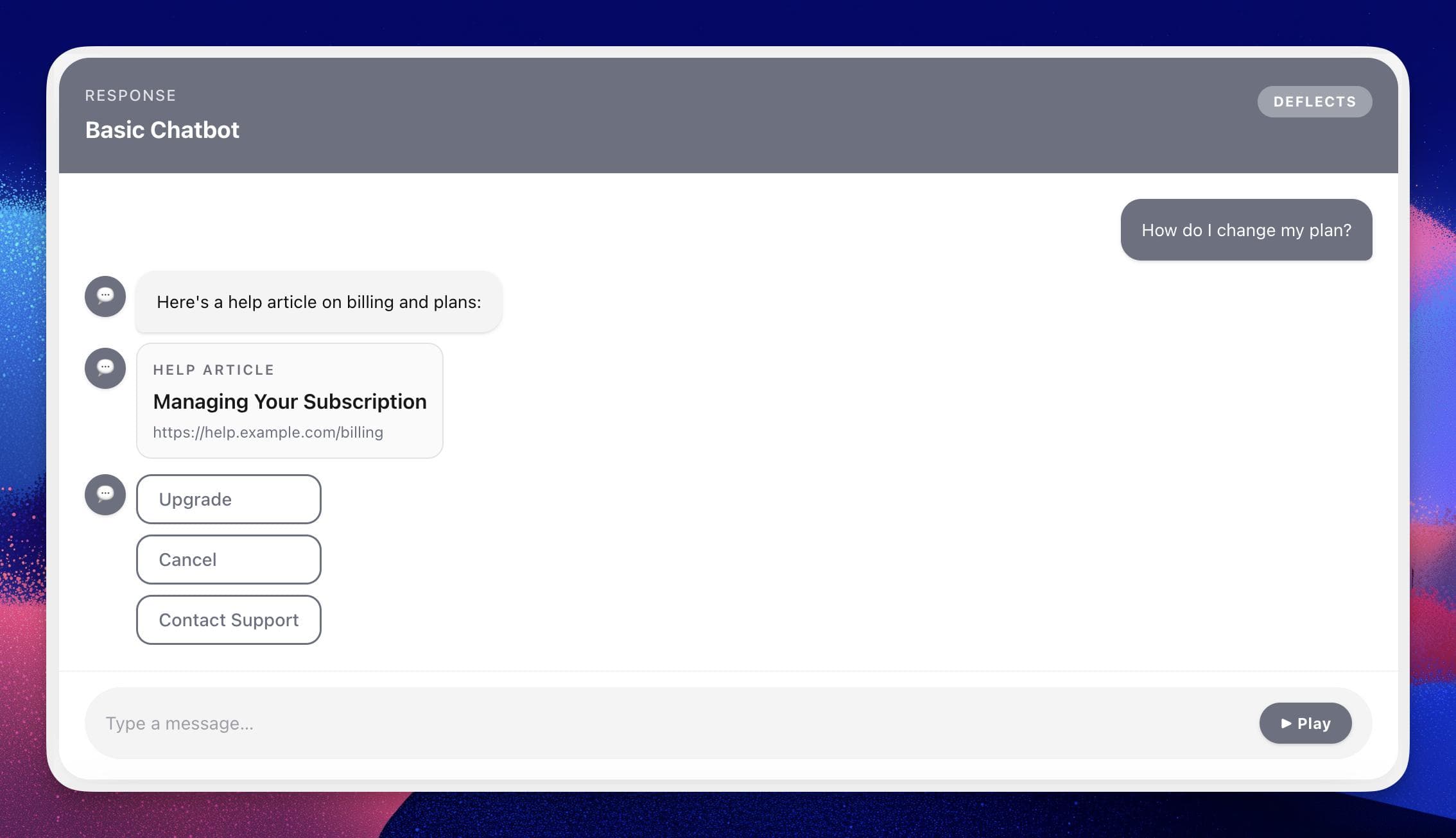
An AI support agent can clarify whether the customer wants an upgrade, downgrade, cancellation, or invoice explanation, then guide the right next step or escalate if the request becomes account-specific.
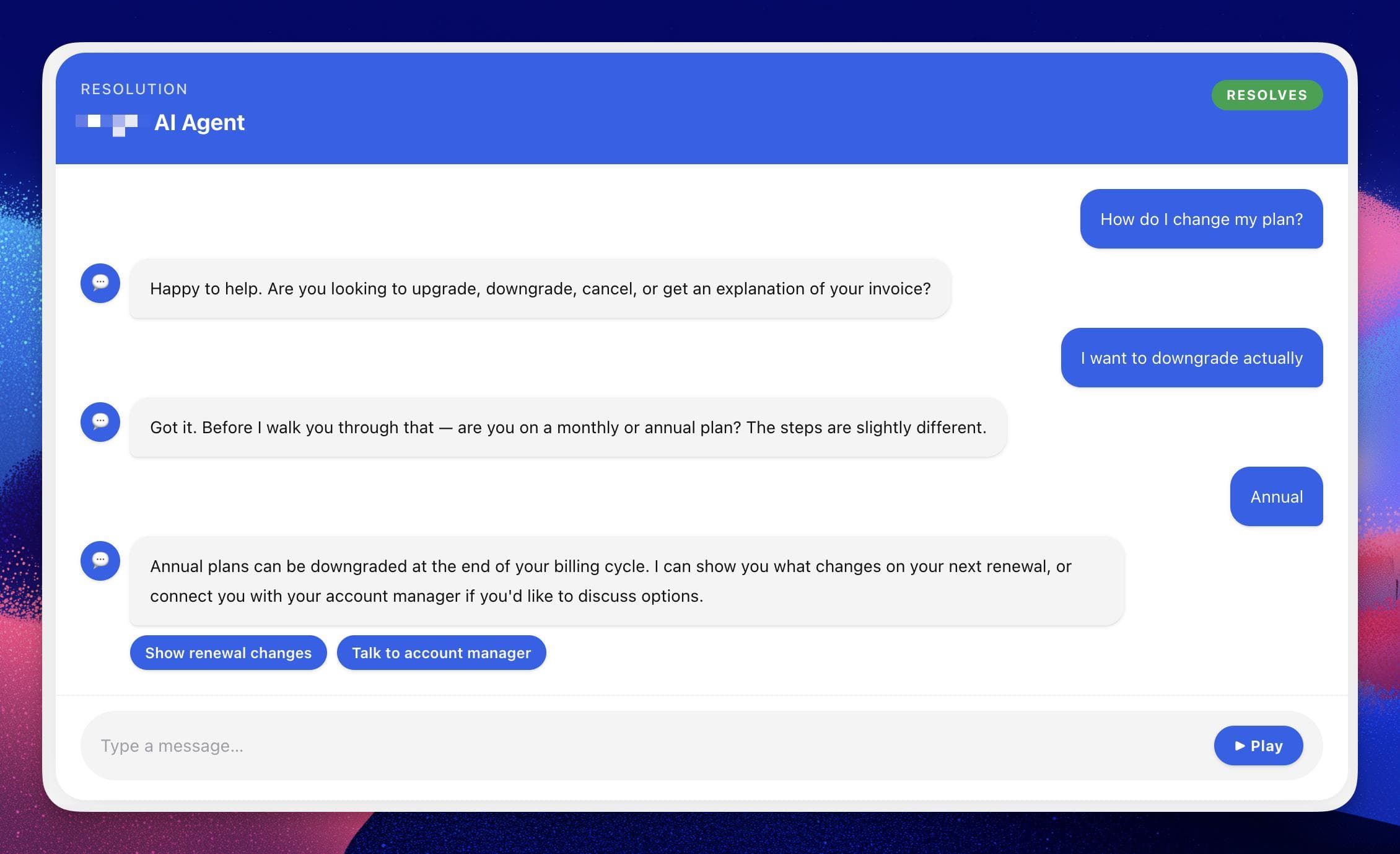
That is the real difference. One is mostly answering. The other is handling support conversations in a more operational way, closer to what conversational AI was always supposed to deliver.
Explore Helply’s AI Support Agent
How Does A Chatbot Work In Customer Support?
A customer service chatbot usually works by combining a conversation interface with a narrower rules layer, a help center or FAQ source, and some basic routing logic.
In support, that often looks like:
- Matching a customer question to a help article in the knowledge base
- Guiding customers through preset flows
- Offering a few menu-based or prompt-based options
- Answering repeat questions from known documentation
- Collecting contact details before handoff
That is still useful.
For many teams, a chatbot is a meaningful upgrade over a static contact form or a buried help center search bar. It can reduce repetitive questions, improve first response time, and make self-service easier to use.
Where it usually starts to struggle is when the conversation stops being predictable.
For example, if a customer says, “I was billed twice, but one charge might be for a teammate and I also changed my plan last week,” a basic chatbot can easily lose the thread.
It may give the wrong article, ask irrelevant questions, or force the customer into a generic support flow even though the real issue needs account-aware clarification.
That is not a chatbot failure in the abstract. It is just the point where the problem becomes more than a simple support reply, and the containment rate starts to drop.
How Does An AI Agent Work In Customer Support?
An AI support agent works more like a support system than a simple support interface.
It still relies on knowledge, conversation, and routing, but it adds deeper context handling and more operational behavior.
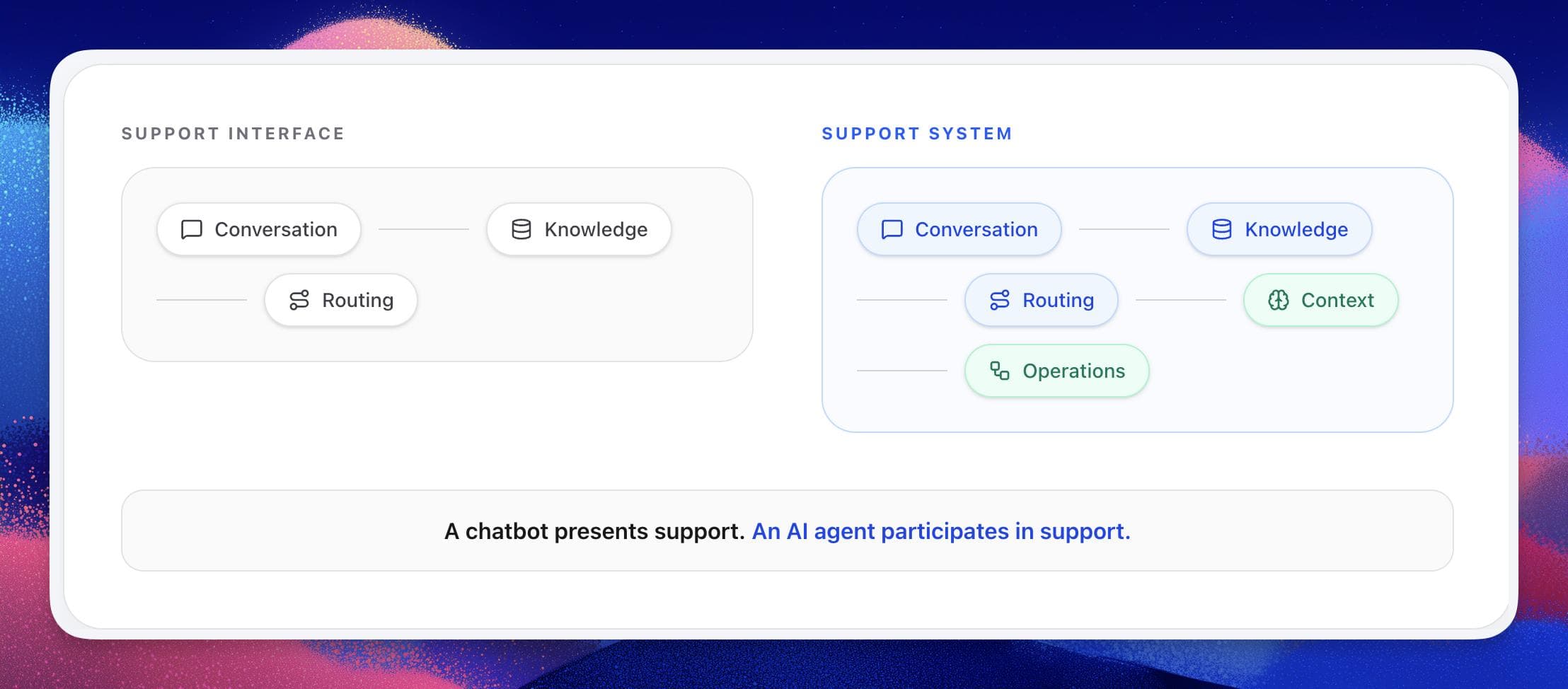
This is what separates basic support automation from a system that can actually resolve tickets.
In customer support, that usually means:
- Understanding intent beyond a fixed prompt match
- Retrieving relevant support content from the knowledge base during the conversation
- Asking clarifying questions before answering
- Retaining more context across turns
- Supporting actions and workflow steps like issuing refunds, sending invoices, or changing plans
- Escalating with better timing and better context through a clean agent handoff
In practical terms, an AI support agent often uses your support documentation as a retrieval layer instead of relying only on a fixed script.
That lets it pull the most relevant support content into the answer while adapting the conversation based on what the customer actually means.
The difference shows up most clearly in multi-step support. Say a customer says, “I need to cancel, but I also want my invoice history first.”
A basic chatbot may send a cancellation article and stop there.
A stronger AI support agent can:
- Recognize that there are two linked needs
- Explain where invoice history lives
- Guide the cancellation path
- Trigger the right workflow or next step
- Escalate if retention, policy, or account context makes the request more sensitive, passing the full conversation transcript and source citations to the human agent
That is why AI support agents are often a better fit once support stops being a pure FAQ problem and ticket resolution becomes the real goal.
See How Helply Uses Actions, Escalation, And Support Workflows
When Is A Chatbot Enough?
A chatbot is enough when the support environment is simple, repetitive, and low-risk.
That usually means:
- The volume is not very high
- The questions are predictable
- Most answers already exist clearly in a help center or FAQ
- The next step is usually a simple article, link, or form
- Escalation depth is not a major operational problem yet
Think of things like:
- Store hours and basic business information
- Shipping and return policy questions
- Simple account navigation help
- Common feature questions with clear documentation
- Entry-level triage before a support ticket form
In those cases, a chatbot can be a perfectly rational choice. It is simpler, easier to explain internally, and often enough to improve self-service without redesigning your support operations.
The mistake is not using a chatbot. The mistake is expecting a chatbot to solve a support problem that has already become more complex than a chatbot model can comfortably handle.
AI Agent Vs Chatbot: Which Is Better For Customer Support Needs?
The answer depends on the kind of support work your team actually does.
If most customer questions are repetitive, the answers are already clearly documented, and there is little need for workflow depth or complex escalation, a chatbot is the simpler option.
But once support gets more complex, the balance shifts. A growing SaaS support team is a good example. Customers ask about billing, plan changes, onboarding, feature behavior, account setup, and edge-case troubleshooting. Some questions are easy.
Some are not. And many of them require the system to ask follow-up questions before anyone can determine the right next step.
That is the point where an AI support agent becomes the better fit, because the job is no longer just answering. It is resolving, qualifying, routing, and handing off.
That means end-to-end conversations fully resolved by AI without human intervention, not just polished-sounding responses that still generate tickets.
Escalation matters here too. Support teams often underestimate how important agent handoff quality is until customers start repeating themselves and agents start inheriting messy conversations.
The best AI support agents pass the full conversation transcript, source citations, and customer context to the human agent so no one starts over.
And once workflows enter the picture, the gap widens further. Routing, collecting context, account-aware next steps, API-driven workflow automation like issuing refunds or changing plans: that is real support operations work, not chatbot territory.
So which is better?
- Choose a chatbot if your support needs are simple and mostly informational.
- Choose an AI support agent if your team needs resolution, escalation, and workflow support.
That is the clearest practical answer for most support buyers.
See If Your Team Needs More Than A Basic Chatbot
What Should You Look For In The Right AI Support Agent?
Whether you are evaluating a chatbot or an AI support agent, there are a few criteria that matter much more than the product label.
Resolution Quality
Can the system actually resolve repetitive support conversations end-to-end, or does it only produce polished-sounding answers that still generate tickets? Look for a measurable resolution rate, not vague claims.
Escalation Quality
When the AI should stop, does it hand off cleanly with the full conversation transcript, source citations, and customer context? Or does the customer have to start over? This is one of the biggest practical differences between a usable support AI and a frustrating one.
Workflow Support
Can it support routing, lookups, guided flows, and real support actions like issuing refunds, sending invoices, or changing plans? Or is it limited to text generation?
Training And Knowledge
How does the system use your help center, FAQs, policies, and support documentation?
Can your team keep it current without creating a maintenance burden? Does it auto-sync with your existing knowledge base, or does every update require manual work?
Ease Of Setup
Can support or operations teams own it effectively, or does it create too much technical overhead? Zendesk AI and Intercom Fin can work well if you are already deep in those ecosystems, but they add complexity if you are not.
Stack Fit
Does the AI support agent make sense as part of your current ecosystem, or do you mainly need the AI support layer itself?
This matters because some products are best when you are already inside a broader service platform.
Others, like Helply, make more sense if you want the AI support layer without committing to a larger platform decision.
AI Support Agent Comparison: Helply Vs Chatbase Vs Intercom Fin Vs Zendesk AI
If you are evaluating AI for customer support, these are the main products to compare.
This table summarizes where each one is strongest and where it trades off.
| Tool | Best For | Strength | Tradeoff |
|---|---|---|---|
| Helply | Teams that want a support-first AI layer without replacing their whole stack | 65% resolution guarantee, action-based AI, hallucination-proof escalation, Gap Finder, VIP Concierge onboarding | Not a full CRM or help desk replacement; best as the AI support layer in your existing stack |
| Intercom Fin | Teams already in or near the Intercom ecosystem | Strong ecosystem fit, testing, deployment, and service-platform story | Better fit if you want the broader platform context |
| Zendesk AI | Zendesk-first support organizations | Strong service operations fit inside Zendesk | Heavier for teams outside Zendesk |
| Chatbase | Teams that want a more general AI agent builder | Flexible AI chatbot/agent positioning | Less support-first by default; no native escalation; limited workflow support |
The most important choice most buyers face is: do you want a support-first AI product, or do you want AI inside a larger support platform?
If you want a support-first AI layer with a measurable resolution guarantee, Helply is one of the clearest products to evaluate.
If you are already committed to Intercom or Zendesk, their ecosystem products may deserve a closer look as part of a broader stack decision.
Why Helply Fits Teams That Need More Than A Chatbot
Helply makes the most sense once your team has realized that a basic chatbot is too narrow for what support actually needs.
65% Resolution Guarantee
Helply guarantees a minimum 65% AI resolution rate within 90 days, or you pay nothing. Resolution here means end-to-end conversations fully resolved by AI without human intervention. Not deflection. Not partial answers. Full resolution, measured and enforced.
That is the kind of outcome most chatbots and even some AI support agents can’t promise, because they are not built around resolution as a measurable target.
Action-Based AI That Does Real Work
Most chatbots stop at answering questions. Helply takes real actions like;
- Queries your database for order status
- Retrieves Stripe invoice links so customers can self-serve
- Checks account status
- Alerts your team via Slack when customers mention canceling.
This is what separates a conversational AI layer from a system that actually reduces your team's ticket volume.
Hallucination-Proof Escalation
When Helply is unsure, it doesn't guess. It escalates directly into your existing help desk with a link to the full conversation. Your agents can see exactly what happened and pick up where the AI left off.
That is a practical difference your team will feel on every escalated ticket. Chatbase, by contrast, has no native escalation feature.
Setting up a basic handoff requires building custom actions, connecting Zapier, and routing manually to your help desk.
Zendesk AI handles escalation within Zendesk, but the setup is more complex if you need flexibility outside that ecosystem.
Gap Finder For Continuous Improvement
Gap Finder scans your recent support tickets and compares them against your training materials. It identifies questions your documentation does not answer, then helps you fill those gaps so the AI keeps getting more accurate over time.
This directly supports the 65% resolution guarantee. As gaps get filled, the AI resolves more tickets, and your resolution rate goes up.
Auto-Syncing Knowledge
Helply automatically syncs help desk articles, saved replies, and macros from your existing tools. No rewriting. No manual updates. It always uses the latest source of truth from your knowledge base.
VIP Concierge Onboarding
Every Helply customer gets a dedicated AI support engineer, a private Slack channel, and weekly optimization reviews.
VIP Concierge exists to enforce the 65% guarantee, not as a premium add-on. It is included for every customer because the outcome depends on it.
FAQ
What is the difference between an AI agent and a chatbot?
A chatbot is usually narrower and more reply-focused, while an AI agent is designed to handle more context, guide conversations more intelligently, support workflows, and escalate better.
Is an AI agent better than a chatbot for customer support?
Yes, if your support needs include resolution, escalation, and workflow support; no, if your needs are simple enough that a basic support chatbot already covers them.
When is a chatbot enough for support?
A chatbot is usually enough when support questions are repetitive, low-risk, clearly documented, and do not require complex handoff or workflow support.
When should a support team use an AI agent?
A support team should use an AI agent when conversations need more clarification, escalation, routing, or operational depth than a simple chatbot can provide.
What should I look for in an AI support tool?
Look at resolution quality, escalation quality, workflow support, training flexibility, onboarding, and stack fit.
Customer Service Chatbot: How It Works And The Best Tools
Learn How Support Chatbots Work, Where They Help, And How To Choose The Right Tool For Resolution, Escalation, And Support Workflows.
AI Customer Support (What It Is, How It Works, And How To Choose The Right Tool)
AI Customer Support Explained: Learn How It Works, Where It Helps Most, And How To Choose The Right Tool. See Why Helply Wins On Resolution And Escalation.
We guarantee a 65% AI resolution rate in 90 days, or you pay nothing.
End-to-end support conversations resolved by an AI support agent that takes real actions, not just answers questions.