Key Takeaways:
- Helply runs the help desk and the AI in one product. The Support Agent resolves tickets and the Assist Agent drafts with CRM and billing data loaded. Background Agents flag churn and upgrade signals.
- On complex tickets, the most useful AI drafts the reply with the customer's context loaded. A person checks it and sends in one pass.
- Most tools charge twice once AI is on. Intercom bills $0.99 per Fin outcome on top of seats, and Help Scout $0.75 per AI Answers resolution on top of per-user plans.
- Twelve agents on Zendesk Suite Professional with Copilot pay $1,980 a month billed annually.
- At 1,000 B2B conversations a month, five agents billed annually pay $339 on Helply. The other five tools cost them $500 to $808, at a 50% AI resolution rate.
- Helply's Knowledge Agent finds the questions your help center doesn't answer and turns proven resolutions into reusable articles.
You're a paying customer. It's the weekend, you're mid-project, and something breaks. You open the vendor's chat widget because surely a company this size has a decent AI agent by now. You explain the problem. The bot gives you a help article you've already read. You rephrase. It gives you the same article. You type, "Please just connect me to a human."
If you've felt that, your customers feel it too. After one bad chat, a customer starts weighing whether to stay.
The recurring complaint about AI support tools: the bills climb while the value stays flat.
Intercom charges $0.99 each time Fin completes an outcome, in addition to seats, so the cost grows as the tool does more. Customers feel the other side: answers that miss the context their account needs.
The 6 best AI tools for customer support teams in 2026 are Helply, Intercom, Zendesk, Freshdesk, Help Scout and Tidio.
The 6 Best AI Tools for Customer Support Teams
Each pick below has a clear use case. The list leads with the all-in-one platform, then covers five tools that add AI to a help desk or a chat widget.
| Tool | Best for | Core AI capabilities | Pricing model | Ideal team |
|---|---|---|---|---|
| Helply | The help desk and the AI in one product | Support Agent resolves, Assist Agent drafts with account context, Background Agents flag churn, upgrade and feature signals, Knowledge Agent finds help center gaps | Plans from $49/mo with unlimited users; AI on credits | Support volume growing faster than the team |
| Intercom (Fin) | Chat-first conversational AI | Fin AI agent, Copilot, multilingual, summaries | $19 to $132/seat ($29 to $139) + $0.99 per Fin outcome | Messaging-first teams |
| Zendesk AI | Large, multi-team operations | AI agents on every plan, intelligent triage, Copilot add-on, 1,800+ integrations | $19 to $115/agent ($25 to $149); Copilot $50/agent on Professional and up; $1.50 to $2.00 per extra automated resolution | Large teams with a support ops owner |
| Freshdesk (Freddy) | Per-agent help desk with AI add-ons | Copilot drafts, summaries and sentiment; AI Agent sessions | $19 to $89/agent ($23 to $107); Copilot $29/agent on Pro and up; AI Agent $49 per 100 sessions after 500 | Ticket-heavy email teams |
| Help Scout | Email-first, human-led teams | AI Assist, AI Drafts, AI Summarize, AI Answers | Free plan; $25 to $75/user ($30 to $90) + $0.75 per AI Answers resolution | Small teams adopting AI gradually |
| Tidio (Lyro) | Small stores and simple questions | Lyro AI agent, FAQ automation, flows | Free plan; $24.17 to $49.17/mo ($29 to $59); Plus from $300 + usage; Lyro from $32.50 ($39) | Small businesses and online stores |
1. Helply: Best All-in-One AI Help Desk
Helply is an AI-native customer support platform: the help desk and its AI agents in one product. It is built to end the loop from the top of this guide, where a bot keeps sending the same article.
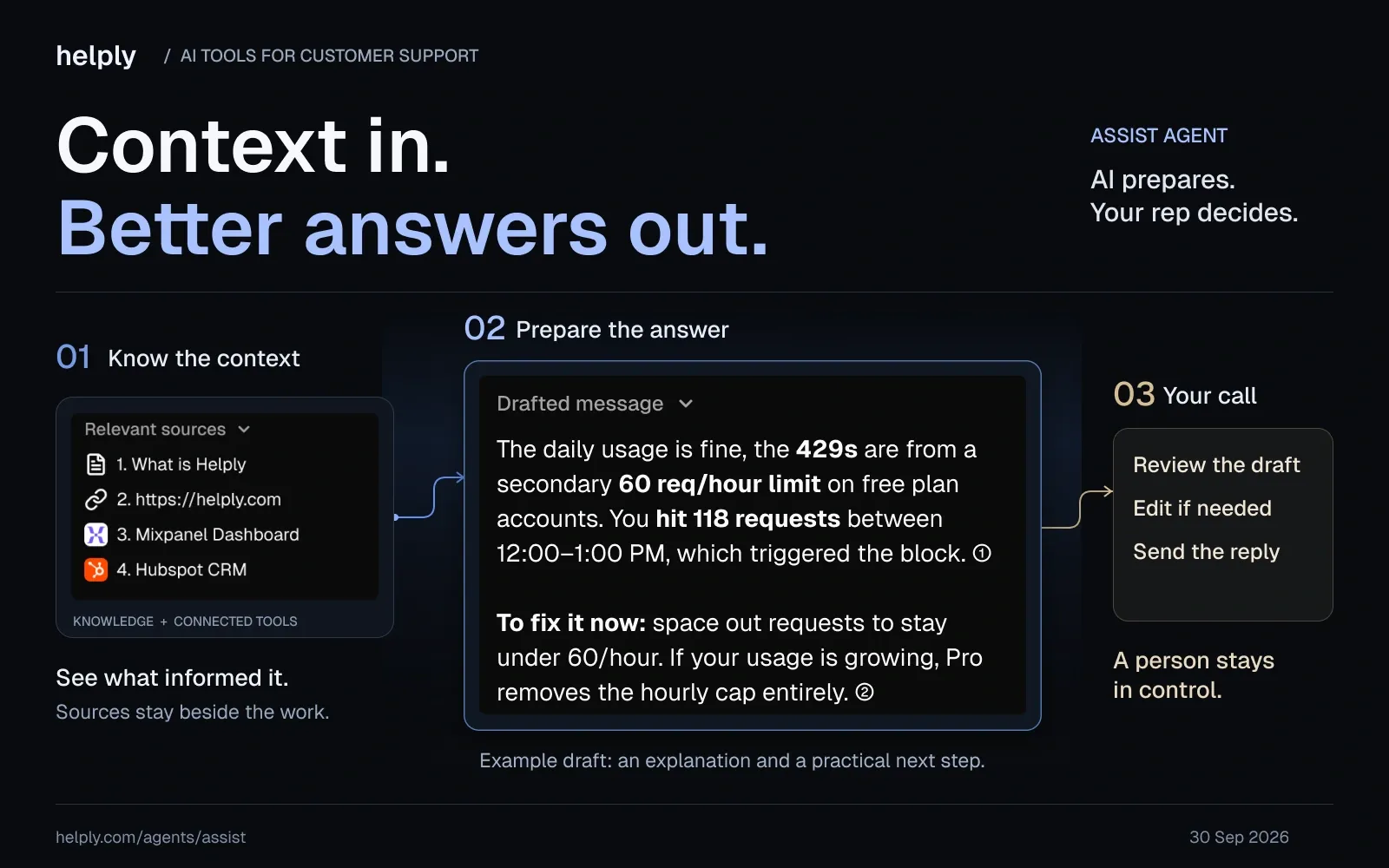
Helply's agents read your documentation and check the customer's account in your connected tools. They take the supported action that fixes the customer's problem.
If an agent isn't confident, it brings in the right person with the history and its findings attached. The customer asks for help once and doesn't have to explain the problem again.
Sender.net's CEO, Edgaras Vaitkevičius, describes the result: "Support used to be a cost line. Helply turned it into our most reliable signal, every onboarding question routes back to product the same week."
Key features:
- Answers from the customer's account as well as the help center. The Support Agent looks up billing, account, and product data through connected Tools. It takes supported actions, such as a refund, and closes the request end-to-end.
- A clean path to a person. You set escalation rules for when the AI keeps working and when a human steps in. The handoff routes based on issue, customer, or urgency, so your teammate starts where the AI left off.
- No starting over. Memory carries context from earlier conversations, so both the AI and your team see what has already happened.
- Faster replies on the hard tickets. The Assist Agent drafts from the conversation, the customer's history, and your Guidelines. Reps can ask it questions or have it update records and create issues without leaving Helply.
- Signals nobody has to tag. The Churn Agent monitors for frustration and sentiment shifts, and the Revenue Agent monitors for upgrade intent. The Feature Request Agent groups product requests by the customers asking.
- Help articles that keep up. The Knowledge Agent finds questions your help center doesn't answer well, flags outdated articles, and turns proven resolutions into reusable knowledge.
- A bill that doesn't grow with your team. Every plan has unlimited users, and your monthly AI spending cap defaults to the block price.
- Every channel in one inbox. Email, live chat, Slack (including Slack Connect), Microsoft Teams, WhatsApp, Discord, Telegram, phone and SMS.
Pricing
The entry plan costs $49 a month and includes 500 AI credits. Bigger credit blocks cost more: $399 for 7,000 and $1,549 for 32,000. Every plan has the same AI agents and unlimited users, and annual billing costs 15% less.
Credits are priced by effort: 1 for a simple draft, 4 for a lookup in one or two systems, 12 for an investigation. Helply doesn't charge for retries, failed actions, or rejected drafts.
The monthly spending cap matches your block price unless you raise it. The free trial runs for 14 days and includes 1,000 credits.
Pros:
- The AI checks the account and acts, so customers get a fix instead of a link to an article they've already read.
- If the AI steps back, the customer reaches a person who already has the full story.
- Adding CSMs, engineers or a founder to the queue costs nothing, because users are unlimited on every plan.
- One product replaces the help desk plus separate AI add-ons and a knowledge-base tool.
Cons:
- Credit spend varies with ticket complexity, so estimate it on the pricing page before you commit.
- Switching means moving off your current help desk. Helply does not sit on top of one.
- Teams that use a lot of AI pay more: 32,000 credits cost $1,549 a month, against $49 for 500.
2. Intercom (Fin): Best for Chat-First, Conversational AI
Intercom is built around a chat messenger, and its AI agent, Fin, handles conversations over chat, email and messaging.
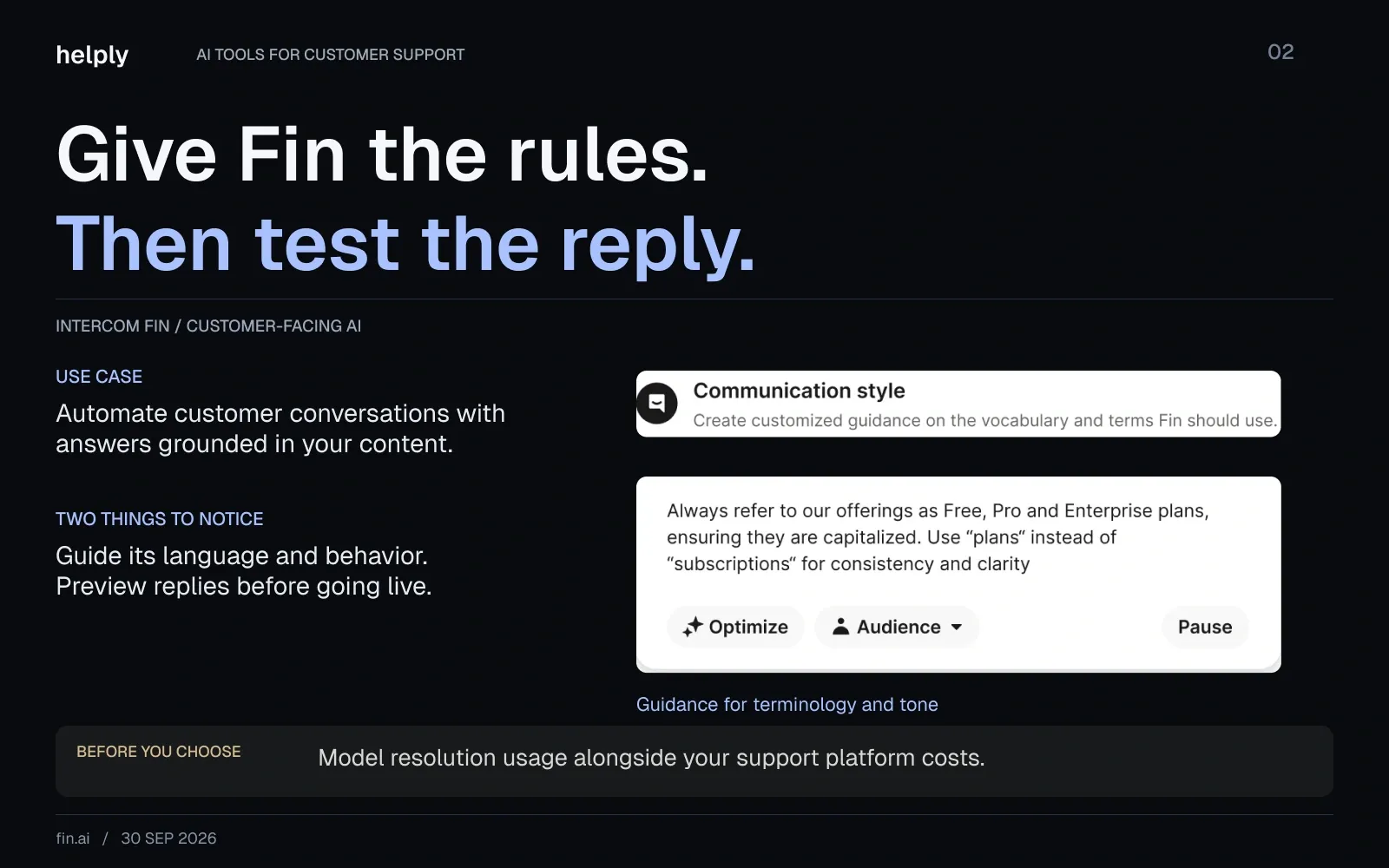
Copilot assists agents inside the inbox, at $29 per agent a month billed annually. The flip side is a cost model with several meters.
Fin's pricing is the part to scrutinize. On Intercom, Fin is billed at $0.99 per outcome on top of the seat plan, so the bill is seats plus outcomes.
Key features:
- Fin AI Agent. Resolves customer conversations across channels using your help center, docs, and past conversations, with a tunable persona and tone.
- Fin Copilot. Works inside the inbox to suggest answers and surface information for human agents on tougher cases.
- Multilingual support. Handles conversations in 45+ languages, useful for global customer bases.
Pricing
Seat plans cost $19 (Essential), $85 (Advanced) and $132 (Expert) per seat a month on annual billing, plus $0.99 per Fin outcome. On monthly billing, they cost $29, $99 and $139. Intercom is testing the Essential price, so some visitors see $29 annual and $39 monthly.
It costs $0.99 per outcome, and Intercom's sales team sets a monthly minimum, such as 50 outcomes.
Pros:
- Fin supports 45+ languages across every channel, per Intercom.
- It can run as a standalone agent on top of another help desk, so you can test it without replacing your stack.
Cons:
- Seats and outcomes both grow, so the bill rises with headcount and with AI volume. A customer who leaves after Fin's answer without asking for more counts as a billable outcome.
- Intercom bills SMS per segment and bulk outbound WhatsApp per message, which adds more variable lines.
Best for:
Messaging-first teams that want a conversational agent in their messenger and can absorb a layered seat-plus-outcome bill.
Helply vs Intercom Fin: Where Helply Is the Better Fit
Helply is a better fit than Intercom Fin for teams that want the help desk and AI on one bill without per-seat pricing.
Intercom charges $19 to $132 per seat a month on annual billing, plus $0.99 per Fin outcome. Helply includes unlimited users from $42 a month billed annually. Its AI runs on credits: 1 per draft, 4 per lookup, 12 per full investigation.
| Helply | Intercom Fin | |
|---|---|---|
| Pricing | Plans from $49/mo ($42 billed annually); AI on credits, 1 to 12 per action | $19 to $132 per seat ($29 to $139 monthly), plus $0.99 per Fin outcome |
| Users | Unlimited on every plan | Paid per seat |
| Help for your reps | Assist Agent on every plan | Copilot, $29 per agent ($35 monthly) |
| Where the AI runs | Inside Helply's own help desk | Intercom, or standalone on another help desk, with a monthly minimum that Intercom's sales team sets |
3. Zendesk AI: Best for Large Enterprises
Zendesk is built for large support operations, and its marketplace lists 1,800+ apps and integrations.
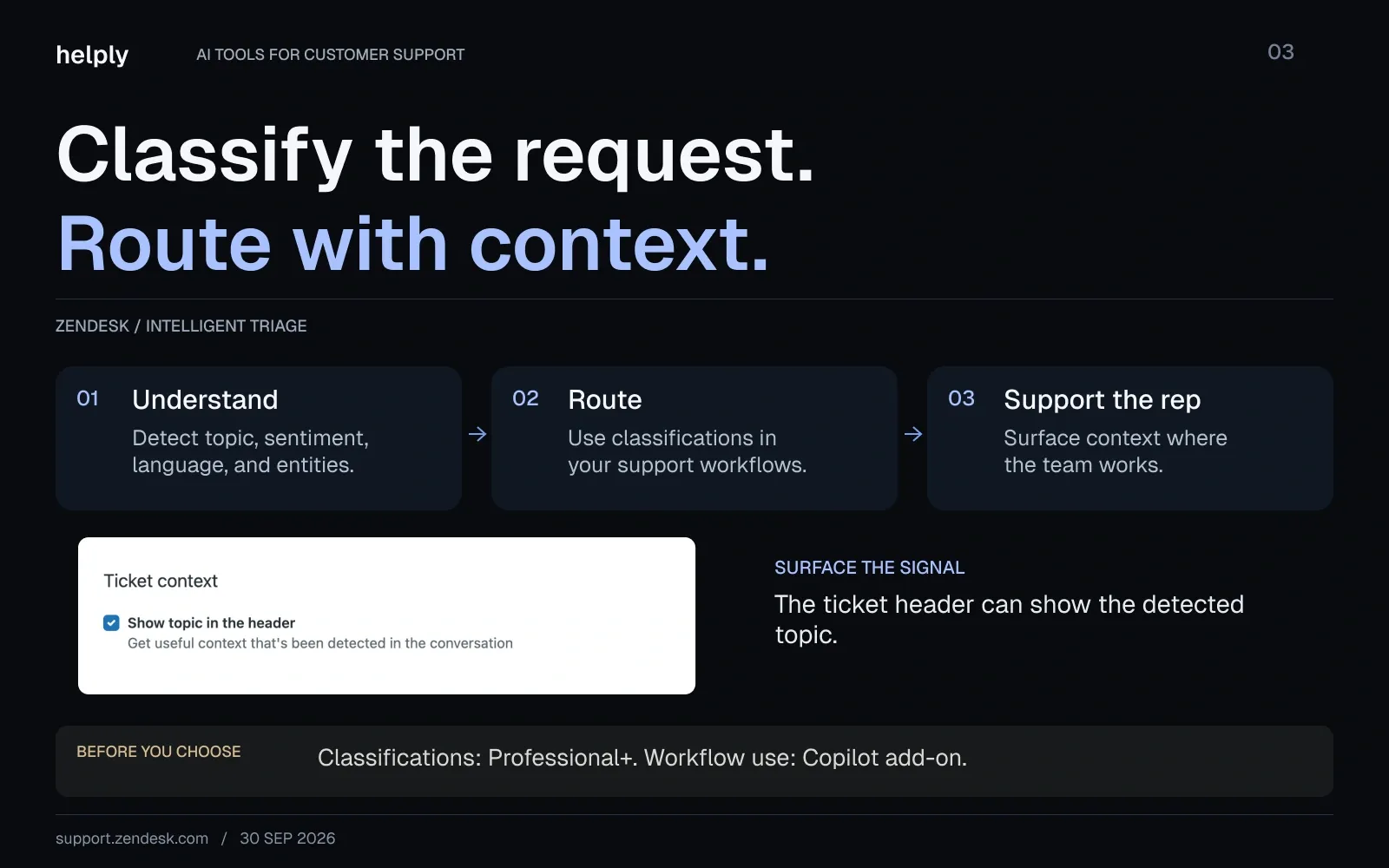
AI agents come on every plan. Intelligent triage and capped writing tools start on Professional, and full Copilot is a $50-per-agent add-on. For smaller teams, the cost and setup are the trade-off.
Once you switch AI on, weigh the total cost, including Professional seats and the $50 Copilot add-on.
Key features:
- Intelligent triage. Classifies new tickets by topic, sentiment, language and entities on Professional and above. Using the classifications in workflows needs Copilot.
- Generative AI tools. Professional includes writing tools and ticket summaries, capped at 5 uses per agent a month. Full use needs Copilot.
- Agent copilot. Suggests replies and next steps, and can follow business procedures to update fields or process returns. It is a $50-per-agent add-on.
Pricing
Support Team is $19 per agent a month billed annually ($25 monthly), Suite Team $55 ($69) and Suite Professional $115 ($149). Copilot adds $50 per agent on Professional and above.
AI agents are on every plan, with 5 to 10 automated resolutions per agent a month included. Extra resolutions cost $1.50 committed or $2.00 pay-as-you-go. New accounts since 18 May 2026 get tiered resolution pricing through sales.
Pros
- 1,800+ apps and integrations cover most enterprise workflows.
- AI agents are included on every plan, with a set number of automated resolutions per agent.
Cons
- Twelve agents on Suite Professional with Copilot pay $1,980 a month billed annually, or $23,760 a year.
- Most of the AI, including triage in workflows and full writing tools, needs Professional plus the Copilot add-on.
Best for
Large, multi-team operations with a support ops owner and budget for Professional plus Copilot.
Helply vs Zendesk AI: Where Helply Is the Better Fit
Helply is a better fit than Zendesk AI for small and mid-size teams that want the full AI toolkit without add-ons.
Zendesk sells full Copilot at $50 per agent on top of $115 Suite Professional seats. On Helply, every plan gets the same AI agents, and users are unlimited from $42 a month billed annually.
| Helply | Zendesk AI | |
|---|---|---|
| Pricing | Plans from $49/mo ($42 billed annually); AI on credits | $19 to $115 per agent ($25 to $149), plus Copilot at $50 per agent |
| Users | Unlimited on every plan | Paid per agent |
| AI on the entry plan | Every AI agent, including Support and Assist | AI agents with 5 automated resolutions per agent a month; triage and Copilot start on Professional |
| 12-person team | 7,000 credits: $339/mo, billed annually | Suite Professional with Copilot: $1,980/mo, billed annually |
4. Freshdesk (Freddy AI): Best Budget and SMB Helpdesk
Freshdesk, from Freshworks, prices per agent and sells most of its AI as add-ons. Freddy AI Copilot covers ticket summaries, drafting and rephrasing, article generation and sentiment analysis.
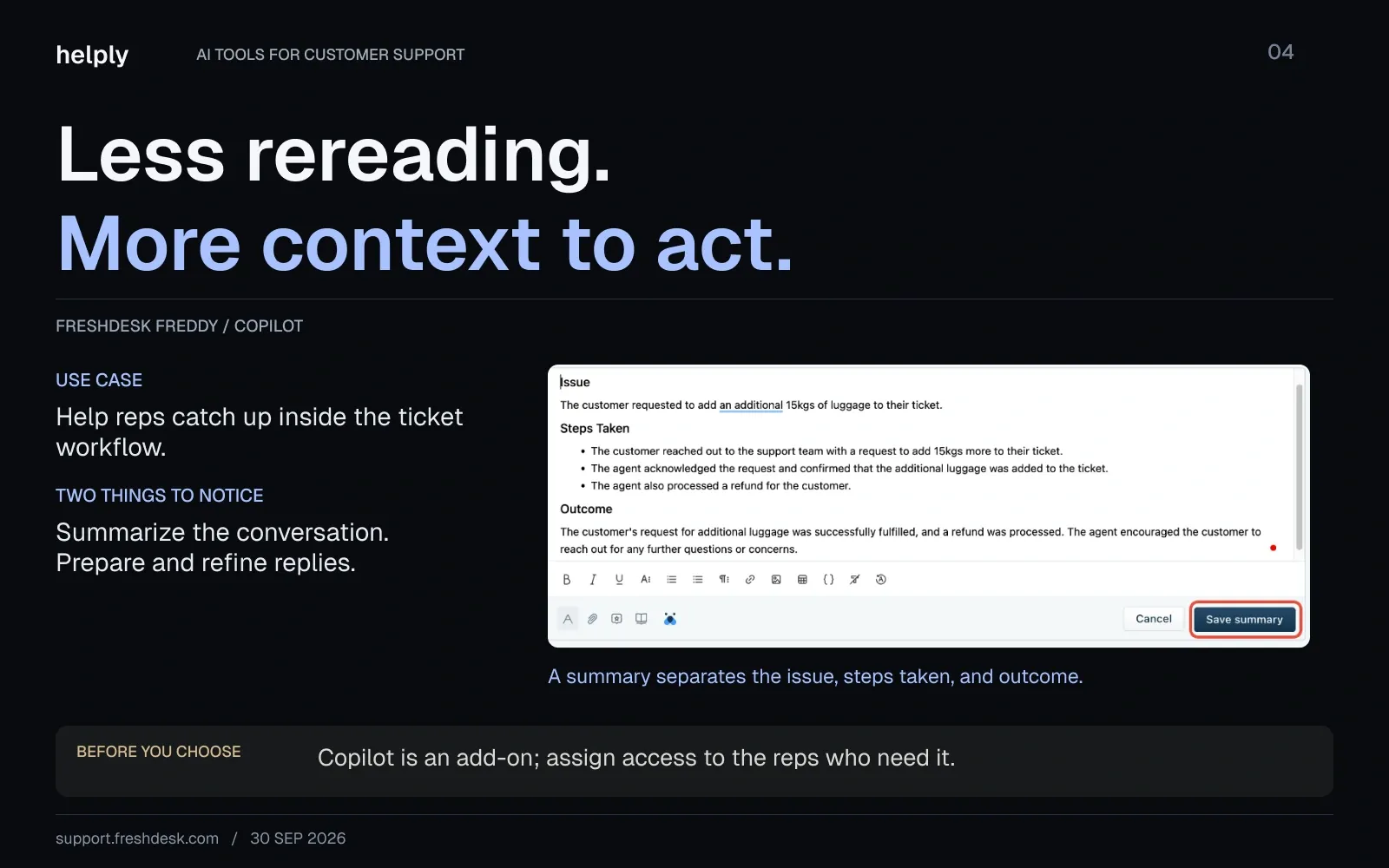
For a smaller or mixed team that wants AI assistance without a big commitment, it's a reasonable starting point.
The catch: Copilot needs the Pro or Enterprise plan.
Key features
- Automated ticket summaries. Condenses long threads so an agent picking up a ticket gets up to speed quickly.
- Draft and rephrase. Generates and rewrites replies, adjusts tone, and expands short notes into full responses.
- Article generator. Drafts help articles from a short prompt. It is a Copilot add-on on Pro and Enterprise.
Pricing
There is no free plan. A 6-month free program covers up to 2 agents, and the trial is 14 days.
Growth is $19 per agent a month billed annually ($23 monthly), Pro $55 ($66) and Enterprise $89 ($107). Freddy AI Copilot is $29 per agent ($35) on Pro and Enterprise.
The Freddy AI Agent includes 500 sessions once per account, then costs $49 per 100 sessions.
Pros
- Growth starts at $19 per agent billed annually.
- Email ticketing is on every plan, with chat and WhatsApp on Freshdesk Omni.
Cons
- Copilot requires Pro or Enterprise, at $29 per agent on top of the seat.
- AI Agent sessions are billed per 100 after the first 500, so cost rises with seats and with AI volume.
Best for
Budget-conscious SMB teams that want core AI assistance on a familiar helpdesk.
Helply vs Freshdesk: Where Helply Is the Better Fit
Helply is a better fit than Freshdesk for teams that want AI drafting and autonomous resolution without buying two add-ons.
Freshdesk sells Freddy AI Copilot at $29 per agent on Pro and Enterprise. Its AI Agent costs $49 per 100 sessions after the first 500, while Helply includes every AI agent on every plan.
| Helply | Freshdesk | |
|---|---|---|
| Pricing | Plans from $49/mo ($42 billed annually); AI on credits | $19 to $89 per agent ($23 to $107) |
| Users | Unlimited on every plan | Paid per agent |
| AI drafting | Assist Agent on every plan | Freddy AI Copilot, $29 per agent, Pro and Enterprise only |
| AI that answers customers | Support Agent on every plan, on credits | Freddy AI Agent, 500 sessions once per account, then $49 per 100 |
5. Help Scout: Best for Lean, Human-Centric Teams
Help Scout keeps its help desk simple and email-first. It pairs a shared inbox with a human-first approach to AI. Teams add automation step by step rather than handing the queue over to a bot.
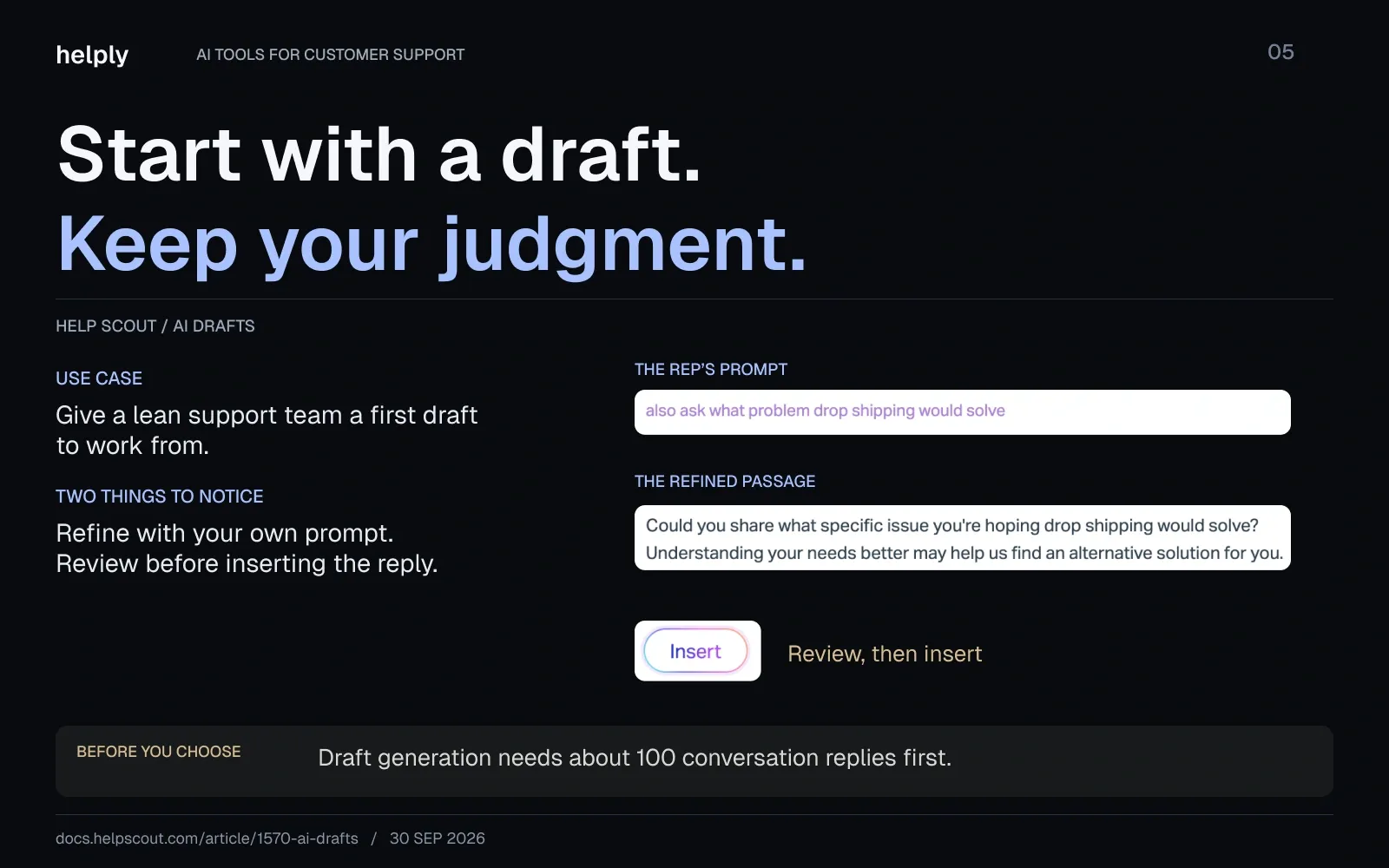
Its AI assists agents with drafts, summaries, and tone edits. Its customer-facing AI agent, now marketed as Compass, answers on your website and in your app, billed as AI Answers.
It suits teams that want AI to help their people. Budget for the per-resolution cost of the customer-facing AI.
Key features
- AI Drafts and AI Assist. Drafts replies from your content and past conversations, and edits tone, length, grammar, and translation on the fly.
- AI Summarize. Collapses long back-and-forth threads into a few bullet points.
- AI Answers. A customer-facing AI agent on your website and in your app. Customers who click "I still need help" reach a person, and that conversation isn't billed.
Pricing
The free plan covers 5 users and 100 contacts a month. Standard is $25 per user a month billed annually ($30 monthly), for up to 25 users. Plus is $45 ($54) for up to 50, and Pro is $75 ($90) with a 10-user minimum.
AI Assist is on every paid plan. AI Answers costs $0.75 per resolution after a 3-month free trial, with an optional monthly cap.
Pros
- Teams get productive with little training because the product stays simple.
- AI Answers has a monthly spending cap, so the AI bill stops at your limit.
Cons:
- Salesforce, HubSpot, Jira and Linear integrations need Plus or Pro.
- AI Answers bills per resolution on top of per-user pricing, and AI Drafts and AI Summarize sit on Plus and Pro.
Best for
Small, human-centric teams that want a clean inbox and a gradual, low-risk path into AI.
Helply vs Help Scout: Where Helply Is the Better Fit
Helply is a better fit than Help Scout for teams that want AI drafting on the entry plan and no per-user pricing.
Help Scout puts AI Drafts on Plus, at $45 per user, and charges $0.75 per AI Answers resolution.
Helply includes the Assist Agent and Support Agent on every plan, with unlimited users from $42 a month billed annually.
| Helply | Help Scout | |
|---|---|---|
| Pricing | Plans from $49/mo ($42 billed annually); AI on credits | Free plan; $25 to $75 per user ($30 to $90) |
| Users | Unlimited on every plan | Paid per user, capped at 25 on Standard and 50 on Plus |
| AI drafts for reps | Every plan | Plus and Pro |
| AI that answers customers | Support Agent on email, chat, Slack, Teams, WhatsApp, Discord and SMS | AI Answers on website and in-app, $0.75 per resolution |
6. Tidio (Lyro): Best for Small Business and Ecommerce Chatbot Automation
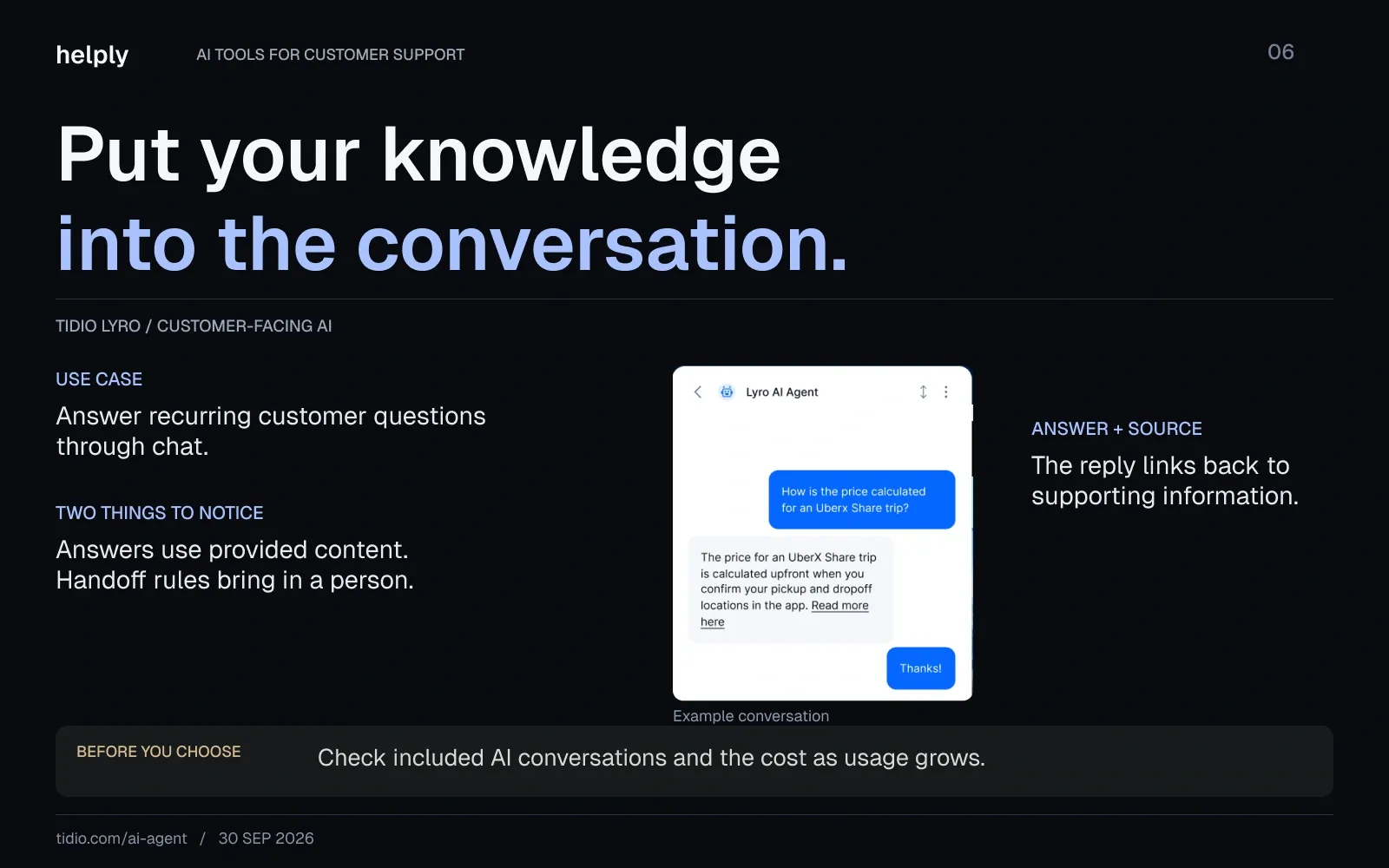
Tidio centers on an AI chatbot called Lyro that resolves common questions and automates simple tasks like order lookups. It deploys quickly and suits small businesses and ecommerce brands.
Lyro runs on Anthropic's Claude plus Tidio's own models and supports 48 languages.
Key features
- Lyro AI agent. Answers FAQs and handles repetitive questions conversationally, trained on your site and FAQ content.
- FAQ automation and flows. Generates chatbots from existing FAQ content and supports a visual builder for manual flows.
- Smart prioritization. Organizes conversations by customer intent, so the team can spot important requests.
Pricing
The free plan covers 50 conversations and 50 lifetime Lyro conversations. Starter is $24.17 a month billed annually ($29 monthly), and Growth starts at $49.17 ($59).
Plus starts at $300 a month plus usage, and Premium is custom. Lyro on its own starts at $32.50 a month billed annually ($39 monthly) for 50 conversations.
Pros
- Fast to deploy with minimal training, which suits small teams.
- The free and Starter tiers make it cheap to experiment with chatbot automation.
Cons
- Lyro conversations are sold in blocks, from $39 for 50 billed monthly, so AI cost climbs with volume.
- Native Shopify actions start on Growth. Free and Starter keep the Tidio branding, Growth removes it for a paid add-on, and Plus includes removal.
Best for
Small businesses and online stores that want an affordable chatbot for common questions.
Helply vs Tidio: Where Helply Is the Better Fit
Helply is a better fit than Tidio when support goes beyond chat FAQs into account questions, email, and team workflows.
Tidio's Lyro answers from your support content, from $39 a month for 50 conversations. Helply's agents check the customer's account in connected tools, act on it, and hand off inside a full help desk.
| Helply | Tidio | |
|---|---|---|
| Pricing | Plans from $49/mo; AI on credits | Free plan; $29 to $59/mo billed monthly; Plus from $300 plus usage |
| AI conversations | Credits by effort, 1 to 12 per action | Lyro from $39 per 50 conversations |
| Users | Unlimited on every plan | 10 seats on Free, Starter and Growth |
| Channels | Email, live chat, Slack, Teams, WhatsApp, Discord, Telegram, phone and SMS | Chat, email, WhatsApp, Instagram and Messenger |
What Makes an AI Support Tool Right for Your Team?
AI customer support software uses AI to draft replies, resolve tickets, route conversations, and surface insights from support data.
The right tool also loads the customer's full context and makes your people faster on complex tickets.
Simple, repeated questions reward an AI agent that resolves them on its own. Complex ones need a person, and the AI's job is to hand that person the answer and the history. Most teams have both kinds, so the tool has to handle both.
Prioritize a few things over chatbot polish:
- Account context. You can't answer most tickets from the ticket itself. The answer sits in the CRM, billing system, order history, product usage and past conversations, and the AI should see all of it.
- Agent-assist quality. Since a human stays in the loop on hard tickets, the AI's most valuable job is drafting accurate, context-rich replies for that human.
- Channel depth. Customers write in on Slack, Teams, WhatsApp and Discord as well as email, so first-class support for those channels matters.
- A pricing model that survives growth. If the bill scales linearly with every AI action on top of seats, success gets expensive.
Helply is built around all four. See how the Assist Agent uses customer context.
The Pricing Trap: Why You Pay Per Seat and Per Resolution
Intercom, Zendesk, Help Scout and Freshdesk charge twice: a per-seat license for the platform, then a fee for the AI's work. Intercom adds $0.99 per Fin outcome on top of $19 to $132 per seat.
Help Scout charges $0.75 per AI Answers resolution, with seats at $25 to $75 per user. Zendesk publishes $1.50 to $2.00 per automated resolution past the monthly allowance. Its $50-per-agent Copilot add-on starts at Suite Professional.
You pay more as your AI handles more tickets, and the seat fees stay on the bill. Intercom counts an outcome when a customer doesn't ask for more help after Fin replies. It charges once per conversation at most, and nothing when the customer asks for a human.
Helply drops the per-user meter. Every plan has unlimited users, and you pick a credit block that fits the work your AI agents do.
What to Look For in an AI Customer Support Tool
Use these criteria to evaluate any tool on your shortlist:
- Account context and integrations. Does it have built-in connections to your CRM (Salesforce, HubSpot), billing (Stripe) and channels like Slack? Generic answers come from tools that can't see the account.
- Agent-assist quality. How good are the drafted replies on complex, technical tickets? This is where most of the day-to-day value lives.
- Pricing-model transparency. Is it seats, outcomes, or both? Model what you'll pay today and at twice your current volume.
- Security and compliance. Confirm SOC 2 Type II and GDPR compliance, encryption, and role-based access before any customer data flows in.
- Channel coverage. Email and chat are standard. Check Slack, Teams, WhatsApp, Discord and a real API.
- Speed to value. Can you get a trained agent running in days, or does the vendor quote a multi-week setup?
- Scalability. Will it still fit at 10x the customers and tickets, without a painful re-platform?
AI Customer Support Software Pricing at 500, 1,000 and 3,000 Conversations
At a 50% AI resolution rate, five agents billed annually pay $339 to $808 monthly for AI customer support software at 1,000 conversations. Helply is the lowest for B2B support, with unlimited users, and Zendesk Support Team the highest. At 500 conversations the range is $212 to $433, and at 3,000 it runs from $917 to $2,308.
Each figure covers the tool's cheapest plan that includes its AI agent. On Helply, 1,000 B2B conversations at about 7 credits each fit the 7,000-credit block. Prices as of October 2026.
| Tool and plan (5 agents, billed annually, AI resolves 50%) | 500 conversations/mo | 1,000 conversations/mo | 3,000 conversations/mo |
|---|---|---|---|
| Helply (credit block, unlimited users) | $212 | $339 | $917 |
| Help Scout Standard + AI Answers | $313 | $500 | $1,250 |
| Freshdesk Growth + Freddy AI Agent | $340 | $585 | $1,565 |
| Intercom Essential + Fin | $343 | $590 | $1,580 |
| Tidio Growth + Lyro | $341 | $691 | Sales quote only |
| Zendesk Support Team + AI agents | $433 | $808 | $2,308 |
The math behind each row:
- Helply: about 7 credits per B2B conversation, counted on every conversation, including the half your team resolves. At that rate, 500, 1,000 and 3,000 conversations fit the 4,000, 7,000 and 22,000-credit blocks. Retries, failed actions, drafts your team rejects and spam never use credits.
- Help Scout: five $25 Standard seats plus $0.75 per AI Answers resolution.
- Freshdesk: five $19 Growth seats plus $49 per 100 Freddy sessions, charged on every conversation the AI joins, resolved or not.
- Intercom: five $19 Essential seats plus $0.99 per Fin outcome. Essential is in a price test, and at $29 a seat, each Intercom total rises by $50 a month.
- Tidio: the Growth plan for the human-handled half (10 seats included), plus Lyro on every conversation. Self-serve Lyro stops at 1,000 conversations a month, so 3,000 needs a sales quote.
- Zendesk: five $19 Support Team seats, 5 included resolutions per agent each month, and $1.50 per extra resolution on a commitment ($2.00 pay-as-you-go). New accounts since 18 May 2026 get tiered resolution pricing through sales.
- Free allowances: the totals exclude Freshdesk's one-time 500 free sessions and Help Scout's three free months of AI Answers. Help Scout also sells prepaid AI Answers at discounts of up to 33%.
- Channels: Freshdesk Growth's AI agent works on email, and chat AI needs Freshdesk Omni. Zendesk Support Team's AI agent covers email, and messaging needs a Suite plan. Help Scout's AI Answers runs in website and in-app chat, Fin covers chat and email, and Lyro covers Tidio's chat and connected channels.
Helply's price stays the same at five people or fifty. Help Scout, Freshdesk, Intercom and Zendesk add a seat fee for every new teammate.
The totals exclude reply-drafting assistants: Intercom Copilot at $29 per agent and Freshdesk Copilot at $29 per agent on Pro and up. Zendesk Copilot adds $50 per agent on Suite Professional and up. Helply's Assist Agent drafts replies on every plan, from 1 credit per draft.
Costs shift with the resolution rate. At a 30% resolution rate, Help Scout comes to $350 at 1,000 conversations and $800 at 3,000, below Helply's $917. On Helply, if every conversation needs a full investigation at 12 credits, 1,000 conversations need the 15,000-credit block at $654, billed annually.
B2C conversations use about 4 credits each on Helply. At that rate, 1,000 conversations a month fit the 4,000-credit block at $212, billed annually.
Keep Adding AI Fees to Seats, or Run Support on One Bill
If your team lives in Intercom's messenger, Fin fits, at $0.99 per outcome on top of seats. Zendesk suits large operations with budget for Copilot, and Help Scout suits small email teams. Freshdesk's free six-month program covers teams of up to two agents, and Tidio fits stores with simple chat questions.
Helply fits a queue that grows faster than the team, with the help desk and its AI agents in one product. Its Support Agent checks the customer's account in your connected tools before it replies. It can run an approved action, such as a refund, and resolve the request end to end.
If the Support Agent needs a person, it hands off with its investigation and the customer's context attached. The Assist Agent drafts the reply from that context and your Guidelines, and your teammate checks it before sending.
On a seat-based help desk, the bill climbs with each new rep and each AI resolution. Every Helply plan has unlimited users, and about 1,000 B2B conversations a month fit a 7,000-credit block at $339, billed annually. Sender.net cut its support tooling spend by about 85% after it retired Front's per-seat model for Helply.
You choose which actions the AI takes on its own, and your spending cap starts at the block price. Helply offers guided migration from Zendesk, Intercom, Freshdesk and Help Scout. Connect one mailbox for the trial, then compare the AI's credit use with your current bill.
Frequently asked questions
Helply is the best overall pick for teams that want the help desk and the AI in one product. It has unlimited users from $49 a month. Intercom Fin suits chat-first teams, and Zendesk AI suits large, multi-team operations.
With the AI resolving half, five agents billed annually pay $212 to $433 monthly at 500 conversations and $339 to $808 at 1,000. Helply is lowest at both volumes for B2B support, with unlimited users from $49 a month ($42 billed annually). Seat-based tools start at $19 per agent a month, then add $0.75 to $2.00 per AI resolution or $49 per 100 AI sessions.
Helply, Intercom, Help Scout, Freshdesk and Tidio publish their AI prices. Helply sells credit blocks from $49 a month with unlimited users, and Intercom charges $0.99 per Fin outcome. Help Scout charges $0.75 per AI Answers resolution, Freshdesk $49 per 100 Freddy sessions, and Tidio sells Lyro in conversation blocks.
Five agents billed annually pay $339 on Helply, $500 on Help Scout and $808 on Zendesk Support Team at 1,000 B2B conversations monthly. In those totals, the AI resolves half of all conversations. Zendesk publishes $1.50 to $2.00 per extra resolution, but new accounts since 18 May 2026 get tiered pricing through sales.
At 1,000 B2B conversations a month, five agents billed annually pay about 34 cents per conversation on Helply. At a 50% AI resolution rate, Help Scout, Freshdesk, Intercom, Tidio and Zendesk run from 50 to 81 cents per conversation. Helply's list prices stay lowest at 500 and 3,000 conversations too: 42 and 31 cents per conversation.
At 3,000 B2B conversations a month, five agents pay $917 on Helply, billed annually. Help Scout, Freshdesk, Intercom and Zendesk list at $1,250 to $2,308 with a 50% AI resolution rate, and Tidio needs a sales quote. Their seat and AI usage fees climb with headcount and volume, while adding users never changes Helply's price.
No, complex tickets still need a person. AI adds the most value by resolving repeat questions and drafting the rest with the customer's context, so your team gets through more.
The leading platforms offer SOC 2 Type II and GDPR compliance with encryption and role-based access. Confirm a vendor's certifications before sharing customer data.
Helply holds a SOC 2 Type II report and supports GDPR with a DPA on request. AI providers never train their models on the customer data Helply sends them.
Yes. Most of these tools connect to CRMs like Salesforce and HubSpot and to Slack. Helply also connects to Stripe, Jira and Linear, and brings Slack Connect channels into the same inbox.
About the author

Bildad Oyugi
Head of Content
Bildad is a digital marketing expert with over 5 years of experience in copywriting, content marketing, and editing. Outside of work, he enjoys videography and spending time with his family.


