Key Takeaways
- A vague "we apologize for any inconvenience" reads as a form letter. Name the specific failure and what you're doing about it.
- Own the impact even when a partner caused the failure. Explain the root cause without passing the blame along.
- Apology emails to business clients often reach several readers. Write for the user, their manager, and the person who signs the renewal.
- Follow up twice: with progress after 24 hours, then a resolution check after 48. Each one shows the customer that the promised work is happening.
- Every Helply plan has unlimited users, so the engineer who fixed the outage can sign the apology too.
Your platform went down for 47 minutes during a key account's business hours. Your CSM flagged that account as at risk two weeks ago, and their VP of Engineering is on the thread.
Your rep is staring at a blank compose window, unsure how to open the apology email to the customer.
Your customer will remember this reply when the renewal comes up. Name what broke and what you fixed, and skip the vague "we apologize for the inconvenience" that starts cancellation talks.
Copy one of the 12 business apology email examples below, each built on the same five parts. Then follow up with the 48-hour sequence and let AI draft each apology for your rep to approve.
Why Can One Apology Email to a Customer Cost You Their Business?
A botched apology costs more than the order or invoice it concerns. It risks the renewal or the next order, and the referral the customer would have made.
You pay for it in three places:
- Several people read it. On a business account, the user, their manager, and the buyer often share the thread. The user wants the workflow fixed, the manager wants assurance, and the buyer is weighing the renewal.
- Promises carry consequences. A breached 99.9% uptime commitment can justify credits, renegotiation, or termination, and a missed delivery date breaks a promise to a shopper. Your apology has to address the broken promise.
- The relationship outlasts the incident. If you mishandle an incident, expect the customer to raise it at the next renewal or reorder. Winning a new customer costs 5 to 25 times more than keeping an existing one, depending on the study and industry, according to Harvard Business Review.
Generic templates miss all three, so build each apology on the framework below.
What Are the 5 Parts of an Effective Business Apology Email?
An effective business apology email has five parts: specific acknowledgment, ownership, transparent explanation, corrective action and a goodwill gesture. If one part is missing, the customer fills the gap with a worse guess.
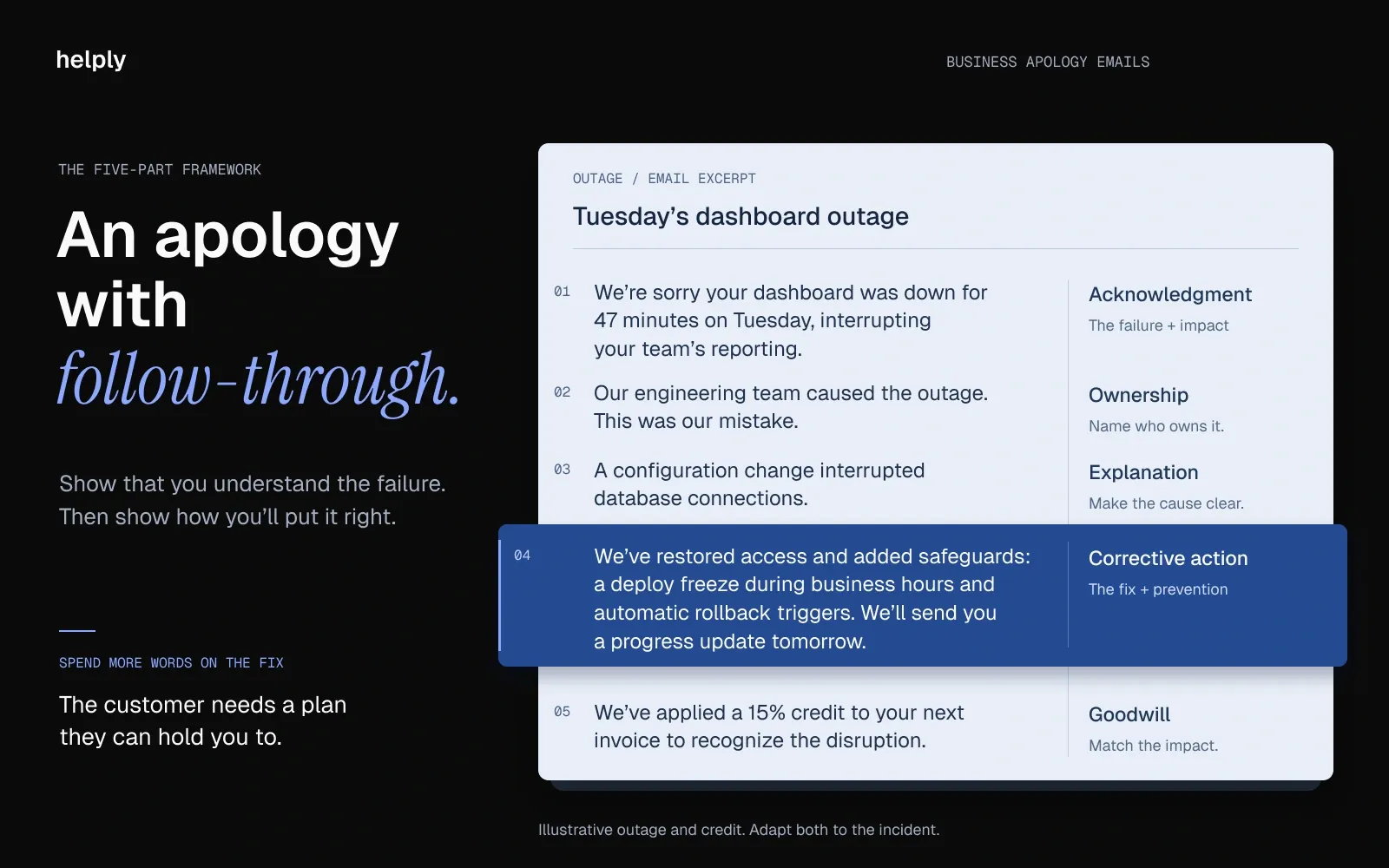
1. Specific Acknowledgment: Name the Exact Failure
"We're sorry for the inconvenience" tells the customer nothing. "We're sorry your dashboard was inaccessible for 47 minutes during business hours on Tuesday" tells them you understand what happened and that you're paying attention.
If you can describe the failure in exact terms, the customer trusts you to fix it. If you stay vague, they assume you don't understand the problem yet.
2. Ownership: First Person, No Passive Voice
Compare "An error occurred in our system" with "Our engineering team pushed a configuration change that caused the outage." The first hides the actor, and the second names the team that made the mistake. The customer judges your company's accountability by this reply.
Use "we" and "our team." Own the impact on the customer's business before you name a vendor, and skip vague "system issues."
3. Transparent Explanation: What Happened and Why
State the cause in a sentence or two, such as "A database migration ran during peak hours instead of the maintenance window."
An explanation shows the customer you've diagnosed the problem. Without one, they wonder whether you know what went wrong.
4. Concrete Corrective Action: The Fix and the Prevention
State both the immediate fix ("we've rolled back the configuration change and restored full service") and the systemic prevention ("we've added a deploy freeze during business hours and implemented automated rollback triggers"). Many teams stop at "we're working on it" without saying what "it" is.
Link to a public incident report or status page if you have one. Customers who can verify your corrective actions trust them more than customers who have to take your word for it.
5. Goodwill Gesture: Proportional to Impact
Match the gesture to the impact: invoice credits for billing errors, extended service commitments for outages, dedicated support sessions for onboarding failures. A 10% discount code suits a late order. After an SLA breach that halted a customer's operations for an hour, it reads as an insult.
A goodwill gesture shows you understand what the disruption cost their business, and that you're willing to absorb part of it.
Good vs. Bad Apology: A Side-by-Side Comparison
A good business apology email identifies the failure, takes ownership, gives the cause and commits to measurable fixes. A bad one leans on vague language, passive voice and filler, and leaves out the fix.
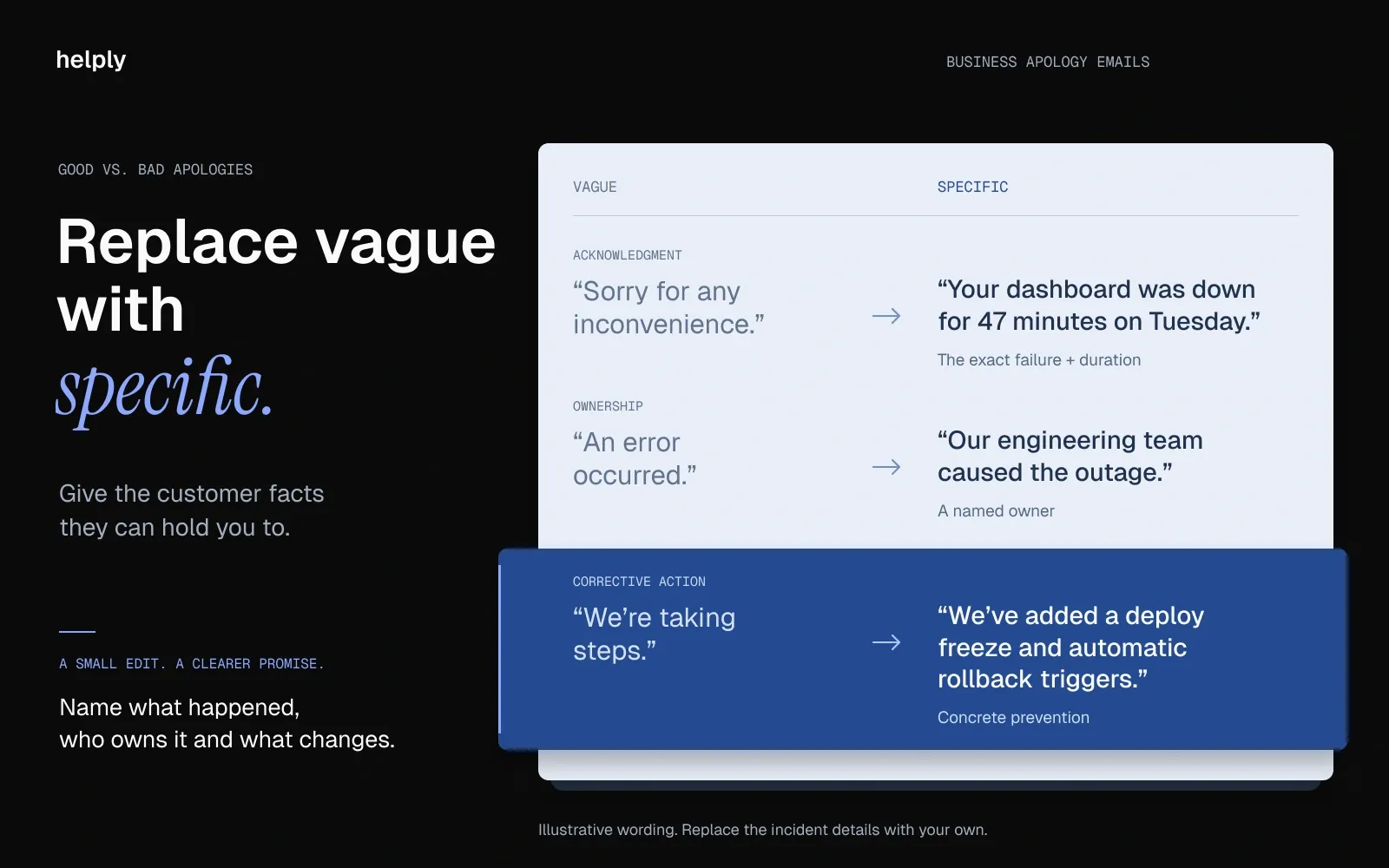
Compare each element, bad and good:A good business apology email identifies the failure, takes ownership, gives the cause and commits to measurable fixes. A bad one leans on vague language, passive voice and filler, and leaves out the fix.
Compare each element, bad and good:
| Element | Bad Example | Good Example |
|---|---|---|
| Acknowledgment | "We're sorry for any issues you may have experienced." | "We're sorry your dashboard was inaccessible for 47 minutes during business hours on Tuesday." |
| Ownership | "Unfortunately, an error occurred in our system." | "Our engineering team pushed a config change that caused the outage. This was our mistake." |
| Explanation | "We are looking into this matter." | "A database migration ran during peak hours instead of our maintenance window, causing query failures." |
| Corrective Action | "We are taking steps to ensure this doesn't happen again." | "We've added a deploy freeze during business hours and implemented automated rollback triggers." |
| Goodwill | "We appreciate your patience." | "We've applied a 15% credit to your next invoice and would like to walk you through our updated reliability roadmap." |
The bad column doesn't say who failed or for how long. The good column names the duration, the team and the fix, so the customer has something to hold you to.
12 Apology Email Templates for Customers and Clients
Each template below follows the five-part framework. Variables in [brackets] are placeholders for your details. Adjust the tone for your brand, but keep all five parts.
The scenarios come from software companies, and the same structure works for other businesses. Swap the outage for a late delivery and the SLA credit for a refund. For shorter everyday replies, see our customer service email templates.
Template 1: Platform or Service Outage
When to use: Your product experienced downtime that affected customer operations.
Subject: Service disruption on [Date]: what happened and what we’re doing about it
Hi [Name],
I'm writing to apologize for the [duration] service disruption your team experienced on [Date] between [Start Time] and [End Time]. I know your team relies on [Product] for [specific workflow], and losing access during business hours is unacceptable.
Here's what happened: [Root cause, e.g.,a database migration script ran during peak hours instead of our scheduled maintenance window, causing cascading query failures]. This was our mistake. It should not have happened during production hours.
We've taken three immediate steps: [1. Specific fix], [2. Prevention measure], [3. Monitoring improvement]. I've attached our full incident report for your team's review.
Per our SLA terms, we're applying a [credit amount or percentage] credit to your next invoice. I'd also like to schedule a 15-minute call to walk through our updated reliability roadmap and answer any questions from your team.
[Your name], [Title]
Why this works: Names the exact failure (specific acknowledgment), takes direct ownership, provides a transparent technical explanation, lists three concrete corrective actions, and offers both financial remediation and a personal follow-up call.
Template 2: Billing or Invoicing Error
When to use: Your billing system charged the wrong amount, double-charged, or invoiced incorrectly.
Subject: Billing correction for your [Month] invoice. Our mistake, resolved.
Hi [Name],
I owe you an apology. Your [Month] invoice included a charge of [$Amount] that should have been [$Correct Amount]. We overcharged your account by [$Difference] due to [specific cause, e.g.,a pricing configuration error after your plan change on Date].
We've already issued a full refund of [$Difference] to the card on file. You should see it reflected within [timeframe]. We've also corrected your billing configuration so future invoices reflect the accurate rate.
To prevent this from recurring, we've [added validation step / implemented billing audit process / assigned a dedicated billing check for plan-change events].
I understand that billing accuracy is non-negotiable, especially when your finance team is reconciling accounts. As a gesture of accountability, we've applied an additional [$Credit] credit to your next invoice.
[Your name], [Title]
Why this works: Leads with exact dollar amounts (specificity), owns the error directly, explains the technical billing cause, confirms the refund is already processed (corrective action), and adds a credit beyond the correction (goodwill gesture).
Template 3: Delayed Response or Missed Ticket
When to use: A support ticket sat unanswered past your committed response time.
Subject: Your ticket #[Number]: apology for the delayed response
Hi [Name],
I'm sorry your support request sat for [duration] without a response. That's [X hours/days] past our committed response time, and it's not the experience you should expect from us.
Your ticket was deprioritized during [specific cause, e.g.,a volume spike from a product release that overwhelmed our routing logic]. That's an explanation, not an excuse. We should have had safeguards to prevent high-priority accounts from being affected.
I've personally reviewed your request and [assigned it to a senior agent / escalated to engineering / prepared a solution]. You'll receive a detailed response within [specific timeframe].
We've [updated our routing rules / added capacity / implemented priority flagging for accounts at your tier] to prevent this from happening again.
[Your name], [Title]
Why this works: Quantifies the delay against the committed SLA (specificity), explains the systemic cause without excusing it, confirms the ticket is already escalated (immediate corrective action), and describes the routing fix to prevent recurrence.
Template 4: SLA Breach
When to use: Your team failed to meet a contractually committed service level.
Subject: SLA performance for [Month/Quarter]. We fell short.
Hi [Name],
I'm writing to address our SLA performance for [period]. We committed to [specific SLA metric, e.g.,99.9% uptime / 4-hour response time / 24-hour resolution], and we delivered [actual performance]. That's a breach of our agreement, and I want to be direct about it.
[Explanation of what caused the gap: specific incidents, systemic issues, or resource constraints]. We take our contractual commitments seriously, and falling short is not something we rationalize.
Per Section [X] of our agreement, we're issuing [specific remediation: credit, service extension, penalty waiver]. Beyond the contractual remediation, I'd like to schedule a quarterly review call with your team and our [VP of Engineering / Head of Support] to walk through our improvement roadmap.
[Your name], [Title]
Why this works: References the exact SLA metric and the actual performance gap (specificity), treats the breach as a contractual matter rather than a vague disappointment, offers both the contractual remediation and an escalated review cadence with senior leadership.
Template 5: Data or Security Incident
When to use: A data exposure, unauthorized access, or security vulnerability affected the customer.
Subject: Security notice: [specific incident type] on [Date]
Hi [Name],
I'm writing to inform you of a security incident that affected your account. On [Date], we identified [specific description, e.g.,unauthorized access to a subset of account metadata / a vulnerability in our API authentication layer].
What was affected: [Specific data types, scope, and duration of exposure]. What was not affected: [Confirm what was not compromised: payment data, credentials, etc.].
Immediate actions taken: [1. Containment step], [2. Remediation step], [3. Notification to affected parties]. Preventive measures: [Security audit, infrastructure changes, third-party assessment]. We've engaged [security firm / auditor] to conduct an independent review.
Your team should [specific recommended actions: rotate API keys, review access logs, update credentials]. Our security team is available at [direct contact] for any questions.
[Your name], [Title]
Template 6: Onboarding Failure or Poor First Experience
When to use: The customer's first 30 days went poorly due to implementation issues, missing documentation, or misset expectations.
Subject: Your onboarding experience. We need to make this right.
Hi [Name],
Your first [X weeks] with [Product] did not meet the standard we set for new accounts, and I'm sorry. You expected [what was promised during sales, e.g., full implementation in 2 weeks with dedicated support], and instead you experienced [what actually happened: delays, missing configurations, gaps in training].
[Specific cause, e.g.,a miscommunication between our sales and implementation teams / a gap in our onboarding playbook for your integration stack]. We're fixing the root cause so future accounts don't experience this.
Here's what I'd like to propose: [1. Restart onboarding with a dedicated implementation lead], [2. Extended onboarding support for an additional X weeks at no cost], [3. Weekly check-in calls until your team is fully ramped]. I've assigned [Name] as your dedicated contact.
[Your name], [Title]
Template 7: Feature Removal or Breaking Change
When to use: A product update removed or significantly changed functionality the customer depends on.
Subject: Changes to [Feature Name]: impact on your workflow
Hi [Name],
In our [version/date] release, we [removed/significantly changed] [Feature Name]. I know your team uses this for [specific workflow the customer relies on], and I'm sorry we didn't give you adequate notice or a migration path before making this change.
The decision to [change description] was driven by [honest reason: technical debt, security concerns, platform direction]. We should have communicated this earlier and provided transition support.
Here's what we're offering: [1. Workaround or alternative feature], [2. Extended access to the legacy feature for X days], [3. Dedicated session to migrate your workflow to the new approach]. [4. Feedback channel for feature requests: your input directly shapes our roadmap].
[Your name], [Title]
Template 8: Integration Downtime (Third-Party Failure)
When to use: An integration partner's failure caused disruption in your product.
Subject: [Integration Name] disruption on [Date]: status and next steps
Hi [Name],
Your [Integration Name] connection experienced [duration] of downtime on [Date], which disrupted [specific impact: data sync, notification delivery, billing reconciliation]. I'm sorry for the disruption to your workflow.
The root cause was [specific issue, e.g.,an API deprecation by the integration partner / a rate-limiting change we weren't notified about]. While the issue originated with [Partner Name], we take responsibility for the impact on your experience. We should have had better monitoring and failover for this dependency.
We've [1. Restored the connection], [2. Added monitoring alerts for this integration], [3. Built a fallback mechanism for future interruptions]. Your data is fully synced as of [timestamp].
[Your name], [Title]
Template 9: Pricing or Contract Error
When to use: A quote, renewal price, or contract term was communicated incorrectly.
Subject: Correction to your [quote/renewal/contract] terms
Hi [Name],
I need to address an error in the [quote/renewal terms/contract] we sent on [Date]. The [specific term, e.g.,pricing, feature access, support tier] was stated as [incorrect term], when it should have been [correct term].
This was our mistake, caused by [specific reason, e.g.,an outdated pricing sheet, a misconfiguration in our CRM]. We're honoring the originally communicated terms for [your current contract period / the next X months] because you made your decision based on what we told you.
Going forward, we've [corrected the source of the error / updated our process]. Your account manager [Name] will follow up with the corrected documentation this week.
[Your name], [Title]
Template 10: Poor Support Interaction
When to use: An agent gave incorrect information, was unhelpful, or mishandled a ticket.
Subject: Re: Ticket #[Number]. Apology and escalation.
Hi [Name],
I reviewed your recent support interaction on ticket #[Number], and I'm sorry. The response you received [was incorrect / didn't address your question / fell below our standard]. You deserved better.
What should have happened: [describe the correct resolution path]. We've provided additional training to the team member involved and updated our internal documentation to prevent this specific gap.
I've escalated your ticket to [Senior Agent / Team Lead Name], who will [provide the correct solution / follow up within X hours]. If you'd prefer, I can also connect you directly with our [CS lead / engineering team] for a call.
[Your name], [Title]
Template 11: Mass Incident Communication (Multiple Accounts)
When to use: The same issue affected many customers simultaneously.
Broadcast version (all affected accounts):
Subject: [Incident type] on [Date]: resolution and next steps
Hi [Name],
On [Date], [description of incident] affected [scope, e.g.,all accounts in the US-East region / all users accessing the reporting module]. Your account was among those impacted. The issue lasted [duration] and has been fully resolved as of [timestamp].
[Root cause explanation]. We've [list corrective actions]. Full incident report: [link].
[Your name], [Title]
High-value account personalized version:
Add to the broadcast: a personal note from the account's CSM or a named engineering lead, a reference to the specific SLA terms, the exact credit amount, and an offer to schedule a call.
Send the broadcast to all affected accounts, then add the personal note for your largest ones so they hear from a named person.
Template 12: Executive-Level Apology (When the CEO Needs to Write It)
When to use: A severe incident requires leadership visibility and personal accountability.
Subject: A personal note from [CEO Name] regarding [incident]
Hi [Name],
I'm [CEO Name], [title] at [Company]. I want to address the [incident] your team experienced on [Date] directly, because an incident of this severity deserves a response from leadership, not just the support team.
[Transparent explanation of what happened and why]. This falls below the standard we hold ourselves to, and I take personal responsibility for ensuring it doesn't happen again.
Here's what we're committing to: [1. Immediate fix], [2. Structural change], [3. Investment in prevention]. I've asked [VP/Director Name] to serve as your direct contact for the next [X weeks] to ensure we've fully addressed the impact on your team.
My direct email is [email]. If there's anything else your team needs, I want to hear it from you personally.
[CEO Name]
The 48-Hour Follow-Up Sequence: What to Send After the Apology
Plan three touches: the apology within an hour, a status update at 24 hours and a resolution check-in at 48 hours. After the apology, customers watch whether you keep each promise.
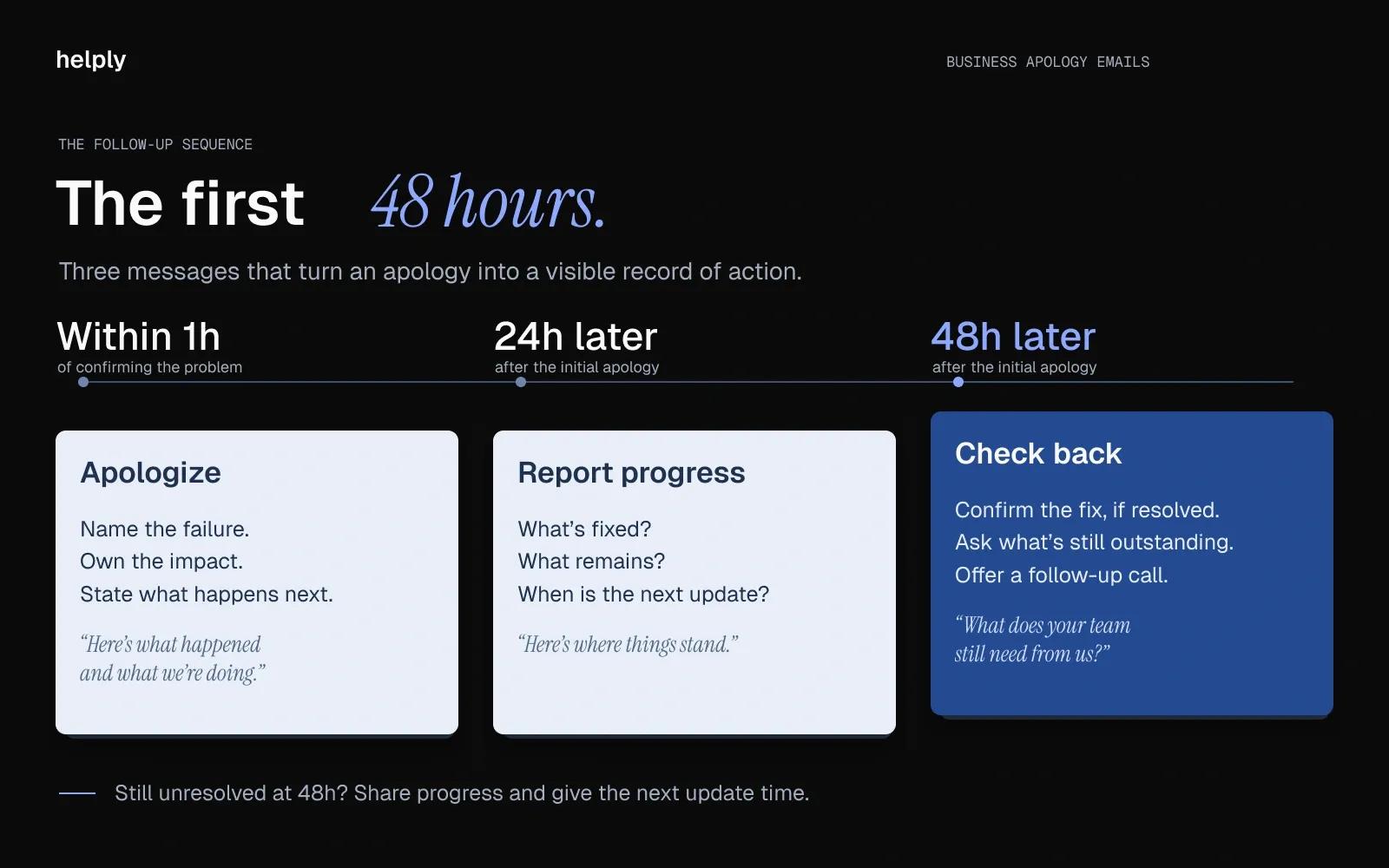
Touch 1: Initial Apology (Within 1 Hour)
Send the apology within the hour, using the template above that fits the incident. If you stay silent longer, the customer starts assuming the worst about your competence.
Touch 2: Status Update (24 Hours Later)
Subject: Update on [incident]: where things stand
Hi [Name], Following up on [incident]. Here's where we are: [What has been fixed since the apology], [What is still in progress and expected timeline], [Any additional findings or adjustments to the corrective actions]. I'll send a final confirmation once everything is fully resolved. [Your name]
Keep this email short and factual: report progress and skip the second apology.
Touch 3: Resolution Confirmation + Check-In (48 Hours)
Subject: [Incident] fully resolved. Anything else from your side?
Hi [Name], The [incident] is fully resolved. [Summary of all actions taken]. I want to make sure nothing else is outstanding on your end. Is there anything your team still needs from us? If you'd find it helpful, I'm happy to schedule a 15-minute call to walk through the full timeline. [Your name]
At 48 hours, you confirm the fix and invite the customer to raise anything still bothering them. You also leave a clean record if the incident comes up at renewal.
How Can AI Help You Write Better Apology Emails, Faster?
AI speeds up an apology email by doing the lookups, so your rep edits a specific draft instead of a blank template.
A template gives you the structure. Every incident still differs in customer history, order or contract terms, severity and who reads the reply.
Customizing one by hand means pulling context from the CRM, reading the ticket history and adjusting the tone for the relationship. In Helply, the workflow takes three steps:
- The customer writes in, or your team opens a ticket for the incident. The Assist Agent starts with the conversation and the customer's history from Memory.
- It checks one or two connected tools for the facts, such as the invoice in Stripe or recent calls in Gong. Then it drafts the email in your five-part structure and your house tone.
- Your rep checks the facts, adjusts the tone, picks the gesture and sends it. For a refund, your rep can direct the Assist Agent to prepare it in Stripe, if you've enabled that action.
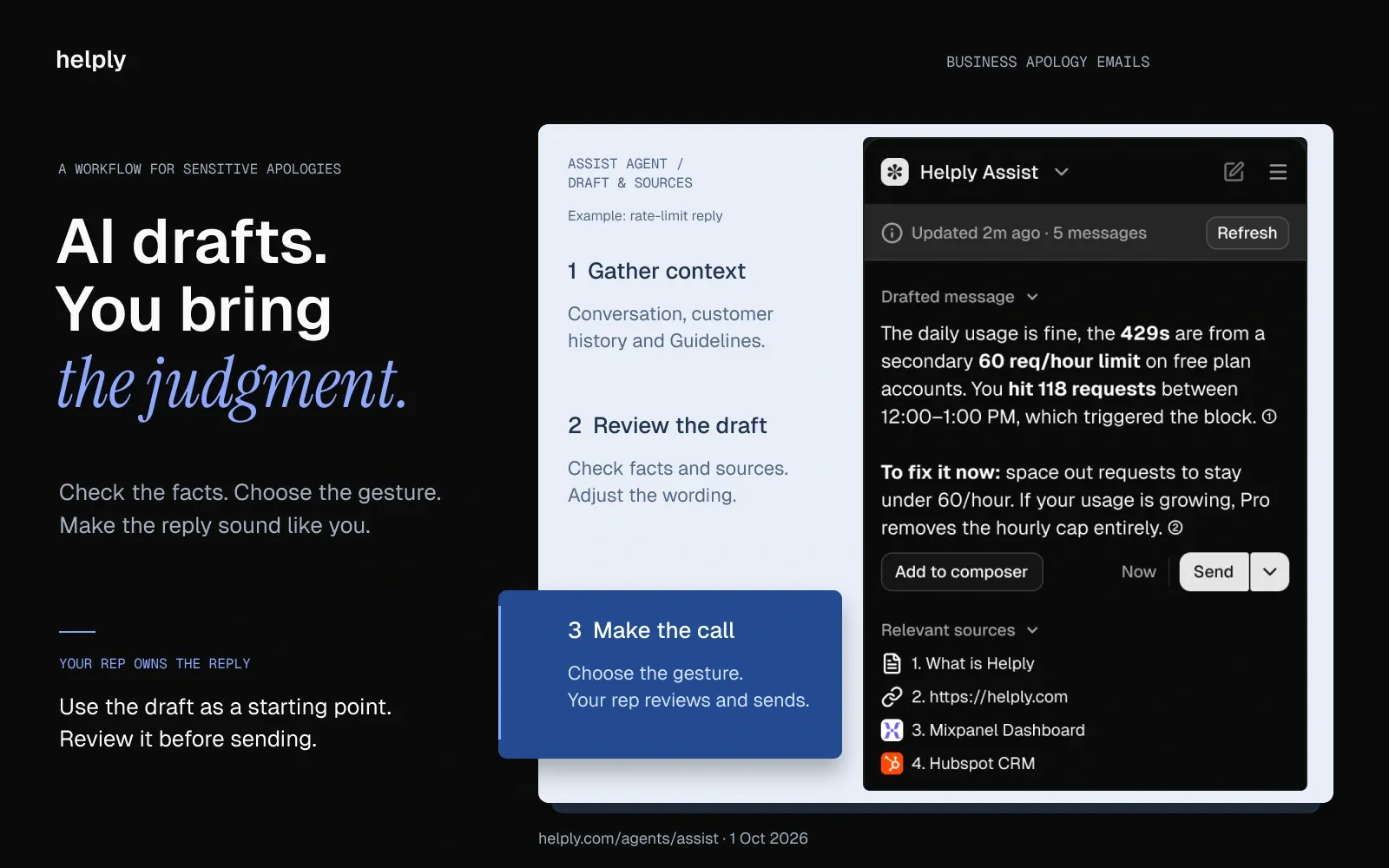
The Assist Agent assembles the structure and the account context, and your rep owns the empathy and the relationship.
If the Support Agent also answers customers on its own, your Guidelines set the boundary. You can add a rule such as "any apology that offers a credit waits for your rep," so a person handles the sensitive ones.
Can AI Write a Professional Apology Email That Sounds Human?
Yes, if your rep reviews it before it goes out. Your customers don't want a robot apology after an outage, and your rep on the send button makes sure they don't get one.
The Assist Agent fills in the structure, the account details and the fixes from the ticket. Your rep adjusts the wording and adds a personal reference.
You set the tone in Guidelines, and the agents learn from your team's feedback. At Sender.net, Helply's Support Agent drew on a shared memory of the company's tone, terminology and escalation rules. With everything on one platform, every human edit improved every agent at once.
5 Business Apology Email Mistakes That Accelerate Churn
Each mistake below weakens the apology, the fix or both.
Mistake 1: Using Passive Voice or Deflecting Blame
Bad: "Mistakes were made in the billing process."
Why it accelerates churn: A passive sentence names no one at your company as the owner of the mistake. If you can't own a billing error, the customer questions whether you'll own the next outage.
The fix: "Our billing team made an error in your invoice configuration." It uses the first person and the active voice, and it names the team.
Mistake 2: Over-Apologizing Without Concrete Action
Bad: "We are so deeply sorry. This is not reflective of our values. We sincerely apologize for the impact this has had on your team. We are committed to doing better."
Why it accelerates churn: The email spends four sentences apologizing and none on what you're doing about it.
The fix: Apologize in one sentence, then state the fix and the prevention. Give element 4 of the framework more words than element 1.
Mistake 3: Sending an Obvious Template Without Personalization
Bad: "Dear Valued Customer, We recently experienced a service disruption that may have affected your account."
Why it accelerates churn: "Valued Customer" tells the recipient you didn't bother to look up their name. "May have affected" tells them you didn't check whether the problem reached them. The customer knows it's a mass template, and they know you didn't spend 30 seconds personalizing it.
The fix: Name the customer and the specific impact on their account. Mention their usage pattern or the feature they rely on. With one personal sentence, you show the customer that a person wrote the email.
Mistake 4: Apologizing for the 'Inconvenience' Instead of the Specific Impact
Bad: "We apologize for any inconvenience this may have caused."
Why it accelerates churn: Calling a failure an "inconvenience" shrinks its impact. A sales team cut off from its CRM integration for two hours during a pipeline review lost selling time. If you call that an inconvenience, the customer concludes you don't understand the stakes.
The fix: "We apologize for the two-hour disruption to your CRM integration during your team's pipeline review." Name the impact in the customer's own words.
Mistake 5: No Follow-Up After the Initial Apology
Bad: [Radio silence after the apology email]
Why it accelerates churn: You promised corrective action in the apology, and the customer expects an update. Without one, they assume the fix didn't happen either. If you stay silent, you break a promise you made in writing.
The fix: Run the 48-hour sequence above, and give each promise in the apology its own follow-up.
Send Better Apologies. Keep More Customers.
Use the five parts to keep the customer: acknowledge the failure, own it, explain it, fix it and offer a fair gesture. The 12 templates cover outages, billing errors, missed SLAs and incidents that need the CEO's name. Use the 48-hour sequence to follow up on every promise you make in the apology.
Helply is an AI-native customer support platform where the team you have can handle more customers from one complete helpdesk. Its Assist Agent writes the first draft of each apology, and its Churn Agent spots the customers at risk before they leave. Every plan has unlimited users, so your engineering lead or CEO can join the thread at no extra cost.
Plans start at $49 a month, and each AI action uses credits priced by complexity. A draft from the thread costs 1, a lookup in another system 4, and an account health check before you reply 12. A draft your rep rejects costs nothing.
Frequently asked questions
Open by naming the specific failure: "I'm writing to apologize for [exact issue]." In the next sentence, take ownership without blaming systems, processes or third parties. Then state the fix and what prevents a repeat.
Name the mistake and what it cost the client, own it, then state the fix and the prevention step. Send it from the person who owns the relationship, never a no-reply address. Close with a direct line and a date for the next update.
The best business apology names the mistake, owns it, explains the cause, states the fix and offers a gesture sized to the impact. The same five-part framework fits a billing error, an outage or a missed deadline.
Name the exact delay, such as a ticket that waited 3 days or an order that shipped 3 days late. Explain the cause, say what you've done to resolve it, and give a firm date for anything still open. On a late order, refunding the shipping is a fair gesture.
Yes, apologize for the impact even when a partner or vendor caused the failure. The customer felt it either way. Explain the root cause without blaming the partner, then name the safeguard you've added, such as monitoring and a fallback.
Keep the initial apology to 150 to 200 words covering all five framework elements. If you go longer, you bury the corrective action, so save deeper context for the follow-ups.
Yes, AI can draft one, and your rep should review it before it goes out. Helply's Assist Agent builds the draft from the ticket, past conversations and your Guidelines. Your rep checks the facts and tone before sending, and Helply doesn't bill for drafts they reject.
Name what went wrong in the interaction, such as a wrong answer or a slow reply, and own it as a team. Then say who handles the case now and by when. Offer a call with a team lead if the customer wants one.
Name the issue and the date or reference, so the customer knows what the email covers. For example: "Your ticket #[Number]: apology for the delayed response" or "Billing correction for your [Month] invoice." Avoid "We're sorry for the inconvenience," which names no problem.
Use ownership and thanks: "This was our mistake," "We should have caught this" or "Thank you for flagging it." Follow it with the fix and the date it takes effect. The customer will judge the fix more than the wording.
The 5 R's of apology are Recognition, Responsibility, Remorse, Restitution and Repetition prevention. The five parts in this guide cover the same ground, with an explanation of the cause where the R's put remorse. Our customer apology letter guide walks through each R with examples.
Start with the credit table in your SLA. Amazon's EC2 SLA, for example, credits 10% of the month's EC2 charges below 99.99% regional uptime, 30% below 99.0% and 100% below 95.0%. Add a goodwill gesture on top when the damage went beyond the contract.
Write "Please accept our apology for [specific issue]" or "I apologize for [specific issue] and the disruption it caused." Name the issue in that sentence, then move to the fix.
Thank the sender, confirm what you still need and set a date. For example: "Thank you for the explanation. Please confirm the credit on our next invoice by Friday."
About the author

Bildad Oyugi
Head of Content
Bildad is a digital marketing expert with over 5 years of experience in copywriting, content marketing, and editing. Outside of work, he enjoys videography and spending time with his family.


