Key Takeaways
- Chatbase offers live chat and its own helpdesk, but both start on Standard at $150 a month ($120 on annual billing).
- Chatbase plan credits reset on the 1st of each month and do not roll over. Extra credits cost $40 per 1,000 through an auto-recharge add-on.
- Check seats and per-user prices before your team grows. Chatbase plans include 2, 3 or 5 seats, and Chatbot.com charges $25 per user a month ($19 on annual billing).
- On a $0 budget, Tidio's and Chatling's free plans include live chat, and Botpress gives you 100 one-time conversations to test with. Botsonic offers a 7-day trial, but its help desk handoff needs Enterprise or a $199-a-month add-on.
- Helply prices each AI task at 1, 4, or 12 credits based on complexity, starting at $49 a month for 500 credits. Every plan has unlimited users, and unused credits carry over to the next month.
Chatbase says you can build and deploy an AI agent in under five minutes. For a FAQ bot on a marketing site, that speed is the appeal.
Your support team hits the limits as chat volume grows. Unused plan credits lapse on the 1st of each month. If they run out before month-end, customers get no AI answers until you add credits or the plan renews.
Chatbase plans include 2 to 5 seats, and live chat with the Chatbase Helpdesk is available starting with Standard. Each additional AI agent costs $25 per month.
At that point, you start comparing Chatbase alternatives. Seven alternatives differ in pricing, live chat, escalation, and the extent of support work they handle.
The 7 Best Chatbase Alternatives at a Glance
The tools fit different jobs and charge by credits, conversations, messages or users.
| Tool | Best for | Starting price | Cost model | Live chat / human handoff |
|---|---|---|---|---|
| Helply | Support teams that want AI agents and a shared inbox | $49/mo for 500 credits (15% off annual) | Monthly credit block, unlimited users | Yes: shared inbox, chat widget and escalation rules |
| Tidio (Lyro) | E-commerce website chat | Free (50 billable conversations/mo); Starter $29/mo ($24.17/mo annual) | Billable conversations, plus Lyro from $39/mo ($32.50/mo annual) | Yes, live chat and ticketing on every plan |
| Botpress | Developers and custom builds | Free (100 conversations, one-time); Plus $189/mo ($150/mo annual) for 250 conversations | Monthly conversations, with $0.10 of AI usage per included conversation | Yes, Botpress Desk on every plan |
| Chatling | AI agent with flows | Free (200 AI credits/mo); Starter $25/mo ($21/mo annual) | Monthly AI credits | Yes, live chat and handoff on every plan |
| Botsonic | Simple website bot | Starter $19/mo ($16/mo annual) for 1,000 messages | Monthly message tiers | No built-in inbox; help desk handoff via a $199/mo add-on or Enterprise |
| eesel AI | AI on your existing help desk | Free (100 credits for 7 days); Teammate from $299/mo for 500 credits | Monthly credits; about 1 per ticket or chat worked | No inbox for human agents; hands off to your help desk or live chat tool |
| Chatbot.com | No-code flows with AI | Essential $25 per user/mo ($19/mo annual) | Per user, plus extra AI resolutions at $0.99 | Yes, human takeover on every plan |
| Chatbase (reference) | AI agents built from your content, with its own helpdesk | Hobby $40/mo ($32/mo annual) for 700 message credits | Message credits; $40 per extra 1,000 | Yes, from Standard at $150/mo ($120/mo annual) |
For a website bot alone, Tidio suits stores and Botpress suits teams with developers. Chatling's paid plans start at $25 a month and Botsonic's at $19.
To size your own volume, use the estimator on the Helply pricing page, which converts monthly conversations into credits.
Why Support Teams Leave Chatbase
Your Chatbase bill grows with credits, seats and helpdesk access. With Chatbase, you build AI agents from your own content, in 90-plus languages, with models from OpenAI, Anthropic, Google and others.
In October 2026, Chatbase held 4.8 out of 5 on G2 (46 reviews) and 4.3 on Capterra (73 reviews). Trustpilot showed 4.0 from 69 reviews, and 28% of those reviews were one-star.
- Replies stop at zero credits. Without the auto-recharge add-on, the agent stops replying until you buy credits or the plan renews on the 1st.
- Credits don't roll over. Chatbase renews plan credits on the 1st, so you can't save a quiet month's credits for a busy one.
- Seats cost extra past the allowance. Chatbase Hobby includes 2 workspace seats, Standard 3 and Pro 5. You add extra members through a paid add-on in the dashboard.
- One agent per plan. Each extra Chatbase AI agent costs $25 a month, or $300 a year on annual billing.
- The helpdesk starts at $150 a month. Live chat handoff and the Chatbase Helpdesk need Standard, which costs $120 a month on annual billing. Escalations into other help desks need the same plan.
- Other help desks get a summary. Escalations into Zendesk carry the full transcript and custom fields; the other eight help desks get an AI-written summary.
- Branding costs extra. Removing "Powered by Chatbase" costs $99 a month, or $1,188 a year.
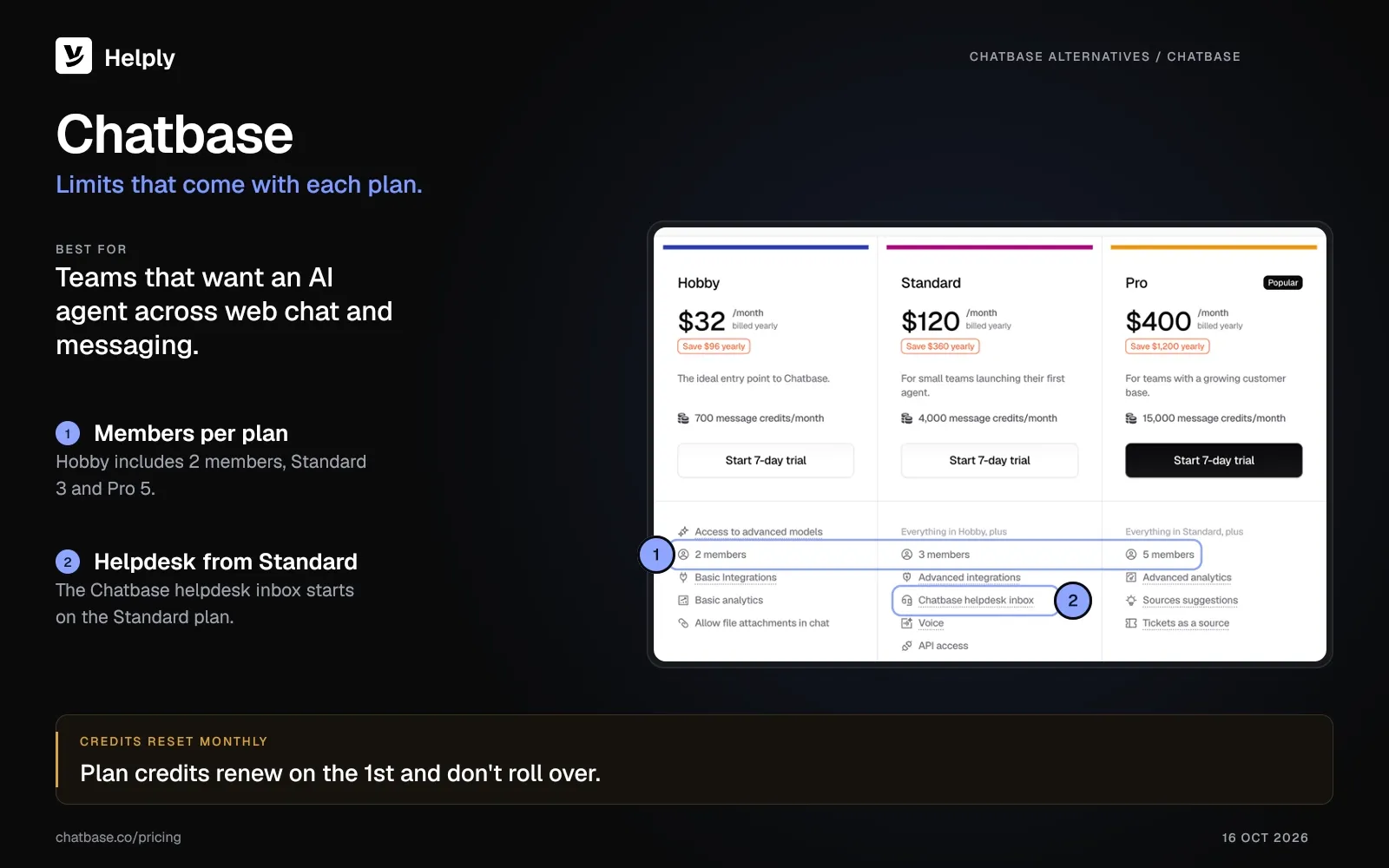
Chatbase suits teams that want an AI agent across web chat, email and messaging, with the Chatbase Helpdesk from the Standard plan. If your team has more people than seats, or more questions than credits, you'll need paid add-ons.
Helply gives you a full help desk: one shared inbox, where AI agents work across your channels.
How Much Does Chatbase Cost as You Scale?
Your Chatbase bill depends on how many message credits each conversation uses. Hobby includes 700 a month, Standard 4,000 and Pro 15,000.
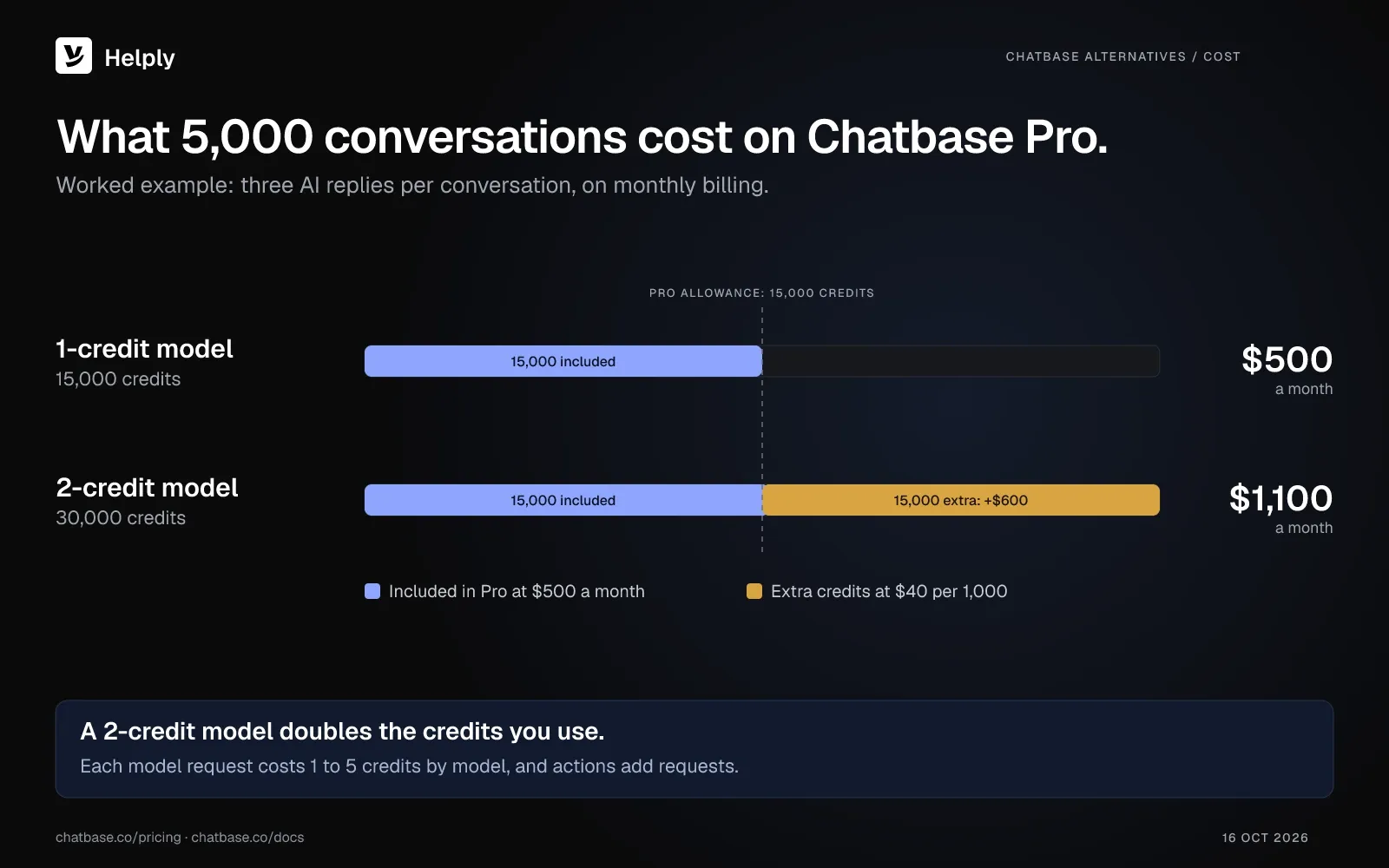
Say your team handles 5,000 conversations a month. Chatbase Pro includes 15,000 message credits for $500 a month, or $400 a month on annual billing.
Each model request costs 1 to 5 credits by model, and actions can add requests to a reply. At three AI replies per conversation on a 1-credit model, 5,000 conversations use all 15,000 credits.
Extra Chatbase credits cost $40 per 1,000. On a 2-credit model, the same 5,000 conversations use 30,000 credits. That adds $600 for the extra 15,000, so Pro on monthly billing comes to $1,100.
See the credit table and the estimator on the Helply pricing page.
The 7 Best Chatbase Alternatives, Compared
1. Helply: Best for Support Teams That Outgrew a Website Widget
Helply is an AI-native customer support platform. Behind the chat widget, you get a full help desk. Customers write on your website, by email, or on Slack, Microsoft Teams, or WhatsApp, and each conversation lands in a single shared inbox.
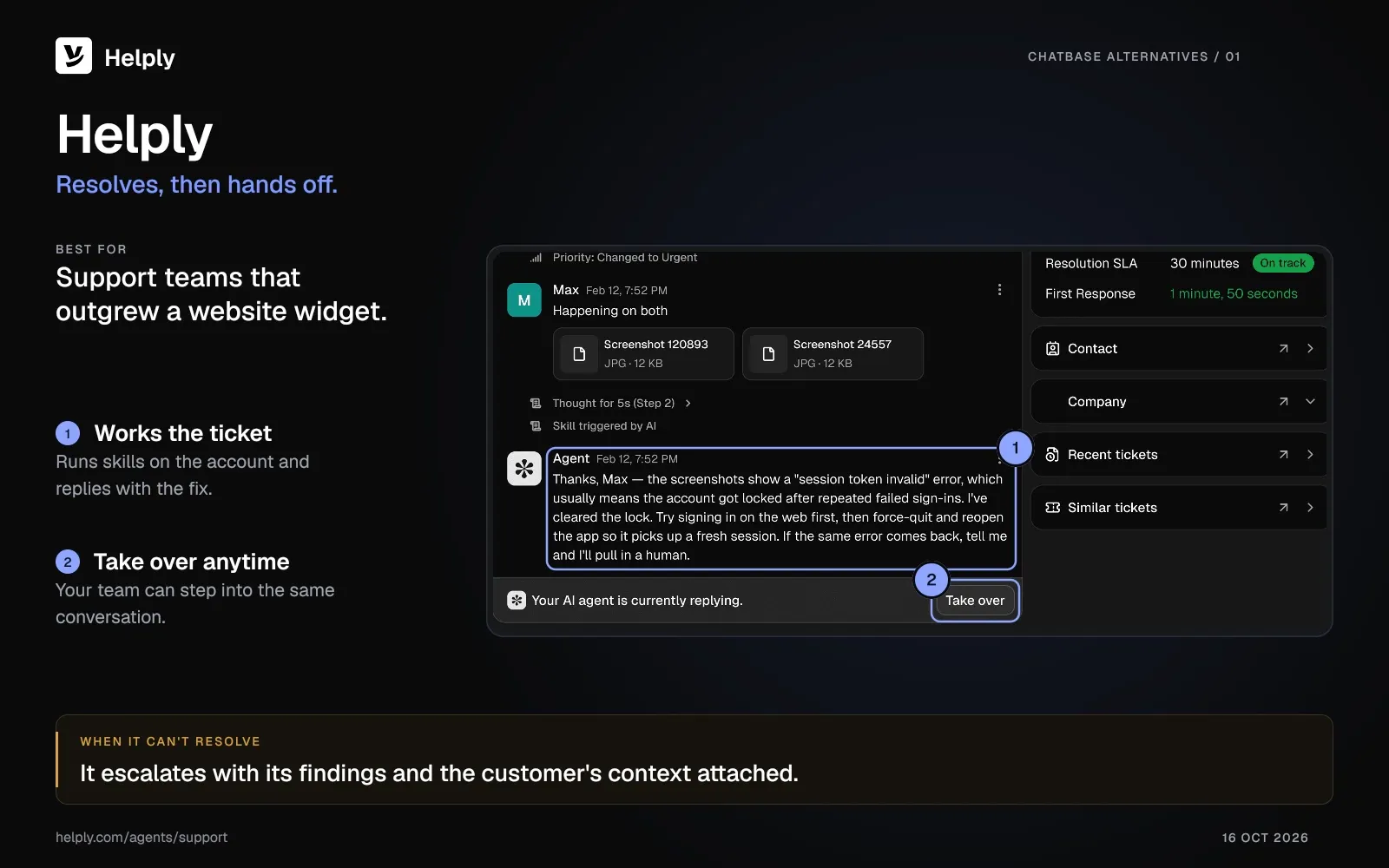
The Support Agent answers from your docs, the customer's history, and the tools you connect, and it can resolve issues end-to-end. If it can't, it passes the conversation to your team with its findings and the customer's context.
At MyBaggage, the Support Agent resolved three of four customer questions across web, email, and WhatsApp. "In shipping, the answer usually isn't in an article; it's in the tracking system," says Anthony Gallagher.
Every plan has unlimited users and all three AI agents: Support, Assist, and Background. You pay for the AI work in credits.
Key Features:
- A chat widget backed by a help desk. Customers ask questions and reach your team from the widget, and you see every chat in the same inbox as email.
- Support Agent with lookups. Connect your tools so the agent can check the customer and their account before it replies. You set escalation rules for when a person takes over.
- Assist Agent beside your reps. It drafts answers based on the conversation, customer context, and your Guidelines, and takes actions the rep approves.
- Knowledge Agent. It learns from customer conversations, finds missing answers, and flags outdated information. Your team can review each suggestion before customers see it.
- Background Agents on every plan. Churn, Revenue, Feature Request, and Insights agents monitor every conversation. Churn and Revenue can alert the right teammate when they spot churn risk or upgrade intent.
- Nine channels, one support history. Email, chat, WhatsApp, Slack, Microsoft Teams, Discord, Telegram, and SMS conversations land in the same inbox. For phone support, Helply links supported call information and transcripts to the customer's support history.
Pricing:
On Helply, you buy AI work in a monthly credit block, and every plan includes unlimited users. The smallest block costs $49 a month for 500 credits, and the largest $1,549 a month for 32,000.
- Drafting or summarizing: 1 credit
- A bounded search in one or two systems: 4 credits
- Several skills chained across systems, ending in a judgment call: 12 credits
On monthly billing, leftover credits roll into the following month and expire when it ends. On annual billing, you save 15% and pool credits across the whole year.
Auto top-up adds credits at the same rate, up to a spend cap that defaults to your block price. Above 32,000 credits a month, you talk to sales about Enterprise.
Pros:
- Unlimited users on every plan, so your whole team can join conversations with no per-user fee.
- Credit cost rises with the complexity of the work.
- Chats the AI can't finish land in a shared inbox with the context attached.
- The Support Agent can act through your connected tools, inside the escalation rules you set.
Cons:
- It's a full support platform, so it's more than you need for a simple FAQ bot on a marketing site.
- Per conversation, Helply's AI can cost more than a Chatbase agent on a 1-credit model, so check the estimator first.
2. Tidio (Lyro): Best for E-Commerce Website Chat
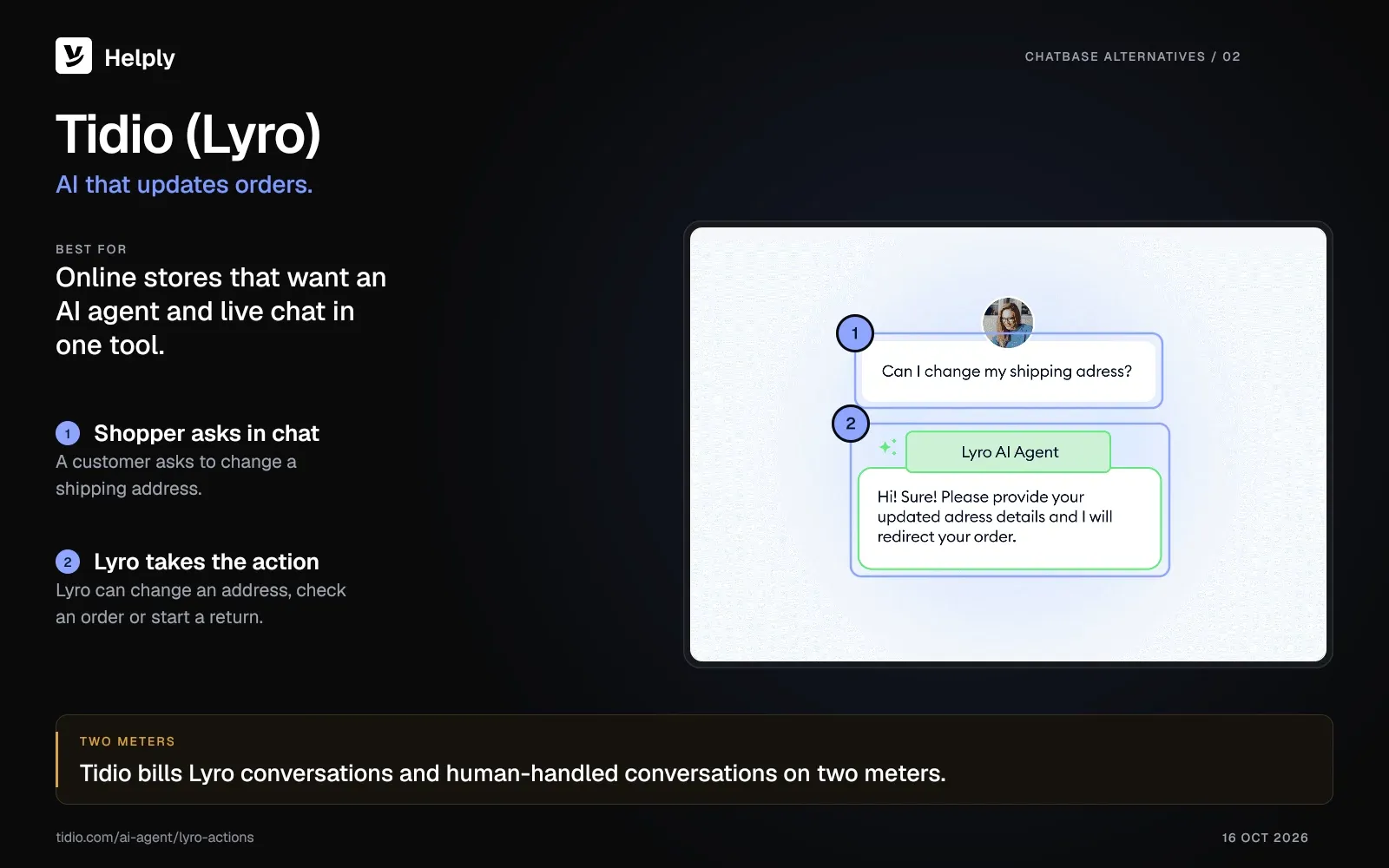
Tidio is for online stores, Shopify shops in particular, that want an AI agent, live chat and ticketing in one tool. Its AI agent, Lyro, can check order status, change a shipping address or start a return.
Unlike Chatbase, Tidio puts live chat and ticketing on every plan, Free included.
Key Features:
- Lyro AI agent. It answers from your website or help docs and forwards the question to a person when the answer isn't there.
- Live chat and help desk. Email, Instagram, Messenger, WhatsApp and the chat widget share one inbox, on every plan.
- Shopify actions. Lyro checks orders and starts returns, and agents can issue refunds from the inbox.
Pricing:
- Tidio's Free plan covers 50 billable conversations a month and 10 seats, plus 50 one-time Lyro conversations. A billable conversation is one a human agent replies to.
- Starter costs $29 a month, or $24.17 a month on annual billing, for 100 billable conversations. Lyro adds $39 a month, or $32.50 on annual billing, for 50 Lyro conversations a month.
Pros:
- The free plan includes live chat, ticketing and 10 seats.
- Tidio sells Lyro on its own for teams on Zendesk or Salesforce. G2 reviewers rate Tidio 4.6 out of 5 across 1,962 reviews.
Cons:
- Lyro can start a return, but refunds and order cancellations stay with your agents in the inbox.
- Conversations your team handles count as billable conversations, a second meter beside Lyro.
Best for: Small and midsize online stores that want their AI agent and live chat team in the same tool.
3. Botpress: Best for Developers and Deep Customization
Botpress suits teams with developers who want to build and control every step of an AI agent. It runs as a managed cloud platform with an open-source SDK and integrations.
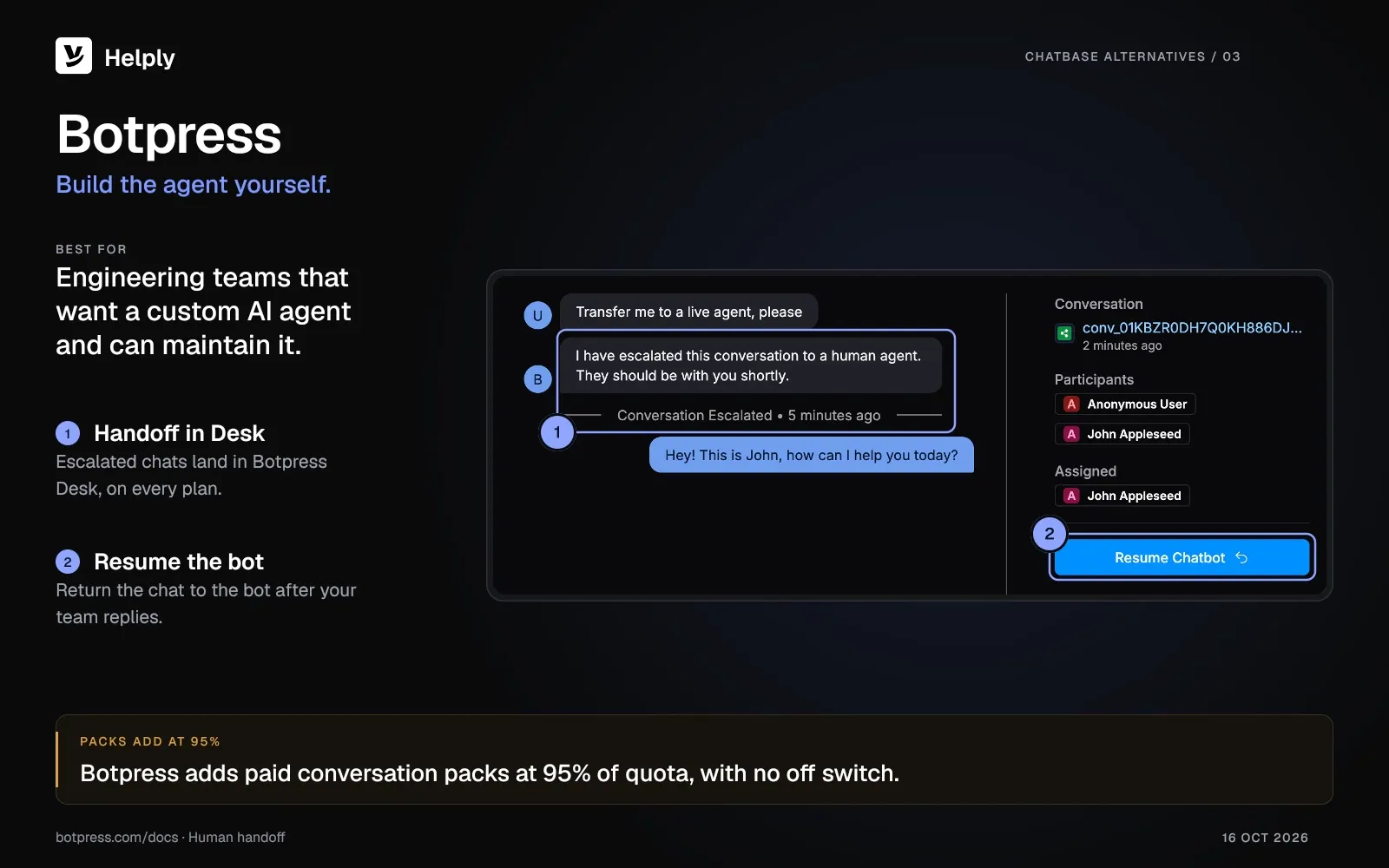
You can publish one Botpress bot to 13 channels, including WhatsApp, Instagram, Slack, and Microsoft Teams.
Key Features:
- Specialized agents. Translator, Summary, Vision and Personality agents handle languages, recaps, images and tone.
- Botpress Studio. Build an agent's logic, conditions and actions step by step.
- Botpress Desk. A built-in help desk for escalation and handoff, on every plan including Free.
Pricing:
- Botpress Free includes a one-time allowance of 100 conversations, with no top-ups.
- Plus costs $189 a month, or $150 on annual billing, for 250 conversations and 3 seats. Team costs $939 a month, or $750 on annual billing, for 1,500 conversations and unlimited seats.
- Each included conversation carries $0.10 of AI usage. Botpress adds extra conversations in packs of 100, at $65 on Plus and $50 on Team, when you reach 95% of quota.
Pros:
- Botpress Desk covers escalation and handoff from the free plan up.
- Control over agent logic, conditions and actions, with 13 channel integrations. G2 reviewers rate Botpress 4.5 out of 5 across 514 reviews.
Cons:
- You build the agent's logic yourself in Studio, so plan for setup time.
- Botpress adds conversation packs at 95% of quota, and you can't turn that off.
- Botpress sunset its self-hosted version, so new projects run on Botpress Cloud.
Best for: Engineering teams that want a custom AI agent and can build and maintain it.
4. Chatling: Best for an AI Agent Plus a Visual Flow Builder
Chatling makes sense for small teams that want an AI agent and a visual flow builder for less than Chatbase charges.
Paid plans start at $25 a month against Chatbase's $40, and the flow builder includes lead forms.
Key Features:
- AI agent plus flows. Train an AI agent on your docs, or build guided paths from message, condition and action blocks.
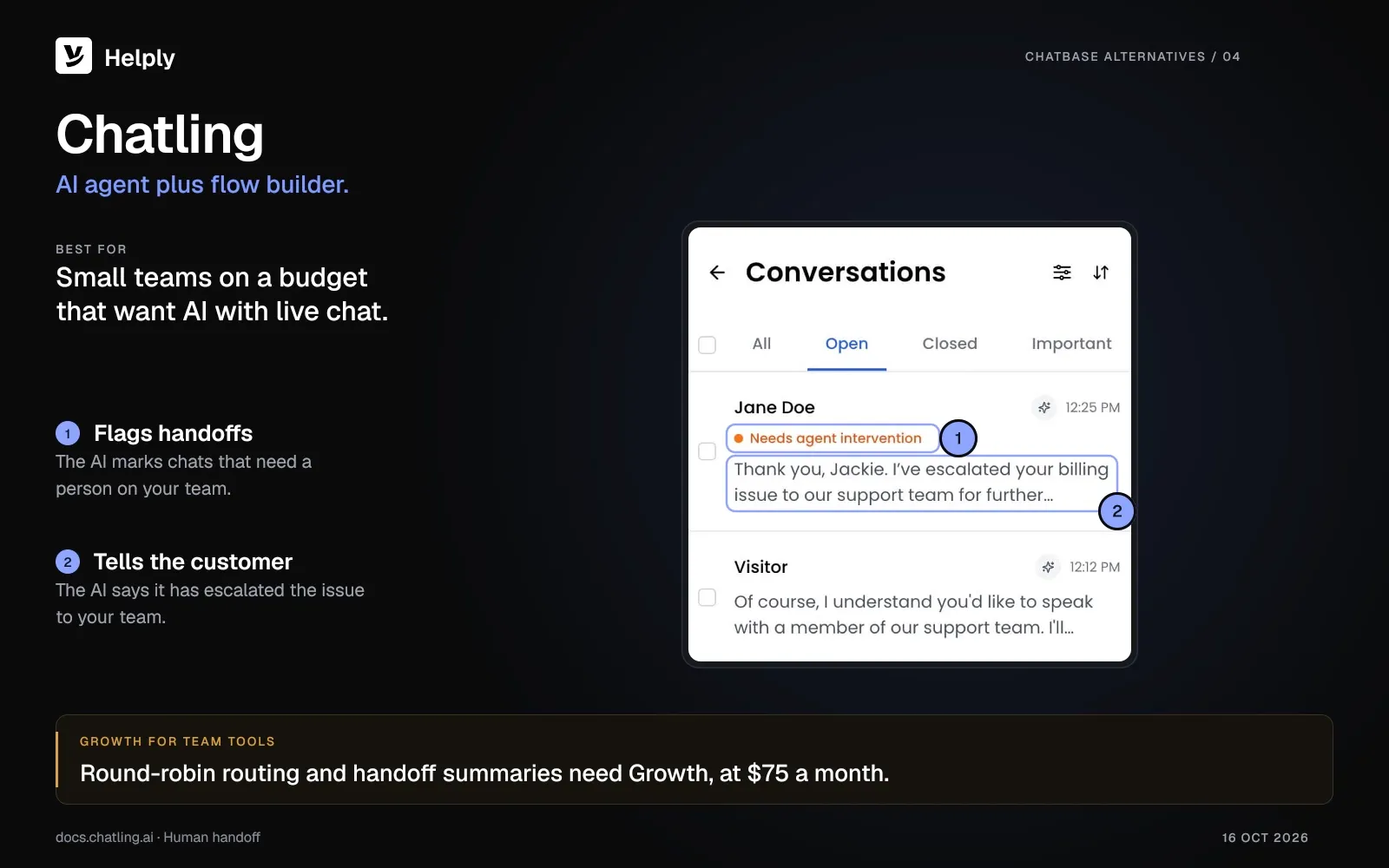
- Live chat and handoff. The AI flags conversations that need a person, and your team takes over from one inbox, on every plan.
- Channels. Website on every plan, plus WhatsApp, Instagram, Messenger and Telegram from Starter.
Pricing:
Free covers unlimited chats, 200 AI credits a month and 1 seat. Starter costs $25 a month for 1,750 AI credits, and Growth costs $75 for 6,000. On annual billing, they cost $21 and $63 a month.
Pros:
- Extra AI credits cost $10 a month per 1,000, so you can add capacity without changing plans.
- Live chat and human handoff come on the free plan. G2 reviewers rate Chatling 4.7 out of 5 across 79 reviews.
Cons:
- Each AI message uses 0.5 to 25 credits, depending on the model.
- Round-robin routing and handoff summaries need the Growth plan, at $75 a month.
Best for: Small teams that want a low-cost AI agent with live chat and guided flows on web and messaging channels.
5. Botsonic: Best for a Simple, Low-Cost Website Bot
Botsonic, from the makers of Writesonic, fits teams that want a branded website bot at a low entry price.
Botsonic starts at $19 a month, or $16 on annual billing, against Chatbase's $40 and $32.
Key Features:
- Chat history. You can read past chats, filter them by feedback and export them.
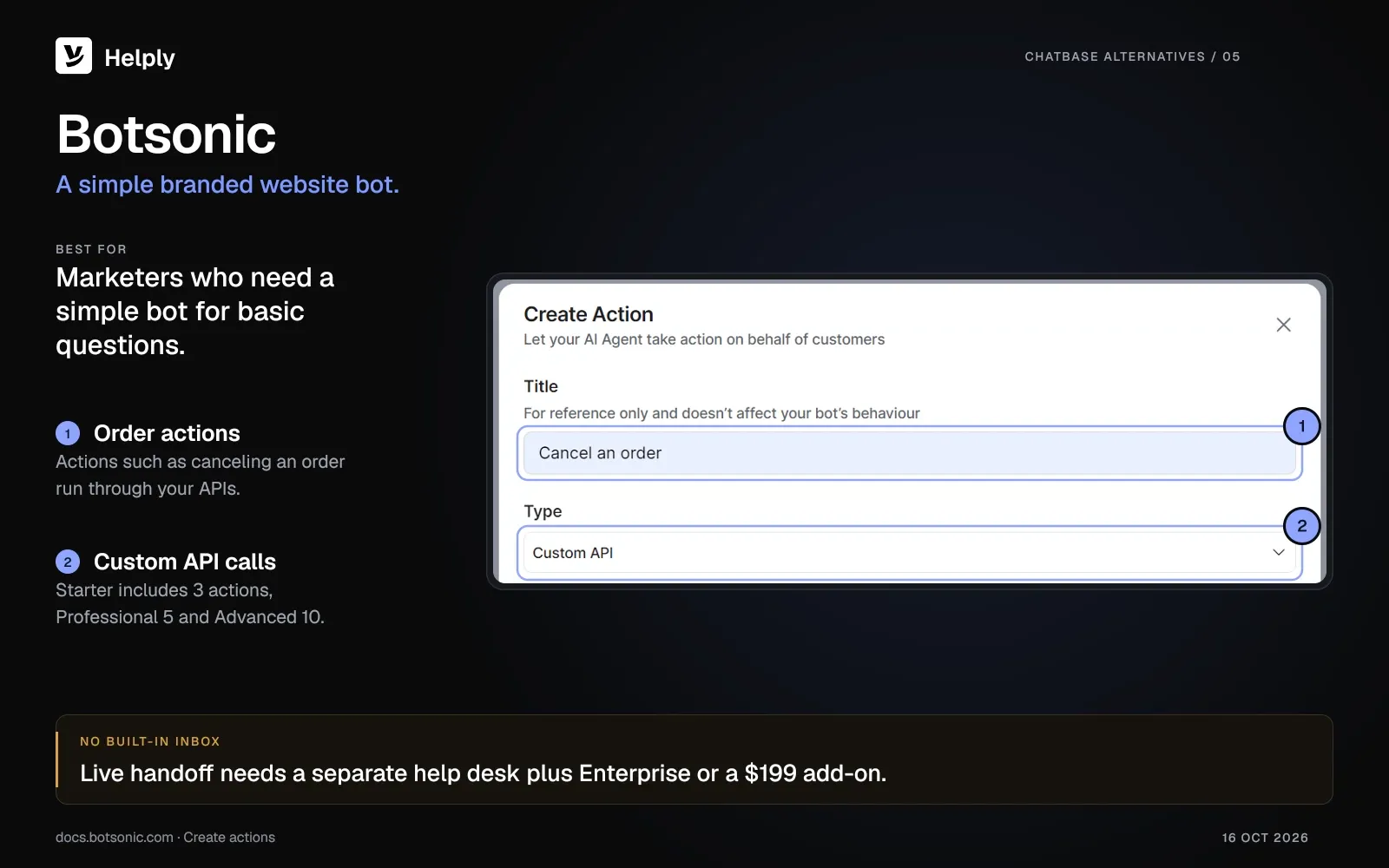
- Custom API actions. Actions such as canceling an order run through your APIs, with 3 to 10 actions by plan.
- Callback requests. On Professional, a Request callback button lets visitors ask your team to call them.
Pricing:
Botsonic offers a 7-day free trial. Starter costs $19 a month for 1,000 messages, Professional $49 for 3,000 and Advanced $299 for 12,000. On annual billing, the three plans cost $16, $41 and $249 a month.
Pros:
- Starter, at $19 a month or $16 on annual billing, is the lowest paid entry among these tools.
- Custom API actions start on Starter, the entry plan.
Cons:
- No built-in human inbox or ticketing.
- Handoff to Zendesk or Freshdesk needs a $199-a-month add-on or Enterprise, and Salesforce handoff needs Enterprise.
Best for: Marketers or small business owners who need a simple branded website bot for basic questions.
6. eesel AI: Best for AI on Your Existing Helpdesk
eesel AI is for teams that want AI inside their existing help desk, such as Zendesk, Freshdesk, Intercom or Gorgias.
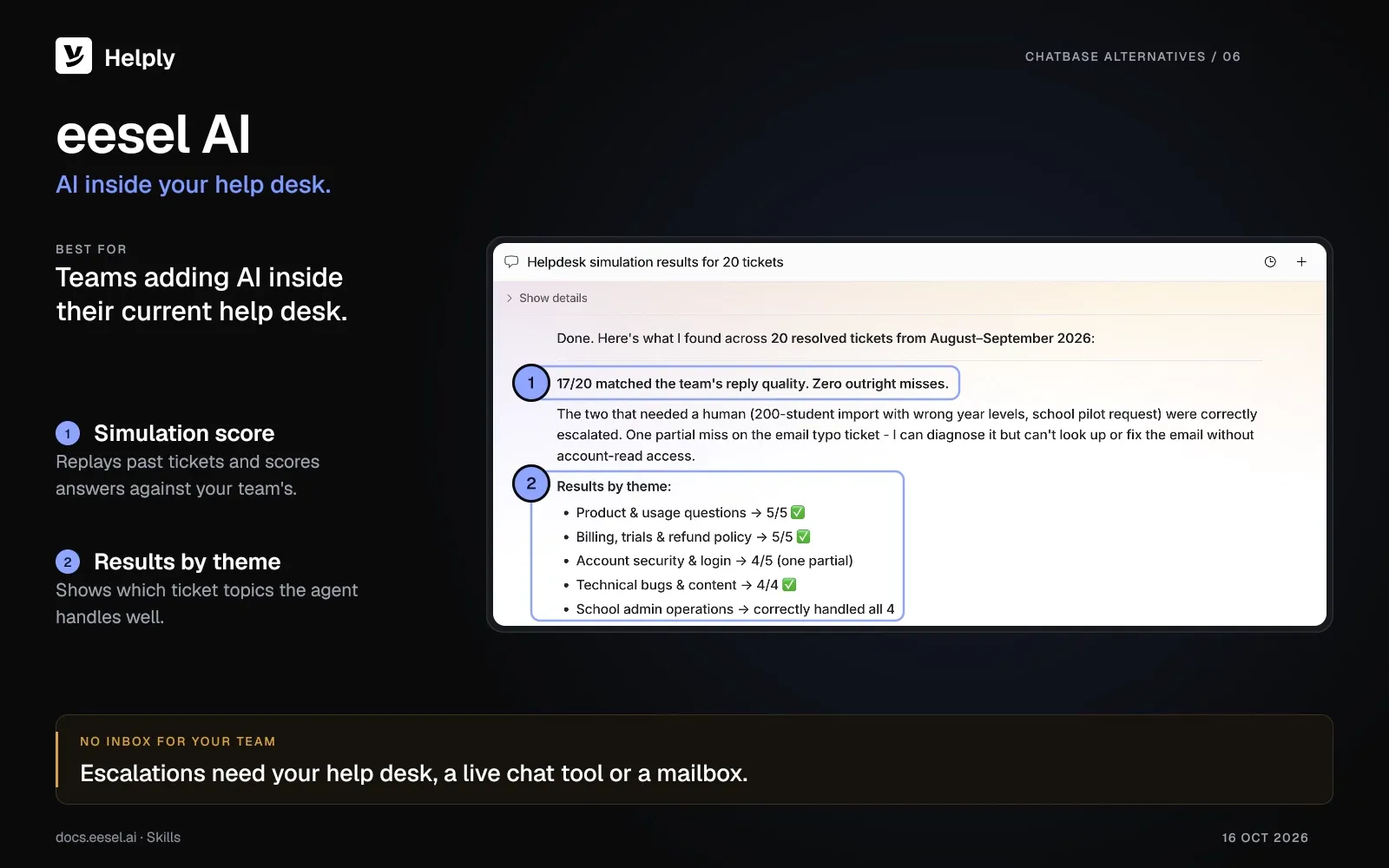
In most outside help desks, Chatbase's agent stops at opening a ticket, while eesel's agent works inside the help desk itself. Before launch, it replays past tickets and scores its answers against your team's.
Key Features:
- Trains on past tickets. With a full help desk connection, it learns your team's voice and proven answers.
- Simulation. You review its scores on past tickets, topic by topic, before you go live.
- Channels and sources. A chat bubble, Slack, email and help desk connections, plus Confluence and Google Docs as knowledge sources.
Pricing:
eesel AI prices its Teammate plan by monthly credits, with no platform fee and no per-seat price. Teammate starts at $299 a month for 500 credits and runs to $1,749 a month for 5,000 credits.
Most tickets or chats the agent works on use 1 credit, and extra credits cost $0.80 each. The free plan includes 100 credits for 7 days.
Above 5,000 credits a month and on Enterprise, eesel AI sets custom pricing.
Pros:
- It adds AI without changing your help desk.
- Adding teammates doesn't raise the price, because eesel charges no per-seat fee.
Cons:
- It has no inbox for your human agents, so you need a help desk, live chat tool or mailbox for escalations.
- Every task the agent works on uses credits, including tasks that go wrong.
Best for: Support or IT teams that like their help desk and want AI working inside it.
7. Chatbot.com: Best for No-Code Flows With Human Takeover
Chatbot.com fits teams that want no-code flows and AI answers from their knowledge base, and Text sells it with its AI Agent.
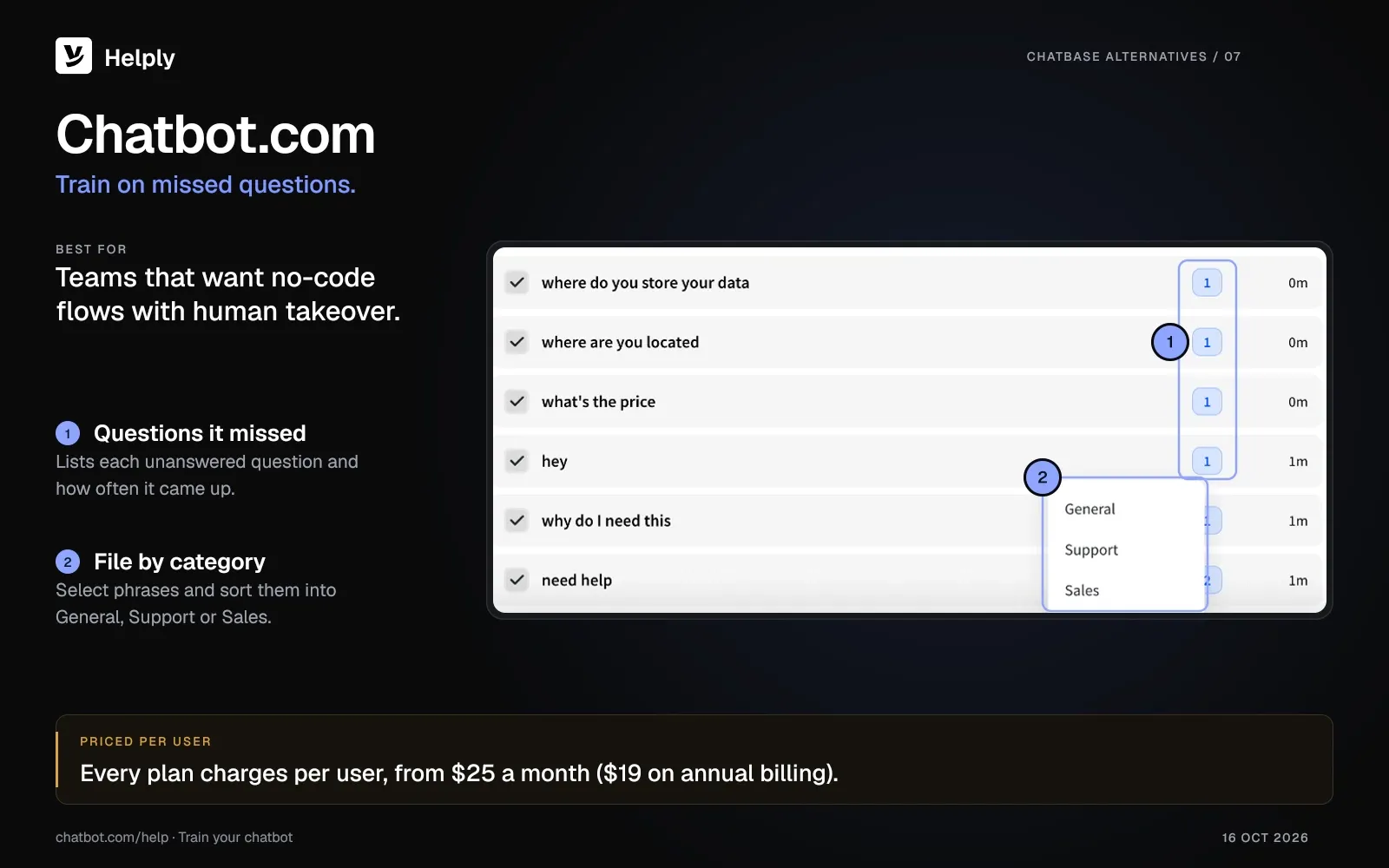
Compared with Chatbase, which keeps live chat for the Standard plan and up, Chatbot.com includes human takeover on every plan. Its Unmatched report lists the questions the bot couldn't answer and how often each came up.
Key Features:
- Flows plus AI answers. Build structured paths and let AI handle the rest.
- Unmatched questions report. It shows where the bot needs more training.
- Built-in human takeover. Your team picks up a chat in the same inbox, with ticketing included.
Pricing:
- Chatbot.com Essential costs $25 per user a month, or $19 on annual billing, with 10 AI resolutions a month. Growth costs $99 per user a month, or $79 on annual billing, with 200.
- Extra AI resolutions cost $0.99 each or $49.50 per 50. Chatbot.com offers a 14-day free trial and no permanent free plan.
Pros:
- The inbox, ticketing and human takeover come with Essential, the entry plan.
- Growth includes 10 AI agents and 200 AI resolutions a month.
Cons:
- Chatbot.com charges per user on every plan, so your bill climbs as you add teammates.
- AI resolutions past the monthly allowance cost $0.99 each.
Best for: Teams that build no-code flows and hand tricky chats to their own agents.
A Support-Team Scorecard: What to Grade Beyond “Answers FAQs”
If a chatbot sits on your support queue, judge it on more than the first easy answer.
Grade any Chatbase alternative on how it handles the hard ticket:
- Human escalation. If the bot can't solve it, does the conversation land in a shared inbox with the history attached?
- Channel depth. Does it cover the channels your customers use, including Slack Connect and Microsoft Teams if you sell to businesses?
- Account context. Can the AI look up the customer's account, order or bill before it answers?
- Signals from conversations. Does the tool flag churn risk, upgrade intent and product feedback to the right person?
- Cost as volume grows. Does the bill grow with seats, conversations, messages or AI work, and can you cap it?
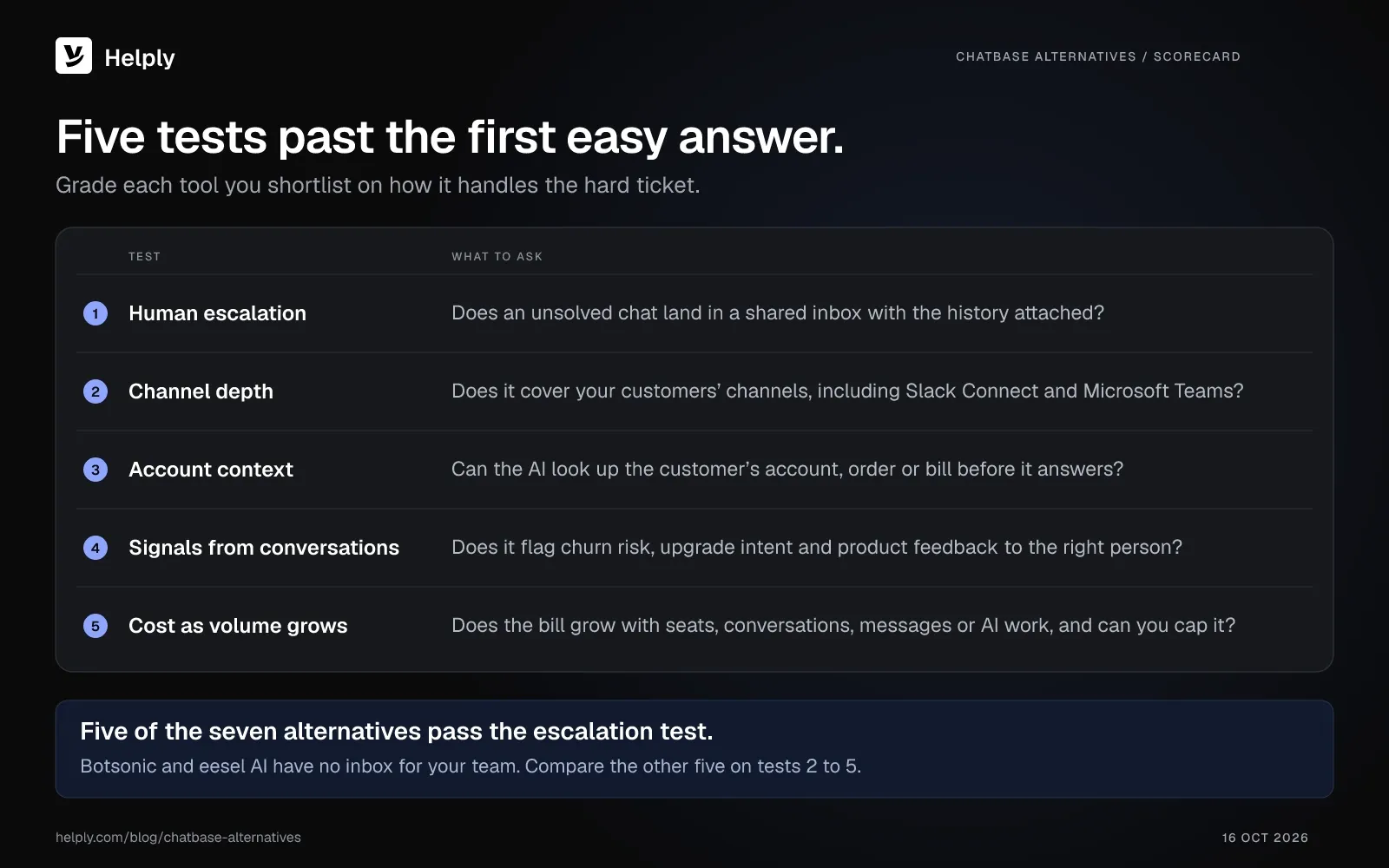
Five of the seven alternatives have a built-in inbox and pass the escalation test, so compare them on the remaining four tests. With Helply's customer records, your team and the AI agents see the account behind each conversation.
How to Choose a Chatbase Alternative
Work through five questions in order:
- Is this a support operation or a website bot? For a low-cost website bot, start with Chatling or Botsonic. For a support operation, compare Helply, Tidio, Botpress and Chatbot.com, or add eesel AI to your current help desk.
- Do you need human escalation in one inbox? Botsonic and eesel AI have no inbox for your team, so handoffs go to a separate tool.
- Does the AI need account context and actions? If answers depend on an account or order, compare the actions each tool can run. Lyro checks Shopify orders, Botsonic and Chatbase call your own APIs, and Helply connects to 60-plus tools.
- Can your team run it day to day? A non-technical support team will want guided setup; Botpress suits teams with developers.
- How much will you pay at volume? Chatbase bills per message credit, Tidio and Botpress per conversation, Chatbot.com per user and Helply per unit of AI work. Pick the meter that fits your volume before traffic grows.
What Should I Use Instead of Chatbase for Customer Support?
For customer support, choose a Chatbase alternative with a shared inbox and human escalation built in.
Helply suits teams that want AI agents and a full help desk, with unlimited users and credits that carry into the next month.
To keep your current help desk and add AI inside it, weigh eesel AI next.
What’s the Best Free Chatbase Alternative?
Chatling's free plan suits a single website bot, with live chat, handoff and 200 AI credits a month for one seat.
Tidio's free plan covers 50 human-handled conversations a month and 50 Lyro conversations in total. Botpress gives you a one-time batch of 100 conversations, so treat it as a trial.
Helply has no free plan, and its paid credit blocks start at $49 a month.
Moving off a Chatbase Bot
Start by gathering the docs and URLs you trained Chatbase on. You'll reuse them as the knowledge base in your new tool.
Rebuild or import that content, reconnect your channels and test on real past questions before going live.
Set escalation rules that route handoffs to your inbox. Connect your CRM and billing tools so the agent can look up accounts. In Helply, the Knowledge Agent finds questions your docs don't cover.
Keep Chatbase or Move to a Support Platform?
Keep Chatbase, or move to Chatling or Botsonic, if you need a website bot on a tight budget. Pick Tidio for a store and Botpress if developers will build the agent. Choose Chatbot.com for no-code flows with human takeover, or eesel AI to add AI inside your current help desk.
Move to Helply if your chat has become a support channel that needs a full help desk and unlimited users.
Credits you don't use carry into the next month, while Chatbase plan credits reset on the 1st. The smallest credit block is $49 a month for 500 credits, and you save 15% on annual billing.
At LingQ, Helply's agents delivered an 88% resolution rate. Support volume fell about 50% as the user base grew 50% year over year, with the same team. "People asking the agent questions before signing up are now converting," says Zoran Simicic, Head of Customer Support.
Start with your website chat and one inbox. Connect your docs, set escalation rules and watch which conversations the agent resolves before you add more channels.
Frequently asked questions
Chatbase is an AI agent platform for customer experience and support. You build agents from your own content and run them on website chat, email, WhatsApp, Slack and voice. Paid plans start at $40 a month, or $32 on annual billing.
The main Chatbase competitors are chatbot builders such as Tidio, Botpress, Chatling, Botsonic and Chatbot.com. Support platforms with AI agents, including Helply, Intercom's Fin and Zendesk's AI agents, compete with it. Another rival, eesel AI, adds AI inside your existing help desk.
Yes, for an AI agent across web chat and other channels, with the Chatbase Helpdesk from the Standard plan. Standard includes 3 seats, and extra members need a paid dashboard add-on.
As of October 2026, Chatbase pricing has three self-serve plans: Hobby at $40 a month, Standard at $150 and Pro at $500. On annual billing they cost $32, $120 and $400 a month. Plans include 700, 4,000 and 15,000 message credits a month, extra credits cost $40 per 1,000, and Enterprise is custom.
Chatbase bills 1 to 5 message credits per model request, depending on the model, and actions can add requests to one reply. Add-ons cost extra: $25 a month for each additional agent and $99 a month to remove the Chatbase branding. Plan credits don't roll over, and extra credits cost $40 per 1,000.
Yes, Chatbase has live chat from the Standard plan, at $150 a month or $120 on annual billing. Chatbase Live Chat passes a conversation to a person in the Chatbase Helpdesk. Its Escalations action can open tickets in nine other help desks, such as Zendesk and Freshdesk.
In October 2026, Chatbase's pricing page listed no free plan, though its docs describe a $0 Free plan. That plan runs the default model and can't take add-ons. Each paid plan has a 7-day trial.
Chatbase's October 2026 scores were 4.8 out of 5 on G2 from 46 reviews and 4.3 on Capterra from 73. On Trustpilot it scored 4.0 from 69 reviews, and 28% of those were one-star. Capterra reviewers gave ease of use 4.6 and customer service 3.8.
Among Chatbase alternatives, Botsonic has the lowest paid entry, at $19 a month or $16 on annual billing. Tidio and Chatling include live chat on their free plans, and Botpress suits teams with developers. If chats need a person, Helply, Tidio, Chatling, Botpress and Chatbot.com include a built-in inbox.
Chatbase bills message credits per model request, from $40 a month on Hobby, with 2 to 5 seats included per plan. Each Helply AI task costs 1, 4 or 12 credits, and the entry block is 500 credits for $49 a month. Every Helply plan includes unlimited users, and unspent credits carry into the next month before they expire.
Yes: eesel AI trains on past tickets through a full help desk connection. Helply's Support Agent reads past tickets, the account and the order before it acts. Helply's Knowledge Agent learns from support conversations, and your team can review its suggestions before customers or other AI agents see them.
Tidio, Chatling and Botpress offer free plans, and eesel AI gives 100 free credits for 7 days. Tidio's free plan covers 50 billable conversations a month, Chatling's 200 AI credits a month and Botpress's 100 conversations once. Helply has no free plan, though a 14-day trial gives you 1,000 credits with no card.
About the author

Bildad Oyugi
Head of Content
Bildad is a digital marketing expert with over 5 years of experience in copywriting, content marketing, and editing. Outside of work, he enjoys videography and spending time with his family.
Keep reading

Alternatives
Document360 vs HelpKit vs Helply: Features and Pricing Compared (2026)
Bildad Oyugi · 12 min read

Alternatives
5 Best ManyChat Alternatives in 2026: Pricing and Features Compared
Bildad Oyugi · 15 min read

Alternatives
6 Best Intercom Fin Alternatives for Support Teams in 2026
Bildad Oyugi · 15 min read