Adding an AI agent to your website is one of the fastest ways to improve customer experience. Visitors get instant answers. Your support team handles fewer repetitive questions. And you capture more leads while you sleep.
The best part? You do not need to be a developer to do it.
This guide walks you through how to install it on your site. We will use Helply as our example since the setup takes about 5 minutes and works with any website.
Before You Start: What You Need
Adding an AI agent to your website requires minimal technical knowledge. Here is what you should have ready:
1. Access to Your Website's Code
You will need to add a small snippet of JavaScript to your site. This means you need either:
- Direct access to your HTML files
- Access to your CMS (WordPress, Shopify, Webflow, etc.)
- Access to a tag manager like Google Tag Manager
2. Your Knowledge Base Content
AI agents work best when they have information to draw from. This could be:
- Help center articles
- FAQ pages
- Product documentation
- Past support tickets
- Any text content about your business
3. Clear Goals
Before you install anything, know what you want the AI agent to accomplish:
- Answer common customer questions?
- Qualify leads and capture contact information?
- Help users navigate your product?
- Reduce support ticket volume?
Step-by-Step: How to Add an AI Agent to Your Website
The exact steps vary depending on which AI agent platform you choose. But the general process looks like this:
Step 1: Choose Your AI Agent Platform
There are dozens of AI agent platforms available. When evaluating options, consider:
- Ease of setup: How quickly can you get it running?
- Knowledge base integration: Can it learn from your existing content?
- Customization: Can you match it to your brand?
- Integrations: Does it work with your helpdesk, CRM, etc.?
- Pricing: Does it fit your budget?
- Resolution vs. deflection: Does it actually solve problems or just route them elsewhere?
Step 2: Create Your Account and Configure the Agent
Most platforms have you:
- Sign up for an account
- Connect your knowledge sources (help docs, website content, etc.)
- Configure the agent's behavior and tone
- Customize the widget appearance to match your brand
- Test the agent before going live
Step 3: Get Your Embed Code
Once configured, the platform will give you a JavaScript snippet. It typically looks something like this:
<script
src="https://platform-name.com/widget.js"
data-id="your-unique-id"
async>
</script>
Step 4: Add the Code to Your Website
Where you paste the code depends on your website platform:
| Platform | Where to Add the Code |
|---|---|
| Plain HTML | Paste before the closing </body> tag |
| WordPress | Use a plugin like Insert Headers and Footers, or add to theme footer |
| Shopify | Go to Online Store > Themes > Edit Code > theme.liquid |
| Webflow | Project Settings > Custom Code > Footer Code |
| Wix | Settings > Custom Code > Add Code to Body |
| Squarespace | Settings > Advanced > Code Injection > Footer |
| Google Tag Manager | Create a Custom HTML tag and set it to fire on All Pages |
Step 5: Test and Go Live
After adding the code:
- Refresh your website
- Look for the chat widget (usually bottom-right corner)
- Ask a few test questions
- Check that answers are accurate
- Test on mobile devices too
Walkthrough: Adding Helply to Your Website
Let's walk through a real example using Helply, the best ai agent for customer support. The entire process takes about 5 minutes.
Why Helply?
Most AI chatbots just deflect tickets to your human team. Helply is different. It is an AI agent that actually resolves tickets, not just a chatbot that deflects them.
Helply learns from your knowledge base and past support tickets to provide accurate, helpful answers.
Step 1: Navigate to the Launch Page
After signing up for Helply and connecting your knowledge base:
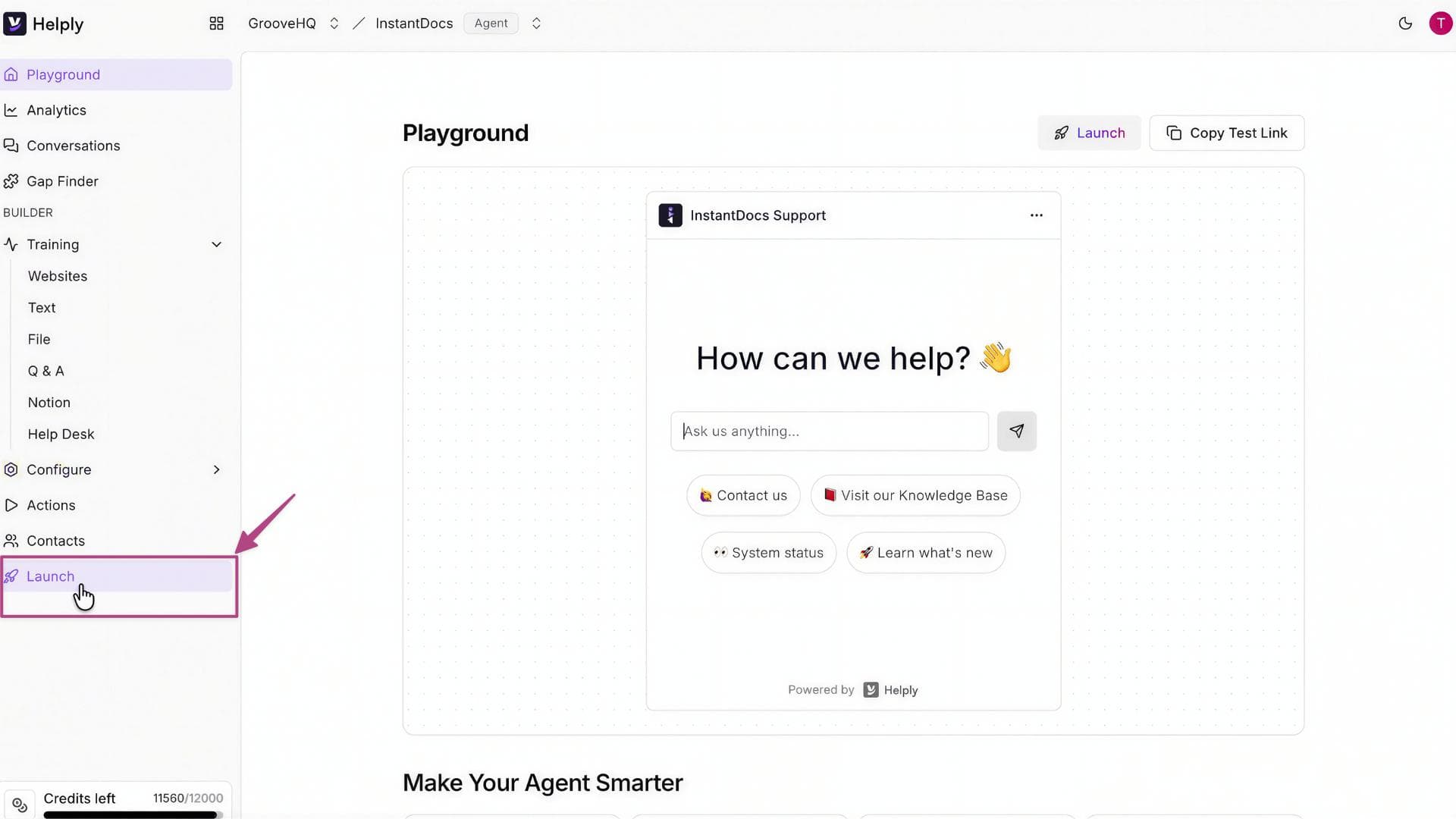
- Log into your Helply dashboard
- Look at the sidebar menu on the left
- Click on the "Launch" tab (near the bottom of the menu)
Step 2: Copy the Integration Script
On the Launch page, you will see a section titled "Add this snippet to your website or application to load the AI agent."
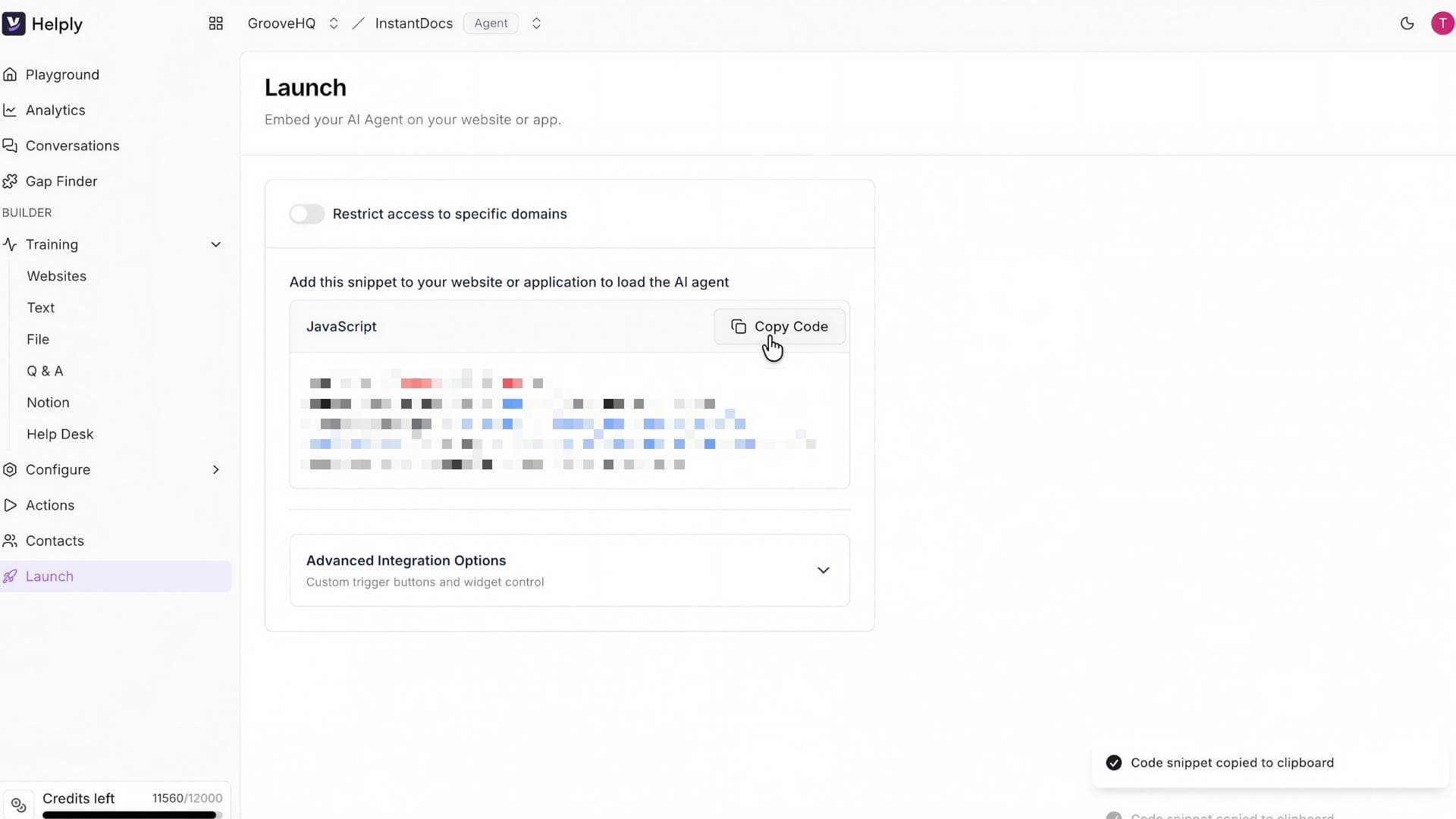
Below that heading is a JavaScript code block. Click the "Copy Code" button next to it.
The code will look something like this:
<script
src="https://helply.com/widget.js"
data-agent-id="your-unique-agent-id"
async>
</script>
Step 3: Paste the Script into Your Website
Now add the code to your website:
- Open the HTML code of the page where you want the agent to appear
- Find the <body> tags in your HTML file
- Paste the copied script at the very end of the body section, just before the closing </body> tag
- Save your changes
Example placement:
<html>
<head>
<!-- Your head content -->
</head>
<body>
<!-- Your website content -->
<!-- Helply AI Agent - paste here -->
<script
src="https://helply.com/widget.js"
data-agent-id="your-unique-agent-id"
async>
</script>
</body>
</html>
Step 4: Verify It Works
After saving your changes:
- Refresh your website
- You should see the Helply chat widget appear (usually in the bottom-right corner)
- Click it and ask a test question
- Check that the response draws from your knowledge base
That's it. Your AI agent is live.
What Makes Helply Different
Helply is not just another chatbot. Here is what sets it apart:
| Feature | What It Means For You |
|---|---|
| Autonomous Resolution | Helply does not just answer questions. It takes action to resolve issues like processing refunds, updating accounts, and closing tickets. |
| No-Code Setup | Pull in your support data automatically. No prompt engineering or technical expertise required. |
| Learns From Past Tickets | Helply learns from your existing documentation and past support conversations to improve accuracy over time. |
| 40+ Languages | Serve global customers without extra effort or translation costs. |
| Helpdesk Integrations | Works with Zendesk, Freshdesk, Groove, Intercom, and more. No need to replace your current tools. |
| Measurable ROI | Track exactly how many tickets get resolved, time saved, and impact on customer satisfaction. |
Best Practices for AI Agent Success
Installing the widget is just the beginning. Here is how to get the most value from your AI agent:
1. Keep Your Knowledge Base Updated
Your AI agent is only as good as the information it has. Make sure to:
- Update help articles when products or policies change
- Add new FAQs based on common questions
- Remove outdated content that might confuse the agent
2. Monitor Performance
Check your AI agent's analytics regularly:
- What questions are being asked most often?
- Where is the agent struggling to provide good answers?
- What is the resolution rate vs. escalation rate?
3. Always Offer a Human Fallback
AI agents handle most questions well, but some situations need a human. Make sure visitors can easily reach a real person when needed. This builds trust and catches edge cases the AI might miss.
4. Start With High-Volume, Low-Complexity Questions
Let your AI agent prove itself on common questions first:
- "What are your business hours?"
- "How do I reset my password?"
- "Where is my order?"
- "What is your return policy?"
As confidence grows, you can expand its responsibilities.
Ready to Add an AI Agent to Your Website?
Adding an AI agent is one of the highest-impact changes you can make to your website. Visitors get instant help.
Your team handles fewer repetitive questions. And you capture leads even when nobody is online.
But here is the thing: you need more than just an AI that answers questions.
You need an AI agent that actually solves problems. One that can upgrade accounts, send invoices, process refunds, check order status, and pull tracking details.
One that hands off to human agents with full context when needed. All in your brand voice, with guardrails, deep analytics, and full transparency over every conversation.
Helply does all of that. But today those features are table stakes.
What Actually Sets Helply Apart: The VIP White Glove Concierge Program
What separates Helply is not just what we deliver. It is how we deliver it.
With our VIP White Glove Concierge program, you do not just get an AI agent. You get a team:
- Access to our AI experts for fine-tuning your agent
- A private Slack channel for one-on-one support
- Weekly optimization reviews to improve performance over time
Think of us as an extension of your team.
And this is not just for enterprise customers. The VIP program is free for every Helply customer.
We configure your agent. We train it on your help desk. And we guarantee measurable results.
The Helply Guarantee: 50% Resolution in 90 Days or You Don't Pay
We do not just launch your AI and walk away. We stay until it performs.
Helply guarantees 50% AI resolution accuracy in your first 90 days. Or your money back.
That means at least half of your support tickets get resolved by AI without any human involvement. Real resolution, not just deflection.
Join the VIP program today. Free for all Helply customers.
Frequently Asked Questions
Do I need coding skills to add an AI agent?
No. Most AI agent platforms give you a simple code snippet to copy and paste. If you can edit a Google Doc, you can add an AI agent to your website.
Will the AI agent slow down my website?
No. Modern AI agent widgets load asynchronously, meaning they do not block your page from loading. The impact on page speed is minimal.
How long does setup take?
With platforms like Helply, you can have an AI agent live on your website in about 5 minutes. Training it with your knowledge base takes a bit longer, but the basic setup is fast.
What if the AI gives wrong answers?
Good AI agents let you review conversations and correct mistakes. Over time, the agent learns and improves. Always keep your knowledge base updated to minimize errors.
Can I customize how the AI agent looks?
Yes. Most platforms let you customize colors, position, greeting messages, and the agent's name to match your brand.
Does Helply work with my existing helpdesk?
Yes. Helply integrates with Zendesk, Freshdesk, Groove, Intercom, and other major helpdesk platforms. You do not need to switch tools.
About the author

Bildad Oyugi
Head of Content
Bildad is a digital marketing expert with over 5 years of experience in copywriting, content marketing, and editing. Outside of work, he enjoys videography and spending time with his family.


