Key Takeaways:
- Salesforce and HubSpot both cite 1 to 4 weeks as a typical hypercare length. Close the window on exit criteria, such as severity-1 volume back at baseline and a signed handoff.
- In standard support, your team waits for tickets to arrive. Run hypercare as a proactive operating mode, with a named owner, tighter response targets and an exit checklist.
- One bad experience can cost you a customer. Zendesk's CX Trends 2025 found 63% of consumers willing to switch to a competitor after one.
- Hypercare overlaps with Early Life Support (ELS), a stage in ITIL's Service Transition guidance. Practitioners disagree on whether the two terms mean the same thing.
- If a launch needs cover at every hour, a small team can't staff it alone. AI agents can take routine questions around the clock. With unlimited users on every Helply plan, product and engineering can join the queue.
After a launch or migration, customers send a burst of new questions, and your help articles don't cover many of them yet. Hypercare is the extra support you run through those weeks. In your hypercare plan, you set who covers the queue, how fast they answer and when the extra effort stops.
What is hypercare?
Hypercare is a short, time-boxed period of elevated, high-touch support after a major operational change. A typical hypercare period runs 1 to 4 weeks. It ends once your exit criteria pass and your business-as-usual (BAU) team takes back the queue.
Common triggers include a software launch, a platform migration, a customer onboarding, a plan upgrade and a rebrand. During hypercare, your team adds people to the queue, sets tighter response targets and checks ticket volume each day.
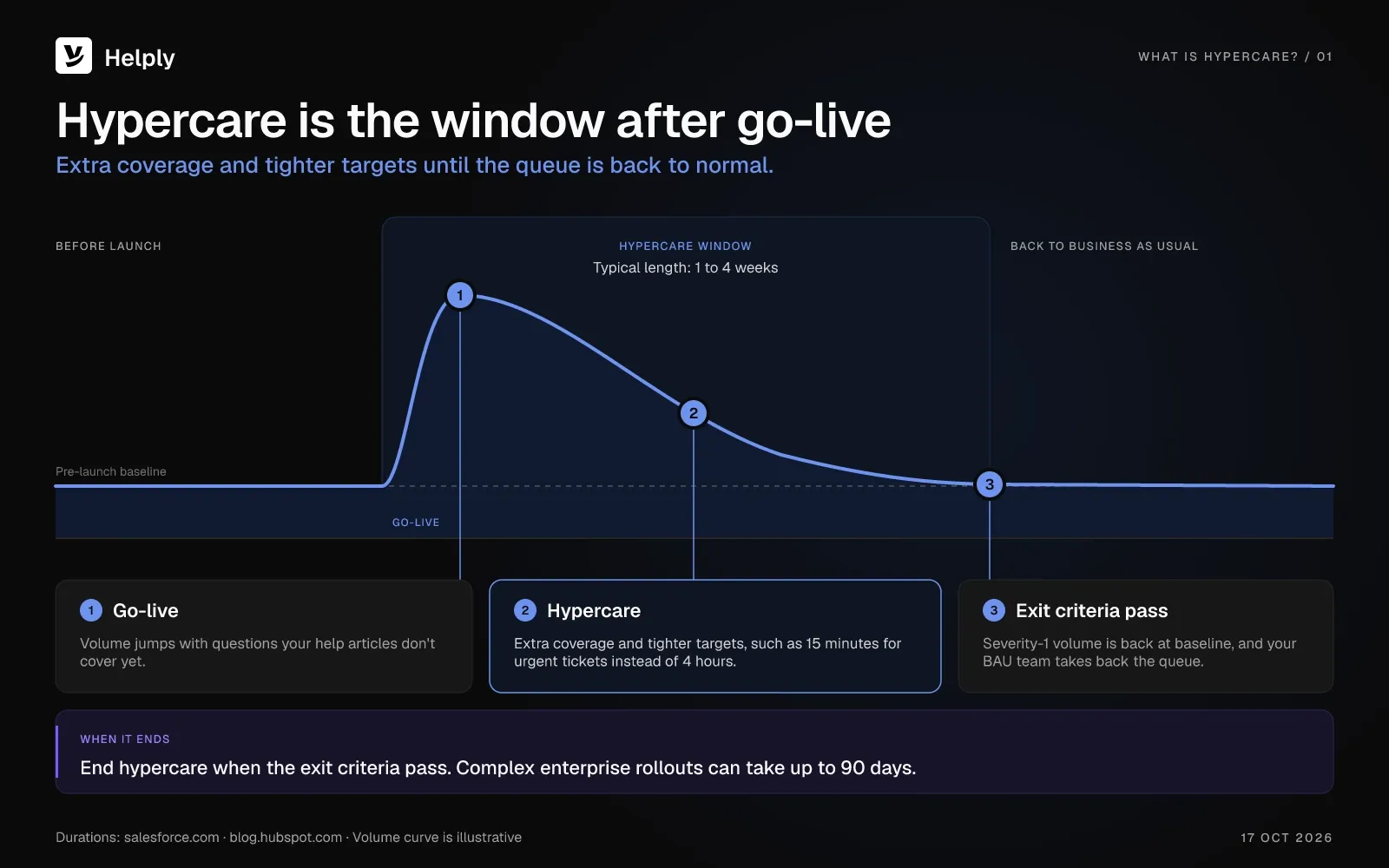
In software development and IT projects, hypercare is the support window after a system goes live. In its Dynamics 365 implementation guide, Microsoft defines hypercare as “a short period after go-live when you provide extra resources and attention to support your users and business processes.”
SAP places hypercare in the Deploy phase of SAP Activate, its implementation methodology. PTC asks the partner that helped implement Windchill+ to keep providing hypercare support “for a predetermined amount of time after go-live.”
Support teams use the same idea for any change their customers feel. A store might plan hypercare for the weeks after it moves to a new checkout. A software company might plan it for a large customer's first month on the product.
Hypercare vs. standard customer support
Standard support reacts. Hypercare anticipates.
| Dimension | Standard customer support | Hypercare |
|---|---|---|
| Posture | Continuous, with no end date | Time-boxed (typical range 1 to 4 weeks, up to 90 days for complex enterprise rollouts) |
| Duration | Your normal target, such as 4 hours | A tighter target for urgent tickets, such as 15 minutes |
| First-response SLA | Hours (often 4 hours) | Minutes (often 15) |
| Staffing model | Your business-as-usual (BAU) support team | Named hypercare owners plus extra coverage |
| Trigger | Customer-initiated tickets | A planned change (launch, migration, onboarding) |
| Exit definition | None, since it runs all the time | Exit criteria, a named owner and a signed handoff |
| Communication mix | Inbound tickets as they arrive | Proactive outreach plus a communication plan |
| Metrics focus | CSAT, resolution time | Adds escalation rate, time to first value and customer signals |
Between standard support and hypercare, response targets and staffing change the most. If your first-response target is 4 hours and you set 15 minutes for urgent hypercare tickets, you can't close that gap with overtime. Treat the window as a separate operating mode, with named owners and a schedule of its own.
Hypercare vs. Early Life Support (ELS)
Hypercare and Early Life Support (ELS) describe related stretches after a go-live. ELS is a stage in the service lifecycle of ITIL, an IT service management framework. In the 2011 ITIL glossary, ELS sits under Service Transition and occurs “at the end of deployment and before the service is fully accepted into operation.”
During ELS, the service provider reviews service levels and monitoring thresholds and may add resources for incident and problem management. Teams that run hypercare put more weight on customers, with proactive outreach and new help content. On a ProjectManagement.com thread, practitioners split three ways: same thing, different things or “not standard terms.”
When hypercare is needed
The same operating mode applies across five trigger events:
- New customer onboarding, from one large account going live to a wave of signups after a launch campaign.
- Plan upgrade or tier expansion when an existing customer crosses into a new feature set or higher-touch SLA.
- Major feature or product release, such as a new AI feature in your app or a redesigned storefront.
- Platform migration or version upgrade, either your migration or your customer's migration to your new platform.
- Rebrand, merger or acquisition, when customers see new names, logins or invoices and need to know what changed.
How Long Does Hypercare Last?
A typical hypercare period lasts 1 to 4 weeks, according to Salesforce and HubSpot. HubSpot adds that complex enterprise rollouts can take up to 90 days. Plan a length, but end the window on exit criteria you agree before launch.
Sitecore plans 2 to 3 weeks for a Content Hub go-live. Optinus puts hypercare for business transformation projects at 4 to 12 weeks.

Smaller changes sit near the short end, while migrations and large implementations run longer. Plan the length of the window around the change you're making:
| Scenario | Starting window to plan | Exit signal |
|---|---|---|
| New customer onboarding | 2 to 4 weeks | First success milestone reached, no open P1s |
| Plan upgrade or tier expansion | 1 to 2 weeks | New-feature usage stable, no escalations |
| Major feature release | 2 to 6 weeks | Adoption on target, support volume back to baseline |
| Platform migration or version upgrade | 4 to 12 weeks | All workflows rechecked, old systems retired |
| Rebrand, merger or acquisition | 4 to 8 weeks | Total volume back to baseline, few new questions about the change |
| Large system implementation | 6 to 12+ weeks | Handoff signed, all integrations stable |
Every exit signal in the table is a condition you can check, such as a signed handoff or volume back at baseline. Agree on the signals before launch, and end hypercare once all of them hold.
The Benefits of Hypercare Support
You get four benefits from a planned hypercare window: fewer lost customers, faster first success, a set budget and product feedback.
Fewer new customers lost to early problems
A new customer's first problems shape how they see the change. Zendesk's CX Trends 2025 found 63% of consumers willing to switch to a competitor after a single bad experience. During hypercare, your team gives those first problems fast, close attention.
Helply's Churn Agent can spot a struggling new customer before you lose them. It looks for frustration, repeated problems and negative sentiment, and it can alert the account owner or update the customer record.
Faster first success for new customers
Early check-ins, prepared training and fast escalations help customers reach their first success in less time. OnRamp surveyed 161 customer success and onboarding leaders and published the results in May 2025. OnRamp writes that “48% of customers abandon onboarding if they do not see value quickly.”
A defined window you can budget for
During hypercare, you add staff hours and tools for a planned window. The window has a start date and agreed exit criteria, so you can budget for it as a one-off project cost.
Take the plan to finance with its owners and exit checklist attached.
Product feedback from the launch
In hypercare tickets, you see what confuses customers about the change. A recurring ticket can point to a product gap.
Helply's Feature Request Agent ties each product request to the customers and accounts behind it, so your product team sees its impact. The Insights Agent flags an unusual rise in questions or complaints before it becomes obvious.
The Five Phases of Hypercare
Salesforce splits hypercare into four phases, from planning to the move back to normal operations. Give the retrospective its own phase, and you get five, each with one owner.
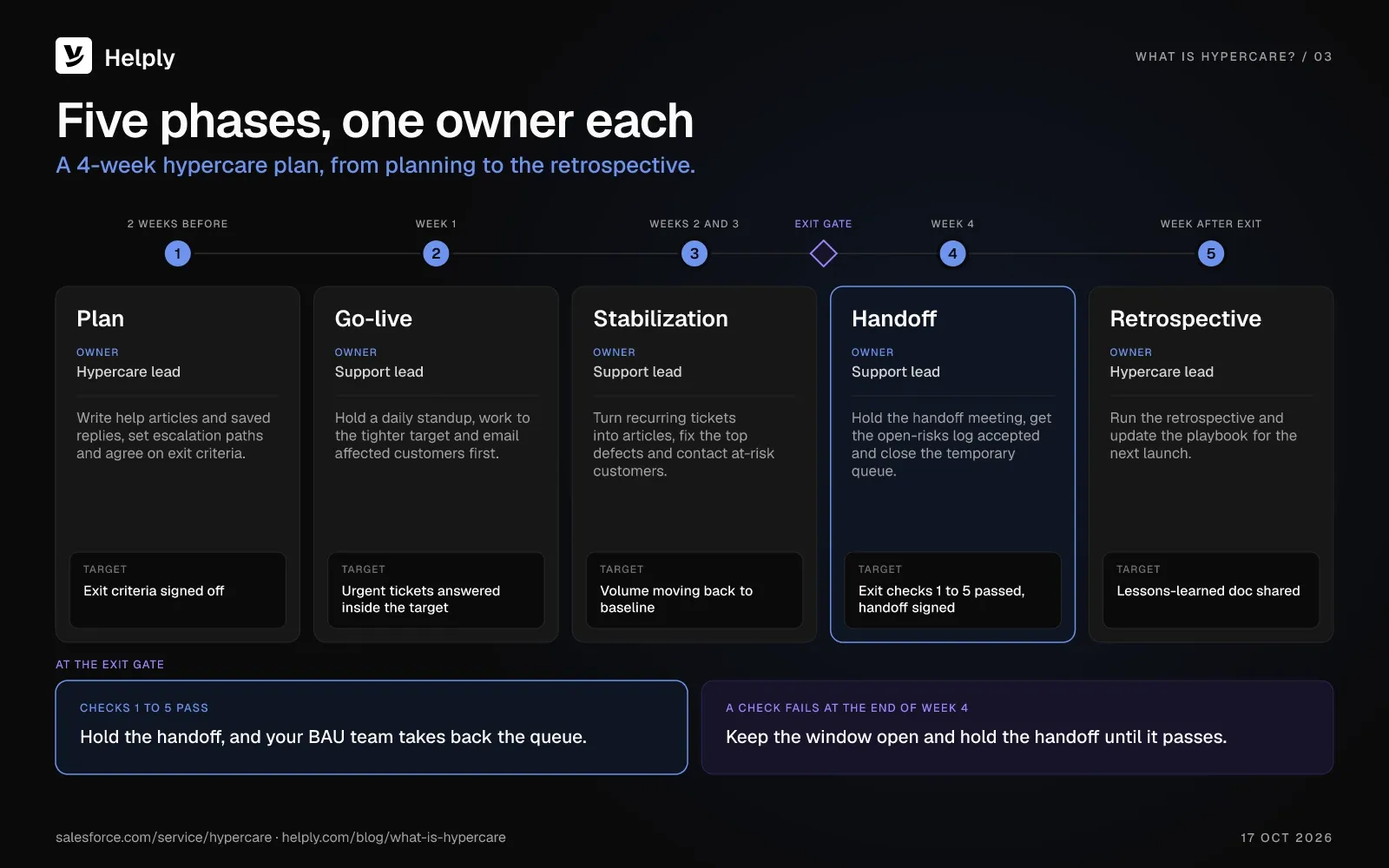
Phase 1: Plan before launch. Owner: hypercare lead
Review the risks, prepare help articles and saved replies for the questions you expect, and agree on escalation paths. Name the team and set the exit criteria before go-live.
Put your launch rules in Helply's Guidelines before go-live, and the AI agents follow them when they handle launch tickets. Set the point where an agent stops and brings in a person, and build Skills for the launch requests you predict. None of this setup uses credits.
Phase 2: Go-live and rapid response. Owner: support lead
Watch ticket volume in real time, hold a short daily standup and keep escalation paths open. Review the first few days in detail to see where your preparation fell short.
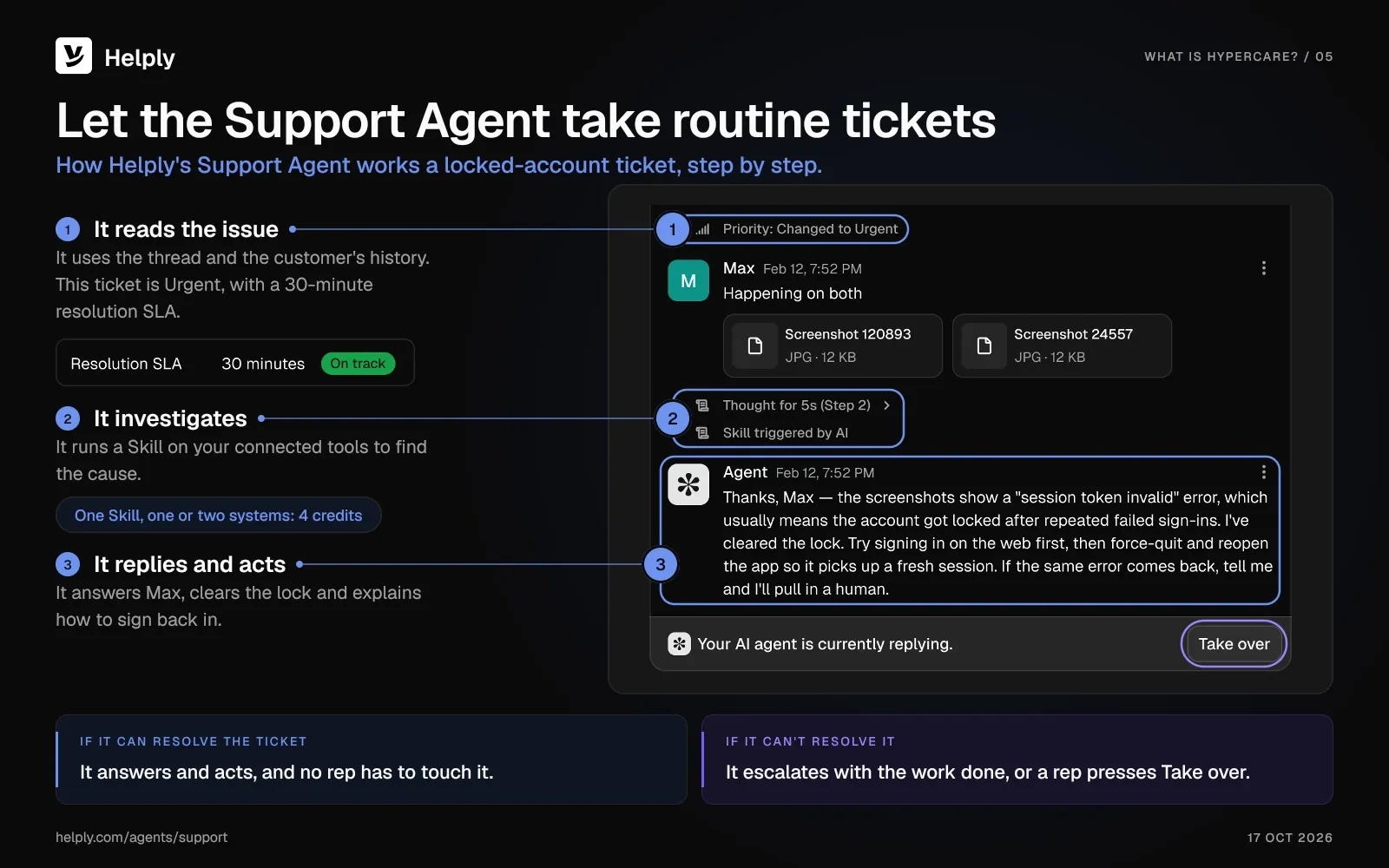
In the go-live spike, Helply's Support Agent can resolve routine questions end to end. It escalates the rest with its investigation prepared, and your reps pick up the hard tickets from there. For each ticket a rep takes, the Assist Agent can draft a reply grounded in the thread, the customer's history and your Guidelines.
Phase 3: Stabilization. Owner: support lead
Turn recurring tickets into help articles, refine your saved replies and flag at-risk customers to their account owners. Publish each article during stabilization, and the next customer with that question finds the answer there.
Helply's Knowledge Agent flags questions your help content doesn't answer well. AI can draft the missing article from the context your reps uncovered in support conversations, and your team edits the draft. After review, you can make each article available to customers and your other AI agents.
Phase 4: Handoff to BAU support. Owner: support lead
Hold a formal handoff meeting, and have the on-call team accept the open-risks log. Close the temporary structures, such as the war room, the dedicated queue and the tighter targets. Start this phase once the first five checks on your exit checklist pass.
Phase 5: Retrospective and feedback loop. Owner: hypercare lead
Write a lessons-learned doc on what broke, what worked and what to fix before the next launch, then update the playbook.
Helply's analytics show conversation volume, response times, escalations and AI performance for the whole window. You can build your next hypercare budget from those numbers without pulling reports from other tools.
A 4-week hypercare plan example
For a 4-week hypercare window, set dates for each phase like this:
| When | Phase | What the team does | Target to watch |
|---|---|---|---|
| 2 weeks before launch | Plan | Write help articles and saved replies, set escalation paths, agree on exit criteria | Exit criteria signed off |
| Week 1 | Go-live | Daily standup, tighter response target, proactive emails to affected customers | Urgent tickets answered inside the hypercare target |
| Weeks 2 and 3 | Stabilization | Turn recurring tickets into articles, fix the top defects, contact at-risk customers | Ticket volume moving back to baseline |
| Week 4 | Handoff | Handoff meeting, open-risks log accepted, temporary queue closed | Exit checks 1 to 5 passed, handoff signed |
| Week after exit | Retrospective | Retrospective and playbook update | Lessons-learned doc shared |
If an exit check fails at the end of week 4, keep the window open and hold the handoff until it passes.
Who Is on a Hypercare Team?
The four core roles
- Hypercare lead (also called the implementation lead or hypercare manager): owns the plan, sets the exit criteria and calls the exit.
- Support lead: runs the daily queue, the escalations and the response targets.
- Account owner: talks with affected customers and watches for churn risk. At many software companies, a customer success manager fills this role.
- Product or engineering contact: fixes defects and confirms workarounds your support team can share.
Larger teams add a communications lead and a data analyst. On a small team, one person may cover two of these roles.
How small teams staff hypercare without burnout
If your launch needs a person on shift at every hour, you need 21 eight-hour shifts a week. At five shifts each, that means more than four full-time people before anyone goes on leave. A team of four that tries it for four weeks works overtime every week, and nobody is free to cover a sick day.
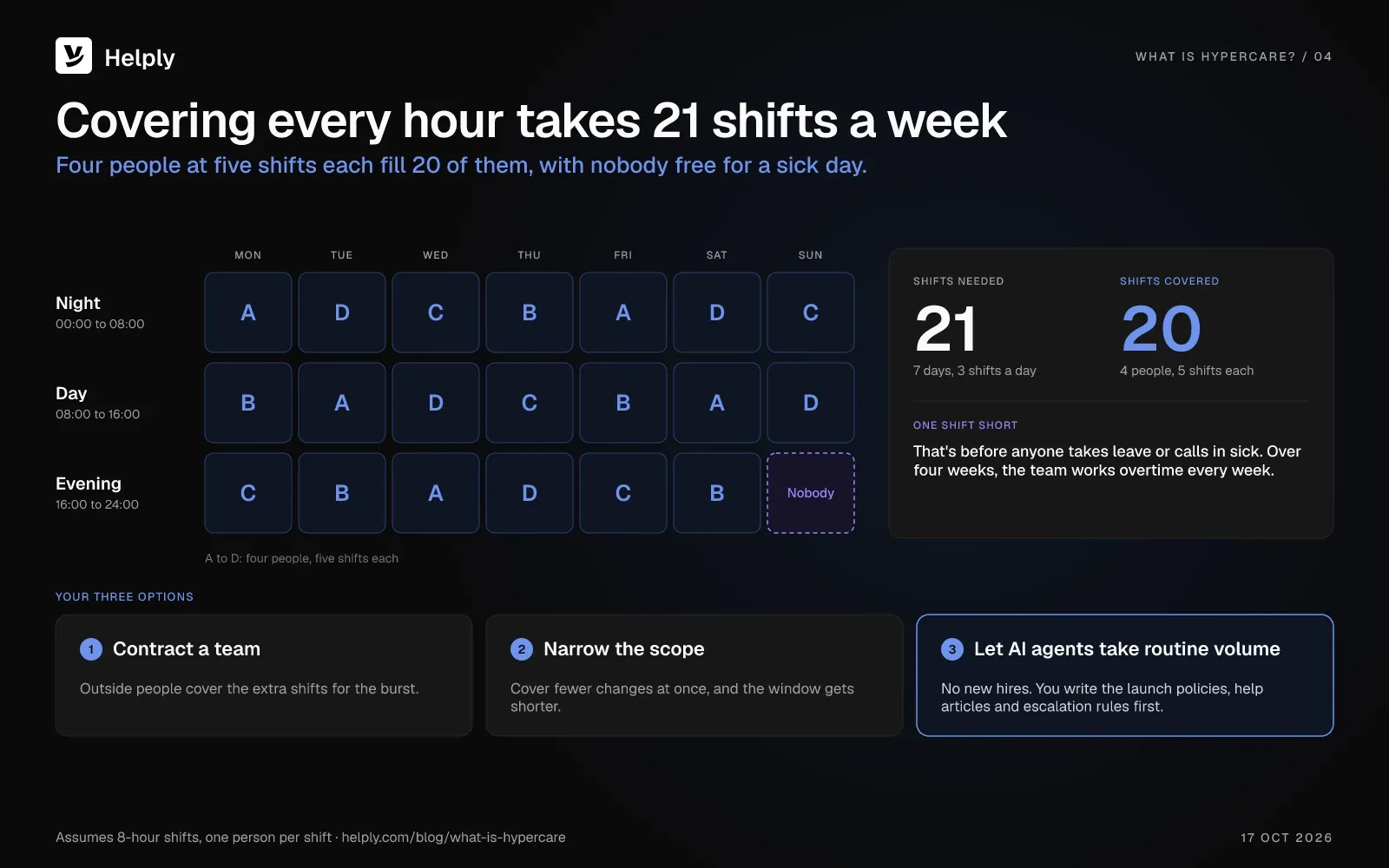
You have three options. Bring in a contracted team for the burst, narrow the scope to shorten the window, or let AI agents take the routine volume.
With the AI option, you add no hires, though you write the launch policies, help articles and escalation rules first. AI agents can then answer routine questions at any hour and hand the hard cases to your team with the work already done.
The Hypercare Exit-Criteria Checklist
End hypercare once all seven checks below pass. Copy the list into your runbook before launch.
- Severity-1 ticket volume returns to a rolling 7-day baseline compared to the 30 days before launch or cutover.
- No open P1 incidents older than 24 hours, and no unresolved P2 incidents older than 5 business days.
- First-response and resolution times are back within standard SLA for two consecutive weeks.
- Customer escalation rate falls below a threshold you agreed in advance, such as 5% of hypercare tickets.
- Knowledge base coverage: every recurring hypercare ticket pattern has a published article or saved reply.
- Handoff sign-off from the launch team to BAU support, and the on-call team accepts the open-risks log.
- Exit decision: the hypercare lead records the call and books the retrospective for the week after exit.
Post the checklist in your team channel and update it each day. Without an owner who can call the exit, hypercare drags on and the tighter targets stay in place.
The Metrics to Track During Hypercare
Keep tracking your standard support metrics during hypercare. Add three more to judge whether your hypercare plan is on track: time to first value, escalation rate and customer signals captured.
Volume and resolution time
Track ticket volume, first-response time, resolution time and repeat issues against your pre-launch baseline. If they aren't moving back toward baseline by week 2 of a 4-week window, revisit the plan.
Time to first value
Time to first value is how long each customer in the hypercare group takes to reach a first success milestone. Examples include a first campaign sent, a first order processed or a first data source connected.
Escalation rate
Escalation rate is the share of tickets that go to engineering, product or an account owner. Expect a high rate in the first week, and watch for it to fall week over week.
Customer signals captured
Count the churn risks, upgrade questions and feature requests that come out of the window. Each one points to a customer, so log it against the account before the ticket closes.
Helply's Revenue Agent spots questions about plans, limits, extra users and other signs a customer is ready for more. It can alert sales or success, update your CRM or start a workflow.
Common Hypercare Mistakes (And How to Avoid Them)
- Treating hypercare as overtime for the usual team. Give the window its own targets, owners and metrics, though the same people may staff it.
- Vague or missing exit criteria. Without them, your team stays on tighter targets for weeks after the queue has settled..
- No proactive comms plan with customers. Tell customers about the change before they find it on their own. Start from one of these customer service email templates.
- Burning out the agents who run BAU support. Bring in help from outside the usual team, or let AI agents take the routine load. Avoid double shifts for weeks on end.
- Paying for seats after the window closes. With a vendor that bills per agent, a temporary rep who replies to customers may need a full agent seat. Check the terms before launch: on some annual plans, you pay for that seat until renewal.
Running Hypercare on an AI-Native Help Desk
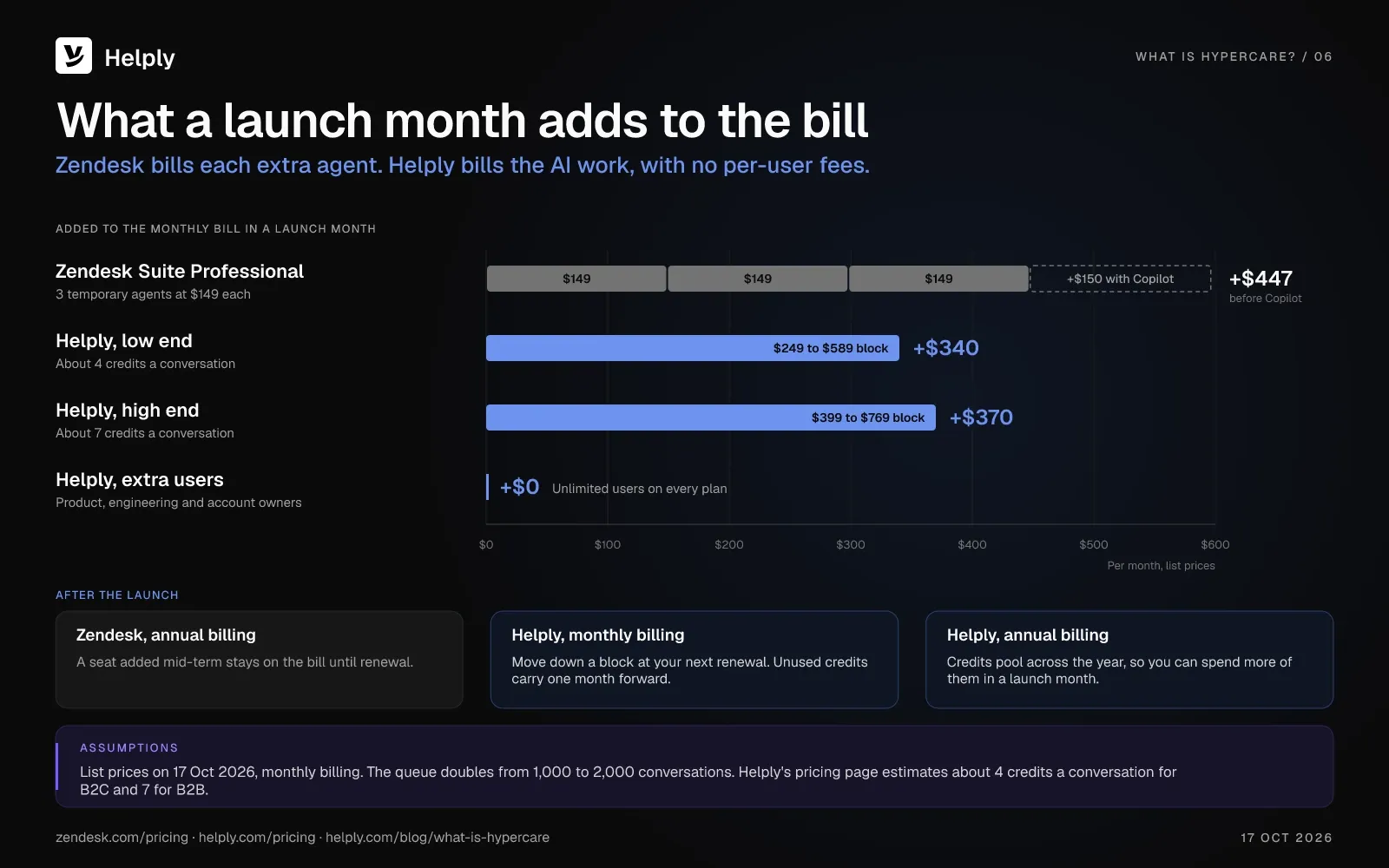
Per-agent pricing makes a short burst expensive. On Zendesk Suite Professional, each extra agent costs $149 a month ($115 on annual billing), and Copilot adds $50 per agent a month. Three temporary agents cost $447 a month on monthly billing, before Copilot.
On an annual Suite Professional plan, a seat you add for a six-week launch stays on the bill until renewal. Zendesk's customer agreement bars cutting the number of agents during a subscription term. Zendesk sells temporary agents as Agent Months on Suite Enterprise and above through sales, at an unpublished price.
Zendesk charges for AI agent resolutions on top of the seat price, though every plan includes the agents. Helply puts the shared inbox, knowledge base, analytics and AI agents in one platform and charges no per-user fees. Its AI agents can answer repeat questions around the clock, and your team keeps the cases that need judgment.
Where AI takes the routine volume. The Support Agent can resolve launch requests end to end on email, chat, Slack, WhatsApp and other channels. It can investigate with your connected tools and take supported actions, so your reps can leave routine tickets to it.
As MixWave grew, customers kept opening install, license-activation and setup tickets despite a solid knowledge base and FAQ library. “We'd written the FAQ and the docs, and people still opened tickets to ask the exact same install question for their particular DAW,” says Ernie Slenkovich, Vice President of Operations at MixWave. After the switch, the Support Agent resolved 58% of MixWave's incoming questions end to end.
Where AI keeps answers consistent. Engineers and account owners who join the launch queue can start each reply from an Assist Agent draft that follows your Guidelines. A draft your team rejects uses no credits.
Where AI catches signals. Background Agents watch every conversation and alert the right teammate to churn risks, feature requests and upgrade questions while the window is open.
Product, engineering and account owners can work the hypercare queue at no per-user cost, since every Helply plan has unlimited users. AI work runs on credit blocks, and you pay for nothing else. You can move up a block at any time and pay the difference pro rata.
Say your queue doubles from 1,000 to 2,000 conversations in a launch month. At about 4 to 7 credits a conversation, the monthly block changes like this:
| Estimate | Credits per conversation | Usual month (1,000 conversations) | Launch month (2,000 conversations) |
|---|---|---|---|
| Low end | About 4 | 4,000-credit block, $249 a month ($212 annual) | 11,000-credit block, $589 a month ($501 annual) |
| High end | About 7 | 7,000-credit block, $399 a month ($339 annual) | 15,000-credit block, $769 a month ($654 annual) |
On monthly billing, you can move down a block at your next renewal, and unused credits carry one month forward. On annual billing, credits pool across the whole year, so you can spend more of them in a launch month. Raise your spending cap for the launch, and auto top-up buys the next block at the rate you already pay.
Staff Up for Hypercare, or Let AI Agents Cover the Burst?
A small change with a few dozen extra tickets may need no more than a written plan, a tagged queue, and daily check-ins. A long system implementation with on-site work may call for a contracted hypercare team. Helply fits teams that run frequent launches, migrations, or onboardings and can't cover every hour of the burst on their own.
During the launch window, the Support Agent can handle everyday questions across all channels, including nights and weekends. Your team picks up the escalations with the investigation already done.
The Knowledge Agent flags launch questions your articles don't cover, and AI can write a first draft of each missing article. Your team reviews and publishes each one, so you turn recurring tickets into help content while hypercare runs.
Anyone who helps with the launch can join the queue without raising the bill. Once your exit checklist passes, they go back to their own work, and you don't cancel anything.
You may worry that AI will mishandle a new customer during a launch. In escalation rules, you choose the confidence levels and customer conditions under which a conversation is routed to a person. Complex, sensitive, or high-value cases can stay with your team.
MixWave moved one full-time role to documentation and product quality after the Support Agent cut into its repetitive install and licensing volume. “For a team our size, paying far less than the old per-seat help desk while resolving more changed the math completely,” says Ernie Slenkovich.
Plans start at $49 a month ($42 on annual billing) for 500 credits, and every plan includes unlimited users. Give your launch mailbox its own monthly credit allowance, so the launch queue can't spend the whole block.
Frequently asked questions
Hypercare is a short, time-boxed period of high-touch support after a major change, such as a launch, a migration or a customer onboarding. Teams add coverage and set tighter response targets, then watch the queue for new problems. A typical period lasts 1 to 4 weeks and ends once your exit criteria pass.
Hypercare support means extra, proactive help for customers or users in the weeks after a change goes live. The support team replies inside tighter targets, reaches out before problems spread and turns recurring issues into fixes and help articles.
Hypercare is the one-word spelling that Microsoft, SAP, PTC and Wiktionary use. You'll also see “hyper-care” and “hyper care,” with the same meaning.
Other names for hypercare include post-go-live support, the stabilization period and the warranty period. ITIL uses Early Life Support (ELS) for a related stage. No single synonym is standard, so pick one term and use it across your plan.
Salesforce and HubSpot put a typical hypercare period at 1 to 4 weeks. HubSpot says complex enterprise rollouts can take up to 90 days, and Optinus puts business transformation projects at 4 to 12 weeks. End the period on exit criteria, whatever the calendar says.
Go-live is the moment a new system, product or change reaches its users. Hypercare is the support period that starts at go-live and runs until your exit criteria pass.
Standard support is continuous and reactive: your team answers tickets as they arrive. A planned change triggers hypercare, which runs for a set window with tighter response targets, named owners and proactive outreach. A team with a 4-hour first-response target might set 15 minutes for urgent hypercare tickets.
Early Life Support (ELS) is the ITIL Service Transition stage at the end of deployment, before full acceptance into operation. Hypercare overlaps that stage, but hypercare teams spend more of the window on customers, through proactive outreach and new help articles.
During ELS, the provider reviews service levels and may add resources for incidents and problems. Practitioners disagree on whether the two terms mean the same thing.
In project management, hypercare is the phase after go-live when the project team stays on to support users and fix issues. It ends with a handoff to the team that runs the system day to day. Microsoft suggests ending hypercare once no critical issues remain or the support team can resolve most issues without extra help.
In software development, hypercare is the stretch after a release goes live, when the team adds support and fixes early issues. Engineers stay on call for the defects users report, and support shares workarounds until engineering ships the fixes. The team hands the product back to normal support once the exit criteria pass.
In SAP Activate, SAP's implementation methodology, hypercare happens in the Deploy phase once the system goes live. In most projects, the contract or the transition plan defines how long the team stays on. Ongoing support then moves to the Run phase, the last of six: Discover, Prepare, Explore, Realize, Deploy and Run.
Hypercare ends once your exit criteria pass. Common criteria include severity-1 volume back at baseline and response times within target for two weeks running. You can also require a help article for every recurring issue and a signed handoff.
Track ticket volume, first-response and resolution times, escalation rate and time to first value for new customers. Count the churn risks and feature requests from the window, and log each one against its account.
A hypercare plan should include a named owner and team, the window length, response targets and escalation paths. Add the proactive messages you'll send customers, the exit criteria and the handoff to normal support.
AI agents can answer routine questions at any hour, and you set the rules that send sensitive cases to a person.
Helply is an AI-native customer support platform. After a launch, its Support Agent can resolve routine requests end to end. The Assist Agent drafts replies for your reps, and Background Agents flag churn risks and feature requests.
About the author

Bildad Oyugi
Head of Content
Bildad is a digital marketing expert with over 5 years of experience in copywriting, content marketing, and editing. Outside of work, he enjoys videography and spending time with his family.
Keep reading

Customer Support
Crisp Pricing in 2026: Plans, Seat Limits, Hugo AI Credits and Monthly Bills
Bildad Oyugi · 14 min read

Customer Support
eesel AI Pricing 2026: Plans, Credits and Real Cost
Bildad Oyugi · 12 min read

Customer Support
8 eesel AI Alternatives for Customer Support in 2026
Bildad Oyugi · 21 min read