Key Takeaways
- Shortlist by channel: LiveChat, Crisp or Zoho SalesIQ for website chat, respond.io or Trengo for WhatsApp, and ManyChat for Instagram DMs.
- Meta charges for each WhatsApp message a business delivers. From October 1, 2026, a US marketing template costs $0.025, and service replies cost $0.0034 after 1,000 free a month per number.
- Texting US customers from a 10-digit number requires A2P 10DLC registration. On Twilio, registering the brand costs $4.50 or $46 once, and each campaign costs $15 to vet plus $1.50 to $10 a month.
- Check what each vendor counts before comparing prices: users at LiveChat, workspaces at Crisp, active contacts at ManyChat and tickets at Gorgias. Some add a per-use AI fee, such as Gorgias's $1.00 per automated interaction ($0.90 annual).
- If customers use several channels, Helply puts chat, email, WhatsApp, SMS, Slack, Microsoft Teams, Discord and Telegram in one inbox. Unlimited users come with every plan, as do the Support, Assist and Background agents. For Instagram and Messenger DMs, add a second tool.
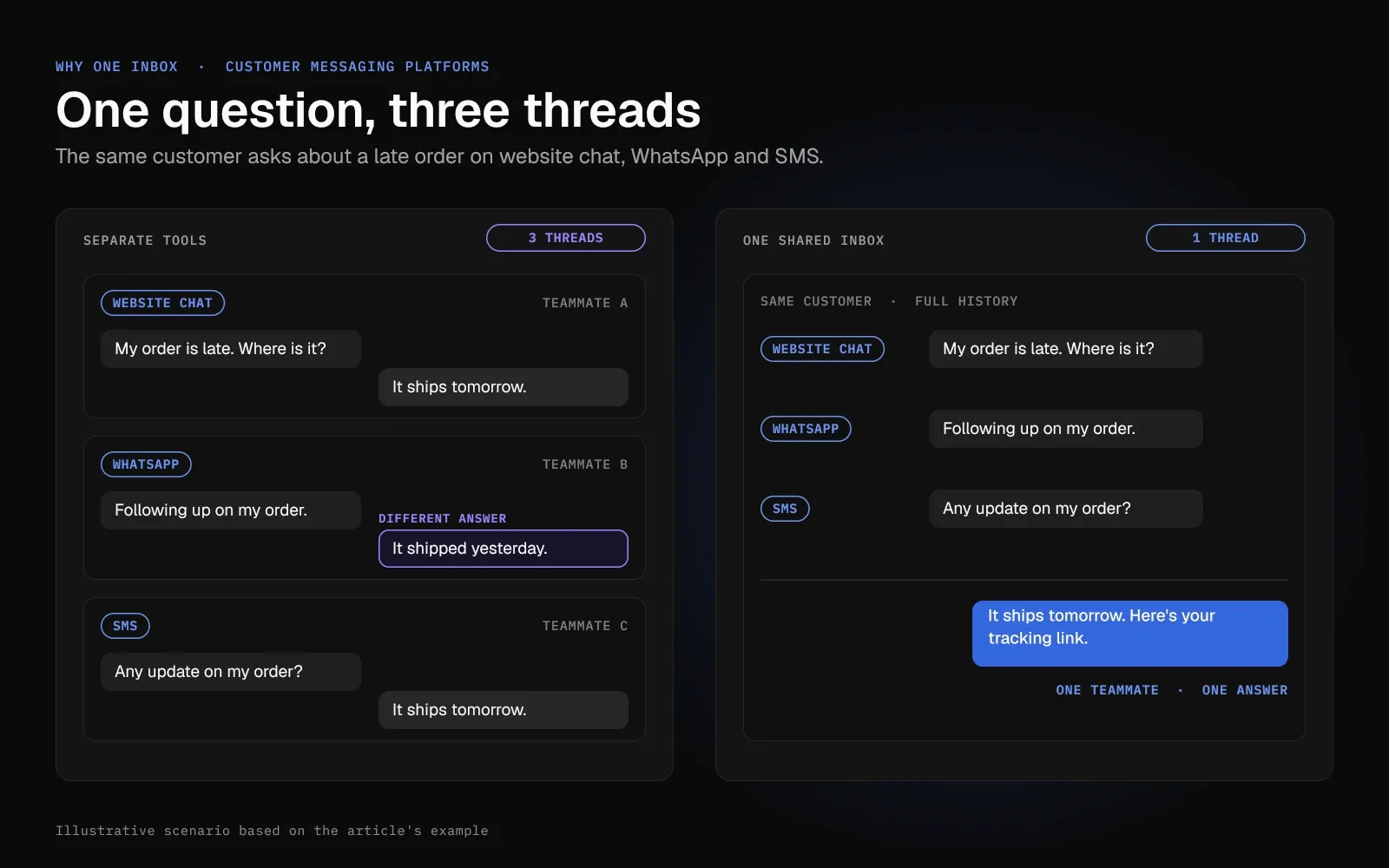
A customer asks about a late order in your website chat. An hour later, the same person sends the question on WhatsApp, then texts your support number. Three teammates pick up three threads, and the customer gets two different answers.
Customers message you from the apps on their phones. A separate tool for each channel can mean another inbox and login for your team, and another bill.
A customer messaging platform pulls those conversations into one place, with the customer's history beside each reply. Vendors differ on the channels they use to connect and on what they charge.
Start with the channel that carries most of your conversations. Then total the user, contact, message, and AI fees for your volume.
The 10 Best Customer Messaging Platforms by Channel
- Helply: Best for chat, WhatsApp, and SMS support with unlimited users
- respond.io: Best for WhatsApp-first teams with high message volume
- Crisp: Best for low-cost website chat priced per workspace
- Zoho SalesIQ: Best for live chat inside mobile apps
- Trengo: Best for small teams sharing one WhatsApp and email inbox
- Gorgias: Best for online stores on Shopify
- Podium: Best for local businesses that text customers
- LiveChat (now Text): Best for selling through website chat
- ManyChat: Best for Instagram and Facebook DM automation
- Chatwoot: Best for an open-source inbox you can host yourself
| Tool | Best for | Main channels | Starting price (October 2026) | Free trial | AI pricing |
|---|---|---|---|---|---|
| Helply | Chat, WhatsApp and SMS support with unlimited users | Email, chat widget, WhatsApp, SMS, Slack, Microsoft Teams, Discord, Telegram | $49/mo for 500 credits ($42 annual), unlimited users | 14 days, 1,000 credits, no card | Credits by complexity: 1, 4 or 12 per AI action |
| respond.io | WhatsApp-first teams | WhatsApp, Instagram, Messenger, TikTok (beta), Telegram, LINE, SMS, email, web chat | $99/mo ($79 annual) with 5 users | 7 days, no card | AI Assist on all plans; AI Agents from Growth on included credits, then $15 per 1,000 |
| Crisp | Low-cost website chat | Chat widget and mobile SDKs; WhatsApp, Instagram and SMS from Essentials | Free for 2 seats; $45/mo per workspace | 14 days, no card | AI credits included from Mini, then pay as you go; Crisp estimates $0.05 to $0.10 per Hugo conversation |
| Zoho SalesIQ | Live chat in mobile apps | Website chat and mobile SDK; WhatsApp, Instagram, Messenger and Telegram from Basic | Free for 3 operators; $10/operator/mo ($7 annual) | 15 days, no card | Zia Agents from Basic; Zoho-hosted AI free up to 30M tokens a month, then $1 per 1M |
| Trengo | Shared WhatsApp and email inbox | Email, WhatsApp, Instagram, Facebook, website widget, SMS | €349/mo (€299 annual) with 10 users | 7 days, no card | €0.30 per AI conversation (€0.25 annual) |
| Gorgias | Online stores | Email, chat, Instagram, Messenger, WhatsApp; SMS add-on | $10/mo for 50 tickets (monthly only) | 7 days, no card | $1.00 per automated interaction ($0.90 annual), plus the ticket |
| Podium | Local businesses that text | Texts, website chat, Facebook, Instagram, Google | $399/mo (Core), plus per-location fees | None listed | AI suggested replies on Core; AI Employee add-on, price not published |
| LiveChat (now Text) | Selling through website chat | Website and in-app chat, email, Messenger, WhatsApp; SMS through Twilio | $25/user/mo ($19 annual) | 14 days, no card | 10 AI resolutions a month on Essential; 50 more for $49.50 |
| ManyChat | Instagram and Facebook DM automation | Instagram, Messenger, TikTok, Telegram; WhatsApp and SMS from Pro | Free for 25 contacts; $17/mo ($14 annual) | 14 days on Essential or Pro | AI included from Pro, $39/mo ($29 annual) |
| Chatwoot | Open-source inbox you can self-host | Chat; email, WhatsApp, Instagram, Messenger, TikTok, SMS, Telegram from Startups | Free self-hosted; cloud $19/agent/mo | 15 days, no card | 300 AI credits a month on Startups, then $20 per 1,000 |
1. Helply: Best for Chat, WhatsApp and SMS Support With Unlimited Users
A specialist tool covers one channel. Once customers write in on three or four, your team switches between inboxes and misses replies.
Helply is an AI-native customer support platform for teams whose customers write in on many channels. Your team answers email, live chat, WhatsApp, SMS, Slack, Microsoft Teams, Discord and Telegram from one inbox. Customers stay in the app they chose.
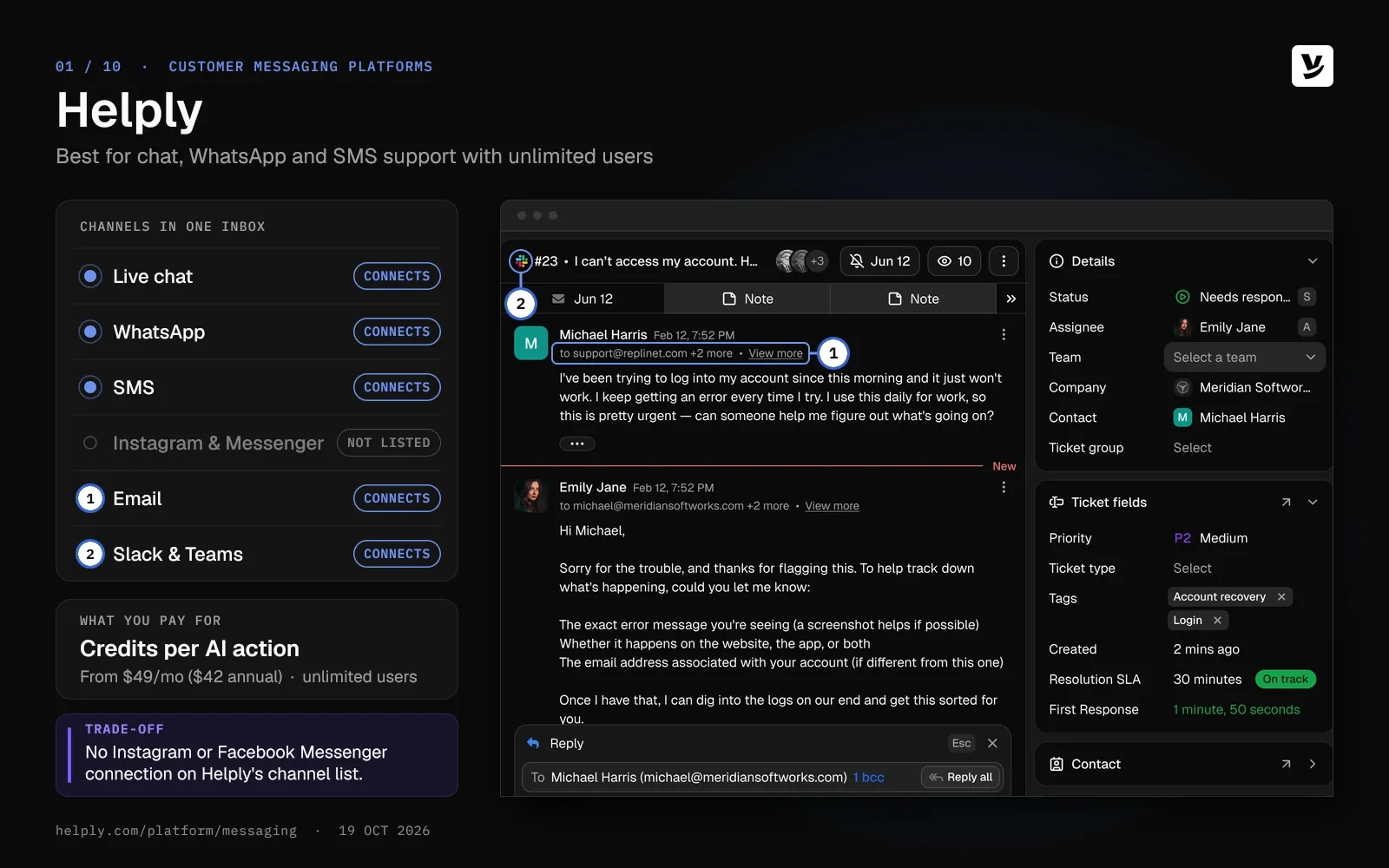
Its Support Agent can answer on those channels, check the customer's account in connected tools and take supported actions. Your team gets any question the agent can't resolve, along with the full history and the agent's work so far.
At MyBaggage, Helply's Insights Agent watches shipment conversations for early signs of trouble. It flags at-risk shipments before the customer escalates.
Key features
- Work every channel from one inbox. Email, the chat widget, WhatsApp, SMS, Slack, Microsoft Teams, Discord and Telegram conversations land in one shared inbox. You apply the same routing, Guidelines and AI agents across those channels.
- Answer at 2 a.m. without a night shift. If Helply has the knowledge and confidence to resolve a question, the Support Agent can reply at once. If not, your team gets the conversation with the context collected.
- Check the account before anyone replies. Connect Stripe, HubSpot, Salesforce or any of the 60+ tools Helply integrates with. The AI agents can then see the account and take supported actions in the thread.
- Give reps a first draft to work from. The Assist Agent prepares each draft from the thread, the customer's record and your Guidelines. Reps edit it, send it or direct Assist to take a supported action.
- Start every chat knowing who's asking. The chat widget can pass customer and account details into Helply, so your team sees the account from the first message. You can style it to match your brand.
- Spot trouble across channels. Background Agents scan each conversation for churn risk, feature requests, knowledge gaps and emerging problems, then alert a teammate.
Pricing
You get unlimited users and all three agent types on every plan. You buy AI work in monthly credit blocks: 500 credits at $49 ($42 on annual billing) up to 32,000 at $1,549 ($1,317).
A draft or summary takes 1 credit, a lookup that touches one or two systems takes 4, and a full investigation takes 12. Helply counts credits per AI action, so a long WhatsApp thread the AI touches once uses one action. Retries, failed actions, rejected drafts and spam never cost credits.
Helply's pricing estimator puts short, repetitive conversations at about 4 credits each and longer, more complex ones at about 7. At 4 credits, 500 conversations a month fit the 2,000-credit block at $139 ($118 on annual billing). Your monthly spending cap starts at your block price, and on monthly plans, leftover credits stay usable through the following month.
Pros
- Part-time and weekend staff can answer chats without raising the bill, since every plan has unlimited users.
- One AI setup covers every connected channel, including the chat widget, WhatsApp and Telegram.
- You spend credits on AI work, with no charge per contact or per conversation.
- The full help desk comes with it: views, assignment rules, collision detection and SLA targets.
Cons
- Helply's channel list has no Instagram or Facebook Messenger connection, so social DM teams need a second tool for those.
- Crisp, Zoho SalesIQ and ManyChat offer free plans, and Helply doesn't; credit blocks start at $49 a month after the 14-day trial.
Best for
Teams that support customers on chat, email, WhatsApp and SMS, with AI agents and unlimited users.
2. respond.io: Best for WhatsApp-First Teams With High Message Volume
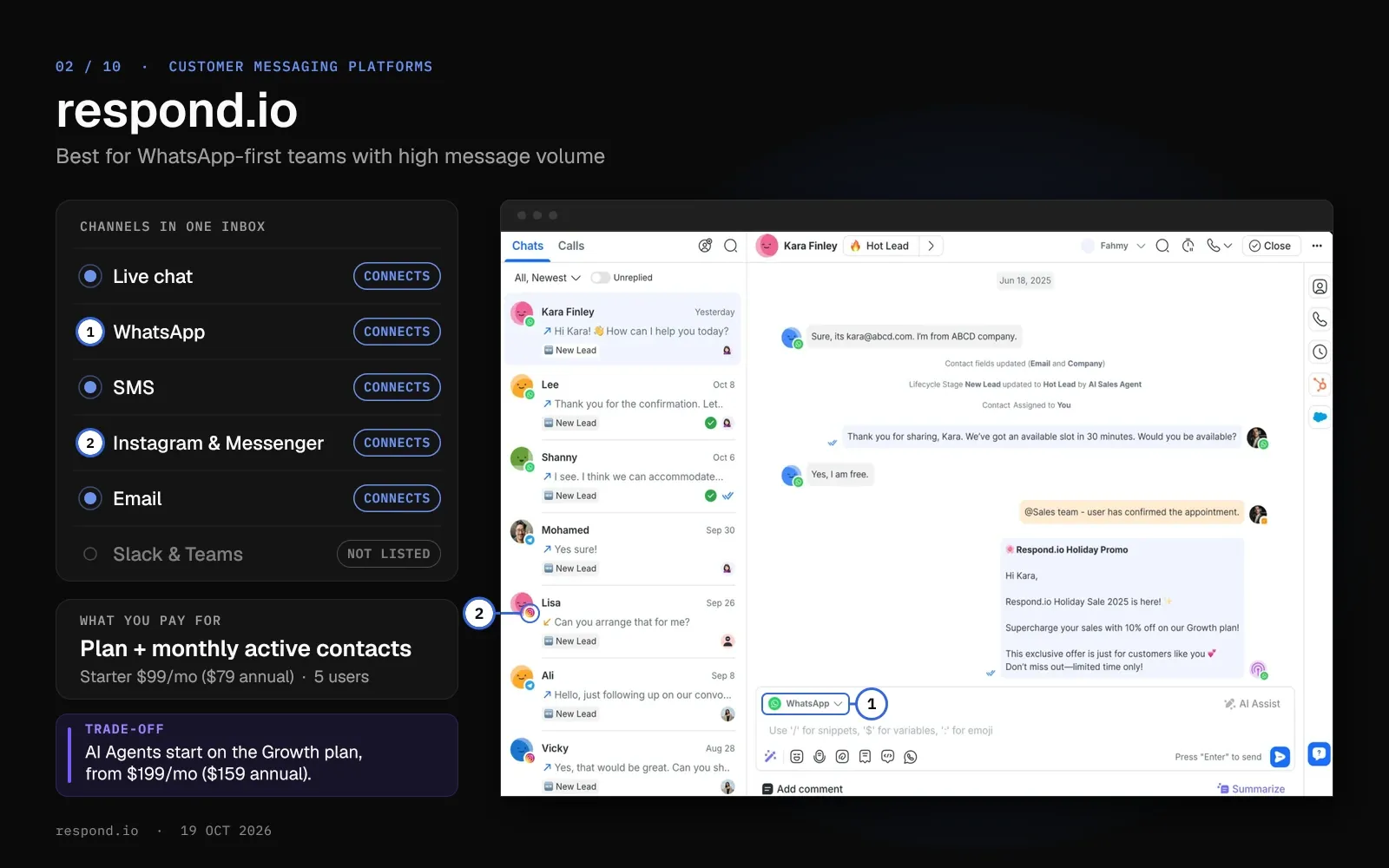
respond.io is a messaging inbox built around WhatsApp. Every plan connects Instagram, Messenger, Telegram, LINE, WeChat, SMS, email and TikTok, which is in beta.
Starter includes unlimited contacts. Growth and Advanced price by Monthly Active Contacts, the people you talk to in a billing month.
Key features
- WhatsApp at Meta's rates. respond.io says it adds "no setup fees or markups" to WhatsApp, so you pay what Meta charges.
- Calls in the same inbox. On every plan, your team can make and receive WhatsApp calls, Messenger calls and VoIP calls through Telnyx.
- AI Agents on included credits. Growth includes AI credits worth 10 times its contact limit, and each AI Agent reply uses 2 to 5 credits. Extra credits cost $15 per 1,000.
Pricing
Starter costs $99 a month ($79 on annual billing) with 5 users and unlimited contacts, but no AI Agents. Growth starts at $199 ($159) for 1,000 Monthly Active Contacts and 10 users.
Each extra 100 contacts on Growth costs $12. Extra users cost $15 to $30 a month by plan ($12 to $24 on annual billing), and Meta's WhatsApp fees come on top.
Pros
- Starter's flat fee covers unlimited contacts, so you pay the same plan price as your WhatsApp audience grows.
- You pay Telnyx's per-minute rates for VoIP calls, with no respond.io markup.
Cons
- respond.io offers a 7-day trial and no free plan.
- Growth and Advanced bill by Monthly Active Contacts, so you pay more in a busy month.
Best for
Consumer businesses that sell and support through high-volume WhatsApp conversations.
Helply vs. respond.io for WhatsApp Teams
Helply and respond.io both put WhatsApp, SMS, email and web chat in one inbox. Starter on respond.io costs $99 a month ($79 annual) with 5 users, and the platform adds Instagram, Messenger, LINE and TikTok (beta). Helply bundles its Support, Assist and Background agents with unlimited users on every plan, and it bills AI work in credits.
| Helply | respond.io | |
|---|---|---|
| Users included | Unlimited on every plan | 5 on Starter, 10 on Growth; extra users $15 to $30 a month |
| Billing unit | Credits per AI action | Plan fee; Growth and Advanced add Monthly Active Contacts ($12 per extra 100 on Growth) |
| AI agents | Support, Assist and Background, on every plan | AI Assist on every plan; AI Agents from Growth |
| AI billing | 1, 4 or 12 credits per AI action | Included credits, then $15 per 1,000 |
| Starting price | $49/mo for 500 credits ($42 annual) | $99/mo ($79 annual) |
See how Helply handles WhatsApp conversations
3. Crisp: Best for Low-Cost Website Chat Priced per Workspace
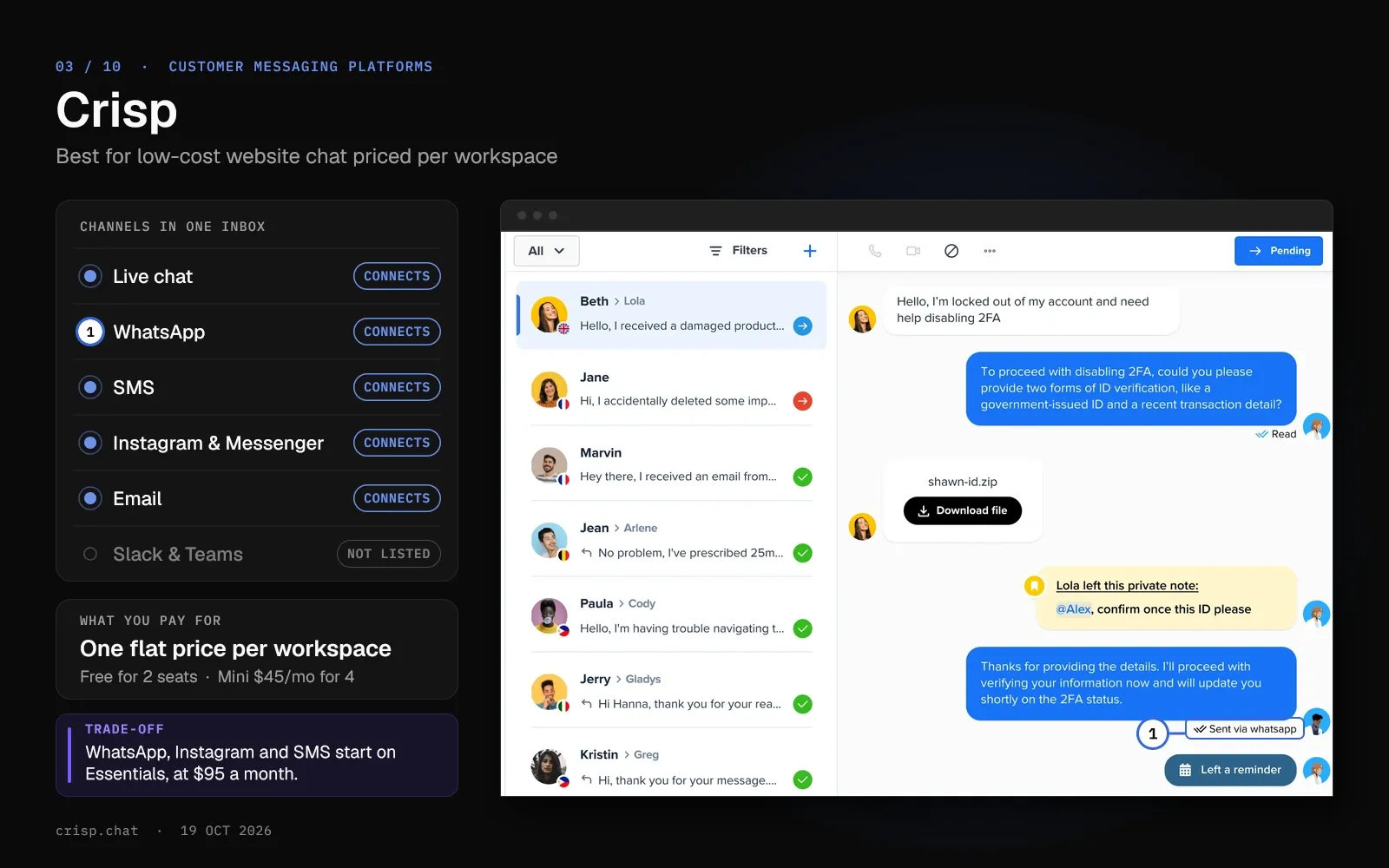
Crisp charges one flat price per workspace, with a set number of seats on each plan. Mini costs $45 a month for 4 seats, and Essentials $95 for 10.
The free plan covers the website chat widget, a shared inbox and mobile chat SDKs for 2 seats. WhatsApp, Instagram and SMS start on Essentials.
Key features
- Chat in your app as well as your site. Crisp's chat SDKs cover Android, iOS, React Native and the web, on every plan, the free one included.
- Hugo AI agent on included credits. Paid plans include AI credits worth $5 on Mini, $25 on Essentials and $75 on Plus. Crisp estimates a full Hugo conversation at around $0.05 to $0.10.
- Messaging apps in the same inbox. Mini adds email, Telegram, Messenger and X. Essentials adds WhatsApp Business, Instagram DMs, SMS, Line and Viber.
Pricing
Free covers 2 seats. Mini costs $45 a month per workspace, Essentials $95 and Plus $295, and the pricing page lists monthly prices only.
Meta's WhatsApp fees appear as a separate monthly usage line on pay-as-you-go billing.
Pros
- A 10-person team pays a flat $95 a month on Essentials.
- Hugo stops answering when its included credits run out, unless you switch on pay-as-you-go, so AI spend stays capped by default.
Cons
- Ticketing and the customer portal sit on Plus, at $295 a month.
- Apart from email, you can connect one account per messaging channel to a workspace unless you pay for higher limits.
Best for
Best for. Small teams that want website and in-app chat at a flat monthly price.
Helply vs. Crisp for Website Chat
Crisp bills per workspace, from $45 a month for 4 seats on Mini, and every Helply plan has unlimited users. Crisp connects Instagram, Viber and Line from Essentials, at $95 a month. Helply adds Slack, Microsoft Teams and Discord, and its AI agents can check an account in Stripe or HubSpot before replying.
| Helply | Crisp | |
|---|---|---|
| Users included | Unlimited on every plan | 2 on Free, 4 on Mini, 10 on Essentials, 20 on Plus |
| AI agents | Support, Assist and Background on every plan | Hugo AI agent from Mini, on included credits |
| Messaging apps | WhatsApp, SMS, Slack, Microsoft Teams, Discord, Telegram | Messenger and Telegram from Mini; WhatsApp, SMS, Instagram, Viber and Line from Essentials |
| Starting price | $49/mo for 500 credits ($42 annual) | Free; Mini $45/mo per workspace |
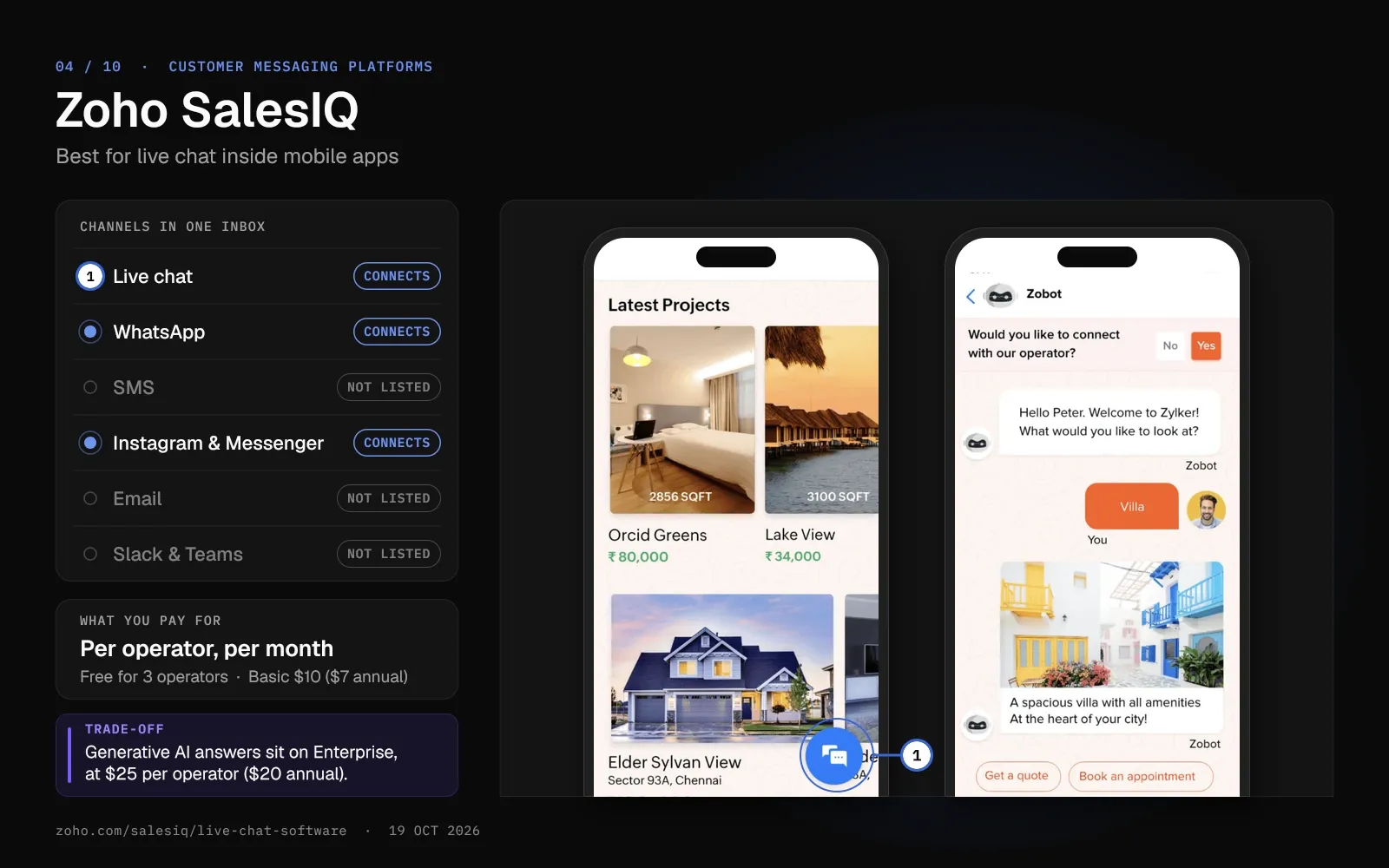
4. Zoho SalesIQ: Best for Live Chat Inside Mobile Apps
Zoho SalesIQ adds live chat to your website and, through its mobile SDK, to your iOS and Android apps.
Paid plans add WhatsApp, Instagram, Messenger, Telegram, Line and WeChat. Zoho offers them where each country's rules allow.
Key features
- In-app chat SDK. The mobile SDK supports iOS, Android, React Native, Cordova and Flutter on every plan.
- Zia Agents. Basic includes 1 Zia Agent, Professional 3 and Enterprise 10. Zoho-hosted AI models cost nothing for the first 30 million tokens each month, then $1 per million.
- Calls inside the chat. From Basic, operators can take audio and video calls and share screens in the browser or app.
Pricing
The free plan includes 3 operators and 100 chat sessions a month. Basic costs $10 per operator a month ($7 on annual billing), Professional $17 ($12.75) and Enterprise $25 ($20).
Zoho shows these US prices, and it charges lower local prices in some regions.
Pros
- Live chat and the mobile SDK cost nothing for up to 3 operators.
- Zoho One and Zoho CRM Plus include SalesIQ, so check your Zoho plan before buying it on its own.
Cons
- The generative AI answer bot sits on Enterprise, at $25 per operator a month ($20 on annual billing).
- You'll need a second tool for email and SMS, since SalesIQ's pricing page lists neither.
Best for
Teams that support customers inside a mobile app, and teams on Zoho CRM.
Helply vs. Zoho SalesIQ for In-App Chat
SalesIQ's paid plans start at $10 per operator a month ($7 annual) after 3 free operators. Helply includes unlimited users on every plan and puts email and SMS in the same inbox as chat and WhatsApp. SalesIQ ships iOS, Android and Flutter SDKs, and you add Helply's chat widget to a site or app with a snippet.
| Helply | Zoho SalesIQ | |
|---|---|---|
| Users included | Unlimited on every plan | Free for 3 operators, then $10 per operator a month ($7 annual) |
| AI agents | Support, Assist and Background on every plan | Zia Agents from Basic; generative AI answer bot on Enterprise |
| Email and SMS | Both in the same inbox | Not on the pricing page |
| Starting price | $49/mo for 500 credits ($42 annual) | Free; Basic $10/operator/mo ($7 annual) |
See how Helply handles chat and messaging
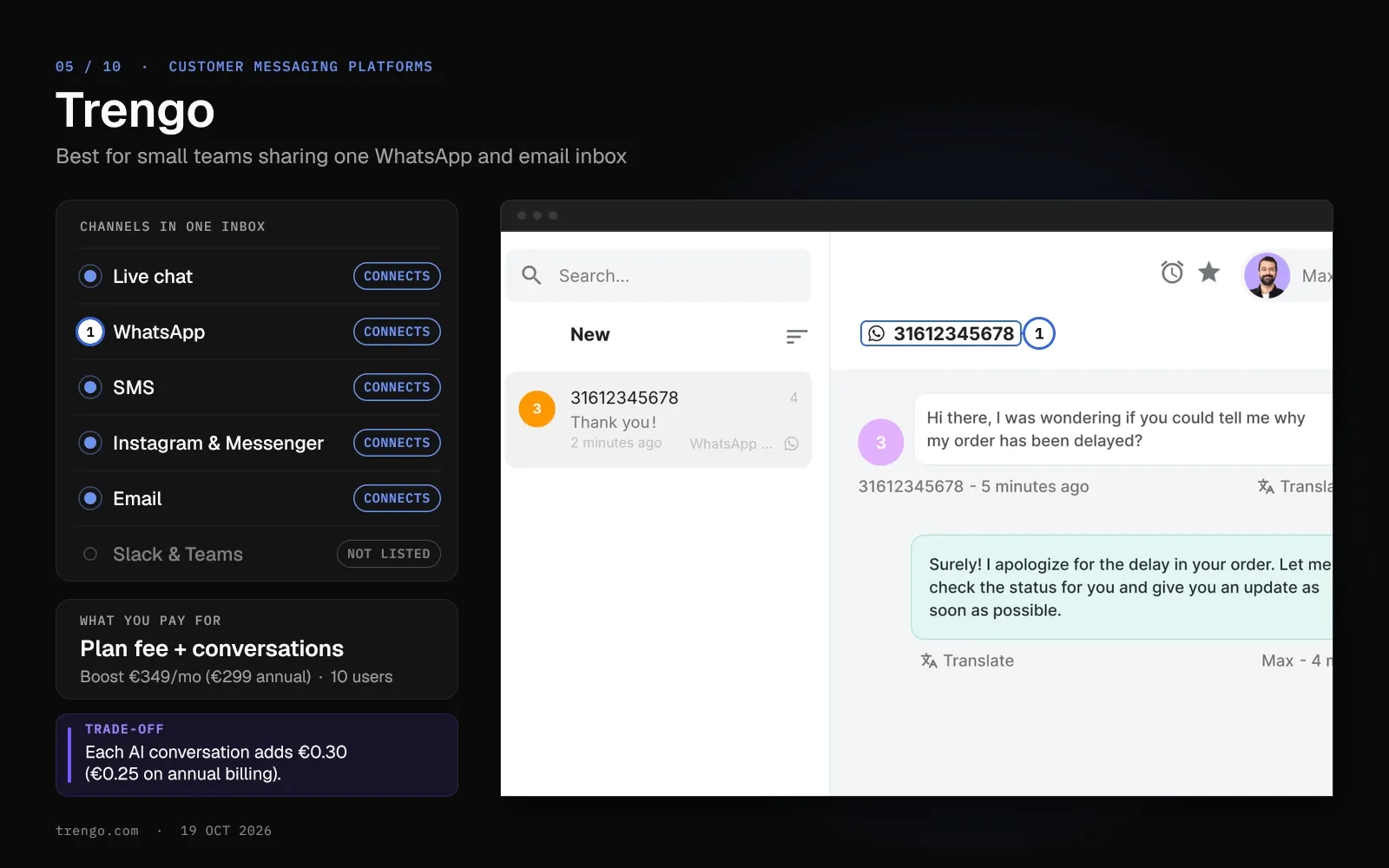
5. Trengo: Best for Small Teams Sharing One WhatsApp and Email Inbox
Trengo bundles users and conversations into each plan. Boost includes 10 users and 500 conversations a month, and Pro includes 20 users and 1,500.
Trengo lists prices in euros, with a switch for dollars and pounds. A conversation covers every reply to a customer within a 7-day window.
Key features
- One inbox for messaging apps. Email, WhatsApp, Instagram, Facebook and the website widget connect on every plan.
- HelpMate AI agent. Every plan includes the HelpMate AI agent, with a surcharge of €0.30 per AI conversation (€0.25 on annual billing).
- Voice and broadcasts as add-ons. Phone calls and broadcast messages cost extra on Boost and Pro.
Pricing
Boost costs €349 a month (€299 on annual billing), and Pro €599 (€499). Extra conversations cost €18 per 100 (€15 annual), and extra users €30 to €50 a month by plan (€25 to €40 annual).
Pros
- Users come in bundles of 10 or 20, so a small team shares a single inbox at a fixed price.
- Boost includes 50 AI Suggested Reply conversations a month, and Pro includes 100.
Cons
- Trengo has no free plan, and its 7-day trial includes up to 100 AI conversations.
- Trengo's pricing page lists WhatsApp service conversations as free. Its help center says Meta has charged from the 1,001st service message a month per number since October 1, 2026.
Best for
Small retail, travel and hospitality teams that handle WhatsApp, Instagram and email together.
Helply vs. Trengo for a Shared WhatsApp Inbox
Trengo bundles 10 or 20 users and a monthly conversation allowance into each plan, then bills €0.30 per AI conversation (€0.25 annual). Your whole team works in Helply with no per-user fee, and Helply counts AI work in credits per action. Both connect WhatsApp, email and website chat; Instagram and Facebook come with Trengo, while Helply connects Slack, Microsoft Teams and Discord.
| Helply | Trengo | |
|---|---|---|
| Users included | Unlimited on every plan | 10 on Boost, 20 on Pro; extra users €30 to €50 a month |
| What you pay for | Credits per AI action, from a monthly block | Plan fee with 500 (Boost) or 1,500 (Pro) conversations a month; extra 100 cost €18 (€15 annual) |
| AI pricing | 1, 4 or 12 credits per AI action | €0.30 per AI conversation (€0.25 annual) |
| Starting price | $49/mo for 500 credits ($42 annual) | €349/mo (€299 annual) |
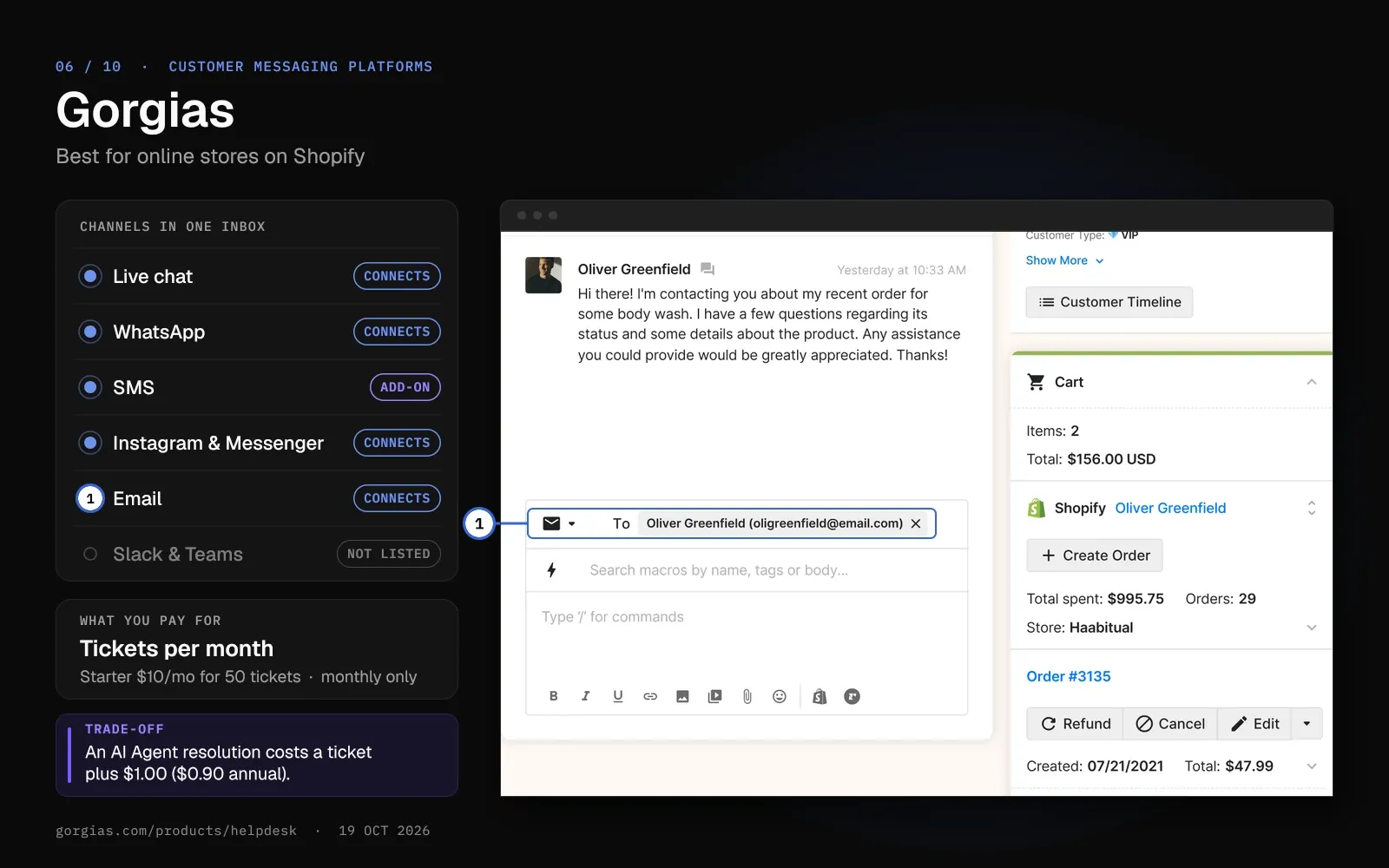
6. Gorgias: Best for Online Stores on Shopify
Gorgias is a help desk for online stores, and it prices each plan by monthly ticket volume.
Email, chat, social media and the help center come with every plan. SMS and voice are paid add-ons.
Key features
- Shopify order actions. Agents can cancel, refund, duplicate or edit Shopify orders and change the shipping address without leaving the ticket.
- Social comments and DMs as tickets. Gorgias turns Facebook and Instagram comments, mentions and messages into tickets in the same queue.
- AI Agent on messaging apps. For Shopify stores, the AI Agent can work on WhatsApp, Instagram DMs, Messenger and, with the add-on, SMS.
Pricing
Starter is $10 a month for 50 tickets, on monthly billing only. Basic costs $60 ($50 on annual billing) for 300 tickets, and Pro $360 ($300) for 2,000.
The AI Agent costs $1.00 per automated interaction ($0.90 on annual billing), then $1.50 past the included amount. Gorgias counts each automated interaction as a billable ticket on top of that fee.
Pros
- No per-agent fees: Basic and up include 500 user seats.
- Shopify and WooCommerce connect on every plan.
Cons
- An AI Agent resolution costs a ticket fee plus an automation fee.
- Gorgias doesn't publish SMS or voice prices; the cost per ticket depends on your plan tier.
Best for
Shopify and WooCommerce stores that answer order questions by chat, email and social media.
Helply vs. Gorgias for Online Stores
Gorgias bills by ticket and charges $1.00 ($0.90 annual) on top for each AI resolution. Helply prices AI work on complexity, so a lookup costs 4 credits whether it ends in a resolution or a hand-off. Gorgias ships Shopify order actions, so check whether your store platform is among the tools Helply connects before you choose.
| Helply | Gorgias | |
|---|---|---|
| Billing unit | Credits per AI action, unlimited users | Tickets a month; 3 to 500 user seats by plan |
| AI pricing | 1, 4 or 12 credits by complexity | $1.00 per automated interaction ($0.90 annual), plus the ticket |
| Order actions | Supported actions in the tools you connect | Cancel, refund and edit Shopify orders |
| Starting price | $49/mo for 500 credits ($42 annual) | $10/mo for 50 tickets (monthly billing only) |
See how Helply handles B2C support
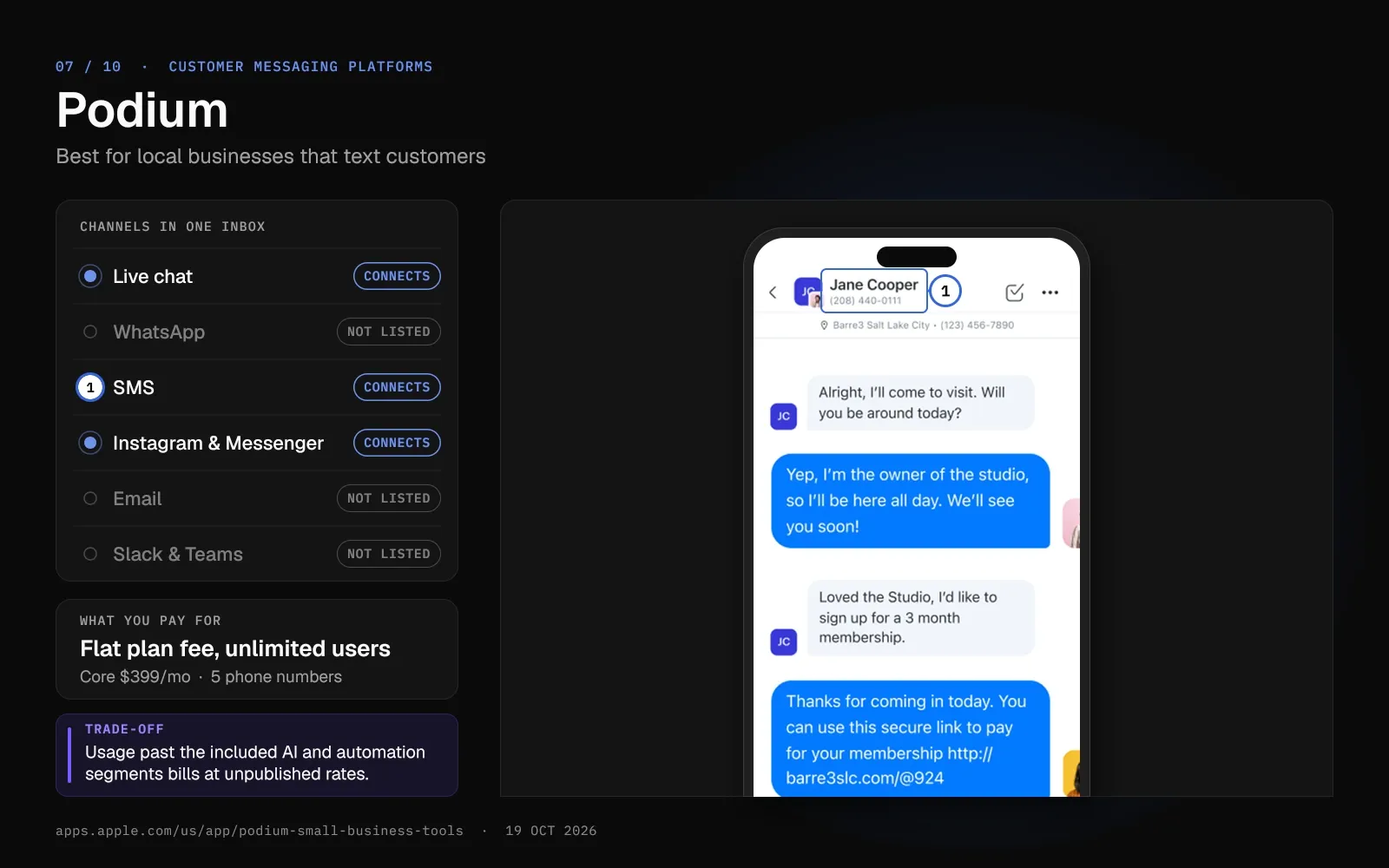
7. Podium: Best for Local Businesses That Text Customers
Podium is a texting platform for local businesses such as furniture stores, home services, auto dealers and medical spas. Every plan includes unlimited team members, contacts and one-to-one texts.
Website chat, Facebook, Instagram and Google messages land in the same inbox. Phone calls come through the Podium Phones add-on.
Key features
- Bulk texts on a monthly allowance. Core includes 250 bulk message credits a month and Pro 500, and unused credits expire at month end.
- Phone numbers included. Core includes 5 phone numbers and Pro 15, and each extra number costs $5 a month.
- AI for leads and reviews. Core includes AI suggested replies and AI review responses. Pro adds AI Instant Answers and an AI Concierge.
Pricing
Core costs $399 a month and Pro $599, and Signature has custom pricing. Podium sells through its sales team, and the page shows no trial or annual price.
Podium charges a $5 monthly 10DLC fee for each US location. Podium Phones costs $30 per user a month for 1 to 4 users, plus a $500 network optimization fee per location.
Pros
- Unlimited team members and one-to-one texts on every plan.
- Texts, web chat and social messages share one inbox.
Cons
- Podium's pricing page lists no WhatsApp channel.
- Podium bills usage past the included AI and automation segments at rates its pricing page doesn't publish.
Best for
Local and multi-location businesses that handle most customer messages by text.
Helply vs. Podium for Business Texting
Podium starts at $399 a month with 5 phone numbers on Core, and it centers on texting and reviews. Helply starts at $49 a month ($42 on an annual plan) and puts SMS from a supported connection beside email, chat and WhatsApp. Podium and Helply both include unlimited users.
| Helply | Podium | |
|---|---|---|
| Users included | Unlimited on every plan | Unlimited team members on every plan |
| Supported conversations in the same inbox | Not listed on the pricing page | |
| AI agents | Support, Assist and Background agents included | AI suggested replies on Core; more on Pro and Signature |
| Starting price | $49/mo for 500 credits ($42 annual) | $399/mo (Core) |
See how Helply handles SMS and call transcripts
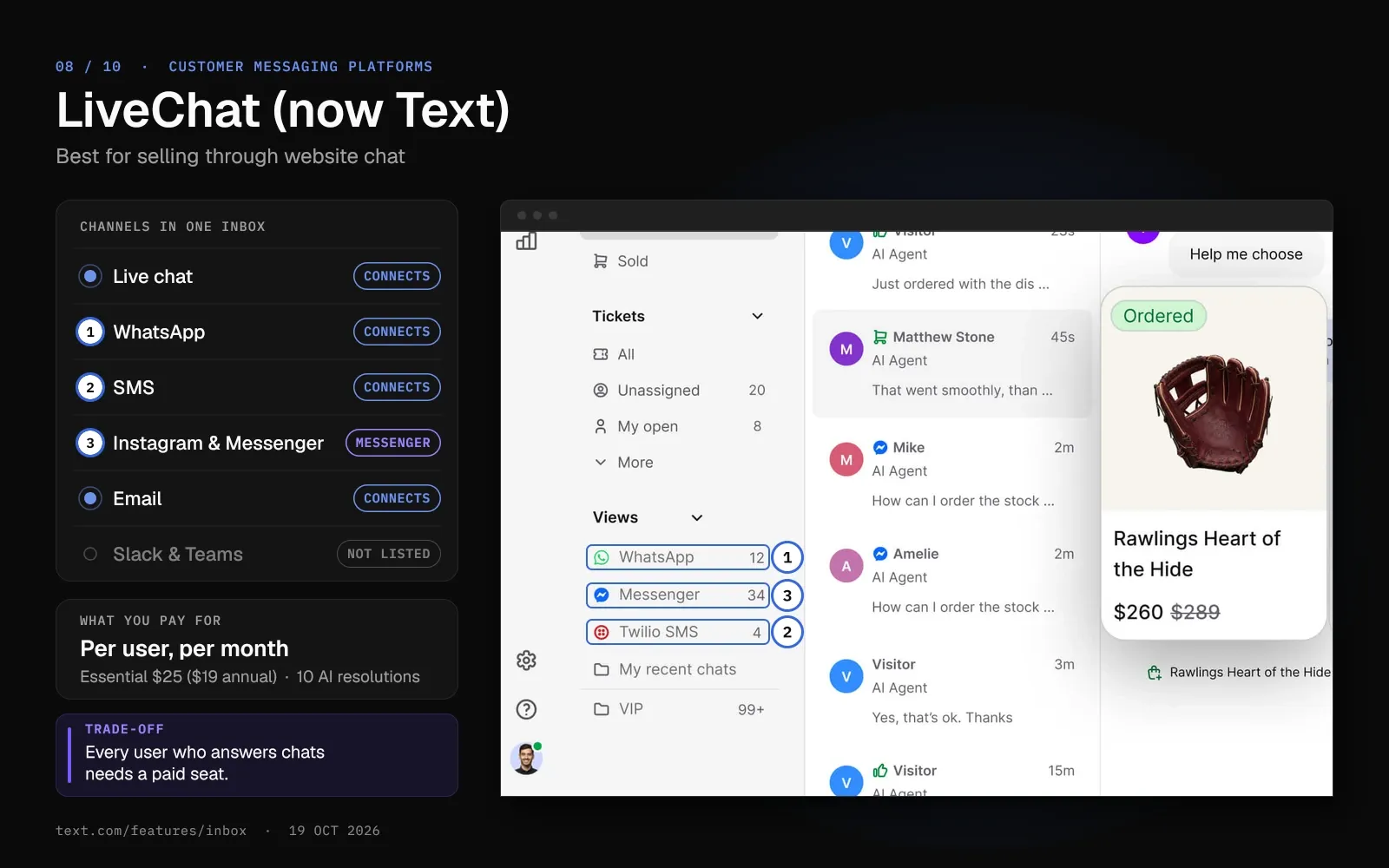
8. LiveChat (Now Text): Best for Selling Through Website Chat
New LiveChat buyers now get Text plans, a newer product from the same team. Existing LiveChat customers keep their plans and prices.
Text puts website chat, in-app chat, email tickets, Messenger and WhatsApp in one inbox, plus SMS through Twilio. The team behind Text markets it to sellers, and every plan connects Shopify.
Key features
- An AI Agent in the base price. Essential includes 1 AI Agent and 10 resolutions a month, and Growth 10 agents and 200 resolutions. One resolution covers a whole chat, however many questions it holds.
- Chats and tickets together. Your team works chats, emails and tickets from one inbox, with 1 email forwarding address on Essential and 10 on Growth.
- Copilot reply suggestions. AI Copilot suggests replies for each user, capped at 5 a month on Essential and 50 on Growth.
Pricing
Essential costs $25 a month per user ($19 on annual billing), and Growth $99 ($79). Extra AI resolutions come in packs of 50 for $49.50. Legacy LiveChat plans run from Starter at $25 ($19) to Business at $89 ($79).
Pros
- You can try Essential or Growth for 14 days without a card.
- No minimum team size, so one person can start on Essential.
Cons
- Every user who answers chats needs a paid seat, at $25 to $99 a month ($19 to $79 on annual billing).
- Essential includes 10 AI resolutions a month, so you buy $49.50 packs of 50 for more.
Best for
Online stores and small teams that sell through website chat and want an AI agent bundled in.
Helply vs. LiveChat (Text) for Website Sales Chat
LiveChat's Text plans cost $25 per user a month ($19 annual), so the bill grows with each chat agent you add. Text connects Shopify and Messenger on every plan, and Helply's channel list has no Messenger. Helply bills for AI work at any team size and connects Slack, Microsoft Teams, Discord and Telegram.
| Helply | LiveChat (Text) | |
|---|---|---|
| Users included | Unlimited on every plan | $25 per user a month ($19 annual) on Essential |
| Support, Assist and Background on every plan, billed in credits | Support, Assist and Background on every plan, billed in credits | 10 AI resolutions a month on Essential, 200 on Growth |
| Extra AI | Auto top-up at the same rate, up to your cap | $49.50 per 50 resolutions |
| Starting price | $49/mo for 500 credits ($42 annual) | $25/user/mo ($19 annual) |
See what Helply's Support Agent can do
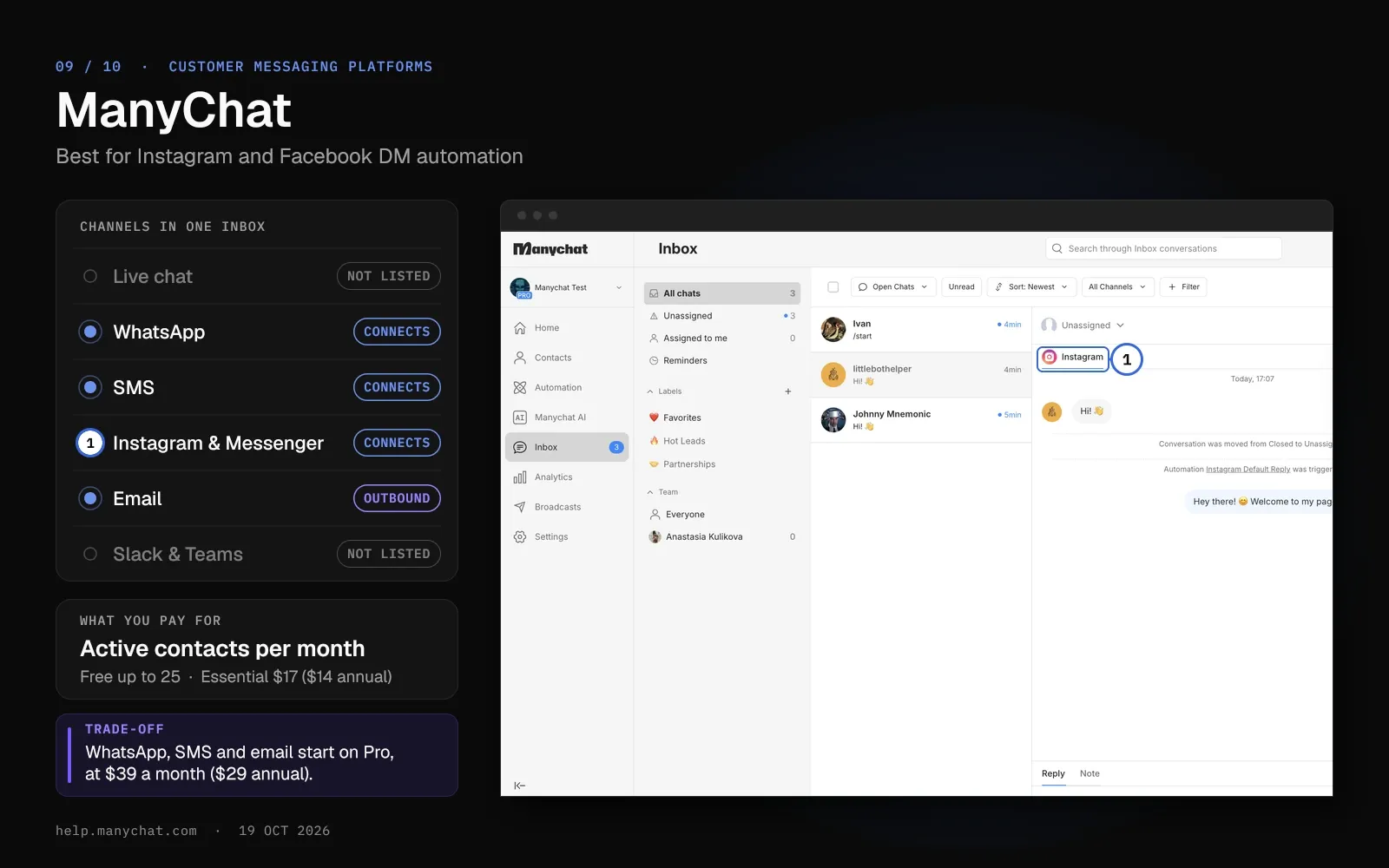
9. ManyChat: Best for Instagram and Facebook DM Automation
ManyChat automates DMs on Instagram, Facebook Messenger, TikTok and Telegram. The free plan connects any two of those channels.
ManyChat built its plans for creators and social-first businesses. It bills by active contacts, the people you message in a month.
Key features
- DM automation across social apps. Flows run on Instagram, Messenger, TikTok and Telegram on every plan, and on WhatsApp and SMS from Pro. You send SMS through your own Twilio account.
- AI from Pro. Pro and up include ManyChat AI features such as AI Replies, AI Comments and AI Goals.
- Email to the same contacts. Pro includes up to 10,000 emails a month, Business 30,000 and Advanced 100,000.
Pricing
The free plan allows 25 active contacts and 2 channels. Essential costs $17 a month ($14 on annual billing) for 250 contacts, and Pro $39 ($29) for 2,500 contacts and 3 channels.
Business costs $99 ($69) for 7,500 contacts and unlimited channels. Each extra contact on Pro costs $0.05 a month ($0.038 annual), and prices depend on your billing country.
Pros
- A free plan covers Instagram and Messenger automation for up to 25 active contacts a month.
- One plan covers several social apps, with TikTok and Telegram on every tier.
Cons
- ManyChat lists no website live chat or voice channel.
- ManyChat bills contact overage each month, annual plans included.
Best for
Social-first and e-commerce brands that want to automate Instagram and Facebook messaging.
Helply vs. ManyChat for Social DMs
ManyChat bills by active contacts, from $17 a month ($14 annual) for 250 contacts, and automates Instagram, Messenger and TikTok DMs. Helply covers a different set: website chat, Slack and Microsoft Teams. Its bill stays the same when you hire.
| Helply | ManyChat | |
|---|---|---|
| Users included | Unlimited on every plan | 1 to 10 users by plan; extra inbox seats $25 |
| Billing unit | Credits per AI action | Active contacts a month |
| Channels | Email, chat, WhatsApp, SMS, Slack, Microsoft Teams, Discord, Telegram | Instagram, Messenger, TikTok, Telegram; WhatsApp, SMS and email from Pro |
| Starting price | $49/mo for 500 credits ($42 annual) | Free; Essential $17/mo ($14 annual) |
Compare Helply's credit blocks
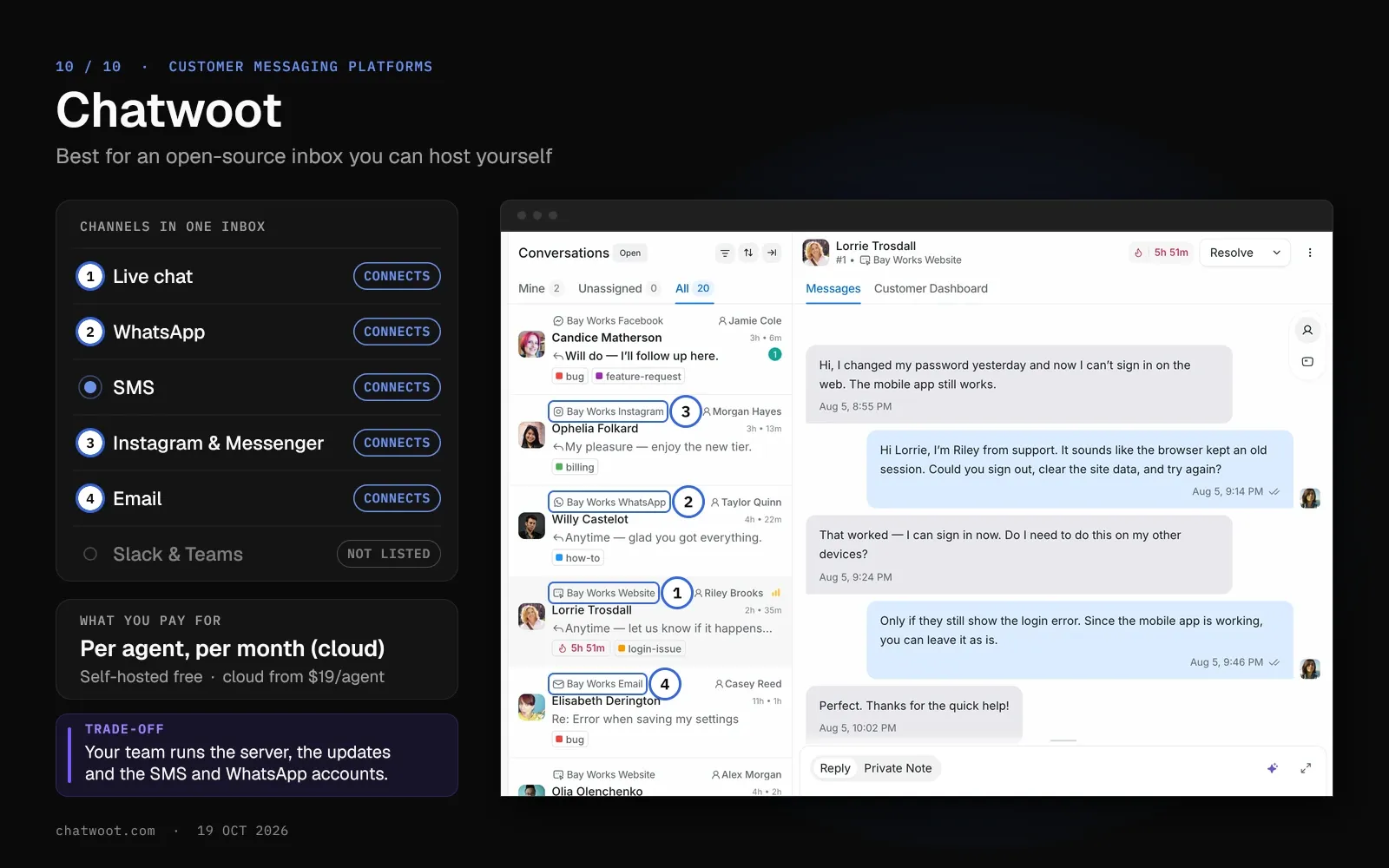
10. Chatwoot: Best for an Open-Source Inbox You Can Host Yourself
Chatwoot is an open-source customer support inbox you can run on your own server or use in its cloud. The self-hosted Community Edition costs nothing.
Cloud plans charge per agent, from $19 a month on Startups. Startups connects email, WhatsApp, Instagram, Messenger, TikTok, SMS, Telegram and LINE.
Key features
- Self-hosting. The Community Edition runs on a Linux server with PostgreSQL and Redis, at least 4GB of RAM and 2 CPU cores.
- Captain AI. Paid cloud plans include 300, 500 or 800 AI credits a month, and one assistant reply uses one credit. Extra credits cost $20 per 1,000.
- Bring your own providers. SMS runs through Twilio or Bandwidth, and WhatsApp through Meta's Cloud API or Twilio.
Pricing
Hacker is free for 2 agents and 500 conversations a month, with live chat only. Startups costs $19 per agent a month, Business $39, and Enterprise $99.
Self-hosted Premium Support adds Captain AI and voice calls for $19 per agent per month.
Pros
- You can host it yourself and keep conversation data on your own servers.
- Every messaging channel apart from voice comes on Startups, the first paid plan.
Cons
- The free self-hosted Community Edition has no Captain AI.
- Your team runs the server, the updates and the provider accounts for SMS and WhatsApp.
Best for
Teams with developers who want an open-source inbox they control.
Helply vs. Chatwoot for Self-Hosting
Chatwoot costs nothing self-hosted if your team runs the server, and $19 to $99 per agent a month in its cloud. On Startups, Chatwoot adds Instagram, Messenger, TikTok and LINE, four channels outside Helply's list. Helply connects to 60+ tools, including Stripe, HubSpot and Salesforce, and every plan has unlimited users.
| Helply | Chatwoot | |
|---|---|---|
| Users included | Unlimited on every plan | $19 to $99 per agent a month in the cloud |
| Channels | Email, chat, WhatsApp, SMS, Slack, Microsoft Teams, Discord, Telegram | Live chat on Hacker; email, WhatsApp, Instagram, Messenger, TikTok, SMS, Telegram and LINE from Startups |
| AI | Support, Assist and Background on every plan | Captain AI: 300 to 800 credits a month, then $20 per 1,000 |
| Starting price | $49/mo for 500 credits ($42 annual) | Free self-hosted; cloud $19/agent/mo |
Browse Helply's 60+ integrations
How to Choose a Customer Messaging Platform
Run four checks in order: your main channel, its message fees, the vendor's billing unit and each channel's messaging rules.
Start with your primary channel
For website chat, compare LiveChat, Crisp and Zoho SalesIQ, and pick Crisp or Zoho SalesIQ if you need chat inside a mobile app. WhatsApp teams can weigh respond.io against Trengo, and Instagram or Messenger DM teams can try ManyChat. Local businesses that text can look at Podium, online stores at Gorgias and self-hosting teams at Chatwoot.
With customers on several of these, compare the channel list of each shared inbox. Helply covers chat, email, WhatsApp, SMS, Slack, Microsoft Teams, Discord and Telegram, and it doesn't connect Instagram or Messenger.
Then add channel fees to the software price
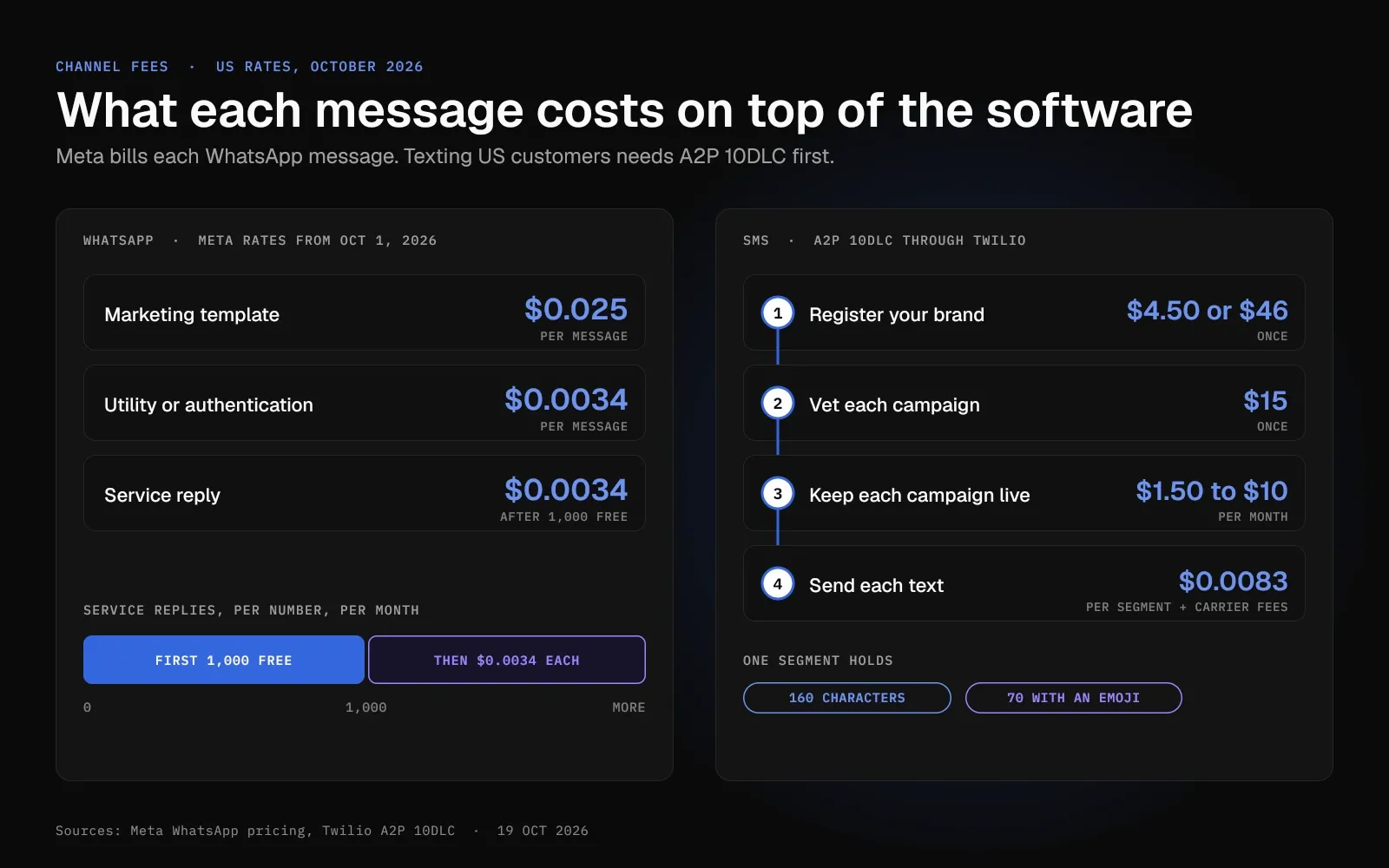
Since October 1, 2026, Meta charges $0.025 per US marketing template and $0.0034 per utility, authentication or service message. At respond.io you pay Meta's rate with no markup. Crisp shows Meta's fees as a monthly usage line, and Gorgias bills WhatsApp conversations as helpdesk tickets.
Before you text US customers from a 10-digit number, register for A2P 10DLC. Through Twilio, brand registration costs $4.50 or $46 once, campaign vetting $15, and each campaign $1.50 to $10 a month. Each text then costs $0.0083 per segment plus carrier fees, and a segment holds 160 characters, or 70 with an emoji.
Compare what each vendor bills for
Price a 10-person team on each meter. Per-user plans cost $250 a month on Text Essential ($190 annual), $100 on Zoho SalesIQ Basic ($70 annual) and $190 on Chatwoot Startups. Crisp Essentials stays at $95 for the workspace, and Trengo Boost at €349 (€299 annual) with 10 users included.
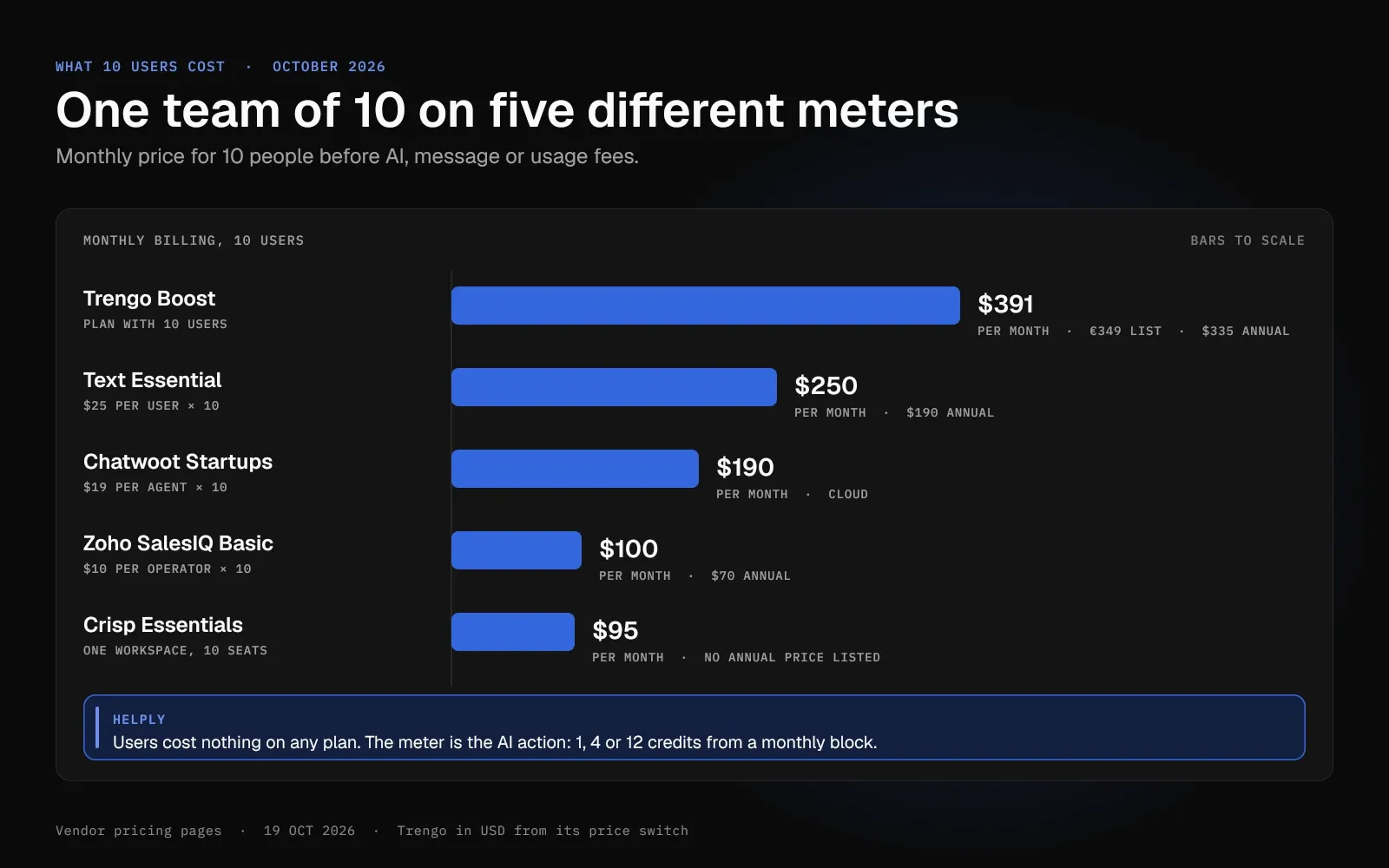
Trengo and Gorgias add a fee for AI. Trengo charges €0.30 per AI conversation (€0.25 annual), and Gorgias $1.00 per automated interaction ($0.90 annual).
Helply's meter is the AI action. Users cost nothing extra on any plan, and each action uses 1, 4 or 12 credits from a monthly block.
Last, check each channel's messaging rules
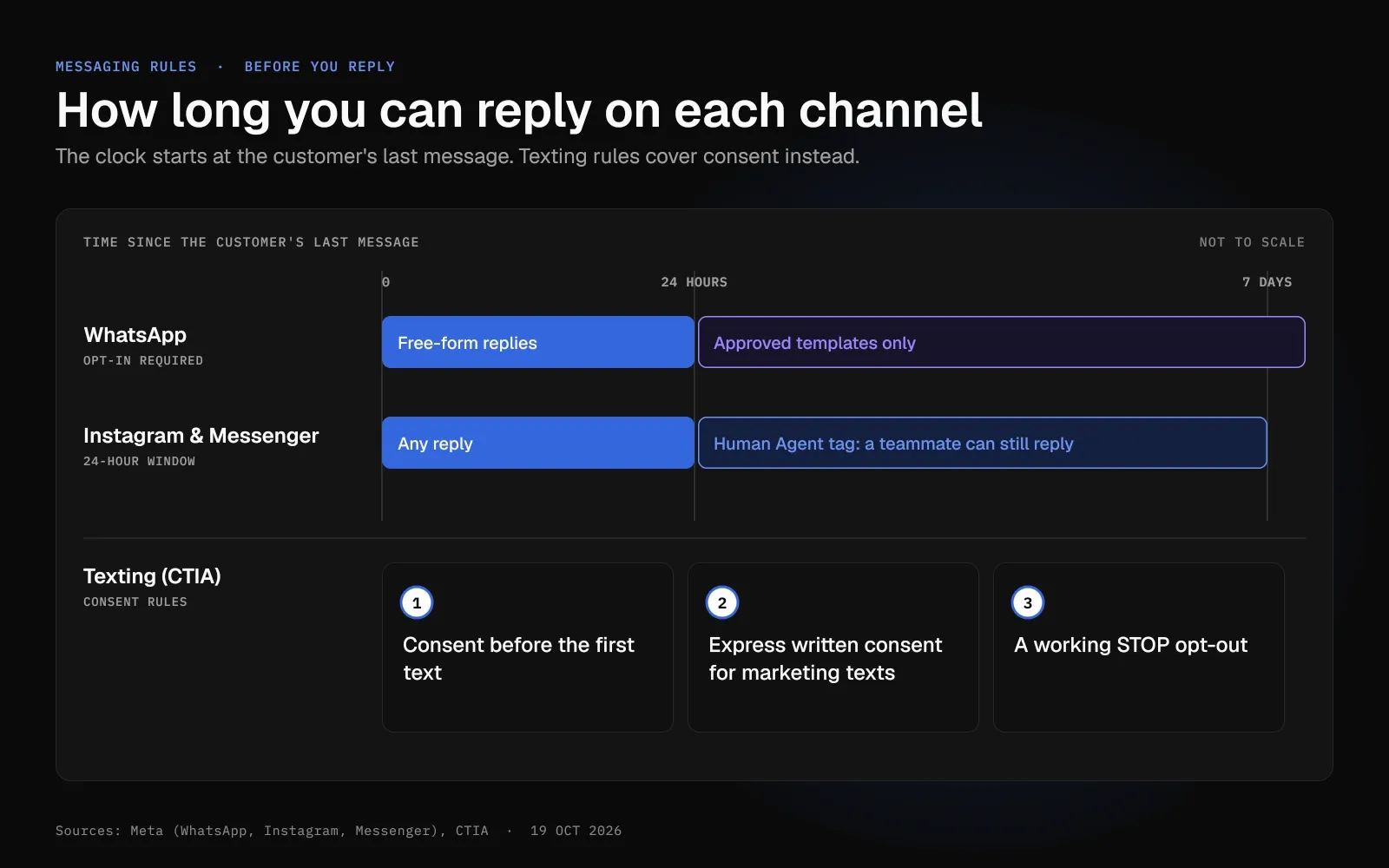
WhatsApp lets you message only customers who opted in. You can send free-form replies for 24 hours after their last message, then only approved templates.
Instagram and Messenger use a 24-hour window as well, and a teammate who adds the Human Agent tag has 7 days to reply. For texting, CTIA expects consent before the first text, express written consent for marketing texts and a working STOP opt-out.
Match each tool's channels against the ones your customers use today.
| Tool | Website or in-app chat | SMS | Instagram or Messenger | ||
|---|---|---|---|---|---|
| Helply | Yes | Yes | Yes | No | Yes |
| respond.io | Web chat | Yes | Yes, through Twilio, Bird, Vonage or Telnyx | Yes | Yes |
| Crisp | Yes, plus mobile SDKs | Essentials and up | Essentials and up | Messenger from Mini; Instagram from Essentials | Mini and up |
| Zoho SalesIQ | Yes, plus mobile SDK | Basic and up | Not listed | Basic and up | Not listed |
| Trengo | Yes | Yes | Yes | Yes | Yes |
| Gorgias | Website chat | Yes | Add-on | Yes | Yes |
| Podium | Website chat | Not listed | Yes | Yes | Not in the plan table |
| LiveChat (Text) | Website and in-app | Every plan, per its pricing banner | Through Twilio | Messenger | Yes |
| ManyChat | Not listed | Pro and up | Pro and up, through Twilio | Yes | Outbound email, Pro and up |
| Chatwoot | Yes | Startups and up | Startups and up | Startups and up | Startups and up |
One Inbox for Several Channels, or a Specialist for One?
Buy a specialist if most of your messages arrive on one channel. On a small budget, Crisp or Zoho SalesIQ can run website chat, and ManyChat can automate Instagram DMs. Podium covers texting for local businesses.
If the same customer writes in on two or three channels, your team ends up with a thread per tool. In Helply, one teammate owns each conversation and sees the customer's earlier messages and account next to the reply. The Support Agent can answer routine questions on every connected channel and hand the rest to your team with its work attached.
At MyBaggage, a luggage shipping service, Anthony Gallagher's team runs web, email and WhatsApp support on Helply. "The platform handles tracking questions on its own across every channel, and it warns us about shipments heading for trouble before the customer does. We're ahead of problems now instead of chasing them."
Every plan includes unlimited users, so the price stays tied to AI work as your team grows. The entry block costs $49 a month ($42 annual) for 500 credits, and setup work such as connecting tools uses no credits.
Frequently asked questions
A customer messaging platform is software that gathers chats from your website, app, WhatsApp, SMS and social media DMs into one shared inbox. Some vendors call it a business messaging platform or a customer messaging tool. Teammates can read a customer's past conversations while they reply, and many platforms add an AI agent for routine questions.
Good apps for customer service messaging include respond.io and Trengo for WhatsApp, ManyChat for Instagram DMs and Chatwoot for self-hosting. LiveChat (now Text), Crisp and Zoho SalesIQ cover website live chat, Gorgias fits online stores, and Podium serves local businesses that text. Helply, an AI-native customer support platform, puts chat, email, WhatsApp, SMS, Slack and Microsoft Teams in one inbox.
Website live chat specialists include LiveChat (now Text), Crisp, Zoho SalesIQ and Chatwoot. Crisp is free for 2 seats, Zoho SalesIQ for 3 operators and Chatwoot's cloud Hacker plan for 2 agents. Helply adds a live chat widget to the same inbox as email, WhatsApp and SMS.
For help desks with live chat built in, see Helply's guide to customer communication tools.
Under WhatsApp's 24-hour rule, a business has 24 hours from the customer's last message to send free-form replies. Meta calls this the customer service window, and each new customer message resets it. Once the window closes, the business can send only approved template messages.
Most US adults don't use WhatsApp, so plan on SMS and website chat for US customers. Pew Research Center surveyed 5,022 US adults in 2025 and found 32% use WhatsApp, up from 23% in 2021. Meta reported more than 100 million monthly WhatsApp users in the US in July 2024.
Crisp, Zoho SalesIQ and ManyChat have free plans, and Chatwoot costs nothing to self-host. Paid plans start at $10 a month: 50 tickets on Gorgias Starter, or one operator on Zoho SalesIQ Basic ($7 on annual billing). Podium Core sits at the top, at $399 a month.
Helply's smallest credit block costs $49 a month ($42 annual), with unlimited users.
Meta's WhatsApp fees and US texting fees come on top of most plans.
Meta bills the business for each message it delivers, and messages from customers cost nothing. Since October 1, 2026, a US or Canadian marketing template costs $0.025, and a utility, authentication or service message costs $0.0034. Service replies stay free up to 1,000 a month for each business number.
Yes, if you text US customers from a regular 10-digit number through a software platform. Twilio says carriers count all its SMS traffic as application traffic, so you register a brand and a campaign for A2P 10DLC. Toll-free numbers and short codes sit outside the 10DLC system, and carriers add fees to unregistered 10DLC texts.
Helply puts WhatsApp, SMS and its chat widget in one inbox, along with email, Slack and Microsoft Teams. Chatwoot and respond.io connect all three from their first paid plan, and Crisp from Essentials at $95 a month. Trengo lists all three, LiveChat's pricing page says the same for every Text plan, and Gorgias sells SMS as an add-on.
Live chat is enough if customers reach you through your website. If they start messaging you on WhatsApp, SMS or social apps, an omnichannel inbox lets one teammate see the whole history. In Zendesk's CX Trends 2026 survey of more than 11,000 consumers and business leaders, 74% of consumers said repeating information frustrates them.
Yes, for supported conversations: Helply's Support Agent can reply on email, chat, WhatsApp, SMS and other connected channels. For Shopify stores, Gorgias's AI Agent works on WhatsApp and, with the paid SMS add-on, on SMS. On WhatsApp, the 24-hour window applies to AI replies the same way it applies to your team's.
Match the tool to your main channel and budget. Free plans cover website chat on Crisp (2 seats) and Zoho SalesIQ (3 operators), and Instagram DMs on ManyChat (25 active contacts). For one inbox with AI agents and unlimited users, Helply starts at $49 a month ($42 annual) after a 14-day free trial.
A customer messaging platform centers on conversations in chat and messaging apps, and a help desk on tickets, many of them from email. Many tools now do both: Gorgias, Crisp Plus, and LiveChat's Text plans include ticketing. Helply runs tickets, chat, and messaging in one inbox, and its AI agents work across all three.
About the author

Bildad Oyugi
Head of Content
Bildad is a digital marketing expert with over 5 years of experience in copywriting, content marketing, and editing. Outside of work, he enjoys videography and spending time with his family.


