Key Takeaways
- Seat pricing grows with the team: five Zendesk Suite Team agents pay $345 a month ($275 on yearly billing) before extra AI.
- Most tools bill AI as a second meter: Zendesk per resolution, Freshdesk per session and Front per conversation.
- Free plans cap Zoho Desk at 3 users, HubSpot at 2, and Help Scout at 5 users and 100 contacts a month.
- Microsoft 365 shared mailboxes and Google Groups' Collaborative Inbox suit a few people; a help desk adds SLA targets and collision warnings.
- Every Helply plan has unlimited users, and the 500-credit block is $49 a month ($42 on yearly billing). Each AI task uses 1, 4 or 12 credits by complexity.
Three people answer customers from one shared Gmail inbox. A refund request sits for four days, because each of them thinks someone else took it. Then two of them reply to the same order question with two different answers.
HubSpot surveyed 1,537 customer experience leaders in March 2024 for its State of Service report. Of those leaders, 67% said customers expect a resolution within three hours.
After a week like that, a team starts pricing help desk software for small business. Most vendors charge per person, and many add a second fee once the AI starts answering.
For 3, 5 and 10 people, the monthly bill on these 10 tools runs from $0 to $1,490 before AI fees.
What Is a Helpdesk Ticketing System?
A helpdesk ticketing system is software that turns customer or employee requests from email, chat, messaging and web forms into tickets. The system tracks each ticket until someone resolves it. For a small business, it replaces a shared inbox where any email can sit without an owner.
Each ticket carries four things:
- An ID and a timestamp. Every request gets a number and an arrival time, which keeps it findable in a busy inbox.
- One owner. One person owns each ticket, and the rest of the team can see who that is.
- The full history. The whole thread stays on the ticket, and whoever picks it up next starts with context.
- A response clock. The help desk tracks each ticket against its service-level agreement (SLA) target and shows which ones are slipping.
What is an email ticketing system?
An email ticketing system turns messages sent to an address like support@yourcompany.com into tickets. Each email gets one owner and one thread, while customers keep writing to the same address.
Most help desks take email in one of two ways. You forward the support address to the help desk, or you sign in to Gmail or Microsoft 365 (Outlook) and connect the mailbox.
Zoho Desk's free plan covers email ticketing for 3 users. On Help Scout's Free plan, 5 users get one shared inbox and up to 100 contacts each month.
Help Desk Software for Small Business: Prices, AI Fees and Free Plans
Prices are monthly list prices in US dollars as of October 2026, with the yearly-billing rate in parentheses. Seat-based tools show the price for one person.
| Tool | Best For | Monthly price, USD (yearly billing) | AI and what triggers a charge | Free plan or trial |
|---|---|---|---|---|
| Helply | Small teams whose volume outpaces hiring | 500 credits for $49 a month ($42); no per-user fee | Credits by task: draft 1, lookup 4, full investigation 12 | 14 days and 1,000 credits, no card |
| Zendesk | Bigger teams routing work across group | Support Team $25 ($19); Suite Team $69 ($55) | 5 automated resolutions per agent seat a month, then $1.50 prepaid or $2.00 as used each; Copilot from Suite Professional | 14-day trial |
| Freshdesk | A free start for two agents | Growth $23 ($19) | 500 AI Agent sessions included once per account, then $49 per 100; Copilot on Pro and Enterprise | Free Program (2 agents, 6 months) or a 14-day trial |
| Help Scout | Email-first teams | Standard $30 ($25) | Envoy, $0.75 per resolution | Free for 5 users and 100 contacts each month |
| Hiver | Teams that stay in Gmail | Growth $35 ($25), from 2 seats | AI Agents listed on all plans, no usage fee shown | 7-day trial, no card |
| Zoho Desk | Teams on Zoho apps | Express $9 ($7); Standard $20 ($14) | Zoho standard-tier models free to 30M tokens monthly, then $1 a million; own OpenAI key on Express and Standard | Free for 3 users |
| Front | Shared-inbox teamwork | Starter $35 ($25) | Autopilot per conversation: $0.05 to triage, $0.89 to resolve | 14-day trial, no card |
| HelpDesk (helpdesk.com) | AI inside the seat price | Essential $25 ($19) | 10 AI resolutions monthly on Essential; packs of 50 at $49.50 | 14-day trial, no card |
| JitBit | Technical teams that self-host | Hosted: 1 agent $29 ($24.92), 4 agents $69 ($58.25); self-hosted 10-agent license $2,490 once | Unlimited AI credits from the 4-agent hosted plan; self-hosted AI on your own key | 21-day trial, no card |
| osTicket | Zero budget, technical team | Free self-hosted; managed cloud (SupportSystem) from $12 | No AI built in | Free |
Helply: Best for Handling More Tickets Without Growing the Team
Helply puts AI agents inside a complete help desk, for teams that must answer more customers before they hire again. You get email, chat, Slack and WhatsApp in one inbox, where each conversation has an owner and the response target you set. If a teammate is already replying to a customer, collision detection shows it to the rest of the team.
Your founder, an engineer or a part-time helper can step into a ticket at no extra cost, since every plan has unlimited users. You pay in credits for the work the AI does.
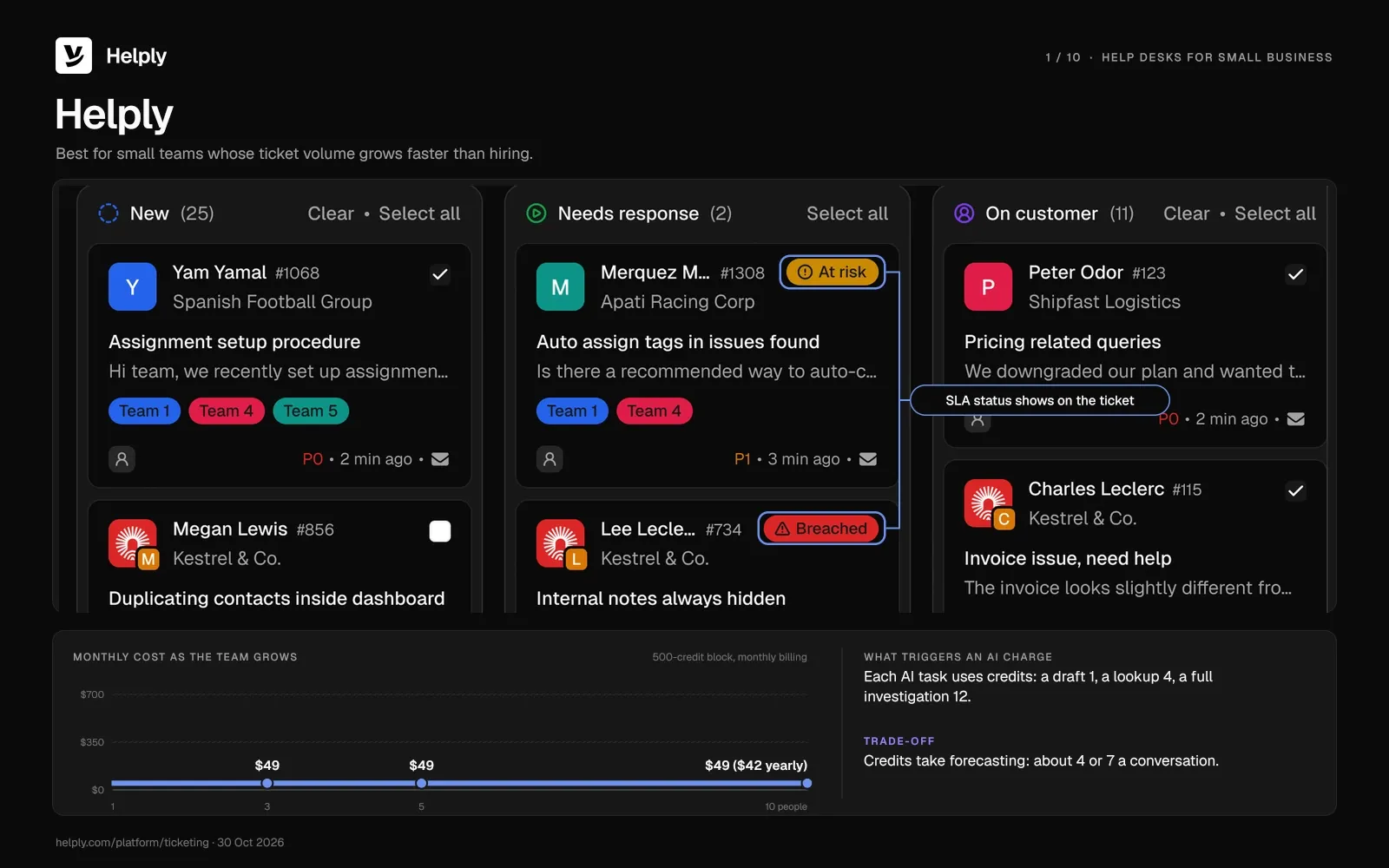
Email arrives once you connect Gmail or Microsoft 365 and choose the mailbox. Customers keep writing to support@ or billing@, and each request gets an owner, a status, a priority and its history.
The AI can categorize each new conversation, set its fields, prioritize it and route it before anyone on your team opens it.
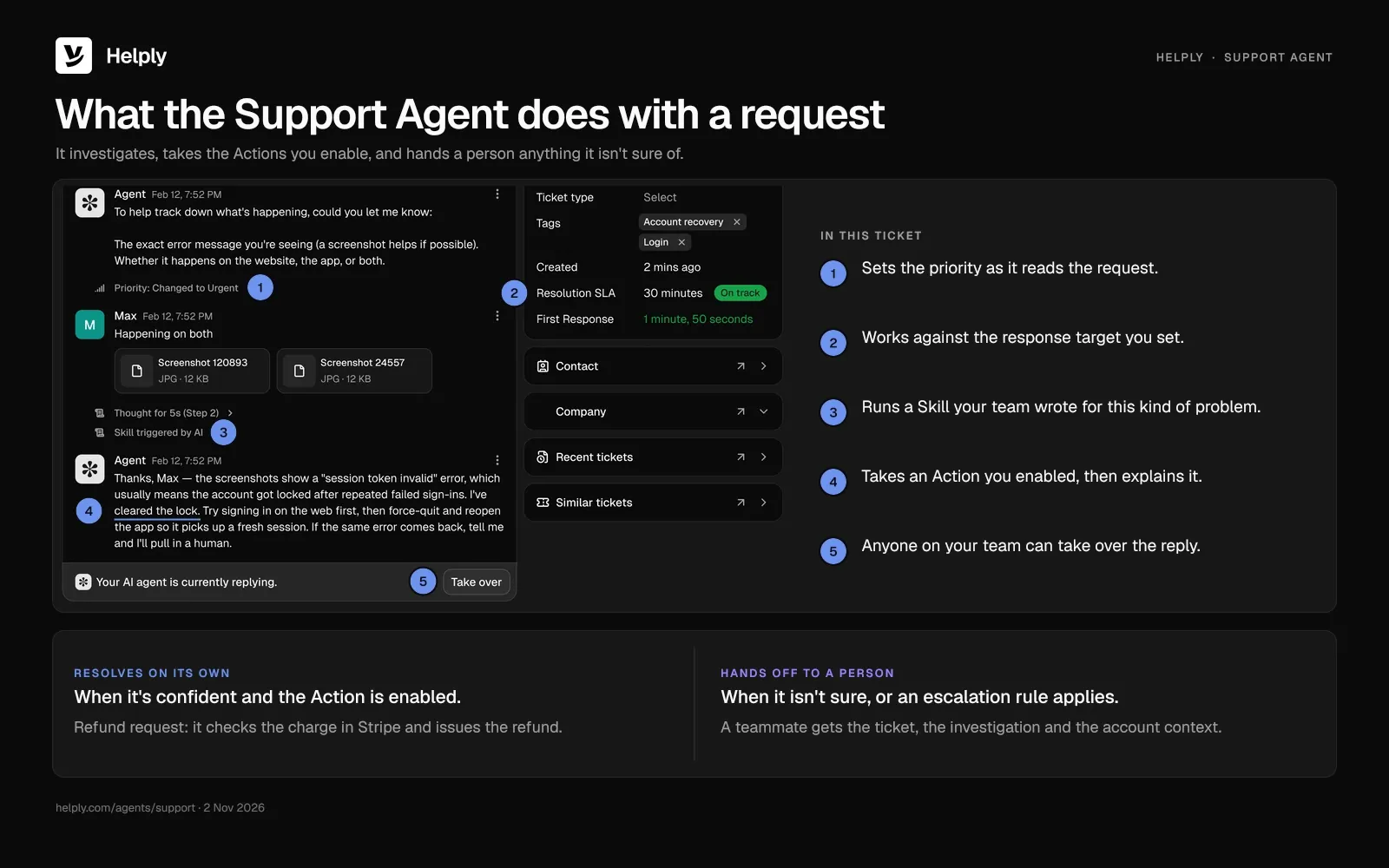
The Support Agent works with customers across email, WhatsApp, Slack, live chat, Telegram, Microsoft Teams, Discord and SMS. It can investigate, answer, take the supported Actions you enable and resolve requests from start to finish. You can also connect supported call information and transcripts to the same customer history.
Take the refund request that sat for four days. The Support Agent can check the charge in Stripe and issue the refund, if you've enabled that Action. If a software customer reports a failed sync, the agent can read the account history, then answer or brief an engineer.
If the Support Agent isn't sure it can resolve a request, it hands a person the ticket, its investigation and the account context.
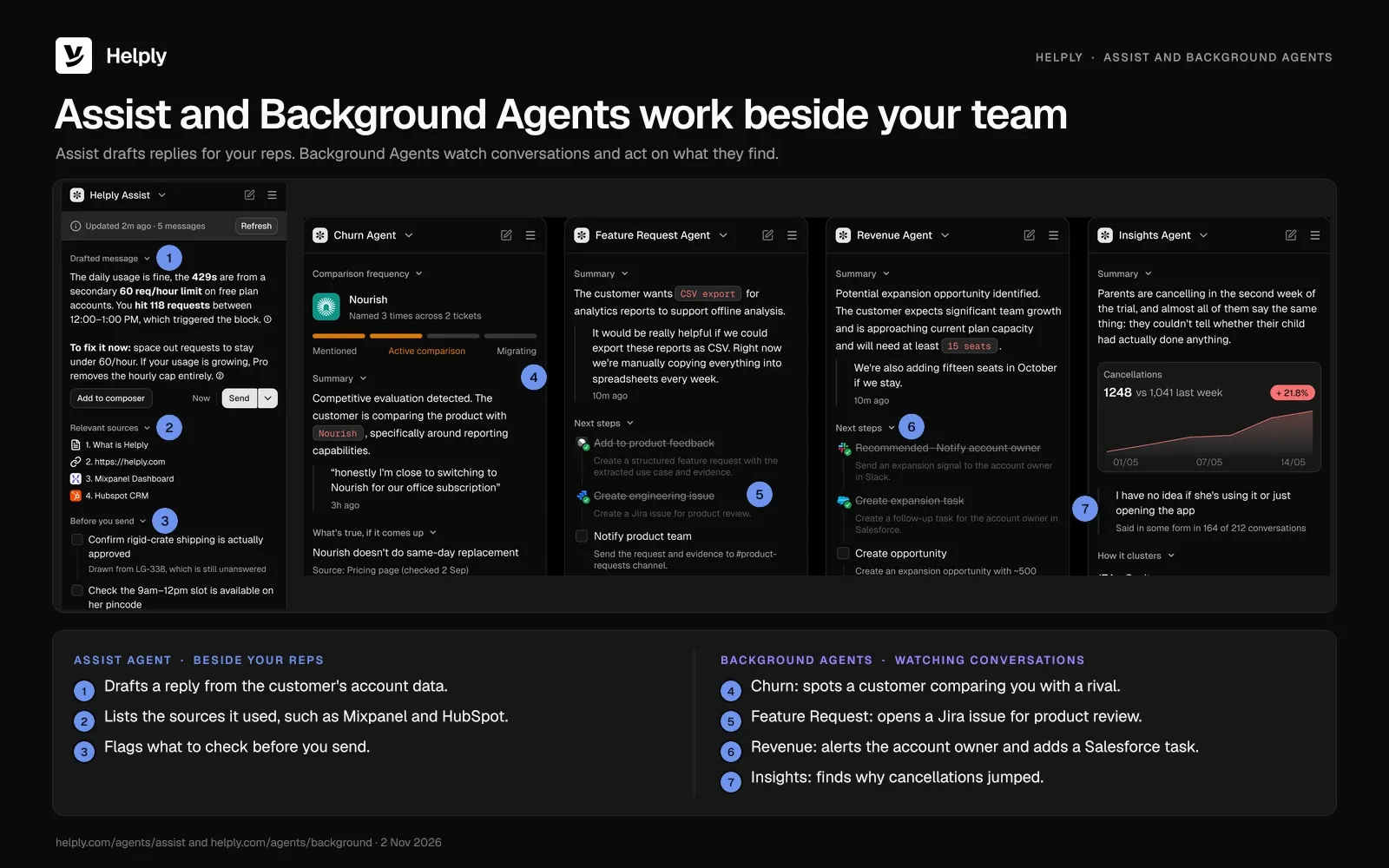
The Assist Agent drafts replies built from the conversation, the customer's account details and your Guidelines. A rep can also ask it to update HubSpot or open a Linear issue, where configured and supported.
Background Agents watch conversations for churn risk, revenue signals, feature requests and recurring problems. They can notify a teammate, update a system or start a workflow. You can also build your own, such as an SLA Agent that steps in before your team misses a response target.
Guidelines tell the agents how to behave and decide, and Skills teach them specific kinds of customer work. Escalation rules set the situations and confidence levels that bring in a person.
Before Helply, Gatekeeper Press answered every author question by hand, and a slow answer at one stage could stall an author's whole project. On Helply, the Insights Agent flagged a spike in formatting confusion before that spike backed up the publishing pipeline.
Key features
- An owner on every conversation. Smart assignment routes each conversation to the right person, team or AI agent. Collision detection flags a conversation another teammate is already handling.
- One queue across channels. Email, chat, WhatsApp, Slack and Teams land in one shared inbox, with views by status, assignee, priority or customer.
- Response targets you can see. You set response and resolution targets on each conversation. Helply prioritizes conversations and shows what needs attention before you miss an SLA.
- Notes and mentions in the thread. Teammates leave internal notes and @mention each other on the conversation itself.
- A help center that stays current. Customers search your published articles. The Knowledge Agent drafts fixes for missing or outdated answers, and your team reviews them before they go live.
- Context from the tools you run. Helply connects to 60+ tools, including Stripe, Chargebee, HubSpot, Salesforce, Linear, Jira, Notion and Snowflake.
- Reporting on people and agents. Reports cover escalations, AI resolutions, conversation volume, customer feedback, and response and resolution performance.
- Answers for a security review. Your security team can request a GDPR data processing agreement and, under NDA, the SOC 2 Type II report. Helply encrypts data in transit and at rest, and the AI providers it uses never train their models on your customer data.
Pricing
No plan charges per user. You pay each month for a block of AI credits, and the smallest, 500 credits, is $49 a month ($42 on yearly billing).
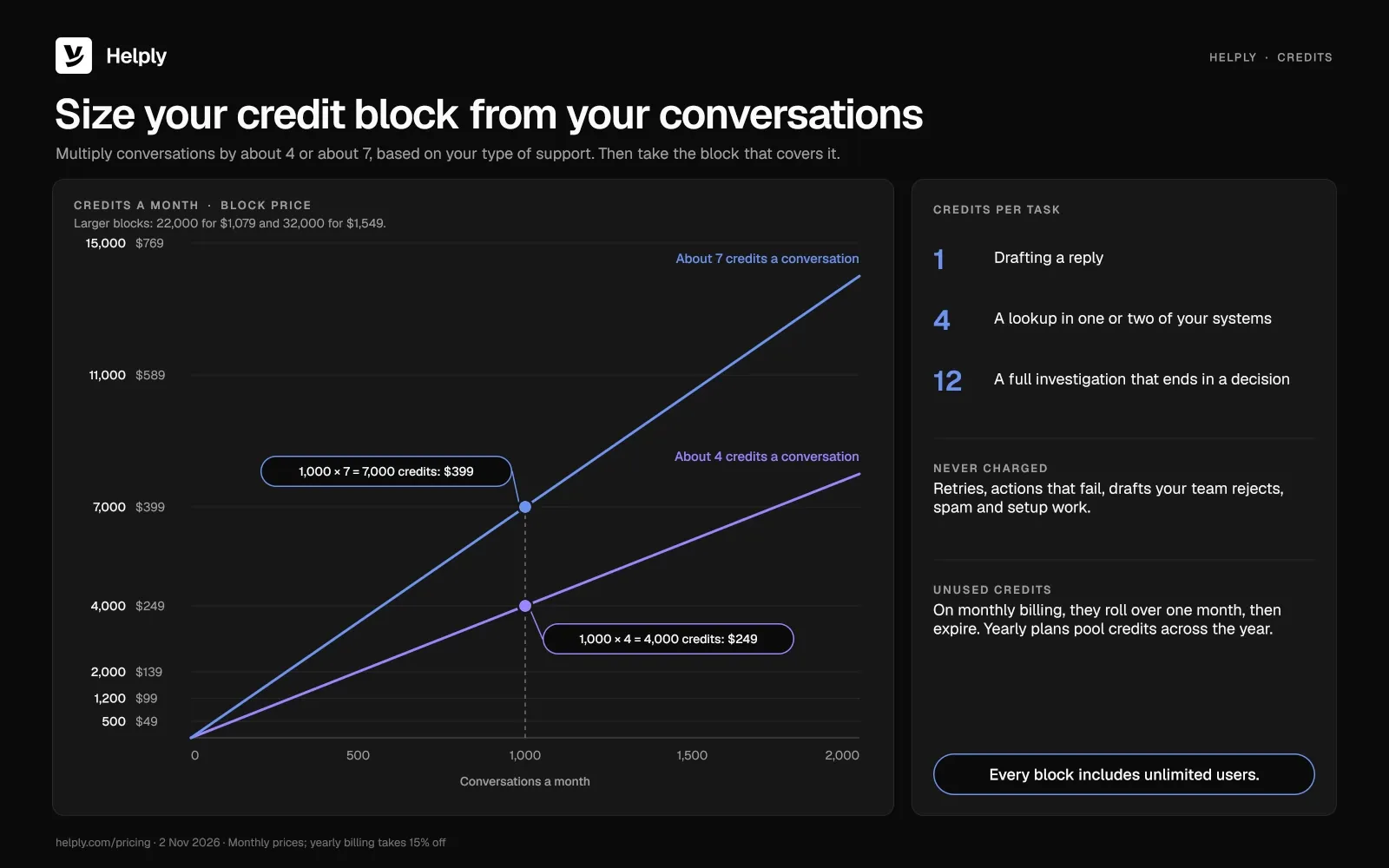
To pick a block, multiply your conversations per month by about 4 or about 7, based on your type of support. At 1,000 conversations a month, you'd need 4,000 credits at $249 a month ($212 on yearly billing) or 7,000 at $399 ($339). Yearly plans pool credits across the year, and on monthly billing, unused credits roll over one month, then expire.
A drafted reply uses 1 credit, and a search limited to one or two systems uses 4. An investigation across systems that ends in a decision uses 12. You pay nothing for retries, actions that fail, drafts your team rejects, spam or setup work.
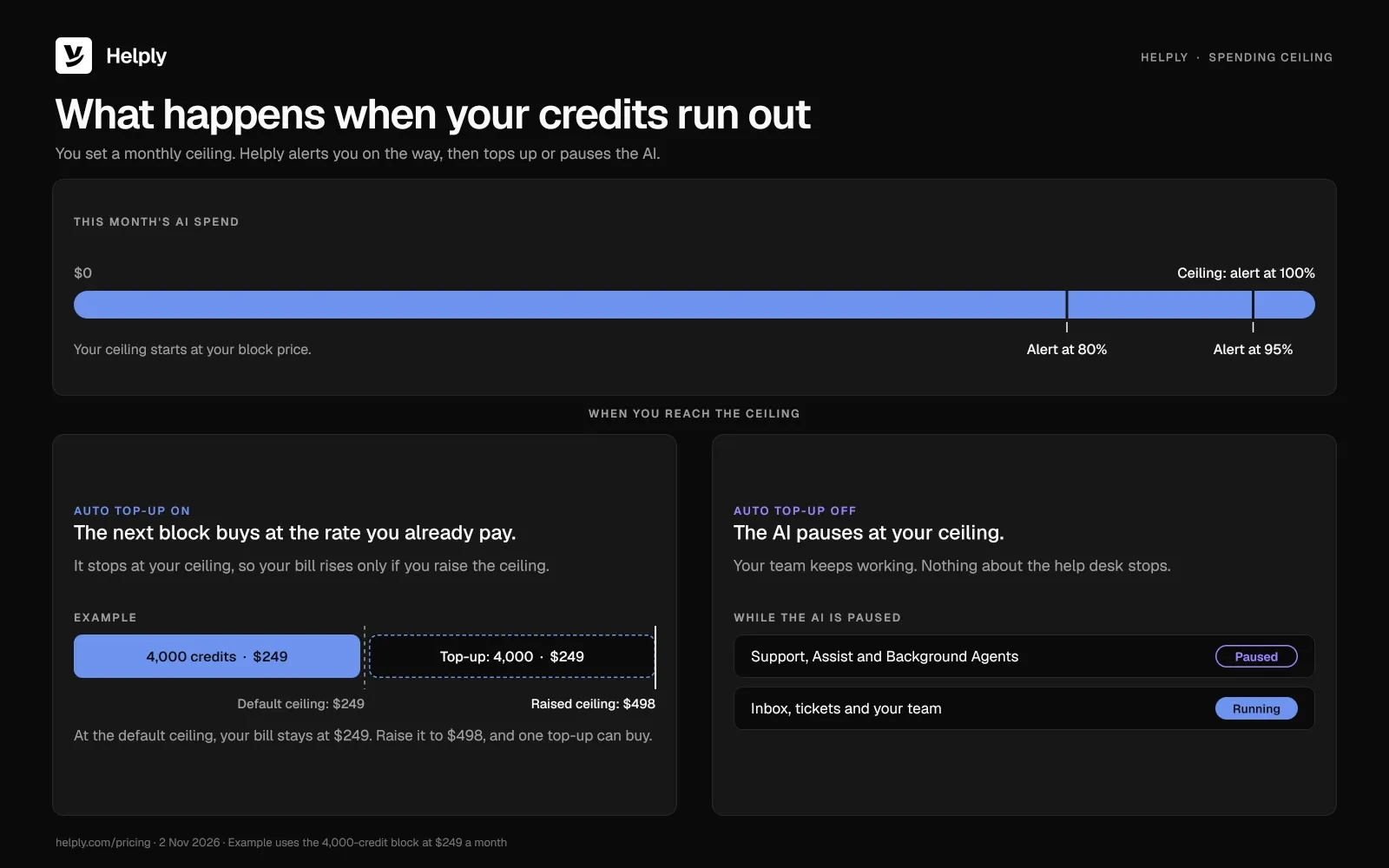
By default, your monthly ceiling equals the block price, with alerts at 80%, at 95% and when you reach it. Once credits run out, auto top-up adds a block at the rate you already pay, up to the ceiling you set. Your bill rises only if you raise that ceiling.
Turn off auto top-up, and AI work pauses at the ceiling while the help desk keeps running for your team. See Helply pricing to size your block.
Pros
- The same team answers more customers. The Support Agent can resolve repeat requests end to end, so people spend their time on conversations that need judgment.
- No bill for adding people. A teammate who helps in a busy week costs nothing extra.
- All three agent types on every plan. Support, Assist and Background Agents come included, whatever block you choose.
- One budget for all AI work. Drafts, lookups and investigations draw on the same credits, and a draft your team rejects is free.
- People stay in control. Your team writes the Guidelines and escalation rules that set what the agents handle alone and when a person steps in.
Cons
- You gain most with repeat volume. With few repeat questions in your queue, the AI has less to resolve.
- Credits take some forecasting. Usage moves with conversation volume and the kind of support you run. The pricing page has an estimator for your volume.
- Setup takes work. Someone on your team has to write the Guidelines and Skills and connect the tools the agents use.
- Heavy AI use costs more. The 32,000-credit block is $1,549 a month ($1,317 on yearly billing), against $49 ($42 on yearly billing) for 500 credits.
Who is Helply Best For?
Helply fits small SaaS companies, ecommerce stores, marketplaces and apps whose ticket volume grows faster than they want to hire.
If you're on a shared Gmail or Outlook inbox, you connect the mailbox you already use.
If you're leaving Zendesk, Freshdesk, Help Scout or Front, you can bring your history over and start Helply on part of the queue.
Zendesk: Best for Large Teams That Can Absorb the Total Cost
Zendesk fits teams that split support across several groups and need detailed routing, and it charges for every agent. Suite Team is $69 an agent a month ($55 on yearly billing).
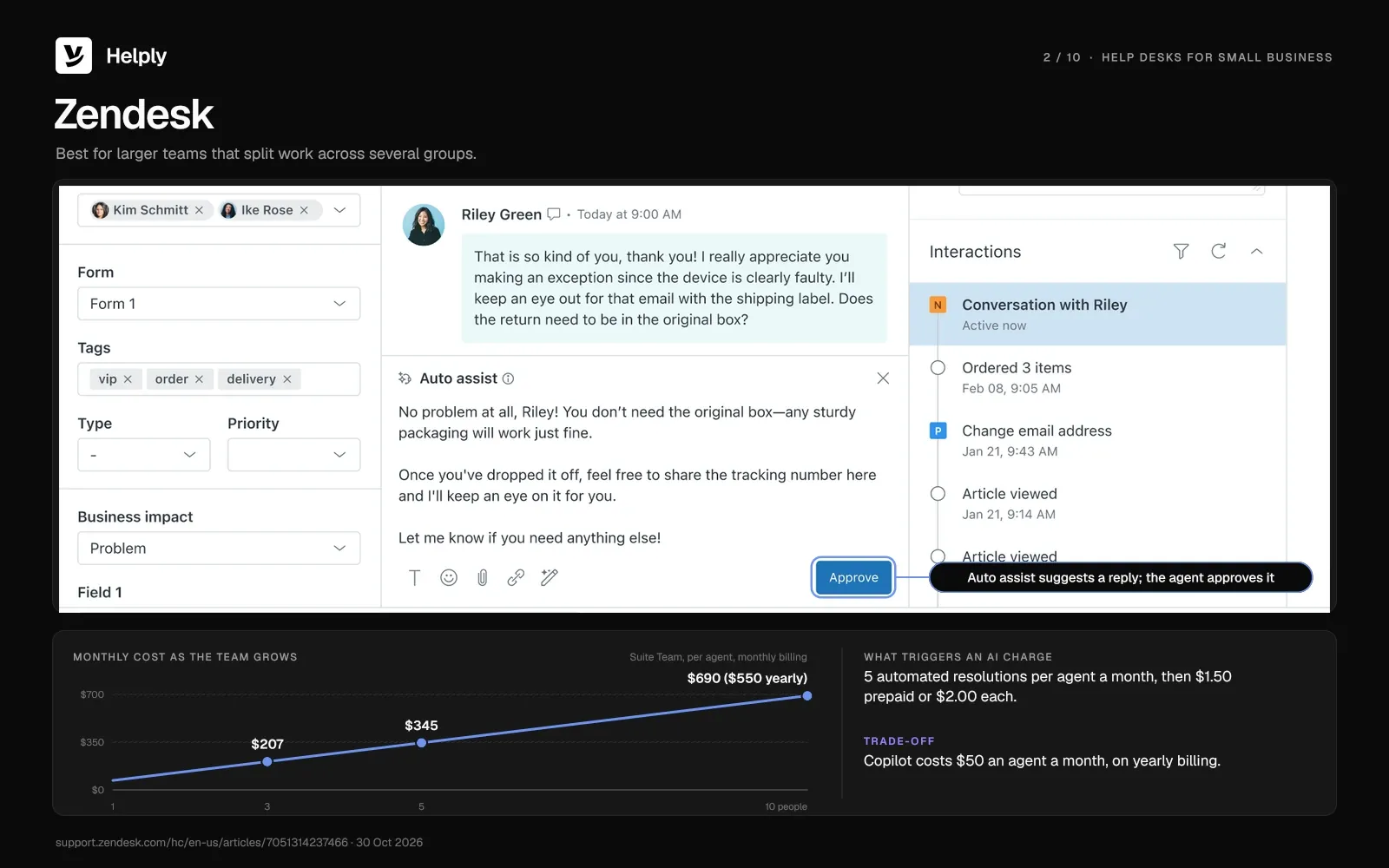
Zendesk's two main AI products are AI agents, billed per automated resolution, and Copilot, which helps your reps.
Key features
- AI agents on every plan. Zendesk puts AI agents in all Support and Suite plans, and each agent seat comes with a monthly batch of automated resolutions. On Support Team, AI agents for messaging need Zendesk messaging.
- Routing and automation from the first plan. Support Team includes ticket routing, pre-written responses, automations and triggers, and prebuilt analytics dashboards.
Pricing
The entry plan, Support Team, is $25 an agent a month ($19 on yearly billing). Suite Team costs $69 an agent a month ($55 on yearly billing), and Suite Professional $149 ($115).
Copilot costs $50 an agent a month on yearly billing, for Suite Professional and higher plans.
Each agent seat brings an allowance of 5 automated resolutions a month on Support Team or Suite Team, or 10 on Suite Professional. Past that, each one is $1.50 prepaid or $2.00 as used. Since May 18, 2026, accounts on Zendesk's newer resolution tiers get a dollar allowance instead, $2 to $10 per agent seat a month.
The 14-day trial opens on Suite Professional with Copilot, and Zendesk has no free plan.
Pros
- AI agents billed only on success. You pay for a resolution only when the AI agent closes the request without a human.
- Routing without an upgrade. On Support Team, at $25 an agent a month ($19 on yearly billing), a team can route and automate tickets.
Cons
- Cost grows with every agent. For twelve agents, Suite Professional plus Copilot comes to $1,980 a month on yearly billing, before extra resolutions.
- AI priced per agent and per resolution. Copilot adds $50 an agent a month on yearly billing, and each resolution past the allowance costs $1.50 or $2.00.
Best for
Larger support teams that split work across several groups and can budget for per-agent AI. For every plan and add-on, see Zendesk pricing in detail.
Where Helply Is a Better Fit Than Zendesk
Five agents on Zendesk Suite Team pay $345 a month ($275 on yearly billing) before extra resolutions, and each new agent adds $69. Helply charges nothing per user, and its smallest credit block is $49 a month ($42 on yearly billing).
| Compared on | Zendesk Suite Team | Helply |
|---|---|---|
| Monthly list price for 5 people, before extra AI | $345 ($275 on yearly billing) | $49 for 500 credits ($42 on yearly billing) |
| What AI costs | 5 resolutions per agent each month, then $1.50 or $2.00 apiece | 1, 4 or 12 credits per task |
| Trial | 14 days | 14 days, 1,000 credits |
| Copilot for reps | From Suite Professional, $50 an agent a month on yearly billing | Assist Agent on every plan |
Read the full comparison: Helply vs. Zendesk.
Freshdesk: Best for a Free Start and a Cheaper Copilot
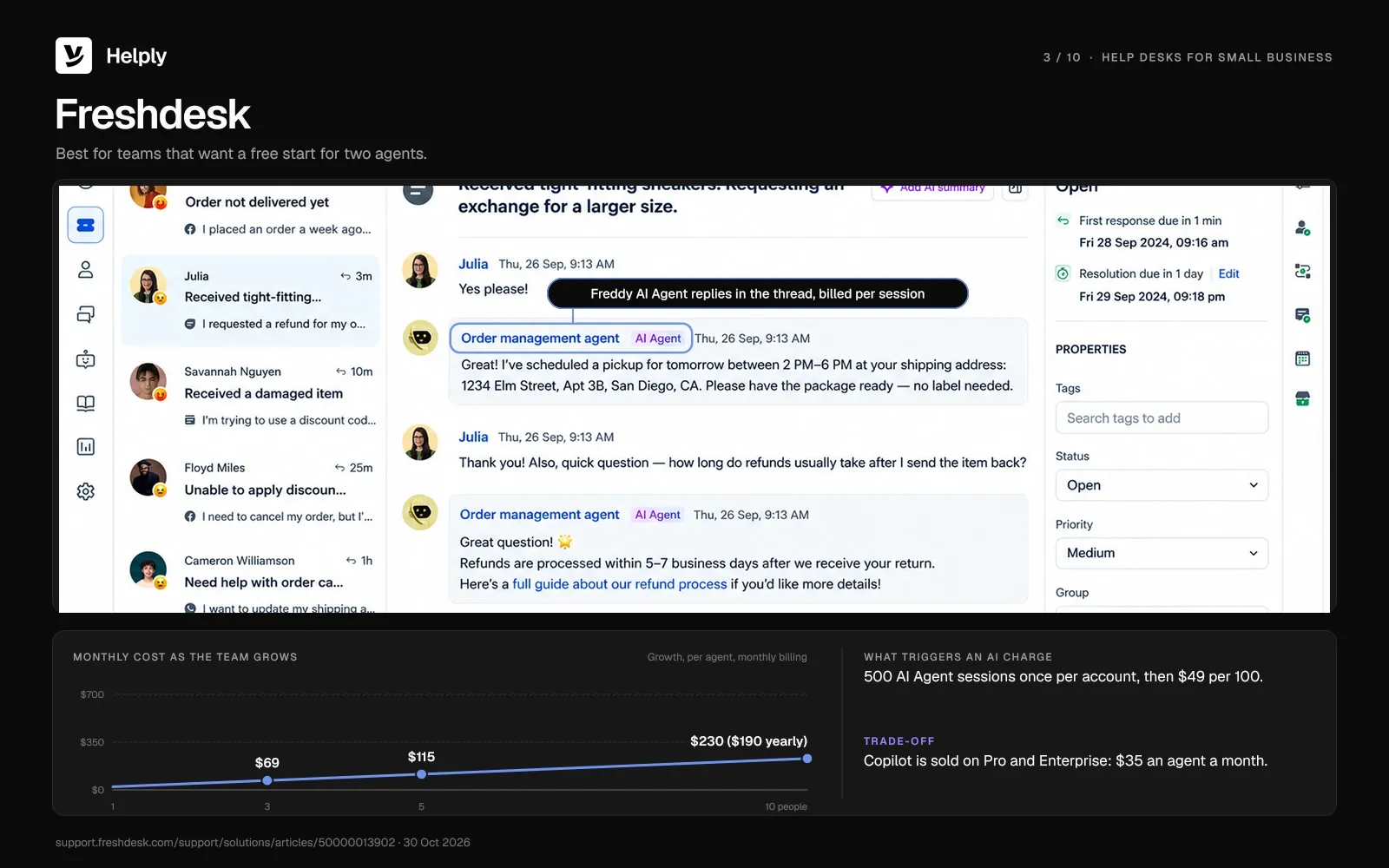
Freshdesk charges per agent, from $23 a month ($19 on yearly billing), and sells its AI in two parts. Freddy AI Copilot helps reps for a per-agent fee, and Freddy AI Agent answers customers for a fee per session.
Key features
- Freddy AI Agent. Plain Freshdesk runs the AI agent only on email, and Freshdesk Omni adds it for chat. One email session lasts 72 hours, counted from the first customer email.
- Day passes. Occasional helpers can work on a day pass at $2 on Growth, $7 on Pro or $12 on Enterprise, per agent per day.
Pricing
Growth is $23 an agent a month ($19 on yearly billing). Pro and Enterprise cost $66 and $107 an agent a month ($55 and $89 on yearly billing).
Freddy AI Copilot, sold for Pro and Enterprise, is $35 an agent a month ($29 on yearly billing). Each account gets 500 AI Agent sessions once, then pays $49 for every 100. New accounts start on a 14-day Enterprise trial.
Pros
- A lower-priced copilot. Freddy AI Copilot is $35 an agent a month ($29 on yearly billing), against $50 a month for Zendesk's Copilot on yearly billing.
- A free runway for two. The Free Program lets up to two agents use Freshdesk free for six months.
Cons
- The bill follows headcount. The Free Program stops at two agents, and every paid plan charges for each agent you add.
- Two AI line items. Freshdesk bills Copilot per agent and the AI Agent per session, both on top of the seat price.
Best for
Teams that want a free start for two agents and can forecast AI sessions as volume grows. For the full plan breakdown, see Freshdesk pricing, plan by plan.
Where Helply Is a Better Fit Than Freshdesk
On Freshdesk, the bill climbs with each agent, and Copilot adds a per-agent fee on top. Five Pro agents with Copilot pay $505 a month ($420 on yearly billing) before AI Agent sessions. On Helply, adding people costs nothing, and every AI task draws on one credit block.
| Compared on | Freshdesk Pro + Copilot | Helply |
|---|---|---|
| Monthly list price for 5 people, before extra AI | $505 ($420 on yearly billing) | $49 for 500 credits ($42 on yearly billing) |
| What AI costs | Copilot per agent; $49 per 100 AI Agent sessions after 500 included once per account | 1, 4 or 12 credits per task |
| Free start | Free Program: 2 agents, 6 months | 14-day trial, 1,000 credits |
| AI on chat | Needs Freshdesk Omni | Support Agent on chat, email, WhatsApp and Slack |
Read the full comparison: Helply vs. Freshdesk.
Help Scout: Best for a Clean, Email-First Experience
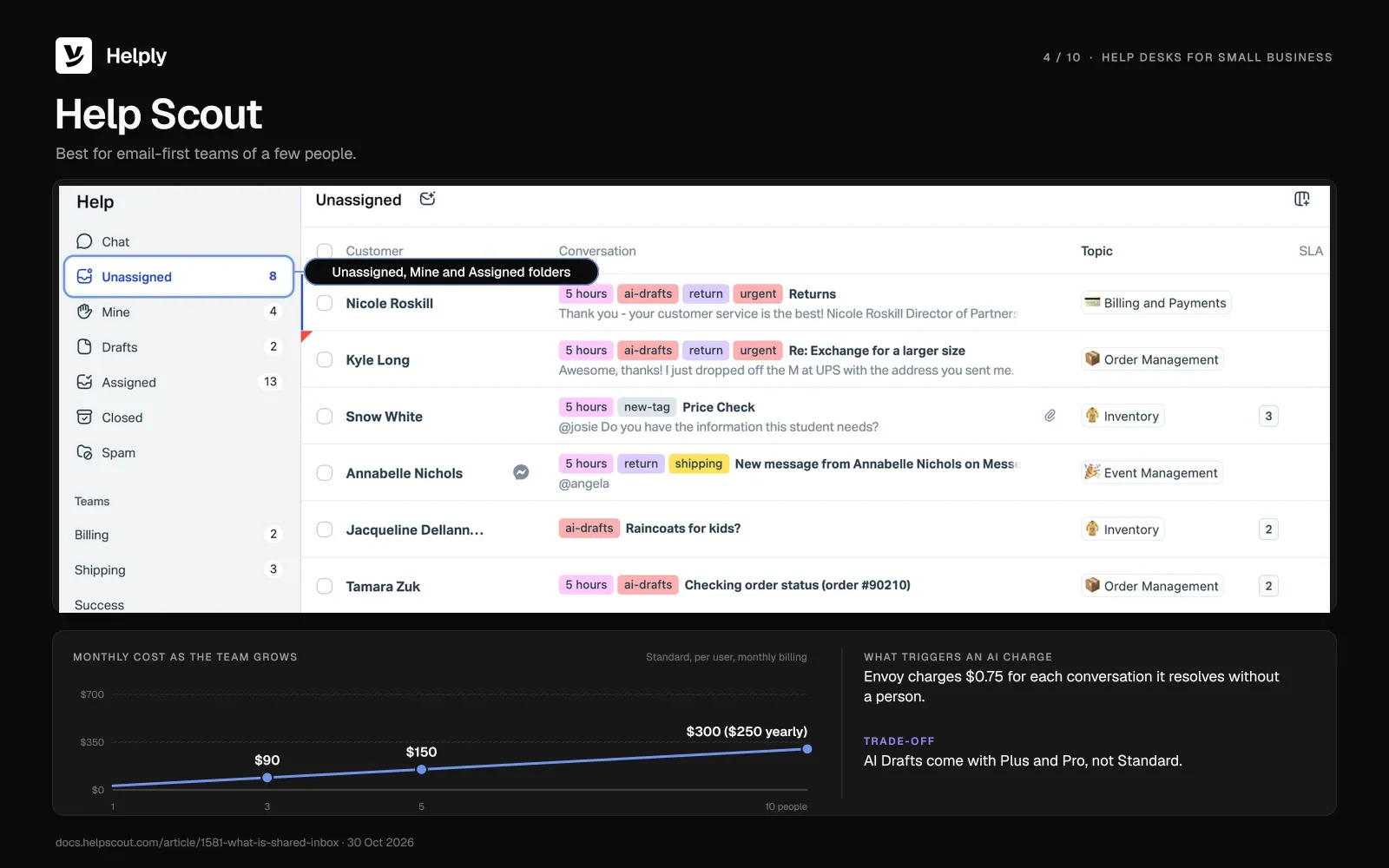
Help Scout runs an email-first inbox, free for up to 5 users and 100 contacts each month. It sells AI as the Envoy add-on.
Key features
- An email-first inbox and Docs. Free comes with a single inbox and a Docs site for help articles.
- Envoy and AI Drafts. Any paid plan can add Envoy at $0.75 a resolution, and Plus and Pro include AI Drafts.
Pricing
The Free plan holds up to 5 users and 100 contacts each month. Standard is $30 a user a month ($25 on yearly billing).
Plus is $54 a user a month ($45 on yearly billing), and Pro is $90 ($75) with a 10-user minimum. Standard and Plus start with a 15-day trial and no card.
Pros
- A free plan for small teams. Up to five users can share one inbox and a Docs site before anyone pays.
- AI spend that follows results. Envoy's $0.75 fee applies only to conversations it resolves without a person.
Cons
- The free plan caps contacts. Free covers 100 contacts each month, and a contact counts once your team replies to them or the AI resolves their question.
- Agent connections are still coming. In October 2026, Help Scout listed connections to payment processors and CRMs for its agent as "Coming Soon."
Best for
Email-first teams of a few people who want a free start and AI billed per resolution.
Where Helply Is a Better Fit Than Help Scout
Help Scout listed payment and CRM connections for its agent as coming soon in October 2026. Helply's Support Agent can check a charge in Stripe and issue a refund you've enabled, then pass the rest to your team.
| Compared on | Help Scout Standard + Envoy | Helply |
|---|---|---|
| Monthly list price for 5 people, before extra AI | $150 ($125 on yearly billing) | $49 for 500 credits ($42 on yearly billing) |
| What AI costs | $0.75 per resolution | 1, 4 or 12 credits per task |
| Free plan or trial | Free for 5 users and 100 contacts each month | 14-day trial, 1,000 credits |
| Actions in other tools | Payment and CRM connections coming soon | Supported Actions in Stripe, HubSpot and Salesforce where configured |
Read the full comparison: Helply vs. Help Scout.
Hiver: Best for Gmail Teams That Want an Omnichannel Option
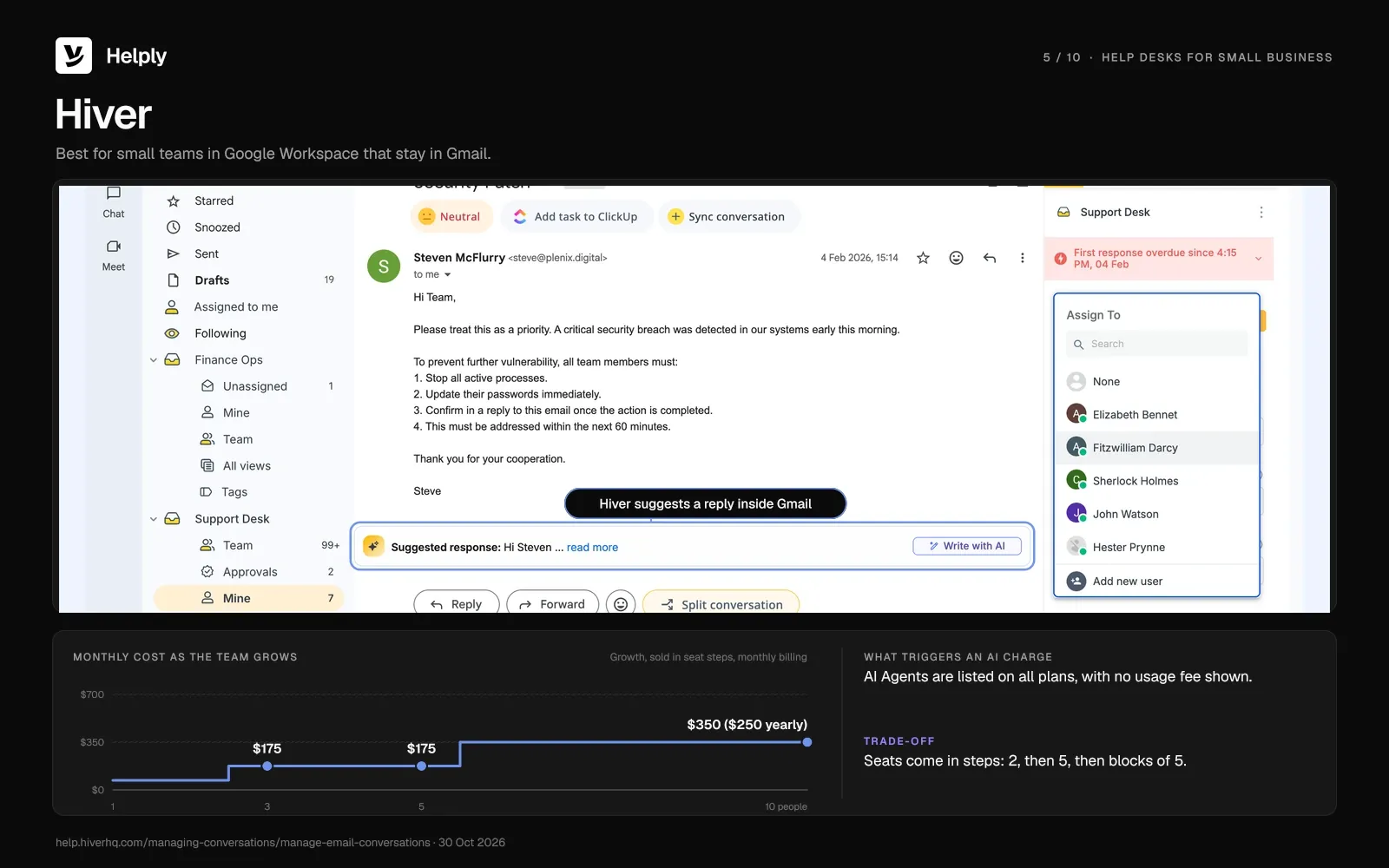
Hiver comes in two forms: Hiver in Gmail, which runs inside your inbox, and Hiver Omni, a standalone help desk. Both cost the same per user.
Its AI Agents resolve tickets and take actions across your systems.
Key features
- Gmail or standalone. Keep tickets inside Gmail, or move to Hiver Omni, which offers a voice add-on at $30 per voice seat a month.
- AI Agents. Hiver lists AI Agents on all plans and shows no usage fee for them on its pricing page.
Pricing
Growth, Pro and Elite cost $35, $65 and $95 a user a month ($25, $55 and $85 on yearly billing).
Plans start at 2 seats, step up to 5, then grow in blocks of 5. The 7-day trial opens on Elite and needs no card.
Pros
- No new tool to learn. Teams that work in Gmail keep working in Gmail.
- AI that acts. Hiver lists AI agents that can look up orders, issue refunds and update records.
Cons
- Seats come in steps. A team of 3 pays for 5 seats: $175 a month ($125 on yearly billing) on Growth.
- Chat AI needs a higher plan. In October 2026, Hiver's help center said the chat AI Agent needs Pro or Elite and is in early access.
Best for
Small teams in Google Workspace that want ticketing without leaving Gmail.
Where Helply Is a Better Fit Than Hiver
Three people on Hiver Growth pay for five seats, and the chat AI Agent needs Pro or Elite. Helply connects the same Gmail inbox and adds chat, WhatsApp, Slack and Teams to one queue, at no cost per teammate.
| Compared on | Hiver Growth | Helply |
|---|---|---|
| Monthly list price for 3 people, before extra AI | $175 ($125 on yearly billing), billed as 5 seats | $49 for 500 credits ($42 on yearly billing) |
| Seats | 2, then 5, then blocks of 5 | Unlimited users |
| What AI costs | No usage fee shown on the pricing page | 1, 4 or 12 credits per task |
| Gmail | Runs inside Gmail | Connects your Gmail mailbox |
See how the mailbox connects: Helply for Gmail.
Zoho Desk: Best for Zoho-Ecosystem Teams
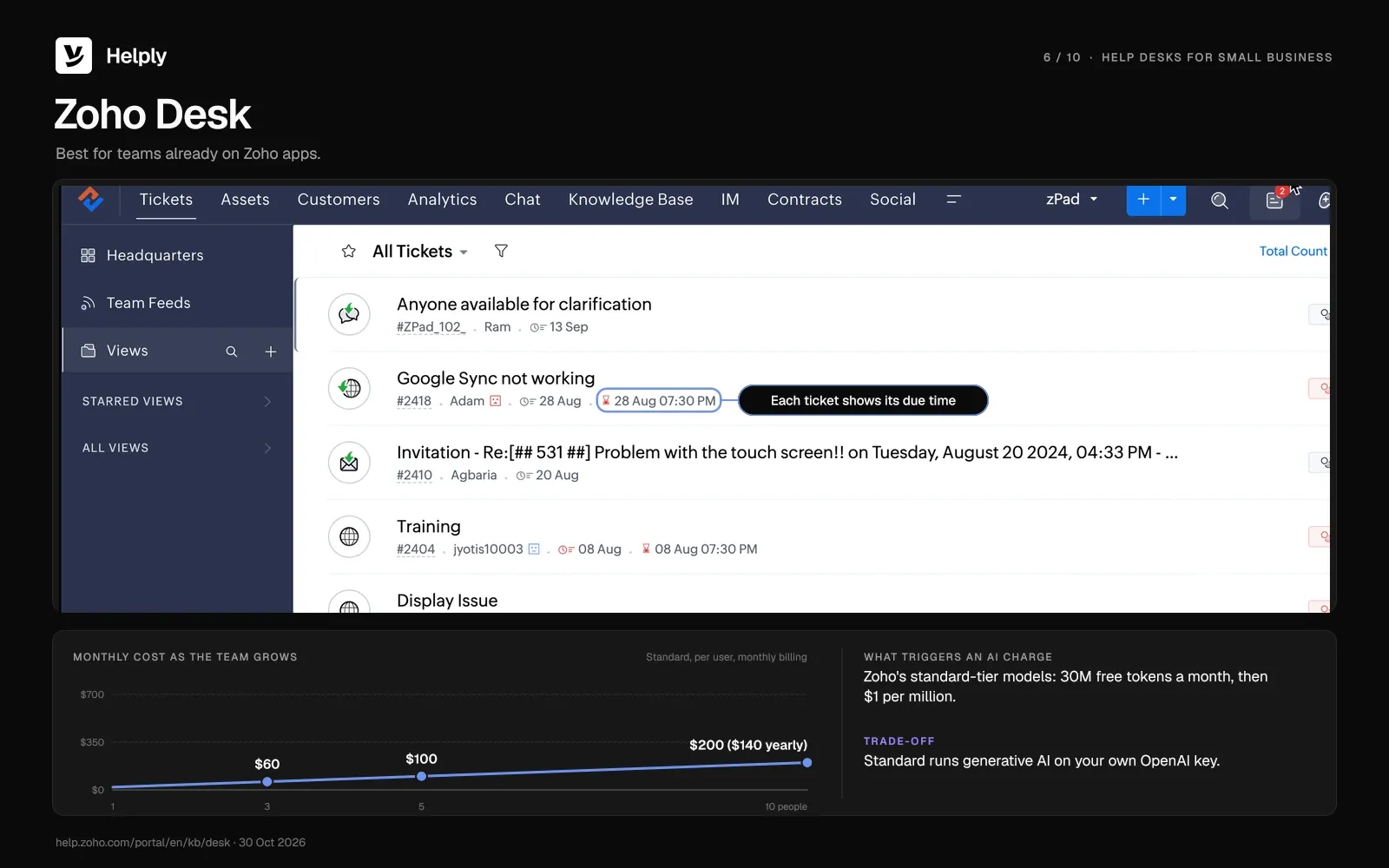
Three users can run Zoho Desk free, and Express is $9 a user a month ($7 on yearly billing). Zoho Desk fits best when your business already runs Zoho CRM or other Zoho apps.
Key features
- A free edition. Three users get email ticketing for free, without workflow rules or assignment rules.
- Zia Agents on every edition. Zoho's standard-tier models are free up to 30 million tokens a month, then $1 for each million.
Pricing
Express is $9 a user a month ($7 on yearly billing) and stops at 5 users. Standard is $20 a user a month ($14 on yearly billing), Professional $35 ($23) and Enterprise $50 ($40).
The 15-day trial needs no card and drops to the free edition when it ends.
Pros
- Ticketing at no cost. Three users can run email ticketing on the free edition.
- Low cost for a small team. Five users on Standard pay $100 a month ($70 on yearly billing).
Cons
- A second AI account on lower plans. Express and Standard run generative AI on your own OpenAI key.
- Prebuilt Desk agents sit on Enterprise. Zia Actions and the prebuilt Zoho Desk AI agents need Enterprise, at $50 a user a month ($40 on yearly billing).
Best for
Teams already on Zoho apps that want a free or low-cost start.
Where Helply Is a Better Fit Than Zoho Desk
Zoho Desk keeps its prebuilt Desk agents and Zia Actions for Enterprise, at $50 a user a month ($40 on yearly billing). Every Helply plan comes with all three agent types, starting at $49 a month ($42 on yearly billing).
| Compared on | Zoho Desk Standard | Helply |
|---|---|---|
| Monthly list price for 5 people, before extra AI | $100 ($70 on yearly billing) | $49 for 500 credits ($42 on yearly billing) |
| Generative AI | Your own OpenAI key | Included, paid in credits |
| Prebuilt agents and actions | Enterprise only | Support, Assist and Background Agents on all plans |
| Free plan or trial | Free for 3 users | 14-day trial, 1,000 credits |
See how credit blocks work: Helply pricing.
Front: Best for Collaborative Operations
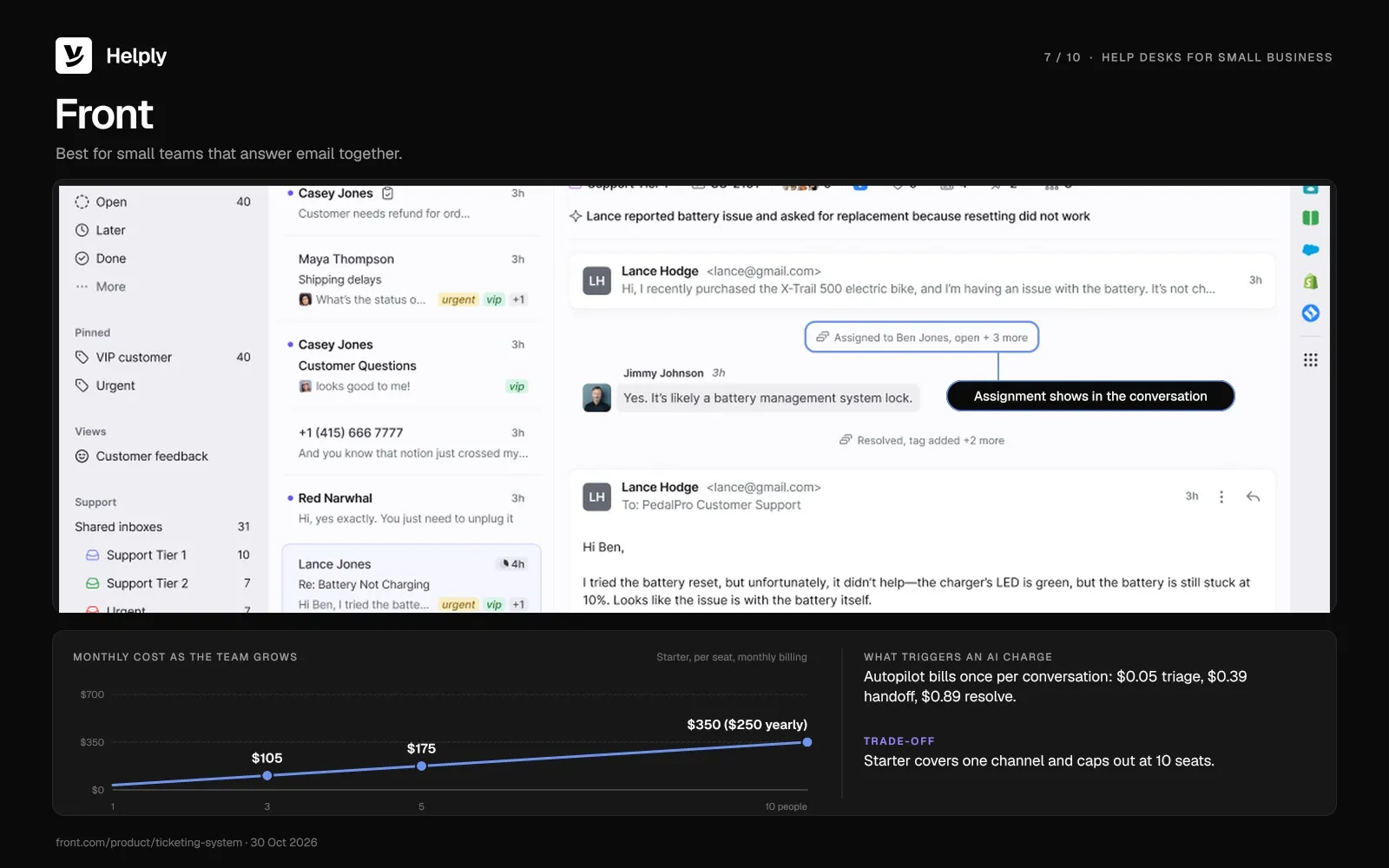
Front is a shared inbox for teams that work email together, with omnichannel support from Professional up. Front bills its Autopilot agent per conversation, by the outcome it reaches.
Key features
- Autopilot. It triages, hands off or resolves a conversation, and Front bills once, for the highest outcome. A triage is $0.05, a handoff is $0.39, and a resolution is $0.89.
- Copilot. Starter and Professional can add Copilot at $20 a seat a month, and Enterprise includes it.
Pricing
Starter is $35 a seat a month ($25 on yearly billing) and caps out at 10 seats. Professional is $85 a seat a month ($65 on yearly billing).
Front sells Enterprise only on yearly billing, at $105 a seat a month. The 14-day trial includes Professional features and needs no card.
Pros
- Low-cost triage. Autopilot triage costs $0.05 a conversation.
- A Starter plan sized for small teams. Starter holds up to 10 seats, each $35 a month ($25 on yearly billing).
Cons
- Starter covers one channel. Omnichannel support and SSO start on Professional, at $85 a seat a month ($65 on yearly billing).
- AI billed on top of seats. Seats grow with headcount, and Autopilot adds a charge for each conversation it handles.
Best for
Small teams that answer email together and want AI priced per conversation.
Where Helply Is a Better Fit Than Front
Front Starter covers one channel, and omnichannel support starts on Professional at $85 a seat a month ($65 on yearly billing). From the first $49 block ($42 on yearly billing), Helply puts email, chat, WhatsApp, Slack and Teams in one inbox.
| Compared on | Front Starter | Helply |
|---|---|---|
| Monthly list price for 5 people, before extra AI | $175 ($125 on yearly billing) | $49 for 500 credits ($42 on yearly billing) |
| Channels | One channel; omnichannel from Professional | Email, chat, WhatsApp, Slack and Teams |
| What AI costs | $0.05 to $0.89 per conversation | 1, 4 or 12 credits per task |
| Trial | 14 days, no card | 14 days and 1,000 credits, no card |
Compare the two in detail: Helply vs. Front.
HelpDesk: Best for Simple Queues With AI Included
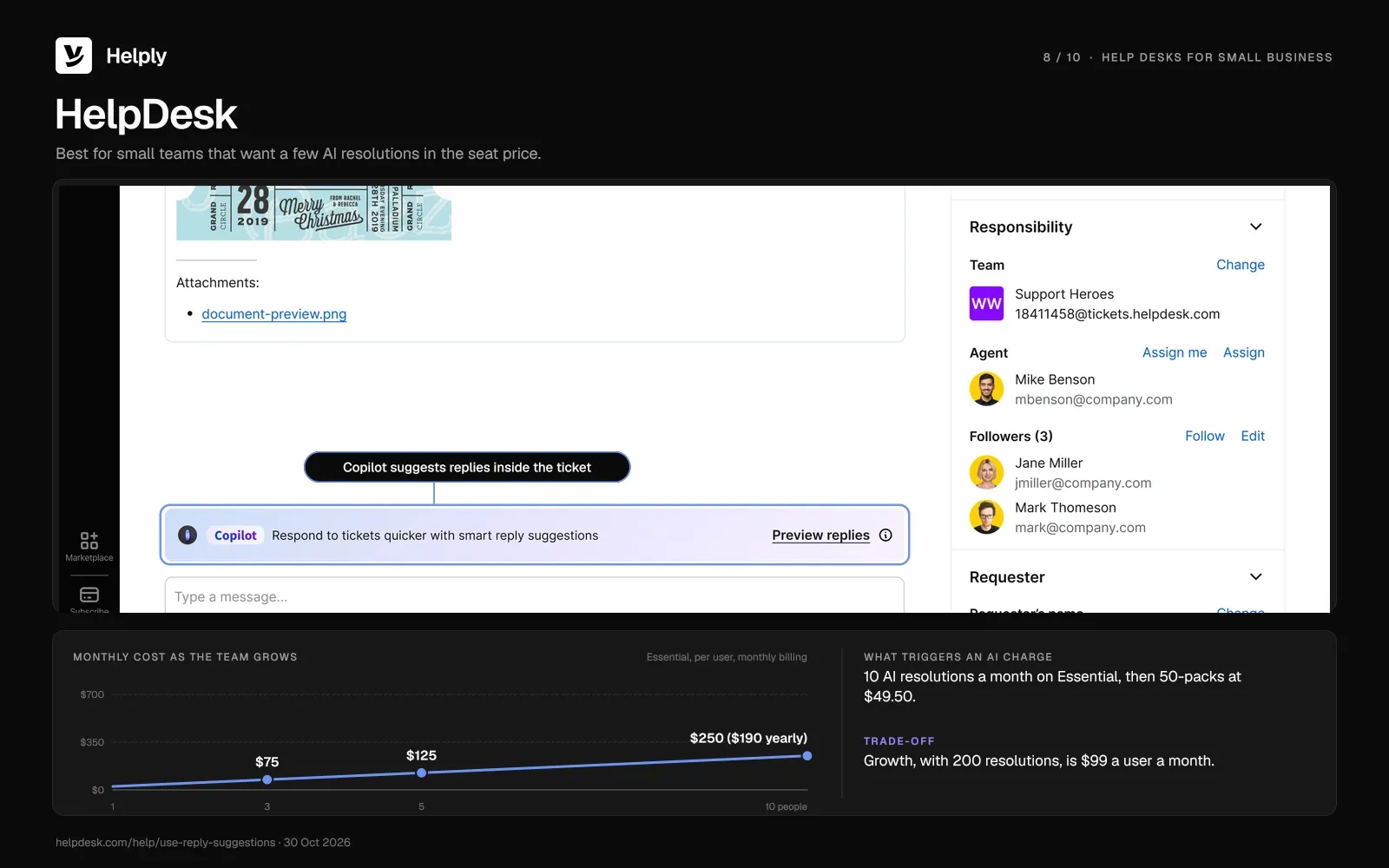
HelpDesk, at helpdesk.com, charges per user and puts a monthly allowance of AI resolutions in that price. Past the allowance, HelpDesk adds a 50-resolution pack each time you run out.
Key features
- AI resolutions included. Essential comes with 10 each month and Growth with 200, and a resolution counts when the AI solves the customer's question.
- Workflows with a run limit. Workflows can run 300 times a month on Essential and 1,000 times on Growth.
Pricing
Essential is $25 a user a month ($19 on yearly billing), and Growth is $99 ($79). HelpDesk sells extra resolutions in 50-packs at $49.50.
Every plan has a 14-day free trial, and you don't need a card.
Pros
- Some AI in the base price. Essential includes 10 AI resolutions each month.
- Extra AI you can budget for. Each 50-resolution pack costs $49.50, about $0.99 a resolution.
Cons
- A big step between plans. Growth is $99 a user a month ($79 on yearly billing), about four times Essential.
- A small allowance on Essential. Ten AI resolutions a month cover only a handful of repeat questions.
Best for
Small teams that want a few AI resolutions inside the per-user price.
Where Helply Is a Better Fit Than HelpDesk
HelpDesk Essential includes 10 AI resolutions a month, and Growth includes 200 at $99 a user a month ($79 on yearly billing). On Helply, a tenth teammate costs nothing, and the agents' work draws on one credit block.
| Compared on | HelpDesk Essential | Helply |
|---|---|---|
| Monthly list price for 5 people, before extra AI | $125 ($95 on yearly billing) | $49 for 500 credits ($42 on yearly billing) |
| AI included | 10 resolutions each month | 500 credits |
| Extra AI | $49.50 per 50 resolutions | The next block at your current rate, until you reach your monthly ceiling |
| Trial | 14 days, no card | 14 days, 1,000 credits, no card |
See how credit blocks work: Helply pricing.
JitBit: Best for Small Technical Teams and Self-Hosting
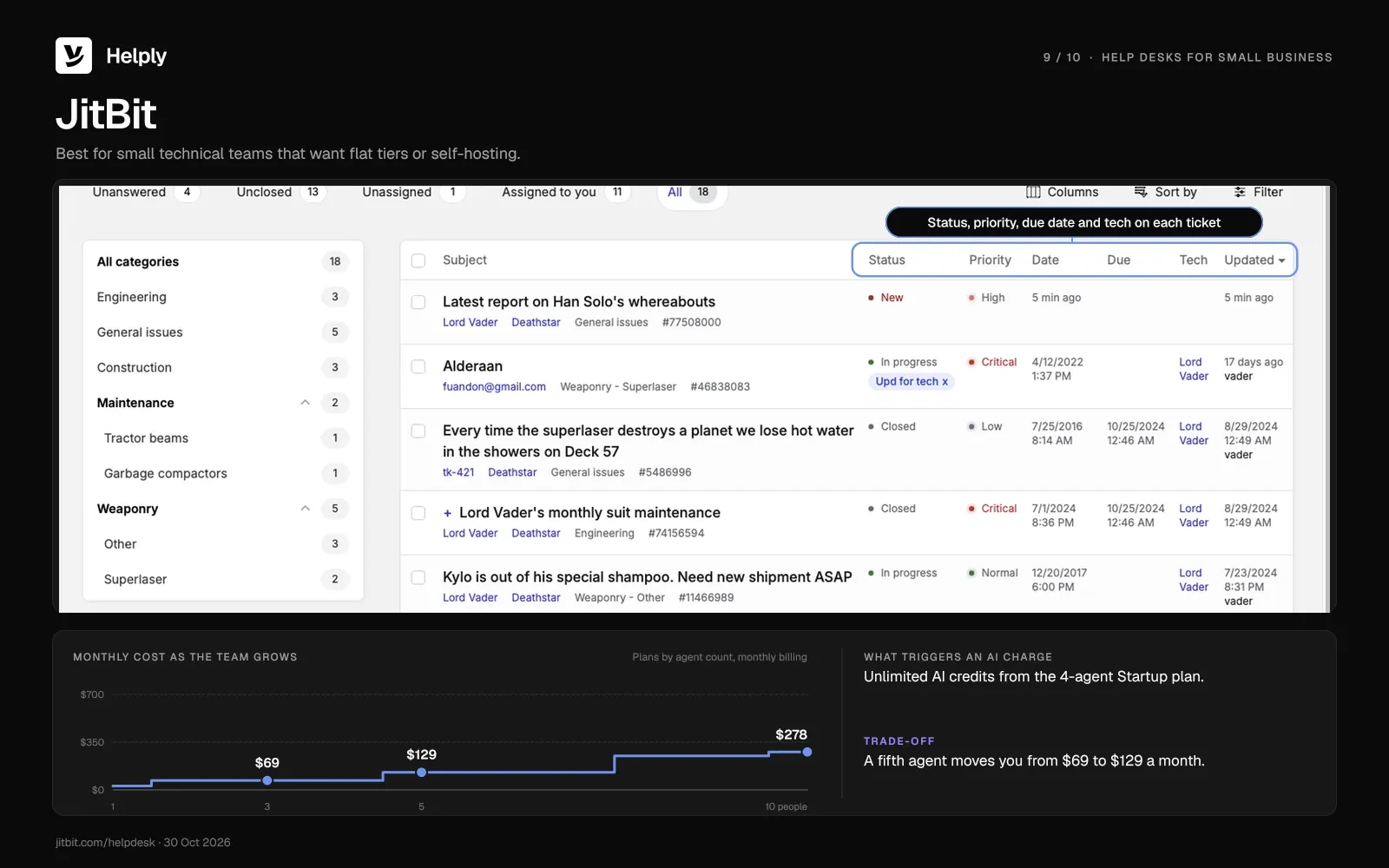
JitBit prices its cloud plans by agent count and also sells a self-hosted license you buy once. Its AI can triage tickets, draft a first reply as a ticket arrives and call your own APIs as tools.
Key features
- Plans by agent count. Freelancer covers 1 agent, Startup 4, Company 7 and Enterprise 9, each at a flat monthly price.
- Self-hosting. A perpetual license for 10 agents is $2,490 once, with 12 months of updates and support.
Pricing
Freelancer is $29 a month for 1 agent ($24.92 on yearly billing), and Startup is $69 a month for 4 ($58.25). Company costs $129 a month for 7 agents ($108.25 on yearly billing), and Enterprise $249 for 9 ($208.25).
Unlimited AI credits start on Startup. The cloud trial runs 21 days and needs no card.
Pros
- Unlimited AI on a flat plan. Four agents on Startup pay $69 a month ($58.25 on yearly billing), however much the AI works.
- A self-hosted option. You run it on your own servers with a one-time license.
Cons
- Each plan caps agents. A fifth agent moves you from Startup to Company, from $69 to $129 a month.
- Self-hosted AI needs your own key. On-prem, generative AI runs on your own LLM key, and semantic search needs a $999 one-time add-on.
Best for
Small technical teams that want flat tiers or a self-hosted license.
Where Helply Is a Better Fit Than JitBit
On JitBit, adding a fifth agent moves the bill from $69 to $129 a month. On Helply, adding people never changes the price, and the $49 block includes Support, Assist and Background Agents.
| Compared on | JitBit Company | Helply |
|---|---|---|
| Monthly list price for 5 people, before extra AI | $129 ($108.25 on yearly billing) | $49 for 500 credits ($42 on yearly billing) |
| People | Up to 7 agents | Unlimited users |
| What AI costs | Unlimited AI credits | 1, 4 or 12 credits per task |
| Hosting | Cloud or self-hosted | Cloud, SOC 2 Type II |
See how credit blocks work: Helply pricing.
osTicket: Best for Zero-Budget Self-Hosting
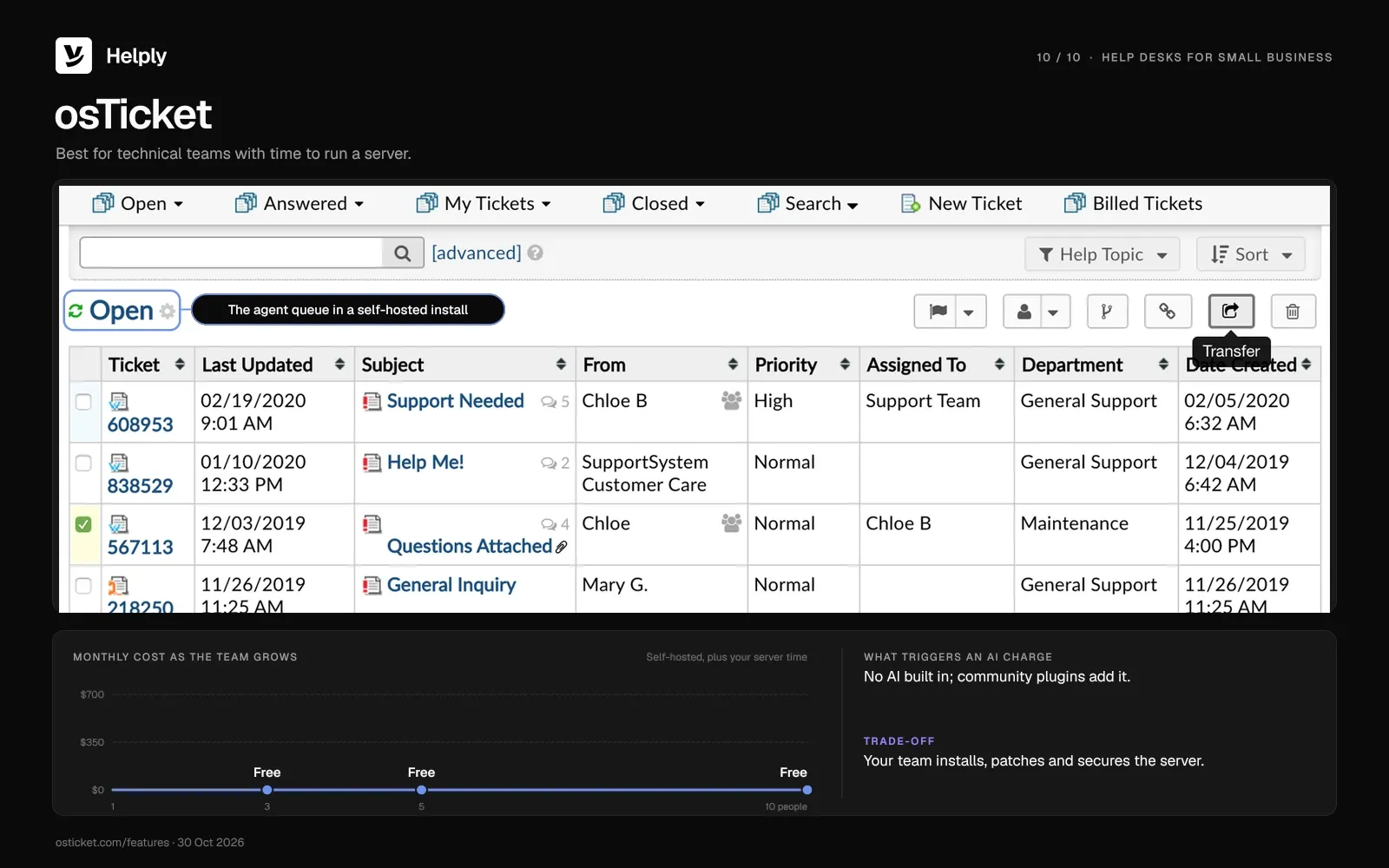
osTicket is free and open source if you host it yourself. Its maker also runs a managed cloud version, SupportSystem, from $12 an agent a month.
Key features
- Open source. Your team can read and change the code.
- A paid cloud option. SupportSystem comes in Basic, Standard and Premium plans, with a 30-day trial.
Pricing
Self-hosted osTicket is free. SupportSystem's Basic, Standard and Premium plans cost $12, $16 and $24 an agent a month.
Pros
- No license fee. The only costs are the server and your team's time.
- Data on your own server. Tickets stay on the machine your team runs.
Cons
- You run the server. Your team installs, patches, backs up and secures it.
- No AI built in. osTicket ships no AI features, and only community plugins add them.
Best for
Technical teams with time to run a server and no software budget.
Where Helply Is a Better Fit Than osTicket
Self-hosted osTicket costs nothing, but someone on your team installs, patches and backs up the server. Helply runs the platform for you, with SOC 2 Type II and encryption in transit and at rest. The self-hosted version ships no AI, while every Helply plan includes all three agent types.
| Compared on | osTicket (self-hosted) | Helply |
|---|---|---|
| Monthly cost | Free, plus your server time | $49 a month for 500 credits ($42 on yearly billing) |
| Security | You patch and secure it | SOC 2 Type II, encrypted at rest |
| AI | None built in | Support, Assist and Background Agents |
| Setup | Install and maintain a server | Connect a mailbox and write Guidelines |
See how Helply handles security: Helply trust and security.
Free Helpdesk Ticketing Systems for Small Business
Three customer-support tools have free plans, Freshdesk has a six-month free program, and two open-source tools cost nothing to self-host. Each one has a limit:
- Zoho Desk Free. Three users get email ticketing, with no workflow rules or assignment rules.
- Help Scout Free. Five users share a single inbox and a Docs site, up to 100 contacts each month.
- HubSpot Service Hub free tools. Up to 2 users get ticketing, a shared inbox and live chat, with no card.
- Freshdesk Free Program. Up to two agents can use Freshdesk free for six months.
- osTicket and FreeScout. Both are free to self-host, and your team runs, patches and backs up the server. FreeScout sells one-time add-on modules, such as Workflows for $14.99, and its AI module is free with your own provider key.
As a paid option, Zammad's hosted Starter plan is €9 an agent a month (€7 on yearly billing), for up to 5 agents.
To try Helply on your own queue first, start the 14-day trial. It includes 1,000 credits and needs no card.
Ticketing Systems for Internal IT Help Desks
Internal IT help desks handle employee requests such as new laptops, access and outages. Two IT tools have free plans for small teams:
- Jira Service Management. It's free for up to 3 agents, and Standard is $26.90 an agent a month at 5 or 10 agents on monthly billing. On yearly billing, 4 or 5 agents cost $1,350 a year.
- Spiceworks Cloud Help Desk. Core is free for 1 to 5 technician seats, and Premium is $7 a seat a month ($6 on yearly billing). Once an account has 6 or more active employees, Premium applies to all of them.
A technical team can also self-host osTicket for staff requests.
How Email Becomes a Ticket in a Help Desk
A help desk sits behind your support address and chat widget. An email becomes a ticket when the help desk receives it, numbers it, assigns an owner and starts a response clock.
- Connect the support address. Forward support@yourcompany.com to the help desk, or sign in to Gmail or Microsoft 365 and pick the mailbox.
- Each email becomes a ticket. The system stamps it with a number and the time it arrived.
- The ticket gets an owner. Rules assign it to a person, a team or an AI agent.
- A response clock starts. The help desk tracks first response and resolution against your SLA targets and flags tickets close to a miss.
- Replies stay in one thread. A person or the AI answers in the same conversation, with the full history attached.
- Closed tickets feed reporting. Response times, volume by topic and workload roll up into reports.
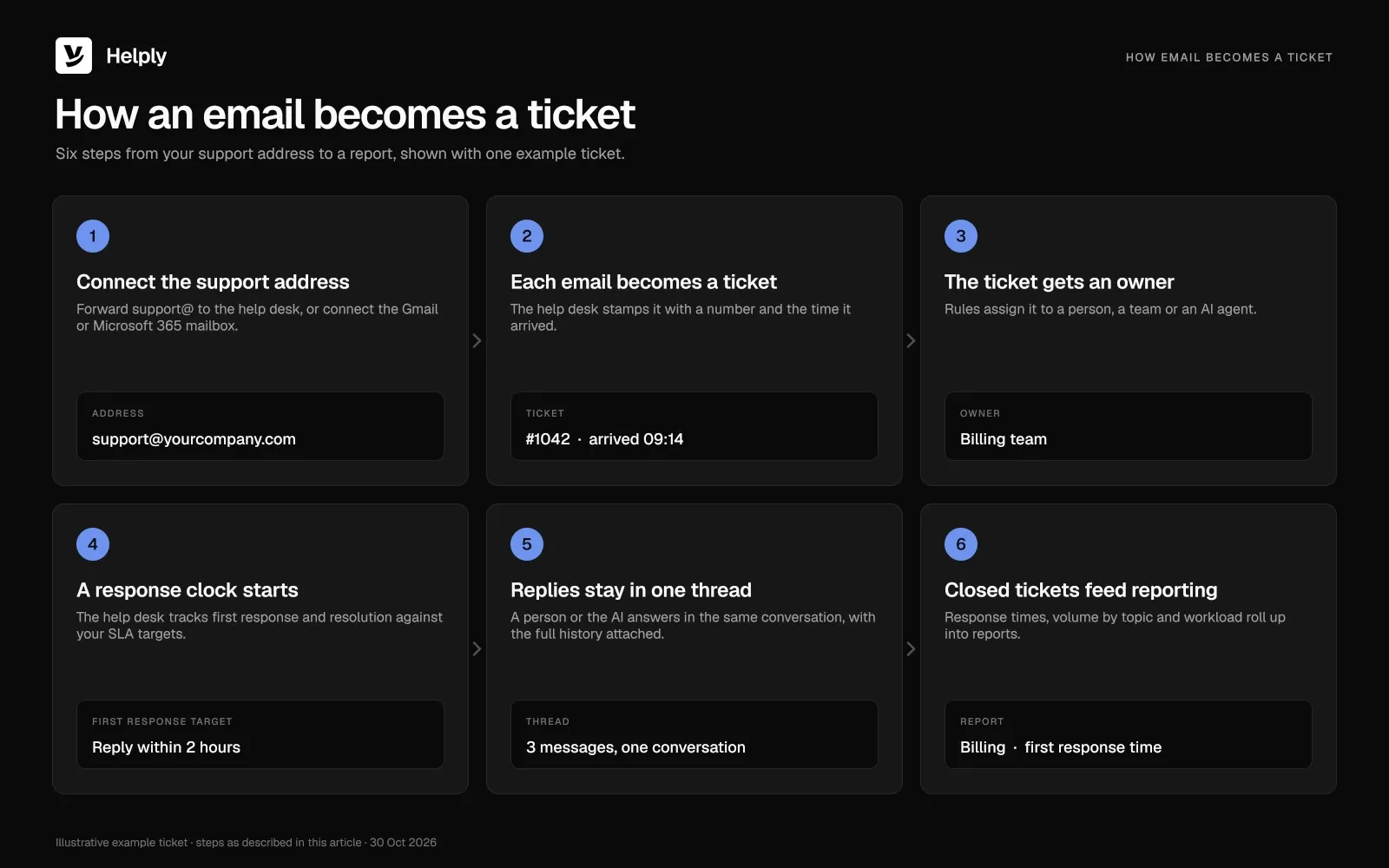
Tools differ in how many of steps 3 to 6 they automate, and in what that automation costs.
In December 2025, one r/sysadmin commenter put setup in one line: buy a help desk, create a support@ address "and away you go."
In Helply, you connect Gmail or Microsoft 365, choose the mailbox, then set routing, ownership, automation and AI behavior. Depending on your setup, the agents can draft replies or answer customers on their own.
Can You Use Gmail, Outlook or Microsoft 365 Instead?
For a few people and light volume, yes. Each do-it-yourself path gives you some structure:
- Microsoft 365 shared mailbox. A group can read and send from one address, such as support@, and replies come from the shared address.
- Gmail with Google Groups Collaborative Inbox. In Google Workspace, members can assign a conversation and mark it complete, duplicate or no action needed.
- Microsoft Lists Issue tracker. The template adds Priority, Status and Assigned to columns, with two built-in rules that email the assigned person.
- Make and Zapier. A Make template changes Gmail labels on each new email, and a Zapier template adds each new email as a Google Sheets row.
A help desk adds response targets, collision warnings and first-response reports. Watch for these signs that you need them:
| Sign | In a shared inbox | In a help desk |
|---|---|---|
| Two people answer the same customer | Replies can cross before either person sees the other | Collision detection shows who is replying |
| A customer asks why nobody replied | Someone has to spot the unanswered thread by hand | The help desk flags the ticket before the response target passes |
| You promise a response time | Someone tracks it by hand | The help desk tracks response and resolution targets |
| Repeat questions fill the day | Each one needs a person | AI can resolve repeat requests |
Once these signs show up every week, move to a help desk with ownership and SLAs. Helply connects the Gmail or Microsoft 365 mailbox you already use, so customers keep the same address.
How Help Desks Bill for AI: Per Resolution, Session, Token or Credit
Zendesk, Help Scout and HelpDesk bill per AI resolution, Freshdesk per session and Front per conversation outcome. Zoho Desk bills $1 per million tokens after the first 30 million each month on Zoho's standard-tier models.
Helply bills every kind of AI work in credits from one block and charges nothing per user.
| Tool | What triggers an AI charge |
|---|---|
| Helply | Credits from your block by task: draft 1, lookup 4, full investigation 12; retries and rejected drafts free |
| Zendesk | An allowance of 5 automated resolutions for each agent seat monthly (10 on Suite Professional), then $1.50 prepaid or $2.00 as used per resolution; Copilot $50 an agent a month on yearly billing |
| Freshdesk | 500 AI Agent sessions included once per account, then $49 per 100; Copilot at $35 an agent a month ($29 on yearly billing) |
| Help Scout | Envoy at $0.75 per resolution; AI Drafts with Plus and Pro |
| Hiver | AI Agents listed on all plans, no usage fee shown |
| Zoho Desk | Zoho standard-tier models free to 30M tokens monthly, then $1 a million; your own OpenAI key on Express and Standard |
| Front | Autopilot per conversation: triage $0.05, handoff $0.39, resolution $0.89; Copilot $20 a seat a month |
| HelpDesk | Resolutions included each month (Essential 10, Growth 200); 50-packs at $49.50 |
| JitBit | Unlimited AI credits from the 4-agent Startup plan; self-hosted AI on your own key |
| osTicket | No AI built in |
Many answers live outside the ticket, in billing, orders or the account record. Helply's agents can read connected systems before they reply, and act in them where you allow it.
In Salesforce's seventh State of Service report, service professionals expected AI to resolve half of service cases by 2027, against 30% in 2025. The survey covered 6,500 people from April to June 2025.
In a Gartner survey of 321 service leaders, run in October 2025, 91% reported pressure from executives to implement AI. For AI tools that sit beside or inside a help desk, see the best AI tools for customer support teams.
What to Look for in a Small Business Ticketing System
A small business ticketing system should take email without broken threads, give every ticket an owner and show its AI costs. Check each tool for these:
- Email intake. It should take mail from support@, billing@ and other addresses without breaking threads or attachments.
- Ownership and routing. Rules give every ticket an owner without anyone sorting the inbox by hand.
- Collision detection. The system shows when a teammate is already replying to the same customer.
- SLA targets. Timers track first response and resolution and warn before you miss a target. For the basics, read what an SLA is and how to set one.
- History and context. The thread and the account record sit on the ticket for whoever picks it up.
- Reporting. Reports should show first response time, resolution time and volume by topic, beyond a ticket count.
- AI cost and reach. Check what triggers an AI charge and which systems the AI can read and act in.
- Self-service and channels. Look for a help center for common questions, plus chat and messaging in the same queue as email.
Help Desk Cost for 3, 5 and 10 People: Seats vs. Credits
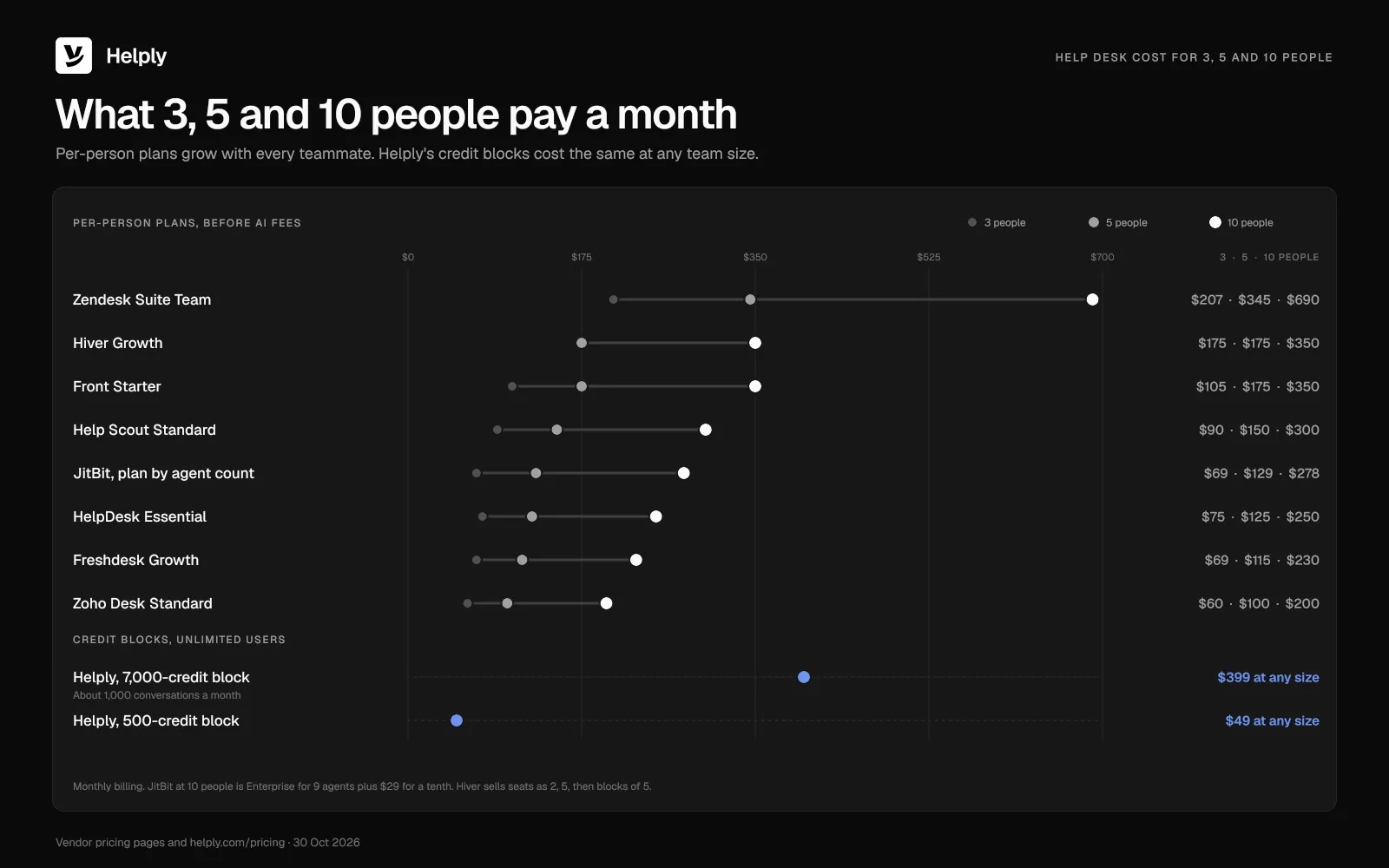
Help desks charge per person, per person plus an AI fee, by credit block with unlimited users, or nothing within limits. The model sets how the bill moves as people and tickets grow.
Per-person billing charges for every full user, busy or not. A teammate who joins for a rush raises next month's bill, and most per-person tools bill the AI on top.
On Helply, the credit block sets the price, and headcount never changes it. In the table below, monthly prices come first, with the yearly-billing rate in parentheses.
| Plan | 3 people, USD a month (yearly) | 5 people, USD a month (yearly) | 10 people, USD a month (yearly) | AI on top |
|---|---|---|---|---|
| Helply, 500-credit block | $49 ($42) | $49 ($42) | $49 ($42) | 500 credits included |
| Helply, 7,000-credit block | $399 ($339) | $399 ($339) | $399 ($339) | 7,000 credits; about 1,000 conversations at about 7 credits each, depending on the kind of support |
| Zendesk Support Team (annual) | $75 ($57) | $125 ($95) | $250 ($190) | 5 resolutions per agent each month; extras $1.50 or $2.00 |
| Zendesk Suite Team (annual) | $207 ($165) | $345 ($275) | $690 ($550) | 5 resolutions per agent each month; extras $1.50 or $2.00 |
| Zendesk Suite Professional (annual) | $447 ($345) | $745 ($575) | $1,490 ($1,150) | Copilot $50 an agent a month on yearly billing; 10 resolutions per agent a month |
| Freshdesk Growth | $69 ($57) | $115 ($95) | $230 ($190) | AI Agent sessions: 500 included once per account, then $49 per 100 |
| Freshdesk Pro | $198 ($165) | $330 ($275) | $660 ($550) | Copilot $35 an agent a month ($29 on yearly billing); AI Agent sessions at $49 per 100 |
| Help Scout Standard | $90 ($75) | $150 ($125) | $300 ($250) | Envoy at $0.75 a resolution |
| Help Scout Plus | $162 ($135) | $270 ($225) | $540 ($450) | AI Drafts; Envoy at $0.75 a resolution |
| Hiver Growth | $175 ($125) | $175 ($125) | $350 ($250) | No AI usage fee shown; seats sold as 2, 5, then blocks of 5 |
| Zoho Desk Standard | $60 ($42) | $100 ($70) | $200 ($140) | Your own OpenAI key for generative AI |
| Front Starter | $105 ($75) | $175 ($125) | $350 ($250) | Autopilot up to $0.89 a conversation |
| HelpDesk Essential | $75 ($57) | $125 ($95) | $250 ($190) | 10 AI resolutions a month; $49.50 per extra 50 |
| JitBit, plan by agent count | $69 ($58.25), Startup for 4 | $129 ($108.25), Company for 7 | $249 ($208.25) for 9 agents, plus $29 for each extra agent | Unlimited AI credits from Startup |
| osTicket, self-hosted | Free | Free | Free | No AI built in |
As AI volume climbs, you choose a larger block, and adding people still costs nothing.
Per-Person Pricing or Unlimited Users: Which Help Desk Fits?
Pick by where your team works today and how the vendor bills the AI:
- Staying in Gmail. Hiver runs in Gmail from $35 a user a month ($25 on yearly billing), sold in seat steps.
- Staying in Outlook. Helpdesk 365 runs as an Outlook add-in and keeps ticket data in Microsoft 365. It starts at $19.99 a user a month on yearly billing, for 5 users or more.
- A free start. Zoho Desk costs nothing for 3 users, and Help Scout costs nothing for 5 users and 100 contacts each month.
- Internal IT. Jira Service Management is free for 3 agents, and Spiceworks Cloud Help Desk is free for 1 to 5 technician seats.
- Complex routing across many groups. Zendesk Suite Team is $69 an agent a month ($55 on yearly billing), and Copilot starts on Suite Professional.
- Zero budget with a technical team. osTicket costs nothing to self-host, and your team runs the server.
- Volume growing faster than hiring. Helply charges nothing per user and bills the AI's work in credits, starting at $49 a month ($42 on yearly billing).
Back in that shared Gmail inbox, the refund request sat four days because nobody owned it. In Helply, routing can give a request like that an owner before anyone opens it, with a response target attached. If two people open the same order question, each one sees the other is already replying.
At Gatekeeper Press, the Support Agent answered authors in the company's own voice, at every stage of publishing.
Each Action the agents take runs inside permissions you set, and Helply logs it. You can connect support@ first and bring in billing@ later.
Frequently asked questions
A helpdesk ticketing system is software that turns each request from email, chat or a web form into a ticket. Each ticket gets an ID, an owner, its history and a response target.
Helply suits a small team whose volume grows faster than hiring. Every plan has unlimited users, and blocks open at $49 a month ($42 on yearly billing). Zoho Desk and Help Scout have free plans for 3 and 5 users, and Hiver keeps a team inside Gmail.
Five to shortlist are Helply, Zoho Desk, Help Scout, Hiver and Freshdesk. Helply's smallest block is $49 a month ($42 on yearly billing), whatever the team size. The other four charge per person, from $9 to $35 a month on their first paid plans ($7 to $25 on yearly billing).
Yes, Zoho Desk is free for 3 users, Help Scout for 5 users and 100 contacts each month, and HubSpot for 2 users. Self-hosted osTicket and FreeScout cost nothing, and Freshdesk's Free Program lasts six months for up to 2 agents. For internal IT, Jira Service Management is free for 3 agents and Spiceworks Cloud Help Desk for 1 to 5 technician seats.
Customer support seats run from $9 a month on Zoho Desk Express ($7 on yearly billing) to $149 on Zendesk Suite Professional ($115). Five people pay $100 a month on Zoho Desk Standard ($70) or $345 on Zendesk Suite Team ($275), before AI fees. Helply has no per-user fee, and its credit blocks open at $49 a month ($42 on yearly billing).
Yes, for a few people and light volume. A Microsoft 365 shared mailbox gives the team one address, and Google Groups' Collaborative Inbox lets members assign conversations and mark them complete. A help desk adds response targets, collision detection and reports.
Yes. Dynamics 365 Customer Service Professional is $50 a user a month on yearly billing, and Copilot Credits for its AI agents cost extra. In Microsoft 365, the Lists Issue tracker template tracks requests with Priority, Status and Assigned to columns.
Zendesk is a ticketing system for customer service. Its sales CRM, Zendesk Sell, retires on August 31, 2027, and Zendesk has partnered with Pipedrive for Sell customers.
A do-it-yourself ticketing system can start from automation templates. Make has one that changes Gmail labels on new email; Zapier's adds each new email as a Google Sheets row. Google Groups' Collaborative Inbox brings assignment and a done status, while a help desk also tracks response targets and runs reports.
An email ticketing system turns each message sent to your support address into a ticket. You forward that address to the help desk or connect the mailbox. Each new email then gets a ticket number, an owner, a status and a response target.
The terms overlap in everyday use. A ticketing system tracks each request from arrival to resolution, and a help desk adds a help center, reporting and automation around it.
Yes. Groove (groovehq.com) is now Helply, and the same team has supported companies since 2011. Supported Groove conversations and customer records can move into Helply.
About the author

Bildad Oyugi
Head of Content
Bildad is a digital marketing expert with over 5 years of experience in copywriting, content marketing, and editing. Outside of work, he enjoys videography and spending time with his family.


