
Short answer
Customer service tools are the software a support team uses to receive, answer and resolve customer questions. A B2B team pairs its help desk with the apps that hold account context. The answer to an account question can sit in the CRM, a sales call, an engineering issue or the status page.
The best B2B customer service tools by job (October 2026 prices):
- Help desk with AI agents: Helply. An AI-native customer support platform with Support, Assist and Background agents and unlimited users. You can start with 500 credits for $49 a month ($42 annual). A B2B team with 1,000 conversations a month needs about 7,000 credits, which the $399 block ($339 annual) covers.
- Shared channels: Slack Connect and Microsoft Teams. Slack Pro costs $8.75 per user a month ($7.25 annual). Microsoft 365 Business Basic, which includes Teams, costs $8.40 per user a month ($7.00 annual).
- CRM: Attio. Free for 3 seats, then $44 per user a month ($35 annual).
- Call recordings: Gong. Gong quotes per-user licenses plus a platform fee on request.
- Bug escalation: Linear. Free for 250 issues, then $12 per user a month ($10 annual).
- Incidents and status pages: incident.io. Free with one public status page, then $19 per user a month ($15 annual).
- Product and API docs: GitBook. Free for 1 user, then $79 per site a month plus $15 per user ($65 plus $12 annual).
- Customer success: Vitally. Every plan shows "Request Pricing".
- Feature requests: Canny. Free for 25 tracked users, then from $99 a month for 100 tracked users ($79 annual).
Helply has native integrations with Slack, Microsoft Teams, Attio, Gong, Linear, incident.io and GitBook. Its AI agents can investigate with that context and take supported actions, such as updating a CRM record. At Sender.net, Helply's Churn and Revenue Agents connected to Stripe, HubSpot and Slack and routed churn and upgrade signals to the right owner.
Start a free trial on your own channels. You can test Helply on real tickets for two weeks with 1,000 credits, without entering a card.
Key Takeaways
- Give each support job its own tool: help desk, shared channels, CRM, call recordings, bug tracking, incident updates, docs, customer success and feedback.
- Most stack tools bill per user, so count the colleagues who need access. Sales and engineering can join Helply's inbox at no extra cost, since Helply has no per-user fees.
- Slack Connect costs money on both sides. Unless the host is on an Enterprise plan, Slack requires a paid plan for every organization in the channel.
- Gong and Vitally publish no prices. Status pages for individual customers need incident.io's Enterprise plan, and its sales team sets that price.
- Choose tools your help desk can read. Of the eight other picks, all but Vitally and Canny have a native Helply integration.
An account admin writes in on a Monday. This month's invoice went up, last week's export bug still breaks their reports, and renewal is 30 days out.
Your rep has the ticket and one reply to get right. The answers sit in Stripe, a Linear issue, the CRM record and the recording of last month's renewal call.
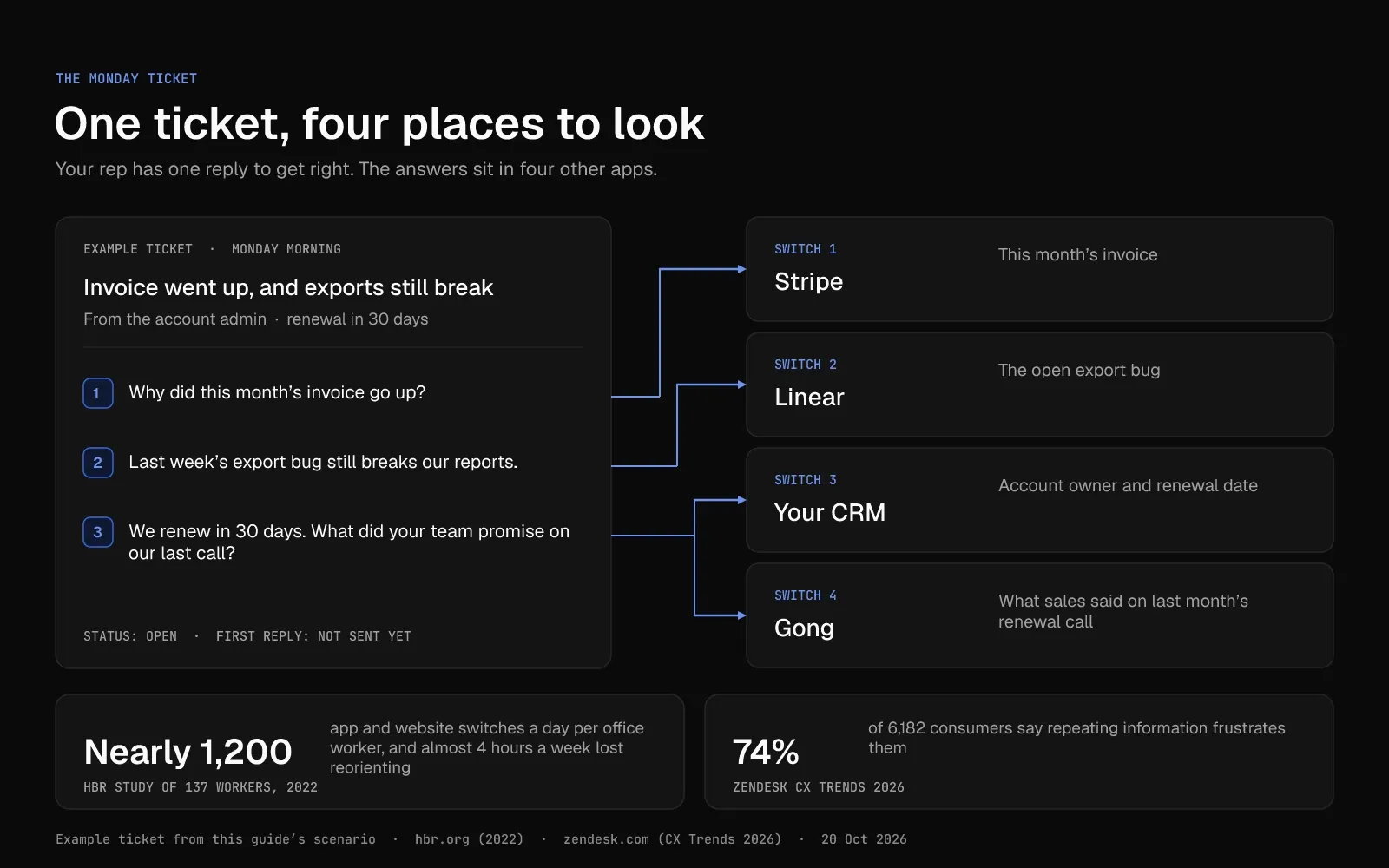
Finding them takes four app switches before anyone replies. In a 2022 Harvard Business Review study of 137 office workers, people switched between apps and websites nearly 1,200 times a day.
Reorienting after all those switches cost them almost four hours a week. A rep who can't find the history asks the customer to repeat it. Zendesk surveyed 6,182 consumers for CX Trends 2026, and 74% said repeating information frustrates them.
With one tool per job, your reps know which app holds each answer. Connect every tool to the help desk, and your reps and AI agents can read the whole account from the ticket. Nine customer service tools cover those jobs for a B2B team, from the help desk to the feature request board.
The Best Customer Service Tools at a Glance
The 9 best B2B customer service tools are Helply, Slack Connect and Microsoft Teams, Attio, Gong, Linear, incident.io, GitBook, Vitally and Canny.
Helply is the help desk in the middle. Six of the other eight picks have a native Helply integration, and Vitally and Canny have none.
Prices are October 2026 list prices in US dollars, monthly first, with annual billing in parentheses.
| Job | Tool | Best for | Starting price (October 2026) | Helply integration |
|---|---|---|---|---|
| Help desk with AI agents | Helply | AI agents in one inbox, with unlimited users | 500 credits for $49 a month ($42 annual) | The core of the stack |
| Shared channels | Slack Connect and Microsoft Teams | Customers who work in Slack or Teams | Slack Pro $8.75 per user a month ($7.25 annual); Microsoft 365 Business Basic $8.40 per user a month ($7.00 annual) | Native |
| CRM | Attio | One account record for sales, success and support | Free for 3 seats; Plus $44 per user a month ($35 annual) | Native |
| Call recording | Gong | Knowing what sales promised | On request | Native |
| Bug escalation | Linear | Bugs linked to the customers they affect | Free for 250 issues; Basic $12 per user a month ($10 annual) | Native |
| Incidents and status pages | incident.io | Outage updates customers can subscribe to | Free Basic plan with 1 public status page; Team $19 per user a month ($15 annual) | Native |
| Product and API docs | GitBook | Docs your AI agents can read | Free for 1 user; Essential $79 per site a month plus $15 per user ($65 plus $12 annual) | Native |
| Customer success | Vitally | Account health and renewals | On request | None; use a CRM sync or Zapier |
| Feature requests | Canny | Public request boards with votes | Free for 25 tracked users; Pro from $99 a month for 100 tracked users ($79 annual) | None; both link to Linear (Canny on Pro and Business) |
Swipe the table sideways to see every column.
Each colleague you add to Slack, Attio, Linear or incident.io raises that tool's bill. Gong and Vitally don't publish prices.
Helply bills credits for the work its AI agents do, and every plan has unlimited users.
The 9 Best Customer Support Tools for B2B Teams in 2026
Start with the help desk, since your reps answer customers from there. Then add the tools for the jobs your team handles each week. To compare help desks with each other, see Helply's breakdown of 12 Zendesk alternatives.
1. Helply: Best for Answering With the Whole Account in View
As an AI-native customer support platform, Helply puts the inbox, the AI agents and the customer records they read in one product. It serves B2B software companies as well as B2C, ecommerce and marketplace businesses. Users are unlimited on every plan, and you buy credit blocks for the AI's work.
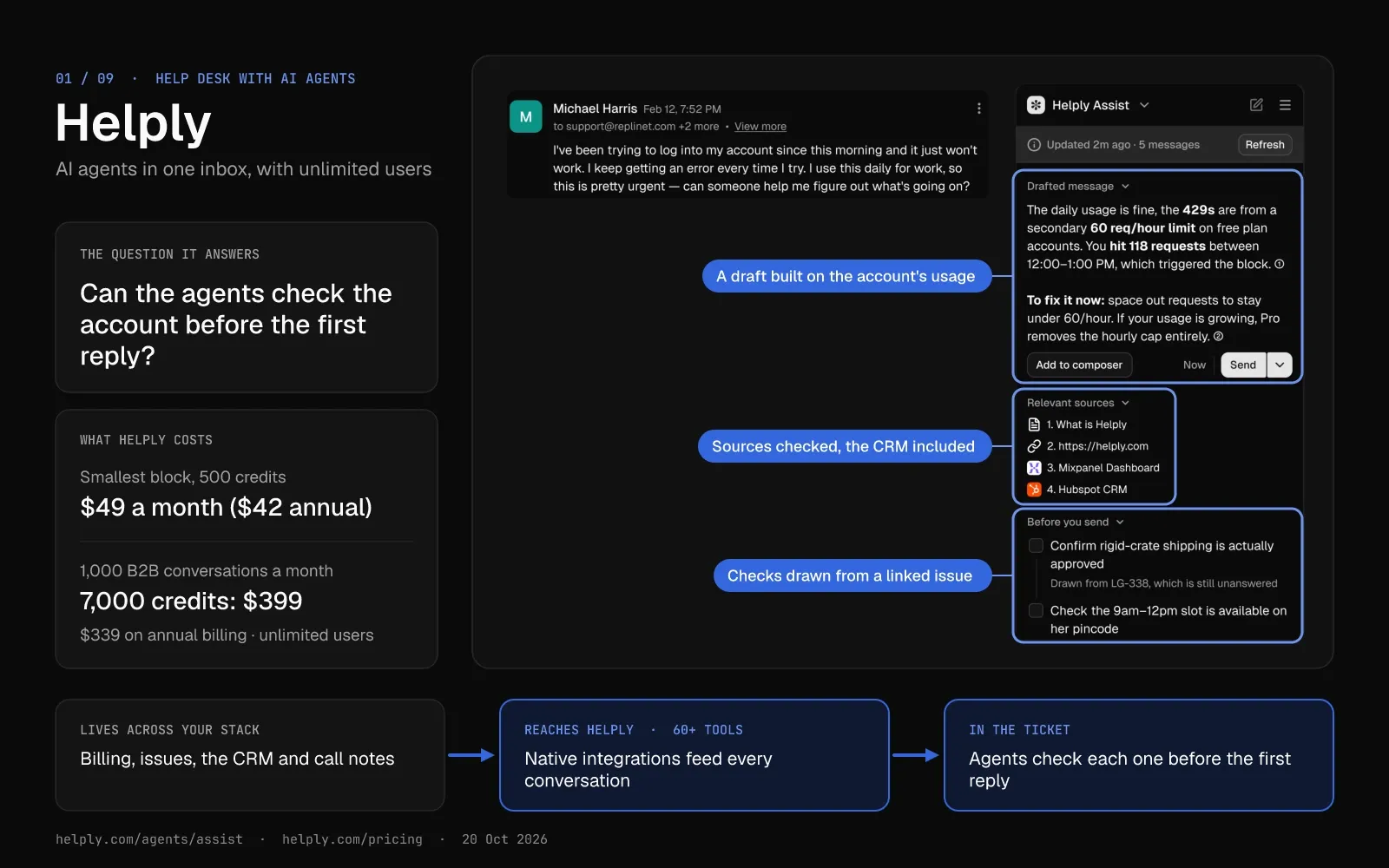
Every other tool in the stack holds one part of the account, and the customer's question lands in the help desk. Helply's AI agents can read the tools you connect to it.
Connect Stripe, Linear, your CRM and Gong. On the Monday ticket, the agents can then check the invoice, the export bug and last month's call before the first reply. They can also file a Linear issue or update a CRM record where supported and configured.
Key Features
- One queue for every customer channel. Email, chat, Slack Connect, Teams, WhatsApp, SMS, phone, Discord and Telegram land in one shared inbox. You set response and resolution targets, routing rules and custom fields for conversations from any of them.
- An agent that resolves or hands off with the work done. The Support Agent can investigate with your knowledge and connected tools, take supported actions and resolve requests on every channel. You set when it can proceed alone, and it passes anything past that line to your team with its investigation.
- Account lookups and drafts inside each conversation. The Assist Agent looks up the customer and writes a draft grounded in your Guidelines. Your rep can approve the draft, or direct Assist to update a record or create an issue where supported.
- Context from 60+ connected tools. Integrations include HubSpot, Salesforce, Attio, Stripe, Gong, Linear, Jira, GitBook and incident.io. Your reps and AI agents see billing, open issues and account history inside the conversation.
- Background agents on every conversation. The Churn, Revenue, Feature Request, Knowledge and Insights agents flag risk, expansion, product requests, trends and gaps in your docs. They can alert a teammate, update a record or start a workflow. Your team can also build its own Background Agent.
- Help articles drafted from real customer questions. The Knowledge Agent uses your conversations to find missing and outdated answers in your knowledge base, then drafts the fix. Your team can review each draft before customers or other agents see it.
Pricing
Adding colleagues never moves your Helply bill, since you pay in credits for AI work. "Summarize this ticket" costs 1 credit, and "Have we seen this before?" costs 4. Checking the Monday export bug with "How many other accounts have this?" costs 12.
Monthly blocks range from 500 credits at $49 up to 32,000 credits at $1,549 ($42 to $1,317 a month on annual billing). Plan on about 7 credits per B2B conversation, so 1,000 conversations a month fits the 7,000-credit block at $399 ($339 annual). Above 32,000 credits a month, Helply prices volume through sales.
Pros
- With unlimited users, engineers, account managers and success managers can read and work tickets, and a new hire leaves the bill unchanged.
- All three agent types come with every plan. Credits never go to setup, retries, failed actions, spam, no-touch tickets or drafts a rep rejects before sending.
- Native integrations cover six of the eight other jobs, so agents can use channel, account, call, issue, incident and docs context.
- The spend cap defaults to your credit block's price, and spending can't pass it unless you raise it. On monthly billing, unused credits roll into the next month, then expire. On annual billing, Helply pools your credits across the year.
Cons
- Helply has no free plan. After the 14-day trial, credit blocks start at $49 a month ($42 annual).
- Your bill follows the AI's workload, and deep investigations cost 12 credits each. Use the estimator on the pricing page to size your block first.
- Helply replaces your current help desk, so a move takes planning. You can run it alongside Zendesk on part of your queue before you switch.
Who is Helply Best for?
Support teams that want AI agents and account context inside one help desk, with unlimited users and credit-based pricing.
2. Slack Connect and Microsoft Teams: Best for Shared Channels With Customer Accounts
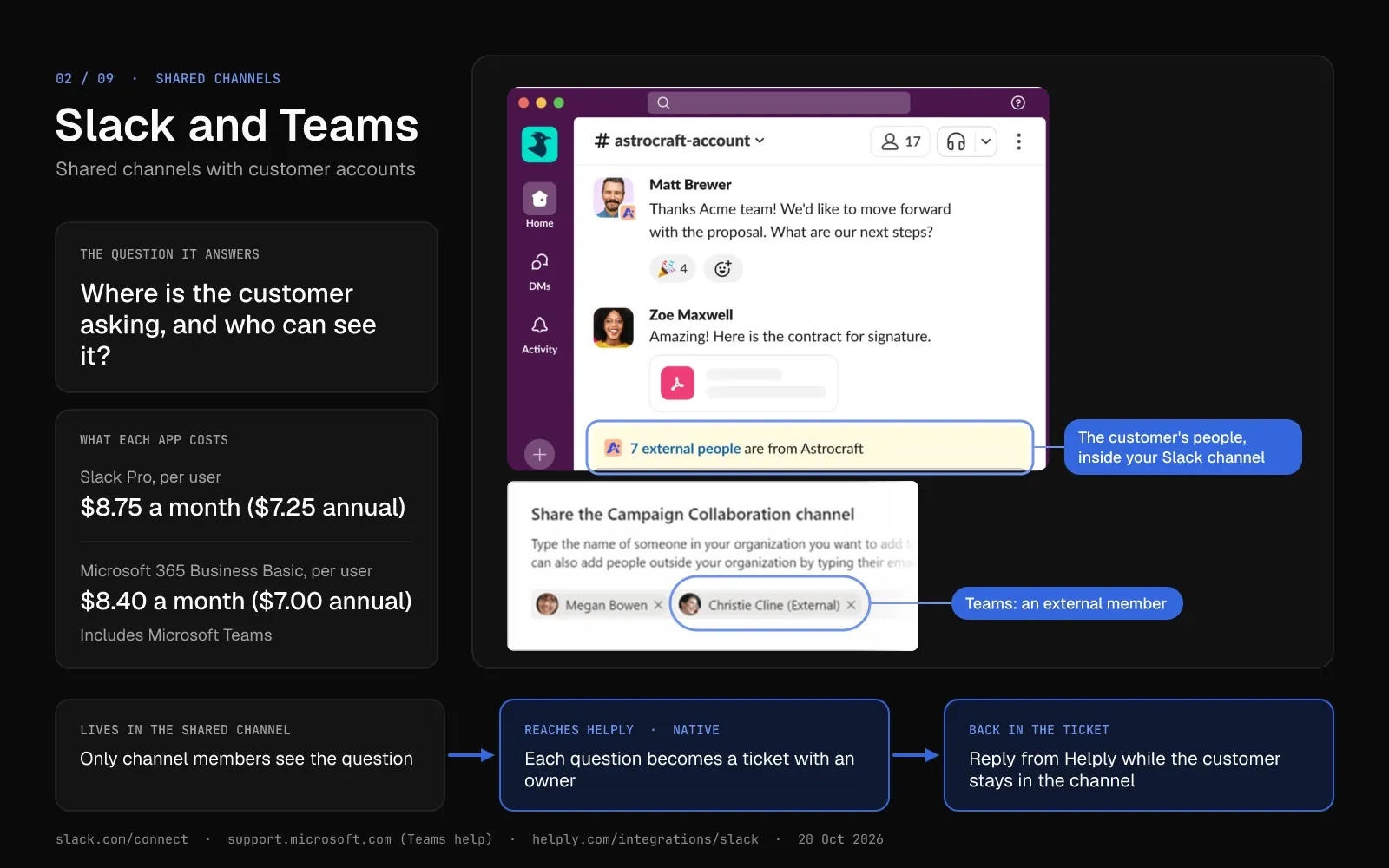
With Slack Connect or Microsoft Teams shared channels, you give each account one channel that both teams use. Some B2B customers already work in one of these apps and ask for help there.
Slack says more than 350,000 organizations work in Slack Connect. One channel can host up to 250 organizations, and each needs a paid Slack plan unless the host is on an Enterprise plan.
In Teams, a shared channel links your organization to another through Microsoft Entra B2B direct connect. Entra blocks that connection by default, so both organizations set up cross-tenant access first.
Pricing
Slack Pro costs $8.75 per user a month ($7.25 on annual billing), and Business+ costs $18 ($15). The free plan allows one-to-one Slack Connect messages but no shared channels.
Microsoft 365 Business Basic includes Teams for $8.40 per user a month ($7.00 on annual billing). Business Standard, also with Teams, costs $16.80 ($14.00).
Pros
- Customers ask questions from the app they work in all day and skip the support portal login.
- Your account manager, success manager and support rep can all sit in the same channel with the customer.
Cons
- Questions in a busy channel can scroll out of view before anyone answers them.
- A partner on free Slack can join your channels only if you're on an Enterprise plan. Otherwise they need a paid plan or Slack's one-time 90-day Pro trial.
Best for
B2B teams whose customers already work in Slack or Microsoft Teams and expect answers there.
Helply With Slack Connect and Teams: Every Customer Question Gets an Owner
Customer questions in a Slack Connect channel become trackable tickets in Helply, and supported Teams conversations can too. Customers stay in their channel while your rep replies from Helply, and internal notes stay out of the customer's Slack channel. Helply agents work these conversations with your knowledge and Guidelines, and can reply in supported Slack conversations when configured.
| Area | Shared channel on its own | Shared channel connected to Helply |
|---|---|---|
| A customer question | A message in the channel | A ticket with an owner, a priority and a response target |
| Who can see it | Members of that channel | Anyone on your team, with unlimited users |
| Internal discussion | Another thread or channel | Private notes beside the ticket |
| AI in the channel | No AI on Free; thread summaries on Pro; Slackbot and AI search on Business+ | Helply agents reply in supported Slack conversations, when configured |
Swipe the table sideways to see every column.
See how Helply works with Slack Connect and Microsoft Teams
3. Attio: Best for One Account Record Across Sales, Success and Support
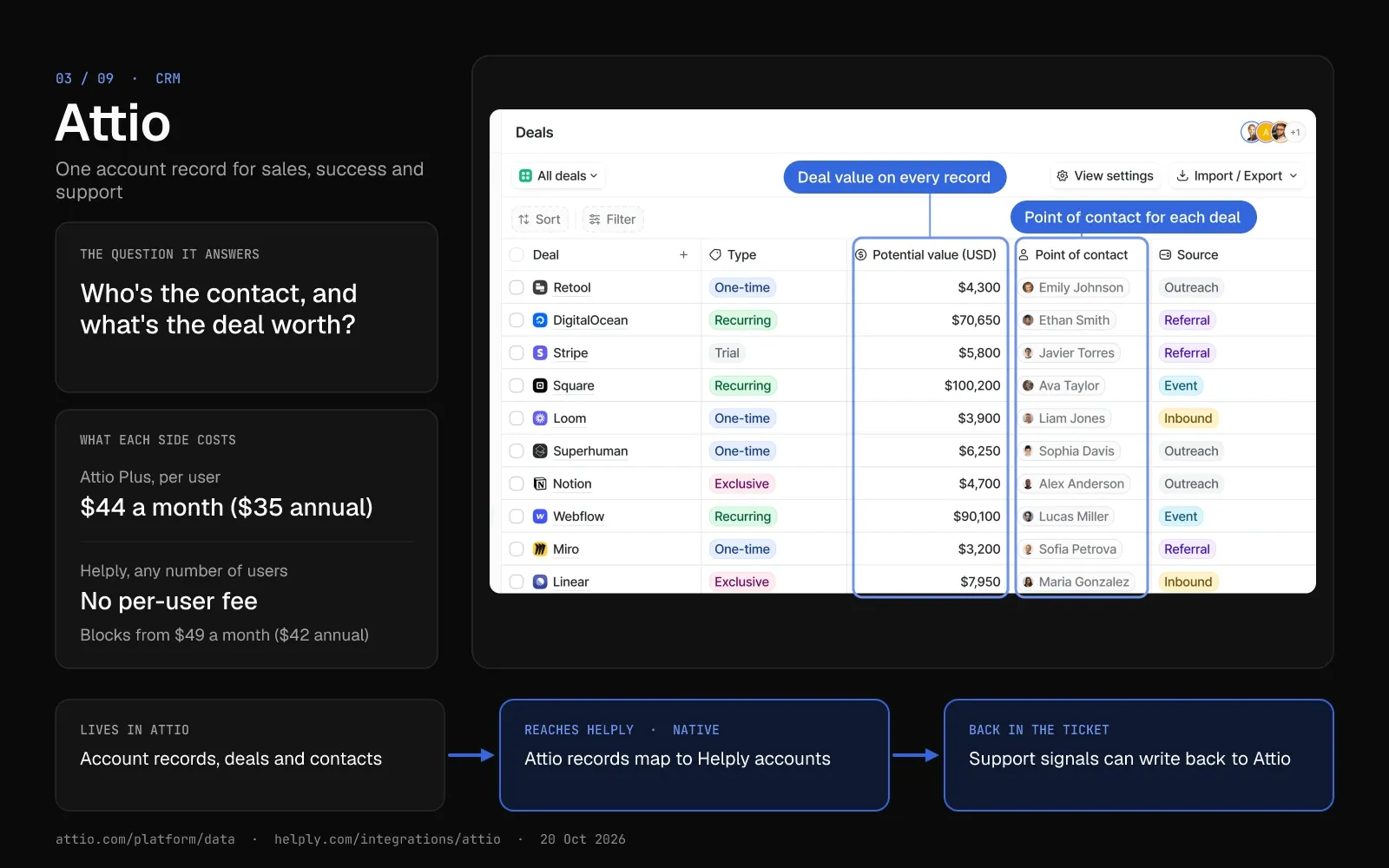
Attio's pitch is "the CRM for agentic revenue." Sales, success and support can all work from the same record for each account.
Every plan, Free included, comes with Ask Attio, AI agents, workflows, an API and an MCP server. Attio meters the AI and workflow features in credits. Call Intelligence and sequences start on Pro.
Attio builds the Slack and Linear apps in its directory. Its Linear app logs customer requests and syncs customer details to Linear.
Pricing
Free covers up to 3 seats. Plus costs $44 per user a month ($35 on annual billing), with a 10-seat cap. Pro costs $99 ($79) with no seat cap.
Pro comes with a 14-day trial, and Enterprise pricing is custom. Extra workspace credits start at $85 a month for 5,000 ($70 annual).
Pros
- A small team can try the CRM on the free plan's 3 seats and 50,000 records.
- AI agents, workflows and API access come with every plan, so you can automate before you pay.
Cons
- Plus stops at 10 seats, so a growing team moves to Pro at $99 a user a month ($79 annual).
- AI and workflow runs draw on shared credits, and extra credit packs add a monthly fee.
Best for
Startups and growing B2B teams that want AI agents and workflows in their CRM from day one.
Helply and Attio: The Account Record Behind Each Ticket
For an account 30 days from renewal, Helply can pull the context your team keeps in Attio into the ticket. You map supported Attio records to Helply's customers and accounts, and Attio fields can power support workflows. Helply can also write signals from support conversations back to the Attio record, where supported and configured.
| Area | Attio | Helply |
|---|---|---|
| Main job | Account records, deals and pipeline | Support inbox and AI agents for customer conversations |
| Who uses it | Sales and success, with 3 seats free | Support and any colleague, with unlimited users |
| AI | Ask Attio, AI agents and workflows on credits | Support, Assist and Background agents on credits |
| Starting price | Free for 3 seats; Plus $44 per user a month ($35 annual) | 500 credits for $49 a month ($42 annual) |
Swipe the table sideways to see every column.
Bring Attio account data into Helply tickets
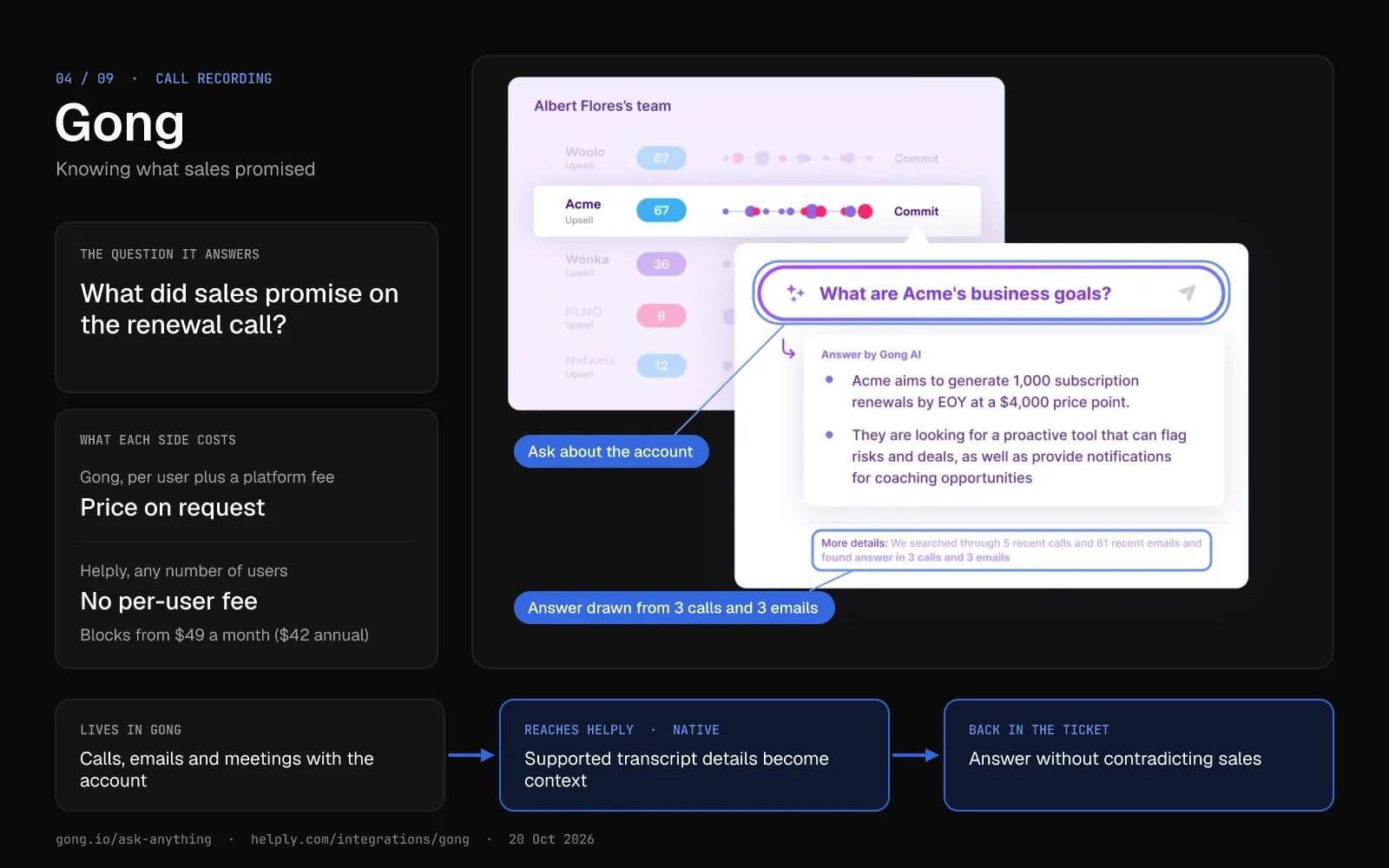
4. Gong: Best for Knowing What Sales Promised Before Support Replies
Gong captures customer calls, emails and meetings and analyzes them for revenue teams. It describes itself as a Revenue AI OS.
For post-sale teams, Gong flags churn risk from sentiment, ghosting and stakeholder changes. It also offers more than a dozen AI agents that brief reps, review calls and monitor deals.
Gong syncs both ways with Salesforce and matches calls and emails to HubSpot records. Alerts go to Slack, and the Zendesk integration can create a support ticket from a call transcript.
Pricing
Gong publishes no prices. It sells licenses per user and adds a platform fee based on the number of users. Advanced AI features draw on Gong Credits.
Pros
- Support can read the exact call where an account manager made a promise.
- Colleagues without a paid license can join as free Collaborators, with limited access.
Cons
- Budgeting starts with a sales call, since Gong builds each proposal around users, modules and integrations.
- Gong's products and agents center on revenue teams, so support needs a help desk link to see calls beside tickets.
Best for
B2B companies whose sales and success teams already record their calls in Gong.
Helply and Gong: The Last Call, Beside the Next Reply
Sales may have promised something on last month's renewal call. Helply connects to Gong, and supported transcript details can become customer context for your team and AI agents. Support can then answer without contradicting what sales told the customer.
| Area | Gong | Helply |
|---|---|---|
| Main job | Record and analyze calls, emails and meetings | Answer and resolve support conversations |
| Who uses it | Sales, account management and success | Support and any colleague, with unlimited users |
| AI | More than a dozen revenue agents; advanced features use Gong Credits | Support, Assist and Background agents on credits |
| Starting price | On request: per-user licenses plus a platform fee | 500 credits for $49 a month ($42 annual) |
Swipe the table sideways to see every column.
Put Gong call context beside each ticket
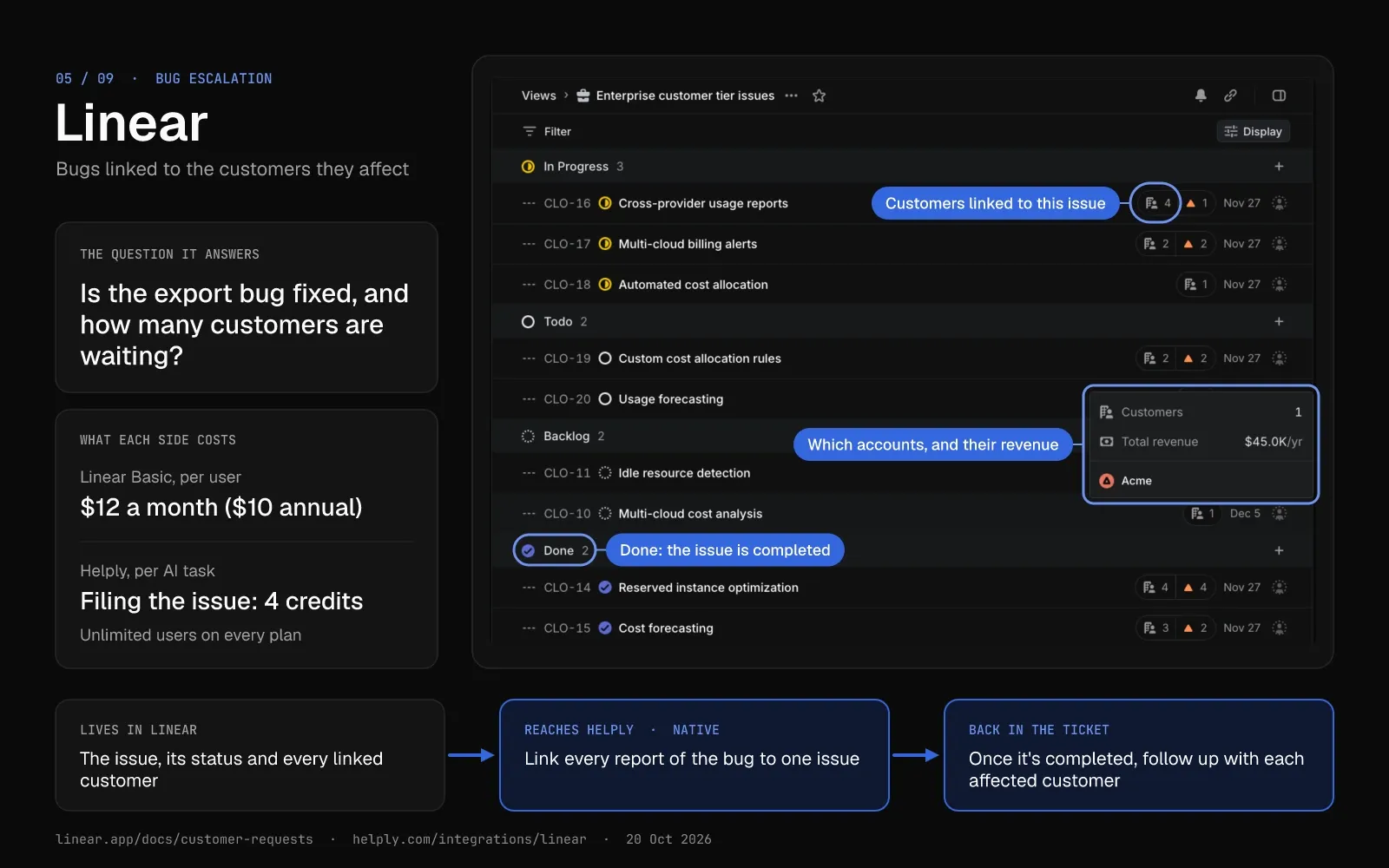
5. Linear: Best for Sending Bugs to Engineering With the Customer Attached
Linear is an issue tracker for product and engineering teams. Support uses it to hand a bug to engineering and follow the fix.
Customer Requests link user feedback to issues on every plan. On Business and Enterprise, requests can arrive from Intercom, Zendesk and Front, and each one points back to its source.
Linear Asks turns Slack and email messages into issues on Business and Enterprise. Linear designs Asks for internal requests, such as IT needs.
Pricing
Linear's free plan allows unlimited members, 2 teams and 250 issues. Basic costs $12 per user a month ($10 on annual billing), and Business costs $18 ($16). Enterprise pricing is custom, on annual billing only.
Pros
- Customer Requests, on every plan, show engineering which customers asked for each issue.
- Linear Agent comes with every plan and can answer questions about your workspace.
Cons
- The Intercom, Zendesk and Front integrations need Business, at $18 per user a month ($16 annual).
- Pricing runs per user, so the bill grows with your engineering team.
Best for
Product and engineering teams that want each bug linked to the customers it affects.
Helply and Linear: One Issue, Every Affected Customer
Several accounts can report the same export bug. In Helply, you can link each of those conversations to one Linear or Jira issue, so engineering sees how many customers are waiting. Once engineering completes the issue, Helply can help your team follow up with each affected customer.
| Area | Linear | Helply |
|---|---|---|
| Main job | Plan and track engineering work | Answer customers and escalate bugs with context |
| Customer link | Customer Requests on every plan; Intercom, Zendesk and Front sources on Business and Enterprise | Several tickets link to one Linear or Jira issue |
| AI cost | Linear Agent included; coding sessions use AI credits | "File this as a Linear issue" costs 4 credits |
| Starting price | Free for 250 issues; Basic $12 per user a month ($10 annual) | 500 credits for $49 a month ($42 annual) |
Swipe the table sideways to see every column.
Link one Linear issue to every customer who reported it
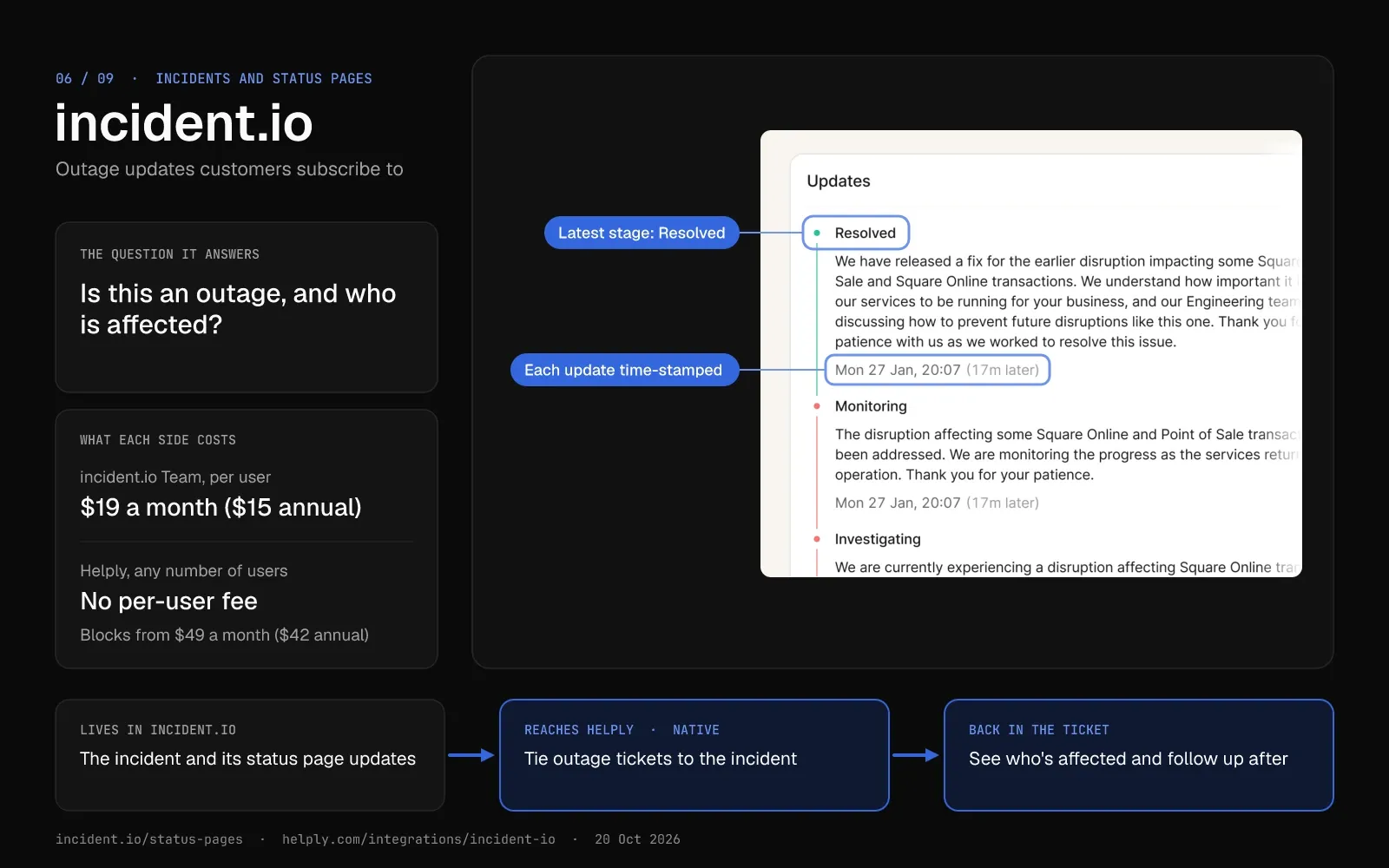
6. incident.io: Best for Outage Updates Customers Can Subscribe To
incident.io, a software reliability platform, runs incident response inside Slack or Microsoft Teams. It adds on-call scheduling and status pages in the same product.
During an outage, the status page sends updates by email, Slack and RSS to every subscriber. An Intercom app shows live status inside the Intercom Messenger.
The Zendesk integration links support tickets to an incident. With Salesforce connected, incident.io can add the right success manager when an incident affects one of their customers.
Pricing
Basic costs nothing, with no time limit, and includes one public status page, unlimited subscribers and a custom domain. Team costs $19 per user a month ($15 on annual billing), plus $12 ($10) for on-call.
Pro costs $25 per user a month, plus $20 for on-call. Private status pages for individual customers come only with Enterprise, which you price with sales.
Pros
- The free Basic plan includes a public status page with unlimited subscribers.
- Support can send customers to one status page while engineering works the incident.
Cons
- Status pages behind a customer sign-in need Enterprise.
- Basic allows 2 integrations, and the AI agent starts on Pro.
Best for
Software companies with uptime commitments that need one place to run incidents and update customers.
Helply and incident.io: Outage Tickets Tied to the Incident
Many customers ask the same question at once when a service goes down. Connect incident.io, and you can tie those conversations to the incident, see who's impacted and know who may need a follow-up. Your reps and AI agents get supported incident context to keep replies accurate while the incident is open.
| Area | incident.io | Helply |
|---|---|---|
| Main job | Run incidents, on-call and status pages | Answer the tickets an incident creates |
| Customer updates | Status page updates by email, Slack and RSS | A reply on each ticket's own channel |
| AI | AI agent on Pro and up | Agents can use supported incident context in replies |
| Starting price | Basic free; Team $19 per user a month ($15 annual) | 500 credits for $49 a month ($42 annual) |
Swipe the table sideways to see every column.
Tie outage tickets to the incident in incident.io
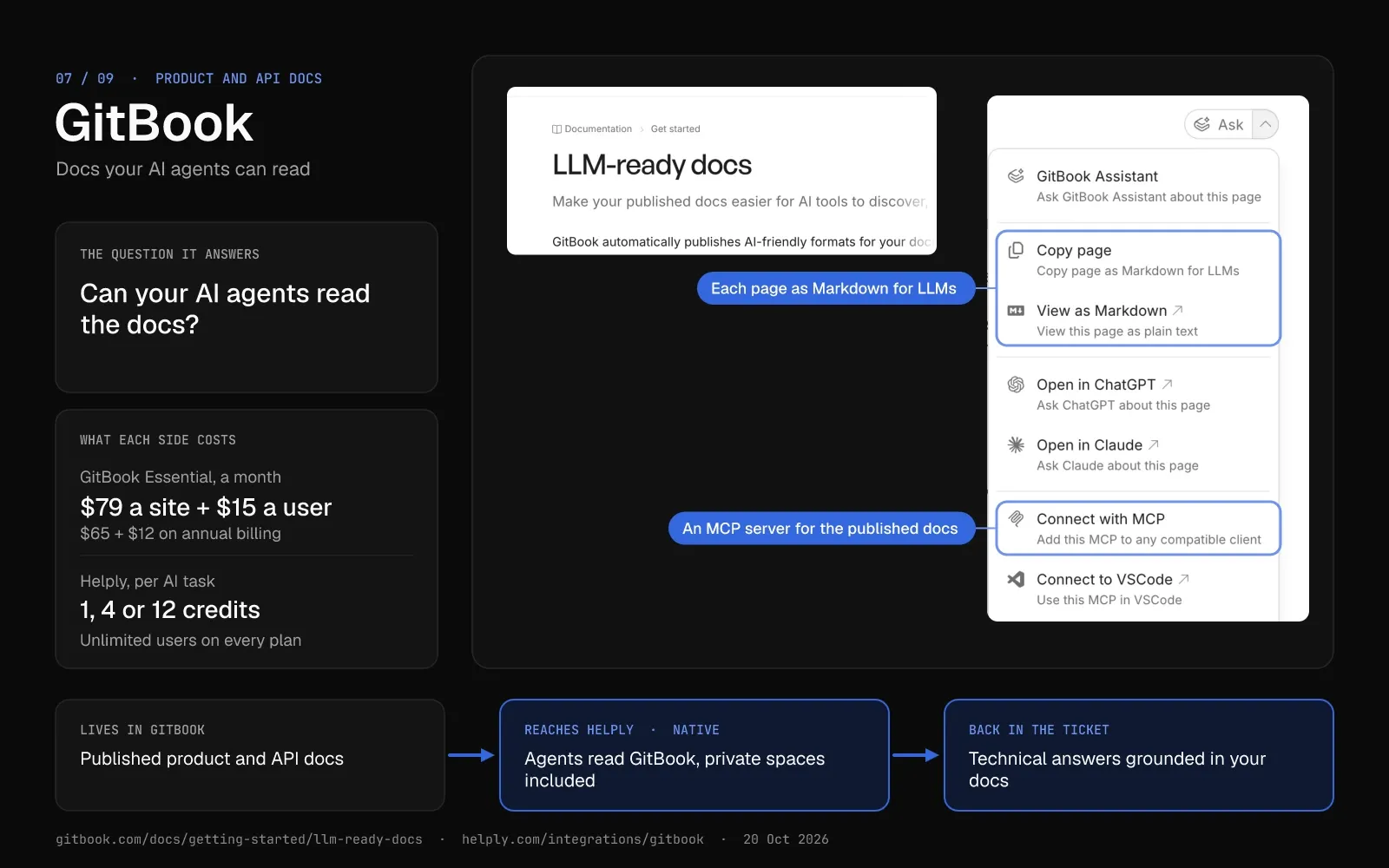
7. GitBook: Best for Product and API Docs Your AI Agents Can Read
GitBook hosts product docs and API references and syncs them with GitHub or GitLab. It calls itself the knowledge layer for AI.
On every plan, GitBook publishes llms.txt, llms-full.txt and a Markdown copy of each page, plus an MCP server for each published site. AI Assistant answers in search start on Essential, and Chat and the embeddable Assistant come with Ultimate.
Pricing
GitBook is free for 1 user. Essential costs $79 per site a month plus $15 per user ($65 plus $12 on annual billing), with $20 of AI credits.
Ultimate costs $299 per site plus $15 per user ($249 plus $12), with $100 of AI credits. Both paid plans come with a 14-day trial.
Pros
- AI tools can read your docs on every plan, through llms.txt, Markdown pages and an MCP server.
- Auto-generated, interactive API docs come with the free plan.
Cons
- A site fee sits on top of per-user fees, so each extra docs site adds $79 a month ($65 annual) on Essential.
- AI answers use credits: Ask costs 20 credits for each relevant question.
Best for
Developer-facing companies whose customers read the API docs before they open a ticket.
Helply and GitBook: Answers Grounded in Your Developer Docs
Helply's agents can answer technical questions from GitBook, including private spaces where the connection has access. Helply also uses support questions to find where your developer docs fall short. Internal answers can come from approved Notion and Confluence pages.
| Area | GitBook | Helply |
|---|---|---|
| Main job | Publish product and API docs | Answer customers from your docs and connected tools |
| Docs gaps | Flags outdated content in your docs | Knowledge Agent finds questions your docs don't answer |
| AI | Ask from Essential; Chat and Embed Assistant on Ultimate; 20 credits per relevant question | Agents answer on every channel; 1, 4 or 12 credits per task |
| Starting price | Free for 1 user; Essential $79 per site a month plus $15 per user ($65 plus $12 annual) | 500 credits for $49 a month ($42 annual) |
Swipe the table sideways to see every column.
Answer technical tickets from your GitBook docs
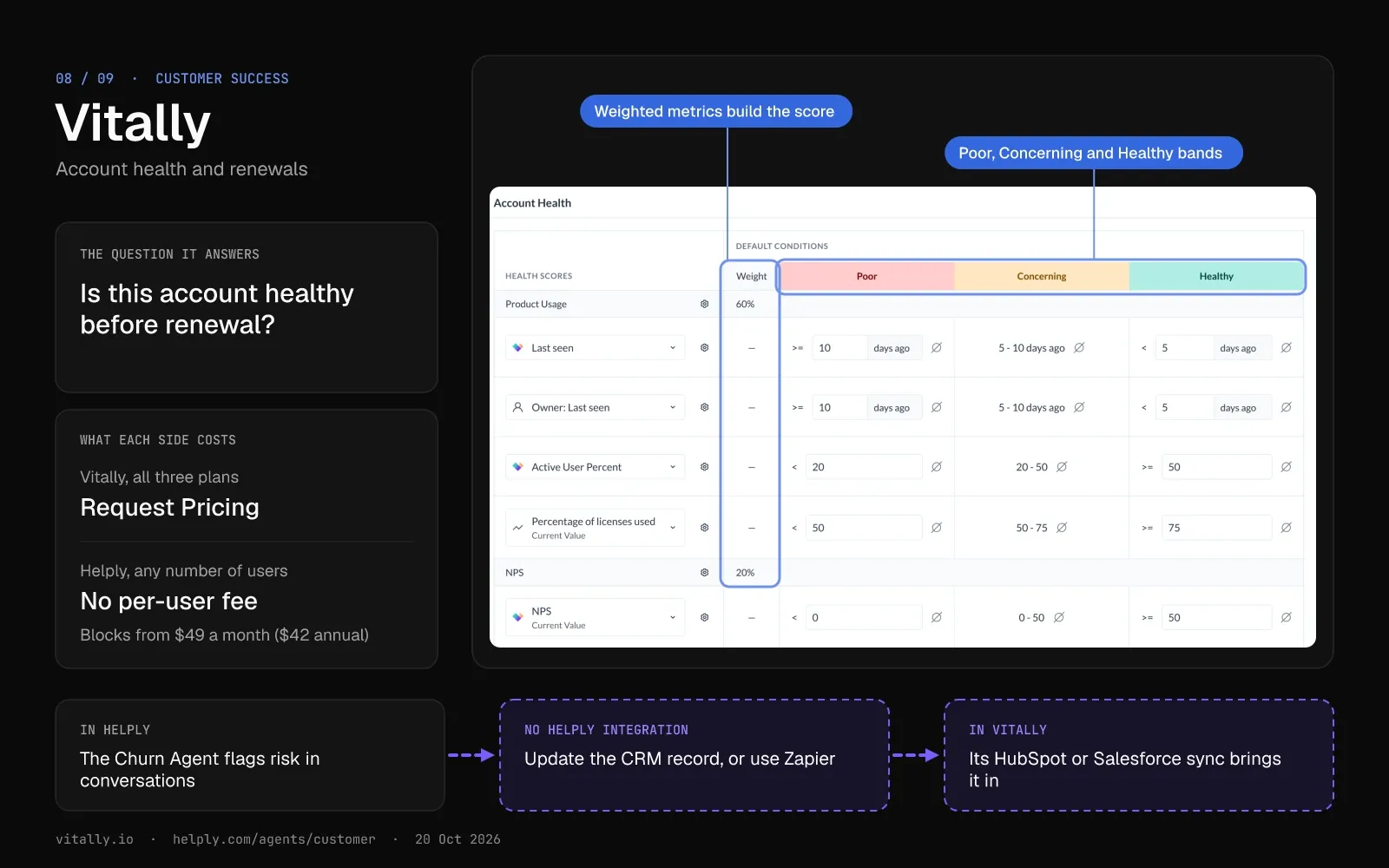
8. Vitally: Best for Success Teams That Own Account Health
Vitally is a B2B customer success platform built around health scores, playbooks and success plans. Success managers watch each account there while support works the tickets.
A health score blends traits, product metrics and engagement, and you can tune it by segment or stage. A playbook can send an email, create a task or raise an alert once a score moves.
Vitally imports tickets from Zendesk and conversations from Intercom, and it syncs accounts both ways with HubSpot and Salesforce. Its AI tools include a meeting recorder, Ask AI, summaries and AI Actions.
Pricing
Vitally's three plans, Tech-Touch, Hybrid-Touch and High-Touch, all show "Request Pricing". Each includes unlimited automations, unlimited observer seats and single sign-on. Gainsight and Planhat also price their platforms on request.
Pros
- Observer seats are unlimited on every plan, so support and sales can view account health without a full seat.
- A playbook can start from a health score change, a usage shift or a survey response.
Cons
- You talk to sales before you can budget, and a sandbox trial with your own data comes after a demo.
- The integration list names Zendesk and Intercom but not Front, Freshdesk, Help Scout or Helply. Those help desks need a CRM sync or Zapier to send ticket data in.
Best for
Success teams that manage a book of renewals and need health scores beyond the support queue.
Helply Beside Vitally: Churn Signals Through Your CRM
Helply's Churn Agent watches support conversations for frustration, sentiment changes, recurring issues and churn risk. If you configure it, the agent can alert the account owner or write the signal to the customer's HubSpot or Salesforce record. Vitally has no Helply integration, so pass the signal on through Vitally's HubSpot or Salesforce sync, or through Zapier.
| Area | Vitally | Helply |
|---|---|---|
| Main job | Health scores, playbooks and success plans | Support inbox and AI agents for every customer conversation |
| Where signals come from | Product usage, CRM data, surveys and imported tickets | Support conversations on every connected channel |
| Who works in it | Success managers, plus unlimited observers | Support and any colleague, with unlimited users |
| Starting price | On request | 500 credits for $49 a month ($42 annual) |
Swipe the table sideways to see every column.
See what the Churn Agent watches for
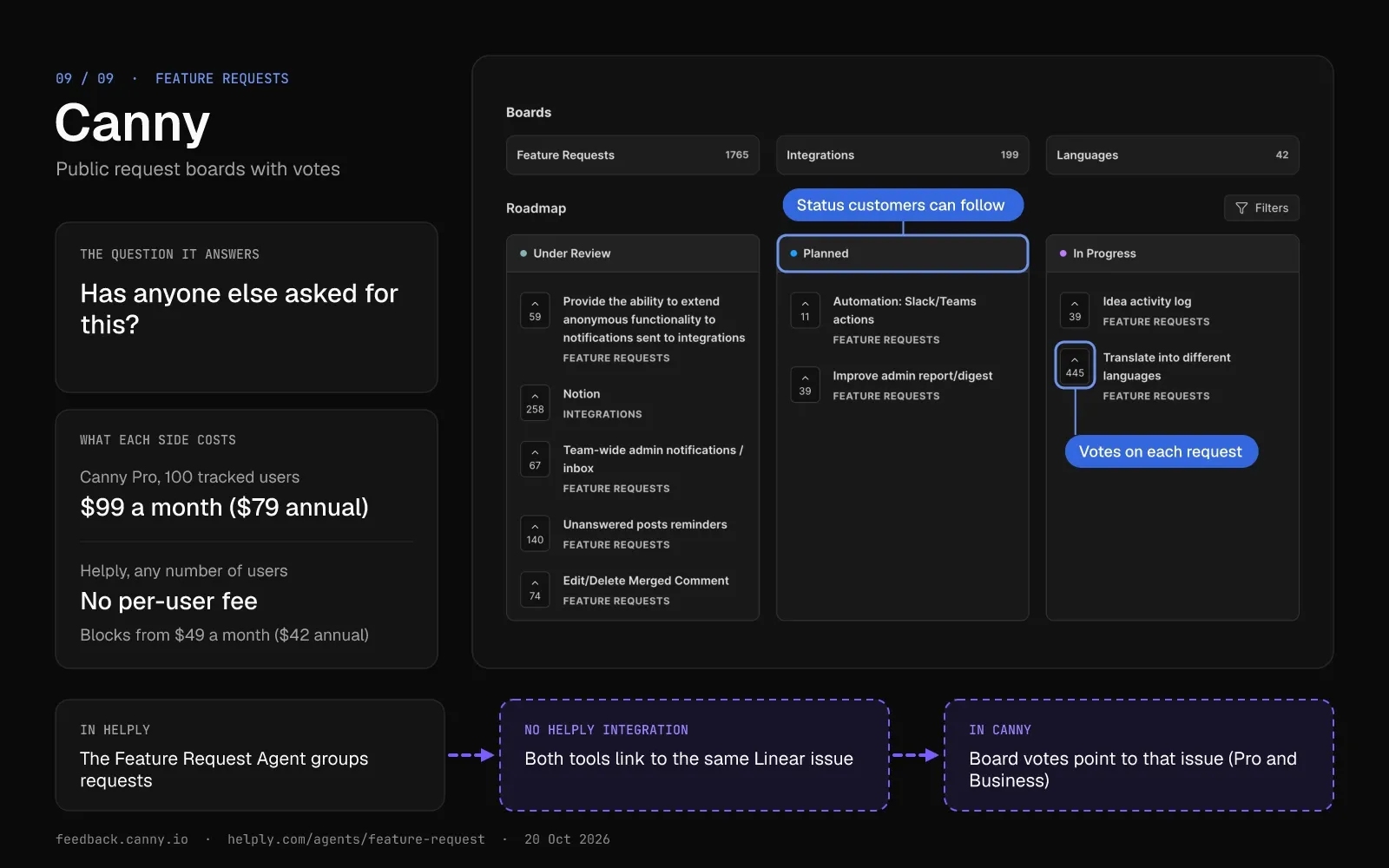
9. Canny: Best for a Public Feature Request Board With Votes
Canny, an AI-powered customer feedback platform, hosts public boards where customers post, vote and comment on feature requests.
Its Autopilot reads conversations and calls from Intercom, Zendesk, Help Scout, Freshdesk, Gong, Zoom and Slack, plus reviews on G2 and app stores. It pulls out feature requests and merges duplicates.
On Pro and Business, each request links to a Linear or Jira issue with two-way status sync. Zendesk and Intercom agents can log feedback to Canny without leaving the ticket.
Pricing
The free plan stops at 25 tracked users and 5 managers. Pro starts at $99 a month for 100 tracked users ($79 on annual billing) and rises to $1,224 a month ($979) at 4,000.
Business pricing is custom, from 5,000 tracked users. A tracked user is anyone who posts, votes or comments, or whose feedback Autopilot captures. Paid plans come with a 14-day trial and no card.
Pros
- Contributors, boards and feedback are unlimited on every plan, Free included.
- On Pro and Business, each request's status stays in step with its Linear or Jira issue.
Cons
- Canny moves your Pro account to the next price tier when you pass your tracked-user limit. Set a monthly spend limit, and Canny pauses those upgrades once you hit it.
- On Free, Canny limits integrations to feedback and notification tools, so the Linear and Jira links need Pro.
Best for
Product teams that want customers to vote on requests and follow them to release.
Helply Beside Canny: Two Routes to One Linear Issue
Helply's Feature Request Agent finds product requests in support conversations, groups duplicates and links each one to the accounts asking. On Canny Pro and Business, both tools link to Linear, so the support tickets and the board votes can point to one issue. Canny doesn't list Helply as an integration or an Autopilot source.
| Area | Canny | Helply |
|---|---|---|
| Where requests come from | Board posts and votes, plus Autopilot sources | Support conversations on every connected channel |
| Duplicates | Autopilot merges them | Feature Request Agent groups them |
| Link to engineering | Linear and Jira with two-way status sync (Pro and Business) | Linear and Jira issues linked from tickets |
| Starting price | Free for 25 tracked users; Pro from $99 a month for 100 tracked users ($79 annual) | 500 credits for $49 a month ($42 annual) |
Swipe the table sideways to see every column.
See how the Feature Request Agent groups requests
Customer Service Tool Pricing for B2B Teams in 2026
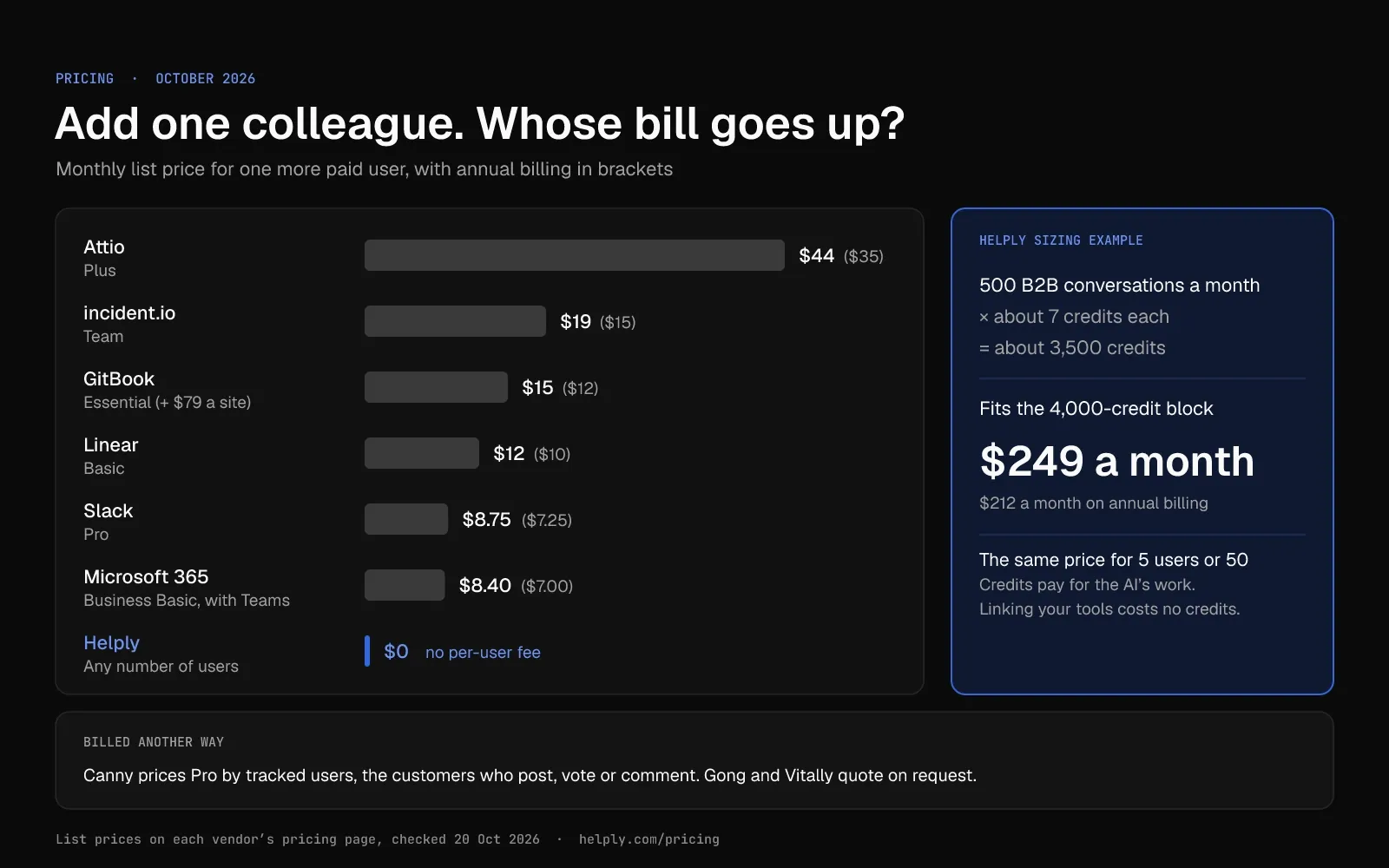
Prices around a B2B help desk run from free plans to custom quotes. The billing unit changes from tool to tool, so compare units before you compare prices.
Count three things before you buy: the people who need access, the records or tracked users, and the AI usage.
- Per user. Slack, Microsoft 365, Attio, Linear and incident.io charge for each person. GitBook charges per user plus a fee for each docs site.
- Per tracked user. Canny prices Pro by the customers who give feedback, from $99 a month for 100 ($79 annual) to $1,224 ($979) at 4,000.
- On request. Gong prices per-user licenses plus a platform fee, and every Vitally plan shows "Request Pricing".
Billing units, free options and AI charges for each tool, October 2026:
| Tool | Billing unit | Free option | AI pricing |
|---|---|---|---|
| Helply | Credits for AI work; no per-user fees | A 14-day trial that includes 1,000 credits | 1, 4 or 12 credits, by task complexity |
| Slack | Per user | Free plan; one-to-one Slack Connect messages only | No AI on Free; thread summaries on Pro; Slackbot agent on Business+ |
| Microsoft Teams | Per user, in a Microsoft 365 business plan | One-month trial that requires a card | Some AI experiences bill by usage |
| Attio | Per user | Free for 3 seats | Seat and workspace credits; packs from $85 a month for 5,000 ($70 annual) |
| Gong | Per user, plus a platform fee | No published free plan; free Collaborator seats with limited access | Gong Credits for advanced agent features |
| Linear | Per user | Free for 250 issues | Linear Agent included; coding sessions use AI credits |
| incident.io | Per user, plus an on-call add-on | Basic plan, free with no time limit | AI agent on Pro and up |
| GitBook | Per site, plus per user | Free for 1 user | Credits; Essential includes $20 of AI credits and Ultimate $100 |
| Vitally | Not published | Sandbox trial after a demo | Not published |
| Canny | Tracked users | Free for 25 tracked users | Autopilot on every plan; people it captures feedback from count as tracked users |
Swipe the table sideways to see every column.
Sales or engineering may already pay for the CRM, Gong and Linear. Support owns the help desk, and per-seat help desks bill for each person who replies to customers.
In Helply, a B2B team with 500 conversations a month needs about 3,500 credits, however many people read the tickets. The 4,000-credit block fits at $249 ($212 annual).
Watch for three costs beyond the list price:
- Plan caps. Attio's Plus plan stops at 10 seats, and Slack's free plan allows no shared channels.
- Automatic upgrades. Without a spend limit, Canny moves Pro to the next price tier once you pass your tracked-user limit.
- Credits. Attio, GitBook, Gong, Linear and Helply meter some AI work in credits. Ask each vendor what happens at zero. With auto top-up off, Helply pauses the AI at your cap while your team keeps working.
Size Helply's part with the credit estimator: enter your monthly conversations and how hard you want the AI working.
What Tools Are Used for Customer Support? 9 Types for B2B Teams
B2B support teams choose from nine types of tools for customer service. The help desk is the hub; your reps pull context from the other eight or hand work to them.
A small team can start with a help desk and its knowledge base, shared channels and a CRM. Add the rest as your accounts and your product grow.
- Help desk, live chat and ticketing. One queue for email, live chat and messaging, with owners, response targets and reports. Example: Helply, a help desk with AI agents built in. Compare more in Helply's roundup of AI tools for support teams.
- Shared channels. Slack Connect and Microsoft Teams shared channels let a customer message your team from their own workspace.
- CRM. The account owner, plan, renewal date and deal history for each customer. Examples: Attio, HubSpot, Salesforce.
- Call recording. Transcripts of sales and onboarding calls, so support knows what the customer heard before they wrote in. Examples: Gong, Fathom, Fireflies.
- Issue tracking. Linear, Jira or GitHub Issues hold the bugs support sends to engineering.
- Incident management and status pages. One place to declare an outage and update every affected customer. Example: incident.io.
- Knowledge base and docs. Public product and API docs, plus the internal pages your AI agents read. Examples: GitBook for public docs; Notion or Confluence for internal pages.
- Customer success platform. Health scores, renewal dates and playbooks for the people who manage a book of accounts. Examples: Vitally, Gainsight, Planhat.
- Feedback boards. One place to collect feature requests, group duplicates and tell customers when a request ships. Example: Canny.
Each extra tool adds a login and one more place to search for context. Connect each one to the help desk, or your reps end up checking all nine.
Helply includes a help desk and a knowledge base, and it brings Slack Connect and Teams conversations into its inbox. It connects to CRM, call recording, issue tracking, incident and docs tools, including Attio, Gong, Linear, incident.io and GitBook. Its Churn Agent and Feature Request Agent cover part of the customer success and feedback jobs inside the inbox.
How to Choose Customer Service Tools for a B2B Support Stack
Ask every vendor on your shortlist these six questions before you sign.
- Does it connect to your help desk through a native integration, Zapier or an API?
- Does it bill per user, and how many colleagues outside support need access?
- Can your AI agents read it, or only your reps?
- Do customers stay in their own channel, or do they have to log in somewhere new?
- Does support, sales, engineering or customer success own the budget?
- Does it have a seat cap, a usage cap or an annual minimum, and how does it bill past that limit?
If a tool fails the first question, your reps will check it by hand in another tab. Weigh that answer above the other five.
Which Customer Service Tools Should a B2B Team Buy First?
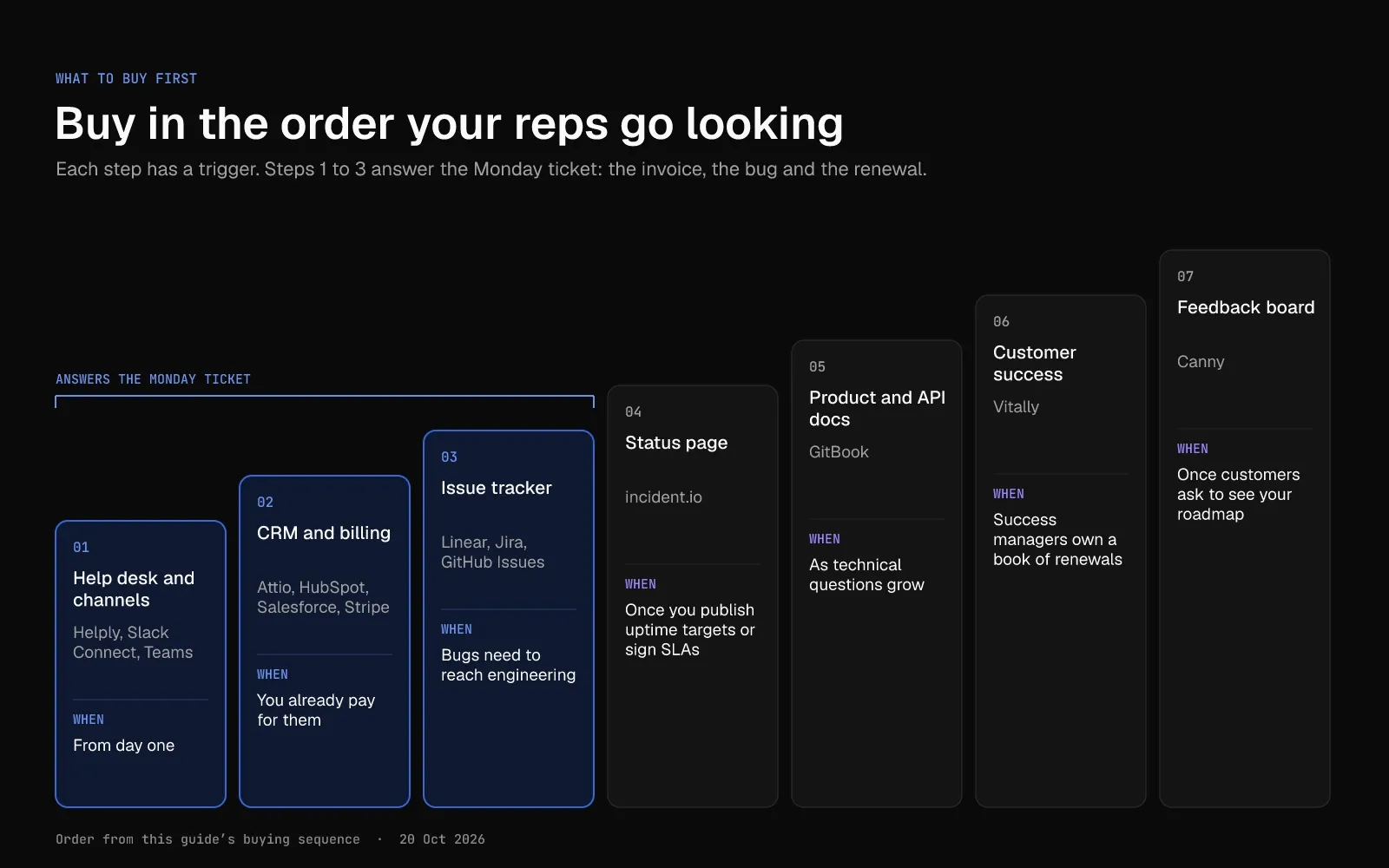
Buy in the order your reps go looking for answers. Answering the Monday ticket, with its invoice, bug and renewal, takes the first three steps.
- Start with the help desk and the channels your customers use. Helply brings Slack Connect and Microsoft Teams conversations into the same inbox as email and chat.
- Connect the CRM and billing tools your company already pays for, such as Attio, HubSpot, Salesforce or Stripe.
- Connect the issue tracker engineering works in: Linear, Jira or GitHub Issues.
- Add a status page once you publish uptime targets or sign SLAs with customers.
- Connect your product and API docs as technical questions grow.
- Add a customer success platform when success managers own a book of renewals.
- Add a public feedback board once customers ask to see your roadmap.
Stay in Slack, or Move to a Help Desk That Reads Your Stack?
A team with a few dozen conversations a month in one Slack channel can get by with Slack Connect and a shared doc. Once answers need the CRM, billing and engineering, choose a help desk that reads all three.
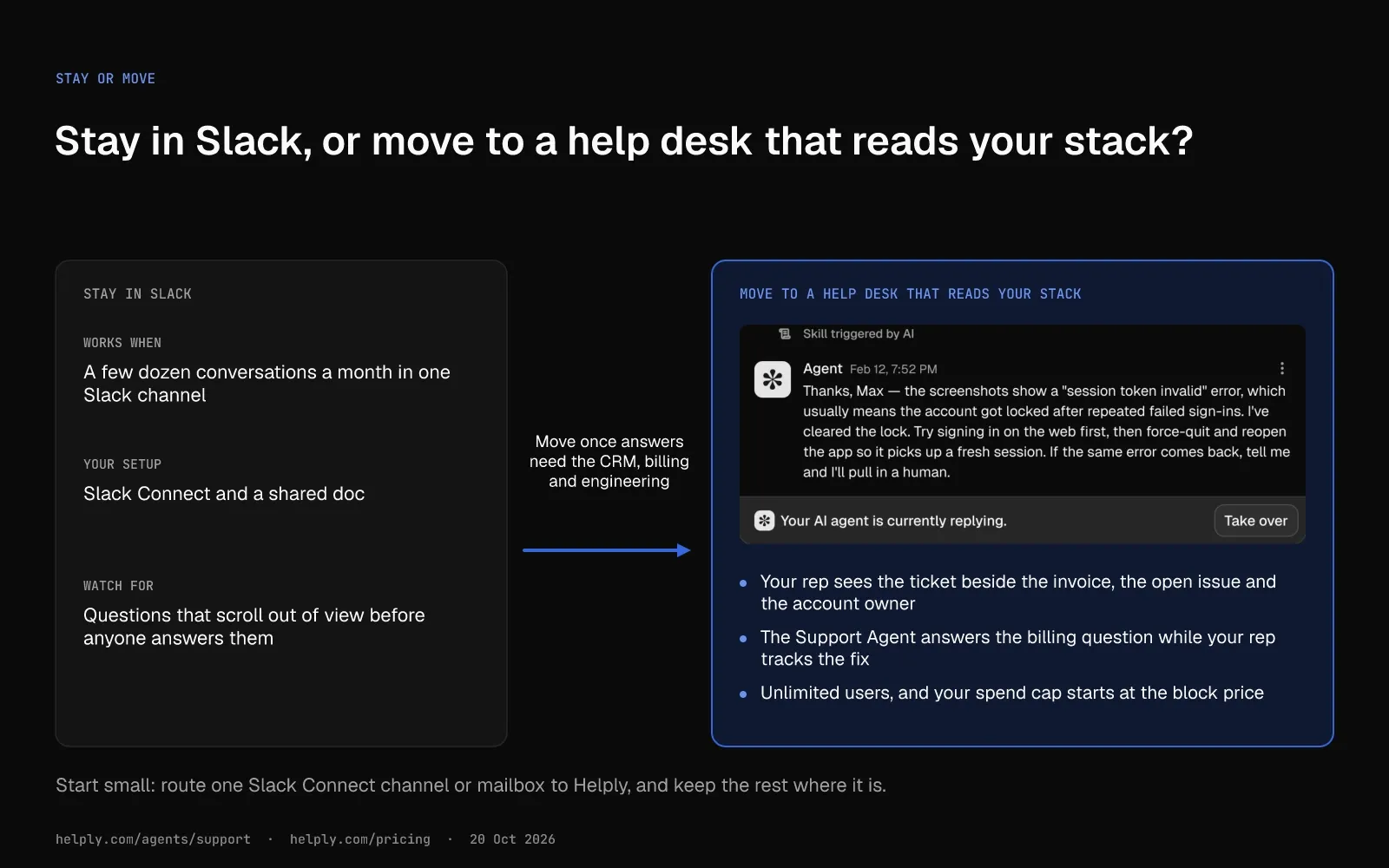
With Stripe, Linear and your CRM connected, your rep sees the Monday ticket beside the invoice, the open issue and the account owner. The Support Agent can answer the billing question while your rep tracks the fix. After the fix ships, Helply can help your team reach every customer who reported the bug.
Thirty days before renewal, the Churn Agent can warn the account owner about frustration in the thread. The Revenue Agent watches the same conversations for upgrade intent. At Sender.net, "upgrade-intent conversations that used to die in the queue now landed in Sales the same hour."
Your AI agents will meet questions they can't answer for sure. Razia Aliani, Senior Systematic Reviewer at Covidence, names the risk: "Our whole value is that we get the hard questions right. A support bot that hallucinates a workflow step isn't helpful, it's a threat to a researcher's review."
Covidence's onboarding "centered on tuning escalation thresholds until the team trusted the agents to know the limits of what they knew." Helply lets you set the point where the AI hands a conversation and its investigation to a person.
The account manager and the engineer on the issue can open the ticket too, since Helply charges no per-user fees. Credit blocks start at $49 a month ($42 annual), and 1,000 B2B conversations a month land near the $399 block ($339 annual). Your spend cap starts at the block price, and you decide when to raise it.
Start with one queue and let the Support Agent work it for a week.
Frequently asked questions
Customer service tools are the apps a support team uses to handle customer questions from first message to resolution. A help desk sits at the core, with live chat, a knowledge base, a CRM, AI agents and reports around it. A B2B team can add shared Slack or Teams channels, call recordings, an issue tracker and a status page.
Most support teams start with three customer support tools: a help desk, a knowledge base and a CRM. B2B teams add shared Slack or Teams channels, call recording, issue tracking, a status page, customer success and feedback tools. Helply covers the help desk and knowledge base jobs and connects to Slack, Microsoft Teams, Gong, Linear and incident.io.
B2B customer support software is a help desk built for business customers. It groups conversations by account, takes questions in Slack Connect and Teams, tracks SLAs and shows CRM data like renewal dates. Helply handles each of these, and every plan includes its AI agents and unlimited users.
Attio, HubSpot, Salesforce and Pipedrive are CRMs that support teams connect to their help desk. The CRM holds the account owner, plan and deal history, and the help desk shows them beside the ticket. Helply connects to all four.
Vitally, Gainsight and Planhat are customer success platforms, and all three price on request. Each scores account health, and Vitally and Gainsight also run playbooks. Inside the support queue, Helply's Churn Agent flags frustration and churn risk in conversations.
On monthly billing, entry paid plans for per-user tools in a B2B support stack run $8.40 to $44 per user a month. As of October 2026, Slack Pro costs $8.75 ($7.25 annual), Linear Basic $12 ($10) and Attio Plus $44 ($35). Slack, Attio, Linear, incident.io, GitBook and Canny also have free plans.
Gong and Vitally quote on request. Helply charges no per-user fees, so hiring leaves the bill unchanged. Its entry block of 500 credits runs $49 a month ($42 annual).
Create a shared channel for each customer account, then connect those channels to your help desk so every question gets an owner. One channel can host up to 250 organizations, and each needs a paid Slack plan unless the host is on an Enterprise plan. Helply turns Slack Connect messages into tickets while customers keep talking in Slack.
Link the ticket to an issue in the tracker engineering already uses, such as Linear or Jira. Attach each later report to the same issue, so engineering sees how many customers it affects. Once the issue closes, follow up with every customer who reported it.
In Helply, several conversations can link to one Linear or Jira issue, and Helply can use the closed issue to prompt those follow-ups.
Yes, once customers rely on your uptime or you sign SLAs with them. One status page update reaches every subscriber by email, Slack or RSS, and support can link to it in replies. The free Basic plan from incident.io includes one public status page, and Helply connects to incident.io for incident context.
For AI agents and unlimited users in one help desk, choose Helply. It bills credits for the work its Support, Assist and Background agents do, from $49 a month ($42 annual). Helply's guide to Zendesk alternatives compares 12 help desks on price and AI fees.
No. AI agents can resolve routine requests end to end and draft replies for the rest. Your team keeps the judgment calls and sensitive accounts.
In Helply, you define when the AI can proceed alone. If it can't resolve a request with confidence, it hands off with the investigation attached.
Cover email, live chat and the apps your business customers work in, such as Slack Connect and Microsoft Teams. Every channel should feed one queue, so a rep sees the full history. Helply puts Slack, Microsoft Teams, email, chat, WhatsApp, phone, SMS, Discord and Telegram conversations in one queue.

Bildad Oyugi
Head of Content
Bildad is a digital marketing expert with over 5 years of experience in copywriting, content marketing, and editing. Outside of work, he enjoys videography and spending time with his family.
Subscribe to the Helply blog
New posts on AI support, delivered to your inbox.


