Key Takeaways:
- Some vendors charge for each agent, and others for conversations or AI work. For 12 agents and 2,000 conversations a month, Zendesk Suite Professional with Copilot costs $2,388 a month ($1,980 annual) before extra AI resolutions. On Helply, the same volume fits the 11,000 or 15,000 credit block, at $589 or $769 a month ($501 or $654 annually).
- Most per-seat vendors bill AI on a second meter. Zendesk sells Copilot to Suite Professional teams for $50 per agent a month, and each Intercom Fin outcome costs $0.99.
- Small teams can start for free. Help Scout covers 5 users, HubSpot Service Hub 2 users, and Tidio 50 human-handled conversations a month.
- If customers message you in Slack Connect or Microsoft Teams, check that your help desk turns those threads into tickets. Zendesk's Slack channel handles 1:1 conversations, and Front connects only Slack Connect channels you own. Helply turns Slack Connect and supported Teams conversations into tickets in the same inbox as email.
- In Helply, a draft uses 1 credit, a check across one or two systems uses 4, and a multi-system investigation uses 12. The 500-credit block costs $49 a month ($42 on annual billing). Every plan includes unlimited users and all three AI agents.
Customer emails pile up in a shared Gmail inbox, and two teammates answer the same message. A billing question has sat for three days because nobody could tell which account sent it. Then the Zendesk quote for your team lands, with a comma in the monthly total.
You reach this point when your team outgrows a shared mailbox and a bigger help desk would charge for each new hire.
With a customer communication tool, you solve the first two problems. Each conversation gets one owner, and the customer's account and past messages sit beside every thread.
The size of that quote depends on what the vendor meters: people, conversations or AI work.
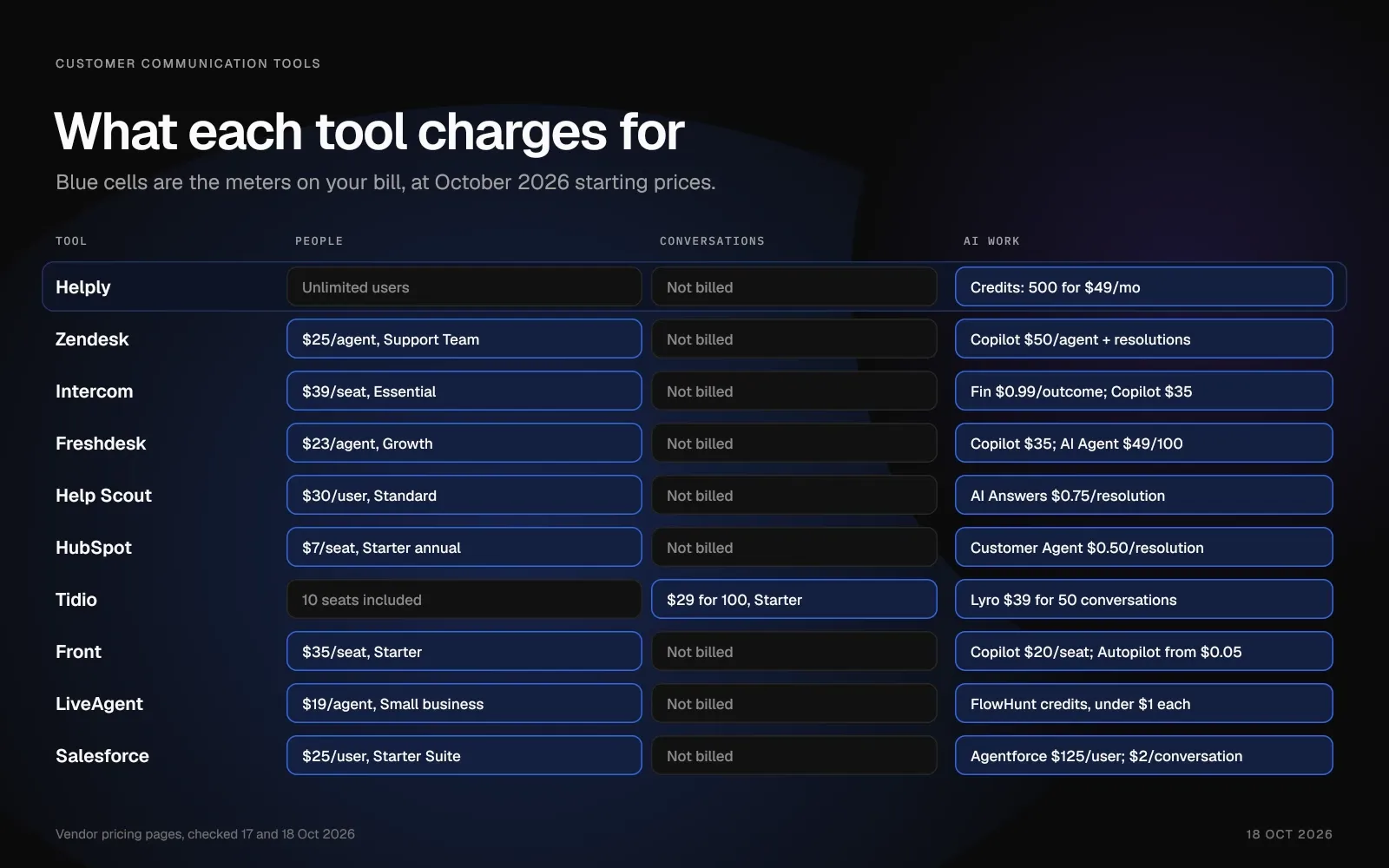
Quick Comparison: Prices for 10 Customer Communication Tools and Platforms
| Tool | Best for | Starting price (October 2026) | AI cost | Pricing model |
|---|---|---|---|---|
| Helply | AI agents on email, chat and messaging, with unlimited users | $49/mo for 500 credits ($42 annual) | 1, 4 or 12 credits per task, by complexity | Credit block, unlimited users |
| Zendesk | Large teams with complex routing | Support Team $25/agent/mo ($19 annual); Suite from $69 ($55); skills-based routing from $149 ($115) | Copilot $50/agent/mo on Suite Professional; AI agents per resolution above the allowance | Per agent, plus AI |
| Intercom | In-app chat with the Fin AI agent | $39/seat/mo ($29 annual) on Essential; some visitors see $29 ($19) in a price test | Fin $0.99 per outcome; Copilot $35/agent/mo ($29 annual) | Per seat, plus AI |
| Freshdesk | Low-cost ticketing with an AI agent | $23/agent/mo ($19 annual) on Growth | Freddy AI Copilot $35/agent/mo ($29 annual), Pro and up; AI Agent: first 500 sessions free per account, $49 per 100 after | Per agent, plus AI |
| Help Scout | Small teams that work in email | Free for 5 users; $30/user/mo ($25 annual) | AI Answers $0.75 per resolution | Per user, plus AI |
| HubSpot Service Hub | Teams already on HubSpot CRM | Free for 2 users; Starter $7/seat/mo on annual billing, discounted from $20 | Customer Agent 50 cents per resolution, Professional and up | Per seat, plus AI |
| Tidio | Online stores with live chat | Free for 50 conversations a month; $29/mo ($24.17 annual) | Lyro from $39/mo ($32.50 annual) | Conversation tiers, plus AI |
| Front | Shared email across teams | $35/seat/mo ($25 annual) | Copilot $20/seat/mo; Autopilot from $0.05 per conversation | Per seat, plus AI |
| LiveAgent | Phone, chat and email in one help desk | $19/agent/mo ($15 annual); call center from $35 ($29) | FlowHunt subscription, credits a little under $1 each | Per agent, plus AI credits |
| Salesforce Service Cloud | Teams already on Salesforce | $25/user/mo (Starter Suite, monthly or annual) | Agentforce for Service $125/user/mo on Core and Advanced (included in Max); conversations $2 each | Per user, plus AI |
1. Helply: Best for Teams That Want One Inbox and AI Agents on Every Channel
Helply is an AI-native customer support platform. Every plan includes unlimited users, and the smallest credit block, 500 credits, costs $49 a month ($42 on annual billing).
Helply pulls email, live chat, Slack, WhatsApp, Discord and Telegram conversations, plus supported Microsoft Teams and SMS conversations, into one shared inbox. For calls, you can connect supported call details and transcripts to the customer's history.
Each customer record shows the person's details, past conversations and account information. Connect Stripe, HubSpot or Salesforce, and the AI agents can check the account behind a billing question before anyone replies.
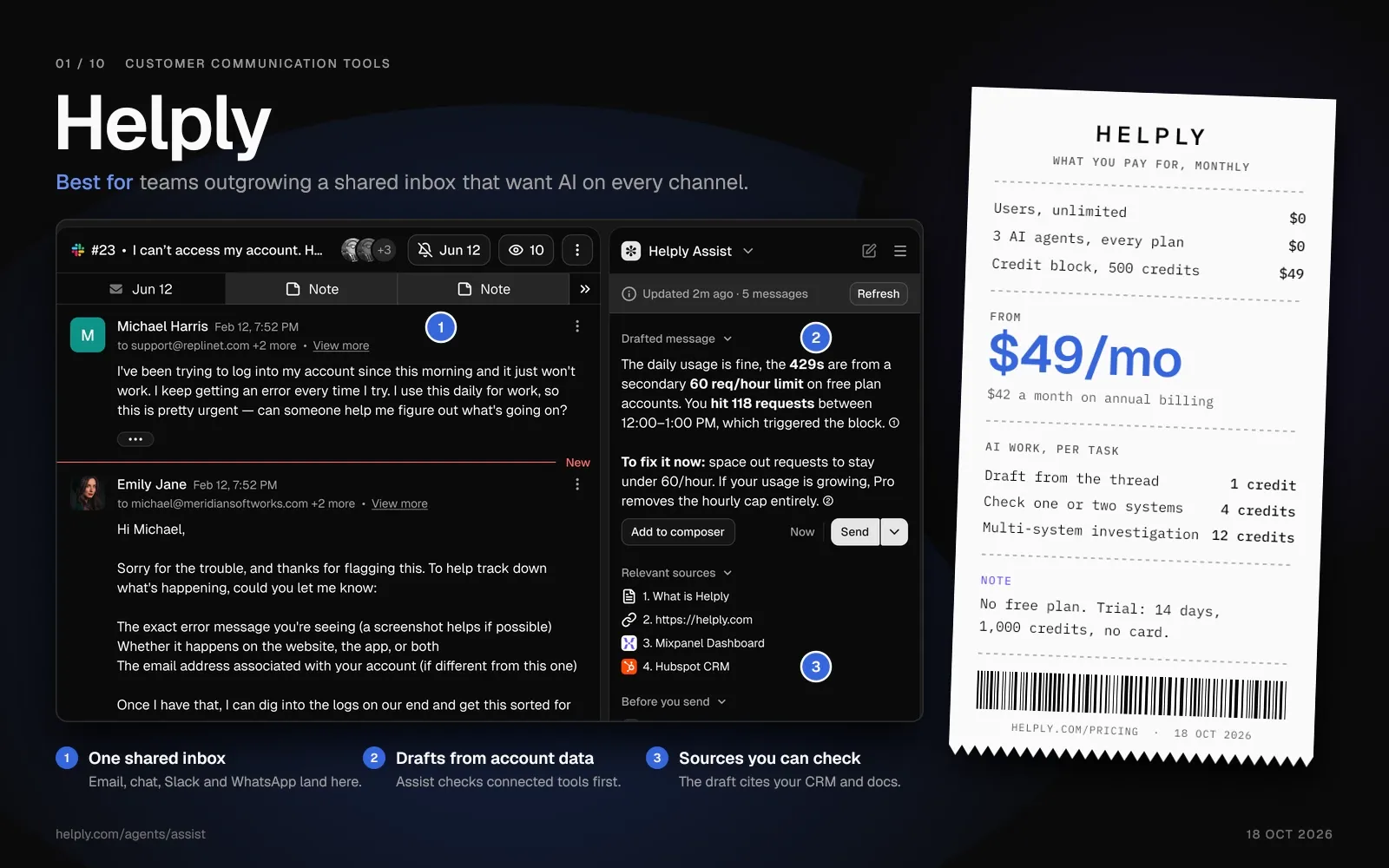
Key Features:
- Stop double replies. Collision detection shows when a teammate is already working on a conversation, and internal notes stay hidden from the customer. You can route each conversation to the right person with assignment rules and, as you scale, set SLA response and resolution targets.
- Answer routine questions on every channel. The Support Agent can answer customers from your help articles, past conversations and tools such as Stripe, and take supported actions. If it can't resolve a conversation, it hands your team the thread and what it found.
- Draft replies from the customer's account. The Assist Agent bases each draft on the thread, the customer's details and your Guidelines. Reps can have it update records, create issues and take actions they approve.
- Track Slack and Teams threads like email. Helply turns Slack Connect channels and supported Microsoft Teams conversations into trackable tickets beside email and chat. Customers keep writing in Slack or Teams while your team works from Helply.
- Route churn and upgrade signals to their owners. Churn, Revenue, Feature Request, Insights and Knowledge agents watch every conversation. They alert the right teammate, update records or trigger workflows when they spot a signal.
- Keep your help center current. The Knowledge Agent finds answers missing from your help center and flags outdated information. Your team can check each suggestion before it goes to customers or the other AI agents.
Pricing:
Every Helply plan includes unlimited users and all three AI agents. You pick a monthly credit block for the AI work, from 500 credits at $49 to 32,000 at $1,549. On annual billing, the same blocks cost $42 to $1,317 a month.
Drafts and summaries cost 1 credit each. A lookup in one or two systems costs 4, and a full investigation ending in a judgment costs 12. You pay nothing for retries, failed actions, drafts your team turns down before a customer sees them, spam or setup.
Credits you don't use roll into the following month, then expire at its end. With annual billing, you save 15% and your credits pool across the whole year. Teams that need more than 32,000 credits a month get volume pricing through sales.
Pros:
- Unlimited users on every plan, so success, product and engineering can join a conversation. Your bill stays the same when you hire.
- All three AI agents come on every plan. Each reply draft costs 1 credit, so the whole team can use the Assist Agent.
- Customers can reach you in Slack Connect, Microsoft Teams or WhatsApp, and your team answers from the same inbox.
- Your team gets each handoff with the conversation history, customer context and the AI's work, so customers don't repeat themselves.
Cons:
- Helply has no free plan. Paid blocks start at $49 a month, and the trial runs 14 days with 1,000 credits.
- Your AI costs rise with the work you hand the agents. Your monthly spend cap starts at your block price unless you raise it, and with auto top-up off, the AI pauses there. Run the estimator on the pricing page before you pick a block.
Best for:
Teams that have outgrown a shared inbox and want AI agents on email, chat and messaging, with unlimited users as they hire. It fits software companies, online stores, marketplaces and consumer businesses.
2. Zendesk: Best for Large Teams That Need Complex Routing
Zendesk suits large support teams that route work by skill and draw on its marketplace of more than 1,800 apps. Support Team costs $25 per agent a month ($19 on annual billing). Skills-based routing starts on Suite Professional, at $149 per agent a month ($115 on annual billing).
The trade-off is cost per agent. Suite Professional with Copilot costs $199 per agent a month, or $165 on annual billing.
Zendesk bills its AI agents by resolution on top of that. You pay for each resolution above your plan's allowance.
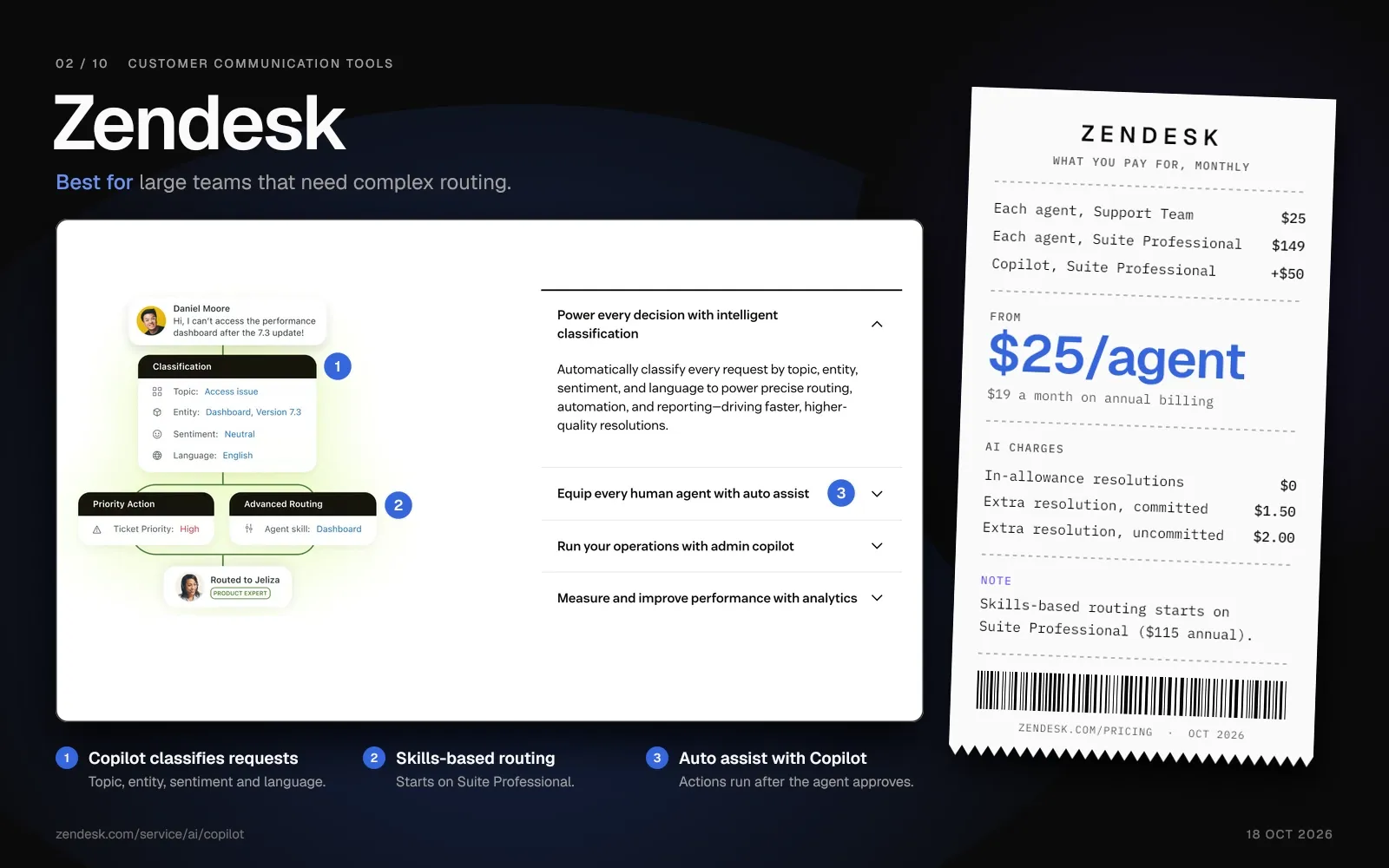
Key Features:
- Omnichannel routing. Suite plans route email, chat and messaging conversations to agents from one workspace.
- Copilot. It suggests first replies, summarizes tickets and runs intelligent triage. Its auto assist can take actions after the agent approves them.
- Triggers and custom objects. You can build automations with triggers and store custom data in custom objects. That setup works best when someone on the team owns the admin work.
Pricing:
- Support Team: $25 per agent a month ($19 on annual billing).
- Suite Team: $69 per agent a month ($55 on annual billing).
- Suite Professional: $149 per agent a month ($115 on annual billing).
- Suite Enterprise + Copilot: price through Zendesk sales.
- Copilot: $50 per agent a month on either billing term, as an add-on to Suite Professional.
- AI agents: included on every plan, with extra cost for resolutions above the monthly allowance.
Pros:
- More than 1,800 apps and integrations in the Zendesk Marketplace.
- Suite Professional adds skills-based routing and up to 100 light agents for teammates who only read tickets and leave private comments.
Cons:
- Each agent adds to the bill: Suite Professional with Copilot costs $199 per agent a month ($165 on annual billing).
- Each extra AI agent resolution costs $1.50 on a commitment or $2.00 without one. Zendesk quotes its May 2026 resolution tiers through sales.
Best for:
Large support teams with an admin, layered workflows and a budget for per-agent AI.
Helply vs. Zendesk: Users, AI and Price
Zendesk charges for each agent, plus $50 per agent for Copilot and a fee for AI agent resolutions above the allowance. On every Helply plan, unlimited users and all three AI agents come included, and you pay in credits for the AI work. Zendesk fits large teams that need skills-based routing and its marketplace of 1,800+ apps.
| Helply | Zendesk | |
|---|---|---|
| Who you pay for | Unlimited users on every plan, from $49 a month for 500 credits ($42 annual) | Each agent, from $25 a month ($19 annual) |
| AI drafting for reps | Assist Agent on every plan, 1 credit per draft | Copilot, a $50-per-agent monthly add-on to Suite Professional |
| AI agent on customer conversations | Support Agent on every plan; Helply estimates about 4 credits per short conversation and 7 per complex one | Charged per resolution above the included allowance |
| Slack and Microsoft Teams | Turns Slack Connect and supported Teams conversations into tickets | Slack Direct Messages channel, 1:1; Teams as an agent-side integration |
Compare Helply and Zendesk in detail
3. Intercom: Best for In-App Chat With the Fin AI Agent
Intercom is for software companies that talk to customers through a messenger inside their product. The company renamed itself Fin in 2026 and kept the Intercom name for the help desk. Essential costs $39 per seat a month ($29 on annual billing).
Salesforce completed its acquisition of the company on 10 September 2026. Fin, the AI agent, costs $0.99 per outcome on top of seat prices, and Intercom charges it no more than once per conversation.
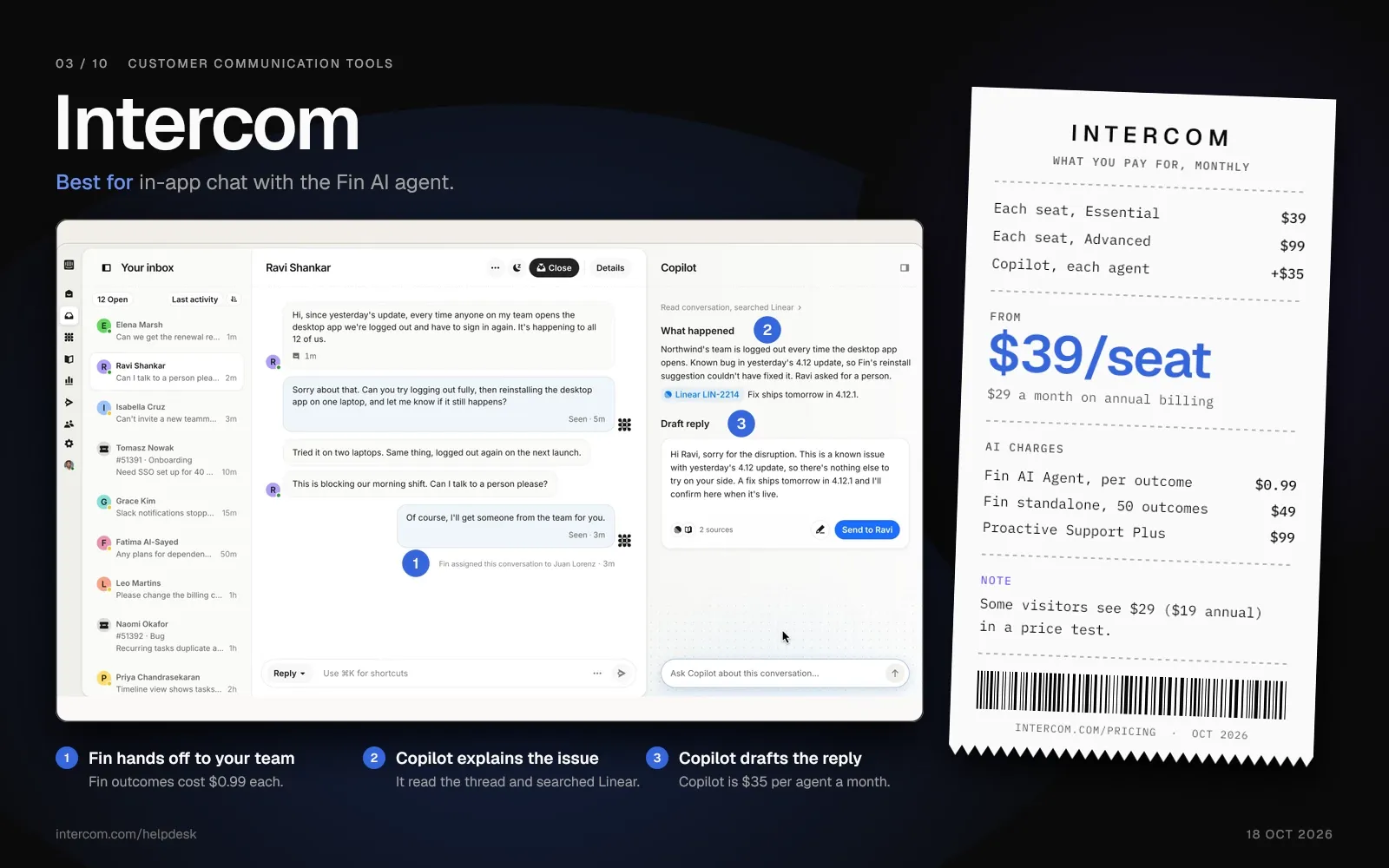
Key Features:
- Fin AI Agent. It answers from your help center, internal articles, PDFs, websites and synced sources, at $0.99 per outcome. Teams on other help desks can buy Fin from $49 a month for 50 outcomes.
- In-app messages and Product Tours. Chats, banners and tooltips come with every plan. Product Tours, Posts and Surveys need the Proactive Support Plus add-on, at $99 a month for 500 messages.
- Workflows. Advanced and Expert add automations for routing and handoff, and every plan includes basic chatbots.
Pricing:
- Essential: $39 per seat a month ($29 on annual billing). In October 2026, some visitors see a test price of $29 ($19 on annual billing).
- Advanced: $99 per seat a month ($85 on annual billing).
- Expert: $139 per seat a month ($132 on annual billing).
- Fin AI Agent: $0.99 per outcome, billed no more than once in a conversation.
- Copilot: $35 per agent a month ($29 on annual billing). Proactive Support Plus: $99 a month for 500 messages.
Pros:
- Software teams get a messenger, help center and in-app messages in one product.
- Fin works in Slack, Slack Connect channels included, and in Microsoft Teams channels.
Cons:
- Costs run on two meters: a fee for each seat, plus $0.99 for each Fin outcome.
- Fin counts an outcome when a customer stops asking for help or when Fin completes a workflow, handoffs included.
- Product Tours and surveys need the $99-a-month Proactive Support Plus add-on, and Workflows need Advanced or Expert.
Best for:
Software companies whose customers ask for help through chat inside the product.
Helply vs. Intercom: Users, AI and Price
Each Intercom seat carries a monthly fee, and Fin outcomes ($0.99 each) and Copilot ($35 per agent, $29 annual) come on top. Helply bills all AI work in credits by complexity, with unlimited users and the Support and Assist agents on every plan. Intercom fits better if you want product tours and in-app campaigns in your support tool.
| Helply | Intercom | |
|---|---|---|
| Who you pay for | Unlimited users on every plan, from $49 a month for 500 credits ($42 annual) | Each seat, from $39 a month ($29 annual) |
| AI drafting for reps | Assist Agent on every plan, 1 credit per draft | Copilot at $35 per agent a month ($29 annual) |
| AI agent on customer conversations | Support Agent on every plan; Helply estimates about 4 credits per short conversation and 7 per complex one | Fin at $0.99 per outcome |
| Slack and Microsoft Teams | Turns Slack Connect and supported Teams conversations into tickets; AI agents you configure can reply in supported Slack conversations | Fin answers in Slack, Slack Connect and Teams channels |
Compare Helply and Intercom in detail
4. Freshdesk: Best for Low-Cost Ticketing With an AI Agent
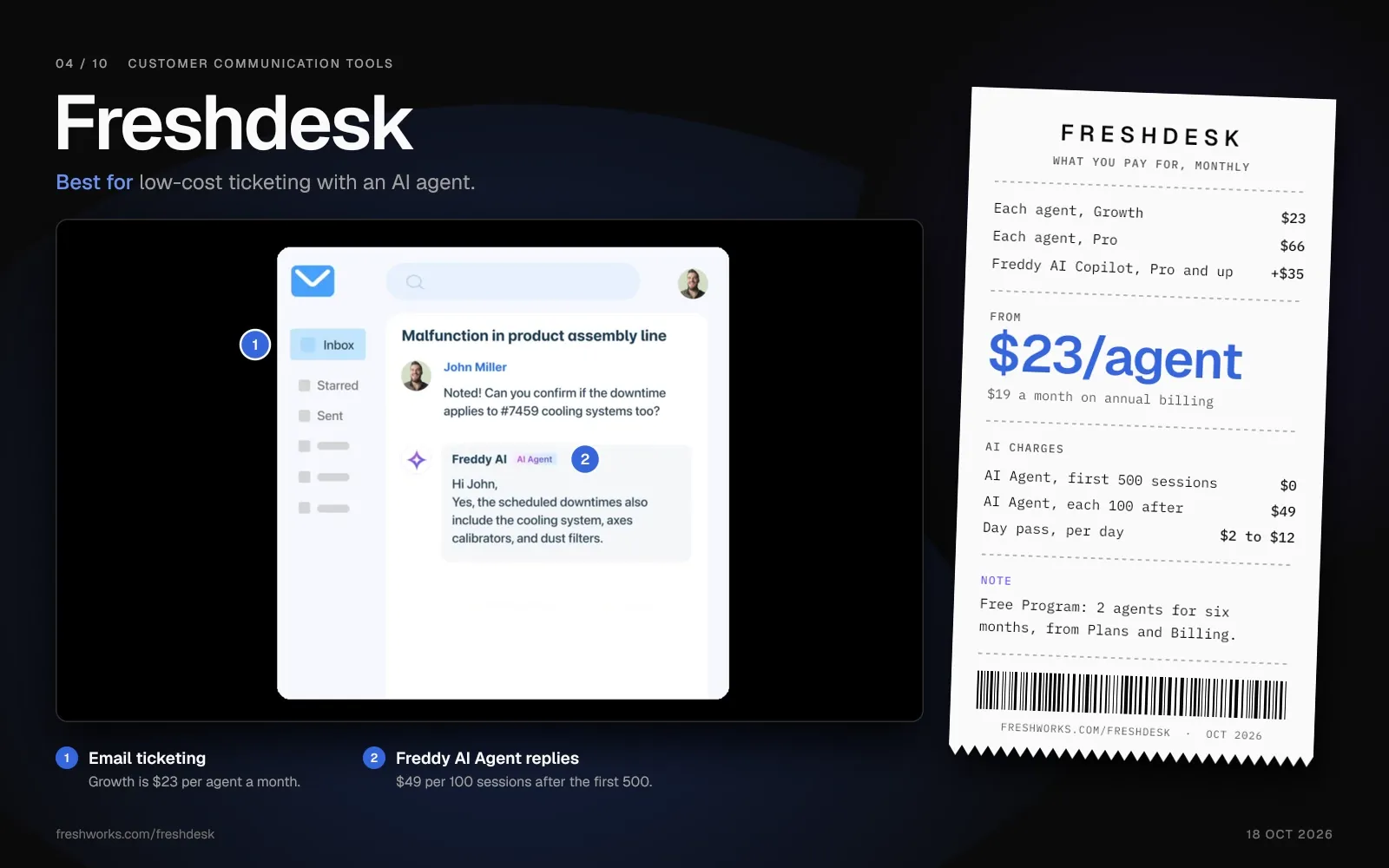
Freshdesk gives teams email ticketing, a knowledge base and several channels at a low entry price. Growth costs $23 per agent a month, or $19 on annual billing.
Each Freshdesk account gets 500 free Freddy AI Agent sessions once, on any paid plan. After that, sessions cost $49 per 100, and Copilot and Auto Triage need Pro or Enterprise.
Key Features:
- Ticket Dispatch and SLA Management. Automated routing rules, priority assignment, and SLA breach alerts across channels.
- Freddy AI Copilot. An assistant for agents, sold on Pro and Enterprise at $35 per agent a month ($29 on annual billing).
- Marketplace Integrations. 1,000+ integrations including CRM, project management, and e-commerce platforms.
Pricing:
- Free Program: 2 agents at no cost for six months, which you turn on from Plans and Billing.
- Growth: $23 per agent a month ($19 on annual billing).
- Pro: $66 per agent a month ($55 on annual billing).
- Enterprise: $107 per agent a month ($89 on annual billing).
- Freddy AI Copilot: $35 per agent a month ($29 on annual billing).
- Freddy AI Agent: a one-time 500 sessions, then $49 for each 100.
Pros:
- Growth starts at $23 per agent a month ($19 on annual billing), and the six-month Free Program costs nothing for two agents.
- Day passes give occasional agents access for $2 to $12 a day, depending on the plan, without a full license.
Cons:
- Growth teams get the AI Agent but no Copilot, which starts on Pro.
- After the one-time 500 free sessions, the AI Agent costs $49 per 100.
- A 12-agent team on Pro with Copilot pays $1,212 a month, or $1,008 on annual billing.
Best for:
Small and midsize teams that want ticketing and an AI agent at a low price per agent.
Helply vs. Freshdesk: Users, AI and Price
Freshdesk bills per agent and sells its AI as two extras: Copilot from Pro up, and AI Agent sessions after the first 500. Helply includes the Assist and Support agents on every plan and bills their work in credits. For one or two agents who need ticketing and little AI, Freshdesk Growth costs less.
| Helply | Freshdesk | |
|---|---|---|
| Who you pay for | Unlimited users on every plan, from $49 a month for 500 credits ($42 annual) | Each agent, from $23 a month ($19 annual) |
| AI drafting for reps | Assist Agent on every plan, 1 credit per draft | Freddy AI Copilot at $35 per agent a month ($29 annual), Pro and Enterprise |
| AI agent on customer conversations | Support Agent on every plan; Helply estimates about 4 credits per short conversation and 7 per complex one | Freddy AI Agent: 500 free sessions per account, $49 per 100 after |
| Occasional teammates | Unlimited users | Day passes at $2 to $12 a day |
Compare Helply and Freshdesk in detail
5. Help Scout: Best for Small, Email-First Support Teams
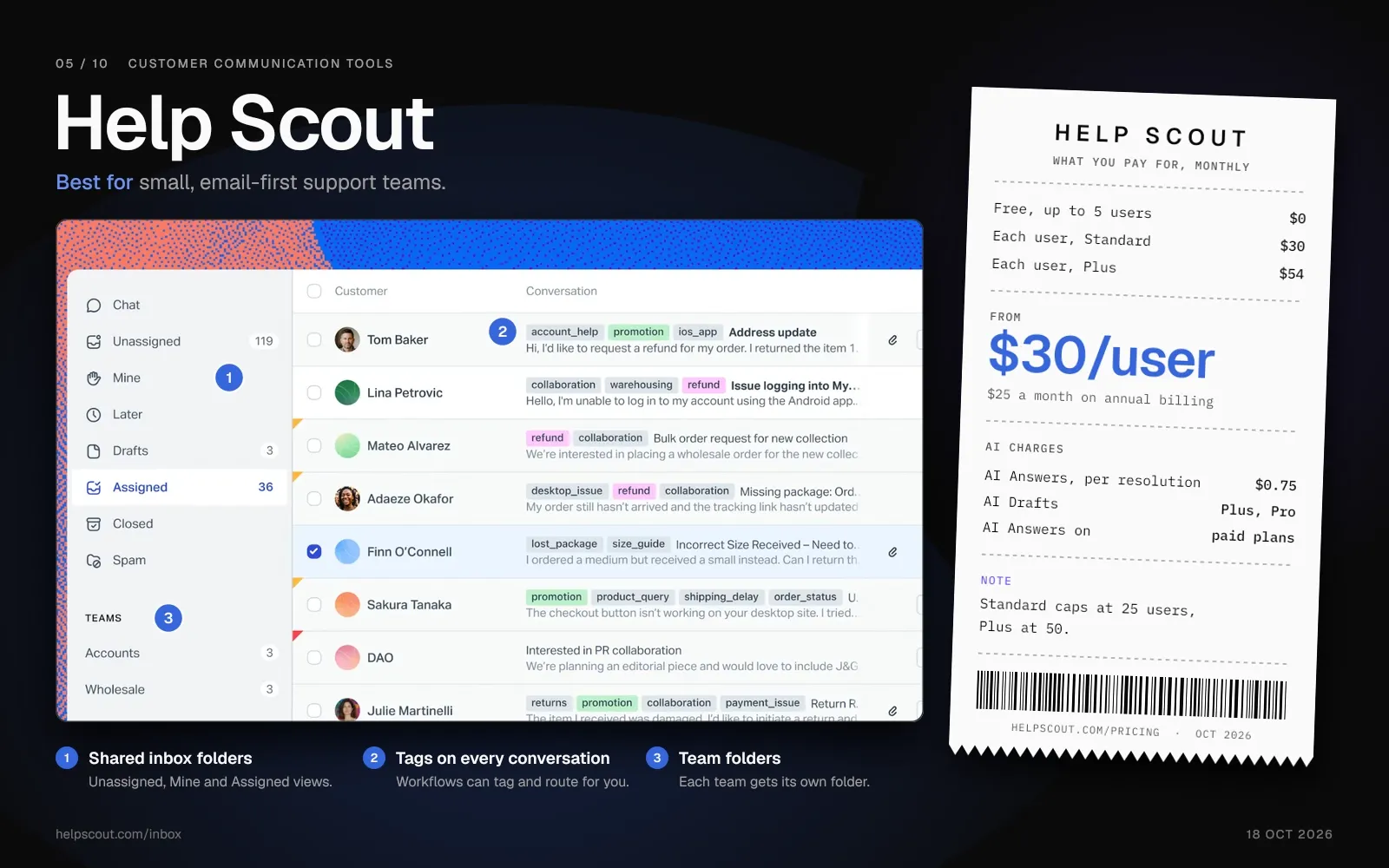
Help Scout fits small teams that run most of their support through a shared email inbox. On the free plan, up to 5 users share one inbox and can help 100 contacts a month. Standard costs $30 per user a month ($25 on annual billing), for up to 25 users.
On paid plans, Help Scout charges $0.75 for each resolution by AI Answers, its AI agent. AI Answers replies in the Beacon widget and by email, and Plus and Pro add AI Drafts.
Key Features:
- Shared Inbox. Collaborative email management with collision detection, internal notes, and saved replies.
- Beacon Widget. Embedded help widget that surfaces knowledge base articles before the customer submits a ticket.
- AI Drafts. Reply drafts for agents, unlimited on Plus and Pro.
Pricing:
- Free: $0 for up to 5 users, with one inbox and 100 contacts a month.
- Standard: $30 per user a month ($25 on annual billing), for up to 25 users.
- Plus: $54 per user a month ($45 on annual billing), for up to 50 users.
- Pro: $90 per user a month ($75 on annual billing), with a 10-user minimum, and Help Scout sells it through a demo.
- AI Answers (Scout in Help Scout's docs): $0.75 for each resolution, on paid plans.
Pros:
- The free plan covers a team of up to 5 people with one inbox.
- Custom reports start on Standard, and the Beacon widget puts help content on your site.
Cons:
- AI Drafts needs Plus or Pro, and AI Answers adds $0.75 per resolution on top of the per-user price.
- User caps apply: Standard stops at 25 users and Plus at 50.
- Pro needs at least 10 users and a sales demo.
Best for:
Email-first teams of up to 25 people on Standard, or up to 50 on Plus.
Helply vs. Help Scout: Users, AI and Price
On Help Scout, you pay per user, Standard stops at 25 users, and each AI Answers resolution costs $0.75. Two Standard users cost $60 a month ($50 annual), more than Helply's $49 block ($42 annual) with unlimited users. If your team has 5 people or fewer and needs a free plan, Help Scout has one and Helply doesn't.
| Helply | Help Scout | |
|---|---|---|
| Who you pay for | Unlimited users on every plan, from $49 a month for 500 credits ($42 annual) | Each user, from $30 a month ($25 annual) |
| AI drafting for reps | Assist Agent on every plan, 1 credit per draft | AI Drafts on Plus and Pro |
| AI agent on customer conversations | Support Agent on every plan; Helply estimates about 4 credits per short conversation and 7 per complex one | AI Answers at $0.75 per resolution |
| Free option | 14-day trial with 1,000 credits | Free plan for 5 users, 1 inbox, 100 contacts a month |
Compare Helply and Help Scout in detail
6. HubSpot Service Hub: Best for Teams Already on HubSpot CRM
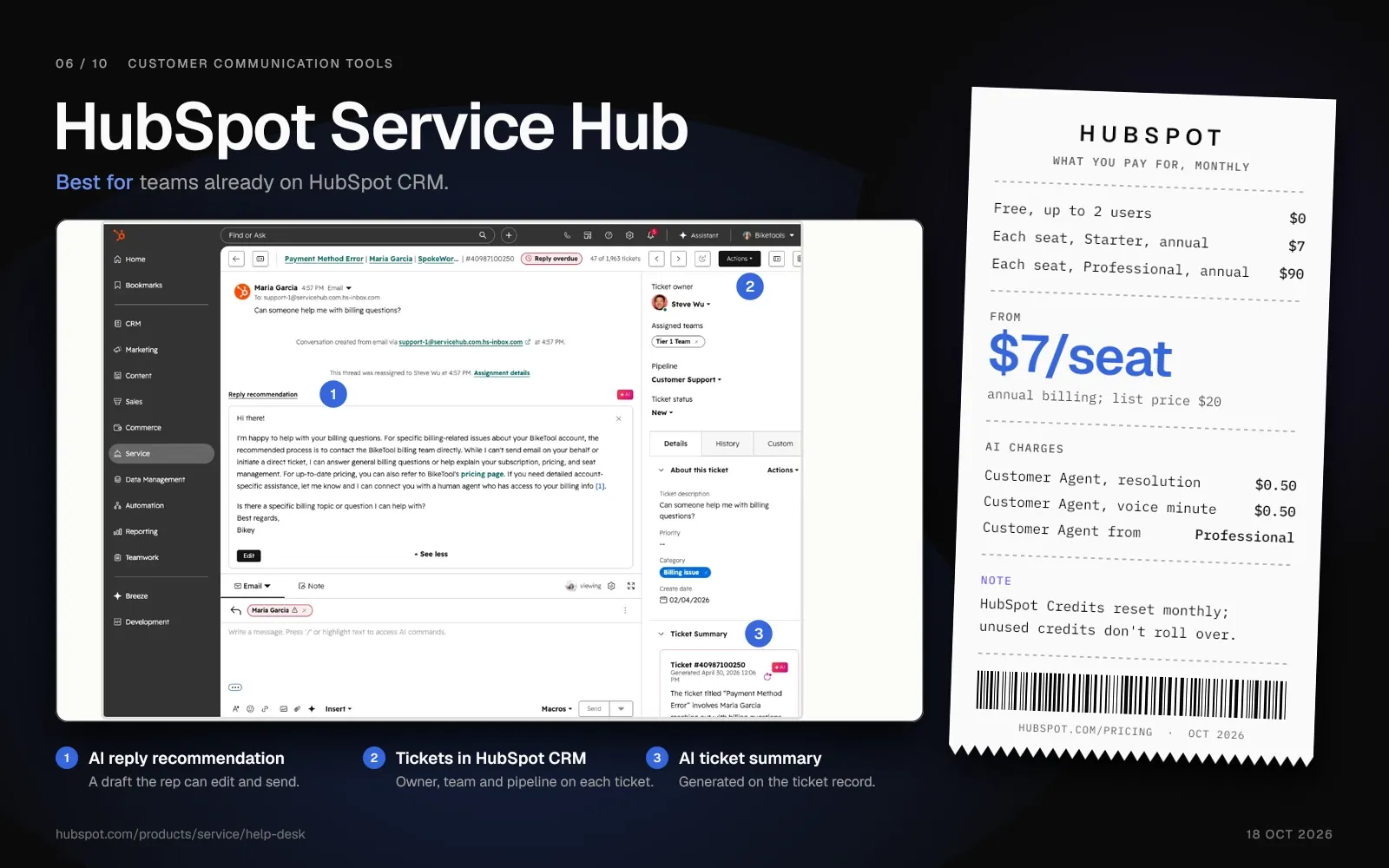
HubSpot Service Hub suits teams already on HubSpot CRM, Marketing Hub or Sales Hub. Up to 2 users get it free, and Starter costs $7 per seat a month on annual billing, discounted from $20.
Service Hub runs on the same CRM as your contacts and deals. You need Professional for the support portal, playbooks and Customer Agent.
Key Features:
- Unified CRM view. Tickets link to contact records, deals and marketing interactions in the same CRM.
- Support portal. Customers track their tickets in a branded portal, on Professional and Enterprise.
- Customer Agent. HubSpot's AI agent answers across chat, email, forms and calling, acts in your CRM and hands off with context. HubSpot bills it per messaging resolution and per voice minute, on Professional and Enterprise.
Pricing:
- Free: $0 for up to 2 users.
- Starter: $7 per seat a month on annual billing, discounted from a $20 list price.
- Professional: $90 per seat a month with annual billing.
- Enterprise: more per seat than Professional.
- Customer Agent: 50 cents per messaging resolution and 50 cents per voice minute, on Professional and Enterprise.
Pros:
- Teams already on HubSpot keep service, sales and marketing data in one CRM.
- Teams already paying for HubSpot CRM add Service Hub without introducing a new vendor.
Cons:
- HubSpot Credits reset each month, and unused credits don't roll over.
- Customer Agent, the support portal and playbooks all need Professional or Enterprise.
Best for:
Teams already on HubSpot CRM that want support data in the same system without adding a third-party integration.
Helply vs. HubSpot Service Hub: Users, AI and Price
HubSpot Service Hub charges per seat, and its Customer Agent needs Professional or Enterprise, from $90 per seat a month with annual billing. Every Helply plan carries unlimited users and three AI agents, which can use supported HubSpot company, contact and deal data where configured. Stay with Service Hub if you want support records inside the same HubSpot CRM as sales and marketing.
| Helply | HubSpot Service Hub | |
|---|---|---|
| Who you pay for | Unlimited users on every plan, from $49 a month for 500 credits ($42 annual) | Each seat: free for 2 users, then Starter at $7 per seat a month on annual billing, discounted from $20 |
| AI agent on customer conversations | Support Agent on every plan; Helply estimates about 4 credits per short conversation and 7 per complex one | Customer Agent at 50 cents per messaging resolution, on Professional ($90 per seat a month, annual billing) and Enterprise |
| CRM data | Supported HubSpot company, contact and deal context where configured; you can set supported signals to flow back | HubSpot's own CRM |
| Free option | 14-day trial with 1,000 credits | Free for up to 2 users |
See which HubSpot data Helply's AI agents can use
7. Tidio: Best for Online Stores That Want Live Chat and an AI Agent
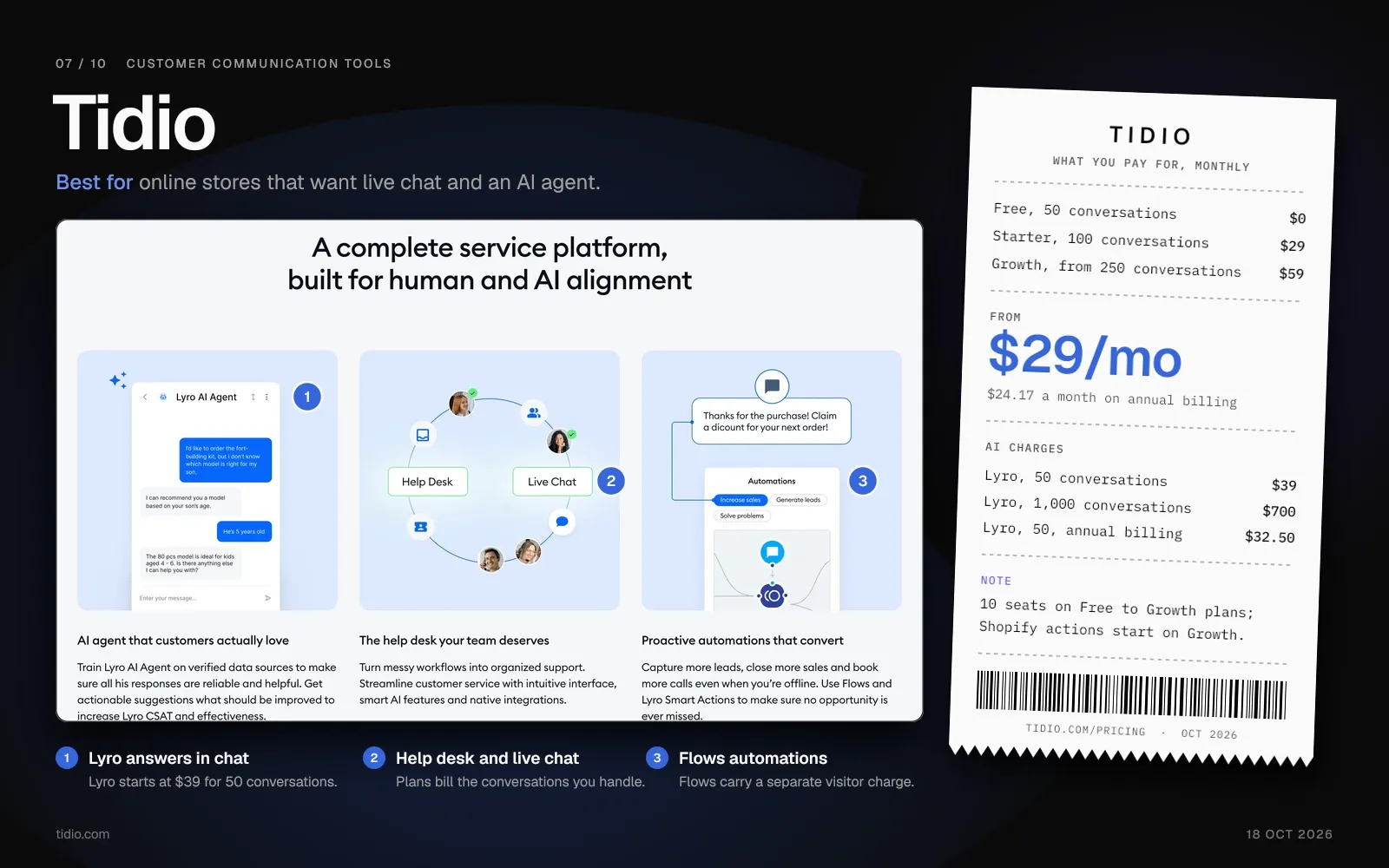
Tidio puts live chat, email and an AI agent in one tool for Shopify stores and other online shops. Its free plan includes 10 seats and 50 conversations a month that your team handles. Starter costs $29 a month ($24.17 on annual billing) for 100 of those conversations.
Tidio sells its AI agent, Lyro, as a separate plan: $39 a month for 50 conversations, or $32.50 on annual billing. Lyro's actions cover order status checks, address changes on unfulfilled orders and return labels.
Key Features:
- Lyro AI agent. It answers customers, and every account gets 50 Lyro conversations once. After that, you need a Lyro plan.
- Visual Chatbot Builder. Drag-and-drop flow builder for creating automated conversation paths without code.
- Shopify integration. On Growth and above, agents can cancel orders, issue refunds and change shipping addresses from the inbox. The WooCommerce integration shares product cards in chat.
Pricing:
- Free: $0 for 10 seats and 50 billable conversations a month.
- Starter: $29 a month ($24.17 on annual billing) for 100 billable conversations.
- Growth: from $59 a month ($49.17 on annual billing) for 250 billable conversations, up to $349 for 2,000.
- Plus: from $300 a month plus usage. Premium: price through sales.
- Lyro AI agent: 50 conversations a month for $39 ($32.50 on annual billing), up to 1,000 for $700.
Pros:
- Shopify order actions run from the inbox, and Lyro can check orders and start returns.
- Visual bot builder lets non-technical teams create automated flows without developer involvement.
Cons:
- Tidio has three separate charges: conversations your team handles, Lyro conversations and Flows visitors.
- Native Shopify actions start on Growth, and Lyro's entry plan includes 3 AI actions.
Best for:
Online stores that want live chat and an AI agent for order questions in one tool.
Helply vs. Tidio: Users, AI and Price
Tidio bills the conversations your team handles and Lyro conversations on separate plans, with 10 seats on Free, Starter and Growth. Helply gives every plan unlimited users and the Support Agent on each channel, and you buy credits for AI work. A Shopify store that wants native order actions in the inbox can get them from Tidio Growth up.
| Helply | Tidio | |
|---|---|---|
| Who you pay for | Unlimited users on every plan, from $49 a month for 500 credits ($42 annual) | Conversations your team handles, from $29 a month ($24.17 annual) for 100 |
| AI agent on customer conversations | Support Agent on every plan; Helply estimates about 4 credits per short conversation and 7 per complex one | Lyro from $39 a month ($32.50 annual) for 50 conversations |
| Channels | Chat widget for your website or app, plus WhatsApp and email in one inbox | Live chat, email and social media messages |
| Team size | Unlimited users | 10 seats on Free, Starter and Growth; Plus lifts the seat limit |
| Free option | 14-day trial with 1,000 credits | Free plan with 50 conversations a month |
See how Helply's chat widget lets customers reach your team
8. Front: Best for Shared Email Across Teams
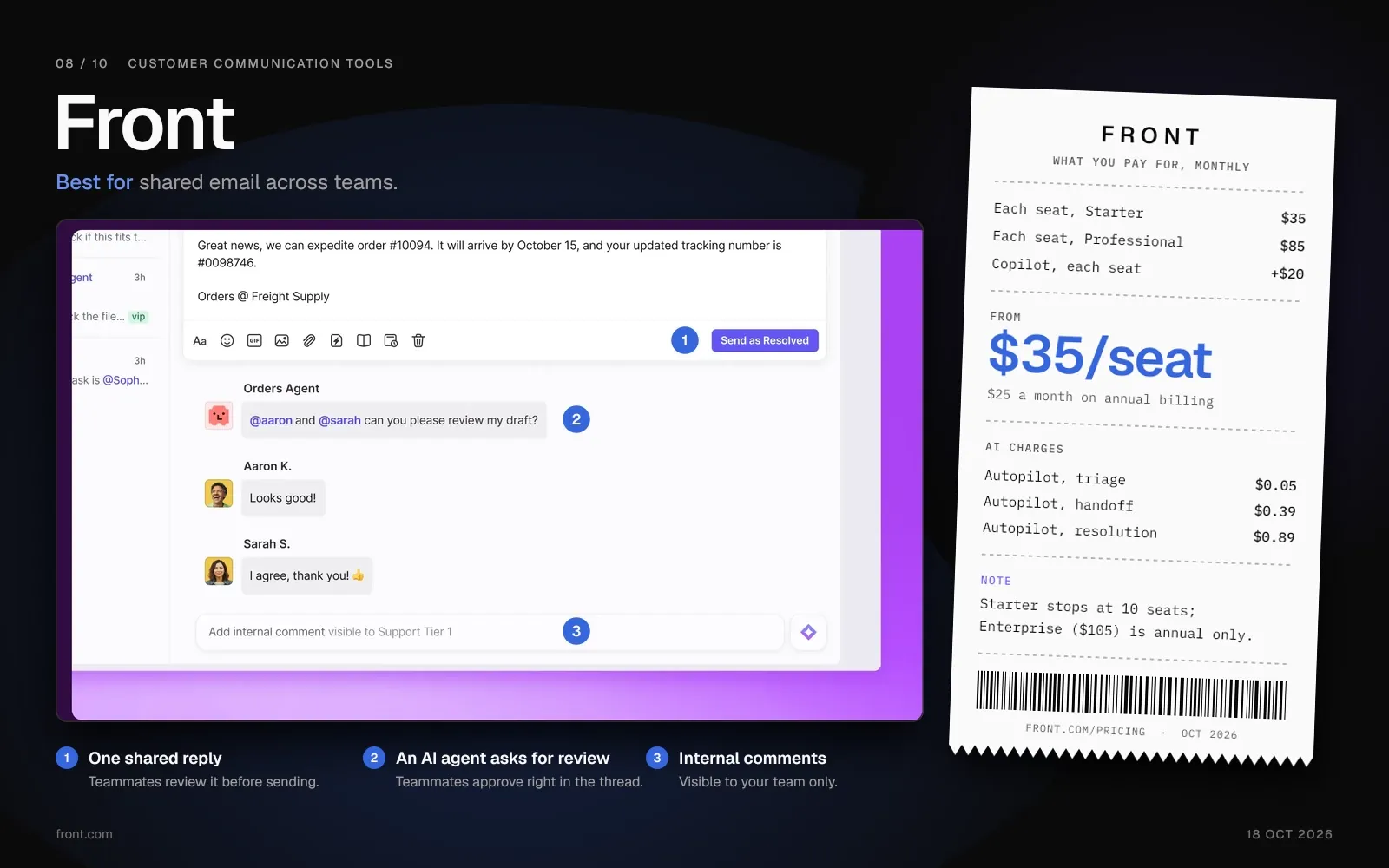
Front turns shared addresses such as support@, sales@ and billing@ into one workspace with assignment and internal comments. Starter costs $35 per seat a month, or $25 on annual billing, for up to 10 seats.
A help center and Front Chat come on every plan, though Starter supports one channel type. You can connect Slack Connect channels you own to the same inbox.
Key Features:
- Shared Inboxes. Multiple email addresses managed collaboratively with assignment rules, tags, and internal threading.
- SLAs and analytics. SLA rules start on Professional, and reports range from basic on Starter to custom on Enterprise.
- Integrations. Connects to CRM, project management, and internal tools via native integrations and API.
Pricing:
- Starter: $35 per seat a month ($25 on annual billing), up to 10 seats.
- Professional: $85 per seat a month ($65 on annual billing), up to 50 seats.
- Enterprise: $105 per seat a month, sold only on annual billing.
- Copilot: $20 per seat a month on Starter and Professional, included in Enterprise.
- Autopilot AI agent: $0.05 to triage a conversation, $0.39 to prepare a handoff and $0.89 to resolve it.
Pros:
- Email, Front Chat, a help center and Slack Connect channels share one workspace.
- Flexible enough for non-support use cases: sales, operations, and finance teams use Front for shared email management.
Cons:
- Front charges for Copilot per seat and for Autopilot per conversation.
- SLA rules and the customer portal start on Professional.
- A 12-person team on Professional pays $1,020 a month, or $780 on annual billing, before AI add-ons.
Best for:
Teams that share support@, sales@ and billing@ addresses and want collaboration built around email.
Helply vs. Front: Users, AI and Price
Front charges $35 per seat ($25 annual), then sells Copilot at $20 per seat and Autopilot per conversation. Every Helply plan includes unlimited users plus the Support, Assist and Background agents, and you can bring supported conversation history over from Front. Pick Front if you want one email tool for support, sales and finance.
| Helply | Front | |
|---|---|---|
| Who you pay for | Unlimited users on every plan, from $49 a month for 500 credits ($42 annual) | Each seat, from $35 a month ($25 annual) |
| AI drafting for reps | Assist Agent on every plan, 1 credit per draft | Copilot at $20 per seat a month, included on Enterprise |
| AI agent on customer conversations | Support Agent on every plan; Helply estimates about 4 credits per short conversation and 7 per complex one | Autopilot: $0.05 triage, $0.39 handoff, $0.89 resolution |
| Slack Connect | Turns Slack Connect conversations into tickets | Slack Connect channels you own; guest organizations can't connect |
Compare Helply and Front in detail
9. LiveAgent: Best for Phone, Chat and Email in One Help Desk
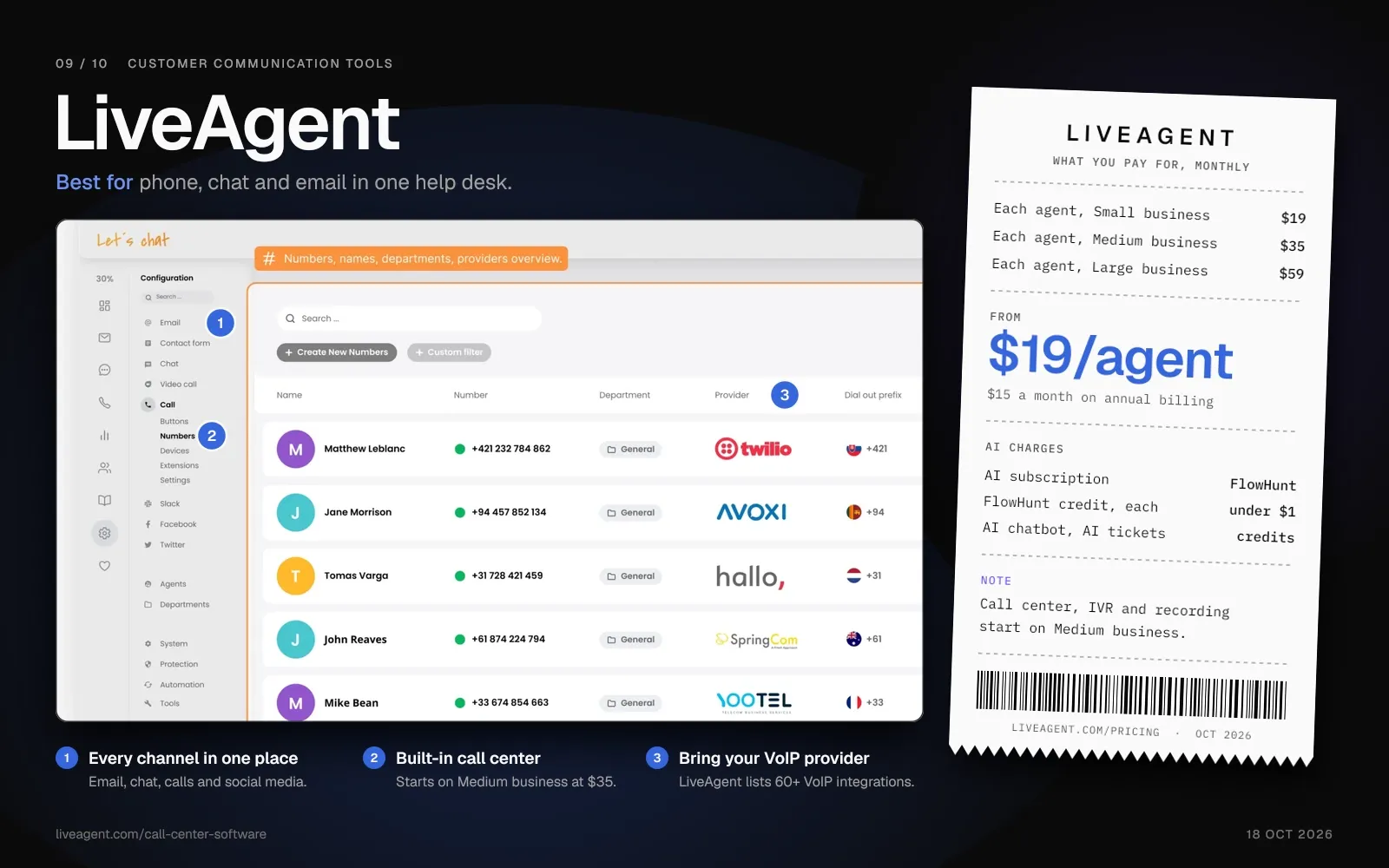
LiveAgent bundles ticketing, live chat and a call center in one help desk. Small business costs $19 per agent a month ($15 on annual billing). The call center starts on Medium business, at $35 per agent a month ($29 on annual billing).
LiveAgent sells its AI features through a separate FlowHunt subscription.
Key Features:
- Built-in call center. Call queueing, IVR, call routing and call recording, from Medium business at $35 per agent a month ($29 on annual billing).
- Universal inbox. Email, chat, social and forum messages share one feed, and Medium business adds phone calls.
- Gamification. Agent leaderboards, badges, and performance benchmarks to incentivize response times.
Pricing:
- Free trial: 30 days, no card needed.
- Small business: $19 per agent a month ($15 on annual billing).
- Medium business: $35 per agent a month ($29 on annual billing).
- Large business: $59 per agent a month ($49 on annual billing).
- Enterprise: $85 per agent a month ($69 on annual billing).
- AI features: billed through a FlowHunt subscription, in credits worth a little under $1 each.
Pros:
- Phone, chat and email tickets share one help desk from Medium business up.
- Small business starts at $19 per agent a month ($15 on annual billing), and gamification comes on every plan.
Cons:
- The AI chatbot, answer assistant and ticket summaries run on FlowHunt credits, a second bill beside the per-agent price.
- Small business leaves out the call center, IVR and call recording.
Best for:
Teams that answer phone, chat and email from one help desk on a modest per-agent budget.
Helply vs. LiveAgent: Users, AI and Price
LiveAgent starts at $19 per agent a month ($15 annual), and its AI features need a separate FlowHunt subscription. Helply includes the Support, Assist and Background agents on every plan, with unlimited users and a single credit block for AI work. Choose LiveAgent for a built-in call center, which starts on Medium business at $35 per agent a month ($29 annual).
| Helply | LiveAgent | |
|---|---|---|
| Who you pay for | Unlimited users on every plan, from $49 a month for 500 credits ($42 annual) | Each agent, from $19 a month ($15 annual) |
| AI agent on customer conversations | Support Agent on every plan; Helply estimates about 4 credits per short conversation and 7 per complex one | AI chatbot and AI ticket responder through a FlowHunt subscription, in credits a little under $1 each |
| Phone | Connects supported call details and transcripts to the customer's history | Built-in call center from Medium business, $35 per agent a month ($29 annual) |
| Free option | 1,000-credit trial for 14 days, no card | 30-day trial, no card |
See how Helply connects supported calls and texts to each customer's history
10. Salesforce Service Cloud: Best for Teams Already on Salesforce
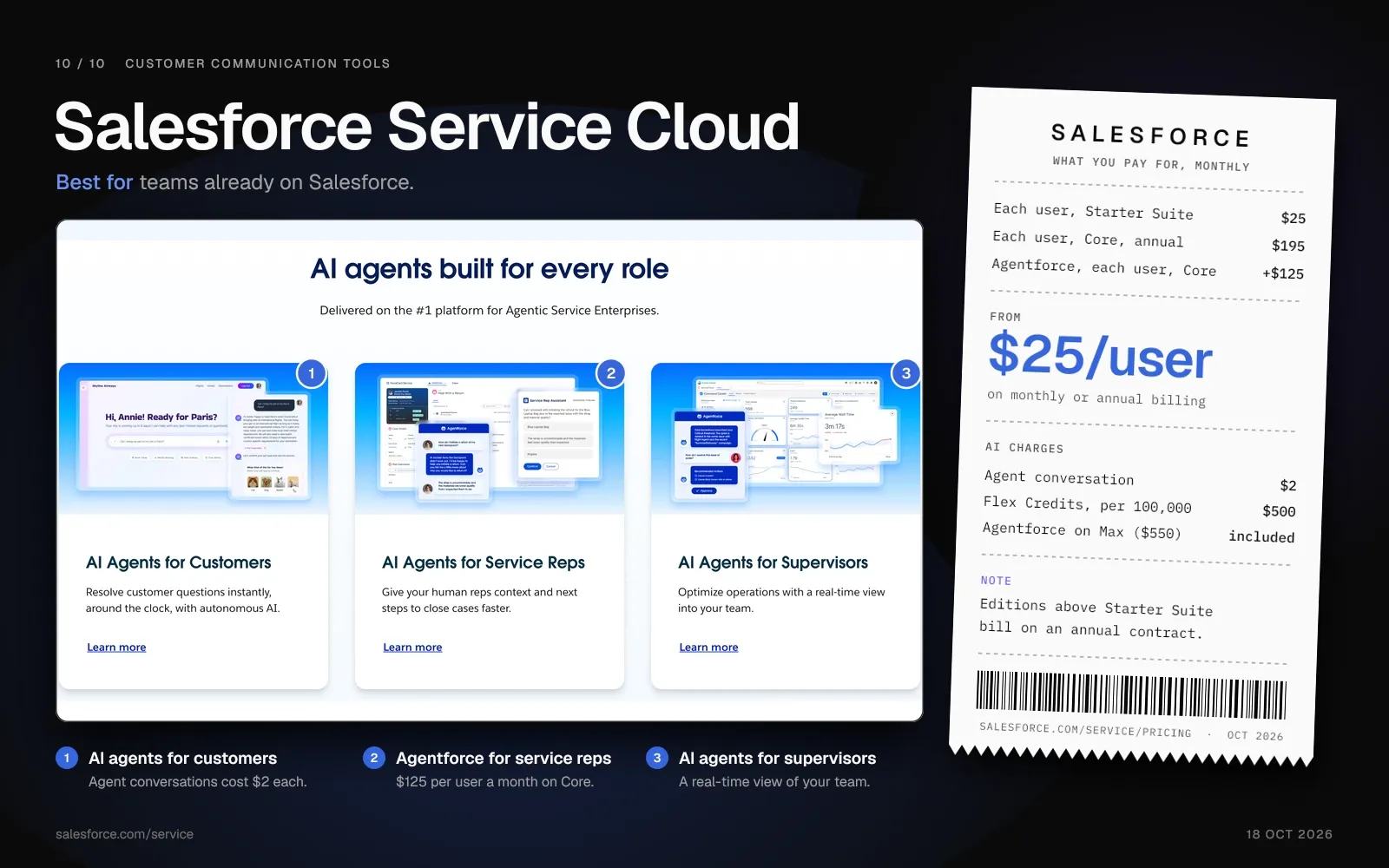
Salesforce Service Cloud runs on the Salesforce platform, so your service team works from the same CRM as sales and marketing. It makes the most sense when your company already runs Sales Cloud. Starter Suite costs $25 per user a month on monthly or annual billing.
Salesforce bills every edition above Starter Suite on an annual contract. Agentforce for Service adds $125 per user a month on Core and Advanced, and Max includes it.
Key Features:
- Case Management. Full ticket lifecycle management with escalation rules, entitlements, and omnichannel routing.
- Agentforce for Service. Salesforce's AI agents work service cases, and you pay per user or per conversation.
- Platform Customization. Flows, Apex code, and Lightning components let teams build custom support experiences.
Pricing:
- Starter Suite: $25 per user a month, billed monthly or annually.
- Pro Suite: $100 per user a month, billed annually.
- Core: $195 per user a month, billed annually.
- Advanced: $395 per user a month, billed annually.
- Max: $550 per user a month, billed annually, with Agentforce for Service included.
- Agentforce for Service: $125 per user a month on Core and Advanced. Salesforce bills agent conversations at $2 each or through Flex Credits, at $500 per 100,000.
Pros:
- Service, sales and marketing data sit on one platform with shared objects and reporting.
- Flows, Apex code and AgentExchange (formerly AppExchange), with more than 13,000 solutions, cover custom builds.
Cons:
- For setup, Salesforce points customers to its Professional Services team or Certified Partners, depending on their needs.
- A 12-user team on Core with Agentforce for Service pays $3,840 a month ($320 per user), billed annually.
- Only Starter Suite offers monthly billing, so the other editions tie you to an annual contract.
Best for:
Companies already on Salesforce that want service cases in the same CRM as sales and marketing.
Helply vs. Salesforce Service Cloud: Users, AI and Price
Salesforce Service Cloud bills each user, and Agentforce for Service adds $125 per user a month on Core and Advanced. Helply's three AI agents can read supported Salesforce account, contact and opportunity context, and every plan includes them with unlimited users. Service Cloud suits companies that want service cases inside Salesforce.
| Helply | Salesforce Service Cloud | |
|---|---|---|
| Who you pay for | Unlimited users on every plan, from $49 a month for 500 credits ($42 annual) | Each user, from $25 a month (Starter Suite, monthly or annual) |
| AI agent on customer conversations | Support Agent on every plan; Helply estimates about 4 credits per short conversation and 7 per complex one | Agentforce for Service at $125 per user a month on Core and Advanced, included in Max; agent conversations at $2 each |
| CRM data | Supported account, contact and opportunity context, read-only if you prefer | Native to the platform |
| Billing term | Monthly, or 15% off on annual billing | Annual on every edition except Starter Suite |
See how Helply connects to Salesforce
AI Agents and Assistants in Customer Communication Tools
Zendesk, Intercom, Freshdesk, Help Scout, HubSpot, Tidio, Front, LiveAgent and Salesforce each offer an AI agent that answers customers. Most of these vendors pair it with an assistant that drafts replies for your reps. With most of them, you pay for both on top of the base plan.
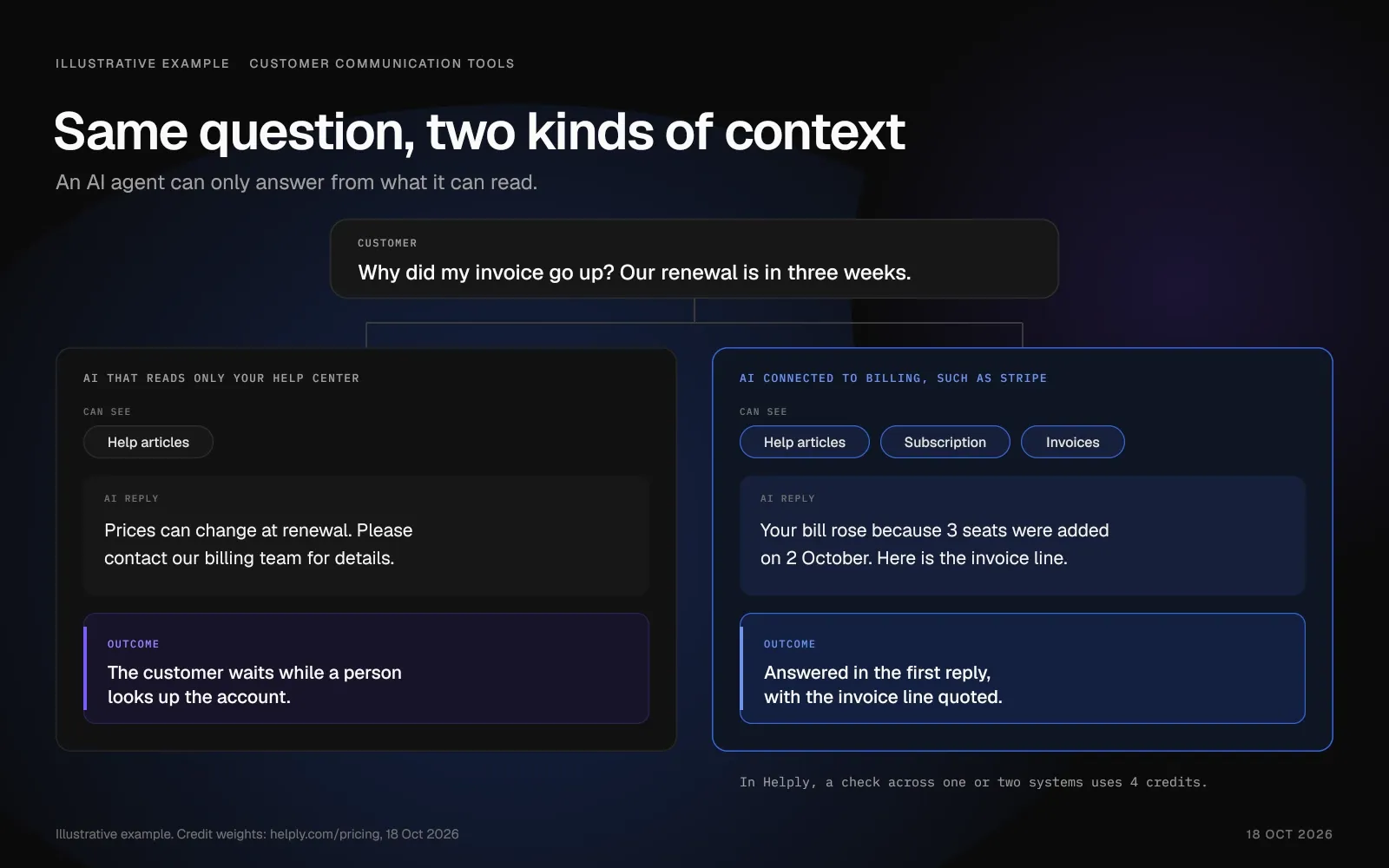
An AI agent's answer depends on the context it can read. A customer asks why this month's invoice went up, three weeks before renewal. An AI that reads only your help center has nothing to go on, while one connected to billing can check the charge.
Customers notice when your team loses the thread. In Zendesk's CX Trends 2026 survey of 6,182 consumers in 22 countries, 74% found it frustrating to repeat their story to different agents. Zendesk ran the survey in June 2025.
Helply's Support and Assist agents can read the conversation, the customer's history and your connected tools. A draft from the thread alone costs 1 credit. Checking why a customer's bill went up costs 4, and an account health review before a reply costs 12.
Background Agents read every conversation for early churn signs, upgrade interest, product requests and new problems. They can alert the teammate who owns each signal, and teams can build their own agents.
See the full credit table on the Helply pricing page.
What to Look for in AI-Powered Support Tools
- Context. Can the AI read the customer's history and your billing or CRM data, or only your help center?
- Pricing meter. Do you pay per agent, per resolution, per conversation or per unit of AI work? A per-agent add-on such as Zendesk Copilot costs the same whether it drafts 500 replies or none.
- Help on the hard tickets. On conversations the AI can't resolve, does it investigate and draft for your reps?
- Signals. Does the AI pass churn warnings, upgrade interest and product feedback to the people who can act?
The Hidden Cost of Per-Seat Pricing
Per-seat vendors bill you for each person who answers customers. With credits, you pay for the work the AI does.
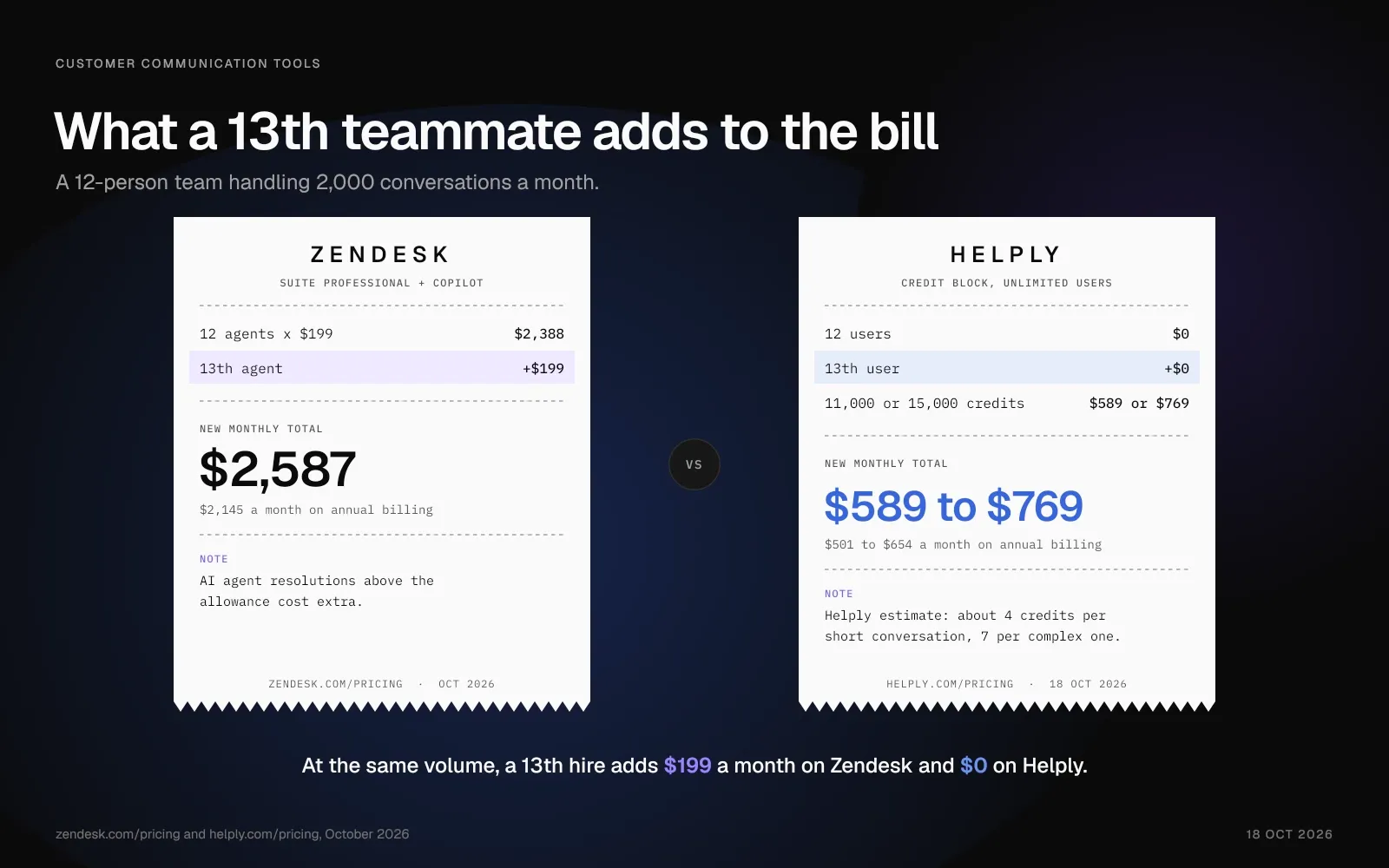
Picture a 12-person team that handles 2,000 conversations a month, then add a 13th hire.
| Zendesk Suite Professional with Copilot | Helply | |
|---|---|---|
| Basis for the numbers | Suite Professional, the first Suite plan where Zendesk sells Copilot | Helply's estimate: about 4 credits per short conversation, about 7 per complex one |
| What you pay for | Each agent: $199 a month ($165 annual) | AI work in credits, with unlimited users |
| 12 people, 2,000 conversations a month | $2,388 a month ($1,980 annual), plus AI agent resolutions above the allowance | 8,000 to 14,000 credits: $589 to $769 a month ($501 to $654 annual) |
| Adding a 13th teammate | Another $199 a month ($165 annual) | $0 in user fees |
| Teammates who only need to read | Up to 100 light agents included (read tickets, add private comments) | Unlimited users on every plan |
| AI drafting for reps | Copilot, included in the $199 per agent | Assist Agent, 1 credit per draft |
| As AI work grows | Copilot stays at $50 per agent; resolutions above the allowance cost extra | More 4- and 12-credit tasks need a bigger block; with auto top-up off, the AI pauses at your cap |
On Zendesk, those 12 agents cost $2,388 a month, or $1,980 on annual billing, before extra AI agent resolutions. Each new hire adds $199 a month ($165 on annual billing), however few tickets that person answers.
Helply estimates about 4 credits for a short, repetitive conversation and about 7 for a longer, complex one. At 2,000 conversations, that means 8,000 to 14,000 credits, with no fee for any of the 12 users. That fits the 11,000 or 15,000 block: $589 or $769 a month ($501 or $654 on annual billing).
Seat pricing limits who can help. On Suite Professional, up to 100 light agents can read tickets and add private comments. On Helply, an engineer or account manager can reply to the customer at no extra cost.
How to Choose the Right Customer Communication Tool
Start with the channels your customers already use. Then match each tool's pricing meter to your team size and monthly volume.
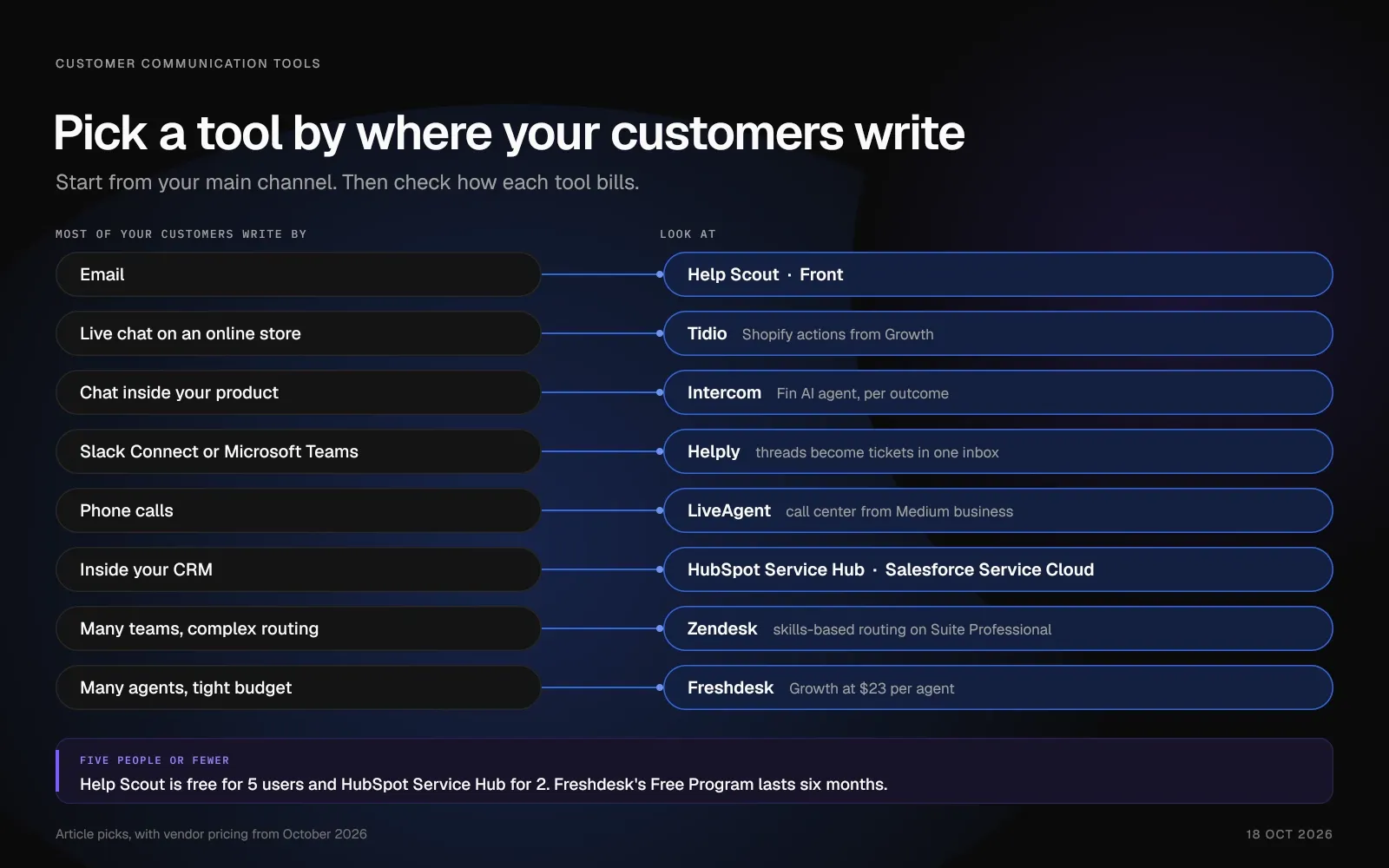
If Most of Your Support Arrives by Email
With assignment and collision detection in a shared inbox, your team stops sending duplicate replies. Help Scout and Front suit email-first teams. Help Scout's free plan gives 5 users one inbox for up to 100 contacts a month.
Look for: assignment rules, internal notes and an AI assistant that drafts from the customer's history and your billing data. With Stripe connected, Helply's Assist Agent writes replies with the customer's subscription and invoice details in view.
If Your Customers Expect Live Chat or Messaging
Chat and messaging customers expect fast answers, and many of their questions repeat. An AI agent can take order and account questions while your team handles the rest.
Look for: a chat widget, WhatsApp and social channels, order lookups through your store or billing tools, and AI spending you can cap. Tidio fits Shopify stores, and Intercom fits chat inside your product. Helply brings chat, WhatsApp and supported SMS conversations into one inbox, and its spend cap defaults to your block price.
If Your Customers Work in Slack or Microsoft Teams
Many business customers message you from a shared Slack channel or from Microsoft Teams. Without a help desk connection, those threads sit outside your queue with no owner or due date.
Look for: Slack Connect and Teams threads you can track and answer as tickets, with the customer's account beside each one. Helply puts Slack Connect and supported Teams conversations next to email and chat in one inbox. Once you configure the Slack connection, Helply's AI agents can reply in supported Slack conversations.
If You Are Starting Out (5 People or Fewer)
Pick a tool you can set up in a day and grow into, and avoid long contracts. Help Scout is free for 5 users and HubSpot Service Hub for 2, while Freshdesk's Free Program lasts six months. Helply has no free plan, but its 14-day trial includes 1,000 credits.
Before you commit, check where each plan stops. Help Scout Standard caps at 25 users, and every per-agent plan adds a fee with each hire.
Focused Tool or Customer Communication Platform: Which Fits Your Team?
A focused tool works if one channel carries most of your support. An email team of up to 5 can use Help Scout's free plan, and a store can run its live chat on Tidio. For phone support, LiveAgent adds a call center to its help desk.
If your CRM runs on HubSpot or Salesforce, you can keep support beside it with Service Hub or Service Cloud. Pick Zendesk for complex routing across a large team, or Intercom for in-product chat. Front handles email shared across support, sales, and finance, and Freshdesk keeps the per-agent price low.
Choose Helply when your team outgrows a shared inbox, reps need each customer's account, and your help desk bills per hire. It fits teams whose customers use chat apps like Slack, Teams, or WhatsApp alongside email.
Collision detection shows who's already responding, so two people don't reply to the same email. Reps see the customer's record and account beside each thread. With Stripe connected, the Support Agent can check billing before anyone answers.
At Sender.net, the Support Agent became the first contact across email and chat. "It answers deliverability, automation, and integration questions in seconds, in any language, and our resolution rate is now over 70%," says CEO Edgaras Vaitkevičius.
Hiring doesn't change the bill because every plan has unlimited users. Credits come in blocks, and 500 credits cost $49 a month or $42 with annual billing. A spend cap defaults to the block price, so the AI bill can't pass it unless you raise it.
Start with one mailbox, such as support@, and connect your billing tool. Watch which conversations the Support Agent resolves before you add chat, Slack, or WhatsApp. Connecting tools and indexing your knowledge base cost no credits.
Frequently asked questions
Customer communication tools are software that brings email, live chat, messaging apps, social media and phone conversations into one workspace. Your team can assign each conversation, see the customer's history and reply from one place. Many include AI agents that answer routine questions.
A customer communication platform puts email, live chat, messaging apps, SMS and phone conversations in one shared inbox. The same system holds customer records, a help center and reporting. Zendesk, Front and Helply each combine a shared inbox, a help center and AI agents for customer conversations.
Helply is an AI-native customer support platform. All three of its AI agents (Support, Assist and Background) come on every plan, with unlimited users.
Any message between a business and its customers counts: support replies, billing notices, onboarding emails and sales follow-ups. Customer communication tools handle the two-way part, where a customer writes in and expects an answer.
Help desks such as Zendesk, Freshdesk and Helply handle tickets across channels, while Front and Help Scout center on shared email. Tidio and Intercom lead with live chat. HubSpot Service Hub and Salesforce Service Cloud run service inside a CRM, and LiveAgent adds a call center.
The five main ones are a shared inbox, live chat, a help center, phone and SMS, and messaging apps such as WhatsApp. A help desk can connect all five, so each conversation keeps its owner and history.
As of October 2026, most paid entry plans cost under $40 per agent a month, or under $30 on annual billing. Top published plans pass $100 per agent a month at Intercom, Freshdesk and Front, and Salesforce Max costs $550 on annual billing.
Most vendors charge extra for AI, such as $50 per agent a month for Zendesk Copilot or $0.99 per Intercom Fin outcome. On Helply, 500 credits cost $49 a month ($42 on annual billing), and every plan has unlimited users.
For an email-first team, Help Scout's free plan covers 5 users and one inbox. For a store's website chat, Tidio's free plan covers 50 human-handled chats a month.
Freshdesk lets 2 agents use its Free Program for six months. Helply has no free plan; its smallest block of 500 credits costs $49 a month ($42 on annual billing) and covers unlimited users. You can test it for 14 days with 1,000 trial credits and no card.
Yes, if your team answers the same questions every week. In a 2023 NBER working paper, researchers tracked 5,179 customer support agents. With an AI assistant, they resolved 14% more issues per hour on average, and novice workers 34% more.
Keep a path to a human agent. Gartner surveyed 3,566 customers in early 2026, and 87% called a human option essential when a company uses GenAI for service.
A shared inbox lets a team answer email together, with assignment and internal notes. A help desk adds ticket statuses, SLAs, a help center, reporting and more channels.
Front pairs its shared inbox with a help center and live chat, so it covers parts of both. Helply runs a shared inbox inside a full help desk with AI agents.
Helply, Intercom, Front and Zendesk can bring Slack Connect conversations into the help desk, with different limits. Front connects only Slack Connect channels you own, and Zendesk's Slack channel handles 1:1 conversations. Helply's AI agents can reply in supported Slack conversations once you configure them, and Intercom's Fin answers in Slack channels.
For Microsoft Teams, Helply and Intercom treat Teams conversations as a support channel. Zendesk's Teams integration lets your own staff create and update tickets from Teams.
With per-seat pricing, you pay a fee for every agent, whether that person answers 5 tickets or 500. With credit-based pricing, you pay for each AI task in credits, and harder tasks cost more.
In Helply, drafting costs 1 credit, a search of one or two systems costs 4, and a multi-system investigation costs 12. Every plan has unlimited users, and 500 credits cost $49 a month ($42 on annual billing). Switch auto top-up off and the AI stops at your cap, while your team carries on in the help desk.
Zendesk's biggest competitor depends on what you compare. Freshdesk competes on per-agent price, Salesforce Service Cloud and HubSpot Service Hub on CRM data, and Intercom on in-app chat. Help Scout and Front go after email-first teams, while Helply offers unlimited users and bills AI work in credits.
For 12 agents, Zendesk runs from $300 a month on Support Team ($228 annual) to $1,788 on Suite Professional ($1,380 annual). On Suite Professional, Copilot adds $50 per agent a month, which brings 12 agents to $2,388 a month ($1,980 annual). AI agent resolutions above the included allowance cost extra.
Yes, for supported data. Helply moves supported customers, conversations and help content from Zendesk, and you can validate everything before you switch.
Helply migrates teams from Intercom, Freshdesk, Help Scout and Front. Groove is now Helply, so Groove accounts can move across.
About the author

Bildad Oyugi
Head of Content
Bildad is a digital marketing expert with over 5 years of experience in copywriting, content marketing, and editing. Outside of work, he enjoys videography and spending time with his family.


