
 Bildad Oyugi ··23 min read

Your sixth support agent starts on Monday, and finance wants to know why the help desk invoice went up again. The head of sales asks to read tickets from the biggest account, and on your plan that costs one more paid seat. The AI add-on you switched on last quarter bills in a unit your team can't forecast.
Choose the best help desk software with that bill and those people in mind. Price each tool by what a new hire, a read-only teammate and the AI would add.
Best Help Desk Software Compared: Prices, AI Fees and Read-Only Seats
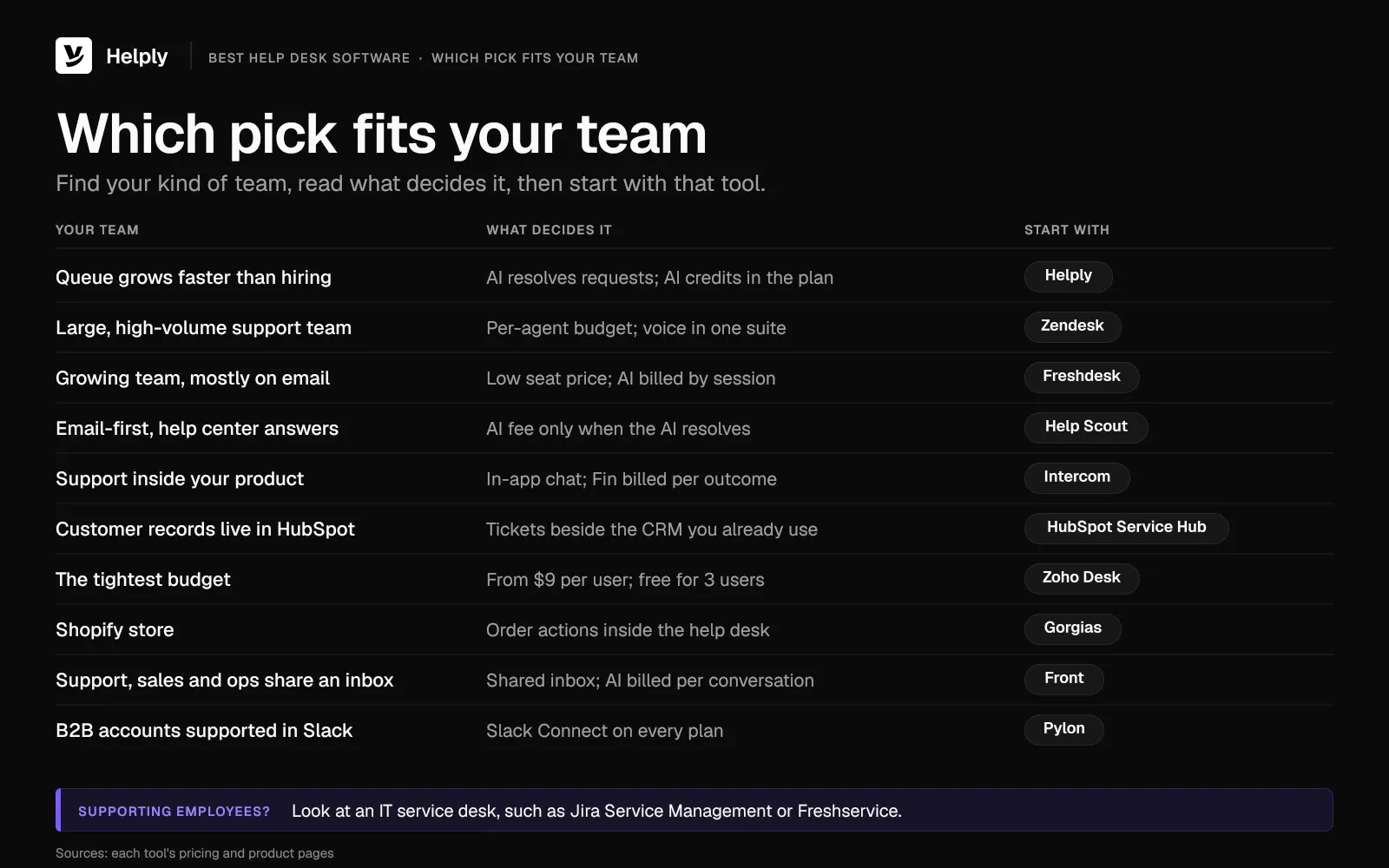
These ten picks are the best customer service software for ten kinds of support teams. The table gives the monthly price first and the annual-billing rate in parentheses.
| Tool | Best for | Price a month (billed annually) | AI agent fee and what triggers it | Teammates who only read tickets | Free plan or trial |
|---|---|---|---|---|---|
| Helply | AI resolving more of the queue | Starter $79 a seat for up to 3 seats; Team $499 with 5 seats; same price monthly or annually | Credits in the plan: 1 to 10 an action, capped at 15 per conversation | Unlimited view-only seats from Team; none on Starter | Free 14-day trial; no card |
| Zendesk | Large, high-volume teams | Per agent: Suite Team $69 ($55); Suite Professional $149 ($115) | $1.50 per automated resolution on a commitment, $2.00 without, after 5 to 15 included per agent a month | Light agents: up to 100 on Suite Professional | 14-day trial, no card |
| Freshdesk | Growing teams wanting low seat prices | Per agent: Growth $23 ($19); Pro $66 ($55) | 500 sessions one time, then $49 for each 100 more | Collaborators: 5,000 on Pro and Enterprise | Free Program: two agents, six months |
| Help Scout | Email-first teams | Per user: Standard $30 ($25); Plus $54 ($45) | $0.75 per AI resolution | Light users: 5 on Plus, 15 on Pro | Free for 5 users |
| Intercom | Support inside your product | Per seat: Essential $39 ($29); Advanced $99 ($85) | $0.99 per Fin outcome | Lite seats: 20 free on Advanced | 14-day trial, no card |
| HubSpot Service Hub | CRM-led teams in HubSpot | Per seat: Professional $100 ($90) | $0.50 per resolution, Professional and up | View-only seats at no cost | Free for 2 users |
| Zoho Desk | The tightest budgets | Per user: Express $9 ($7); Professional $35 ($23) | Model tokens past 30 million a month, $1 per million | Light agents $6 each; 50 free on Enterprise | Free for 3 users |
| Gorgias | Shopify stores | Basic, 300 tickets: $60 ($50); Pro, 2,000 tickets: $360 ($300) | $1.00 ($0.90) per automated interaction | Up to 500 users from Basic | 7-day trial |
| Front | One inbox across teams | Per seat: Starter $35 ($25); Professional $85 ($65) | Autopilot: $0.89 per resolution, $0.39 per handoff | Guests comment without a license | 14-day trial, no card |
| Pylon | B2B teams in Slack Connect | Per seat: $89 on an annual contract | Credits, 5,000-credit minimum | Viewer seats on every plan; sales sets the number | Trial set up with sales |
1. Helply: Best for Teams That Want AI to Resolve More of the Queue
Helply suits teams whose conversation volume grows faster than their hiring plan. Its AI agents can resolve requests, draft replies and flag what needs attention inside a full help desk. It covers the inbox, chat and messaging, customer records, a knowledge base, workflows and analytics.
The Support and Assist Agents and a shared pool of AI credits come with every plan. On Team and above, sales, success and product can read tickets and add notes on view-only seats at no added cost.
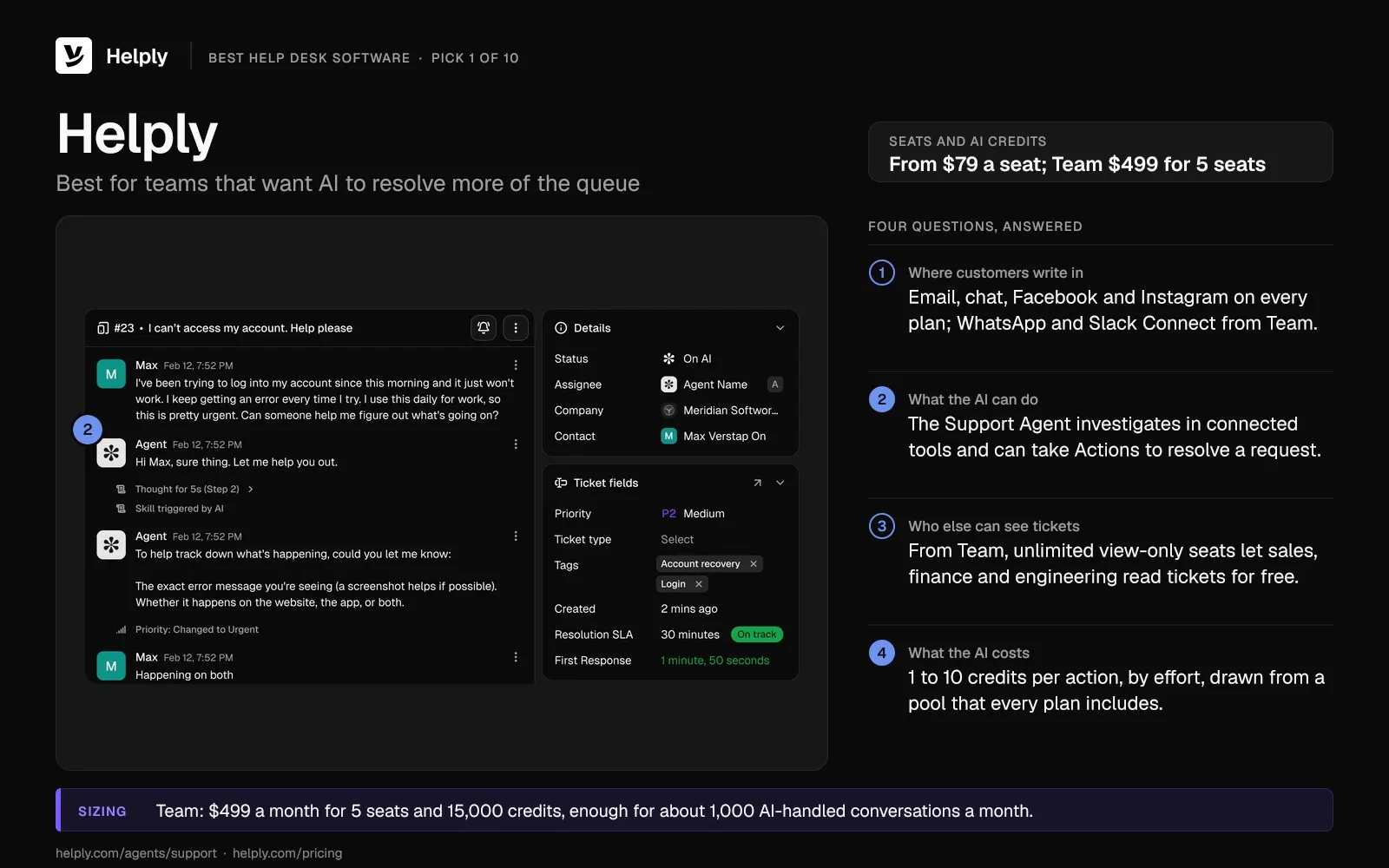
- Help desk. Your team works from one shared inbox with views, macros, custom fields, collision detection and internal notes. The Team plan adds SLAs, round robin and teams.
- Resolve requests (Support Agent). It investigates using connected tools, past conversations and your knowledge base, then can take Actions to resolve a request end to end. If its confidence is low, it escalates to a person and hands over its findings and the customer's context.
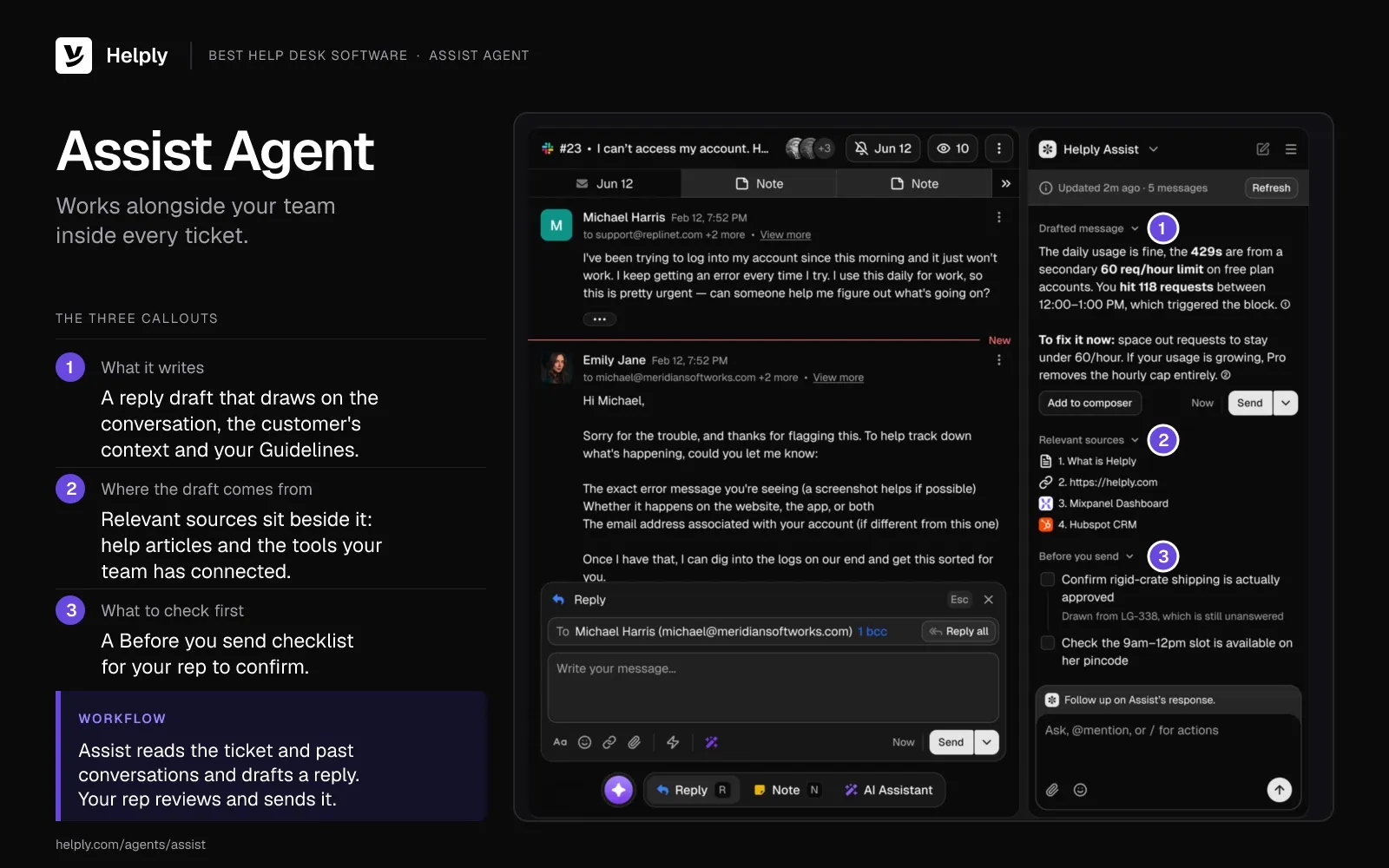
- Draft replies (Assist Agent). It writes draft replies grounded in your Guidelines, the customer's context and the thread itself. Your team can also direct it to run supported Actions inside the thread.
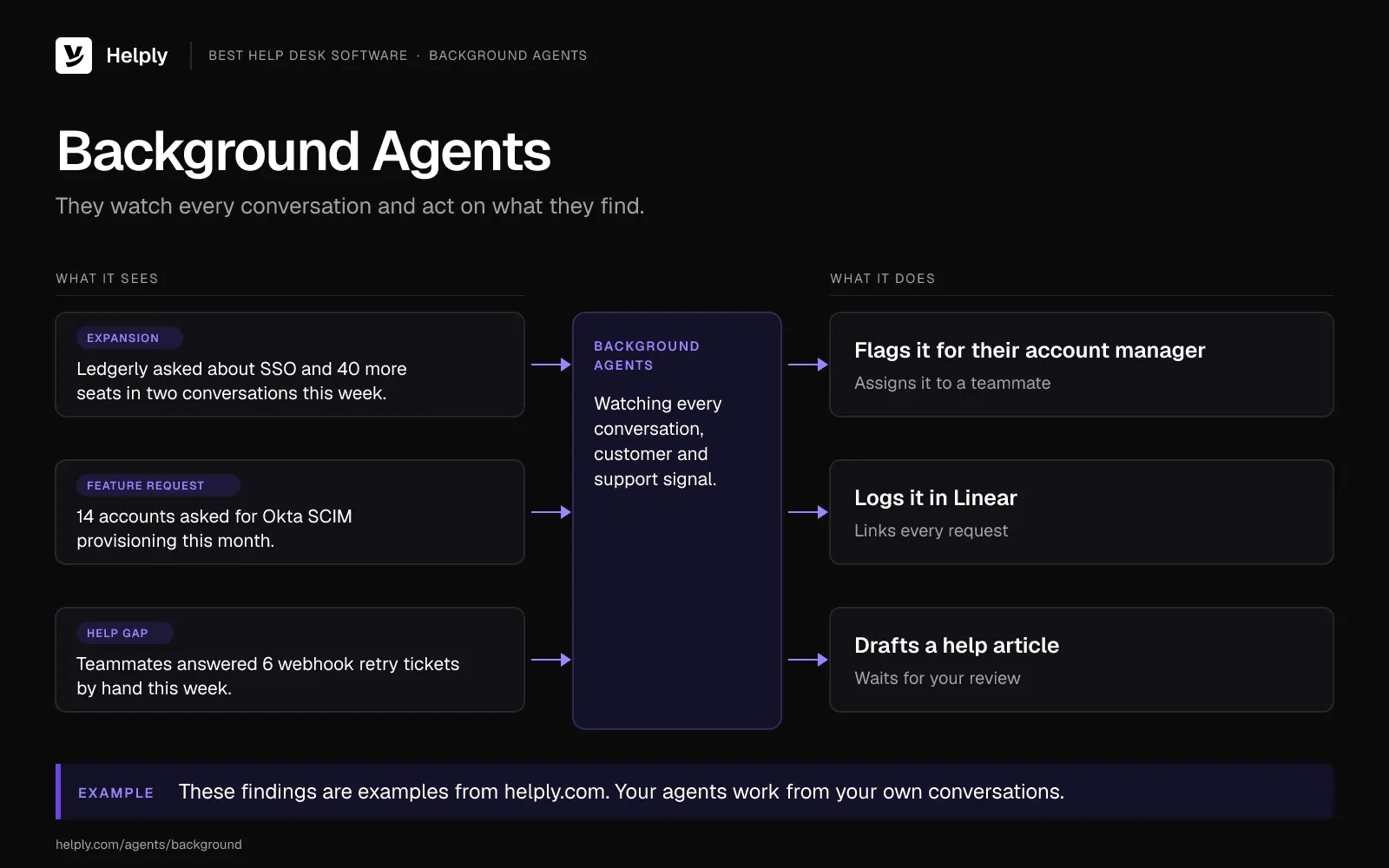
- Flag what needs attention (Background Agents). They monitor conversations and customers, then alert teammates, update systems, open work items or trigger workflows. Team includes two of the five Background Agents, and Pro has all five, including a Knowledge Agent that finds missing answers.
- Decide when a person steps in (escalation rules). From the Team plan, you set which situations, confidence levels and customer conditions call for a person. Every plan has Guidelines, where you spell out what the AI may handle unaided.
- Channels and tools. Email, chat, Facebook and Instagram come with every plan; Team brings WhatsApp, SMS, Discord and Slack Connect, and Pro adds Microsoft Teams. Of Helply's 60+ tools, Stripe works on every plan; HubSpot and Linear start on Team, and Salesforce on Growth.
Pricing
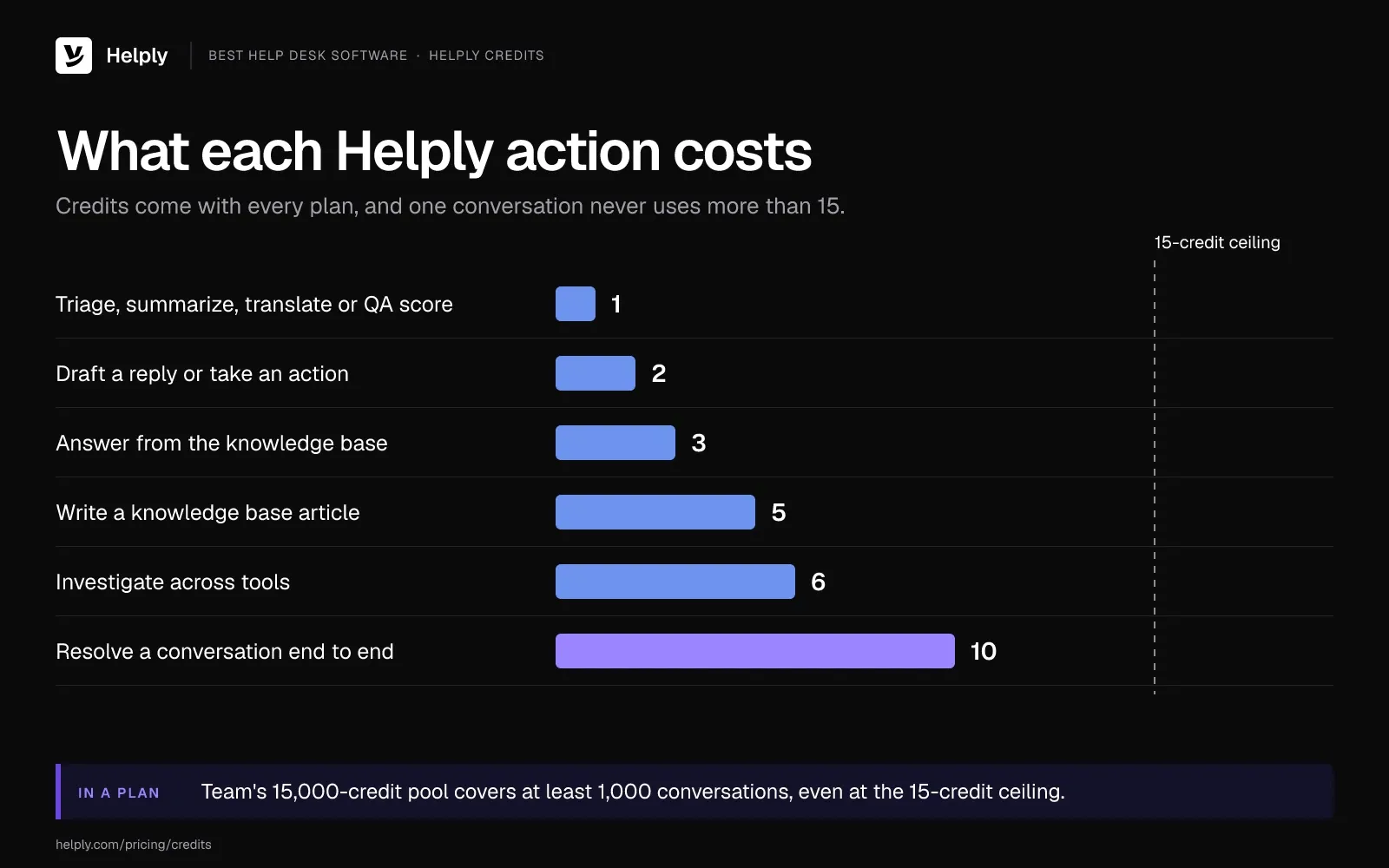
On Starter, you can buy up to 3 seats at $79 a month each, and every seat brings 500 AI credits. Team is $499 a month for 5 seats and a 15,000-credit pool, then $99 for each extra seat.
Pro is $999 a month with 5 seats and a 50,000-credit pool. Growth is $1,999 with 10 seats and 100,000 credits. Both include every Background Agent.
A summary or triage costs 1 credit, and each drafted reply costs 2. An investigation across Stripe, HubSpot or your logs costs 6, a full resolution 10, and one conversation never passes 15. Spam, auto-replies, Playground tests and a handover to a teammate after the AI tries cost nothing.
Pros
- Team and higher plans add unlimited view-only seats, so a teammate who only reads tickets and leaves notes needs no paid seat.
- Usage alerts warn you before the credit pool runs low. If Starter or Team runs out of credits, the AI pauses until you top up. Your human agents keep working in the help desk.
- Starter includes the Support and Assist Agents, so the AI can resolve requests on the smallest plan.
Cons
- Credit use varies with the AI's work, so a month of full resolutions uses more credits than a month of drafts. Run your monthly volume through the credit estimator before you pick a plan.
- On Starter, everyone who logs in needs a seat, and the plan stops at 3 seats. Background Agents start on Team, which includes two.
Best for
Teams that want AI to resolve more requests, with view-only seats from Team for everyone else who helps a customer.
2. Zendesk: Best for Large, High-Volume Support Teams
Zendesk is enterprise help desk software built around per-agent plans, and it charges for AI and add-ons on top. It bills seats and Copilot per agent, so each agent you hire adds to both lines.
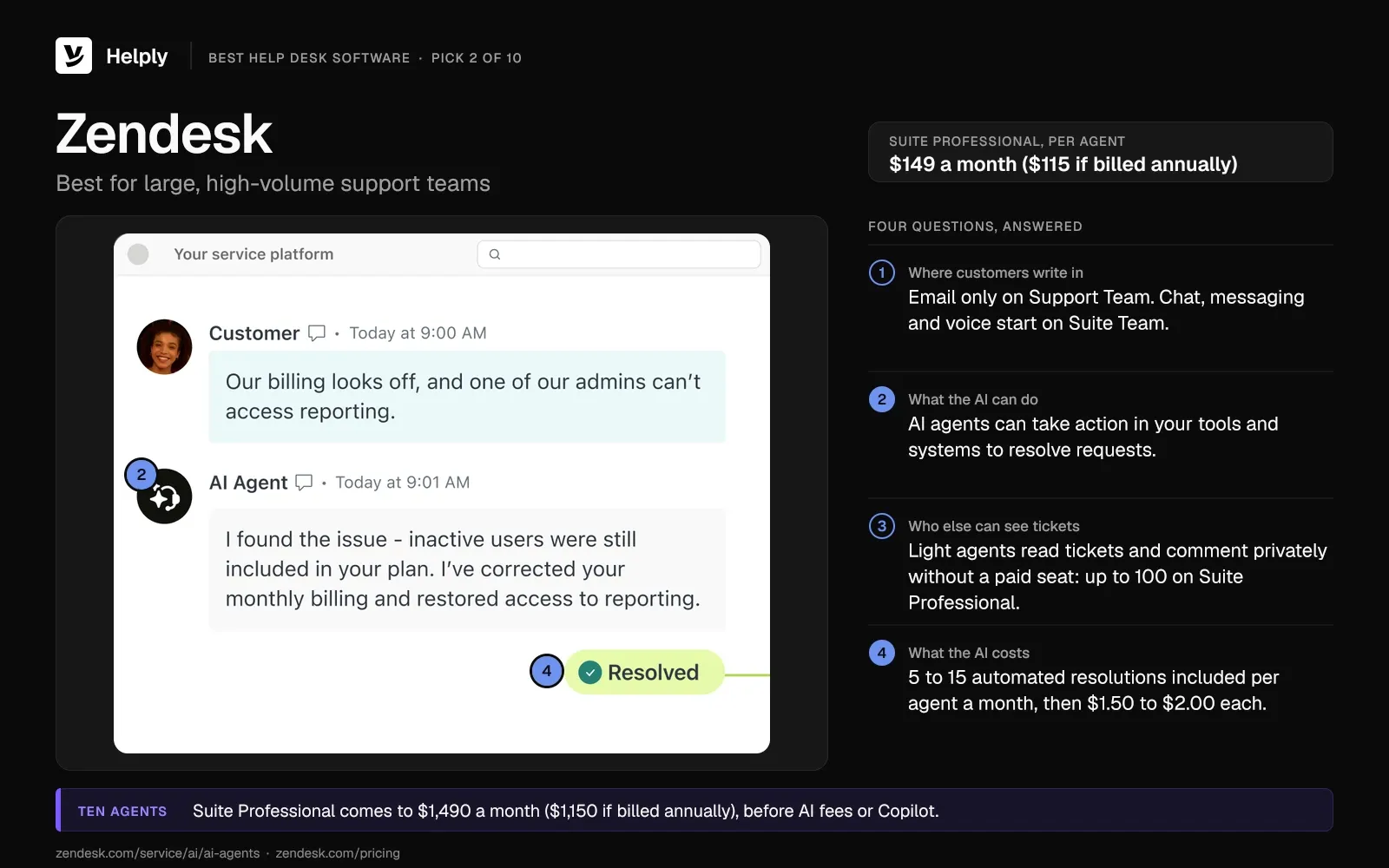
- Plans. Zendesk Suite Team runs $69 per agent each month ($55 if billed annually), and Suite Professional $149 ($115). Support Team covers email and ticketing only, at $25 ($19), and sales quotes Suite Enterprise.
- AI agents. Zendesk's pricing table lists 5 to 15 automated resolutions per agent seat a month, 10 on Suite Professional. Past that allowance, Zendesk charges $1.50 per resolution on a commitment and $2.00 without one.
- Resolution rule. Zendesk counts a resolution when its AI agent resolves a request without escalating to a person.
- Copilot. Zendesk's agent-assist add-on costs $50 per agent each month on annual billing, from Suite Professional up.
- Light agents. Zendesk light agents can read tickets and leave private comments for free. Suite Professional allows up to 100, and Support Team has none.
Zendesk says you can give its AI agents access to "your tools and systems to take action and resolve requests independently."
For ten agents, Suite Professional comes to $1,490 a month ($1,150 if billed annually) before any AI fees. Copilot for the same ten adds $500 a month on annual billing. The full breakdown sits in the Zendesk pricing guide.
Pros
- Suite plans add messaging, live chat and telephony to email, with social channels and WhatsApp from Suite Team at extra fees.
Cons
- Seats, Copilot and extra resolutions are three separate charges to forecast.
- Suite Team includes no light agents, so read-only teammates there need an add-on or a paid seat.
Best for
Large, high-volume teams that can budget per agent.
Zendesk or Helply: Which Fits a Large Team?
Zendesk fits high-volume teams that can budget for per-agent seats plus Copilot and want voice inside one suite. Helply fits teams that want AI credits included in the plan and unlimited view-only seats from Team. The Zendesk comparison page covers switching.
| Zendesk | Helply | |
|---|---|---|
| Price model | Per agent: $69 ($55) on Suite Team, $25 ($19) on email-only Support Team | Starter $79 a seat; Team $499 for 5 seats |
| AI billing | $1.50 committed or $2.00 per automated resolution, past 5 to 15 included per agent a month | Credits in the plan: 1 to 10 an action, capped at 15 per conversation |
| Read-only teammates | Light agents come with Suite Professional; add-on on Suite Team | Unlimited view-only seats from Team |
| Agent assist | Copilot from Suite Professional, $50 per agent a month paid yearly | Assist Agent on every plan |
3. Freshdesk: Best for Growing Teams That Want a Low Seat Price
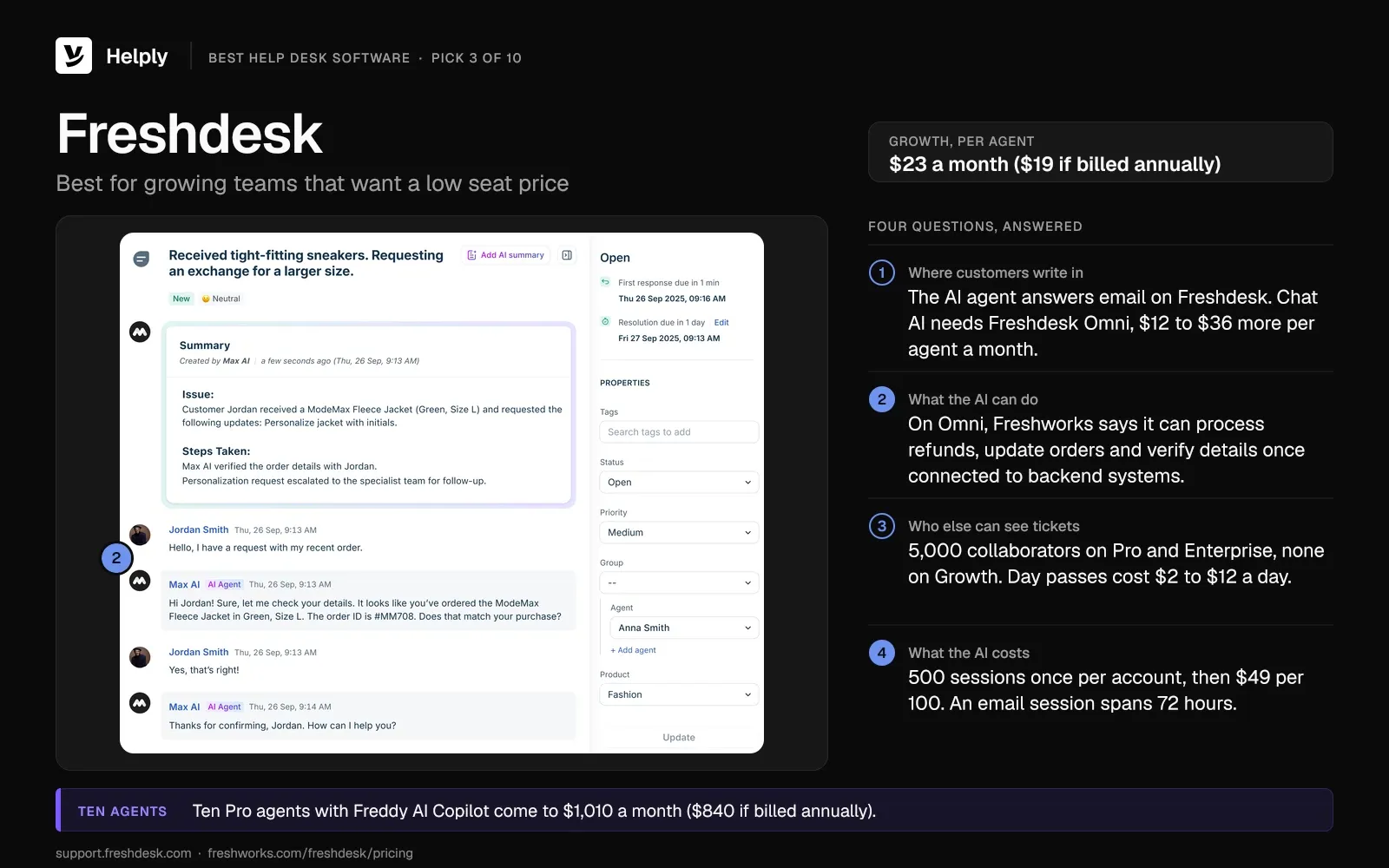
Freshdesk keeps the entry seat price low and meters its AI agent by session. On Freshdesk the AI agent works over email; the chat AI agent needs Freshdesk Omni, which costs more per seat.
- Plans. Freshdesk Growth runs $23 per agent each month ($19 if billed annually). Pro is $66 ($55), and Enterprise is $107 ($89).
- Freddy AI Agent. Every Freshdesk account gets 500 sessions one time, then pays $49 for each pack of 100, or 49 cents a session. For email, a single session spans the 72 hours after the customer first writes.
- Freddy AI Copilot. Pro and Enterprise teams can add it for $35 per agent each month ($29 if billed annually).
- Collaborators and day passes. Freshdesk Pro and Enterprise allow up to 5,000 collaborators, who help resolve issues without a full license. Day passes cost $2, $7 or $12 per agent per day, depending on plan.
For Freshdesk Omni, Freshworks says its AI agent can "process refunds, update orders, verify details" once you connect it to backend systems.
Ten Pro agents with Copilot come to $1,010 a month ($840 if billed annually). Read the full Freshdesk pricing breakdown.
Pros
- Freshdesk's Free Program gives up to two agents six months at no cost.
Cons
- Chat AI requires Omni, which adds $12 to $36 per agent each month ($10 to $30 if billed annually).
- Growth includes no collaborators, so helpers outside support need a seat or a day pass.
Best for
Growing, email-led teams that want low seat prices and can forecast AI by session.
Freshdesk or Helply: Which Fits a Growing Team?
Freshdesk fits growing teams that keep most support on email and want low seat prices. Helply fits teams that want email and chat from the Starter plan, plus WhatsApp, Slack Connect and view-only seats from Team. Compare the two on the Freshdesk comparison page.
| Freshdesk | Helply | |
|---|---|---|
| Price model | Per agent, from $23 ($19) | Starter $79 a seat; Team $499 for 5 seats |
| AI billing | $49 per 100 sessions after 500 once | Credits in the plan: 1 to 10 an action, capped at 15 per conversation |
| Read-only teammates | Collaborators on Pro and Enterprise | Unlimited view-only seats from Team |
| Chat AI | Needs Freshdesk Omni | Support Agent works across every channel |
4. Help Scout: Best for Email-First Teams
Help Scout charges per user and keeps its AI agent on a per-resolution add-on.
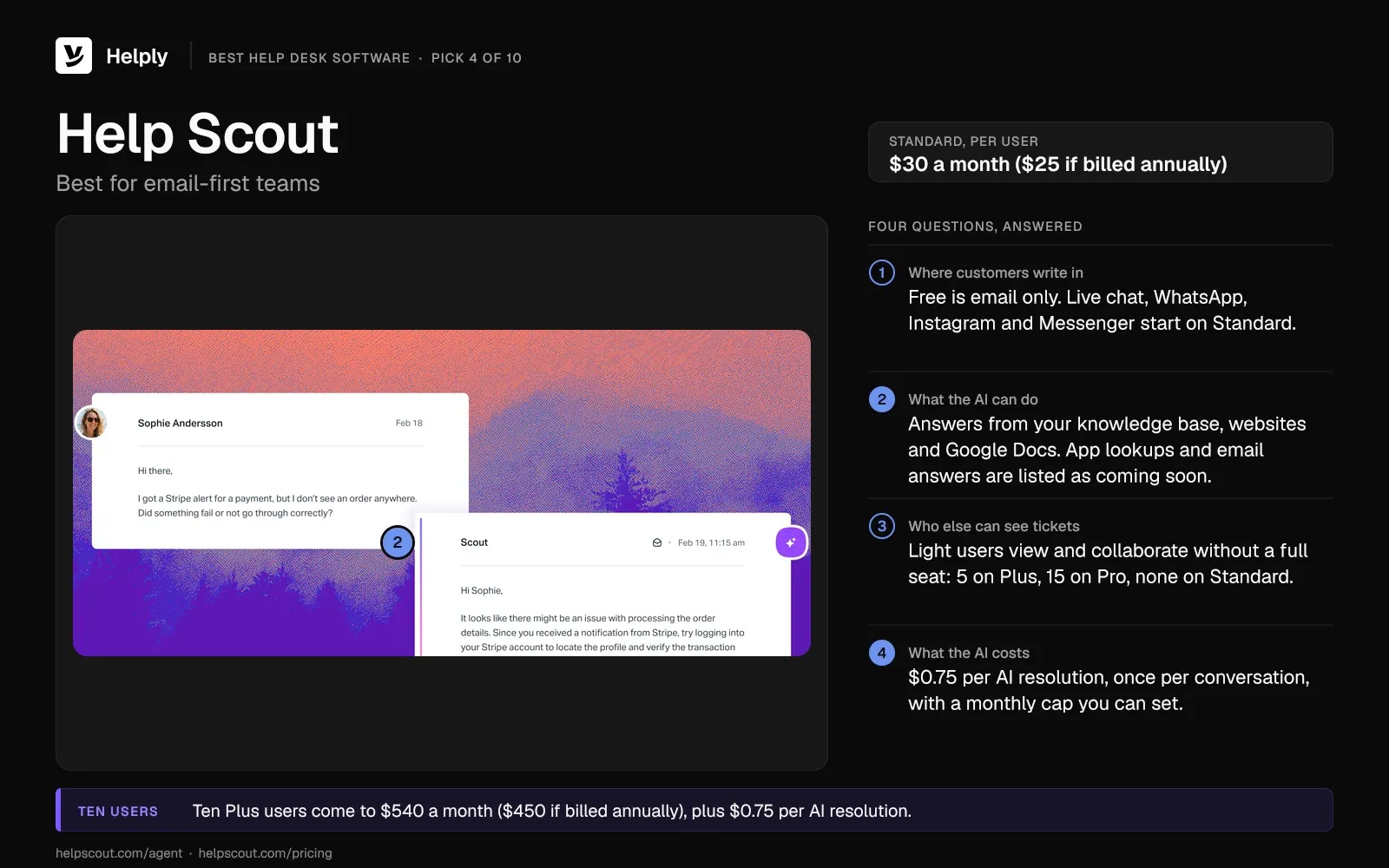
- Plans. Help Scout Standard runs $30 per user each month ($25 if billed annually). Plus is $54 ($45), and Pro, sold with a 10-user minimum, is $90 ($75).
- Free plan. Help Scout's free plan lets 5 users share one email-only inbox, with 100 contacts a month.
- AI agent. Help Scout charges $0.75 per resolution, once per conversation, on paid plans. You can set a monthly cap, and new accounts get three months of free AI resolutions.
- Light users. Help Scout light users view conversations and collaborate without a full seat: 5 included on Plus and 15 on Pro.
Help Scout's AI agent answers from your knowledge base, websites and Google Docs in web and in-app chat. Help Scout lists payment and CRM lookups, and email answers, as coming soon.
Ten Plus users come to $540 a month ($450 if billed annually), plus $0.75 per AI resolution.
Pros
- You pay the $0.75 only when the customer gets an AI answer and asks for nothing more.
Cons
- The AI agent can't yet answer email or look up payment and CRM records, so your team covers those cases.
- Read-only teammates need Plus or a paid seat, since Standard includes no light users.
Best for
Email-first teams that answer most questions from a help center.
Help Scout or Helply: Which Fits an Email-First Team?
Help Scout fits email-first teams whose questions the help center can answer. Helply fits teams whose answers need lookups in tools like Stripe or HubSpot. The Help Scout comparison page sets the two side by side.
| Help Scout | Helply | |
|---|---|---|
| Price model | Per user, from $30 ($25) | Starter $79 a seat; Team $499 for 5 seats |
| AI billing | $0.75 per AI resolution | Credits in the plan: 1 to 10 an action, capped at 15 per conversation |
| Read-only teammates | Light users on Plus and Pro | Unlimited view-only seats from Team |
| AI lookups | App lookups and email answers listed as coming soon | Support Agent uses connected tools and can take Actions |
5. Intercom: Best for Support Inside Your Product
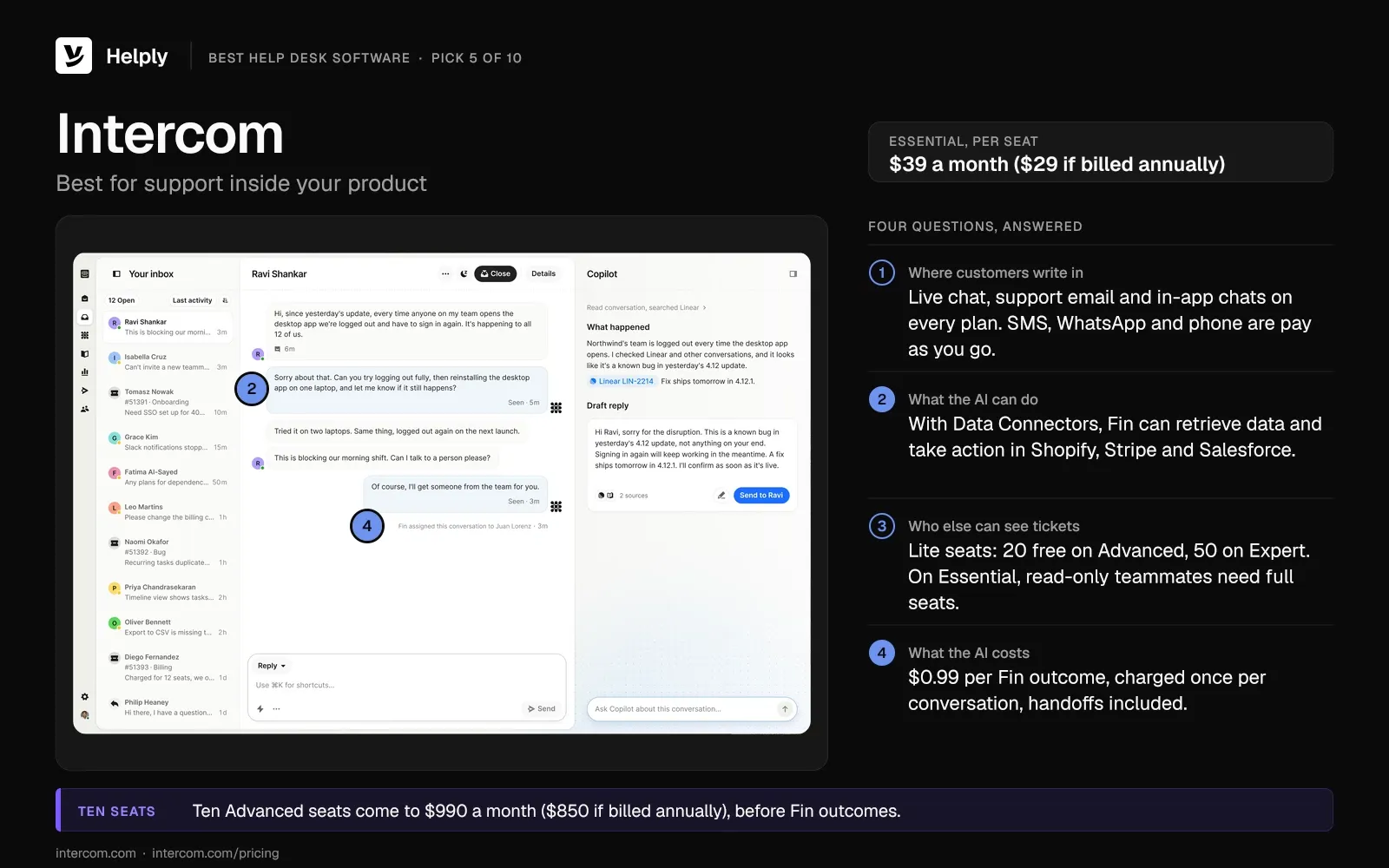
Intercom centers on in-app chat and bills its Fin AI agent per outcome.
- Plans. Intercom Essential lists at $39 a seat each month ($29 if billed annually). Advanced is $99 ($85), Expert is $139 ($132), and new customers get Essential at $29 ($19) while subscribed.
- Fin. Each Fin outcome costs $0.99, and Intercom bills it once per conversation. Intercom counts an outcome when the customer confirms the fix, asks for nothing more, or Fin completes a workflow, including handoffs.
- Fin on another help desk. Intercom sells Fin alone for your current help desk from $49 a month for 50 outcomes, with no seat cost.
- Lite seats. Intercom Expert includes 50 free lite seats and Advanced 20; only full seats can send messages.
With Data Connectors, Intercom says, Fin can "retrieve data and take action in external systems like Shopify, Stripe, and Salesforce."
Ten Advanced seats come to $990 a month ($850 if billed annually), before Fin's outcome fee of $0.99 each. For other options, see these Intercom Fin alternatives.
Pros
- Every plan includes live chat, support email and in-app chats.
Cons
- On Essential, a teammate who only reads needs a full seat.
- SMS, WhatsApp and phone are pay as you go on top of seats.
Best for
Software and app companies that support users inside the product.
Intercom or Helply: Which Fits In-Product Support?
Intercom fits product teams that want chat and Fin inside the app and can budget per seat plus each Fin outcome. Helply fits teams that want the Support and Assist Agents in their plan and one shared pool of AI credits. Compare the two on the Intercom comparison page.
| Intercom | Helply | |
|---|---|---|
| Price model | Per seat, from $39 ($29) | Starter $79 a seat; Team $499 for 5 seats |
| AI billing | $0.99 per Fin outcome | Credits in the plan: 1 to 10 an action, capped at 15 per conversation |
| Read-only teammates | Lite seats on Advanced and Expert | Unlimited view-only seats from Team |
| AI actions | Data Connectors take action in Shopify, Stripe, Salesforce | Support Agent uses connected tools and can take Actions |
6. HubSpot Service Hub: Best When Customer Records Live in HubSpot
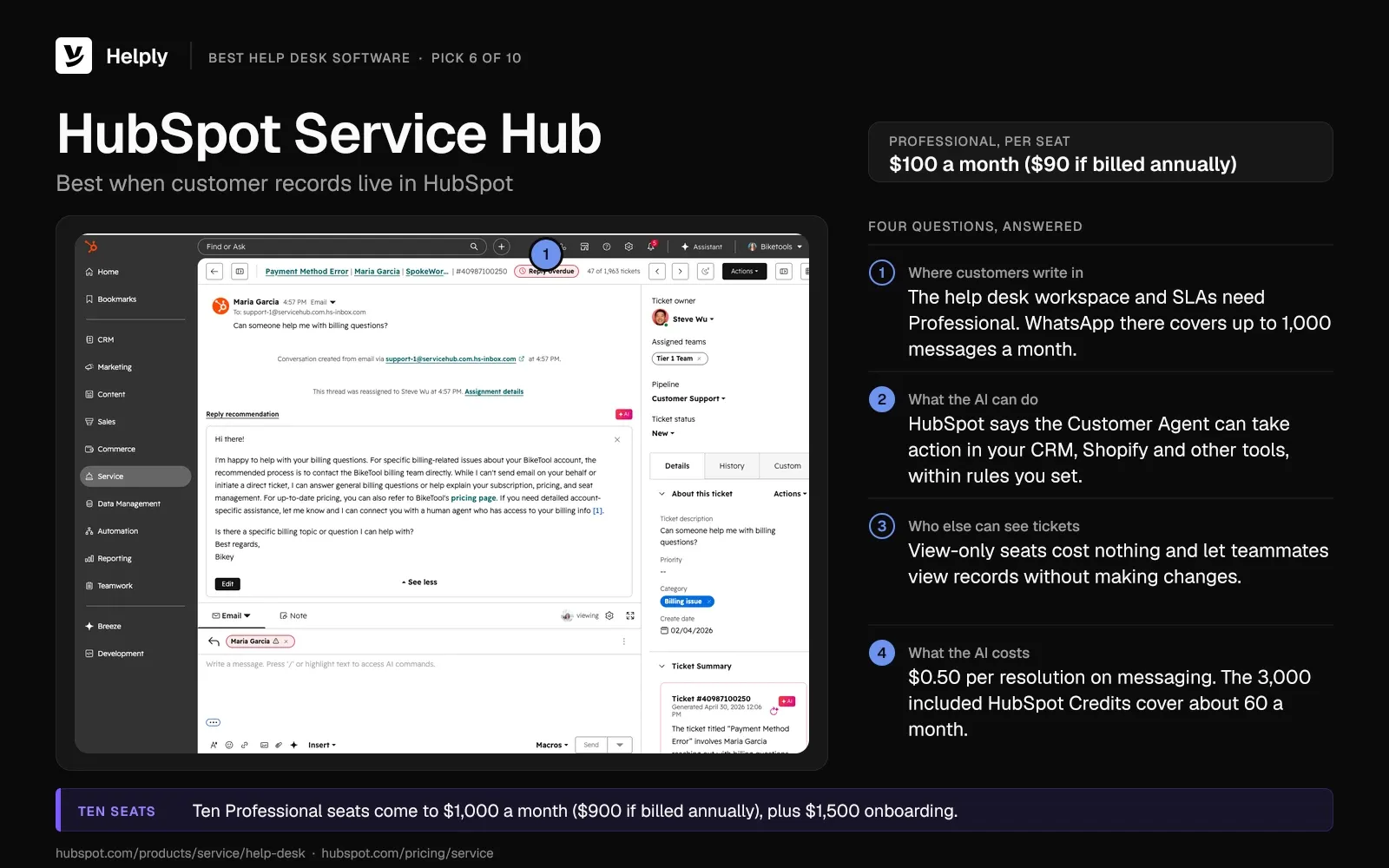
HubSpot Service Hub puts tickets next to the CRM your sales and marketing teams already use.
- Plans. Service Hub Professional runs $100 per seat each month ($90 if billed annually), with an annual commitment on either billing. On its Service Hub pricing page, HubSpot lists Enterprise from $150 per seat on annual billing.
- Onboarding. HubSpot charges a one-time onboarding fee: $1,500 for Professional and $3,500 for Enterprise.
- Customer Agent. HubSpot's Customer Agent costs $0.50 per resolution on messaging, and HubSpot counts one when no person takes over for 72 hours. Professional's 3,000 included HubSpot Credits cover about 60 resolutions a month if you spend them only on the Customer Agent.
- View-only seats. HubSpot's view-only seats cost nothing and let teammates view records without making changes.
HubSpot says the Customer Agent can "take action in your CRM, Shopify, and the other tools" within rules you set.
Ten Professional seats come to $1,000 a month ($900 if billed annually), plus $1,500 for onboarding.
Pros
- You pay nothing for teammates on view-only seats.
Cons
- The Customer Agent, help desk workspace and SLAs need Professional or Enterprise.
- Starter's $10 monthly price ($7 if billed annually) is a limited-time offer for new customers; its list price is $20.
Best for
Teams already running sales and marketing on HubSpot CRM.
HubSpot or Helply: Which Fits a CRM-Led Team?
HubSpot Service Hub fits teams that want support inside HubSpot. Helply fits teams that want a dedicated help desk linked to their CRM through the HubSpot integration, which starts on Team.
| HubSpot Service Hub | Helply | |
|---|---|---|
| Price model | Per seat, Professional $100 ($90) plus onboarding | Starter $79 a seat; Team $499 for 5 seats |
| AI billing | $0.50 per resolution (50 HubSpot Credits) | Credits in the plan: 1 to 10 an action, capped at 15 per conversation |
| Read-only teammates | View-only seats at no cost | Unlimited view-only seats from Team |
| CRM | Customer Agent acts in HubSpot CRM | Connects to HubSpot and Attio from Team, Salesforce from Growth |
7. Zoho Desk: Best for the Tightest Budgets
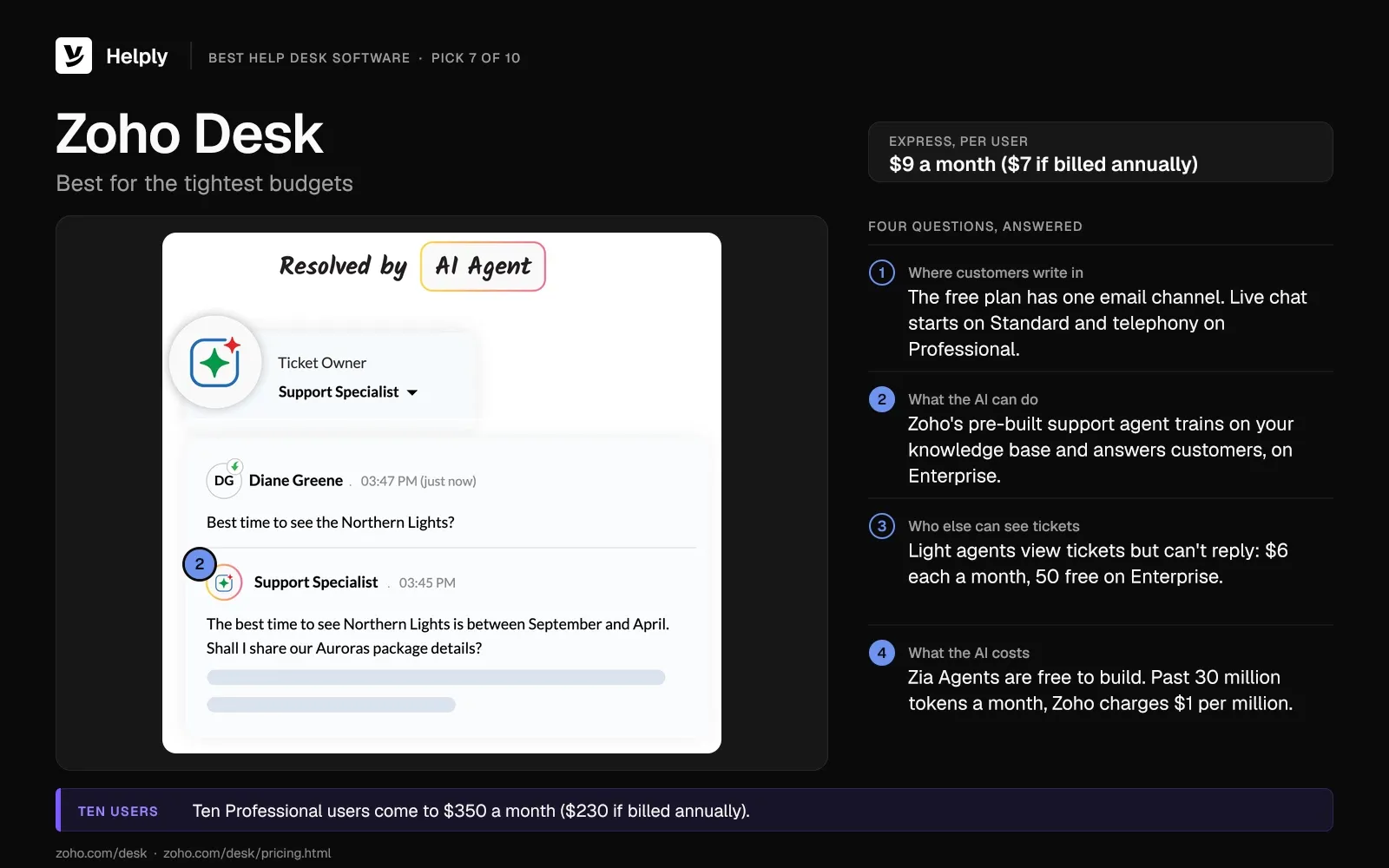
Zoho Desk charges per user, from $9 a month ($7 if billed annually), and offers a free plan for three users. Zoho bills its AI by model tokens and publishes no price per conversation.
- Plans. Zoho Desk Express runs $9 per user each month ($7 if billed annually). Standard is $20 ($14), Professional is $35 ($23), and Enterprise is $50 ($40).
- Free plan. Zoho Desk's free plan allows 3 users on one email channel, with no live chat, answer bot or generative AI.
- Zia Agents. Zoho's Zia Agents are free to build; usage past 30 million tokens a month on its standard models costs $1 per million.
- Light agents. Zoho Desk light agents view tickets but can't reply, for $6 each a month on Standard and Professional, with 50 free on Enterprise.
Zoho's pre-built support agent trains on your knowledge base and answers customers; it is available in Zoho's US and India data centers.
Ten Professional users come to $350 a month ($230 if billed annually).
Pros
- At list price, Express costs less per user than any other per-seat pick of the ten.
Cons
- Pre-built AI agents and Zia Actions sit on Enterprise.
- Live chat starts on Standard and telephony on Professional.
Best for
Budget-led teams whose questions the knowledge base can answer.
Zoho Desk or Helply: Which Fits a Tight Budget?
Zoho Desk fits teams that want the lowest seat price and whose answers sit in a knowledge base. Helply fits teams that want lookups and actions in connected tools, and an investigation across Stripe or HubSpot uses 6 credits.
| Zoho Desk | Helply | |
|---|---|---|
| Price model | Per user, from $9 ($7) | Starter $79 a seat; Team $499 for 5 seats |
| AI billing | Model tokens past 30 million a month, $1 per million | Credits in the plan: 1 to 10 an action, capped at 15 per conversation |
| Read-only teammates | Light agents at $6 each | Unlimited view-only seats from Team |
| AI answers from | Knowledge base | Knowledge base, history and connected tools |
8. Gorgias: Best Help Desk for Shopify Stores
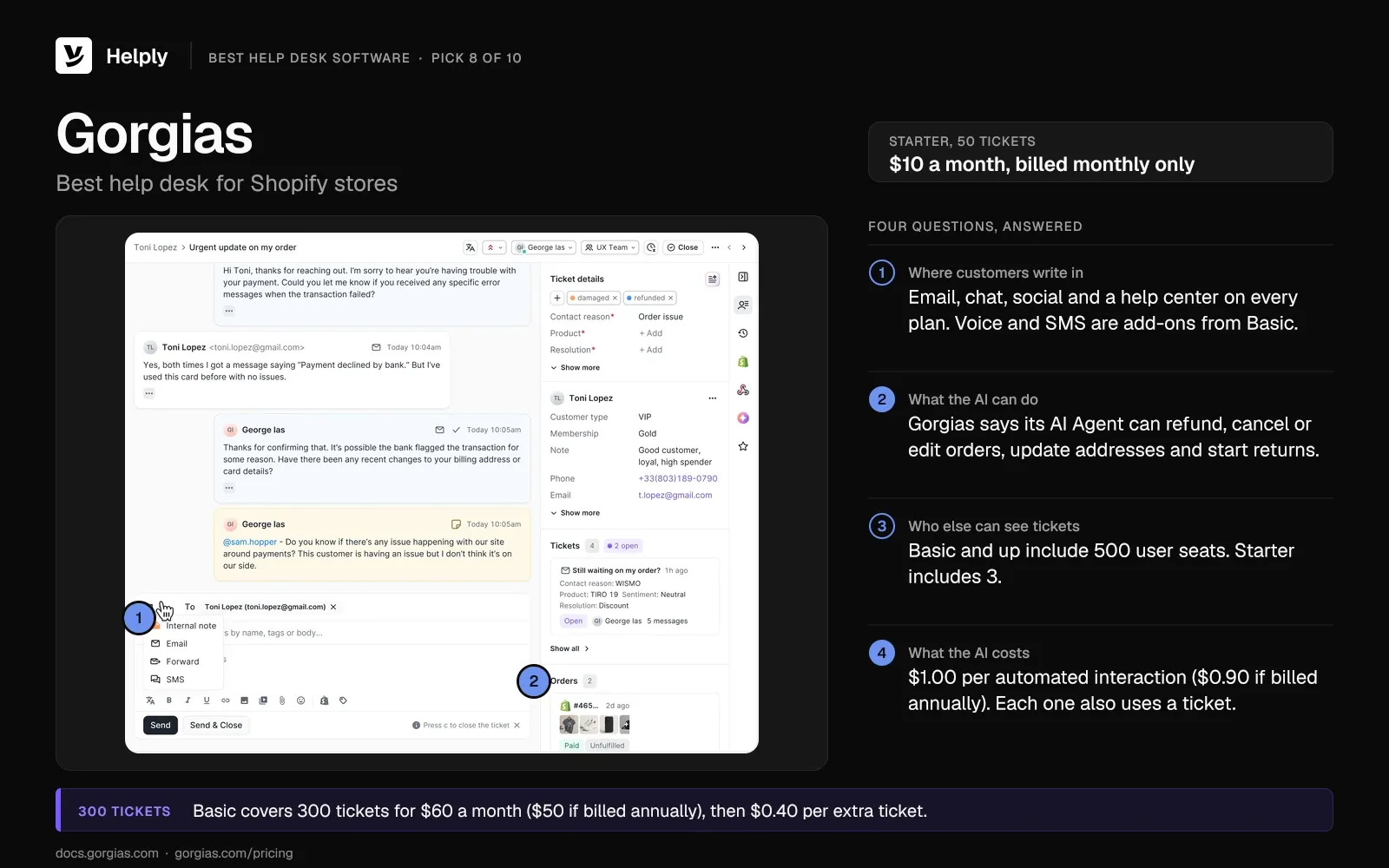
Gorgias prices plans by ticket volume with no per-agent fee, and its AI Agent works inside Shopify.
- Plans. Gorgias Starter covers 50 tickets for $10 a month, billed monthly only, and Basic covers 300 for $60 ($50 if billed annually). Pro handles 2,000 tickets at $360 ($300), and Advanced handles 5,000 at $900 ($750).
- Overage. Tickets past your limit cost $0.40 each on Starter and Basic, and $0.36 each on Pro and Advanced.
- AI Agent. Gorgias bills its AI Agent at $1.00 per automated interaction ($0.90 if billed annually) and $1.50 above your allowance. Gorgias counts one when the AI Agent resolves the whole request with no human agent, and each one also uses a ticket.
- Users. Gorgias Basic and up include 500 user seats; Starter includes 3.
Gorgias says its AI Agent can issue a refund, cancel an order, edit an order, update an address and start a return. Those actions start on Basic. Stores weighing other tools can compare these Gorgias alternatives.
Pros
- Every plan includes email, chat, social channels and a help center.
Cons
- Each automated interaction uses a ticket from your allowance on top of the AI fee.
- The trial lasts 7 days, against 14 on Zendesk, Intercom and Front.
Best for
Shopify stores where most questions are about orders, returns and refunds.
Gorgias or Helply: Which Fits an Online Store?
Gorgias fits Shopify stores that want order actions built into the help desk. Helply fits stores whose answers need data from several systems, and you can connect Stripe and Shopify on every plan.
| Gorgias | Helply | |
|---|---|---|
| Price model | By ticket volume, from $10 for 50 tickets | Starter $79 a seat; Team $499 for 5 seats |
| AI billing | $1.00 ($0.90) per automated interaction | Credits in the plan: 1 to 10 an action, capped at 15 per conversation |
| Users | 500 from Basic | Up to 3 seats on Starter; Team includes 5, then $99 a seat |
| AI on every plan | AI Agent costs extra; actions from Basic | Support and Assist Agents included |
9. Front: Best for One Inbox Shared by Support, Sales and Ops
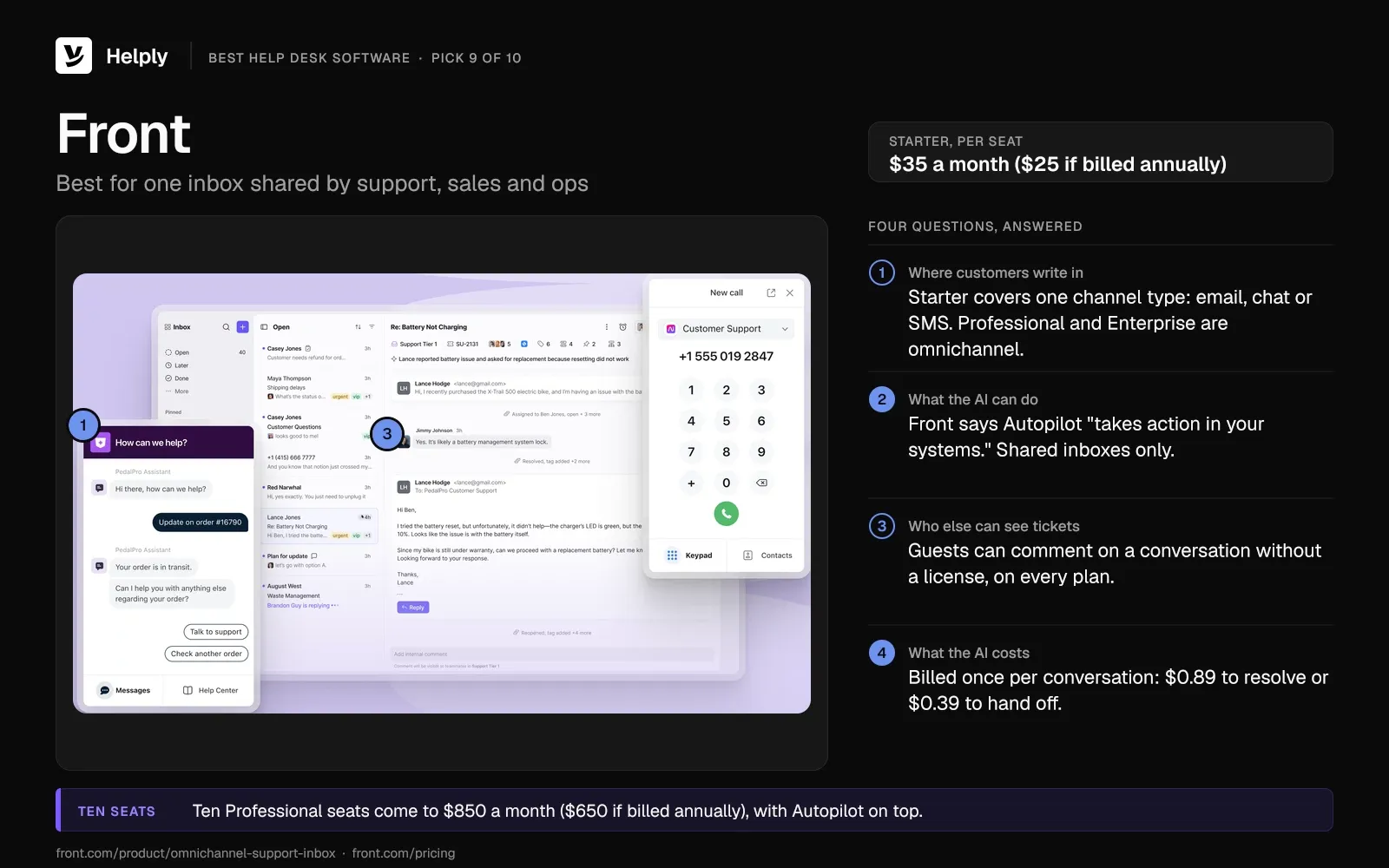
Front prices its shared inbox per seat and bills its Autopilot AI per conversation.
- Plans. Front Starter runs $35 per seat each month ($25 if billed annually) for up to 10 seats. Professional allows up to 50 seats at $85 ($65); Enterprise is $105, annual only.
- Autopilot. Front bills each conversation once, at the highest step Autopilot reached. The fees are $0.89 for a full resolution and $0.39 for a handoff.
- Resolution rule. Front counts a resolution if no teammate replies within 24 hours on chat, SMS, WhatsApp or custom channels. On email, the window is 72 hours.
- Copilot. Front Copilot costs $20 per seat each month on Starter and Professional; Enterprise includes it.
- Guests. Front guest accounts can comment on a conversation without a license, on every plan.
Front says Autopilot "gathers the context" and "takes action in your systems."
Ten Professional seats come to $850 a month ($650 if billed annually), with Autopilot on top.
Pros
- Handoffs cost less than full resolutions.
Cons
- Starter covers one channel type: email, chat or SMS.
- Autopilot works on shared inboxes only.
Best for
Teams where support, sales and operations answer customers from the same inbox.
Front or Helply: Which Fits a Shared Inbox Team?
Front fits teams that want a shared inbox with AI billed by how far Autopilot gets in each conversation. Helply fits teams where support answers customers while sales and ops read tickets on view-only seats from Team. For a row-by-row view, see the Front comparison page.
| Front | Helply | |
|---|---|---|
| Price model | Per seat, from $35 ($25) | Starter $79 a seat; Team $499 for 5 seats |
| AI billing | $0.89 a resolution, $0.39 a handoff | Credits in the plan: 1 to 10 an action, capped at 15 per conversation |
| Read-only teammates | Guests comment free | Unlimited view-only seats from Team |
| Copilot | $20 per seat on Starter and Professional | Assist Agent on every plan |
10. Pylon: Best for B2B Teams Supporting Accounts in Slack
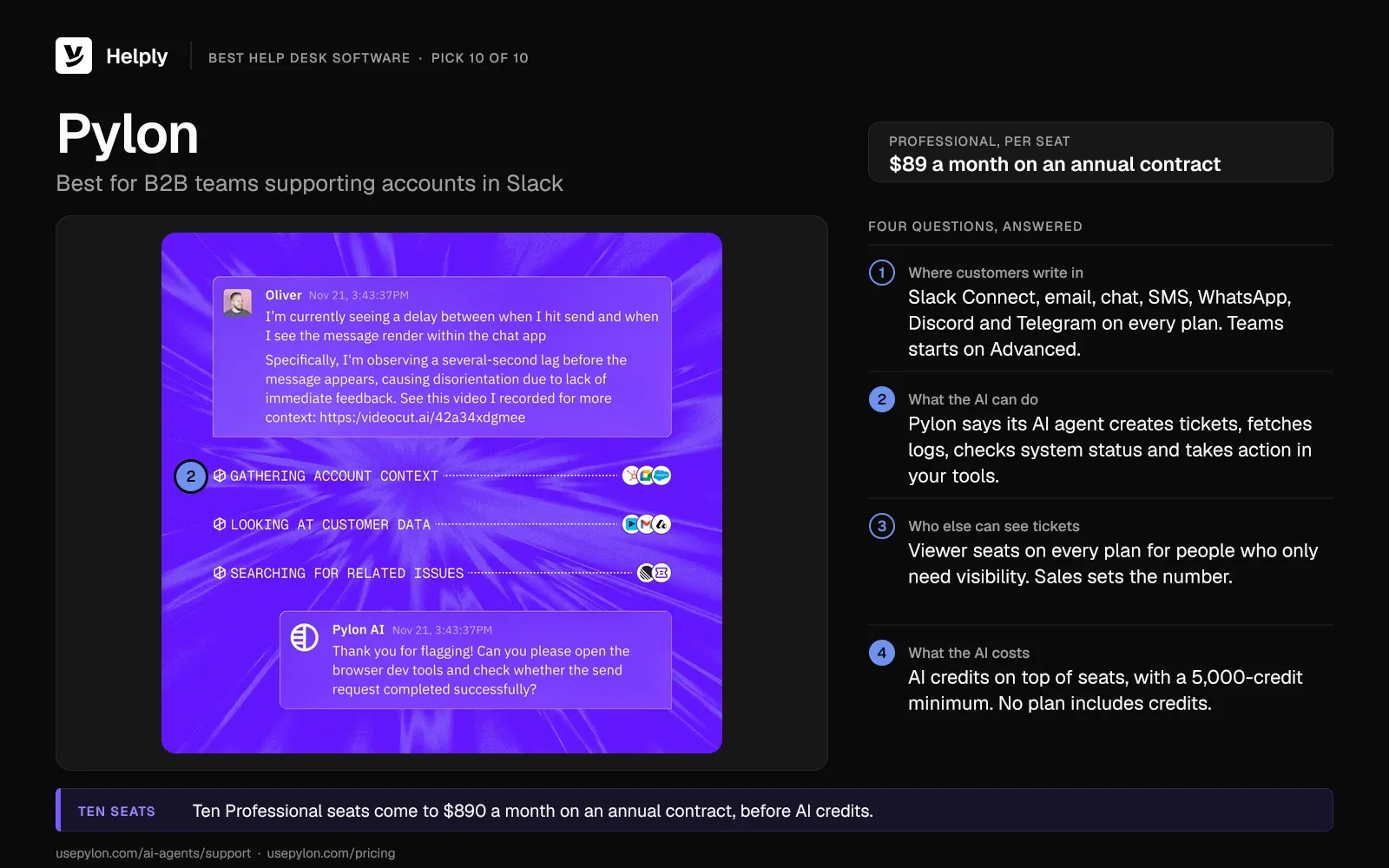
Pylon targets B2B companies that support customers in shared Slack channels. Seats come on an annual contract, and you buy AI credits on top.
- Plans. Pylon Professional runs $89 a seat each month and Advanced $139, both on an annual contract. Pylon also bills monthly but doesn't list that price.
- AI credits. Pylon sells AI agent credits as a separate purchase, with a 5,000-credit minimum commitment. No plan includes credits.
- Viewer seats. Pylon offers viewer seats on every plan for people who only need visibility; sales sets how many.
- Channels. Every Pylon plan includes Slack Connect, email, chat, SMS, WhatsApp, Discord and Telegram. Microsoft Teams starts on Advanced.
Pylon's AI agent "creates tickets, fetches logs, checks system status, and takes action in the tools your team already uses."
Ten Professional seats come to $890 a month on an annual contract, before AI credits.
Pros
- The AI agent can fetch logs and check system status for technical questions.
Cons
- Microsoft Teams support needs Advanced, at $139 per seat each month under an annual contract.
- You buy credits and seats as two contract lines.
Best for
B2B software companies whose customers expect answers in Slack.
Pylon or Helply: Which Fits B2B Teams in Slack?
Pylon fits B2B teams that want Slack-first support and can sign a seat contract. Helply fits teams that support accounts over Slack Connect, which starts on the $499 Team plan. Compare the two on the Pylon comparison page.
| Pylon | Helply | |
|---|---|---|
| Price model | $89 per seat on an annual contract | Starter $79 a seat; Team $499 for 5 seats |
| AI billing | Credits on top of seats, 5,000 minimum | Credits in the plan: 1 to 10 an action, capped at 15 per conversation |
| Read-only teammates | Viewer seats on every plan; sales sets the number | Unlimited view-only seats from Team |
| AI on every plan | Credits required; no plan includes them | Support and Assist Agents, with credits included |
Two Deeper Guides for Smaller Teams and Software Companies
On a small team, you compare free plans and the price of the first paid seat. The guide to help desk software for small business prices each tool for small teams and covers moving off a shared mailbox.
At a software company, you route bugs to engineering and need billing context to support each account. The help desk software built for SaaS teams guide compares nine tools on Jira and Linear handoff and AI fees.
Supporting Employees Instead of Customers? Look at an IT Service Desk
If your team supports employees with IT requests, start with a service desk. Atlassian treats help desks as a subset of service desks and notes that teams use the two terms loosely.
Two service desks to compare for internal IT:
- Jira Service Management. It is free for up to 3 agents. Its Standard plan costs $26.90 per agent a month for a 10-agent team ($2,700 a year if billed annually).
- Freshservice. Its Starter plan costs $29 per agent a month ($19 if billed annually), with a 14-day trial.
How to Choose Customer Service Software for Your Team
In a help desk software comparison by features alone, many tools can look alike. Answer four questions about your own queue to narrow the field.
Where Do Your Customers Write In?
Entry plans often cap your channels. Zendesk's Support Team and Help Scout's free plan cover email only, and Front's Starter covers one channel type. Zoho Desk adds live chat on Standard, and Intercom bills SMS, WhatsApp and phone as you go.
For its CX Trends 2026 report, Zendesk surveyed 6,182 consumers in 22 countries in June 2025. Of them, 74% said they now expect 24/7 service because of AI. Helply's inbox holds chat and email from the Starter plan; WhatsApp, SMS and Slack Connect from Team; and Microsoft Teams from Pro.
What Data Does Each Answer Need?
Order, subscription and account questions need an AI agent that can pull records from other systems. Help center questions need only an agent that answers from your articles.
Help Scout's AI agent and Zoho's pre-built agent answer from your knowledge sources. Help Scout lists app lookups as coming soon.
Zendesk, Freshdesk Omni, Intercom, HubSpot, Gorgias, Front and Pylon all market AI agents able to act in other systems. Helply's Support Agent can look up records in connected tools such as Stripe or HubSpot and take Actions to resolve requests. If its confidence is low, it escalates with its findings attached.
Who Else on Your Team Needs to See Tickets?
Sales, success, finance and engineering often need to read a ticket or add a note. HubSpot's view-only seats cost nothing, and Front guests comment without a license. Pylon includes viewer seats on every plan, and its sales team sets how many.
Zendesk, Freshdesk, Help Scout and Intercom include read-only teammates only from a higher plan. Zoho Desk charges $6 a month per light agent on Standard and Professional. Helply includes unlimited view-only seats from its Team plan, and Starter has none.
What Will AI Add to Your Help Desk Bill?
Most of the ten vendors bill AI on top of seat or ticket plans, some after an included allowance. Helply's plans include a monthly credit pool for its AI agents. On Starter and Team, you can top up in the app when the pool runs out.
In Salesforce's State of Service report, 6,500 service professionals in 40 countries answered a survey between April and June 2025. They expect AI's share of resolved cases to rise from 30% in 2025 to 50% by 2027.
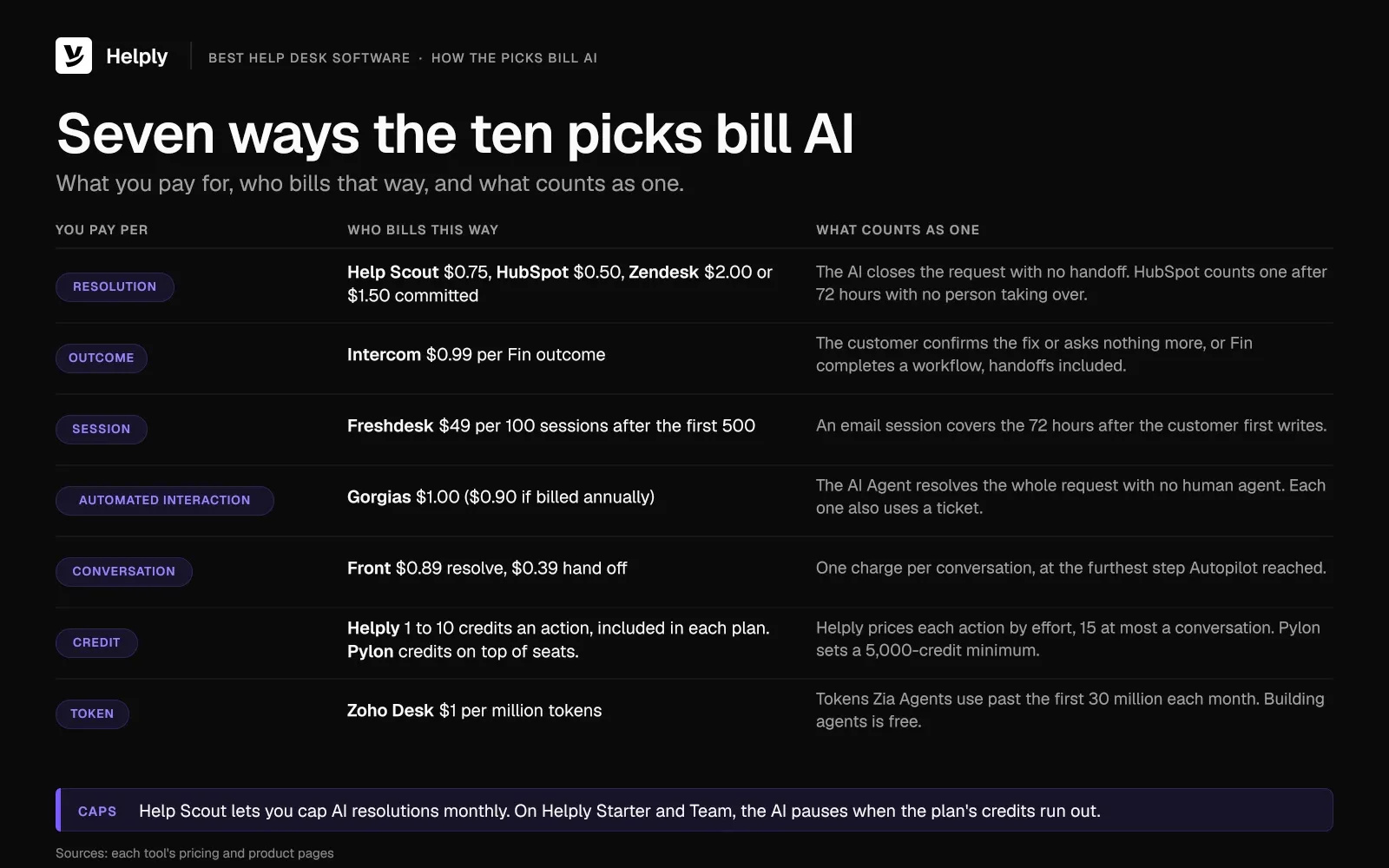
The ten vendors bill AI in seven units:
- Per resolution. Help Scout charges $0.75, HubSpot $0.50, and Zendesk $2.00 past an included allowance, or $1.50 with a commitment.
- Per outcome. Intercom bills $0.99 for each Fin outcome.
- Per session. Freshdesk charges $49 per 100 sessions.
- Per automated interaction. Gorgias charges $1.00 per interaction ($0.90 if billed annually), and every one also counts as a ticket.
- Per conversation. Front bills once per conversation for the furthest step Autopilot reaches: a resolution costs $0.89 and a handoff $0.39.
- Per credit. Pylon sells credits on top of seats. Helply's plans include credits, from 500 a seat on Starter to 100,000 on Growth, and an action uses 1 to 10.
- Per token. Zoho bills model tokens past 30 million a month.
Help Scout lets you cap AI resolutions each month. Helply sends usage alerts before the pool runs low, and on Starter or Team the AI pauses at the limit. Pro and Growth let you set a hard cap or go over at a rate agreed at signup.
Seat Prices Plus AI Fees, or AI in the Plan: Which Model Fits?
A small, fixed team with light AI needs can keep the bill low on a per-seat tool. At list prices before AI fees, ten Zoho Desk Professional users cost $350 a month ($230 if billed annually). Ten Zendesk Suite Professional agents cost $1,490 ($1,150) on the same basis.
Gartner said in July 2026 that AI agents are breaking the seat-license model across enterprise applications. If your team is growing, price next year's seats and AI fees together before you shortlist.
Helply fits when the queue grows faster than hiring and people outside support need to see tickets. For $499 a month, its Team plan bundles 5 seats, a 15,000-credit pool and as many view-only seats as you need. A team with about 1,000 AI-handled conversations a month fits inside that plan.
On Team, you pay $99 for a sixth agent, and the head of sales reads tickets on an included view-only seat. Ten agents on Team come to $994 a month: $499 plus five extra seats at $99. The AI's work comes out of the plan's credit pool.
Covidence's support team is small and technical. Its people spent a growing part of each day on repeat questions about review setup, plan limits and reference imports.
During onboarding, the team tuned the agents' escalation thresholds until it trusted them to know their limits. At peak review seasons, the Support Agent resolved 72% of inbound conversations end to end.
Living documentation also drafted more than 20 new knowledge base articles for the team to approve.
Run Helply as a pilot on part of one queue while your current help desk handles the rest. Usage alerts tell you before the pilot's credits run low. Move the remaining work once you trust the AI's resolutions and your workflows run in Helply.
Frequently asked questions
The best help desk software fits your team's channels, lookups, read-only teammates and AI budget. Pick Zendesk for large teams, Freshdesk or Zoho Desk for low seat prices, Help Scout for email-first teams and Intercom for in-product support. Helply suits teams that want AI to resolve more of the queue, with AI credits in every plan.
Customer service teams use help desk software such as Zendesk, Freshdesk, Intercom, Help Scout or Helply. It turns emails, chats and messages into tracked conversations, with a shared inbox, a knowledge base, reporting and AI agents. IBM describes a help desk as a tool or team that lets a company support its customers in real time.
A help desk usually supports customers, while a service desk supports employees with IT requests. Atlassian treats help desks as a subset of service desks, and many teams use the two terms loosely.
Zendesk has no free plan, but Help Scout is free for 5 users, Zoho Desk for 3 and HubSpot Service Hub for 2. Freshdesk's Free Program gives up to two agents six months at no cost. The free plans from Help Scout and HubSpot leave out AI agents.
Paid seats start at $9 per user a month on Zoho Desk Express ($7 if billed annually), before AI fees. Zendesk Suite Professional runs $149 per agent a month ($115 if billed annually). Helply starts at $79 a seat a month, and Team costs $499 a month with 5 seats and 15,000 credits included.
Vendors bill AI by resolution, outcome, session, automated interaction, conversation, credit or token. Help Scout charges $0.75 per resolution, Intercom $0.99 per Fin outcome, Freshdesk $49 per 100 sessions and Gorgias $1.00 per automated interaction. Helply's AI draws 1 to 10 credits an action from the pool each plan includes.
On some plans they do: Help Scout Standard and Intercom Essential include no read-only seats. HubSpot's view-only seats cost nothing, and Front guests can comment without a license. Helply includes unlimited view-only seats from its Team plan, and on Starter everyone who logs in needs a seat.
Not yet for every request. In a March 2025 forecast, Gartner expected agentic AI to resolve 80% of common customer service issues with no person involved by 2029. Service professionals who answered Salesforce's State of Service survey between April and June 2025 expect AI to resolve 50% of cases by 2027.
About the author

Bildad Oyugi
Head of Content
Bildad is a digital marketing expert with over 5 years of experience in copywriting, content marketing, and editing. Outside of work, he enjoys videography and spending time with his family.
Keep reading

Support Ticket Response Examples: 25 Replies by Ticket Type
Konrad Janczyk · 22 min read
Agentic AI vs. Generative AI: What Changes When AI Can Act on a Ticket
Bildad Oyugi · 14 min read