The quote for Zendesk's AI agents sits in one browser tab. In the other, the founder asks whether you can try it on one queue before committing. Your team still remembers the last chatbot, which sent customers in circles before they reached a person.
Customers remember a bad bot too. In a Gartner survey of 3,566 customers in February and March 2026, only 27% would try a chatbot again after a negative experience. Gartner's advice is to "begin with targeted, thoroughly tested deployments," so start on one queue before anyone signs a contract.
By week 5, you can hand the founder a scorecard, a cost per kept resolution, and a written answer: widen, hold, or stop. If an incorrect action or a fabricated policy reaches a customer before then, you switch the AI off the same day.
Inside or Beside: Where Should the AI Agent Run During the Pilot?
Pilot an AI agent on one queue inside your help desk if you'll keep that desk and only need to test the AI. Pilot beside it, in a separate AI-native help desk on one mailbox or channel, when you're also weighing a switch. Inside, you add an AI agent to your current help desk and give it a slice of the queue.
Inside Zendesk or Intercom: Zendesk AI Agents or Fin
Zendesk includes AI agents in every Suite and Support plan and bills them per automated resolution. Its AI agents take action across systems, so an inside pilot can test both actions and answers.
On Zendesk, only one AI agent can be active on a channel at a time. An email AI agent answers only the support address's trigger names, so you define the pilot slice when you pick that address.
Zendesk documents three ways to split test groups: by label, by AI agent and channel, or by traffic_split. Your customer success manager needs to enable traffic_split, which randomizes paths within a single AI agent's flow. On its own, it doesn't create a human-only slice.
Fin costs $0.99 an outcome inside Intercom or on another help desk such as Zendesk. It charges at most once per conversation. On another help desk, Fin also has a $49 monthly floor that covers the first 50 outcomes.
In Intercom, you can limit Fin with audience rules by plan, region, or page, and on email by the "Email to" address. Workflows can also branch on that address, but Intercom's Essential plan doesn't include Workflows.
On Zendesk, Fin answers tickets and messaging conversations, but only tickets assigned to the Zendesk agent it represents. You set your pilot slice by editing the trigger that assigns tickets to that agent.
Beside Your Help Desk
In a beside pilot, you move one queue into a separate AI-native help desk with its own AI agents. You route one address, such as billing@, or one channel, and Zendesk or Intercom keeps everything else. That way, you test the AI agent and the help desk it would run in at the same time.
On the beside route, your team works in two tools until you cut over or stop.
Inside vs. Beside Zendesk or Intercom: Pilot Routes Compared
| Pilot question | Inside your help desk | Beside your help desk |
|---|---|---|
| Examples | Zendesk AI agents; Fin in Intercom or on Zendesk | Helply on one mailbox or chat widget |
| What the pilot tests | An AI agent inside your current setup | An AI agent plus a different help desk |
| How you set the pilot slice | Channels, triggers or audience rules in your current tool | One address or channel routed to the new tool |
| How the AI bills | Zendesk: per automated resolution. Fin: $0.99 an outcome | Helply: credits per AI action, weighted 1, 4 or 12, in blocks from $49 a month ($42 billed annually) |
| Adding reviewers | Follows your current plan's seat terms | Never changes the bill, since every Helply plan has unlimited users |
| What widening means | A larger share, then more ticket types | A larger share, then the remaining queues and your history |
| Fits teams that | Want to keep their help desk | Are also weighing a switch |
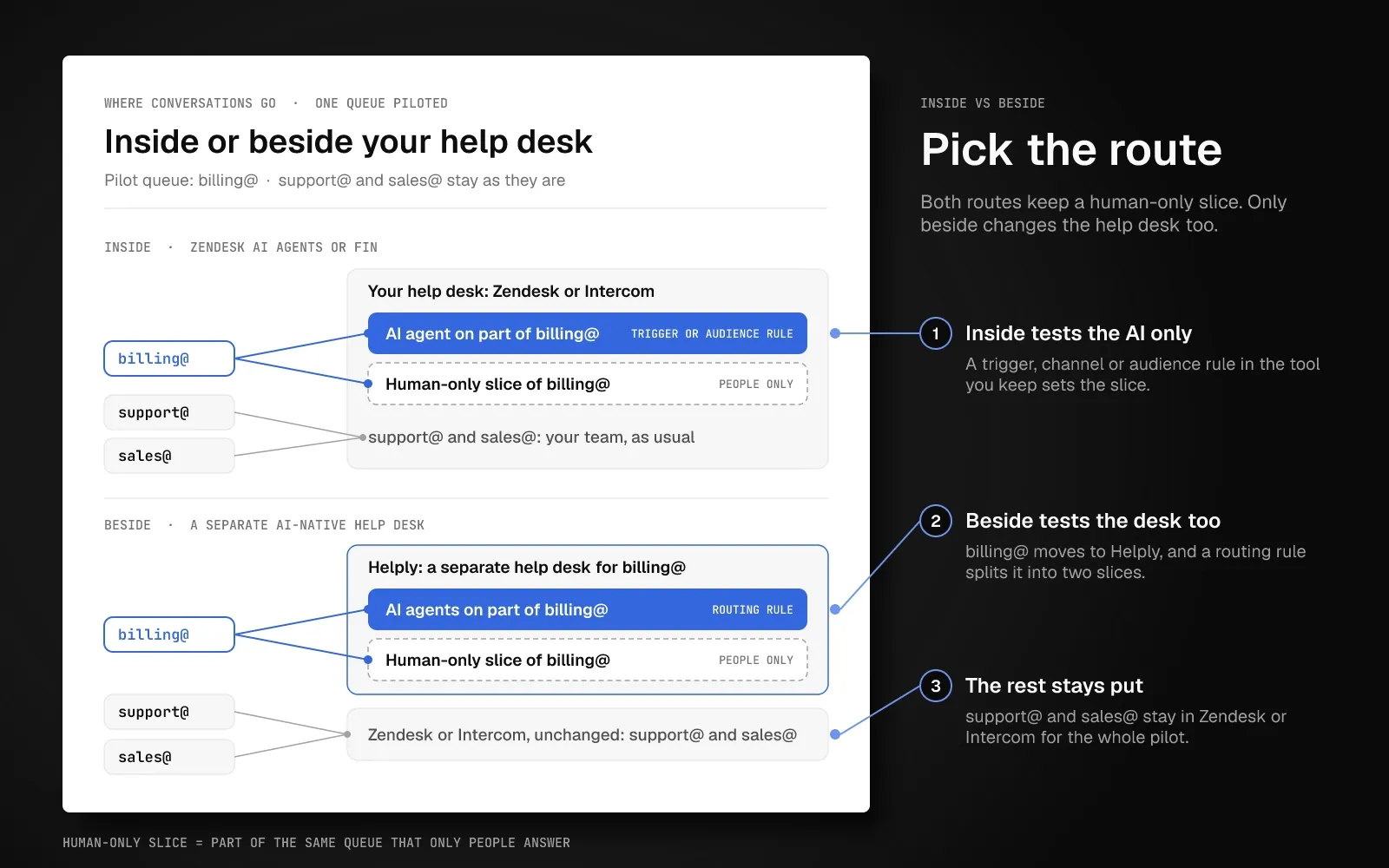
Running the Pilot Beside Zendesk or Intercom With Helply
Helply runs alongside Zendesk or Intercom as a complete help desk, and every plan includes its Assist, Support, and Background agents. You connect one queue, such as billing@ or a chat widget, and leave the other queues untouched. If the pilot passes, you can migrate supported history and cut over, since Helply replaces your help desk rather than integrating with it.
A pilot on Helply uses these pieces:
- One mailbox in. Add the address in Helply and follow your email provider's setup steps. Then choose how AI agents handle that inbox's conversations.
- Drafts before replies. Depending on your configuration, agents can draft responses or respond directly. The Assist Agent keeps reps in control and prepares a draft when it isn't set up to answer or isn't confident enough.
- Tickets the AI can resolve. The Support Agent answers customers directly when it is confident, and it can resolve tickets.
- A human-only slice. You route based on rules and customer context, so one customer group can stay with your team for the entire pilot.
- A person on the cases you pick. You decide when a person takes over based on the situation, confidence level, or customer condition. The Support Agent escalates with its investigation attached, so your teammate picks up where it left off.
- A budget fence. You can limit credits by mailbox, and every account has a monthly ceiling that defaults to the block price. The pilot can't overspend once auto top-up is off, because the AI pauses at the cap while people keep answering tickets.
- Room for every reviewer. Every plan has unlimited users, so billing, product, and ops staff can grade drafts beside the teammates who remember the last chatbot.
- A record of every AI action. Helply logs AI actions, resolutions, escalations, and signals, so a reviewer can trace what the agent did and why.
- Answers for your security review. Helply maintains a SOC 2 Type II report, and you can ask for a DPA. The AI providers behind it never use your customer data to train their models.
Gatekeeper Press came to Helply from human-only support. Its Support Agent checked a project's stage and sent complex cases to the right specialist with full context.
The Zendesk comparison and the Intercom comparison show the one-queue start and the later switch for each help desk.
How Do You Pick the Right Queue for an AI Support Pilot?
A good pilot queue passes three tests: volume for about 200 AI-handled conversations, answers the AI can find, and mistakes you can undo. Keep it to one channel so you can trace a bad week to a single cause.
- Volume. You need enough AI-handled conversations for the rates to be meaningful (see the table below).
- Answerable. Your docs or a single lookup should answer most questions in the queue.
- Low blast radius. A wrong answer costs a follow-up email, and no money moves.
Two queues often pass: a billing@ inbox of invoice copies, plan questions and failed payments, and a "where's my order?" chat queue. Keep these out of the first pilot, or behind a person's approval:
- refunds, credits, and cancellations
- account security and identity checks
- legal threats, complaints, and chargebacks
- at-risk or high-value accounts
- any topic your docs don't cover yet
A measured resolution rate carries a margin of error that shrinks as the sample grows. At 95% confidence and 200 AI-handled conversations, a 60% rate sits within about ±7 points of the true rate.
| AI-handled conversations | Margin on a 60% rate (percentage points, 95% confidence) |
|---|---|
| 50 | ±13.6 points |
| 100 | ±9.6 points |
| 200 | ±6.8 points |
| 400 | ±4.8 points |
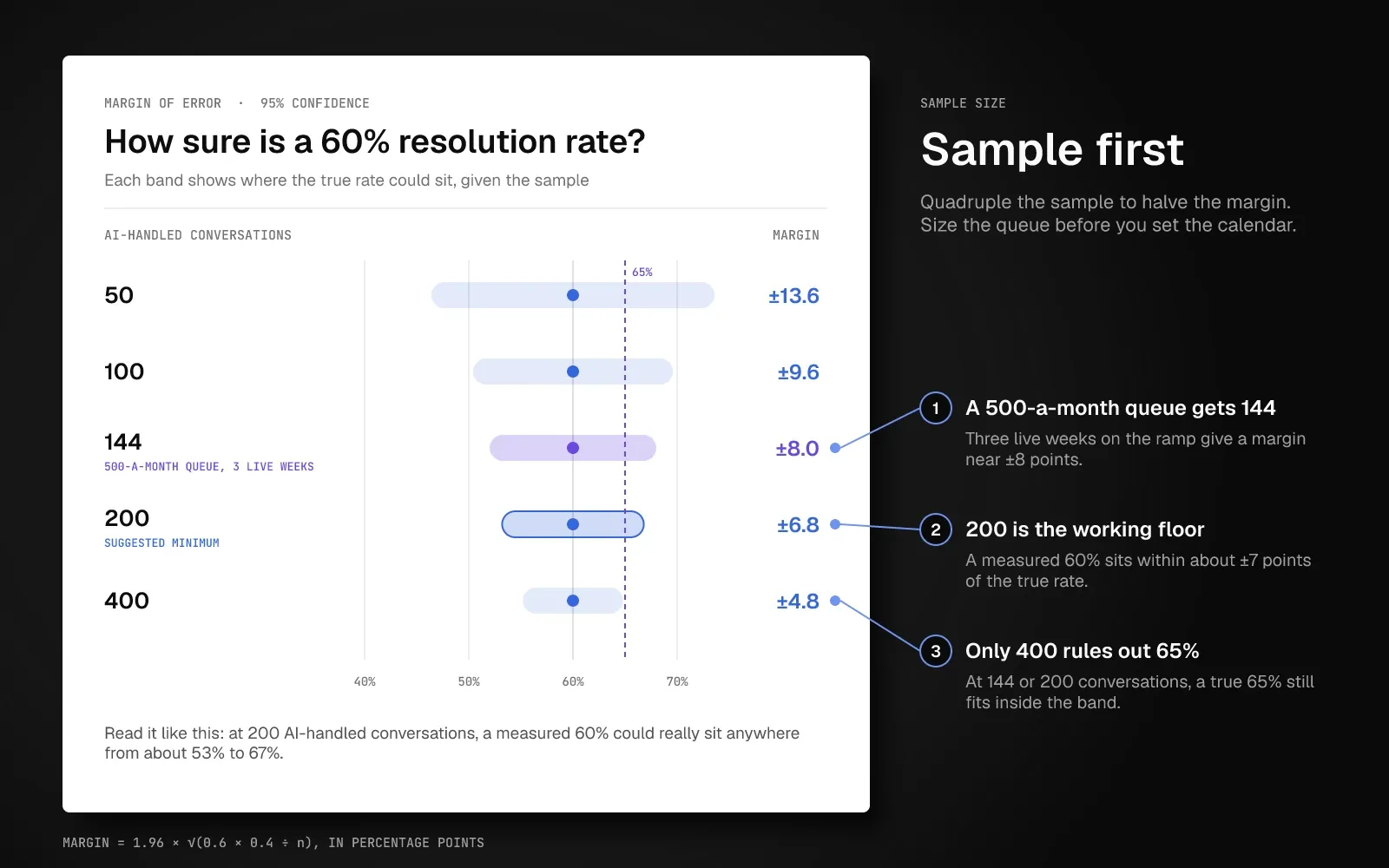
A queue of 500 conversations a month amounts to about 115 per week. On the ramp below, the AI handles about 144 conversations over three live weeks, with a margin of about ±8 points.
At that size, you can catch a red-line failure, but you can't distinguish 60% from 65%. To give the AI 200 conversations on this ramp, the queue needs about 160 a week. Add a second topic to the same channel before adding weeks.
Set the Baseline and a Human-Only Slice Before Week 1
Pull four weeks of baseline numbers for the pilot queue, and set aside a human-only slice before the AI touches it. The baseline covers resolution, reopen and escalation rates, CSAT, first response time, and cost per ticket. Keep at least 20% of the same queue human-only for the whole pilot, so you compare like with like.
Zendesk and Fin count a resolution differently. Zendesk has an LLM review each conversation its AI agent handled without a handoff, once the conversation ends. An email conversation ends 72 hours after the first email, and a messaging conversation ends 2 hours after the first message by default.
Since 18 May 2026, Zendesk's dashboard rate includes contained conversations, but Zendesk bills only for conversations that pass the review. The dashboard can climb while the bill stays flat.
Fin counts a resolution when "No further help is requested after the last AI answer," which includes customers who leave without replying. On another help desk, 24 hours of silence after Fin's last answer counts as an assumed resolution.
Count your own instead. A kept resolution is a conversation that closes with no new contact from the same customer within seven days.
How to Keep a Holdout Group in Zendesk, Intercom, or Helply
The human-only slice is your control group, or holdout: part of the same queue, ideally on the same channel, that only people answer. With that control, a quiet week or a seasonal dip can't pass for an AI win. Pick a split that has nothing to do with the questions, so both slices see the same mix.
- Zendesk email: a second email address for the same topic that the AI agent's trigger leaves out. Customers pick the address, so compare the question mix in both slices.
- Zendesk messaging: a split by AI agent and channel, which puts the human slice on another channel and makes the match looser.
- Fin in Intercom: an audience rule on a customer segment or an "Email to" address, set in Fin's email deploy settings. Intercom has no built-in Fin-versus-human holdout for inbound support; its Releases feature A/B-tests one Fin setup against another.
- Fin on Zendesk: the trigger that assigns tickets to Fin's Zendesk agent, set to leave the human slice out.
- Helply: a routing rule on customer context that sends one customer group to your team and another to the AI agent.
Set each week's share with customer segments or addresses, then widen the segment as the pilot ramps up. Tag every conversation in both slices: ai_pilot for the AI slice and human_slice for the other. Conversations outside both slices stay with your team as usual and carry neither tag.
In week 5, you will pull both sets into a spreadsheet without relying on anyone's dashboard.
The Five-Week AI Support Agent Pilot, Week by Week
Week 0 is setup, weeks 1 to 4 are the pilot, and week 5 is for reading the results. The AI drafts or answers test questions in week 1, then takes 25% in week 2 and half in weeks 3 and 4.
| Week | AI share of the pilot queue | What the team does | Move on when |
|---|---|---|---|
| 0 | None | Connect the queue and any read-only lookup it needs, write escalation rules, pull the baseline, set the human-only slice | Rules, tags, lookups and the slice are live |
| 1 | Helply: drafts on pilot conversations outside the human slice. Zendesk or Fin: test runs only | Reviewers grade every draft or test answer as send, edit or wrong | No "wrong" answer invents a policy, and each other "wrong" answer has a fix |
| 2 | 25% | The AI answers customers; daily review | Four review days in a row with no wrong action or invented policy |
| 3 | 50% | Raise the share and change nothing else; daily review continues | No red-line failure |
| 4 | 50%, no changes | Let the numbers settle on one stable setup | The week ends |
| 5 | 50%, no changes | Run the 7-day lookback on week 4 and hold the decision meeting | Widen, hold or stop |
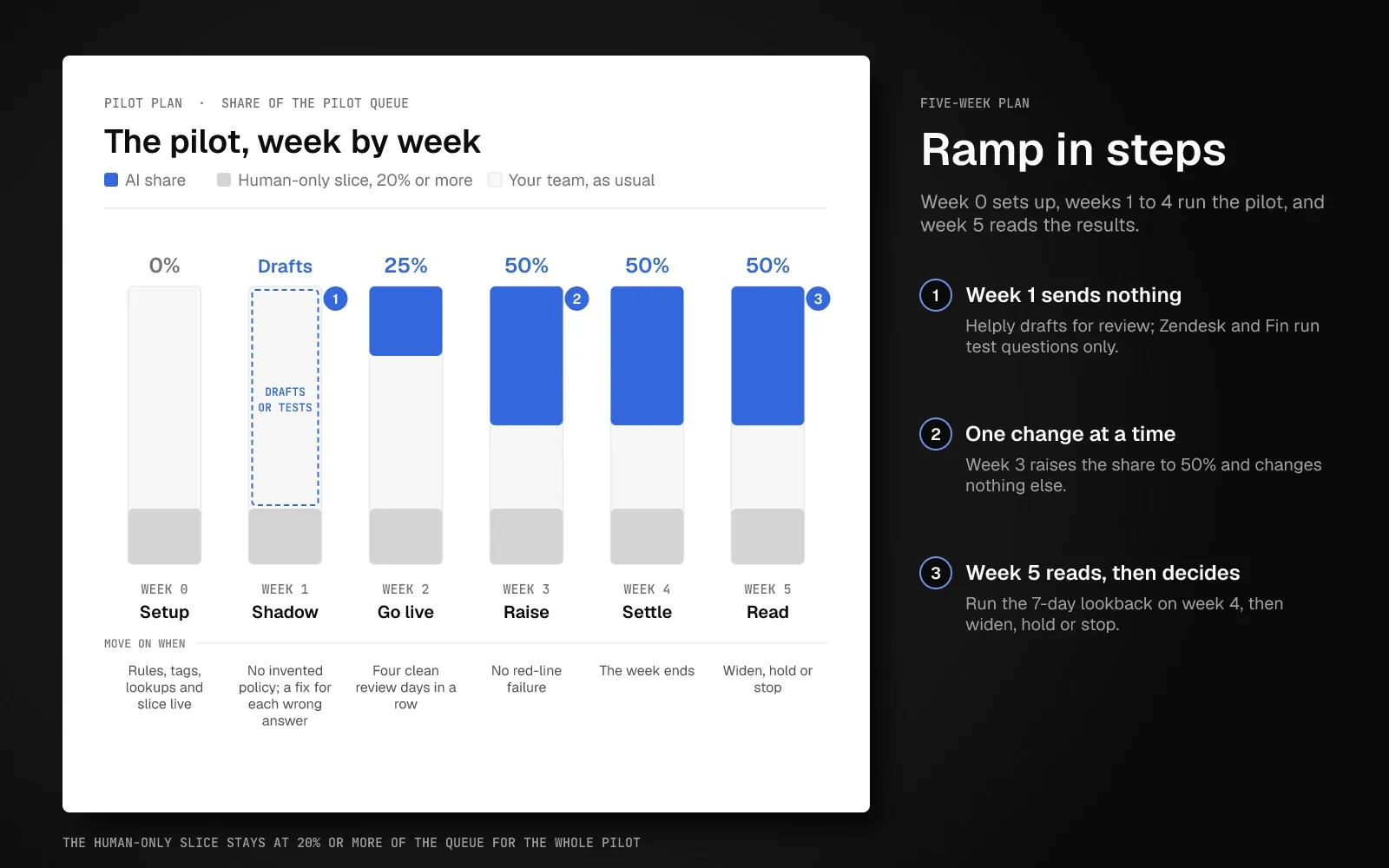
In week 1, the AI sends nothing on its own. On Zendesk, the test widget doesn't use automated resolutions, and neither does a sandbox, which needs Enterprise or a purchased add-on.
The conversation simulator doesn't use them either, but it's in early access and covers messaging only. When testing an email AI agent in production, use automated resolutions, so keep those tests to a short list of sample questions.
Fin's previews and batch tests are free, but Fin bills per resolution when you test it live. In Helply, an inbox set to drafts lets reviewers send, edit, or reject each one. Drafts rejected before sending cost no credits.
From week 2, one person runs a 15-minute review every morning:
- every action the AI took, read in the log rather than the reply
- every conversation where the customer came back
- every handoff, checked for anything a teammate had to re-ask the customer
- 10 to 20 conversations from the resolved pile
Change one thing at a time and write down the date. If you fix an article on Tuesday and widen the share on Wednesday, you can't tell from week 3's numbers which change worked.
The Weekly AI Pilot Scorecard
Score five numbers each week, with the AI slice and the human slice side by side. They are kept: resolution rate, escalation rate, CSAT on AI-handled tickets, first response time, and cost per kept resolution. Set each pass mark from the baseline, and fail the pilot on either red line alone.
Print one copy per week, fill it from your help desk export, and keep the vendor dashboard for cross-checks. Filter the export by the ai_pilot and human_slice tags to pull both slices.
| Number | How to count it | Pass mark | AI slice | Human slice | Pass? |
|---|---|---|---|---|---|
| Kept resolution rate | AI-closed conversations with no new contact from that customer within 7 days, divided by all AI-handled conversations | At or above the target you set from the baseline | |||
| Escalation rate | AI-handled conversations the AI passed to a person, divided by all AI-handled conversations. Log each handoff where a teammate re-asked the customer | Flat or falling after week 2, and a fix for every re-ask | |||
| CSAT on AI-handled tickets | Ratings on AI-handled conversations, with the response count written beside the score | No more than 3 percentage points below the human slice, on pooled weeks | |||
| First response time | Median time to first reply for each slice, plus the wait from handoff to a person's reply | Handoff wait no longer than the human slice's first response time | |||
| Cost per kept resolution | AI spend for the slice, plus the cost of your team's time on its handoffs, divided by kept resolutions | Below your cost per human-handled ticket |
Red lines:
- Wrong actions or invented policies: zero. Stop the pilot on one invented refund promise, even if all five numbers pass.
- Repeat contact: across two pooled weeks, the AI slice's seven-day repeat-contact rate must stay at or below the human slice's rate.
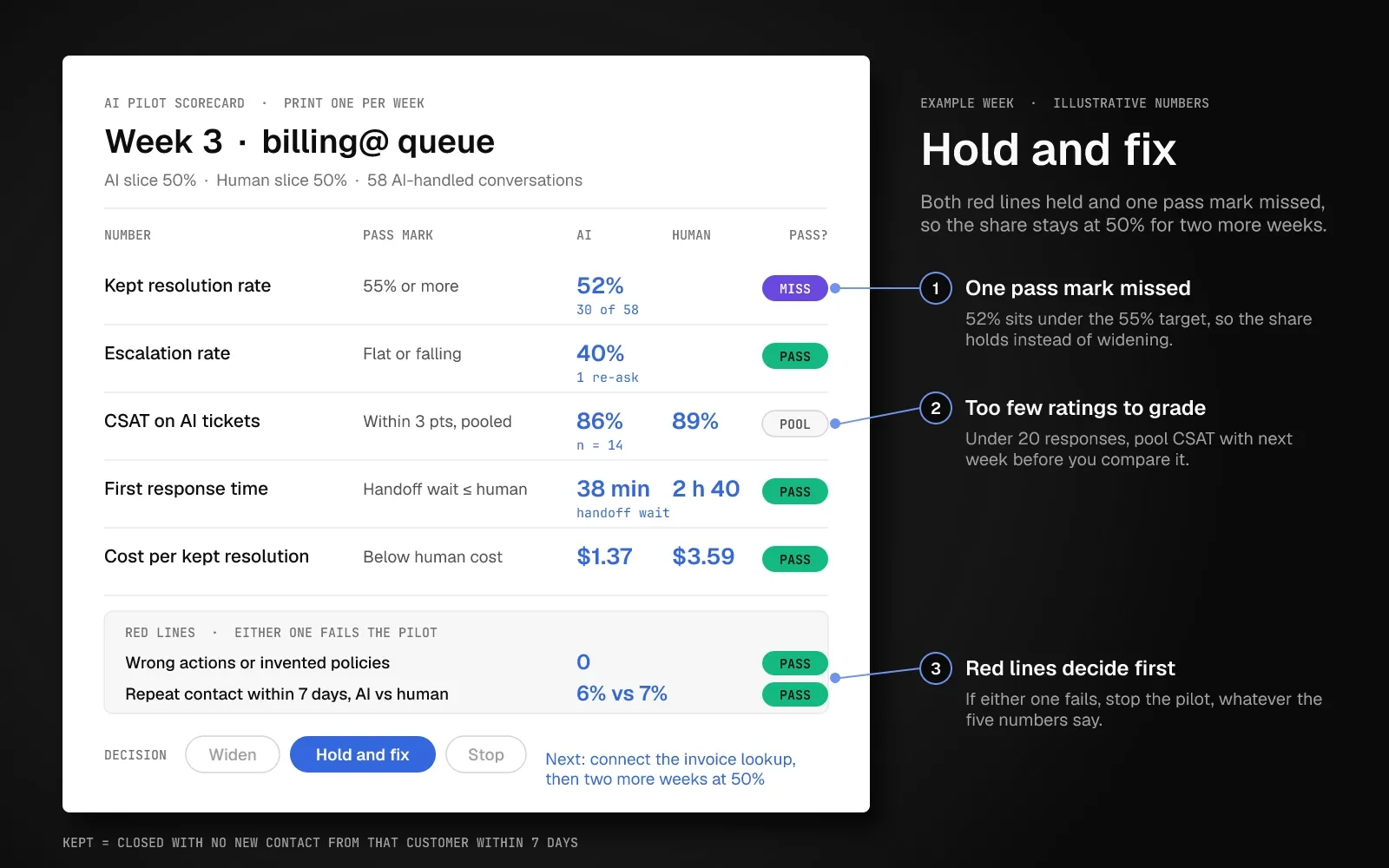
Don't grade a number on fewer than 30 conversations in a week, or CSAT on fewer than 20 responses. Pool two weeks instead. Small CSAT counts swing week to week, so confirm a gap of a few points on pooled weeks before you act.
On Zendesk, the bot rating works on messaging only and skips escalated conversations. Pair it with the ticket CSAT survey, which goes out on Suite Growth, Support Professional, and higher plans.
In Helply, analytics tracks response and resolution performance, AI resolutions, escalations, and customer feedback. Helply's audit trail shows each AI action behind those numbers and the reasoning for it.
What Does an AI Support Pilot Cost? Worked Math for One Queue
At 60% AI resolution and October 2026 list prices, AI spend for one 500-conversation queue ranges from $0.51 to $1.85 per kept resolution. Monthly AI spend runs from 139(118 billed annually) to $500, depending on the vendor and, for Helply, the credits each conversation uses.
The example covers an entire queue after the AI takes it all. Pilot months cost less because the AI handles at most half the queue. The assumptions:
- one queue of 500 conversations a month
- the AI resolves 60%, or 300 conversations
- 10% of those customers come back with a new conversation within seven days, leaving 270 kept resolutions
- for the Zendesk rows, five agents on Suite Professional
Your current help desk licenses remain the same across all routes, so the table shows only AI spend. Helply prices appear monthly, with annual billing in parentheses. Helply sizes a conversation at about 4 or about 7 credits, depending on the kind of support.
| Route | How the AI bills | AI spend a month | AI cost per kept resolution |
|---|---|---|---|
| Zendesk AI agents, listed committed rate | $1.50 per automated resolution after 50 included (10 per agent, five agents) | $375 | $1.39 |
| Zendesk AI agents, listed pay-as-you-go rate | $2.00 per automated resolution after 50 included (10 per agent, five agents) | $500 | $1.85 |
| Fin in Intercom | $0.99 an outcome, one charge per conversation at most | $297 | $1.10 |
| Fin on Zendesk | $49 floor covering 50 outcomes, then $0.99 each | $296.50 | $1.10 |
| Helply at about 4 credits a conversation | 2,000-credit block; credits per AI action, weighted 1, 4 or 12 | $139 ($118 billed annually) | $0.51 |
| Helply at about 7 credits a conversation | 4,000-credit block; same weights | $249 ($212 billed annually) | $0.92 |
| Helply at 12 credits on every conversation | 7,000-credit block; same weights | $399 ($339 billed annually) | $1.48 |
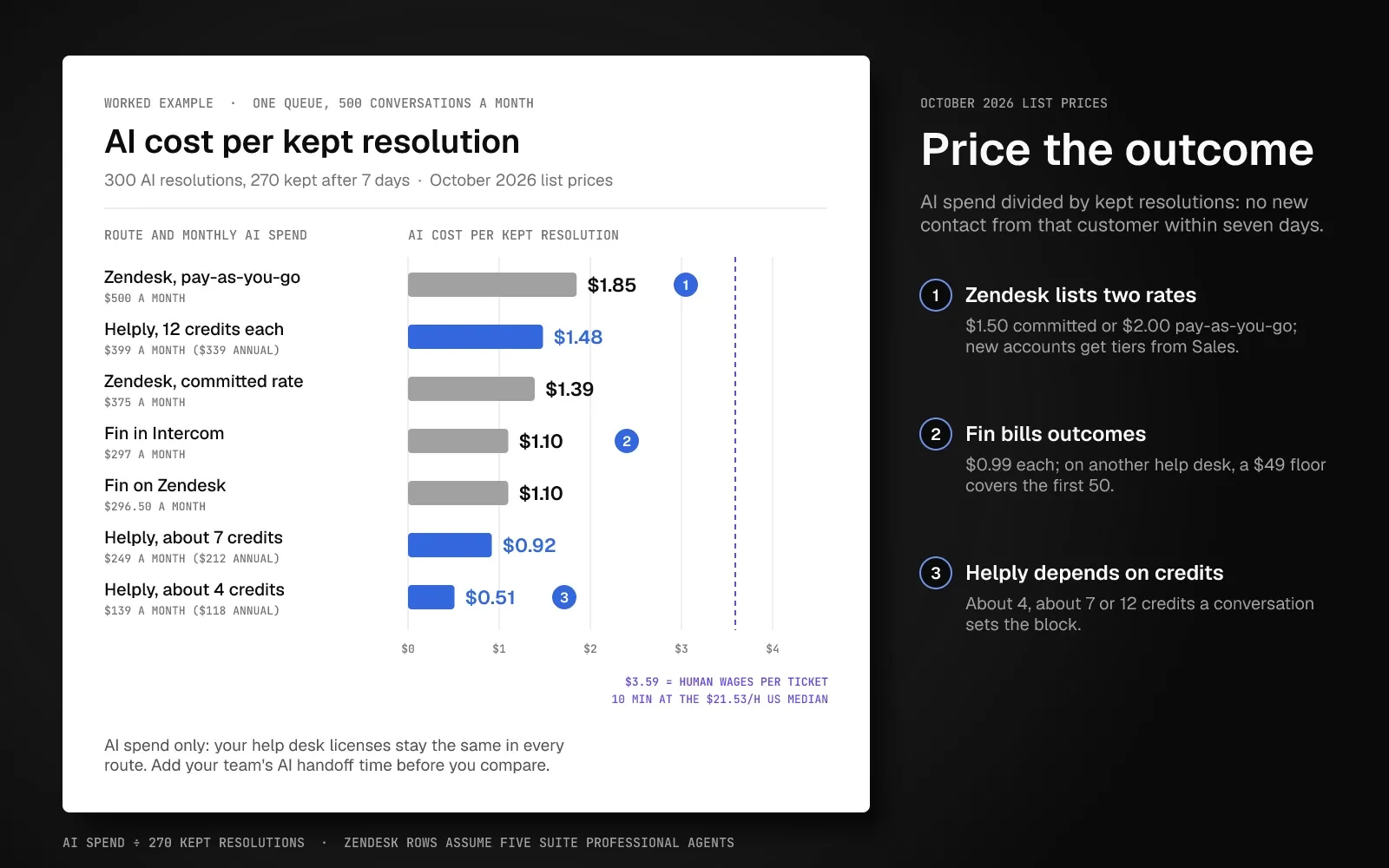
Read the table with four caveats:
- Zendesk's rate. Zendesk's pricing page lists $1.50 per committed resolution and $2.00 per pay-as-you-go resolution, with 10 included per Suite Professional agent. Since 18 May 2026, new accounts get automated resolution tiers with rates from Zendesk Sales, so treat those rows as a range check.
- Fin's other outcomes. Fin also bills procedure handoffs, disqualifications, and self-serve routing at $0.99, and refunds an outcome when its conversation reopens. In the base case, the 30 returning customers open new conversations, so Fin bills all 300 resolutions.
- Helply's credits. You pay credits for every conversation the AI touches, including the 200 handoffs, but never for retries, spam, or rejected drafts. Zendesk doesn't bill those handoffs, and Fin bills only procedure handoffs.
- Licenses after a full move. If you move all queues to Helply, you can retire your Zendesk or Intercom licenses. On every Helply plan, adding users never changes the bill.
US customer service reps earned a median of $21.53 an hour in May 2025, according to the Bureau of Labor Statistics. At a 10-minute handle time, that comes to $3.59 in wages per ticket, before benefits, tools, and management. Swap in your own handle time and loaded cost, and put the cost of your team's AI handoff time on the AI side.
When Should You Widen the Pilot, and When Should You Stop?
Widen toward a full rollout when both red lines hold for two weeks running, and all five numbers meet their pass marks. Hold and fix for two more weeks when the red lines hold, but a number misses its pass mark. Stop the day a wrong action or invented policy reaches a customer, or when the two-week repeat-contact rate exceeds the human slice's.
Write the rule before week 1, share it with the vendor, and read it out at the week-5 meeting.
In June 2025, Gartner predicted that companies would cancel more than 40% of agentic AI projects by the end of 2027. It cited rising costs, unclear business value, and weak risk controls. With a written widen-or-stop rule, you answer the value question for one queue before costs grow.
| Decision | When | Next step |
|---|---|---|
| Widen | Both red lines held two weeks running, and all five numbers met their pass marks | Pick one change: raise the share one step (50% to 80%) or add one ticket type. Repeat the two-week check until the AI takes the full queue. |
| Hold and fix | The red lines held but a number missed its pass mark | Fix the top cause, such as a missing article, a rule, routing or data the AI can't reach. Run two more weeks at the same share. |
| Stop | A wrong action or invented policy reached a customer, or the AI slice's two-week pooled repeat-contact rate ran above the human slice's | Switch the AI off on that queue the same day, write down why, and decide whether a narrower queue deserves a second pilot |
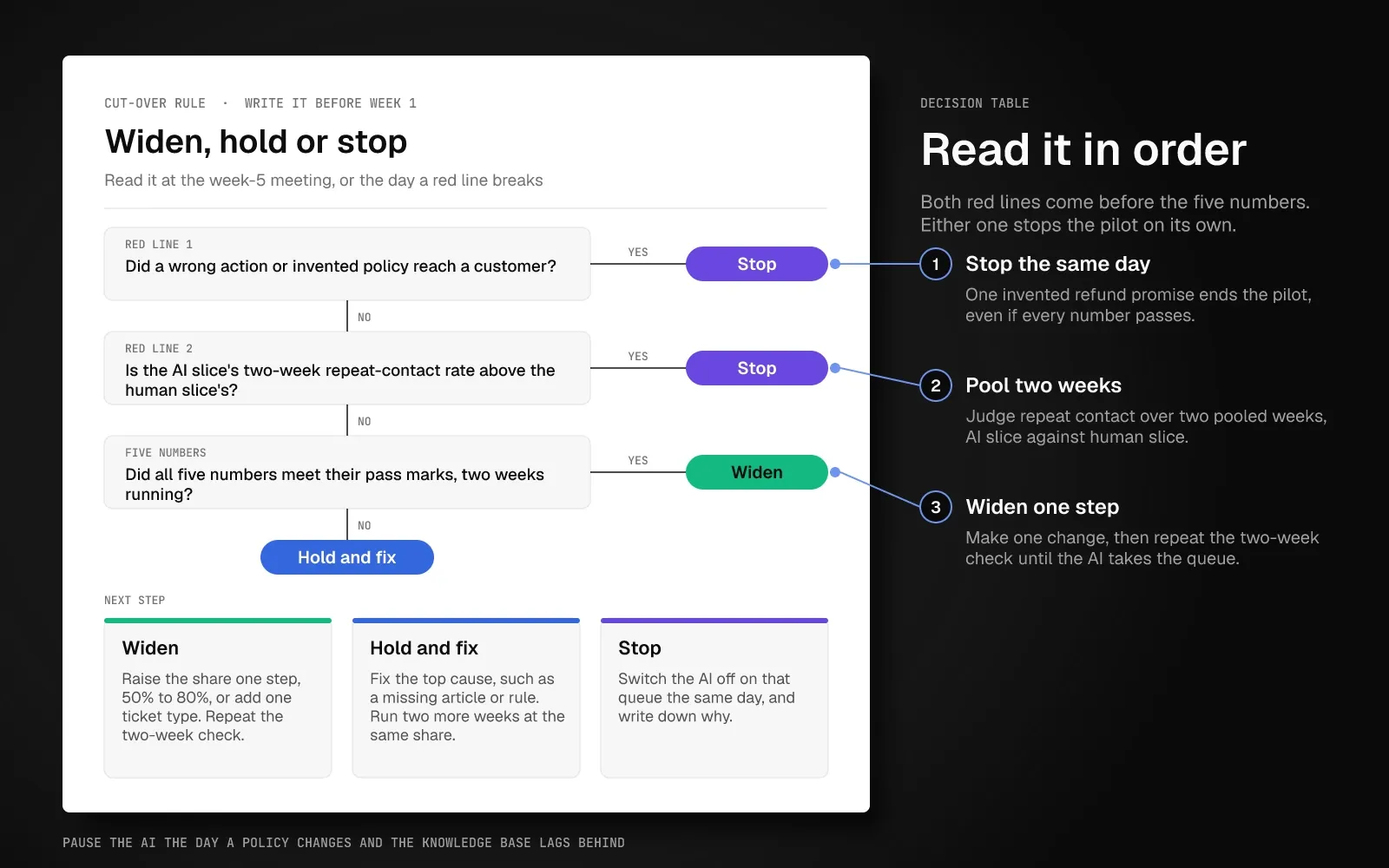
If a policy changes and the knowledge base lags behind, pause the AI that day rather than waiting until week 5. Resume once the articles match the new policy and the topic passes a draft check.
When Is It Time to Cut Over From Zendesk or Intercom?
A beside pilot ends with a second decision: whether the remaining queues move too. Wait for all of these:
- two clean weeks in a row at half the queue or more
- a written scope and escalation rules for each queue you plan to move
- supported history and knowledge brought across and reviewed in Helply, using the Zendesk or Intercom migration steps that let you validate first
- response and resolution targets set, with warnings before a breach
- every remaining channel connected and tested with a real message
- the old help desk kept open for lookups for a set window after each move
Move the queues one at a time and keep running the scorecard. Proposify's CSAT held steady through its full move off Zendesk. On Enterprise plans, Helply includes dedicated migration.
Should Your AI Support Pilot Run Inside Zendesk or Intercom, or Beside Them?
Pilot inside if your help desk works and only the AI is in question. Zendesk bills per automated resolution and Fin charges $0.99 per outcome.
Pilot beside if the help desk is part of the question, since you can test both with one mailbox in a second tool. Past the 14-day trial, you pay for both tools while the pilot runs.
On the beside route, you move one mailbox to Helply and start its AI on drafts. You decide when a person steps in through escalation rules, and analytics show AI resolutions, escalations, and customer feedback for the scorecard. Reviewers can trace each AI action in the audit log, so the team that remembers the last chatbot sees what this one does.
Before Helply, Gatekeeper Press ran human-only support. Its CEO and founder, Rob Price, said Helply "took everything we'd learned over the years and turned it into support that runs itself, takes action, and warns us early. Our authors move faster, and my team isn't buried."
Half of a 500-conversation queue needs the 1,200-credit block if each conversation takes about 4 credits, or the 2,000-credit block if each conversation takes about 7 credits. Those blocks cost $99 and $139 a month ($84 and $118 billed annually), and every plan has unlimited users.
This week, pull the queue's four-week baseline and write your widen-or-stop rule, then connect one mailbox with the AI on drafts.
Frequently asked questions
After a setup week, plan four pilot weeks and a reading week: one week of drafts or tests, then three weeks answering customers. That outlasts the 14-day trials for Fin and Helply, and the reading week lets the 7-day repeat-contact check finish.
Track kept resolution rate (no new contact in seven days), escalation rate, AI-handled CSAT, first response time and cost per kept resolution. Add two red lines: zero wrong actions or invented policies, and a repeat-contact rate no higher than the human-only slice's.
Plan on at least 200 AI-handled conversations, which puts a measured 60% resolution rate within about ±7 points at 95% confidence. At 100, the margin widens to about ±10 points. On a 25%, 50%, 50% ramp, you reach 200 with a queue of about 160 a week.
No: in week 1, keep the AI in shadow mode, on drafts or test runs that only your team sees. In week 2, let it answer a quarter of the queue if no draft or test answer invented a policy.
Start with drafts or tests, give the AI 25% of the queue in week 2, then half in weeks 3 and 4. After two clean weeks, widen one step at a time until the AI takes the full queue.
Yes: Zendesk includes AI agents in every Suite and Support plan, and Fin works on Zendesk from $49 a month, including 50 outcomes. To limit either to one queue, set the Zendesk email agent's trigger to one address, or edit Fin's assignment trigger.
Yes, as a separate help desk on one slice of the queue, such as a billing@ inbox. Helply replaces Zendesk and Intercom rather than integrating with them, so the pilot ends with a cut-over decision.
A holdout group is the pilot's human-only slice: a share of the same queue, ideally on the same channel, that only people answer. Keep at least 20% of the queue there, so you can tell an AI gain from a quiet week.
Add the cost of your team's time on AI handoffs to the month's AI spend for the queue. Divide that by kept resolutions, the ones with no new contact within seven days. Excluding handoff time, Fin's 300 outcomes on a 500-conversation queue cost $297 at $0.99, or $1.10 for each of 270 kept resolutions.
A trial tests the software, while a pilot tests your queue against a baseline, a human-only slice and written pass marks. A pilot of four weeks plus a reading week outlasts a 14-day trial, so plan its budget up front.
Stop the day a wrong action or invented policy reaches a customer, or when the two-week repeat-contact rate exceeds the human-only slice's. Pause the AI when a policy changes and your help articles still describe the old one.
About the author

Tom Morkes
Head of Growth, OptimizeCX


