Key Takeaways
- An SLA defines the expected service level (response time, resolution time, uptime), the metrics used to measure it, and the penalties when commitments are missed.
- There are three SLA types: customer-based, service-based and multilevel, plus internal SLAs between teams. Companies with several pricing plans usually need a multilevel SLA with priority tiers..
- AI is changing how teams keep SLAs. Gartner found 85% of customer service leaders planned to explore or pilot conversational GenAI with customers in 2025. By 2029, Gartner expects agentic AI to handle 80% of common service issues with no human involved.
- The most common SLA mistakes, including setting targets once and never revisiting them, tracking too many metrics, and excluding agents from planning, can be prevented with quarterly reviews and automation.
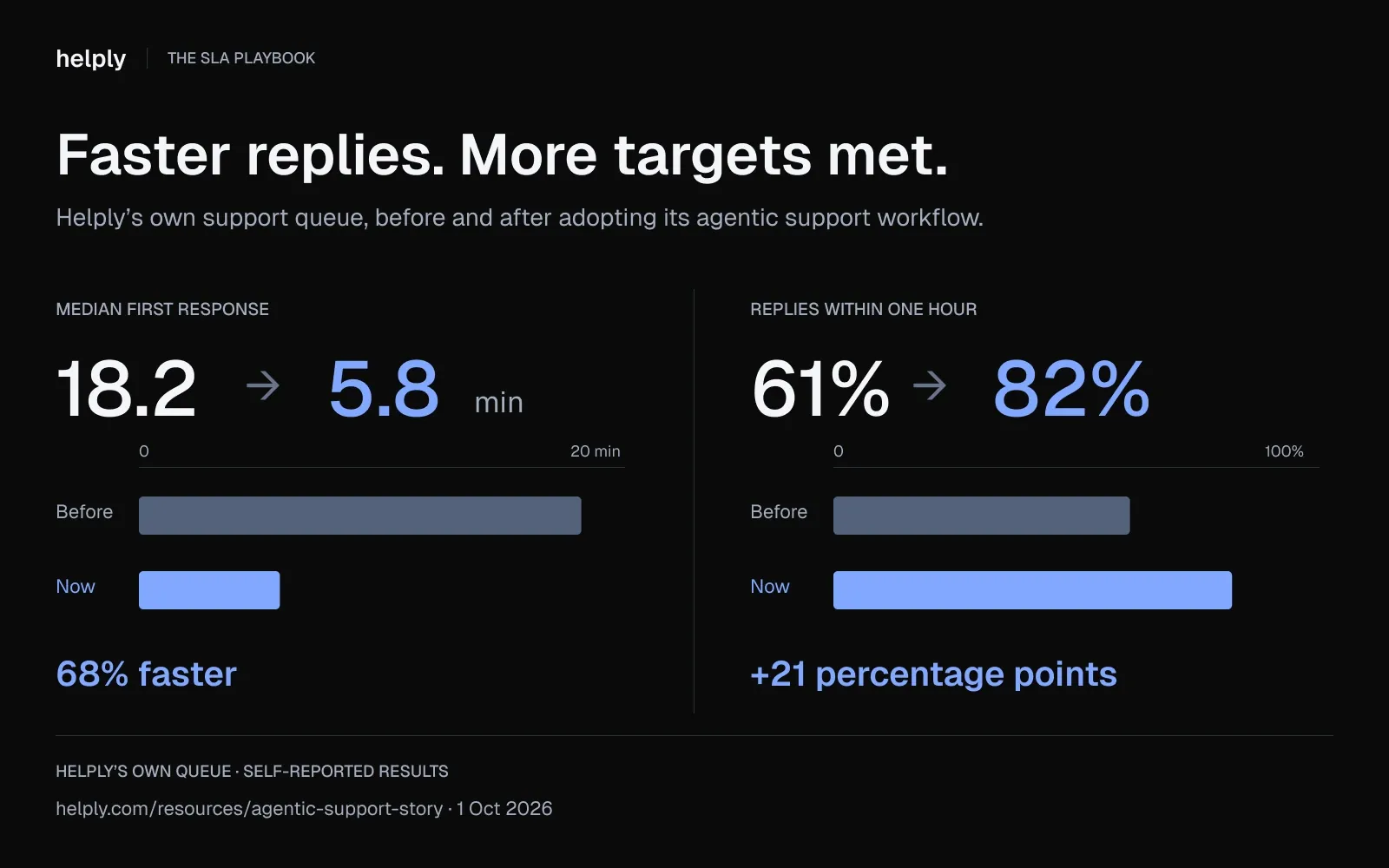
- AI helps you keep an SLA by answering routine requests at any hour. Helply's own two-person team cut median first response from 18.2 to 5.8 minutes, and 82% of replies now land inside its one-hour target.
A service level agreement (SLA) is a contract between a service provider and a customer that defines the expected level of service, the metrics used to measure performance, and the remedies or penalties that apply when commitments are not met. SLAs are used in customer support, IT services, and cloud computing to set clear expectations and ensure accountability.
SLAs exist between vendors and external customers, but they also operate between internal departments. A support team and an engineering team might agree that escalated bugs get acknowledged within two business hours.
An IT department and an HR team might agree on a 24-hour turnaround for access provisioning requests. These internal agreements, sometimes called Operational Level Agreements (OLAs), support the external SLA by ensuring every link in the service chain has its own commitment.
For support teams, SLAs turn "good support" into numbers a customer can hold you to.
A missed SLA costs something. For a software company it can put a renewal at risk, and for an online store it can cost the next order.
Why SLAs Matter in Customer Service
SLAs create accountability in both directions. The provider commits to a measurable standard, and the customer commits to reasonable expectations. Without that contract, "fast support" means something different to every stakeholder in the room.
The stakes go beyond satisfaction scores. SQM Group's call-center research found that when an issue is resolved on first contact, 95% of customers keep doing business with the company.
That makes first-contact resolution (FCR) a retention lever. An SLA with an FCR target measures your ability to keep customers.
First-contact resolution (FCR) is not just a metric; it is a retention mechanism. When your SLA framework includes FCR targets, you are directly measuring your ability to keep accounts.
SLAs also protect revenue. A breached SLA on a high-value customer close to renewal is an early warning, so treat it as one. Internal SLAs keep support, customer success and engineering working to the same commitments.
From a legal perspective, well-drafted SLAs include indemnification clauses, service credit mechanisms, and termination conditions that protect both parties.
SLAs measure speed, and they also say something about customer health. A ticket resolved after the SLA window can still cost you a customer who was already unhappy. The strongest support teams track SLA compliance next to the customer's history.
3 Types of Service Level Agreements (+ Internal SLAs)
There are three standard SLA types.
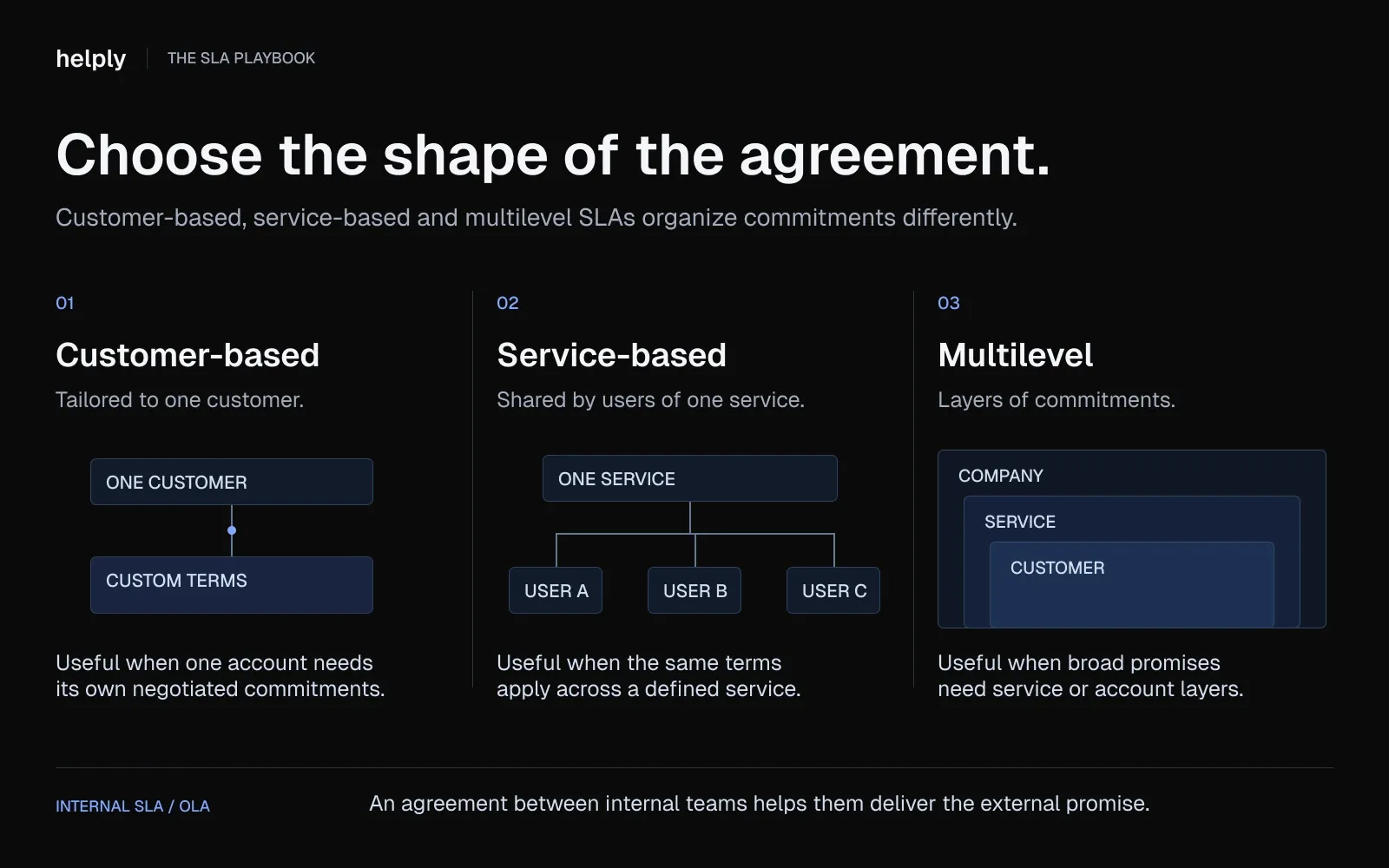
Each serves a different use case, and most companies with more than one pricing plan use a combination.
- Customer-based SLA. A custom agreement tailored to a single customer. Example: an enterprise account negotiates a 1-hour P1 response time, dedicated account manager, and 99.99% uptime as part of their annual contract. Customer-based SLAs are common in enterprise sales where contract value justifies the customization.
- Service-based SLA. A single standard applied to all customers using a specific service tier. Example: every customer on the Growth plan gets the same 4-hour first-response commitment and 99.9% uptime guarantee. Service-based SLAs are simpler to manage and scale, but they lack flexibility for high-value accounts.
- Multilevel SLA. A tiered structure that combines company-wide, service-specific, and customer-specific commitments. Example: the company commits to 99.9% uptime for all customers, but Enterprise accounts get 1-hour P1 response, Growth accounts get 4-hour P1 response, and Free accounts get 24-hour response. This is the most common structure for companies with several pricing plans.
A fourth practical type is the internal SLA, also called an OLA. This is an agreement between two departments that supports the external SLA.
Example: the engineering team agrees to acknowledge escalated bugs within 2 business hours so that support can meet its 4-hour resolution commitment to customers. Without internal SLAs, external SLAs become promises with no mechanism behind them.
Key Components Every SLA Should Include
An SLA is only as strong as its specificity. Vague commitments like "we will respond quickly" are not enforceable and erode trust. Every SLA should include the following components, each written in measurable terms.
- Service description and scope. Define exactly what is covered (email support, live chat, phone) and what is excluded (custom development, third-party integrations). Ambiguity here causes many SLA disputes.
- Performance metrics and SLOs. Specify the metrics that define success: first-response time, resolution time, uptime percentage, and any service-level objectives (SLOs) that sit beneath the SLA.
- Priority tiers and escalation procedures. Define P1 through P4 tiers based on business impact, and document the escalation path for each tier when targets are at risk.
- Stakeholder roles and contact points. Name the responsible parties on both sides. Include escalation contacts, not just frontline agents.
- Exclusions. Force majeure, scheduled maintenance windows, and customer-caused delays should all be explicitly excluded from SLA calculations.
- Security and compliance standards. Include data handling commitments, SOC 2 references and GDPR requirements where they apply.
- Penalties, service credits, and earn-backs. Define the financial consequence of a breach, usually a service credit worth a percentage of monthly fees, plus earn-back terms for sustained compliance.
- Indemnification clause. Indemnification clause. Who pays if the service failure causes downstream losses. This protects both parties from disproportionate liability.
- Review cadence and amendment process. SLAs are living documents. Specify how often they are reviewed (quarterly is the standard) and how changes are proposed and approved.
- Termination conditions. Define the notice period, exit procedures, and data portability commitments if either party ends the agreement.
What Happens When an SLA Is Breached?
The most common breach remedy is a service credit: a percentage of the monthly fee, returned to the customer. AWS, for example, credits 10% when monthly EC2 uptime falls below 99.99%, and 30% below 99.0%.
Credits lose their force when a contract carries many SLAs. Mike Fuller of The Hackett Group gave CIO.com an example. With 65 SLAs and 10% of fees at risk, one breach earns a credit of 1/65th of 10%.
Beyond credits, breaches can trigger license extensions, priority support upgrades, or contract renegotiation rights.
The most effective SLAs also include an earn-back clause. If the provider meets the target for a set period, such as two consecutive months, it recovers the credits already issued. This rewards sustained performance.
Customer Service SLA Example You Can Copy
Use this sample as a starting point, then replace the targets with numbers from your own help desk history.
Customer service SLA between [Company] and [Customer]
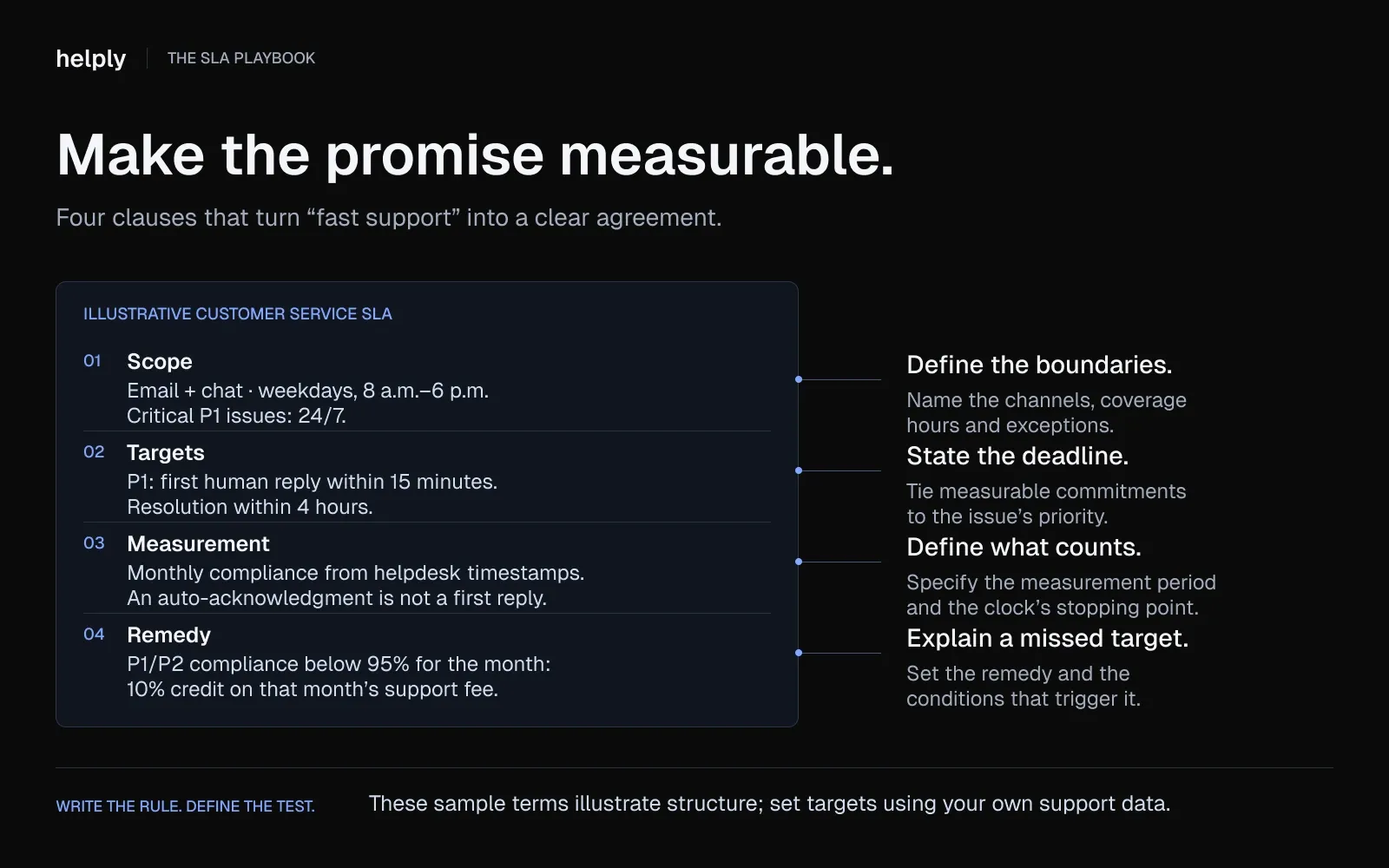
- Scope. Support by email, chat, and Slack, Monday to Friday, 8 a.m. to 6 p.m. in the customer's time zone. Critical (P1) issues are covered around the clock.
- Priority tiers. P1 critical (service down), P2 major (key feature broken, no workaround), P3 minor (workaround exists), P4 question or request.
- First response targets. 15 minutes for P1, 1 hour for P2, 4 hours for P3 and 24 hours for P4.
- Resolution targets. 4 hours for P1, 8 hours for P2, 48 hours for P3 and 5 business days for P4.
- Measurement. Compliance is measured monthly from help desk timestamps. The response clock stops at the first human reply, not an automatic acknowledgment.
- Exclusions. Scheduled maintenance is announced 48 hours ahead, and time is spent waiting for the customer.
- Remedy. If monthly compliance for P1 or P2 tickets falls below 95%, the customer receives a credit of 10% of that month's support fee.
- Earn-back. The credit is waived if compliance stays above target for the next two months.
- Review. Both parties review targets and results every quarter.
In Helply, you can set these response and resolution targets as SLA rules. Conversations are prioritized, so your team sees which ones need attention before an SLA is missed.
Essential SLA Metrics Every Support Team Should Track
Metrics are the backbone of any SLA. Without measurable targets, an SLA is just a statement of intent. These are the metrics that matter most for support teams, with current benchmarks.
- First response time. The time between ticket creation and the first human reply, and the metric customers notice first. Peak Support's 2024 KPI research found the best companies respond within two minutes. Jitbit estimates a top-5% response time in 2026 is closer to 5 to 10 minutes.
- Resolution time. The time from ticket creation to confirmed resolution. Varies by priority tier. P1 targets typically range from 1 to 4 hours; P4 targets from 24 to 72 hours.
- First-contact resolution (FCR). The percentage of tickets resolved in a single interaction. SQM Group's call-center benchmark rates 70 to 79% as good and 80% or higher as world-class. Only 5% of call centers reach 80%.
- Uptime and availability. Measured in "nines." 99.9% uptime allows 8.7 hours of downtime per year. 99.99% allows 52 minutes. For software companies, 99.9% is the usual floor, and enterprise contracts often ask for 99.99%.
- Abandonment rate. The percentage of customers who leave a queue before getting help. Critical for chat and phone channels. For phone queues, SQM Group treats a rate above 5% as too high.
- CSAT score. The qualitative counterpart to speed metrics. A team can hit every SLA target and still have unhappy customers if resolution quality is low.
What SLA Response Times Should a Support Team Aim For?
Response time targets should scale with business impact. A practical priority matrix:
| Priority | Description | Response Target | Resolution Target |
|---|---|---|---|
| P1 (Critical) | System down, revenue impact, all users affected | 15 minutes | 4 hours |
| P2 (Major) | Major feature broken, no workaround, multiple users | 1 hour | 8 hours |
| P3 (Minor) | Minor issue, workaround available, limited impact | 4 hours | 48 hours |
| P4 (Low) | Question, feature request, enhancement idea | 24 hours | 5 business days |
These are starting points, not universal standards. Pull your historical data before setting targets.
If your current average P1 response time is 45 minutes, setting a 15-minute target without adding resources or automation will produce breaches, not improvement.
Response Time vs. Resolution Time: Why the Difference Matters
Response time measures when you acknowledge. Resolution time measures when you fix. Teams mix the two up often, and it causes real problems.
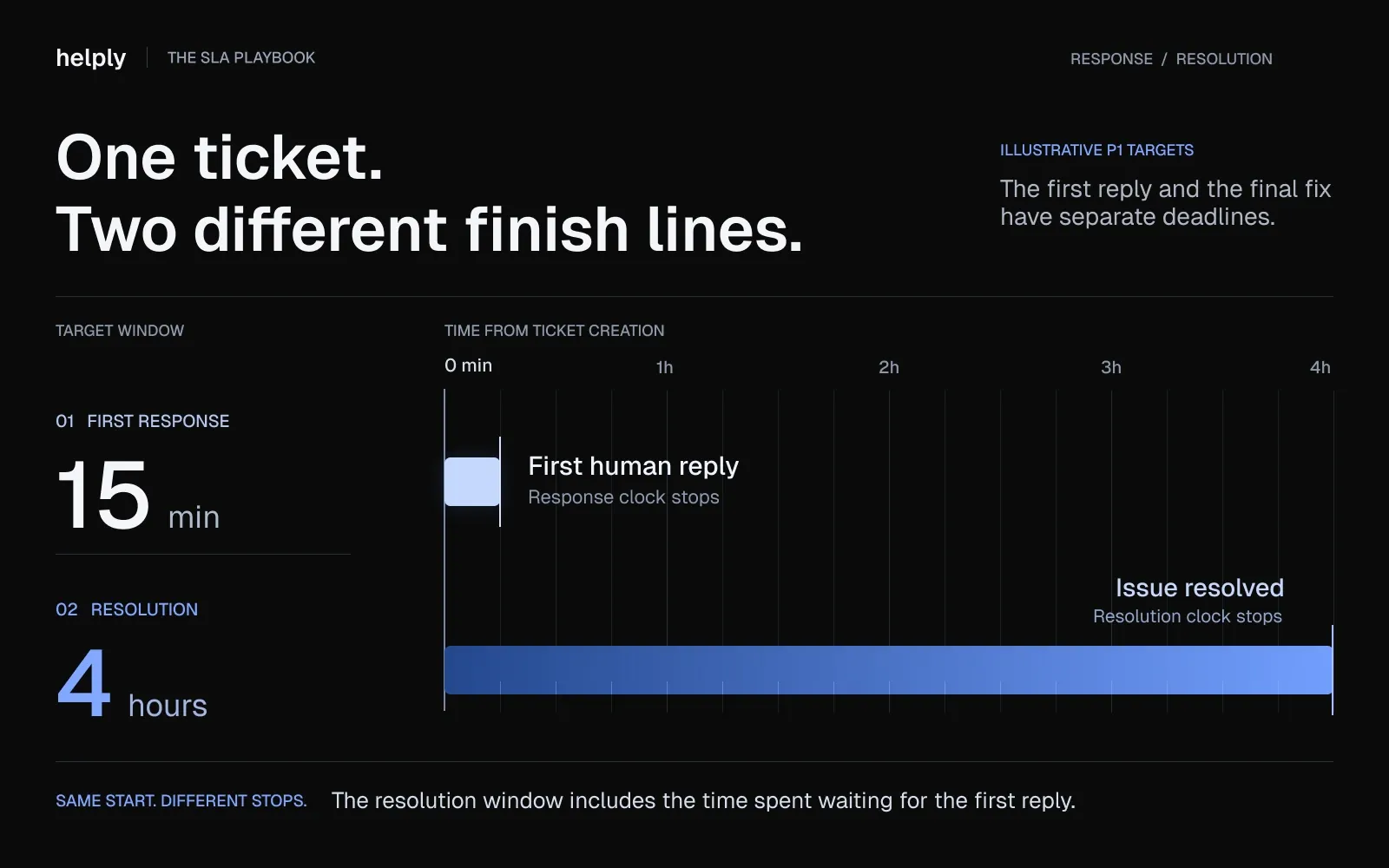
A team that auto-replies to every ticket in 30 seconds can claim a 30-second response time while customers wait hours for an actual answer.
Track both. Response time tells you how quickly customers feel heard. Resolution time tells you how quickly their problem is actually solved. Tracking only one creates false confidence. A 5-minute response time means nothing if resolution takes three days.
In Helply, you set response and resolution targets, and conversations are prioritized so you see what needs attention before an SLA is missed.
SLA vs KPI vs OLA: What's the Difference?
These three acronyms overlap but serve different functions. Confusing them leads to tracking the wrong things and making commitments you cannot enforce.
An SLA is an external commitment to a customer. It defines what the customer can expect and what happens if the provider falls short.
A KPI is an internal metric used to measure whether the team is on track to meet SLA targets. An OLA is an internal agreement between departments that supports the SLA.
Example: The SLA says P1 tickets get a 4-hour resolution. The KPI tracks average resolution time weekly. The OLA says engineering acknowledges escalated bugs within 2 hours so support has time to resolve within the 4-hour window.
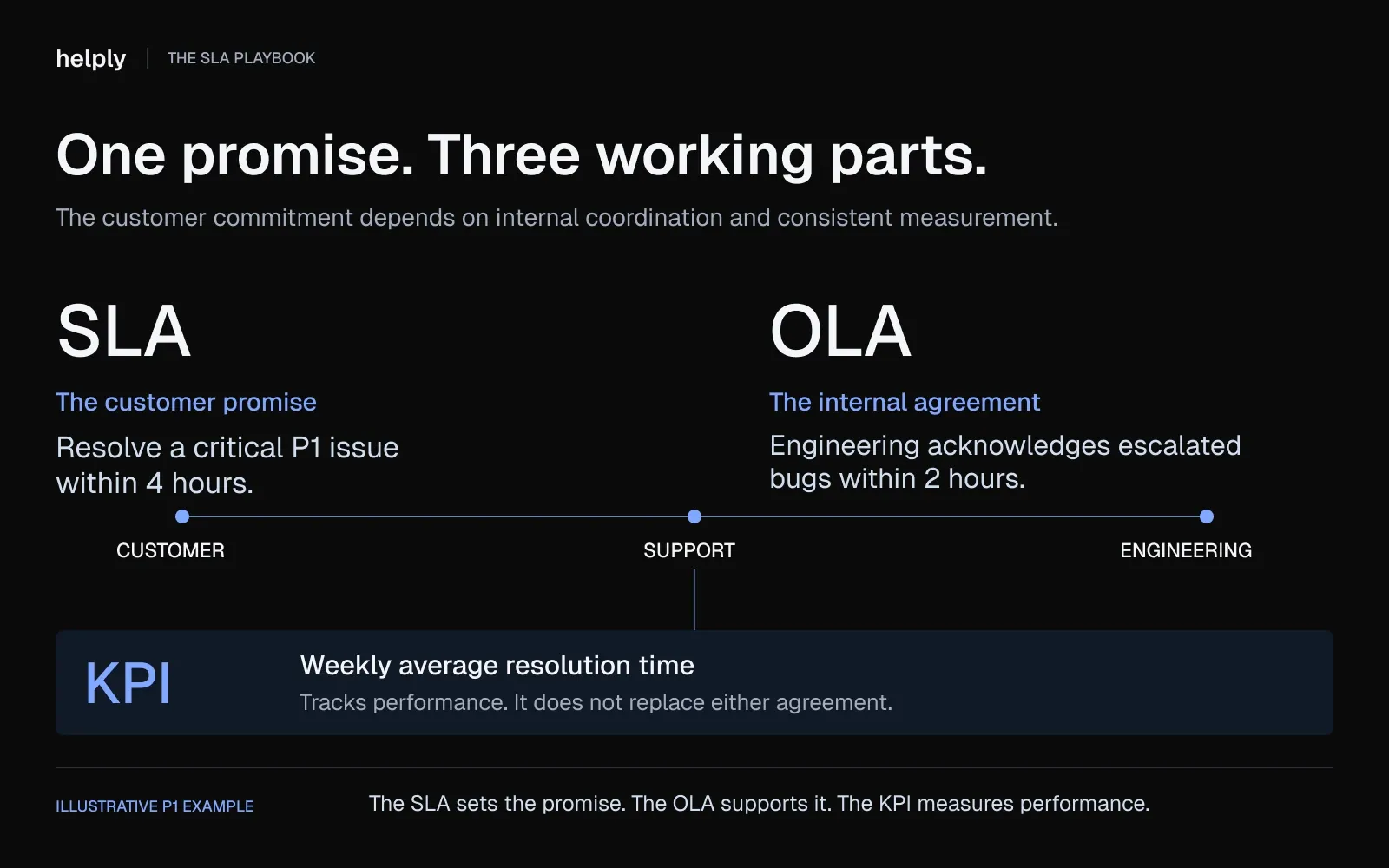
All three work together. Without the OLA, engineering delays cause SLA breaches that no amount of KPI tracking will prevent.
| SLA | KPI | OLA | |
|---|---|---|---|
| What it is | External contract with customer | Internal performance metric | Internal agreement between teams |
| Who's involved | Provider + Customer | Internal team / leadership | Two internal departments |
| Example | P1 response in 1 hour | Average first response: 12 min | Eng acknowledges bugs in 2 hrs |
| Consequence | Service credits / penalties | Performance review impact | Workflow bottleneck / SLA miss |
| Review cadence | Quarterly / at renewal | Weekly / monthly | Quarterly |
How to Create an SLA for Your Support Team
Creating an SLA from scratch is not complicated, but it requires input from multiple stakeholders and data from your existing operations.
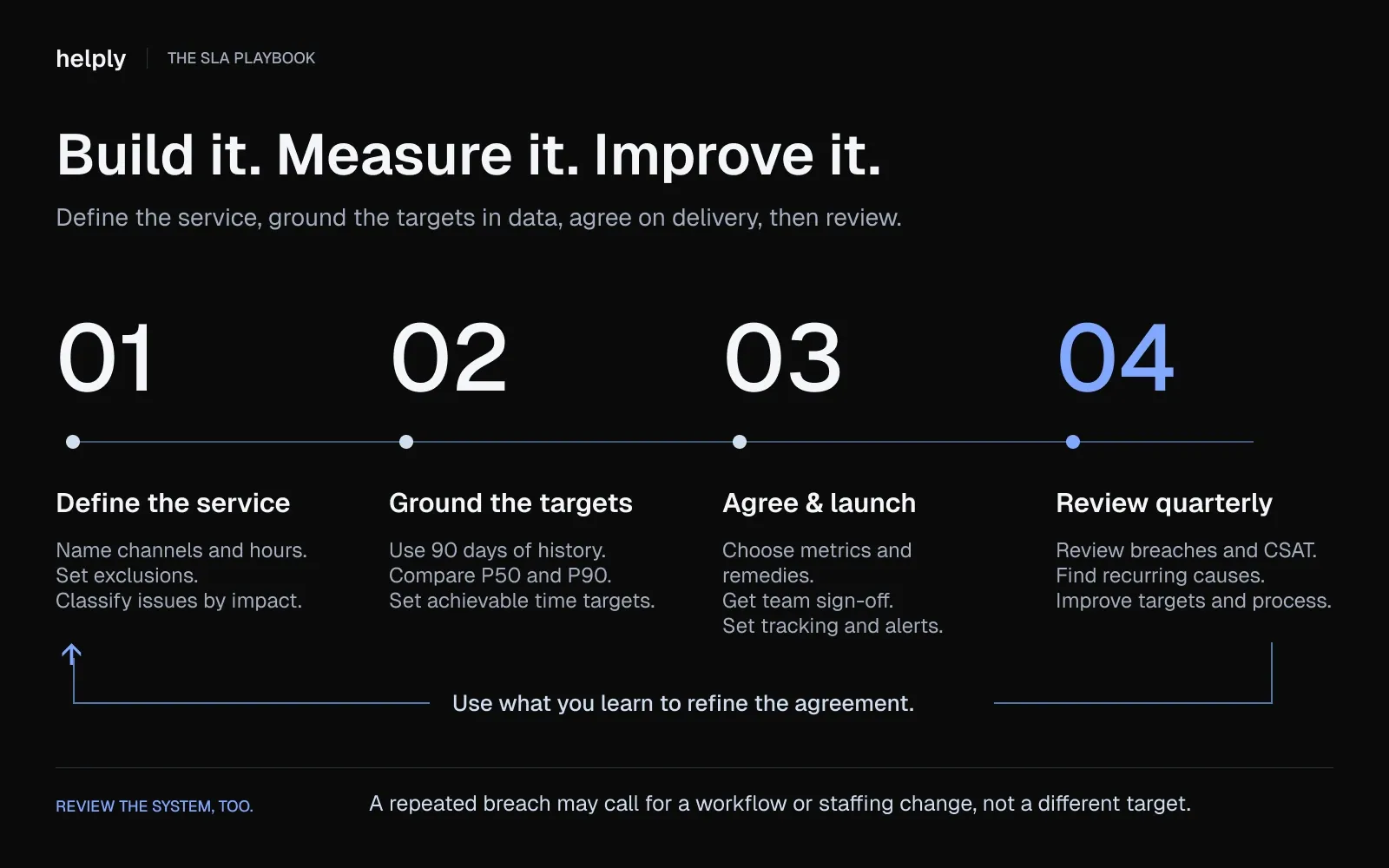
These seven steps produce an SLA that is realistic, enforceable, and improvable.
- Define your service scope. Document which channels are covered (email, chat, phone, Slack), your operating hours, and what falls outside the agreement. If you do not offer phone support, say so, because ambiguity invites disputes.
- Set priority tiers based on business impact. Set priority tiers based on business impact. Define P1 through P4 using clear criteria tied to revenue impact and user scope, not subjective urgency. A system outage for a large customer is P1, and a single user's UI question is P4.
- Choose your metrics. Start with first-response time, resolution time, and FCR. Add uptime and CSAT if your tooling supports it. Do not track 15 metrics. Track 3-5 that directly correlate with customer retention.
- Set realistic targets using historical data. Pull the last 90 days from your helpdesk. Find your P50 and P90 response and resolution times. Set SLA targets between those two numbers. Aspirational targets without a path to achieve them just guarantee breaches.
- Document penalties and remedies. Specify service credits as a percentage of monthly fees, escalation paths for repeated breaches, and earn-back terms for sustained compliance. Both parties should understand the financial consequences before signing.
- Get stakeholder sign-off. Support, customer success, engineering, and leadership all need to review and approve. An SLA that support cannot meet because engineering will not commit to escalation timelines is a broken contract before it starts.
- Schedule quarterly reviews. SLAs are living documents. Ticket volume changes. Team size changes. Customer expectations shift. Review breach rates, average response times, and CSAT scores every quarter and adjust targets accordingly.
How Do I Set Up SLAs in My Helpdesk Tool for the First Time?
Start small. Configure 2-3 SLA rules covering your two highest-priority tiers (P1 and P2) with first-response and resolution targets.
Use automation from day one: set up breach alerts, automatic escalation, and real-time SLA timers so compliance is tracked without manual effort. You can always add complexity later; starting with 20 rules creates alert fatigue and false urgency.
You set SLA targets and escalation rules in the Helply help desk. Assignment rules route each conversation to the right person or team. Every plan has unlimited users.
There is no configuration overhead or per-seat cost to start tracking compliance.
7 Common SLA Mistakes (and How to Avoid Them)
Most SLA failures are not caused by unreasonable customers. They are caused by preventable design and management errors.
- Setting SLAs once and never revisiting them. Ticket volume changes. Team size changes. Product complexity evolves. An SLA written 18 months ago is almost certainly misaligned with current reality. Quarterly reviews are non-negotiable.
- Unrealistic targets set without agent input. Leadership sets a 15-minute P1 response target. Agents know the average is 45 minutes and there is no staffing plan to close the gap. Involve frontline agents in target-setting because they know where bottlenecks live.
- Too many SLAs. With 65 SLAs, one breach earns a credit of 1/65th of 10% of the monthly fee, as The Hackett Group's example shows. Fewer, focused SLAs mean clearer accountability and credits that matter.
- Unclear language. "Resolve quickly" is not a metric. "Resolve P2 issues within 4 business hours" is. Every target in the SLA should be measurable, time-bound, and free of subjective terms.
- Manual tracking. Spreadsheet-based SLA tracking misses breaches in real time. By the time someone updates the sheet, the customer has already escalated. Use automated SLA timers and breach alerts in your helpdesk.
- Confusing response with resolution. An auto-reply is not a resolution. Teams that count automated acknowledgments as "first response" inflate their metrics while customers wait for a real answer. Track both response and resolution separately.
- No escalation path. When an SLA is about to breach, the system should alert a senior agent or manager automatically. Waiting for someone to notice an aging ticket is how P1 breaches happen.
How AI Is Transforming SLA Management in 2026
AI is changing how support teams meet and track SLA commitments. In McKinsey's 2026 State of AI survey, nearly nine in ten respondents report regular AI use in at least one business function.
Gartner found that 85% of customer service leaders planned to explore or pilot customer-facing conversational GenAI in 2025.
AI changes SLAs in four specific ways.
Predictive breach prevention
Traditional SLA management is reactive: you get an alert when a timer expires. AI-powered systems monitor ticket volume, backlog aging, agent capacity, and historical patterns to forecast breaches hours before they happen.
The shift is from "this ticket just breached" to "these 12 tickets will breach in the next hour unless you reroute or reprioritize."
AI-drafted replies that cut first-response time
AI drafts replies with the customer's context loaded, from the knowledge base, account history and past conversations. The agent reviews and sends instead of starting from a blank page, so the SLA clock stops sooner.
On Helply's own queue, 64% of conversations now include substantive work by an AI agent.
Autonomous resolution for routine tickets
Password resets, billing questions and how-to questions with documented answers don't need a person. AI agents can resolve them end to end.
Gartner predicts that by 2029, agentic AI will resolve 80% of common customer service issues without human intervention. Each ticket an AI agent resolves is one that can't breach an SLA.
Early warnings from every conversation
Some of the most useful SLA signals never show up on a timer. A customer writing in for the third time this week is at risk even when every reply lands on time.
AI can read every conversation for those signals. In Helply, the Churn Agent watches for frustration, recurring issues and sentiment changes, then alerts the right teammate or updates the customer record.
Can AI Help My Support Team Avoid SLA Breaches?
Yes. AI prevents breaches in three ways.
First, intelligent routing assigns tickets to the right agent based on skill, availability, and workload, eliminating misroutes that eat into SLA time.
Second, AI-drafted replies remove blank-page time so agents respond faster with better context.
Third, predictive alerts flag at-risk tickets before breach, giving managers time to reroute or reprioritize.
What Happens to SLAs When AI Clears the Queue
When AI agents handle routine requests, your team's SLA targets become easier to meet. Your people keep their hours for the cases where a human call matters.
Helply runs its own support this way. Its two-person team supports roughly 1,400 customers. Median first response fell from 18.2 to 5.8 minutes, and replies inside the one-hour target rose from 61% to 82%.
Helply charges a plan price with unlimited users. AI work draws credits by effort, and a lookup across one or two systems costs 4. Adding a person to cover a busy shift doesn't change the bill.
SLA Best Practices for Support Teams
These eight practices separate functional SLAs from effective ones.
- Set targets you can actually hit. Start conservative using historical data. Tighten quarterly as processes improve and automation kicks in. Aspirational targets without a path to achieve them just produce breaches.
- Involve agents in target-setting. Frontline agents know where bottlenecks live. They know which ticket categories take 30 minutes and which take 3 hours. Targets set without their input are guesses.
- Differentiate by priority tier. P1 and P4 should never share the same response target. A system outage and a feature request are not the same level of urgency.
- Automate SLA tracking. Real-time timers, breach alerts, and automatic escalation triggers eliminate the manual overhead that causes missed breaches.
- Review quarterly with data. Pull breach rates, average response and resolution times, and CSAT scores side by side. Look for patterns. If P2 breaches spike every month-end, that is a staffing problem, not an SLA problem.
- Track SLAs alongside CSAT. Speed without quality is just fast disappointment. A team that hits every response target but delivers poor resolutions is meeting the letter of the SLA while violating its intent.
- Be transparent with customers. Publish your SLA targets on your support portal. Transparency builds trust and sets expectations before a ticket is even filed.
- Set internal SLOs stricter than external SLAs. If the SLA promises a 4-hour resolution, aim for 2 hours internally. The buffer absorbs spikes without breaching customer commitments.
Conclusion
An SLA turns vague support expectations into measurable, enforceable commitments.
The best SLAs are tiered by priority, reviewed quarterly and tracked automatically. They sit next to CSAT and the customer's history, so a fast reply that misses the point still shows up.
Teams that treat SLAs as working systems, and revisit them as volume changes, keep more customers. Start a 14-day Helply trial with 1,000 credits, or book a demo to see SLA rules and AI agents at work.
Frequently asked questions
SLA stands for service level agreement. It is a contract that defines the expected level of service between a provider and a customer, including performance metrics like response time and uptime, and the remedies or penalties that apply when commitments are not met.
The three types are customer-based (tailored to a single account), service-based (same standards applied to all customers of a specific service tier), and multilevel (tiered commitments across different plans, departments, or account segments).
An SLA is an external commitment to a customer that defines service standards and includes penalties for non-compliance. A KPI is an internal metric used to measure whether the team is on track to meet those standards. The SLA is the promise; the KPI is the scorecard.
At minimum, quarterly. Review whenever ticket volume shifts significantly, you add new support channels or products, team size changes, or customer expectations evolve. An SLA written 12 months ago is almost certainly misaligned with current operations.
It depends on priority. A common starting point is 15 minutes for P1 (critical, system down) and 1 hour for P2 (major feature broken). P3 (minor issue with a workaround) gets 4 hours and P4 (a question or request) 24 hours, adjusted to your own historical data.
Yes. AI agents resolve routine tickets before they near a breach, and AI drafts shorten the time to first reply. Helply's own team now answers 82% of conversations inside its one-hour target.
A customer service SLA might promise a first response within 1 hour and a fix within 8 hours for major issues. If the provider misses either target, the customer gets a 10% credit on that month's fee.
In customer service, an SLA is a commitment on how fast a support team responds to and resolves customer requests. It usually sets first-response and resolution targets by priority, such as a 15-minute first response for critical tickets.
An external SLA is legally binding when it is part of a signed contract or written into one by reference. Targets you only publish on a support page usually are not. Internal SLAs between teams are operating commitments.
A 4-hour SLA means the provider commits to act within four hours. Depending on the SLA, that means a first response or a full resolution. Check whether the clock runs on business hours or around the clock.
Divide the number of tickets that met the SLA target by the total tickets in the period, then multiply by 100. If 450 of 500 tickets got a first response inside the target, compliance is 90%.
About the author

Bildad Oyugi
Head of Content
Bildad is a digital marketing expert with over 5 years of experience in copywriting, content marketing, and editing. Outside of work, he enjoys videography and spending time with his family.


