
 Konrad Janczyk ·7 min read
What does MCP for customer support mean?
MCP for customer support means using the Model Context Protocol to link your help desk to AI apps and to your other systems. Claude or ChatGPT can read tickets and customer history, and the help desk's own agents can call tools such as a billing lookup.
An engineer copies a ticket thread into Claude, asks for a fix, then pastes the answer back into the help desk. A support lead does the same with ChatGPT to summarize an angry customer's thread. You lose context with each paste, and your team can't see what the AI saw.
With MCP, your team stops copying and pasting. Helply's MCP page puts the goal this way: "Let AI workflows retrieve the context they need directly instead of making people manually move information between systems."
Anthropic open-sourced the protocol in November 2024. In December 2025, Anthropic donated it to the Agentic AI Foundation, a directed fund under the Linux Foundation. Anthropic, Block and OpenAI co-founded the fund.
The official introduction describes AI apps like Claude or ChatGPT connecting to "data sources," "tools" and "workflows." The specification names the three parts that make this possible:
- Host. The AI app a person uses, such as Claude.
- Client. A connector inside the host app.
- Server. The system that offers context and actions, such as a help desk.
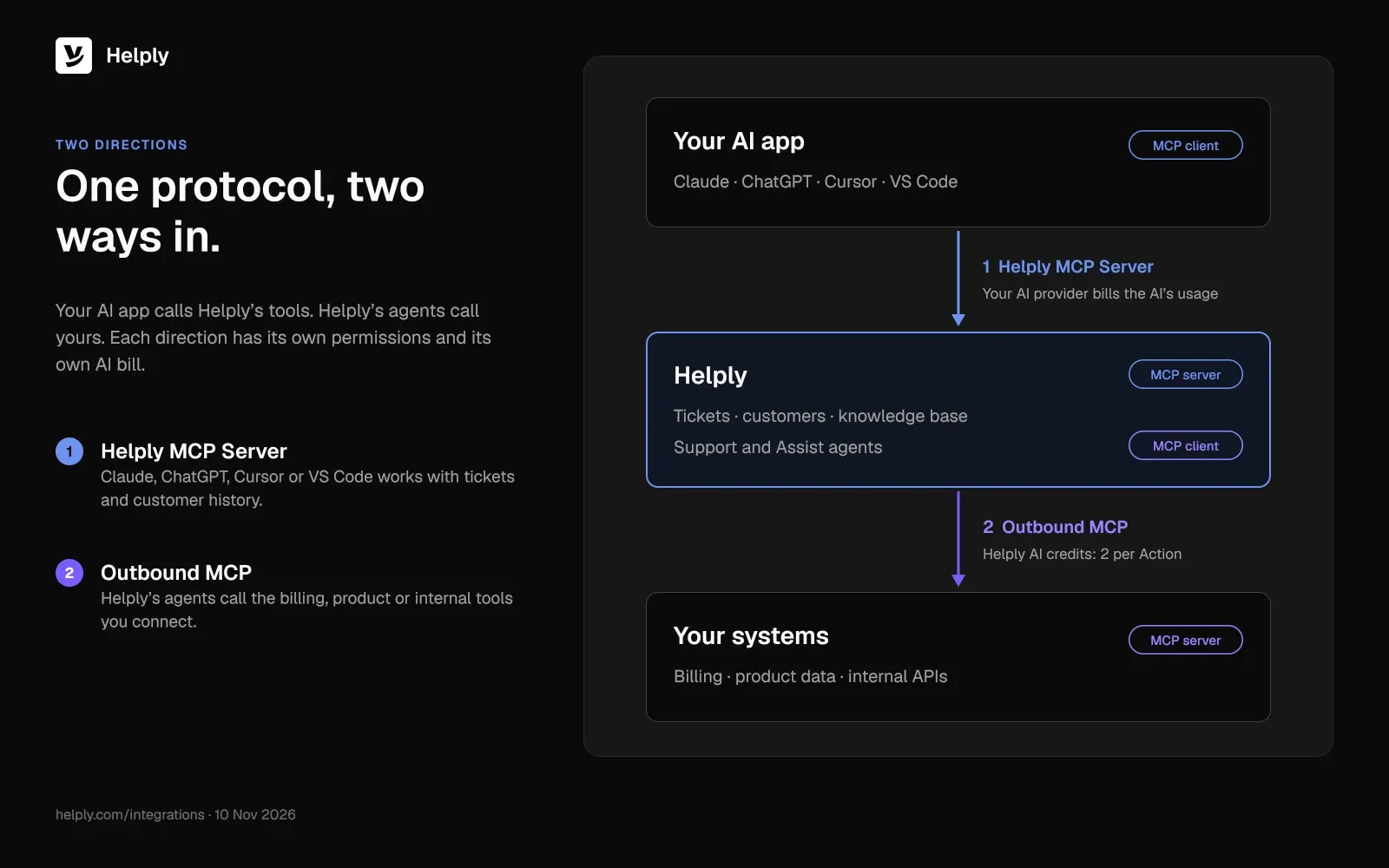
A server lists its tools, and the AI model can call them. In a support stack, the help desk can act as the server for your AI app. Your help desk's agents can also act as clients of your own servers.
What can an AI assistant do through a help desk MCP server?
Through the Helply MCP Server, an AI assistant can search tickets and read customer history. It can draft or send replies where supported and explicitly enabled. Helply's MCP Server page says the server makes "supported customer, account, conversation, and support context available to AI tools and agents."
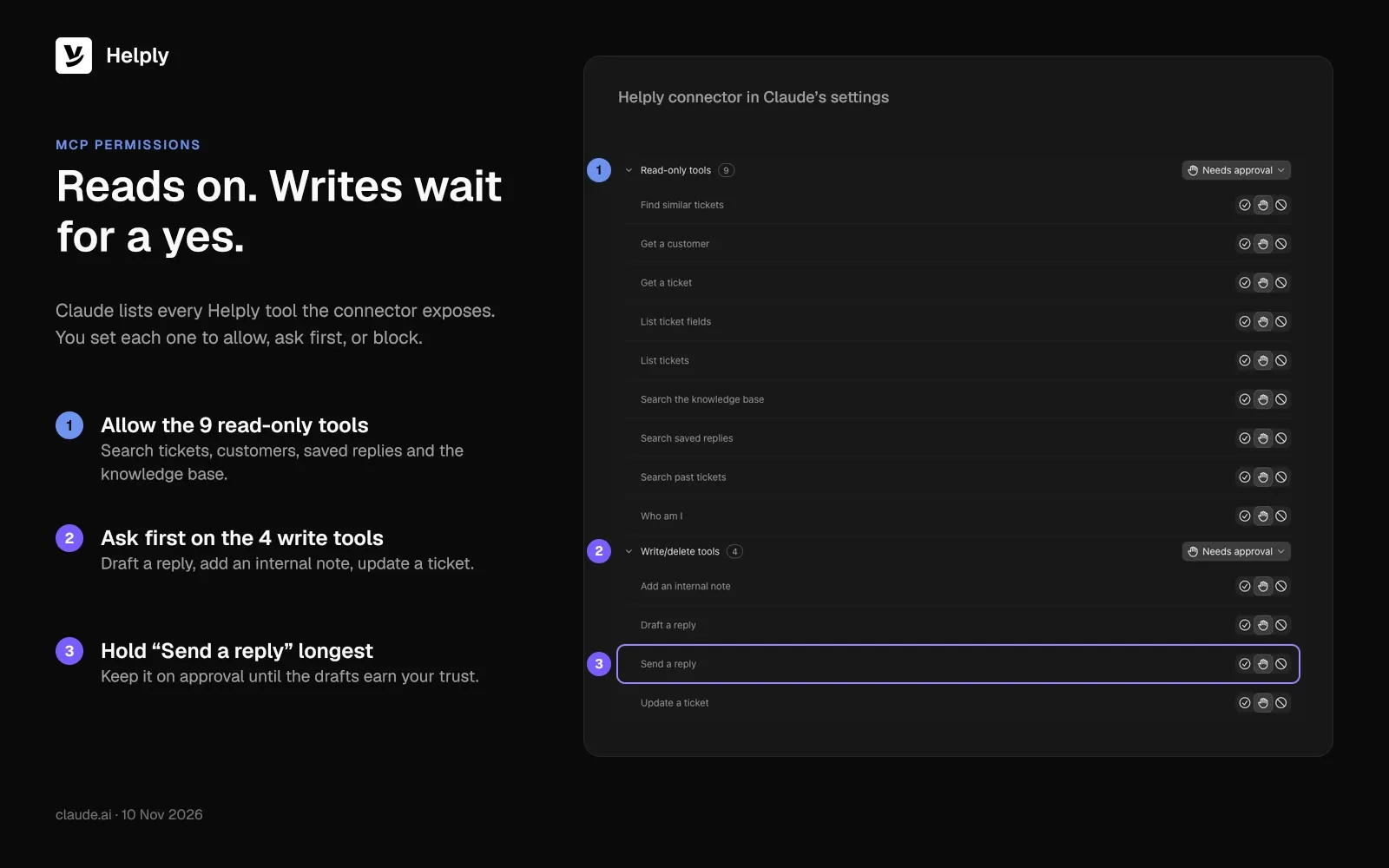
In Claude's connector settings, the Helply connector splits the tools your organization allows into two groups.
- Read-only tools. The AI can find similar tickets, get a customer or a ticket, and list tickets or ticket fields. It can also search the knowledge base, saved replies and past tickets, and check which Helply user it is acting as.
- Write/delete tools. The AI can add an internal note, draft or send a reply, and update a ticket. Helply allows these Actions where supported and explicitly enabled.
An engineer can ask Claude about a ticket, and Claude can pull the ticket, the customer and similar tickets itself.
You can run your own AI with Helply's Claude integration in two ways. In headless mode, "Your AI does the work through Helply's MCP. Helply is the inbox, history, SLAs and reporting."
In side-by-side mode, "Helply's Support and Assist agents handle what they're best at. Your Claude skills handle the rest."
Helply's Claude page describes a multi-brand subscription company that handles 40,000 emails a month across 60 inboxes and runs its own Claude automations.
How do you connect Claude or ChatGPT to Helply over MCP?
ChatGPT, Codex, Cursor, VS Code and other apps can connect, as long as they can add a remote MCP server. In Claude, you add it as a custom connector. In ChatGPT, you add it as a custom MCP serverif your account and workspace policies allow it.
- Create the connection. Configure MCP access in Helply.
- Add it to your AI app. Enter the connection details from Helply in your AI app.
- Set permissions. Pick which Helply context and capabilities the app can use.
Each person then signs in and approves access.
How do Helply's agents use your own tools over MCP?
Outbound MCP runs the other way, from Helply's agents to your own systems. Helply's Outbound MCP page says: "Connect supported MCP servers so Helply agents can use your systems while investigating and resolving customer issues." If your billing system, product database or internal API runs a supported MCP server, Helply's agents can call its tools.
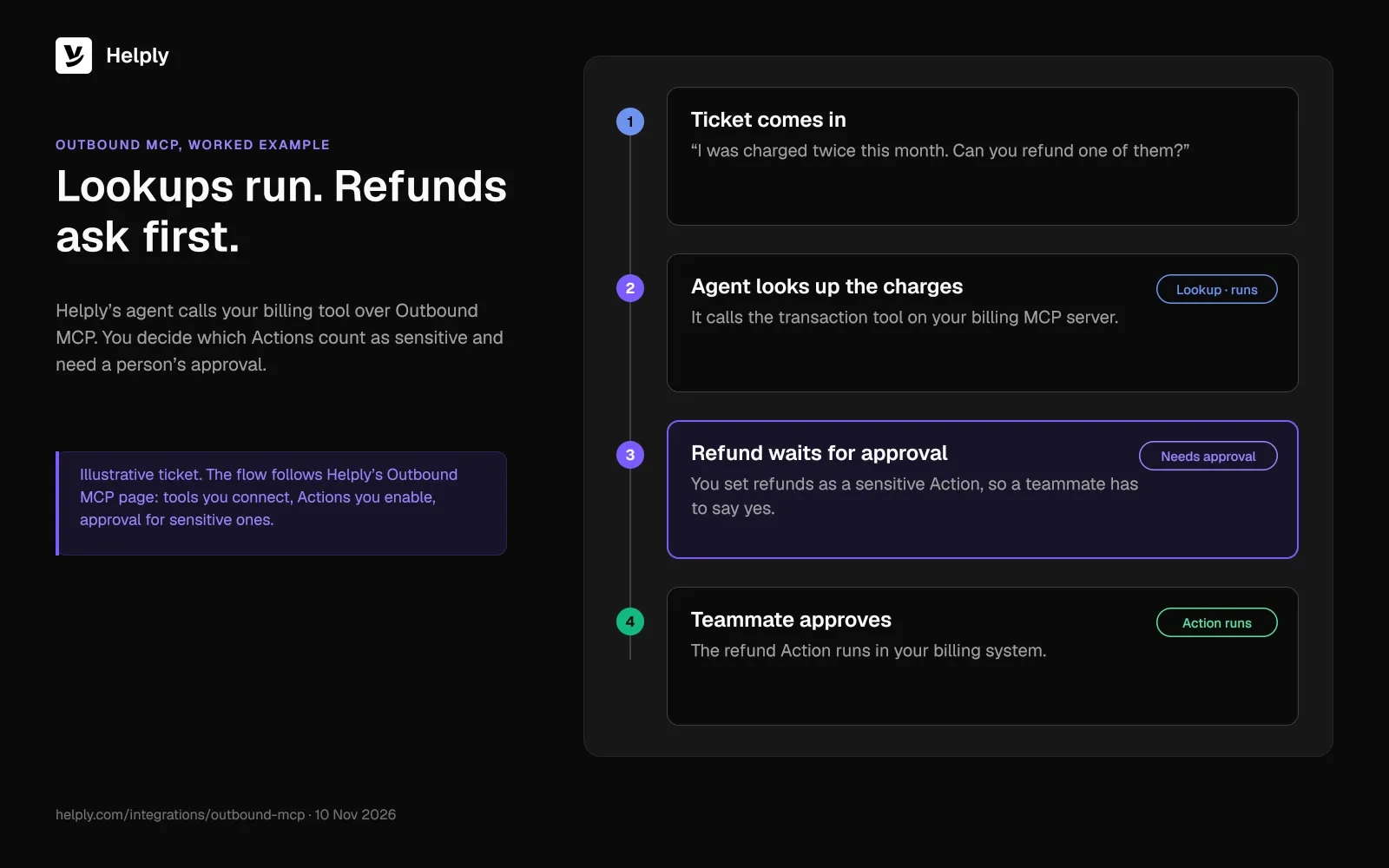
Helply separates Tools from Actions: "Tools are what an agent has access to. Actions are what an agent can do with them." Agents can take Actions "where the connected server exposes supported capabilities and you've enabled them." You choose which agents get which tools, and sensitive Actions can require approval.
Helply's Claude page gives an example: "A ticket marketplace connects its own MCP server so agents can look up transactions and process refunds safely." You decide whether refunds count as a sensitive Action that needs a person's approval.
Setup takes three steps in Helply: add the server, choose its Tools and Actions, then assign them to agents and workflows.
Helply MCP Server vs. Outbound MCP: Access, Billing and Permissions
The Helply MCP Server lets your AI app work with Helply, and Outbound MCP lets Helply's agents work with your supported MCP servers.
| Question | Helply MCP Server | Outbound MCP |
|---|---|---|
| Who acts | Your AI app (Claude, ChatGPT, Cursor, VS Code) works with Helply | Helply's agents work with your MCP servers |
| What it reaches | Supported ticket, customer, knowledge base and saved-reply data you permit | Supported tools on the MCP servers you connect |
| Who pays for the AI | Your AI provider bills your usage | AI credits in your Helply plan: 2 per Action, 6 to investigate across tools |
| Permissions | Each person signs in and approves access; Claude lets you allow, hold for approval or block each tool | You choose which agents get which tools; sensitive Actions can require approval |
| Plans | Team, Pro, Growth and Enterprise | Team, Pro, Growth and Enterprise |
| Best for | Teams whose engineers and leads already work in Claude or ChatGPT | Teams whose tickets stall on billing checks and product lookups |
Is MCP safe to use on customer tickets?
MCP can be safe on customer tickets, under controls you set at four levels: person, workspace, tool and Action. The MCP specification, version 2026-07-28, says "there SHOULD always be a human in the loop with the ability to deny tool invocations." Helply holds three of the four controls, and your AI app holds the fourth.
- Person. Each teammate signs in and approves access, and the AI gets that teammate's permissions.
- Workspace. In Settings, an admin can turn off AI agent access for the entire workspace, or turn it back on.
- Tool. Claude's connector settings let you allow each tool, hold it for approval, or block it.
- Action. Your AI can take Actions in Helply where supported and explicitly enabled. In Outbound MCP, sensitive Actions can require approval.
Helply doesn't train models on your customer data, and its AI providers don't either. Your agreement with your AI provider covers the data your own AI pulls over MCP.
If your team pastes threads into Claude or ChatGPT, those tickets already go to an AI provider. With MCP, you control that access through sign-in, tool settings and approvals.
Which MCP permissions should a support team set first?
A safe first setup takes four choices:
- In Claude, allow the read-only Helply tools where your admin permits it.
- Put "Draft a reply," "Add an internal note" and "Update a ticket" on approval.
- Keep "Send a reply" on approval until your team trusts the drafts.
- In Outbound MCP, assign lookup tools first and require approval for sensitive Actions such as refunds.
Which MCP direction should your support team start with?
Pick the direction that matches where your team loses time. If engineers and leads live in Claude or ChatGPT, start with the Helply MCP Server so their AI can read the real queue. If tickets stall on billing checks and product lookups, start with Outbound MCP so Helply's agents can fetch the answer themselves.
Either way, your team skips the manual handoff between apps. Your AI acts with each person's permissions, and Helply's agents use the tools you assign them.
Team and every plan above it include MCP. On Team, $499 a month covers 5 seats, unlimited view-only seats and 15,000 AI credits each month for Helply's agents. Your own AI's usage stays on your AI provider's bill.
Every plan includes Helply's Support Agent and Assist Agent, and your whole team shares one pool of AI credits. Start with the read-only tools for a few teammates. Widen access once your team trusts the answers, as you would in an AI support pilot.
Frequently asked questions
The official MCP site calls MCP (Model Context Protocol) "an open-source standard for connecting AI applications to external systems." Apps such as Claude or ChatGPT use it to reach data sources, tools and workflows. Anthropic open-sourced it in November 2024 and donated it to the Agentic AI Foundation in December 2025.
MCP (Model Context Protocol) support means a product can act as an MCP server, client or both. As a server, it offers tools AI apps can call. As a client, its own agents call tools on other MCP servers.
An MCP server offers context and tools to AI apps. The AI model can call those tools to read data or take the actions the server allows. In customer support, a help desk's MCP server can let Claude search tickets and read customer history.
Configure MCP access in Helply, add the connection details to your AI app, then choose what the app can use. Each person signs in and approves access.
No. Claude, ChatGPT or any other AI you bring runs on your own AI account, and that provider bills the usage. Helply's credits cover Helply's own agents, including the Actions they take over Outbound MCP.
Helply includes MCP on Team, Pro, Growth and Enterprise, for both the Helply MCP Server and Outbound MCP. Starter doesn't include it.
Only if you allow it. In Helply, Actions such as sending a reply work where supported and explicitly enabled. Claude's connector settings also let you put "Send a reply" on approval or block it.
The Helply MCP Server lets outside AI apps such as Claude work with Helply. Outbound MCP lets Helply's agents use tools on your supported MCP servers.
No. Helply doesn't train models on your customer data, and its AI providers don't either. Your agreement with your AI provider covers the data your own AI pulls over MCP.
About the author

Konrad Janczyk
Staff Software Developer