
 Alex Turnbull ··15 min read

What Is Social Media Customer Service?
Social media customer service is support delivered where customers already talk to you online. A customer might tag your brand in a post, comment under an ad, send an Instagram DM or message your WhatsApp Business number. Each of those is a support request, even when it reads like a passing comment.
Comments, @-mentions and direct messages are consumers' preferred ways to get service on social, according to the 2025 Sprout Social Index. Public messages need a fast, visible answer. Private messages need the customer's order, account and history.
Two teams touch social support. Marketing runs the accounts and the content calendar, and support owns the answers, refunds and follow-up. Both teams need a written split of who answers what.
Social Customer Service vs. Social Customer Care
Social customer service and social customer care name the same work. Some teams use "care" for a wider job that adds proactive outreach and community replies.
Social listening is a different job. Listening tracks mentions of your brand that never tag you, such as a Reddit thread or an untagged review. Service starts when a person contacts you.
Social marketing publishes content and runs ads from the same accounts, and its posts often draw the comments your support team answers.
Why Customer Service on Social Media Matters
Customers on social expect fast answers. In the 2025 Sprout Social Index, 73% of consumers expected a response within 24 hours or sooner. The survey covered 4,044 consumers who follow at least five brands, in the US, UK, Canada and Australia, in September 2024.
The same share, 73%, said they'd buy from a competitor if a brand didn't respond on social.
Sprout's 2025 Content Benchmarks Report found that Instagram incoming messages rose from 13 to 18 a day between 2023 and 2024. Over the same period, brands' daily response rate to messages and comments across networks slipped from 8% to 7%.
Meta reported more than 1 billion active threads a day with business accounts on its messaging apps in October 2025. Those threads include product questions and customer support requests.
In a Gartner survey of 5,801 customers from early 2025, 51% of service journeys started on third-party platforms. Gartner named Google, YouTube and ChatGPT as examples, and search engines were the most popular starting point.
Social Customer Service Channels: Reach, Messages and Reply Windows
| Channel | US adults who ever use it (Pew, 2026) | What customers send | Window for API replies (help desks, bots) |
|---|---|---|---|
| Facebook and Messenger | 70% | Page comments, visitor posts, Messenger DMs | 24 hours for most messages; one private reply to a comment or visitor post within 7 days |
| 51% | Comments, story replies, DMs (messages from accounts you don't follow land in Requests) | 24 hours for most messages; one private reply to a comment within 7 days | |
| 33% | Private messages to a business number | 24-hour window that resets with each customer message | |
| TikTok | 37% | Comments on videos | Set by your team |
| X | 18% | @-mentions, replies, DMs | Set by your team |
Emplifi's April 2025 research found that frequent social users most often contact a brand's Facebook (55%) or Instagram (47%) account for service. Start with those two, add WhatsApp if customers already message your number, and watch X and TikTok comments for questions.
Public Reply or DM? How to Decide for Every Message
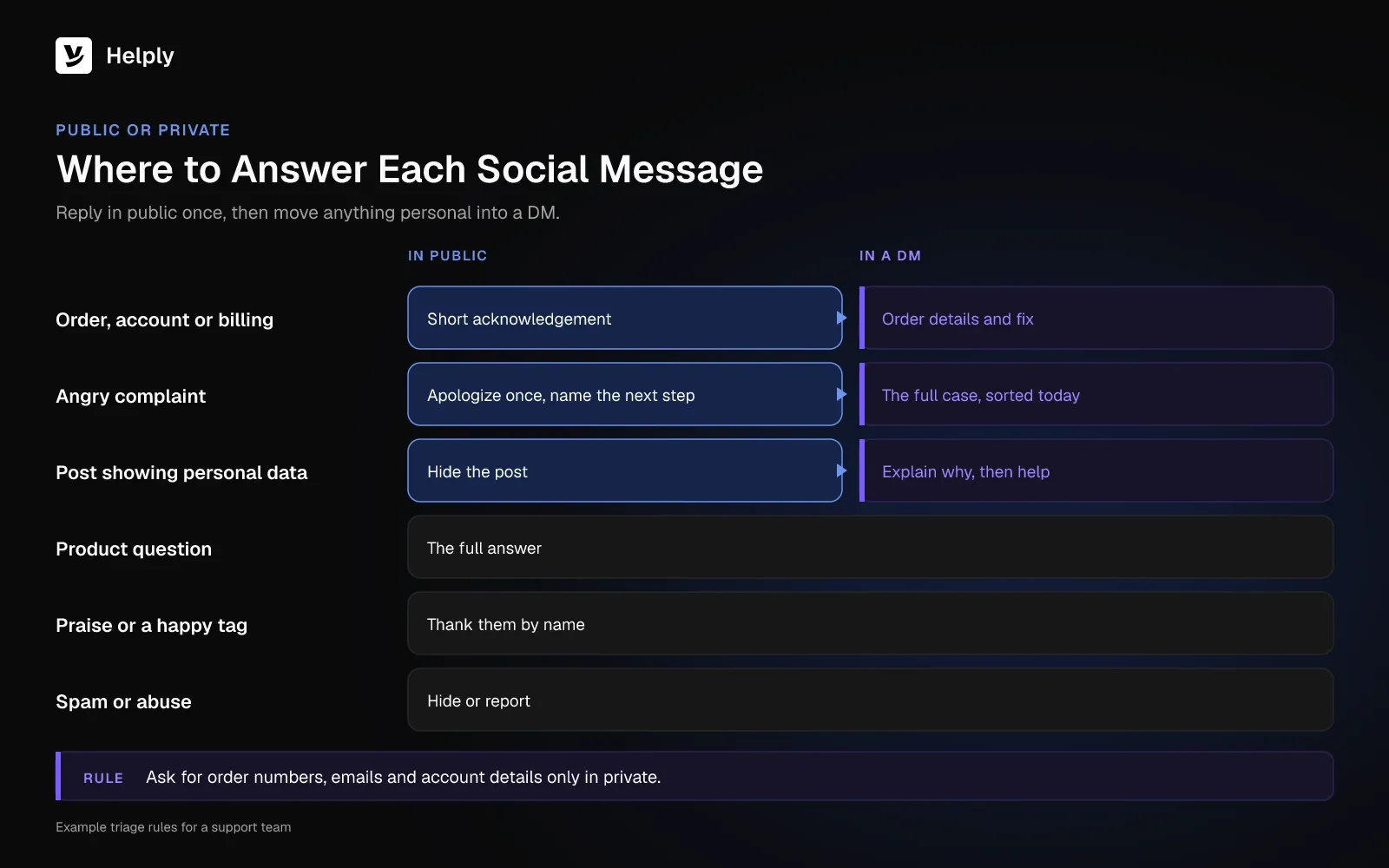
Reply in public once, then move anything personal into a private message. In Sprout Social's Q4 2025 Pulse Survey, 51% of people who reach out in public expect a public reply first, then DMs. The survey covered 2,270 social users in the US, UK and Australia in September 2025.
A public reply shows everyone else that you answer. A DM protects the customer's details and gives your team room to investigate. Ask for order numbers, emails and account details only in private, and hide any public post that exposes them.
Meta limits how connected tools move a comment into DMs. Under Meta's messaging policy, a Facebook Page can send one private reply to a comment or visitor post within 7 days.
On Instagram, a business gets one private reply per comment within 7 days. If the person doesn't follow you, your reply lands in their Requests folder. You can message them again only after they answer.
Public Reply vs. DM on Social: Where to Answer Each Message Type
| Situation | Where to answer | First reply |
|---|---|---|
| Order, account or billing question | Public acknowledgement, then DM | Short public reply, details in DM |
| Angry complaint in the comments | Public acknowledgement, then DM | Apologize once, name the next step |
| General product question | Public | Full answer in the thread |
| Post that exposes personal data | Hide the post, then DM | Explain why you hid it |
| Praise or a tag in a happy post | Public | Thank them by name |
| Spam or abuse | Hide or report | No reply |
Example Replies for Common Social Messages
Late order comment. "Sorry you've had to ask three times, Dana. We've sent you a DM, so check your message requests if you don't follow us."
Angry complaint. "We're sorry, Priya. A support lead has your case, and we've sent you a DM to sort it out today."
Product question. "Yes, the travel case fits a 15-inch laptop. The size guide on each product page lists exact measurements."
Exposed details. "We've hidden your comment because it showed your order number and address. We've sent you a DM to finish this."
Praise. "Thanks, Sam. We passed this on to the team that packed your order."
How Fast Should You Respond to Customers on Social Media?
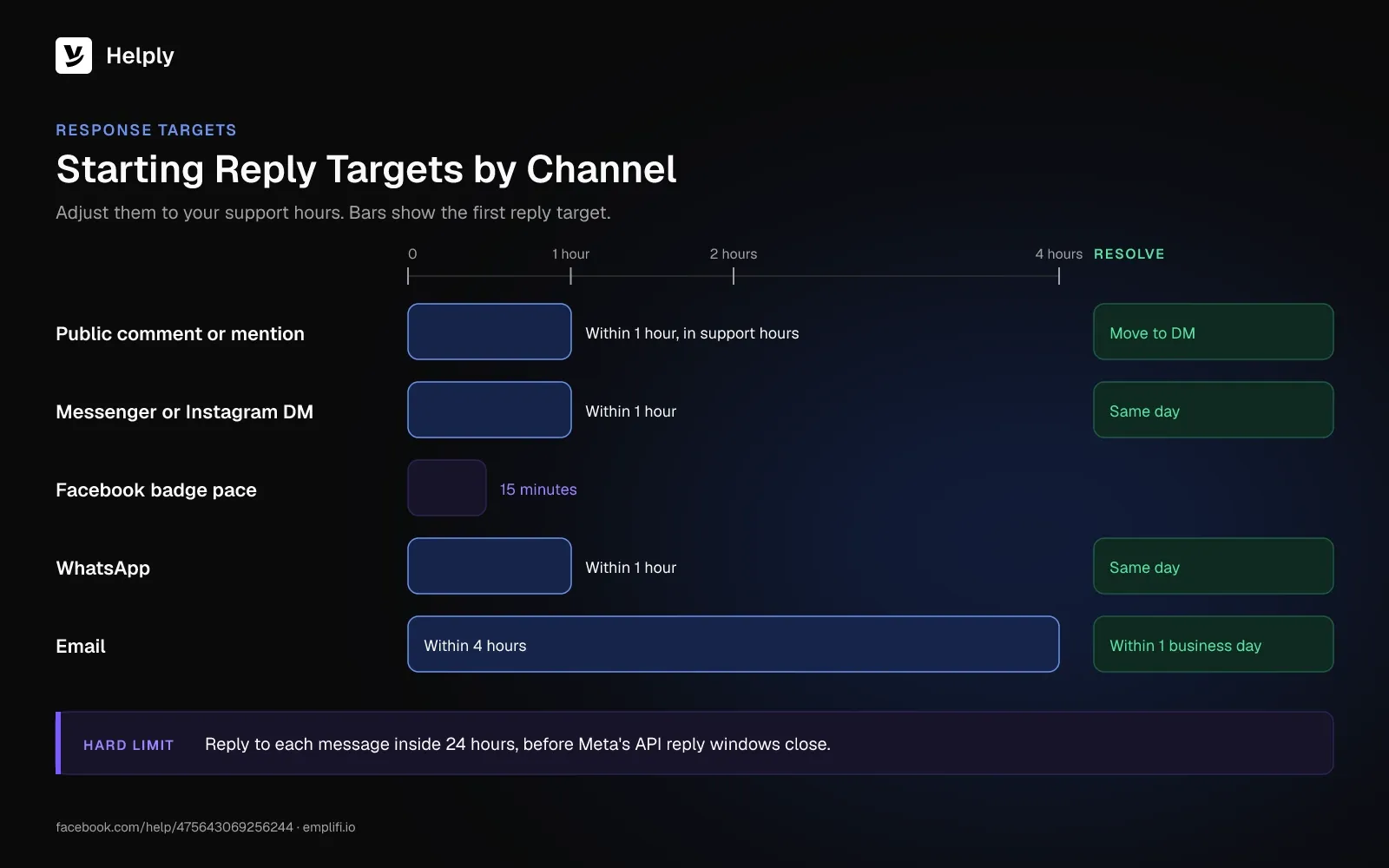
Aim to answer social DMs within an hour, and reply to each message inside 24 hours.
Emplifi surveyed nearly 1,000 US consumers in research published in April 2025. In that survey, 32% expected a DM reply within an hour, 23% within six hours, and 17% each within 12 and 24 hours.
Meta rewards responsive Facebook Pages with a badge. The "Very responsive to messages" badge needs a 90% response rate and a 15-minute response time over the last seven days. In a worked example from Meta's Blueprint course, a small business sets a goal to answer comments within an hour during working hours.
Track resolution time beside first response time. A fast "We're on it" helps, but the customer waits for the refund or the tracking update. Set a target for both, and publish your support hours in your bio so after-hours customers know when to expect a person.
Response Time Targets: First Reply and Resolution by Channel
Use these as starting targets and adjust them to your support hours.
| Channel | First reply target | Resolution target |
|---|---|---|
| Public comment or @-mention | Within 1 hour in support hours | Move to DM, then same as DM |
| Messenger or Instagram DM | Within 1 hour (15 minutes for Facebook's badge) | Same day |
| Within 1 hour | Same day, inside the 24-hour window | |
| Within 4 hours | Within 1 business day |
Messaging Windows and Platform Rules to Plan Around
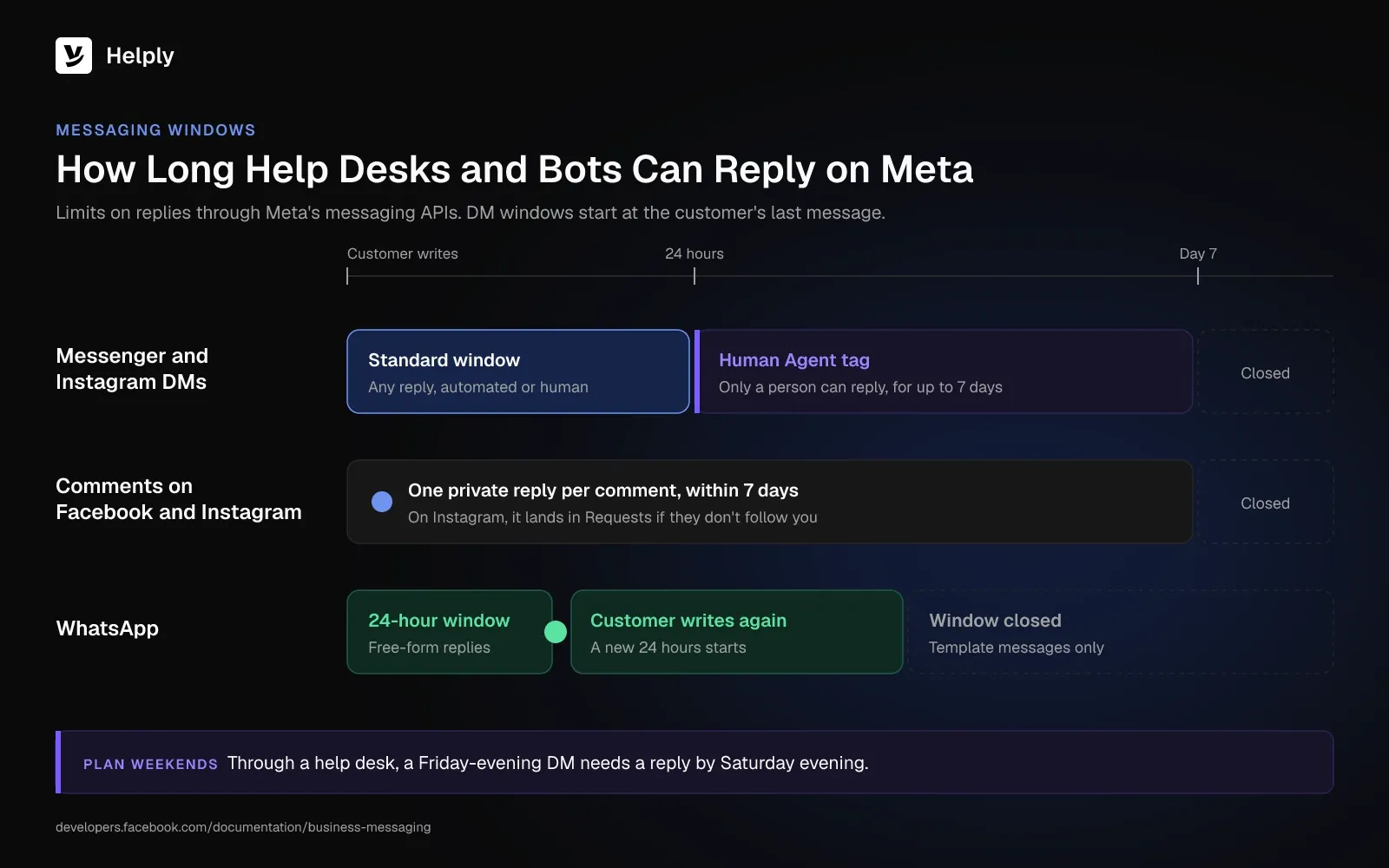
Messenger, Instagram and WhatsApp each limit when a business can reply. Help desks, chatbots and connected tools reply through Meta's messaging APIs, and these limits apply to those replies. Plan staffing around them, because Meta blocks API replies once the window closes.
- Messenger and Instagram. A business gets a 24-hour standard window after most customer actions. After a click-to-Messenger or click-to-Direct ad, the window can run up to 7 days.
- Human replies after 24 hours. Meta's Human Agent tag lets a person reply for up to 7 days after the customer's last message. It requires App Review and business verification, and automated replies can't use it.
- WhatsApp Business Platform. Free-form replies go out only inside a 24-hour customer service window that resets with each customer message. Meta doesn't charge for messages customers send.
- WhatsApp Business Platform charges. Since October 1, 2026, Meta charges for service messages after a free tier of 1,000 a month per business phone number.
- Automated bots. On Messenger, they must respond to user input within 30 seconds.
- Bot disclosure. Automated chat must tell people they're talking to an automated service where the law requires it. Meta's policy names California and Germany and recommends disclosure everywhere.
Plan weekends around the 24-hour limit. If you reply through a help desk, a Messenger or Instagram DM sent on Friday evening needs a reply by Saturday evening. After that, a person can reply for up to 7 days with the Human Agent tag.
Cover weekends with AI for routine questions and a short on-call rotation for the rest.
How to Set up Social Media Customer Service in 7 Steps
Work through these seven social media customer service best practices in order, starting with the channels you run today.
1. Choose the Channels Customers Already Use
List every account where customers contact you today, including old Pages and regional handles. Keep the channels with real volume, and point the rest to the ones you staff. Add a "Message us here for help" line to each bio so customers know where to write.
2. Audit Your Accounts and Make Support Easy to Find
Check that each account shows your support hours, a contact route and a link to your help center. Search for impersonator accounts that copy your name and logo. Report them, and pin a post that names your real handles.
3. Decide Who Owns Each Type of Message
Agree on ownership between marketing and support in writing. Marketing answers praise, tags and content questions. Support owns orders, accounts, billing and complaints, and it owns them on weekends too.
4. Bring Social Messages into One Queue
Pull DMs and comments into the queue that already holds email and chat, so one customer has one history. Meta Business Suite puts Messenger, Instagram and WhatsApp messages in one inbox, plus comments on your Facebook and Instagram posts. A help desk goes further, because it adds email, chat and your other tools to the same support ticket record.
5. Write Saved Replies and Rules for Your AI
Draft saved replies for your ten most common questions, in the tone each channel uses. Write down what the team never says in public, such as refund amounts or blame. If an AI agent answers DMs, give it the same rules in writing.
6. Build an Escalation Matrix
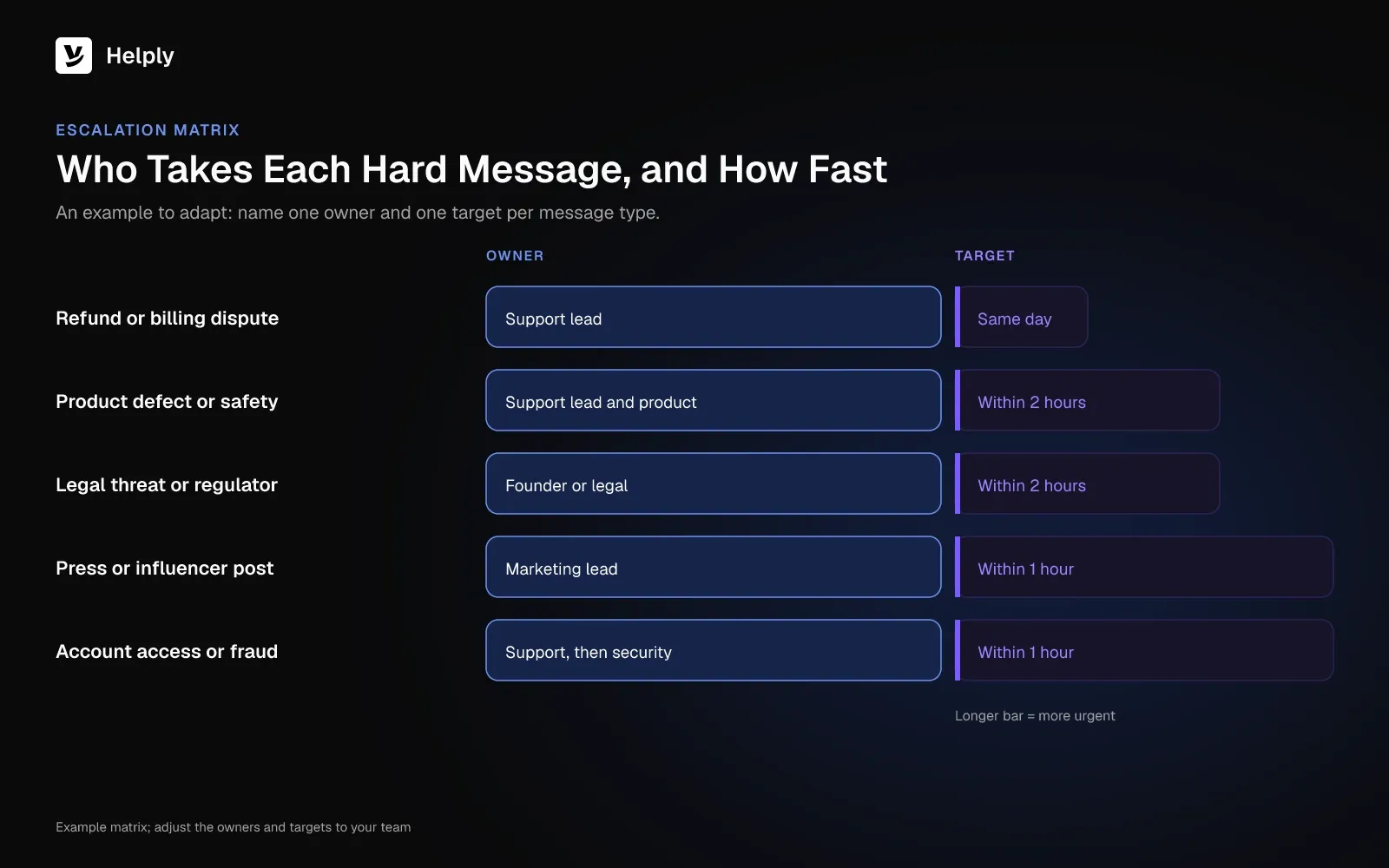
Name an owner and a target time for every message type that a first responder can't close. Refunds over a set amount, safety issues, legal threats and press questions each need a named person. Put the matrix where both teams can see it.
Use the example below as a starting point and adjust the targets to your hours.
| Message type | Owner | Target |
|---|---|---|
| Refund or billing dispute | Support lead | Same day |
| Product defect or safety issue | Support lead and product | Within 2 hours |
| Legal threat or regulator mention | Founder or legal | Within 2 hours |
| Press or influencer complaint | Marketing lead | Within 1 hour |
| Account access or fraud | Support, then security | Within 1 hour |
7. Cover Nights and Weekends
Decide what happens to a DM at 11pm on a Saturday. Set an away message that states your hours, and let AI answer the routine questions in that gap. Keep one person on call for complaints that could spread.
How to Handle a Complaint That Goes Viral
Act fast with one consistent message, then fix the problem in private. A complaint with thousands of views needs a public owner within the hour.
- Post a holding reply. Acknowledge the problem in the thread, say you're looking into it and give a time for the next update.
- Agree on one source of truth. Write one statement and use it across channels and DMs so the story stays consistent.
- Pin an update. Pin the latest status to your profile, and update it each time something changes.
- DM the original poster. Ask for details in private, fix the issue, and ask whether they'd share the outcome.
- Review it afterward. Log the trigger, first reply time and failed rule, and note the signal that could have warned you sooner.
Don't delete critical comments. Hide only spam, abuse and posts that expose personal data, and explain the policy in a pinned post if people ask.
Can AI Answer Customer Service Messages on Social Media?
Yes, AI can answer routine DMs, as long as your team sets clear rules for when it hands off to a person. In Sprout Social's Q4 2025 Pulse Survey, 69% of social users were comfortable with companies using AI for faster social service. In Emplifi research published in May 2025, 67% of US consumers preferred a person over AI for social support.
Many social users accept AI for speed, but most in Emplifi's survey preferred a person. Give AI the routine questions and your team the hard ones. An AI agent for social DMs needs five things:
- Disclosure. It says it's automated wherever the law requires it, and Meta recommends disclosure everywhere.
- Grounded answers. It answers from your help center, policies and live data, and says so when it doesn't know.
- Actions. It looks up the order or the account and answers with the customer's details.
- Approval rules. Refunds, discounts and account changes follow limits your team sets.
- A fast handoff. It passes the conversation to a person with context, long before the 24-hour window closes.
See how other teams set this up in these customer service chatbot examples.
How Helply Runs Social Support from One Queue
Helply is an AI-native customer support platform linking Facebook, Instagram, WhatsApp, email and chat into one queue. Its Support and Assist Agents are on every plan. Facebook and Instagram need Plus, and WhatsApp needs Team.
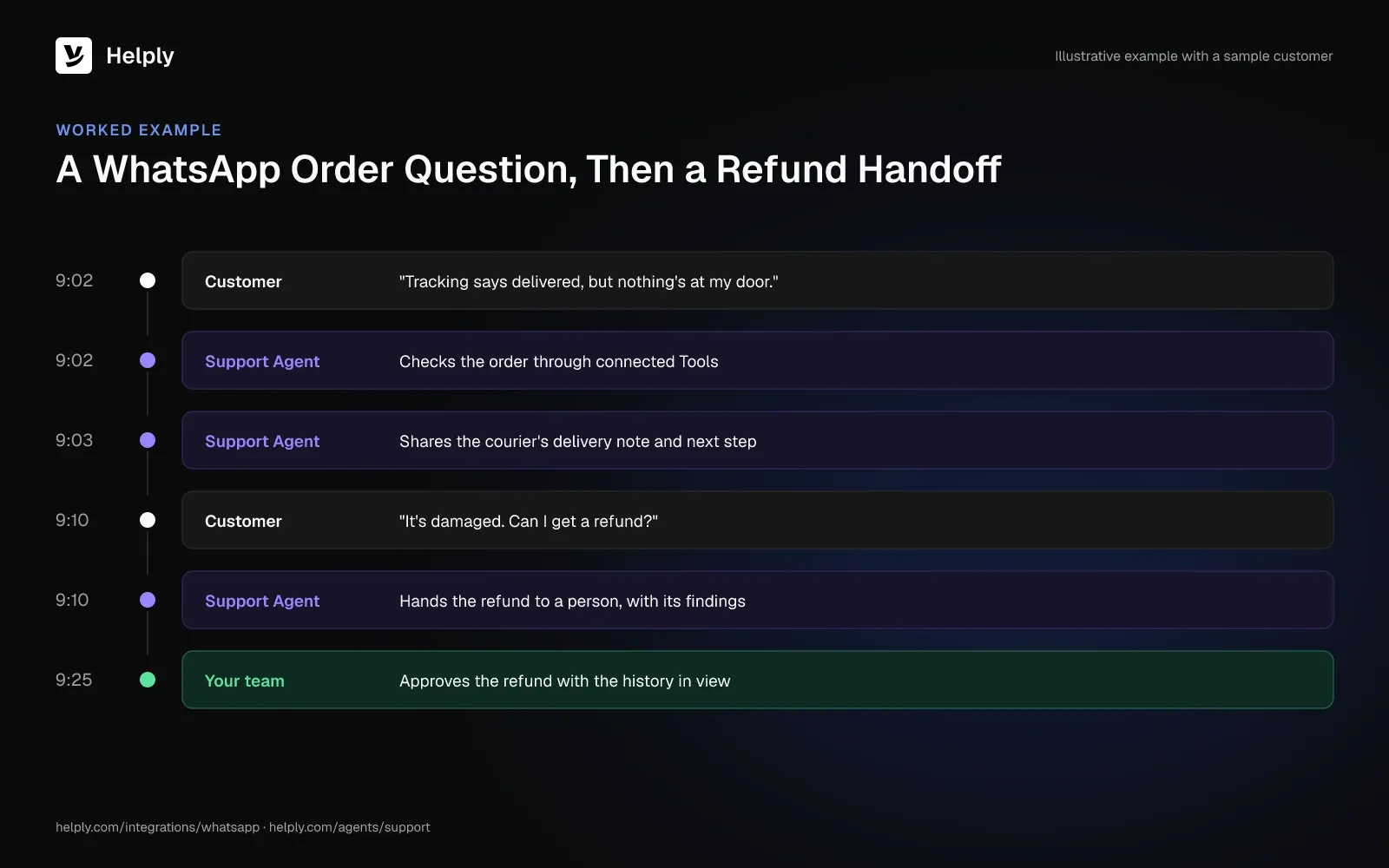
For the Saturday customer, the Support Agent can pick up the open email ticket. It can check the order through connected Tools and hand any refund to a person.
Each plan's shared inbox has views, tags, macros, notes, snooze and collision detection. With the WhatsApp integration, your team and AI agents handle WhatsApp chats beside every other customer conversation. Customers keep messaging you in WhatsApp, while your team works from Helply.
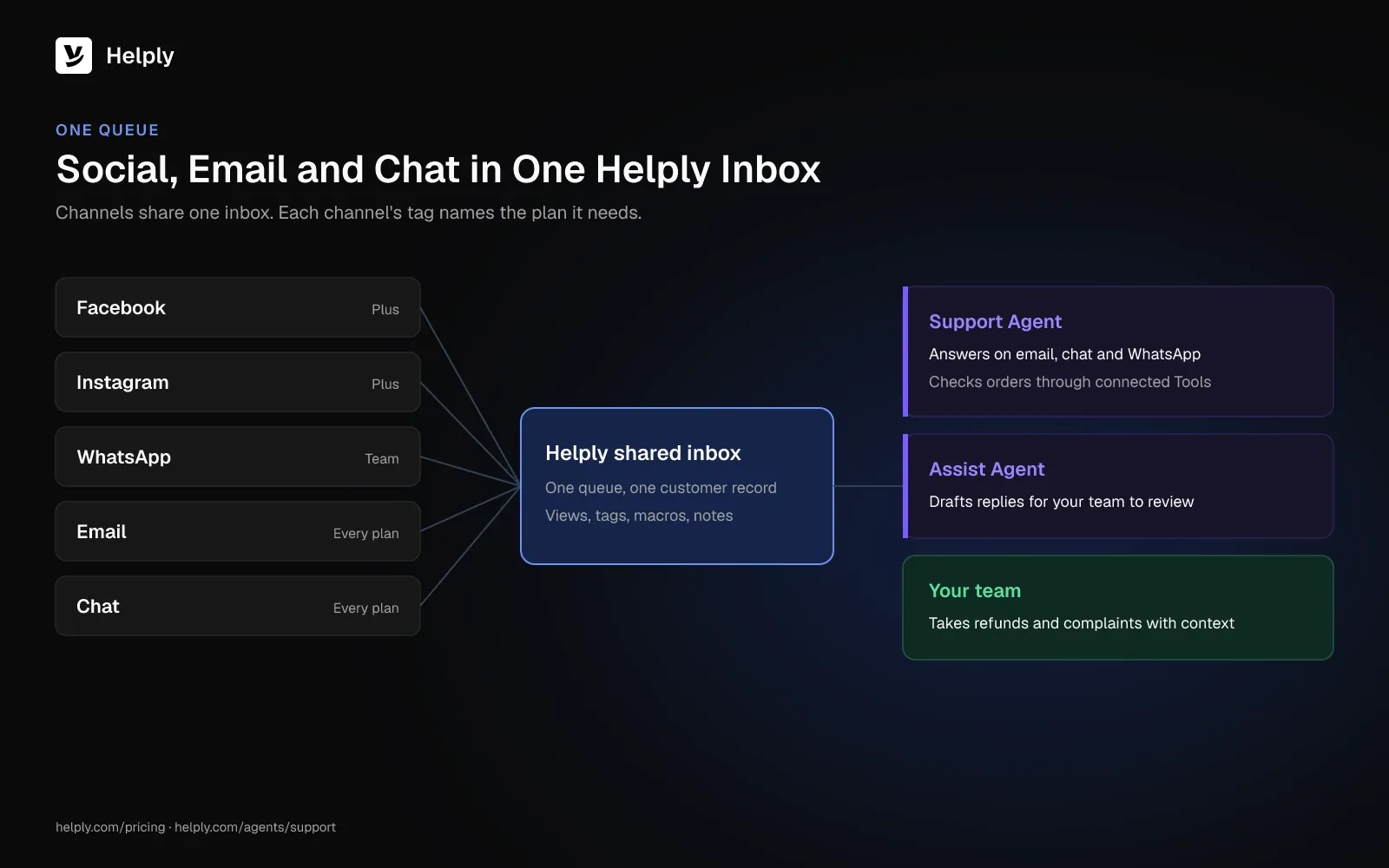
The Support Agent runs the same AI on email, chat, SMS, WhatsApp and other connected channels. It works out what's happening from your knowledge, Skills and connected Tools, and takes supported Actions to fix the issue. If it can't resolve something confidently, your team gets the conversation, its findings and the customer's details in one place.
- Guidelines define how your AI agents behave, including the situations where a person must step in.
- Escalation rules send each handoff to the right person, from the Team plan.
- The [Assist Agent](https://helply.com/agents/assist) writes each draft from the thread and the customer's context, within your Guidelines. Your team can ask it to take supported Actions.
- The [Insights Agent](https://helply.com/agents/insights), from Team, surfaces unusual increases in questions or complaints before they become obvious.
MyBaggage customers asked about tracking, delivery and customs on web, email and their preferred messaging apps. MyBaggage's Support Agent now answers them on web, email and WhatsApp, using live tracking and carrier data.
Helply's AI providers never train models on the customer data it shares with them. Helply also maintains a SOC 2 Type II report.
Social Media Customer Service Tools Compared
Social media customer service tools fall into three groups: free native inboxes, social media suites and help desks with social channels. Pick by who answers, how many channels you run and whether answers need order or account data.
- Meta Business Suite. Free, with automated replies, assignment to teammates, labels and private notes for Meta channels.
- WhatsApp Business app. Free on a single device, with greetings, away messages, quick replies and labels. Medium and large businesses connect the paid WhatsApp Business Platform directly or through a partner.
- Sprout Social. A social inbox from the Standard plan, priced per seat, with Listening as a paid add-on.
- Zendesk. Social and messaging channels come with Suite plans, and WhatsApp carries additional fees.
- Freshdesk Omni. Freshworks sells WhatsApp, Messenger and Instagram in Freshdesk Omni plans.
- Helply. Facebook and Instagram (from Plus) and WhatsApp (from Team) share one inbox with email and chat. Each plan also includes the Support and Assist Agents, and Helply pricing lists the rest.
Social Support Tools Compared: Channels, Starting Plan and Best Fit
| Tool | Social channels | Starting point for social | Best fit |
|---|---|---|---|
| Meta Business Suite | Messenger, Instagram, WhatsApp messages; Facebook and Instagram comments | Free | A small team answering Meta channels only |
| WhatsApp Business app | Free, single device | A shop answering WhatsApp from one phone | |
| Sprout Social | Social inbox (from Standard) | Standard: $249 a month per seat ($199 a month billed yearly) | Social-first teams that budget per seat |
| Zendesk | Facebook, Instagram, X, WhatsApp (WhatsApp has additional fees) | $69 per agent a month on Suite Team ($55 a month billed yearly) | Teams already on Zendesk Suite |
| Freshdesk Omni | WhatsApp, Messenger, Instagram | Growth: $35 a month per agent ($29 a month billed yearly) | Teams already on Freshworks |
| Helply | Facebook and Instagram (Plus), WhatsApp (Team) | Plus for Facebook and Instagram (see pricing) | Teams that want social, email and chat in one queue, with AI agents on every plan |
Signs You've Outgrown Meta Business Suite
Meta Business Suite fits a small team that answers Meta channels only. Its inbox covers Messenger, Instagram and WhatsApp messages, plus comments on your Facebook and Instagram posts.
WhatsApp syncing works through the WhatsApp Business app and has limits. Meta doesn't offer it in some regions, including the UK, the EU and EEA, and Australia. You need to open the app at least once every 20 days to keep messages syncing.
Move to a help desk when customers switch between DMs and email, or when answers need order or account lookups. Needing SLAs or escalation rules is another reason to switch. Teams with several channels can compare setups in our guide to online customer service.
How to Measure Social Media Customer Service
Measure social support with the same metrics as other channels, split by channel so you can spot problems. Six numbers cover most teams:
- First response time. The time from the customer's message to your first reply, measured in support hours and in total.
- Resolution time. The time from the customer's first message until your team closes the issue.
- Response rate. The share of support messages that got any reply. Sprout's 2024 benchmark of 7% counts every social message and comment, so set your own target for support messages.
- Resolved in channel. The share of social conversations closed without sending the customer to email or phone.
- Handoff rate. The share of AI or first-line conversations that needed a person, with the reasons logged.
- CSAT by channel. A one-question survey after the conversation closes, compared across social, email and chat.
Review these numbers weekly. If the handoff rate rises on one topic, check for a missing help article or a policy the AI doesn't know. Compare each metric with email and chat every month to see how social fits among the other types of customer service.
Keep Social Support in Meta's Inbox or Move It into Your Help Desk?
Meta Business Suite is free and does the job while you answer Meta channels only. Social-first teams can pick Sprout Social's dedicated inbox, and Zendesk Suite or Freshdesk Omni customers can add channels there.
Helply fits teams that want social, email and chat in one queue, with AI agents that investigate and resolve routine requests.
The Saturday customer won't need to ask a fourth time once someone owns message requests. The open email ticket sits in the same queue as chat and WhatsApp. AI or an on-call person covers routine weekend questions, and support owns the refunds.
At MyBaggage, the Insights Agent flags shipments at risk before customers escalate.
Helply pricing shows what each plan includes. A safe first step is one channel, such as WhatsApp, with the Support Agent on routine questions and your team on every handoff.
Frequently asked questions
Social customer care is another name for social media customer service: answering questions, fixing problems and handling complaints on social channels. Some teams use it for a wider job that adds proactive outreach and community replies.
The 3-3-3 rule is a loose marketing heuristic with conflicting versions. One counts 3 messages, 3 audience segments and 3 marketing channels. It isn't a customer service rule, so set response targets by channel.
If you reply through a help desk or bot, you have 24 hours after the customer's last message in Meta's standard window. After a click-to-Messenger or click-to-Direct ad, the window can run up to 7 days. A person can reply for up to 7 days with the Human Agent tag, which needs App Review and business verification.
The WhatsApp Business app is free on a single device. On the WhatsApp Business Platform, Meta doesn't charge for messages customers send. Since October 1, 2026, it charges for service messages after a free tier of 1,000 a month per business phone number.
Yes, for a small team. Meta Business Suite is free and puts Messenger, Instagram and WhatsApp messages, plus Facebook and Instagram comments, in one inbox. WhatsApp sync isn't available in some regions, including the UK, the EU and EEA, and Australia.
No, keep negative comments up and reply to them, then move the details to DMs. Hide only spam, abuse and posts that expose personal data.
A Facebook Page needs a 90% response rate and a 15-minute response time over the last seven days to earn this badge.
Yes, a chatbot or AI agent can answer DMs if it discloses that it's automated where the law requires it. It also needs a handoff to a person, because only human replies can use the 7-day Human Agent window.
Yes. Helply’s Support Agent can answer WhatsApp messages for supported conversations and configurations, from the Team plan. If it can’t resolve one, your team gets the conversation with its context intact.
Social media customer service answers people who contact you. Social listening tracks mentions of your brand that don’t tag you, so you can spot issues and trends.
About the author

Alex Turnbull
CEO & Founder, Helply
Alex is the CEO & Founder of Helply, (formerly Groove). He loves to help other entrepreneurs build startups by sharing his own experiences from the trenches.
Keep reading

Customer Service Week 2027: Dates, Theme and a 5-Day Plan
Bildad Oyugi · 12 min read
Ticket Acknowledgement Email Templates: 12 Examples by Situation
Konrad Janczyk · 16 min read