
 Jared Scheel ·

Key Takeaways
- Online customer service runs on email, live chat, messaging apps, social DMs and a help center, all tracked in one help desk.
- Set it up in order: channels, one inbox, written answers, hours, AI on the first line, handoff rules, then a channel-by-channel launch.
- Keep a clear route to a person, since 64% of customers in Gartner's December 2023 survey would prefer companies skip AI.
- Every handoff should carry the whole conversation and what the AI checked, so nobody asks the customer to start over.
- Helply's Support Agent is in every plan, answers around the clock and hands your team what it can't resolve, with its findings.
What Is Online Customer Service?
Online customer service is how a business answers customers in writing over the internet. Questions arrive by email, website or in-app chat, WhatsApp, social DMs and help center searches. Reply in the same channel, within minutes on chat and hours on email.
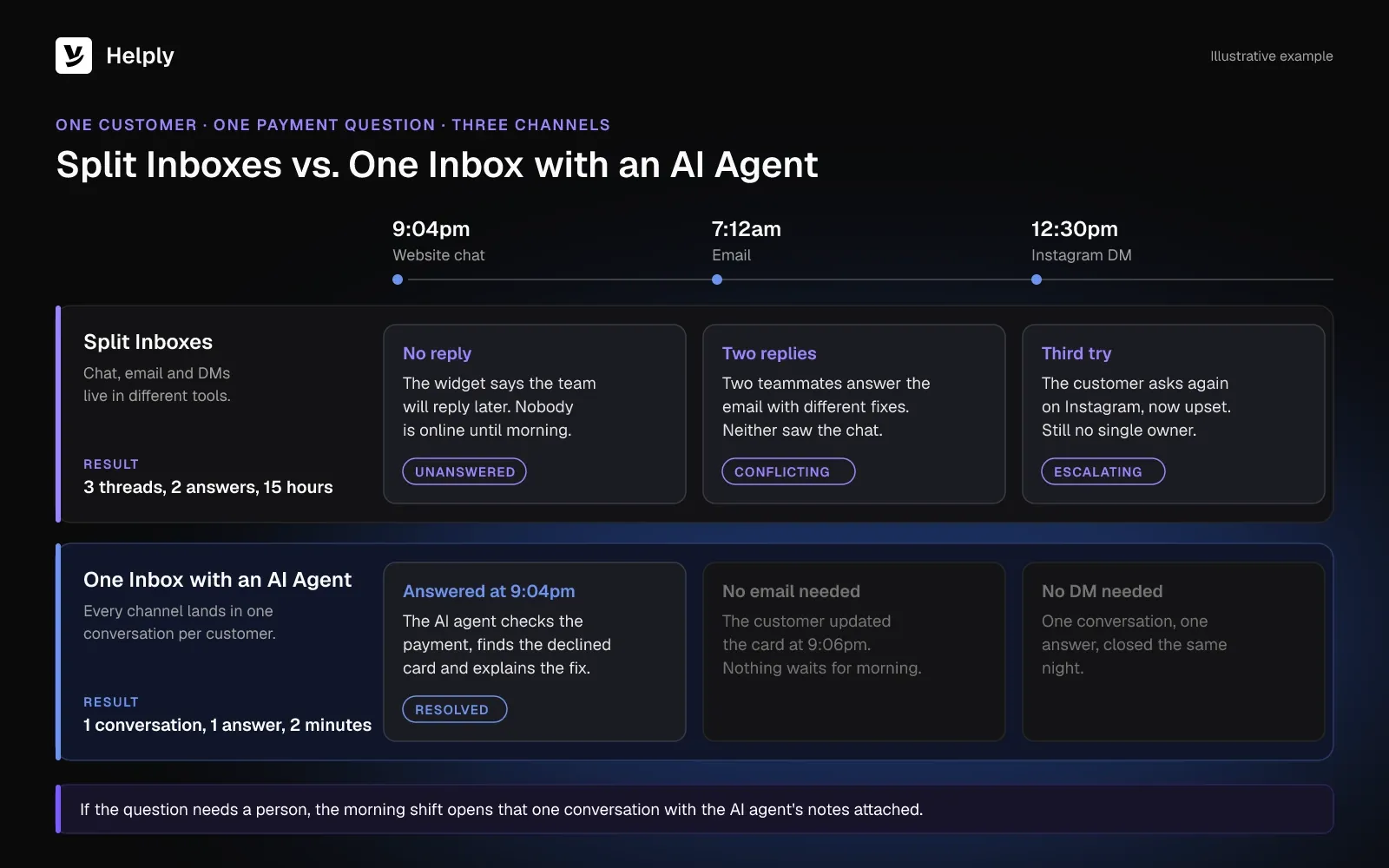
Picture a Tuesday. A customer opens chat at 9pm to ask why a payment failed, and nobody is online. At 7am they email the same question, and two teammates send different answers.
By noon the customer has two answers that disagree and tries Instagram. They have asked three times and still can't pay.
With one shared inbox, an AI agent replies at 9pm, and the teammate who picks up the thread later sees all three messages.
Online vs. Traditional Customer Service
Traditional customer service runs on the phone and at a counter, one customer at a time, during opening hours. Online customer service runs in writing, across several channels at once, and customers expect it outside office hours.
In writing, one person can handle several chats at a time, every answer leaves a record and the best replies become help articles.
In YouGov data published in March 2025, nearly 70% of US adults tend to use phone support, and 35% prefer it. Keep a phone or callback route for urgent and sensitive issues, and move routine questions online.
For the two models side by side, read traditional vs. digital customer support.
Online Customer Service Channels Compared: Best Use and AI Role
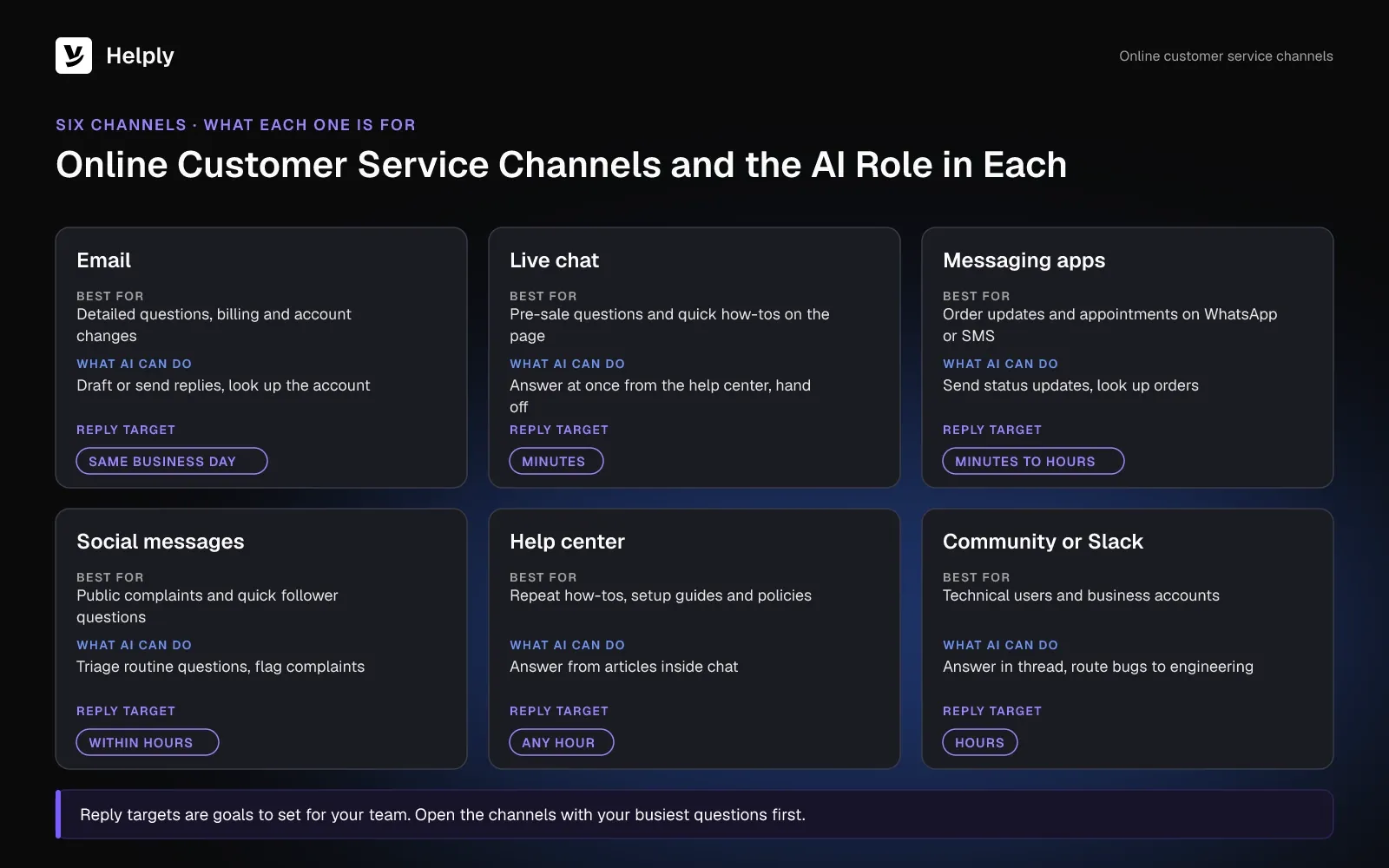
Email suits detailed and account questions, and live chat suits quick questions while the customer is still on the page. Messaging apps carry order updates, and a help center answers repeat how-tos at any hour. Open the two channels that match your busiest questions first, then add the rest.
| Channel | Best for | Reply target to set | What AI can do there |
|---|---|---|---|
| Detailed questions, attachments, billing and account changes | Within hours, same business day | Draft or send replies, look up the account, sort and tag | |
| Live chat | Pre-sale questions, quick how-tos, checkout problems | Minutes, while they're still on the page | Answer at once from the help center, collect details, hand off |
| Messaging apps (WhatsApp, SMS) | Order updates, appointments, mobile-first customers | Minutes to hours, in one ongoing thread | Answer and send status updates, look up orders |
| Social media messages | Public complaints, quick questions from followers | Within hours; public posts sooner | Triage and answer routine questions, flag complaints |
| Help center | Repeat how-to questions, setup guides, policies | Instant, at any hour | Answer from articles inside chat, suggest articles |
| Community or Slack | Technical users, business accounts, product feedback | Hours | Answer in thread, route bugs to engineering |
Don't count on the help center alone. In Gartner's study of 5,728 customers (December 2023), self-service fully resolved only 36% of issues customers called "very simple". In 43% of cases, they couldn't find content that fit their issue.
How to Set up Online Customer Service in 7 Steps
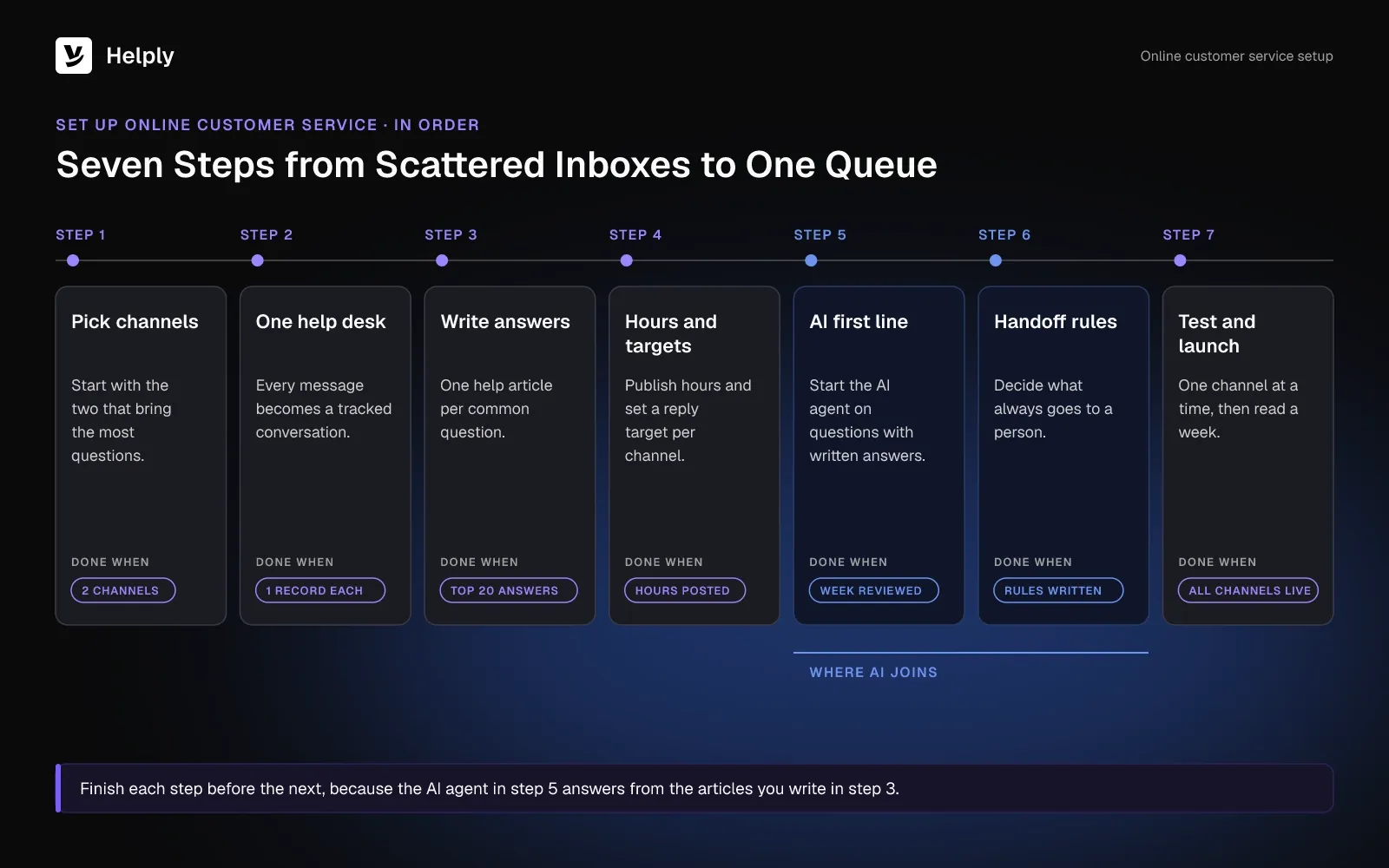
Set up online customer service in seven steps, in order. Pick channels, route them into one help desk and write the answers down. Then set hours, add AI for routine questions, write handoff rules and launch one channel at a time.
Finish each step before the next, because the AI agent in step 5 answers from the articles you write in step 3.
1. Pick Channels from Your Real Queue
Count where questions come from today: your inbox, website forms, DMs and phone notes. Begin with the two channels that bring in the most questions, usually email and website chat. Add WhatsApp, SMS or social messages once those two run well.
2. Route Every Channel into One Help Desk
Connect each channel to a help desk so every message becomes a tracked conversation with an owner and a status. Match messages to one customer record by email address, phone number or login. A customer who writes on chat and then by email should appear as one person.
3. Write the Answers Down
List your 20 most common questions and write one help article for each. Cover whatever your queue asks most, such as policies, setup, billing, shipping or account changes. These articles feed your help center, your saved replies and any AI agent you add later.
4. Set Hours and Reply Targets
Decide when people answer, and publish those hours on the chat widget and contact page. Set a first-reply target for each channel, such as minutes on chat and the same business day on email. Then pick the hours an AI agent covers instead of people.
5. Put AI on the First Line for Routine Questions
Connect an AI agent to your help center, past conversations and the tools that hold order and account data. Start it on the questions with clear, written answers. Read its replies for seven days before you give it more ground.
6. Write Handoff Rules
Decide which questions always go to a person: refunds outside policy, legal issues, angry customers and anything the AI can't answer with confidence. Write those rules into the AI agent's instructions and routing. The teammate who takes over should see the full conversation and what the AI already checked.
7. Test, Then Launch One Channel at a Time
Ask your own questions through each channel before customers do. Check the answers, the tone and every handoff. Launch on one channel, read a week of conversations, fix the gaps, then add the next channel.
Which Questions Should AI Answer, and When Should a Person Take Over?
Let AI agents take three kinds of request: questions your help center answers, lookups in connected tools and routine actions within policy. Send policy exceptions, upset or at-risk customers and new or unclear issues to a person.
In Salesforce's State of Service survey (April to June 2025), service professionals estimated AI handled 30% of cases and expected 50% by 2027. A Gartner prediction from March 2025 says four in five common service issues will close with agentic AI and no human by 2029.
Customers want a route to a person. In a separate Gartner study of 5,728 customers from December 2023, 64% said they would prefer that businesses skip AI in service. Their top concern was that AI would make it harder to reach a person.
In Zendesk's CX Trends 2027 survey of over 3,100 consumers (July and August 2026), 88% want a human on hand if needed. So split the work and give customers a fast, visible route to your team.
| Type of request | Who handles it | Example |
|---|---|---|
| Answer from your help center | AI agent | "How do I reset my password?" or "What's your return window?" |
| Lookup in a connected tool | AI agent | "Where's my order?" or "Why did my card fail?" |
| Routine action within policy | AI agent, with rules you set | Resend an invoice, update an address, cancel within the window |
| Exception to policy | Person | A refund outside the return window |
| Upset or at-risk customer | Person | A third complaint about the same order |
| Unclear or new issue | Person, with the AI's notes | A bug nobody has reported before |
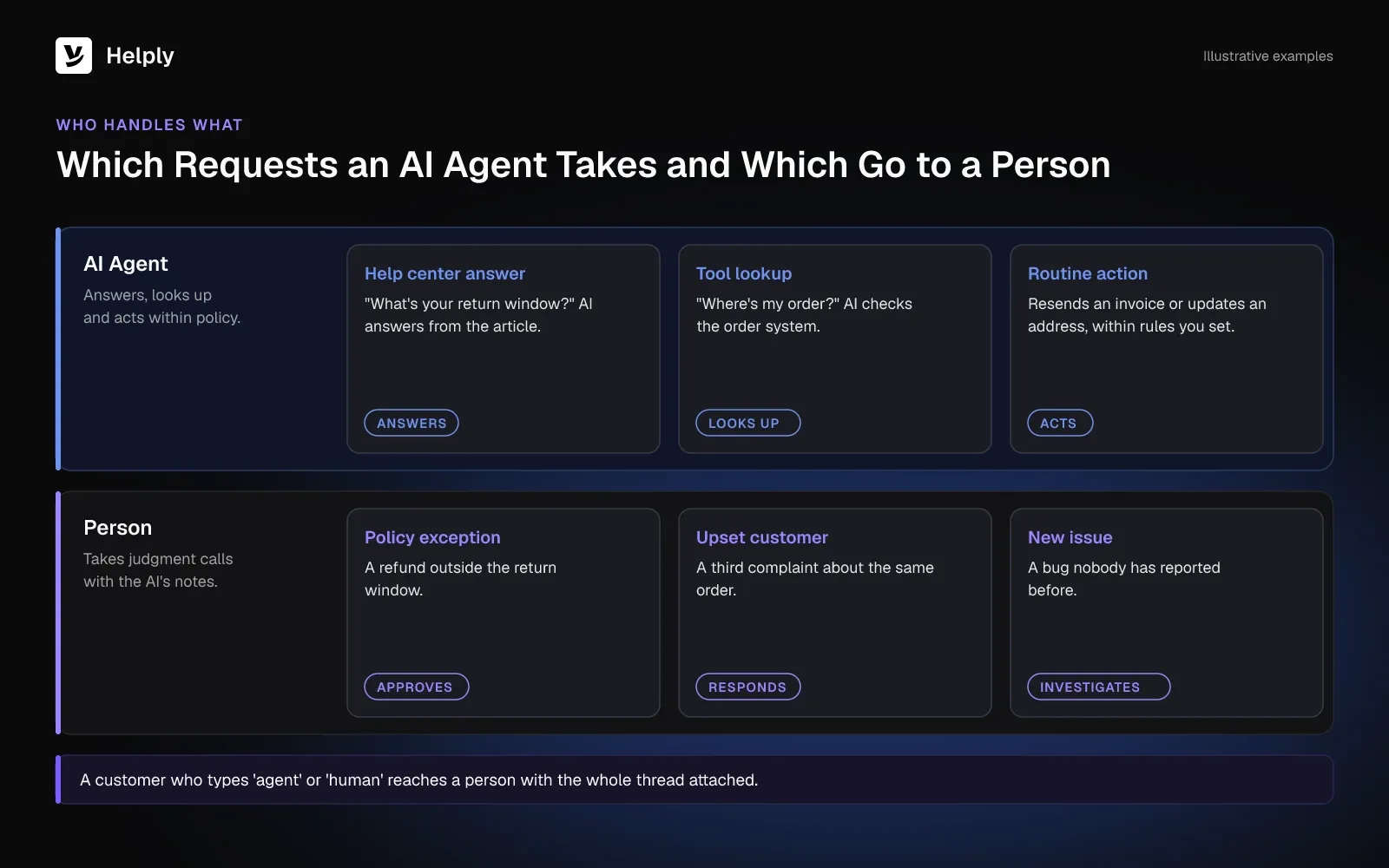
Set two rules for the handoff. The AI hands off as soon as it can't answer with confidence. A customer who types "agent" or "human" reaches a person with the thread intact.
Online Customer Service Best Practices
Seven habits keep replies fast and consistent across chat, email and messaging. Reply where the customer wrote, keep one history and answer at any hour. The other four cover next steps, skimmable replies, repeat-question articles and tone.
Reply Where the Customer Wrote
Answer a WhatsApp message on WhatsApp and a chat in chat. Moving a customer to email "for security" can add a day and start a new thread. Move them only when the channel can't carry what they need, such as a signed document.
Never Make Customers Repeat Themselves
Keep every channel in one conversation history. A teammate taking over from an AI agent should see the whole thread and everything the AI already tried. Ask for the order number twice, and the customer can assume nobody read their message.
Answer at Any Hour
Customers write when they hit the problem, often in the evening or on weekends. An AI agent can clear the simple questions overnight and leave the rest sorted for your team in the morning.
Say What Happens Next
End each reply with the next step and its timing. A line like "Billing has your case, and you'll hear back by 3pm tomorrow" beats a vague promise. Customers who know the time write in less often to chase updates.
Write for Skimming
Many online customers read on phones. Put the answer in the first line, use short paragraphs and numbered steps, and link one help article instead of five.
Fix the Article Behind Every Repeat Question
A question that arrives three times in a week means the help center is missing an answer or hiding it. Write or fix that article the same week.
In HubSpot's 2024 State of Service report, 75% of CRM leaders said they were receiving more customer service tickets than ever before. Each fixed article takes one repeat question out of your team's queue.
Keep the Tone Human
Use the customer's name, match their tone and apologize once when something went wrong. Give your AI agent the same voice rules your team follows, so the handoff doesn't feel like two different companies.
Online Customer Service Examples: Common Mistakes and Fixes
Watch for five habits: bot loops, one inbox per channel, silence after hours, a stale help center and closing too early. Each has a fix:
- Bot loops. A chatbot offers the same three buttons and no way to a person, so customers leave or return angrier. Give every bot flow a visible route to a person.
- One inbox per channel. With email in Gmail and DMs on a phone, two people answer the same customer. Route every channel into one help desk.
- Silence after hours. A widget that says "We're offline" all night loses the 9pm customer. Let an AI agent answer routine questions overnight and queue the rest.
- A stale help center. Customers follow steps for last year's settings, fail and open a ticket anyway. Fix the article the same week a repeat question shows up.
- Closing without checking. Close a conversation too early, and a more frustrated customer writes back two days later. Ask for confirmation that the fix worked before you mark it solved.
Online Customer Service Metrics to Track
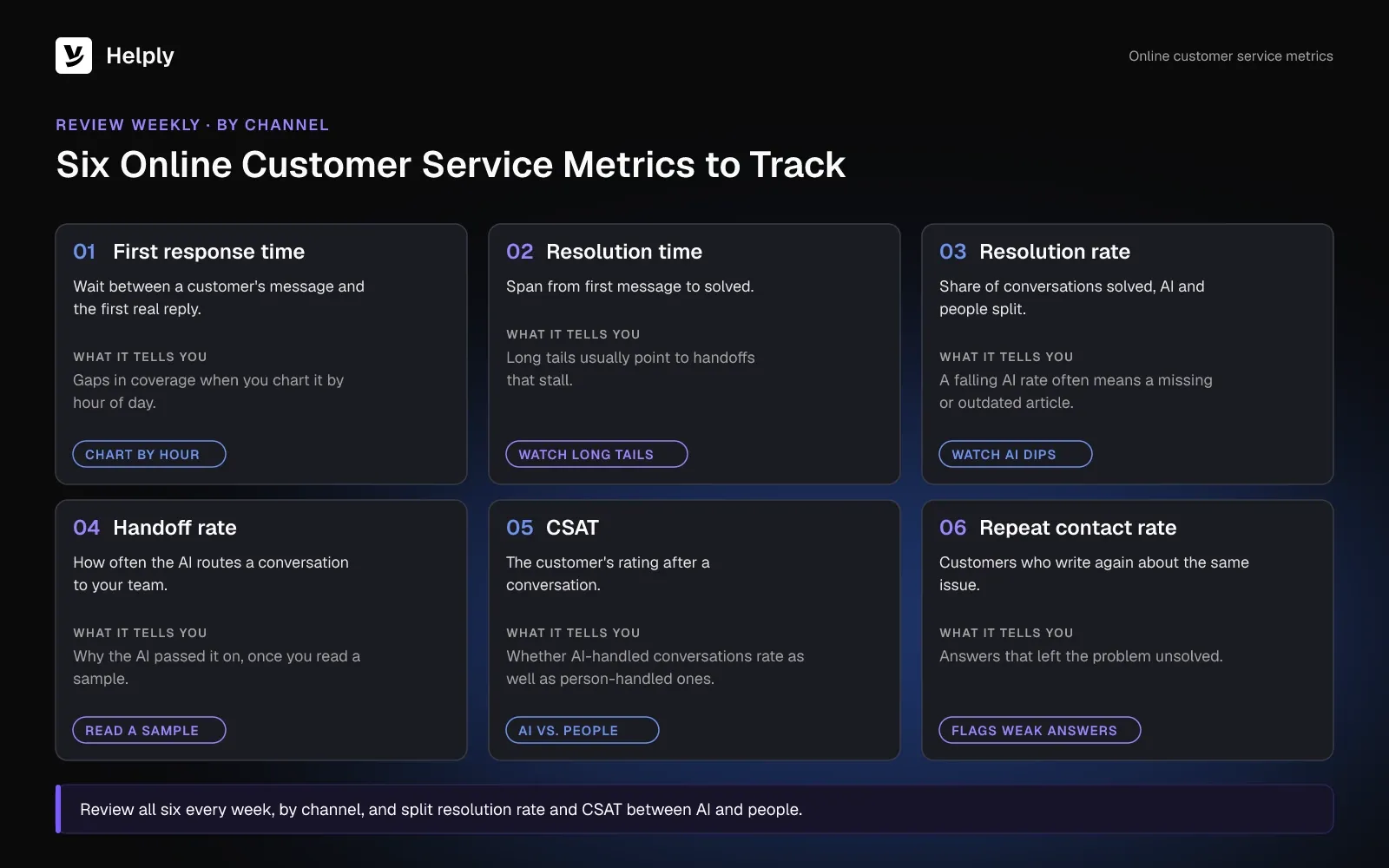
Track six online customer service metrics every week, by channel, and split each between AI and people where you can:
- First response time: the wait between a customer's message and the first real reply. Chart it by hour of day to find coverage gaps.
- Resolution time: the span from first message to solved. Long tails usually point to handoffs that stall.
- Resolution rate: the share of conversations solved, split between AI and people. A falling AI rate often means a missing or outdated article.
- Handoff rate: how often the AI routes a conversation to your team. Read a sample each week to see why.
- CSAT: the customer's rating after a conversation. Compare it for AI-handled and person-handled conversations.
- Repeat contact rate: customers who write again about the same issue within a few days. A rising rate flags answers that left the problem unsolved.
What to Look for in Online Customer Service Software
Online customer service software should cover the whole loop, from the first message to the report on Friday. Check for six things:
- Every channel in one inbox: email, chat, messaging apps and social messages in one conversation per customer.
- A help center that stays current: searchable articles that your team and AI answer from, plus a way to spot gaps.
- AI that answers and acts: an agent that replies from your knowledge, looks things up in your tools and takes approved actions.
- Handoffs with context: the person who takes over sees the thread, the customer record and what the AI checked.
- Reports by channel: response time, resolution rate, handoffs and CSAT, split between AI and people.
- Security: an independent audit such as SOC 2, a DPA on request and a written promise about AI training on your data.
For more on AI agents in this role, see how teams use ChatGPT for customer service and a knowledge base chatbot.
How Helply Runs Online Customer Service
Helply puts the help desk, help center and AI agents in one platform. The 9pm chat, 7am email and noon DM reach one team. It fits software companies as well as ecommerce, marketplace and other consumer businesses.
One inbox for every channel. Chat and messaging sit in the same inbox as email, so your team reads each customer's history in one place.
All plans carry email and live chat. Facebook and Instagram join on Plus. WhatsApp, SMS and Discord join on Team, and Microsoft Teams on Pro.
A first line that works at 9pm. Across every channel, the Support Agent replies to customers and handles common questions around the clock. It can resolve issues end to end, take supported Actions in tools you connect such as Stripe, and escalate anything needing human judgment.
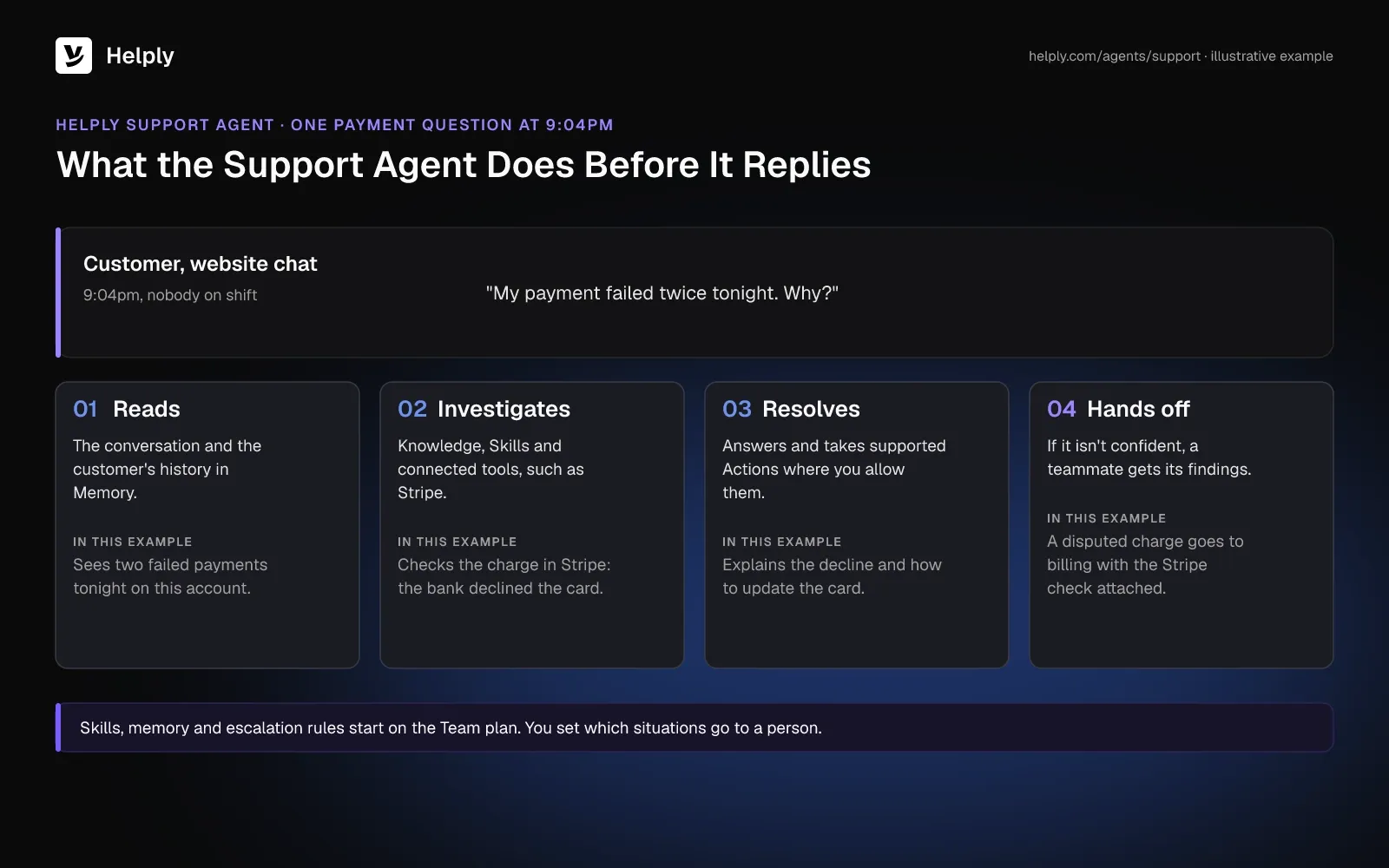
Handoffs that don't start over. Some issues the Support Agent can't resolve with confidence. For those, it passes your team the conversation, its investigation and the customer context.
Your team can step into any conversation at any point. Guidelines set how the agents behave and name the situations that need a person.
On Team and above, you set escalation rules for the situations, confidence levels and customer conditions that route a conversation to a person.
Proposify, a proposal software company with two products and two knowledge bases, set up its first line this way. The Support Agent took first contact, worked out which product a customer meant and answered from the matching knowledge base. It resolved routine how-tos on the spot and handed questions that needed a person to the team.
Help for the people who reply. Inside each conversation, the Assist Agent drafts answers from the thread, customer context and your Guidelines. Teammates edit that draft instead of a blank reply, and can tell Assist to run supported Actions while they stay in the conversation.
A help center that keeps up. On Team and above, the Knowledge Agent reads conversations for missing or stale answers. Teammates can check what it suggests before customers see it.
Also from Team, the Insights Agent spots trends and recurring problems, and Skills teach the agents specific types of customer work.
Security. Prospects and customers can read Helply's SOC 2 Type II audit under NDA and ask for a DPA. Helply's AI providers don't train their models on Helply customer data.
Run It with People Alone or Put AI Agents on the First Line?
On one or two channels in business hours, a shared help desk and a solid help center can carry online customer service. Once customers write at night, on weekends or on three or more channels, an AI agent belongs on the first line.
In Helply, the Support Agent can answer the 9pm payment question that night after checking the payment in Stripe.
If it needs a person, the morning shift can open one conversation with the chat, email, Instagram message and the agent's findings. Instagram comes with Plus and above.
At Proposify, support staff deployed Helply with zero engineering time. The agent learned from Proposify's real conversations, so its answers matched the team's voice.
Any Helply plan you pick carries the Support Agent and Assist Agent, plus one pool of AI credits for your team. Passing a conversation to your team after the AI tries it costs no credits, and the pricing page lists each plan.
Start with one channel. Connect your support email or website chat, add your help center and read the first week of answers. Then add the next channel.
Frequently asked questions
Online customer service is the help a business gives customers over email, live chat, messaging apps, social DMs and a help center. Some teams call it digital customer service or online customer support.
Online and digital customer service mean the same thing: support over email, chat, messaging apps, social media and help centers. Phone and in-person support sit outside both terms.
Customers write when they hit a problem, often outside office hours. One round-the-clock position takes at least 4.2 full-time employees (168 weekly hours ÷ 40). An AI agent can cover routine questions at night.
Pick channels, route them into one help desk and write answers down. Then set hours, add AI for routine questions, write handoff rules and launch one channel at a time.
Speed, accuracy and an easy path to a person matter most. In Zendesk's CX Trends 2027 survey of over 3,100 consumers (July and August 2026), 88% want a human on hand if needed.
No, exceptions to policy and upset customers still need a person. Gartner's March 2025 prediction has agentic AI handling 80% of common service issues unaided by 2029.
Start with email and website chat, then add messaging apps like WhatsApp. Keep a phone or callback option, since 35% of US adults prefer the phone in YouGov data published in March 2025.
Track first response time, resolution time, resolution rate, handoff rate, CSAT and repeat contacts weekly, by channel. Split resolution rate and CSAT between AI and people.
Online customer service software is a help desk that brings email, chat, messaging and social messages into one inbox. Good tools add a help center, AI agents that answer and act, handoffs with context and reports by channel.
Helply covers email, live chat, Facebook, Instagram, Slack Connect, WhatsApp, Microsoft Teams, Discord, Telegram, phone and SMS. Email and live chat come with every plan. Plus adds Facebook and Instagram, Team brings Discord, SMS, WhatsApp and Slack Connect, and Pro brings Microsoft Teams.
About the author

Jared Scheel
Co-founder & CTO
Keep reading

Customer Support Feedback: How to Collect, Read and Act on It
Konrad Janczyk · 13 min read
Best Customer Service Software for Small Business in 2026
Bildad Oyugi · 22 min read