
 Konrad Janczyk ··15 min read

Key Takeaways
- ChatGPT for customer service is lowest-risk as a drafting assistant in ChatGPT Business, where OpenAI doesn't train on your data by default.
- ChatGPT Business Agents answer product and policy questions for eligible US businesses but can't check orders, and you don't receive their chats.
- On GPT-6.1 Sol, OpenAI API model fees run about 2 cents a conversation (6,000 input, 800 output tokens), and engineering costs more.
- In a 2025 Quarterly Journal of Economics paper, researchers found AI help raised support agents' resolutions per hour by 15% on average.
- Helply's Support Agent checks your docs, customer history and connected systems, and can resolve issues or hand off with its findings.
Can You Use ChatGPT for Customer Service?
Yes, ChatGPT can help your support team draft replies, but it can't see your orders, invoices or accounts by itself.
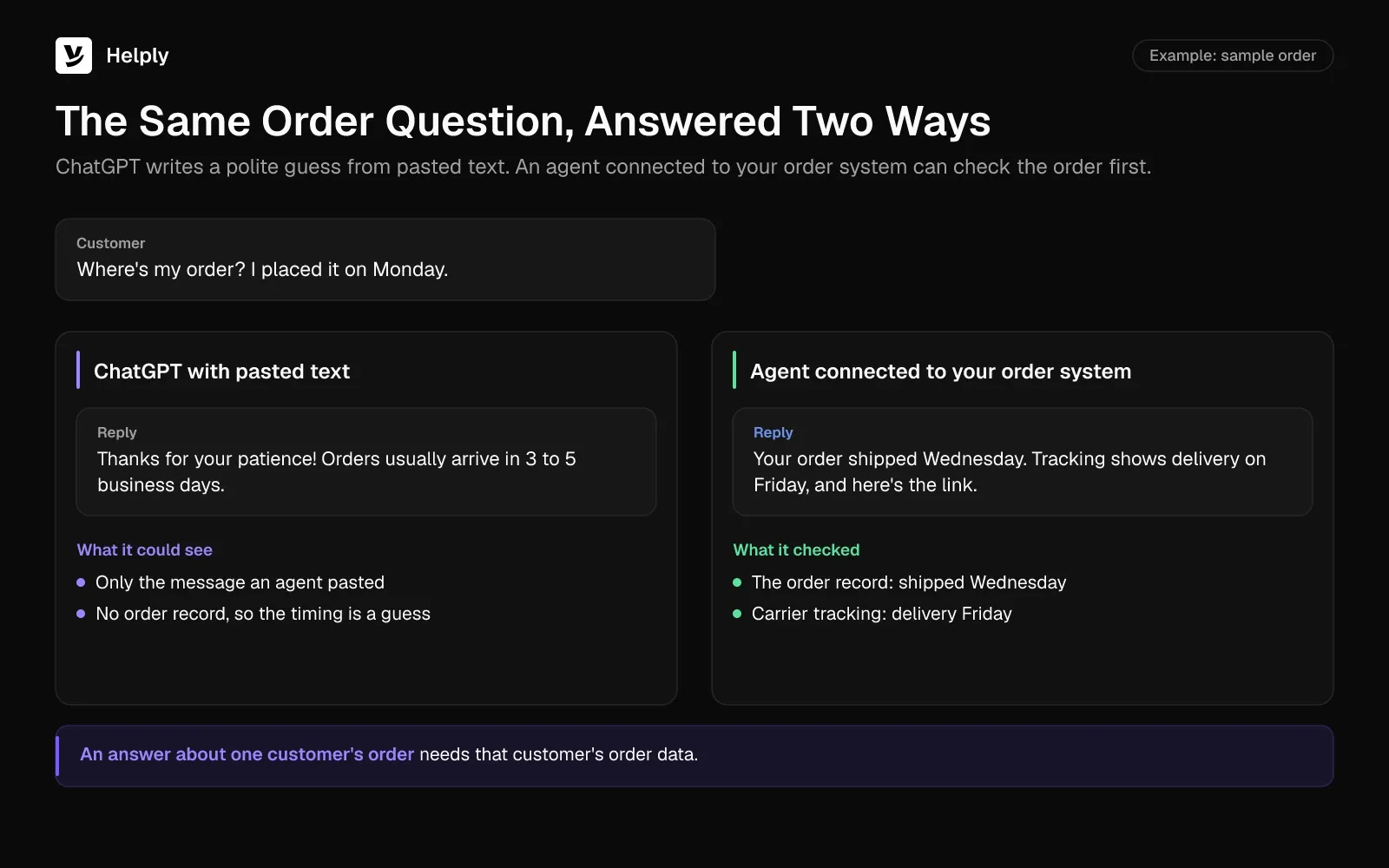
It's Monday morning, and the queue is already full. A shopper asks where their order is. A software customer asks why an invoice failed after a plan change.
You paste both into ChatGPT, and the replies read well. One promises a delivery date ChatGPT can't know. The other apologizes for the failed payment but gives no reason, since ChatGPT can't see the declined card.
ChatGPT can still help if a person looks up the order and the declined card first. You also have to decide whether AI should answer customers on its own.
Researchers studied 5,172 customer support agents during the staggered rollout of an assistant built on OpenAI's GPT-3. In a 2025 paper in The Quarterly Journal of Economics, they report that issues resolved per hour rose 15% on average. The gain reached 30% for less skilled and less experienced agents.
In Zendesk's June 2025 survey of 6,182 consumers for CX Trends 2026, 74% said AI is why they now expect round-the-clock service. A drafting assistant helps only while someone is at the desk.
One user on OpenAI's community forum had hundreds of new leads a day, more than they could process alone. They exported the conversations to a spreadsheet and asked ChatGPT to fill in a "Response" column. Then they built a custom GPT with an accurate filled-in file as its knowledge, and it "still doesn't work well," they wrote.
OpenAI pairs a bot with people in its own support. Chats on its help center start with a virtual assistant, and a human agent can join if the bot can't resolve the issue.
4 Ways to Use ChatGPT for Customer Service
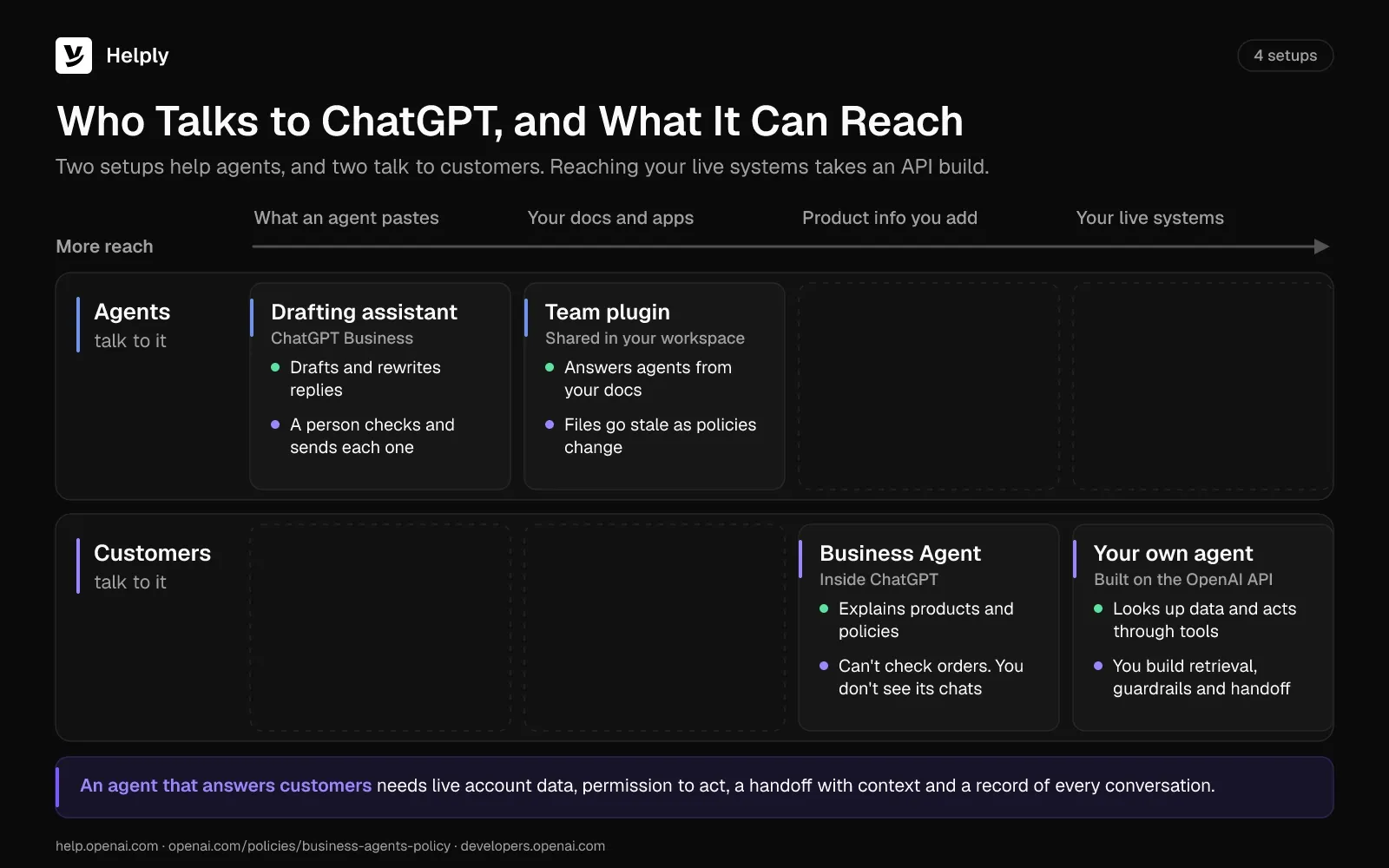
The right way to use ChatGPT for customer service depends on who talks to it: your agents or your customers. The first two setups keep a person between ChatGPT and the customer. The last two put an AI agent in front of customers, inside ChatGPT or on your own site.
ChatGPT Customer Service Setups Compared: Data, Actions, Cost, Limits
| Setup | Who talks to it | What it can see | What it can do | Cost or requirement | Main limit |
|---|---|---|---|---|---|
| Drafting assistant in ChatGPT Business | Your agents | The thread and policy an agent pastes in | Draft, rewrite, summarize and translate replies | Standard seats at $25 per user a month ($20 billed annually) | A person copies, checks and sends every reply |
| Team plugin with your docs | Your agents | Reference files and connected apps, within each user's permissions | Answer agents' questions from your documents | A Business or Enterprise workspace to share it | Files go stale as policies change |
| Business Agent in ChatGPT | Customers inside ChatGPT | Product details and policies you provide | Explain products and policies, then link to your site | Claiming plus Persona identity checks; you don't need an Ads account | Can't check orders, and you don't receive its conversations |
| Your own agent on the OpenAI API | Customers on your site or app | Whatever you connect: orders, accounts, billing, docs | Answer and act through tools you build, and hand off to a person | About 2 cents a conversation in model fees on GPT-6.1 Sol (6,000 input, 800 output tokens), plus engineering | You build and maintain retrieval, tools, guardrails and handoff |
1. A Drafting Assistant for Your Agents
Start with a ChatGPT Business workspace. Agents paste the customer's message and the matching policy, ask for a draft, then edit it before sending.
- Create a ChatGPT Business workspace, which needs at least 2 seats.
- Write a short standing instruction with your tone, refund window and escalation rules.
- Paste the thread without passwords or full card numbers, and ask for a short reply.
- Check every fact against your own systems, then send the reply from your help desk.
Keep customer data out of personal accounts. By default, OpenAI doesn't use inputs or outputs from ChatGPT Business, Enterprise, Edu or the API to improve its models. On personal plans, including Free, Plus and Pro, OpenAI may train on your content unless you turn off "Improve the model for everyone."
ChatGPT Business Standard seats cost $25 per user a month ($20 billed annually). Premium seats cost $125 per user a month ($100 billed annually).
In this setup, ChatGPT works from what an agent pastes in. Someone still looks up the order, checks the invoice and moves the reply into the ticket.
2. A Team Plugin Built on Your Docs and Policies
A team plugin packages your support instructions and policy files in one place. Business and Enterprise users can share plugins with other members of their workspace.
OpenAI has scheduled the standard retirement of custom GPTs for December 11, 2026, and is moving creators to plugins. Users on personal plans can no longer create new GPTs. On migration, a GPT's instructions become a plugin skill and its files become reference files, but custom actions don't transfer.
Company Knowledge adds live sources on Business, Enterprise and Edu. It answers organization-specific questions from connected apps such as Google Drive, SharePoint, Slack, GitHub and Notion. It also respects each source's permissions, so agents see only what they could already open.
Someone has to update a plugin's reference files each time a refund window, price or feature changes. To ground ChatGPT in your own content, see how to train ChatGPT on your data.
3. A Business Agent Inside ChatGPT
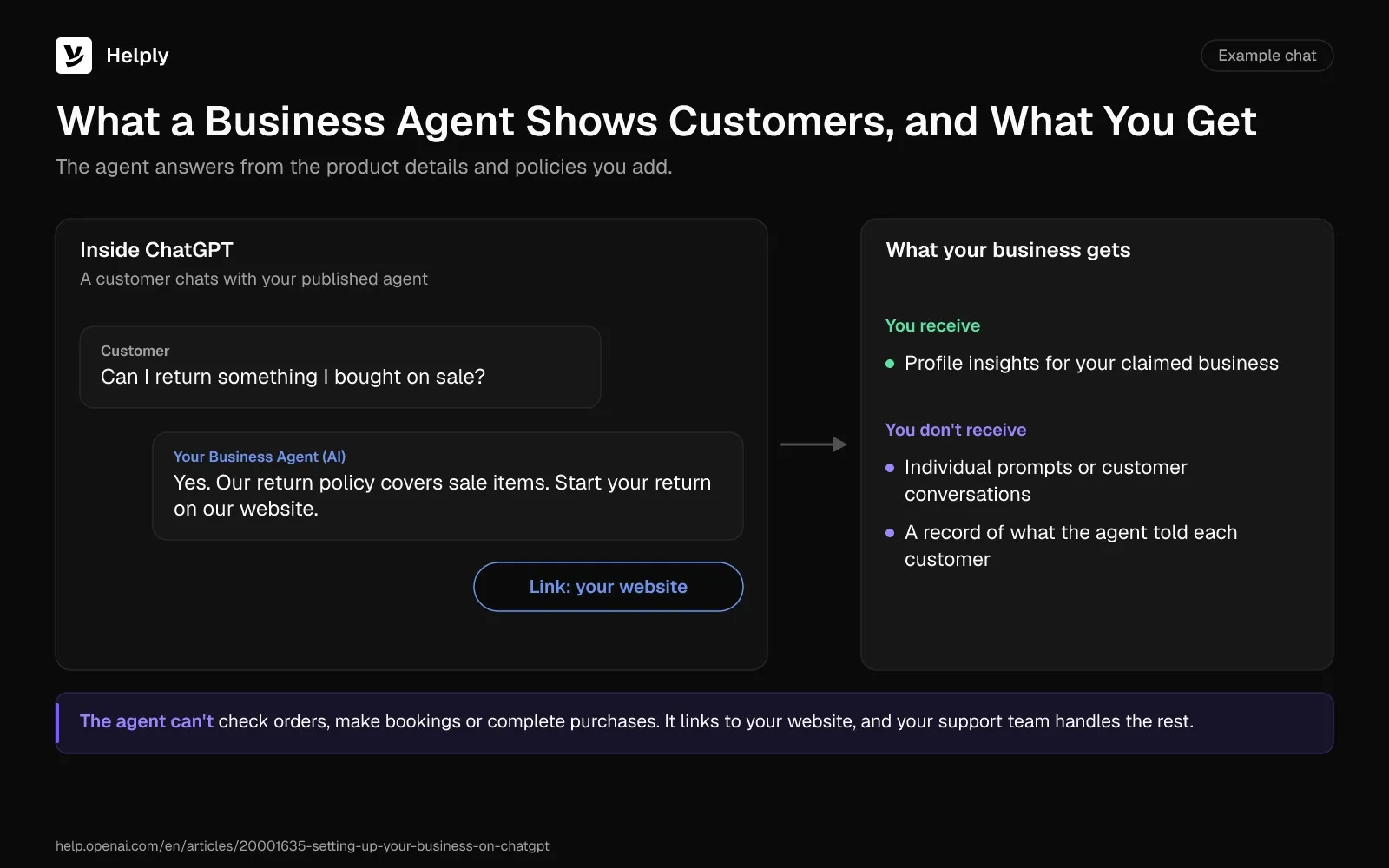
OpenAI lets a business claim its profile in ChatGPT. Eligible US ecommerce and online service businesses with a website can also publish a Business Agent. It answers customer questions from the information the business provides.
- Claim the business by confirming a business phone, email, website domain or Shopify store.
- Complete identity verification with Persona, which you need before you can publish changes, view insights or create an agent.
- Review what the agent will use, such as product details and your return policy.
- Preview it with a question customers often ask, fix any wrong answer, then publish. Customers can chat only with a published agent.
OpenAI's Business Agents Policy requires the agent to be clear that it is AI representing the business. Verification alone doesn't guarantee that a business qualifies.
OpenAI's setup guide says the agent can't complete purchases, make bookings or check a customer's order. It explains products and policies and links to your website, where customers finish those tasks. Businesses also don't receive individual prompts or consumer conversations, including chats with their Business Agents.
Claiming a profile doesn't guarantee higher placement or sales, either. A Business Agent answers questions inside ChatGPT, and your support team still handles orders, refunds and account changes.
4. Your Own Support Agent on the OpenAI API
To put OpenAI's models on your own site, engineers build on the API. OpenAI recommends the Responses API for new projects, and its Agents SDK runs the agent loop. ChatKit provides the chat interface.
Skip any tutorial built on the Assistants API or Agent Builder. OpenAI sunset the Assistants API on August 26, 2026, and scheduled Agent Builder to shut down on November 30, 2026.
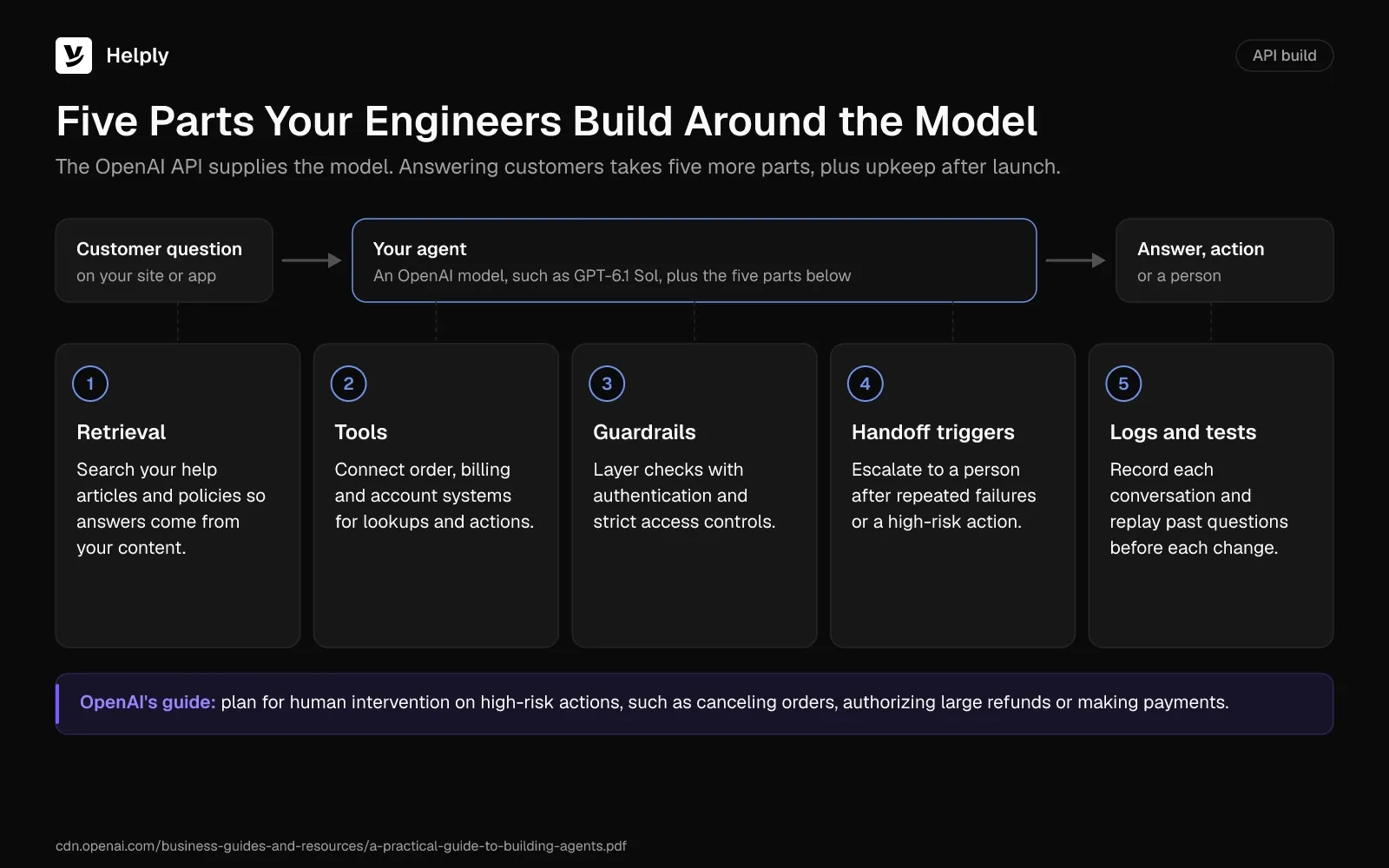
A support build needs five parts beyond the model:
- Retrieval. Search your help articles and policies, so answers come from your content.
- Tools. Connect order, billing and account systems. OpenAI's guide to building agents lists actions such as "update a CRM record."
- Guardrails. The guide calls guardrails "a layered defense mechanism" and pairs them with authentication and strict access controls.
- Handoff triggers. The guide says to escalate to a human agent after repeated failures and for high-risk actions, such as large refunds.
- Logs and tests. Record every conversation, and replay past questions against each change before customers see it.
On OpenAI's community forum, a builder said their support assistant invented some answers. Another member advised starting with two knowledge files, testing, then adding more and tuning chunk sizes. Teams hit the same traps in AI support projects that stall.
ChatGPT Prompts for Customer Service
Use these prompts in a ChatGPT Business workspace. Replace the brackets, paste only what the task needs, and keep a person on the final send.
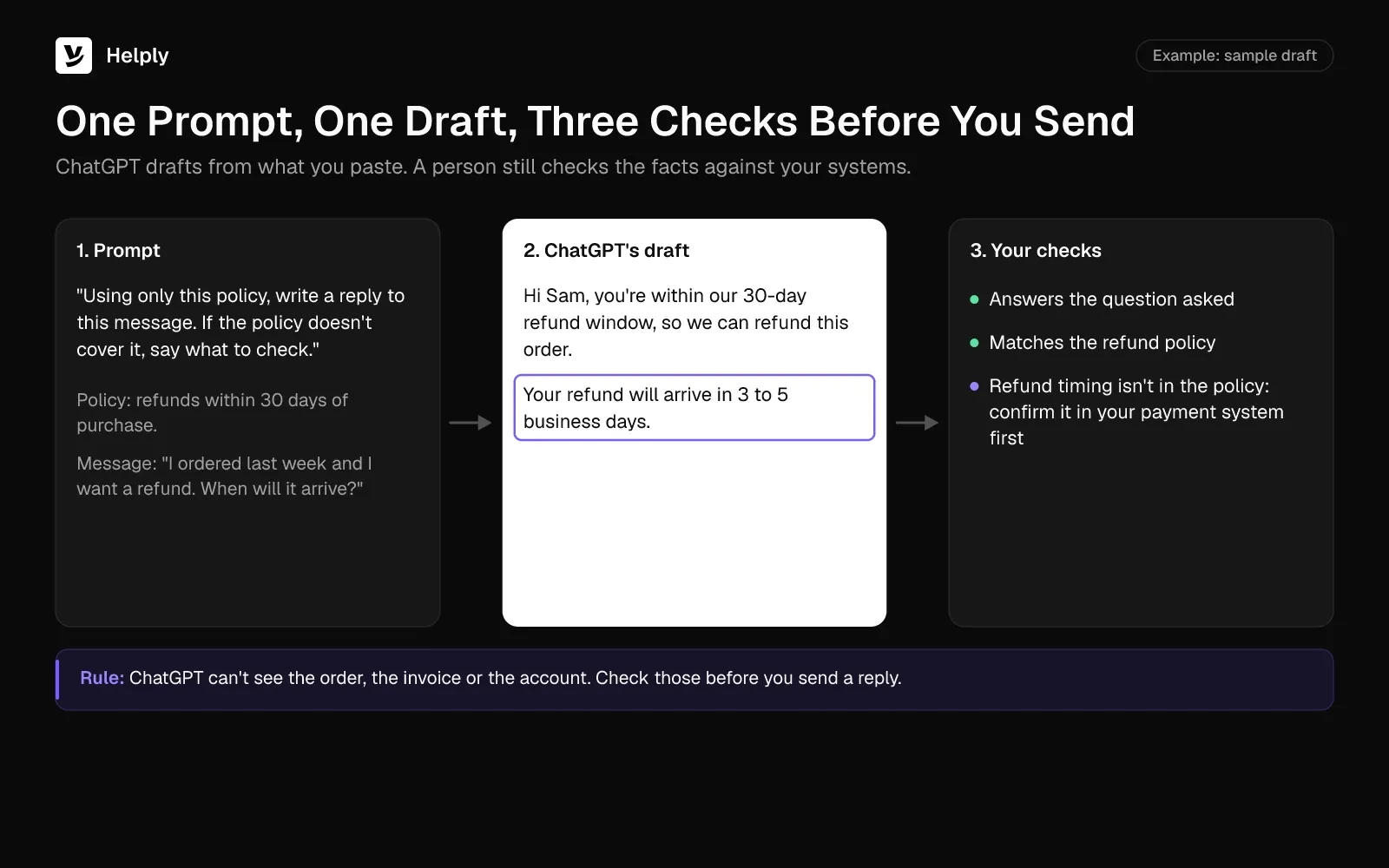
- Draft from policy: "Using only this policy, [paste], write a reply to this message: [paste]. If the policy doesn't cover the question, say what to check."
- Match your tone: "Rewrite this draft in our voice: friendly, direct and short, with no exclamation marks. Keep every fact and promise: [paste]."
- Calm an upset customer: "This customer is upset about [issue]. Write a reply that names the specific failure first, then the fix or next step, without blaming them."
- Summarize for a handoff: "Summarize this thread for the next agent: goal, steps tried, what failed, open questions and the promised next step."
- Ticket to article: "Turn this resolved conversation into a help article with a title, the fix steps and a 'still stuck?' line. Remove customer details."
- Translate without breaking terms: "Translate this reply into [language], keeping product names, plan names and button labels in English. Flag any sentence whose meaning shifts."
- Write saved-reply versions: "Write versions of this saved reply for a first contact, a follow-up and a customer who wrote twice. Keep the facts identical."
- Check a draft before sending: "Check this draft: does it answer the question, state the next step and time, and match the policy? List anything missing."
Check every answer against your systems before you send it. In its help center, OpenAI reminds users that "ChatGPT can make mistakes" and asks them to check important information.
For the structure of a good reply, see how to respond to a customer inquiry.
Where ChatGPT Falls Short with Customers
Using ChatGPT for customer support carries little risk when it only drafts, because a person reads each reply. Putting ChatGPT in front of customers raises five problems:
- It can't see the order or the account on its own. A Business Agent works from the product and policy information you provide, and an API agent sees only the systems your engineers connect.
- Chatbots can sound certain and still be wrong. In 2024, a British Columbia tribunal held Air Canada responsible for wrong fare information from its website chatbot. The tribunal treated the chatbot's answer like any other page on the site and ordered the airline to pay CA$812.02.
- It can't act without tools you build. Refunds, cancellations and plan changes need access to your systems, plus rules for when a person approves.
- Customers worry AI will keep them from a person. In December 2023, Gartner asked 5,728 customers about AI in service. Harder access to a person topped their list of concerns.
- You can't see what a Business Agent told customers. Businesses don't receive the conversations customers have with one.
To compare more chatbot options, see how to pick an AI chatbot for customer service.
What Should You Never Let ChatGPT Handle Alone?
Keep a person on anything that moves money, changes account access or needs a license. Any customer who asks for a person should get one.
- Refunds, cancellations and payments. OpenAI's guide names canceling orders, authorizing large refunds and making payments as high-risk actions for human review.
- Advice that needs a license. The Business Agents Policy bars agents from advice that legally requires a professional license.
- Account security and identity changes. Password resets, email changes and ownership transfers need identity checks in your systems.
- Customers who ask for a person. Route them to one. In Gartner's December 2023 survey, 64% of customers said they would prefer that companies skip AI in customer service.
What Companies Use ChatGPT for Customer Service?
Klarna and CRED both built their own customer service assistants on OpenAI models instead of sending customers to ChatGPT. In February 2024, Klarna said its AI assistant, powered by OpenAI, had 2.3 million conversations in its first month. That was two-thirds of its customer service chats, the equivalent work of 700 full-time agents.
Klarna's 2025 annual report says the assistant handled 80% of customer service chats that year, work equal to over 850 full-time agents. Klarna still lets customers reach a person: "we continue to offer all of our customers that option."
In an OpenAI interview published in November 2025, CRED reported a 14-percentage-point rise in CSAT. Its assistant reached 98% resolution accuracy within three months of launch.
What Does ChatGPT for Customer Service Cost?
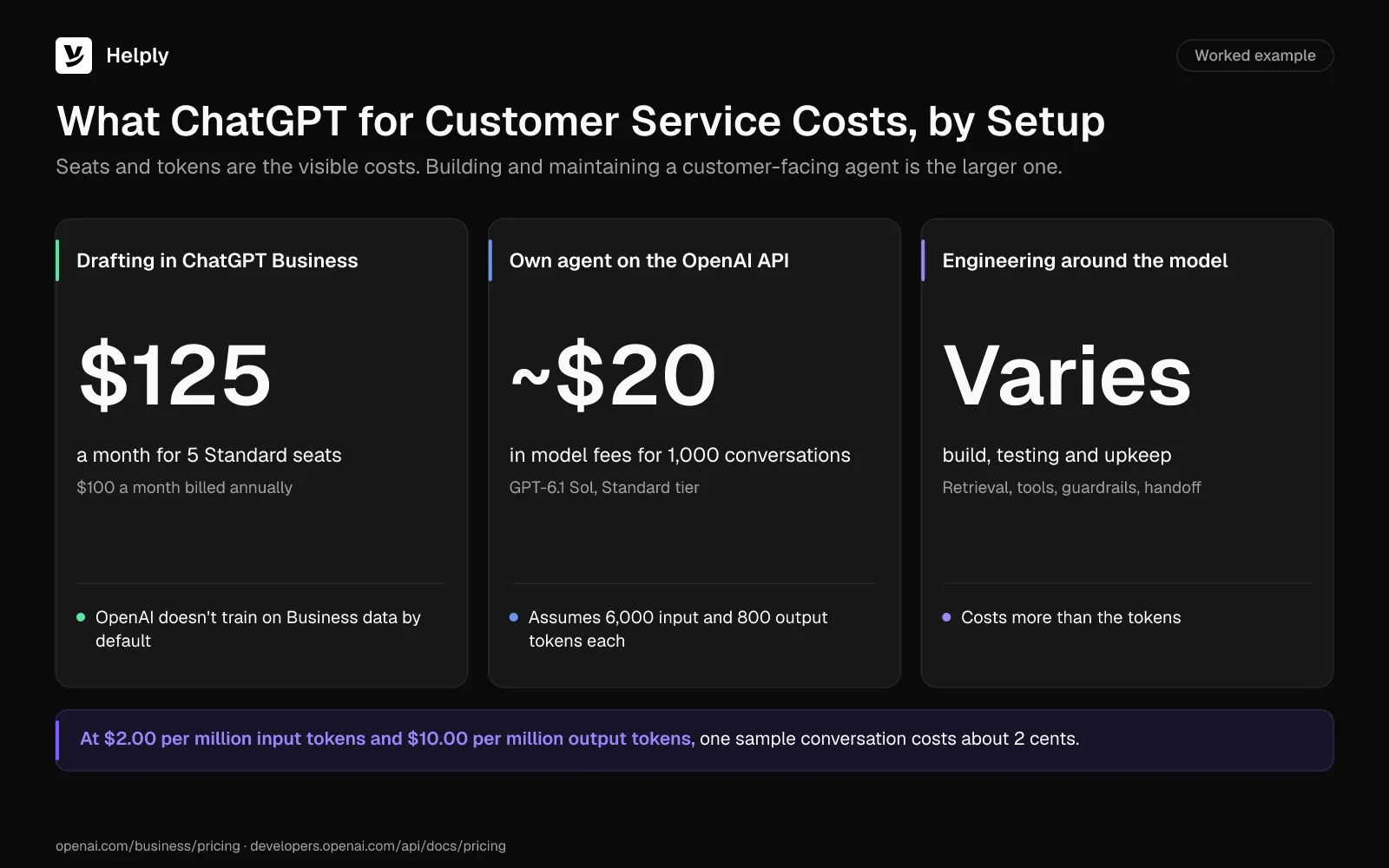
Drafting in ChatGPT Business costs $25 per user a month for a Standard seat ($20 billed annually). On the OpenAI API, you pay per token, plus the engineering work of building and maintaining a customer-facing agent. Costs and requirements differ by setup:
- Drafting and plugins. A 5-agent team on ChatGPT Business Standard pays $125 a month ($100 a month billed annually). Company Knowledge is available on Business.
- Business Agent. Claiming needs no Ads account or ChatGPT Enterprise agreement. You do need to confirm a business phone, email, domain or Shopify store, then pass Persona identity checks.
- API build. On OpenAI's Standard API tier, GPT-6.1 Sol costs $2.00 per million input tokens and $10.00 per million output tokens. GPT-6 Luna, OpenAI's low-cost option, costs one-twentieth as much per token.
Take a support conversation with 6,000 input tokens and 800 output tokens. The input covers instructions, retrieved articles and history. On GPT-6.1 Sol that costs about 2 cents in model fees, so 1,000 such conversations cost about $20.
Engineering time costs more: building retrieval, tools, guardrails and handoff, then testing and maintaining them.
An AI support platform bundles the model, the help desk and the handoff. Every Helply plan covers the Assist and Support Agents, with one pool of AI credits for the whole team. Each plan also includes a knowledge base on your own domain with AI answers, so retrieval comes with the help desk.
Passing a conversation to a person after the AI tries it uses no credits.
When an AI Support Platform Beats a ChatGPT Build
If customers need answers that depend on their order, invoice or account, the work belongs in the help desk. Helply provides the help desk itself, and its agents work inside it. Email, live chat and a shared inbox come on every plan.
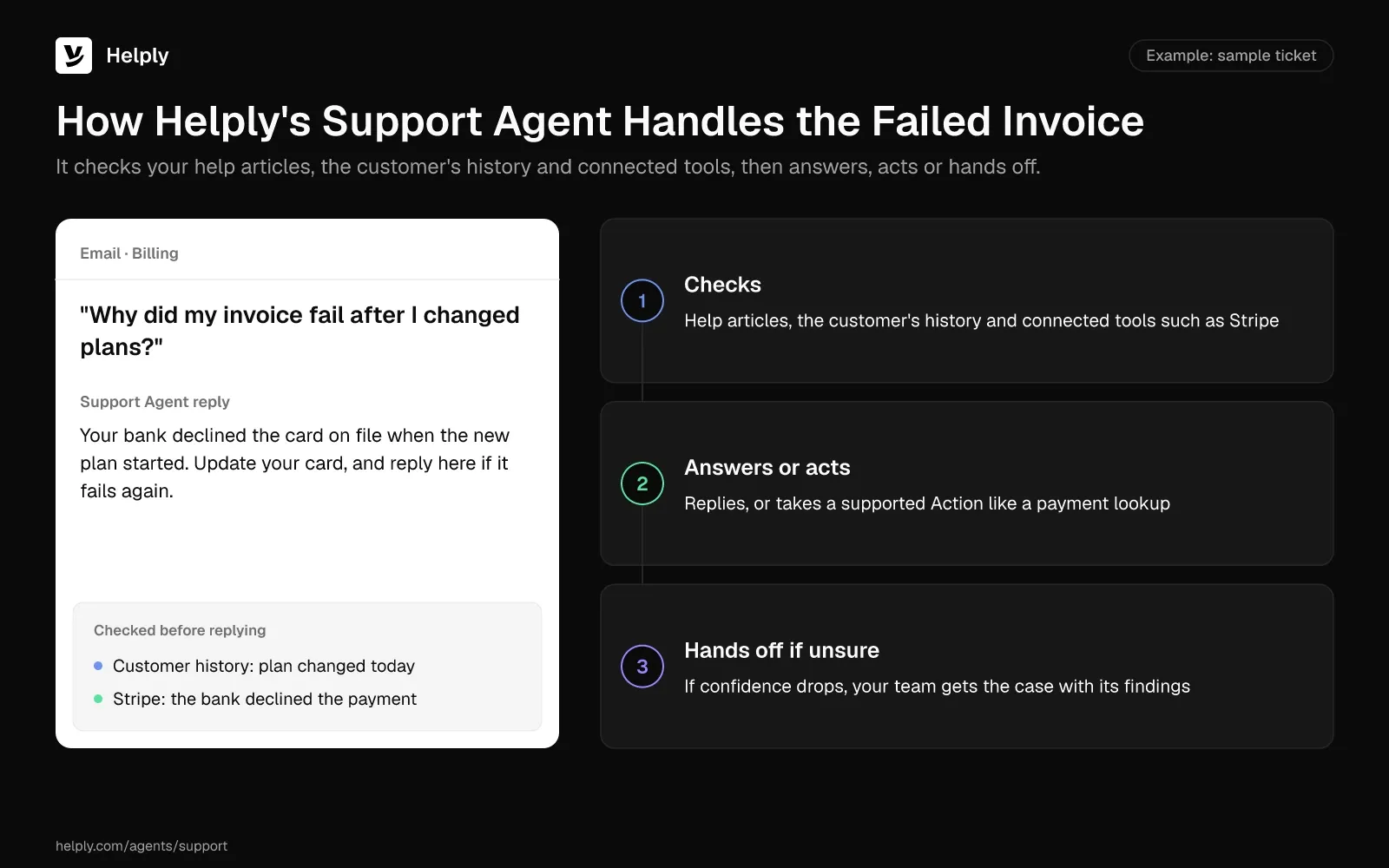
On the channels you connect, Helply's Support Agent searches your help articles, the customer's history and linked systems before it replies. It can settle a conversation and take supported Actions. If confidence drops, it passes the case to your team with what it found and the customer's details.
The shopper's order question and the failed invoice both need a lookup. Helply's Tools are the systems an agent can use, and Actions are what it can do with them. Stripe can be a Tool, and looking up a payment can be an Action.
Stripe connects on every plan. For order data in your own systems, the Team plan adds MCP connectors and custom API actions.
Some replies need a person, and the Assist Agent drafts them inside the ticket instead of in a ChatGPT tab. Each draft draws on your Guidelines, the conversation so far and the customer's context. Your team can also have it take supported Actions without leaving the ticket.
You write the Guidelines that tell your AI agents how to behave and decide. From the Team plan, Skills teach agents how to handle specific kinds of support work. With escalation rules, also from Team, you choose the situations and confidence levels at which an agent hands the conversation to a person.
Help articles drift out of date the same way a plugin's files do. From Team, the Knowledge Agent reads customer conversations for questions your articles miss and flags content that looks outdated. Your team can vet each suggestion before releasing it to customers or other AI agents.
From the Team plan, Helply also includes AI QA and backtesting. With an API build, your engineers write those tests themselves.
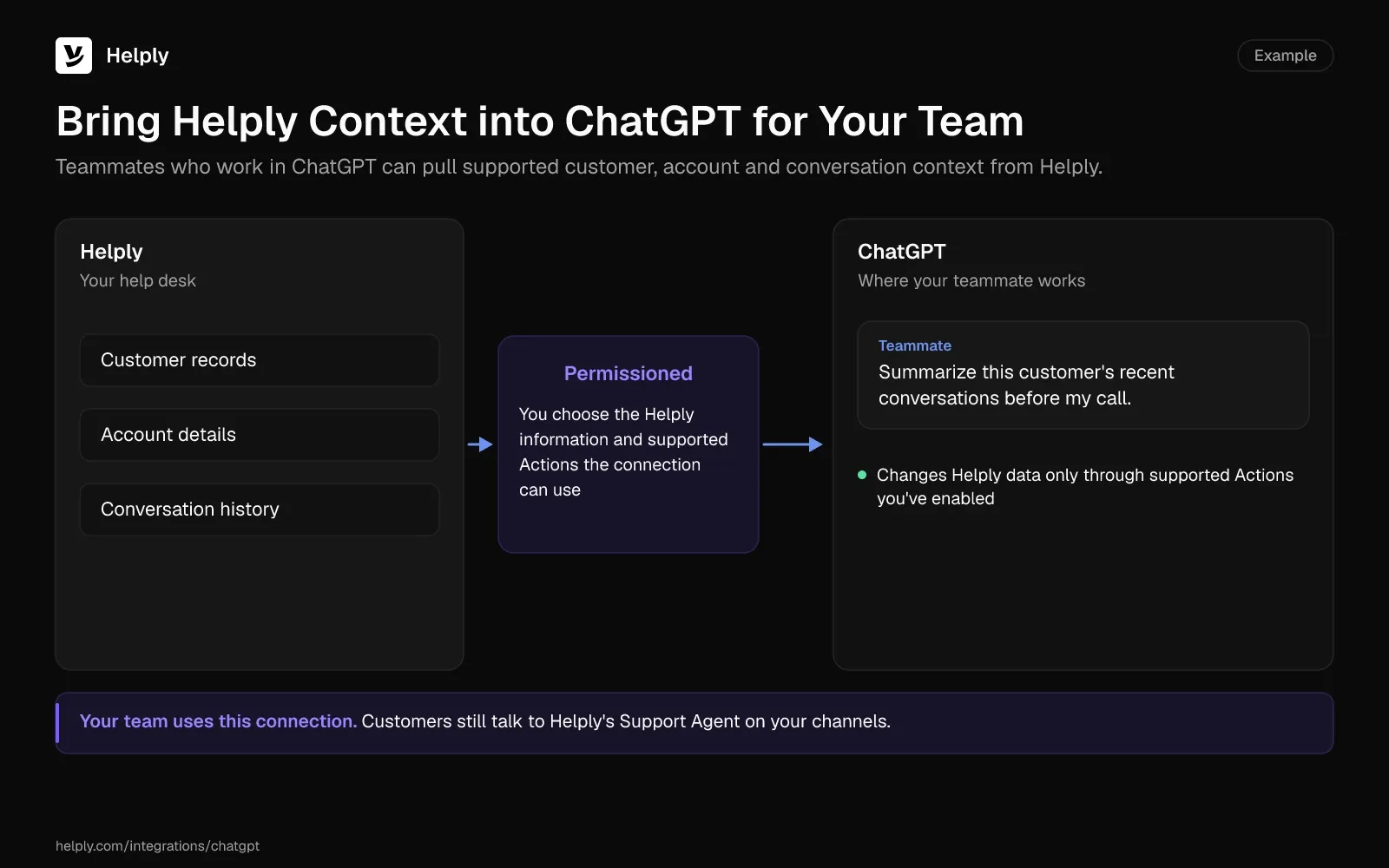
Teams that work in ChatGPT can keep it. Helply's ChatGPT integration brings supported Helply customer, account and conversation context into ChatGPT. You choose which Helply information and supported Actions the connection can use.
Helply sends customer data to AI providers for the tasks you request. The providers don't train their models on it. Prospects and customers can get the SOC 2 Type II report under NDA through Helply's trust center and request a DPA.
Keep ChatGPT as a Drafting Tool, or Give Customers an AI Agent?
Decide how to use ChatGPT for customer service by asking who needs the answer. If your team needs faster drafts and can live with the copy and paste, ChatGPT Business and a shared plugin cover it. Eligible US ecommerce and online service businesses can also claim a ChatGPT profile and publish a Business Agent beside their support.
Teams with engineers and unusual workflows can build on the OpenAI API and budget for upkeep. Some customers need answers from their own orders and accounts, with actions and a handoff. Helply's agents can do that without the build.
For the shopper, you can connect the Support Agent to your own order API with custom API actions (from Team). For the failed invoice, the Support Agent can look up the payment in Stripe before it replies. If a case falls outside your rules, a person on your team can take over with the agent's findings.
At LingQ, a bootstrapped language-learning platform, confused new users used to stall and churn without asking for help. Onboarding flows now run as Skills (from Team), so each new learner gets the same proven first-session path.
Both the Support and Assist Agents ship on each Helply plan, and your whole team draws from its AI credits. If your team likes drafting in ChatGPT, Helply's ChatGPT integration brings supported customer context into that workflow. Start with one inbox and the question you answer most.
Frequently asked questions
To reach OpenAI Support, open the chat icon on help.openai.com. A virtual assistant answers first, and a human agent can join if the bot can't resolve the issue. 1-800-CHATGPT (1-800-242-8478) is an experimental line for talking to ChatGPT itself, with 30 free minutes a month from US and Canadian numbers.
ChatGPT has a free plan, but on Free and other personal plans, OpenAI may train on your content unless you opt out. For customer data, use ChatGPT Business: Standard seats cost $25 per user a month ($20 billed annually), with a 2-seat minimum.
Not fully. In a Gartner survey from December 2023, 64% of customers said they would prefer that companies skip AI in customer service. Klarna's 2025 annual report says its OpenAI-powered assistant handled 80% of customer service chats, and Klarna still lets every customer reach a person.
It's safer in a ChatGPT Business or Enterprise workspace, where OpenAI doesn't train on your data by default. On personal plans, including Free, Plus and Pro, OpenAI may train on your content unless you opt out. Either way, leave out passwords and full card numbers.
It can if your help desk offers a ChatGPT integration. Helply, an AI-native customer support platform, ships one that brings supported customer, account and conversation context into ChatGPT for your team. Answers that use a customer's own order or account still need an API build or a support platform.
On the OpenAI API, model fees run about 2 cents a conversation on GPT-6.1 Sol, at 6,000 input and 800 output tokens. For 1,000 conversations, that adds up to about $20. Engineering, testing and upkeep cost more than the tokens.
A ChatGPT Business Agent is an AI agent that eligible US ecommerce and online service businesses can publish inside ChatGPT. From information the business provides, it answers product and policy questions but can't check orders, and the business doesn't receive its conversations. ChatGPT Business, OpenAI's workspace plan for teams, is a different product.
Not on a personal plan: users on Free, Go, Plus and Pro can no longer create new GPTs. OpenAI scheduled the standard retirement of custom GPTs for December 11, 2026, and is moving creators to plugins. In a Business or Enterprise workspace, build a plugin your team can share.
Start with drafting in ChatGPT Business, where a person checks and sends every reply. Next, share a plugin that holds your policies, and keep its files current. Put an agent in front of customers only once it has live account data, escalation rules and a handoff with context.
About the author

Konrad Janczyk
Staff Software Developer
Keep reading

What Is an AI Chatbot? Rule-Based vs. AI Chatbots Explained
Bildad Oyugi · 11 min read
What Is a Customer Service Center? Types, Tools and How to Set One Up
Jared Scheel · 14 min read