
 Bildad Oyugi ··9 min read

What Is an AI Chatbot for Customer Service?
Your chat widget already answers the shipping question. It also answers the refund question with a link to the refund policy, and the customer types "talk to a human" three times. Your team then reads the whole loop before it can help.
Customers fear that loop more than anything else about AI service. In a Gartner survey of 5,728 customerspublished in July 2024, 64% said they'd prefer companies didn't use AI in customer service. Their top worry was that reaching a person would get harder, followed by job losses and wrong answers.
Older bots match keywords to scripted answers. Newer ones use large language models grounded in your own content, and some can act on systems like billing or order tracking.
Gartner's March 2025 forecast reads: "By 2029, agentic AI will autonomously resolve 80% of common customer service issues without human intervention." That forecast covers common issues, so your edge cases still need people.
Klarna said in February 2024 that its assistant handled two-thirds of its customer service chats in its first month, 2.3 million conversations.
Chatbot Types Compared: Rule-Based vs. AI Chatbot vs. AI Agent
Vendors use "chatbot", "AI assistant" and "AI agent" loosely. In practice, you'll meet three kinds. Rule-based bots follow scripts, AI chatbots answer from your docs, and AI agents also look up data and act.
| Type | How it answers | Can it act? | Handoff | Fits |
|---|---|---|---|---|
| Rule-based bot | Decision trees and keyword matches | No | Menu option or form | A few fixed questions, like opening hours |
| Knowledge-base AI chatbot | Generates answers from your help center | No | Varies by vendor; ask whether context carries over | Teams whose questions live in docs |
| AI agent | Answers from docs, history and connected tools | Yes, within the permissions you set | With the conversation and findings attached | Queues full of account-specific requests |
A knowledge-base chatbot handles "How do I reset my password?" well. It stalls on "Where is my order?" because the answer lives in your order system, outside the docs. An AI agent can check the order and reply with the real status.
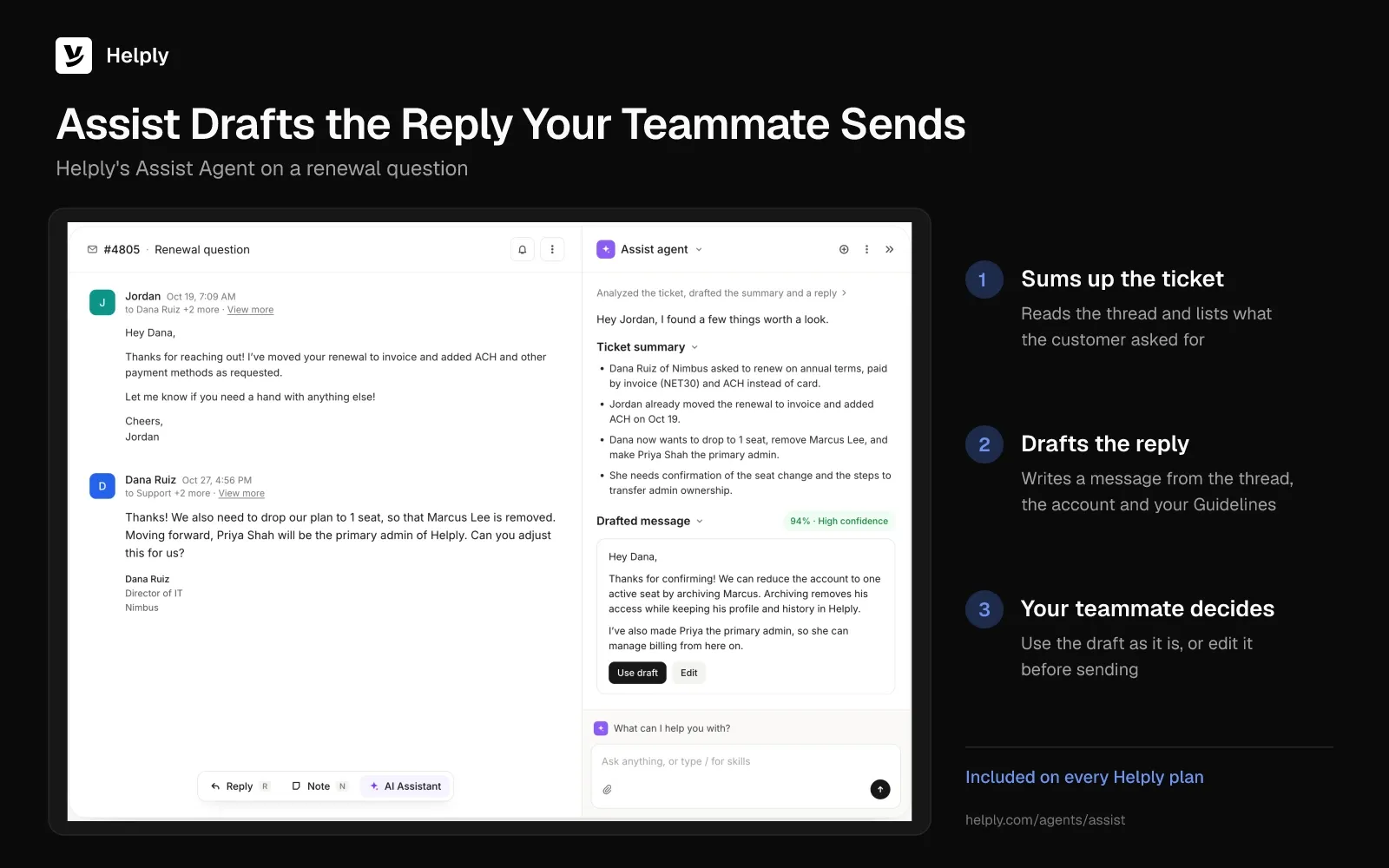
Bots for customers also differ from assistants for your team. A chatbot talks to customers directly. Helply's Assist Agent works alongside your human support agents instead.
Many teams run both. One answers customers, and the other speeds up the replies people still write.
What an AI Chatbot Can Handle, and What It Shouldn't
Good candidates come up often, have an answer somewhere you control, and cost little to fix when the bot gets them wrong.
- Order, shipment and booking status
- Password, login and account setting questions
- Plan, billing date and invoice lookups
- How-to questions your docs already answer
- Collecting details before a person takes over
Keep people on complaints with legal exposure, refunds outside policy, safety issues and upset customers who ask for a person. A person with authority should own those calls.
A wrong answer can cost you in court. In 2024 a Canadian tribunal held Air Canada liable for refund advice its chatbot gave.
The tribunal rejected the airline's claim that the bot was a separate legal entity. Your chatbot speaks for your company, so its answers need the same care as a written policy.
Chatbot Metrics: Resolution, Deflection and Containment
Measure resolution rate first, because it counts solved issues. Deflection and containment count conversations that never reached a person, solved or not.
- Deflection: the customer didn't open a ticket. They may have found the answer, or they may have given up.
- Containment: the conversation never reached a person. A customer who left angry still counts as contained.
- Resolution: the bot or a person solved the customer's issue, and the customer or the outcome confirms it.
A bot can post high deflection and containment while customers leave without help. Our guide to chatbot containment rate covers where that metric misleads.
Vendor figures need the same scrutiny. Intercom says Fin customers average a 76% resolution rate, a figure it reports itself. Each vendor defines resolution its own way, so ask for the definition and test on your own tickets.
Zendesk's CX Trends 2025 report came out in November 2024. In it, 75% of CX leaders expect 80% of interactions to need no person in a few years. Treat that as a target to test against, since your mix of questions sets how high you can go.
How to Evaluate an AI Chatbot: Seven Questions to Ask
Run every vendor through the same seven questions, using a sample of your own tickets.
1. Where Do Its Answers Come From?
Ask which sources it reads: help center, past conversations, internal notes, connected tools. Then ask what it does when none of them has the answer. The right reply is "it says so and escalates".
2. Can It Take Actions, and Who Controls Them?
Ask which actions it can take out of the box and which need custom setup. Check that you choose its permissions per action, and that every action leaves a log.
3. How Does the Handoff Work?
Ask what your agent sees when the bot hands over. The full conversation, the customer's account and what the bot already checked should arrive together. In Gartner's July 2024 survey, a harder path to a person was customers' top AI worry, so give this answer the most weight.
4. Can You Set Rules for Its Behavior?
You need plain instructions for tone, topics to avoid and cases that always go to a person. Ask how you write them and how fast changes take effect.
5. Can You Test It Before Customers See It?
Ask for a sandbox, and for a way to replay past tickets against the bot. A replay lets you read its answers before any customer sees one.
6. Which Channels Does It Cover?
A chat-only bot leaves email, WhatsApp and SMS queues untouched. Ask which channels share the same AI, knowledge and rules.
7. What Happens to Your Data?
Ask for the SOC 2 report, a data processing agreement, and a clear answer on model training. Customer conversations should never train a provider's models.
How to Roll Out a Customer Service Chatbot in Five Steps
Skip ticket sorting and doc cleanup, and your bot starts with gaps it can't fill. Our piece on why AI support implementations fail covers the common traps; the steps below avoid them.
- Sort your last three months of tickets. Group and count them by intent, then take the top five to ten as your first scope.
- Fix the knowledge first. Update stale articles and fill the gaps, because a bot grounded in wrong docs answers wrongly with confidence.
- Write escalation rules before launch. Decide which topics, customer types and confidence levels go straight to a person.
- Start on one channel and a few intents. Replay past tickets, go live on a share of traffic, and read every early conversation.
- Measure resolution and widen scope. Add intents as the resolution rate holds, and feed every gap back into the knowledge base.
Keep step five running after launch. Each new product or policy change opens gaps, so name one person to own the knowledge base. Our guide to adding an AI agent to your website walks through the setup.
Where Helply Fits as an AI Agent for Customer Service
Helply is an AI-native customer support platform. Chat replies, handoffs and tickets all reach your team in one help desk. If a customer asks for a person, your team gets the case with the AI's notes attached.
Software companies, ecommerce brands and marketplaces all run support on it.
Every plan includes the Assist Agent and Support Agent, with AI credits pooled across your team.
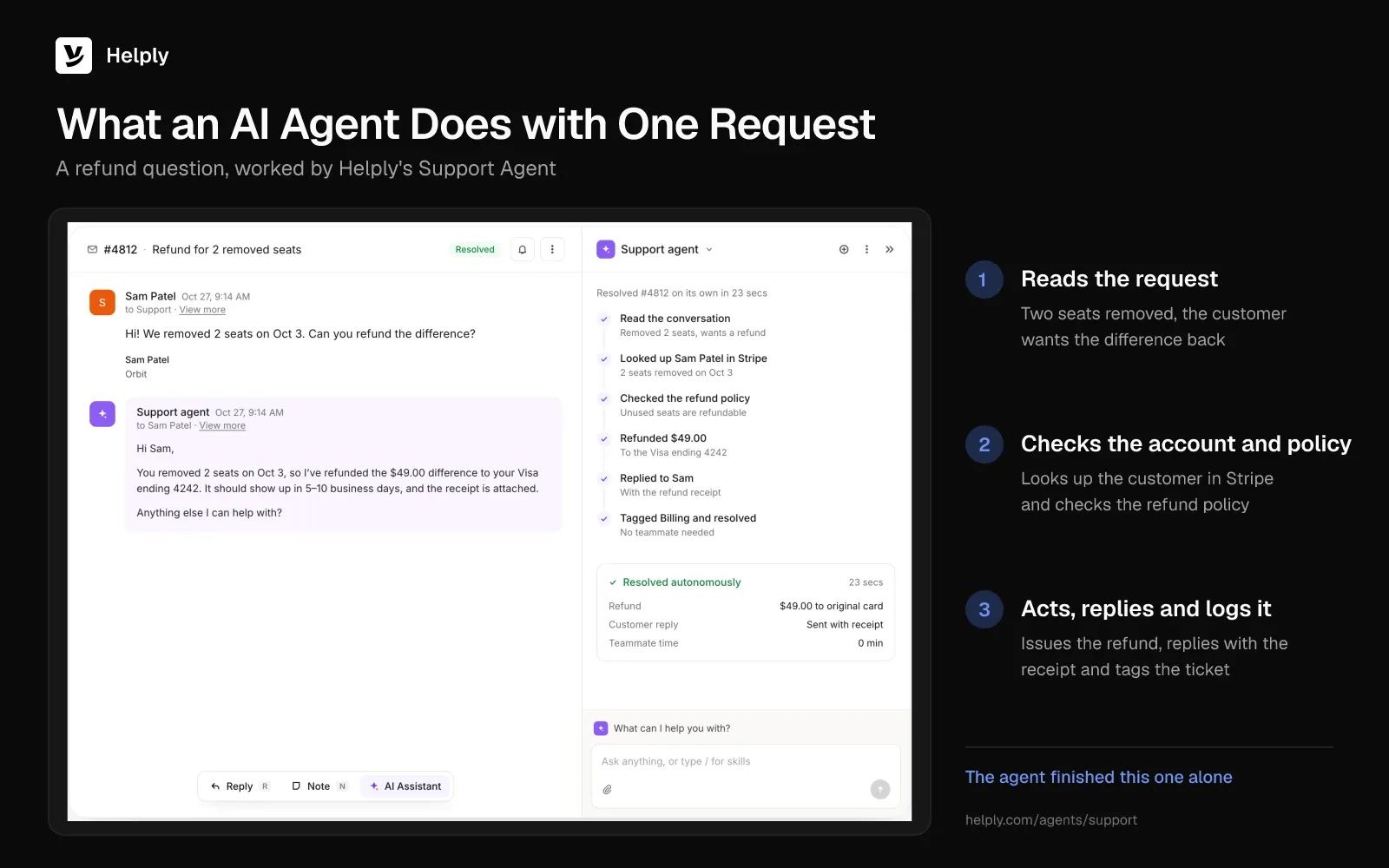
- Resolve or hand off: Support Agent. It draws on help articles, past tickets and linked apps, and can close out a request on its own. If it isn't confident, it hands the case over with its notes and the customer's details.
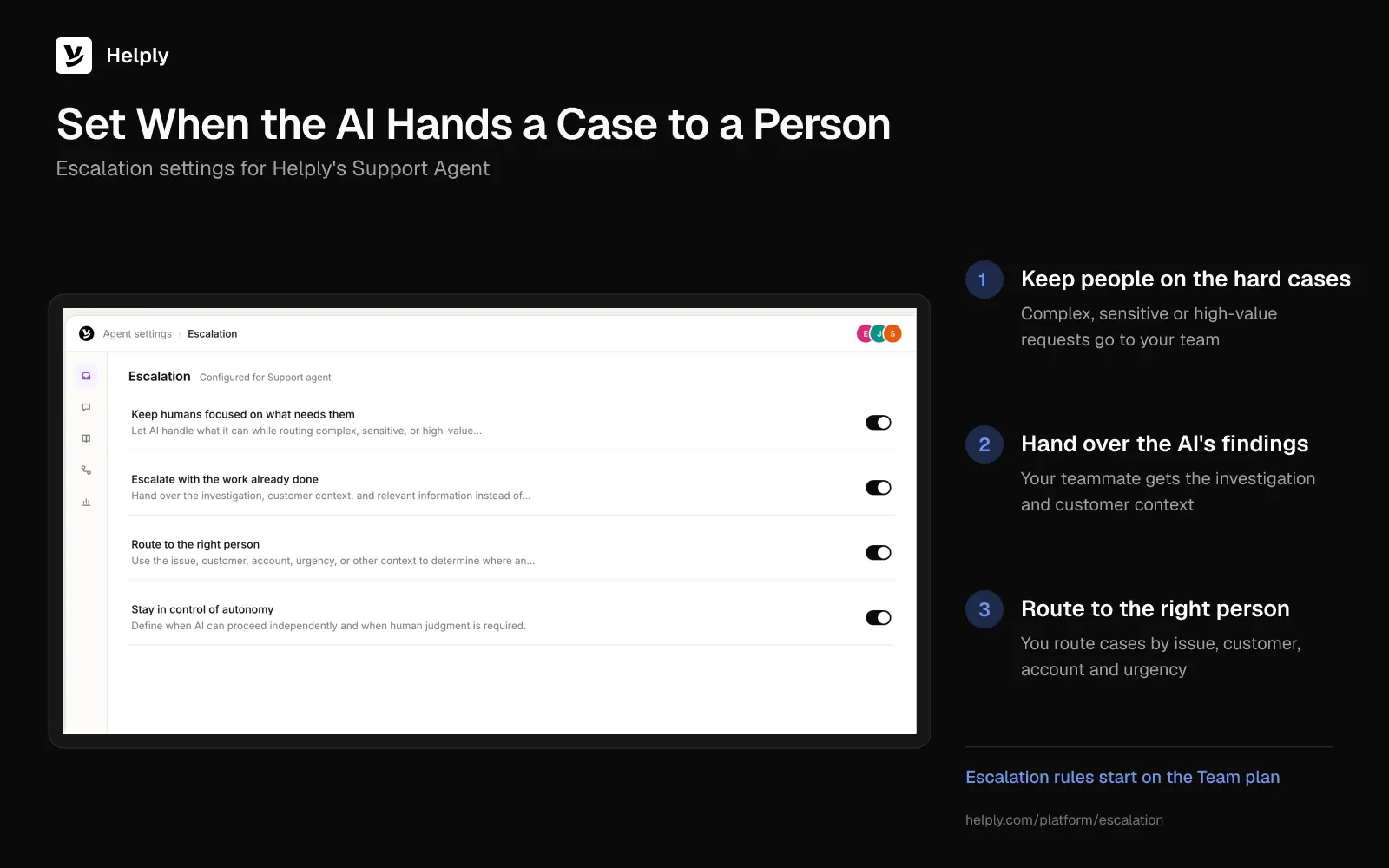
- Decide when people step in: Guidelines and escalation rules. Guidelines tell your AI agents how to act, including which cases always go to a person. From the Team plan, escalation rules let you pick the topics, confidence levels and customer signals that send a case to your team.
- Faster human replies: Assist Agent. It drafts replies from the thread, the customer's account and your Guidelines. It can also run supported Actions when your team asks.
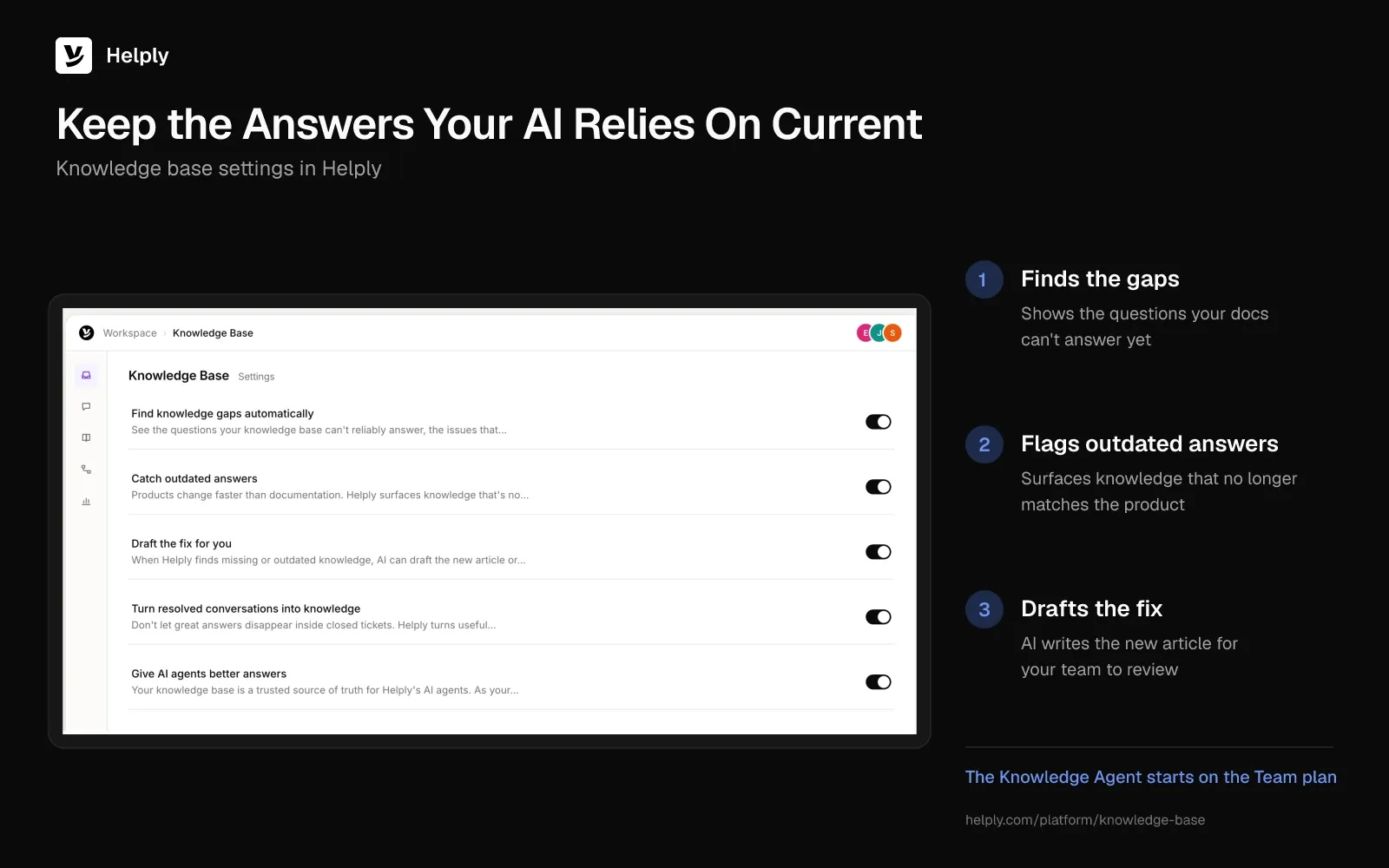
- Keep answers current: Knowledge base. It runs on your own domain, with AI answers and AI article writing on every plan. From Team, the Knowledge Agent finds missing answers and flags outdated information for your team to review.
- Test and extend: Skills, MCP connectors and custom API actions, plus AI QA and backtesting, start on Team.
Supported channels: email, live chat, WhatsApp, SMS, phone, Slack, Discord, Telegram and Microsoft Teams. WhatsApp, SMS, Discord and Slack Connect start on Team, and Microsoft Teams starts on Pro. Handing a case to a person uses no AI credits, and neither does testing in the Playground.
For security, Helply has SOC 2 Type II attestation, and you can request a DPA on its Trust page. Its AI providers don't use the customer data it passes them for model training, and Helply logs every AI action, resolution and escalation.
Keep a FAQ Bot, or Move to an AI Agent?
If your queue is mostly how-to questions and your docs are current, a knowledge-base chatbot may cover it. If customers ask about their own orders, accounts and bills, you need an agent that can look those up and act.
The handoff matters in both cases. Zendesk's CX Trends 2025 report found 63% of consumers willing to leave for a rival after a single bad experience. A bot that traps a customer in a loop risks that switch.
For those account questions, Helply's Support Agent can look up the data and act, so you don't need a separate bot vendor. You set the rules for when people take over, and your team sees every conversation in one help desk.
Start with one channel and your top intents, then widen as resolutions hold.
Frequently asked questions
A chatbot answers questions, and an AI agent can also act. It checks an order, updates an account or starts a workflow within your permissions. Unfinished cases go to a person with notes.
No. AI chatbots take over common, repeatable requests, and people keep the judgment calls. Gartner's 2029 forecast says "agentic AI will autonomously resolve 80% of common customer service issues." Complex cases stay with your team.
Intercom reports a 76% average across Fin customers, a vendor figure. One Helply customer, Gatekeeper Press, resolves 92% of author conversations. Your own rate depends on your questions, docs and actions, so test on your own tickets.
Many customers are wary. In a Gartner survey published in July 2024, 64% said they'd prefer companies didn't use AI in service. Their top worry was that reaching a person would get harder.
Your company can be. In 2024 a Canadian tribunal held Air Canada liable for wrong refund advice from its chatbot. It rejected the idea that the bot was a separate legal entity.
Most AI chatbots learn from the help center, past tickets and tools you connect, with no model training on your side. Keep those sources current and replay past tickets before launch.
About the author

Bildad Oyugi
Head of Content
Bildad is a digital marketing expert with over 5 years of experience in copywriting, content marketing, and editing. Outside of work, he enjoys videography and spending time with his family.
Keep reading

AI Customer Experience: Where It Helps and Where It Hurts
Alex Turnbull · 9 min read
24/7 Customer Support Without a Night Shift
Konrad Janczyk · 9 min read