
 Jared Scheel ··14 min read

Key Takeaways
- Customer service centers come in-house or outsourced and on-site or remote, and any of them can add AI agents.
- A call center works the phones, and a contact center adds email, chat and messaging. A help desk tracks each request.
- One position open around the clock takes 4.2 full-time people. At the BLS median US customer service wage, that's about $188,000 a year before benefits.
- Track service level (80/20 is the common target), first call resolution (SQM Group's average is 71%), resolution time, CSAT and resolution rate.
- AI agents can take routine questions at any hour, and customers want a clear path to a person. Helply's Support Agent passes what it can't resolve to a teammate, who sees what it checked.
What Is a Customer Service Center?
A customer service center is the operation a business runs to answer customers: its people, channels, software, knowledge, hours and metrics. It can sit in one office, spread across home offices or run through an outsourced partner. Customer care center and customer support center name the same thing.
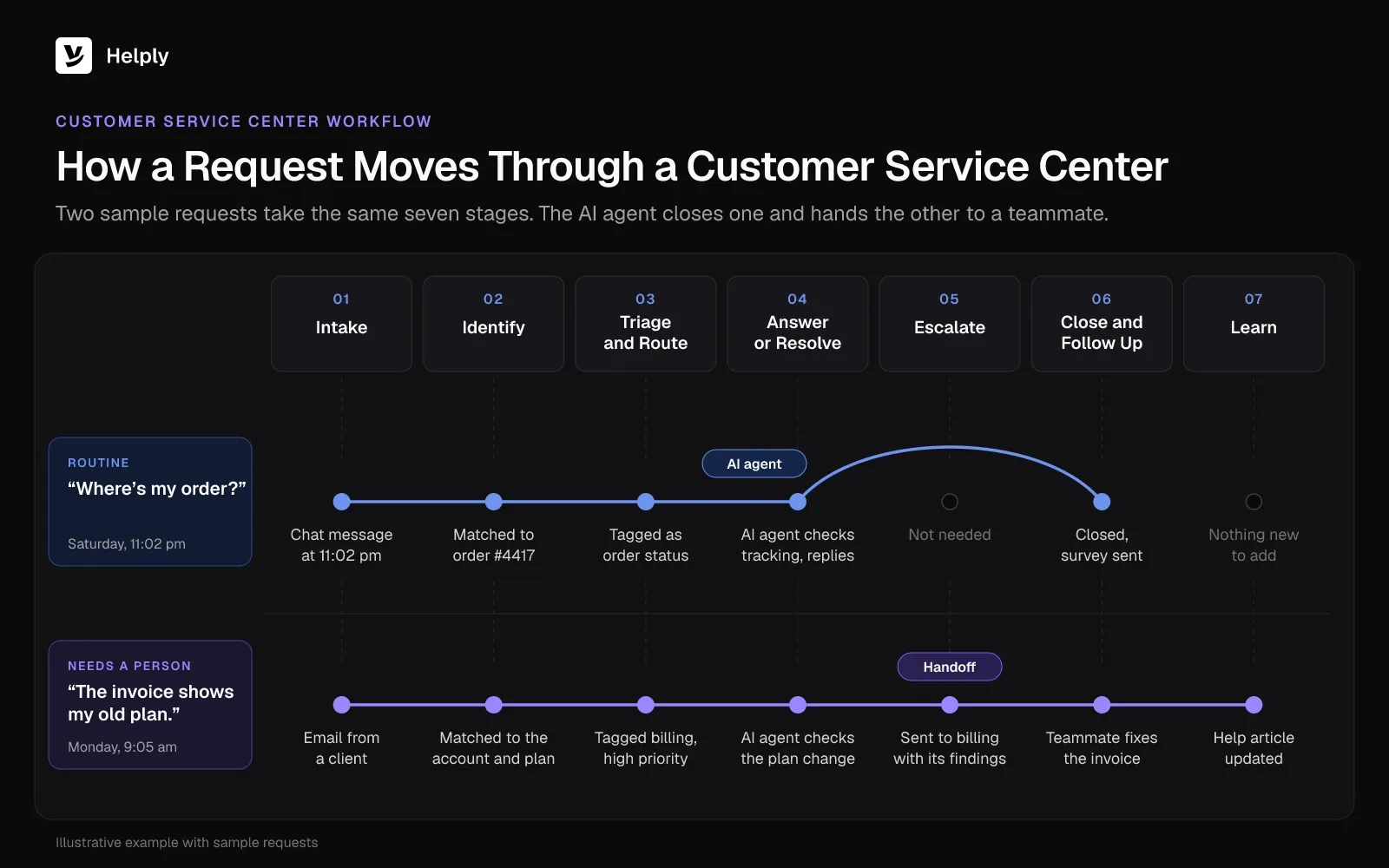
A shopper asks "Where's my order?" at 11pm on a Saturday, and your team doesn't see it in the shared inbox until Monday. That morning, a client writes that an invoice still shows the old plan after an upgrade. Two teammates answer the shopper, and nobody answers the client.
Then someone says the business needs a proper customer service center, and you picture a room full of headsets. A small team can run one on a help desk. An AI agent can answer the Saturday question that night, and one teammate owns the invoice question on Monday.
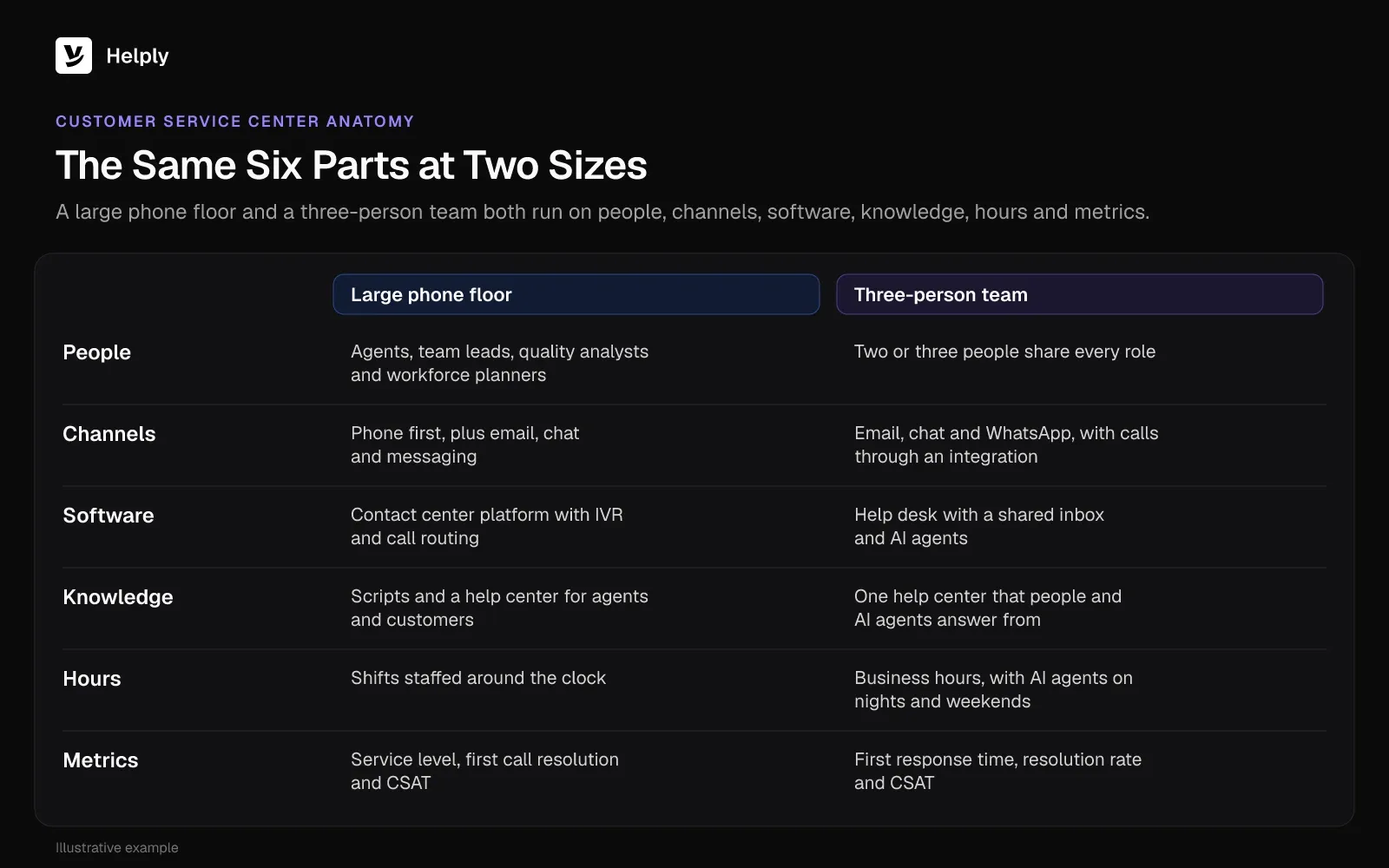
A large phone floor and a three-person team run on the same six parts:
- People: big operations hire agents, team leads and quality analysts, while two or three people share every role on a small team.
- Channels: phone, email, chat, WhatsApp and social messages, wherever customers write or call.
- Software: the help desk or contact center platform that records each request and who is handling it.
- Knowledge: the policies, help articles and saved replies that keep answers consistent, whoever sends them.
- Hours: the times a person or an AI agent answers.
- Metrics: the numbers that show whether customers get fast, correct answers.
What Does a Customer Service Center Do?
A customer service center handles whatever customers can't finish on their own. You can split that work into six jobs:
- Answer questions: order status, delivery times, how a feature works or what a plan includes.
- Fix problems: a failed payment, a login loop, a damaged delivery or a wrong charge on an invoice.
- Process requests: refunds, returns, address changes, upgrades and cancellations.
- Escalate: pass cases the first person can't solve to billing, engineering or a manager, with the history in the ticket.
- Reach out: follow up after a fix, confirm a replacement or warn customers about an outage.
- Collect feedback: run satisfaction surveys and send patterns in customer questions to product and operations.
A contact center team handles these six jobs across phone, email, chat and messaging. An online store spends most of its day on orders, returns and delivery problems. A software company spends more time on logins, billing questions and bug reports that need an engineer.
Customer Service Center vs. Call Center vs. Contact Center vs. Help Desk
The four terms overlap. A customer service center is the whole operation, on any channel, and a call center is the phone-only kind. A contact center covers phone plus email, chat and messaging, and a help desk is the software and team that track each request.
TechTarget defines a contact center as the central point for customer interactions across channels, and a call center as phone only.
Customer Service Center Terms Compared: Channels, Tools and Fit
| Term | What It Covers | Channels | Typical Tools | Best For |
|---|---|---|---|---|
| Customer service center | The whole operation: people, channels, software, knowledge, hours and metrics | Any mix | Help desk or contact center platform, knowledge base, AI agents | Any business with a support queue |
| Call center | Phone work, inbound or outbound | Phone | Phone system with interactive voice response (IVR) menus, call routing and call recording | Phone-led service, sales and collections |
| Contact center | Customer conversations across channels | Phone, email, chat, SMS, messaging apps and social media | Cloud contact center platform (CCaaS, contact center as a service) with routing and workforce management | High-volume teams with heavy phone and digital traffic |
| Help desk | The software and team that track each request to resolution | Email, chat, messaging and web forms, with phone through an integration | Ticketing, shared inbox, knowledge base, reports and AI agents | Teams that get most requests in writing |
A call center is one kind of customer service center, and a help desk is the system many of them run on.
Types of Customer Service Centers
Customer service centers differ in who staffs them, which direction the calls go, where the team sits and how much work AI takes. The five common types are in-house, outsourced, inbound and outbound, remote and cloud-based, and AI-assisted centers.
In-House
Your own employees answer customers on your tools and under your policies. You control quality and tone, and you carry the hiring, training and scheduling.
Outsourced
A partner firm answers on your behalf, from onshore, nearshore or offshore locations. You add capacity without running the hiring yourself, and you give up some control over tone and product depth.
Inbound and Outbound
Inbound centers take the calls and messages customers start. Outbound centers start them: sales calls, renewal reminders, surveys and collections. Many customer service call centers run both.
Remote and Cloud-Based
Agents work from home on cloud software instead of a phone system in one building. Adding an agent takes a login, and one remote team can cover several time zones.
AI-Assisted
AI agents answer routine questions and take simple actions, and people handle the cases that need judgment. With this model, a small team can cover nights and weekends without hiring a night shift.
How Does a Customer Service Center Work?
A request moves through up to seven stages: intake, identification, triage and routing, answer or resolve, escalation, close and follow-up, and learning. Your team logs each stage in a support ticket, whether the request arrives by phone, email or chat.
- Intake: the request lands in a queue as a call, email, chat or message.
- Identification: the system matches it to the customer's account, past conversations and orders.
- Triage and routing: a person or an automation tags the topic and urgency, then sends it to the right teammate or AI agent.
- Answer or resolve: the owner answers the question or completes the task, such as a refund or an address change.
- Escalation: cases the first owner can't solve go to a specialist, who reads the history instead of starting over.
- Close and follow-up: the owner confirms the fix, closes the conversation and sends a satisfaction survey.
- Learning: the team turns repeated questions into help articles and sends recurring problems to product or operations.
Phone teams add a layer in front of step 1. An IVR menu sorts callers by topic, and automatic call distribution (ACD) queues them for the next free agent.
Who Works in a Customer Service Center?
A customer service center needs agents, team leads, quality analysts, workforce planners, knowledge managers and support operations staff. Small centers fold these roles into two or three people, and large ones hire for each:
- Agents or representatives: answer customers and own each conversation until it closes.
- Team lead or supervisor: plans shifts, takes escalations and coaches agents.
- Quality analyst: reviews conversations against a scorecard.
- Workforce planner: forecasts volume and schedules people to match it.
- Knowledge manager: keeps help articles, saved replies and internal docs current.
- Support operations: runs the tools, routing rules and reports.
The Bureau of Labor Statistics counted about 2.67 million customer service representative jobs in the US in 2025. Representatives earned a median $21.53 an hour, or $44,770 a year, in May 2025.
BLS projects the job to shrink 5% from 2025 to 2035, yet it still expects about 289,500 openings a year. It expects all of them to come from replacing people who leave, so plan for steady hiring and training.
How Many People Does a 24/7 Customer Service Center Need?
One position staffed around the clock takes 4.2 full-time people, because a week has 168 hours and one full-time person covers about 40. You pay wages for each hour you cover, so decide your hours before you shop for software.
The 4.2 leaves out breaks, holidays, sick days and training. Twelve hours a day, seven days a week, takes 2.1 people.
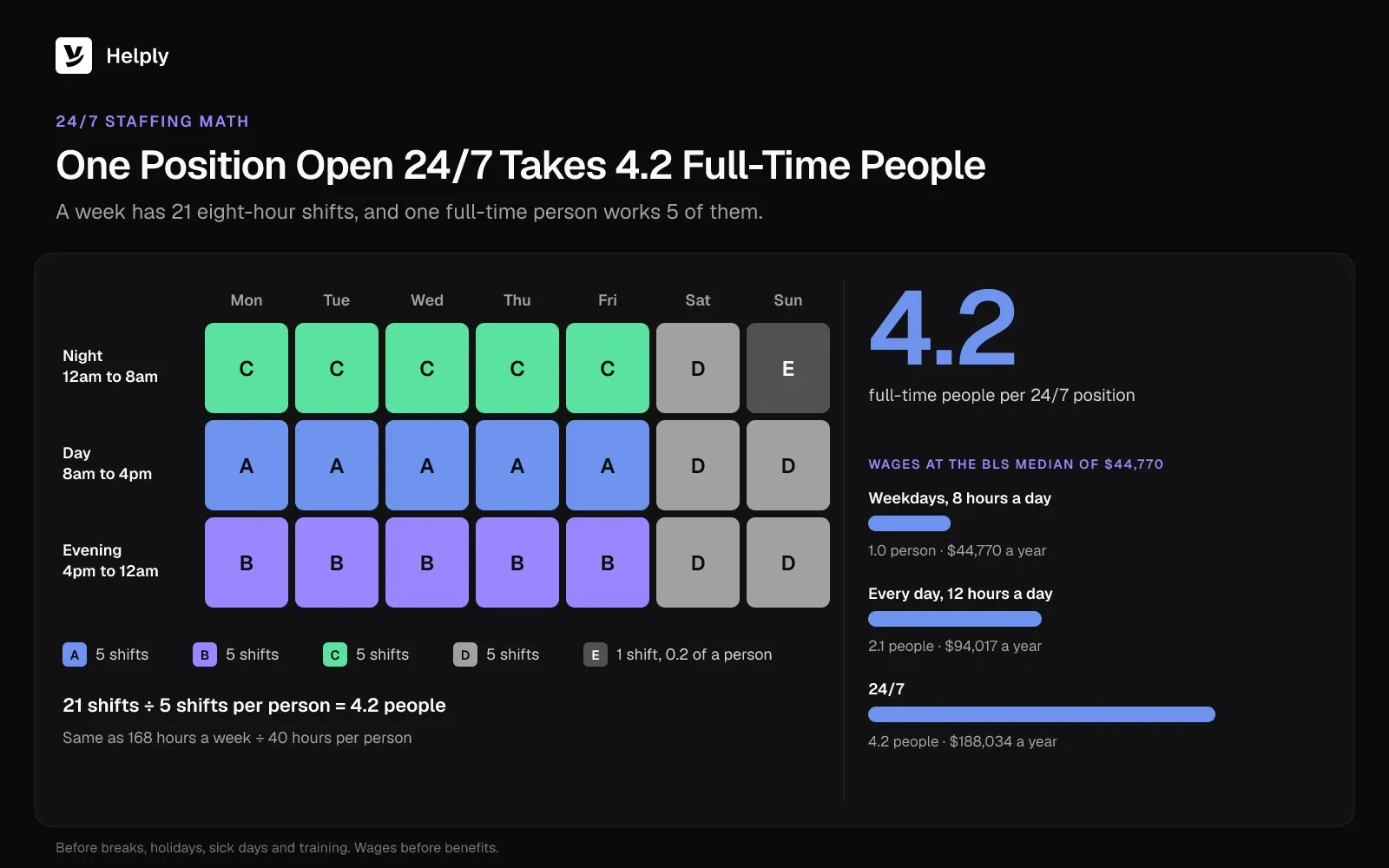
24/7 Customer Service Staffing: Hours, People and Wages per Position
| Coverage | Hours a Week | Full-Time People per Position | Yearly Wages at the BLS Median (May 2025) |
|---|---|---|---|
| Weekdays, 8 hours a day | 40 | 1.0 | $44,770 |
| Every day, 12 hours a day | 84 | 2.1 | $94,017 |
| 24/7 | 168 | 4.2 | $188,034 |
At the BLS median wage, one round-the-clock position costs about $188,000 a year in pay, before benefits or night premiums. If your queue needs two people on at once, double it.
Most customers expect those hours. Zendesk surveyed 6,182 consumers across 22 countries in June 2025 for its CX Trends 2026 report. Of them, 74% said AI now makes them expect customer service around the clock.
The usual ways to cover nights and weekends are a night shift, an outsourced partner or 24/7 support with AI agents.
Which Metrics Should a Customer Service Center Track?
Track seven numbers every week: service level, first response time, resolution time, first call resolution (FCR), CSAT, resolution rate and cost per contact. Two come with outside benchmarks: the 80/20 service level and SQM Group's 71% average FCR.
Customer Service Center Metrics: What They Measure and Targets
| Metric | What It Measures | Benchmark or How to Set a Target |
|---|---|---|
| Service level | Share of calls or chats answered within a set time | 80/20: 80% of calls answered within 20 seconds (Call Centre Helper) |
| First response time | Time from a customer's message to the first reply | Set per channel: seconds for phone and chat, hours for email |
| Resolution time | Time from the first message to a confirmed fix | Track the median by topic |
| First call resolution (FCR) | Share of issues solved in the first contact, with no follow-up | 71% average; 80% or higher counts as world-class (SQM Group) |
| Customer satisfaction (CSAT) | Share of surveyed customers who rate the help as good | Your own trend, week over week |
| Resolution rate | Share of conversations resolved, with a separate figure for AI agents | Your own trend, by topic |
| Cost per contact | Total support cost divided by conversations handled | Your own trend, month over month |
Call Centre Helper's research across 250+ contact centers, published in August 2019, found many still use the 80/20 target. SQM Group's 2026 benchmark of 500+ leading call centers puts average FCR at 71%. SQM counts an FCR of 80% or higher as world-class and says only 5% of call centers get there.
Tie each metric to a goal, and use these customer service goals as a starting list.
What Software Does a Customer Service Center Need?
A customer service center runs on five layers of software:
- Help desk and shared inbox: gives every email, chat and message an owner, a status and a due time.
- Channels: live chat on your website, email, SMS, social media and messaging apps such as WhatsApp, all landing in one queue.
- Knowledge: a knowledge base holds the help center customers search on their own and the internal answers agents use.
- AI agents: software that answers customers, looks up orders or accounts, takes supported actions and hands a person anything it can't resolve.
- Reports and integrations: dashboards for service level, resolution time and CSAT, plus links to the CRM, billing and order systems agents use.
Add a phone system with IVR, call routing and recording if calls are your main channel. A contact center platform provides those, and a phone integration can bring supported call information into a help desk.
How Are AI Agents Changing the Customer Service Center?
AI agents now answer routine service questions at any hour. Salesforce surveyed 6,500 service professionals from April to June 2025 for its 2025 State of Service report. They put AI's share of their cases at 30% and expected it to reach 50% by 2027.
Gartner's March 2025 forecast says agentic AI will close out 80% of common service issues by 2029 with no human involved. Gartner ties that to a 30% cut in operating costs.
Most customers still want a person within reach. In a Gartner poll of 5,728 customers in December 2023, 64% said they would rather companies not use AI for service. The top worry was a harder path to a person: 60% of respondents who knew about AI named it.
Plan the handoff first. Gartner advises telling customers the AI will connect them to a human agent if it can't solve the problem. That person then picks up where the AI stopped.
AI agents can take order status, password resets, plan questions, refunds within policy and anything your help center already answers. Your team keeps upset customers, judgment calls, exceptions to policy and bugs that need an engineer.
Running a Customer Service Center on Helply
Helply runs the help desk, channels, help center, reports and AI agents as one complete platform:
- Answered at 11pm: the Support Agent can answer at any hour after checking your help center, customer history and connected tools. It can also take action and resolve the request.
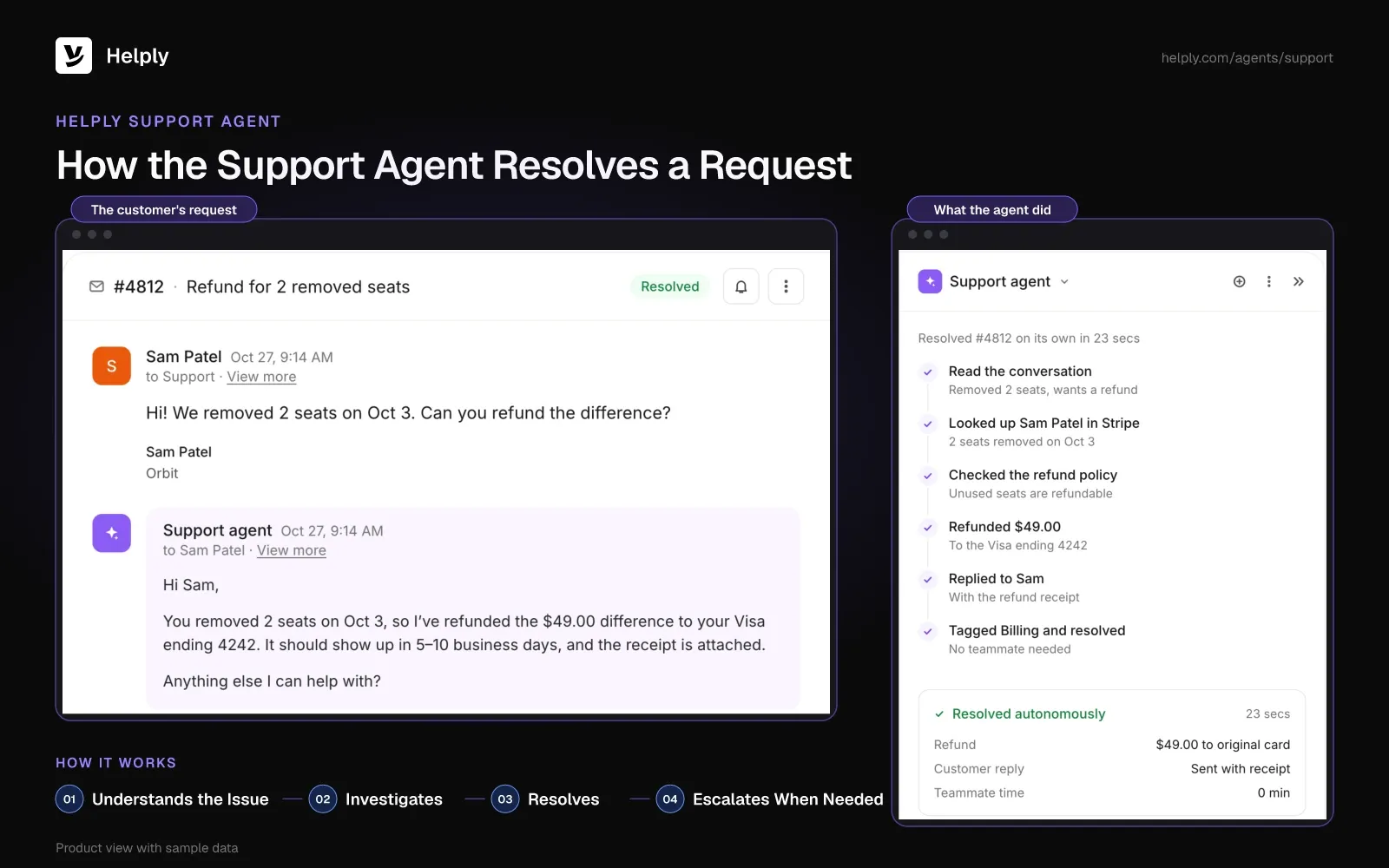
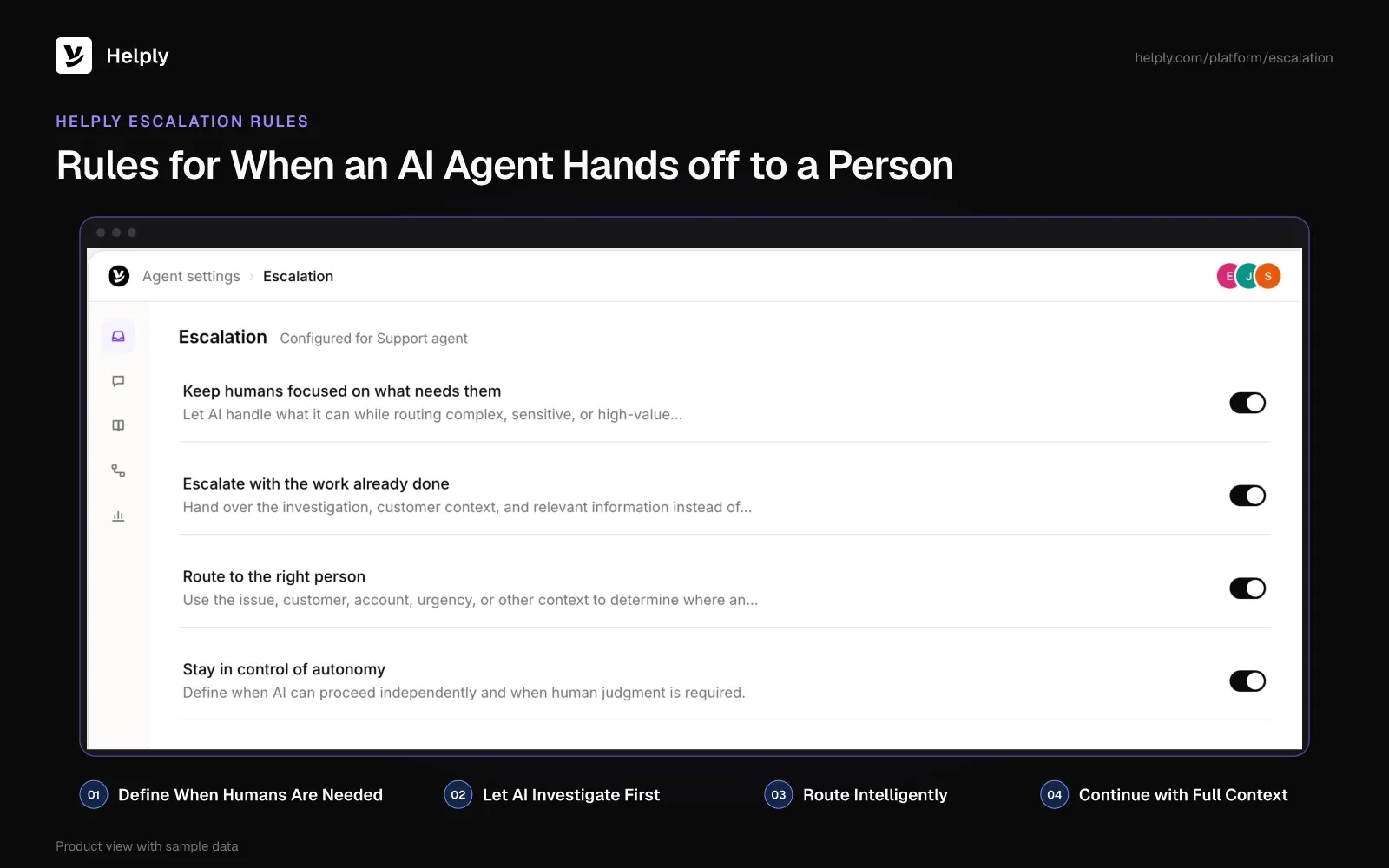
- Monday's invoice, handed over: the Support Agent sends what it can't resolve to a teammate, with its investigation and the customer's context. You set escalation rules for when an AI agent carries on, asks a teammate for help or passes the customer along.
- A single owner: rules assign each conversation to a person or an AI agent, and collision detection shows who's on it. Email, chat, WhatsApp and other conversations land in the same shared inbox. You can connect your phone setup so supported call details and transcripts sit in the customer's history.
- Drafts ready for your team: the Assist Agent prepares a reply from the thread and the customer's record, within your Guidelines. A teammate checks the draft and sends it.
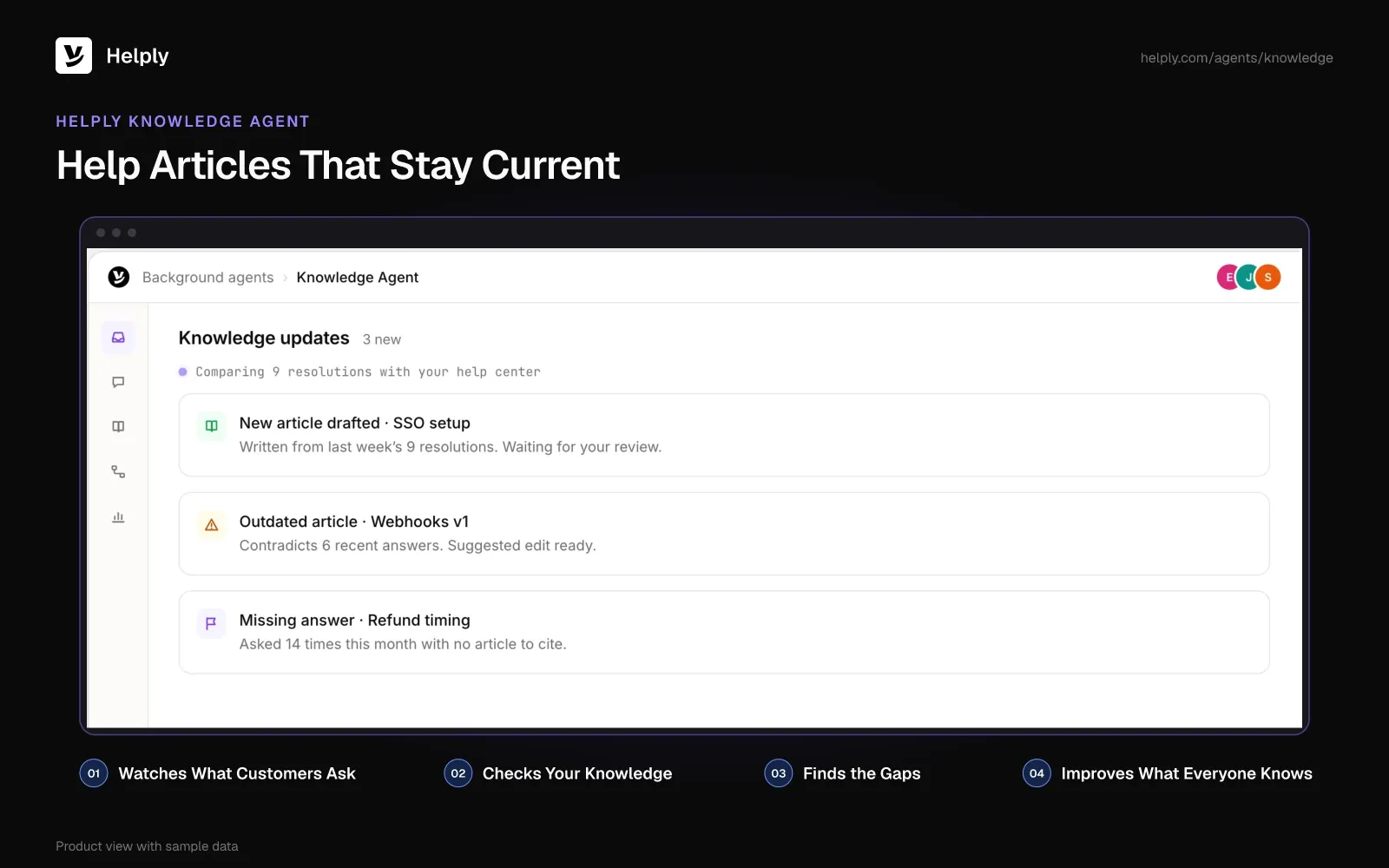
- Help articles that stay current: your help center lets customers find answers on their own, with AI article writing built in. The Knowledge Agent learns from real conversations, finds questions your articles miss and suggests fixes for outdated ones. A teammate can check each suggestion before it goes out to customers.
- SLA targets in view: set service level agreements (SLAs) for response and resolution, and Helply shows what needs attention before one slips. Track response and resolution performance, AI resolutions and escalations in Helply's support analytics for the weekly review.
- Patterns in the queue: the Insights Agent reads across conversations and flags trends, repeat problems and new themes.
StaffTraveler, a bootstrapped travel-tech team of 1 to 10 people, handled about 1,000 tickets a month from airline staff in every time zone. Covering every hour the traditional way meant hires it couldn't justify. It swapped its old help desk for the whole Helply platform.
The Support Agent answered whenever the team was offline, reached an 88% resolution rate and passed the rare hard case to a person. StaffTraveler turned its common standby questions into Skills, so answers stayed consistent at any hour. The Insights Agent delivered daily briefings on what users were asking.
Helply prices each plan by how many human agents it covers, and a human agent is any teammate who replies to customers. Every plan is a whole help desk, with the Support and Assist Agents plus a team-wide pool of AI credits. The AI draws on those credits only when it does work.
SLAs, escalation rules, WhatsApp, SMS, Skills, Memory and the Knowledge and Insights Agents start on the Team plan. Team also adds free migration and an onboarding call.
Plans and credit costs are on the pricing page. Helply's trust page covers its security controls, and prospects or customers who sign an NDA can get its SOC 2 Type II report.
How to Set up a Customer Service Center in Six Steps
Start with a month of conversation data, then work through hours, model, tools, AI handoff and a weekly review.
- Count your volume and channels. Pull a month of conversations and note where each came from, what it asked and when it arrived.
- Set hours and response targets. Decide which hours a person answers, which hours AI covers and how fast each channel gets a reply.
- Choose the model. Pick in-house, outsourced or a small team with AI agents, based on volume, channel mix and budget.
- Set up the help desk and knowledge base. Connect every channel to one inbox, then write articles for the ten questions customers ask most.
- Add an AI agent with handoff rules. Start with nights and weekends or one channel, and list the topics that always go to a person.
- Review the numbers every week. Track service level, FCR, CSAT and resolution rate on a customer support dashboard, then turn repeated questions into articles.
Build a Phone Floor or Start with a Help Desk and AI Agents?
Choose a contact center platform or an outsourced partner if most customers call, or if you run outbound sales and collections. Choose a help desk with AI agents if most questions to your customer service center arrive by email, chat and messaging. Helply fits that second case, and its phone integration adds supported call information to each customer's history.
The Support Agent can take the 11pm order question when it arrives. It hands Monday's invoice problem to a teammate with what it found, and collision detection shows who is already replying.
StaffTraveler covered every hour without growing the team, and the Support Agent cut its tickets by 50%.
Price a Helply plan for your team and monthly conversations, then compare it with the wages for the hours left uncovered. Start with one mailbox, add the help articles you already have and let the Support Agent take the overnight shift. Your current inbox or help desk can keep running until you're ready to switch.
Frequently asked questions
Customer service is the job of helping customers, and a call center does that job by phone. A customer service center can include a call center alongside email, chat and messaging.
A contact center is a central team that manages customer conversations across phone, email, chat, messaging and social channels. A call center handles phone calls only, and both are kinds of customer service centers.
A customer service call center is a customer service center that works by phone, taking inbound calls, making outbound calls or both. Once it adds email, chat and messaging, it becomes a contact center.
The 80/20 rule is a service level target: answer 80% of calls within 20 seconds. Call Centre Helper's research across 250+ contact centers, published in August 2019, found many still use it.
A customer care center is another name for a customer service center: the people, channels and software a business uses to answer customers. Customer support center is a third name for the same operation.
No. A help desk is the software and team that track each request. A customer service center is the whole operation around it, including hours, staffing and metrics.
One position staffed around the clock takes 4.2 full-time people (168 hours a week ÷ 40), and weekday business hours take one person. Multiply that by the people who must answer at once in your busiest hour, then allow for breaks and leave.
Yes, if most questions arrive by email, chat or messaging. Helply's Support Agent can cover evenings and weekends on a help desk and hand hard cases to your team. StaffTraveler's team of 1 to 10 people uses the Support Agent to answer airline staff in every time zone.
Not fully. Gartner's March 2025 forecast has agentic AI resolving 80% of common service issues without human help by 2029. Your team would still handle the other cases and the customers who ask for a person.
Plan wages first: one position staffed around the clock costs about $188,000 a year before benefits. That is 4.2 full-time people at the BLS median of $44,770 a year for US customer service representatives (May 2025).
About the author

Jared Scheel
Co-founder & CTO
Keep reading

CSAT Survey: 15 Questions, Score Formula and Calculator
Bildad Oyugi · 12 min read
What Is a Support Ticket? Fields, Statuses, Types and Examples
Konrad Janczyk · 15 min read