
 Alex Turnbull ··9 min read

Knowledge Base Definition
A knowledge base is a central, searchable collection of written answers about a company's products, services and processes. People and software both use it to find the right answer without asking a person.
In customer support, the term covers help centers and internal wikis. Most knowledge bases group articles into categories and put a search bar on top, so readers can browse or type a question.
Picture a customer asking your AI agent where to export contacts. The agent sends them to Settings, but the export button moved to Reports in the last release. The agent was answering from an article your team wrote before the release.
What Goes in a Knowledge Base?
Most knowledge bases hold a mix of these article types:
- How-to guides with step-by-step instructions for one task, such as resetting a password.
- Troubleshooting articles that pair a symptom with its likely causes and the fix for each.
- FAQs with short answers to the questions customers ask most.
- Policies on refunds, shipping, security, data handling and service levels.
- Reference pages for settings, limits, plan features, integrations and API details.
- Glossaries with plain definitions of product terms.
- Internal procedures such as escalation paths, approval rules and the macros your team follows.
For real help centers built from these parts, see these knowledge base examples.
Internal vs. External Knowledge Bases
Internal and external knowledge bases differ by reader. An external knowledge base answers customers in a public help center. An internal knowledge base gives employees procedures, escalation rules and known issues behind a login.
Internal vs. External Knowledge Bases: Readers, Content, Access and AI Use
| External knowledge base | Internal knowledge base | |
|---|---|---|
| Reader | Customers and prospects | Support agents, sales, success and new hires |
| Typical content | How-to guides, troubleshooting, FAQs, policies | Procedures, escalation rules, known bugs, account notes |
| Access | Public help center, often on your own domain | Private, behind a login |
| Tone | Plain, task-first, no internal jargon | Direct, can name systems and teams |
| Main job | Let customers solve issues alone | Keep answers consistent across the team |
| AI use | Feeds the agent that replies to customers | Feeds the agent that drafts replies for your team |
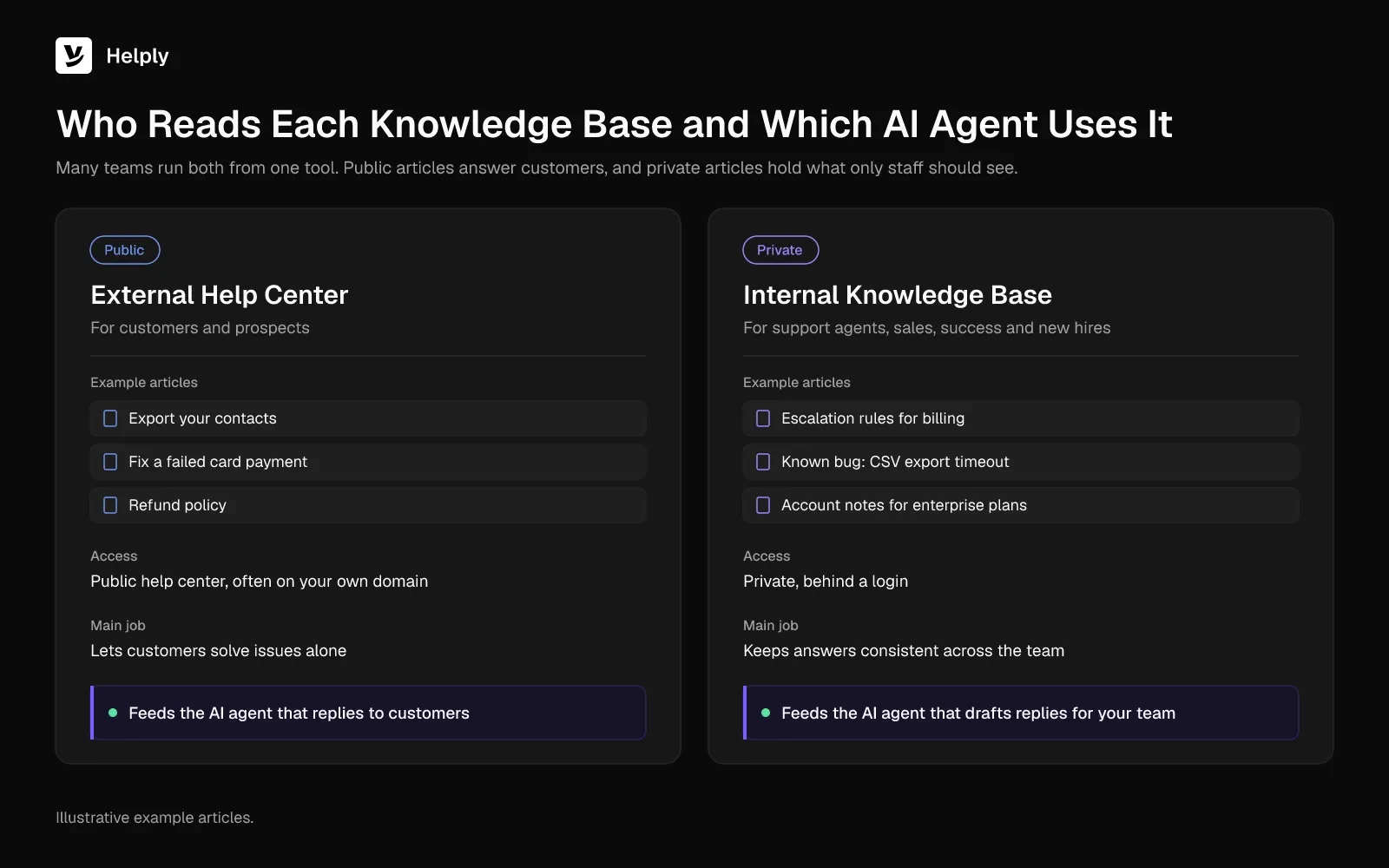
Many teams run both from one tool. Public articles answer customers, and private articles hold what only staff should see. Helply's Team plan, for example, includes 3 knowledge bases and a private help center.
Why Companies Build a Knowledge Base
A knowledge base gives customers answers at any hour without opening a ticket. It keeps your agents giving the same answer to the same question. It also gives new hires one place to learn the answers.
Gartner research, based on 5,728 customers surveyed in December 2023, puts the share of issues fully resolved in self-service at 14%. In the most common failure, at 43%, the customer couldn't find relevant content.
Once AI agents answer customers, they hit the same missing content. In October 2025, a Gartner survey of 321 customer service and support leaders found 58% aimed to upskill agents into knowledge management specialists. They cited the need for accurate, continually updated content for AI systems and customer self-service.
How to Build a Knowledge Base
A first knowledge base needs a short list of real questions, a clear reader and an owner for each area. Set it up in six steps:
- List the top questions. Pull them from recent tickets, chats and search logs.
- Pick the reader. Decide whether each article serves customers, employees or both.
- Choose a tool. Look for search, categories and a help center on your own domain.
- Assign owners. Give each category one person who keeps it accurate.
- Set a format standard. Agree on title style, answer-first openings and step formatting.
- Group articles into categories. Match the categories to the way customers describe their problems.
What a Good Knowledge Base Article Looks Like
A good knowledge base article answers one question for one reader, and it says so in the title. The reader should find the answer in the first two lines.
Strong articles share the same parts:
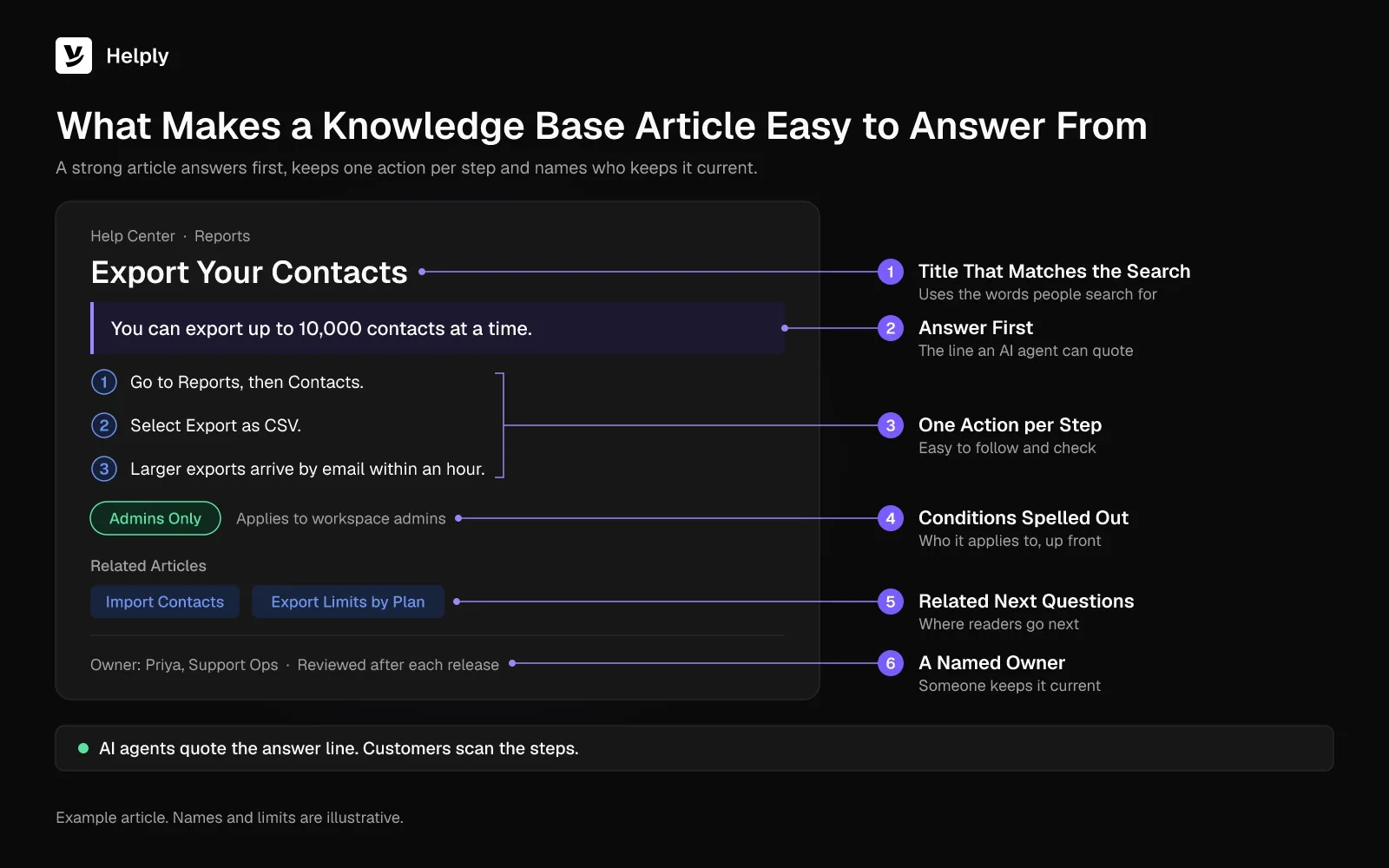
- A title that matches the search. "Export your contacts" beats "Data management overview".
- The answer first. One or two sentences that resolve the question before any background.
- Numbered steps. One action per step, with the exact button and menu names on screen.
- Conditions spelled out. Plan limits, regions, roles and dates that change the answer.
- A screenshot where the interface is unclear. Cropped to the part that matters.
- Related links. The next question the reader usually has.
- A named owner. One person updates the article when the product changes.
Compare the same answer written two ways.
Weak: "Contacts. You can manage your contact data in several places across the app. Please reach out to support if you need help exporting."
Strong: "You can export up to 10,000 contacts at a time. Go to Reports, then Contacts, and select Export as CSV. Only admins see the Export button."
The strong version gives the answer, the steps and the condition that changes it. An AI agent can quote it word for word. The weak version gives an AI agent nothing to quote except "reach out to support".
How AI Answers from a Knowledge Base
AI agents answer from a knowledge base by retrieving the articles that best match a question and writing a reply from them. The method is retrieval-augmented generation (RAG). A May 2020 paper by Patrick Lewis and colleagues described RAG models that "combine pre-trained parametric and non-parametric memory for language generation."
The process runs in four steps:
- Understand the question. The AI reads the customer's message and works out the intent.
- Retrieve. It searches the knowledge base for the passages most likely to answer it.
- Ground the reply. It writes an answer from those passages, instead of from general training data.
- Answer or hand off. It replies when the passages cover the question, and a well-built agent passes the rest to a person.
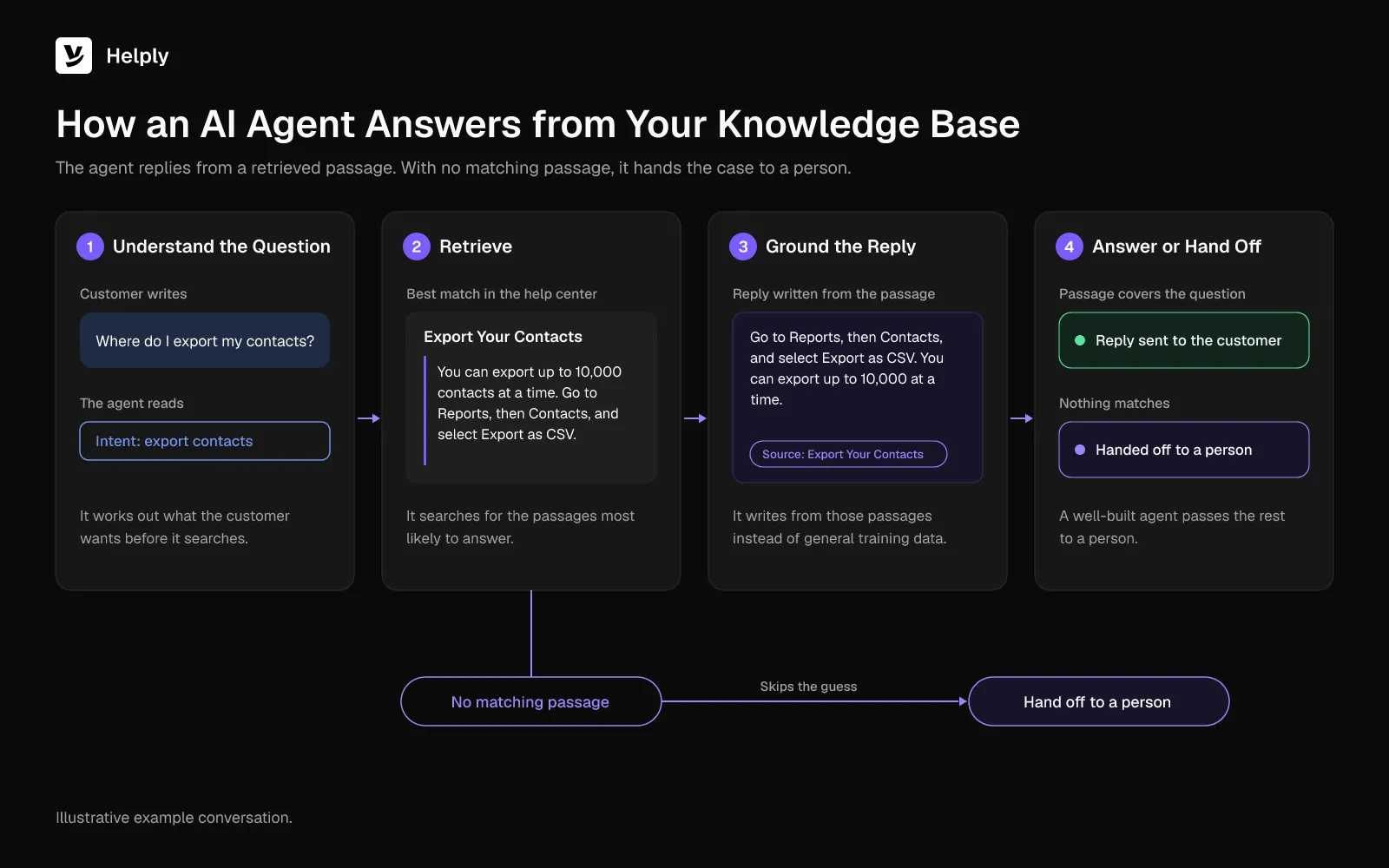
Steps 2 and 3 depend on the articles. A missing article leads the AI to retrieve something close but wrong. The AI repeats an outdated article with full confidence.
The Consortium for Service Innovation warns that "agentic and LLM solutions are only as effective as the content they consume."
ChatGPT can't see your help articles until you connect your content. A support AI connected to your knowledge base answers from your own articles. For a deeper look at setup, see our guide to the knowledge base chatbot.
Why Knowledge Base Articles Go Stale
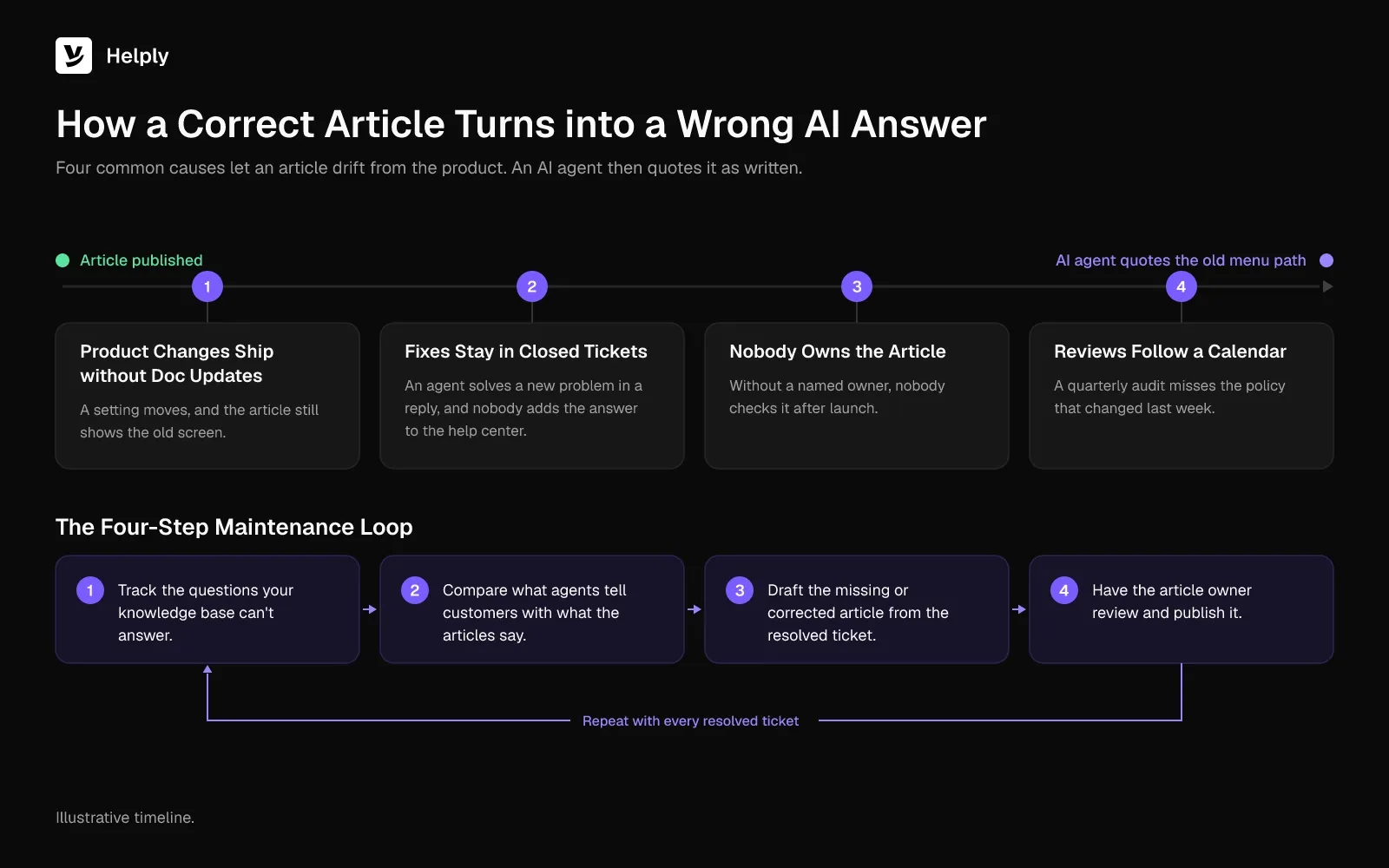
Knowledge base articles go stale when the product changes and the articles don't. The causes fall into four groups:
- Product changes ship without doc updates. A setting moves, a plan limit changes, and the article still shows the old screen.
- Fixes stay in closed tickets. An agent solves a new problem in a reply, and the answer never reaches the help center.
- Nobody owns the article. Without a named owner, nobody checks it after launch.
- Reviews follow a calendar. A quarterly audit misses the policy that changed last week.
Stale articles cost more once AI reads them. A person might notice an old screenshot and ask a colleague. An AI agent quotes the article as written, old menu path included.
The fix is to capture knowledge while the work happens. In the same August 2024 research, Gartner advises building knowledge into the resolution workflow instead of running it as a separate job. Knowledge-Centered Success (KCS, formerly Knowledge-Centered Service) builds a whole support practice on that idea.
A working maintenance loop has four steps:
- Track the questions your knowledge base can't answer.
- Compare what agents tell customers with what the articles say.
- Draft the missing or corrected article from the resolved ticket.
- Have the article owner review and publish it.
How Helply Keeps a Knowledge Base Current
Helply is an AI-native customer support platform organized around one knowledge base for customers, humans and AI. Its knowledge base page promises "The help center that never goes stale."
Helply finds missing and outdated knowledge, drafts the fixes, and keeps customers, your team, and AI agents working from the right answers:
- Finds the gaps. Helply spots missing knowledge in the conversations your team already handles.
- Catches outdated answers. It surfaces outdated information from customer conversations so your team can correct the article.
- Drafts the fix. Helply turns useful resolutions into draft articles. Your team reviews, edits and publishes instead of starting from scratch.
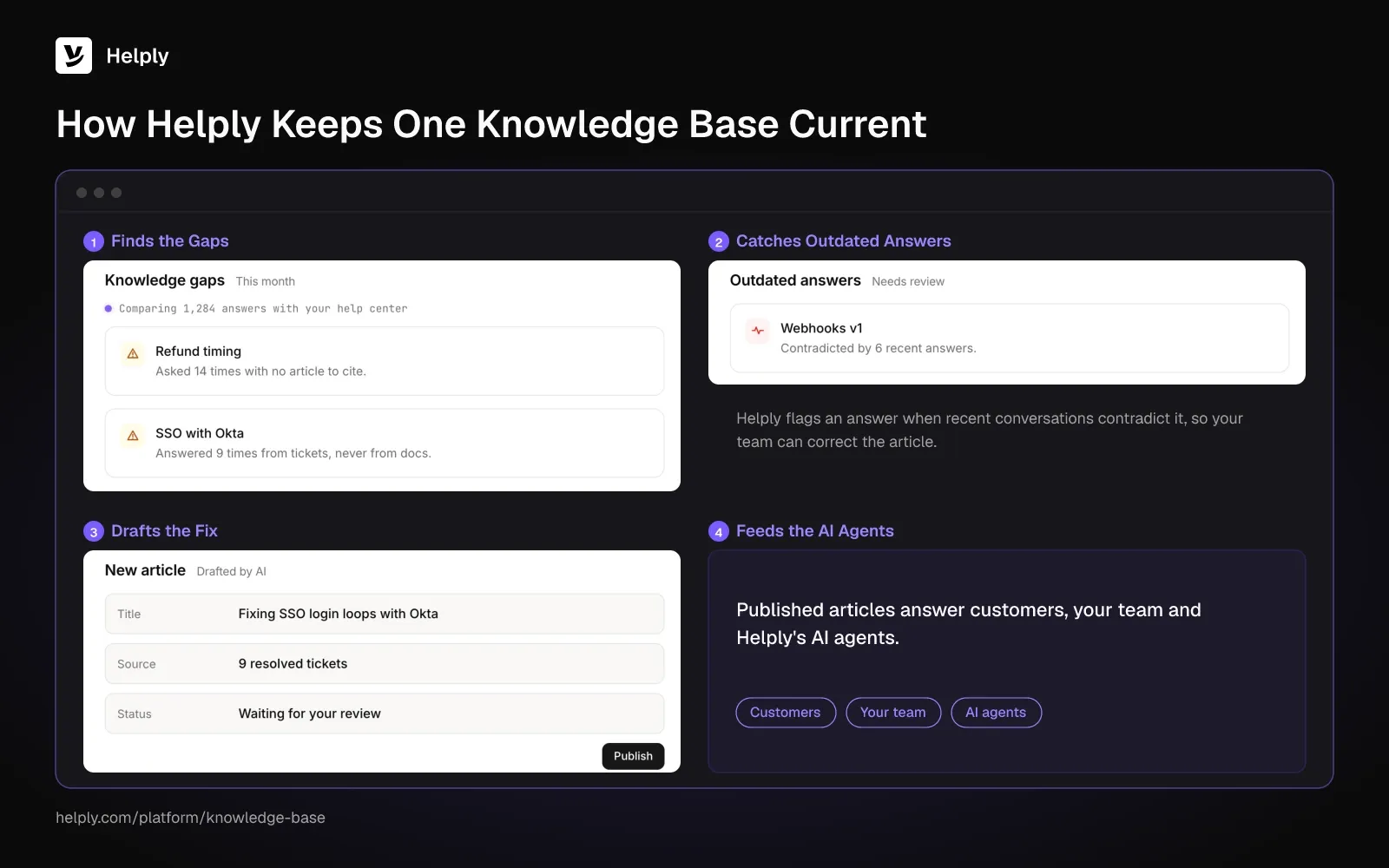
- Feeds the AI agents. The Support Agent uses knowledge, Skills and connected tools to figure out what's happening. If it can't confidently resolve a case, it escalates to a person and passes along what it already investigated.
Every Helply plan includes a help center on your own domain with AI article writing and AI answers. The same articles serve customers, your team and Helply's AI agents, so one fix reaches all three.
On the Team plan and up, the Knowledge Agent studies customer conversations to find missing answers and surface outdated information. A teammate can review and edit each suggestion, then decide whether customers and other AI agents get it.
LingQ had a documentation gap. Zoran Simicic, Head of Customer Support, described it: "Our best users love how deep the product is; our newest users get lost in it."
Helply's living documentation drafted the missing help articles. Support volume at LingQ fell about 50%. Over the same year its user base grew 50%, and the support team didn't add anyone.
Write Every Article by Hand or Let Support Conversations Write Them?
If your product changes rarely and a few people answer every ticket, a hand-written knowledge base with a quarterly review can work. A dedicated help center tool can handle it, and published help centers offer strong layouts to copy.
If your product ships often or an AI agent answers customers, your team can fall behind on manual updates. An untracked change can turn into a wrong answer your AI agent gives customers. Helply fits that case, because it learns from the conversations your team already handles.
Go back to the customer sent to the wrong menu. On Team and above, Helply's Knowledge Agent reads those conversations and surfaces the outdated article. Your team reviews the drafted fix, edits it and publishes it.
Start small. Let Helply find the missing and outdated answers in your help center, then review the drafts. See what each plan includes.
Frequently asked questions
A knowledge base is a searchable library of answers about a product or service. Customers, employees and AI agents use it to find help without asking a person.
An external knowledge base is a public help center for customers. An internal knowledge base is a private library for employees, with procedures, escalation rules and notes that customers shouldn't see.
Most knowledge bases hold how-to guides, troubleshooting articles, FAQs, policies and reference pages. Internal knowledge bases add procedures and escalation rules.
An intranet holds company news, documents and tools for employees. A knowledge base holds answers to specific questions, written so a reader or an AI agent can act on them.
ChatGPT answers from its training data and, in some modes, from web search. It can't see your company's articles until you connect them. A support AI connected to your knowledge base answers from your own articles instead.
An AI agent retrieves the articles most relevant to a question and writes its answer from them. If an article is missing or outdated, the AI can give a wrong or old answer. Answer quality depends on article quality.
Update an article whenever the product, policy or process it describes changes. A calendar review catches some drift. Reviewing live customer conversations shows you which answers have already gone wrong.
Yes. Every Helply plan includes a help center on your own domain with AI article writing and AI answers. Teams on Team or higher also get the Knowledge Agent, which spots gaps and outdated information in customer conversations.
About the author

Alex Turnbull
CEO & Founder, Helply
Alex is the CEO & Founder of Groove. He loves to help other entrepreneurs build startups by sharing his own experiences from the trenches.


