Key Takeaways
- A knowledge base is a self-serve library of articles, FAQs, guides, and troubleshooting docs. The two main types are external (customer-facing) and internal (team-facing).
- Airbnb's role tabs and Slack's Desktop and Mobile tabs show each reader the version that fits them. Asana's plan box names the plans that include a feature.
- A knowledge base article answers one question: the answer first, then numbered steps, and the result the reader should see.
- In an AI-native knowledge base, AI drafts articles from recurring tickets and flags gaps. Your AI agents answer from the same content.
- In Gartner's survey, 43% of failed self-service attempts came down to customers not finding relevant content. Close the gaps behind your most frequent tickets first.
A knowledge base is a self-serve online library of information about a product, service, or topic. It collects articles, FAQs, how-to guides, troubleshooting docs, and glossaries in one place so people find answers without contacting support.
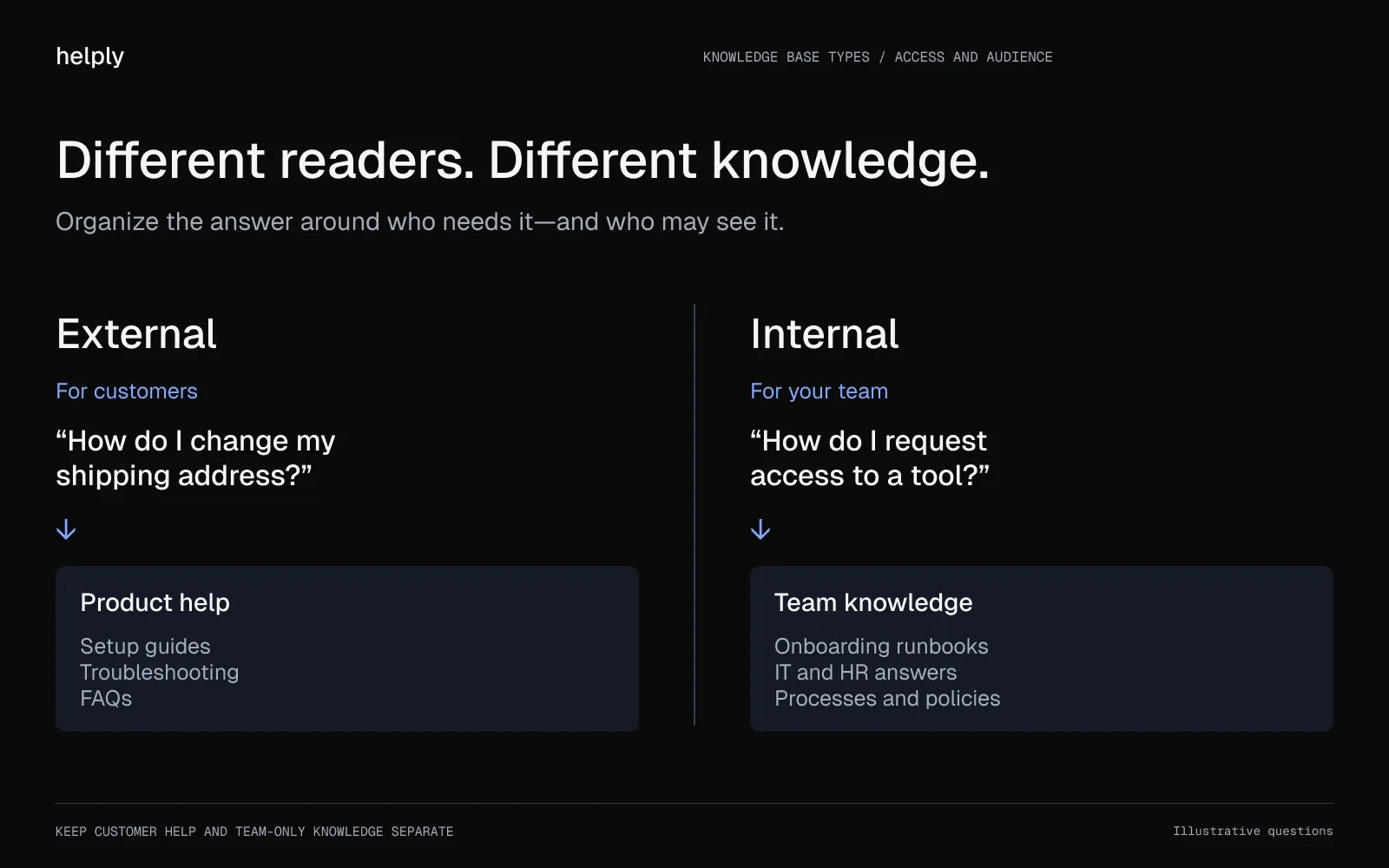
An external knowledge base faces your customers and holds product help, setup guides and troubleshooting. An internal one faces your team and holds processes, onboarding docs and policies. Most companies run both.
Articles in either type come in five formats:
- FAQ articles. Short answers to the questions you hear most often, one topic per article.
- Step-by-step guides. Instructions for a specific task, like turning on a feature or finishing setup.
- Troubleshooting articles. Fixes for common errors, written so a customer can self-diagnose.
- Product and feature overviews. What something does, when to use it, and who has access.
- Glossaries. Short definitions for the terms your product uses.
Helply is an AI-native customer support platform, and every plan includes unlimited users and a knowledge base with unlimited articles. Each plan covers the shared inbox, integrations, and all AI agents, including one that flags missing or outdated answers.
What Every Great Knowledge Base Has in Common
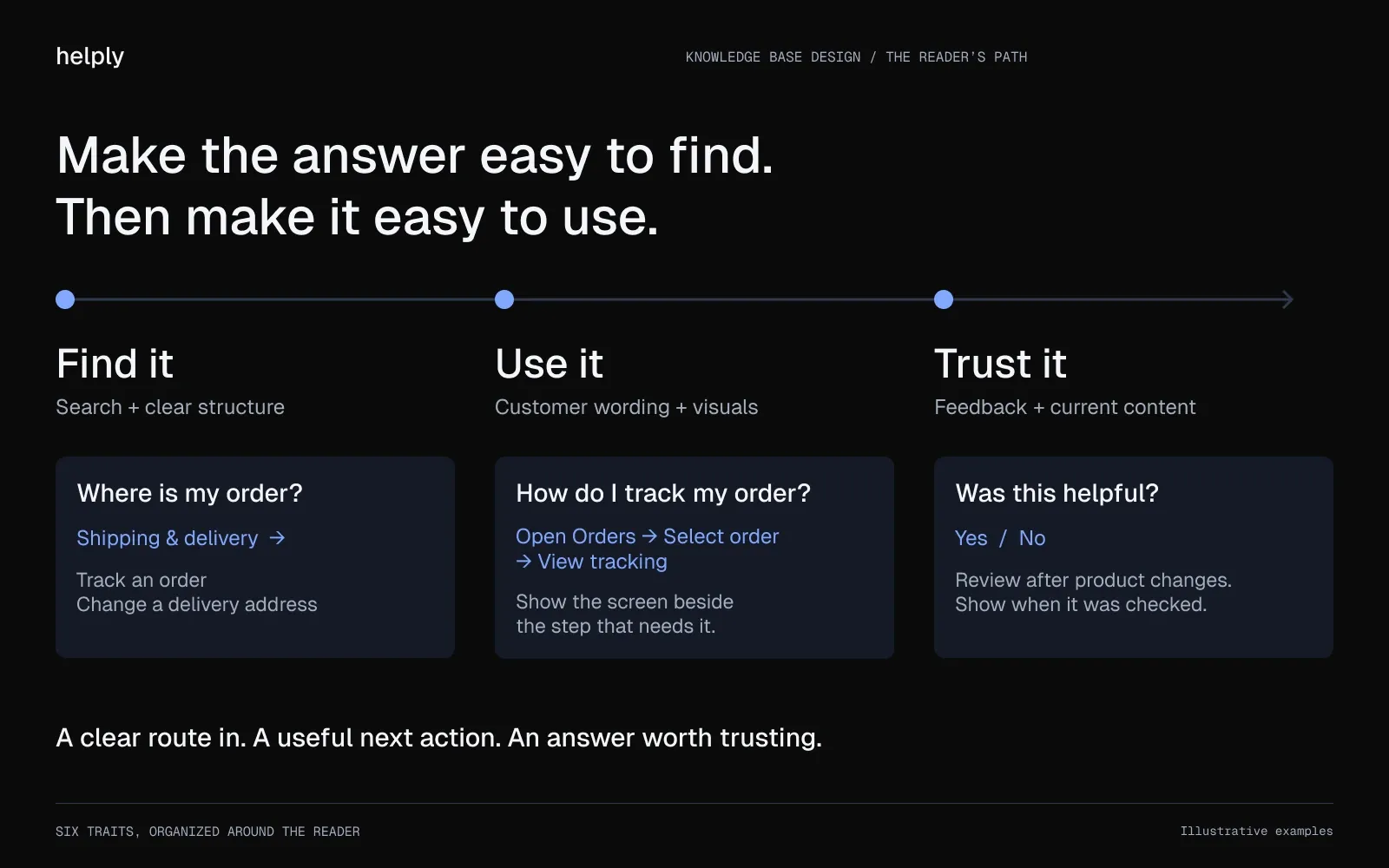
Six traits recur across the 14 help centers below:
- Search that surfaces the answer. Many of your customers type a question before they browse, so make search predictive and forgiving of typos. Keep clear categories for readers who don't know what to call their problem.
- A structure you can scan in seconds. Clear collections and categories let a visitor find the right shelf without reading everything on it.
- Wording customers use. Name features and problems the way customers do, and leave internal jargon out. Slack's help home suggests questions such as "How can I upgrade my Slack plan?"
- Visuals for multi-step tasks. Put a screenshot, GIF or short clip beside any step a reader could get wrong.
- A feedback loop. Read the answers to a "Was this helpful?" prompt to see which articles to fix and which gaps to fill.
- Content kept current. Review articles after each product change, because customers who hit an outdated step open a ticket.
The Best Knowledge Base Examples (And What to Steal From Each)
These 14 knowledge base examples span developer docs, team software, and consumer and commerce brands.
Developer-facing examples
Benchmark against these if you sell a technical product. Your customers know the basics and want depth and accuracy over polish.
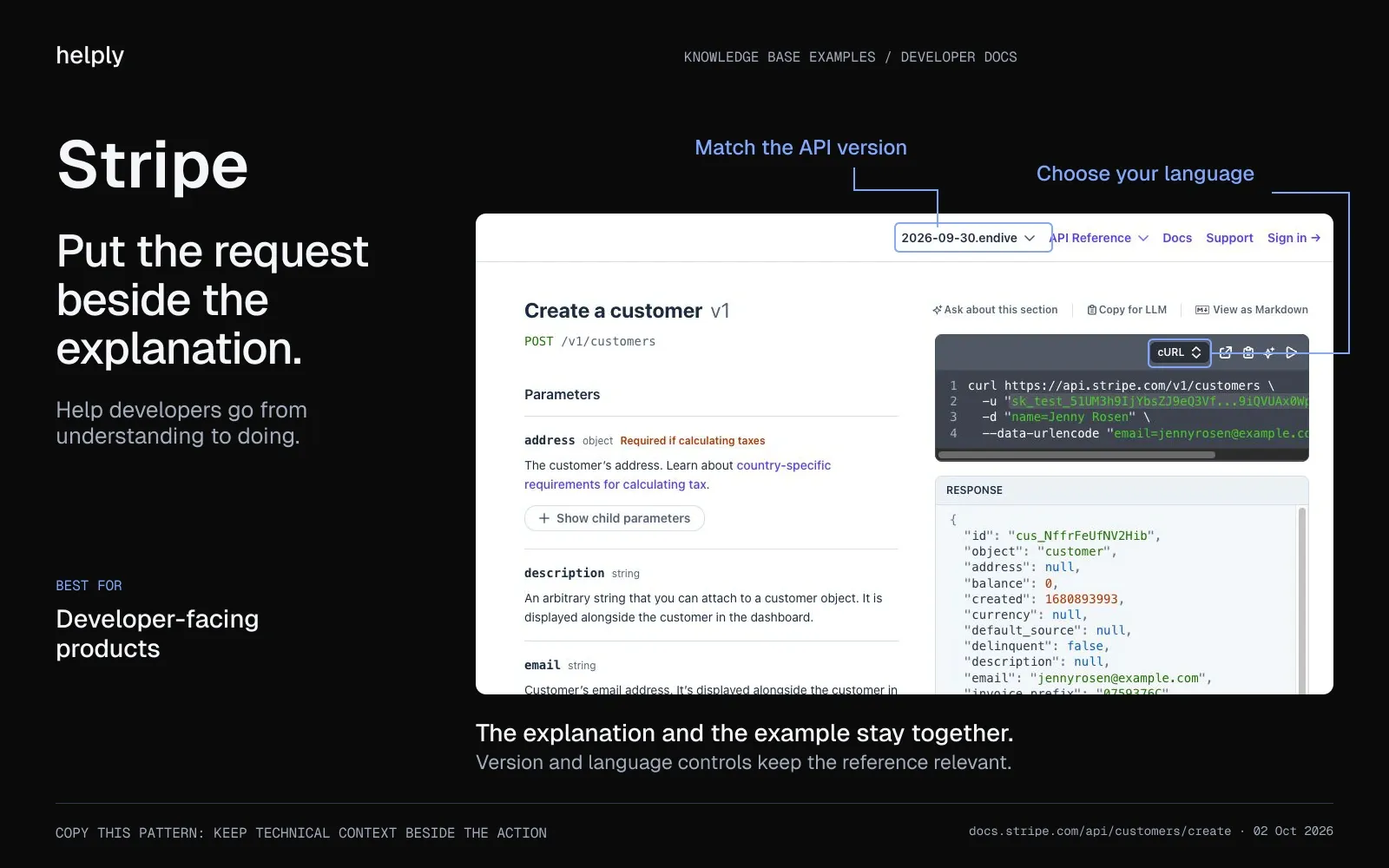
Stripe is the docs standard most developer teams measure themselves against. What to steal: a request sample beside every API endpoint, plus a language picker for cURL, Python, Node.js and six others. The API reference has a version selector, so developers on older integrations see docs that match their version.
Twilio splits its content by reader intent. What to steal: separate "Getting Started" quickstarts, a full API reference and tutorials, so each reader lands at the right depth.
AWS layers its docs for a technical audience. What to steal: user guides, API and CLI references, and command-line examples such as the aws s3 commands for copying and syncing files. Every page has PDF and Markdown versions and a "Did this page help you?" prompt.
ReadMe-built docs show what interactive documentation looks like. What to steal: a "Try It!" button that sends a real API request and shows the response, status code and headers. ReadMe warns that it sends real requests, so point it at a sandbox.
Team software examples worth copying
Notion blurs the line between a help center and a template gallery. What to steal: its Guides end with a "Start with a template" box linking to more than 10,000 templates.
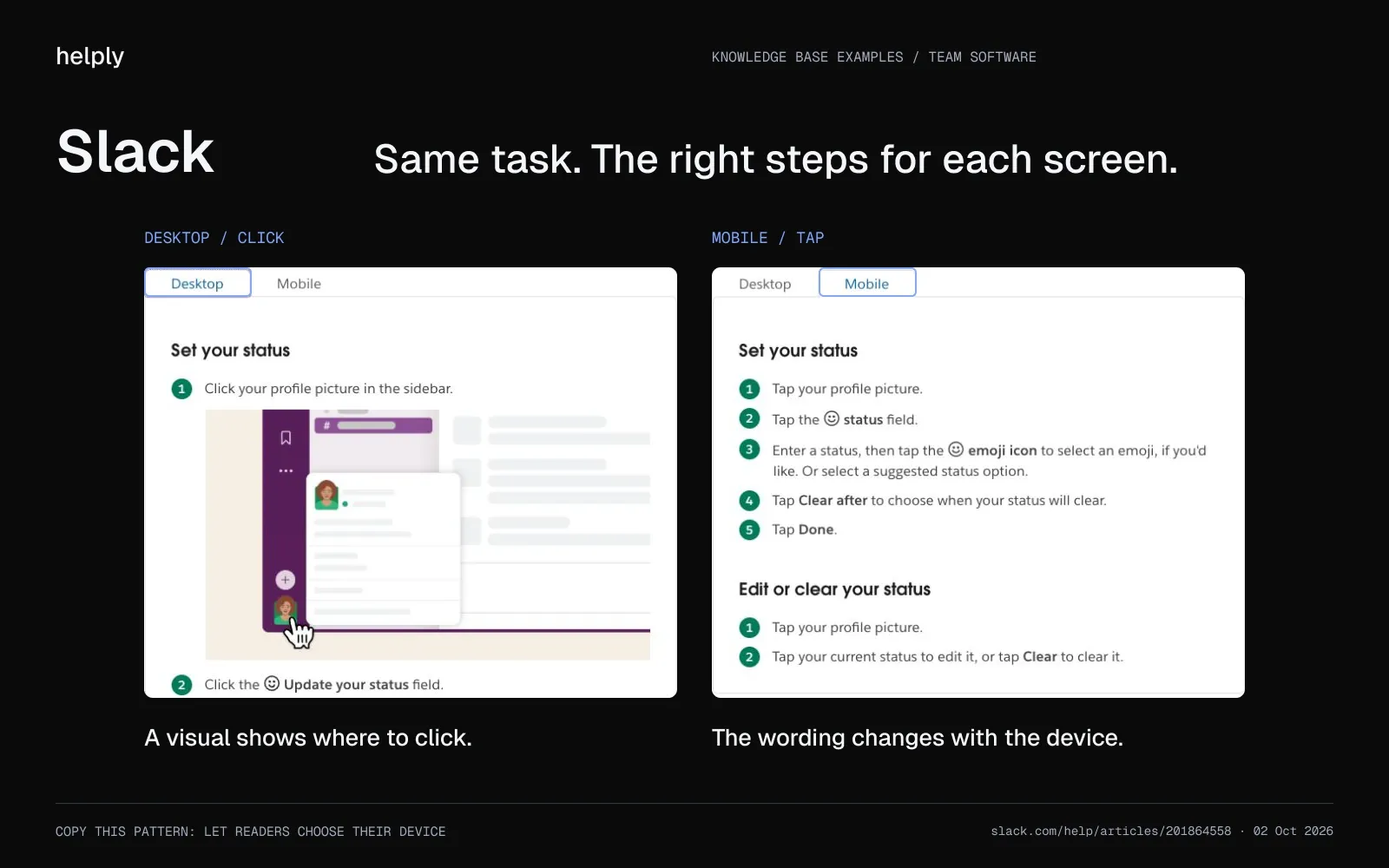
Slack keeps a complex product feeling simple. What to steal: a "Hi. How can we help?" box that suggests article titles as you type and doubles as an AI agent. Articles use numbered steps with Desktop and Mobile tabs, so readers follow the version on their screen.
Asana writes for people who learn by doing, with video tutorials and Asana Academy courses. What to steal: a "Who can use this feature?" box at the top of each article listing the eligible plans. Readers learn whether their plan has the feature before they file a ticket about it.
HubSpot treats education as part of support. What to steal: a "Highest rated articles" list above 13 categories. Every article ends with "Was this article helpful?", and HubSpot Academy adds more than 1,000 courses.
Airtable helps customers past a real learning curve. What to steal: a support home of 18 collections with article counts. Its Web API docs add copy-ready curl requests and sample responses, and Airtable Guides hold the use-case walkthroughs.
Consumer and commerce examples worth copying for UX
Consumer and commerce brands win on experience design, and you can copy their patterns into your own help center.
Canva is visual-first, which fits a visual product. What to steal: short videos beside the steps for visual tasks, such as removing a background. Each step has Desktop and Mobile tabs, and the help home suggests questions such as "How do I upload photos?"
Spotify designs its help center around finding answers fast. What to steal: an AI "Ask" box at the top, then six topic accordions that open on recommended articles. The topics include Payments & billing and Devices & troubleshooting.
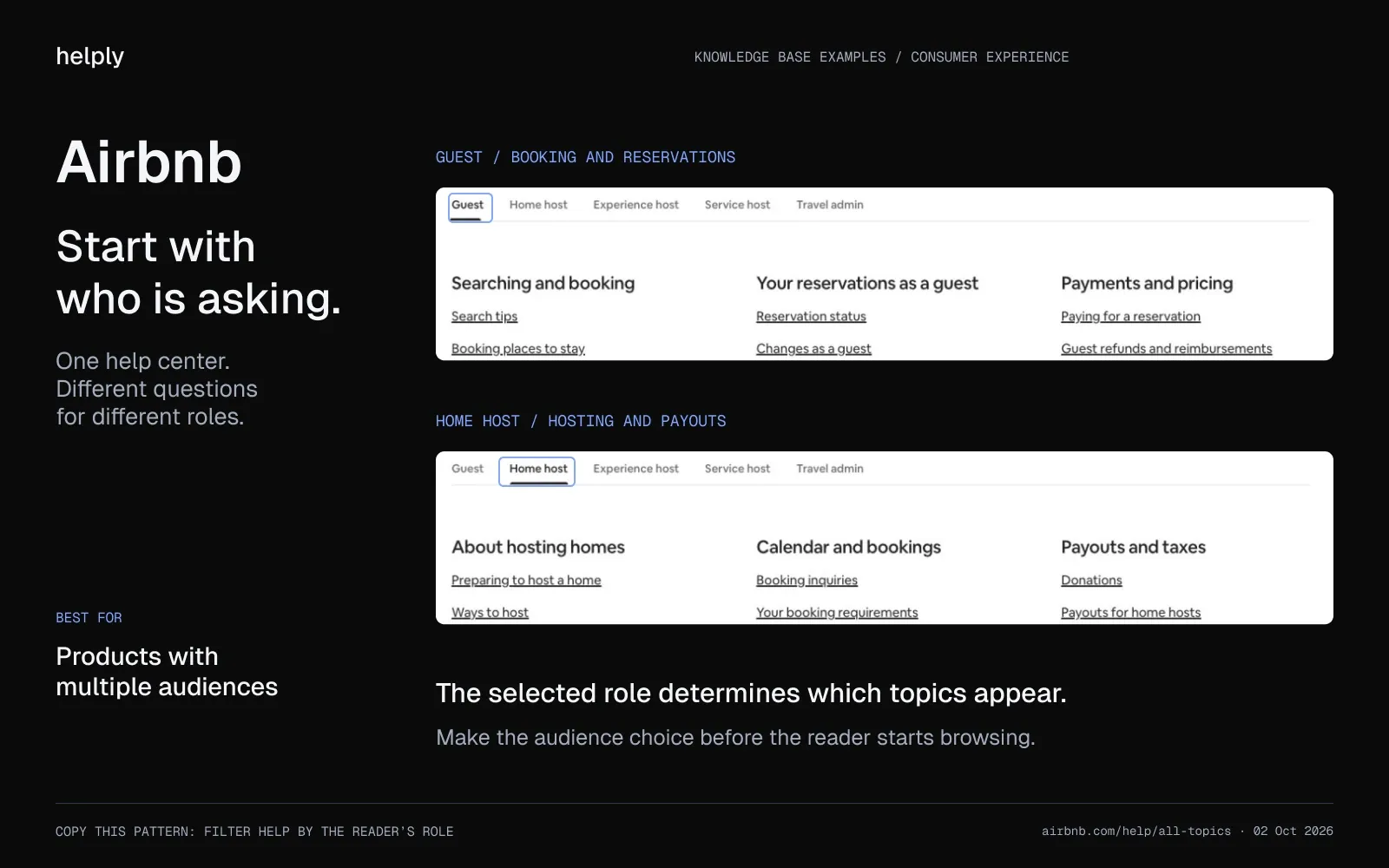
Airbnb serves five audiences from one help center. What to steal: five role tabs, including Guest, Home host and Travel admin, so each reader sees the help for their role.
Shopify writes detailed, practical help for merchants. What to steal: thorough step-by-step guides that end with an AI "Ask about this article" field and a "Leave feedback" button.
Square writes for busy business owners. What to steal: a "Who is this article for?" box at the top. Articles close with "Was this article helpful?", and the help home offers "Still need help? Chat with us."
What each example does best, at a glance
| Example | Type | Audience | What to steal |
|---|---|---|---|
| Stripe | External | Developers | Request samples per endpoint, language picker, versioned API reference |
| Twilio | External | Developers | Quickstarts, API reference and tutorials kept separate |
| AWS | External | Developers | CLI examples, PDF and Markdown versions of every page |
| ReadMe-built docs | External | Developers | "Try It!" console for live API calls |
| Notion | External | Teams | Guides that end in a template box |
| Slack | External | Teams | Title suggestions as you type, Desktop and Mobile tabs |
| Asana | External | Teams | "Who can use this feature?" plan box |
| HubSpot | External | Teams | Highest-rated list above 13 categories, Academy courses |
| Airtable | External | Teams and developers | Collections with article counts, copy-ready API requests |
| Canva | External | Consumers and teams | Short videos and Desktop and Mobile tabs on steps |
| Spotify | External | Consumers | AI "Ask" box plus six topic accordions |
| Airbnb | External | Guests, hosts and travel admins | Five role tabs |
| Shopify | External | Merchants | AI "Ask about this article" field and "Leave feedback" |
| Square | External | Business owners | "Who is this article for?" box, helpful prompt, chat link |
Internal Knowledge Base Examples
Your team asks repeat questions of its own, and an internal knowledge base keeps the answers in one place. Three patterns work well.
Your team keeps its processes in a wiki, such as a Notion or Confluence workspace. New hires follow an onboarding runbook, so no senior teammate has to repeat the walkthrough each month.
An IT and HR self-serve hub answers repeat questions about access, policies and benefits before they reach a team channel.
If your team keeps answering the same question in a Slack channel, move the answer into the wiki.
Helply finds the undocumented answers your team gives in conversations and drafts each one for approval. Its AI agents can read approved pages from Confluence, Notion or Google Drive.
On Helply, Starter includes a public knowledge base, and Pro adds a private, multilingual one. Supported visibility controls can separate internal knowledge from customer-facing articles.
What Does a Good Knowledge Base Article Look Like?
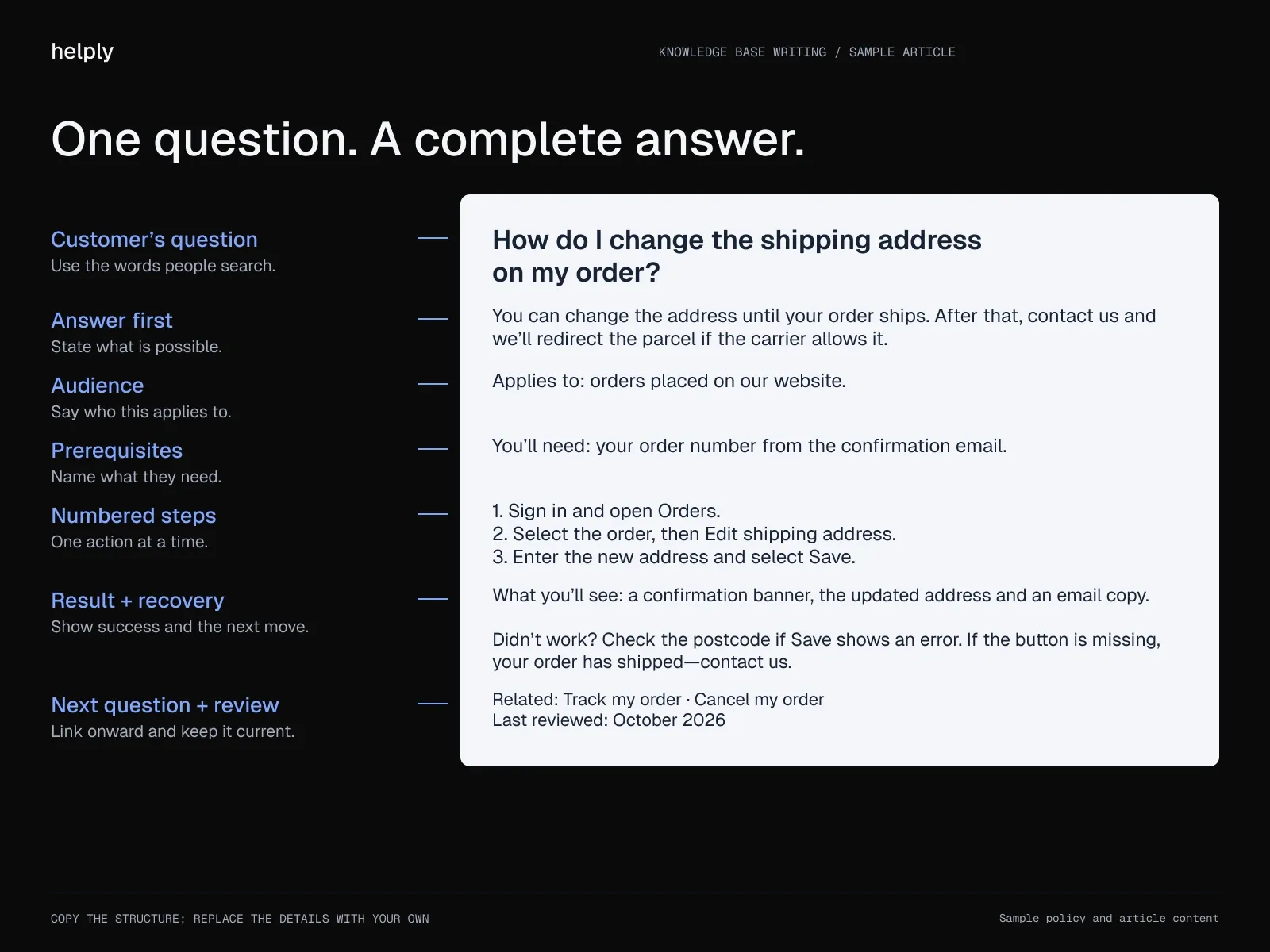
A knowledge base article is a single help page that answers one customer question. A good one puts the answer first and has seven parts:
- A title in the customer's words, such as "How do I change the shipping address on my order?"
- A one-line answer under the title.
- The audience, such as the plan, role or device the article applies to.
- Prerequisites, such as permissions or an order number.
- Numbered steps, one action each, naming the exact buttons.
- The result to expect, and what to do if it doesn't appear.
- Related articles for the next question, plus a "last reviewed" date.
Knowledge base article example
The same skeleton works for a software product. Swap the order number for an admin role and the address for an account setting. For a troubleshooting article, swap the steps for the symptom, the likely cause and the fix.
What Does a Knowledge Base Look Like in 2026?
In 2026, you build the knowledge base out of the support work your team does each day.
Gartner surveyed 5,728 customers and reported in August 2024 that the most common reason customers failed at self-service was not finding relevant content. That was the cause in 43% of cases. Gartner's advice: let reps create knowledge "as part of the issue resolution workflow."
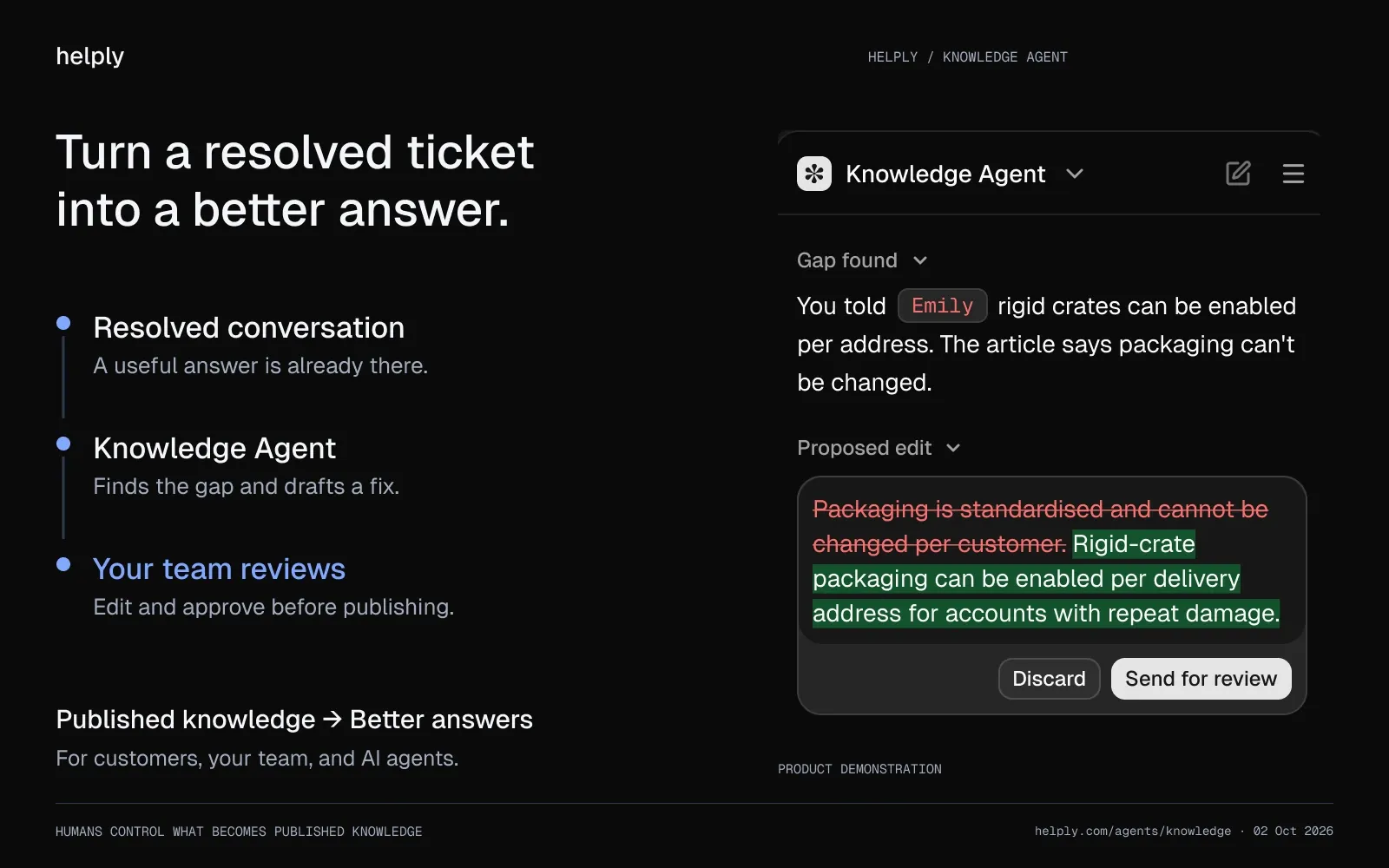
- Articles start from resolved tickets. If a resolution answers a question your knowledge base doesn't cover, AI drafts an article from it for your team to review.
- AI finds the gaps for you. Helply's Knowledge Agent spots questions customers keep asking that no article answers well. It flags articles that no longer match your team's current answers and drafts the update.
- The same content powers your AI agents. Helply's Support Agent answers customers from your knowledge base on email, chat, Slack, Teams, WhatsApp and SMS. With better articles, it resolves more conversations without handing them to your reps.
"Two products, two knowledge bases, and every tool wanted to mash them into one," says Jacqueline Antworth, Proposify's Director of Customer Experience.
On Helply, the Support Agent identifies which product a customer is asking about and pulls the answer from the right knowledge base. After the switch, Proposify's total ticket volume fell 34%, and CSAT held steady through the migration.
How Do I Build a Knowledge Base of My Own?
Ship a tight first version and improve it as new tickets come in.
- Start from your real tickets. Pull your most common questions and answer those first. Sort last quarter's tickets by topic to see which articles to write next.
- Pick a simple structure. Start with a handful of clear categories and keep the tree shallow. Split a category once readers have to scroll to find an article.
- Write for search. Give each article one question and a title in your customers' phrasing. Your on-site search and Google both match on that wording.
- Add visuals to anything multi-step. A screenshot or short clip shows readers which button to click at each step.
- Measure the tickets it prevents and keep it current. Track which articles cut repeat questions and add a feedback prompt. Review the content on a schedule to catch outdated steps and screenshots.
Build a Knowledge Base That Earns Its Keep
The best knowledge base examples win on the six traits above, from fast search to content kept current. The developer-facing leaders add depth for technical readers.
In 2026, make your knowledge base AI-native: draft articles from resolved tickets and close each gap as it appears. Once an article answers a repeat question, customers can find that answer without opening a ticket.
Pick the questions your team answers most this month, and write each one up with the seven parts above.
Frequently asked questions
A knowledge base is a self-serve collection of help articles, FAQs and troubleshooting guides for a product or service. Stripe's developer docs and Spotify's help center are two examples.
Stripe is the benchmark for developer docs, with a request sample beside every API endpoint. Slack shows how to keep a complex product simple, and Airbnb splits help by role with five tabs. Copy the one whose readers look most like yours.
A knowledge base article is one help page built around one question or task. It puts the answer first, then gives steps, the expected result and links to related articles.
To write a knowledge base article, title it with the customer's question and answer it in the first line. List numbered steps with one action each, and add a screenshot for any tricky step. Close with what success looks like and a fix for the most common error, then link the next question.
The two main types of knowledge base are external and internal. External ones are customer-facing help centers, and internal ones hold team wikis and runbooks. Most companies run both.
A knowledge base should include FAQs, step-by-step guides, troubleshooting articles, product and feature overviews, and a glossary, all behind a strong search bar.
A good knowledge base has predictive, typo-tolerant search, clear categories and titles in the customer's words. It adds screenshots or GIFs for multi-step tasks, a "Was this helpful?" prompt and regular reviews.
An internal knowledge base serves employees with processes and onboarding. An external one serves customers with product help and troubleshooting.
To create a knowledge base, start with the 20 to 30 questions your support team answers most, and write one article for each. Group them into a few clear categories with search and a feedback prompt, and review them every quarter.
An AI knowledge base drafts articles from recurring tickets, flags missing or outdated content, and feeds AI agents that resolve customer questions. In Helply, AI drafts each fix and your team approves it before it goes live.
Slack, Spotify and Shopify all lead their help centers with an AI box that answers questions. Shopify adds an "Ask about this article" field to the end of its guides. In Helply, the Knowledge Agent spots questions no article answers and drafts the missing articles for your team.
Yes, every Helply plan includes a customer-facing help center with unlimited articles, and Helply's AI agents draw on the same content. The free 14-day trial comes with 1,000 credits and needs no card.
About the author

Bildad Oyugi
Head of Content
Bildad is a digital marketing expert with over 5 years of experience in copywriting, content marketing, and editing. Outside of work, he enjoys videography and spending time with his family.
Keep reading

Customer Support
Crisp Pricing in 2026: Plans, Seat Limits, Hugo AI Credits and Monthly Bills
Bildad Oyugi · 14 min read

Customer Support
eesel AI Pricing 2026: Plans, Credits and Real Cost
Bildad Oyugi · 12 min read

Customer Support
8 eesel AI Alternatives for Customer Support in 2026
Bildad Oyugi · 21 min read