
 Bildad Oyugi ·

When a Shared Inbox Stops Working
It's Monday at 9:05. Two teammates answered the same customer on Saturday, with different refund amounts. A billing question from Friday afternoon still has no reply, because everyone assumed someone else took it.
Your manager asks how many conversations came in last week, and nobody can say. A shared inbox got you this far, but it can't answer that.
Helply is an AI-native customer support platform. Tickets land in a complete help desk. There, the Support Agent investigates each request, then resolves it or hands it over with the work done.
What Is a Help Desk?
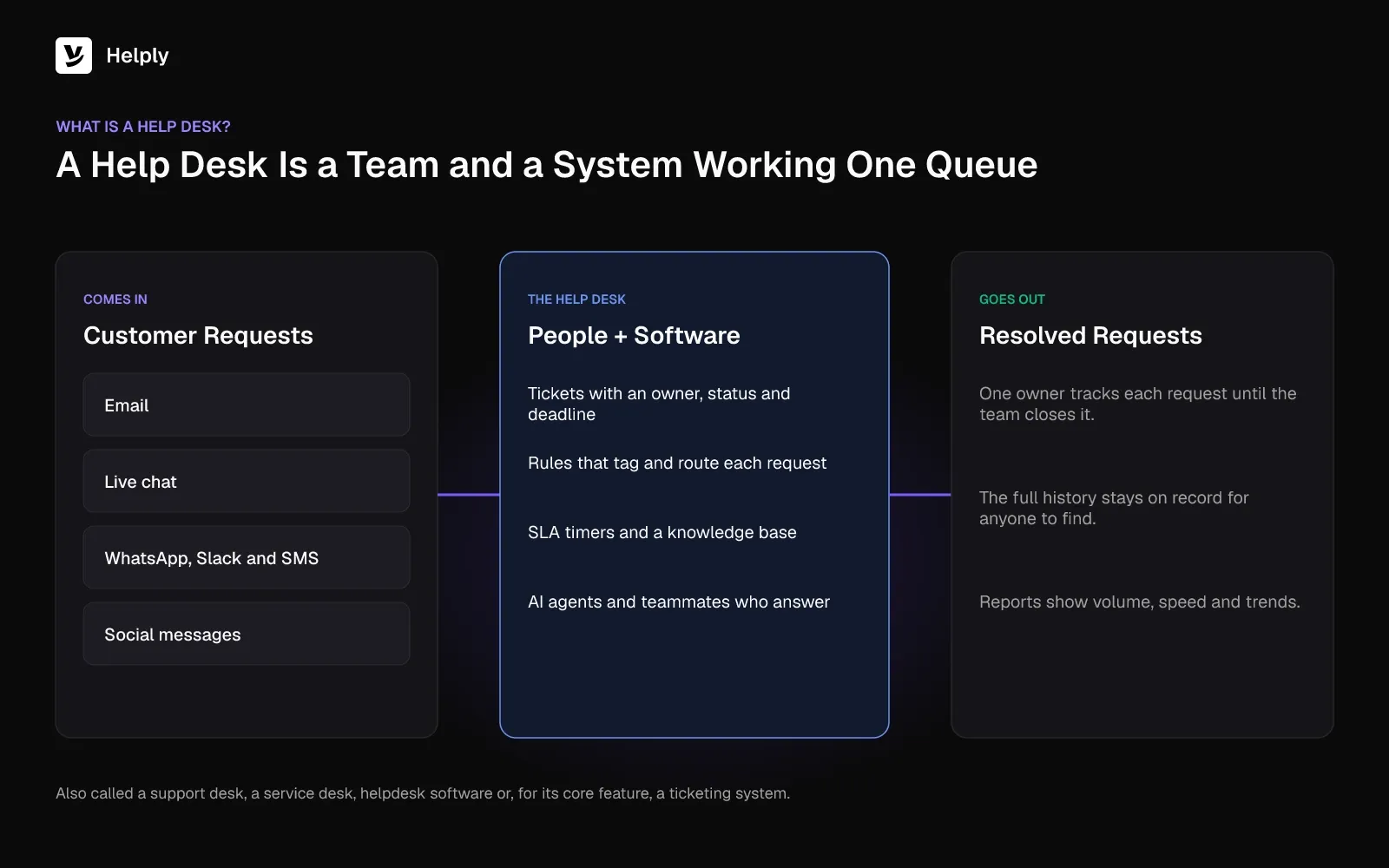
A help desk is the central point where customers or employees bring questions and problems. A team then tracks each one until someone resolves it. The term covers the people who answer and the help desk software they work in.
The phrase started in IT, where a help desk fixes broken laptops and resets passwords for staff. Customer support teams adopted the same model for questions about orders, billing, accounts and products. Both versions give each request an owner who tracks it to a close.
You'll also hear a help desk called a support desk, a service desk, helpdesk solutions, helpdesk software or a ticketing system. A ticketing system is one part of a help desk. The full system adds channels, automation, a knowledge base and reporting on top.
How a Help Desk System Works
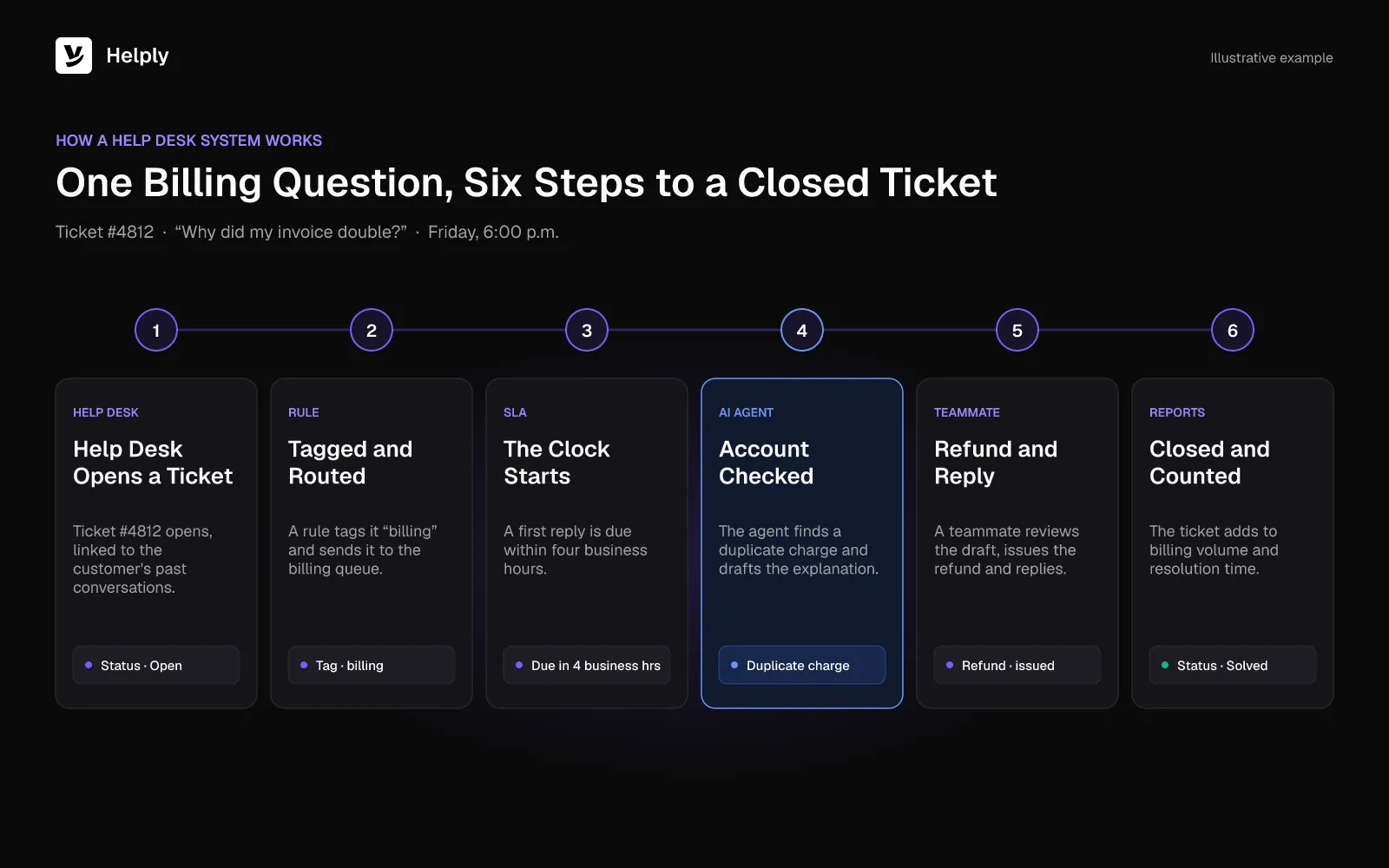
Help desk systems run a common loop. A customer writes in and the system creates a ticket. A person or an AI agent works it, and the closed ticket stays on record for anyone to find later.
Follow that Friday billing question. A customer emails at 6 p.m. asking why their invoice doubled.
- The email lands in the help desk and becomes ticket #4812, linked to the customer's past conversations.
- A rule tags it "billing" and routes it to the billing queue.
- The SLA clock starts. In this example, a first reply is due within four business hours.
- An AI agent checks the account, finds a duplicate charge and drafts the explanation, or resolves it if your rules allow.
- A teammate reviews, issues the refund and replies.
- The ticket closes, and the reports count it toward billing volume and resolution time.
Tickets Give Every Request an Owner
A ticket is the record of one customer request. It holds the conversation, the customer's details, a status (open, pending, solved), a priority, tags and the person assigned to it.
Ownership solves the Saturday double reply. Collision detection shows teammates that someone is already replying to a ticket. Internal notes let a teammate ask finance a question inside the ticket without the customer seeing it.
Views then slice the queue: unassigned tickets, tickets waiting on the customer, tickets close to breaching an SLA. You stop scrolling an inbox to spot what needs attention.
Channels Feed One Queue
Customers pick the channel that suits them. They email, open the chat widget, send a WhatsApp message or post in your shared Slack channel. A help desk pulls every channel into the same queue and keeps each customer's history in one thread.
The agent answering a chat sees last month's email about the same order. Your team doesn't ask the customer for the order number twice, and two teammates don't answer the same question on two channels.
SLAs Put a Clock on Every Ticket
A service level agreement (SLA) is a promise about speed, for example a first reply within one hour. The help desk tracks each target per ticket, warns the owner before a breach and escalates when time runs out.
HubSpot surveyed 1,500+ customer service leaders for its 2024 Service Trends Report. In it, 82% of service pros say customers expect immediate resolution, with a desired timeline under three hours.
With an SLA, your team sees that expectation as a deadline on every ticket.
A Knowledge Base Answers the Repeat Questions
A knowledge base is your library of help articles: setup guides, billing explanations, troubleshooting steps. Customers search it before they write in, and agents link articles in replies instead of retyping the same answer.
A knowledge base only works while it stays current. Help desks that track which questions arrive without a matching article show you what to write next.
AI Agents Resolve, Draft and Watch
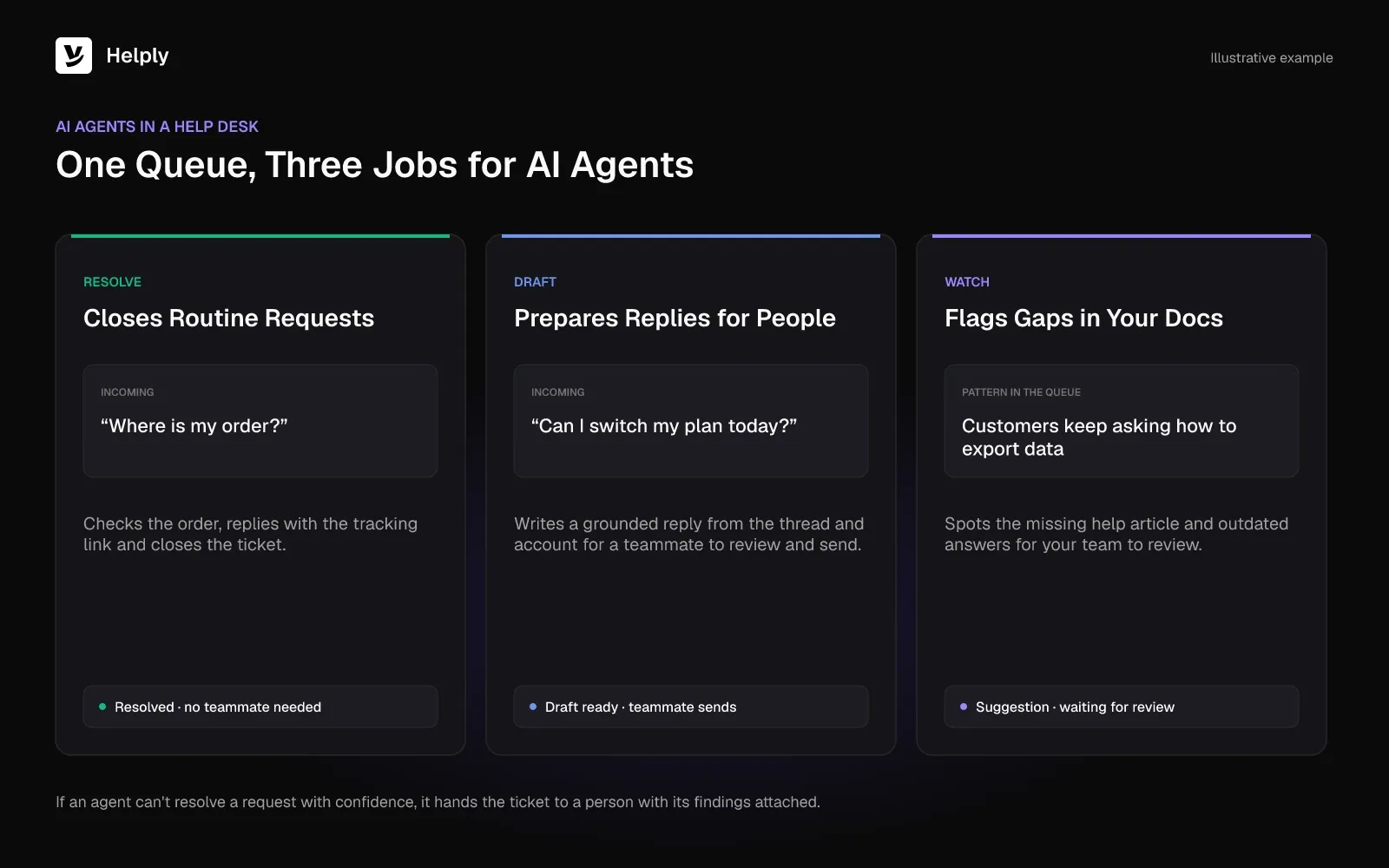
Modern help desk systems add AI agents that work inside the queue. They resolve routine requests end to end after checking help articles, earlier tickets and linked apps. They draft grounded replies for a person to send, and they flag missing articles, outdated answers and trends.
An AI agent that can't resolve a request with confidence should pass the ticket to a person. It attaches its findings, so the teammate picks up where it stopped.
Support leaders expect this layer to carry more of the load. Zendesk's 2025 CX Trends Report came out in November 2024. Its press release reports "75% of CX leaders expecting 80% of customer interactions to be resolved without human intervention in the next few years."
Reports Show Volume, Speed and Trends
Reports answer the question your manager asked on Monday. A help desk counts volume by channel and topic, first response time, resolution time, SLA breaches and customer satisfaction scores.
Watch the trend lines. If "where is my order" tickets jump after a carrier change, fix the tracking email before you hire.
Help Desk vs. Shared Inbox
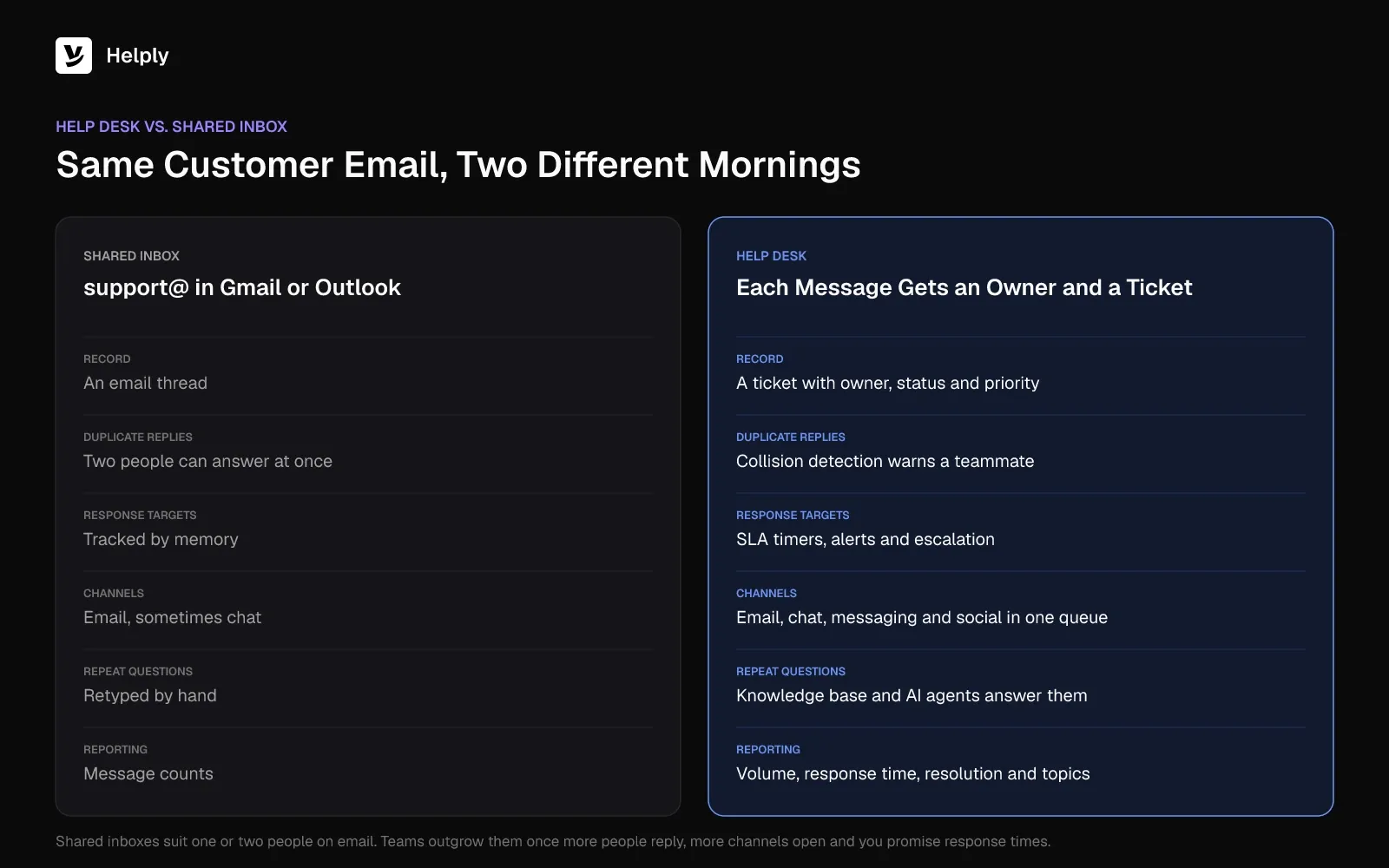
A shared inbox is a single address like support@ that a whole team reads and answers. A help desk turns each message into a ticket with an owner and a deadline, and adds channels, SLAs, reporting and AI.
Gmail delegation, Outlook shared mailboxes and dedicated shared-inbox apps add assignment and notes on top of a shared inbox. That works for one or two people handling email only. Teams outgrow it when more people reply, more channels open and customers expect a promised response time.
Help Desk vs. Shared Inbox: Tickets, SLAs, Channels and AI Compared
| Capability | Shared inbox | Help desk |
|---|---|---|
| Request record | An email thread | A ticket with owner, status, priority and tags |
| Channels | Email, sometimes chat | Email, chat, messaging apps and social in one queue |
| Duplicate replies | Common without collision detection | Collision detection and assignment prevent them |
| Response targets | Tracked by memory | SLA timers, breach alerts and escalation |
| Self-service | Separate tool, if any | SLA timers, breach alerts and escalation |
| Automation | Basic filters | Routing rules, macros and round robin |
| AI | Reply suggestions at most | AI agents that resolve, draft and flag gaps |
| Reporting | Message counts | Volume, response time, resolution time, CSAT and topics |
Sender.net's story opens on that gap: "Sender.net was running support on a shared inbox that moved tickets efficiently and understood nothing about them."
Help Desk vs. Service Desk
A help desk fixes problems as they come in. A service desk handles a wider set of requests, such as access, new equipment and changes, usually for employees inside a company.
Atlassian draws the line this way: "A help desk handles break/fix: a user reports a problem, and the team resolves it. A service desk is the single point of contact for everything a user needs from IT."
Customer support teams usually need a help desk. IT teams that manage assets and change requests need a service desk.
Types of Help Desk Solutions
Help desk solutions fall into four groups: shared inbox tools, standalone help desks, IT service desks and AI-native help desks. The right one depends on who writes in and how many people answer.
- Shared inbox tools: email-first apps with assignment and notes. They suit one or two people answering email.
- Standalone help desks: ticketing, channels, SLAs, a knowledge base and reporting in one product. Pricing models vary, so check whether AI agents come in the plan or cost extra.
- IT service desks (ITSM): built for internal IT, with asset management, change requests and ITIL processes.
- AI-native help desks: a complete help desk with AI agents built in from the start. AI agents resolve requests, draft replies and flag gaps in your help articles inside the same queue.
Customer-facing teams usually choose between a standalone help desk and an AI-native one. Decide how much of your queue you want AI agents to resolve.
Signs Your Team Needs a Help Desk
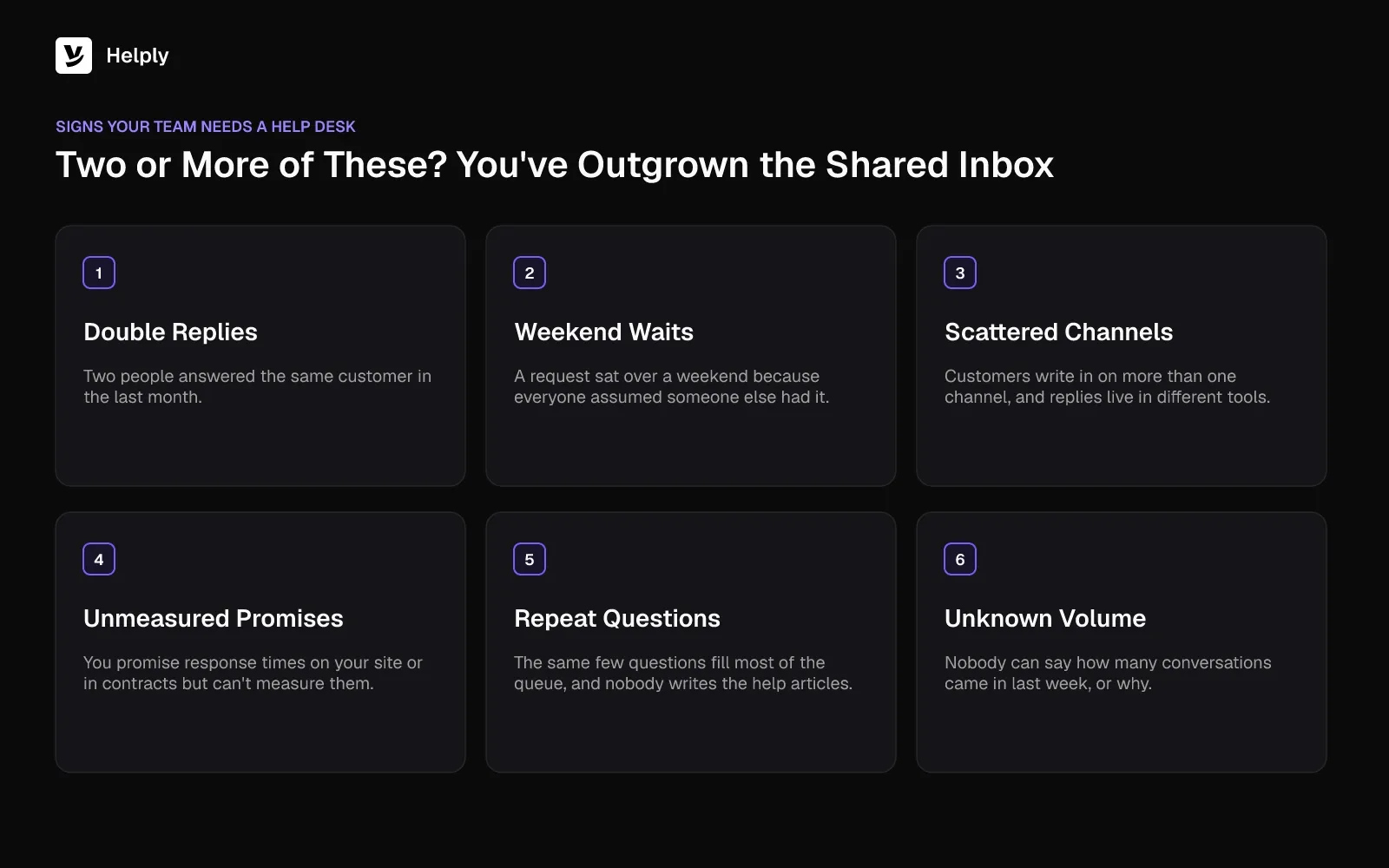
Your team needs a help desk once you see double replies, missed requests, extra channels, unmeasured response times or unknown volume. If two or more of these signs sound familiar, your team has outgrown its shared inbox.
- Two people answered the same customer in the last month.
- A request waited over a weekend because everyone assumed someone else had it.
- Customers write in on more than one channel, and replies live in different tools.
- You promise response times on your site or in contracts but can't measure them.
- The same few questions fill most of the queue, and nobody has time to write the help articles.
- Nobody can say how many conversations came in last week, or why.
What to Look for in a Help Desk System
Compare help desk systems on ticketing, channels, SLAs, the knowledge base, AI agents, reports, pricing model and migration support.
- Ticketing basics: assignment, collision detection, internal notes, views, tags and macros.
- Your channels: every channel your customers use today, plus the ones you'll add next year.
- SLAs and escalation: timers, breach alerts and rules for when a ticket goes to a senior person.
- A knowledge base: on your own domain, easy to keep current, linked to tickets.
- AI agents: check whether they can resolve requests end to end or only suggest replies.
- Reports: volume by channel and topic, response and resolution times, and SLA breaches.
- Pricing model: check whether AI agents and AI credits come in the plan or cost extra.
- Migration: check whether the vendor moves your past conversations and help articles for you.
Where Helply Fits
One Helply workspace holds your help desk and the AI agents in it.
Each plan is a complete help desk on its own. It covers the shared inbox, email, live chat, standard reports and a help center on your domain with AI article writing. Each plan also ships the Support Agent for customers and the Assist Agent for your team.
Each Monday-morning problem has a matching part of Helply:
- Double replies: every plan's shared inbox includes internal notes and collision detection, which warns a teammate before a second reply goes out.
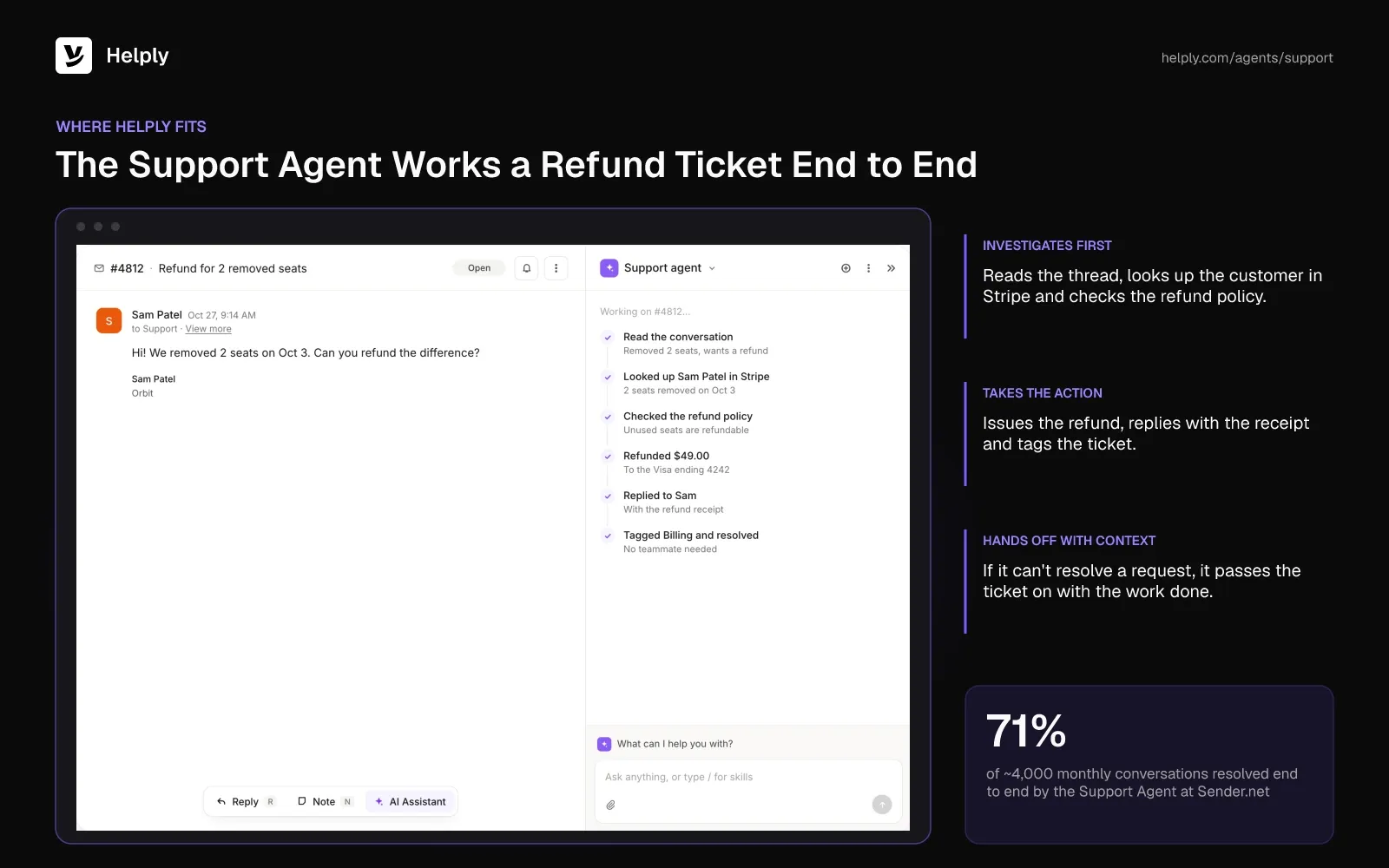
- The Friday billing ticket: the Support Agent investigates using the knowledge base, past conversations and the tools you connect. It can resolve requests end to end, and it hands off with the work already done when it can't.
- Missed deadlines: SLAs, escalation rules and round robin start on the Team plan.
- Slow replies on hard tickets: the Assist Agent drafts answers grounded in the thread, the customer's account and the Guidelines you write.
- Repeat questions: every plan's knowledge base includes AI article writing and AI answers. From Team, the Knowledge Agent spots missing answers and outdated articles, and your team reviews each suggestion.
- Unknown volume: standard reports come on every plan, so you can answer Monday's volume question.
- More channels: Helply covers email and live chat, plus WhatsApp, SMS, Discord, Slack, Microsoft Teams, Telegram and phone. On Team, you can add WhatsApp, SMS, Discord and Slack Connect. Microsoft Teams starts on Pro.
Skills teach the agents your specific types of customer work, from the Team plan up. Helply is SOC 2 Type II audited. Customer data that reaches AI providers stays out of their model training.
Sender.net ran support on a shared inbox before it moved to Helply. It replaced Front and now runs its inbox, knowledge base and reporting in one place. The Support Agent resolves 71% of ~4,000 monthly conversations end to end.
The team also built 18 reusable Skills for deliverability, DNS and billing workflows.
Stay on a Shared Inbox or Move to a Help Desk?
Stay on a shared inbox if one person answers email-only questions and nobody asks about response times. At that size, it does the job.
Switch to a help desk once two or more people reply, customers write in on several channels or you promise a response time. Helply fits teams that want AI agents working the queue from the first day, inside the same help desk their team uses.
Collision detection flags double replies before they go out. The Support Agent can answer the Friday billing question over the weekend, and from Team, SLA timers flag anything still waiting. Standard reports show your manager last week's volume.
Start with one support address. Connect it, watch the Support Agent handle a week of real questions, then add your next channel. The help desk with AI turned off uses no credits, and Team and up include free migration.
Frequently asked questions
A help desk system is software that turns each email, chat or message into a ticket with an owner, status and deadline. It adds channels, SLAs, a knowledge base, AI agents and reports around those tickets.
Common alternatives are support desk, service desk, customer service desk, helpdesk solutions, helpdesk software and ticketing system. In IT, "service desk" usually means a broader function that also handles access requests and changes.
An IT help desk supports a company's own employees with technical problems like password resets and broken hardware. A customer support help desk serves outside customers with questions about products, orders and accounts.
L1, L2 and L3 are support tiers: L1 handles common questions, L2 takes harder technical issues and L3 covers engineering-level fixes. AI agents can resolve routine L1 requests and hand the rest up with context.
A ticketing system records and tracks requests. A help desk includes ticketing and adds channels, SLAs, a knowledge base, automation, reporting and, in modern systems, AI agents.
A team of one answering email can manage with a shared inbox. Once two people reply or a second channel opens, help desk software prevents double replies and missed requests.
Routine requests like order status, billing questions and how-to questions suit AI agents, which can close them without a person. Complex, sensitive or high-value conversations still go to people, with the agent's findings attached.
Help desk pricing usually depends on the number of human agents who reply and whether AI comes included or costs extra. Helply puts the Support Agent and Assist Agent on every plan. See Helply's pricing for current plans.
About the author

Bildad Oyugi
Head of Content
Bildad is a digital marketing expert with over 5 years of experience in copywriting, content marketing, and editing. Outside of work, he enjoys videography and spending time with his family.


