
 Alex Turnbull ··12 min read

The Refund Article Your Bot Still Quotes
Your team cuts the refund window from 30 days to 14. Someone updates the billing settings that afternoon, but the help article still says 30 days.
Twenty days after buying, a customer asks the chat widget about a refund. The knowledge base chatbot quotes the article, links it, and promises the refund. Your agent then has to say no, and the customer has the bot's answer in writing.
The bot retrieves the closest article and repeats its 30-day rule. Your team changed billing and left that article untouched.
What Is a Knowledge Base Chatbot?
A knowledge base chatbot is an AI assistant that answers questions from your own help center articles instead of a fixed script. It retrieves the passages that match each question, writes a reply grounded in them, and points to the source article. The underlying method is retrieval-augmented generation, or RAG.
The method comes from a 2020 NeurIPS paper by Lewis and colleagues. It pairs a language model with a searchable index of documents. Knowledge base chatbots apply the same idea to your help center.
Two older tools came before the AI knowledge base chatbot, and each did part of that job. A scripted FAQ bot matches keywords to replies someone wrote in advance. Help center search returns a list of articles and leaves the reading to the customer.
How Does a Knowledge Base Chatbot Work?
A knowledge base chatbot answers in six steps.
- Connect the sources. You point the bot at your help center, and sometimes at internal docs, saved replies or past tickets.
- Split articles into passages. Each article becomes short chunks, so the bot can match one section instead of a whole page.
- Index the passages by meaning. Each passage gets a numeric fingerprint, called an embedding, so questions with different words and the same meaning land close together.
- Retrieve the best matches. A customer asks a question, and the bot pulls the handful of passages closest to it.
- Write a grounded answer. A large language model writes a reply from those passages in your tone and cites the article it used.
- Hand off when nothing fits. If no passage answers the question, a well-built bot says so and routes the customer to a person with the conversation attached.
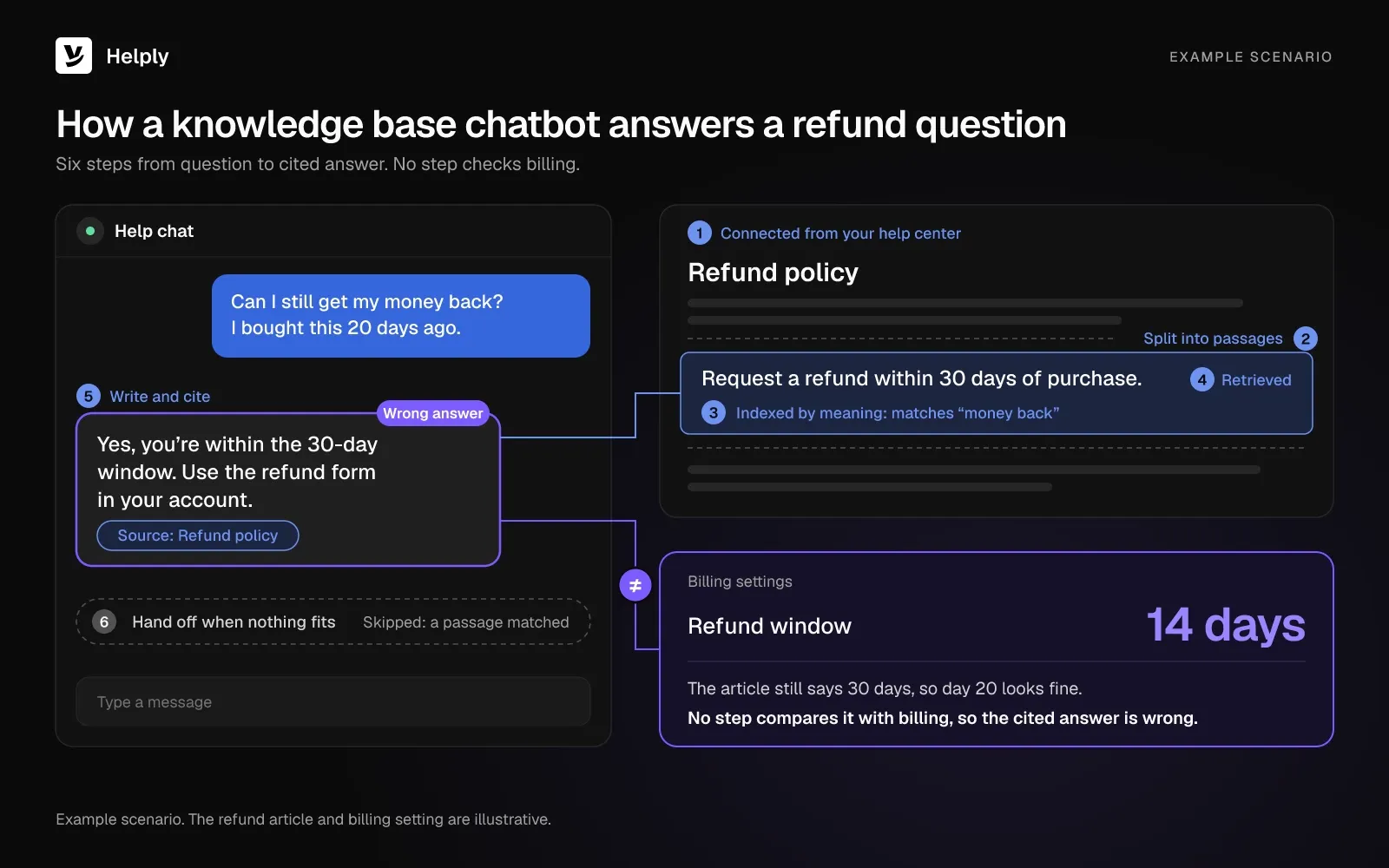
A Worked Example: One Refund Question
A customer types: "Can I still get my money back? I bought this 20 days ago."
- Retrieval matches "money back" to the passage under the "Refund policy" heading, though the customer never wrote "refund."
- The passage says: "Request a refund within 30 days of purchase."
- The model replies: "Yes, you're within the 30-day window. Use the refund form in your account," and links the article.
- Billing settings now allow 14 days, so the customer is outside the window and the bot's answer is wrong.
- No step compares the passage with your billing settings, so the bot answers from the article alone.
FAQ Chatbots vs. Knowledge Base Chatbots: Matching, Sources and Upkeep
| What differs | Scripted FAQ bot | Knowledge base chatbot |
|---|---|---|
| How it matches a question | Keywords or buttons mapped to set replies | Meaning, through an index of article passages |
| What it answers from | Replies someone wrote inside the bot | Your live help center articles |
| When nothing matches | A fallback message or a menu | A handoff to a person, if you set one up |
| Upkeep | Edit every reply by hand inside the bot | Edit the article, and the bot picks up the change at its next sync |
With a knowledge base chatbot, you maintain one copy of each answer, in the help center. If that copy is wrong, the bot's answer is wrong too.
What Your Chatbot Knowledge Base Needs Before Launch
Your chatbot knowledge base is the set of articles the bot may answer from. To create a knowledge base for a chatbot, write those articles with five habits so the bot retrieves the right passage. If you are still deciding what belongs there, start with the questions your agents answer most.
- One question per article. An article titled "Billing FAQ" with twelve answers gives the bot muddled passages, because each one mixes topics.
- Numbers in the text. Limits, prices, time windows and plan rules belong in sentences, since the bot can't read a screenshot.
- Edge cases on the page. Exceptions your agents know by heart, such as "annual plans refund differently," need their own line, or the bot applies the general rule.
- One source of truth. If two articles cover the same topic, the bot may retrieve either one, and your team has to update both.
- Account questions routed elsewhere. Billing questions like "Why was I charged twice?" need account data. The bot should hand off or call a connected tool for those.
What Breaks When Knowledge Base Articles Go Stale
A knowledge base chatbot goes wrong in three ways when articles go stale: old answers, disagreeing articles and answers nobody wrote down. Your team ships changes most weeks and updates articles when someone remembers.
The Bot Repeats the Old Answer With Confidence
A stale article still matches the question well. Its words haven't changed, so retrieval ranks it first and the model has no reason to doubt it. Your customer gets a specific answer with a citation and has no sign that the rule changed.
Re-syncing the bot won't fix it. A re-sync copies the current article into the index again, stale text included. Only an edit to the article changes the answer.
Two Articles Disagree, and the Bot Picks One
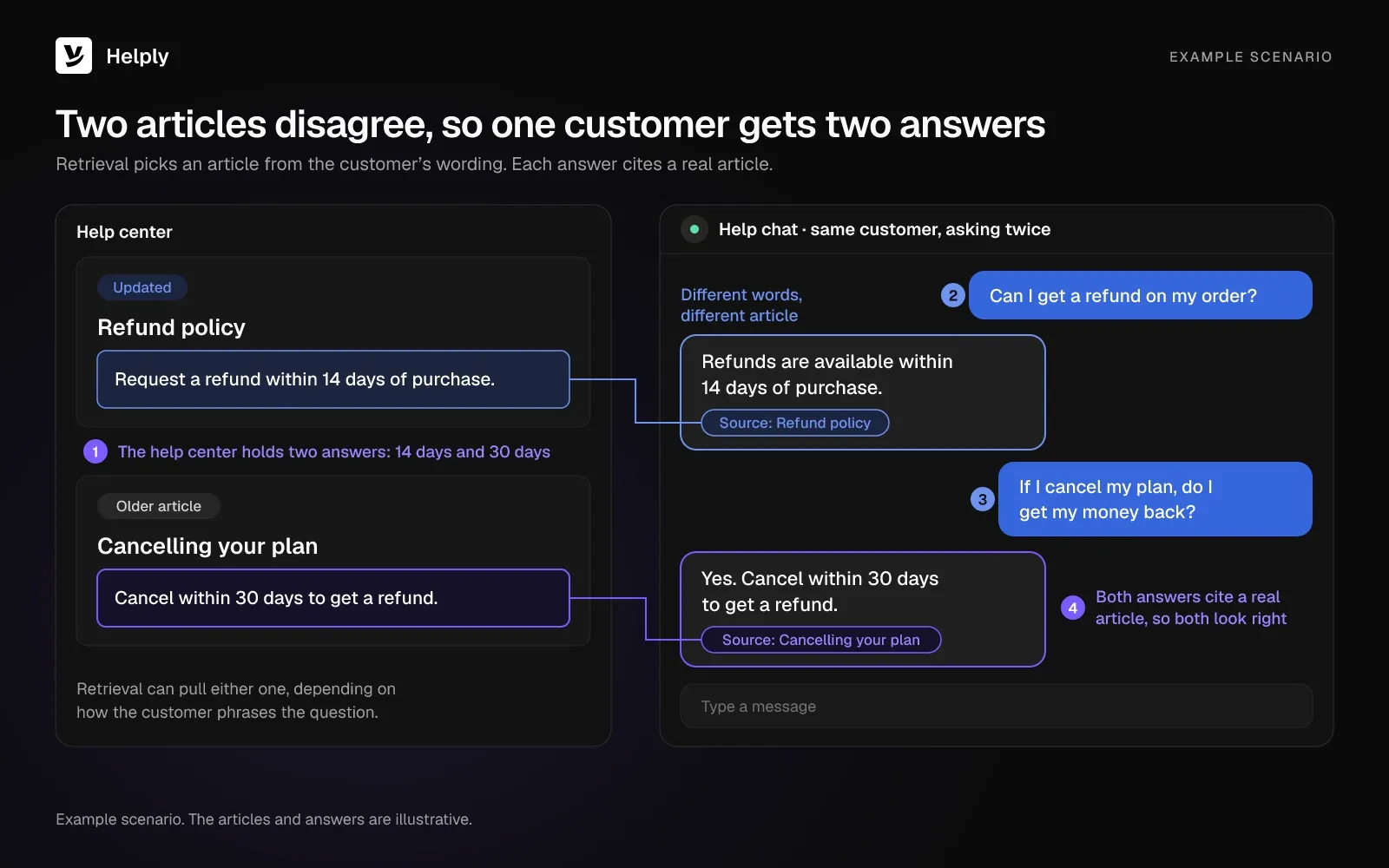
If your team updates one article and misses another, your help center holds two answers. The new "Refund policy" article says 14 days, while an older "Cancelling your plan" article still says 30. Retrieval may pull either one, depending on how the customer phrases the question.
A customer who asks twice can get two different answers. Each answer cites a real article, so both look right.
The Answer Was Never Written Down
Some answers live only in your team's replies. An agent works out the fix for a new error, sends it to the customer and closes the ticket. The next customer with the same error asks the bot.
With no passage to retrieve, the bot either hands off or stretches a loosely related article into an answer. A handoff costs your team time, and a stretched answer can send the customer off with the wrong instructions.
What a Wrong Chatbot Answer Costs
The tribunal decided Moffatt v. Air Canada (2024 BCCRT 149) on 14 February 2024. A passenger had asked the airline's website chatbot about bereavement fares.
The chatbot told them they could apply for a reduced bereavement rate after travel, within 90 days of the ticket's issue date. The tribunal found that Air Canada's bereavement page said the policy didn't apply once travel was over.
Air Canada argued that it wasn't liable for information from its chatbot. The British Columbia Civil Resolution Tribunal disagreed:
"It should be obvious to Air Canada that it is responsible for all the information on its website. It makes no difference whether the information comes from a static page or a chatbot."
The tribunal ordered the airline to pay CA$812.02, including CA$650.88 in damages. Air Canada's own page had the right rule, so the wrong answer came from the chatbot alone. If your help article carried the wrong rule, the bot would repeat it with a citation attached.
How Often Do Retrieval-Based AI Tools Still Get It Wrong?
A preregistered Stanford study in the Journal of Empirical Legal Studies, published in April 2025, tested AI legal research tools built on retrieval. Across 202 queries, each tool still hallucinated between 17% and 33% of the time, less often than GPT-4.
How Do You Know Your Knowledge Base Chatbot Is Going Stale?
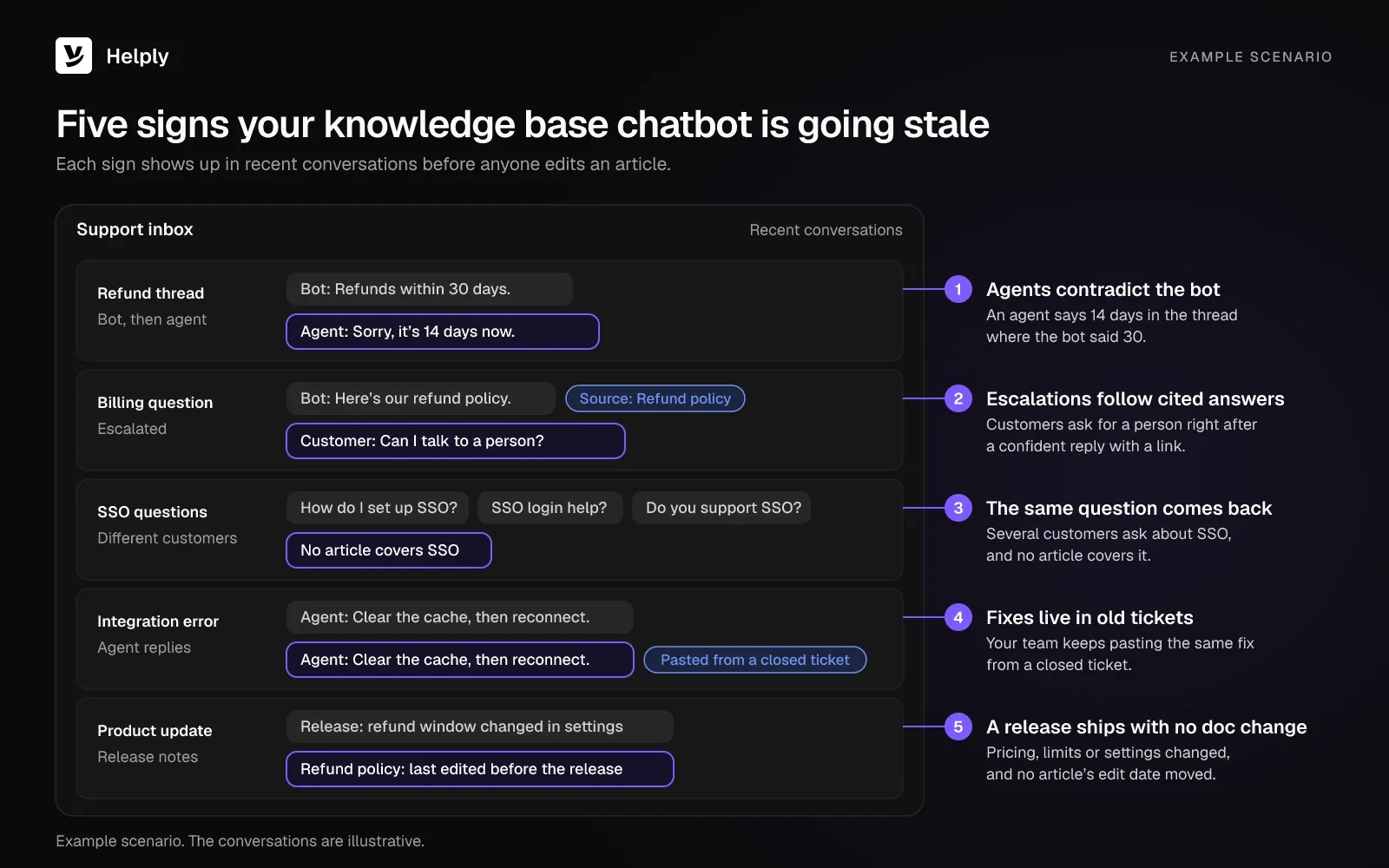
Five signals in your own conversations show a knowledge base chatbot going stale. A customer who gets a wrong bot answer may open a ticket or leave without saying why.
- Agents contradict the bot. An agent's reply says 14 days in the same thread where the bot said 30.
- Escalations follow cited answers. Customers ask for a person right after the bot gave a confident reply with a link.
- The same question keeps coming back. Ten customers ask about SSO this month, and no article covers it.
- Fixes live in old tickets. Your team keeps pasting the same fix from a closed ticket because the help center never got it.
- A release ships with no doc change. Pricing, limits or settings changed, and no article's edit date moved.
You only see these signals when you compare recent conversations with the help center. If you run that check by hand, it takes hours your team could spend on customers.
How Do You Keep a Knowledge Base Chatbot Up to Date?
Keep a knowledge base chatbot current with three approaches: manual audits, scheduled re-syncs, and flagging stale articles from conversations.
Knowledge Base Chatbot Upkeep: Audits vs. Re-Syncs vs. Flag-and-Draft
| Approach | What it catches | What it misses | Who does the work |
|---|---|---|---|
| Manual audit | Articles a reviewer reads and knows are wrong | Changes nobody remembers and gaps no article covers | A support lead or writer, article by article |
| Scheduled re-sync | Edits already made in the help center | Stale facts in articles nobody edited | The tool, on a timer |
| Flag-and-draft from conversations | Articles that contradict recent answers, and repeat questions with no article | Changes no customer has asked about yet | The tool can draft, and your team reviews, edits and publishes |
A re-sync copies help center edits into the bot. It can't see product changes your team never wrote into an article. Flag-and-draft starts from the other end: what customers asked and what agents answered.
Use them together: a light audit for pages with little customer traffic, and conversation flags for the rest.
Can a Self-Updating Knowledge Base Keep Your Chatbot Current?
Yes, with a person approving each fix. A tool that reads your conversations can flag the stale article and draft a fix your team reviews before publishing.
Helply is an AI-native customer support platform running its knowledge base on the flag-and-draft model. Its Support Agent answers customers from that same knowledge base. Fix an article, and the Support Agent can use the fix in its next answer.
The Helply knowledge base surfaces knowledge "that's no longer accurate or doesn't match what your team is telling customers".
- It catches outdated answers. In the refund example, that is the 30-day article your agents keep contradicting.
- It can draft the fix. AI can write the updated article, or a new one, from what your team already worked out in the tickets.
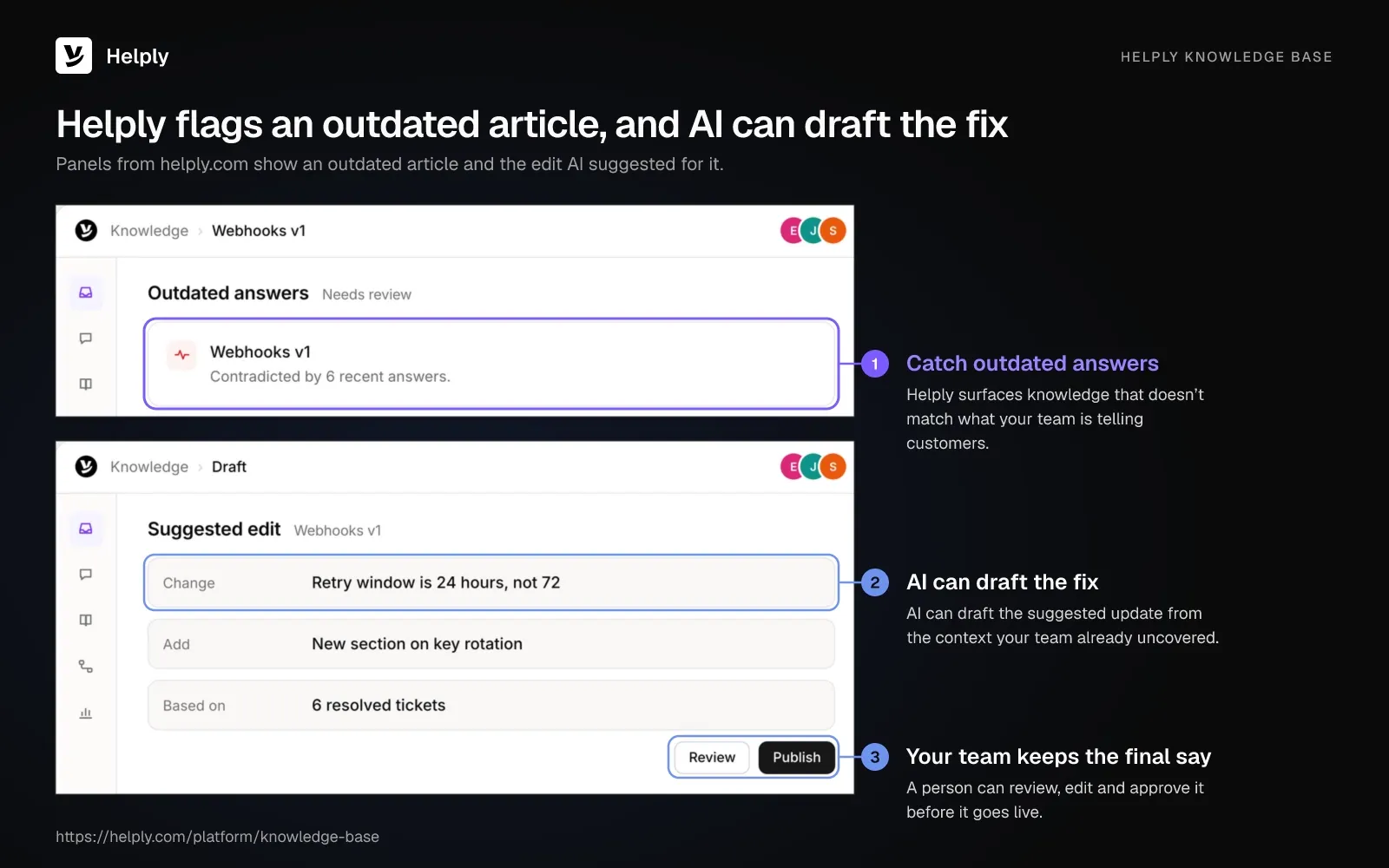
- You keep the final say. Your team reviews, edits and publishes each draft instead of writing from scratch.
- It can reuse your team's fixes. Helply can turn useful fixes, investigations and decisions from closed tickets into knowledge for the next customer.
- Customers and AI agents read the same page. The knowledge that powers the AI agents is the same help center your customers search.
On Team and up, the Knowledge Agent runs this loop in the background. It works from "repeated questions, escalations, unsuccessful answers, and areas where existing knowledge isn't enough". It can also retire content that no longer applies.
The Support Agent answers from your knowledge and connected tools, plus Skills from Team up. It can take an issue from first message to resolution. If it can't resolve a case with confidence, a person takes over and sees what it found.
Your team can correct an agent that gets something wrong through Training.
How to Set Up a Knowledge Base Chatbot That Stays Accurate
Use these six steps to launch with fewer stale answers reaching customers.
- Pull your top questions from tickets. Export a month of conversations and list the 20 questions that come up most.
- Fix those articles first. Rewrite each one with one question per article, numbers in the text, edge cases on the page and no duplicates.
- Write the answering rules. Helply's Guidelines, on every plan, "define how your AI agents should behave and make decisions".
- Decide when the AI hands off. Send billing, account and legal questions to a person, using escalation rules in Helply from the Team plan up.
- Review flagged articles every week. Clear the queue of contradictions and drafted fixes on a fixed day, so no flagged article waits more than a week.
- Track the right numbers. Watch your chatbot containment rate next to reopened tickets, since high containment with rising reopens points to confident wrong answers.
Start with part of the queue. Run a pilot on a share of your tickets to find broken articles before your whole customer base meets the bot.
Audit by Hand, or Let Your Conversations Flag What's Stale
If your product changes a few times a year, you can keep your knowledge base chatbot accurate with a monthly audit and re-sync. Teams that ship weekly can't reread the help center after each release, so they need flags from conversations.
Helply fits that second group. It surfaces articles that contradict your agents' replies, AI can draft the fix, and your team decides what to publish.
The 30-day refund article can land in your review queue once agents' replies contradict it, with a suggested edit attached. Your writers don't have to reread every page on a schedule, because the flags point them to the articles that need work. You can hear about a stale article from your own conversations before a customer screenshots it.
Covidence spent its onboarding adjusting when the agents hand off, until the team trusted them to know what they didn't know. The company recorded no measurable rise in inaccurate answers, because the Support Agent escalated instead of guessing. Razia Aliani, Senior Systematic Reviewer, says the platform "knows exactly when to hand off."
Every plan includes the knowledge base with AI article writing. A knowledge base answer uses 3 AI credits, an AI-drafted article uses 5, and a handoff after an AI attempt uses none.
Helply's Starter plan costs $116 a month ($99 billed yearly) for up to 2 human agents and 2,500 AI credits. Team costs $587 a month ($499 billed yearly) for 10 human agents and 15,000 AI credits, and it adds the Knowledge Agent.
Start with one help center and the Support Agent on one channel. Read a week of flagged articles before you add more channels.
Frequently asked questions
A knowledge base chatbot is an AI assistant that answers customer questions from your help center articles. It cites the article it used, and a well-built one hands off to a person when no article fits.
Connect your help center, and the bot indexes your articles. From then on, training means improving those articles and correcting wrong answers. In Helply, Training lets your team give feedback on a wrong answer and improve how the agent handles similar cases.
Update an article the day the product or policy behind it changes. Then check conversations weekly for agents contradicting the bot, for repeat questions and for escalations after cited answers.
Some tools can draft updates from conversations, with a person approving them. In Helply, AI can draft the new or updated article, and your team reviews, edits and publishes it.
A well-built bot hands the conversation to a person with the context attached instead of guessing. If Helply's Support Agent can't resolve a case with confidence, it hands the case to your team along with what it found.
They can, because the model can still state things your articles don't say. A preregistered Stanford study, published in April 2025, found retrieval-based legal research tools still hallucinated 17% to 33% of the time. A stale article adds a second risk, because the bot repeats its wrong text with a citation.
In one Canadian case, yes. In Moffatt v. Air Canada (2024), a British Columbia tribunal held the airline responsible for all the information on its website, chatbot included. It ordered the airline to pay CA$812.02.
A knowledge base is the library of help articles. A knowledge base chatbot reads that library and answers questions from it in conversation.
An answer from the knowledge base uses 3 AI credits, with a ceiling of 15 credits per conversation. Handing a case to your team after an AI try uses no credits. Every plan includes the knowledge base with AI article writing, from $116 a month ($99 billed yearly).
About the author

Alex Turnbull
CEO & Founder, Helply
Alex is the CEO & Founder of Groove. He loves to help other entrepreneurs build startups by sharing his own experiences from the trenches.


