
 Konrad Janczyk ··15 min read

Key Takeaways
- A support ticket holds one customer request's ID, owner and status, so your team can see who has it.
- Teams sort tickets by type, such as question, incident, bug report, billing or complaint, to send each one to the right owner.
- Until a ticket closes, its status shows who owes the next move: your team, the customer or another team.
- A clear ticket names one problem, the steps that trigger it, the expected result and the exact error message.
- AI agents can triage, investigate, act on and resolve tickets; Helply's Support Agent escalates with its findings when it can't confidently finish.
What Is a Support Ticket?
A support ticket, or customer support ticket, is a numbered help desk record that tracks one request until the team resolves it. The request can be a question, a problem, a change the customer wants or a complaint. Wikipedia describes a ticket as "a running report on a particular problem, its status, and other relevant data."
Help desk ticket, customer service ticket and service ticket name the same record. Wikipedia adds trouble ticket and incident ticket as other names for a support ticket.
Say your team answers support from one shared inbox. On Monday, Dana writes that her order shows as delivered but never arrived. Two teammates send different answers, or nobody replies because each thinks the other has it.
On Thursday, Dana writes again, angrier, and explains the whole problem a second time. A third teammate scrolls the full thread to work out what happened. With a ticket, one teammate owns the request, the team can see its status and the next person reads the history in order.
The same thing happens in software support. A customer reports that single sign-on keeps looping back to the login page, and the report sits in one teammate's inbox. As a ticket, it carries a status the whole team can see, and the steps engineering needs sit in one timeline.
With tickets in place, your team still answers the same shipping and password-reset questions, one ticket at a time.
What Does a Support Ticket Contain?
A support ticket contains an ID, the requester, channel, subject, description, type, priority, status, assignee and a timeline of replies and notes. Dana's Monday delivery ticket shows what each field holds.
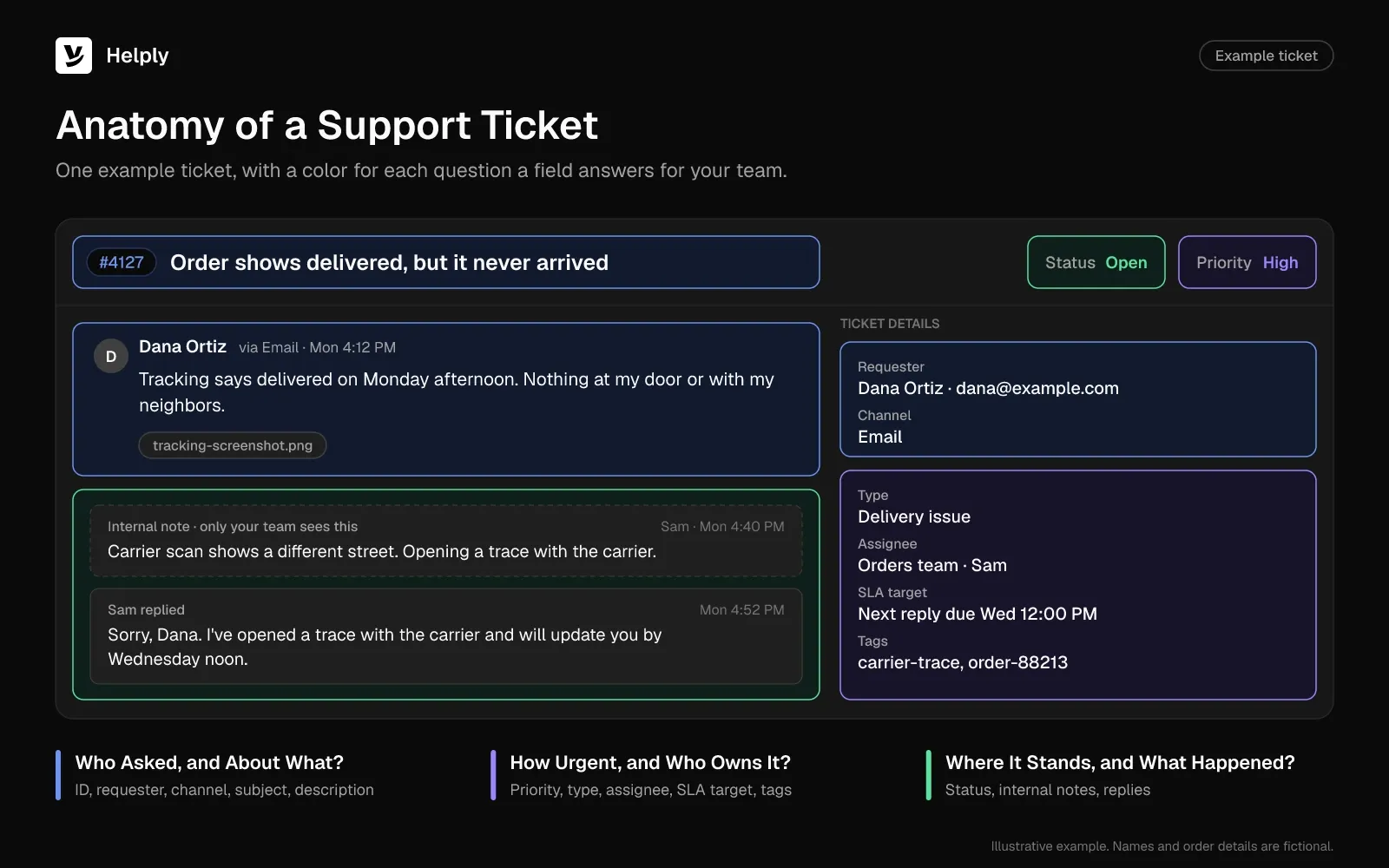
Support Ticket Fields: What Each One Holds and an Example
| Field | What it holds | Example |
|---|---|---|
| Ticket ID | A unique number both sides use to refer to the request | #4127 |
| Requester | The customer's name, email and account | Dana Ortiz, dana@example.com |
| Channel | Where the request came in | |
| Created | The date and time the request arrived, which starts the first-response clock | Monday, 4:12 PM |
| Subject | A one-line summary of the problem | Order shows delivered, but it never arrived |
| Description | The problem in the customer's own words, with any attachments | "Tracking says delivered on Monday afternoon. Nothing at my door or with my neighbors." |
| Type | The kind of request | Delivery issue |
| Priority | How urgent it is against the rest of the queue | High |
| Status | Where the ticket stands and who owes the next move | Open |
| Assignee | The person, team or AI agent that owns it | Orders team (Sam) |
| Tags and custom fields | Extra data for routing and reports | carrier-trace, order-88213 |
| SLA target | The reply or resolution deadline, if the team sets one | Next reply due Wednesday, 12:00 PM |
| Timeline | Every public reply, internal note and status change, in order | 1 internal note, 1 reply |
Your team will lean on two of these fields most. The status shows who owes the next move. The timeline lets a second teammate take over without asking the customer to start again.
Customers notice when that handover fails. In Salesforce's sixth State of the Connected Customer survey, 56% said they often have to repeat or re-explain information to different representatives. Salesforce polled 14,300 consumers and business buyers from May to July 2023.
How a Support Ticket Moves from New to Closed
A typical ticket passes through seven stages, from Created to Closed, though a quick one may skip Waiting:
- Created. A customer emails, chats, fills out a form or calls, and the help desk opens a ticket with a new number.
- Triaged. A person, a rule or an AI agent sets the type and priority and fills in missing fields.
- Assigned. The same mix of people, rules and AI picks the owner: a teammate, a whole team or an AI agent.
- Worked. The owner investigates, replies to the customer and logs internal notes along the way.
- Waiting. The ticket waits on the customer for an answer, or on another team such as engineering or billing.
- Solved. The owner sends the fix or answer and marks the ticket solved, and the customer can still reply if the fix didn't work.
- Closed. The help desk closes the ticket after a set window, or when the customer accepts the fix.
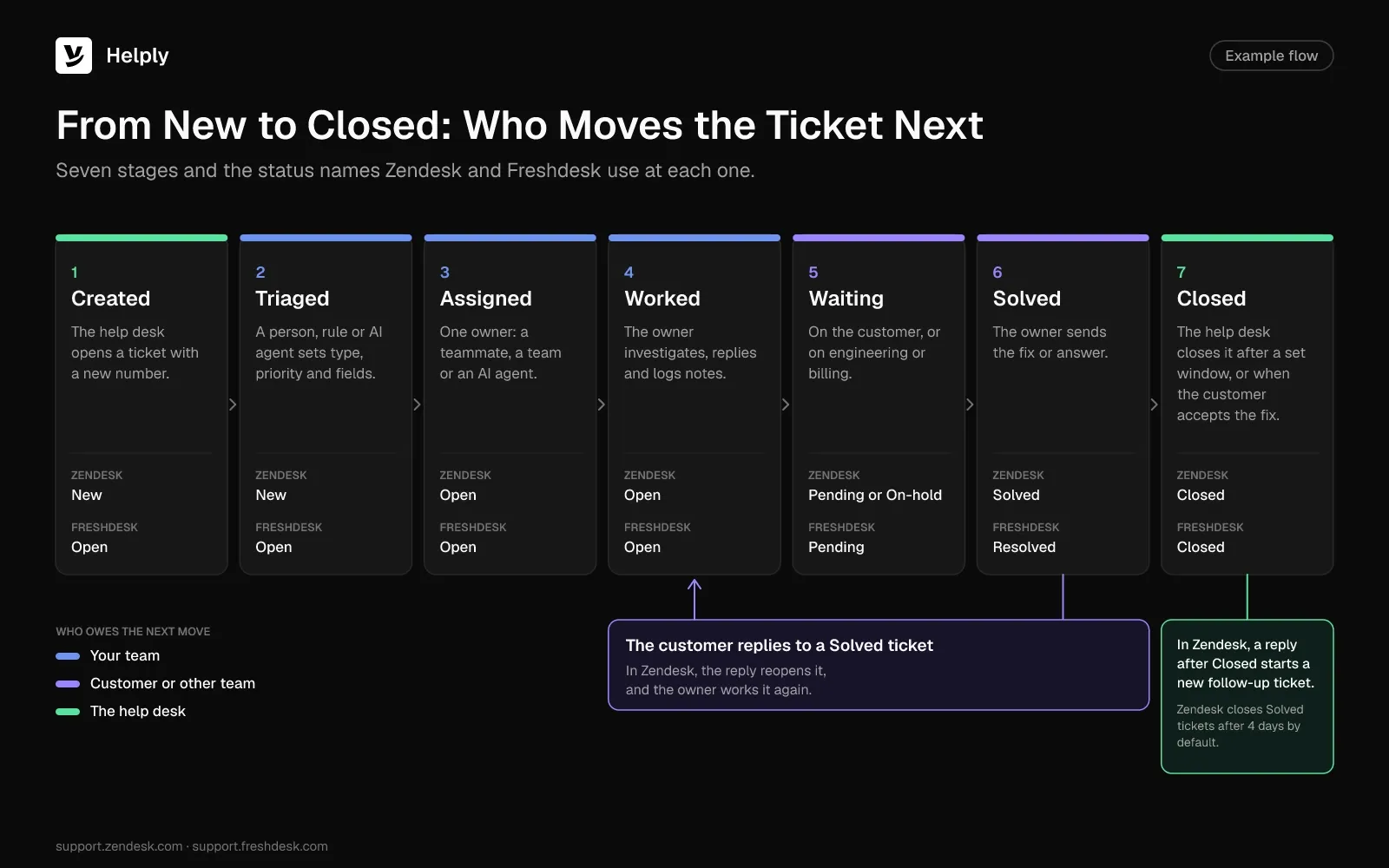
Support Ticket Statuses: What Each Means and Who Acts Next
Zendesk uses six standard statuses, and Freshdesk starts with four.
| Zendesk status | Freshdesk status | What it means | Who acts next |
|---|---|---|---|
| New | Open (new tickets start as Open) | Nobody has acted on the ticket yet | The support team |
| Open | Open | The ticket waits for an agent to act. In Zendesk, it also has an assignee | The assignee |
| Pending | Pending | The agent is waiting for more information from the customer | The customer |
| On-hold (optional) | No default status | The agent is waiting on someone other than the customer | Another team or a partner |
| Solved | Resolved | The agent has sent a solution | The customer, if the fix didn't work |
| Closed | Closed | Finished. Zendesk locks it, and in Freshdesk the customer has accepted the solution | Nobody |
Freshdesk's Pending status can also pause SLA timers while the agent gathers information. In Zendesk, On-hold stays off until an admin switches it on.
Solved vs. Closed: Can You Reopen a Ticket?
In Zendesk, a customer reply reopens a solved ticket, but a closed ticket stays closed. A reply to it creates a new follow-up ticket instead.
By default, Zendesk closes a ticket four days after the agent solves it, and admins can stretch that window up to 28 days. Freshdesk describes an automatic close after 72 hours as standard practice for tickets the customer hasn't closed.
Pick a window long enough for the customer to test the fix. Close a ticket too soon, and the customer's reply starts a new ticket instead of reopening the old one.
What Are the Types of Support Tickets?
Teams sort tickets by what the customer needs, because different types go to different owners. Seven types make a workable starting set:
- Questions. The customer needs an answer that already exists in the help center. A knowledge base chatbot can answer "How do I add a second admin?" or "Can I change my delivery address?"
- Incidents. Something broke or stopped working, such as a login loop or a failed checkout. The IT framework ITIL 4 defines an incident as "an unplanned interruption to a service, or reduction in the quality of a service."
- Service requests. The customer wants a routine, pre-agreed action, such as a password reset or access for a new teammate. Nothing is broken, so the work follows a known procedure.
- Bug reports. The problem traces back to a defect in the product that the team can reproduce. Support gathers the steps and evidence, and engineering owns the fix.
- Billing tickets. Charges, invoices, refunds and tax details. Billing or finance tends to own them, and most need a lookup in the billing system.
- Feature requests. The customer wants something the product doesn't do yet. Record the use case as the customer describes it, because product teams read these for patterns.
- Complaints. The customer is unhappy with an outcome or with the service itself. A senior teammate often takes these, since the reply needs judgment as much as a fix.
Ten customers reporting the same login loop make ten incident tickets and one problem. ITIL 4 defines a problem as "a cause, or potential cause, of one or more incidents."
How Do Teams Prioritize Support Tickets?
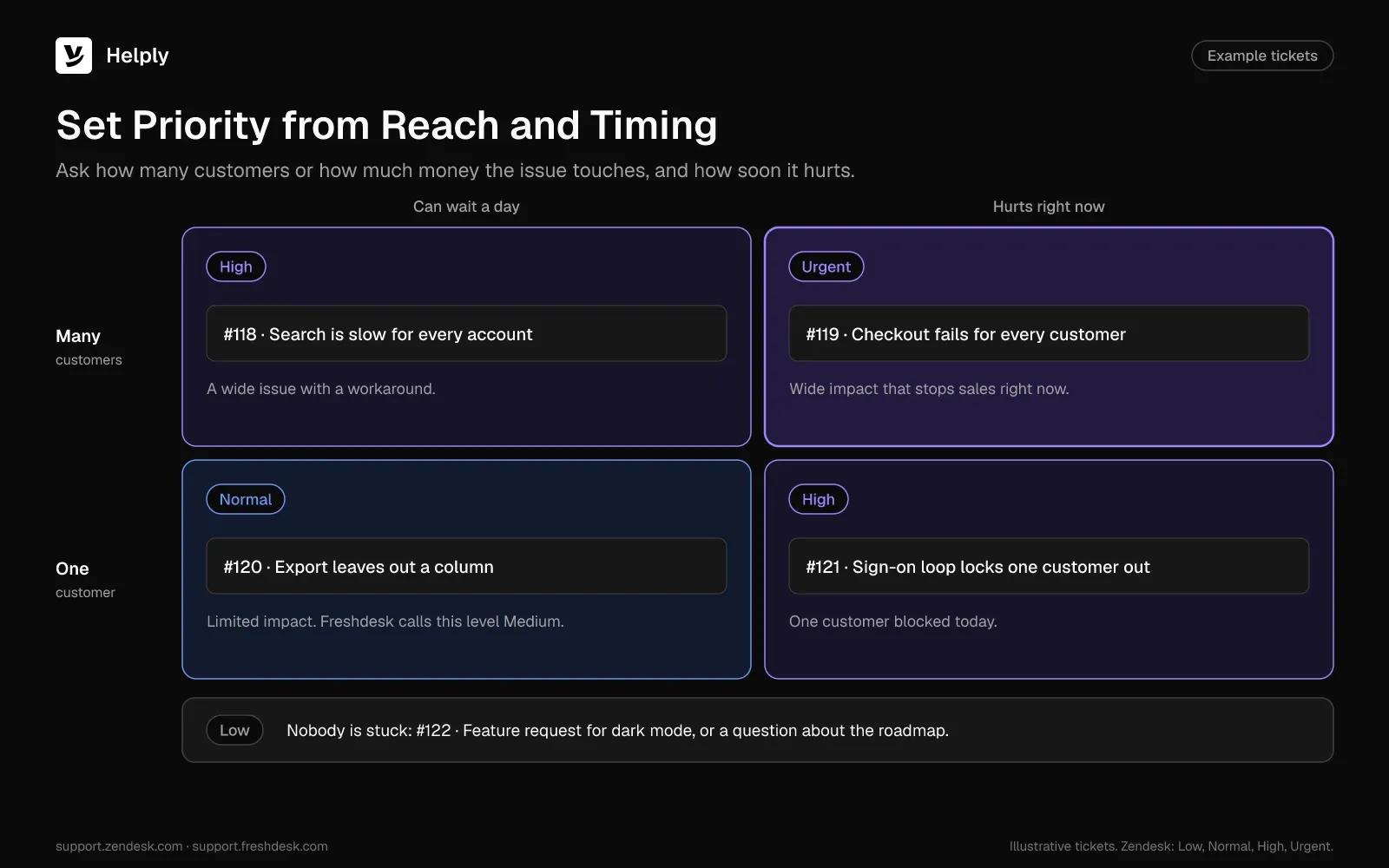
Teams set priority from two inputs: how many customers or how much money an issue touches, and how soon it hurts. Zendesk's standard priority field offers Low, Normal, High and Urgent, and Freshdesk offers Low, Medium, High and Urgent.
The four levels map to tickets like these:
- Urgent: wide impact that hurts right now, such as a checkout that fails for every customer.
- High: one customer blocked today, or a wide issue with a workaround, such as a sign-on loop that locks one customer out.
- Normal (Medium in Freshdesk): limited impact that can wait a day, such as an export that leaves out a column.
- Low: no customer is stuck, such as a feature request or a question about the product roadmap.
Tie each level to a first reply target your staffing can meet, nights and weekends included. Let the help desk flag tickets about to miss their target. Each month, check how many tickets sit in High, because teams drift toward overusing it.
How to Resolve Support Tickets Faster
Your team can keep tickets moving and hold average handle time down with four habits:
- Give each ticket one owner on arrival. Once a ticket has a name on it, the rest of the team knows to leave the reply alone.
- Keep the investigation on the ticket. Log findings as internal notes, and the next person can carry on without asking the customer again.
- Save replies for repeat questions. Turn the answers you type every week into saved replies, then into help articles customers can find first.
- Group duplicates under one problem. Link every report of the same outage to one problem ticket and send one update to every affected customer.
Support Ticket vs. Request, Incident, Case and Conversation
A support ticket is the help desk's record of the customer's request. A case number is the record's ID under another name, and an incident is one kind of issue a ticket can hold. Intercom splits its inbox into conversations for quick questions and tickets for complex work.
| Term | What it means | Example |
|---|---|---|
| Support ticket | The record of one customer request, from first message to close | Order shows delivered, but it never arrived |
| Support request | The record of one customer request, from first message to close | "My order shows delivered, but it never arrived" |
| Trouble ticket or incident ticket | Other names for a support ticket | Trouble ticket #4127 |
| Incident (ITIL 4) | An unplanned interruption to a service, or a drop in its quality | Nobody can sign in |
| Problem (ITIL 4) | The cause, or potential cause, of one or more incidents | An expired certificate behind the sign-in failures |
| Service request | A routine, pre-agreed request where nothing is broken | Give a new teammate access |
| Case, issue or call log number | Other names for a ticket's reference number | Case #4127 |
| Conversation (Intercom) | A simple query handled fast, with little collaboration | "Where can I download my invoice?" |
| Ticket (Intercom) | A complex query that needs investigation, several steps or collaboration | A refund that needs finance to sign off |
| Email thread | A reply chain with no owner, status or priority | A forwarded message in a shared inbox |
How to Write a Support Ticket the Team Can Solve Fast
A good ticket sticks to one issue and gives the team a clear subject, the steps, the exact error and the impact. Share this checklist in your help center, or use it to decide which fields your support form asks for.
- Use one ticket per issue. Two issues in one ticket often need two owners, and one of them waits.
- Name the problem in the subject. "Invoice PDF won't download in Chrome" beats "Urgent help needed!!"
- Say what you expected and what happened instead. The team needs both to pin down what broke.
- List the steps that trigger it. Steps let the team reproduce the issue without a second message.
- Add the details only you have. Include your account email, the order or invoice number, your device, browser or app version and the time it happened.
- Paste the exact error message and attach a screenshot. The team can search the exact wording across past tickets and the docs.
- Say what you tried and how much it blocks you. A blocked payroll run and a cosmetic glitch need different priorities.
Before: "Not working!! Your app is broken again, please fix ASAP."
After:
- Subject: Invoice PDF won't download in Chrome
- Expected: The invoice PDF downloads.
- What happened: Since this morning, clicking Download on any invoice shows "Error 403".
- Steps: Billing, then Invoices, then Download.
- Setup: Chrome on macOS. Edge shows the same error.
- Impact: I need the March invoice for our accountant by Friday.
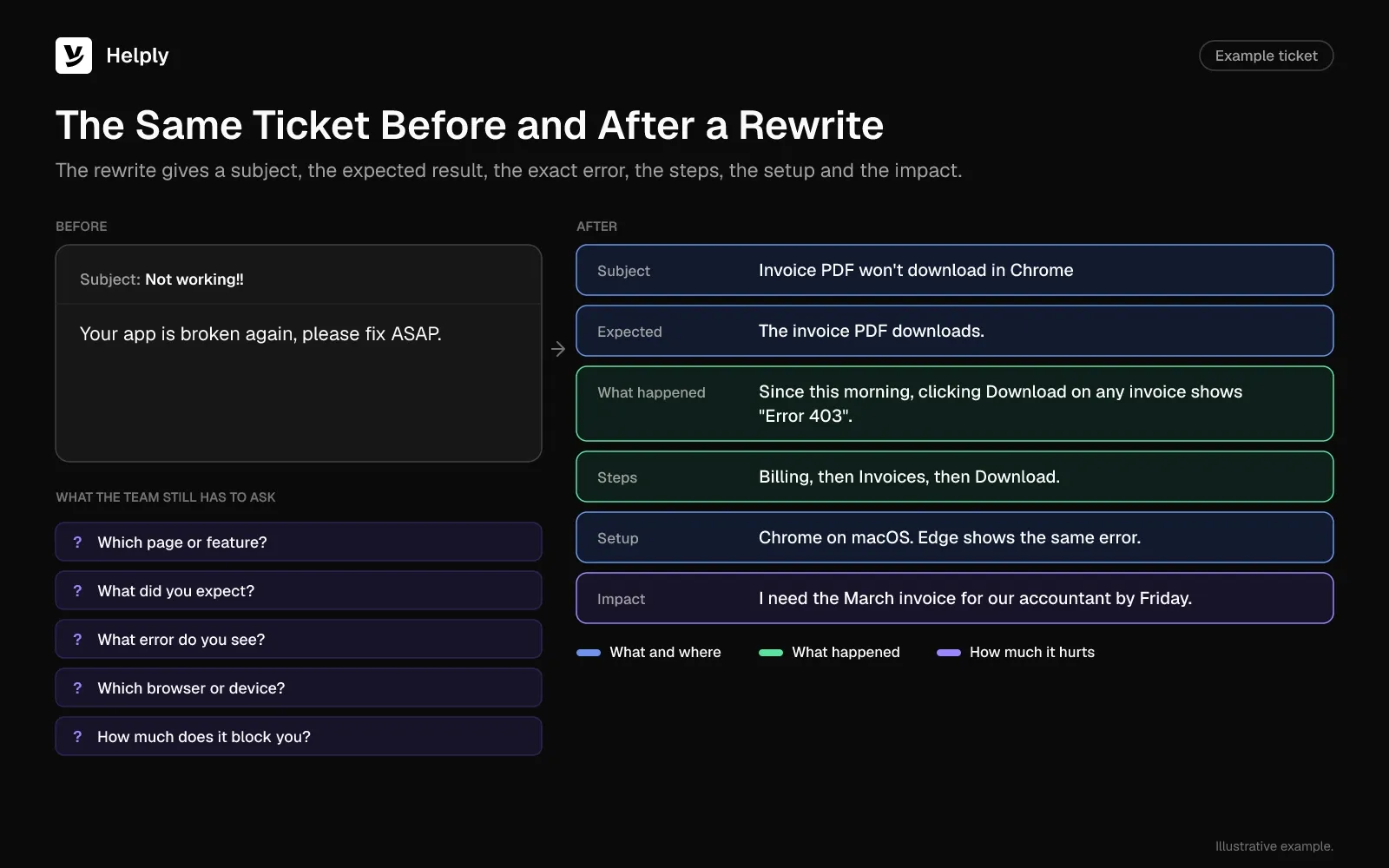
On your support form, ask for the order number, the steps and a screenshot up front, and fewer tickets stall in Pending.
What Is a Support Ticketing System?
A support ticket system, or help desk, turns incoming emails, chats, form submissions and calls into tickets in one queue. It assigns each ticket, tracks its status and priority, keeps the history and reports on volume and response times.
A shared inbox works while one person answers a few requests a day. Past that point, the Monday-to-Thursday story repeats: double replies, missed replies and customers explaining the problem twice.
Helply's help desk and ticketing system brings email, live chat and other channels into one shared inbox. Assignment rules can give each new ticket an owner, and views by status show what still waits on a reply. Every plan includes both, plus custom fields and collision detection.
What Happens When an AI Agent Works a Support Ticket?
An AI agent can work a support ticket on its own, from the first read to the reply. It triages the request, investigates it, takes any supported action and resolves the ticket, or hands it to a person.
AI-assisted tools leave the ticket with a person. They suggest tags, summarize threads and draft replies, so the person works faster.
An AI agent works a ticket in four steps:
- Triage. It reads the request, sets the type and priority, fills in fields and routes the ticket before anyone opens it.
- Investigate. It checks past conversations, the knowledge base and connected systems, such as billing or order data, to learn what happened.
- Act. It takes the supported action the request needs, such as issuing a refund or updating an account setting.
- Resolve or hand off. It replies and solves the ticket, or it escalates with its findings so the next person starts from the investigation.
Each step should land in the ticket's timeline. A person reading it later can see what the agent checked, what it changed and why it handed over.
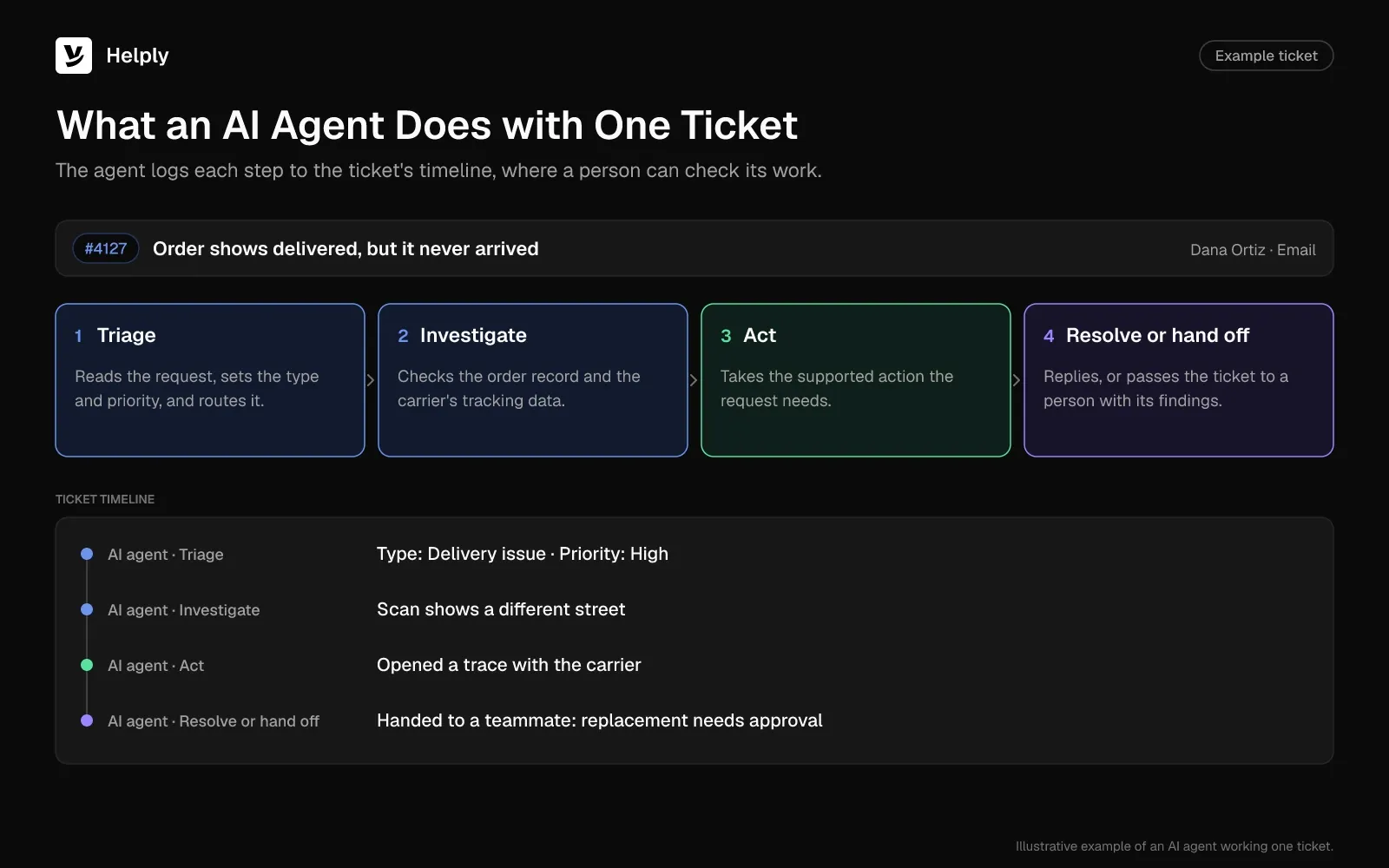
Gartner predicted in March 2025 that by 2029, AI agents will fully resolve 80% of common customer service issues on their own.
How Helply Works a Support Ticket
In Helply, email, chat and other conversations land in one shared inbox. Assignment rules can send each ticket to the right teammate or AI agent, who owns it from the start.
Collision detection shows when someone already has the ticket open, so two people don't answer the same customer. Teammates can leave findings in internal notes and @mention each other, out of the customer's view.
Helply's AI can sort a new ticket before anyone opens it. It can pick a category, fill in fields, set the priority and route the ticket. On Team and above, Dana's missing-parcel ticket could reach the Orders team tagged as a delivery issue, with High priority.
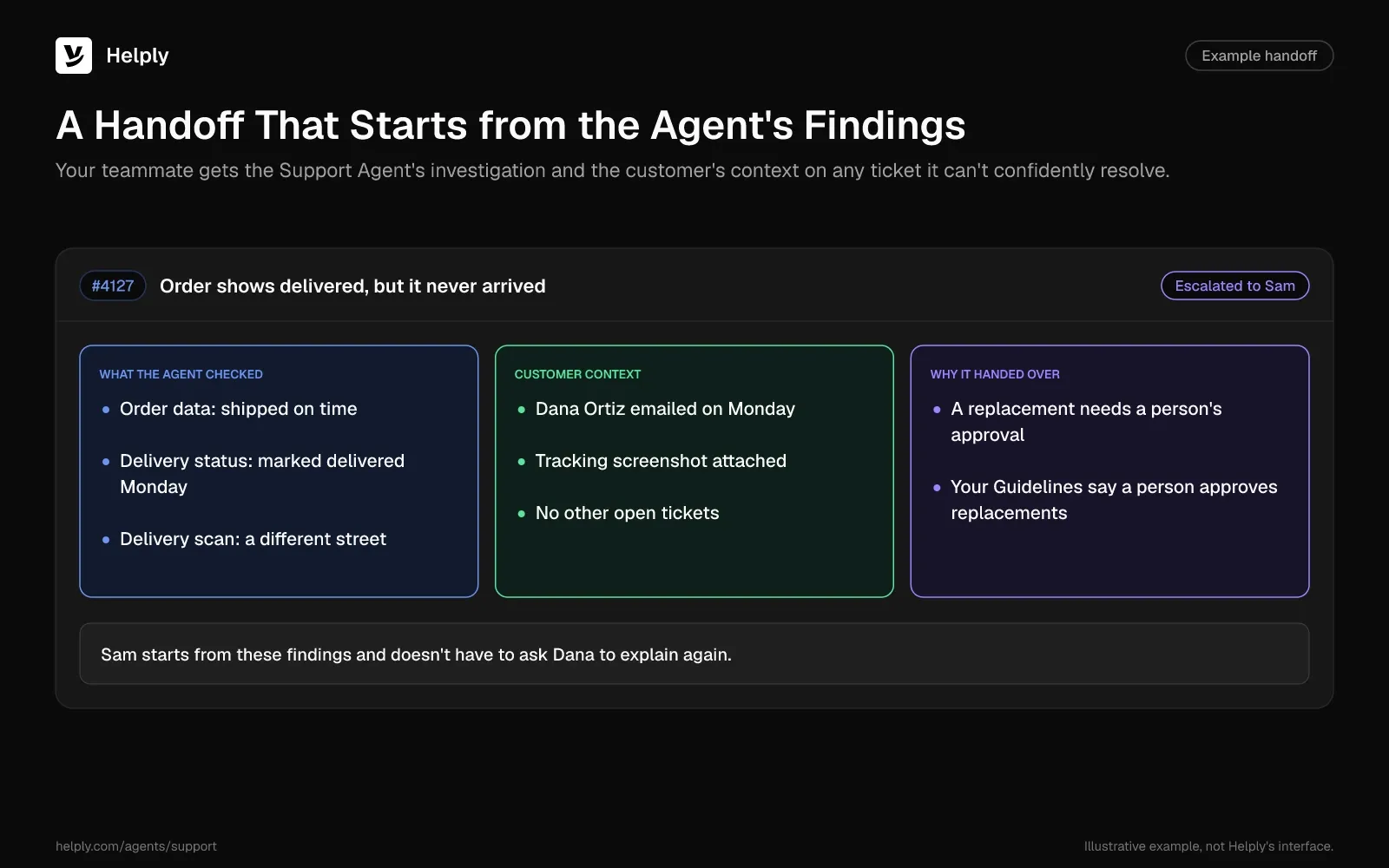
On every plan, the Support Agent can take the first reply and resolve the ticket from start to finish. It reads your knowledge base, checks customer data in connected tools and can take supported actions to fix the problem. If it isn't confident it can finish, it escalates, and the agent's findings and the customer's context stay on the ticket.
The Assist Agent works next to the teammate who owns the ticket. It summarizes a long thread, so Thursday's teammate reads a recap instead of scrolling back to Monday. It finds the relevant article, drafts a reply to review and send, and can take a supported action when your teammate directs it.
On Team and above, the Knowledge Agent learns from customer conversations. It finds the answers your help center is missing and flags outdated articles, and your team can vet its drafts before publishing them. The Insights Agent, also from Team, spots trends and recurring problems, such as a run of tickets about one login loop.
MixWave, an audio plugin and virtual instrument maker with 1 to 10 people, had the answers in its docs. Customers kept opening tickets about installs, license activation and DAW (digital audio workstation) setup anyway. Helply pulled in MixWave's past tickets and help articles, then taught the Support Agent to answer in the team's own voice.
With that setup, the agent resolved 58% of incoming questions on its own. MixWave then shifted a full-time teammate toward its docs and product quality.
Which Support Ticket Metrics Should You Track?
Once every request is a ticket, track five measures: first response time, resolution time, reopen rate, backlog age and volume by type.
- First response time: how long a customer waits from ticket creation to the first public reply.
- Resolution time: how long a ticket takes to go from created to solved.
- Reopen rate: the share of solved tickets that customers reopen, a sign that fixes didn't hold.
- Backlog age: how long open tickets have waited, so old ones don't hide behind new ones.
- Volume by type: which requests repeat, so you can fix the product or write the missing article.
To cut that repeat volume, follow the guide on how to reduce incoming support tickets. If AI agents work your queue, track the KPIs for AI customer support too.
Run Tickets from a Shared Inbox, or Move Them into a Help Desk with AI Agents?
A shared inbox with labels can hold up while the founder handles support alone. Once two people reply, you need support tickets with owners, statuses and history. If repeat questions pile up too, Helply lets AI agents work the queue next to your team.
Your team can see who has each ticket through routing and collision detection. With the Support Agent able to take the first reply, a request doesn't sit while two teammates each assume the other has it. A teammate who takes over from the agent gets its investigation and customer context, and the customer won't have to retell the story.
The Support Agent can answer repeat questions from your docs. At MixWave, the most common troubleshooting flows also became Skills, and Helply wrote first drafts of missing articles and flagged stale ones. Skills start on the Team plan.
The Support and Assist Agents come with every Helply plan, along with AI credits the whole team shares. The Knowledge and Insights Agents start on Team, and Helply's plan comparison shows what each tier adds.
Guidelines on every plan tell the agents how to behave, and on Team and above, escalation rules set when they hand over. An independent SOC 2 Type II audit covers Helply's controls, and AI providers don't train on the customer data Helply shares with them. Start with one mailbox and one ticket type, such as shipping questions or password resets, and widen from there.
Frequently asked questions
A support ticket is the numbered record of one request for help, which a support team tracks until it resolves the issue. It carries an owner, a status and the full history.
Seven common types are questions, incidents, service requests, bug reports, billing tickets, feature requests and complaints. Each type often lands with a different owner, such as engineering for bug reports or finance for billing.
A ticket number is the unique ID a help desk gives each request, so both sides can refer to it later. It also goes by case number, issue number or call log number.
An open ticket is one the support team still owes an action on. In Zendesk, Open means the ticket has an assignee and waits for that agent to act.
Pending means the team is waiting on the customer for more information. In Freshdesk, Pending can also pause SLA timers while the agent waits.
On-hold means the agent is waiting on someone other than the customer, such as another team or a partner. In Zendesk, it's an optional status that an admin switches on.
Solved means the agent has sent a solution, and in Zendesk a customer reply reopens the ticket. By default, Zendesk closes a solved ticket after four days, then turns any new reply into a follow-up ticket. In Freshdesk, Closed means the customer has accepted the solution.
Yes, a help desk ticket is the same record as a support ticket. Service ticket and customer service ticket name it too, and Wikipedia adds trouble ticket and incident ticket.
Put one issue in each ticket, name it in the subject and list the steps, what you expected and what happened. Add your account or order number, device or browser, the exact error text and a screenshot.
Escalating a ticket moves it to someone with more authority or skill, such as a senior agent, billing or engineering. In a good escalation, the first agent passes along the findings to date, and the next person picks up from there.
Yes, give each separate issue its own ticket, owner and status, so a quick fix can't close out a slower one. Reports of the same outage from many customers stay separate tickets, linked to one problem ticket.
Yes, AI agents can resolve tickets by triaging them, looking up data, taking supported actions and replying. Gartner's March 2025 forecast has AI agents resolving 80% of common customer service problems by 2029, with no person stepping in. Helply's Support Agent can resolve tickets end to end and escalates with its investigation when it isn't confident it can finish.
About the author

Konrad Janczyk
Staff Software Developer
Keep reading

Closing a Ticket Due to No Response: Email Templates and Timing Rules
Bildad Oyugi · 12 min read
Slack Customer Support: How to Run Support in Slack
Alex Turnbull · 14 min read