
 Alex Turnbull ··14 min read

What Is Slack Customer Support?
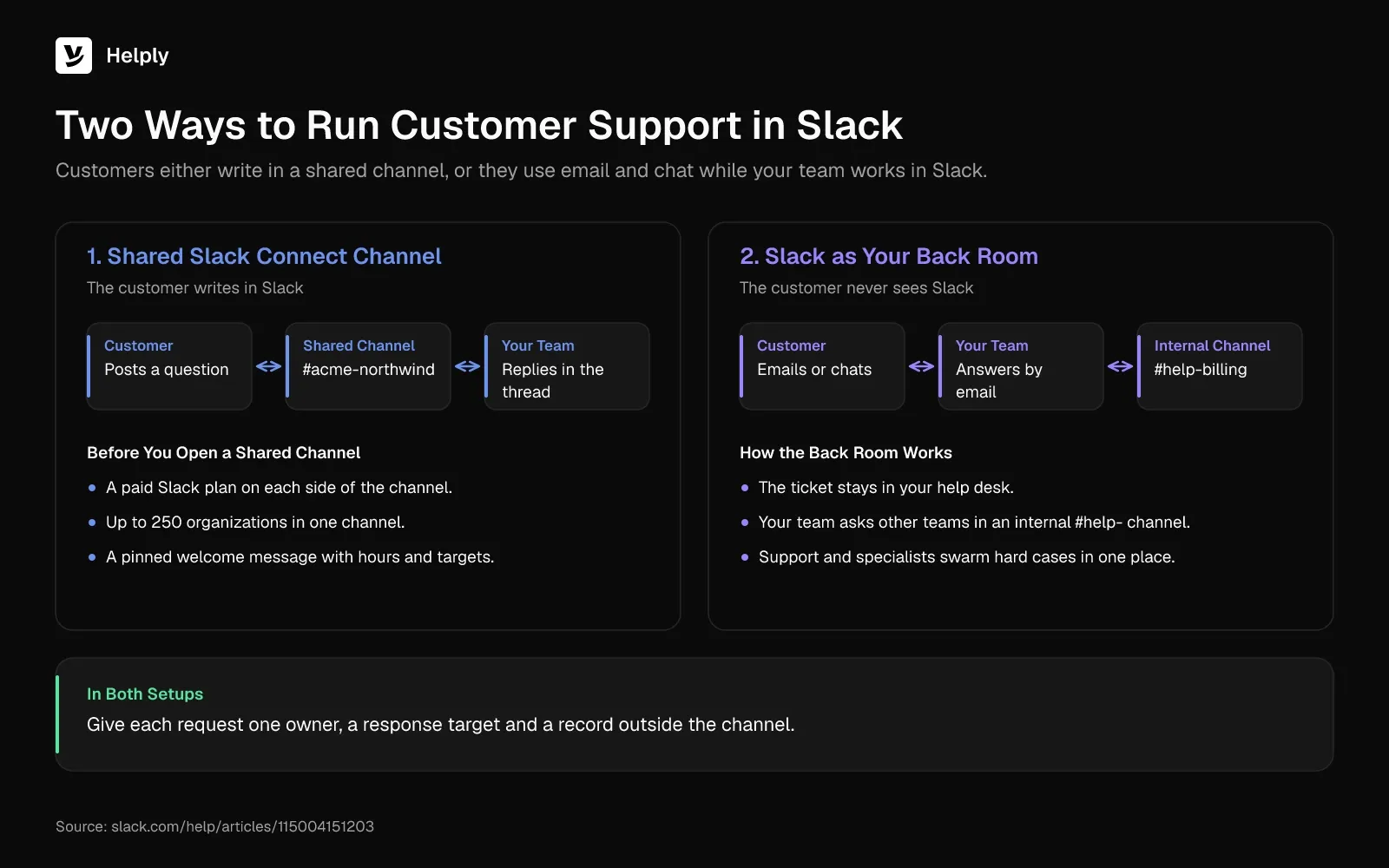
Slack customer support covers any setup where your team does part of its support work in Slack, with customers or among teammates. A help desk or tracker should still keep the record of each request. You can use Slack for customer service in shared Slack Connect channels, in internal back-room channels or in both.
Customers Write to You in Shared Slack Connect Channels
Slack Connect shares one channel between your workspace and a customer's workspace. The customer posts a question, your team replies in the thread, and both sides stay in the tool they use all day.
Slack counts more than 350,000 organizations in Slack Connect, and in February 2024 it said 77% of the Fortune 100 used the feature.
In its guide to Slack Connect, Slack says each company needs a paid Slack plan and one channel holds up to 250 organizations. If an Enterprise organization hosts the channel, a free workspace can join it. Direct messages with people outside your company work on any Slack plan, so customers on free Slack can still reach you.
Slack Works as Your Team's Back Room for Email and Chat
In the back-room setup, customers never see Slack. They email, use your chat widget or message you on WhatsApp, and your team uses Slack to find answers behind the scenes.
Picture an online store where a customer emails to ask about an order. Your teammate asks the warehouse team in an internal help channel, then replies by email with the tracking update. A software company does the same with a billing bug and pulls in an engineer through a #help-billing channel.
Slack's service guide suggests dedicated #plz- or #help- channels where agents ask peers and find pinned answers. It calls the cross-team version swarming: service agents and other teams working one case in one place.
In a 2021 Forrester study that Slack commissioned, service teams using Slack cut cost per ticket by 15.1% and escalations by 17.4%. Intuit's QuickBooks support agents solved cases 36% faster after moving internal answers into Slack with a custom bot, per a Slack customer story.
When Is a Customer Slack Channel Worth It?
A shared channel pays off when the customer already works in Slack, asks questions that need back-and-forth and expects a fast reply. If you can't staff the channel, keep that customer on email or chat, where a slower reply won't surprise them.
Give a customer a channel when:
- They already pay for Slack, so a shared channel works on day one.
- Their questions involve setup, integrations or bugs that need a few rounds of replies.
- Several people at the account ask questions, so a shared space saves forwarding.
- Your team can cover the hours you promise in the channel.
Customers on free Slack and accounts with few questions can use email, chat or a Slack direct message instead.
Check Slack's own limits before you promise support in Slack:
- Free workspaces show only the last 90 days of messages and files. Slack may also delete free-plan data older than a year.
- Workflow Builder and Slack lists, Slack's own tools for tracking requests, need a paid plan.
In Pylon's State of Slack Support 2025, the 100 Pylon accounts with the most shared customer channels averaged 893 channels each. Together they ran over 89,000 channels. One team can't watch 893 channels by scrolling, so each request needs a ticket outside the channel.
How to Set up Slack for Customer Support in 8 Steps
To run customer support in Slack, track each thread as a ticket with one owner and a response target. Steps 1, 2, 3, 5 and 8 cover shared Slack Connect channels, and steps 4, 6 and 7 apply to both setups.
1. Decide Which Customers Get a Channel
Write the rule down before the next customer asks. Tie it to something you can check, such as plan, contract size or how technical their questions get. Customers outside the rule get email, chat or a Slack direct message.
2. Name Each Channel and Pin a Welcome Message
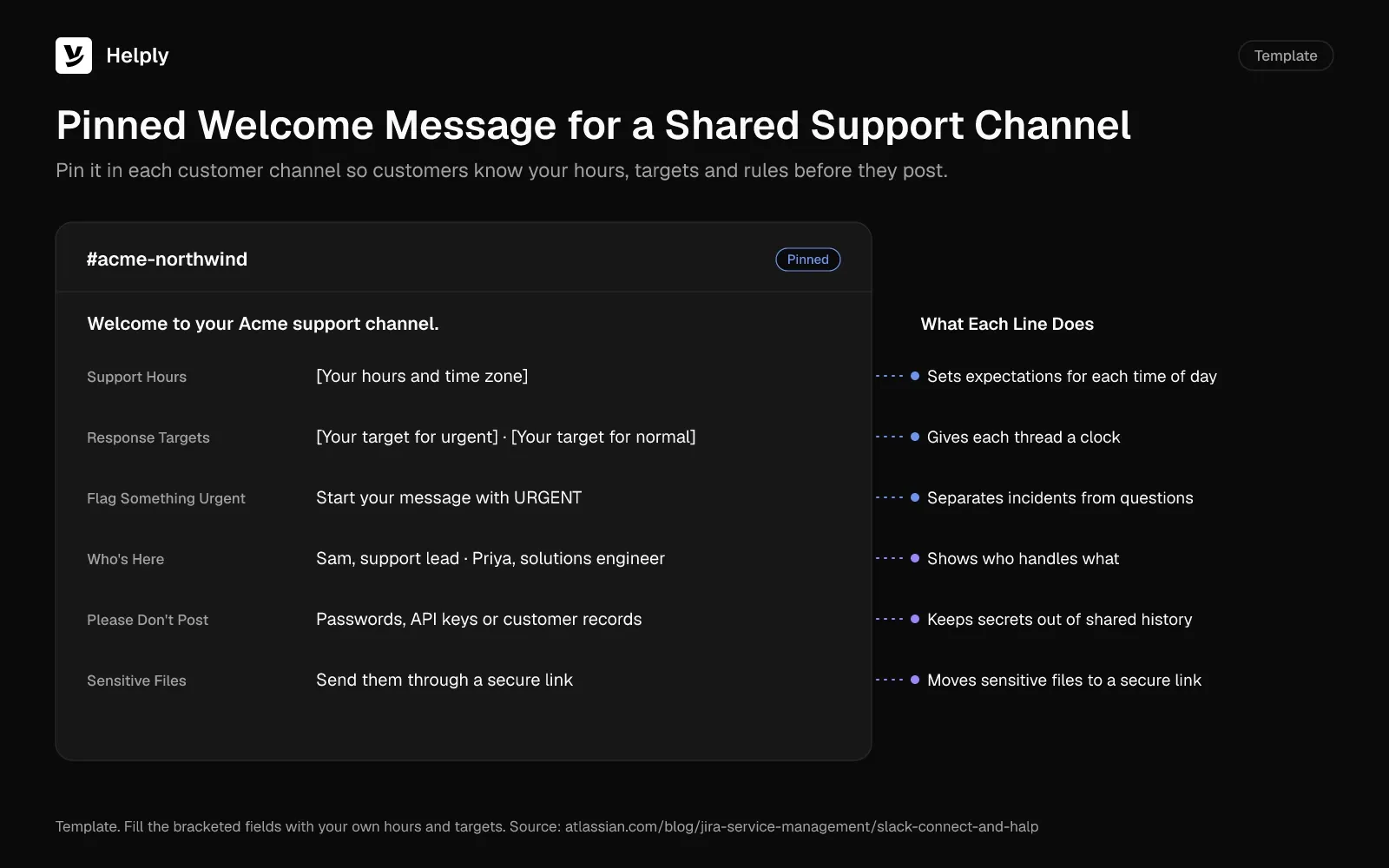
Atlassian recommends one channel per customer, named with a pattern like #yourcompanyname-customername. It also advises setting expectations for response time and ownership at different times of day.
Pin a welcome message that lists:
- Your support hours and time zone.
- Your response target for urgent and normal requests.
- Your urgent flag, such as a keyword or an emoji.
- The teammates in the channel and what each one handles.
- Data to keep out: passwords, API keys and customer records.
3. Turn Every New Thread into a Ticket with One Owner
The Friday thread had no owner. Give each new question one named owner and a status you track outside the channel.
On Slack alone, a Workflow Builder form can collect the request, and a Slack list can track it with an assignee. Add a status field yourself, and budget for a paid Slack plan, since both tools need one.
A Slack ticketing system does the same job without a form and a list for you to maintain. Zendesk, Freshdesk and HubSpot can create a ticket from a Slack message, and Slack-first tools turn new channel messages into tracked issues.
4. Set Response Targets and Coverage Hours
Write a first-response target for each priority level, then staff the queue to meet it. Customers in a chat tool expect chat speed. In a 2018 HubSpot survey, 60% of customers defined an "immediate" reply to a service question as 10 minutes or less.
Busy Slack teams can compare their numbers with Pylon's 2025 data. The 100 Pylon accounts with the most shared channels averaged a median first response of 11 minutes. Their median time to resolution averaged 5.4 hours.
Say what happens after hours. In June 2025, Zendesk asked 6,182 consumers about service for its CX Trends 2026 report, and 74% expected round-the-clock service because of AI. An AI agent or an on-call rotation can cover the gap.
5. Keep Internal Discussion Out of the Customer Channel
Customers see every message in a shared channel, including a half-formed theory about a bug. Move that talk to a private note on the ticket or an internal channel for the account. Keep one person as the voice in the customer's thread, so the customer hears one answer.
6. Escalate Bugs to Engineering from the Thread
If a question turns out to be a bug, file it in Linear or Jira and link the issue to the ticket. Have one person own the customer update and post it in the original thread, where the customer first asked.
Once the fix ships, reply in the same thread, confirm it with the customer and mark the ticket solved.
7. Write Each New Answer Back into the Knowledge Base
Answers buried in Slack threads don't help the next customer, and on the free plan only the last 90 days stay visible. Turn each repeat question into a help center article, then link it the next time it comes up. An AI agent or a knowledge base chatbot can answer from those articles too.
Keep the habit and you can cut the number of incoming tickets over time.
8. Set Data Rules for Shared Channels
In a shared channel, you control your data and the customer controls theirs. Each company's retention settings cover only its own people's messages, so your policy can't delete what the customer posted. If either side disconnects the channel, files the other company shared stop being accessible.
Add one line to the welcome message's data rules: send sensitive files through a secure link.
What Does a Well-Run Slack Support Thread Look Like?
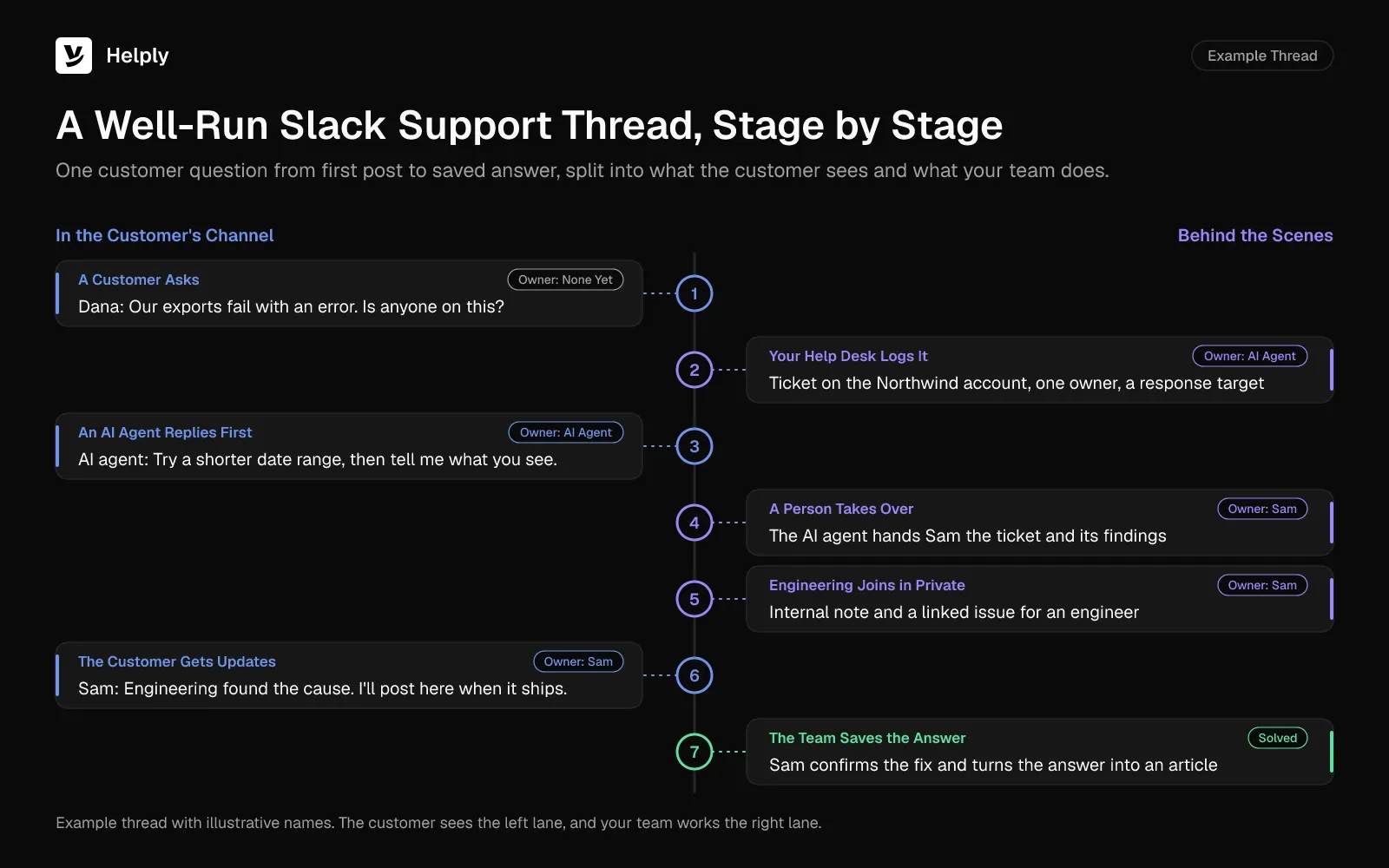
A well-run Slack support thread has one owner, a response target, private notes for the team and a saved answer at the end. Follow one thread from a software customer's shared channel, start to finish:
- A customer asks. Their data export fails with an error, so they post in the shared channel.
- Your help desk logs it. It opens a ticket on the customer's account, with one owner and a response target.
- An AI agent replies first. It checks the account and the docs, then answers in the thread with a fix or one clarifying question.
- A person takes over. The fix doesn't work, so the AI agent hands the ticket and its findings to a teammate, who owns it from there.
- Engineering joins in private. The owner adds an internal note and files a linked issue for an engineer.
- The customer gets updates. The owner posts progress in the same thread until the fix ships.
- The team saves the answer. The owner confirms the fix, closes the ticket and turns the answer into a help center article.
The same pattern fits an ecommerce return that arrives by email. The AI agent checks the order, sends the return label and hands off only when a refund needs a person's approval. For reply wording at each stage, see these tips for answering a customer inquiry.
Which Slack Support Metrics Should You Track?
Track seven Slack support metrics, the same ones you use for email, split by channel and by account:
- First response time. The gap between a customer's post and your first reply.
- Time to resolution. The time from the first post to a confirmed fix.
- SLA breaches by channel. A count that shows which customer channels miss their targets.
- Open threads per account. A count that shows which customers need attention this week.
- Reopened threads. The fixes that didn't hold.
- AI resolution rate. The share of threads an AI agent closes without a handoff.
- CSAT. The rating each customer gives the help they got.
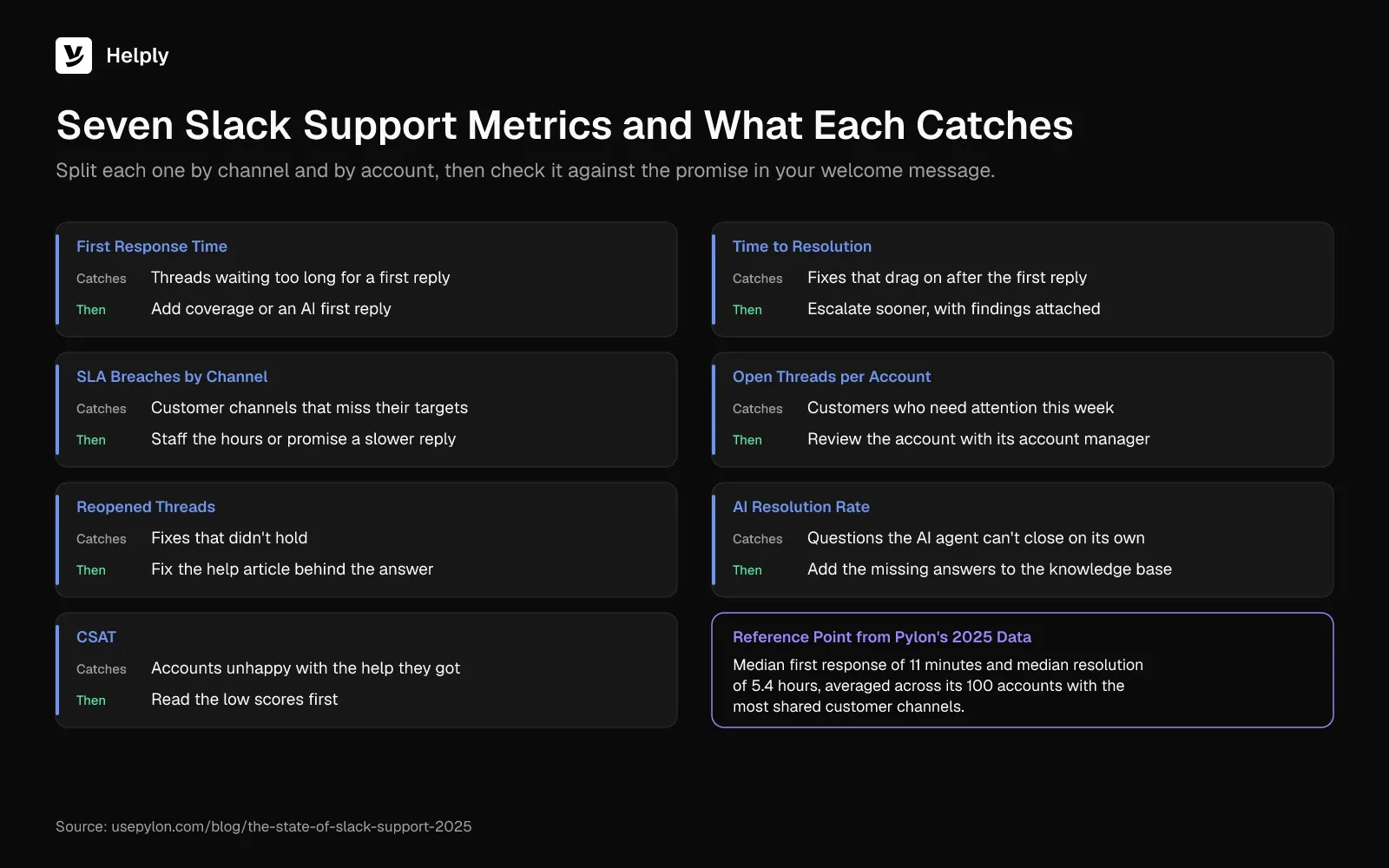
Check each number against the promise in your welcome message, one account at a time. If one channel keeps missing its target, add coverage or promise a slower reply. For AI resolution rate and other AI numbers, see this guide to AI customer support KPIs.
Slack Customer Support Tools Compared: Tracking, AI and Best Fit
Slack help desk tools differ most in how they handle a customer's Slack message. Some send an alert or create a ticket on request, and others treat Slack as a full support channel.
| Setup | Examples | A customer's Slack message becomes | Who answers | Fits teams that |
|---|---|---|---|---|
| Slack on its own | Workflow Builder, Slack lists, Slack Connect (paid plans) | A form entry and a list item | Your team | Run a few channels and have no help desk yet |
| Help desk plus a Slack app | Zendesk, Freshdesk, HubSpot; Help Scout sends alerts only | A ticket created from the message, or an alert | Your team, plus the vendor's AI where included | Keep their help desk and want Slack alerts or tickets on request |
| Help desk with Slack as a channel | Intercom, Front | A conversation in the shared inbox, with replies posted back to Slack | Your team, plus the vendor's AI where included (Fin on Intercom) | Want Slack beside email and chat in one inbox |
| Slack-first help desk | Pylon, Plain, ClearFeed, Thena | A tracked issue or thread | Your team, plus the vendor's AI where included (credits on Pylon and Plain) | Run most of their support in shared channels |
| AI-native support platform | Helply | A ticket on the customer's account, with replies synced (Slack Connect from Team) | Configured AI agents with the full thread, then your team | Want AI to resolve questions across Slack, email, chat and WhatsApp |
What Each Tool Does with a Slack Message
Check these details before you shortlist:
- Zendesk. On Suite Team and up, people in a Slack Connect channel can file a ticket with an @zendesk mention. Its Slack DM channel handles one-to-one requests without threads.
- Intercom. It opens a conversation in its inbox for each message in a connected community or Slack Connect channel. Intercom charges for each Fin outcome, and a resolution counts as one.
- Front. It connects public, private and Slack Connect channels on every plan but doesn't support direct messages. Your company must own a Slack Connect channel to connect it.
- Pylon. It turns Slack Connect messages into tracked issues on every plan, and its AI agents run on credits. Microsoft Teams starts on Advanced.
- Plain. Its Foundation plan syncs up to 25 Slack channels, and higher plans sync unlimited channels. Its Customer Agent uses 100 credits per resolved thread.
- ClearFeed and Thena. Both bring Slack, email, web chat and Microsoft Teams requests into one queue. ClearFeed can also bridge Slack to an existing help desk such as Zendesk.
- Salesforce. Service Cloud licenses include Service Cloud for Slack at no extra charge, so teams can swarm on cases in a tracked channel.
Count last month's requests by channel first. A Slack-first help desk fits if most came from shared channels. If more requests came by email and chat, compare how each tool's AI handles those channels too.
Read the Helply and Pylon comparison and the Helply and Plain comparison for the side-by-side detail.
How Helply Handles Customer Support in Slack
Helply is an AI-native customer support platform covering Slack, email, chat and WhatsApp from one queue. Slack Connect, WhatsApp and SLAs start on the Team plan, and Microsoft Teams starts on Pro. For the Friday thread, Helply adds an owner, a clock and a record, and configured AI agents can reply in Slack.
- An owner for each thread. From the Team plan, customer questions in Slack Connect channels become tickets in Helply, and round robin can assign each one. Your team can see who is working on each ticket through collision detection, so teammates stop guessing who has the Friday question.
- A clock on each reply. From the Team plan, you set response and resolution targets with SLAs, and escalation rules route issues by customer, account or urgency.
- A record outside the channel. Slack, email, chat and WhatsApp conversations land in one shared inbox, and each Slack channel links to its customer account.
- Customers stay in Slack. Your team replies from Helply while customers keep posting in their channel, and the replies stay in sync. Once configured, Helply's AI agents can answer customers inside supported Slack conversations.
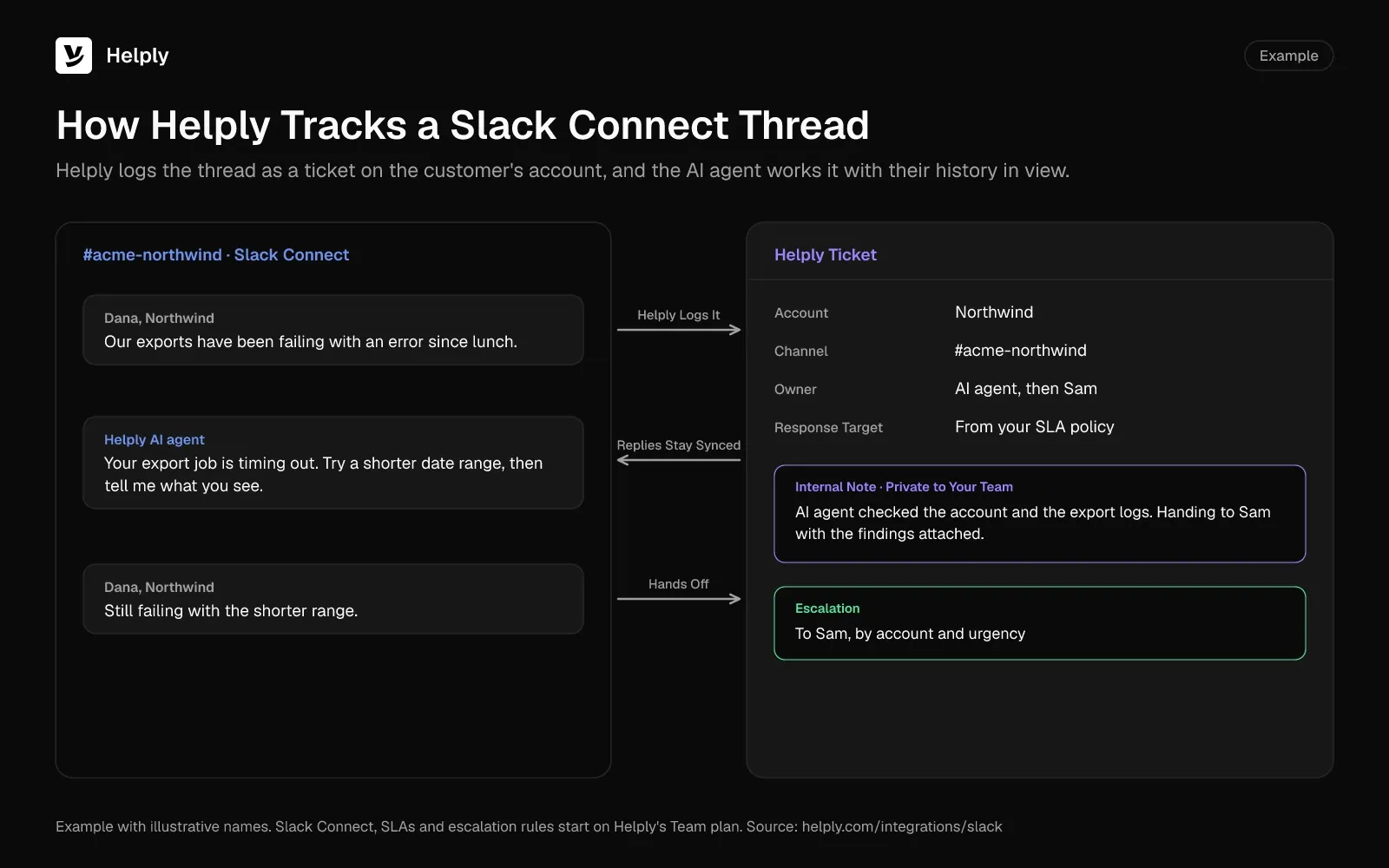
- AI that works the whole thread. The Support Agent can read the Slack conversation, then check customer history, your knowledge base and the tools you've connected. It can resolve the issue end to end.
- A clean handoff. If the Support Agent isn't confident in an answer, it hands your team the ticket with its investigation and customer context attached. The Assist Agent then works beside the owner in Helply to investigate and draft the reply.
- Private teamwork. Internal notes and @mentions stay out of the customer's Slack thread.
- AI that doesn't train on your data. Your customer data stays out of the training sets of Helply's AI providers. A SOC 2 Type II report covers Helply's security controls.
- A knowledge base you can keep current. On Team and above, the Knowledge Agent spots missing answers and points out outdated information for your team to review.
Setup takes three steps. Connect Slack in Tools, pick the customer channels Helply should monitor and match each channel to its customer account.
For teams that keep Slack as a back room, every Helply plan includes Slack notifications and the Slack integration. Teammates can ask Helply's AI questions in Slack too, and each answer draws on the team's pooled AI credits. From the Team plan, Linear and Jira connect, so your team can file an engineering issue from the ticket where configured and supported.
Read how Kameleo runs support with Helply
Keep Slack as One Channel, or Run Most of Your Support in Slack?
With a few channels and no help desk, use Workflow Builder and lists on a paid Slack plan to collect and assign requests. Teams keeping Zendesk or Freshdesk can add their Slack apps.
If shared channels carry most of your support, Pylon and Plain center on them. Helply covers them from the Team plan, and its AI agents can resolve questions with the full thread and customer history. Teams that run Slack beside email, chat and WhatsApp can work all four from one Helply queue with the same AI agents.
Teams whose customers never see Slack get Slack notifications on every Helply plan, and teammates can ask Helply's AI questions in Slack.
Once your team runs Slack customer support through tickets, one teammate owns the Friday export question and replies before the weekend. On Monday, the customer sees a linked issue and a progress update in the same thread.
At Kameleo, engagement doubled once customers knew an instant technical answer was coming, and the engineers went back to shipping product. Every Helply plan comes with the Support Agent, the Assist Agent and AI credits the whole team draws on. Slack Connect, WhatsApp, free migration and an onboarding call start on Team, and the pricing page lists each plan.
Route one Slack channel or one inbox to Helply during the trial, and compare its first response time with your other channels. Move the rest once the results hold up.
Frequently asked questions
Yes, Slack works for customer support once your team tracks each thread as a ticket with one owner and a response target. Teams run it two ways: shared Slack Connect channels with customers, or internal channels behind email and chat.
Use Slack for the conversation and a help desk for the record. Log each thread as a ticket with a named owner, keep team talk in private notes and escalate bugs to Linear or Jira. Save each new answer in the knowledge base so the next customer finds it.
Not for most shared channels. Each side needs a paid Slack plan, though a free workspace can join a channel that an Enterprise organization hosts. Direct messages with people outside your company work on any plan.
Use a Workflow Builder form and a Slack list on a paid Slack plan, or a help desk that connects to Slack. Zendesk, Freshdesk and HubSpot can create tickets from Slack messages, and Intercom and Front route them into a shared inbox. Pylon, Plain and Helply (from its Team plan) turn Slack conversations into tracked issues, threads or tickets.
Yes. Intercom's Fin, Plain's Customer Agent, Pylon's AI agents and, from the Team plan, configured Helply AI agents can respond inside supported Slack conversations. Whichever you pick, check how it hands a thread to a person when it isn't sure.
Run Slack as one channel in a shared inbox, so customers outside Slack can write in by email or chat. Those on free Slack can use a direct message, which works on any Slack plan.
A support team can run hundreds of customer channels if it logs each thread as a ticket. In Pylon's 2025 data, the 100 Pylon accounts with the most shared customer channels averaged 893 channels each.
Yes, if both companies agree on data rules and follow them. Each company's retention settings cover only its own members' messages, and files from the other company stop being accessible after a disconnect. Keep passwords, API keys and customer records out, and send sensitive files through a secure link.
Use the contact form at slack.com/help/requests/new or type /feedback in Slack. Slack retired the feedback@slack.com address for support cases. Paid plans get live help through Slack's Help Agent and chat, with a 2-business-day case target on the Standard Success Plan.
About the author

Alex Turnbull
CEO & Founder, Helply
Alex is the CEO & Founder of Groove. He loves to help other entrepreneurs build startups by sharing his own experiences from the trenches.
Keep reading

What Is a Support Ticket? Fields, Statuses, Types and Examples
Konrad Janczyk · 15 min read
Closing a Ticket Due to No Response: Email Templates and Timing Rules
Bildad Oyugi · 12 min read