
 Jared Scheel ··11 min read

When Vendors Call Themselves a Service Desk
Many ITSM vendors call their product a service desk, while most SaaS support queues need a customer help desk.
You lead support at a software company, and the shortlist has gone sideways. Half the vendor pages say "service desk" and talk about ITIL, change advisory boards and configuration records. Then someone from IT suggests Jira Service Management, since engineering already lives in Jira.
Your queue looks nothing like that. SSO sign-in keeps sending one account back to the login screen, and another customer wants a second admin on their workspace. A CSV export drops custom fields, and an invoice needs a VAT number.
Customers sent all four of those tickets, so you're shopping for a help desk. Pick a service desk instead, and you work those tickets in a tool that centers on employee IT requests. Service desks and help desks differ in who writes in and where each fix goes.
For the basics, this guide to what a help desk is covers how one works.
What Is a Service Desk?
A service desk is where an IT service provider takes in every issue and request from the people who use its services. The ITIL 2011 glossary, quoted by Atlassian, calls it "the single point of contact between the service provider and the users."
That glossary adds that a typical service desk "manages incidents and service requests, and also handles communication with the users." ITIL 4 reframed it as a practice: "the practice of capturing demand for incident resolution and service requests."
IBM describes the IT service desk as "a single point of contact (SPOC) between IT organizations and users." In most companies, those users are employees.
Incidents and Service Requests
ITIL splits service desk work into two kinds. ITIL 4 defines an incident as "an unplanned interruption to a service or reduction in the quality of a service."
A VPN that drops every hour is an incident. A service request is a normal, pre-agreed ask, such as access to a design tool for a new hire.
The ITSM Practices Around It
A service desk sits inside IT service management (ITSM), the wider discipline of running IT as a service. Atlassian lists ITSM processes that include service request, knowledge, IT asset, incident, problem and change management.
The service desk takes the tickets. Other teams use those practices to fix root causes, approve changes and track laptops and licenses. IBM calls IT service desks "a superset of the standard help desk," since they sit inside that wider set of practices.
What Is a Help Desk?
In support and IT alike, a help desk is the team, plus its software, that takes problems from users and resolves them. The team logs each problem as a ticket, then tracks its owner, status and history. Atlassian traces the term to IT, where a help desk "receives and resolves user-reported problems."
Customer support teams use the term too. A customer help desk collects email, chat and messaging in one queue, routes each conversation and keeps a knowledge base customers can search. Freshworks, for example, sells Freshdesk as customer service software.
People also call it a support desk, a helpdesk, a customer service desk or a ticketing system. Support teams mix the two names as well. In HDI's 2015 Support Center Practices & Salary Report, 36% of support centers called themselves a service desk and 23% a help desk.
Service Desk vs. Help Desk: The Key Differences
A service desk serves a company's employees under ITIL practices, while a SaaS help desk resolves problems for customers. An Atlassian guide notes that "one person's help desk is another person's service desk," so judge the work instead of the name.
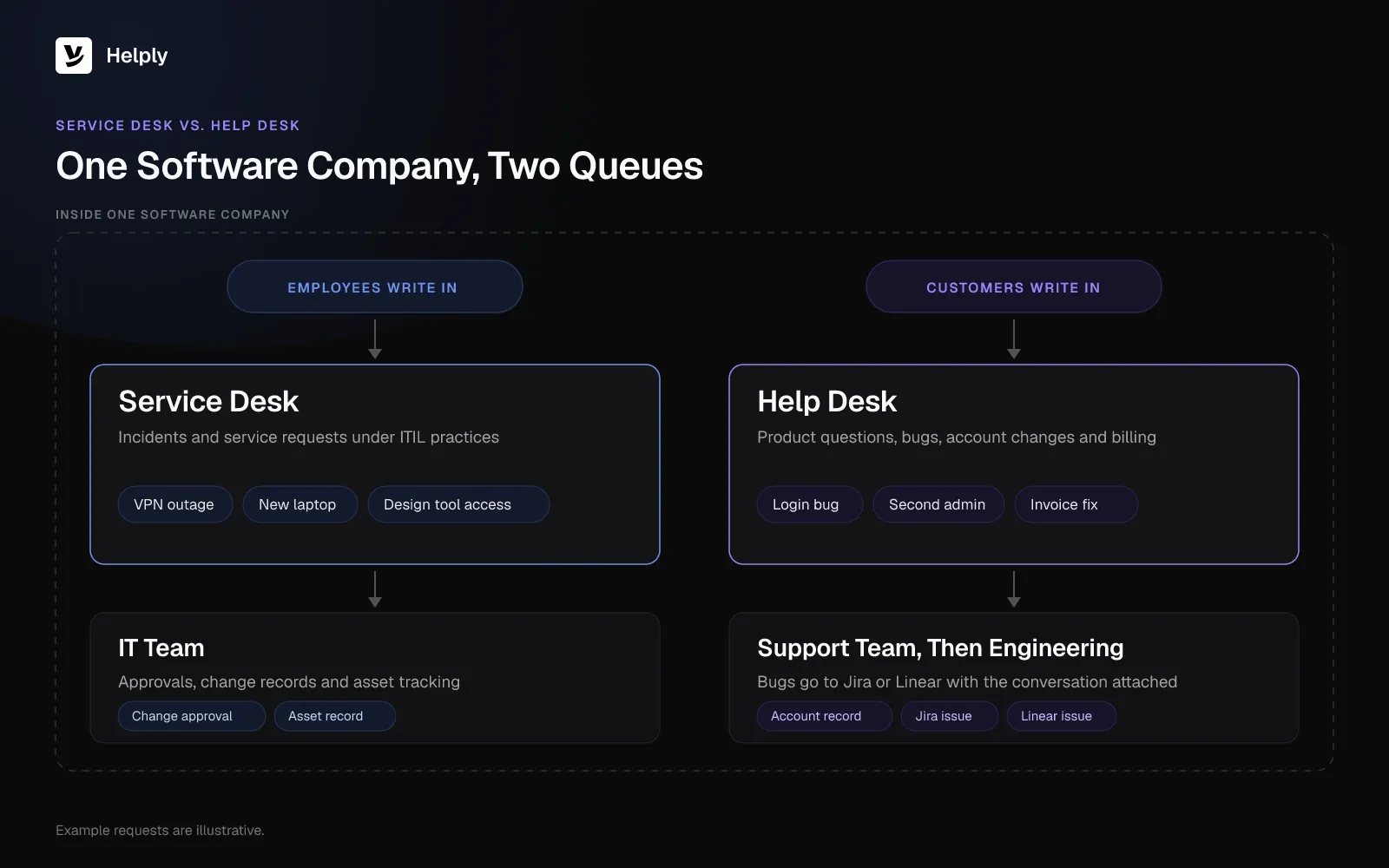
- Audience. A service desk serves employees, contractors and other internal users. A help desk at a software company serves paying customers and trial users.
- Request types. A service desk handles incidents plus requests for access, equipment and changes. A help desk handles how-to questions, bugs, account admin and billing.
- Process. A service desk follows ITIL practices with approvals, problem records and change records. A help desk runs a loop of triage, answer, escalate and follow up.
- Escalation path. A service desk escalates to infrastructure and IT specialists. A SaaS help desk escalates to product engineering, usually in Jira or Linear.
- Records. A service desk tracks assets and configuration items. A help desk tracks customer accounts, plans and conversation history.
Atlassian's own comparison tags the help desk as "Tactical" and the service desk as "Strategic." It also says the split will "differ across organizations," so treat those labels as tendencies.
Service Desk vs. Help Desk Compared: Audience, Requests and Tools
| Compared on | Service desk | Help desk (SaaS customer support) |
|---|---|---|
| Who writes in | Employees and contractors | Customers, trial users and admins on customer accounts |
| Typical requests | VPN outage, software access, new laptop, approved change | Login bug, second admin, failed export, invoice correction |
| Framework | ITIL and ITSM practices | No formal framework; SLAs and escalation rules |
| Linked records | Problems, changes, IT assets, configuration items | Customer accounts, plans, past conversations, engineering issues |
| Escalates to | IT specialists and infrastructure teams | Product engineering in Jira or Linear |
| Channels | Portal, email, chat, internal messaging | Email, chat, in-app, Slack Connect, Microsoft Teams |
| Main measures | SLA compliance, request fulfillment time, repeat incidents | First response time, resolution time, CSAT, AI resolution rate |
| Example tools | Jira Service Management, Freshservice | Freshdesk, Helply |
For the reporting side, these customer support dashboard examples show how help desk teams track those measures.
ITSM vs. Customer Support: Where the Two Split
ITSM exists to keep a company's own technology running for its staff. Customer support exists to keep customers successful with a product they pay for. Both teams use tickets, so vendor feature pages make the two look closer than they are in daily work.
Most ITIL practices have a counterpart in SaaS support, often owned by a different team:
- Incident: a bug report or outage. Support takes the ticket first, then engineering fixes the cause.
- Service request: an account change. Adding an admin or resetting 2FA stays with support.
- Problem: duplicate bug reports. Engineering fixes one issue that many customers reported.
- Change: a product release. Product ships it, and support updates help articles and tells affected customers.
- Knowledge: the help center. Customers search it on their own.
- IT asset: no direct equivalent. Account data lives in your CRM and billing tools instead.
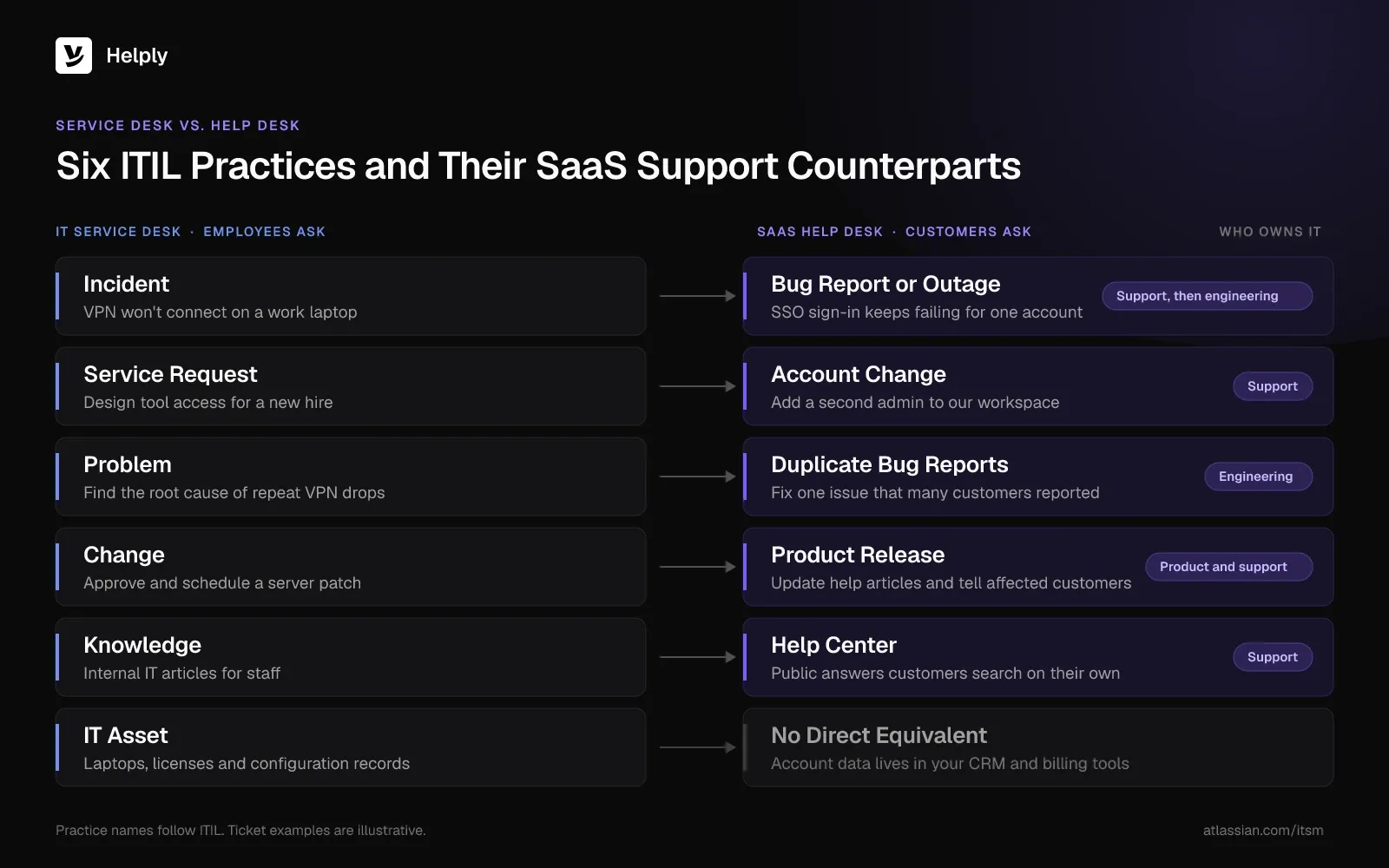
Atlassian lists IT asset management among ITSM processes. A customer support team tracks accounts and plans instead of hardware.
What a SaaS Support Queue Looks Like
A SaaS support queue mixes how-to questions, account changes, technical questions, bugs and billing requests, all from customers. Picture one Monday at a 40-person software company. Customers send six tickets before lunch.
- "Where can I download last month's invoice?" Support closes it with a how-to answer from the help center.
- "Add a second admin to our account." Support makes this account change with the right permissions.
- "Webhook retries failing with a 401." This technical question needs logs and docs before support can send a precise answer.
- "CSV export is missing custom fields." Support links this bug to one engineering issue that three other customers already hit.
- "SSO sign-in sends us back to the login screen." The account renews next month, so support moves this ticket to the front of the queue.
- "Can you add our VAT number to the invoice?" This billing change needs the account record.
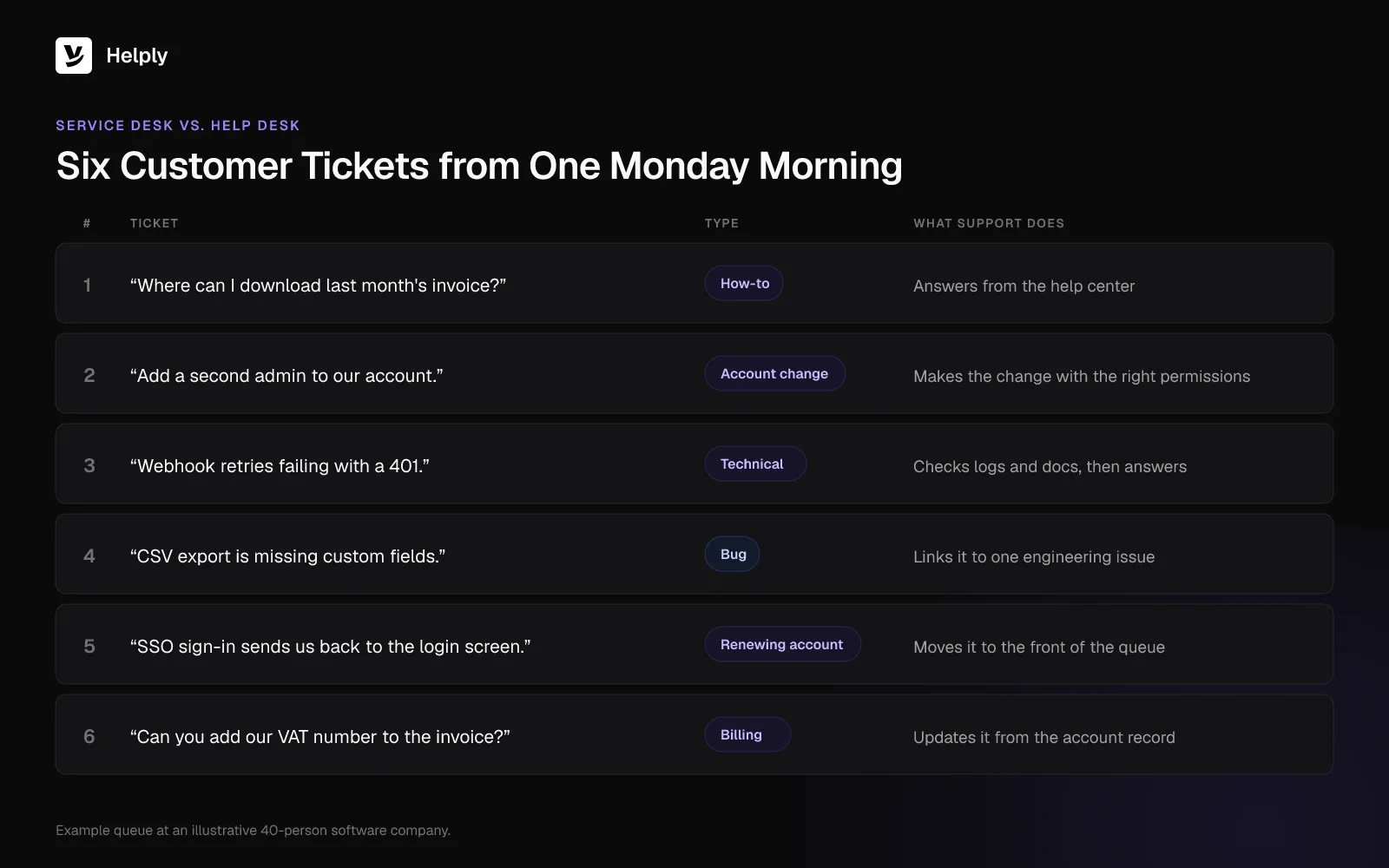
A service desk logs these as incidents and service requests, in software that tracks employee approvals and asset records. A support team on a customer help desk sees the account behind each ticket and clears the invoice and admin requests from there. It sends the bug to engineering with the conversation attached.
Which One Does a SaaS Support Team Need?
A SaaS support team gets its requests from customers and escalates to product engineering, so it needs a help desk. Its context lives in accounts, plans and past conversations, with no call for ITIL change approvals or an asset database.
Run your own queue through three checks:
- Sender. If most requests come from customers, buy a help desk.
- Approvals. If most requests need approvals or asset records, you're running internal IT, and a service desk fits.
- Engineering tracker. If engineering fixes root causes in Jira or Linear, connect your help desk to that tracker instead of running support inside it.
Can You Run Customer Support in Jira Service Management?
You can. Atlassian bills Jira Service Management per agent, and the customers who raise requests need no license of their own. It sells the product as ITSM "for incident response, change management, and request fulfillment."
Its product page aims it at "IT, HR, facilities, and more." For customer service, Atlassian sells a separate Customer Service Management app.
A customer help desk connected to Jira gives support the account behind every ticket, while engineering works from its own backlog.
When a SaaS Company Needs Both
A growing software company often runs both, owned by different teams. IT or operations runs a service desk for laptops, SSO accounts, onboarding and software access for staff. Support runs a help desk for customers.
Keep the two queues separate, because customer tickets need speed and account context while employee requests need approvals and asset records. As volume grows, read how to scale customer support without hiring.
Freshworks draws the same line, with Freshdesk for customer service and Freshservice for ITSM.
Help Desk Features a SaaS Support Team Needs
A SaaS help desk needs six features beyond a shared inbox. Check for each before you shortlist:
- Every customer channel in one queue. Email, chat and in-app messages, plus Slack Connect or Microsoft Teams for larger accounts.
- The account behind each ticket. Plan, admins, past conversations and product activity, visible without switching tabs.
- Engineering escalation that keeps context. Create or link Jira and Linear issues, group duplicate reports and follow up when the fix ships.
- SLAs and routing. Response and resolution targets, with urgent accounts routed to the right person.
- A knowledge base that stays current. Each release can outdate an answer, so your team needs a way to catch stale articles. This guide to knowledge bases covers the basics.
- AI that resolves routine tickets and escalates the rest. An AI agent should answer routine questions end to end and hand over its findings when it can't.
Where Helply Fits
Helply puts AI agents inside its help desk, messaging, knowledge base and analytics. Software, B2C, ecommerce and marketplace teams run support on it. Your team works the login, admin, export and invoice tickets from that Monday queue in one place.
- The account behind every ticket. In Helply for software companies, each ticket shows the customer, company, earlier conversations, product activity and relationship.
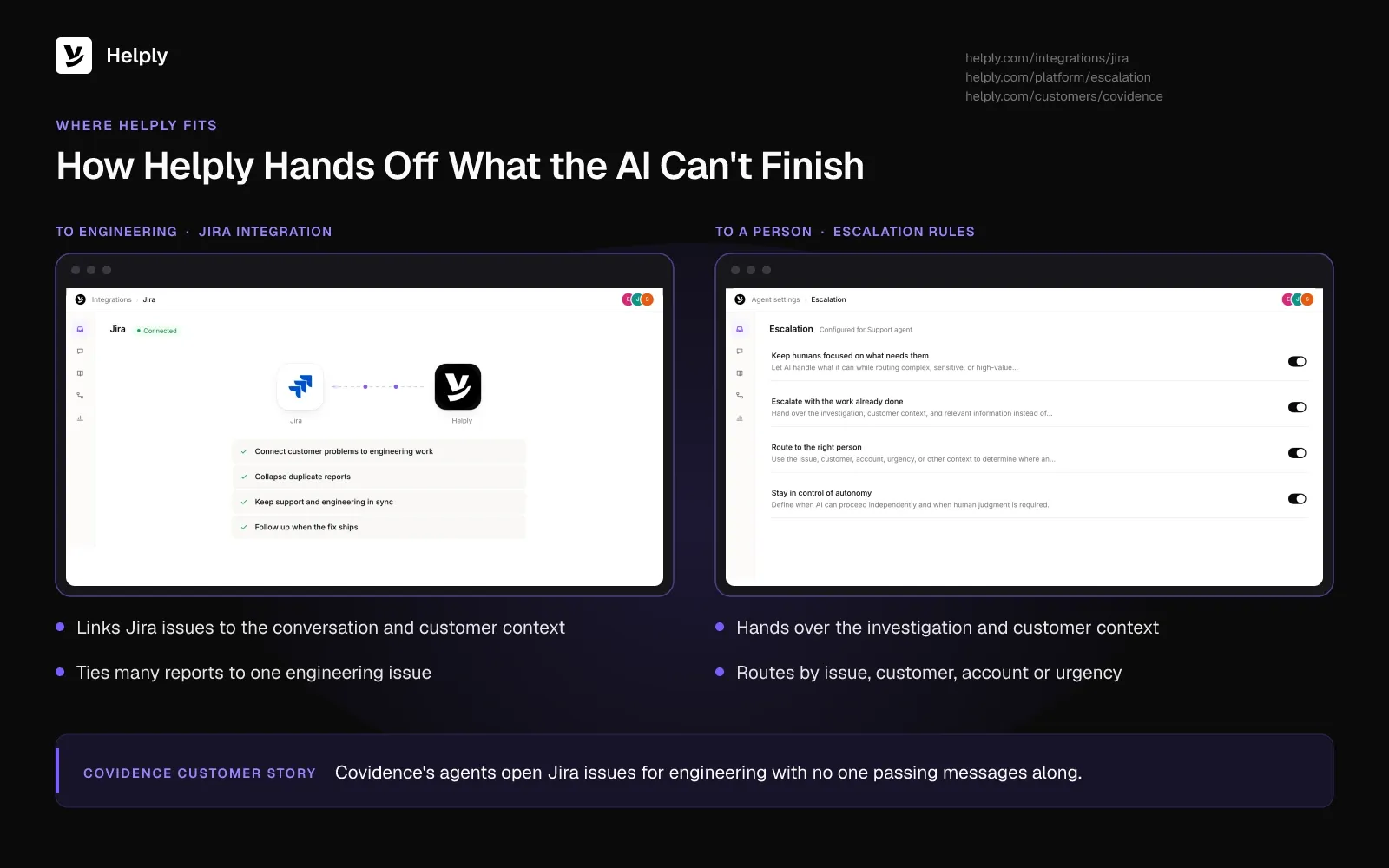
- Engineering escalation with the conversation attached. Helply's Jira and Linear integrations can create issues where configured and supported, or tie many conversations to one issue. Helply carries the customer context into each issue, and supported Jira status changes or Linear completion events help your team follow up.
- Customer channels in one queue. Your team answers email, chat, Slack Connect and Microsoft Teams from the same queue.
- A Support Agent that investigates first. The Support Agent can resolve a ticket end to end from your knowledge and the Skills your team sets up. If its confidence is low, it passes the ticket to a person along with its findings and the customer's details.
- An Assist Agent beside your team. The Assist Agent sits inside each conversation with your team. It investigates, drafts replies and takes the supported Actions your team directs.
- SLAs and escalation rules you control. Set response and resolution targets, and escalation rulesroute each case by issue, account and urgency.
- A help center that keeps up with releases. Helply includes a knowledge base on your own domain with AI answers. The Knowledge Agent surfaces articles that may be outdated, and your team reviews its suggestions before publishing.
Covidence builds systematic-review software that medical researchers and universities use, and its support team is small and technical. Covidence configured its Support Agent to escalate rather than improvise when confidence dropped, so a person received the whole investigation. The agents read docs in Confluence and Notion and open Jira issues for engineering with no one passing messages along.
Buy a Help Desk or a Service Desk?
Buy a service desk if your requests come from employees and need approvals, asset records and change control. Jira Service Management and Freshservice fit that job. If customers send your requests, buy a help desk, and pick one built for software products.
The vendor pages full of ITIL describe internal IT, and Jira belongs on the engineering side, linked to your help desk. The Monday queue of admins, exports and SSO loops needs a help desk that sees each account.
At steady state, Covidence saw its Support Agent resolve 64% of inbound conversations end to end. Its customer story records "no measurable rise in inaccurate answers over the human-only baseline," because the agent escalated instead of guessing.
Helply prices each plan by how many people on your team answer customers. Every plan comes with the Support Agent, the Assist Agent and AI credits the whole team shares.
Jira, Linear, Skills, SLAs, escalation rules, Slack Connect and the Knowledge Agent start on the Team plan. Microsoft Teams starts on Pro. The pricing page shows the plan price for each team size.
Connect one support inbox to Helply and watch which tickets the Support Agent resolves before you decide.
Frequently asked questions
A help desk resolves problems that users report, while a service desk also handles service requests and ties into wider ITSM practices. In software companies, "help desk" usually means customer support and "service desk" means internal IT.
A customer service desk answers customer questions and logs each request as a ticket. It resolves the ticket or escalates it to the right team, so it works as a help desk for customers.
ITSM is the wider discipline of running IT as a service, and the service desk is one practice inside it. Atlassian lists ITSM processes that include service request, knowledge, IT asset, incident, problem and change management.
Both spellings appear. Atlassian and IBM write "help desk" as two words.
An ITIL service desk is the one point of contact between an IT service provider and its users. ITIL 4 defines the practice as "the practice of capturing demand for incident resolution and service requests."
A service desk is not a call center. A call center handles phone volume, while a service desk takes IT incidents and requests on phone, portal, email and chat.
Only in part, since AI agents can resolve many routine requests end to end while people keep the judgment calls and sensitive cases. A well-built agent escalates with its findings, so the person picking up starts from the work already done.
It can, though Atlassian aims Jira Service Management at IT, HR and facilities teams and sells a separate Customer Service Management app. Customer teams usually get more from a help desk with live chat, account context and engineering escalation.
About the author

Jared Scheel
Co-founder & CTO
Keep reading

What Is a Support Ticket? Fields, Statuses, Types and Examples
Konrad Janczyk · 15 min read
Closing a Ticket Due to No Response: Email Templates and Timing Rules
Bildad Oyugi · 12 min read