
 Bildad Oyugi ··11 min read

What Is a Chatbot?
A chatbot is a computer program that holds a conversation with a person. By that chatbot definition, a ten-button menu and ChatGPT both count. The word joins "chat" and "robot," and people now use it for any software that talks back.
You meet chatbots in a few common places:
- Website chat widgets. A small bubble in a site's corner that answers questions about orders, plans or accounts.
- Messaging apps. Bots inside WhatsApp, Facebook Messenger, Slack or Microsoft Teams that reply to a message the way a contact would.
- General AI assistants. ChatGPT and similar tools that answer almost any question in conversation.
- Voice assistants. Siri and similar assistants that answer spoken questions.
Picture 11pm on a store's website. A shopper opens the chat and types: "where's my order? #2087 was due yesterday." The answer depends on the bot behind that window.
You'll hear rule-based bots, AI chatbots and AI agents all called chatbots, yet only the agent can find out where order #2087 is. The other two leave the question in your queue for the morning shift.
The two main types differ in who writes the reply. A person scripts it ahead of time in a rule-based bot, and a model writes it per message in an AI chatbot.
What Is an AI Chatbot?
An AI chatbot is a chatbot that uses artificial intelligence to understand language and generate replies. It uses natural language processing (NLP) to read intent and a large language model (LLM) to write the answer.
Older bots pick a canned reply from a list. An AI chatbot writes a fresh reply for each message. A customer can type "my parcel is late" or "order still not here" and get the same help.
AI chatbots come in two broad flavors:
- General-purpose chatbots such as ChatGPT answer from what the model learned in training.
- Business chatbots answer from a company's own content, such as its help center, policies and product docs. These are the bots you meet on support pages.
ChatGPT counts as an AI chatbot. A business AI chatbot uses the same kind of model but ties its answers to one company's information.
A Short History of Chatbots, from ELIZA to ChatGPT
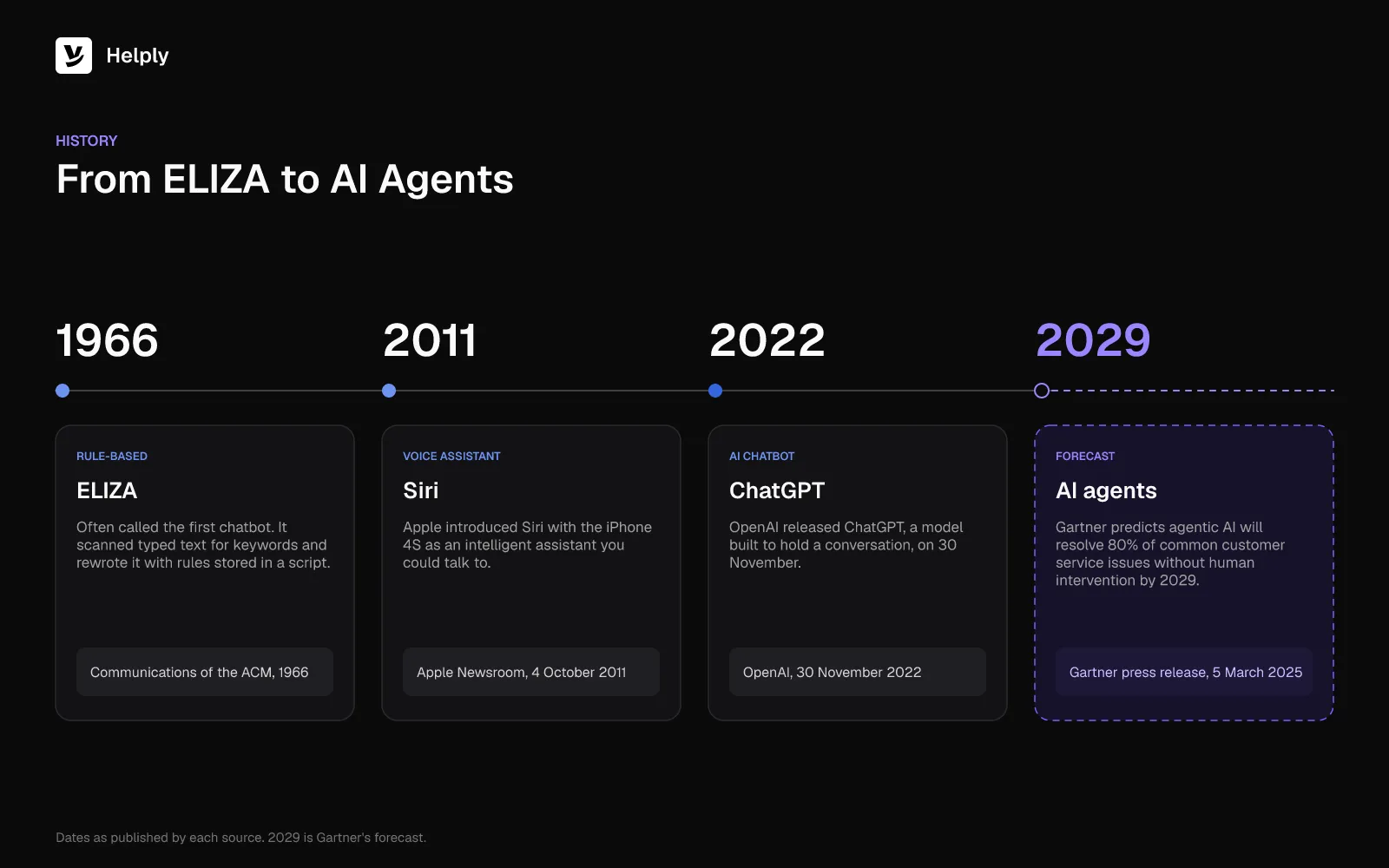
Writers often call ELIZA the first chatbot. MIT's Joseph Weizenbaum described it in Communications of the ACMin 1966. ELIZA scanned what a user typed for keywords and rewrote the input using rules stored in a script.
Its best-known script imitated a psychotherapist. Rule-based bots today still pair keywords with scripted rules.
Later, Apple and OpenAI put chatbots in front of everyday users:
- 2011: Apple introduced Siri with the iPhone 4S on 4 October, as an intelligent assistant you could talk to.
- 2022: OpenAI released ChatGPT on 30 November, a model built to hold a conversation.
- 2025 onward: AI agents add lookups and actions to conversation. In March 2025, Gartner forecastthat agentic AI would resolve 80% of common service issues on its own by 2029.
Rule-Based vs. AI Chatbots: How They Differ
A rule-based chatbot is a bot that follows a script someone mapped in advance, built from buttons, keyword triggers and decision trees. The bot moves along those branches.
An AI chatbot reads the message itself. It works out the intent, finds relevant information and composes a reply, so customers can type the way they talk. IBM draws the same line: traditional bots follow decision trees, while AI chatbots use NLP and large language models.
Rule-Based vs. AI Chatbots: Input, Answers, Upkeep and Failure Mode
| Feature | Rule-based chatbot | AI chatbot |
|---|---|---|
| How customers talk to it | Buttons, menus and set keywords | Any wording, typos included |
| Where answers come from | Replies a person wrote for each branch | A language model writes them from training data or your help content |
| Upkeep | Edit the flow every time a policy or product changes | Keep the source content current and set rules for tone and limits |
| What happens off-script | Loops back to the menu or says it didn't understand | Tries to answer, which can include a confident wrong answer |
| Best fit | A few fixed paths, such as booking or opening hours | Broad, repeat questions phrased many different ways |
Neither type, as defined here, can look up a specific order or change an account. An AI agent can do both, once you connect it to your order and account systems.
How Do AI Chatbots Work?
Chatbots work in one of two ways. A rule-based bot matches a button or keyword to a scripted reply. An AI chatbot turns a message into an answer in five steps:
- It reads the message. The bot takes in the text, plus any earlier turns in the same conversation.
- It works out the intent. NLP models decide what the person wants, such as tracking an order or resetting a password.
- It finds the source. A support bot searches the company's help articles and policies for passages that match the question.
- It writes the reply. The language model composes an answer grounded in what the search returned.
- It checks its limits. Rules decide whether to send the answer, ask a follow-up question or route the chat to a person.
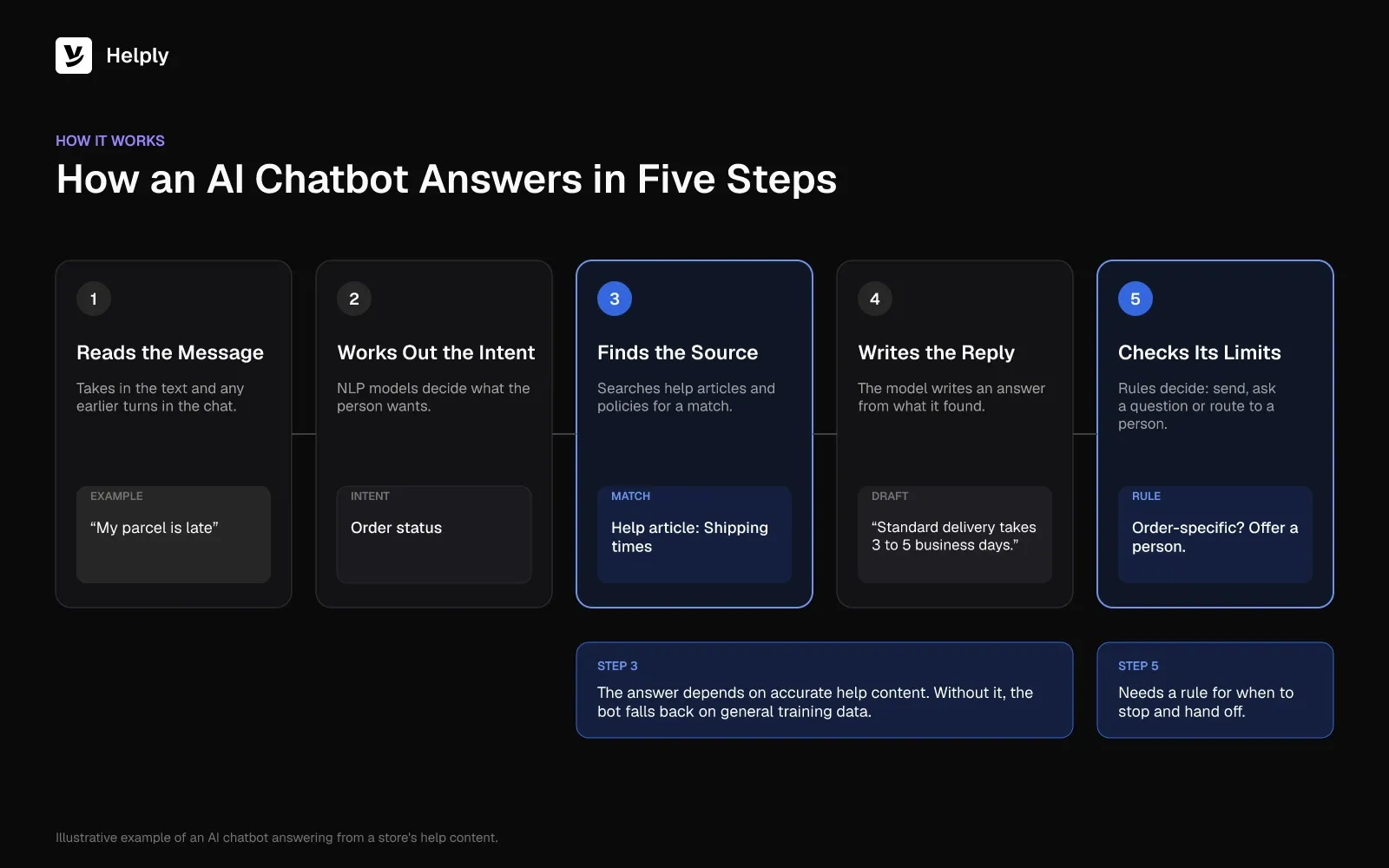
Step 3 depends on your help content. A bot grounded in an accurate knowledge base gives the company's real answer. A bot without that grounding falls back on general training data, and nothing in that data covers your refund window.
Step 5 needs your rules too. A bot with no stopping rule keeps answering questions it should pass to your team.
One Customer Question, Three Kinds of Bot
A shopper types "where's my order? #2087 was due yesterday" and sends it to three kinds of software.
The rule-based chatbot shows a menu: Shipping, Returns, Billing, Other. The shopper taps Shipping and gets a link to the delivery-times page. The page doesn't mention order #2087, so the shopper opens a ticket and waits for morning.
The AI chatbot understands the question and replies in full sentences. It explains standard delivery times and suggests checking the tracking email. It still can't see the order, so the shopper learns nothing new about #2087.
The AI agent reads the message, checks order #2087 in the connected order system and sees the carrier marked it delayed. It replies with the new delivery date and the tracking link. If the carrier had lost the order, it would hand the chat to a person with the order details attached.
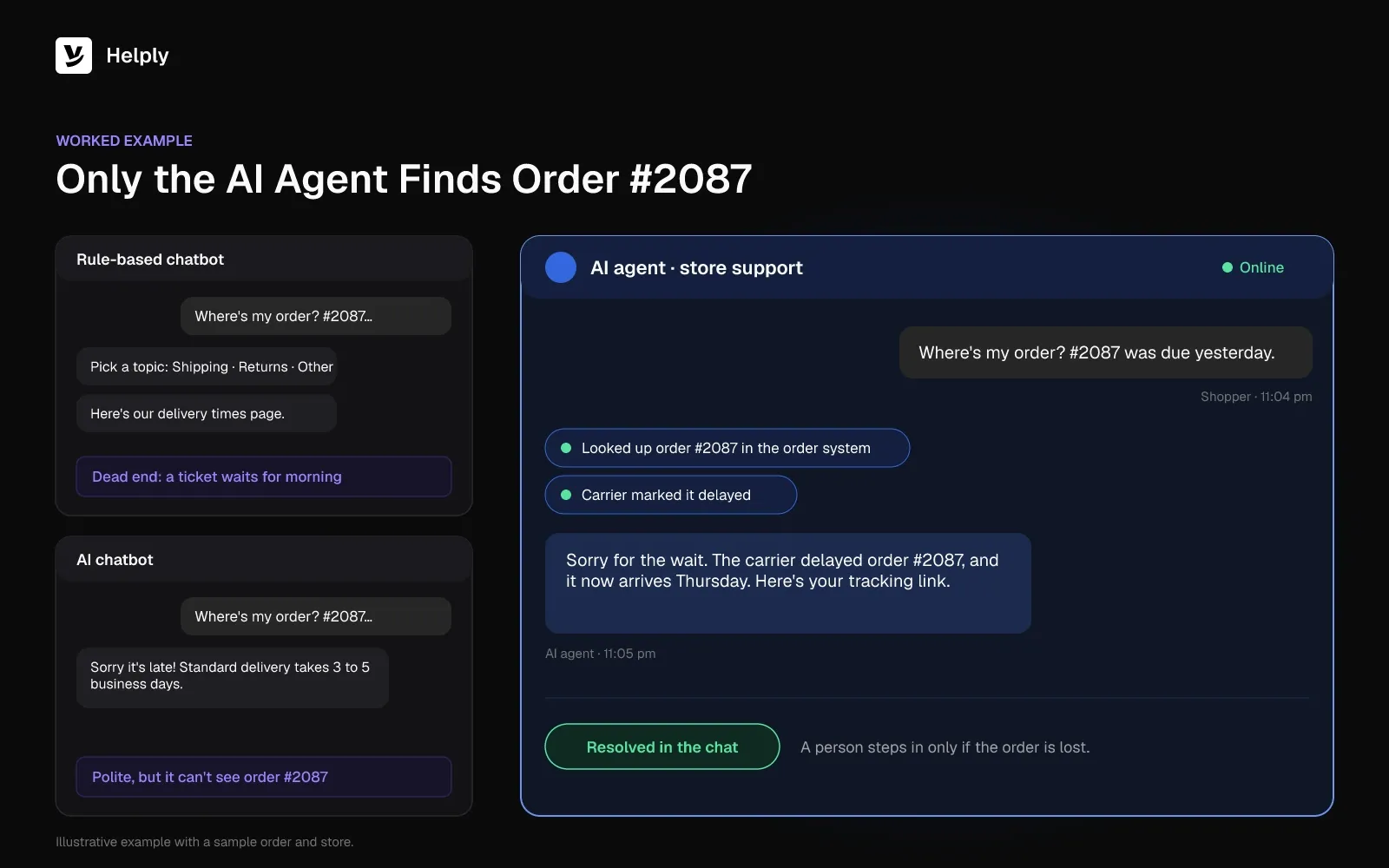
The first two bots explain how orders work. Only the agent opens order #2087 and gives the shopper a new delivery date.
Where Chatbots Help a Support Team
A chatbot helps most when the same questions arrive every day. It handles these jobs well:
- Repeat questions. Shipping times, password steps, plan limits and return windows can all come straight from your help content.
- After-hours answers. A bot replies at 2am, so a customer with a simple question doesn't wait for the morning shift.
- Collecting details before a handoff. A bot can ask for the order number, email or error, so a person starts with facts.
- Routing. A bot can sort a billing question from a bug report and send each to the right queue.
- Pointing to self-service. A bot can link the exact help article instead of the whole help center.
A knowledge base chatbot depends on the articles behind it, so keep them current. To measure a bot, start with the guide to chatbot containment rate.
Where Chatbots Fall Short
A chatbot that only reads help content stops where an answer needs live data or an action. It can't see an order, check a payment or change an address. The customer still needs a person for anything account-specific.
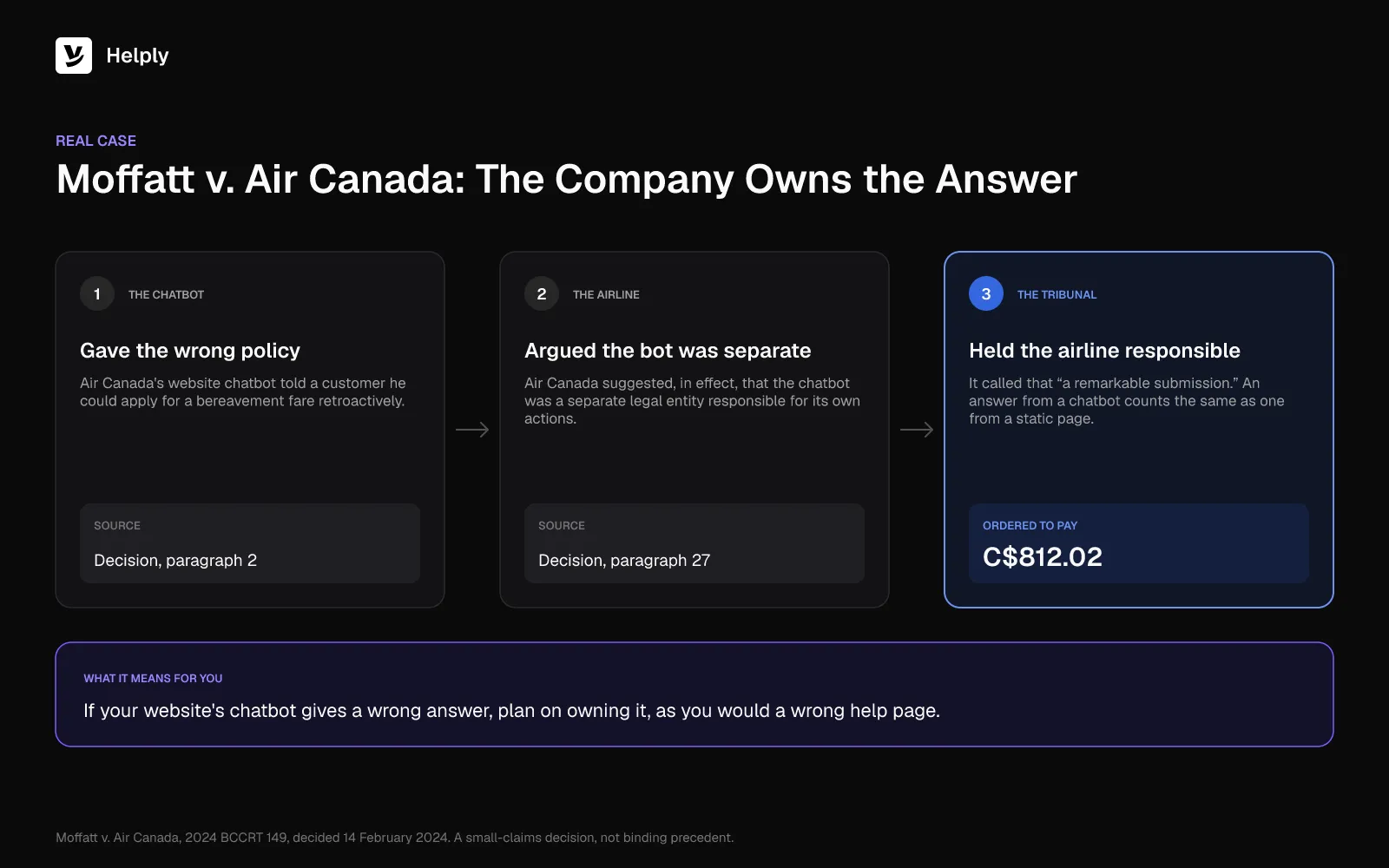
Wrong answers are the second risk, and the company owns them. In February 2024, a tribunal ruled on Moffatt v. Air Canada. The airline's website chatbot had told a customer he could claim a bereavement fare after travel.
Air Canada argued, in effect, that the chatbot was a separate legal entity. British Columbia's Civil Resolution Tribunal called that "a remarkable submission" and ordered the airline to pay C$812.02.
The tribunal saw no difference between a chatbot's answer and a static page on the same website. It was a small-claims decision, yet a business that runs a bot should plan on owning every answer it gives.
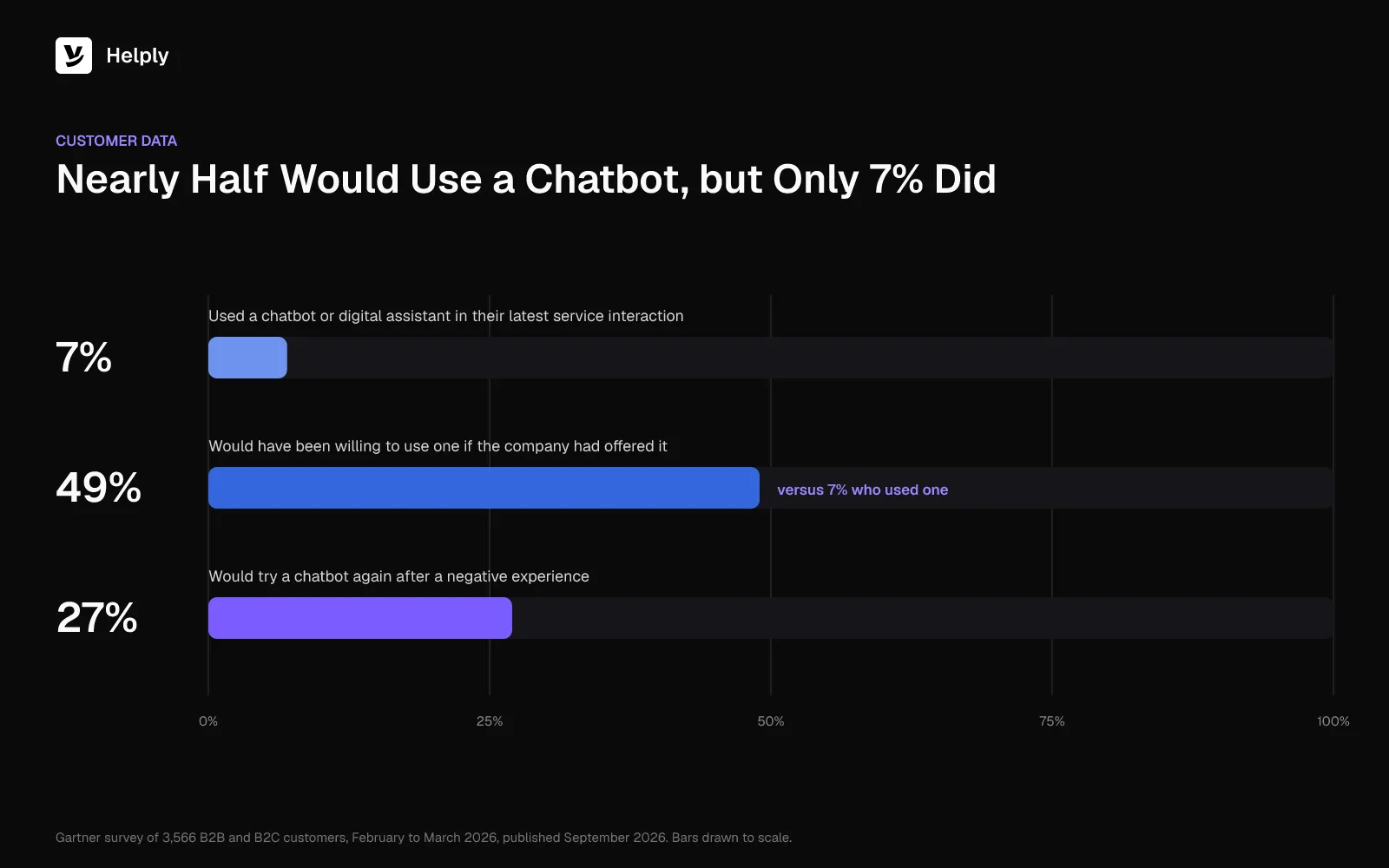
Gartner surveyed 3,566 customers from February to March 2026. Only 7% used a chatbot or digital assistant in their latest service interaction. Yet 49% said they would have been willing to use one if the company had offered it.
After one poor bot conversation, only 27% said they'd give a chatbot another go.
Chatbot vs. AI Agent: What Changes
An AI agent is software that works toward a goal, uses tools and decides its next step, instead of only replying. In support, an agent can check the order, issue the refund or update the account, then confirm in the conversation.
An AI chatbot answers from the content it can read. An AI agent also connects to business systems and takes actions such as refunds. If it gets stuck, it hands off to a person with what it found.
Chatbot vs. AI Agent: Data, Actions, Handoff and Rules
| Feature | AI chatbot | AI agent |
|---|---|---|
| Data it can use | Help articles, FAQs and training data | Help content plus connected systems such as orders, billing and the CRM |
| What it can do | Answer questions and share links | Answer, look things up and take actions such as refunds or updates |
| When it gets stuck | Says it can't help or opens a ticket | Hands off to the right person with what it found |
| How you control it | A prompt and the source content it draws on | Written instructions, permissions and escalation rules |
An agent needs tighter controls because it can change things. You decide which actions it may take, which cases always go to a person and how it should sound. For a full definition, read the guide to what an AI agent is.
If you're comparing tools, work through the evaluation questions and rollout plan in the guide to AI chatbots for customer service.
Answering and Resolving Support Chats in Helply
Helply pairs AI agents with a complete help desk: shared inbox, messaging, knowledge base and analytics. Customer-facing AI is only one piece of Helply.
The Support Agent talks with customers on any channel you connect and can resolve an issue from start to finish. It draws on your knowledge base, each customer's history and the tools you connect. It can also take supported Actions to solve the problem.
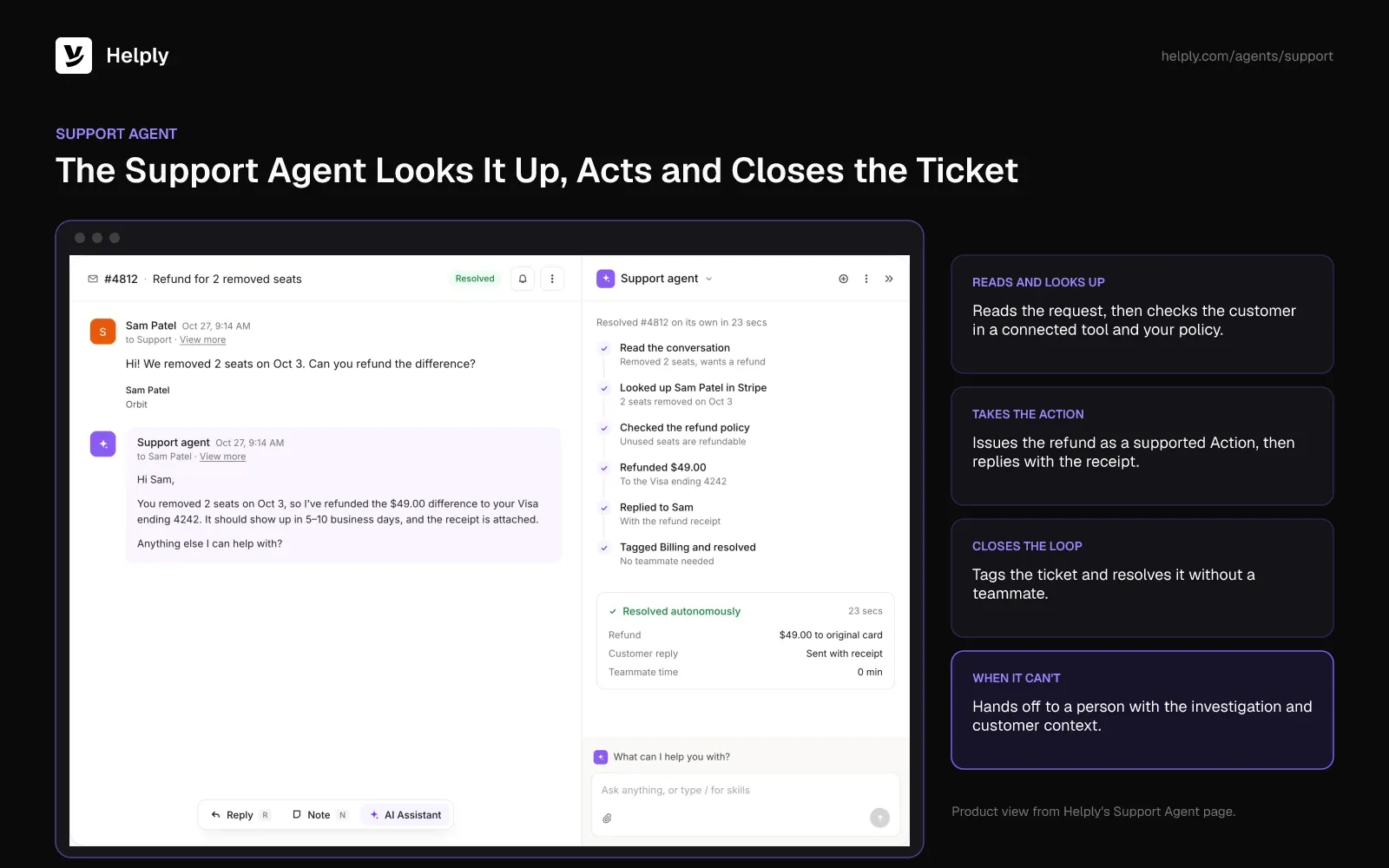
Helply connects to 60+ tools. MCP connectors and custom API actions can link your order system, so if the shopper asks about order #2087, the Support Agent can check it and reply with what it finds.
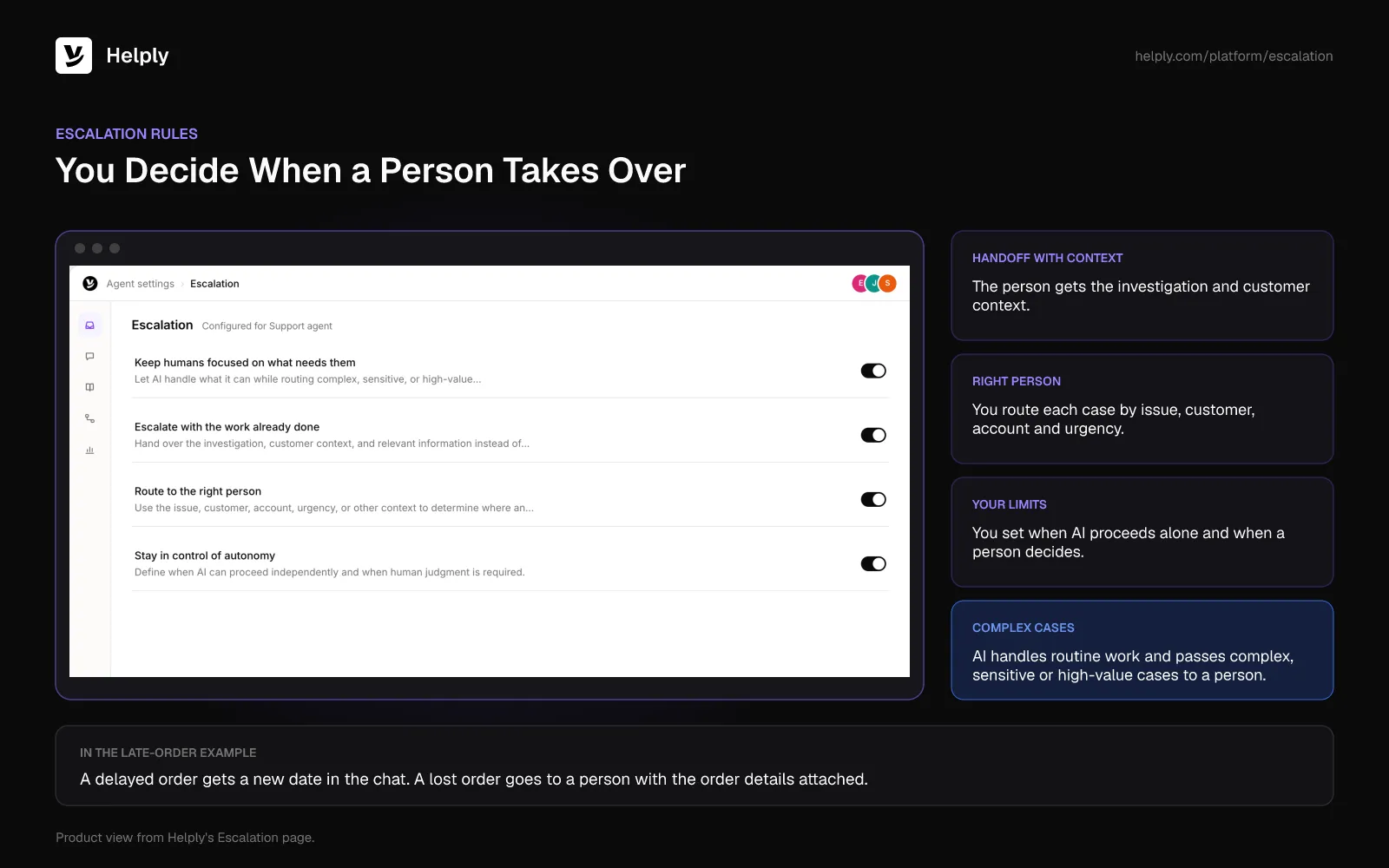
The Support Agent passes any case it can't resolve with confidence to a person. It sends its investigation and the customer context along, so your teammate doesn't start over.
The Assist Agent works beside your human agents inside each conversation. It investigates issues, finds answers and drafts replies for your team. Your team can also direct Assist to run supported Actions.
You stay in control of what the agents do:
- Guidelines define how your agents behave and make decisions, including the point where an agent should stop and bring in a person.
- Escalation rules define when AI can proceed alone and when a person takes over.
- Skills teach the agents particular kinds of customer work, such as plan changes or annual plan refunds.
- The knowledge base runs on your own domain, and AI helps you write its articles and answer customers from it.
- No model training on your data. Helply sends customer data to AI providers, and they don't use it to train their models.
AirGigs runs a global online marketplace for remote studio musicians. Its Support Agent resolved 68% of the marketplace's conversations end to end and handled the account, order and payment lookups itself.
Is a Chatbot Enough for Your Support Team?
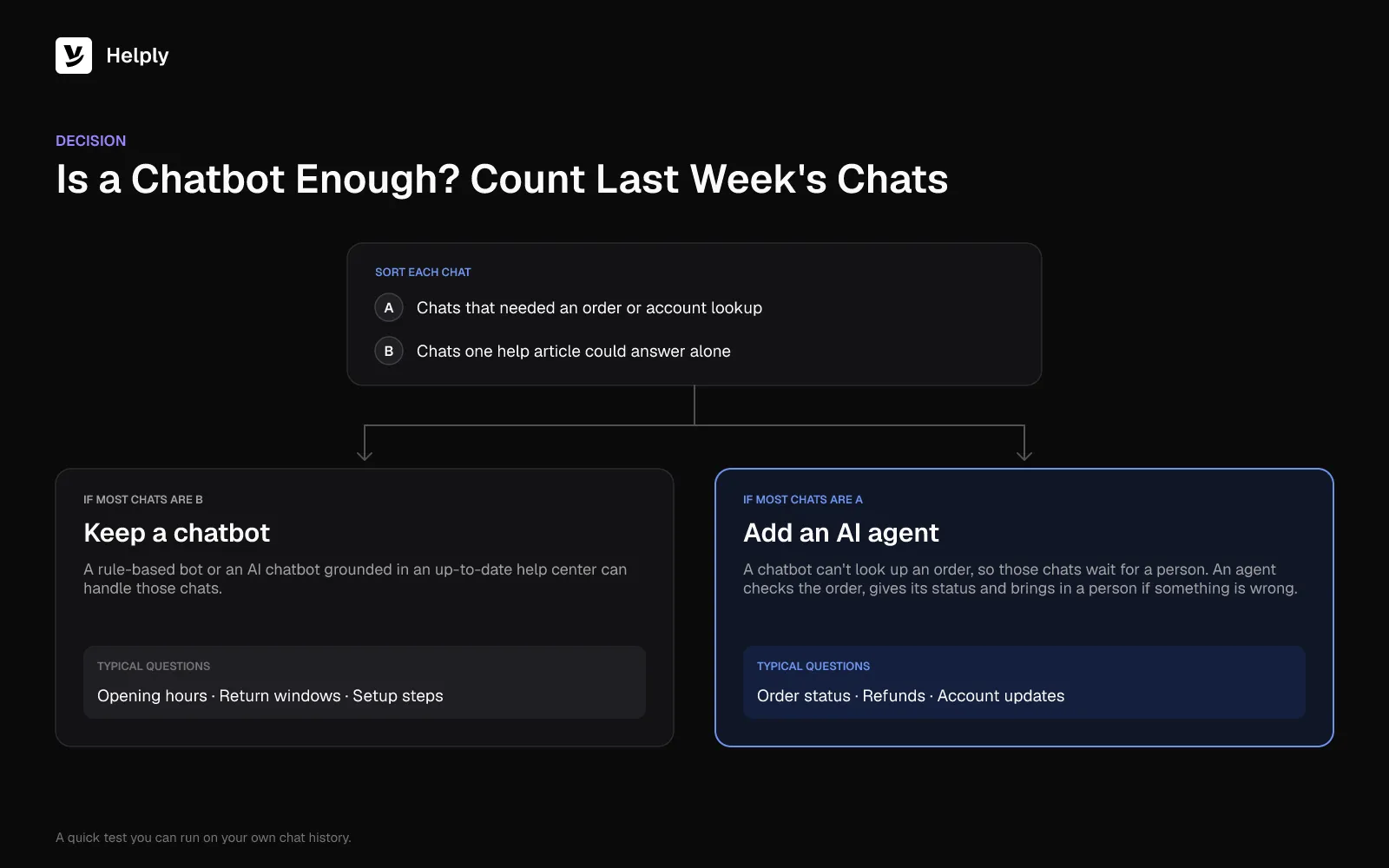
Count last week's chats that needed an order or account lookup. Then count the ones a help article could answer alone.
If most questions have one written answer, such as opening hours, return windows or setup steps, keep a chatbot. A rule-based bot or an AI chatbot grounded in a solid help center can handle that load. If lookup chats outnumber the one-answer questions, a chatbot will leave those customers waiting.
Helply's agents can cover both kinds: they answer from your knowledge base and run lookups in the systems you connect.
For order #2087, a chatbot can explain shipping times. An agent can check the order, give the new date and involve a person if something is wrong.
To limit wrong answers and dead ends, Helply's agents answer from your knowledge base and follow your Guidelines. They hand off with context when a case needs a person. AirGigs uses the Support Agent for 24/7 support across its buyers and sellers.
Each Helply plan comes with the Assist and Support Agents, plus AI credits your whole team shares. MCP connectors, custom API actions, Skills and escalation rules start on Team. See what each plan adds on the pricing page.
Frequently asked questions
Yes, ChatGPT is a general-purpose AI chatbot that OpenAI released on 30 November 2022. It writes each reply with a large language model instead of following a script. Business AI chatbots use the same kind of model but answer from one company's help content and policies.
Siri is a voice assistant that uses AI. It holds spoken conversations, so it fits the broad meaning of a chatbot. Apple introduced it with the iPhone 4S in October 2011 as an intelligent assistant.
Chatbot histories often name ELIZA, which MIT's Joseph Weizenbaum described in 1966, as the first chatbot. It matched keywords and replied using scripted rules. Chatbots built on large language models reached the public when OpenAI released ChatGPT on 30 November 2022.
A store's chat widget that answers "where's my order?" is a common example of a chatbot. Other examples include ChatGPT, a bank's FAQ bot and a booking bot inside WhatsApp. Each one answers people in conversation, though only some can look up an order or take an action.
People use AI chatbots to answer questions, draft text and summarize documents. Businesses use them for customer support, such as order status, password steps and return windows.
Yes, many AI chatbots work by voice as well as text. Voice assistants such as Siri take spoken questions and answer out loud. Most support chatbots on a website reply in text inside a chat window.
A bot is any program that runs a task on its own, like a web crawler that indexes pages. A chatbot is a bot built for conversation, reading messages and replying in text or voice. Every chatbot is a bot, but a bot does not need to hold a conversation.
A rule-based chatbot follows a script someone wrote in advance. It offers buttons or matches keywords, then sends the reply attached to that branch. It handles fixed paths such as opening hours or bookings well but stalls on questions its script doesn't cover.
For a support chatbot, yes, because a business AI chatbot answers from the articles and policies it can search. If a page is missing or out of date, the bot gives a wrong or vague reply. Helply includes a knowledge base with AI answers, and its agents reply from it.
About the author

Bildad Oyugi
Head of Content
Bildad is a digital marketing expert with over 5 years of experience in copywriting, content marketing, and editing. Outside of work, he enjoys videography and spending time with his family.
Keep reading

What Is a Customer Service Center? Types, Tools and How to Set One Up
Jared Scheel · 14 min read
CSAT Survey: 15 Questions, Score Formula and Calculator
Bildad Oyugi · 12 min read