Key Takeaways
- Give each support email template a subject line, a body and an account-context note. With a body alone, your agent ends up rewriting it from scratch.
- Edit the template before you send it to an account in your top 20% by ARR. Templates can cover the other 80%. Write that rule into your help-desk macro library.
- Five templates handle revenue moments: the churn save, renewal check-in, upsell after a plan-limit mention, competitor mention, and feature request triage.
- Four metrics tell you whether your templates earn their keep. They are first response time, resolution time with thread length, follow-up response rate, and SLA compliance. A fifth tracks whether churn and upsell signals reached the right person.
- AI can draft each reply from the customer's history and account context. In Helply, you can load your best templates as Skills and their account-context notes as Guidelines. The Assist Agent drafts, and your rep decides what to send.
Each of these 20 customer service email templates is ready to paste into your help desk's saved replies.
Every template has a subject line, a body and a short note. The note says how to adjust it for the customer's ARR, renewal date and ticket history.
They suit teams of 2 to 10 agents handling 200 to 2,000 tickets a month from technical, knowledgeable customers. If you sell to consumers, swap ARR for order value or lifetime spend.
Why Support Email Templates Fail on High-Stakes Tickets
Templates fail on high-stakes tickets, where you need them most. The reply reads as canned, and the agent sends it without checking the account. You fix both with an account-context note on each template.
The “Feels Like a Template” Problem
The more sophisticated the customer, the faster they detect a templated reply. An enterprise CSM at a renewing account will forward your reply to their procurement team with three words: "this is concerning."
A customer who says a reply "feels like a template" is telling you the account is at risk. To protect the account, the agent has to know who the customer is before choosing what to send.
Salesforce surveyed more than 14,000 consumers and business buyers for its 2023 State of the Connected Customer report. Of those, 67% expected companies to understand their needs as they change. Send a generic template to a long-time customer, and you miss that expectation in the first line.
Every Ticket Is Account-Health Data
For a subscription business, you can read each ticket for renewal risk, an expansion opportunity or a product gap. The template you send depends on which of those it is. A "we'd love to keep you" cancellation reply lands fine on a $200/month account.
On a $5,000/month account, the same reply looks like a script you sent without reading. That customer is less forgiving if they haven't logged in for three weeks.
The template is half the response. The other half is the account context the agent brings with them. They need to load it before they pick the template.
The Framework: Template + Account Context = Response
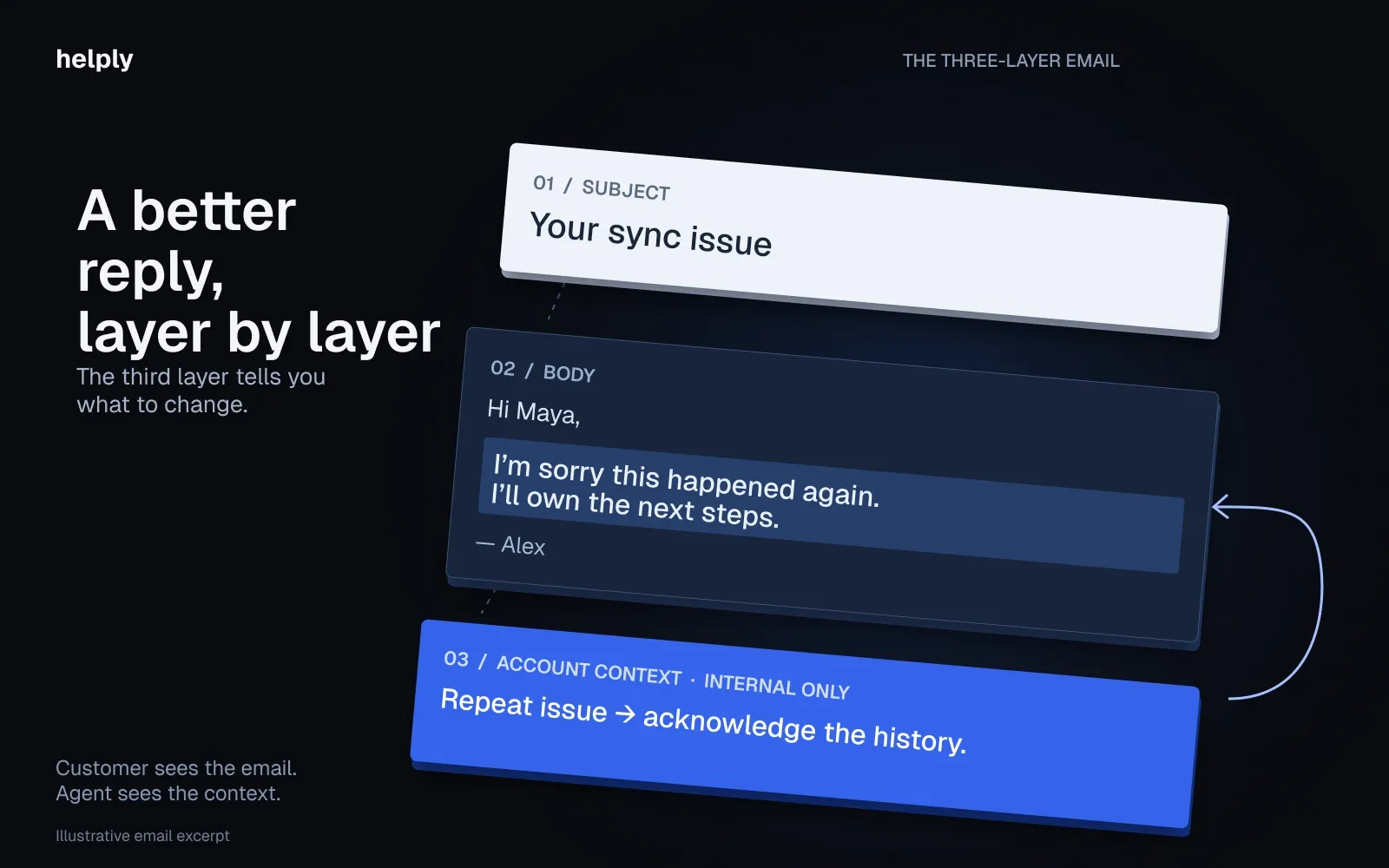
Each template below follows the same three-layer structure:
The 3-layer support email template:
- Subject line. The first thing the customer sees.
- Body. The part that stays the same for most customers.
- Account-context note. The rule for adjusting by ARR, renewal date or ticket history.
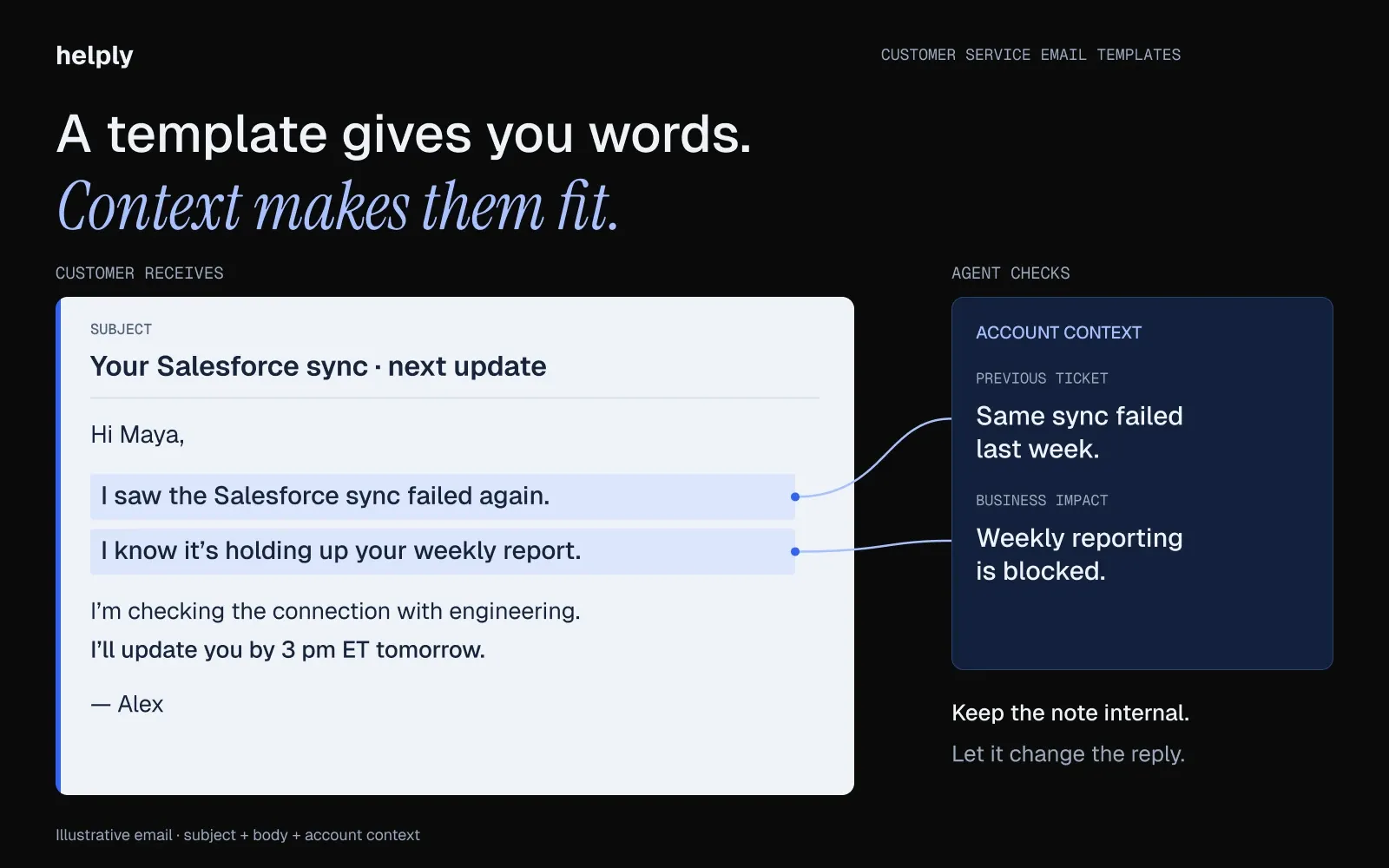
Inside the body, use five parts in this order:
- Greeting. Use the customer's first name.
- Acknowledgment. Restate the issue in the customer's words.
- Action. Say what you did or what you'll do.
- Timeline. Give the next step and a time.
- Sign-off. Close with a person's name or the team's name on an auto-reply.
Without the third layer, the account-context note, your agents get the words with no rules for using them. They end up sending a "feels like a template" reply to a high-stakes account.
When to Use a Customer Support Email Template vs. Write From Scratch
A useful operating rule, before any of the templates: the 10-second decision.
The 10-second decision rule: Before you send, ask whether this customer would still feel heard if a colleague read the reply aloud at standup. Send it if yes, and rewrite the top third if no.
That rule, plus an account-tier filter, will catch most of the bad sends.
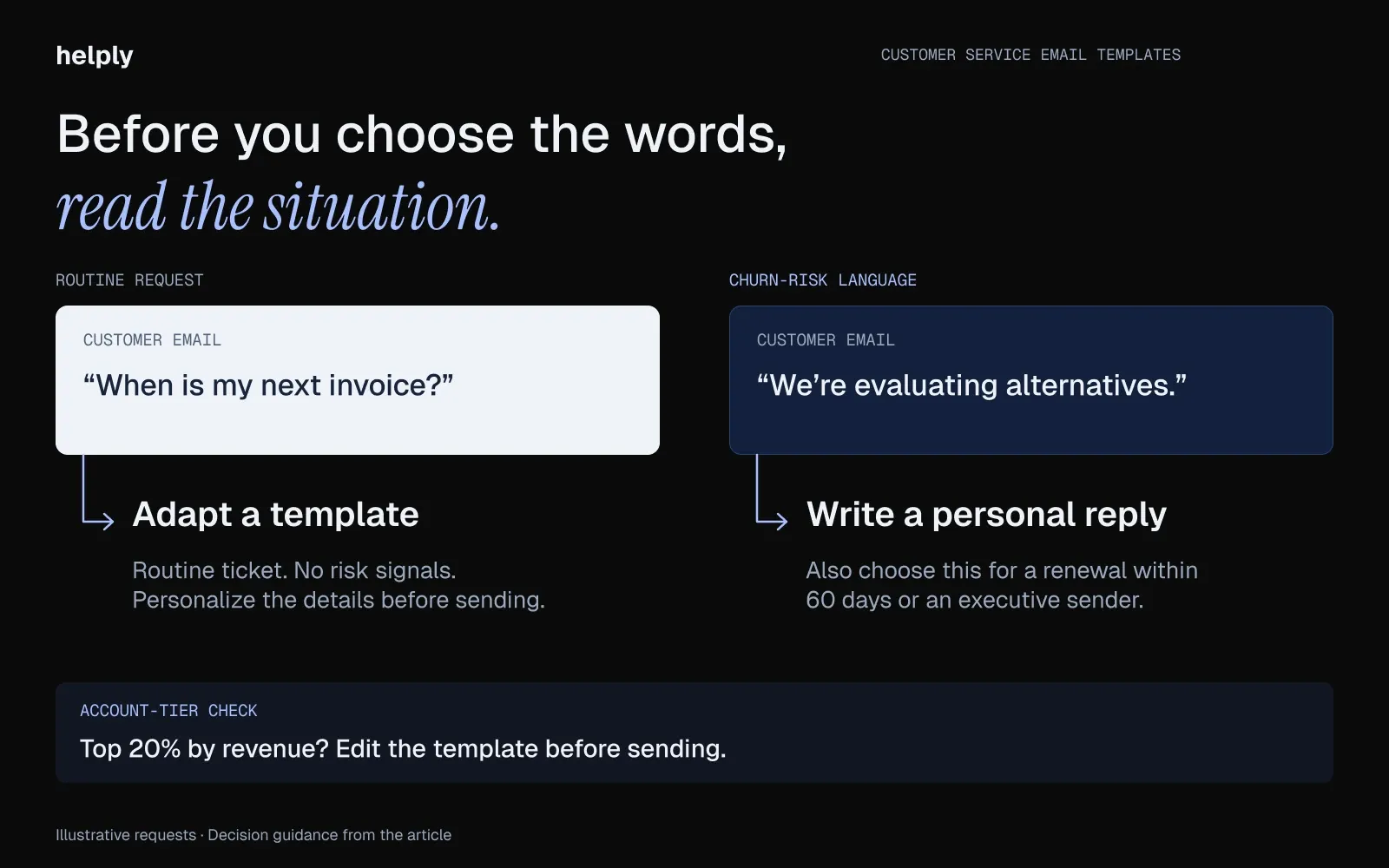
Use a customer support email template when:
- The request is routine and high-volume. Password resets, plan questions, billing date confirmations.
- You need to acknowledge receipt before a full investigation. The customer needs to know you saw the email, even if you can't resolve yet.
- Multiple agents will reply to similar tickets this week and you need consistency across the team.
- The customer is in the bottom 80% of accounts by ARR and the ticket carries no churn-risk language.
Write from scratch when:
- The ticket contains churn-risk language: "frustrated," "considering," "evaluating alternatives," "this isn't working."
- The renewal is within 60 days. Renewal-proximate tickets are too valuable to template.
- The sender is a C-level contact or an executive sponsor on the account.
The cleanest way to apply this rule is a tag on the template itself. Every entry in your help-desk macro library should carry an ARR ceiling. Past that ceiling, the agent edits the template before sending.
20 Customer Service Email Templates by Situation
First Response Templates
1. Acknowledgment Auto-Reply
When to use: A customer emailed support and needs to know you saw it. Give a specific response time, such as four business hours. Give them a real SLA, not a vague "soon."
Account-context note: For accounts above $50k ARR, route the auto-reply to mention their CSM by name. Generic auto-replies feel impersonal at the top of your book.
Subject line: We've got it, {{first_name}}. You'll hear from us within four business hours.
Body:
Hi {{first_name}},
Thanks for writing in. We've got your message and you're in the queue.
Standard SLA on tickets like this is four business hours. If it's urgent, reply to this email with "urgent" in the first line and we'll re-prioritize.
If you'd like to check the status, here's your ticket: {{ticket_link}}.
Talk soon, The {{company}} Support Team
Helply note: Once a rep picks up the ticket, the Assist Agent can search the customer's history and account context. In a first reply to your biggest customer, the rep can then name their CSM.
2. Sales-to-CS Handoff
When to use: A deal has closed. Introduce the new CS owner before the customer wonders who to email.
Account-context note: Send within 24 hours of close. If the account is $30k+ ARR, the CSM should send their own follow-up within 48 hours of this handoff.
Subject line: Welcome to {{company}}. Meet your CS contact.
Body:
Hi {{first_name}},
First, thank you for trusting us. I'm handing you off to {{csm_name}}, who'll be your CS contact going forward.
{{csm_name}} has worked with teams in {{customer_segment}} for the last {{tenure}} years. They'll reach out within 48 hours to schedule a kickoff.
If anything comes up before then, reply to this thread.
Best, {{ae_name}}
3. Out-of-Hours Response
When to use: A customer emails outside business hours and you need to set expectations without sounding like a robot.
Account-context note: If the message contains "urgent," "down," or "outage," skip the templated reply and page the on-call engineer. Auto-replies don't catch P1s.
Subject line: We're back online at 9am ET. Your message is in the queue.
Body:
Hi {{first_name}},
Thanks for writing in. We're currently outside business hours and our team is back at 9am ET tomorrow ({{day}}).
We've logged your message, and it's at the top of the queue. From 9am, expect a reply within two business hours and a resolution within four.
If this is a production outage, reply with "URGENT" to page our on-call team.
Talk soon, The {{company}} Support Team
Issue Resolution Templates
4. Technical Issue: Diagnosis Request
When to use: A customer reported a technical issue, and you need structured details before you can triage.
Account-context note: If the reporter is on the engineering or DevOps team at a $50k+ account, skip the templated questions. Ask them what they'd want to know if they were on your side.
Subject line: Looking into this. A few questions before we dig in.
Body:
Hi {{first_name}},
Thanks for flagging this. So we can get to the root cause faster, could you send:
- Steps to reproduce (what you clicked, in order)
- The exact error message, or a screenshot if there isn't one
- Browser and version
- Approximate time the issue started, in your timezone
Once those are in, I'll have an update for you within four business hours.
Thanks, {{agent_name}}
Helply note: The Assist Agent can search the customer's history, your knowledge base and connected Tools before it drafts. The rep can then skip any question the customer answered in an earlier ticket.
5. Bug Report: Confirmed and Triaged
When to use: You've confirmed the bug, you have a workaround, and you can share an ETA.
Account-context note: For accounts in your top 20% by ARR, put the agent's name and Slack handle in the signature alongside the team alias.
Subject line: Confirmed. We have a workaround and an ETA.
Body:
Hi {{first_name}},
Confirmed: the bug is in our code, so you don't need to change anything in your setup. Engineering is on it.
Workaround while we ship the fix: {{workaround_steps}}
ETA on the permanent fix: {{eta}}. I'll send a status update by {{update_date}}, even if there's no change.
Sorry for the friction. Thanks for the thorough report.
{{agent_name}}
6. Account Access / Login Issue
When to use: A customer can't log in and you need to walk through the reset securely.
Account-context note: If the request is coming from an email domain that doesn't match the account's verified domain, do not template the reset. Escalate to a human review.
Subject line: Login fix. Try this first.
Body:
Hi {{first_name}},
Let's get you back in. Try this first:
- Reset your password from {{reset_link}}
- Clear cookies for {{product_url}} (your password manager will save the new one)
- Try again in an incognito window if it still fails
If you're still locked out after that, reply here and I'll escalate to our auth team. For security reasons we'll need to verify your identity through your account admin.
{{agent_name}}
7. Integration Failure
When to use: A customer's integration with Salesforce, HubSpot, Stripe, Gong, or another named tool has stopped working.
Account-context note: Integration failures on revenue-touching tools (Salesforce, Stripe) need same-day resolution targets, regardless of standard SLA. Adjust the response if the integration is one of those.
Subject line: {{integration_name}} sync. Diagnosing now.
Body:
Hi {{first_name}},
Looking at your {{integration_name}} connection now. A few things would speed this up:
- When did you last see successful syncs?
- Have credentials or scopes changed on the {{integration_name}} side recently?
- Are you seeing errors in the integration logs at {{logs_link}}?
If the sync is blocking a revenue workflow, flag it and I'll move it to the front of the queue.
{{agent_name}}
8. Workaround and Issue-Resolved Follow-Up
When to use: A feature is broken or being rebuilt, and you can keep the customer moving in the meantime.
Account-context note: Customers who hit this workaround multiple times in a month should get a heads-up call from their CSM. The same workaround twice is acceptable. Three times is a churn signal.
Subject line: Quick workaround while we ship the fix.
Body:
Hi {{first_name}},
This workaround should hold you over: {{workaround_steps}}
The permanent fix is in our pipeline for {{eta}}. I'll let you know the moment it ships.
One favor: if you hit this again before the fix lands, reply to this thread instead of opening a new ticket. It keeps the context with me.
{{agent_name}}
Issue-resolved follow-up: Send this one when the fix goes live. For other check-ins, use these customer follow-up email templates.
Account-context note: If the customer hit this bug three or more times, have the CSM send it and offer a short call.
Subject line: Resolved: {{issue_short_name}} works again.
Body:
Hi {{first_name}},
The fix for {{issue}} went live on {{date}}. The cause was {{root_cause}}. You can drop the workaround and go back to {{normal_steps}}.
Thanks for putting up with the workaround. Could you try the fix once and reply to confirm it works for your team? If I don't hear back by {{close_date}}, I'll close this ticket, and you can reopen it with a reply.
{{agent_name}}
Difficult Conversations
9. Refund Request: Approved
When to use: You're approving the refund. Don't over-apologize. Move fast.
Account-context note: For an account over $20k ARR, your agent writes the refund reply from scratch.
Subject line: Your {{amount}} refund is on its way.
Body:
Hi {{first_name}},
We've processed your refund of {{amount}}. You'll see it in your account within {{business_days}} business days, depending on your bank.
No action needed on your side. If it hasn't appeared after that window, reply to this thread.
Thanks for giving us a try.
{{agent_name}}
10. Refund Request: Declined (Graceful)
When to use: You can't approve the refund, but you can offer something concrete instead.
Account-context note: Pair this with a 15-minute check-in call. A declined refund without any human interaction is the moment a frustrated customer starts looking elsewhere.
Subject line: About the refund, and what I can offer instead.
Body:
Hi {{first_name}},
I'm not able to approve the full refund. Our policy is {{policy_summary}}, and your account doesn't fit the criteria.
Instead, I can offer {{alternative_offer}}.
I know that's not the answer you wanted. If you want to talk it through in 15 minutes, here's my calendar: {{calendar_link}}.
{{agent_name}}
11. Angry Customer: Empathy and De-Escalation
When to use: The customer is upset, so de-escalate first and solve second. Name the problem and how it hurt them before any policy, then give one fix and a time for your next update. For calls and chat, use these steps for angry customers.
Account-context note: Acknowledge the issue without making excuses. Loop in the customer's CSM in BCC. They should know about this before the next renewal conversation.
Subject line: I'm taking this on personally.
Body:
Hi {{first_name}},
Thank you for writing. You're right to be frustrated. We fell short on {{issue}}, and we hold ourselves to a higher standard.
I'm making this my personal priority. Specifically: {{next_step}}.
I'll have a full update for you by {{date_time}}, and I'll stay on this until we've fixed it. If you'd rather talk it through, here's my calendar: {{calendar_link}}.
{{agent_name}}
Helply note: If a customer writes in angry, the Churn Agent can flag the frustration and churn risk. It can alert the customer's CSM before the next renewal conversation.
Retention and Revenue Signals
These five templates cover the conversations where a renewal or an expansion is on the line.
12. Churn-Risk Save (Cancellation Request)
When to use: A customer asked to cancel and you want one shot at understanding why before they go.
Account-context note: Don't try to talk them out of it. Ask one clarifying question. If the account is over $10k ARR and the reason is product fit, the CSM should reach out within 24 hours.
Subject line: Got your cancellation. One quick question.
Body:
Hi {{first_name}},
Your cancellation is in. I'll process it on {{cancellation_date}} as requested, no action needed on your side.
One question, if you have a minute: which tool are you moving to, or what would have made {{product}} a better fit?
Honest answers help us. If you'd rather not say, no worries. Your cancellation is already in motion.
Thanks for the time you spent with us.
{{agent_name}}
Helply note: The Churn Agent can spot repeated problems, negative sentiment and unresolved issues across a customer's history. Your team can then see the risk build in earlier tickets, before the customer writes to cancel.
13. Renewal Proximity Check-in (30 Days Out)
When to use: An account renews in 30 days and you want the CSM to surface value before the procurement conversation starts.
Account-context note: The CSM should send this one and name a value moment from the account's last quarter.
Subject line: 30 days to renewal. A quick recap.
Body:
Hi {{first_name}},
Renewal's on {{renewal_date}}, about 30 days out. Before that conversation kicks off, a quick recap of the last quarter:
- {{usage_metric}}
- {{outcome_metric}}
- {{specific_value_moment}}
Anything coming up on your side I should know about before we talk renewal? Procurement timelines, team changes, budget cycles. Happy to work around them.
{{csm_name}}
14. Upsell Follow-up (After Plan-Limit Mention)
When to use: A customer mentioned hitting a plan limit, growing their team, or wanting a feature on a higher tier.
Account-context note: Have the CSM send this one. Bring in the AE only after the customer agrees to a deeper conversation.
Subject line: About what you mentioned on {{topic}}.
Body:
Hi {{first_name}},
You mentioned {{plan_limit_or_feature}} in your last ticket. Worth a 20-minute conversation?
If your team is outgrowing {{current_plan}}, we may have a cleaner setup than buying around the limit one seat at a time. I'd rather show you what that looks like than guess.
My calendar is open if you want to grab a slot: {{calendar_link}}. Or reply here and I'll work around your hours.
{{csm_name}}
Helply note: Questions about plans, limits and additional users are buying signals the Revenue Agent can detect. It can alert the CSM and update your CRM.
15. Competitor Mention Reply
When to use: A customer mentioned evaluating Zendesk, Intercom, Freshdesk, or another tool.
Account-context note: Do not panic. Do not pitch. Ask one diagnostic question and route the conversation to the AE same-day.
Subject line: About what you mentioned.
Body:
Hi {{first_name}},
Saw your note about evaluating {{competitor}}. It's fair to look around. Most of our best customers did before they came over.
One question that helps us either way: what would make {{product}} the obvious choice for your team next quarter? Be as blunt as you like.
If you want to talk it through with {{ae_name}}, here's a slot: {{calendar_link}}.
{{agent_name}}
Helply note: The Insights Agent groups similar feedback across customers. If more customers than usual name the same competitor, it can surface that rise as one theme.
16. Feature Request Triage (On Roadmap / Not on Roadmap)
When to use: A customer asked for a feature. Be honest about whether it's coming.
Account-context note: Feature requests from customers above $50k ARR carry more weight in the roadmap. Tag the request with the account's ARR before it goes to Product.
Subject line: About your {{feature}} request.
On-roadmap body:
Hi {{first_name}},
Good news: {{feature}} is on our roadmap for {{quarter}}. I've added your account to the early-access list. You'll hear from us before the public release.
If there are specific use cases you're hoping it covers, send them my way and I'll route to Product directly.
{{agent_name}}
Off-roadmap body:
Hi {{first_name}},
Being straight with you: {{feature}} isn't on the roadmap for the next two quarters. I've logged the request with your account name attached. Feature requests from accounts your size carry weight in our planning.
In the meantime, the closest workaround is {{workaround}}. It has gaps, but it's the best option until we revisit the roadmap.
{{agent_name}}
Helply note: Inside tickets, the Feature Request Agent can find product requests and connect similar ones. It links each request to the accounts asking for it, so your product team can weigh demand by account.
Onboarding and Lifecycle
17. Welcome / First-Week Guidance
When to use: A new customer signed up. Point them to the two resources that save the most time in week one.
Account-context note: For accounts over $20k ARR, the CSM sends this email. An enterprise customer who gets a generic welcome from support will see a missed handoff.
Subject line: Welcome to {{product}}. Start with these two setup steps.
Body:
Hi {{first_name}},
Welcome aboard. Two things that will save you the most time in your first week:
- {{key_resource_1}}. The setup walkthrough most teams skip and then come back to.
- {{key_resource_2}}. Connect {{primary_integration}} so your data is in place from day one.
If you hit a wall, reply to this email. It comes straight to me.
{{csm_name_or_agent_name}}
18. Activation Nudge (Day 14)
When to use: A new customer hasn't crossed an activation threshold. Examples: set up their first integration, invited a teammate, sent their first ticket.
Account-context note: If the account is over $30k ARR and hasn't activated by day 14, have the CSM call instead.
Subject line: One step we noticed you haven't taken yet.
Body:
Hi {{first_name}},
Two weeks in. You're {{progress_metric}}, which is on track.
One step that usually shows up around now: {{specific_activation_step}}. Most teams who skip it end up back at it in month two, so flagging it early.
If something about it doesn't fit your setup, reply here and tell me what's in the way. I'd rather find a workaround than nudge again.
{{agent_name}}
19. NPS / Review Request
When to use: A customer had a positive interaction or hit a value moment. Ask them for a single score from 0 to 10.
Account-context note: Do not send NPS surveys to accounts within 30 days of renewal. A customer near renewal may see a review request as transactional.
Subject line: Quick one. On a scale of 0 to 10.
Body:
Hi {{first_name}},
Reply with one number: on a scale of 0 to 10, how likely are you to recommend {{product}} to another {{role}}?
Add a one-line "why" if you have a moment. The number on its own is fine.
Thanks, {{agent_name}}
20. Sunset Notification (Deprecated Feature)
When to use: You're retiring a feature and need to give customers a firm timeline and a migration path.
Account-context note: If an account uses the feature more than five times a week, the CSM should call within seven days of this email. Sunset notifications without a human conversation are churn risks.
Subject line: We're retiring {{feature}} on {{date}}. Your migration path is inside.
Body:
Hi {{first_name}},
Wanted to give you a real heads-up: we're retiring {{feature}} on {{date}}, about {{weeks_notice}} weeks out.
The reason: {{honest_reason}}.
Your migration path: {{replacement_feature_or_workflow}}, with a step-by-step at {{migration_guide_link}}.
If your team relies on {{feature}}, reply here. Your CSM will walk you through the move on a call before the deadline.
{{agent_name}}
How to Personalize Customer Service Response Templates
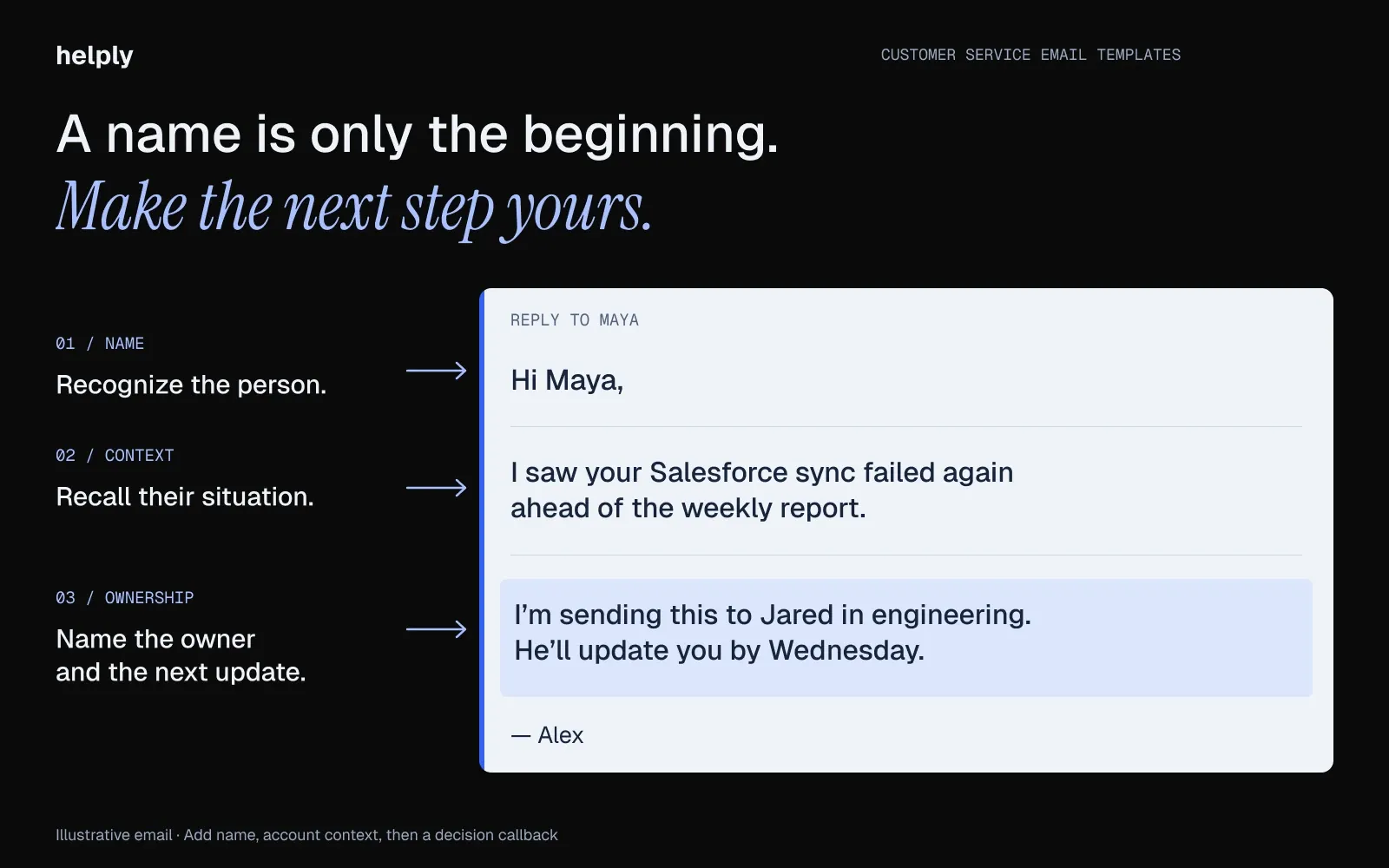
Three personalization layers. Add them in order. Stop when the reply passes the read-aloud test.
Layer 1: Name and greeting variant. Use the customer's first name, and rotate greetings such as Hi, Hey and Hello. A customer who emails twice in a week then sees a different opener.
Layer 2: Context callback. Reference something specific from this customer's account, such as their integration, last month's launch or a ticket from March.
"Hi Sarah, thanks for writing in" could go to anyone. With "Hi Sarah, saw you set up the Salesforce sync last week, hope it's holding up," you show Sarah you read the account.
Layer 3: Decision callback. Name the next step as your own decision, with an owner and a day. A line like "Our team will reach back out shortly" reads as automated.
Write this instead: "I'm sending this to Jared on our infra team. He'll come back to you by Wednesday."
The read-aloud test: Read the reply out loud, in your normal voice, at normal speed. If it sounds like a Slack message you'd send a teammate, send it. If it sounds like a press release, rewrite it.
Below your top 20% of accounts by ARR, the three layers are enough. Above that line, your agent edits the template before sending.
How to Know Your Customer Service Email Templates Are Working
Templates only earn their place if they move the metrics that matter. Four apply to every support team. The fifth applies if your customers renew.
1. First Response Time (FRT). Set a target for routine tickets and a shorter one for urgent ones. Watch it for two weeks after rolling out new templates. If FRT doesn't drop, your agents either skip the templates or find them too long to send.
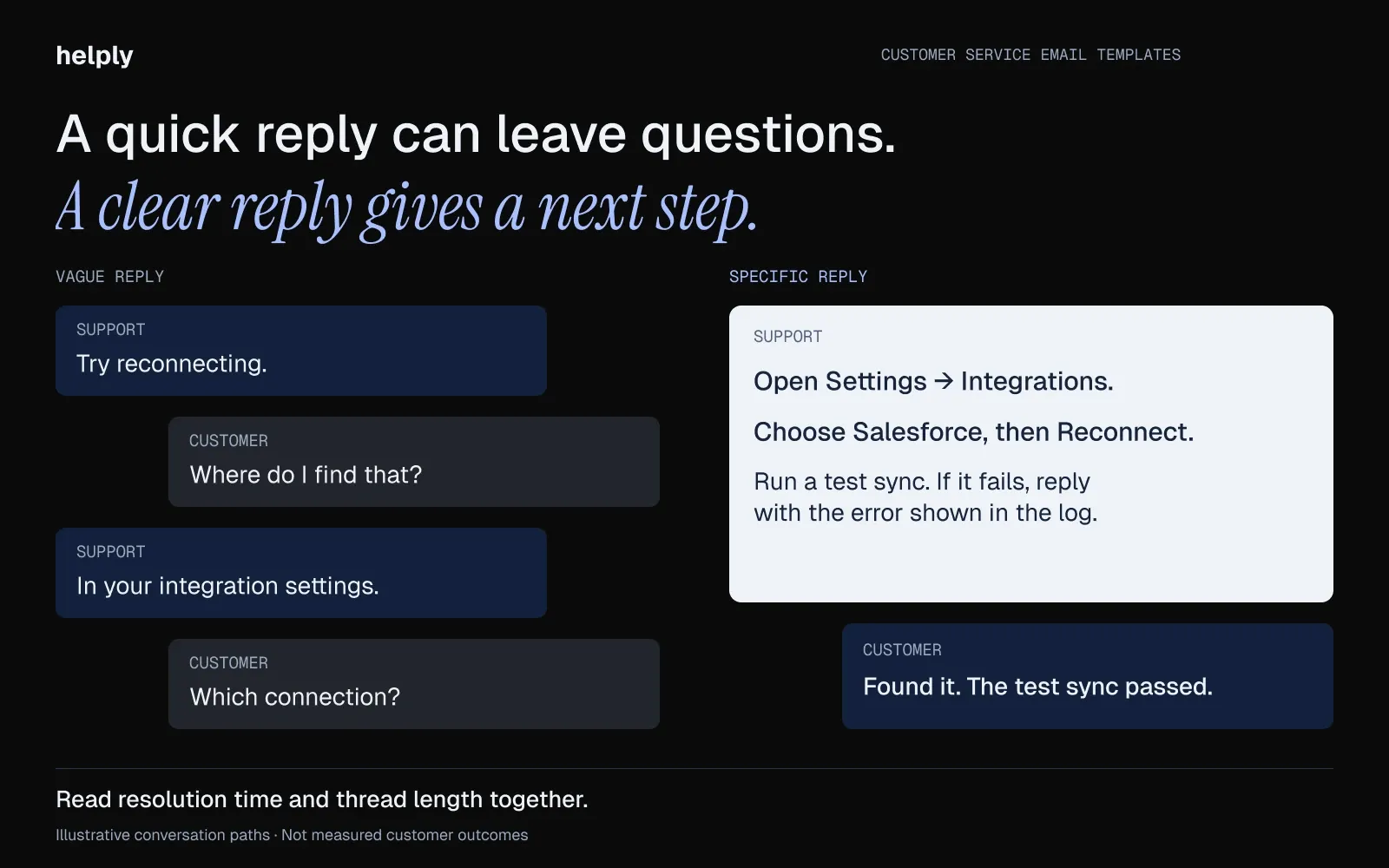
2. Resolution time and thread length. Track them together. If resolution time drops while threads grow, customers are replying to ask what a vague template meant. Rewrite those templates with specifics.
3. Follow-up response rate. Track how many customers reply to a follow-up template, such as a "checking in on your previous ticket" email. A falling rate means customers find the follow-up irrelevant or automated and learn to ignore your emails.
4. SLA compliance rate. If the rate slips, check routing and staffing first, because templates can hide a staffing gap for weeks.
5. Signals routed. Count how many churn-risk and upgrade conversations reached the CSM or account owner. Without that count, your team saves time on templates and misses the accounts about to churn.
Helply's Churn Agent and Revenue Agent can flag those signals and alert the right teammate.
If nobody tracks that, your templates are saving time and losing renewals. Helply's background agents catch these signals in every conversation and alert the owner.
Send These Templates as Macros, or Let AI Fit Each One to the Account
Most help desks include saved replies on every plan, so a team under 200 tickets a month can run these templates there. Some vendors charge extra per agent for AI drafting, such as $29 a month for Freddy AI Copilot on Freshdesk Pro, billed annually. Helply fits teams that can't risk a canned reply on their biggest accounts.
For a top-20% account, your rep can start from a draft with the customer's plan, billing and past tickets in it. The Assist Agent can pull account context from a connected Salesforce or HubSpot and billing details from Stripe. If a customer sounds frustrated or at risk, the Churn Agent can alert the CSM ahead of the renewal call.
An AI draft can sound more canned than your template. With the Assist Agent, your rep can review each draft before the customer sees it. If a draft is off, the team can give feedback in Training to improve how the AI handles similar tickets.
At Gatekeeper Press, Helply's Support Agent answered authors on its own. About 120 of the 1,500-plus monthly author conversations escalated to a person. CEO and founder Rob Price says: "Many messages that used to need a human now go to Helply, and the results are at least as good as what we'd write ourselves."
Helply has no per-user fees, and every plan has unlimited users. As of October 2026, pricing starts at $49 a month for 500 credits, enough for up to 500 thread-only drafts. Answering a question such as "Why were they charged $412 this month?" uses 4 credits.
Turn your five most-sent templates into Skills and their account-context notes into Guidelines. Set when the AI should stop and involve a person, then connect one mailbox for a week. Your reps can send, edit or reject each draft.
Frequently asked questions
Put the issue in the subject line. Greet the customer by name, restate the issue in their words with one detail from their account, and give the answer. End with the next step, a time and your name, in an email short enough to read on a phone.
Start with these five: an acknowledgment, a technical issue diagnosis request, an issue-resolved follow-up, a refund reply and an angry-customer reply. Add a churn save if you sell subscriptions. Each needs a subject line, a body and a note on when to edit it for the account.
Confirm you saw the problem, then ask for steps to reproduce, the exact error, the browser and the start time. Promise an update by a set time. Once you confirm the bug, share a workaround and an ETA, then send an issue-resolved email when the fix goes live.
The 3 email rule is an email etiquette guideline: after three messages on one issue, stop typing and talk. Author Phil Simon set it out in a 2015 column that the World Economic Forum republished. For support, offer a call or a screen share once a ticket passes three emails without a fix.
Acknowledge the specific problem and the frustration it caused in the first line, and own it without excuses. Say what you're doing about it and when the customer will hear from you next. If the customer is frustrated or the account is large, write the reply yourself instead of sending a template.
Write from scratch when a message mentions "frustrated" or "evaluating alternatives," or the customer renews within 60 days. Edit the template before sending to any account in your top 20% by revenue. Use the 10-second decision rule on the rest: would this customer still feel heard if a colleague read your reply aloud?
Add three layers in order. Use the customer's name with a varied greeting, then reference something from their account, such as a recent integration. Close with a named next step and a time, such as "Jared on our infra team will reply by Wednesday."
Tell the customer who owns the issue next, by name and role, and when that person will reply. Summarize what you've tried so the new owner doesn't ask the customer to start over. Stay on the thread until the new owner confirms the next step.
Yes, AI can draft a reply from the customer's history and your policies, and you choose whether a person reviews it first. Helply is an AI-native customer support platform whose Assist Agent can draft from the thread, the account's context and your Guidelines. Its Support Agent can also resolve routine issues end to end and hand off to a person when it can't.
Helply pricing starts at $49 a month for 500 credits, with unlimited users on every plan. Drafting a reply from the thread alone costs 1 credit, and a lookup in one connected system, such as Stripe, costs 4. A draft your team discards before a customer sees it costs nothing, and annual billing saves 15%.
Yes. You get 1,000 credits over a 14-day free trial, and Helply asks for no card. Turn the account-context notes from your most-used templates into Guidelines, connect one mailbox and compare the drafts with what your reps send today.
About the author

Joan Kiara
SEO Writer


