Key Takeaways:
- Check in 24 to 48 hours after resolution to confirm the fix held and catch any workaround that stopped working.
- Tie the timing to the scenario so it never depends on memory: outages and negative ratings within 4 hours, renewals 60 days out.
- A failed fix you never check on can cost you the customer. In Zendesk's CX Trends 2025, 63% of consumers would switch to a competitor after one bad experience.
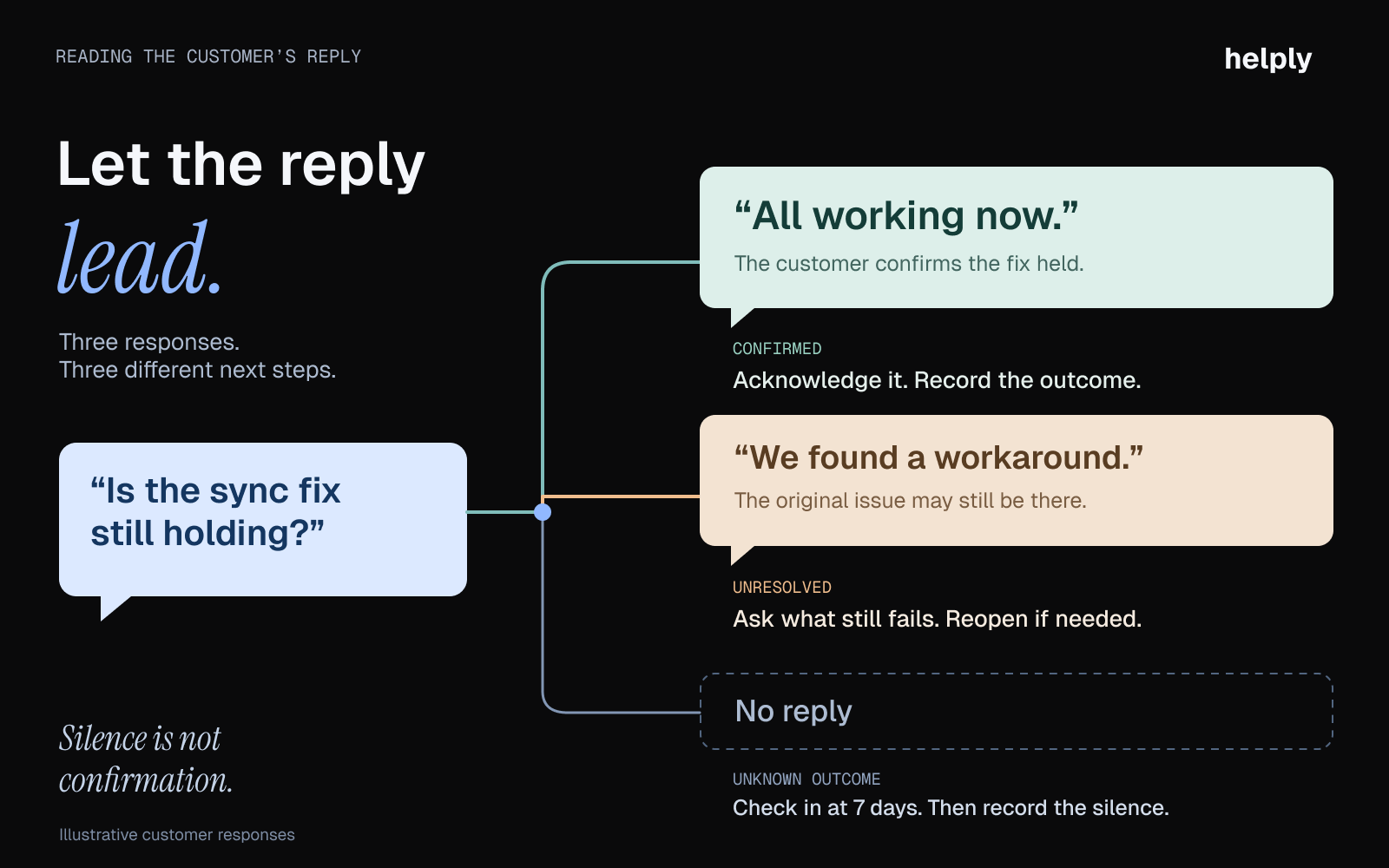
- Read each reply for signals: "it's okay for now" means frustration. Log any silence after a fix in the customer's record.
- Follow up on the channel where the conversation started, whether that is email, chat, SMS, or WhatsApp.
You resolved the ticket and moved on. Three weeks later, the customer canceled, and your team couldn't say why.
The queue never stops, so reps close one conversation and open the next without looping back. The customer who got a workaround last Tuesday is living with it. The one whose order arrived damaged had to reopen the ticket themselves.
The customer who wrote in four times in two weeks was comparing alternatives before anyone noticed. Your rep could have reached each of them with a two-line follow-up.
To follow up with customers in each case, time the message to the scenario and read the reply for signals.
What Is a Customer Follow-Up in Customer Service?
A customer follow-up is a message a business sends after a support conversation, purchase, or refund to confirm the outcome. Each reply is a reading on how that customer feels about you.
Sales reps follow up to move a prospect toward a purchase. In customer service, you ask an existing customer how a fix, order, or refund turned out and what could be improved.
Why Customer Follow-Ups Matter
You follow up to keep the customers you have and get their feedback to the people who can act on it.
Follow-Ups Prevent Silent Churn
Harvard Business Review reported that Bell Canada cut customer churn by 6% by heading off each customer's likely next issue. For complex cases, Bell sent follow-up emails.
A quiet customer adapts to a workaround that half works, then cancels at renewal or stops ordering without a complaint.
A follow-up costs your rep a few minutes. Helply's Churn Agent reads each customer's whole support history for frustration, repeat problems and shifts in sentiment, then alerts the right teammate.
Every Follow-Up Reply Is a Signal
A reply to a follow-up carries more detail than any survey score. Customers say things in a thread that they never put in a rating.
Churn risk sounds like "we've been looking at how other tools handle this" or "can I pause my subscription instead?" Upgrade interest sounds like "we wish we could also do X"; a feature request reads "it would be great if the API could handle Z."
Route each signal to the person who can act on it that day. Your rep can miss an upgrade hint inside a thank-you reply while closing the ticket. Helply's Revenue Agent monitors conversations for upgrade intent and buying signals, then alerts sales or success, or updates your CRM.
Feedback Loops Improve the Product
In Microsoft's 2019 Global State of Customer Service survey, 89% of people said companies should give them a chance to share feedback. A follow-up is the natural place to ask.
Weigh feedback by who sends it and how many times it comes up. Your product team learns more from one customer's five tickets about the same gap than from a single passing comment.
Helply's Feature Request Agent finds requests and workarounds in conversations, including follow-up replies, and links each one to the customers behind it. It groups requests worded differently, so the product sees how many customers share each gap.
When Should You Follow Up with a Customer? A Timing Framework
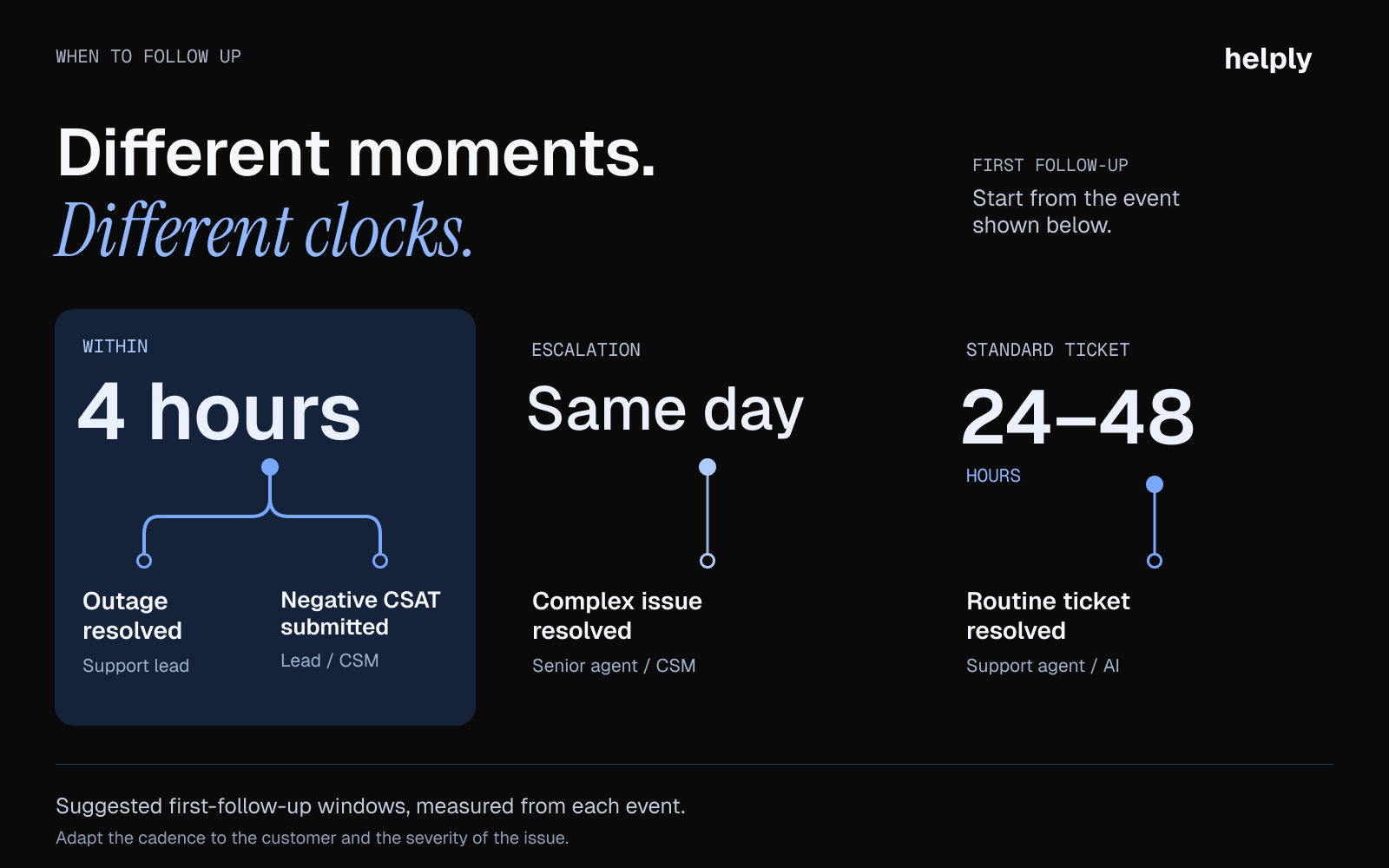
Send the first follow-up 24 to 48 hours after resolving a support ticket, and the same day after an escalation. After an outage or a negative survey score, follow up within 4 hours. Touch base with your highest-value customers quarterly and 60 days before a contract renewal.
Teams that leave follow-up timing to each rep get uneven results. Some customers hear back within hours, and others never do.
Fix that with a timing table by scenario. Give each type of conversation a follow-up window, a channel, and an owner.
| Scenario | First Follow-Up | Second Follow-Up | Channel | Owner |
|---|---|---|---|---|
| Post-resolution (standard ticket) | 24 to 48 hours after resolution | 7 days after resolution, if no reply | The ticket's channel | Support rep, starting from an AI draft |
| Post-escalation (complex issue) | Same day as resolution | 72 hours | Email plus a call or personal note | Senior rep or account owner |
| Post-outage or incident | Within 4 hours of resolution | 1 week (incident review) | Email to every affected customer | Support lead |
| After an order problem, return or refund | 24 to 48 hours after delivery, or the day the refund window closes | 7 days after delivery or refund, if no reply | Email, SMS or chat | Support rep |
| After an AI agent resolves or acts | 24 hours after the action | 7 days after the action, if no reply | The conversation's channel | Support rep |
| Proactive check-in (no ticket) | Quarterly for your highest-value customers | As needed, based on health signals | Email or call | Account owner |
| Onboarding follow-up | Day 1, Day 7, Day 30 | Triggered by usage milestones | Email, plus a call at Day 30 | Onboarding specialist |
| Pre-renewal touchpoint | 60 days before renewal | 30 days, then 7 days | Email, plus a call at 30 days | Account owner |
| After a negative CSAT or survey score | Within 4 hours of the rating | 48 hours, with a resolution update | Email or call | Support lead |
| After a feature request | 48 hours (acknowledge) | When shipped or roadmapped | Product or account owner |
A few rules of thumb:
- If the conversation involved billing or money, follow up the same day.
- For your highest-value customers, follow up by phone and email.
- If a customer opens 3 or more tickets in 30 days, bring in the account owner, regardless of the resolution status.
- Tell the customer at resolution when you will check back, and keep that promise.
- Send one follow-up at a time. Hold the CSAT survey and any marketing emails until the customer responds or the window expires.
- Never auto-close a ticket without a follow-up. Send the "anything else?" message first, so the customer gets one last chance to raise a problem.
How to Follow Up with Customers by Scenario
Name the issue, confirm the outcome, and give the customer a one-reply way to raise any unresolved issues. The wording, the sender, and the signals to watch change depending on the scenario.
After Resolving a Support Ticket
Your team sends this customer service follow-up more than any other. Confirm the fix worked and the customer is happy with it.
Reference the specific issue by name instead of a generic "how did we do?" Say: "I wanted to check that the Salesforce sync issue we resolved on Tuesday is working as expected." Naming it shows you remember the problem.
Watch the reply. "It's okay for now" or "we found a workaround ourselves" is a yellow flag. Log silence in the customer's record as a signal.
Send the follow-up on the original thread, so a reply reopens the conversation with its history attached.
After a Complex Escalation
Give a ticket more than the standard follow-up if it needs several reps, an engineering handoff, or more than 48 hours. The customer felt the friction, so acknowledge it.
The senior rep or account owner should send this one, rather than the rep who closed the ticket. Acknowledge that the fix took longer than it should have, explain what changed, and give a direct contact for next time.
After a Service Outage or Incident
Send outage follow-ups to every affected customer, including those who never opened a ticket. Many customers notice the downtime, form an opinion, and never write in.
Send it from a named person, such as the head of support or the CTO, instead of a no-reply address. Cover what happened, what fixed it, and what will prevent a repeat. Write in the first person and take responsibility for the disruption.
After an Order Problem, Return or Refund
Time this follow-up to the outcome: 24 to 48 hours after the replacement arrives, or the day the refund window you promised ends. Ask one question, such as whether the refund has reached the account or whether the new item has arrived in working order.
If the money has not landed, skip another apology and send the payment reference and a date for the next check. With Helply's Stripe integration, your rep sees the customer's invoices and payments beside the conversation.
After an AI Agent Resolves or Acts
Some conversations end with an AI agent taking the action, such as issuing a refund or changing a plan. Follow up a day later to confirm the action landed: the refund cleared, the plan shows the new limit, the login works.
Helply's Support Agent resolves requests end-to-end and takes the supported Actions you enable. Those conversations sit in your rep's inbox, ready for the 24-hour check. If the Support Agent can't resolve something with confidence, it escalates to your rep with the investigation and customer context prepared.
Proactive Check-Ins for High-Value Accounts
Some follow-ups should start without a ticket. For your highest-value customers, schedule a quarterly check-in.
The goal is to surface latent issues and identify room for growth. If they adopted a new feature, ask how it went; if their ticket volume dropped, ask what changed.
Pull context from your CRM, billing, and call notes before you reach out. Helply connects to Salesforce, HubSpot, Stripe and Gong, so your rep sees that context without jumping between systems. For 12 credits, the Assist Agent runs an "Account health before I reply" check.
During Onboarding
Follow up on Day 1 with resources, on Day 7 to check feature adoption, and on Day 30 with a health check. Introduce the account owner at the Day 30 check.
Watch for non-use of key features. A help desk customer without email forwarding by Day 7 is stuck. Offer a walkthrough before they ask.
If customers ask about features that exist, your onboarding material has gaps. Helply's Knowledge Agent finds the questions your knowledge base doesn't answer well, so you can fix the article before the next customer asks.
Before a Renewal
Use the pre-renewal follow-up to fix problems before the customer decides. For an annual plan or contract, start 60 days before the renewal date.
Reference the account's support history and show the value your team delivered: "We resolved 34 of your tickets this year, with a 2.4-hour average response time." Then ask: "Is there anything we should address before your renewal?"
Resolve any open tickets before the renewal conversation starts. Your rep can ask the Assist Agent, "Should I worry about this account before renewal?" for 12 credits.
Follow Up Where the Conversation Started
Use the channel the customer chose. A chat conversation gets a chat follow-up, and an SMS or WhatsApp thread gets a two-line message.
On a messaging channel, try: "Hi [Name], it's [Rep] from [Company]. Is the [issue] we fixed on [day] working as it should? Reply here if not, and I'll reopen it."
Helply brings email, chat, Slack, WhatsApp, and other channels into one inbox, so your rep sends the follow-up in the original thread.
9 Customer Follow-Up Email Templates for Support Teams
Each template maps to a scenario in the timing table. Fill in the bracketed fields and send. For first replies and refund decisions, use our customer service email templates.
Template 1: Post-Resolution Check-In
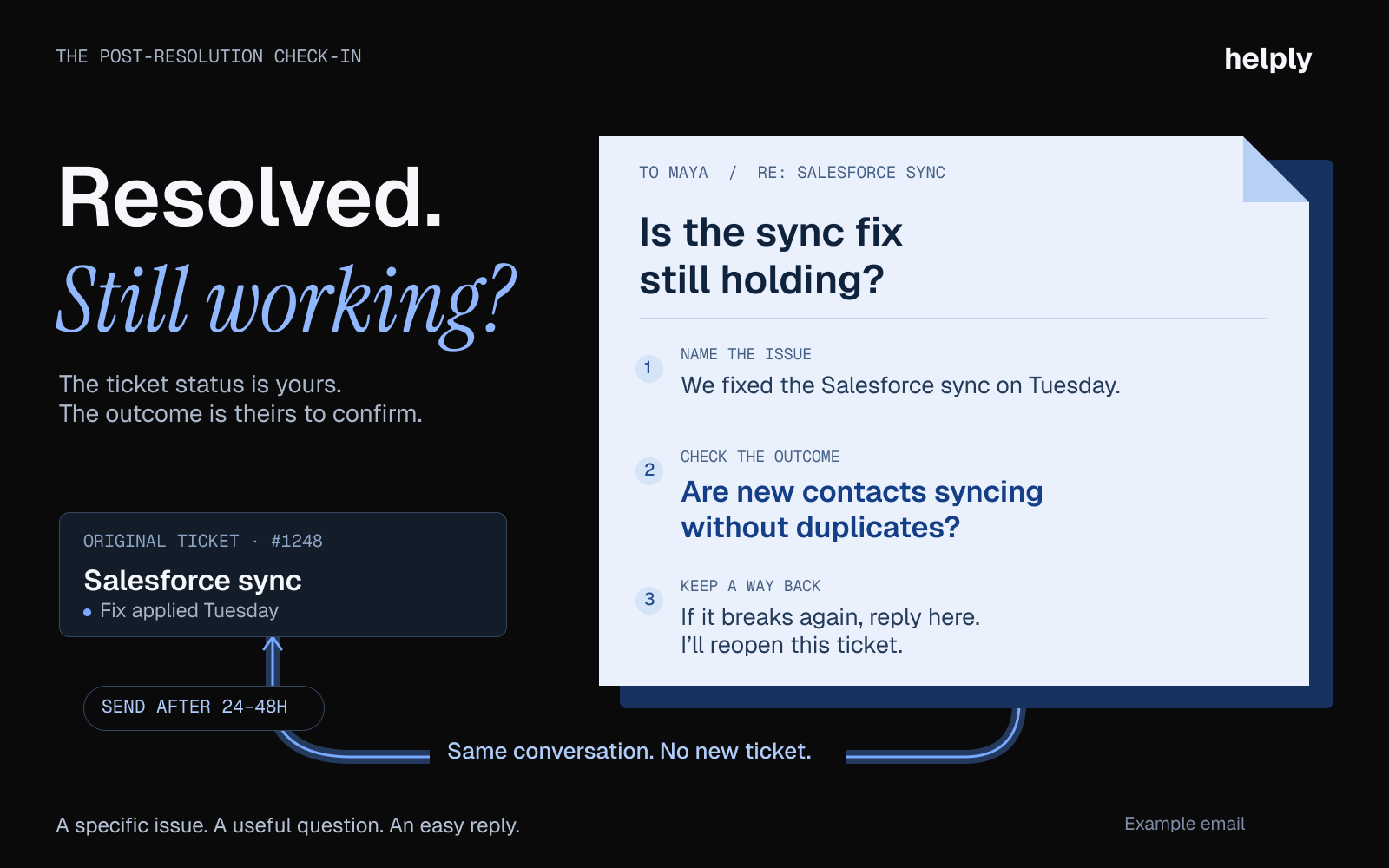
Timing: 24 to 48 hours after resolution
Subject: Quick check: is the [issue name] fix holding?
Hi [First Name],
I wanted to check that the fix for [specific issue] we resolved on [date] is working as expected on your end.
If anything feels off, reply to this email and I'll reopen the ticket. If everything works, you don't need to reply.
Thanks for your patience on this,
[Rep Name]
Template 2: After a Complex Escalation
Subject: Following up on the [issue name] fix
Hi [First Name],
I know the [specific issue] you reported on [date] took longer to fix than it should have, and I'm sorry for the wait. Our engineering team traced the root cause to [brief explanation], and the fix went live today.
If anything similar comes up, you can reach me at [email]. I'll make sure it gets the right attention the same day.
[Your Name]
Template 3: After a Service Outage
Hi [First Name],
Earlier today, [brief description of what happened] affected [specific service or feature] for about [duration]. We resolved it at [time].
The cause: [one-sentence root cause]. To prevent a repeat, we are [one-sentence remediation step].
I take full responsibility for the disruption. If you saw any data inconsistencies or have questions, reply to this email and I'll handle it myself.
[Name, Title]
Template 4: "Anything Else?" Before Auto-Close
Timing: 7 days after resolution, if the customer hasn't replied
Subject: Closing your ticket in 3 business days (unless you need more help)
Hi [First Name],
Is the [issue name] fix working the way it should? I want to make sure you're all set before we close ticket #[number].
If the fix is working, you don't need to do anything, and we'll close the ticket in 3 business days. If you need more help or something new has come up, reply and we'll keep it open.
[Rep Name]
Template 5: Onboarding Follow-Up (Day 7)
Hi [First Name],
You're one week into [Product], so I'm writing to see whether [key setup step] is done and working for your team.
These help at this stage:
- [Core feature 1] for [benefit]
- [Core feature 2] for [benefit]
- [Help doc or video link] if you want a walkthrough
If you haven't set up [key feature] yet, I'm happy to walk you through it. Reply with a time that works.
[Onboarding Specialist Name]
Template 6: Quarterly Account Health Check-In
Subject: Your quarter with [Product]: is it working for your team?
Hi [First Name],
I wanted to touch base on how things are going with [Product]. This quarter we resolved [X] tickets for you, with an average resolution time of [Y hours].
A couple of things I wanted to flag:
- We launched [new feature] in [month], and I think it could help with [specific use case relevant to their account].
- I noticed [observation about their usage]. Would it help to walk through [relevant capability]?
If anything is on your mind, such as a feature request or a frustration, I'd like to hear it.
[Account Owner Name]
Template 7: Pre-Renewal Touchpoint
Hi [First Name],
Your [Product] renewal is on [date]. Before that conversation happens, I want to make sure your team has everything it needs.
A quick snapshot of your account this year:
- tickets resolved [Done]
- [Y] average response time
- [Z] satisfaction score
Is there anything we should address before renewal? Any open issues, feature requests or upcoming changes on your end?
Let me know. I'd rather hear a concern with weeks to spare than at the last minute.
[Account Owner Name]
Template 8: After a Negative CSAT Score
Timing: Within 4 hours of survey submission
Subject: I saw your feedback and want to make this right
Hi [First Name],
I noticed you rated your recent support experience a [score]. I want to understand what went wrong and fix it.
Could you tell me what we could have done differently? I'm reading your answer myself, and I'll tell you what we change as a result.
Template 9: After a Refund or Replacement
Timing: 24 to 48 hours after delivery, or when the refund window closes
Subject: Did your [refund / replacement] arrive?
Hi [First Name],
I'm checking that your [refund of $X / replacement for order #number] arrived as promised on [date].
If it hasn't shown up, reply with what you see and I'll trace it today. If it's there and working, you're all set.
Thanks for bearing with us,
[Rep Name]
How AI Changes Customer Follow-Ups in 2026
Drafted follow-ups. Helply's Assist Agent drafts each follow-up using the ticket, the customer's past conversations, and your Guidelines. Say your rep fixed an API sync for a customer. The draft names that fix, and your rep edits and sends it.
Triggered follow-up work. Helply workflows use signals from conversations to trigger follow-up work, notify teammates, or update customer records.
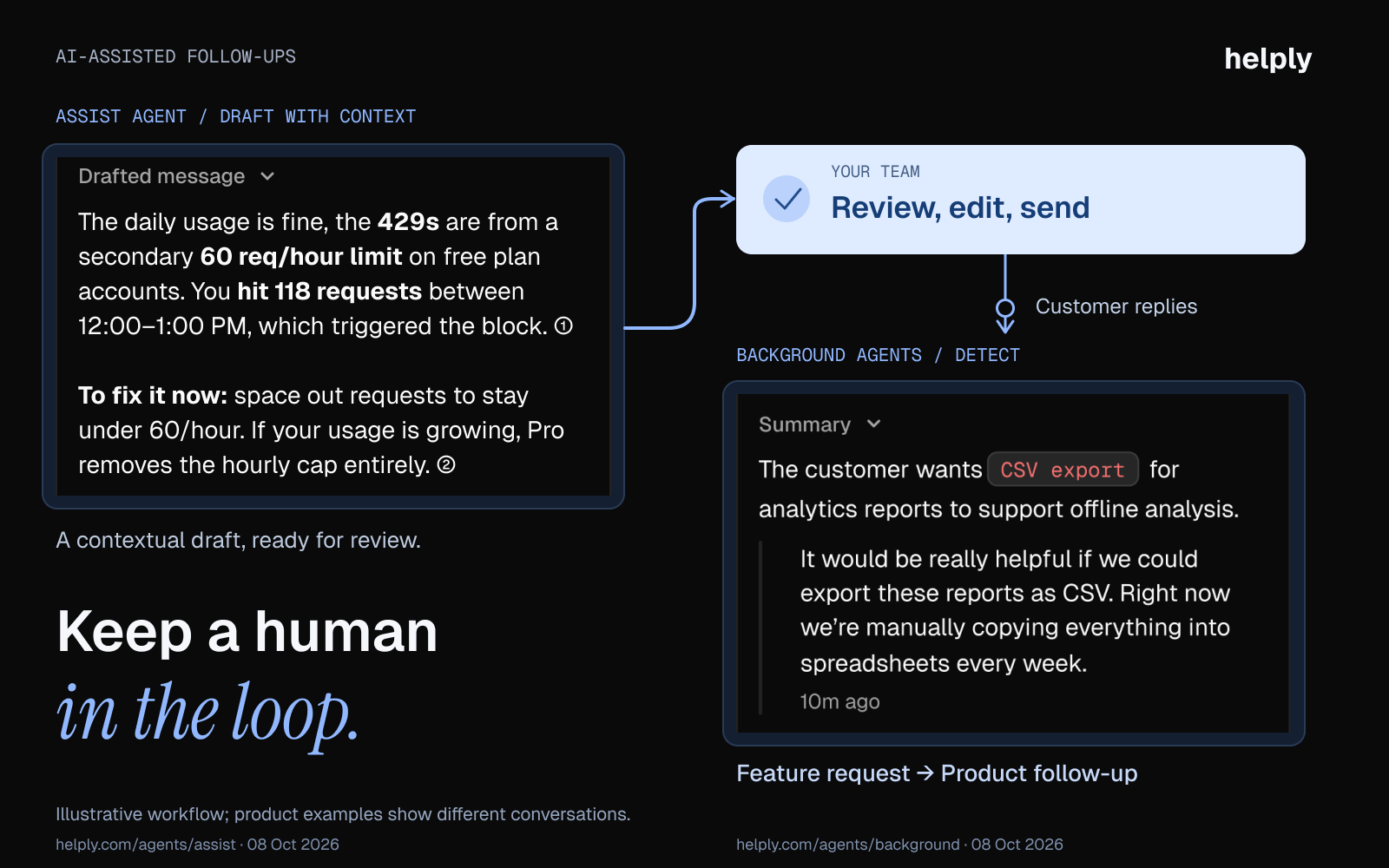
Reading the replies. Helply's Background Agents monitor every conversation. The Churn Agent flags frustration and recurring issues, and the Revenue Agent flags upgrade intent. The Feature Request Agent ties each request to the customers who asked.
Helply's Insights Agent groups similar questions and feedback across customers, so you can spot the problems that keep coming back after a fix.
Every Helply plan includes unlimited users, so the engineer who shipped the fix can join the follow-up thread. The smallest monthly credit block costs $49 for 500 credits. A drafted follow-up costs 1 credit, and asking the Assist Agent, "Is this contact usually this frustrated?" costs 4 credits.
Frequently asked questions
Send a short message 24 to 48 hours after resolution. Name the issue, ask whether the fix held and offer to reopen with one reply. If the customer stays silent, send one reminder 7 days after resolution, then close the ticket.
A good follow-up names the specific issue, asks one question and tells the customer what happens next. Example: "Is the [issue] fix from [date] holding up? If not, reply and I'll reopen the ticket."
Replace "just checking in" with the reason you are writing. Try "I'm writing to confirm the [issue] fix is holding," "Did the replacement arrive in working order?" or "Before we close ticket #[number], is anything left to fix?"
Give one reason for writing, ask one question and stop at two messages per resolved ticket. Make silence an acceptable answer with a line such as "If it's all working, there's no need to reply." Don't stack a survey or marketing email on top of the follow-up.
Twice for a resolved ticket: once 24 to 48 hours after resolution, and again at 7 days if the customer does not reply. A third follow-up on one resolved ticket starts to feel like noise.
The channel the customer used for the original conversation. Add a phone call for your highest-value customers, after an escalation and after a negative survey score. Match the channel to the stakes.
Let AI write the draft and keep a person on the send. On the follow-up date, your rep asks Helply's Assist Agent for a draft from the ticket, then edits it before sending.
Send one more follow-up 7 days after resolution, with a specific question in place of "checking in." If the customer stays silent, close the ticket and log the silence in their record.
Put the issue in the subject line, then name the fix and the date you made it. Ask one question about whether it held, and offer a one-reply path to reopen. Close with a thank-you and, for anything left open, the next step and its date.
A follow-up service is the contact a business makes after a sale or support conversation to confirm the outcome. Typical examples are a check-in after a fix, after a delivery and after a refund.
About the author

Bildad Oyugi
Head of Content
Bildad is a digital marketing expert with over 5 years of experience in copywriting, content marketing, and editing. Outside of work, he enjoys videography and spending time with his family.


