
 Bildad Oyugi ··6 min read

What Do Zendesk AI Agents Do?
Zendesk AI agents talk to customers on messaging, email (including API and web forms) and voice. They answer from your knowledge sources and follow procedures you write.
Zendesk says its agents "take action independently through APIs, MCP, and connected tools to drive end-to-end resolution." Your team handles any request the AI agent can't finish.
Zendesk AI has changed in three ways:
- Zendesk is removing the split between "Essential" and "Advanced" AI agents, and all customers move to a single offering.
- Zendesk will migrate remaining Essential agents in January 2027 and legacy bot-builder agents from February 2027.
- Copilot stays separate. It guides your human agents inside tickets and doesn't answer customers itself.
What Do Zendesk AI Agents Cost?
Zendesk charges for AI in three layers: the agent seat, automated resolutions past your allowance, and add-ons such as Copilot. The full Zendesk pricing breakdown covers every plan.
Zendesk AI Costs by Plan: Seats, Resolutions and Copilot
| Plan | Per agent, monthly (yearly) | Automated resolutions included | Copilot |
|---|---|---|---|
| Support Team | $25 ($19) | 5 per agent a month | Not listed for this plan |
| Suite Team | $69 ($55) | 5 per agent a month | Not listed for this plan |
| Suite Professional | $149 ($115) | 10 per agent a month | $50 a seat monthly, yearly billing |
| Suite Enterprise | Quote only | Not listed | Sold with the plan |
How Zendesk Counts an Automated Resolution
Zendesk bills a request only when the AI resolves it "without any escalation to a human agent." Handed-off conversations carry no fee.
Zendesk confirms each resolution after the conversation ends. It waits 72 hours on email and 2 hours on messaging by default, and confirms voice resolutions at hangup. Only resolutions Zendesk labels "verified" count against your allowance.
Zendesk is moving accounts from per-resolution prices to tiered resolution allowances. Its help center calls the example prices "placeholders" and sends you to sales for real rates.
A Monthly Cost Example
Five Suite Professional agents with Copilot and 300 AI resolutions a month cost $1,200 to $1,325 on yearly billing:
- Seats: 5 × $115 = $575.
- Copilot: 5 × $50 = $250.
- Resolutions: the plan includes 50, so 250 more cost $375 committed or $500 pay-as-you-go.
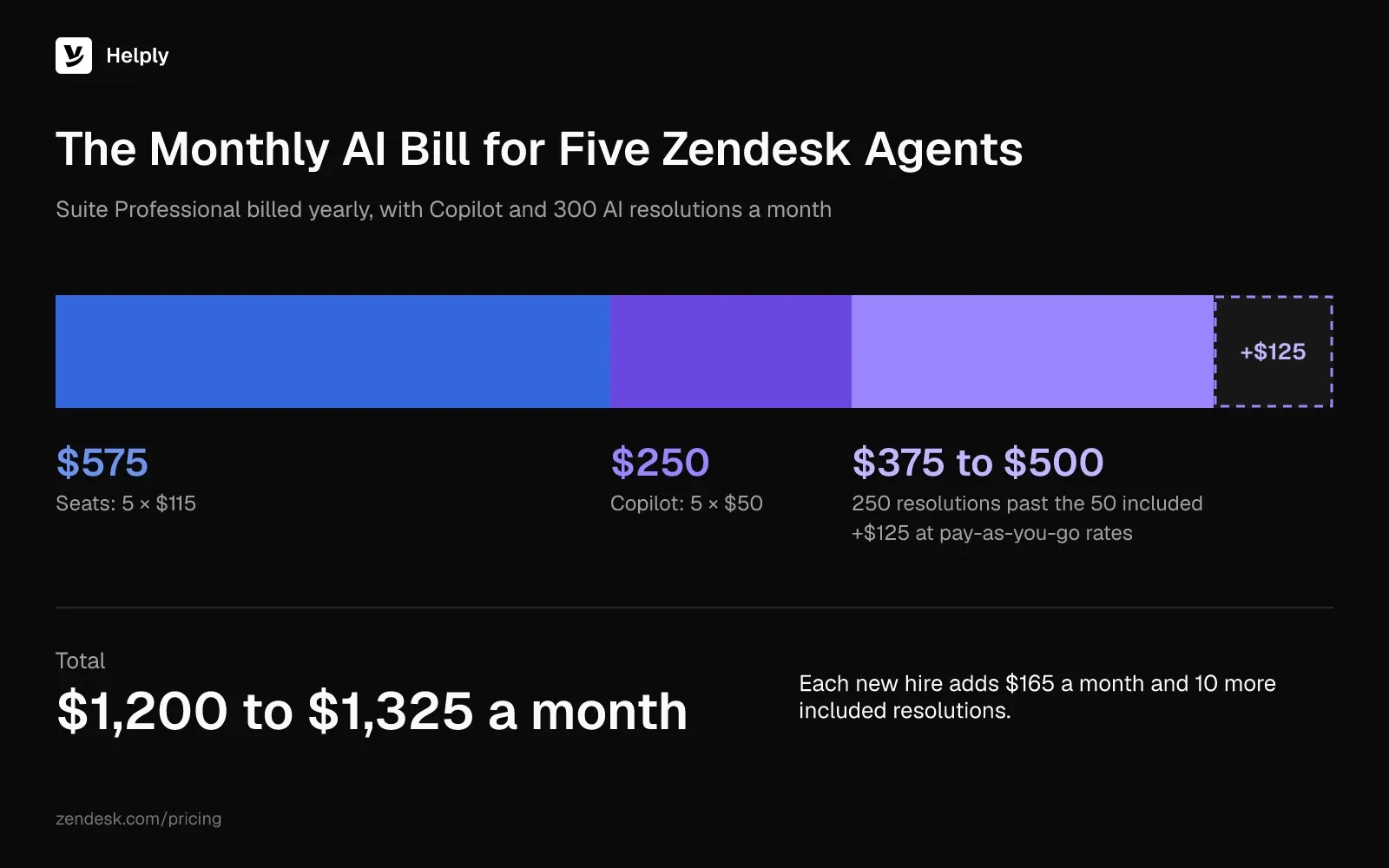
The included 50 resolutions cover one request in six. Each new hire adds $165 a month and 10 more resolutions to the allowance.
How Zendesk Bridge Connects an Outside AI Agent
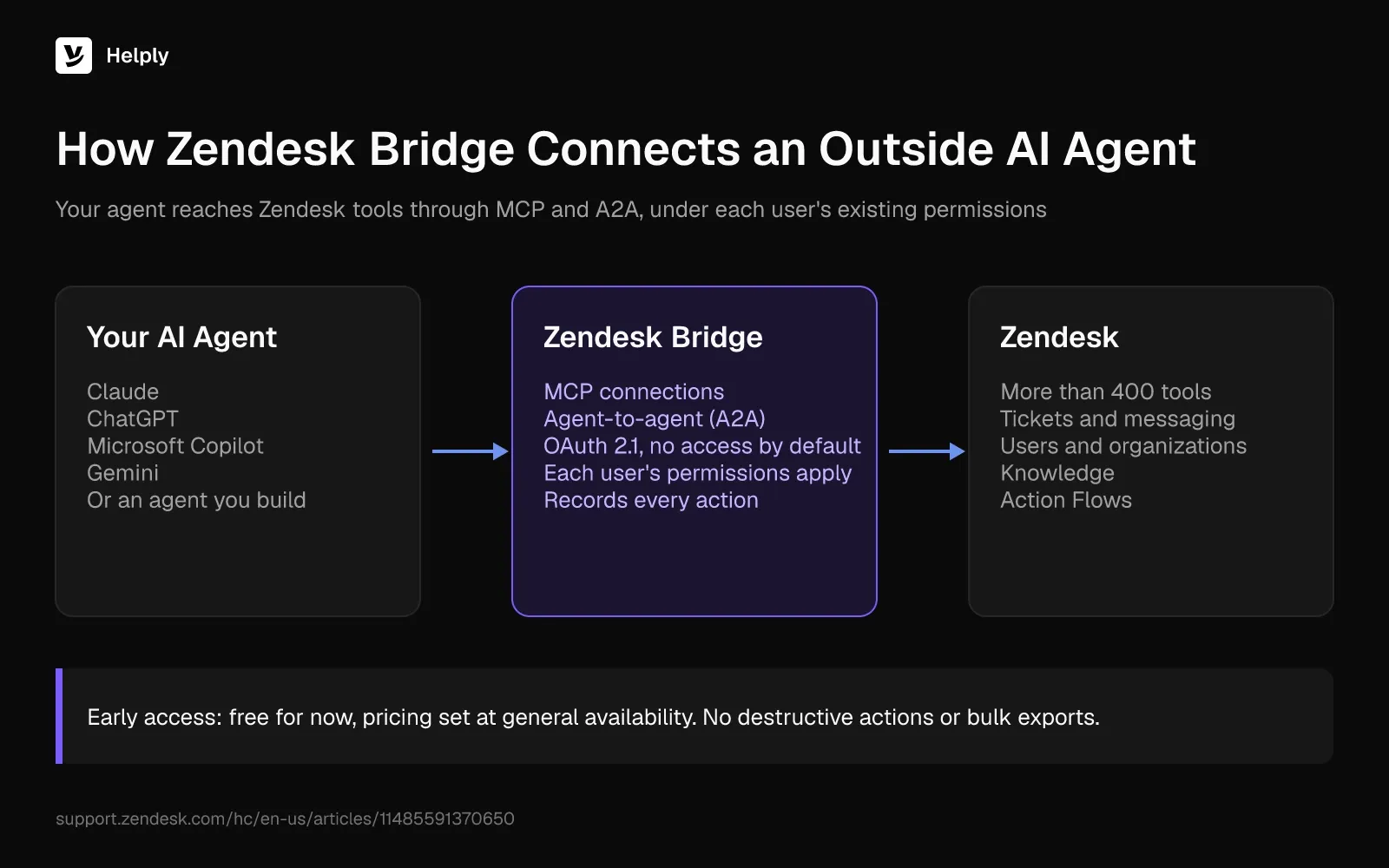
Zendesk Bridge is Zendesk's way to connect an outside AI agent to its service tools and context. Zendesk names Claude, ChatGPT, Microsoft Copilot and Gemini, or an agent you build yourself.
Connected agents reach more than 400 Zendesk tools through MCP connections and agent-to-agent (A2A) workflows. Zendesk applies each user's existing permissions to every request and records the resulting actions.
Zendesk launched Bridge as part of its Outcome AI Platform.
How to Add an AI Agent to Zendesk with Bridge
- Confirm your plan. Bridge's early access covers Suite Team, Growth, Professional, Enterprise and Enterprise Plus, plus Support Team, Professional and Enterprise.
- Join early access in Admin Center under AI > External AI > External AI early access.
- Register your agent on the External AI page. It connects with OAuth 2.1 and starts with no access.
- Give it a small set of tools, then set policies and approval thresholds.
- Review its first resolutions in the observability dashboard and audit logs.
Zendesk Bridge Limits During Early Access
Bridge is free during early access. Zendesk says packaging and pricing "might change" at general availability, with outcome-based pricing phasing in through 2027.
Early access also blocks destructive actions, bulk exports and third-party integrations. Admin Center actions are read-only. Over A2A, you can delegate only to a new Zendesk Monitoring agent.
The Older Route: Third-Party Bots in Zendesk Messaging
Before Bridge, teams connected an outside bot to Zendesk messaging as a third-party bot. That route needs a Sunshine Conversations license, which comes with Suite Professional, Enterprise and Enterprise Plus.
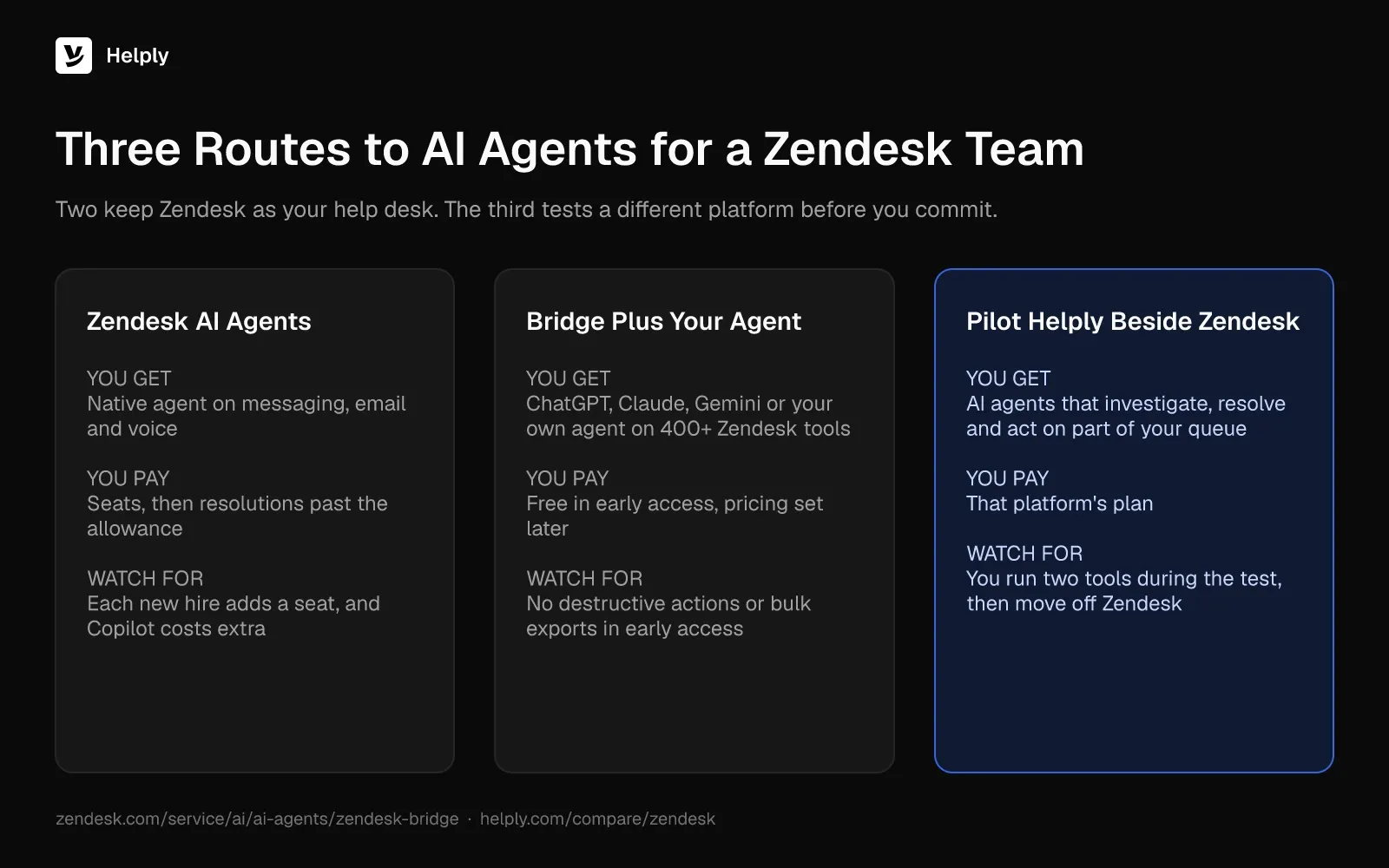
Three Routes to AI Agents for a Zendesk Team
Zendesk AI Agents vs. Bridge vs. a Side-by-Side Pilot
| Route | What you get | What you pay | Watch out for |
|---|---|---|---|
| Zendesk AI agents | Native agent on messaging, email and voice | Seats, then resolutions past the allowance | Each new hire adds a seat, and Copilot costs extra |
| Bridge plus your own agent | ChatGPT, Claude, Gemini or your own agent on 400+ Zendesk tools | Free in early access, pricing set later | No destructive actions or bulk exports in early access |
| Pilot an AI-native help desk beside Zendesk | AI agents that investigate, resolve and act on part of your queue | That platform's plan | You run two tools during the test, then move off Zendesk |
The first two keep Zendesk as your help desk. The third tests whether a different platform resolves more of your queue before you commit.
How to Test Helply's AI Agents Next to Zendesk
Helply runs as its own help desk, so you test it beside Zendesk. During the 14-day trial, you move one part of your Zendesk queue onto Helply. Then you bring your history across and cut over.
Every Helply plan includes two AI agents, with AI credits pooled across the team:
- Support Agent. It replies to customers using your help articles, past conversations and connected tools, and can close issues end to end. Anything it can't finish goes to your team along with its findings.
- Assist Agent. It writes draft replies inside each ticket, drawing on the thread, the customer record and your Guidelines. On your team's instruction, it runs supported Actions.
The Team plan adds escalation rules, backtesting on past conversations and connections to supported MCP servers.
Playground tests and handoffs to your team after an AI attempt use no credits. Run a fair pilot in three steps:
- Pick one slice of your queue, such as one channel or one product, and run it in Helply.
- Over the 14-day trial, compare Helply's resolutions on that slice with Zendesk's results on similar tickets.
- If Helply wins, move tickets, customers, organizations and Guide articles over while your team keeps working in Zendesk.
Keep Zendesk AI Agents or Test a Different One?
Stay with Zendesk AI agents if your volume sits near your allowance and Copilot fits your budget. Try Bridge if you already run ChatGPT, Claude or Gemini and can work within early access limits until final pricing.
Test Helply if a $1,200 monthly bill for five agents looks like yours. Helply's Team plan costs $587 a month ($499 on yearly billing). It covers 10 human agents, 15,000 AI credits, SLAs and escalations.
On Helply, an end-to-end resolution uses 10 credits and a drafted reply uses 2. Helply sizes a typical conversation at about 6 credits when AI resolves around half. At that rate, 600 conversations with 300 AI resolutions use about 3,600 of the 15,000 credits.
Kameleo moved off a Zendesk and GitHub setup onto Helply's complete platform. On Helply, the Support Agent resolved 79% of incoming technical questions end to end.
Team includes a free migration from Zendesk and an onboarding call. Your customer data stays out of AI providers' model training, and Helply's security controls have SOC 2 Type II attestation.
The Helply vs. Zendesk comparison sets out each feature side by side.
Frequently asked questions
Yes. Zendesk bundles AI agents into all its Suite and Support plans, and they answer customers on messaging, email and voice. Copilot, for human agents, costs extra.
Zendesk includes AI agents in a seat price that starts at $25 monthly ($19 on yearly billing). Each seat bundles 5 resolutions a month on Team plans or 10 on Suite Professional. Zendesk's listed overage is $1.50 a resolution committed, or $2.00 uncommitted, and sales now quotes newer rates.
An automated resolution is a request an AI agent resolves without escalation to a human agent. Zendesk confirms it after the conversation ends: 72 hours later for email, and 2 hours by default for messaging.
Use Zendesk Bridge, which works on Suite and Support plans. Join early access in Admin Center under AI > External AI, then register your agent. Give it a few tools, set approval thresholds and review its first resolutions in the audit logs.
Yes. Zendesk Bridge connects ChatGPT, Claude, Microsoft Copilot, Gemini or your own agent to more than 400 Zendesk tools through MCP and A2A. Bridge is in an open early-access program.
Bridge costs nothing during early access. Zendesk says pricing might change at general availability, with outcome-based pricing phasing in through 2027.
No. Zendesk Copilot is a separate purchase: $50 a seat each month, billed yearly, on Suite Professional and up.
Yes. Helply runs as its own help desk, so you put part of your Zendesk queue on it during the 14-day trial. Then you bring your history across and switch when you're ready.
About the author

Bildad Oyugi
Head of Content
Bildad is a digital marketing expert with over 5 years of experience in copywriting, content marketing, and editing. Outside of work, he enjoys videography and spending time with his family.


