
 Konrad Janczyk ··16 min read

Key Takeaways
- Map a month of conversations before hiring. Put repeat questions on an AI agent such as Helply's Support Agent, and keep judgment calls with people.
- Per Relay, hire a generalist once support takes more than 15 to 20 hours a week of someone else's time.
- Using Front's formula, size the team from the queue left after AI: 300 to 500 conversations per agent a month, times 1.2. At 3,000 conversations a month, 400 per agent and 40% AI resolution, you need six agents instead of nine.
- Per Front, add a dedicated manager past six agents and split into pods of five to eight at 9 to 20 agents.
- In Zendesk's CX Trends 2027 survey, published in November 2026, 88% of consumers want a human available if needed.
Who Answers Support Before You Have a Support Team?
Before the first hire, you answer support yourself, often at 10pm between product work. An engineer lost the afternoon to a failing webhook, and a shopper's "where's my order?" has waited since breakfast. Most of the queue repeats the same few questions, and the answers live in two people's heads.
In 2020, one founder on Hacker News described the hiring problem. "A good technical person doesn't like doing support, a great support person is not that technical to debug a tricky API issue."
You'll build the team faster if you work in the right order. Hire before you map the queue, and you pay a salary for questions a help article could close. For keeping volume down later, see how to scale customer support.
When Should You Hire Your First Support Person?
Hire your first dedicated support person when answering customers takes more than 15 to 20 hours a week of a non-support person's time. That's Relay's trigger for the first dedicated hire.
Slow replies alone don't justify a hire. Hold off when the delay comes from:
- Process: tickets bounce between people or nobody owns the inbox.
- Missing automation: no help center, saved replies or AI agent on the repeat questions yet.
- A temporary spike: a bug or a seasonal rush that will pass.
- A training gap: people are slow because they don't know the product, and more people won't fix that.
Budget for salary and recruiting. US customer service representatives earned a median $44,770 a year ($21.53 an hour) in 2025, per BLS wage data on O*NET.
Recruiting costs money too. SHRM benchmarking data from 2021 put the average cost per hire at $4,683, with a median of $1,244.
Step 1: Set Service Standards, Channels and Hours
Write down what good support means before anyone joins, because the first hire will inherit it. Set three things: response targets, the channels you'll answer on and the hours you'll cover.
Front's guidance suggests a first response under one minute on live chat and under one hour on email. It also sets CSAT at 85% or higher and first contact resolution at 70% and up.
Customers expect speed. In Twilio's survey of 3,900 consumers, published in October 2024, 51% said they expect fast replies, ideally within an hour.
Start with fewer channels and answer them well. Email and live chat are enough for many software and ecommerce teams at first. Add WhatsApp, SMS or Slack when customers ask for them and you can staff the replies.
Pick hours you can staff. Business hours with a clear "we'll reply by 9am" promise beat a 24/7 promise a small team can't keep. The customer service center guide covers what round-the-clock staffing takes.
Step 2: Decide What an AI Agent Handles Before You Hire
Map the queue before you write a job post. Export a month of conversations and sort them into three groups. Some your docs already answer, some need a lookup or an action, and some need human judgment.
The first two groups are work an AI agent can take. Password resets, order status, plan changes, invoice copies and "how do I" questions take the same few steps each time.
Salesforce surveyed 6,500 service professionals for its State of Service report, published in November 2025. Those service teams expect AI to resolve 50% of their cases by 2027, compared with 30% in 2025.
The third group stays with people: refunds outside policy, angry customers, contract questions and bugs that need an engineer. Write the handoff rules down. Decide which topics the AI resolves alone, which it drafts for a person to approve and which it always hands off.
Customers still want a way to reach someone. In Zendesk's CX Trends 2027 survey of 3,100+ consumers, published in November 2026, 88% want a human available if needed.
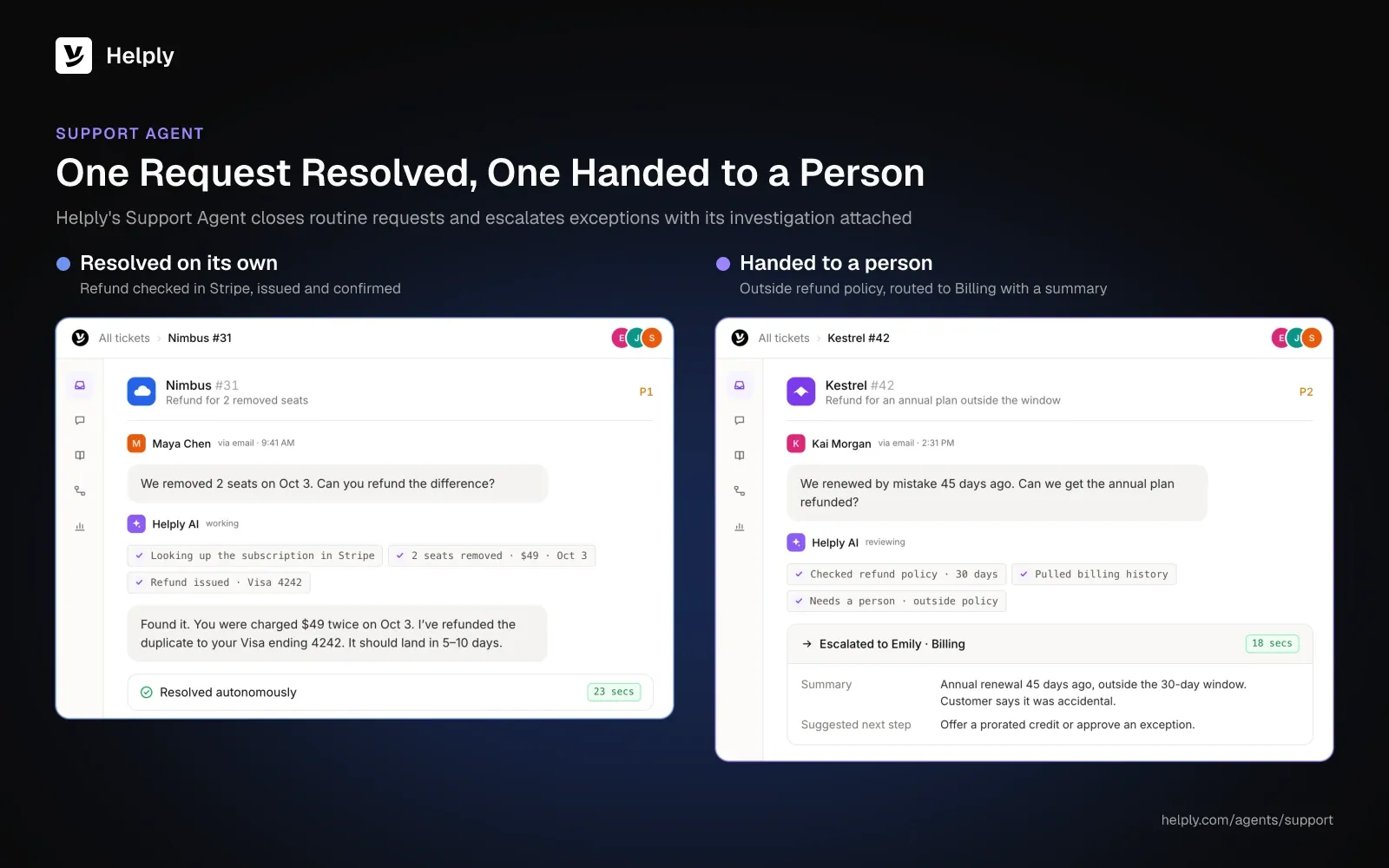
Helply's Support Agent works across every channel you connect. It can investigate, answer, take action and resolve a request without a teammate. If it can't confidently resolve something, it hands your team its investigation and the customer context, so no one starts over.
Guidelines set what the AI handles alone and when a person steps in. Starting on the Team plan, escalation rules and SLAs route each handoff by issue, customer, account or urgency.
- Map a month of conversations before hiring. Put repeat questions on an AI agent such as Helply's Support Agent, and keep judgment calls with people.
- Per Relay, hire a generalist once support takes more than 15 to 20 hours a week of someone else's time.
- Using Front's formula, size the team from the queue left after AI: 300 to 500 conversations per agent a month, times 1.2. At 3,000 conversations a month, 400 per agent and 40% AI resolution, you need six agents instead of nine.
- Per Front, add a dedicated manager past six agents and split into pods of five to eight at 9 to 20 agents.
- In Zendesk's CX Trends 2027 survey, published in November 2026, 88% of consumers want a human available if needed.
Who Answers Support Before You Have a Support Team?
Before the first hire, you answer support yourself, often at 10pm between product work. An engineer lost the afternoon to a failing webhook, and a shopper's "where's my order?" has waited since breakfast. Most of the queue repeats the same few questions, and the answers live in two people's heads.
In 2020, one founder on Hacker News described the hiring problem. "A good technical person doesn't like doing support, a great support person is not that technical to debug a tricky API issue."
You'll build the team faster if you work in the right order. Hire before you map the queue, and you pay a salary for questions a help article could close. For keeping volume down later, see how to scale customer support.
When Should You Hire Your First Support Person?
Hire your first dedicated support person when answering customers takes more than 15 to 20 hours a week of a non-support person's time. That's Relay's trigger for the first dedicated hire.
Slow replies alone don't justify a hire. Hold off when the delay comes from:
- Process: tickets bounce between people or nobody owns the inbox.
- Missing automation: no help center, saved replies or AI agent on the repeat questions yet.
- A temporary spike: a bug or a seasonal rush that will pass.
- A training gap: people are slow because they don't know the product, and more people won't fix that.
Budget for salary and recruiting. US customer service representatives earned a median $44,770 a year ($21.53 an hour) in 2025, per BLS wage data on O*NET.
Recruiting costs money too. SHRM benchmarking data from 2021 put the average cost per hire at $4,683, with a median of $1,244.
Step 1: Set Service Standards, Channels and Hours
Write down what good support means before anyone joins, because the first hire will inherit it. Set three things: response targets, the channels you'll answer on and the hours you'll cover.
Front's guidance suggests a first response under one minute on live chat and under one hour on email. It also sets CSAT at 85% or higher and first contact resolution at 70% and up.
Customers expect speed. In Twilio's survey of 3,900 consumers, published in October 2024, 51% said they expect fast replies, ideally within an hour.
Start with fewer channels and answer them well. Email and live chat are enough for many software and ecommerce teams at first. Add WhatsApp, SMS or Slack when customers ask for them and you can staff the replies.
Pick hours you can staff. Business hours with a clear "we'll reply by 9am" promise beat a 24/7 promise a small team can't keep. The customer service center guide covers what round-the-clock staffing takes.
Step 2: Decide What an AI Agent Handles Before You Hire
Map the queue before you write a job post. Export a month of conversations and sort them into three groups. Some your docs already answer, some need a lookup or an action, and some need human judgment.
The first two groups are work an AI agent can take. Password resets, order status, plan changes, invoice copies and "how do I" questions take the same few steps each time.
Salesforce surveyed 6,500 service professionals for its State of Service report, published in November 2025. Those service teams expect AI to resolve 50% of their cases by 2027, compared with 30% in 2025.
The third group stays with people: refunds outside policy, angry customers, contract questions and bugs that need an engineer. Write the handoff rules down. Decide which topics the AI resolves alone, which it drafts for a person to approve and which it always hands off.
Customers still want a way to reach someone. In Zendesk's CX Trends 2027 survey of 3,100+ consumers, published in November 2026, 88% want a human available if needed.
Helply's Support Agent works across every channel you connect. It can investigate, answer, take action and resolve a request without a teammate. If it can't confidently resolve something, it hands your team its investigation and the customer context, so no one starts over.
Guidelines set what the AI handles alone and when a person steps in. Starting on the Team plan, escalation rules and SLAs route each handoff by issue, customer, account or urgency.
Step 3: Work Out How Many Support Agents You Need
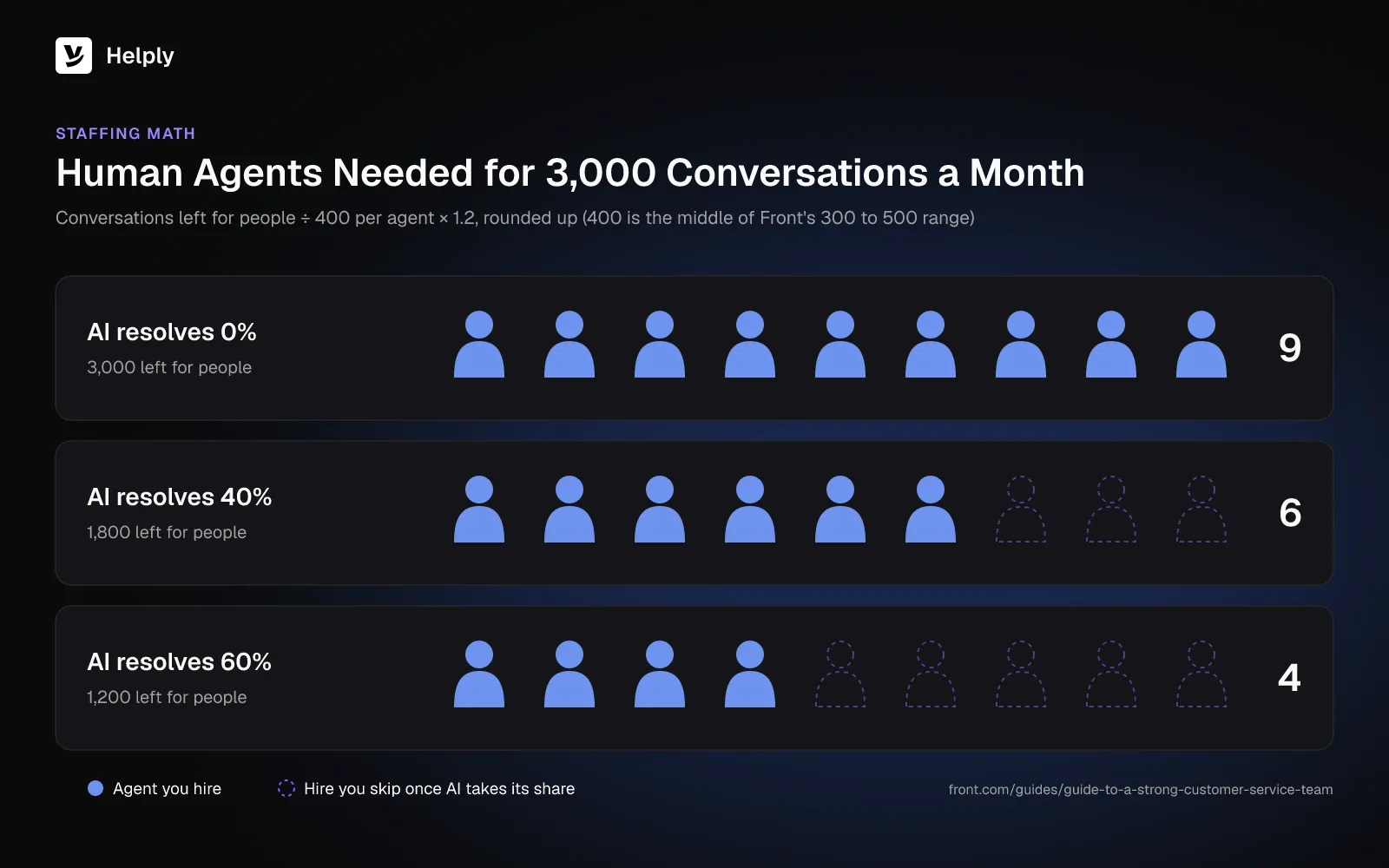
Size the human team from the conversations people must handle after the AI and your help center take their share. Front's formula is a sound start: agents needed = monthly volume ÷ tickets per agent per month × 1.2.
Front puts sustainable capacity at 300 to 500 tickets a month per agent on mixed channels, about 20 to 40 a day. Agents on email-only queues with heavy template use can handle more, and technical support agents usually handle well under 300. The 1.2 covers time off, training, meetings and coaching.
Human Support Agents Needed at 0%, 40% and 60% AI Resolution
Plug 3,000 conversations a month and 400 per agent, the middle of Front's range, into the formula. The AI resolution rates are example inputs.
| AI resolves | Conversations left for people | Agents before buffer | Agents with × 1.2 (rounded up) |
|---|---|---|---|
| 0% | 3,000 | 7.5 | 9 |
| 40% | 1,800 | 4.5 | 6 |
| 60% | 1,200 | 3 | 4 |
Real resolution rates vary by product and by how well you train the AI. At 40%, this team drops from nine agents to six.
Add Coverage Hours to the Math
Check coverage hours separately from headcount. One full-time person covers about 40 of the 168 hours in a week.
Count the hours you promise, then check that each one has someone on it. An AI agent can take the first reply outside those hours and leave the rest for the morning shift.
Step 4: Hire a Generalist Who Writes Things Down
Your first support hire sets the habits later hires inherit. Look for a generalist who writes clearly, documents every answer and stays calm with an upset customer. Technical curiosity matters more than call-center experience.
You'll face the same trade-off with your first hire. A strong technical person may not want a support role, and a strong support specialist may never have debugged an API.
Hire the support person, then give them a defined path to engineering. Name who they escalate bugs to and how fast engineering replies.
Test candidates on the real work. Use samples from your own queue:
- Reply to a real complaint: give them an anonymized angry email and read the draft for tone and accuracy.
- Write a help article: hand over a resolved thread and ask for the article that would have prevented it.
- Triage a batch: give them 10 tickets and ask them to sort by urgency and owner.
- Reproduce a bug: ask for the steps, account details and screenshots an engineer would need.
Step 5: Choose a Customer Support Team Structure for Your Size
Match the structure to your headcount. A team of two needs a shared queue and clear ownership. A team of 20 needs leads, pods and someone who runs the systems.
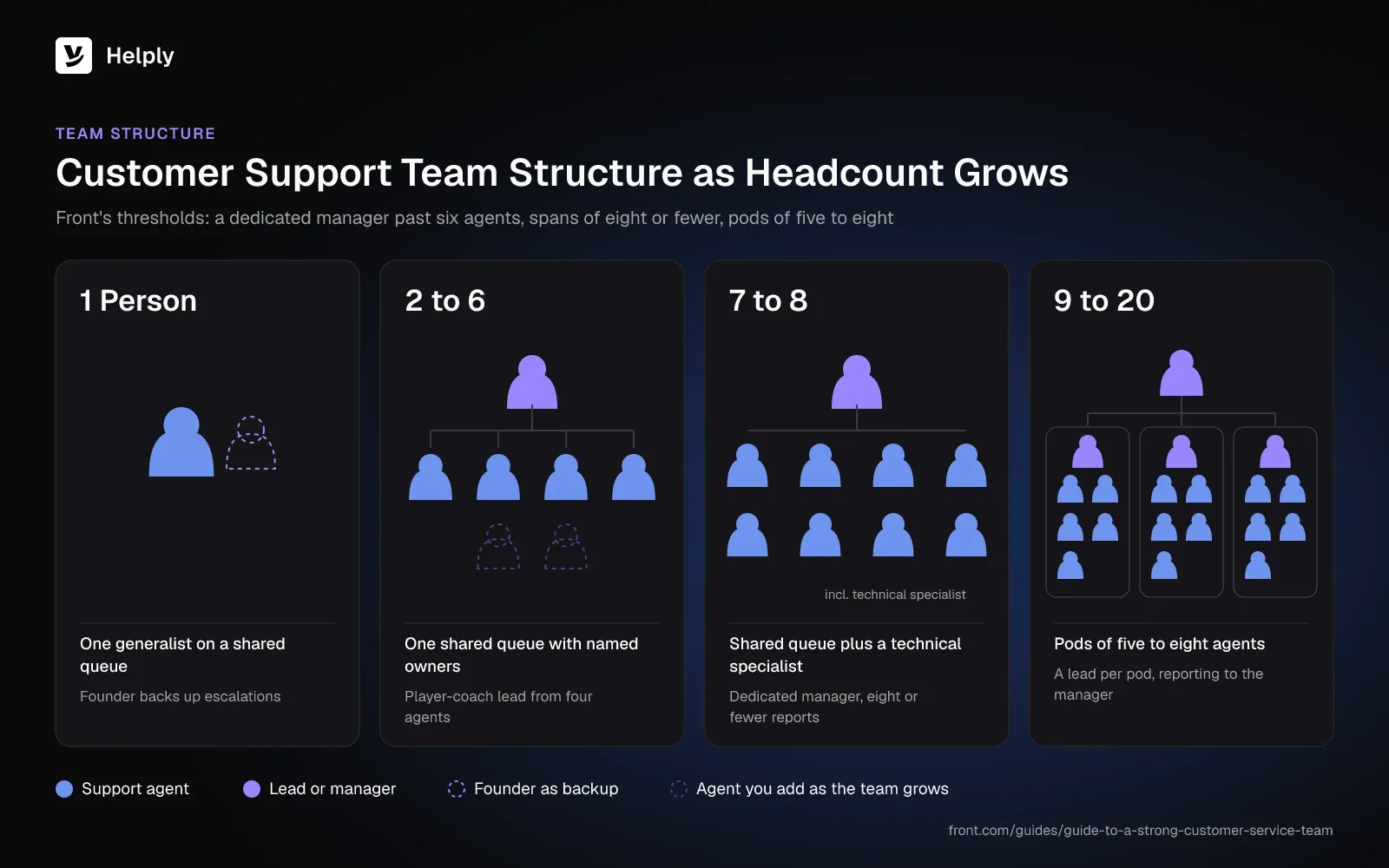
Customer Support Team Structure by Size: Leads and Next Additions
Front's guidance sets the thresholds below. Add a dedicated manager once you pass six agents and keep spans at eight or fewer. Split into pods of five to eight at 9 to 20 agents.
| Team size | Structure | Who leads | What to add next |
|---|---|---|---|
| 1 person | One generalist on one shared queue | Founder backs up escalations | Help center, saved replies, AI agent |
| 2 to 6 | One shared queue; from four agents, every conversation gets a named owner and a daily triage rotation | The founder, then from four agents a player-coach lead on about half a queue | Coverage across time zones, a technical specialist |
| 7 to 8 | Shared queue with named owners, a triage rotation and a technical specialist on complex cases | A dedicated manager with eight or fewer reports | Quality reviews, support operations |
| 9 to 20 | Pods of five to eight by channel, region or customer segment | A lead per pod, reporting to the manager | Support ops, QA, knowledge and AI operations |
Choose the split that matches how your questions differ. Split by product when products need different expertise. Split by segment when large accounts need named contacts, and by region when hours drive the work.
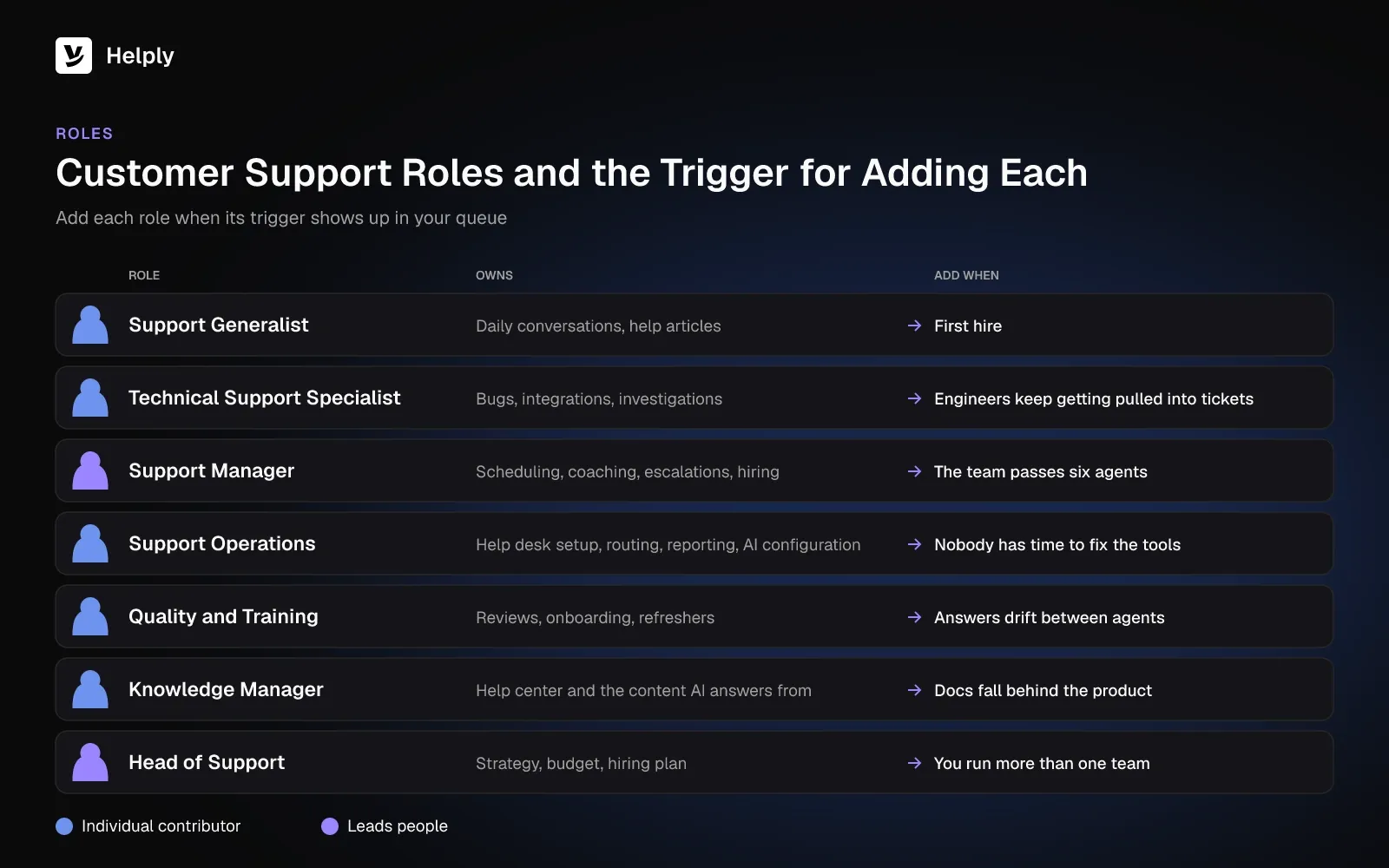
Customer Support Team Roles and When to Add Each
Add each role when a specific problem appears.
| Role | Owns | Add when |
|---|---|---|
| Support generalist | Daily conversations across channels, help articles | First hire |
| Technical support specialist | Bugs, integrations and investigations | Engineers keep getting pulled into tickets |
| Support manager | Scheduling, coaching, escalations, hiring | The team passes six agents |
| Support operations | Help desk setup, routing, reporting, AI configuration | Nobody has time to fix the tools |
| Quality and training | Reviews, onboarding, refreshers | Answers drift between agents |
| Knowledge manager | Help center and the content AI answers from | Docs fall behind the product |
| Head of support | Strategy, budget, hiring plan | You run more than one team |
Expect operations roles to take on AI work. Zendesk polled 4,400+ business respondents for its CX Trends 2027 survey, published in November 2026. Of those, 84% say AI workflow design is becoming a core skill for CX operations roles.
Step 6: Onboard People and Train the AI from One Playbook
New hires and AI agents learn from the same sources: help articles, saved replies, tone rules and past conversations. Build one playbook, and you train both each time you fix an article or rule.
Put these in place before the first hire starts:
- Help center: articles for every question you answered more than twice last month.
- Tone and policy rules: how you write, what you refund and what always goes to a person.
- Escalation paths: who owns bugs, billing exceptions and contract questions.
- A shadowing week: the new hire reads and drafts replies before sending any.
In Helply, Guidelines hold the rules your AI agents follow, so your new hire learns the same ones. They set what agents handle alone and the point where a human takes over. Training lets your strongest reps teach the AI agents from real conversations and corrections.
Every Helply plan includes a help center with AI answers. From the Team plan, Skills teach agents specific types of customer work. The Knowledge Agent, also from Team, spots missing answers and outdated information, and your team can review its suggestions.
In a 2023 NBER working paper on 5,179 support agents, AI-suggested replies raised issues resolved per hour by 14% on average. Novice and low-skilled agents in the study gained 34%, and the most experienced saw minimal change. A new hire can ramp faster with that kind of help inside the conversation.
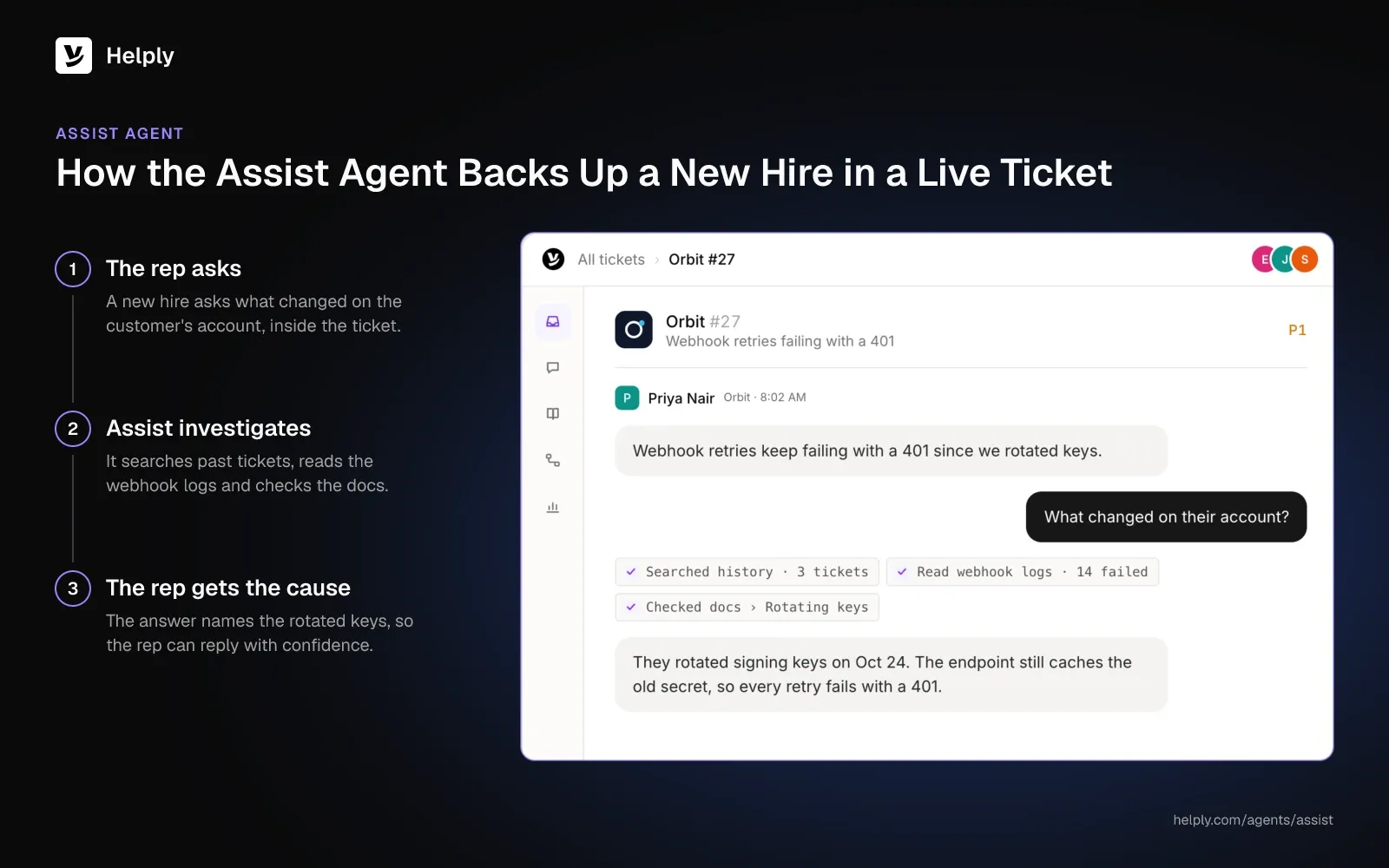
On every plan, the Assist Agent works alongside each rep. It investigates issues and drafts replies from the conversation, your Guidelines and customer context. It also takes supported actions when your rep directs it.
Step 7: Measure the Team and the AI Together
Track people and AI on one dashboard, because your team handles the conversations the AI can't resolve. Review these weekly:
- First response time: against the targets you set in Step 1.
- Resolution time: from first message to solved.
- CSAT: with a target of 85% or higher, per Front's guidance.
- AI resolution rate: the share the AI resolves end to end, by topic.
- Handoff rate: what the AI passes to people, and why.
- Backlog: open conversations older than your reply target.
Watch workload alongside speed. In the same Salesforce survey, 12% of service employees had left their company over the past year.
In Salesforce's survey, service reps spend less than half their time (46%) with customers, partly because of admin and internal work. Each hour of admin you remove is an hour a rep can spend with customers.
Helply's analytics show your team and AI agents together, so you see where customers get stuck and what needs your attention. CSAT surveys start on Plus, and AI QA starts on Team.
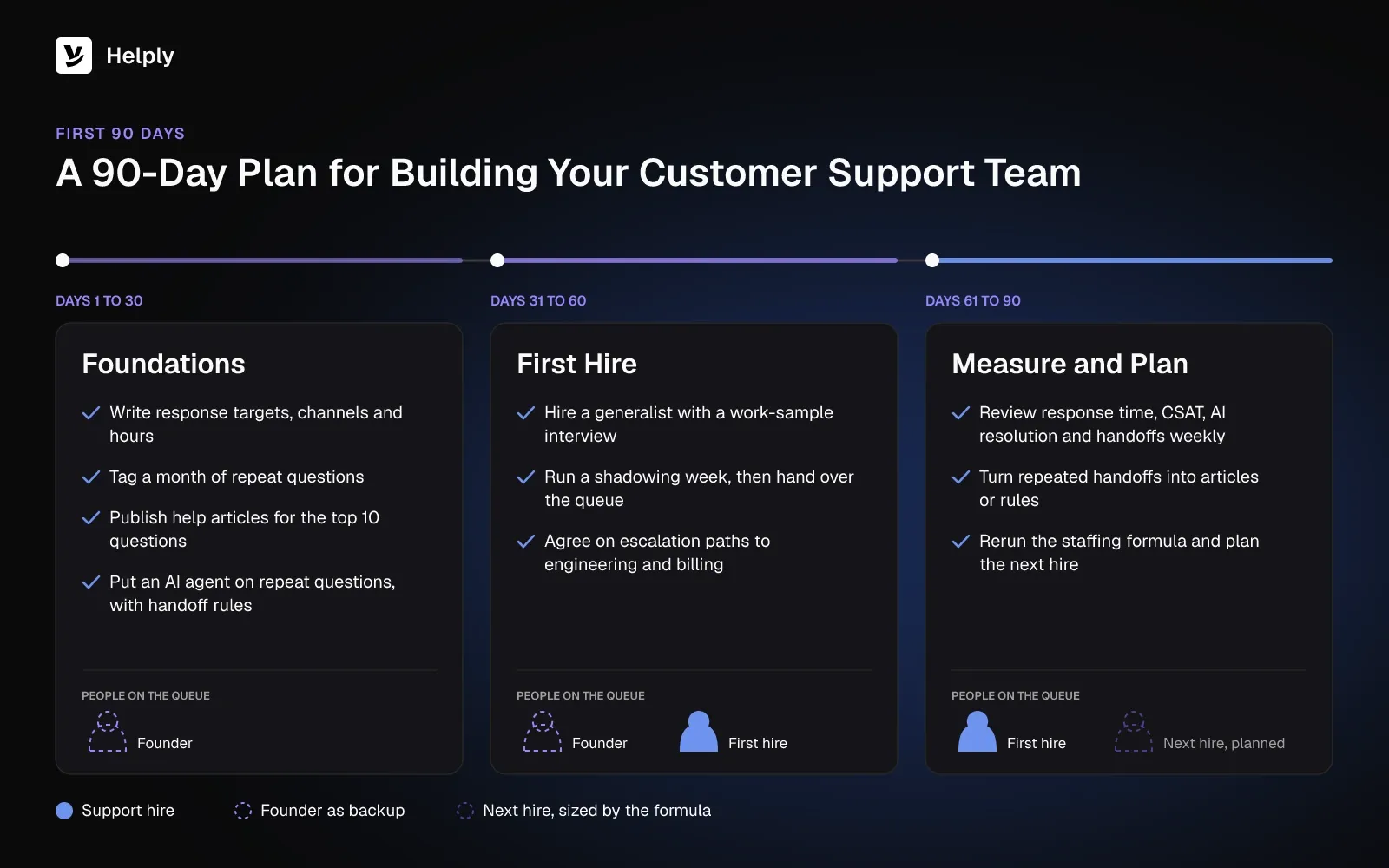
Your First 90 Days Building a Customer Support Team
Spend days 1 to 30 on standards and AI, then make the first hire. Use days 61 to 90 to measure.
Days 1 to 30: Foundations
- Write response targets, channels and hours.
- Export a month of conversations and tag the repeat questions.
- Publish help articles for the top 10 questions.
- Put an AI agent on the repeat questions, with handoff rules.
Days 31 to 60: First Hire
- Hire a generalist with a work-sample interview.
- Run a shadowing week, then hand over the queue.
- Agree on the escalation path to engineering and billing.
Days 61 to 90: Measure and Plan
- Review response time, CSAT, AI resolution and handoff rates weekly.
- Turn every repeated handoff into a help article or a rule.
- Rerun the staffing formula and plan the next hire.
Hire First or Put an AI Agent on the Queue First?
Hire first when volume is low and each conversation is complex or high value, such as onboarding enterprise accounts. Put an AI agent on the queue first when most questions repeat. Helply covers both paths, because your hires and the AI agents work in one inbox.
The founder can get evenings back, because the Support Agent takes the repeat questions on every channel you connect. Escalations reach engineers with the investigation attached, so a webhook bug costs them less of the afternoon. Your first hire can ramp faster with the Assist Agent's drafts.
You also get the knowledge out of people's heads, because your team turns each fix into an article, a Guideline or a Skill. Covidence's team put the hours it got back into tricky review setups, hard imports and bringing new institutions on board.
Covidence's Razia Aliani, a Senior Systematic Reviewer, says: "Our experts finally spend their time on the work that actually needs experts."
Helply prices each plan by how many teammates reply to customers. Plans step up as you hire, with AI credits pooled across the team. Handoffs from the AI to your people use no credits.
Trials last 14 days and need no credit card. Helply pricing lists the plans by team size, and Helply for startups shows the path from the first hire up.
Start with the month of conversations you exported in Step 2. Give the Support Agent the repeat topics, then build your customer support team around the work only people can do.
Frequently asked questions
To build a customer service team, set response targets, channels and hours first. Put repeat questions on an AI agent and a help center, then hire for the conversations that remain.
Divide the monthly conversations people must handle by 300 to 500 per agent, then multiply by 1.2, per Front's guidance. At 1,200 conversations a month left after AI and 400 per agent, that's four agents, rounded up.
A generalist who writes clearly, documents every answer and owns the escalation path to engineering. Hire once support takes more than 15 to 20 hours a week of someone else's time, per Relay.
Most teams start with one support generalist. Later roles include a technical support specialist, a support manager, support operations, quality and training, a knowledge manager and a head of support.
US customer service representatives earned a median $44,770 a year in 2025, per BLS data, before benefits and hiring costs. SHRM's 2021 data put the average cost per hire at $4,683.
Hire a dedicated manager once you pass six agents and keep each lead to eight or fewer direct reports, per Front's guidance. From four agents, a player-coach lead can carry about half a queue.
A customer service organizational structure is how you divide support work and reporting lines. Common models are one generalist queue, tiers by complexity and pods by product, region or segment.
No. An AI agent such as Helply's Support Agent can resolve repeat questions and pass the rest to your team with its investigation attached. In Zendesk's CX Trends 2027 survey, published in November 2026, 88% of consumers want a human available if needed.
About the author

Konrad Janczyk
Staff Software Developer
Keep reading

Customer Service Chatbot Examples: 8 That Worked, 4 That Failed and What to Copy
Bildad Oyugi · 15 min read
Best Live Chat Software in 2026: 10 Tools Compared on Cost, AI and Handoff
Jared Scheel · 27 min read