
 Jared Scheel ··27 min read

Key Takeaways
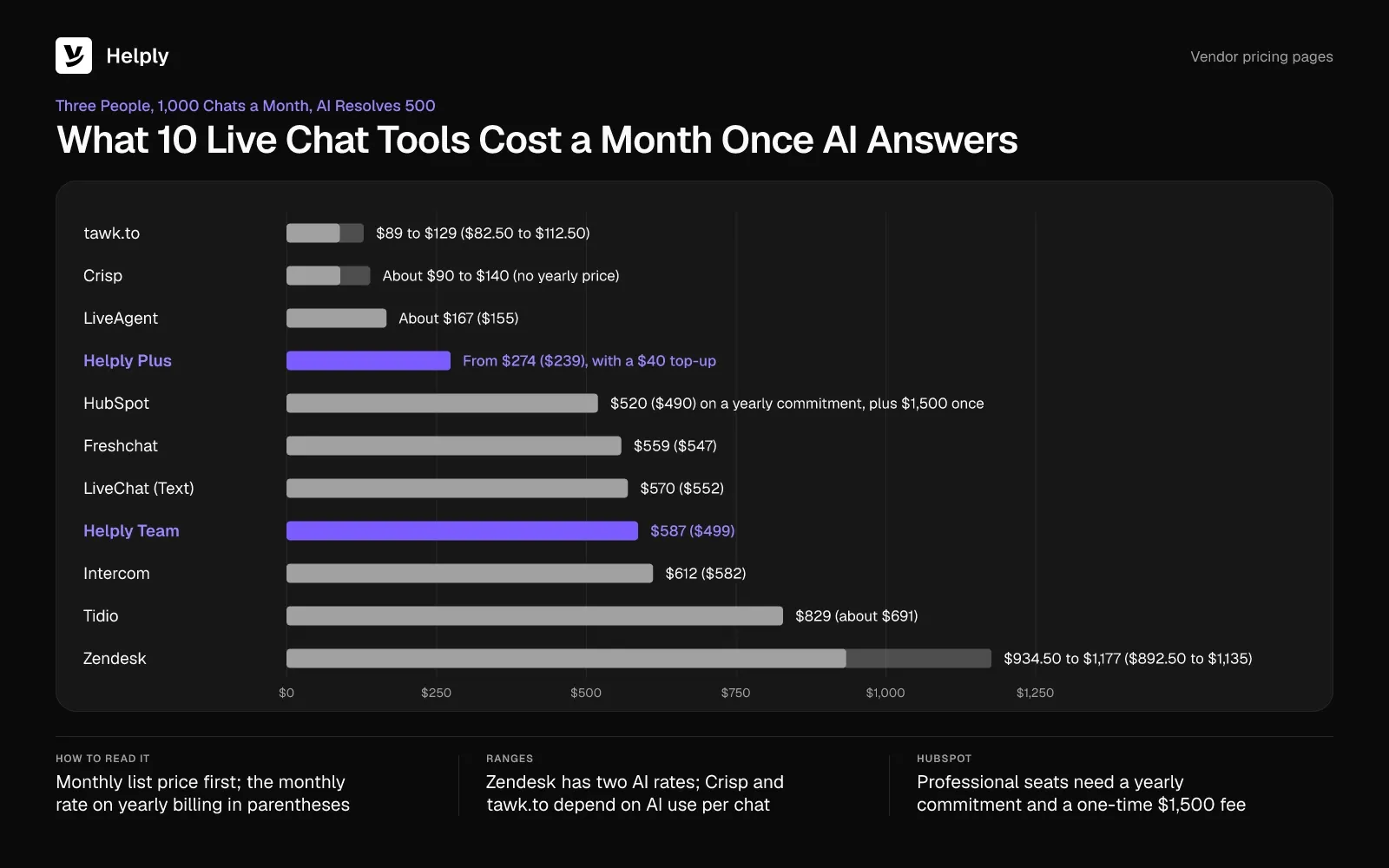
- With most of the best live chat software, AI fees outweigh seat fees. For three people with AI resolving 500 of 1,000 chats, Intercom Essential costs $612 ($582), and seats make up $117 ($87) of it.
- Live chat tools bill AI five ways: per resolution, Fin outcome, AI conversation or session, reply or usage credit, or action. Helply draws credits per action from the plan's allowance.
- Gorgias reported in July 2026 that the median online store got 53% of its pre-purchase questions outside business hours. Behind an offline form, those wait until your team is back, while an AI agent can answer them.
- Three in four consumers (74%) get frustrated when they must repeat information, per Zendesk's CX Trends 2026 survey from June 2025. LiveChat's Text, LiveAgent and tawk.to pass the full chat history to a person, and Helply's Support Agent adds its investigation.
- tawk.to's free live chat has no agent cap, HubSpot's covers 2 users and Freshchat's up to 10 agents. Crisp's free plan holds 2 seats and Tidio's 50 conversations a month, and AI on 1,000 chats costs extra on all five.
Who Answers Your Website Chat Late on a Saturday Night?
Without an AI agent, nobody answers a late Saturday chat until your team logs in on Monday.
A shopper opens your chat widget late on a Saturday to ask whether the blue jacket ships before Friday. On a SaaS pricing page, a trial user asks why the quoted price doubled after they added a teammate. Nobody on your team is online, so the widget shows a form asking for an email address.
Your team finds those messages in the queue on Monday. Before anyone replies, the shopper emails again and the trial user asks the pricing question a second time.
Gorgias, a help desk vendor, published research in July 2026 on when shoppers ask. The median online store got 53% of pre-purchase questions outside business hours, and one in five on a weekend.
An AI agent on the chat can answer the common Saturday-night questions, but the vendor adds a second bill. Five of the nine rivals charge per seat for their website chat software, then again for chats their AI resolves or handles.
Live Chat Software Compared: Cost with AI and After-Hours Coverage
Live chat vendors bill AI per resolution, outcome, AI conversation or session, reply or usage credit, or action. Every total covers one month of three people and 1,000 chats, with an AI that replies first on each chat and resolves 500. A figure in parentheses is the monthly rate on yearly billing.
| Tools | Best for | Entry price with live chat | AI billing unit | Monthly total: 3 people, 1,000 chats, AI resolves 500 | When nobody is online |
|---|---|---|---|---|---|
| Helply | A help desk whose AI agent can resolve chats and hand off with context | Starter: $116 ($99), 2,500 AI credits, up to 2 agents | 1 to 10 credits per AI action, 15 at most per conversation | Team: $587 ($499); Plus with at least one $40 top-up: from $274 ($239) | AI agents keep answering; the Support Agent escalates with its investigation |
| LiveChat (Text) | Chat-first teams with WhatsApp in the same inbox | Essential: $25 ($19) a user | $0.99 per AI resolution past 10 a month | $570 ($552) | AI Agent answers; offline contact or ticket form |
| Intercom | Chat with banners and tooltips in the product | Essential: $39 ($29) a seat | $0.99 per Fin outcome | $612 ($582) | Fin answers; Messenger shows when the team is back |
| Zendesk | Larger teams on one service suite | Suite Team: $69 ($55) an agent | $1.50 to $2.00 per resolution beyond 5 an agent each month | $934.50 to $1,177 ($892.50 to $1,135) | Widget stays on for AI agents, which can open a ticket |
| Tidio | Small online stores | Free: 50 conversations; Starter $29 ($24.17) for 100, US pricing | Per Lyro AI conversation; $700 for 1,000 | $829 (about $691) | Offline form asks for an email; Lyro can answer |
| Freshchat | Growing teams that want a free plan first | Free for up to 10 agents; Growth $23 ($19) an agent | $49 per 100 Freddy sessions | $559 ($547) | Away experience can turn the chat into a ticket; business hours from Pro |
| HubSpot | Teams that keep customer records in HubSpot CRM | Free for 2 users | 50 HubSpot credits per Customer Agent resolution, one cent per extra credit | $520 ($490) on a yearly commitment, plus $1,500 once | Away message, email capture or the Customer Agent |
| Crisp | One flat workspace price | Free for 2 seats; Mini $45 for 4 seats Usage credits; | Usage credits; Crisp puts a full conversation at 5 to 10 cents | About $90 to $140 | Hugo answers; the chatbox can hide when everyone is away |
| LiveAgent | Chat, email and calls at a low seat price | Starter: $19 ($15) an agent | $0 from LiveAgent; your AI provider bills usage | About $167 ($155) | AI keeps answering; messages become tickets |
| tawk.to | Free live chat | $0, with no limit on agents | AI Assist credits, 3 per reply on the default model | $89 to $129 ($82.50 to $112.50) | Offline form; AI Assist can keep the widget online |
Helply's Team total includes WhatsApp, SMS and proactive messages, which several rivals offer at entry level. Plus covers web chat and email for up to five agents.
New Intercom customers pay $29 a seat ($19) for Essential while they stay subscribed, which brings the total to $582 ($552). Zendesk's range excludes the 15 automated resolutions included with three Suite Team agents each month.
HubSpot's Service Hub pricing page lists Professional at $100 a seat monthly ($90 paid yearly), each on a yearly commitment. Crisp publishes no yearly price, and the tawk.to range assumes one or two AI replies per chat.
How Much Does Live Chat Software Cost Once AI Answers?
Seat prices for live chat start between $19 and $69 an agent a month at entry level. For three people answering 1,000 chats a month, with AI resolving 500, list-price totals run from tawk.to's $89 ($82.50) to Zendesk's $1,177 ($1,135). AI live chat costs span that range because each vendor counts the AI's work in its own unit.
Comm100, a live chat vendor, published its 2026 benchmark of more than 220 million chats in January 2026. In Comm100's data, AI agents resolved 44.8% of the chats they handled in 2025. A month of 1,000 chats with AI resolving 500 sits close to that rate.
You pay for AI in one of five units:
- Per resolution. LiveChat's Text charges 99 cents for each AI resolution past its allowance, and Zendesk $1.50 to $2.00 for each one past its own. HubSpot charges 50 credits per Customer Agent resolution, and extra credits cost one cent each.
- Per Fin outcome. Intercom charges 99 cents whenever Fin reaches an outcome, and a handoff Fin completes through a Procedure counts as one. A customer asking for a person costs nothing.
- Per AI conversation or session. Tidio counts a Lyro conversation when Lyro replies in a new thread, and sells 1,000 for $700. Freshchat counts every exchange within 24 hours as one Freddy session, at $49 per 100.
- Per reply or usage. tawk.to deducts 3 credits per AI reply on its default model, with extra credits at $30 per 1,000. Crisp bills Hugo from token-based credits and puts a full conversation at 5 to 10 cents. With LiveAgent, you pay your own AI provider; LiveAgent measured a median of 11 cents a chat on its own support.
- Per action from an allowance. Each Helply plan holds a monthly AI credit allowance. Answering from the knowledge base takes 3, and resolving end to end takes 10.
With per-resolution billing, you pay for every chat the AI closes, so the bill grows as your AI agent resolves more. With an allowance, you pay the plan price until the pool runs out.
1. Helply: Best for AI That Resolves Chats and Passes the Rest to a Person
Helply is an AI-native customer support platform answering chats through the Support Agent, with a full help desk behind the widget. Its AI agents keep no office hours, so the Saturday-night chat can get an answer instead of an email form.
You install the widget with a snippet on your website or inside your app. You choose the branding, the customer context to pass in, how the AI behaves and when it escalates.
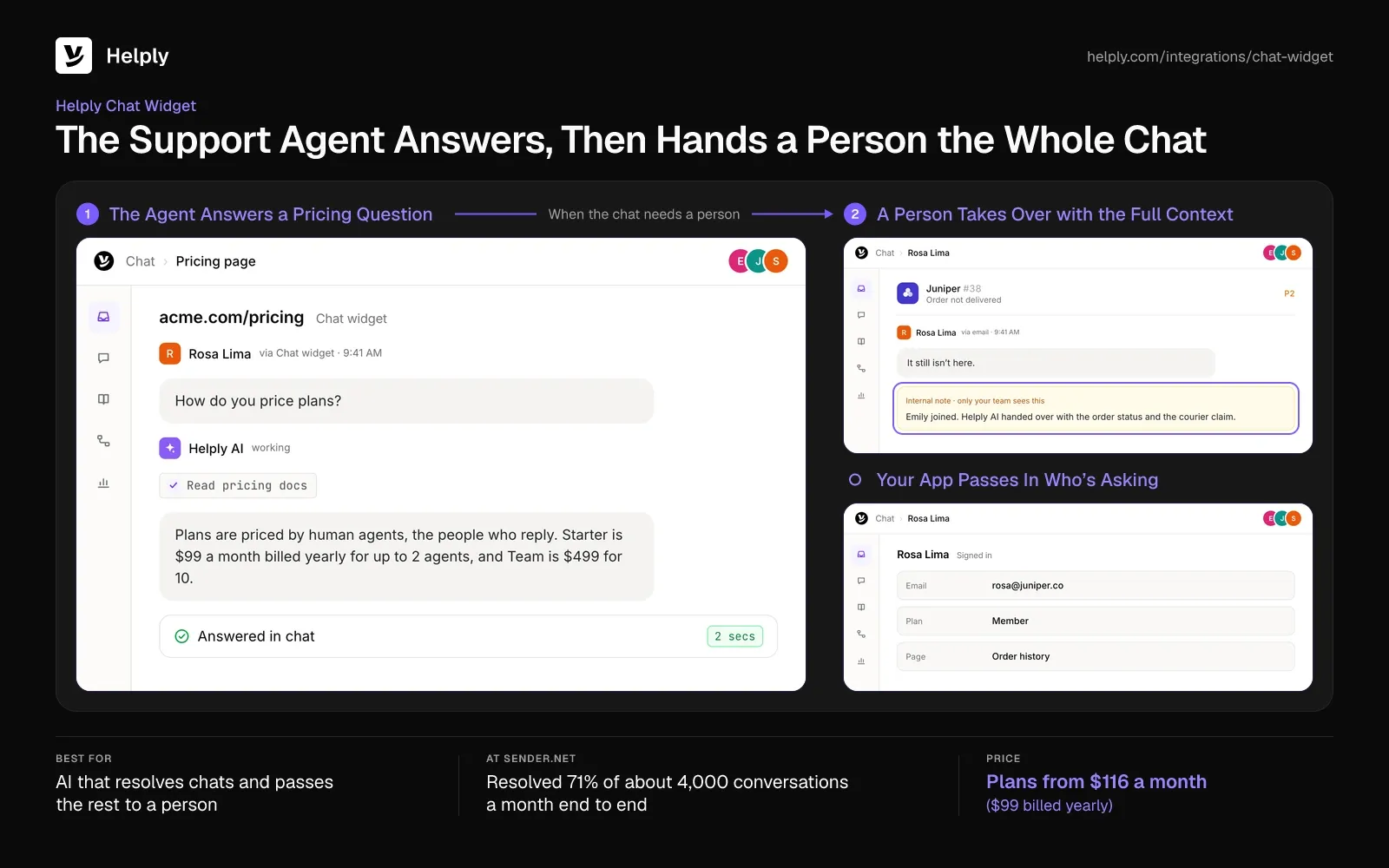
- Answers on the widget. The Support Agent investigates with your help articles, each customer's history and your connected tools. It can resolve supported questions end to end and take the supported Actions needed to solve them.
- After-hours coverage. AI agents keep answering common questions when your team is offline, and they escalate the chats that need a person.
- Handoffs without starting over. If the chat needs a person, Helply hands over the whole conversation with the customer's context. The Support Agent escalates with its investigation ready, so the customer doesn't have to repeat the problem.
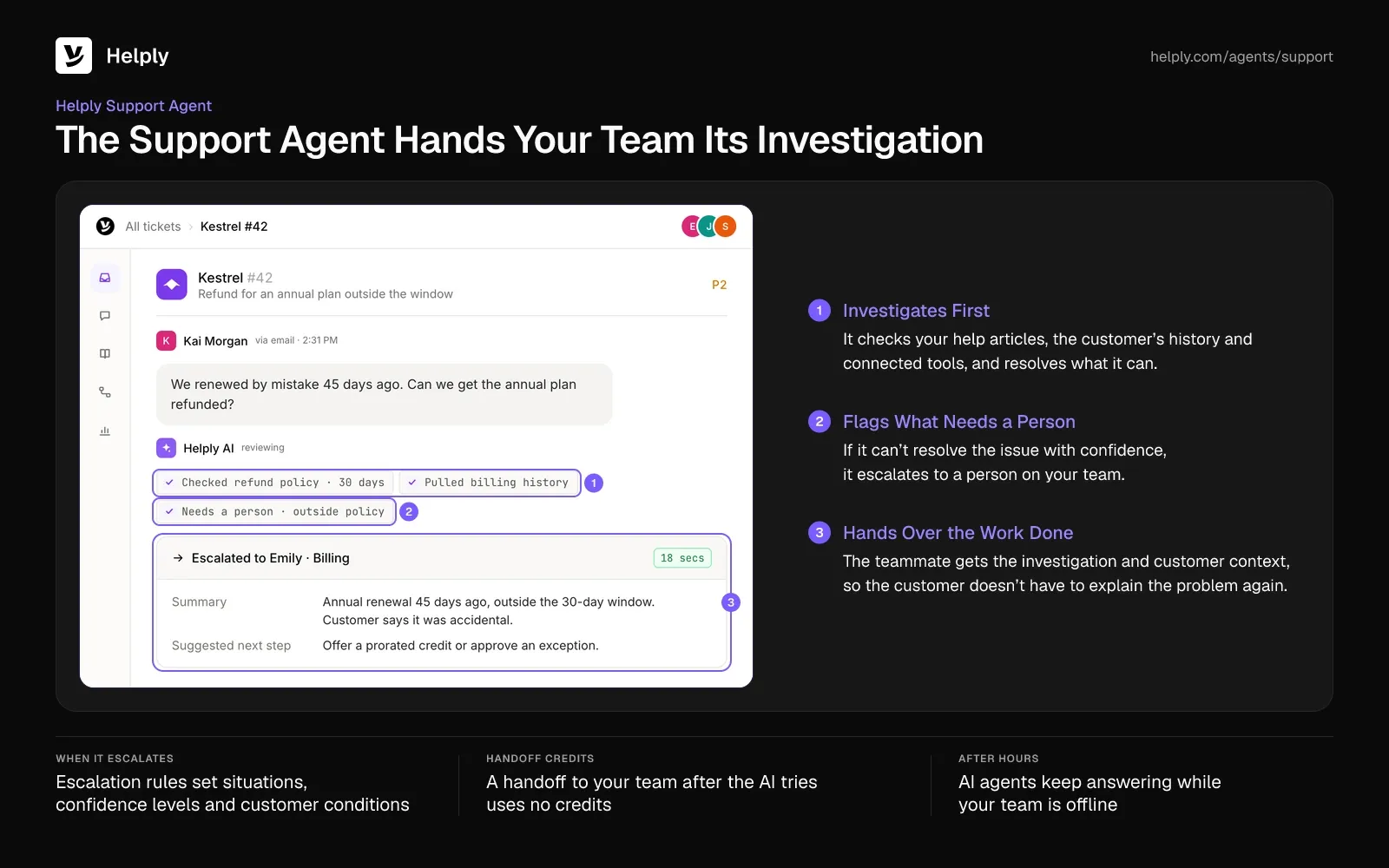
- Rules for when AI stops. Escalation rules cover situations, confidence levels and customer conditions. Guidelines set how the agents behave and make decisions.
- Drafts for the Monday queue. The Assist Agent drafts replies from your Guidelines, the open conversation and the customer's context. Teammates can hand it supported Actions to run inside the chat.
- Known customers from the first message. Pass supported customer and account details from logged-in users into the chat widget, so each conversation starts with context.
- More channels in one inbox. WhatsApp, SMS, phone, Slack Connect, Microsoft Teams, Discord and Telegram reach the same help desk as email and the chat widget.
Sender.net, a marketing platform for email and SMS campaigns, put the Support Agent first in line on chat and email. The agent confirmed each customer's identity, settled routine deliverability, DNS and billing questions, and ran approved Stripe actions where needed. Across about 4,000 conversations a month, it resolved 71% end to end.
Pricing
Each plan's price covers a set number of human agents (the people who answer customers), plus a monthly pool of AI credits:
| Plan | Monthly (billed yearly) | Human agents | AI credits a month |
|---|---|---|---|
| Starter | $116 ($99) | Up to 2 | 2,500 |
| Plus | $234 ($199) | Up to 5 | 5,000 |
| Team | $587 ($499) | 10 | 15,000 |
| Pro | $1,175 ($999) | 25 | 50,000 |
| Growth | $2,352 ($1,999) | 50 | 100,000 |
Yearly billing saves 15%, and you can pay monthly without an annual contract. Each extra agent on Team, Pro or Growth costs $58 a month ($49 billed yearly).
Live chat, email and the shared inbox come on every plan. Chat flows, ticket forms, Facebook, Instagram, CSAT surveys and Helply branding removal start on Plus. WhatsApp, SMS, Slack Connect, Discord, proactive messages, SLAs, escalation rules, Skills and HubSpot start on Team, while Microsoft Teams needs Pro.
Answering from the knowledge base takes 3 credits, investigating across tools 6, and a full resolution 10. Triage and translation take 1 each, and drafting a reply or taking an action takes 2.
One conversation tops out at 15 credits. Handing a chat to your team after the AI tries costs nothing.
Close to 6,000 credits cover 1,000 chats if the AI resolves about half of them. Team holds that volume inside its 15,000 credits and adds WhatsApp and SMS. Three people on web chat and email fit Plus, from $274 ($239) with at least one $40 top-up.
AI replies pause on Starter, Plus and Team when the monthly credits run out, until you buy a top-up or change plans. Usage alerts and limits come with the shared credit pool.
Pros
- AI included in the plan. The Support and Assist Agents share one credit allowance, so resolved chats add no fee until the pool runs out.
- Handoffs with the work attached. The teammate who takes over sees the whole conversation, the customer's details and the AI's investigation. The handoff itself uses no credits, and no chat goes past 15.
- A help desk behind the widget. Chats and email land in one shared inbox beside the knowledge base. Your team handles a chat and its follow-up ticket in the same place.
- One price for a band of agents. Plus costs the same for 3 agents or 5, so a new hire inside the band adds nothing to the bill.
Cons
- No free plan. Helply sells five paid plans and a 14-day trial, so teams that want free chat start elsewhere.
- Agent caps on the smaller plans. Starter caps out at 2 agents, Plus at 5, and neither can add more.
- WhatsApp and proactive messages cost more. They sit on a higher plan than web chat and email, while LiveChat's Text, Tidio and tawk.to include WhatsApp at entry level.
Best For
Support teams that want one help desk, with AI agents answering at any hour and the Support Agent escalating with its investigation.
2. LiveChat (Now Text): Best for Chat-First Teams with WhatsApp in the Same Inbox
New buyers on livechat.com now get Text, which the LiveChat team built as its next product. Existing LiveChat customers keep their plans, and new trials start on Text's Essential, Growth and Enterprise plans.
Every user who answers chats needs a seat. Essential comes with 10 AI Agent resolutions each month, Growth with 200, and you buy extra ones in packs of 50.
- One inbox for chat channels. Website chat, WhatsApp, Messenger, SMS and email land in the same inbox on every plan.
- AI Agent with skills. It answers from your documentation, creates or updates tickets, collects customer details and transfers to a person.
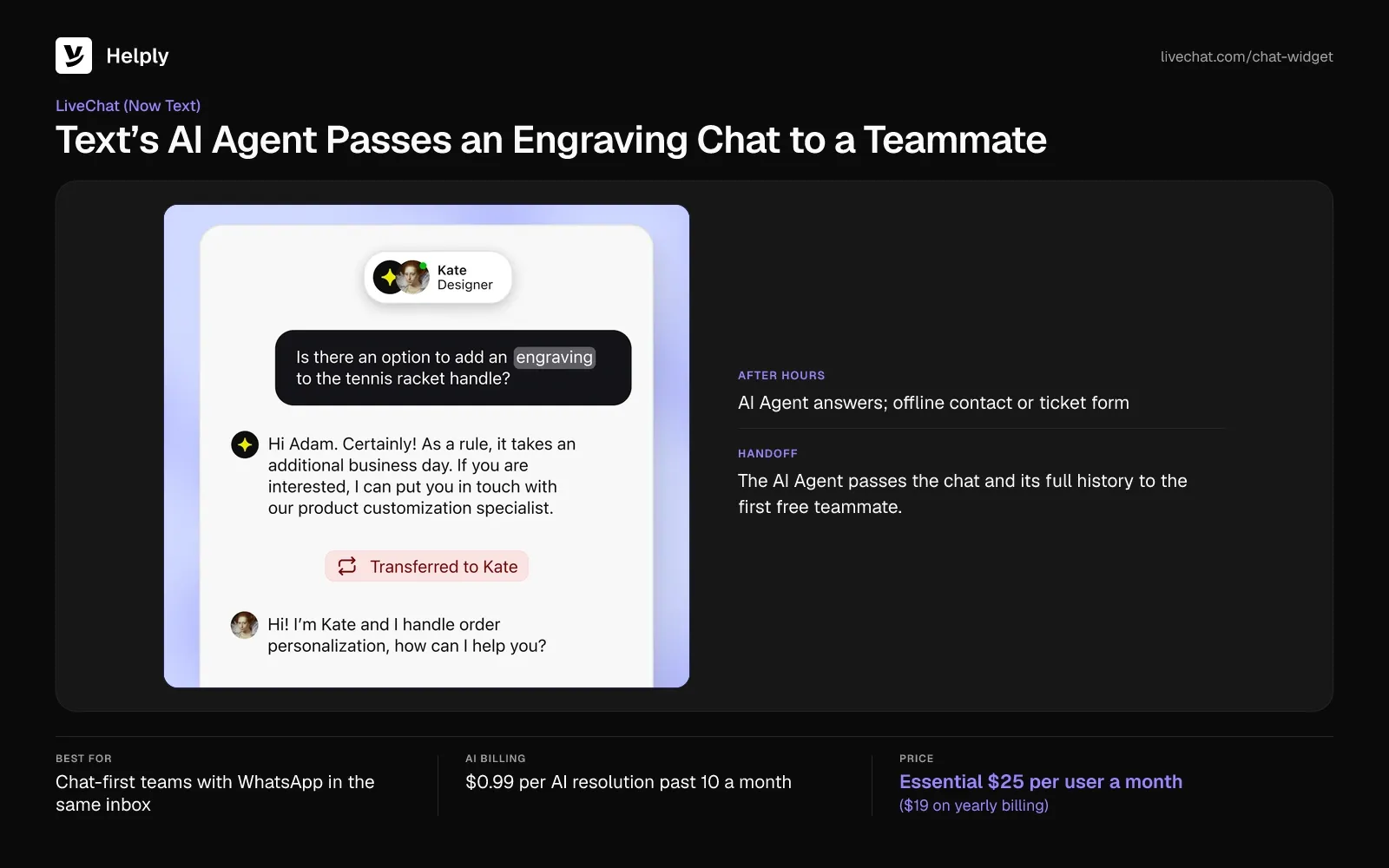
- After hours. The AI Agent answers website chats and WhatsApp out of hours. Visitors can also leave contact details or open a ticket in an offline form.
- Handoff. The AI Agent passes the chat and its full history to the first free teammate. If nobody is free within 30 seconds, it can open a ticket.
Pricing
Text Essential is $25 per user monthly ($19 on yearly billing), and Growth $99 ($79). Enterprise pricing is custom, and trials last 14 days without a card.
Each extra pack of 50 resolutions costs $49.50, or 99 cents a resolution. Packs you add renew until you remove them, and Text never adds them for you.
Pros
- Chat channels together. Teams on the $25 ($19) Essential plan answer WhatsApp, Messenger, SMS and email from one inbox.
- Handoffs keep the history. A Capterra reviewer praised moving a chat with its full history between front-desk and support staff.
Cons
- Short history on Essential. Essential keeps 60 days of conversations; unlimited history needs Growth.
- Two product names. A Capterra reviewer said the overlap between LiveChat and Text makes newer AI settings harder to find.
Best For
Chat-first teams that want WhatsApp, Messenger and SMS in one inbox and expect few AI resolutions a month.
LiveChat or Helply?
Text adds 99 cents for each AI resolution past the allowance, so three seats with 500 resolutions cost $570 ($552). Helply's Team plan carries WhatsApp and SMS too, and that volume fits inside its 15,000 credits. Choose Text when AI resolves few chats, and Helply when it resolves most.
| Helply | LiveChat (Text) | |
|---|---|---|
| Pricing basis | Human agents in bands: 5 on Plus, 10 on Team | $25 ($19) per user on Essential |
| AI charge | Credits per AI action (1 to 10), capped at 15 a chat | 99 cents per resolution after the first 10 |
| Scenario: 3 people, 1,000 chats | Close to 6,000 credits, inside Team's 15,000 | $570 ($552) |
| Handoff | Investigation and context travel with the chat | First free teammate with full history, or a ticket after 30 seconds |
3. Intercom: Best for Chat with Banners and Tooltips in Your Product
Intercom prices by the full seat and adds Fin, its AI agent, at 99 cents for each outcome, whatever the plan. Fin has no included allowance, so the first resolved chat is a billable one.
Live chat comes on all plans, along with support email, in-app chats, banners and tooltips. The Messenger runs on the web, iOS and Android.
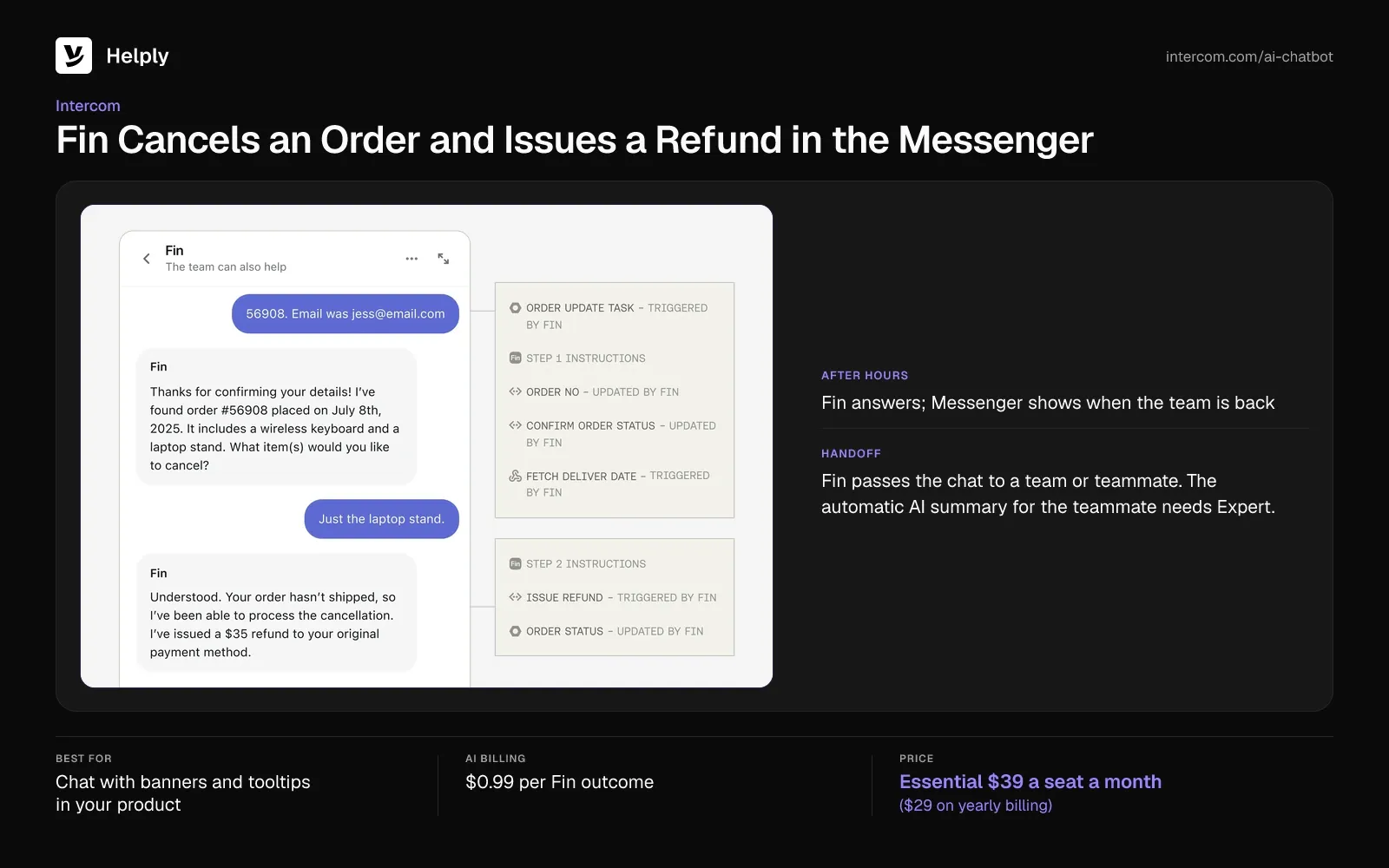
- Fin AI Agent. Fin answers across chat, email, WhatsApp and SMS, and Fin Procedures can resolve complex queries from start to finish.
- After hours. Office hours default to 24/7. Outside set hours, the Messenger shows when the team will be back.
- Handoff. Fin passes the chat to a team or teammate. The automatic AI summary for the teammate needs Expert; on Advanced, teammates create summaries by hand.
- Social channels on higher plans. Facebook and Instagram need Advanced or Expert.
Pricing
Intercom's seats run $39 ($29 yearly) on Essential, $99 ($85) on Advanced and $139 ($132) on Expert. New customers get Essential at $29 ($19) for as long as they stay subscribed.
Each Fin outcome is 99 cents, and Intercom counts at most one per conversation. Intercom bills nothing if the customer requests a person. You can try it for 14 days without a card.
Pros
- Context on takeover. A TrustRadius reviewer wrote that Intercom "Maintains context when a live agent takes over."
- Chat in the product. Essential includes the Messenger inside your web, iOS and Android app.
Cons
- Spend control. A TrustRadius reviewer said the only way to cap one Fin outcome type's spend is to pause Fin.
- Summaries on Expert. The automatic handoff summary needs the top plan.
Best For
Software companies that want in-product messaging and can budget for Fin outcomes on top of seats.
Intercom or Helply?
Three Essential seats with 500 Fin outcomes total $612 ($582), and the fee grows with every chat Fin closes. That month fits inside the credits on Helply Team, which also carries WhatsApp and SMS, and no conversation uses more than 15. Start with Intercom if you need banners, tooltips and in-app messages beside chat, and read how Helply compares with Intercom before you decide.
| Helply | Intercom | |
|---|---|---|
| Pricing basis | Human agents in bands: 5 on Plus, 10 on Team | $39 ($29) per full seat on Essential |
| AI charge | Credits per AI action (1 to 10), capped at 15 a chat | 99 cents per Fin outcome, one per conversation |
| Scenario: 3 people, 1,000 chats | Close to 6,000 credits, inside Team's 15,000 | $612 ($582) |
| Handoff | Investigation and context travel with the chat | Automatic summary on Expert; manual on Advanced |
4. Zendesk: Best for Larger Teams on One Service Suite
Zendesk's live chat starts on Suite Team, not Support Team. Zendesk includes AI agents with each Suite plan, and on Suite Team it bills for automated resolutions past 5 an agent a month.
Suite Team includes unlimited concurrent chats, a pre-chat form and transfers between agents and departments. WhatsApp, Messenger and Instagram come with the Suite plans.
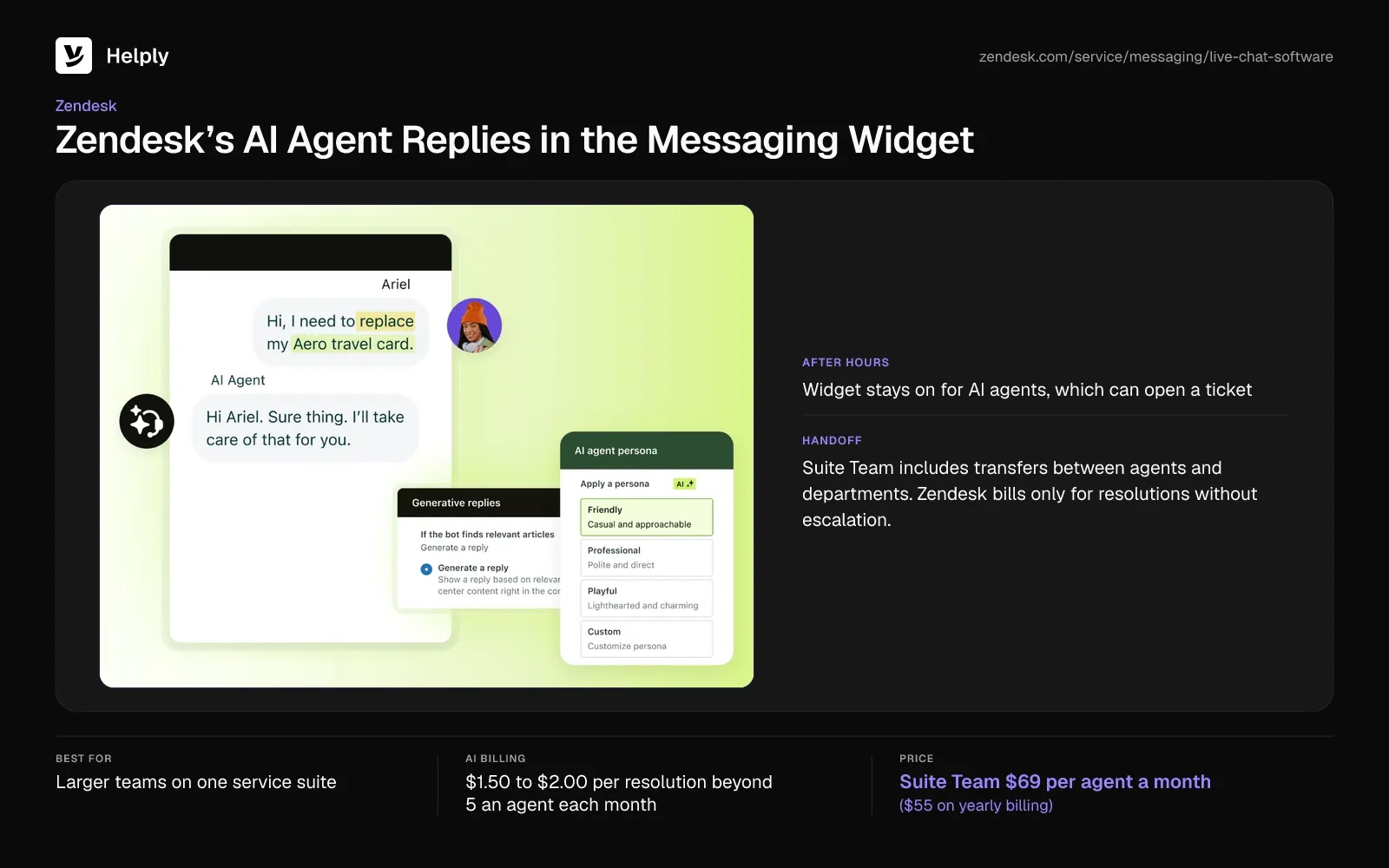
- AI agents on messaging. Zendesk's AI agents work across messaging, email and voice, and Zendesk bills only for resolutions without escalation.
- After hours. The messaging widget stays on for AI agent conversations. AI agents can capture details and open a ticket for later.
- Business hours from Professional. Suite Team has no business-hours schedules and uses out-of-office triggers instead.
- Proactive messages. Suite Team and higher plans can send proactive messages in the web widget.
Pricing
Zendesk Suite Team costs $69 per agent monthly ($55 on yearly billing), with Suite Professional at $149 ($115). Enterprise pricing comes through sales. The 14-day trial asks for no card.
Each Suite Team agent brings 5 included automated resolutions a month; on Suite Professional it's 10. Past that, each costs $1.50 if you commit in advance, or $2.00 pay-as-you-go.
Pros
- One thread. A Capterra reviewer said Zendesk pulled everything into one thread, so whoever picked up a case saw the whole history.
- Chat capacity. Suite Team includes unlimited concurrent chats and transfers between departments.
Cons
- AI over basics. A Capterra reviewer said Zendesk's focus on AI is taking attention from features that should be standard by now.
- AI fees on top of seats. Three agents and 500 AI resolutions come to $934.50 to $1,177 ($892.50 to $1,135) a month.
Best For
Larger support teams that want chat, tickets and voice in one suite and can budget per-agent and per-resolution fees.
Zendesk or Helply?
With 15 resolutions included, three agents plus the other 485 at $1.50 to $2.00 each total $934.50 to $1,177 ($892.50 to $1,135). On Helply, that month uses close to 6,000 credits, under half of Team's 15,000. Zendesk suits a larger team that needs its full suite; for a side-by-side view, read how Helply compares with Zendesk.
| Helply | Zendesk | |
|---|---|---|
| Pricing basis | Human agents in bands: 5 on Plus, 10 on Team | $69 ($55) per agent on Suite Team |
| AI charge | Credits per AI action (1 to 10), capped at 15 a chat | $1.50 to $2.00 per resolution beyond 5 an agent each month |
| Scenario: 3 people, 1,000 chats | Close to 6,000 credits, inside Team's 15,000 | $934.50 to $1,177 ($892.50 to $1,135) |
| After hours | AI agents keep answering; the Support Agent escalates with its investigation | Widget stays on; AI agents open tickets |
5. Tidio: Best for Small Online Stores
Tidio prices each plan by billable conversations and sells Lyro, its AI agent, by AI conversation. A billable conversation is one where a human agent replies.
Free, Starter and Growth each include 10 seats. At the billable limit, agents can't reply to new messages until the quota resets or you upgrade.
- Channels on every plan. Messenger, Instagram, WhatsApp and email start on the free plan.
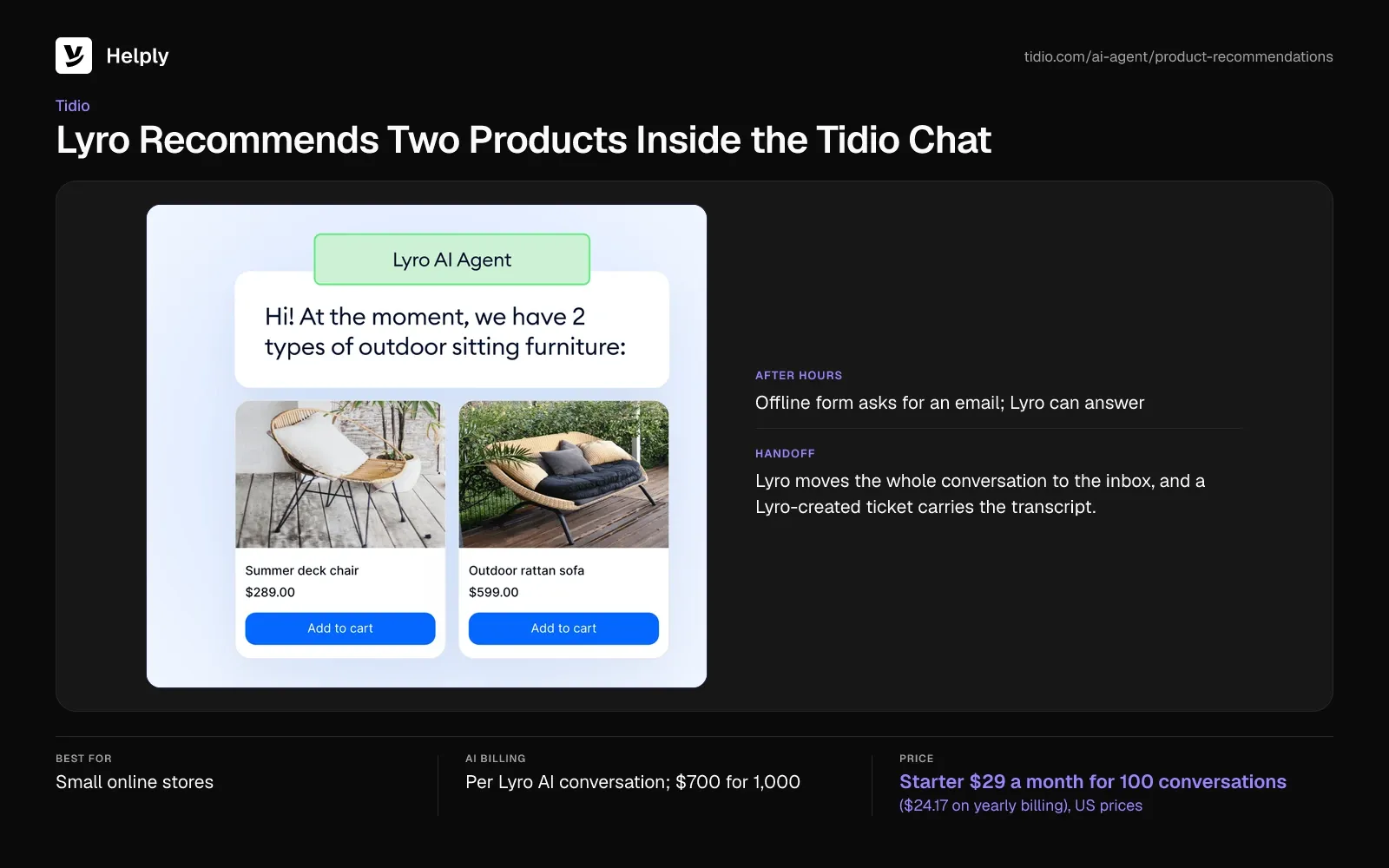
- Lyro AI Agent. Lyro answers from your support content, and Tidio says it resolves 75% of conversations on average.
- After hours. The widget shows an offline form that always asks for an email. You can also set Lyro to answer only while agents are offline.
- Handoff. Lyro moves the whole conversation to the inbox, and a Lyro-created ticket carries the transcript.
Pricing
Tidio's US prices start with Starter at $29 monthly ($24.17 on yearly billing) for 100 billable conversations. Growth begins at $59 ($49.17) with 250 conversations, and the 600-conversation tier costs $129 ($107.50). Tidio's trial lasts 7 days and needs no card.
Lyro costs $39 a month ($32.50) for 50 AI conversations and $700 (about $583) for 1,000. Removing Tidio branding on Growth costs $20 a month ($16.67).
Pros
- Fast setup. A Trustpilot reviewer praised quick setup and smooth integration with their site.
- Free channels. WhatsApp, Instagram and Messenger come on the free plan.
Cons
- Upgrade costs. One Trustpilot reviewer said they kept paying for upgrades to get Tidio working, and another felt overcharged for AI features.
- Hard limit. Agents can't reply once the billable quota runs out, unless you switch on automatic upgrades for a monthly plan.
Best For
Small online stores that want chat, Instagram and WhatsApp on a free plan and expect few AI conversations.
Tidio or Helply?
Tidio charges for human-answered conversations and again for each Lyro conversation, so 1,000 AI-first chats cost $829 (about $691). Helply prices by human agents and covers the AI work with credits. Pick Tidio for a free start, or compare Helply's plans for AI at volume.
| Helply | Tidio | |
|---|---|---|
| Pricing basis | Human agents in bands: 5 on Plus, 10 on Team | Billable conversations; 10 seats on Starter and Growth |
| AI charge | Credits per AI action (1 to 10), capped at 15 a chat | Lyro: $700 for 1,000 AI conversations |
| Scenario: 3 people, 1,000 chats | Close to 6,000 credits, inside Team's 15,000 | $829 (about $691) |
| Free plan | None; 14-day trial | 50 billable conversations a month |
6. Freshchat: Best for Growing Teams That Want a Free Plan First
Up to 10 agents can use Freshchat's free plan, with the chat widget and team inbox. Freddy, its AI agent, starts on paid plans, and Freshchat bills it by the session.
A session covers every exchange with the AI within 24 hours. Once the session packs run out, Freddy stops and chats go to your agents.
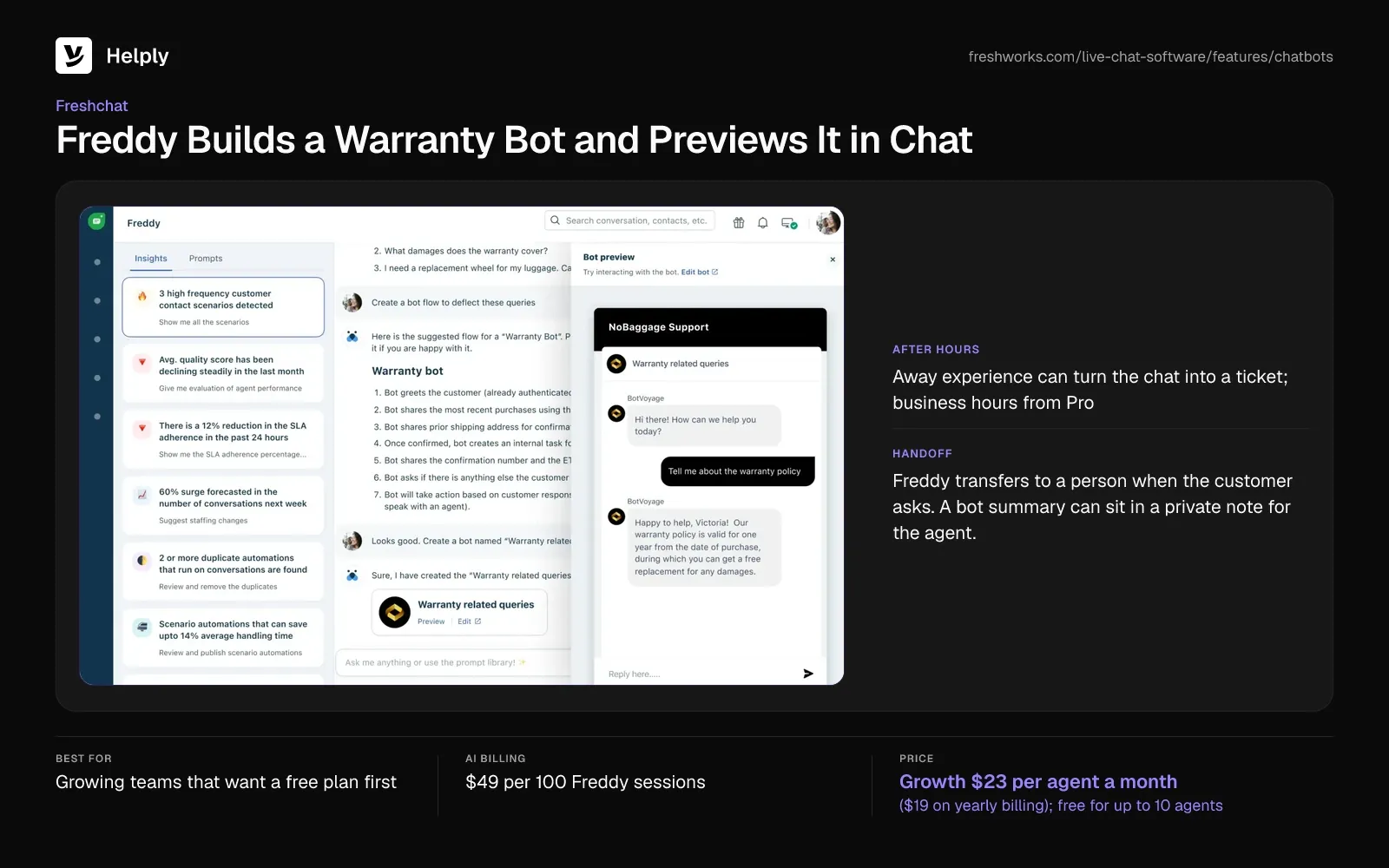
- Chat on web and mobile apps. On every plan, Free included, the widget runs on your website and inside mobile apps.
- After hours. The away experience can turn an out-of-hours chat into an email or web chat ticket. Business hours start on Pro.
- Handoff. Freddy transfers to a person when the customer asks. A bot summary can sit in a private note for the agent.
- Messaging channels. WhatsApp, SMS, Facebook and Instagram start on Growth.
Pricing
Freshchat Growth is $23 per agent monthly ($19 on yearly billing). Pro costs $59 ($49) and Enterprise $95 ($79). A 14-day trial starts without a card.
Freddy costs $49 for each pack of 100 sessions. Paid accounts get 500 free sessions once.
Pros
- Quick start. A Capterra reviewer praised a clean interface and fast setup.
- A free plan with room. A 10-agent team can answer chats from the widget and team inbox without paying.
Cons
- Basic routing. A Capterra reviewer said Freshchat's routing feels basic next to Zendesk and Salesforce.
- Business hours on Pro. Growth teams can't set business hours for the away experience.
Best For
Growing teams that want free live chat for up to 10 agents now and AI sessions later.
Freshchat or Helply?
Freshchat sells AI in session packs, so 1,000 AI-first chats on three Growth agents cost $559 ($547). Helply Team holds the same month inside its 15,000 credits. If a free plan matters most, Freshchat fits; if you want AI inside the plan price, see Helply pricing.
| Helply | Freshchat | |
|---|---|---|
| Pricing basis | Human agents in bands: 5 on Plus, 10 on Team | $23 ($19) per agent on Growth |
| AI charge | Credits per AI action (1 to 10), capped at 15 a chat | $49 for each pack of 100 Freddy sessions |
| Scenario: 3 people, 1,000 chats | Close to 6,000 credits, inside Team's 15,000 | $559 ($547) |
| Free plan | None; 14-day trial | Up to 10 agents |
7. HubSpot: Best for Teams That Keep Customer Records in HubSpot
HubSpot includes live chat on all plans, free and paid, and stores each conversation in its inbox. The Customer Agent, its AI agent, needs a Professional or Enterprise subscription, such as Service Hub Professional.
The free plan covers up to 2 users and shows HubSpot branding; paid plans remove it.
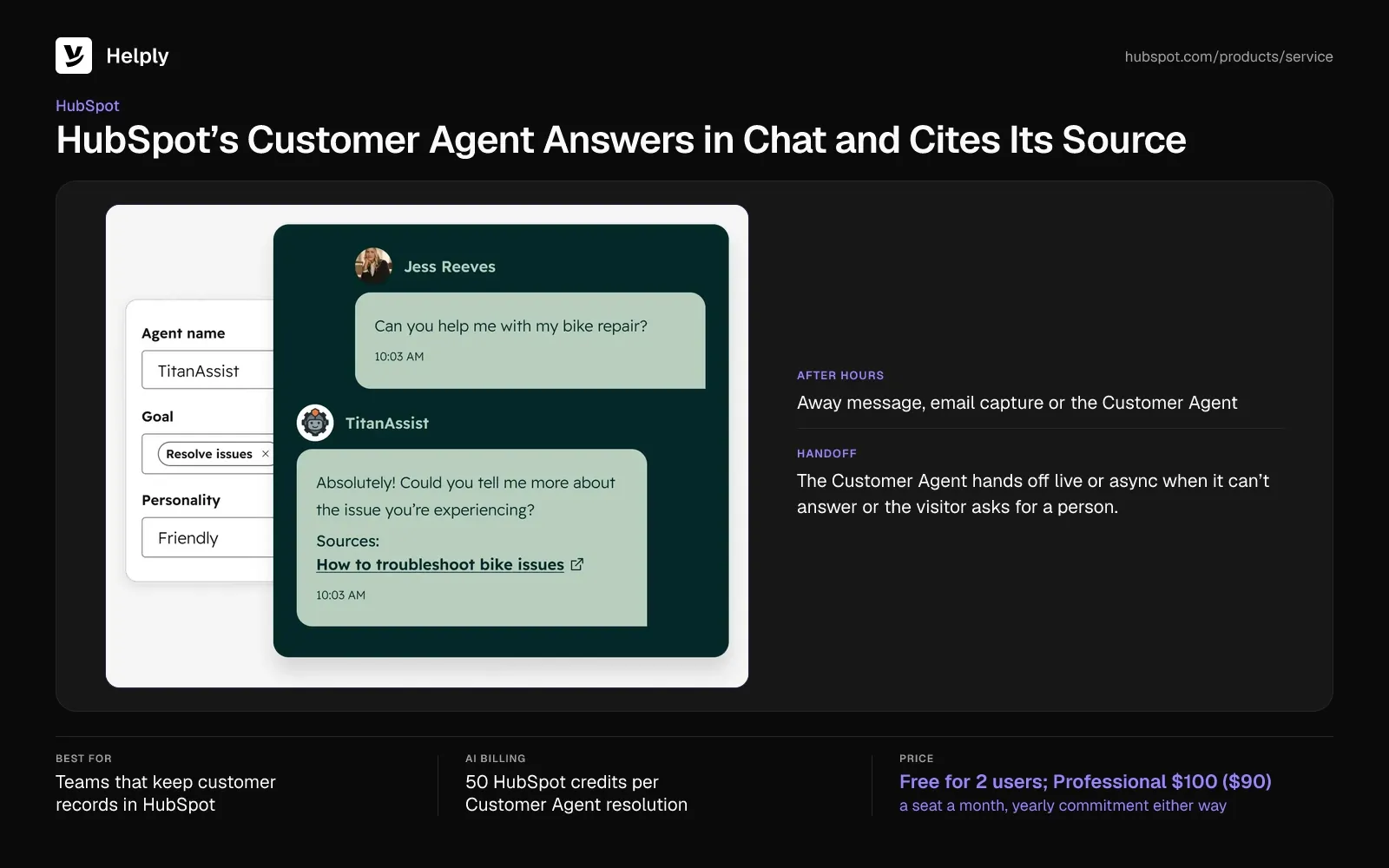
- Customer Agent. It answers from synced content, runs configured actions such as resetting a password, and transfers to a person.
- After hours. The chat can show a return time or an away message, or capture an email. It can also pass chats to the Customer Agent.
- Handoff. The Customer Agent hands off live or async when it can't answer or the visitor asks for a person.
- WhatsApp on Professional. The WhatsApp inbox needs Professional or Enterprise.
Pricing
On HubSpot's Service Hub pricing page, Professional costs $100 a seat a month ($90 paid yearly), with a yearly commitment either way. It also requires a one-time $1,500 onboarding fee and includes 3,000 HubSpot credits a month.
The Customer Agent uses 50 credits per resolved conversation, and extra credits cost one cent each. A resolution counts when no visitor-requested handoff follows within 72 hours.
Pros
- Chat in the CRM. A Capterra reviewer said the live chat connects to the CRM, so no conversation gets lost.
- Free start. Live chat is free for up to 2 users.
Cons
- Complex setup. A Capterra reviewer found live chat setup and permission settings slow and complex.
- AI needs Professional. The Customer Agent and WhatsApp both need Professional, with its $1,500 onboarding fee.
Best For
Teams that keep customer records in HubSpot and want each chat saved alongside them.
HubSpot or Helply?
Three Professional seats with 500 resolutions come to $520 a month ($490 paid yearly), plus $1,500 once. Helply's Team plan connects to HubSpot for the Support Agent's investigations and includes an onboarding call. Choose HubSpot when you keep customer records in its CRM; for more options, see these HubSpot Service Hub alternatives.
| Helply | HubSpot | |
|---|---|---|
| Pricing basis | Human agents in bands: 5 on Plus, 10 on Team | Free for 2 users; $100 ($90) a seat on Professional |
| AI charge | Credits per AI action (1 to 10), capped at 15 a chat | 50 credits per resolution, at one cent a credit |
| Scenario: 3 people, 1,000 chats | Close to 6,000 credits, inside Team's 15,000 | $520 ($490) on a yearly commitment, plus $1,500 once |
| AI agent | Included in each plan | Professional and Enterprise |
8. Crisp: Best for One Flat Workspace Price
Crisp prices each workspace at one flat rate, and each plan allows unlimited conversations. Crisp Plus holds 20 seats, Essentials 10 and Mini 4.
Hugo, Crisp's AI agent, starts on Mini and draws on token-based credits. Crisp puts a full conversation at 5 to 10 cents.
- Included AI credits. Mini includes $5 of credits a month, enough for about 90 automated conversations, and Essentials $25.
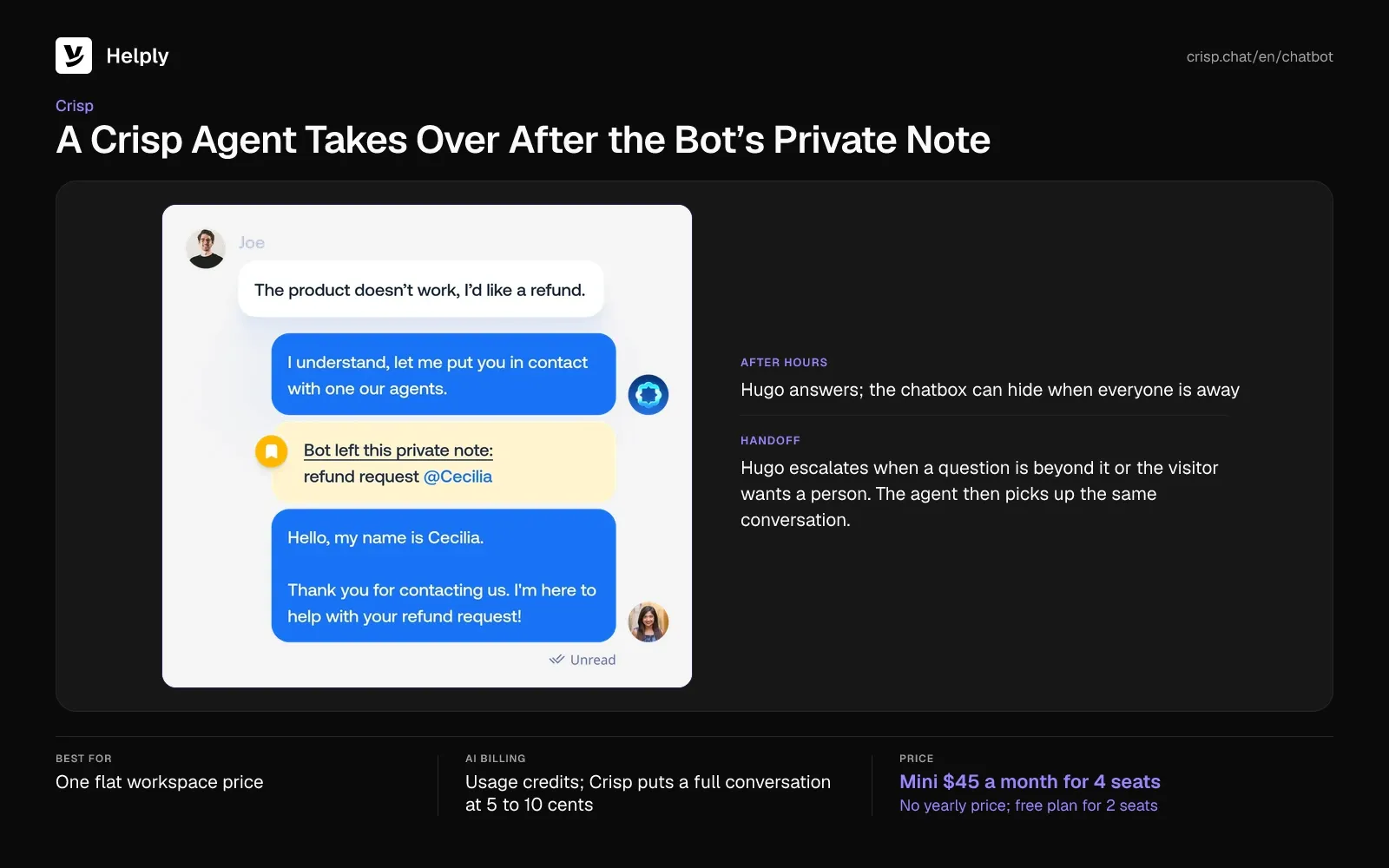
- After hours. The chatbox can hide when everyone is away, and Hugo can use your office hours to set reply expectations.
- Handoff. Hugo escalates when a question is beyond it or the visitor wants a person. The agent then picks up the same conversation.
- Mobile SDKs on every plan. Crisp's free plan includes chat SDKs for iOS and Android.
Pricing
Crisp Mini is $45 monthly and holds 4 seats; Essentials is $95 for 10, and Plus $295 for 20. Crisp publishes no yearly price. Its 14-day trial needs no card.
Past the included credits, Hugo runs on pay-as-you-go. With pay-as-you-go off, Hugo stops and conversations go to your team.
Pros
- A usable free plan. A Trustpilot reviewer said the free plan covered their live chat needs.
- Flat price. Mini covers 4 seats for $45 with unlimited conversations.
Cons
- Locked basics. A Trustpilot reviewer said away messages, triggers and the AI agent sit behind paid plans.
- Answer quality. Another Trustpilot reviewer found Hugo's answers off-topic despite training.
Best For
Small teams that want one flat workspace price and pay-as-you-go AI.
Crisp or Helply?
Crisp keeps the workspace price flat and bills Hugo by usage, so Mini with 1,000 AI chats comes to about $90 to $140. Crisp costs less than Helply at this volume. Pay more for Helply when chats need the Support Agent to take supported Actions or hand over unresolved chats with its investigation.
| Helply | Crisp | |
|---|---|---|
| Pricing basis | Human agents in bands: 5 on Plus, 10 on Team | Flat per workspace: 4 seats on Mini for $45 |
| AI charge | Credits per AI action (1 to 10), capped at 15 a chat | Token-based credits, 5 to 10 cents a conversation |
| Scenario: 3 people, 1,000 chats | Close to 6,000 credits: Plus's 5,000 and one 1,000-credit top-up | About $90 to $140 |
| Yearly price | Saves 15% | Not published |
9. LiveAgent: Best for Chat, Email and Calls at a Low Seat Price
LiveAgent charges nothing for its AI chatbot. You connect your own AI provider, such as OpenAI or Anthropic, and pay that provider's usage.
LiveAgent measured a median of 11 cents a chat at the provider on its own support. Live chat and the AI chatbot come on every plan.
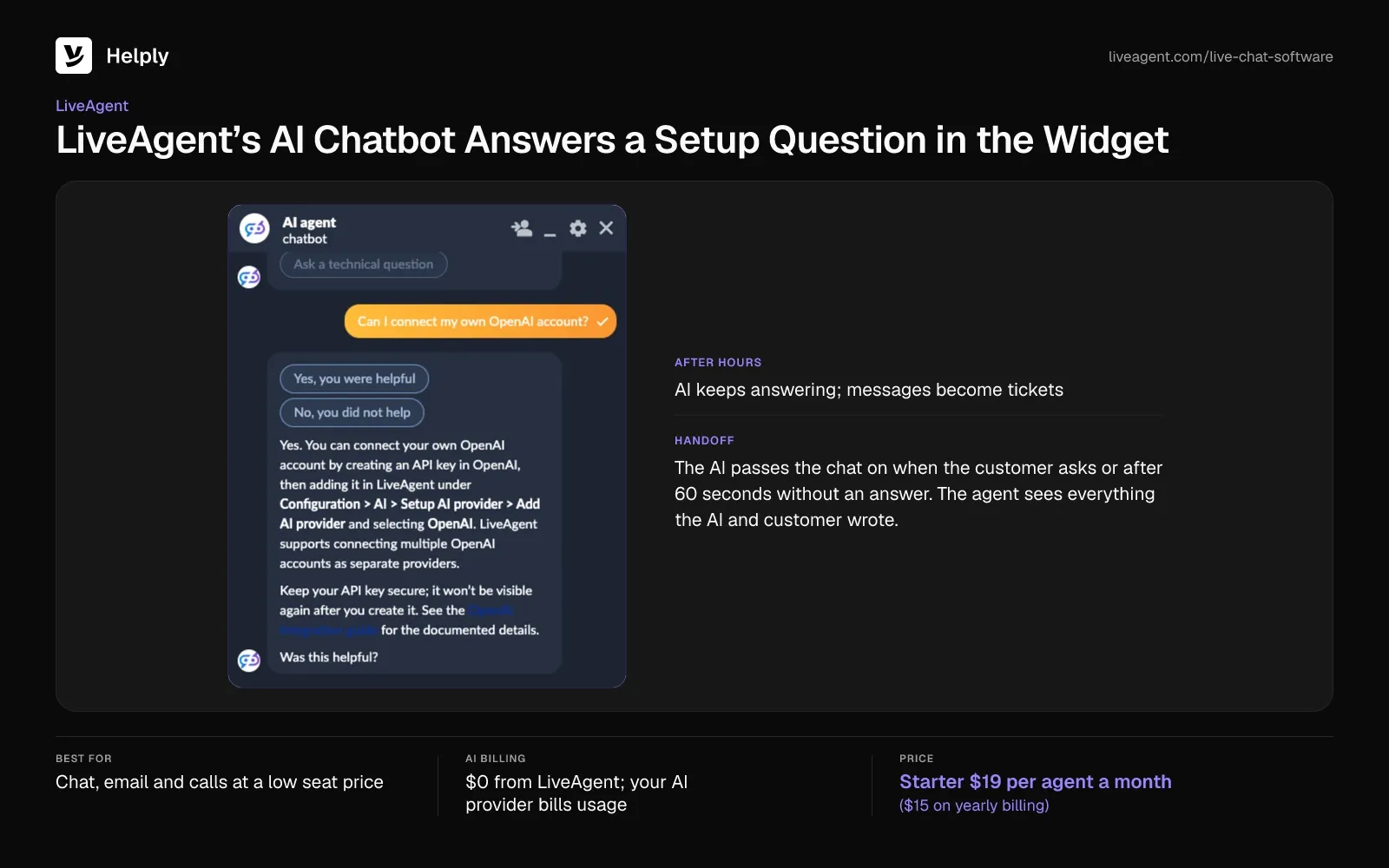
- After hours. The AI keeps answering when nobody is online, and visitors can leave a message that arrives as a ticket.
- Handoff. The AI passes the chat on when you tell it to, when the customer asks, or after 60 seconds without an answer. The agent sees everything the AI and customer wrote.
- Calls on Team. Team adds Messenger, Instagram, WhatsApp, Viber, Telegram and a call center.
- Email and a knowledge base on Starter. Starter covers email, contact forms and a knowledge base beside live chat.
Pricing
LiveAgent Starter is $19 per agent monthly ($15 on yearly billing), with a cap of 5 agents. Team costs $35 ($29) for up to 15, and Business $59 ($49).
LiveAgent offers no free plan; a 30-day trial needs no card. Proactive chat invitations start on Team.
Pros
- Price and support. A Trustpilot reviewer called LiveAgent cheaper than competitors and praised its fast support.
- No AI markup. LiveAgent adds no fee on top of your AI provider's usage.
Cons
- App reliability. A Trustpilot reviewer reported missed call notifications and logouts in the middle of work.
- No refunds or order changes. The AI chatbot can't issue refunds or change orders, so those chats go to your team.
Best For
Teams that want chat, email and a call center in one tool at a low per-agent price.
LiveAgent or Helply?
LiveAgent charges nothing for AI, so three Starter agents and 1,000 chats come to about $167 ($155) with provider usage. Its seats stay cheap at $19 ($15) an agent, and Team adds calls. Helply's Support Agent can take supported Actions, such as the Stripe actions Sender.net approved (how the Support Agent works).
| Helply | LiveAgent | |
|---|---|---|
| Pricing basis | Human agents in bands: 5 on Plus, 10 on Team | $19 ($15) per agent on Starter |
| AI charge | Credits per AI action (1 to 10), capped at 15 a chat | Your AI provider's usage |
| Scenario: 3 people, 1,000 chats | Close to 6,000 credits: Plus's 5,000 and one 1,000-credit top-up | About $167 ($155) |
| Actions | Can take supported Actions to solve the issue | No refunds or order changes |
10. tawk.to: Best for Free Live Chat
tawk.to charges nothing for live chat, with no limit on agents and no conversation cap. Paid add-ons cover branding removal and AI Assist.
Without the add-on, "Powered by tawk.to" stays on the widget. Removing it costs $39 a month ($29 billed yearly).
- Free channels. Live chat, email, WhatsApp, Messenger, Twilio SMS and Telegram come in the free inbox.
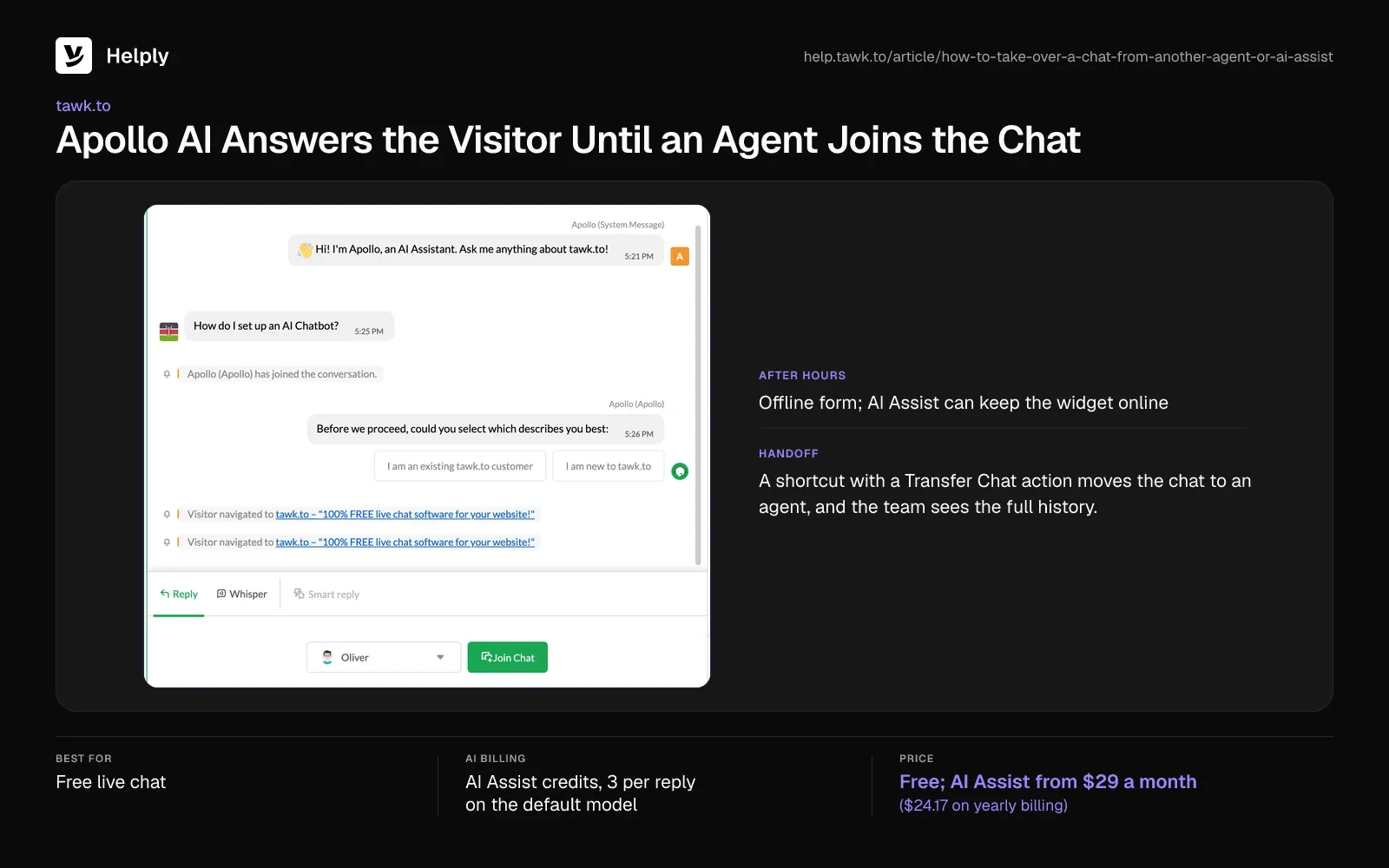
- After hours. The offline form asks for a name and email, and offline messages can become tickets. With AI Assist on, the widget can stay online when nobody is there.
- Handoff. A shortcut with a Transfer Chat action moves the chat to an agent, and the team sees the full history.
- Free triggers. Up to 20 triggers per property start chats while the widget is online.
Pricing
AI Assist has a free Hobby tier with 100 credits a month. AI Assist Growth is $29 monthly ($24.17 on yearly billing) for a 1,000-credit allowance, and Business $99 ($82.50) for 5,000.
Extra credits are $30 per 1,000, and each reply on the default model uses 3.
Pros
- Free core. A Trustpilot reviewer praised getting the essential tools without a monthly fee.
- No limit on agents. Every teammate can answer chats at no cost.
Cons
- Vendor support. A Trustpilot reviewer said tawk.to's own support bounced them between chatbots.
- Missed chats. Another reviewer reported a mobile app bug that kept switching Do Not Disturb back on.
Best For
Small sites that need free live chat for a whole team and can add AI later.
tawk.to or Helply?
tawk.to costs nothing for chat, and AI Assist on 1,000 chats adds $89 to $129 ($82.50 to $112.50). On Helply, the Support Agent can take supported Actions, and your team gets its investigation on handoff. For free chat alone, pick tawk.to; for AI resolution, try the Helply chat widget.
| Helply | tawk.to | |
|---|---|---|
| Pricing basis | Human agents in bands: 5 on Plus, 10 on Team | Free, with no limit on agents |
| AI charge | Credits per AI action (1 to 10), capped at 15 a chat | 3 credits per AI reply on the default model |
| Scenario: 3 people, 1,000 chats | Close to 6,000 credits, inside Team's 15,000 | $89 to $129 ($82.50 to $112.50) |
| Handoff | Investigation and context travel with the chat | Transfer Chat shortcut; the team sees the history |
How to Choose Live Chat Software: Four Tests to Run in a Trial
Run these four tests during a free trial to see what a chat costs and how it ends before you commit.
Test 1: Send a Chat After Hours
Open your site's widget at night or on a weekend and ask a common question. Note whether an AI agent gets the answer right or the widget asks for an email.
For CX Trends 2026, Zendesk asked 6,182 consumers in June 2025. Of those, 74% now expect service around the clock because of AI.
Test 2: Ask the AI Something It Can't Answer
Ask a question your help articles don't cover, then ask for a person. Check what the teammate receives: the transcript, the customer's details, and what the AI tried.
In a Five9 survey of 3,000 consumers in April 2026, 83% said they still repeat themselves at least sometimes after a transfer.
Test 3: Price a Month at Your Own Volume
Multiply your monthly chats, or the chats the AI resolves, by each tool's AI unit price. Add seats, then compare the totals instead of the entry price. Ask what happens at the limit: some tools pause the AI, and Tidio agents can't reply until you upgrade or the quota resets.
Test 4: Install the Widget Where Customers Ask
Put the widget on the page with the most questions, such as pricing or order tracking. Check that it can pass logged-in customer details, so chats start with context. For the full setup, see how to put an AI agent on a website.
Which Is the Best Live Chat Software for Your Team?
Pick the best live chat app for the job your chat needs to do.
| Your situation | Pick |
|---|---|
| You want AI to resolve chats and hand off with context, paid from the plan's AI credits | Helply |
| You want WhatsApp, Messenger and SMS beside web chat at a low seat price | LiveChat (Text) |
| You want chat with banners and tooltips in your product | IntercomIntercom |
| You need a large suite for chat, tickets and voice | Zendesk |
| You run a small online store and want WhatsApp and Instagram on a free plan | Tidio |
| You want free chat for up to 10 agents now and AI sessions later | Freshchat |
| You keep customer records in HubSpot | HubSpot |
| You want one flat workspace price | Crisp |
| You want chat, email and calls in one tool at a low seat price | LiveAgent |
| You need free live chat for a whole team | tawk.to |
Add a Chat Widget, or Put an AI Agent Behind Your Chat?
If your team will answer most chats itself, tawk.to, Crisp, Tidio and Freshchat all start free. LiveAgent adds calls at a low seat price. Text fits chat-first teams with few AI resolutions, and Intercom, Zendesk and HubSpot suit teams that run on their suite or CRM.
Helply fits teams that want a live chat platform on a full help desk, with an AI agent priced inside the plan. Its AI agents can answer common Saturday-night questions before Monday, and the Support Agent escalates the chats that need judgment.
Once a person takes over, the conversation arrives with the customer's context and the Support Agent's investigation. The shopper and the trial user don't have to explain the problem a second time.
For web chat and email, Plus covers up to five agents and needs at least one credit top-up at 1,000 chats. Team adds WhatsApp, SMS and proactive messages, and its 15,000 credits cover that month. Either way, you pay for AI from the plan's credits, with no fee for each resolved chat.
With the Support Agent answering first, Sender.net's human support team held steady as its customer base passed 180,000 businesses. Sender.net's Helply workspace also runs 18 Skills, reusable playbooks for deliverability, DNS and billing fixes.
Start with the widget on your busiest page, and read a week of handoffs before you roll it out everywhere.
Frequently asked questions
Helply fits teams wanting AI that resolves chats and hands off with context. Intercom suits in-product chat, Tidio small online stores, and tawk.to free chat with no cap on agents.
tawk.to's live chat is free, with no cap on agents or conversations. HubSpot's free plan covers 2 users, Crisp's 2 seats, Freshchat's 10 agents and Tidio's 50 billable conversations a month.
You can add tawk.to's widget to your website at no cost. Agents reply from iOS, Android, Windows and macOS apps, and AI Assist has a free Hobby tier.
Entry seats cost $19 to $69 an agent monthly, and tawk.to is free. With three people, 1,000 chats and AI resolving 500, totals range from tawk.to's $89 ($82.50) to Zendesk's $1,177 ($1,135).
No. Live chat connects a visitor with a person, while a chatbot or AI agent answers on its own, and most tools combine both.
Yes, when an AI agent answers out of hours. Helply's AI agents keep answering while your team is offline; tools without AI collect an email for later.
Live chat is one real-time channel. Help desk software tracks every conversation across chat, email and other channels, with assignment and reporting.
You install a widget snippet on your site, and chats arrive in a team inbox. An AI agent or a teammate replies, and the AI hands over when the chat needs a person.
LiveChat's Text charges 99 cents per AI resolution past its allowance. Zendesk charges $1.50 to $2.00, Intercom 99 cents per Fin outcome, and HubSpot 50 credits at one cent each.
Helply uses about 6,000 credits when AI resolves half. One conversation tops out at 15 credits, and the handoff to your team adds none.
About the author

Jared Scheel
Co-founder & CTO
Keep reading

Customer Service Chatbot Examples: 8 That Worked, 4 That Failed and What to Copy
Bildad Oyugi · 15 min read
Best AI Chatbots for Business: 9 Picks Compared by Cost and Fit
Konrad Janczyk · 26 min read