
 Konrad Janczyk ··26 min read

Key Takeaways
- The nine picks bill AI in seven units. Fin charges $0.99 per outcome, Freshdesk $49 per 100 sessions, Zendesk and HubSpot per resolution, and Tidio per AI conversation. Gorgias counts automated interactions and ManyChat active contacts, while Helply and Chatbase bill credits, per action and per AI reply.
- More than half of customers who use GenAI have handed it a task, so a bot that only links articles falls short. In Gartner's February and March 2026 survey, 58% had used it to complete a task for them, and 74% in B2B.
- One bad chatbot experience puts most customers off chatbots. In Gartner's February and March 2026 survey, only 27% would try one again after a negative experience.
- For three people handling 1,000 chats a month while AI resolves half, six picks cost $520 to $1,177 ($490 to $1,135). At list prices, HubSpot sits at the low end before its one-time $1,500 onboarding fee, and Zendesk pay-as-you-go at the top. Helply's Plus plan covers the same month with one top-up past its 5,000 included credits.
- Before choosing an AI chatbot for business, check each pick's limits against your channels and plan. Gorgias AI Agent works with Shopify stores, not BigCommerce, Magento, WooCommerce or PrestaShop. ManyChat's AI Replies run only on Instagram, and each Zendesk AI agent covers either messaging or email.
Why Do Customers Abandon Business Chatbots?
A customer opens your website chat at 9pm and asks where their order is, or why their invoice doubled. The bot replies with a help article link. They ask again, get the same link, find no way to reach a person and close the window.
Only 27% of the 3,566 customers Gartner polled in February and March 2026 would give a chatbot another try after a negative experience. In the same survey, 49% said they would have used a chatbot if the company had offered one. In their most recent service interaction, only 7% had used a chatbot or digital assistant.
Customers take the question elsewhere. In the same Gartner survey, they were about three times more likely to use third-party GenAI tools than a company's chatbot. Company chatbot use has stayed statistically flat since 2022.
The 9pm customer needed a bot that could check the order, or hand the chat to someone who could. Judge each pick by three tests: finishing the task in your systems, handing off with context and billing in a predictable unit.
AI Chatbots for Business Compared: Billing, Entry Price and Best Fit
Prices are list prices for the cheapest plan that includes the AI agent. The monthly price comes first; the per-month price on yearly billing sits in parentheses. Seat prices are per person a month.
| Pick | Best for | Entry price with AI | AI billing unit | Takes actions | Free plan or trial |
|---|---|---|---|---|---|
| Helply | An AI agent with a full help desk | Starter plan: 2,500 AI credits a month for up to 2 human agents (priced in section 1) | Credits per action, capped at 15 a conversation | Yes, in the tools you connect and allow | 14-day trial, no card |
| Fin AI Agent (Intercom helpdesk) | Chat-first software teams | $39 ($29) a seat on Essential, Fin included | $0.99 per outcome, capped at one per conversation | Yes, through data connectors | 14-day trial, no card |
| Zendesk | Structured ticketing for larger teams | $25 ($19) an agent for email AI; Suite Team $69 ($55) for chat | $1.50 or $2.00 for each resolution beyond the allowance | Yes, reads and writes data in other systems | 14-day trial, no card |
| Freshdesk | Low per-agent prices | $23 ($19) an agent for email AI; Omni $35 ($29) for chat | $49 per 100 sessions; each account's first 500 are free once | Yes, refunds, order updates and detail checks | 14-day trial |
| HubSpot Customer Agent | Teams that run on HubSpot | $100 ($90) a seat on Service Hub Professional, plus $1,500 once for onboarding | 50 credits, about $0.50, per resolution | Yes, through API calls to your apps | Free plan without the agent; 14 days of agent access with a paid Professional seat |
| Tidio | Small online businesses | Lyro from $39 ($32.50) for 50 AI conversations, on any plan including Free | Per AI conversation | Yes, orders, returns, leads and bookings | Free plan; 7-day trial, no card |
| Gorgias | Shopify stores | Starter with AI, $40, monthly only | $1.00 ($0.90 yearly) for each automated interaction | Yes, Shopify order edits, not on Starter | 7-day trial, no payment details |
| Chatbase | Answers from your own content | Basic, $150 ($120) with 4,000 message credits | Message credits per AI reply | Yes, Shopify, Stripe, bookings and APIs | 7-day trial |
| ManyChat | nstagram and social DM sales | Pro $39 ($29) for 2,500 active contacts, AI included | Active contacts a month | Lead qualification and links in DMs | Free plan; 14-day trial |
What Does an AI Chatbot for Business Cost at 1,000 Conversations a Month?
At list prices, six picks cost $520 to $1,177 ($490 to $1,135) for one month of support. In that month, three people answer customers, 1,000 website chats arrive, and AI replies first in every chat and resolves half.
| Pick | Plan for three people | AI charge for the month | Monthly total (yearly billing) |
|---|---|---|---|
| Helply | Plus, up to 5 human agents and 5,000 credits | About 6,000 credits: one top-up past the 5,000 included | Plus with one credit top-up (priced in section 1) |
| Fin AI Agent with Intercom | Essential, 3 seats at $39 ($29) | 500 outcomes at $0.99: $495 | $612 ($582) |
| Zendesk | Suite Team, 3 agents at $69 ($55) | 485 resolutions past 15 included, at $1.50 to $2.00 | $934.50 or $1,177 ($892.50 or $1,135) |
| Freshdesk Omni | Growth, 3 agents at $35 ($29) | 1,000 sessions past the one-time free 500: 10 packs at $49 | $595 ($577) |
| HubSpot Customer Agent | Service Hub Professional, 3 seats at $100 ($90) | 25,000 credits, 3,000 included, 22,000 more at $0.01: $220 | $520 ($490), plus $1,500 once |
| Tidio | Growth's 600-conversation tier at $129 ($107.50) for the 500 chats people handle | Lyro for 1,000 conversations: $700 ($583.33) | $829 ($690.83) |
| Gorgias | Pro, 2,000 tickets: $360 ($300) | 190 bundled interactions at $190 ($171), plus 310 at $1.50 | $1,015 ($936) |
| Chatbase | Basic with unlimited members: $150 ($120) | 4,000 message credits included; 1 credit per reply on the Auto model | $150 ($120) while replies fit 4,000 credits |
| ManyChat | Pro with 2,500 active contacts, 3 users and 2 Inbox seats: $39 ($29) | Manychat AI included | $39 ($29) for social DMs; a third Inbox seat costs extra; AI Replies on Instagram only |
Those six are HubSpot, Freshdesk Omni, Fin, Tidio, Zendesk and Gorgias. HubSpot's $520 leaves out its one-time $1,500 onboarding fee. Helply's month runs on Plus with one credit top-up; its price and channel limits are in section 1.
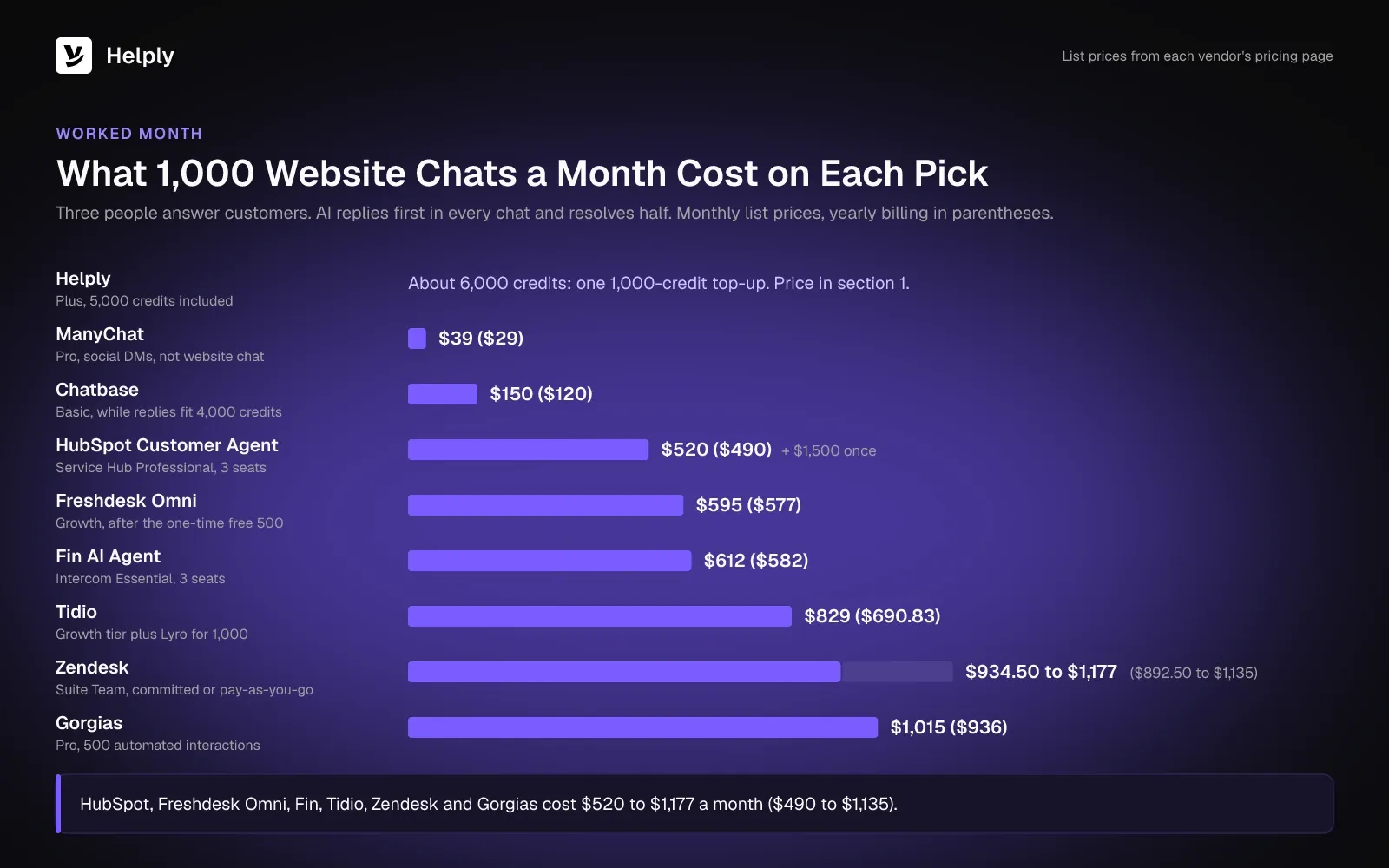
Freshdesk's total assumes you've used the 500 free sessions, which each account gets once. Chatbase's total holds while AI replies fit 4,000 credits. ManyChat lists social apps, email and SMS as its channels, so its row covers DM volume rather than website chat.
1. Helply: Best for AI That Resolves Requests with a Full Help Desk Behind It
Helply's AI agents can investigate the 9pm order or invoice question and resolve it inside a full help desk. Inbox, live chat, help center and reporting sit in one product with the agents that handle the queue. The Support Agent talks to customers, and the Assist Agent works beside your team.
On your website or in your app, the chat widget passes in who the customer is and which account they belong to. The Support Agent can use that context and your knowledge base to resolve supported questions, so the customer doesn't wait for a person.
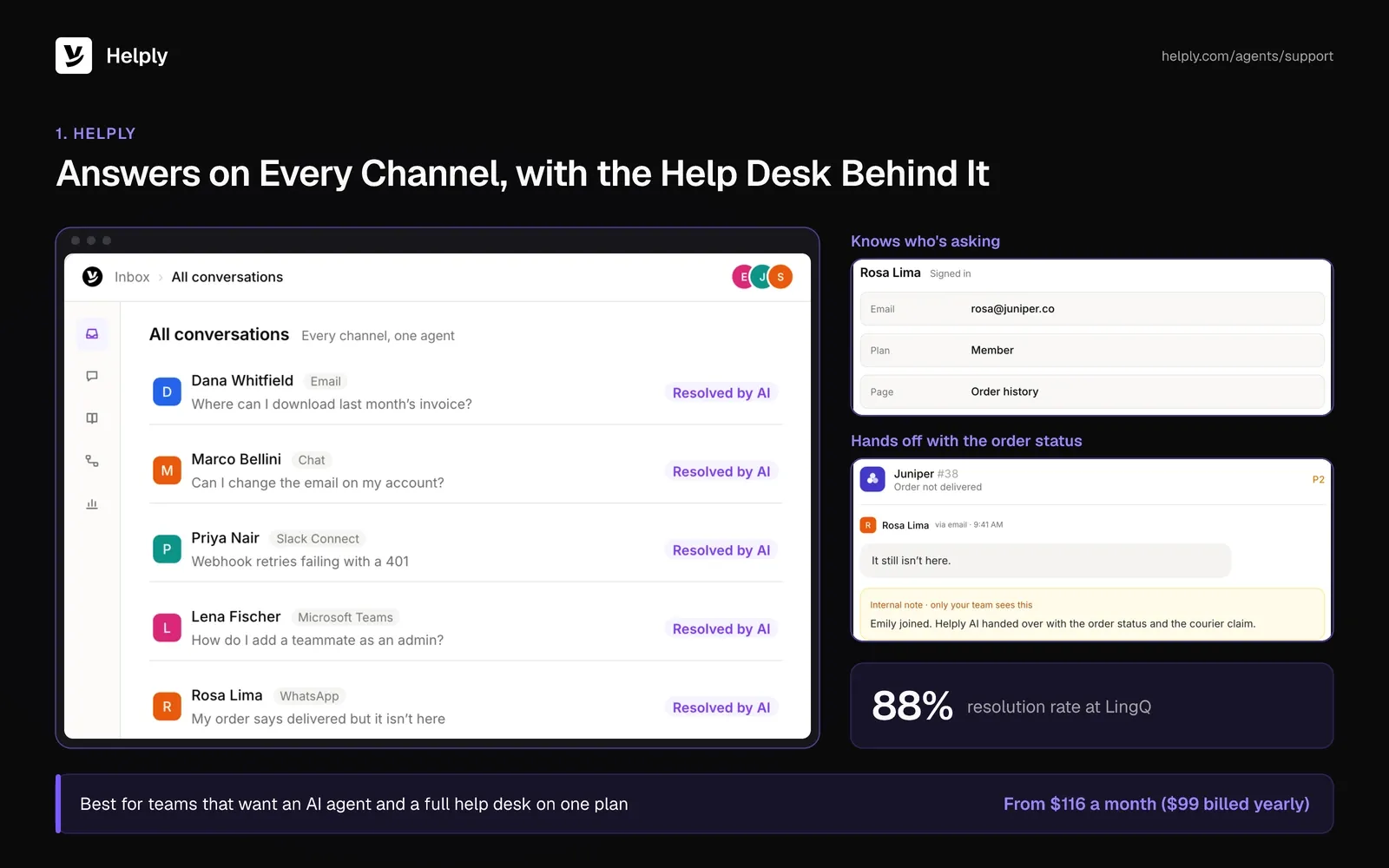
- An agent that finishes the request. The Support Agent can investigate, use connected tools and take supported actions to resolve a conversation from start to finish. That can include issuing a refund in Stripe or updating an order, where you allow it.
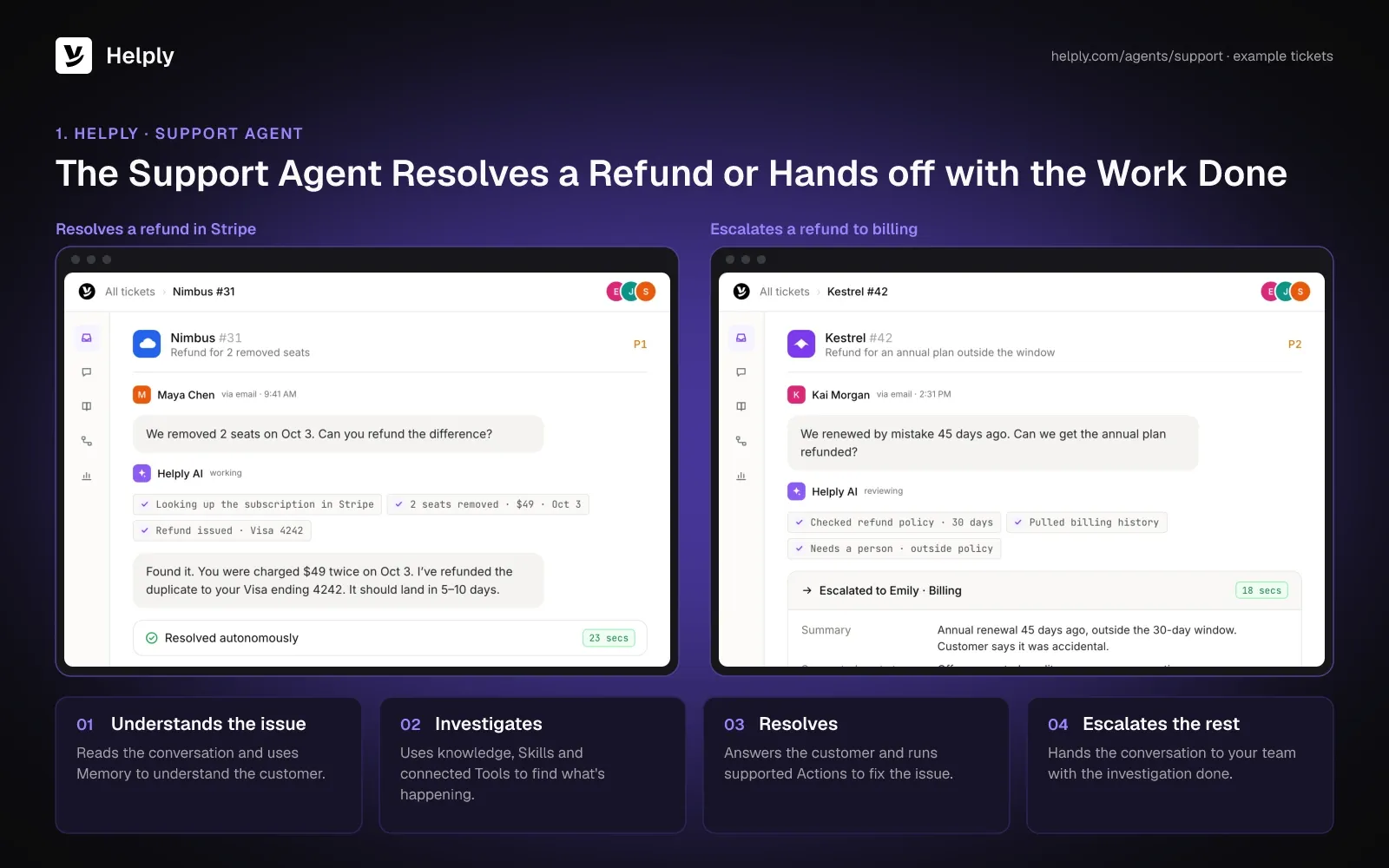
- Handoffs with the work attached. If it can't resolve something with confidence, your team receives the conversation, the agent's investigation and the customer's context. The customer doesn't have to repeat the question.
- Your rules for refunds and exceptions. Guidelines tell the agents how to handle refunds, cancellations, account changes and exceptions, and which situations need a person. Escalation rules set when the AI can proceed alone and when a person steps in.
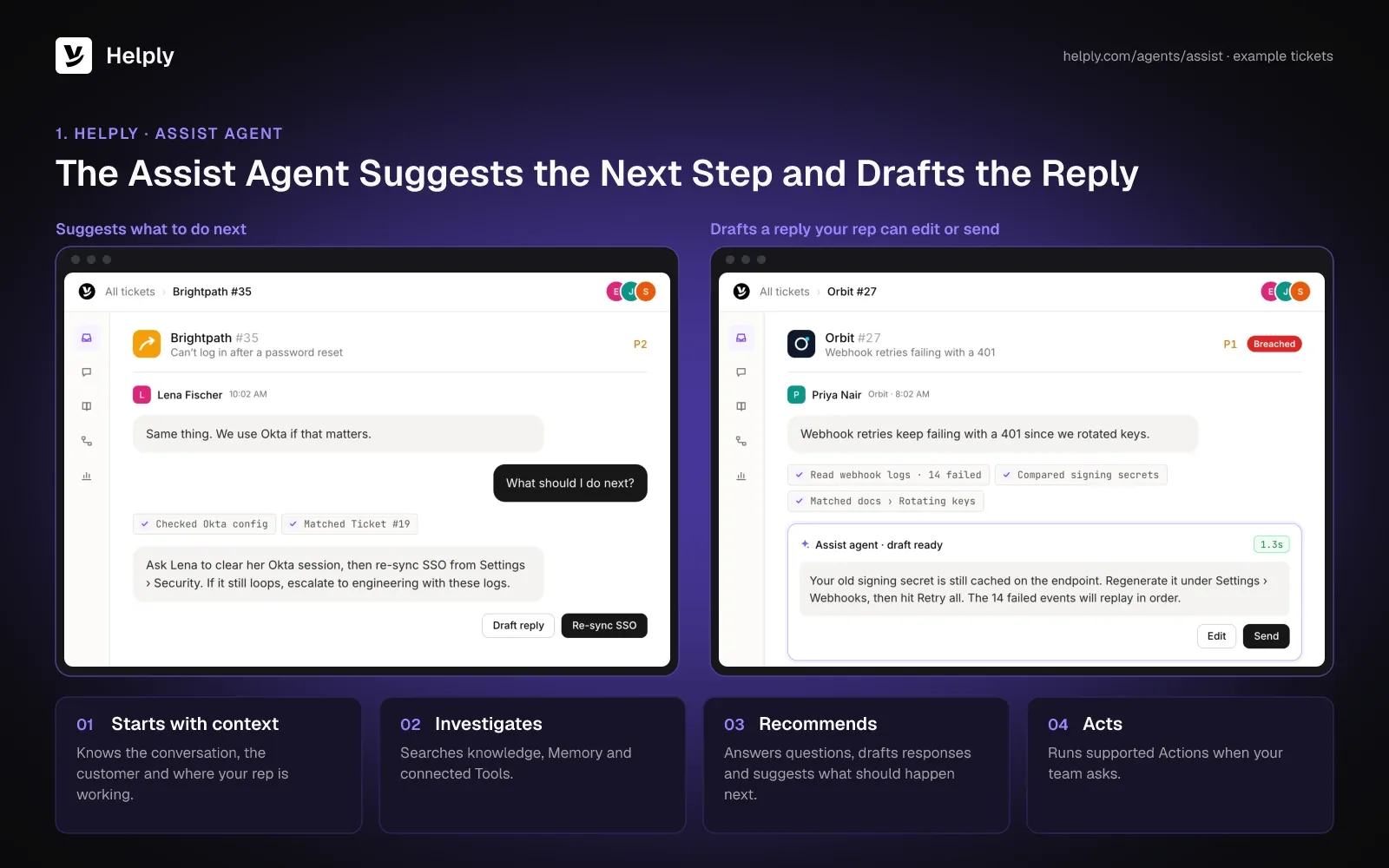
- Your team starts from a draft. The Assist Agent bases its draft replies on the conversation, customer details and your Guidelines. Reps can also have it run supported actions from inside the ticket.
- A help center the agents keep current. Your knowledge base lives on your domain, and AI helps write its articles and answers customers from them. Your team reviews the gaps and outdated answers the Knowledge Agent flags.
- Your channels in one workspace. Conversations from email, website chat, WhatsApp, SMS, Discord, Telegram, Slack Connect, Microsoft Teams and supported phone calls share one inbox.
- Security for customer data. Helply follows GDPR, offers a DPA on request and maintains a SOC 2 Type II report. The AI providers it works with never train their models on your customers' data.
Support volume at LingQ fell 50% while its user base grew 50% a year, with no added headcount. LingQ, a language-learning company of 11 to 50 people, had moved its website and app support from its old help desk to Helply. New users asking how to get started got an instant answer from the Support Agent.
Pricing
On Starter, up to 2 human agents share 2,500 AI credits a month for $116 ($99 billed yearly). Plus lifts that to 5 agents with 5,000 credits for $234 ($199). Team, at $587 ($499), covers 10 agents with 15,000 credits.
Pro and Growth cost $1,175 ($999) and $2,352 ($1,999) for 25 and 50 agents, with 50,000 and 100,000 credits. Yearly billing saves 15%, and no plan needs an annual contract. Each human agent is a teammate who answers customers.
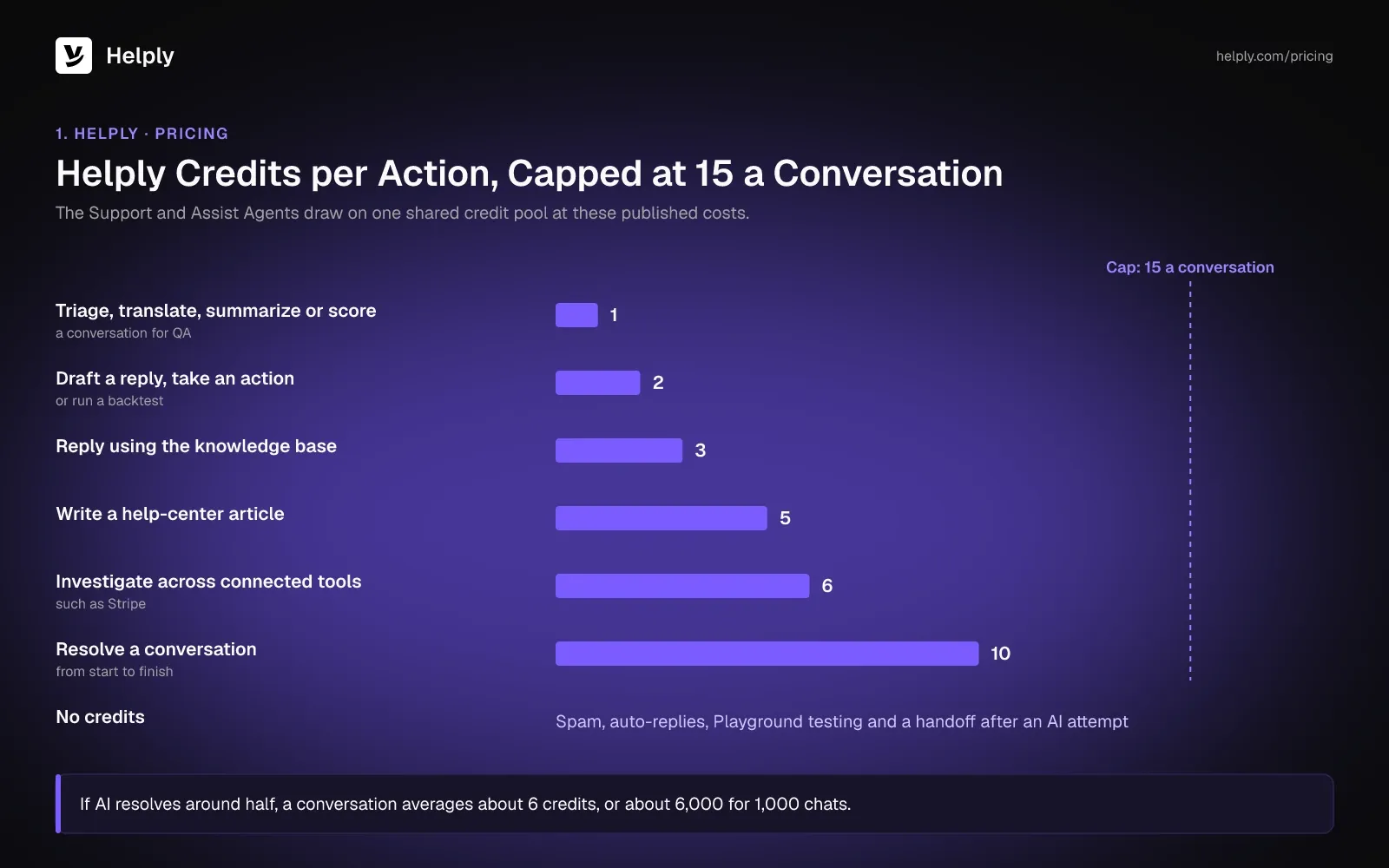
The Support and Assist Agents come with all five plans. Their AI work draws on the plan's shared credit pool, at a published cost per action:
- Triage, translate, summarize or score a conversation for QA: 1 credit
- Draft a reply, take an action or run a backtest: 2 credits
- Reply to a customer using the knowledge base: 3 credits
- Write a help-center article: 5 credits
- Investigate across connected tools such as Stripe: 6 credits
- Resolve a conversation from start to finish: 10 credits
No conversation can go past 15 credits. Spam, auto-replies, Playground testing and a handoff after the AI has tried cost nothing.
If AI resolves around half, each conversation averages about 6 credits, and 1,000 chats a month use about 6,000. For three people, Plus covers that month with one 1,000-credit top-up at $40, for $274 a month ($239 billed yearly). Team covers the same month at $587 ($499) inside its 15,000 credits.
For the same month at list prices, Fin, Zendesk, Freshdesk, HubSpot, Tidio and Gorgias total $520 to $1,177 ($490 to $1,135).
Usage alerts warn the team before the pool runs low. On Starter, Plus and Team, the AI pauses at the limit, so spending stops until someone adds credits or changes plan. Pro and Growth teams set a hard cap or agree on an overage rate at signup.
Facebook and Instagram need Plus or higher, and Microsoft Teams needs Pro. Team adds Slack Connect, WhatsApp, SMS, Discord, escalation rules, Skills, memory, custom API actions, AI QA, backtesting and the Knowledge Agent. The 14-day trial needs no credit card.
Pros
- The agent can finish requests in the chat. The Support Agent can investigate, then refund a charge in Stripe or update an order, where you allow it.
- AI agents come with the plan. The Support and Assist Agents draw on a shared credit pool, and every action has a published credit cost.
- Help desk and AI in one product. You don't need to wire a separate chatbot into your help desk.
- Handoffs cost no credits. If the AI tries first and then passes the conversation to your team, the handoff itself uses none.
Cons
- Starter and Plus cap the team. Starter covers 2 human agents and Plus 5, and neither can add more.
- Unresolved chats use credits. If the AI answers or investigates before your team takes over, those steps cost 3 or 6 credits.
- AI stops when credits run out. On Starter, Plus and Team, the agents wait for a top-up or a plan change once the pool is empty.
Best For
Businesses that want AI agents to resolve order, billing and account requests and hand off the rest, with credits per action.
2. Fin AI Agent: Best for Chat-First Software Teams on the Intercom Helpdesk
Fin AI Agent comes from Fin, the company formerly called Intercom, which Salesforce acquired in September 2026. The help desk keeps the Intercom name. Fin bills per outcome on top of Intercom's seat prices, so the bill grows with both headcount and AI work.
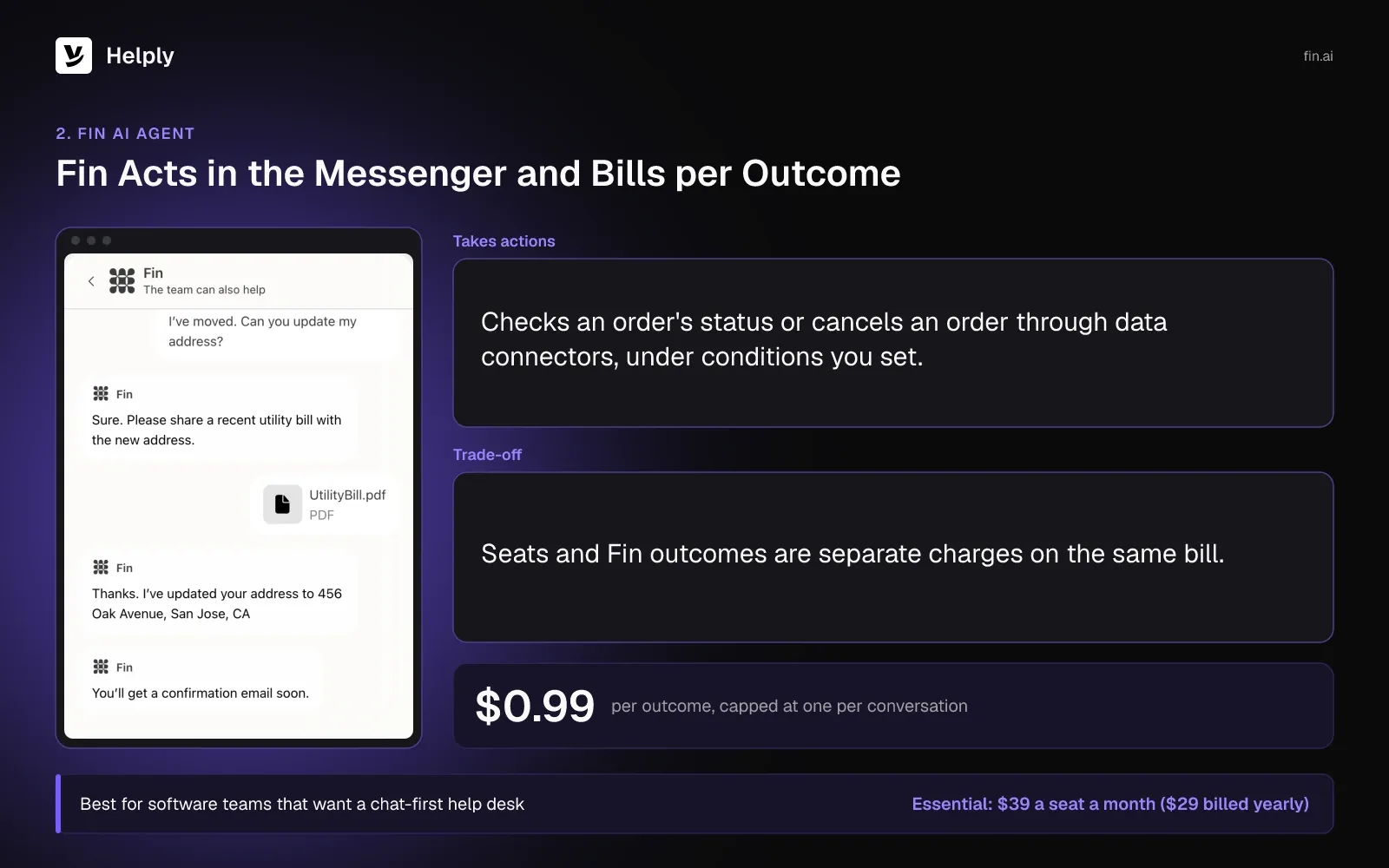
- Billing tied to outcomes. Fin bills at most one outcome per conversation, at $0.99. An outcome is a resolution, or a handoff that a Procedure you configured tells Fin to make.
- No fee for most escalations. Apart from Procedure handoffs, Fin bills nothing when it escalates or a customer asks for a person. It refunds the outcome if the conversation reopens.
- Actions through data connectors. On every plan, Fin's data connectors can check an order's status or cancel an order under conditions you set.
- Messenger and messaging apps. Fin answers in the Intercom Messenger on web, iOS and Android, and on email, WhatsApp, SMS, Facebook and Instagram.
- Fin on another help desk. Fin also runs on Zendesk, Salesforce, HubSpot or Freshdesk at $0.99 per outcome with no seat fees. You buy it through Fin's sales team.
Pricing
Intercom's seats cost $39 a month on Essential ($29 billed yearly), $99 on Advanced ($85) and $139 on Expert ($132). New customers get Essential for $29 ($19) while they stay subscribed.
Fin comes with every plan at $0.99 per outcome, and Copilot costs $35 a month per agent ($29 billed yearly). Three Essential seats with 500 outcomes come to $612 a month ($582).
Running Fin on another help desk carries a $49 minimum each month, covering 50 outcomes. Intercom's 14-day trial includes Fin and asks for no credit card.
Pros
- Multilingual answers. Fin answers customers in more than 40 languages across Messenger, email and messaging apps.
- Fin fits the help desk you have. Teams on Zendesk or Salesforce can add Fin without moving help desks.
Cons
- Two meters on one bill. Seats and Fin outcomes are separate charges, and Copilot adds a third if your agents want it.
- One Fin version on Essential. Without Workflows, which start on Advanced, you can set only one version of Fin live.
Best For
Software teams that want a chat-first help desk and accept per-outcome AI fees on top of seats.
Fin or Helply?
Pick Fin if your team is set on the Intercom Messenger and accepts seat and outcome fees as separate lines. For three people and 1,000 chats a month, half resolved, those lines come to $612 ($582). Helply's plan price covers a band of human agents, the Support and Assist Agents and a credit pool.
Teams that want the AI agents inside the plan price can compare the two in Helply vs. Intercom.
| Helply | Fin AI Agent with Intercom | |
|---|---|---|
| AI billing | Credits per action, capped at 15 a conversation | $0.99 per outcome, capped at one per conversation |
| People | Plus: up to 5 human agents | $39 ($29) a seat on Essential |
| Three people, 1,000 chats, half resolved | About 6,000 credits: Plus's 5,000 and a 1,000-credit top-up | $612 ($582) |
| Charge when the AI hands off | Credits for the AI's work; none for the handoff itself | None, except handoffs a Procedure calls for |
3. Zendesk: Best for Larger Teams That Need Structured Ticketing
Every Zendesk Support and Suite plan comes with AI agents, and Zendesk bills extra resolutions past a small monthly allowance. A web chat AI agent needs a Suite plan, because Support Team's AI covers email. Zendesk fits teams that want detailed ticket structure and can absorb a higher price per agent.
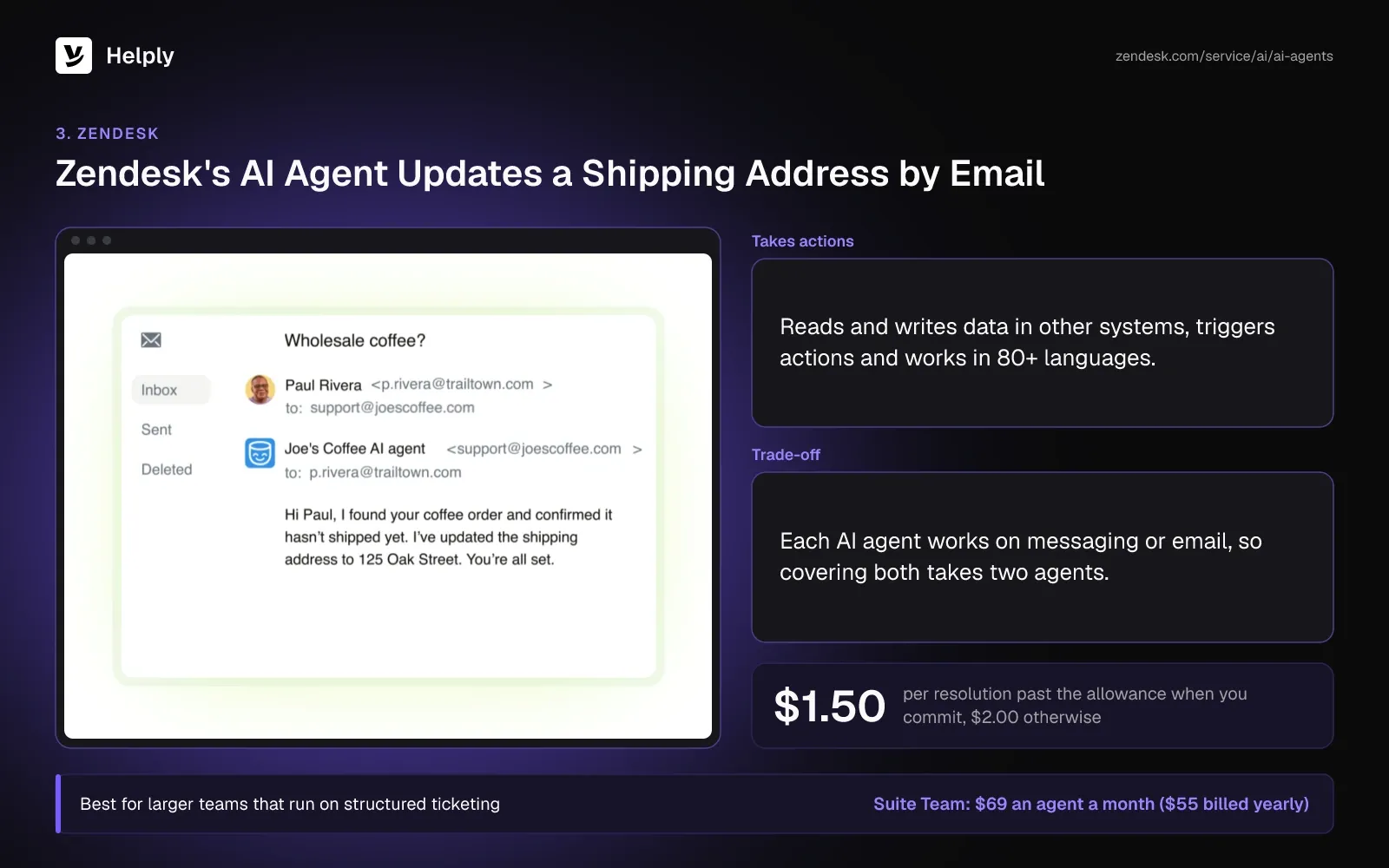
- Resolutions included per agent. On Suite Professional, each agent adds 10 automated resolutions a month, and the two Team plans add half that.
- Actions in other systems. AI agents can read and write data in external systems and trigger actions. They work in more than 80 languages.
- No add-on fee. Multi-step procedures and API integrations come with Support and Suite plans.
Pricing
Per agent a month, Suite Professional lists at $149 ($115 billed yearly), Suite Team at $69 ($55) and Support Team at $25 ($19). Suite Enterprise needs a quote from Zendesk's sales team.
Past the allowance, each resolution is $1.50 with an advance commitment, otherwise $2.00. From Suite Professional up, Copilot is an extra $50 per agent a month, billed yearly.
Three Suite Team agents with 500 resolutions, 15 of them included, cost $934.50 to $1,177 a month ($892.50 to $1,135). The 14-day trial needs no credit card.
Pros
- AI agents from the first plan. Support Team, the entry plan, includes email AI agents and 5 resolutions per agent a month.
- Unresolved requests cost nothing. Escalations to a person don't count toward the resolution bill.
Cons
- One channel type per AI agent. Each AI agent works on messaging or email, so covering both takes two agents.
- A small allowance at volume. With 500 AI resolutions a month, three agents' 15 included resolutions leave 485 to bill at $1.50 to $2.00 each.
Best For
Larger support teams that need structured ticketing and can budget for per-resolution AI fees.
Zendesk or Helply?
Zendesk and Helply each pair a full help desk with AI agents that act in other systems. Zendesk suits larger teams built around its ticket structure, and it bills resolutions past 5 or 10 a month per agent. Helply fits teams that would rather have AI agents and a credit pool in the plan price.
Helply vs. Zendesk compares the plans.
| Helply | Zendesk Suite Team | |
|---|---|---|
| AI billing | Credits per action, capped at 15 a conversation | Past 5 a month per agent: $1.50 or $2.00 per resolution |
| People | Plus: up to 5 human agents | $69 ($55) an agent |
| Three people, 1,000 chats, half resolved | About 6,000 credits: Plus's 5,000 and a 1,000-credit top-up | $934.50 or $1,177 ($892.50 or $1,135) |
| AI allowance for three people | 5,000 credits on Plus; a full resolution uses 10 | 15 automated resolutions |
4. Freshdesk: Best for Low Per-Agent Prices with AI Billed by Session
Freshdesk's own plans include an email AI agent, and the chat AI agent comes with Freshdesk Omni. Freddy AI Agent bills by session after 500 free sessions per account, whether or not it resolves anything. A chat session covers 24 hours of conversation, and an email session 72 hours.
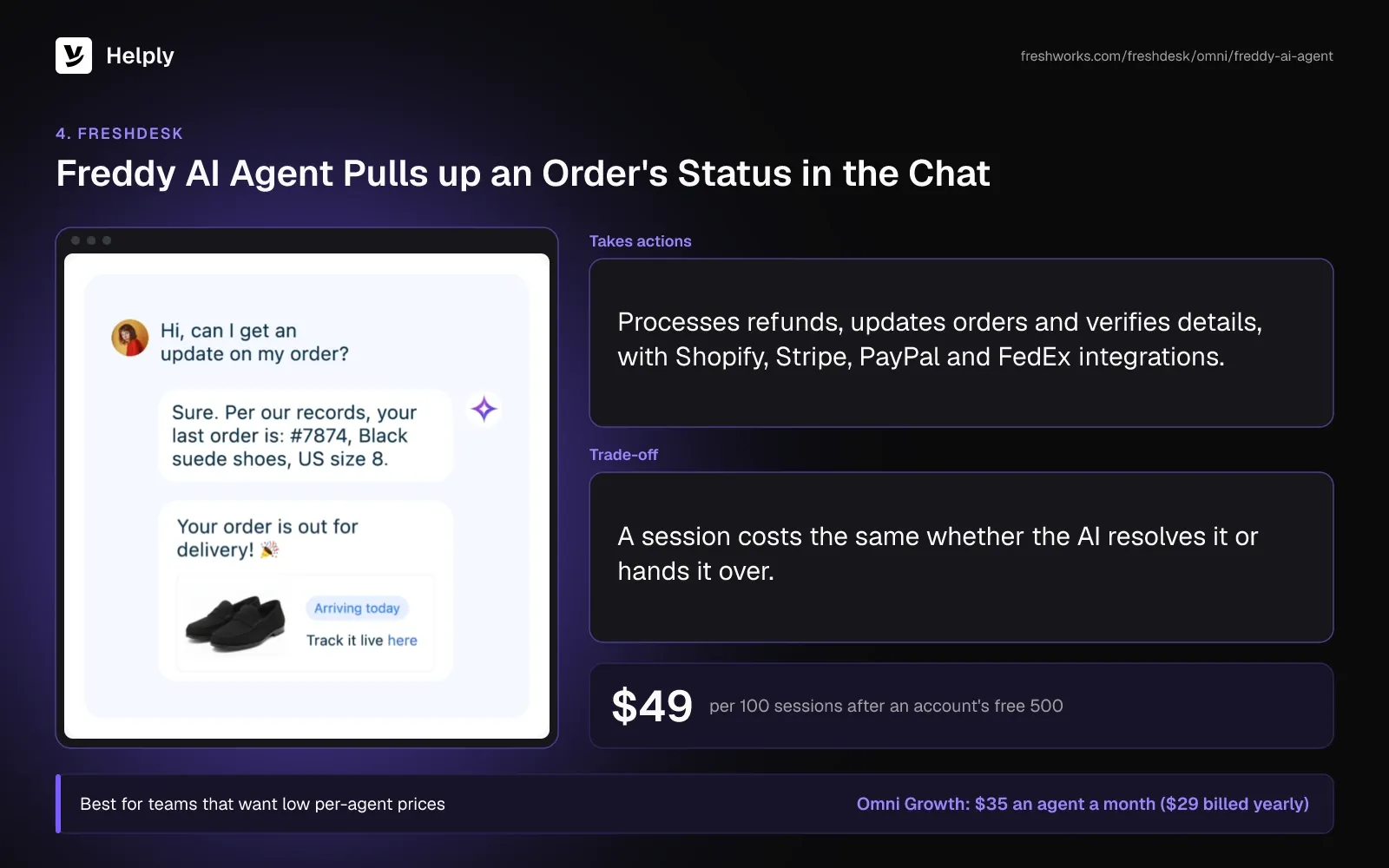
- Sessions in packs. Once an account has used its first 500 sessions, each further pack of 100 costs $49.
- Refunds and order updates. Freddy AI Agent can process refunds, update orders and verify details, with integrations that include Shopify, Stripe, PayPal and FedEx.
- Chat across messaging apps. The Omni chat agent works in the web widget, WhatsApp, Instagram, Messenger and LINE, in more than 60 languages.
- Handoff with context. Freddy AI Agent escalates to a person and keeps the conversation's context.
Pricing
On Freshdesk's own plans, an agent costs $23 a month on Growth ($19 billed yearly). Pro costs $66 ($55) and Enterprise $107 ($89).
Freshdesk Omni adds the chat AI agent. It costs $35 an agent ($29) on Growth, $95 ($79) on Pro and $143 ($119) on Enterprise.
On Pro and Enterprise, Freddy Copilot costs $35 more for each agent a month ($29 billed yearly). Once an account has spent its free 500, three Omni Growth agents and 1,000 chat sessions cost $595 a month ($577). The 14-day free trial runs on the Enterprise plan.
Pros
- A low price per agent. Omni Growth costs $35 ($29) an agent with the chat AI agent included.
- A long chat counts once. Every exchange within 24 hours counts as one chat session.
Cons
- One price per session, resolved or not. A session costs the same whether the AI closes it or hands it over.
- The AI stops when sessions run out. Chats then go to live agents, and self-service widget deployments don't hand over.
- Previews use sessions. Testing an AI agent consumes sessions, published or not.
Best For
Teams that want low per-agent prices and can forecast AI use by session.
Freshdesk or Helply?
Freshdesk bills a full Freddy session whether or not the AI resolves the chat. Helply bills each AI action instead: 3 credits for a knowledge-base answer, 10 for a full resolution and none for the handoff. Freshdesk suits teams that put agent price first; teams that want to pay per AI action can compare Helply vs. Freshdesk.
| Helply | Freshdesk Omni Growth | |
|---|---|---|
| AI billing | Credits per action, capped at 15 a conversation | $49 per 100 sessions; each account's first 500 are free once |
| People | Plus: up to 5 human agents | $35 ($29) an agent |
| Three people, 1,000 chats, half resolved | About 6,000 credits: Plus's 5,000 and a 1,000-credit top-up | $595 ($577) |
| Charge when the AI hands off | Credits for the AI's work; none for the handoff itself | The full session |
5. HubSpot Customer Agent: Best for Teams That Run Sales and Service in HubSpot
HubSpot Customer Agent answers on HubSpot's channels using your HubSpot content and up to 5,000 website URLs. It needs Service Hub Professional or Enterprise, and Professional has a required onboarding fee. The agent bills each resolved conversation in HubSpot Credits.
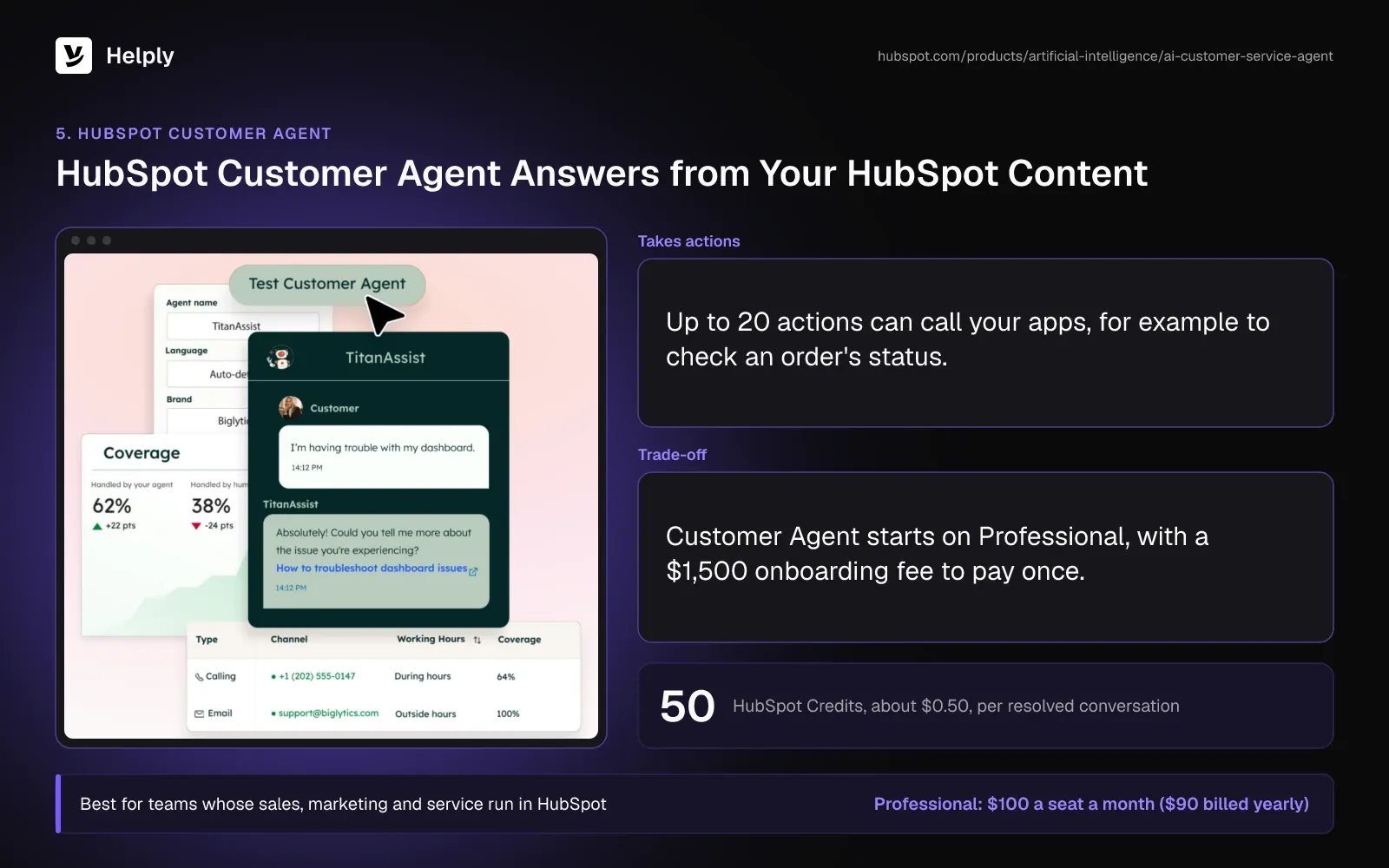
- Credits per resolution. Each resolved conversation uses 50 HubSpot Credits, about $0.50, with 3,000 credits a month included on Professional.
- HubSpot's resolution rule. HubSpot counts a conversation as resolved if the agent replied from a content source or acted. A visitor-requested handoff within 72 hours of their last message stops the charge.
- Actions through API calls. Up to 20 actions can call your apps, for example to check an order's status or send a password reset email.
- HubSpot's channels. The agent covers live chat, email, forms, Facebook, WhatsApp and SMS, plus calling in beta.
Pricing
A Service Hub Professional seat is $100 a month ($90 billed yearly), plus a one-time $1,500 onboarding fee. Professional's monthly price comes with a one-year commitment. Enterprise starts at $150 a seat, and Starter and the free plan don't include Customer Agent.
With three Professional seats and 500 resolutions, the month totals $520 ($490), counting 22,000 credits beyond the 3,000 included. Unused credits don't roll over. A Professional or Enterprise seat comes with 14 days of free Customer Agent access.
Pros
- A low price per resolution. At 50 credits, a resolved conversation costs about $0.50.
- Content you already keep in HubSpot. The agent draws on HubSpot content plus up to 5,000 synced website URLs.
Cons
- A Professional minimum and an onboarding fee. Customer Agent starts on Professional, with $1,500 to pay once.
- Manual reassignment keeps the charge. Assigning a conversation to a person yourself leaves the resolution charge in place.
- The agent stops taking chats when credits run out. HubSpot assigns it no new conversations until the account has credits again.
Best For
Teams whose sales, marketing and service already run in HubSpot.
HubSpot or Helply?
HubSpot makes sense if it runs your CRM and marketing. It charges per seat and about $0.50 per resolution, plus a one-time onboarding fee on Professional. Helply's AI agents and a credit pool come in one price for each band of human agents.
Teams comparing other help desks can read these HubSpot Service Hub alternatives.
| Helply | HubSpot Service Hub Professional | |
|---|---|---|
| AI billing | Credits per action, capped at 15 a conversation | 50 credits, about $0.50, per resolution |
| People | Plus: up to 5 human agents | $100 ($90) a seat |
| Three people, 1,000 chats, half resolved | About 6,000 credits: Plus's 5,000 and a 1,000-credit top-up | $520 ($490), plus $1,500 once |
| Onboarding | An onboarding call on Team, none on Plus | $1,500 one-time onboarding fee on Professional |
6. Tidio: Best for Small Online Businesses Starting on a Free Plan
Tidio pairs live chat with Lyro, an AI agent sold as a monthly quota of AI conversations. The Free plan covers 50 billable conversations, and self-serve plans allow up to 10 seats. Lyro can run on any plan, including Free.
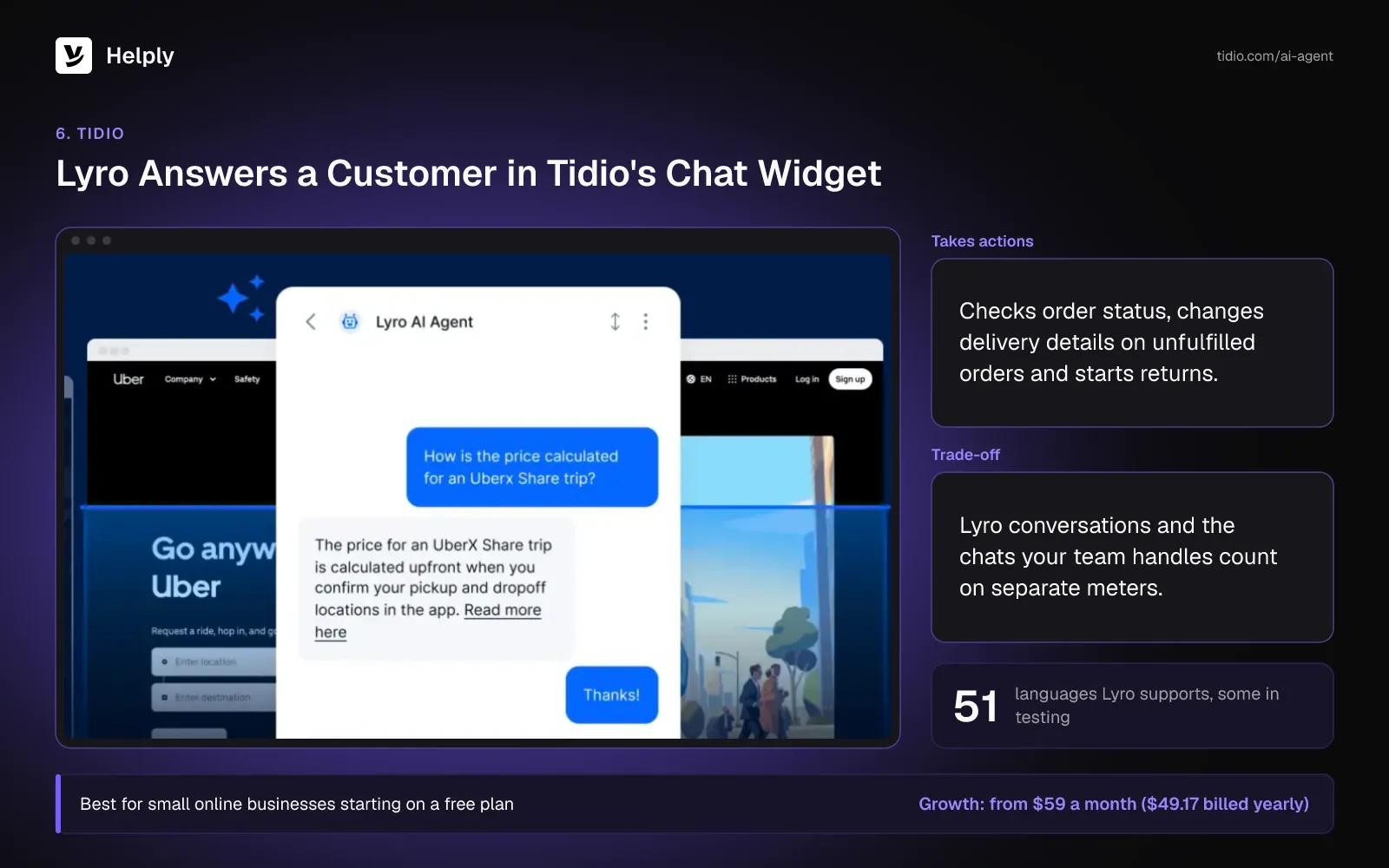
- Billing per AI conversation. Lyro counts a conversation once it replies, however many replies follow. A thread closes after 15 minutes of silence, and a new message starts a new conversation.
- Free handoffs. Lyro deducts nothing when it hands a chat straight to a person.
- Actions for online stores. Lyro Actions check order status, change delivery details on unfulfilled orders, start returns, check stock, score leads and book demos.
- 51 languages. Tidio lists 51 supported languages for Lyro, some still in testing.
Pricing
Tidio's Growth plan begins at $59 a month ($49.17 billed yearly) with 250 billable conversations, and Starter costs $29 ($24.17) with 100. Lyro's smallest quota is 50 AI conversations for $39 a month ($32.50), and 1,000 cost $700 ($583.33).
The first 50 Lyro conversations are free once, and the 7-day trial needs no card. With Lyro on all 1,000 chats, plus Growth's 600-conversation tier for the 500 your team handles, the month costs $829 ($690.83).
Pros
- A free plan to start. A small store can run live chat and test Lyro before paying.
- Store actions in the chat. Lyro can check orders, change delivery details and start returns without a person.
Cons
- Two meters. Lyro conversations and the ones your team handles count on separate meters.
- The free Lyro allowance doesn't reset. After 50 conversations, Lyro stops until you buy a quota.
Best For
Small online stores and service businesses that want to begin free with live chat and an AI agent.
Tidio or Helply?
Tidio bills Lyro per AI conversation and human chats on a separate meter. Small stores can start on Tidio's Free plan and pay for Lyro as volume grows. Helply fits teams whose chats include billing and account changes as well as orders, and its AI draws on one shared credit pool.
| Helply | Tidio Growth with Lyro | |
|---|---|---|
| AI billing | Credits per action, capped at 15 a conversation | Per Lyro conversation, from $39 ($32.50) for 50 |
| People | Plus: up to 5 human agents | Up to 10 seats |
| Three people, 1,000 chats, half resolved | About 6,000 credits: Plus's 5,000 and a 1,000-credit top-up | $829 ($690.83) |
| Chats your team answers | No credits without AI | A separate billable meter |
7. Gorgias: Best for Shopify Stores
Gorgias prices its help desk by billable tickets and bills AI Agent per automated interaction. AI Agent runs on Shopify stores; Gorgias doesn't support it on BigCommerce, Magento, WooCommerce or PrestaShop.
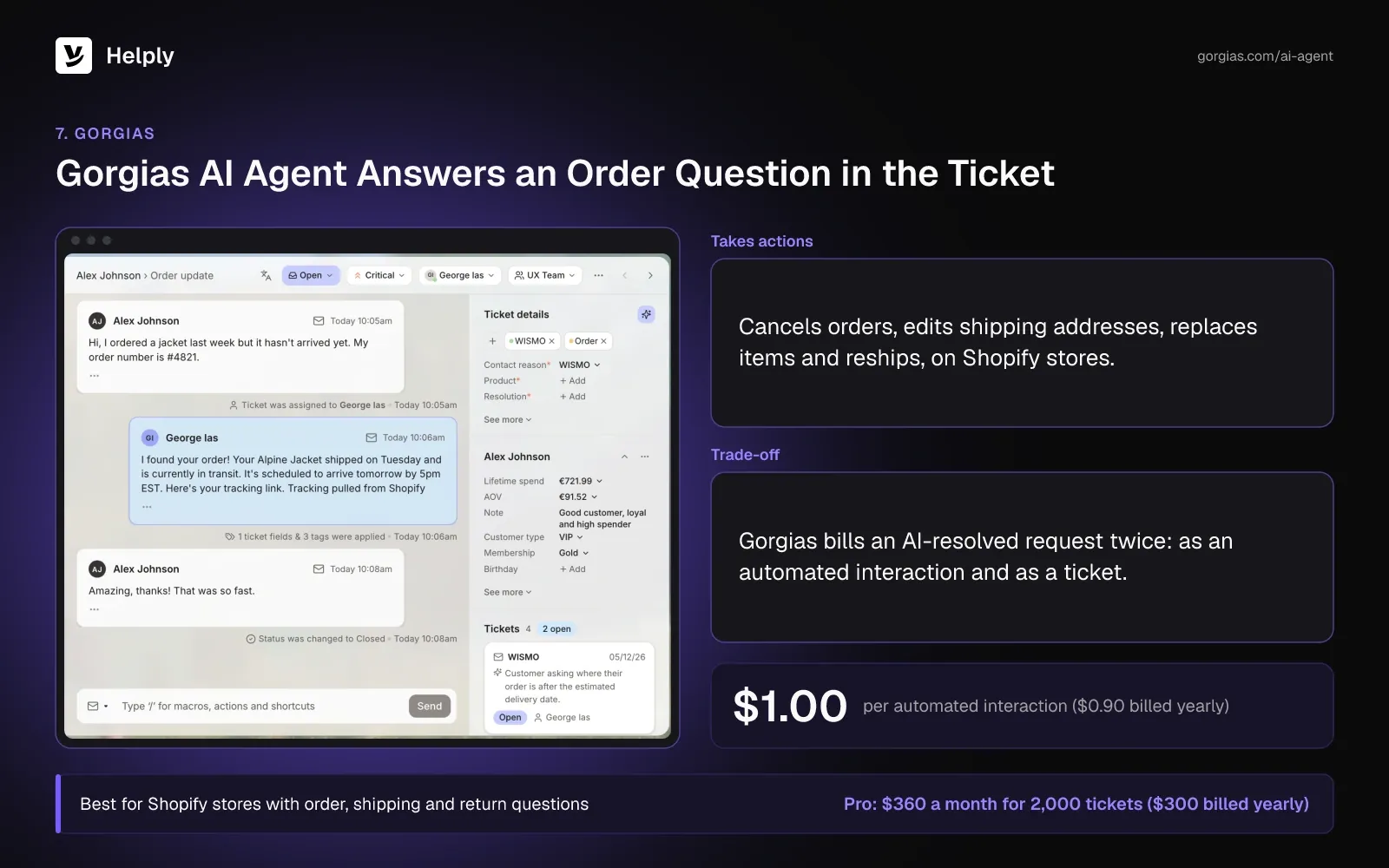
- Order changes in the chat. AI Agent can cancel orders, edit shipping addresses, remove or replace items and reship an order.
- AI fee only on full resolutions. Gorgias bills a request the AI resolves without a person. If an agent replies within 72 hours, it bills only as a ticket.
- Channels for stores. AI Agent works on email, chat, Instagram, Messenger and WhatsApp, plus SMS as an add-on. It replies in the customer's language.
Pricing
Advanced covers 5,000 tickets for $900 a month ($750 billed yearly), Pro 2,000 for $360 ($300) and Basic 300 for $60 ($50). Starter gives 50 tickets for $10, billed monthly only.
AI Agent bills $1.00 ($0.90 on plans billed yearly) for each automated interaction, and $1.50 once the plan's bundle runs out. Each AI interaction also counts as a billable ticket.
Pro with its 190-interaction bundle and 310 more at $1.50 comes to $1,015 a month ($936). The 7-day trial needs no payment details.
Pros
- Order edits without a person. AI Agent can cancel, edit or reship Shopify orders inside the conversation.
- Up to 500 user seats. Basic, Pro and Advanced each include up to 500 user seats.
Cons
- Shopify only for AI Agent. Stores on other platforms can't use it.
- Two fees on an AI-resolved ticket. Gorgias charges for the automated interaction and for the help desk ticket.
- No order actions on Starter. The cheapest plan with AI leaves out cancel, edit and reship actions.
Best For
Shopify stores whose questions center on orders, shipping and returns.
Gorgias or Helply?
Gorgias edits Shopify orders inside the conversation and bills a ticket fee plus an AI fee per resolved request. Helply fits teams that sell outside Shopify or field billing and account questions, and its AI runs on the plan's credit pool. A Shopify-only store may value Gorgias's native order actions more.
| Helply | Gorgias Pro | |
|---|---|---|
| AI billing | Credits per action, capped at 15 a conversation | $1.00 ($0.90 yearly) for each automated interaction, plus the ticket |
| People | Plus: up to 5 human agents | Up to 500 user seats |
| Three people, 1,000 chats, half resolved | About 6,000 credits: Plus's 5,000 and a 1,000-credit top-up | $1,015 ($936) |
| Fees on an AI-resolved request | Credits only | AI fee plus a help desk ticket |
8. Chatbase: Best for a Chatbot Trained on Your Docs and Website
Chatbase trains an AI agent on up to 40 MB of your content on Basic and Business. It bills each AI reply in message credits. Its plans list unlimited members with no seat fees.
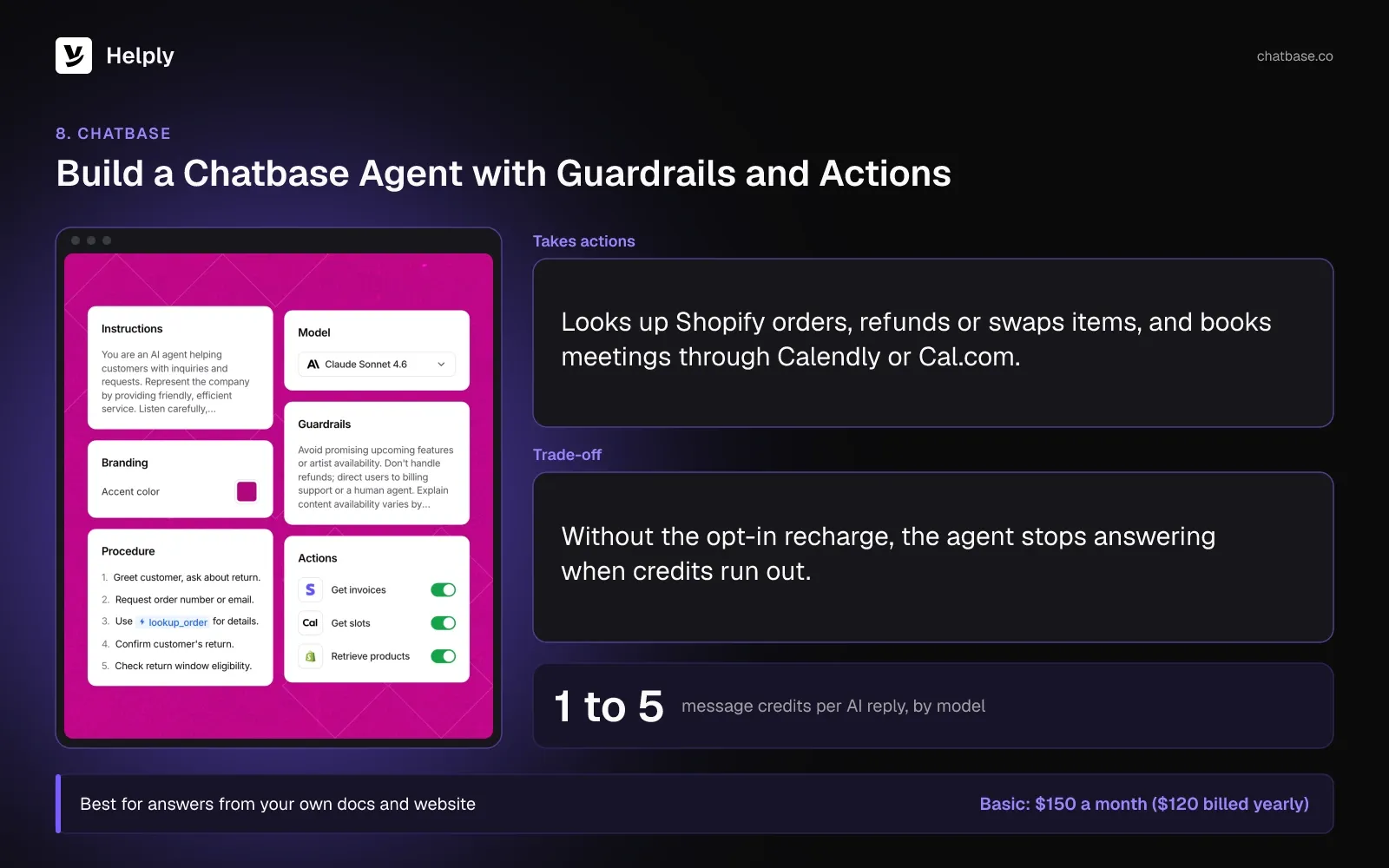
- Credits per AI reply. An AI reply uses between 1 and 5 credits, depending on the model you pick, and an Action can double that. Unused credits don't roll over.
- Actions for stores and sales. Chatbase looks up Shopify orders, refunds or swaps items on existing orders, and works with Stripe. It also captures leads and books meetings through Calendly or Cal.com.
- Escalation to a help desk. Escalations create tickets in Chatbase Helpdesk, Zendesk, Salesforce, Intercom or Freshdesk.
- Channels and languages. Chatbase works on your website, WhatsApp, Messenger, Instagram, email, Slack and phone, in 95+ languages.
Pricing
Basic runs $150 a month ($120 billed yearly) for 4,000 message credits and one AI agent. Business costs $500 ($400) for 15,000 credits.
Extra AI agents cost $25 a month each, opt-in recharges $40 per 1,000 credits, and removing Chatbase branding $99 a month. The 7-day trial covers Basic and Business.
Pros
- No seat fees. Basic and Business let you add as many members as you need.
- Many channels from one agent. One agent answers on your site, messaging apps, email and phone.
Cons
- A hard stop at zero credits. Without the opt-in recharge, the agent shows "This AI Agent is currently unavailable" until the account has credits again.
- Some order changes need a person. Chatbase's Shopify actions don't cancel orders or change a placed order's shipping address, so those requests go to your team.
Best For
Businesses that want an AI agent answering from their own content, with escalations going to the help desk they choose.
Chatbase or Helply?
Chatbase answers from your content and can send escalations to Chatbase Helpdesk or to Zendesk, Salesforce, Intercom or Freshdesk. Helply's handoff lands in its own help desk with the Support Agent's investigation attached. For 1,000 website chats a month, Chatbase Basic costs less if you only need answers and the AI replies fit 4,000 credits.
| Helply | Chatbase Basic | |
|---|---|---|
| AI billing | Credits per action, capped at 15 a conversation | 1 to 5 message credits per AI request |
| People | Plus: up to 5 human agents | Unlimited members |
| Three people, 1,000 chats, half resolved | About 6,000 credits: Plus's 5,000 and a 1,000-credit top-up | $150 ($120) while replies fit 4,000 credits |
| Where a handoff lands | Helply's own help desk, with the investigation | Chatbase Helpdesk or a connected help desk |
9. ManyChat: Best for Instagram and Social DM Sales
ManyChat automates conversations in Instagram, WhatsApp, Messenger, TikTok and Telegram and bills by the people you reach. Manychat AI comes with Pro and higher plans. It answers messages, qualifies leads and sends links.
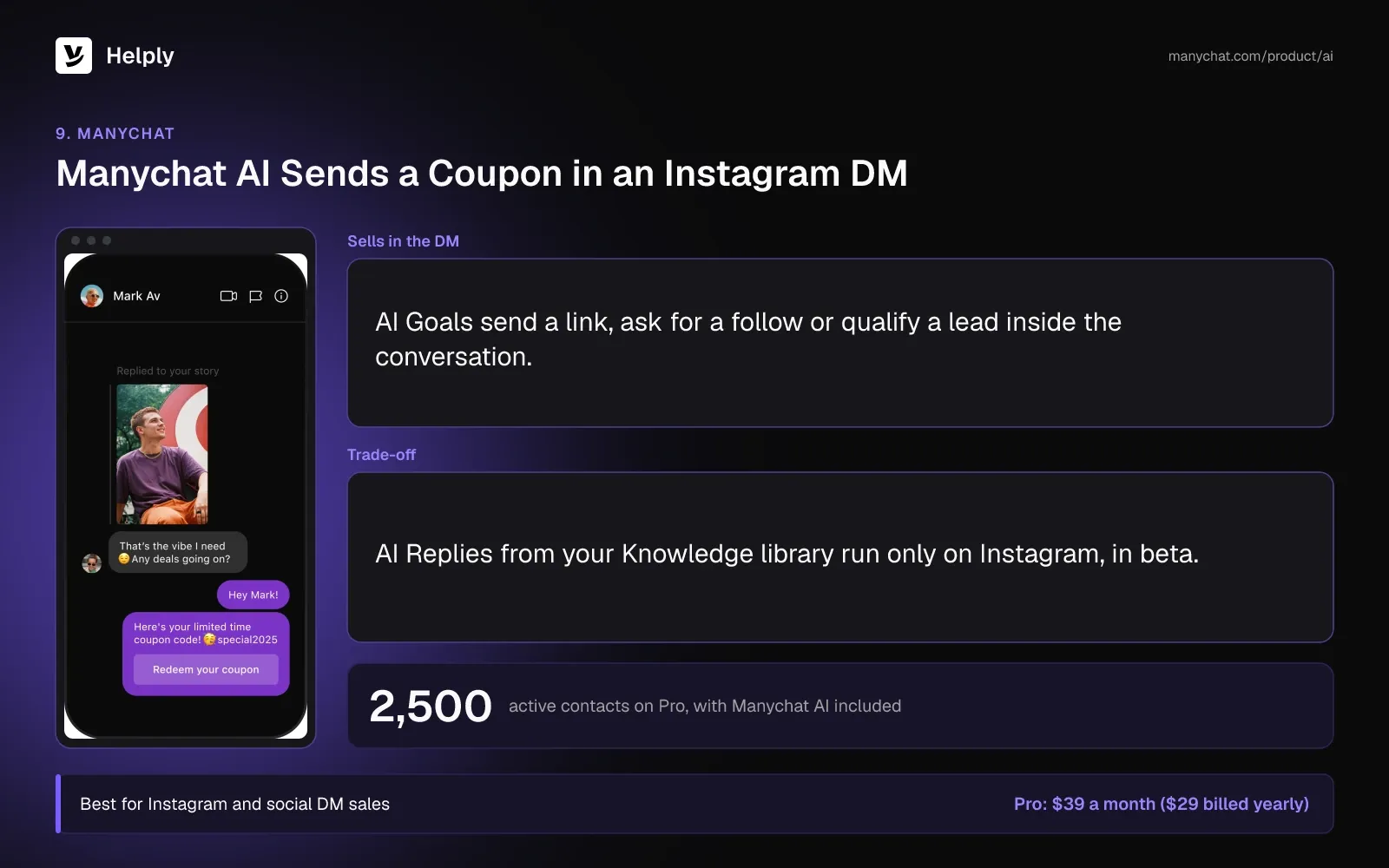
- Contact-based billing. One person counts as one active contact a month, and overages bill per extra contact.
- AI Goals for sales. The AI can send a link, ask for a follow or qualify a lead inside the DM.
- AI Replies from your Knowledge library. They answer customers on Instagram. The feature is in beta.
Pricing
Essential costs $17 a month ($14 billed yearly) for 250 active contacts, Pro $39 ($29) for 2,500 and Business $99 ($69) for 7,500. Prices can vary by billing country.
Pro includes Manychat AI with no separate AI fee, and extra contacts on Pro cost $0.05 each ($0.038 on plans billed yearly). The Free plan needs no card, and a 14-day trial covers Essential or Pro.
Pros
- AI in the plan price. Manychat AI costs nothing beyond Pro's $39 ($29).
- DM sales tools. AI Goals qualify leads and send links in the DMs where buyers message you.
Cons
- AI Replies run on Instagram only. The feature is still in beta.
- Three channels on Pro. Pro connects 3 channels and 3 users, 2 of them with Inbox seats; Business and up get every channel.
Best For
Creators and stores that sell through Instagram and other social DMs.
ManyChat or Helply?
ManyChat automates sales chats in social DMs and bills by active contact. Helply runs support across email, chat and messaging apps, and its AI uses credits per action. A store can run ManyChat for Instagram sales and Helply for customer support.
| Helply | ManyChat Pro | |
|---|---|---|
| AI billing | Credits per action, capped at 15 a conversation | Included in the plan; billed by active contacts |
| People | Plus: up to 5 human agents | 3 users, 2 with Inbox seats |
| Three people, 1,000 chats, half resolved | About 6,000 credits: Plus's 5,000 and a 1,000-credit top-up | $39 ($29), with AI Replies on Instagram |
| Knowledge-based AI answers | Chat, email and the messaging apps you connect | AI Replies, Instagram only, in beta |
What Should a Business Check Before Choosing an AI Chatbot?
The best customer service chatbot for your business passes these checks on your own top questions. A longer checklist sits in this buyer's guide to AI chatbots for customer service.
- Price the billing unit at your volume. Estimate how many units your monthly chats use, such as outcomes, sessions or credits, and multiply by the unit's price. Then add seats and add-ons.
- Ask what it can change in your systems. List your five most common requests and check which ones the bot can finish, such as refunds, order edits or account changes.
- Ask for a person mid-chat and see what reaches your team. In Gartner's survey of February and March 2026, 87% of customers called an option to reach a person essential when companies use GenAI. Zendesk's CX Trends 2026 research, which polled 6,182 consumers in June 2025, found 74% frustrated by having to repeat information.
- Check where answers come from. Gartner polled 5,728 customers in December 2023, and only 14% of their service issues ended in full self-service resolution. Ask how the bot finds gaps in your help center and who reviews fixes.
- Match the channels you need. A chat-only bot leaves WhatsApp, SMS or email to your team.
- Replay past conversations before launch. Run last month's real questions through the bot and read every answer before customers see one.
Once it's live, measure resolutions as well as the chatbot containment rate.
Which AI Chatbot Fits Your Stack and Goal?
Match the pick to the tools you run before you compare features.
| Your situation | Pick | Why |
|---|---|---|
| A Shopify store with order, shipping and return questions | Gorgias | AI Agent edits Shopify orders in the chat |
| Sales and service run in HubSpot | HubSpot Customer Agent | Answers from HubSpot content, billed in HubSpot Credits |
| Already on Zendesk or Salesforce | Fin on either help desk, or Zendesk AI agents on Zendesk | Keep the help desk and add AI billed per outcome or per resolution |
| Selling through Instagram DMs | ManyChat | Contact-based pricing and AI Goals for leads |
| A small site answering from docs, with no help desk yet | Chatbase or Tidio | No seat fees on Chatbase, and a free plan on Tidio |
| A team that wants low per-agent prices with chat AI included | Freshdesk Omni | Omni Growth at $35 ($29) an agent, AI billed by session |
| A support team that wants the help desk and AI agents together | Helply | Inbox, chat, help center and agents in one product, with AI priced per action |
| Internal writing and research | ChatGPT, Claude, Gemini or Copilot | Workspace assistants for your team rather than customers |
Add a Chatbot to Your Website, or Put an AI Agent on Your Whole Support Queue?
For one narrow job, a focused AI chatbot for business is enough. ManyChat suits Instagram sales, Chatbase or Tidio a site chatbot answering from your content, and Gorgias a Shopify store. Teams on HubSpot, Zendesk, Freshdesk or Intercom can add that vendor's AI and keep their help desk.
Helply suits teams that want one product to answer, act and hand off across the whole queue. For the 9pm customer, the Support Agent can pull up the order or invoice, then update or refund it where you allow that. If it can't resolve the request, your team gets the conversation with the investigation attached.
At LingQ, many confused new users never asked for help; they stalled and left. LingQ put the Support Agent in its website and app to answer getting-started questions on the spot. Zoran Simicic, LingQ's Head of Customer Support, said: "Support stopped being a cost and started driving the business."
You decide what the AI does and what it can cost. Your Guidelines set how it handles refunds, cancellations and account changes, and which situations need a person.
Credits per conversation stop at 15, and usage alerts warn you before the pool runs low. On Starter, Plus and Team, the AI pauses at the limit until you add credits. A month of 1,000 chats fits Plus with one credit top-up.
Start with one page. Put the chat widget on the page with the most order, billing or signup questions, and connect your help center. Review a week of handoffs before you add channels.
Frequently asked questions
The best AI chatbot for business finishes your top customer request in your own systems and bills in a unit you can predict. Teams that want AI agents inside a full help desk can start with Helply. Shopify stores can look at Gorgias, chat-first teams on Intercom at Fin AI Agent, and HubSpot teams at HubSpot Customer Agent.
The best AI-powered customer service platform runs the help desk and AI agents together, so one system answers, acts and hands off. Helply, Zendesk, Freshdesk and the Intercom helpdesk with Fin AI Agent all combine a full help desk with AI agents that take action. Helply prices that AI work in published credits per action, with a cap of 15 credits a conversation.
You can start free on Tidio, and its smallest paid Lyro quota costs $39 a month ($32.50 billed yearly). At list prices, six picks cost $520 to $1,177 ($490 to $1,135) for three people and 1,000 chats a month, half resolved. They are HubSpot, Freshdesk Omni, Fin, Tidio, Zendesk and Gorgias, and HubSpot charges $1,500 once for onboarding.
Yes, with limits: Tidio's Free plan includes 50 Lyro AI conversations once, and HubSpot and ManyChat have free plans without the AI. Helply, Intercom and Zendesk offer 14-day trials without a credit card.
ChatGPT works as a chatbot, and OpenAI describes its Work mode as an agent for longer, multi-step tasks. In Gartner's February and March 2026 survey, customers were about three times likelier to use third-party GenAI than company chatbots for service. For putting it to work in support, see how ChatGPT fits customer service.
A chatbot answers questions, while an AI agent can also investigate, take supported actions such as a refund, and hand off with context. For a "where's my order?" question, a basic chatbot links a help article and an AI agent can look up the order. Read more in what an AI agent is.
No. In Gartner's February and March 2026 survey of 3,566 customers, 87% called a route to a person essential when companies use GenAI. A chatbot takes the repeat questions, and your team keeps the cases that call for judgment.
A month of 1,000 chats uses about 6,000 Helply credits when AI resolves around half of them. The cap is 15 credits for any single conversation, and the handoff that follows an AI attempt uses no credits. Helply's Plus plan includes 5,000 credits a month and Team 15,000, so Plus needs one top-up.
Gorgias AI Agent runs on Shopify stores, and on plans above Starter it can cancel, edit or reship orders inside the conversation. Each automated interaction costs $1.00 ($0.90 billed yearly) on top of the ticket. Chatbase also looks up Shopify orders and refunds or swaps items on existing orders.
Install the vendor's chat snippet on your site, connect your help content, set handoff rules and test on past questions before going live. On Helply, the chat widget passes customer and account context into each conversation. Follow a walkthrough for adding an AI agent to a site.
About the author

Konrad Janczyk
Staff Software Developer
Keep reading

What Is an AI Chatbot? Rule-Based vs. AI Chatbots Explained
Bildad Oyugi · 11 min read
Customer Service Outsourcing vs. AI Agents: Cost, Quality and Fit
Alex Turnbull · 14 min read