Key Takeaways
- As of October 2026, Pylon charges $89 per Professional seat and $139 per Advanced seat, both on an annual contract. Its sales team estimates AI credits from a 5,000-credit minimum, and Pylon doesn't publish a credit price.
- Seven Pylon competitors run customer conversations in Slack: Helply, Thena, Plain, ClearFeed, Unthread, Intercom and Front. Zendesk turns @zendesk mentions into tickets, and HubSpot and Freshdesk sync Slack for internal use.
- Helply's 7,000-credit block covers about 1,000 conversations a month for $399 ($339 billed yearly), whether 5 or 15 people reply.
- With all 15 replying, list-price totals for competitors run from $700 ($595) on ClearFeed's usage plan to $2,935 on Zendesk Suite Professional. On annual billing, Intercom Expert tops the range at $2,475.
- Most Pylon alternatives let occasional teammates read and comment for free; Helply and ClearFeed's usage plan let them reply. Unthread lets domain users respond in external projects but doesn't publish how it bills them. Pylon documents a free Slack-only seat in an older help article.
Pylon Alternatives at a Glance
Your customers live in Slack Connect channels, and your engineers, success managers and account owners jump in when a thread gets technical. Then you open Pylon's quote, and each of them who replies from the web app needs a paid seat on an annual contract. Sales estimates the AI credits, and Pylon puts Microsoft Teams on the higher plan.
In March 2026, a G2 reviewer called Pylon's pricing "a bit unclear and bespoke" and said it "was given to us in a Google Sheet."
| Tool and plan | Best for | People, monthly (annual), October 2026 | Who can reply without a paid seat | AI agent fee | Slack Connect conversations |
|---|---|---|---|---|---|
| Pylon Professional (baseline) | Slack-first support | $89 per seat, annual contract | Slack-only responders who never open the web app | Credits by sales estimate, 5,000 minimum | Yes |
| Helply | Teams whose Pylon seat bill keeps growing | Unlimited users; plans from $49 ($42) | Everyone | Credits: 1, 4 or 12 per task | Yes |
| Thena Standard | A Slack-native swap | $99 ($79) per user | Not published | AI agents "Limited"; no usage price | Customer Slack channels |
| Plain Horizon | Engineering-led teams | $139 ($99) per user, 3 to 10 members | Nobody; free viewers can't reply | $1 per resolution | Yes |
| ClearFeed Professional, usage plan | Slack triage synced with Jira or Linear | $700 ($595) for 1,000 tickets, or a quote | Anyone | Credits per AI attempt, included | Yes |
| Unthread Pro | Support your whole domain can answer | From $95 ($85) per agent, 5-seat minimum | Domain users can respond in external projects; billing not published | Not published | Yes |
| Intercom Expert | In-app chat with Fin | $139 ($132) per seat | Nobody; Lite seats can't reply | $0.99 per outcome | Yes |
| Zendesk Suite Professional | Larger teams | $149 ($115) per agent | Nobody; light agents add private comments | $2.00 per automated resolution ($1.50 committed) | Tickets from @zendesk mentions |
| Front Professional | Email-first teams | $85 ($65) per seat | Nobody; guests comment only | $0.05 to $0.89 per outcome | Yes |
| HubSpot Service Hub Professional | Support inside HubSpot CRM | $100 ($90) per seat, annual commitment | Nobody; View-Only seats add notes | $0.50 per resolution | Not in HubSpot's docs; internal Slack sync |
| Freshdesk Pro | Low seat prices | $66 ($55) per agent | Nobody; collaborators add notes | $49 per 100 sessions | Not in Freshdesk's docs; internal Slack app |
Pylon Pricing in 2026: Seats, Credits and Add-Ons
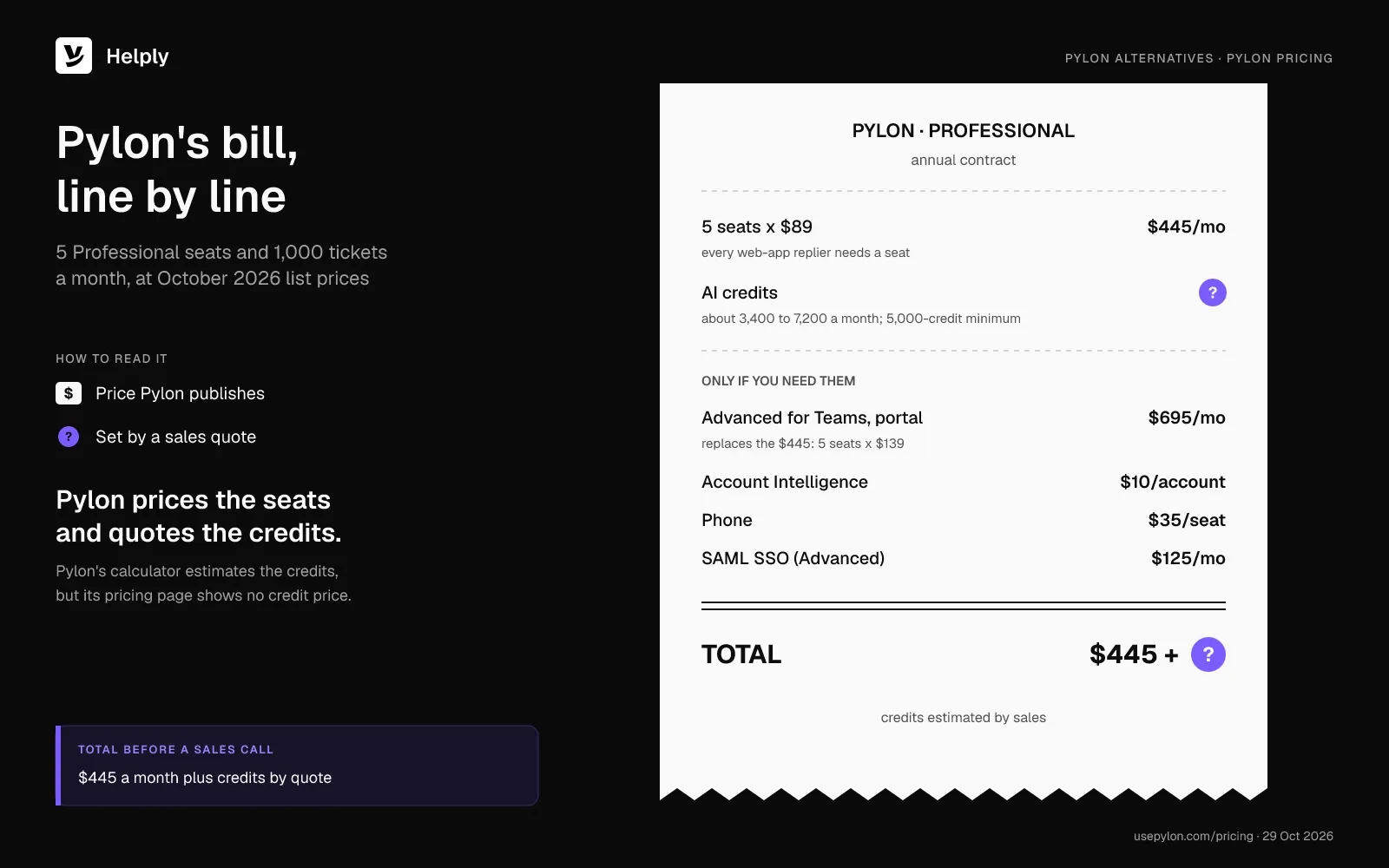
Pylon sells seats at $89 or $139 on an annual contract, AI credits with a 5,000-credit minimum and three add-ons. On 15 July 2026, Pylon relaunched as an "agentic support platform", and the first release was a beta.
Seats Come on an Annual Contract
Pylon lists Professional at "$89/seat on an annual contract" and Advanced at $139, with Enterprise by custom quote. Its FAQ says Pylon offers annual and monthly billing, but standard contracts are annual, and Pylon publishes no monthly seat price. New customers also face a minimum seat count, and Pylon doesn't publish the number.
Viewer seats come with every plan, in a number your sales rep sets. Viewers can read and leave internal notes, but they can't reply to customers. An older Pylon help article lists a free Slack-only seat for people who reply in Slack and never open the web app.
Anyone who replies from Pylon's web app needs a paid seat. At Professional list prices, 5 seats come to $445 and 15 come to $1,335, before credits.
AI Credits Have No Published Price
The Assist Agent, Support Agent, Slack Agent and Automations all run on credits. Pylon's sales team helps estimate how many you need, and its FAQ sets "the minimum required commitment" at 5,000 credits.
With 1,000 tickets a month, half automated and the default 20% needing deep investigation, Pylon's calculator shows 3,400 to 7,200 credits a month. Pylon doesn't publish a credit price, so you can't turn that range into dollars before a sales call. Credits last the contract term, and top-ups and autoreload come with every plan.
Teams, Google Chat and the Customer Portal Need Advanced
Slack Connect, email, chat, WhatsApp, Discord and Telegram come with every Pylon plan. Microsoft Teams, Google Chat and the customer portal start on Advanced, where five seats cost $695 a month instead of $445.
Add-ons cost $10 per customer account a month for Account Intelligence and $35 per seat a month for phone. SAML SSO adds $125 a month on Advanced.
AI reports and anomaly detection start on Advanced. In April 2026, a support director on G2 wished "the ability to create custom reports was part of the Professional plan."
What Does Each Pylon Alternative Cost for a 15-Person Team?
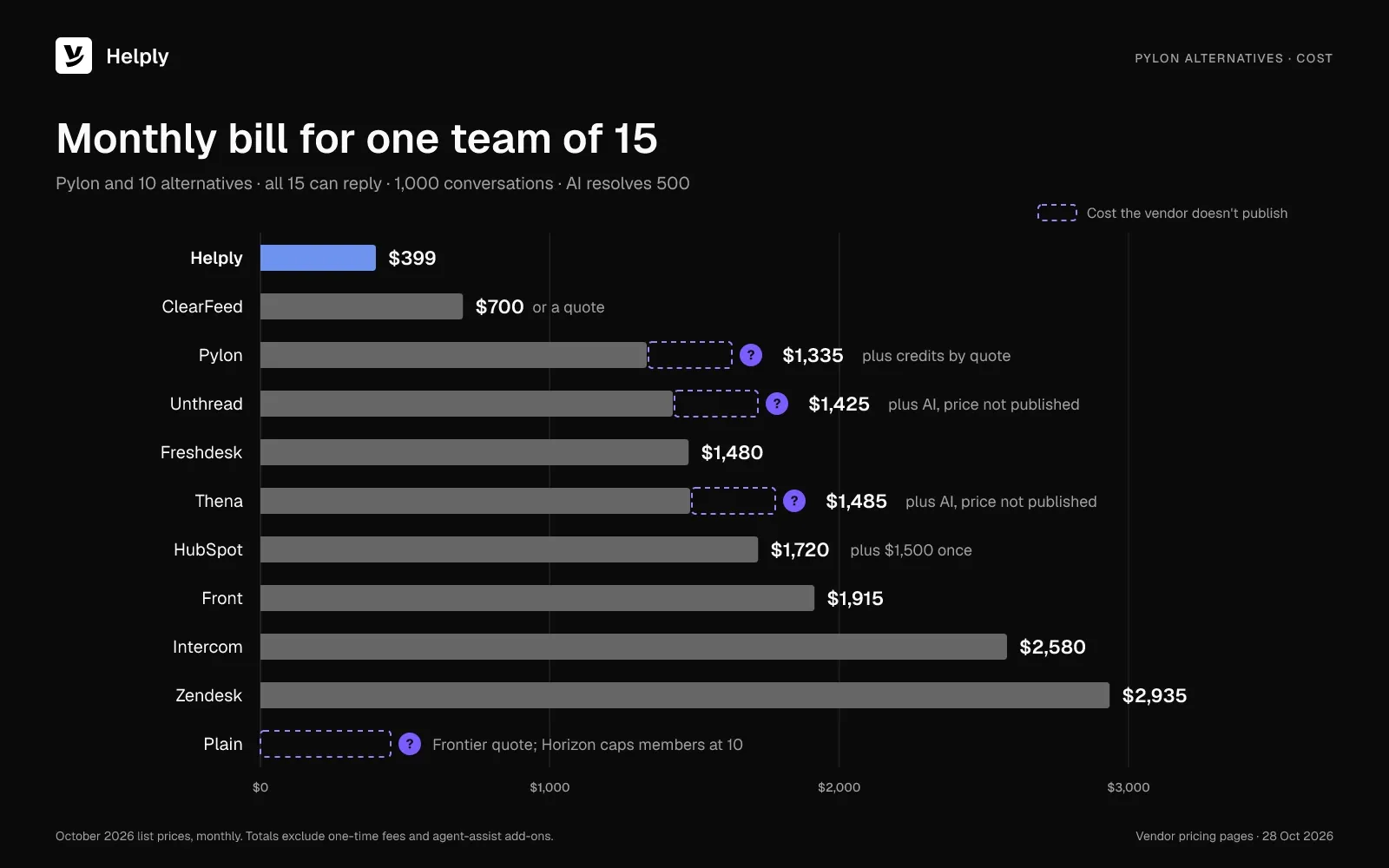
Helply costs $399 a month ($339 billed yearly) when 15 people handle 1,000 conversations and the AI agent resolves 500. With all 15 replying, Intercom Expert reaches $2,580 ($2,475) and Zendesk Suite Professional $2,935 ($2,250).
Each row shows the same team: 5 people work the queue daily, and 10 reply in Slack Connect a few times a week. You pay for 5 users in the first total, and the other 10 use any free role the tool offers. In the second total, all 15 can reply.
| Tool and plan | AI fee: 1,000 conversations, AI resolves 500 | Total, 5 paid users | Total, all 15 reply |
|---|---|---|---|
| Helply | 7,000-credit block | $399 ($339) | $399 ($339) |
| Pylon Professional | Credits by quote, 5,000 minimum | $445 plus credits; 10 free Slack-only seats | $1,335 plus credits; all 15 in the web app |
| Thena Standard | Not published | $495 ($395) plus AI | $1,485 ($1,185) plus AI |
| Plain Horizon | $480 | $1,175 ($975) | Frontier quote |
| ClearFeed Professional, usage plan | Included | $700 ($595), or a quote | $700 ($595), or a quote |
| Unthread Pro | Not published | $475 ($425) plus AI | $1,425 ($1,275) plus AI |
| Intercom Expert | $495 | $1,190 ($1,155) | $2,580 ($2,475) |
| Zendesk Suite Professional | $900 ($675) with 5 agents; $700 ($525) with 15 | $1,645 ($1,250) | $2,935 ($2,250) |
| Front Professional | $640 | $1,065 ($965) | $1,915 ($1,615) |
| HubSpot Service Hub Professional | $220 | $720 ($670) plus $1,500 once | $1,720 ($1,570) plus $1,500 once |
| Freshdesk Pro | $490 | $820 ($765) | $1,480 ($1,315) |
The 10 Best Pylon Alternatives in 2026
All ten reviews use the same 15-person team and October 2026 list prices.
1. Helply: Best for Teams Whose Pylon Bill Grows With Headcount
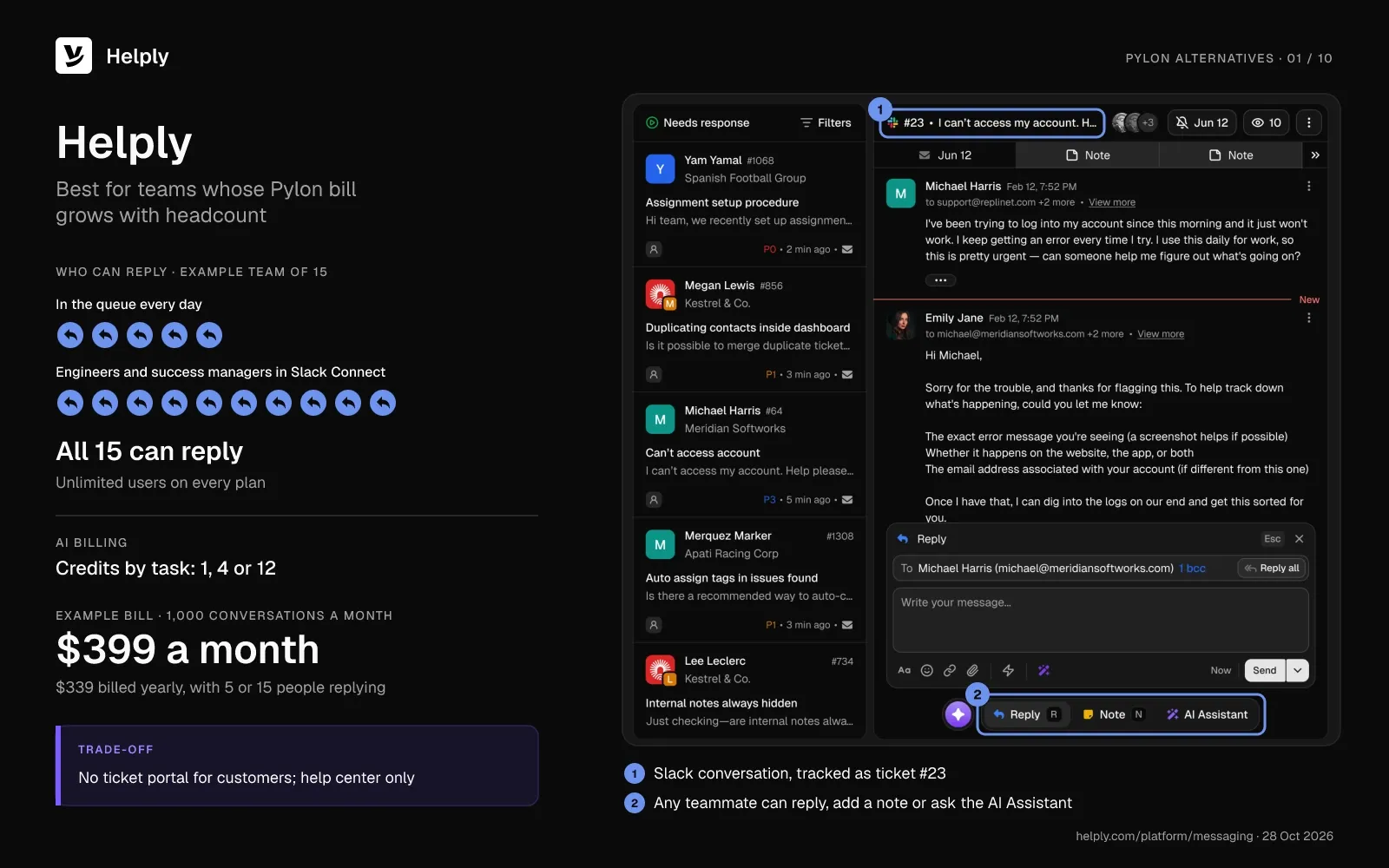
Helply is an AI-native customer support platform priced by the work its AI agents do. Every plan has unlimited users, so the engineers and success managers who jump into threads add no per-person fee. Helply turns Slack Connect conversations into trackable issues, and replies stay synced "so everyone can work where they prefer."
What You Get When You Move From Pylon to Helply
- Everyone who helps customers can join at no extra cost. You can invite "support, product, engineering, operations, founders, and anyone else who needs to help customers" on every plan. Pylon describes its free Slack-only seat in an older help article, and replying from Pylon's web app takes a paid seat.
- Success managers see the account behind each thread. Your team and AI agents get "a complete view of every customer, account, and support interaction," plus HubSpot and Salesforce data where configured.
- You see the credit price before you sign. The entry plan carries 500 credits at $49 a month ($42 billed yearly), and the top block, at $1,549 ($1,317), carries 32,000 credits. A full cross-system investigation takes 12 credits, a check of one or two systems takes 4, and drafting a reply takes 1.
- Billing runs month to month. Choose annual billing for 15% off, and Helply pools your credits across the year.
- You pay nothing extra for Microsoft Teams. Teams conversations come into the same workspace as Slack Connect, email, chat, WhatsApp and Discord. Helply charges for credits and nothing else, so a Teams conversation costs only the credits its AI work uses.
- The AI can take a thread before an engineer has to. If you configure it, the Support Agent can reply in supported Slack conversations and resolve the issue or hand over its investigation. Every plan also includes the Assist Agent, which drafts from your Guidelines, and Background Agents that flag churn risk and feature requests.
- Engineers keep working in Linear and Jira. Helply can create Linear issues where configured and supported, and Jira issues where configured. Supported Linear status changes flow back, so your team can follow up with affected customers.
Kameleo's engineers handled support, and founder and CEO Tamas Deak named the cost: "Our support tickets are basically code reviews, answering them well needs an engineer, so support was literally stealing hours from the roadmap."
With Linear and Slack connected, Helply opened well-formed engineering issues and called in the right person when a ticket needed human judgment. Kameleo now answers customers 3x faster, and Helply resolves 79% of the company's technical questions end to end.
Pricing
For B2B support, Helply estimates about 7 credits per conversation, so 1,000 conversations a month come to about 7,000 credits. That block costs $399 a month ($339 billed yearly), whether 5 or 15 people reply. A retry, a failed action or a draft your team discards uses no credits, and neither do spam, untouched tickets or setup.
A spend cap defaults to your block price, with notices at 80%, 95% and the cap. If you turn auto top-up off, AI work pauses at the cap and your people carry on.
You can test Helply for 14 days on 1,000 trial credits without a card. The pricing page lists every block.
Watch-Outs
- Customers get a help center without a ticket portal. They can browse and search your help center, but Helply lists no portal where they track their own tickets.
- Migration help needs an Enterprise plan. On Enterprise, Helply's team can assist with moving your support data and knowledge. Helply has migration pages for Front, Help Scout, Groove, Zendesk, Freshdesk and Intercom, but none for Pylon.
- Plan access before you invite everyone. Helply describes roles and permissions only on its Enterprise page and lists no view-only role.
- Credit use climbs in busy months. Your AI agents use more credits when volume rises, so set the cap and per-team allowances before launch.
2. Thena: Best for a Like-for-Like Slack Swap
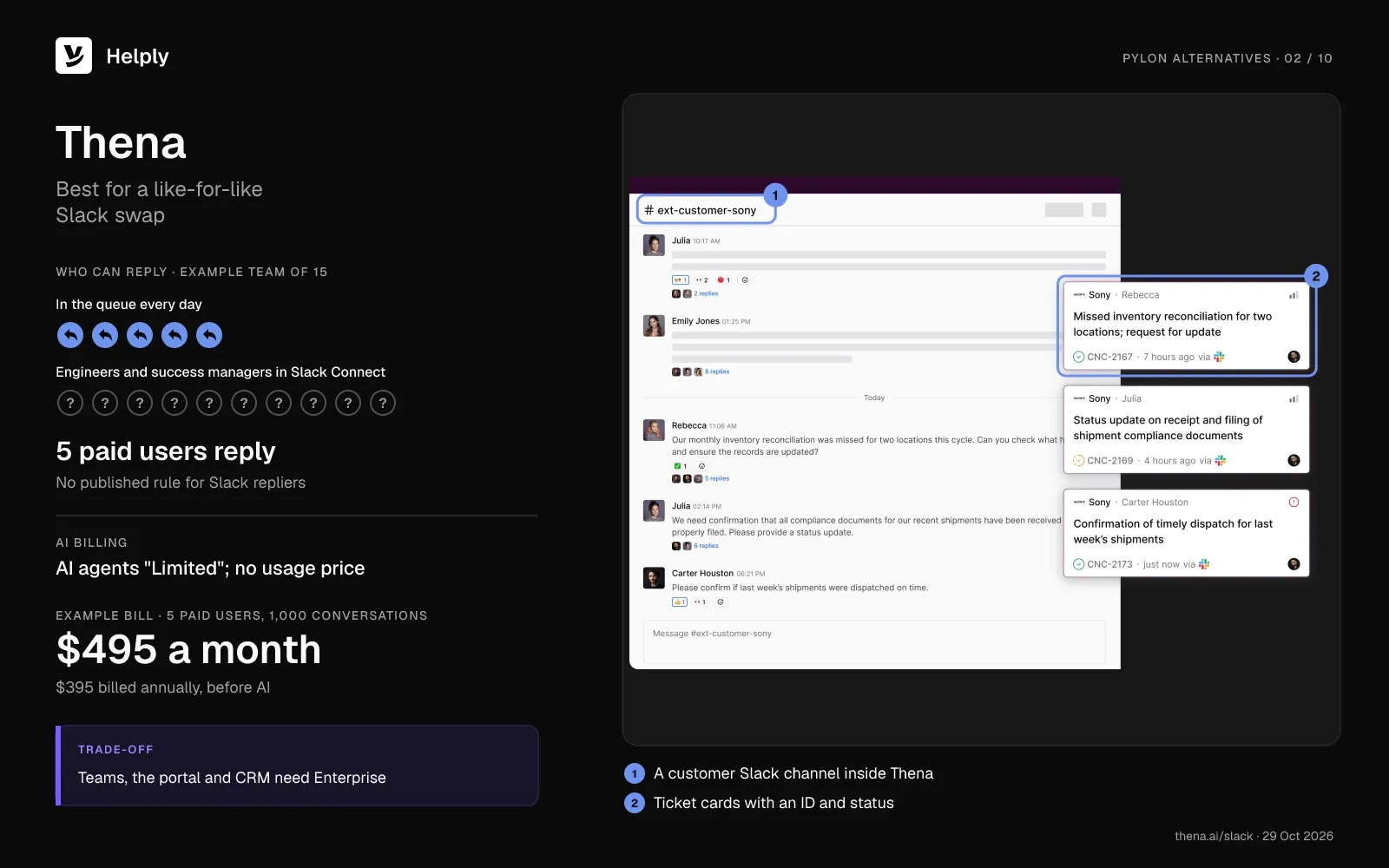
Thena runs support in customer Slack channels and email, and it calls AI "the baseline in all plans." Every Thena plan includes SLAs.
Pricing
Starter costs $29 per user a month, billed annually, and covers up to 5 seats and 1,000 tickets a month without AI agents. Standard costs $99 per user a month in Thena's docs ($79 billed annually). AI agents on Standard read "Limited," Thena publishes no usage price, and its docs list Enterprise as custom pricing.
Five Standard seats cost $495 a month ($395 billed annually), and 15 seats cost $1,485 ($1,185). Thena publishes no rule for teammates who reply from Slack without a seat.
Watch-Outs
- Teams, the portal and CRM integrations need Enterprise. HubSpot, Salesforce, Jira, Microsoft Teams and the customer portal all sit on the custom-priced plan.
- Reviews skew older. Thena holds 4.9 out of 5 from 65 G2 reviews in October 2026, and the newest dates from March 2025.
- One reviewer wanted easier access to human support. An IT support reviewer wrote in March 2025: "I didn't feel backed up by an easy to access human support service to clarify any doubts."
Choose Thena if you want a Slack-native swap with SLAs on every plan and can put Teams on a custom quote.
Where Helply Fits Better Than Thena
If Microsoft Teams customers matter now, or you want to see the AI price before you buy, Helply is the closer fit. Thena puts Teams on Enterprise and prices Standard per user, with no published AI usage price. Helply brings Teams in alongside Slack Connect and prices AI work from a published credit table for unlimited users.
| Helply | Thena Standard | |
|---|---|---|
| People who can reply | Unlimited users | Paid users; Slack-reply rule not published |
| AI billing | Published credit blocks | "Limited"; no usage price |
| Microsoft Teams | Included in the workspace | Enterprise only |
| 15-person example | $399 ($339) | $1,485 ($1,185) before AI |
See how Helply brings in Microsoft Teams customer conversations.
3. Plain: Best for Engineering-Led Support Teams
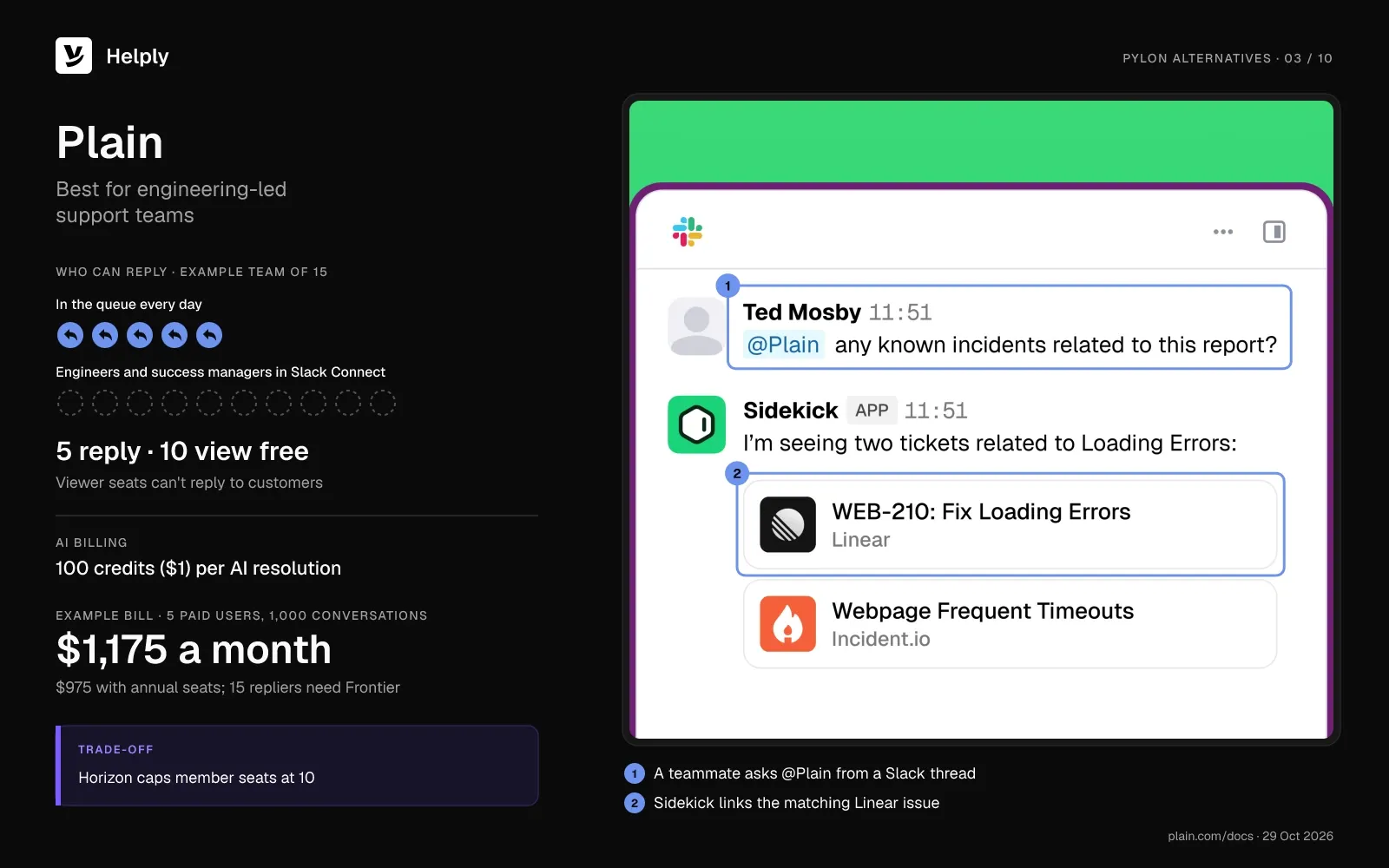
Plain and Pylon both list Slack Connect support and connect to Linear and Jira on every plan. Plain's viewers cost nothing and have no cap, but only paid member seats can reply to customers. One G2 reviewer said Plain "works really well for our Slack Connect support model."
Pricing
Foundation costs $55 per user a month ($45 billed annually) for up to 5 member seats. Horizon costs $139 ($99) with 3 to 10 members, and it adds SLAs, escalation paths and Microsoft Teams. Frontier needs 10 or more seats, bills annually and runs on a custom quote.
Each Customer Agent resolution on Plain uses 100 credits, and top-ups cost $10 per 1,000 credits, so a resolution costs $1. Five Horizon members plus 500 resolutions come to $1,175 a month ($975 with annual seats), after 2,500 included credits. Fifteen people replying pushes you past Horizon's 10-member cap and into a Frontier quote.
Watch-Outs
- Occasional responders still need a member seat. A founder and CTO on G2 wrote: "it doesn't make sense to pay for a full seat when an engineer might only respond once a month."
- Foundation caps Slack at 25 channels. SLAs and HubSpot or Salesforce sync start on Horizon.
- The trial runs 7 days. Every plan includes it, with no card.
Choose Plain if your engineers already track work in Linear or Jira and no more than 10 people need to reply.
Where Helply Fits Better Than Plain
Pick Helply when engineers answer customers only now and then. Plain bills each member who replies and caps Horizon at 10 members. Helply includes every user, so the same 7,000-credit block covers 5 or 15 people answering in Slack Connect.
| Helply | Plain Horizon | |
|---|---|---|
| People who can reply | Unlimited users | Paid members, 3 to 10 |
| AI billing | Credits by task: 1, 4 or 12 | 100 credits ($1) per resolution |
| Contract | Monthly, or annual at 15% off | Monthly or annual; Frontier annual only |
| 15-person example | $399 ($339) | Frontier quote |
See the full Helply vs. Plain comparison.
4. ClearFeed: Best for Slack Triage Synced With Jira or Linear
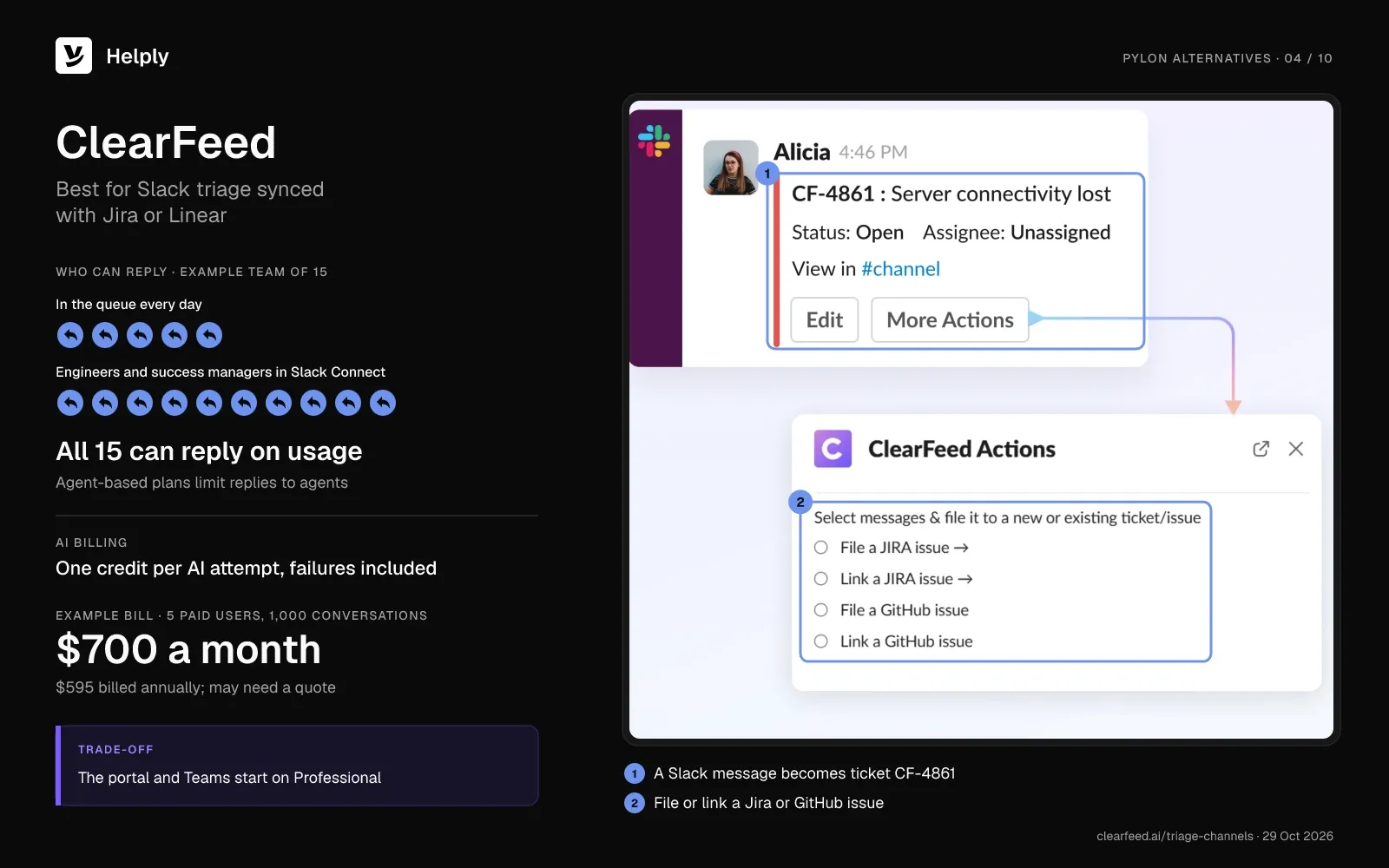
ClearFeed turns Slack conversations, including Slack Connect channels, into tickets and syncs both ways with Jira, Jira Service Management and Linear. Its usage-based plan lets anyone post public replies, while its agent-based plan limits replies to agents. A telecom reviewer wrote: "Our teams can meet our customers where they prefer (Slack)."
Pricing
On agent-based billing, Starter costs $24 and Professional $49 per agent a month, with 15% off annual billing. The usage-based Professional plan costs $700 a month ($595 billed annually) for up to 100 channels and 1,000 tickets. ClearFeed's Enterprise card mentions tailored pricing above 50 channels or 500 tickets, so ClearFeed may quote this volume.
On the usage plan, Professional includes 100 AI credits per 100 tickets, and each AI attempt uses one, failed ones included. Overage costs $2 per 10 credits up to 500, $1.50 per 10 up to 1,000 and $1 per 10 after that. With all 15 people replying, the usage plan costs $700 ($595).
Watch-Outs
- Sync setup takes work. A legal services reviewer said syncing with Jira or Salesforce "can get fairly technical."
- The portal and Teams start on Professional. Starter covers Slack channels, including Slack Connect through the External Helpdesk.
Choose ClearFeed if you want Slack triage that syncs both ways with Jira, Jira Service Management or Linear.
Where Helply Fits Better Than ClearFeed
At 1,000 conversations a month, you can read Helply's price from its published table. ClearFeed's usage plan lists $700 ($595) for 1,000 tickets, but its Enterprise card mentions tailored pricing above 500 tickets. Helply runs the help desk, the Slack Connect inbox and three AI agents on one 7,000-credit block at $399 ($339).
| Helply | ClearFeed Professional, usage plan | |
|---|---|---|
| People who can reply | Unlimited users | Anyone |
| AI billing | Credits by task: 1, 4 or 12 | One credit per AI attempt |
| Engineering trackers | Linear and Jira issues where configured | Two-way sync with Jira, JSM and Linear |
| 15-person example | $399 ($339) | $700 ($595), or a quote |
See how Helply opens Jira issues where configured.
5. Unthread: Best for Slack Connect Support Your Whole Domain Can Answer
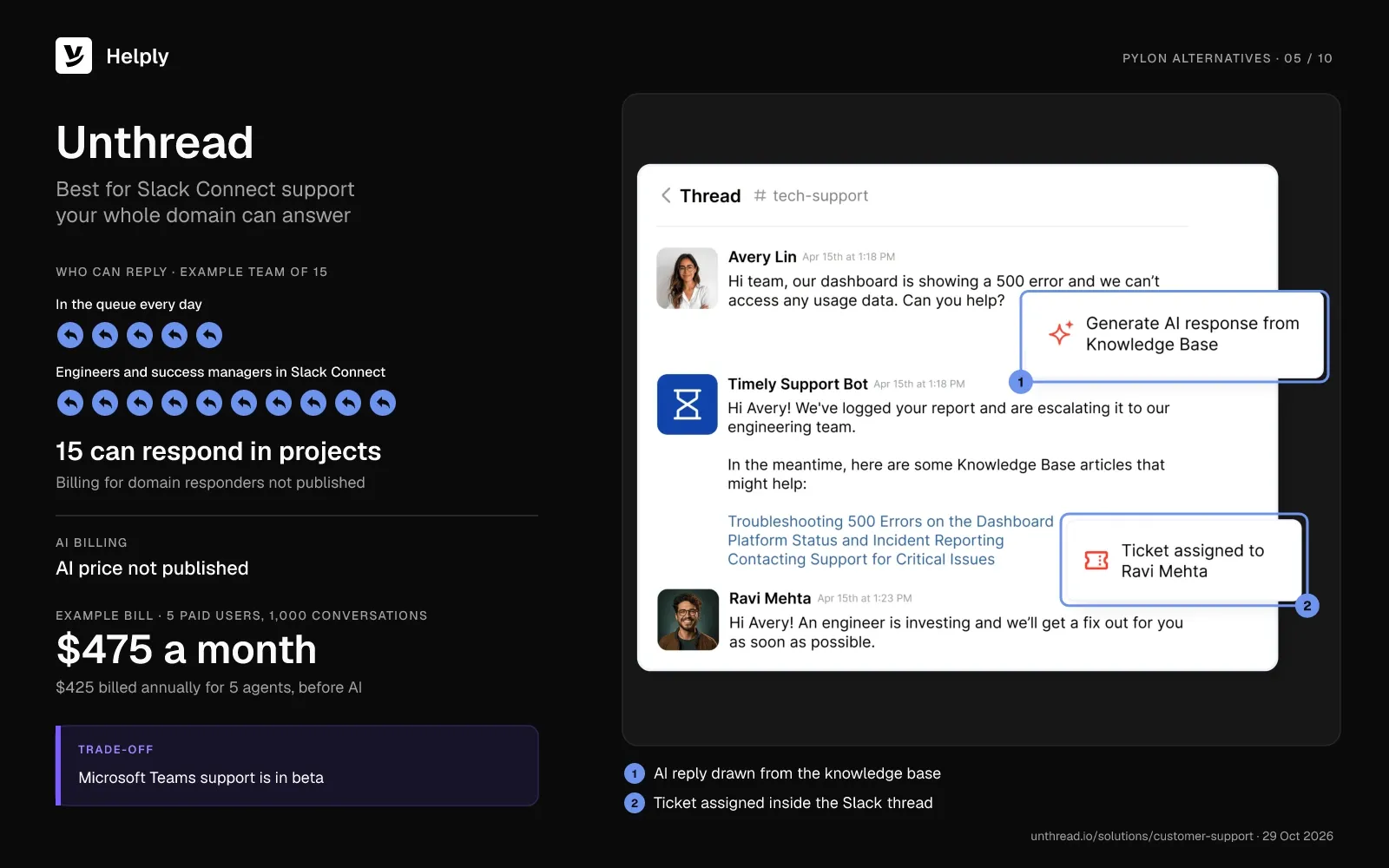
Unthread runs support in Slack Connect channels, and its docs also list email, in-app chat and a customer portal. In external projects, anyone in your domain can respond, and only agents take assignments.
Pricing
Pro starts at $95 per agent a month ($85 billed annually), with a 5-seat minimum. Unthread notes "Conversation limits apply" without a number and publishes no AI price. Contracts run monthly, annually or multi-year.
Five Pro agents cost $475 a month ($425 billed annually), and 15 cost $1,425 ($1,275), before AI. Unthread doesn't say whether domain users who respond count toward billing.
Watch-Outs
- Microsoft Teams sits in beta. Unthread's docs label Teams "currently in beta," so test it before you move Teams customers.
- One reviewer flagged reporting. A December 2025 reviewer wrote that it "does not have a proper customer centric dashboard to track and create reports."
- Most reviews date from 2024. Unthread holds 4.9 out of 5 from 13 G2 reviews in October 2026.
Choose Unthread if many people in your company answer customer threads and only a few need ticket assignments.
Where Helply Fits Better Than Unthread
Unthread prices agents from $95 and publishes neither an AI price nor its conversation limits. Helply publishes every credit block, so you see the AI price before you sign. Helply's Background Agents also watch for churn risk and feature requests.
| Helply | Unthread Pro | |
|---|---|---|
| People who can reply | Unlimited users | Agents, plus domain users in external projects |
| AI billing | Published credit blocks | Not published |
| Microsoft Teams | In the shared workspace | Beta |
| 15-person example | $399 ($339) | $1,425 ($1,275) before AI |
6. Intercom: Best for In-App Chat With an AI Agent
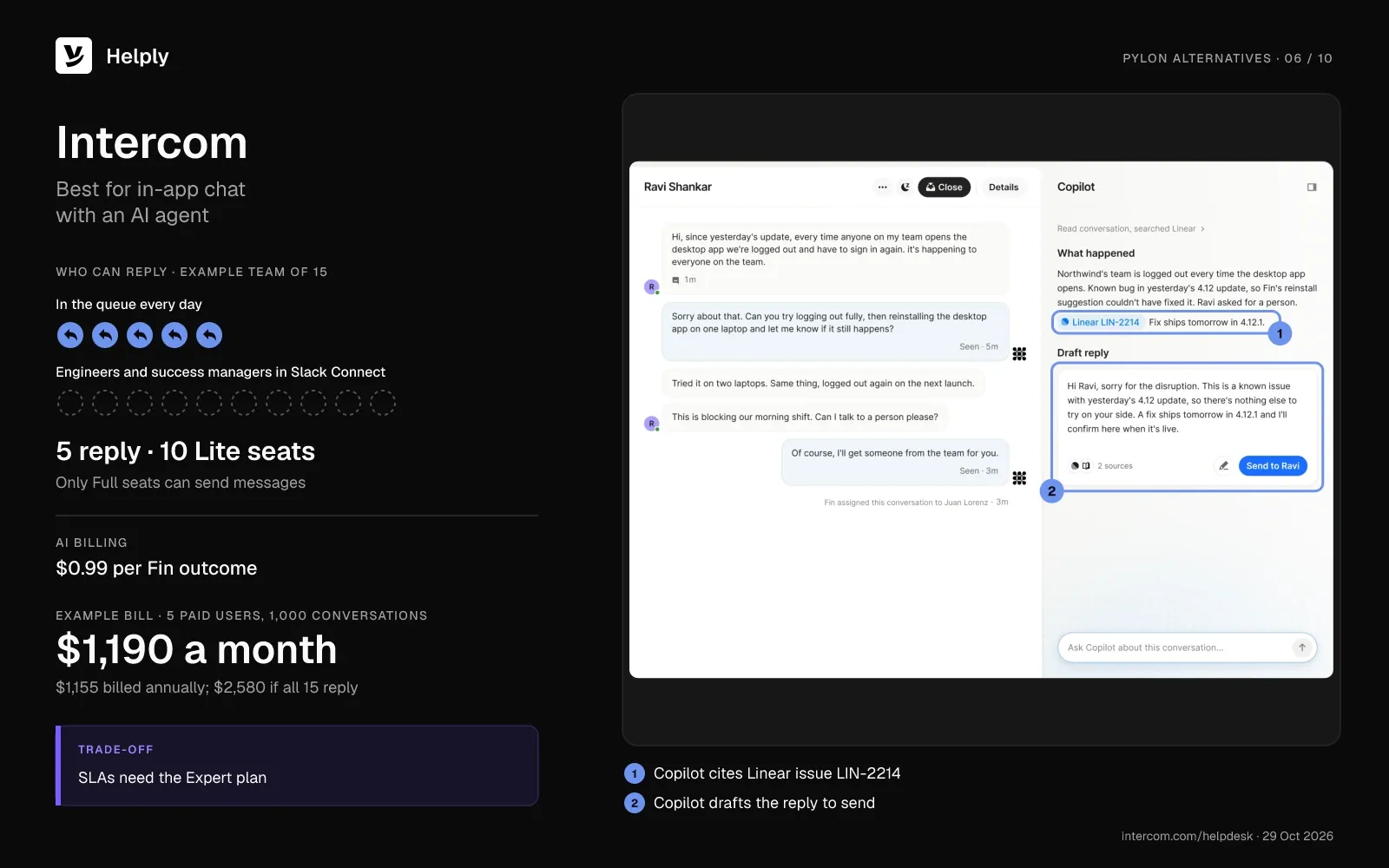
Intercom sells seats and adds $0.99 for each Fin AI Agent outcome. On every Intercom plan, a new message in a private Slack Connect channel starts a conversation, and replies land in the thread. In April 2026, a head of client success on G2 said Fin "resolves over 50% of our inbound chats."
Intercom's maker renamed itself Fin in May 2026, and Salesforce completed its purchase of Fin on 10 September 2026. The help desk still sells under the Intercom name.
Pricing
Expert costs $139 per seat a month ($132 billed annually), includes 50 free Lite seats and adds SLAs. Advanced costs $99 ($85) with 20 free Lite seats. Lite seats can add notes, but "Only Full seats can send messages."
Fin bills $0.99 per outcome: a confirmed fix, a customer who goes quiet after Fin answers, or a finished Procedure. Copilot adds $35 per agent a month ($29 billed annually). On Expert, the example team pays $1,190 a month ($1,155) with 5 full seats, or $2,580 ($2,475) with all 15.
Watch-Outs
- Lite seats can't answer. An events platform administrator wrote: "A lite seat is basically read-only access."
- SLAs need Expert. Intercom leaves SLAs off Essential and Advanced.
- Fin outcomes include some handoffs. A Procedure that ends in a human handoff still counts, though Intercom refunds outcomes on reopened conversations.
Choose Intercom if your support starts in an in-app messenger and you want Fin answering there first.
Where Helply Fits Better Than Intercom
On Intercom Expert, every engineer or success manager who replies needs a $139 full seat, and Fin adds $0.99 per outcome. Helply's estimate for the same 1,000 conversations is 7,000 credits, which cost $399 a month ($339 billed yearly) at any team size.
| Helply | Intercom Expert | |
|---|---|---|
| People who can reply | Unlimited users | Full seats only |
| AI billing | Credits by task | $0.99 per outcome |
| SLAs | Included | Expert only |
| 15-person example | $399 ($339) | $2,580 ($2,475) |
See the Helply vs. Intercom comparison.
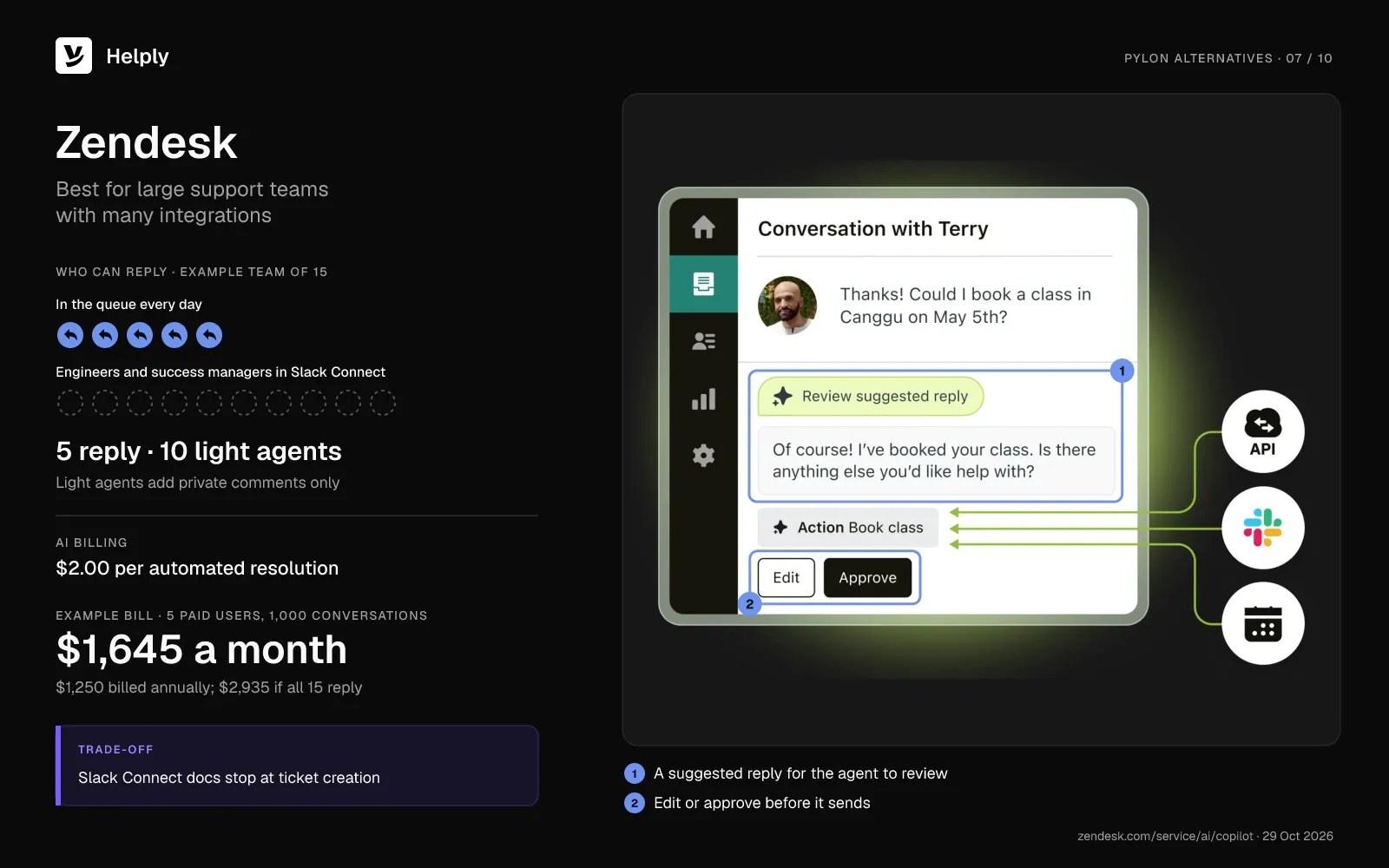
7. Zendesk: Best for Large Support Teams With Many Integrations
Zendesk prices per agent and charges for its AI agents per automated resolution. In Slack Connect, people create tickets with an @zendesk mention, and Zendesk adds the ticket as a reply in the thread. One operations lead on G2 praised how "Slack, Jira, Harvest, and hundreds more" connect.
Pricing
Suite Professional costs $149 per agent a month ($115 billed annually), and SLAs start on this plan. Light agents read tickets and leave private comments without a paid seat, up to 100 on Suite Professional. Copilot costs $50 per agent a month, paid yearly.
Zendesk lists $2.00 per pay-as-you-go automated resolution and $1.50 committed, and Suite Professional includes 10 per agent a month. Zendesk introduced resolution tiers in May 2026, and its help center tells buyers to contact sales for tier prices. The example team pays $1,645 a month ($1,250) with 5 agents, or $2,935 ($2,250) with 15.
Watch-Outs
- Light agents only read and add private comments. A software developer on G2 wrote: "The high pricing per seat makes it costly to include all those who need to be."
- Zendesk's Slack Connect docs stop at ticket creation. They describe @zendesk tickets but no two-way chat in the channel.
- Zendesk uses Microsoft Teams only for internal side conversations. That feature starts on Suite Professional.
Choose Zendesk if you run a large team and need Zendesk's integration catalog more than Slack-native conversations.
Where Helply Fits Better Than Zendesk
Zendesk turns an @zendesk mention into a ticket and lists $2.00 per pay-as-you-go automated resolution. Helply keeps Slack Connect threads synced, so customer conversations stay in the channel. It prices AI work in published credits for unlimited users.
| Helply | Zendesk Suite Professional | |
|---|---|---|
| People who can reply | Unlimited users | Paid agents; light agents comment |
| AI billing | Credits by task | $2.00 per resolution ($1.50 committed) |
| Slack Connect | Synced conversations | Tickets from mentions |
| 15-person example | $399 ($339) | $2,935 ($2,250) |
Read the Helply vs. Zendesk comparison.
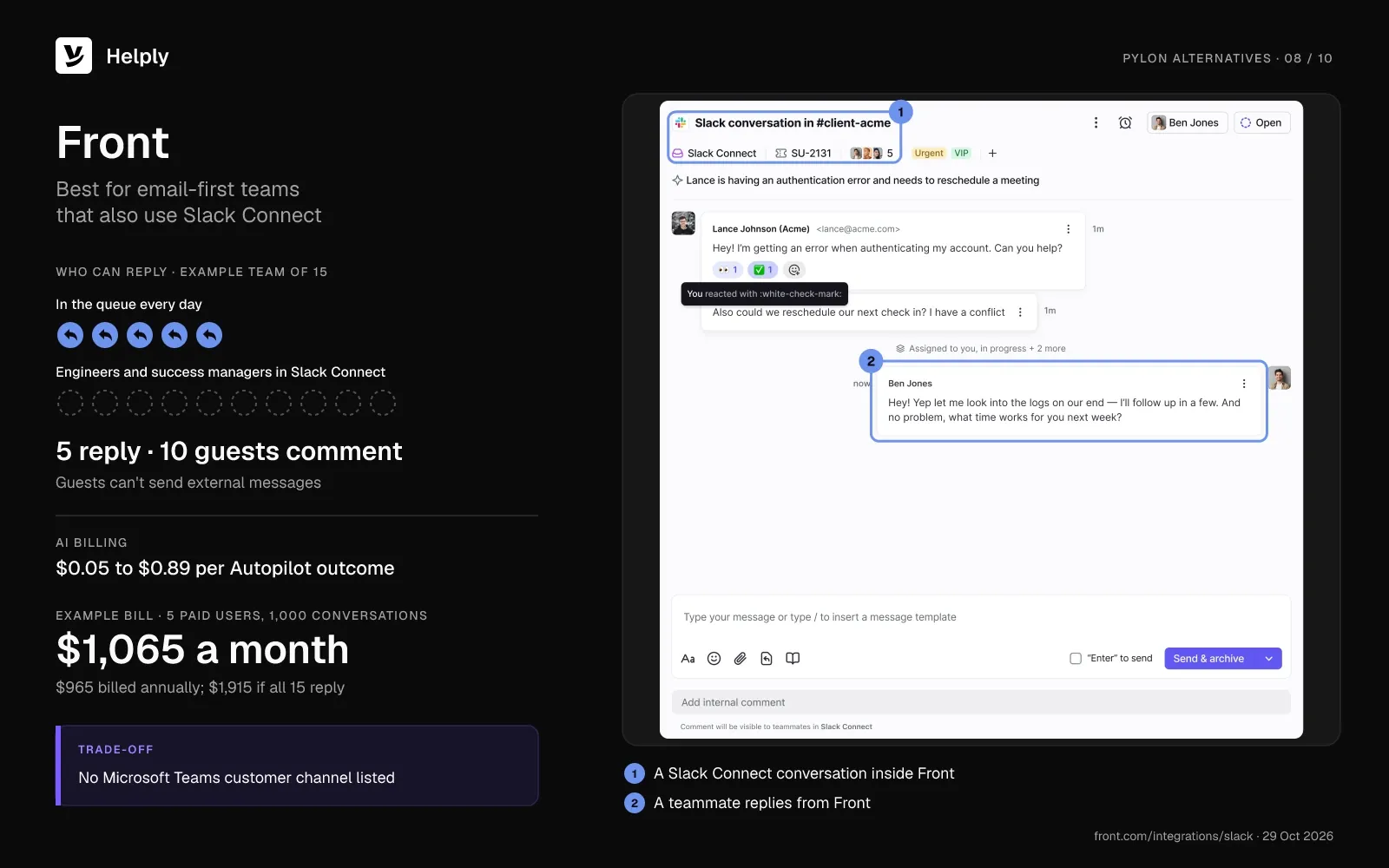
8. Front: Best for Email-First Teams That Also Use Slack Connect
On Front, you pay per seat and per Autopilot outcome. You can connect public and private Slack Connect channels that you own on every plan. On Starter, Front allows Slack Connect only with a single channel type.
Guests can comment on conversations without a license but can't send external messages.
Pricing
Professional costs $85 per seat a month ($65 billed annually) for up to 50 seats, and SLA rules start there. Starter costs $35 ($25) for up to 10 seats, and Copilot adds $20 per seat a month. Contracts over $25,000 require an onboarding package.
Autopilot bills each conversation once, at the highest level it reaches: $0.89 to resolve, $0.39 to hand off, $0.05 to triage. With 500 resolutions and 500 handoffs, AI adds $640 a month. Five seats bring the total to $1,065 ($965), and 15 seats bring it to $1,915 ($1,615).
Watch-Outs
- Every sender needs a paid seat. One software reviewer wrote: "It's a bit expensive, so not all of my colleagues are on it."
- Front lists no Microsoft Teams customer channel. Its help center covers Slack Connect but no Teams channel for customers.
- Slack channels count toward limits. Each Slack Connect channel uses part of your plan's channel allowance.
Choose Front if email still drives most of your support and Slack Connect is a second channel.
Where Helply Fits Better Than Front
Pick Helply when the people who need to reply outnumber your licensed seats. Front guests can only comment. Every Helply user can send replies, and the same 7,000-credit block costs $399 ($339) whether 5 or 15 people reply.
| Helply | Front Professional | |
|---|---|---|
| People who can reply | Unlimited users | Paid seats; guests comment |
| AI billing | Credits by task | $0.05, $0.39 or $0.89 per outcome |
| Microsoft Teams | Customer channel | No customer channel listed |
| 15-person example | $399 ($339) | $1,915 ($1,615) |
See the Helply vs. Front comparison.
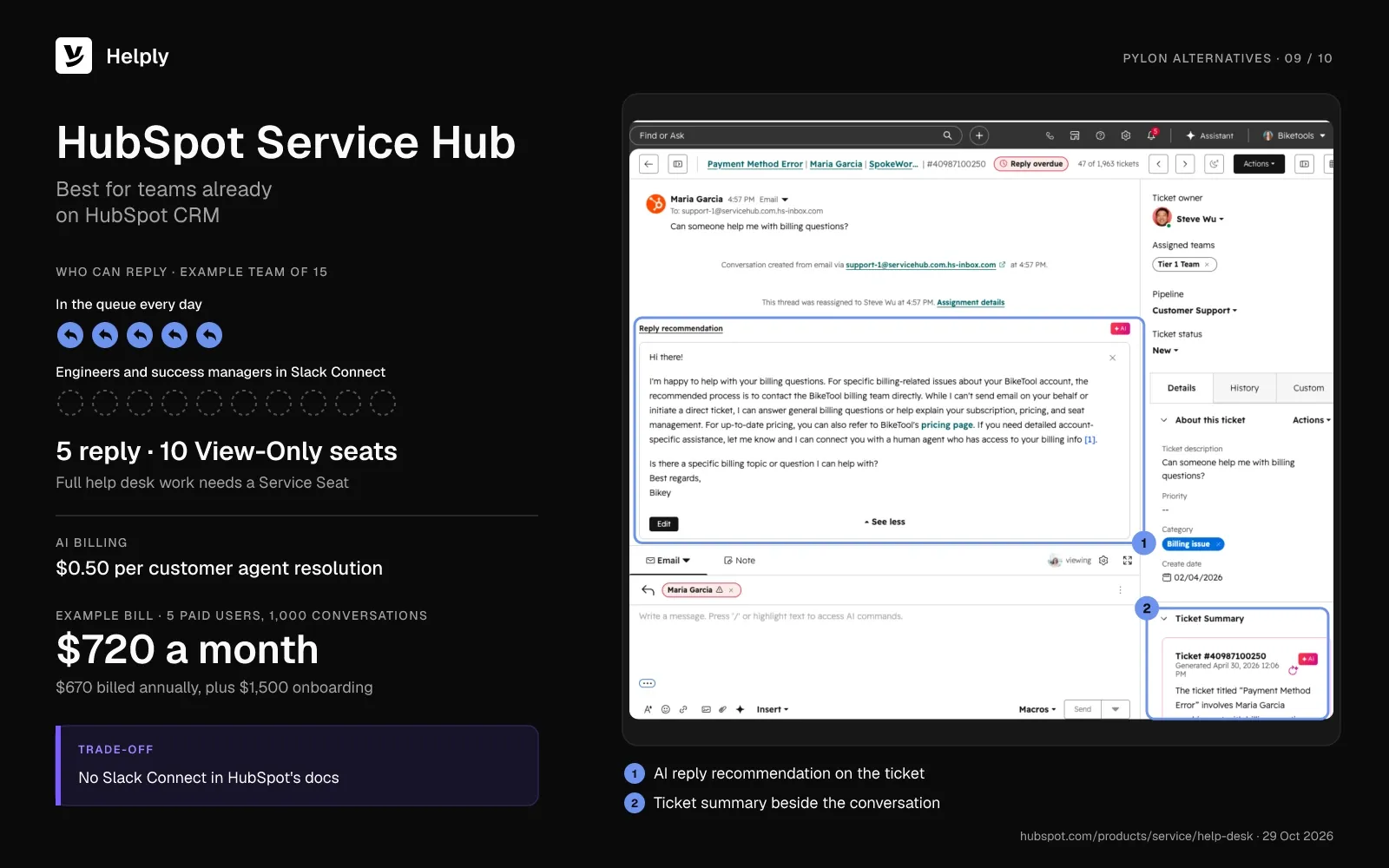
9. HubSpot Service Hub: Best for Teams Already on HubSpot CRM
HubSpot Service Hub keeps support tickets in the same records as sales and marketing. One reviewer wrote: "I can see sales, marketing, and support within the same customer history." Its Slack app syncs tickets for your internal team, and HubSpot's docs don't cover Slack Connect.
Pricing
HubSpot lists Professional at $100 a seat each month with a one-year commitment ($90 billed annually), plus $1,500 for onboarding. View-Only seats are free and unlimited, but you need a Service Seat for full help desk work. SLAs and the customer agent start on Professional.
The customer agent costs $0.50 per resolution, or 50 HubSpot Credits, and Professional includes 3,000 credits a month. For 500 resolutions, the example team pays $220 in extra credits. The total comes to $720 a month ($670) with 5 seats, or $1,720 ($1,570) with 15, before onboarding.
Watch-Outs
- Each new replier adds a Service Seat. An enterprise marketing specialist wrote: "Seats can get rather expensive as you scale."
- A resolution means 72 hours without a rep. HubSpot charges for a customer agent resolution when no human rep takes over for 72 hours.
- HubSpot documents Teams for internal comments. Its Microsoft Teams integration syncs comments for your own team.
Choose HubSpot Service Hub if your sales team already runs on HubSpot and customers will move from Slack to email or chat.
Where Helply Fits Better Than HubSpot Service Hub
Helply suits teams whose customers expect answers inside Slack Connect. HubSpot's docs cover Slack for internal sync, and Professional carries a one-time $1,500 onboarding fee. Helply brings customer Slack Connect threads into the inbox and reads HubSpot data where configured.
| Helply | HubSpot Service Hub Professional | |
|---|---|---|
| People who can reply | Unlimited users | Service Seats |
| AI billing | Credits by task | $0.50 per resolution |
| Slack Connect | Customer conversations | Internal sync; not in HubSpot's docs |
| 15-person example | $399 ($339) | $1,720 ($1,570) plus $1,500 once |
See what the Helply HubSpot integration covers.
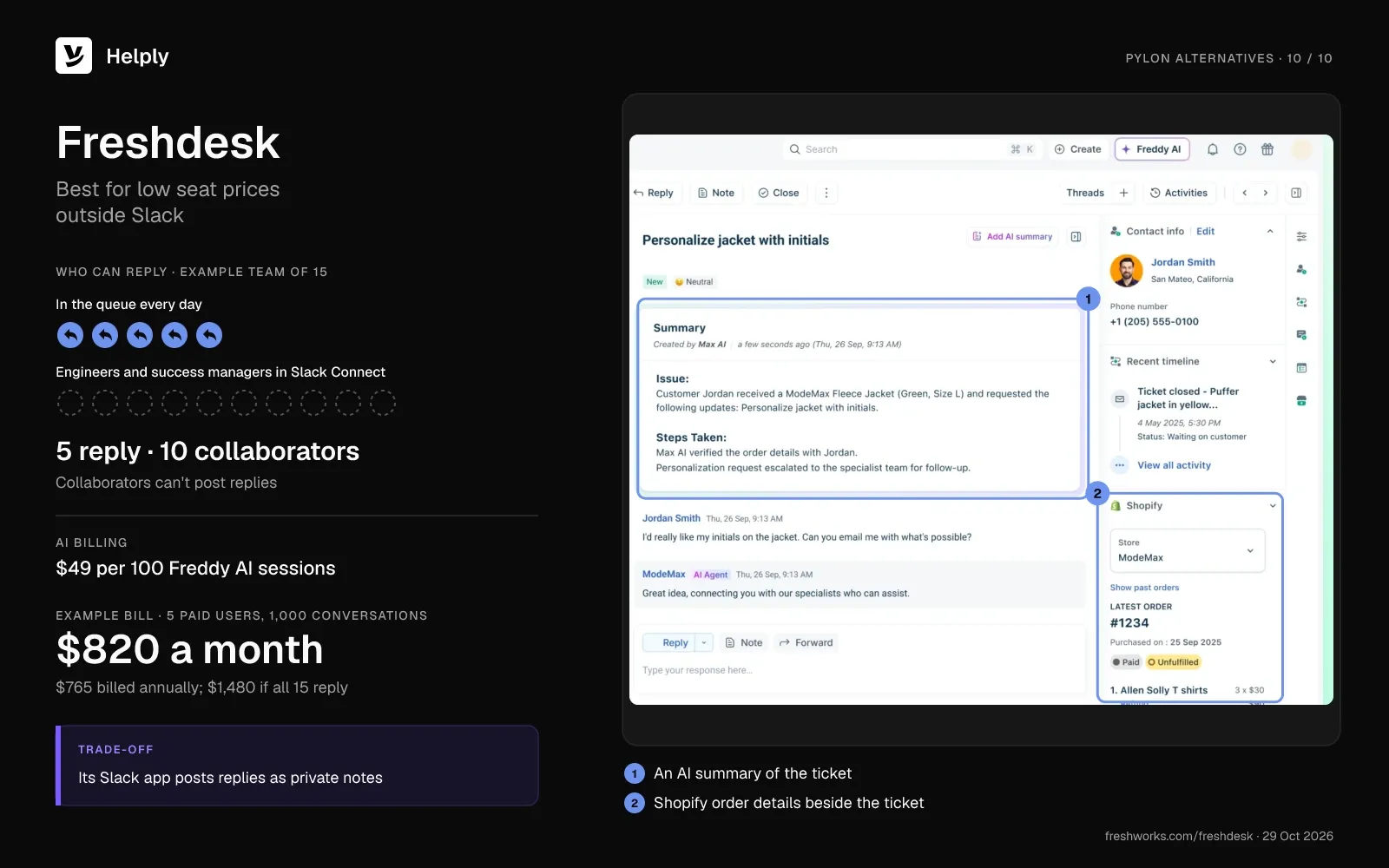
10. Freshdesk: Best for Low Seat Prices Outside Slack
Freshdesk's Slack app turns Slack replies into private notes, and its docs don't mention Slack Connect. Freshdesk sells seats per agent and bills Freddy AI Agent use per session.
Pricing
Pro costs $66 per agent a month ($55 billed annually), and Growth costs $23 ($19). Multiple SLA policies and 5,000 collaborators start on Pro, and collaborators can't post replies. Freddy Copilot adds $35 per agent a month ($29 billed annually).
Freshdesk sells Freddy AI Agent in packs of 100 sessions for $49, and each account gets 500 free sessions once. The email AI agent comes with Freshdesk, while chat automation requires Freshdesk Omni, where Pro costs $95 ($79). With 5 agents the bill totals $820 a month ($765), and with 15 it totals $1,480 ($1,315).
Watch-Outs
- Occasional agents need a seat or a day pass. Freshdesk day passes cost $2 on Growth, $7 on Pro and $12 on Enterprise. A retail reviewer noted that "many of our agents only have to log in a few times a month."
- Freddy bills by the session. A chat session covers 24 hours, and an email session covers 72.
- Slack replies arrive as private notes. Freshdesk caps the notes and replies it posts back to Slack at 250 characters.
Choose Freshdesk if your customers write in by email or chat and you want a low per-agent price.
Where Helply Fits Better Than Freshdesk
Helply fits better when customers stay in Slack Connect and occasional responders need to reply. Freshdesk keeps Slack for internal notes, and collaborators can't reply to customers. Helply syncs customer Slack Connect threads and lets any user answer them.
| Helply | Freshdesk Pro | |
|---|---|---|
| People who can reply | Unlimited users | Paid agents; collaborators add notes |
| AI billing | Credits by task | $49 per 100 sessions |
| Slack Connect | Customer conversations | Internal Slack app |
| 15-person example | $399 ($339) | $1,480 ($1,315) |
See the Helply vs. Freshdesk comparison.
What to Check Before You Leave Pylon
- Your contract end date. Pylon's standard contracts run annually, and its credits last the contract term.
- Your Microsoft Teams customers. Thena puts Teams on Enterprise, Plain on Horizon, and Unthread labels it beta.
- Slack Connect channel owners. Front requires the channel owner to connect it.
- Your Linear and Jira links. Pylon syncs comments both ways, so plan how you'll move open issues across.
- Your Slack-only responders. Pylon's free Slack-only seat may cover them today, and most alternatives charge for a reply.
Helply's team can help migrate support data and knowledge on Enterprise plans. For more options, compare help desks built for SaaS companies.
When Pylon Is Still the Right Choice
Stay on Pylon if your occasional responders reply only in Slack and never open the web app. An older Pylon help article lists a free Slack-only seat for them. Pylon also fits if customers need a portal to track their tickets, which Advanced includes.
Pylon suits success teams that track account health inside the support tool. Its Account Intelligence add-on, at $10 per customer account a month, includes a health score builder and account notebooks. If customers message you in Google Chat, Pylon covers that channel on Advanced.
Seats Plus Credits, or Credits Alone?
Of the ten Pylon alternatives, pick Thena for a Slack-native swap and Unthread for support your whole domain can answer. Pick Plain for engineering-led teams, ClearFeed for Slack triage with two-way Jira or Linear sync, and Intercom for in-app chat. Helply fits the team whose Pylon bill grows each time another engineer or success manager needs to reply from the web app.
Pylon's standard contract runs a year, and Helply bills month to month, with 15% off annual billing. Pylon's sales team estimates credits, and Helply publishes its table: about 7,000 credits cover 1,000 conversations for $399 ($339 billed yearly). Helply charges only for credits, so you can serve Microsoft Teams customers at no separate fee.
Kameleo's customers asked more once they could count on an instant, accurate technical answer, and engagement doubled. If your Pylon renewal is close, price a Helply credit block before you sign again.
Frequently asked questions
Among Pylon alternatives, pick Helply for unlimited users and published credit prices, Thena for a Slack-native swap, and Plain for an engineering-led team. Intercom fits in-app chat, and Zendesk fits large teams that need many integrations.
In October 2026, Pylon lists Professional at $89 per seat and Advanced at $139, both on an annual contract. Pylon prices Enterprise by quote. AI credits carry a 5,000-credit minimum and no published price, and Pylon's sales team estimates how many you need.
Yes: at October 2026 list prices, Helply costs $399 a month ($339 billed yearly) for 15 people, 1,000 conversations and 500 AI resolutions. If the other 10 reply only in Slack, Pylon Professional costs $445 for 5 seats on an annual contract, before credits. Among tools with a full published price, ClearFeed's usage plan comes next at $700 ($595), unless ClearFeed quotes that volume.
Yes. HubSpot's free Service Hub plan covers up to 2 users, without the SLAs or customer agent that Professional adds. Helply, ClearFeed, Intercom, Zendesk, Front and Freshdesk offer 14-day trials, Unthread offers 14 days after a demo, and Plain offers 7.
Yes. Helply charges nothing per user, so your whole team can join any plan, from $49 a month ($42 billed yearly). ClearFeed prices its usage plan by channel count or ticket volume, whichever is higher.
Yes, through sales: Pylon's FAQ says it "offers free trials for prospects," and a sales rep sets up a demo organization. Pylon has no free plan or self-serve trial.
Helply, Plain, ClearFeed and Unthread run customer conversations in Slack Connect. Intercom works in private Slack Connect channels, Front in channels you own, and Thena in customer Slack channels. Zendesk creates tickets from @zendesk mentions in Slack Connect, while HubSpot and Freshdesk sync Slack for internal use.
Pylon and several alternatives connect to Linear, including Helply, Plain, ClearFeed and Unthread. Helply can create Linear issues where configured and supported. It can use supported status changes to help your team follow up with affected customers.
They overlap: both are help desks with SLAs and AI agents. Pylon runs customer conversations inside Slack Connect, while Zendesk creates tickets from @zendesk mentions there. Pylon Professional costs $89 per seat on an annual contract, and Zendesk Suite Professional costs $149 per agent a month ($115 billed annually).
Both run customer conversations in Slack Connect, and Intercom does it in private channels on every plan. Their AI billing differs: Pylon sells credits with a 5,000-credit minimum, while Intercom charges $0.99 per Fin outcome.
Intercom's maker renamed itself Fin in May 2026, and Salesforce completed its purchase of Fin on 10 September 2026. The help desk still sells under the Intercom name.
Pylon, the company at usepylon.com, sells a B2B customer support platform for Slack Connect, Microsoft Teams, email and chat. Teams support starts on Pylon's Advanced plan. Pylon relaunched as an "agentic support platform" on 15 July 2026.
About the author

Bildad Oyugi
Head of Content
Bildad is a digital marketing expert with over 5 years of experience in copywriting, content marketing, and editing. Outside of work, he enjoys videography and spending time with his family.
Keep reading

Customer Support
Intercom Pricing Explained: Seats, Fin and the Full Monthly Bill
Bildad Oyugi · 15 min read

Customer Support
8 Freshdesk Alternatives, Priced With AI Included (2026)
Bildad Oyugi · 23 min read

Customer Support
Freshdesk Pricing in 2026: Plans, Freddy AI Costs and What Teams Pay
Bildad Oyugi · 14 min read