
 Alex Turnbull ··9 min read

What Is AI Customer Experience?
AI customer experience (AI CX) is the use of AI to answer, assist and act across the customer journey. It includes the answer a customer reads and the draft a support rep sends. It also includes the alert an account owner gets before a customer complains.
In support, AI does four jobs:
- Answers customers directly. An AI agent investigates the question, uses connected tools and resolves the request, or hands it to a person.
- Assists your team. AI drafts replies grounded in the conversation, the customer's history and your company's guidelines.
- Acts before the customer asks. Background agents watch conversations and accounts, then alert a teammate or open work when something needs attention.
- Turns conversations into insight. AI groups recurring problems and new themes so product and docs teams can fix the cause.
The first job gets the most attention. Customers weigh the other three when they decide whether to trust the answer and whether they can still reach a person.
Why Customers Are Wary of AI in Service
Many customers would rather not deal with AI at all. Of the 5,728 customers Gartner polled, 64% would prefer companies kept AI out of customer service. Another 53% would consider switching to a competitor if they found out a company planned to use it.
Qualtrics XM Institute surveyed more than 20,000 consumers for a study published in October 2025. Nearly one in five who had tried AI customer service got nothing from it. Qualtrics put that failure rate at almost four times the rate for AI in general.
The same Qualtrics study found half of consumers fear AI will cut them off from a human.
In a July 2025 article, Deloitte Canada reported a 15% increase in AI adoption in contact centers from 2023 to 2025. Over the same years, its survey showed customer and employee experience ratings fell 0.5 points on average.
Adding AI didn't improve service by itself. Most of these fears trace to design choices, such as bot loops, buried human options and wrong answers. You can fix each one before launch.
Where AI Improves the Customer Experience
Answers at Night Without a Queue
A customer who asks at night shouldn't wait until morning for a known answer. Zendesk's CX Trends 2026 report, released in November 2025, found 74% of consumers expect round-the-clock service due to AI. An AI agent covers nights, weekends and time zones your team can't staff.
Resolution Instead of Deflection
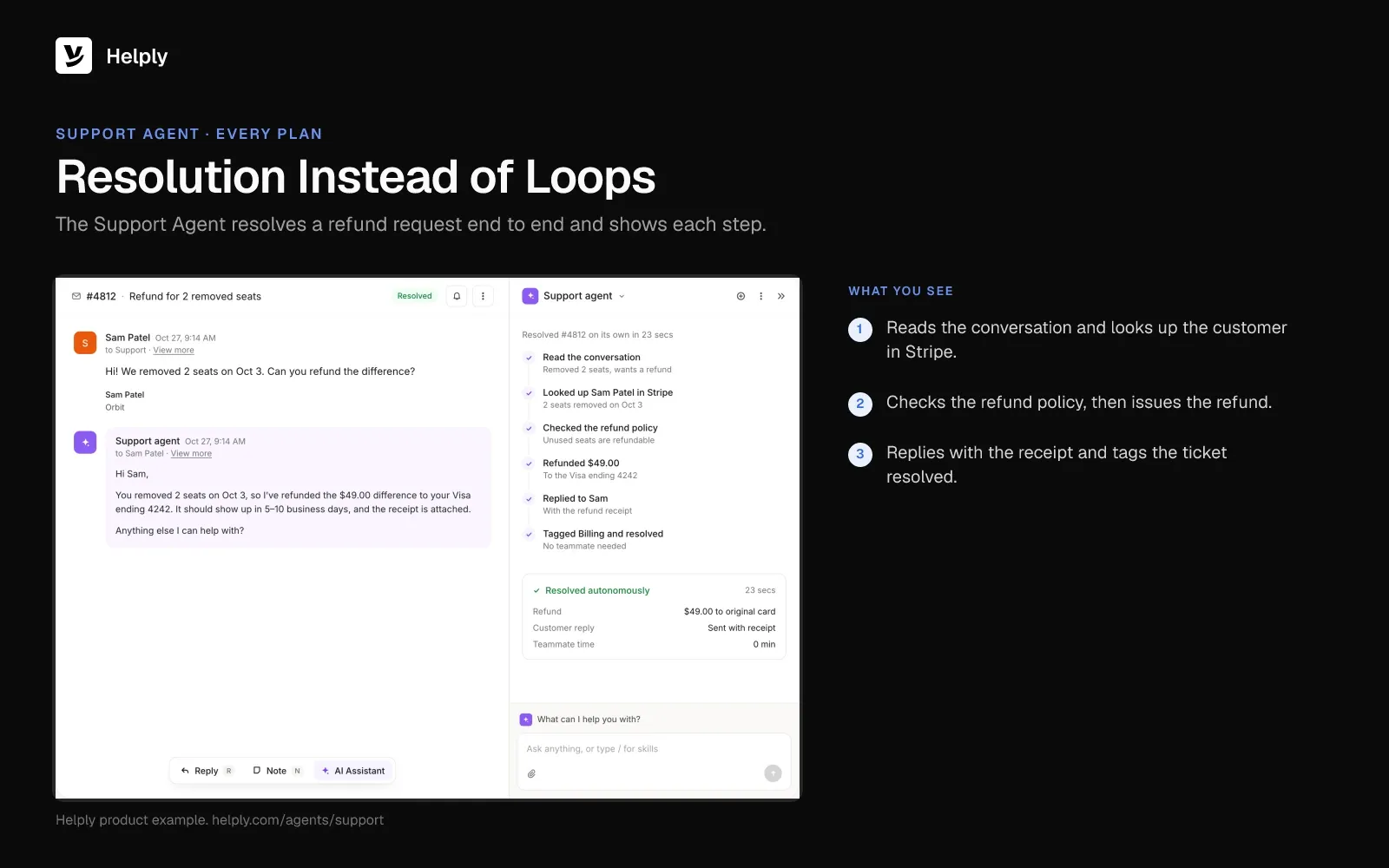
A good AI agent finishes the job. It checks the account, reads the logs, issues the refund the policy allows and confirms the outcome. The customer leaves with the problem solved and no extra article to read.
Handoffs Without Repeating Yourself
Zendesk found 81% of consumers want agents to continue a conversation without backtracking. The same standard applies when AI passes a customer to a person. The person should get the question, what the AI checked and what it found, so the customer picks up where they left off.
Answers That Remember the Customer
Zendesk also found 67% of consumers expect brands to tailor support based on prior interactions. AI that reads past tickets, plan details and open issues can answer with that customer's account in view.
Problems Fixed Before the Customer Writes In
AI reads each conversation, so it spots patterns a busy team misses. A spike in login errors can reach the right owner the same day. A confusing invoice change or an outdated doc can follow the same route.
Where AI Makes the Customer Experience Worse
The Deflection Loop
The bot offers three help articles, the customer rephrases, and the bot offers the same three again. Loops like this one trap customers in the bot. Customers in Gartner's survey named that harder path to a person as their top AI concern.
Teams that score AI on deflection reward it for keeping customers away, and customers feel it. Read more on why containment rate misleads.
Confidently Wrong Answers
A wrong refund policy or a broken setup step costs a second conversation and some trust. Ground answers in current docs and past resolutions, and set a confidence line below which AI escalates.
Lost Context at Handoff
Some setups pass the customer to a person with nothing attached. The person asks for the order number, the error and the steps already tried, and the customer starts over. The customer loses whatever time the AI saved.
Stale Knowledge
AI repeats whatever your help center says. If the docs lag behind the product, the AI repeats old answers to each customer who asks. Give your docs an owner and a way to catch gaps from real conversations.
Hiding the Human
If you bury the "talk to a person" option, your deflection number improves while customers stay stuck. Make the path visible, and tell customers when they are talking to AI. Explain its decisions too: in Zendesk's research, 95% of consumers expect that.
AI Customer Experience by Journey Stage: What Helps vs. What Hurts
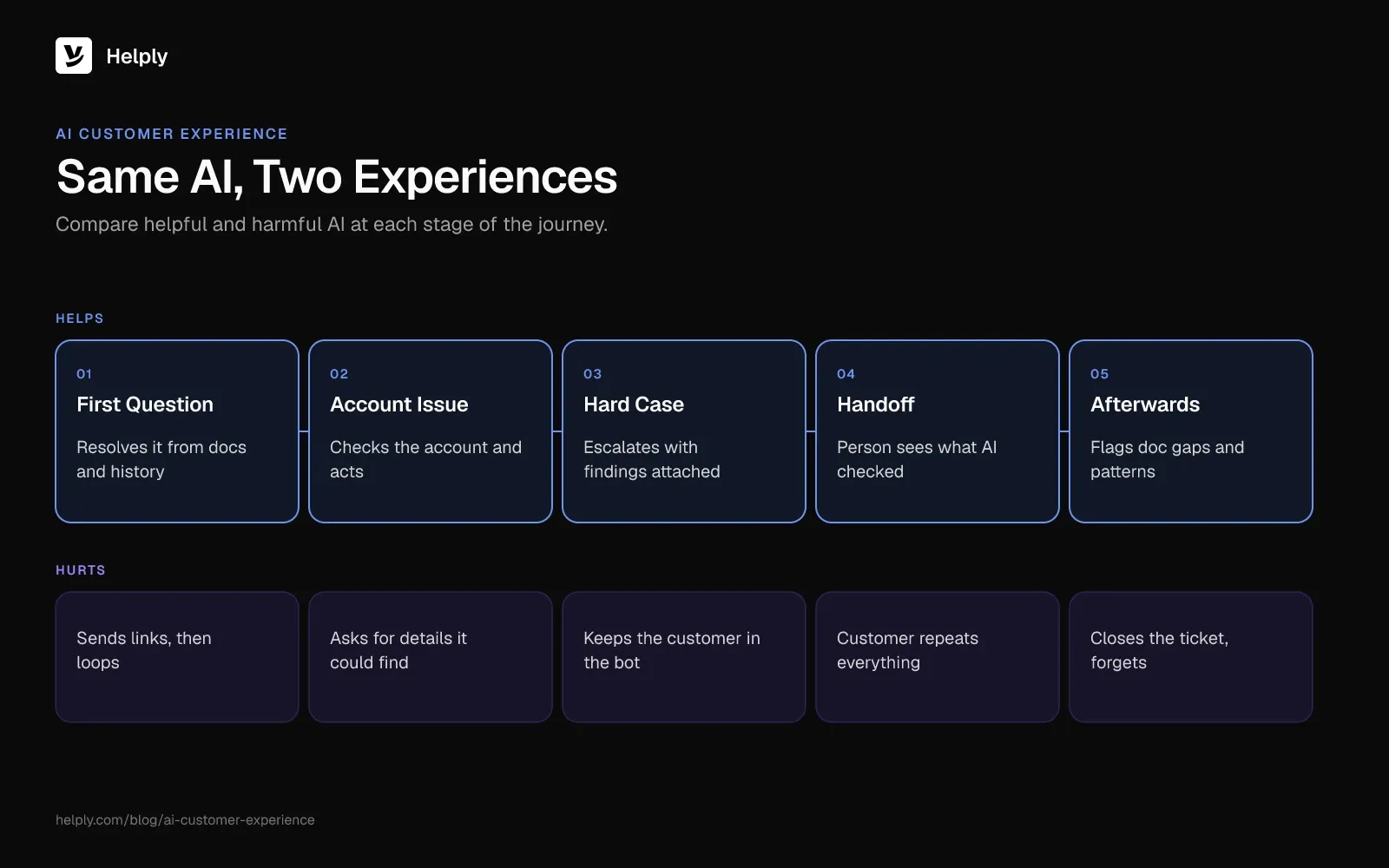
The same AI can help or hurt at each stage of the customer journey. It helps when it resolves the problem and hurts when it blocks the customer.
| Journey stage | AI that helps | AI that hurts |
|---|---|---|
| First question | Resolves it from docs, history and connected tools | Sends links and loops |
| Account or billing issue | Checks the account and takes the allowed action | Asks for details it could look up |
| Complex or sensitive issue | Escalates with the investigation attached | Holds the customer in the bot |
| Handoff to a person | Person sees the question, checks and findings | Customer repeats everything |
| After the conversation | Flags gaps in docs and recurring problems | Closes the ticket and forgets |
How to Measure AI's Effect on Customer Experience
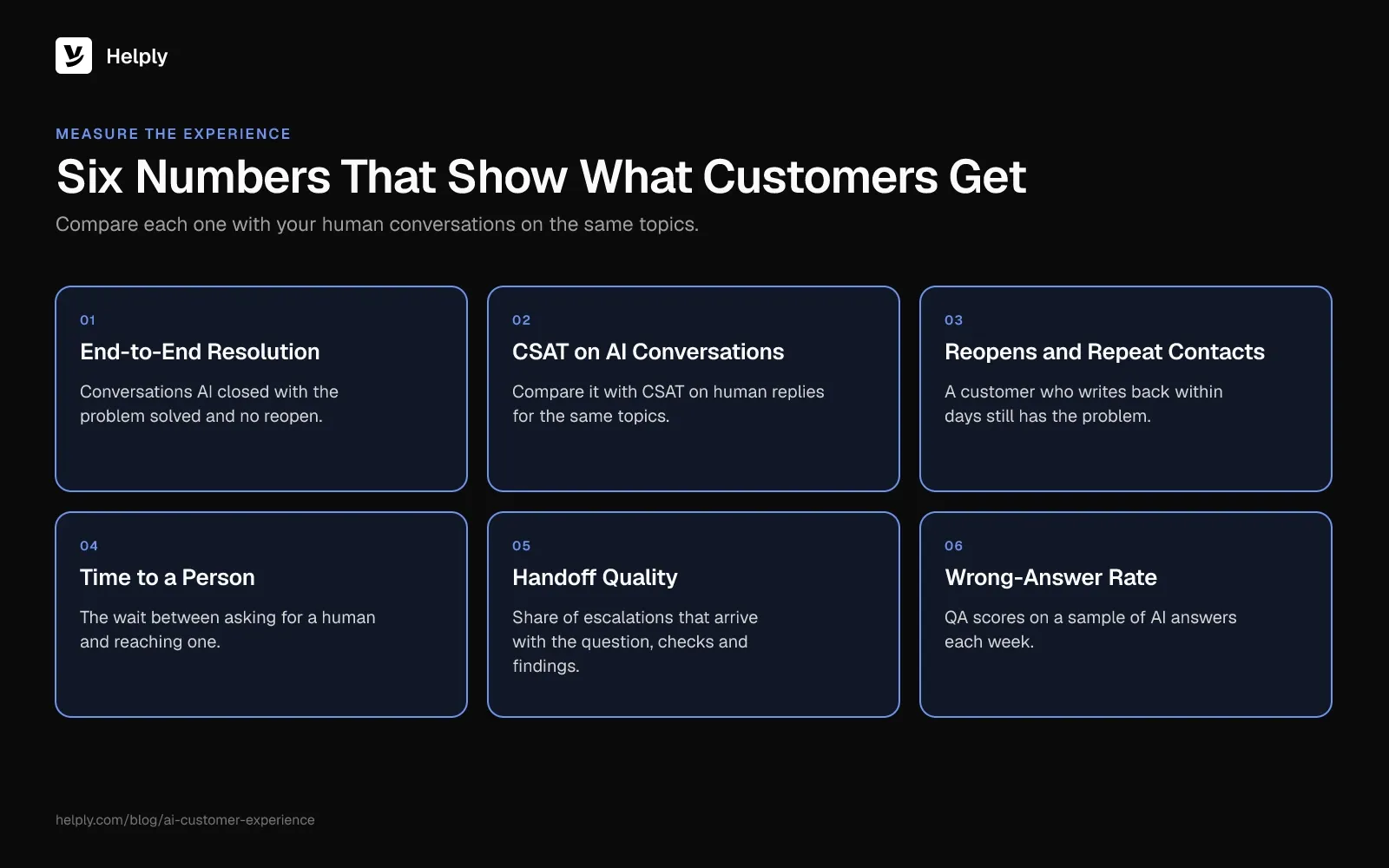
Measure AI's effect on customer experience with six numbers, and compare each with your human conversations on the same topics. Cost metrics show what AI saved, and these show what customers got:
- End-to-end resolution rate. Conversations AI closed with the problem solved and no reopen.
- CSAT on AI conversations. Compare it with CSAT on human conversations for the same topics. For more ways to lift the score, see how to improve customer satisfaction.
- Reopen and repeat-contact rate. A customer who writes back within a few days still has the problem.
- Time to a person. The wait between a customer asking for a human and reaching one.
- Handoff quality. Share of escalations that arrive with the question, the checks and the findings attached.
- Wrong-answer rate. QA scores on a sample of AI answers each week.
Run new AI behavior against past conversations before customers see it. You catch wrong answers there before they reach a customer.
How Helply Builds AI into the Customer Experience
Helply is an AI-native customer support platform. Against those five failures, each Helply agent covers at least one.
- Resolution instead of loops. The Support Agent handles customers on email, chat and messaging. It looks into each issue, answers, acts within your rules and can close the request end to end.
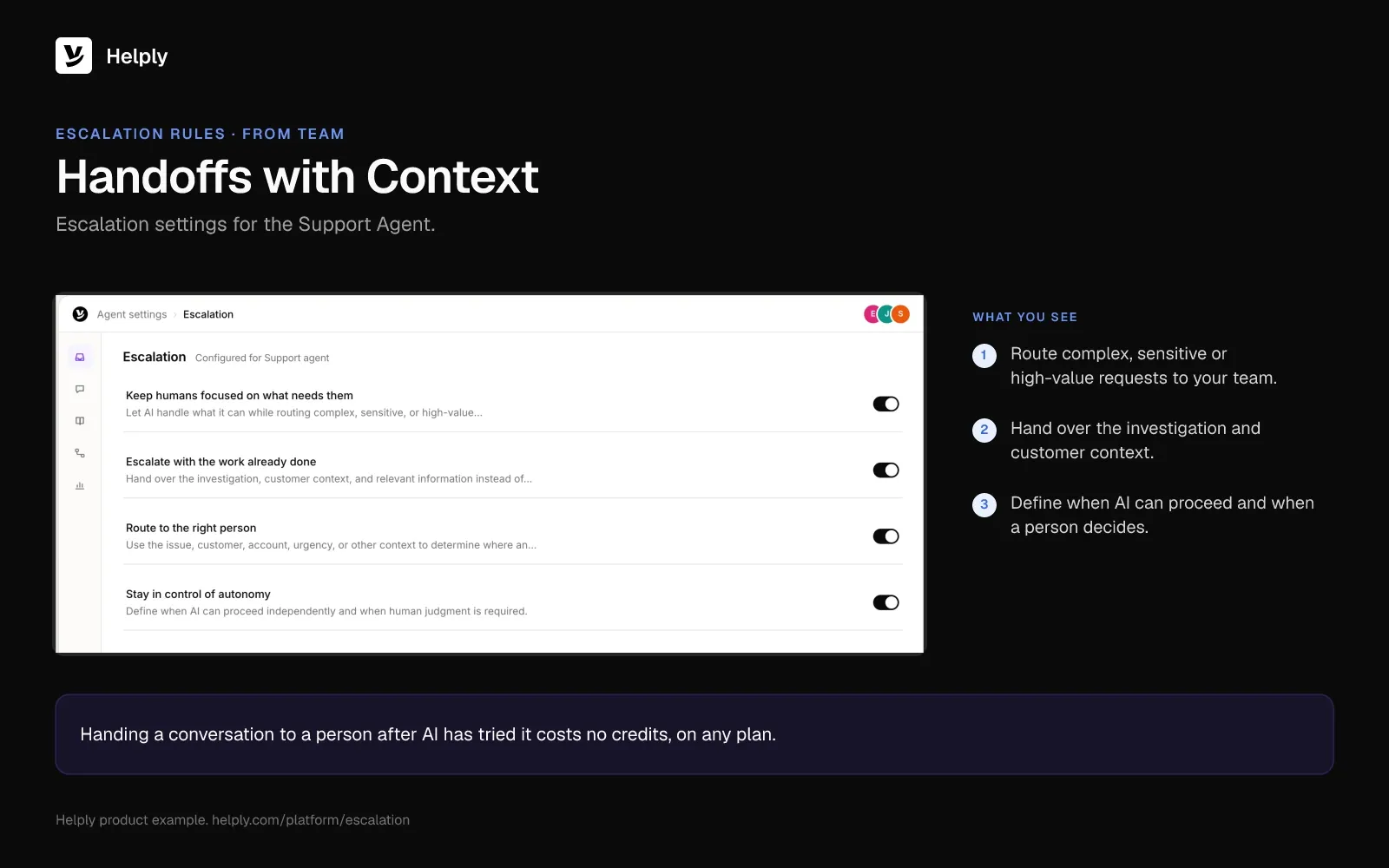
- Handoffs with context. Requests it can't settle with confidence land with a teammate, who sees what the agent checked and found. From the Team plan, escalation rules define which requests AI can handle alone and which need a person.
- Your voice. Guidelines set how agents speak to customers, how detailed answers should be and how your brand sounds.
- A faster team. The Assist Agent bases its reply drafts on the conversation, customer context and the Guidelines you set.
- Docs that keep up. From Team, the Knowledge Agent learns from conversations, finds missing answers and surfaces outdated information for your team to review.
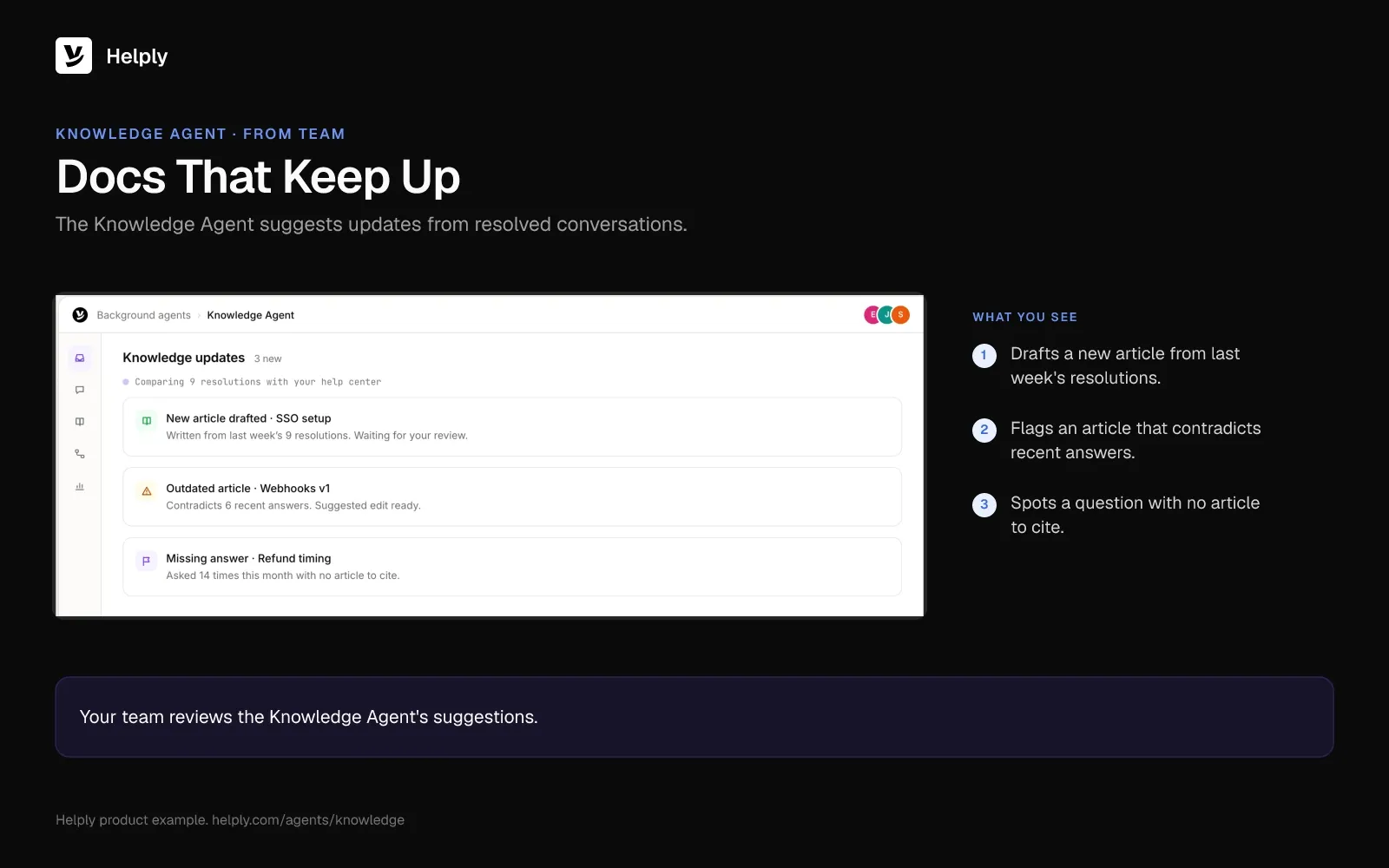
- Problems spotted early. From Team, the Insights Agent uncovers trends and recurring problems across customer conversations.
- One AI across your channels. The same AI works across email, chat, Slack, Teams, WhatsApp, SMS and other connected channels. WhatsApp and SMS start on Team.
The Assist and Support Agents come on every Helply plan, and the whole team shares AI credits. Handing a conversation to a person after AI has tried it costs no credits. Helply logs AI actions, resolutions and escalations, and AI providers never train their models on customer data Helply sends them (Trust).
Kameleo's customers asked deep technical questions and used to wait for business hours. With the Support Agent, 79% of its inbound questions now resolve end to end, and customer engagement doubled as customers asked more. Helply mapped Kameleo's knowledge base at about 70% complete, then closed the gaps with living documentation.
How to Roll Out AI Without Hurting CX
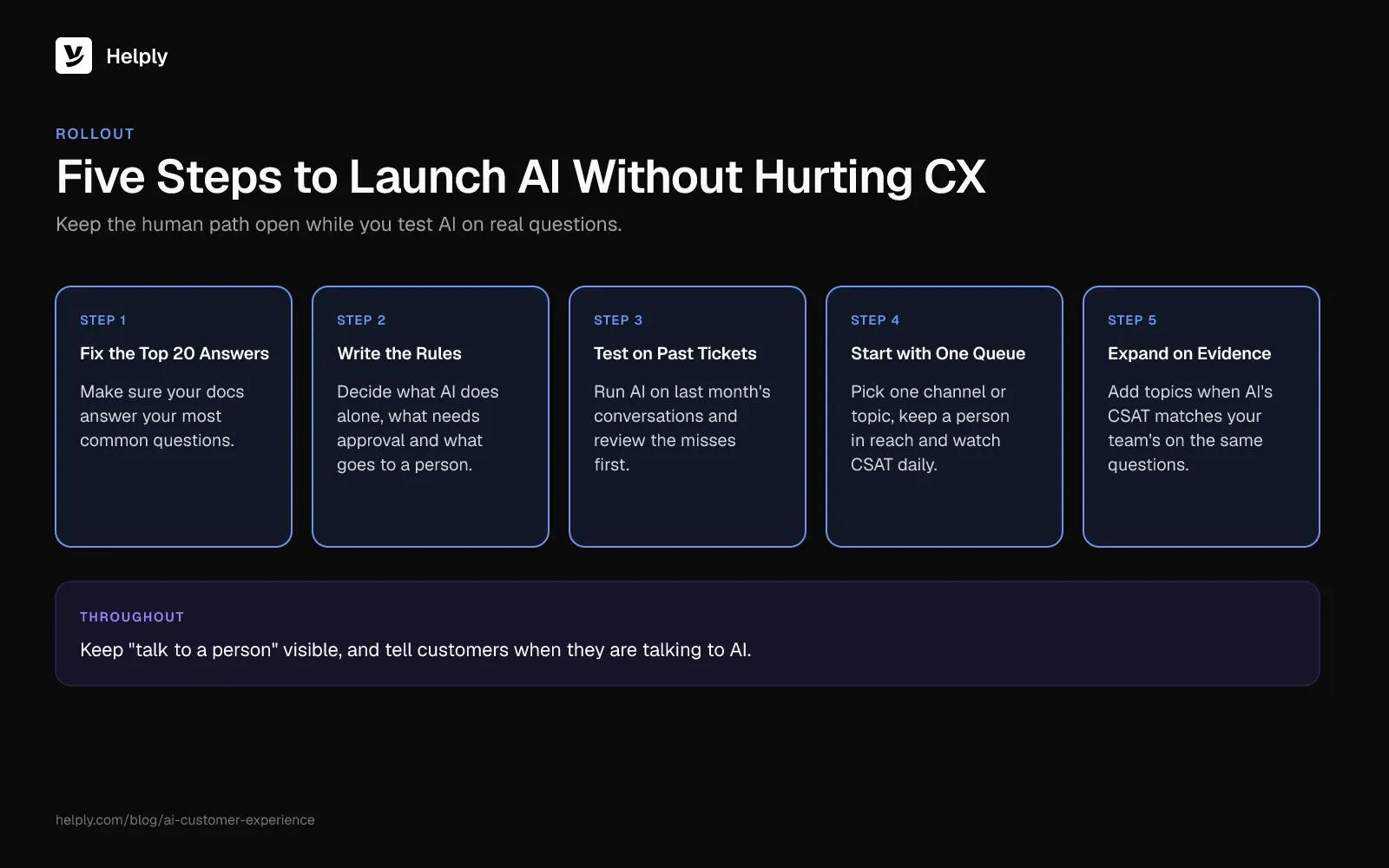
These five steps keep the human path open while you test AI on real questions.
- Fix the top 20 answers first. Pull your most common questions and make sure the docs answer each one correctly today.
- Write the rules before launch. Decide what AI can do alone, what needs approval and what always goes to a person.
- Test on past conversations. Run the AI against last month's tickets and review the misses before any customer sees them.
- Start with one queue. Pick one channel or topic, keep the human path visible and watch CSAT and reopens daily.
- Expand on evidence. Add topics when the AI's CSAT matches your team's on the same questions.
For a longer list of rollout mistakes, see why most AI support implementations fail.
Start with One Queue, or Fix Your Knowledge First
If your docs cover your common questions and you can name a queue, start there. Put AI on that queue, keep a person one step away and compare CSAT with your team's for four weeks.
If your docs lag behind the product, fix them first. If you put AI on stale knowledge, customers get the wrong answers they fear. From the Team plan, Helply's Knowledge Agent then flags missing and outdated answers from real conversations for your team to review.
In a March 2025 forecast, Gartner predicted that agentic AI will resolve 80% of routine service issues on its own by 2029. Teams that already resolve issues and hand off with context will be ready for that shift. Kameleo started by putting its AI on technical questions and closing the gaps in its knowledge base.
Frequently asked questions
AI customer experience is the use of AI to answer, assist and act across the customer journey. In support, AI agents resolve questions, draft replies, flag problems early and hand off to a person with context.
AI can close common requests without a person and draft replies for agents. It can also route, summarize and translate conversations and spot recurring problems. The best setups let AI act within rules you set and escalate the rest with full context.
The main risks are deflection loops, wrong answers, lost context at handoff, stale docs and a hidden path to a person. Gartner's survey, published in July 2024, found customers' top AI concern is that reaching a person gets harder.
No. AI takes over repeat questions and routine actions, while people handle complex, sensitive and high-value conversations. In a March 2025 forecast, Gartner predicted that agentic AI will resolve 80% of routine service issues on its own by 2029.
Track end-to-end resolution, CSAT on AI conversations, reopens, time to a person, handoff quality and wrong answers caught each week. Compare each with the same numbers for human conversations.
Examples include an AI agent that issues a refund within policy and an assistant that drafts replies from customer history. Another is an agent that flags a spike in login errors. Kameleo's Support Agent now settles 79% of its inbound questions end to end.
Many are wary. Gartner's research, published in July 2024 and based on 5,728 customers, found 64% would prefer companies kept AI out of customer service. AI earns more trust when it solves the problem fast, says it is AI and keeps a person within reach.
About the author

Alex Turnbull
CEO & Founder, Helply
Alex is the CEO & Founder of Groove. He loves to help other entrepreneurs build startups by sharing his own experiences from the trenches.
Keep reading

24/7 Customer Support Without a Night Shift
Konrad Janczyk · 9 min read
AI Chatbots for Customer Service: How to Pick One That Resolves Tickets
Bildad Oyugi · 9 min read