
 Alex Turnbull ··24 min read

Key Takeaways
- Personal email management software such as SaneBox and Superhuman handles one person's mail and gives support@ no owner or status.
- Among these eight tools, Zoho Desk Standard is the cheapest plan with configurable SLAs for five people: $100 a month ($70 yearly). On Zendesk, five people pay $745 a month ($575) on Suite Professional, its first plan with SLAs and a listed price.
- Help Scout ($0.75), Hiver ($0.80), Front ($0.89, or $0.39 per handoff) and Zendesk ($2.00 past its allowance) charge per AI resolution. Helply includes AI credits in every plan, and one resolution uses 10 of Team's 15,000 monthly credits.
- At 200 AI resolutions a month, five people pay $213 on Freshdesk Growth, once its 500 free AI sessions are gone. The same team pays $499 on Helply Team and $1,045 on Zendesk Suite Professional. Each total uses list prices with monthly billing.
Three Kinds of Email Management Software, and the One a Support Team Needs
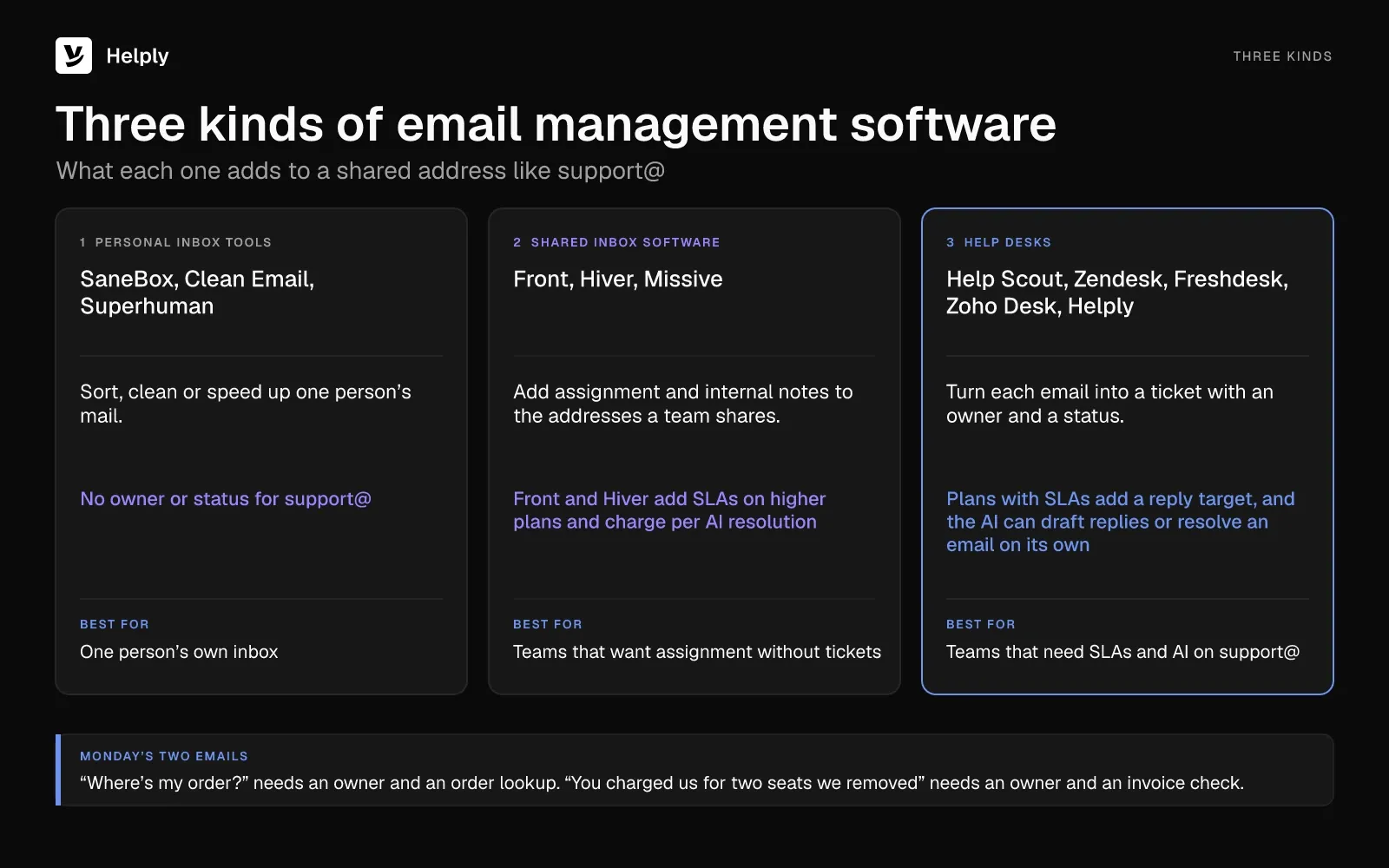
Email management software comes in three kinds: personal inbox tools, shared inboxes and help desks.
It's Monday, and your support@ lives in a shared Gmail inbox. Two of your teammates answered the same "where's my order?" email. The "you charged us for two seats we removed" email sat for three days with no owner.
Both answers need a lookup, one in the order system and one in Stripe. The teammate who knows that customer's account is away this week. Next week, the same two questions arrive again.
In YouGov research published in April 2025, 33% of Britons named email their preferred customer service channel, ahead of phone at 31%. And 74% said they tend to contact businesses by email.
The three kinds differ in who owns support@ and who looks up the order:
- Personal inbox tools. SaneBox, Clean Email and Superhuman sort, clean or speed up one person's mail. None of them gives support@ an owner or a status.
- Shared inbox software. Front, Hiver and Missive add assignment and internal notes to the addresses a team shares. Front and Hiver add SLAs on higher plans and charge for each AI resolution.
- Help desks (email ticketing systems). Help Scout, Zendesk, Freshdesk, Zoho Desk and Helply turn each email into a ticket with an owner and a status. Plans with SLAs add a reply target, and the AI can draft replies or resolve an email on its own.
Newsletter platforms send campaigns to lists, a different job from answering support@.
The order email needs an owner and an order lookup. The seat complaint needs an owner, an invoice check and a refund if the charge is wrong. A shared inbox covers the owner, and a help desk with AI agents can cover the lookup too.
Email Management Software Compared: Price, AI Fees and SLAs
Each row covers one of the eight email management tools: its entry plan and its first plan with SLAs. Prices are per person a month, with yearly billing in parentheses. Helply's prices stay the same on yearly billing, and Team is one company price.
| Tool | Type | Starting price | AI pricing | SLAs from | Best for |
|---|---|---|---|---|---|
| Helply | AI-native help desk | Starter: $79 a seat, up to 3 seats; Team: $499 for 5 seats | AI credits included in every plan; a resolution uses 10 | Team, $499 a month | AI that can resolve customer email |
| Help Scout | Help desk | Free for 5 users; Standard $30 ($25) | Envoy AI agent: $0.75 per resolution | Standard (1 basic policy) | Small email-first teams |
| Front | Shared inbox | Starter $35 ($25), up to 10 seats | Autopilot: $0.39 per handoff, $0.89 per resolution | Professional, $85 ($65) | Many shared inboxes |
| Hiver | Shared inbox, in Gmail or standalone | Growth $35 ($25), 2-seat minimum | $0.80 per AI resolution | Pro, $65 ($55) | Teams staying inside Gmail |
| Missive | Shared inbox | Starter $18 ($14), up to 5 users | Provider price plus 25%, or your own API key, from Productive | No SLA timers; SLA reports on Business | Mixing personal and shared email |
| Zendesk | Help desk | Support Team $25 ($19) | Includes 5 or 10 resolutions a month per agent; extras $2.00, or $1.50 committed | Suite Professional, $149 ($115), among listed prices | Larger teams wanting AI resolutions per agent |
| Freshdesk | Help desk | Growth $23 ($19) | Freddy AI Agent: 500 sessions free per account, then $49 for each 100 | Growth (one default policy); more on Pro | Low per-agent price with a knowledge base |
| Zoho Desk | Help desk | Free for 3 users; Express $9 ($7), up to 5 users | Native generative Zia from Professional; your own key or Zoho agent tokens below it | Standard, $20 ($14) | The smallest paid bill for five people |
The 8 Best Email Management Tools for Teams
Every tool here charges per user, seat or agent, except Helply from Team up. Team covers 5 seats for one company price, and its yearly rate matches the monthly one.
1. Helply: Best for Teams Whose Customer Email Repeats Every Week
Helply gives Monday's order question and seat complaint an owner each. Every plan comes with the Support Agent and the Assist Agent. Bring support@, orders@, billing@ and your other customer-facing addresses into one workspace, and keep the addresses customers already use.
Once you connect a supported Gmail or Outlook mailbox, each email carries its owner, status, priority and full history.
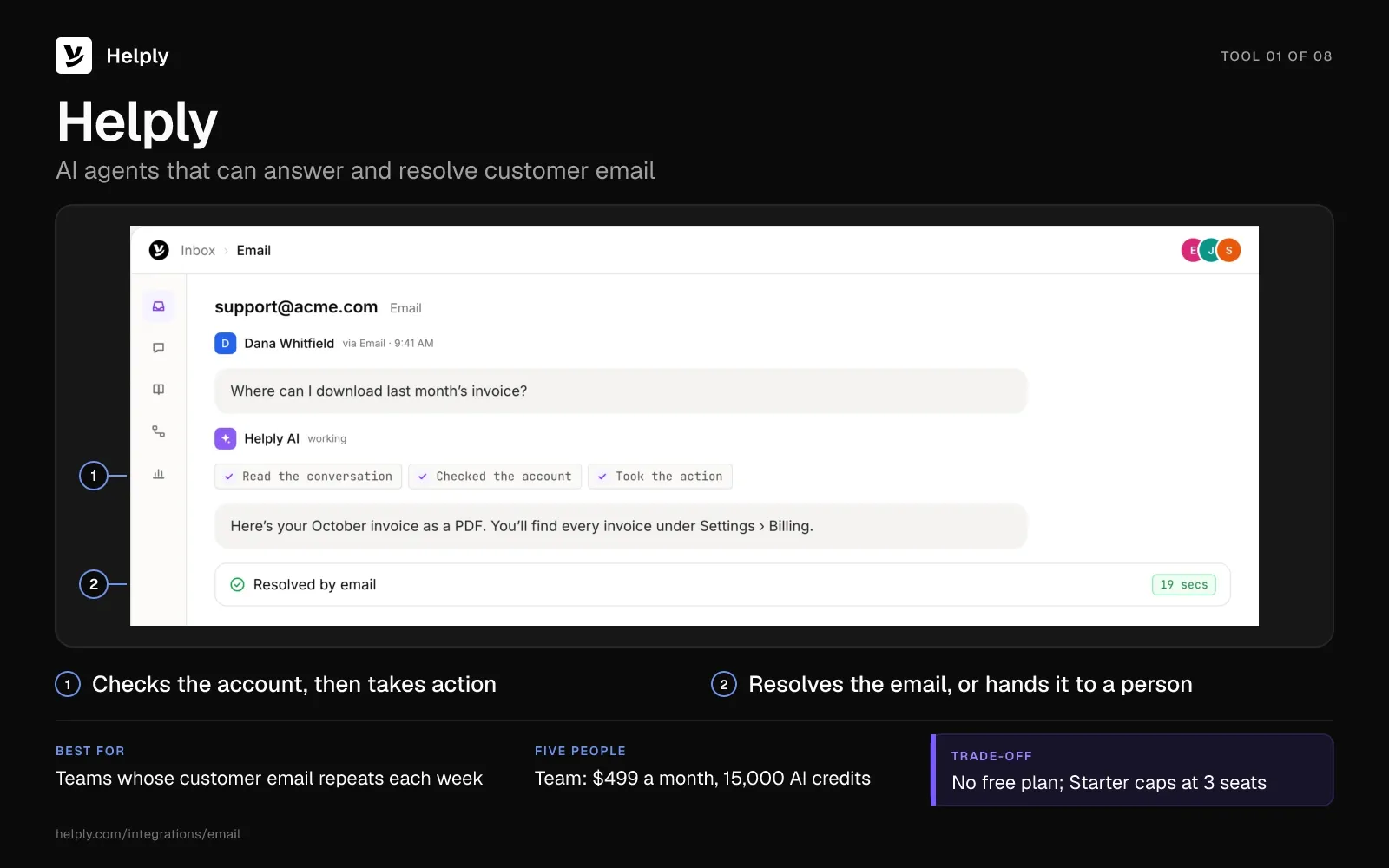
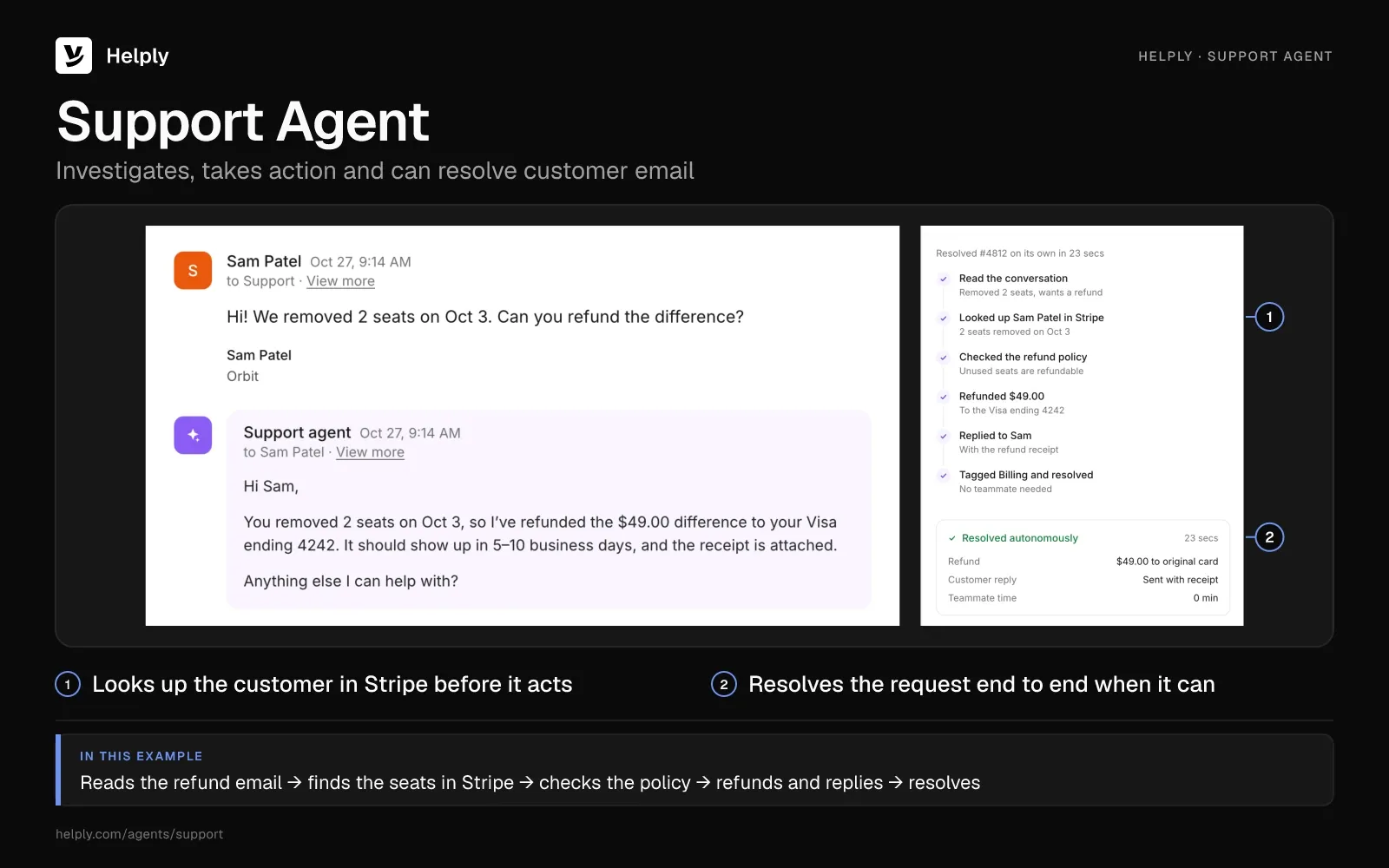
- Repeat emails the AI can resolve. The Support Agent reads a customer's email, checks your knowledge base and connected tools, and can then reply or take action. It can resolve a request end to end, and it hands anything it can't finish to a teammate with what it found.
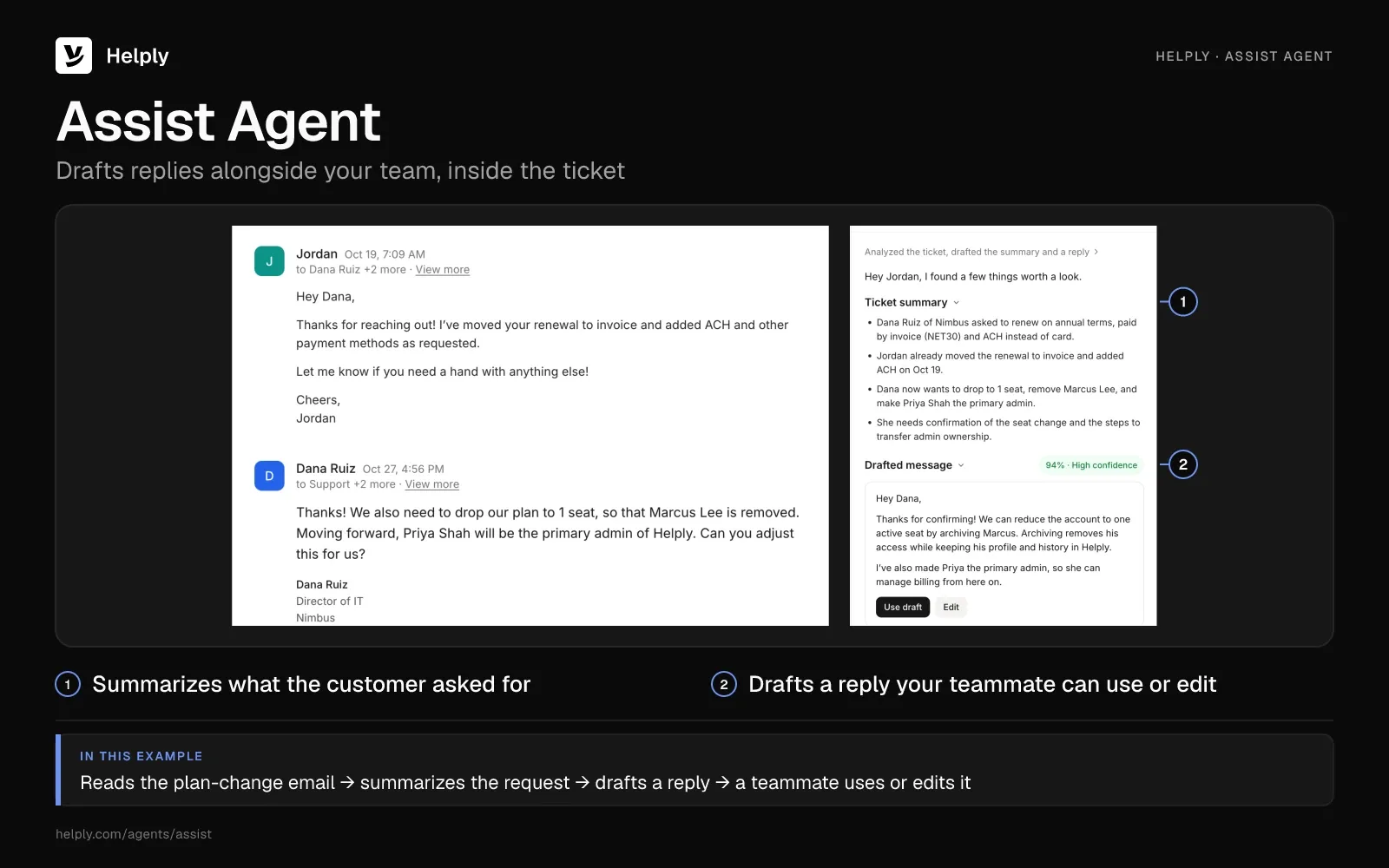
- Drafted replies for your team. On emails your team answers, the Assist Agent drafts a reply from the email thread, customer context and your Guidelines. Teammates can also ask it to run supported Actions without leaving the thread.
- An owner for every email. Collision detection, internal notes, views, macros and snooze come with every plan. From Team, round robin spreads new emails, SLA targets flag replies at risk and you set escalation rules for handoffs to a person.
- Answers that stay current. Every plan includes a help center on your own domain, and AI can write its articles. On Pro and up, the Knowledge Agent learns from customer conversations and surfaces missing or outdated answers for your team to review.
- Order and invoice lookups. Stripe and Shopify connect on every plan, so the Support Agent can check the order or invoice behind an email. Slack and Zapier work on every plan too, and HubSpot, Jira and Linear connect from Team.
- Moving in. Teams on Front or Help Scout can bring supported conversations, inboxes and customers over, and Team includes free migration.
- Customer data protection. SOC 2 Type II and GDPR come with every plan, and AI providers never train their models on customer data Helply sends them.
Gatekeeper Press, a publishing company, had people handle all of its support before Helply. Now the Support Agent hands about 120 of more than 1,500 monthly conversations to a person.
“It fully integrated with our email platform and molded years of communication into an automated system built specifically for us.”
Rob Price, CEO & Founder, Gatekeeper Press
Pricing
On Starter, you pay $79 for each seat monthly, with a 3-seat limit and 500 AI credits per seat. Team costs $499 a month for the company, with 5 seats and 15,000 credits, and charges $99 for each seat beyond 5. Team adds SLAs, round robin, unlimited inboxes and unlimited view-only seats for people who read but don't answer.
Pro costs $999 a month with 5 seats, 50,000 credits and every Background agent, the Knowledge Agent included. Growth runs $1,999 a month for 10 seats and 100,000 credits, and both charge $150 for each extra seat.
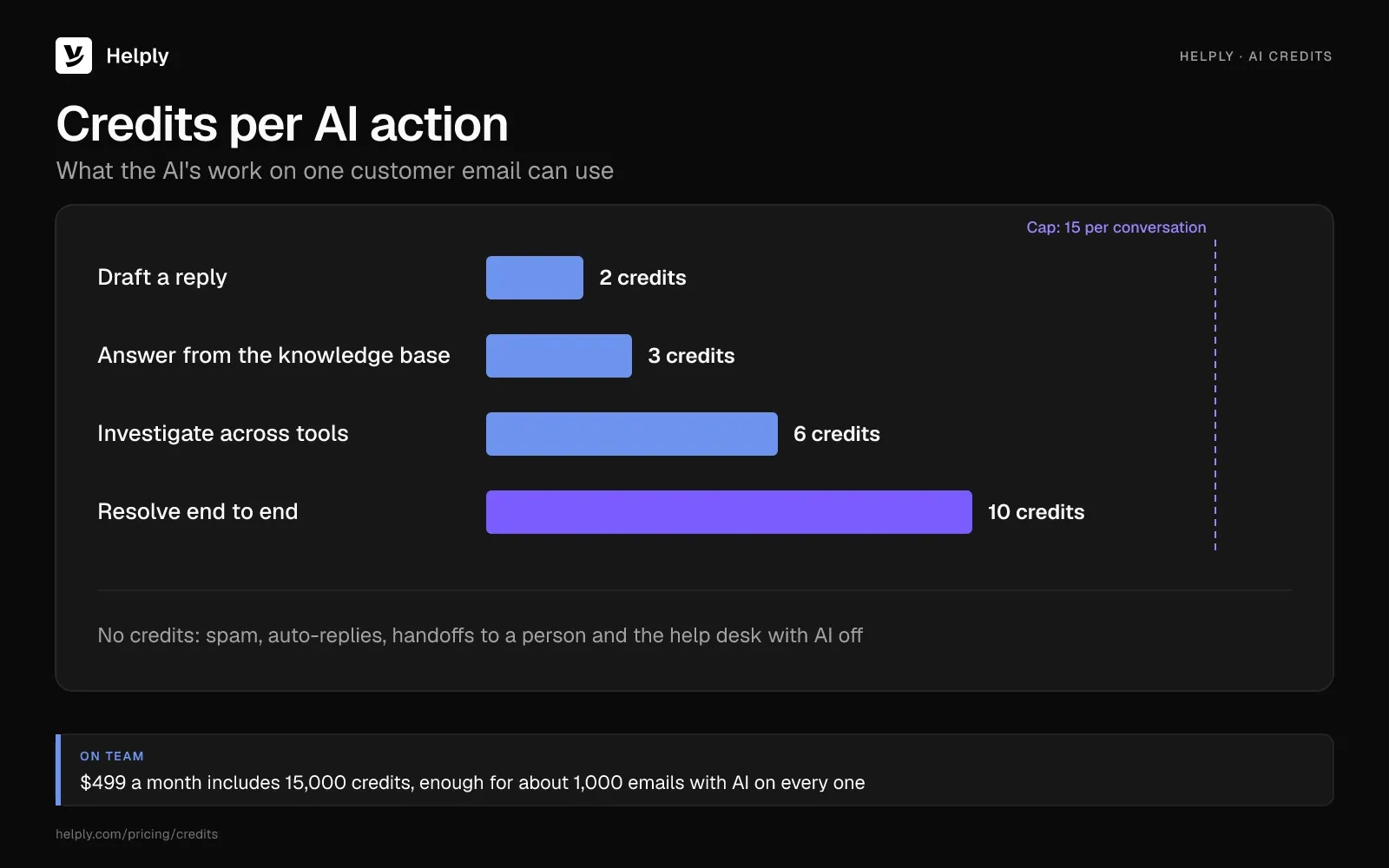
You buy the AI's work with credits, and the whole team shares one pool. Drafting a reply takes 2 credits, a knowledge-base answer 3, a cross-tool investigation 6 and a full resolution 10. No conversation goes past 15 credits, so about 1,000 emails a month with AI on every one fit inside Team.
Running the help desk with AI off costs no credits, and neither do spam, auto-replies or handoffs to a person. Each plan costs the same on monthly or yearly billing. The free trial lasts 14 days, with no credit card required.
Pros
- Every plan includes the Support Agent, which can resolve email, and the Assist Agent, which drafts replies.
- On Team, 200 AI resolutions a month use 2,000 of the 15,000 included credits, so the bill stays $499.
- Collision detection comes with every plan, so teammates see who is already replying to an email.
Cons
- Helply has no free plan, only a 14-day trial.
- Starter stops at 3 seats and leaves out SLAs and round robin, so a team of five starts on Team at $499.
- On Starter and Team, the AI pauses when the month's credits run out, until you buy more or change plans.
Best for
Teams that answer the same customer emails every week and want AI to check the order or invoice, then resolve the email.
2. Help Scout: Best for Small Teams Moving Off a Shared Gmail Inbox
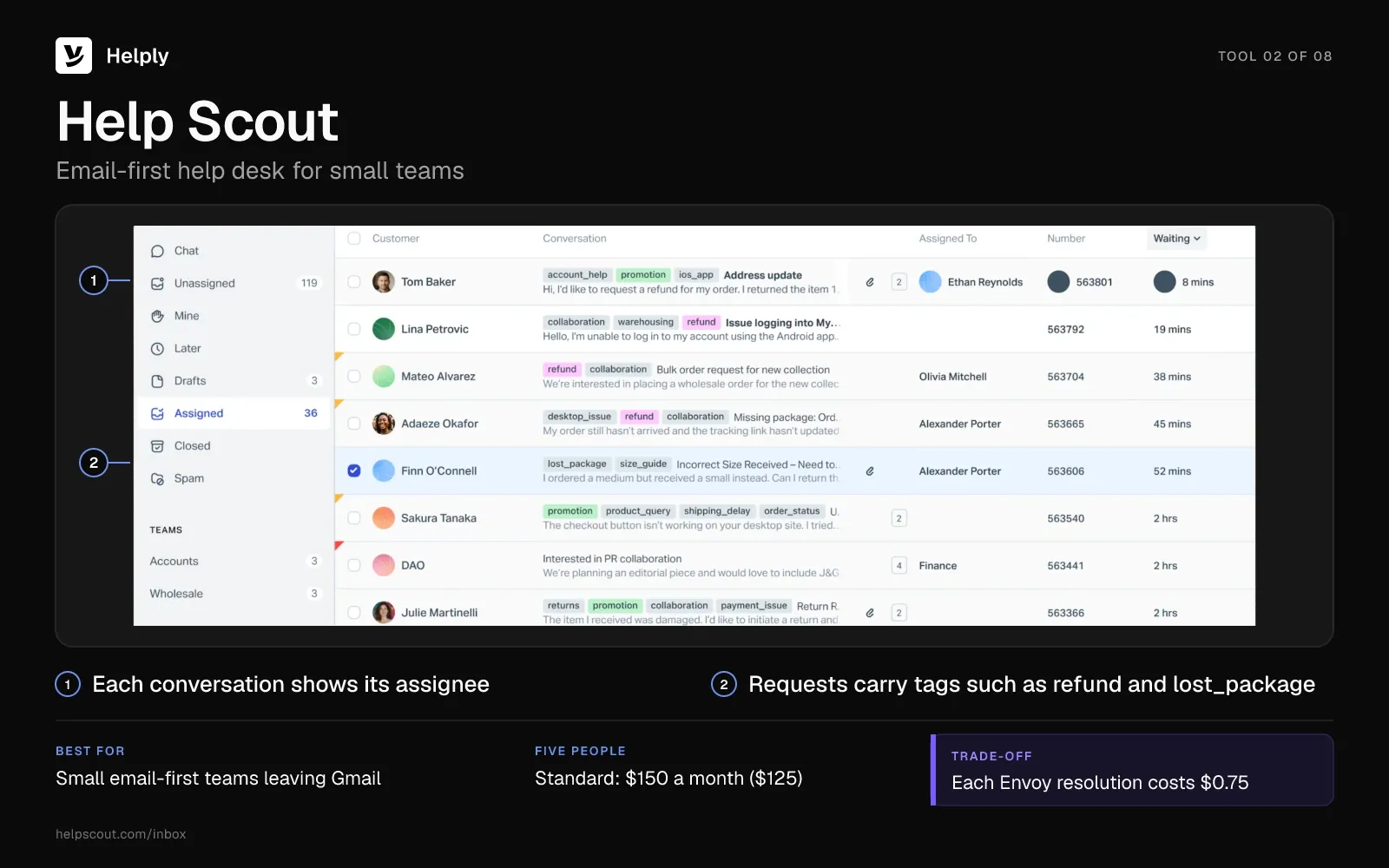
Help Scout is an email-first help desk with collision detection on every plan. You forward support@ into it from Gmail, Microsoft 365 or another provider.
The free plan covers 5 users and 1 inbox. It caps replies at 100 contacts a month and keeps a "Sent with Help Scout" footer on your emails.
- Standard plan. Up to 25 users share 2 inboxes, with 1 basic SLA policy and unlimited use of AI Assist. Extra inboxes cost $12 a month ($10).
- Envoy. On paid plans, each resolution by Envoy, Help Scout's AI agent, costs $0.75. A resolution counts when Envoy answers a customer's question without your team, at most once per session.
- Plus and Pro. Plus adds AI Drafts at $54 per user ($45). Pro requires at least 10 users at $90 each ($75).
Pricing
On Help Scout Standard, each user costs $30 a month ($25 billed yearly), so five people pay $150 a month ($125). Envoy resolutions come on top at $0.75 each. The 15-day trial needs no credit card.
Pros
- Help Scout Free covers up to 5 users at no cost.
- Forwarding lets you keep your current email provider.
- Collision detection is automatic on every plan.
Cons
- Free accounts can reply to 100 contacts a month and carry a Help Scout footer.
- Standard includes 2 inboxes and 1 basic SLA policy; each extra inbox costs $12 a month ($10).
- Help Scout bills each Envoy resolution, so the AI line grows with your volume.
Best for
Small email-first teams that need owners, collision detection and a basic SLA policy at $30 a user ($25).
Help Scout or Helply?
Pick Help Scout if five people need ownership most and expect few AI resolutions. Pick Helply if AI should resolve email without a fee per resolution, since each one uses 10 of Team's 15,000 credits. At 600 AI resolutions a month on list prices, five people pay $600 on Help Scout Standard and $499 on Helply Team.
| Help Scout | Helply | |
|---|---|---|
| Five people with SLAs | Standard: $150 ($125) | Team: $499, same on yearly billing |
| AI resolutions | Envoy: $0.75 each | 10 credits each, from 15,000 included |
| Inboxes | 2 on Standard, then $12 ($10) each | Unlimited from Team |
| Trial | 15 days, no credit card | 14 days, no credit card |
Read the full Help Scout comparison for plan-by-plan detail.
3. Front: Best for Teams That Run Many Shared Inboxes
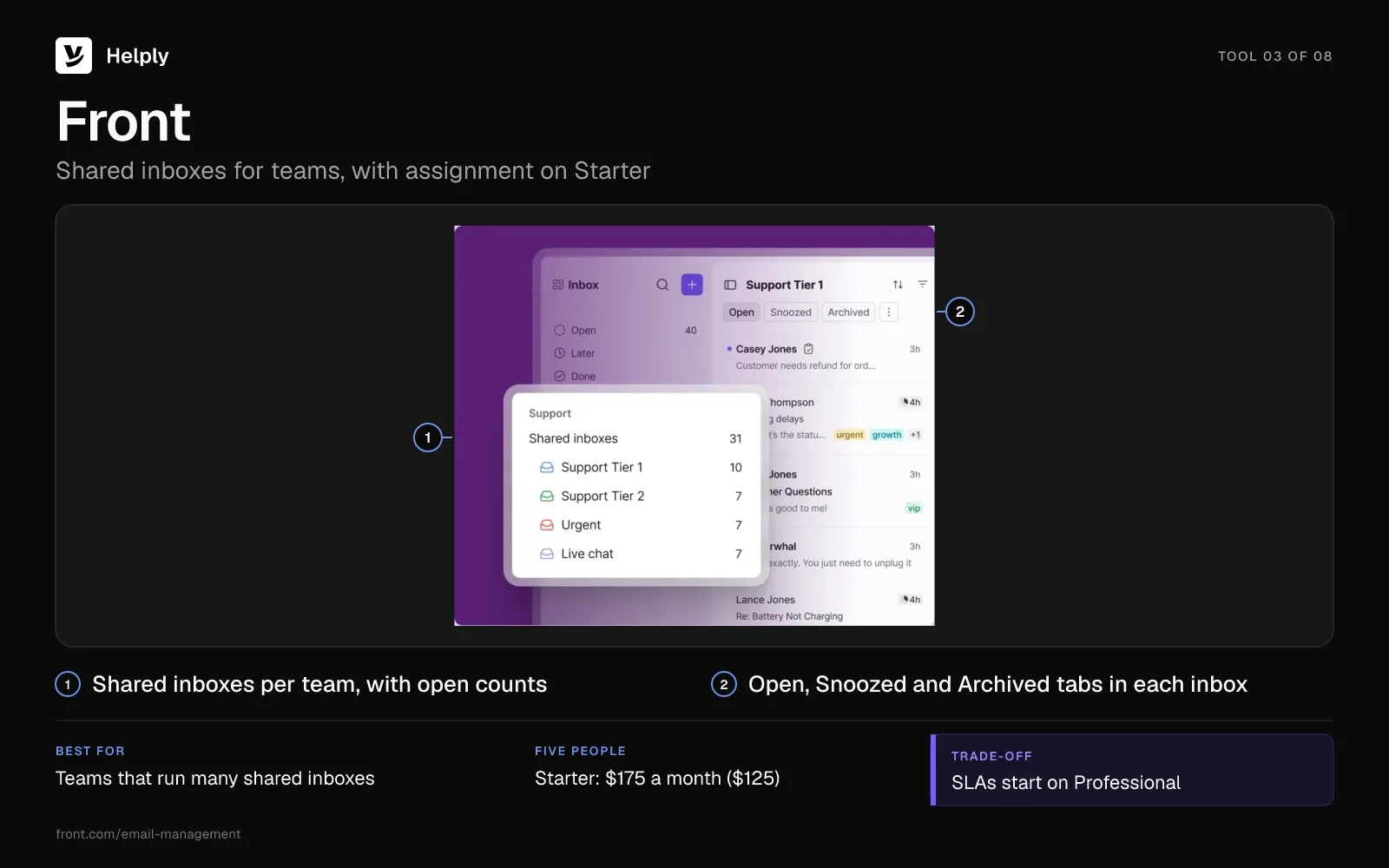
Front is a shared inbox for teams, and it connects to Office 365, Gmail or a custom email server. Starter includes assignments, internal comments, shared drafts and round robin.
- Starter limits. Starter allows up to 10 seats and 10 rules. It supports one channel type: email, chat or SMS.
- SLAs. Response-time SLA rules and ticket SLAs start on Professional at $85 per seat ($65).
- Copilot. On Starter or Professional, Front's AI assistant costs $20 a seat each month, and Enterprise includes it.
- Autopilot. Front's AI agent costs $0.39 for each conversation it hands off and $0.89 for each one it resolves. Front bills each conversation once, for the highest level Autopilot reaches.
Pricing
Front's Starter plan runs $35 a seat each month ($25 on yearly billing), so five people pay $175 ($125). Professional costs $85 ($65), and Enterprise costs $105 per seat on yearly billing only. Front has no free plan and offers a 14-day trial without a credit card.
Pros
- Shared drafts and internal comments let teammates write a tricky reply together.
- Round robin on Starter spreads new email without a manager sorting it.
- Front charges $0.39 for an Autopilot handoff, less than the $0.89 for a full resolution.
Cons
- SLAs start on Professional, which costs five people $425 a month ($325).
- Starter handles one channel type and up to 10 rules.
- Front has no free plan.
Best for
Teams that run several shared addresses and want shared drafting before they want AI.
Front or Helply?
Pick Front if your team writes replies together and SLAs can wait. Pick Helply if you want SLAs and AI resolutions inside one monthly price. With SLAs and 200 Autopilot resolutions a month on list prices, five people pay $603 on Front Professional and $499 on Helply Team.
| Front | Helply | |
|---|---|---|
| Five people with SLAs | Professional: $425 ($325) | Team: $499, same on yearly billing |
| AI resolutions | Autopilot: $0.89 each, or $0.39 per handoff | 10 credits each, from 15,000 included |
| Drafting help | Copilot: $20 a seat a month | Assist Agent, included in every plan |
| Trial | 14 days, no credit card | 14 days, no credit card |
The Front comparison covers the move in more detail.
4. Hiver: Best for Teams That Want to Stay Inside Gmail
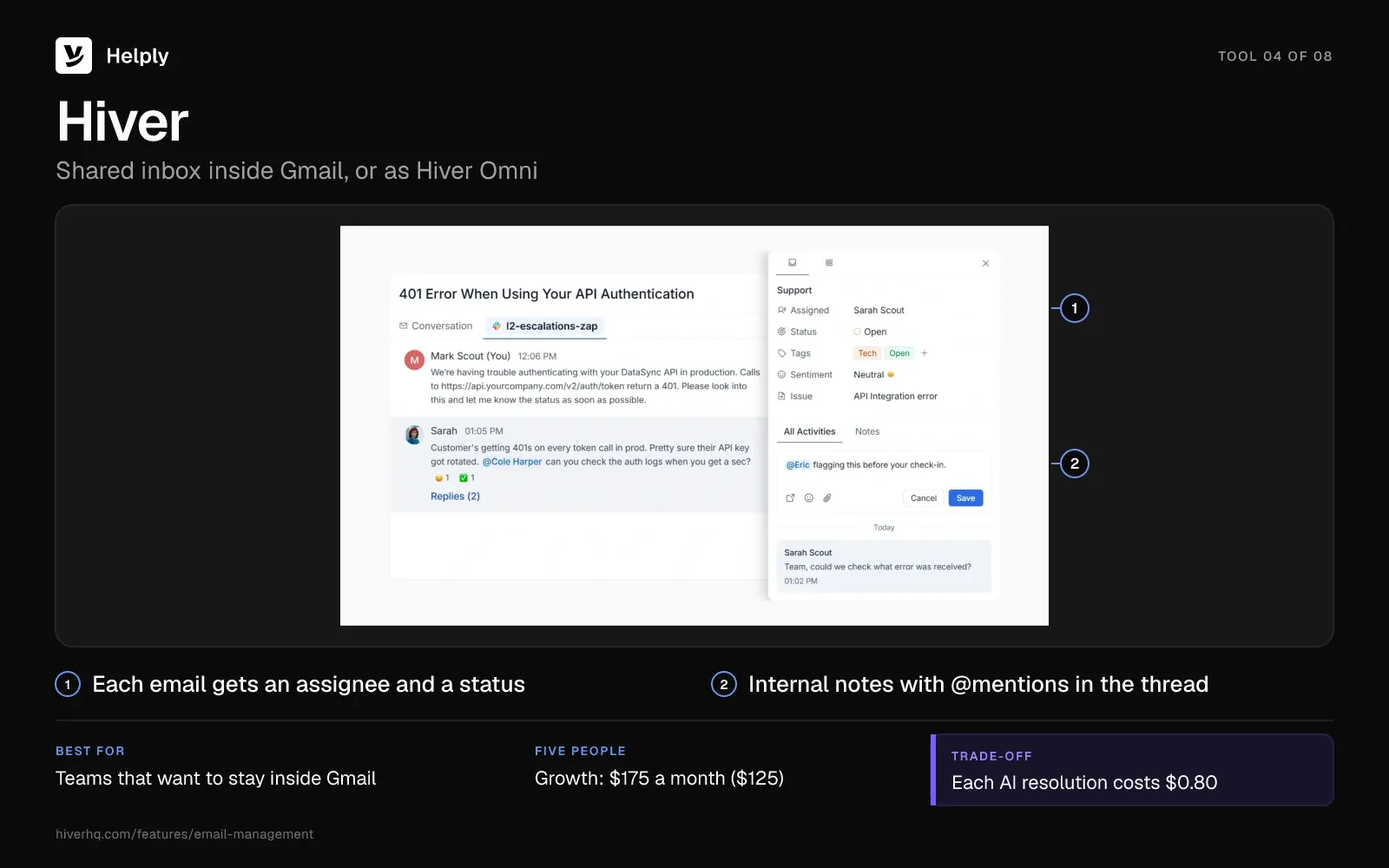
Hiver comes in two versions: a Chrome extension that runs inside Gmail, and Hiver Omni, a standalone app that also works with Outlook. Growth includes shared inboxes, routing and assignment, notes, shared drafts and collision detection.
- Growth limits. Growth covers 2 shared inboxes and up to 10 users, and every plan starts at 2 seats.
- SLAs. SLAs start on Pro at $65 per user ($55). Pro also allows 5 shared inboxes and removes the user cap.
- AI resolutions. Hiver bills $0.80 for each successful AI resolution, on top of the plan price.
Pricing
Hiver Growth costs $35 per user a month ($25 billed yearly), so five people pay $175 ($125). Pro costs $65 ($55), and Elite $95 ($85). Hiver offers no free plan; its 7-day trial runs on Elite.
Pros
- Teammates on Hiver in Gmail keep working in Gmail, without switching apps.
- Growth, the first plan, includes collision detection.
- Hiver Omni covers teams on Outlook too.
Cons
- Growth stops at 2 shared inboxes and 10 users.
- SLAs need Pro: $325 a month for five people ($275).
- Seven days is little time to test Hiver on real volume.
Best for
Gmail teams that want shared-inbox basics without leaving Gmail.
Hiver or Helply?
Pick Hiver if your team lives in Gmail and needs ownership more than AI. Pick Helply if AI should resolve email while customers keep writing to the same Gmail address. With SLAs and 200 AI resolutions a month on list prices, five people pay $485 on Hiver Pro and $499 on Helply Team.
| Hiver | Helply | |
|---|---|---|
| Five people with SLAs | Pro: $325 ($275) | Team: $499, same on yearly billing |
| AI resolutions | $0.80 each | 10 credits each, from 15,000 included |
| Where your team works | Gmail, or Hiver Omni | Helply, connected to Gmail or Outlook |
| Trial | 7 days | 14 days, no credit card |
Helply's Gmail integration shows how the connection works.
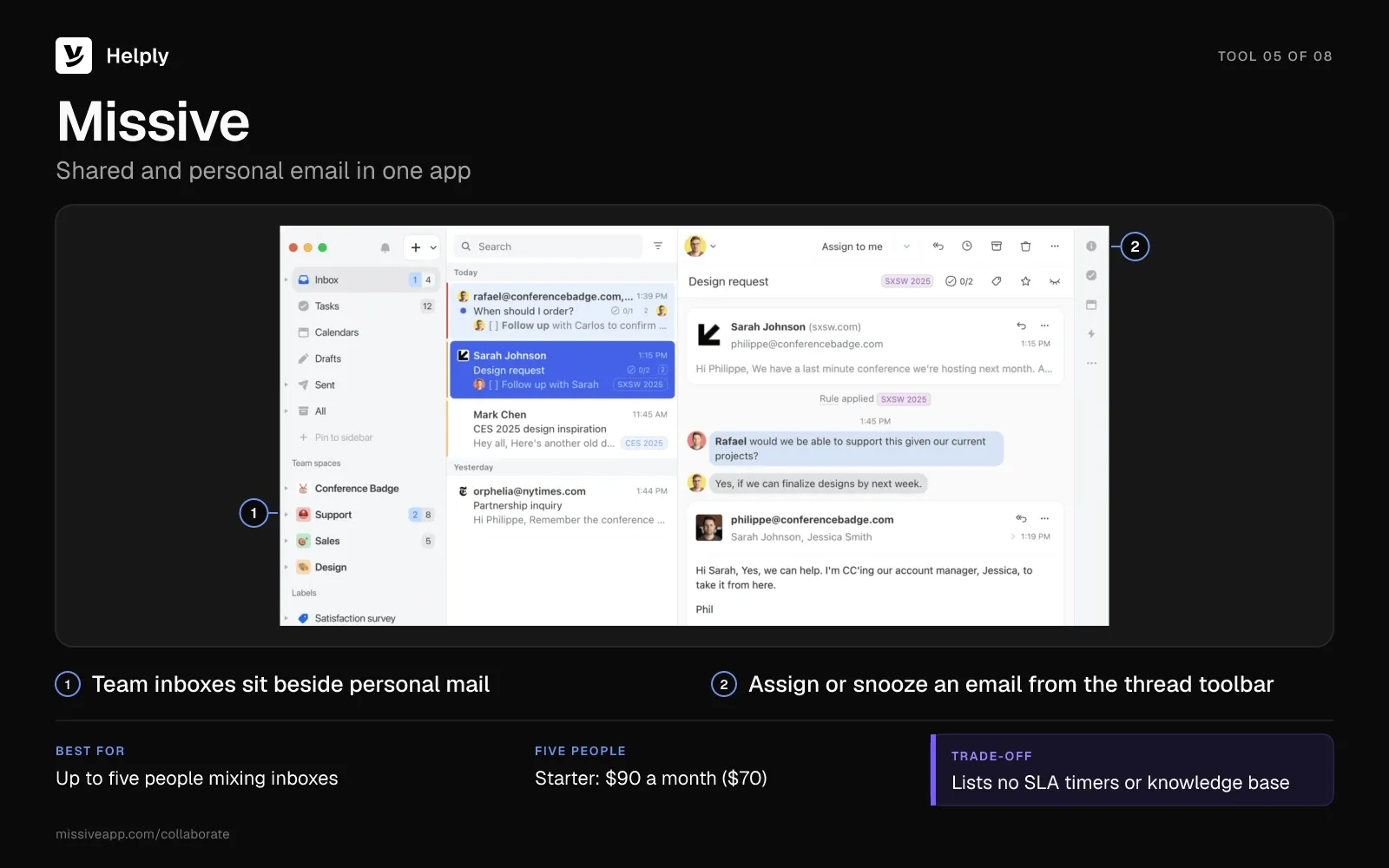
5. Missive: Best for Up to Five People Mixing Personal and Shared Email
Missive puts shared inboxes beside each person's own inbox in one view, across Gmail, Google Workspace, Outlook and IMAP accounts. Starter includes team inboxes, assignment, internal threads and collaborative drafting.
- Starter cap. Starter allows up to 5 users. Productive raises the cap to 50 and adds rules.
- AI. AI needs Productive or Business. You pay the AI provider's price plus a 25% markup, or connect your own API key at the provider's price.
- SLAs and knowledge. Business adds SLA reports, but no plan lists SLA timers or a knowledge base.
Pricing
Missive Starter costs $18 per user a month ($14 billed yearly), so five people pay $90 ($70). Productive costs $30 ($24), and Business $45 ($36). New teams start on a 30-day trial of Productive, with no credit card.
Pros
- Personal and shared email in one app suits founders who answer both.
- Five people on Starter cost $90 a month ($70).
- Live collaborative drafting shows who is writing what.
Cons
- Starter stops at 5 users, so a sixth person means Productive.
- No plan lists SLA timers or a knowledge base.
- AI costs follow your provider's usage, which makes the monthly bill hard to predict.
Best for
Founders and small teams who handle personal and shared email in the same place.
Missive or Helply?
Pick Missive if five people need shared email at a low seat price and AI is optional. Pick Helply if you need SLAs, a knowledge base and AI that can resolve email within one price. Missive AI starts on Productive at $30 a user ($24) and costs the provider's price plus 25%, unless you bring your own key.
| Missive | Helply | |
|---|---|---|
| Five people | Starter: $90 ($70) | Team: $499, same on yearly billing |
| AI | Provider price plus 25%, or your own key, from Productive | Credits included in every plan |
| SLAs | SLA reports on Business | SLA targets from Team |
| Knowledge base | Not listed | On every plan |
You can connect your support email to Helply and keep the same address.
6. Zendesk: Best for Larger Teams That Want AI Resolutions per Agent
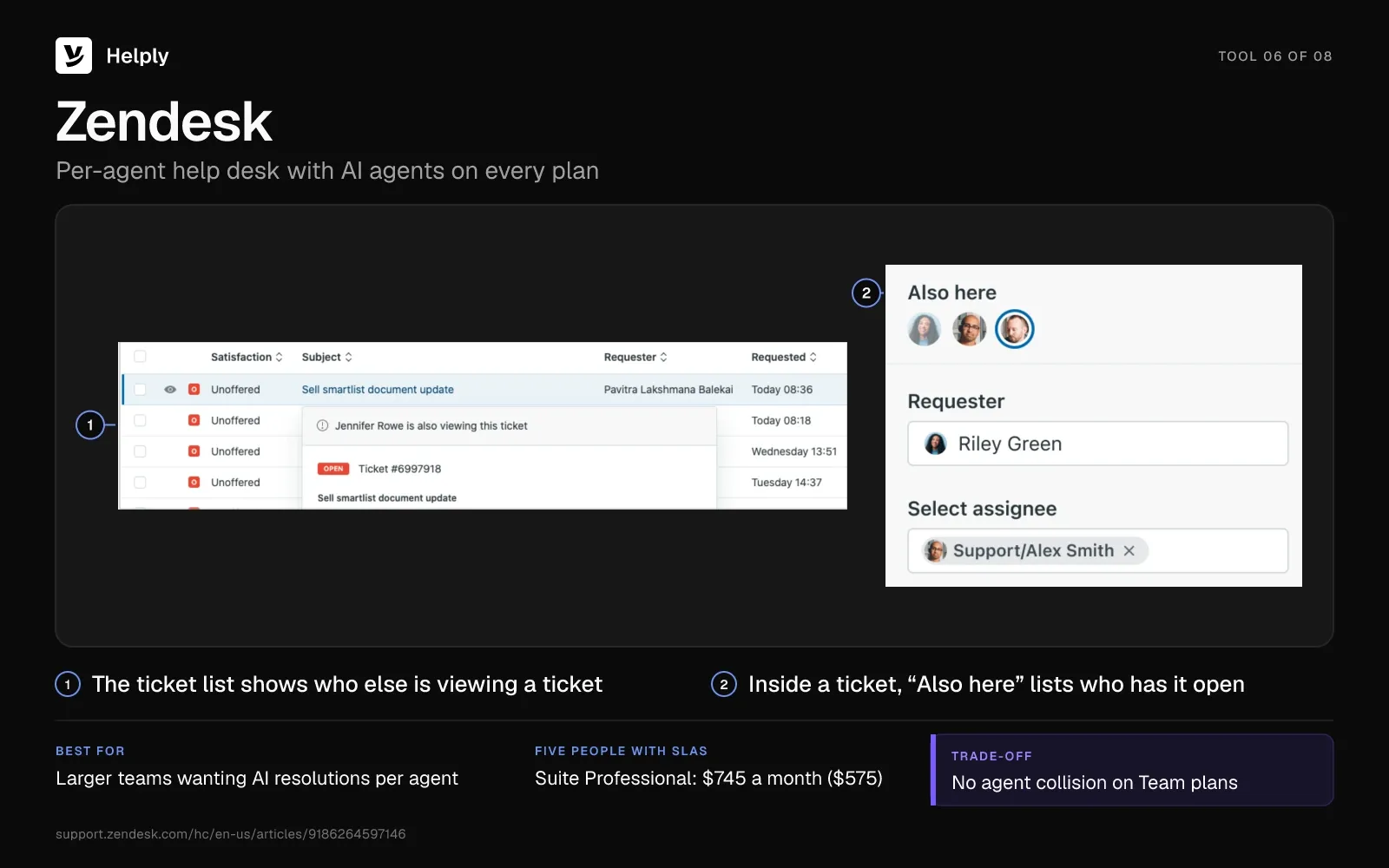
Zendesk is a help desk that charges per agent. Its cheapest plan with a listed price, Support Team, includes email with unlimited addresses and routing based on agent status and capacity. Zendesk notes that agent collision isn't available on Team plans.
- SLAs. Among plans with a listed price, SLAs appear only on Suite Professional, at $149 per agent ($115).
- AI agents. Every plan includes AI agents, and Zendesk bills them by automated resolution. Support Team and Suite Team include 5 a month per agent, and Suite Professional 10, with up to 10,000 included a year.
- Extra resolutions. Each resolution past that allowance costs $2.00, or $1.50 when you commit to a volume upfront. For email, Zendesk counts a conversation as ending 72 hours after the first email.
- Copilot. Zendesk's AI help for agents is a $50 add-on per agent each month, billed yearly, from Suite Professional up.
Pricing
Zendesk Support Team runs $25 a month per agent ($19 on yearly billing). Next up, Suite Team runs $69 ($55), while Suite Professional costs $149 ($115), with Enterprise pricing through sales. Zendesk offers no free plan; a 14-day trial opens Suite Professional's features.
Five people on Suite Professional pay $745 a month ($575), with 50 automated resolutions included.
Pros
- Included AI resolutions grow with the team: 5 or 10 a month for each agent.
- Every plan with a listed price handles email with unlimited addresses.
- The Team plans route email by agent status and capacity.
Cons
- Among plans with listed prices, SLAs need Suite Professional: $745 a month for five people ($575).
- Team plans lack agent collision, so two people can reply to the same email without a warning.
- Support Team has no help center.
Best for
Larger teams that need SLAs, a help center and AI resolutions included per agent, at $149 an agent a month ($115).
Zendesk or Helply?
Pick Zendesk if a large team wants AI resolutions included per agent and can pay $149 an agent ($115) for SLAs. Pick Helply if five people need SLAs and AI resolutions without a $149 seat. At 200 AI resolutions a month, five people pay $1,045 on Suite Professional at pay-as-you-go rates and $499 on Helply Team.
| Zendesk | Helply | |
|---|---|---|
| Five people with SLAs | Suite Professional: $745 ($575) | Team: $499, same on yearly billing |
| AI resolutions | 10 a month per agent; extras $2.00, or $1.50 committed | 10 credits each, from 15,000 included |
| Collision detection | Not on Team plans | Every plan |
| Drafting help | Copilot: $50 per agent, billed yearly, from Suite Professional | Assist Agent, included in every plan |
The Zendesk comparison walks through moving off Zendesk.
7. Freshdesk: Best for a Low Per-Agent Price With a Knowledge Base
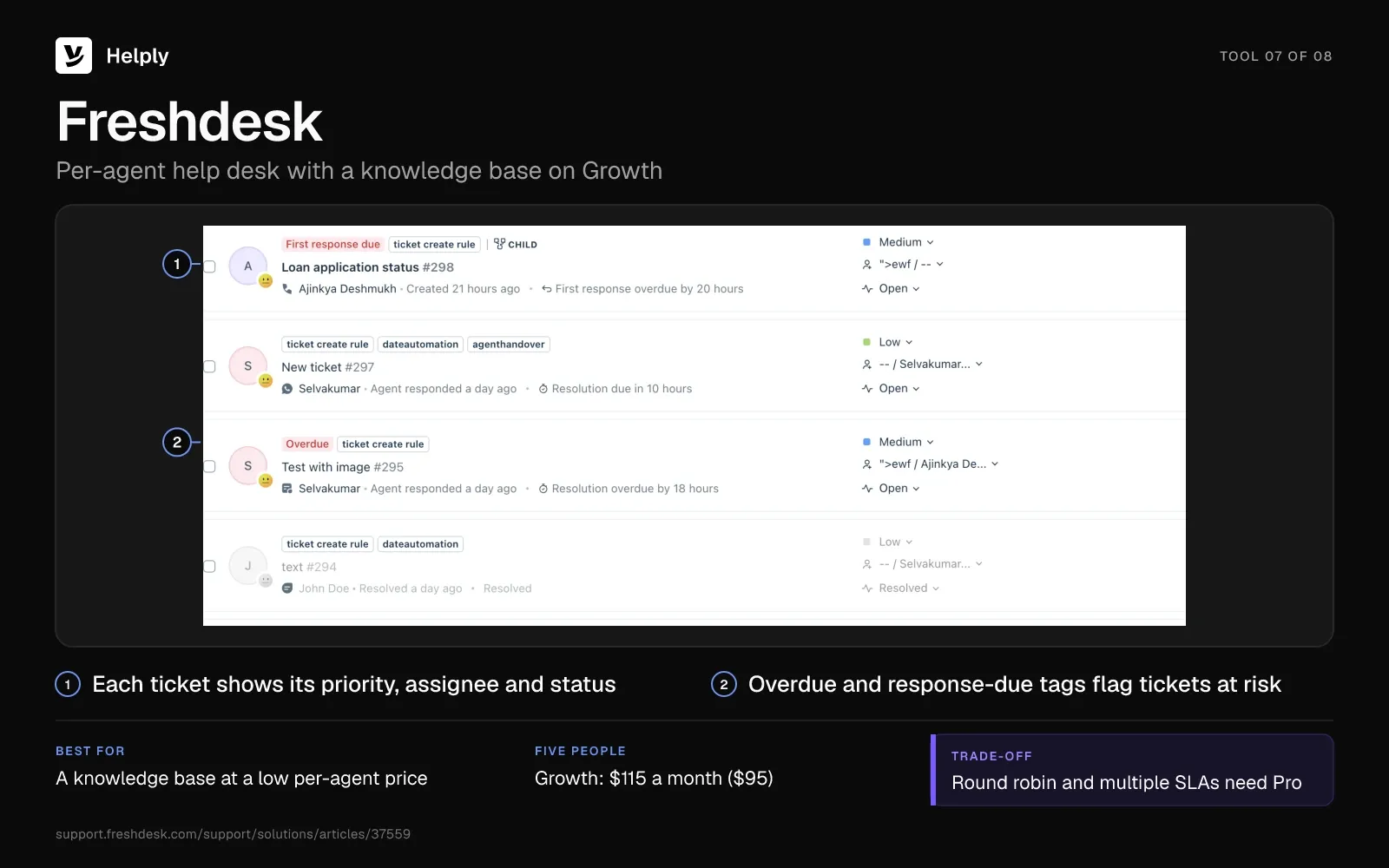
Freshdesk is a per-agent help desk. Its Growth plan covers email support with ticketing, a shared inbox, rule-based ticket dispatch, a customer portal and a knowledge base. Growth also includes collision detection.
- SLAs. One default SLA policy comes with every account. Multiple SLAs, reminders and escalations start on Pro at $66 per agent ($55).
- Assignment. Growth routes email by rules you write, and round robin and load-balanced assignment start on Pro.
- Freddy AI Agent. Each account gets 500 sessions once; after that, sessions cost $49 per 100. For email, a session covers the 72 hours after the customer's first message.
- Freddy AI Copilot. AI help for agents adds $35 an agent each month ($29), on Pro and Enterprise only.
- Free Program. Freshdesk no longer lists a free plan. After the trial, email-first Freshdesk accounts can join a Free Program for up to 2 agents for 6 months.
Pricing
Freshdesk Growth is $23 an agent each month ($19 billed yearly), Pro $66 ($55) and Enterprise $107 ($89). Five people pay $115 a month on Growth ($95), or $330 on Pro ($275). The 14-day trial opens the Enterprise plan.
Pros
- Growth includes a knowledge base and a default SLA policy at $23 per agent ($19).
- Collision detection comes with Growth.
- The first 500 AI sessions cost nothing.
Cons
- Round robin and multiple SLAs need Pro.
- After the one-time 500 sessions, Freshdesk bills $49 for every 100 Freddy AI Agent sessions.
- The free option lasts 6 months and covers 2 agents.
Best for
Teams that want a knowledge base and a default SLA policy at a low per-agent price.
Freshdesk or Helply?
Pick Freshdesk if a low seat price matters most and rule-based routing is enough. Pick Helply if AI should resolve email inside one monthly price, with round robin on Team. At 200 AI sessions a month after the first 500, five people pay $213 on Freshdesk Growth and $499 on Helply Team.
| Freshdesk | Helply | |
|---|---|---|
| Five people | Growth: $115 ($95); Pro: $330 ($275) | Team: $499, same on yearly billing |
| AI | 500 sessions free per account, then $49 for each 100 | 10 credits per resolution, from 15,000 included |
| Round robin | Pro | Team |
| Free option | Free Program: 2 agents for 6 months | 14-day trial, no credit card |
The Freshdesk comparison goes deeper on plans and AI.
8. Zoho Desk: Best for the Smallest Paid Bill for a Team of Five
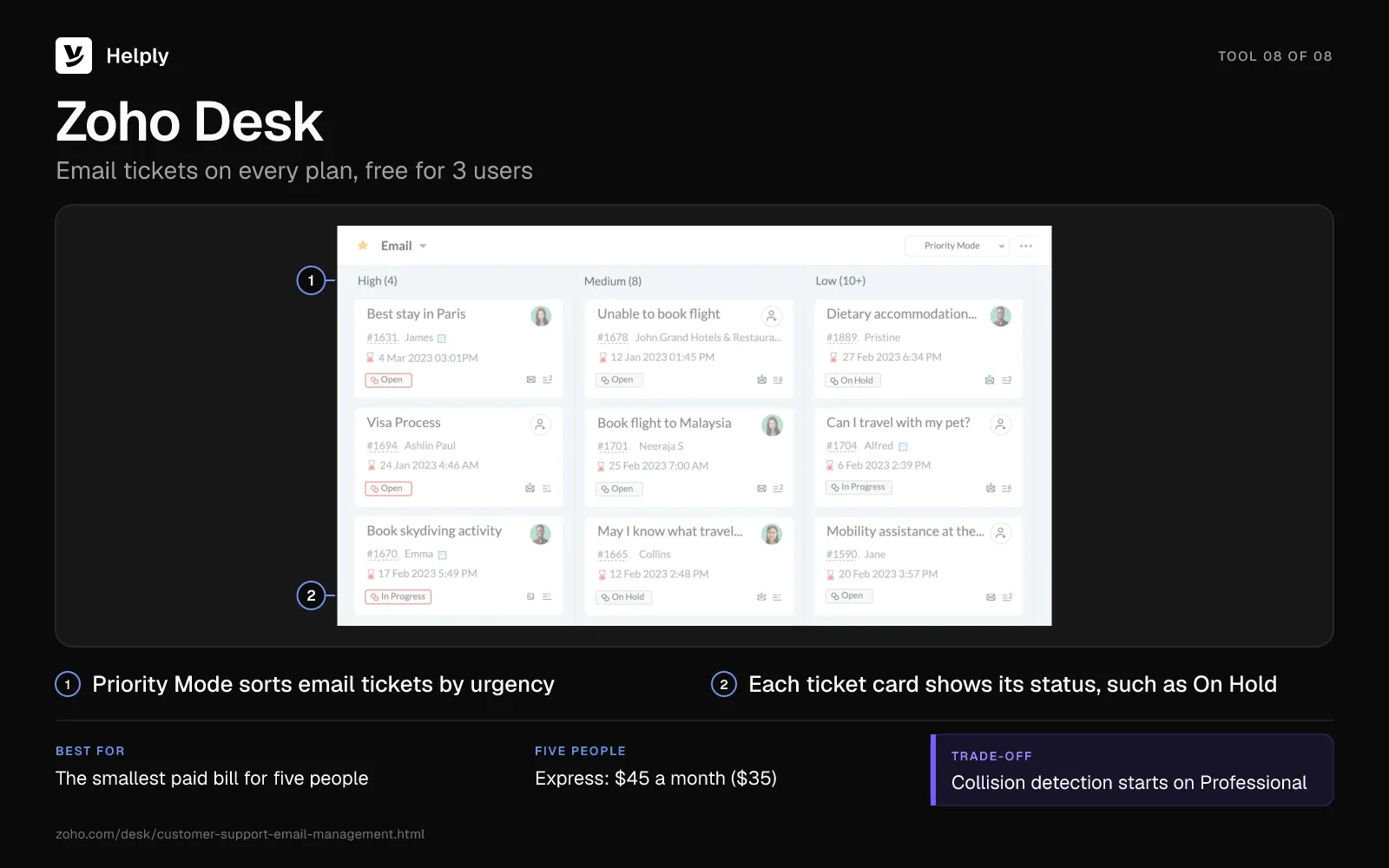
Zoho Desk turns email into tickets on every plan, including a free plan for 3 users. Express adds 2 assignment rules for up to 5 users, and Standard removes the user cap.
- SLAs. Free and Express get a default SLA only. Configurable SLAs, up to 4, start on Standard at $20 per agent ($14).
- Collision detection and round robin. Both start on Professional at $35 ($23).
- Zia. Standard adds Answer bot, Professional adds native generative Zia, and on Express and Standard, you bring your own API key for generative AI. On every plan, you can build AI agents with up to 30 million Zoho model tokens a month.
Pricing
Zoho Desk Express runs $9 a user monthly ($7 yearly), Standard $20 ($14) and Professional $35 ($23), with Enterprise at $50 ($40). Five people pay $45 a month on Express ($35), or $100 on Standard ($70). The 15-day trial needs no credit card, and the account moves to the free plan afterward.
Pros
- Five people on Express cost $45 a month ($35).
- The free plan covers 3 users.
- Configurable SLAs start on Standard at $20 ($14).
Cons
- Express caps at 5 users, so a sixth person needs Standard.
- Collision detection starts on Professional, at $35 an agent ($23).
- For generative AI, Express and Standard take your own API key, and native generative Zia needs Professional.
Best for
Five-person teams that want the smallest paid bill and can work without collision detection.
Zoho Desk or Helply?
Pick Zoho Desk if the bill matters most and your own AI key, Zoho's agent tokens or no AI works for you. Pick Helply if AI should look up orders and invoices and resolve email, with collision detection on every plan. Native generative Zia starts on Professional, which costs five people $175 a month ($115).
| Zoho Desk | Helply | |
|---|---|---|
| Five people with SLAs | Standard: $100 ($70) | Team: $499, same on yearly billing |
| AI | Native generative Zia from Professional; your own key or Zoho agent tokens below it | Credits included in every plan |
| Collision detection | Professional | Every plan |
| Trial | 15 days, no credit card | 14 days, no credit card |
Helply's plans and prices list what each tier adds.
What Does Email Management Software Cost for a Team of Five?
Before AI fees, five people with SLAs pay from $100 a month on Zoho Desk Standard to $745 on Zendesk Suite Professional. Most tools keep SLAs for a higher plan, and five of the eight add per-resolution or per-session AI fees to the seat price. Each total covers five people on the tool's first plan with SLAs, plus AI fees for 200 resolved emails a month.
| Tool | Plan with SLAs | Five people a month | 200 AI resolutions | Total a month |
|---|---|---|---|---|
| Freshdesk | Growth (one default policy) | $115 ($95) | $98 after the first 500 sessions | $213 |
| Help Scout | Standard (1 basic policy) | $150 ($125) | $150 | $300 |
| Hiver | Pro | $325 ($275) | $160 | $485 |
| Helply | Team | $499 (same yearly) | Included: 3,600 of 15,000 credits | $499 |
| Front | Professional | $425 ($325) | $178 | $603 |
| Zendesk | Suite Professional | $745 ($575) | $300, or $225 committed | $1,045 |
| Zoho Desk | Standard | $100 ($70) | Your own key, or Zoho agent tokens (up to 30M a month) | $100 plus any AI provider bill |
| Missive | Business (SLA reports) | $225 ($180) | Provider price plus 25%, or your own key | $225 plus AI usage |
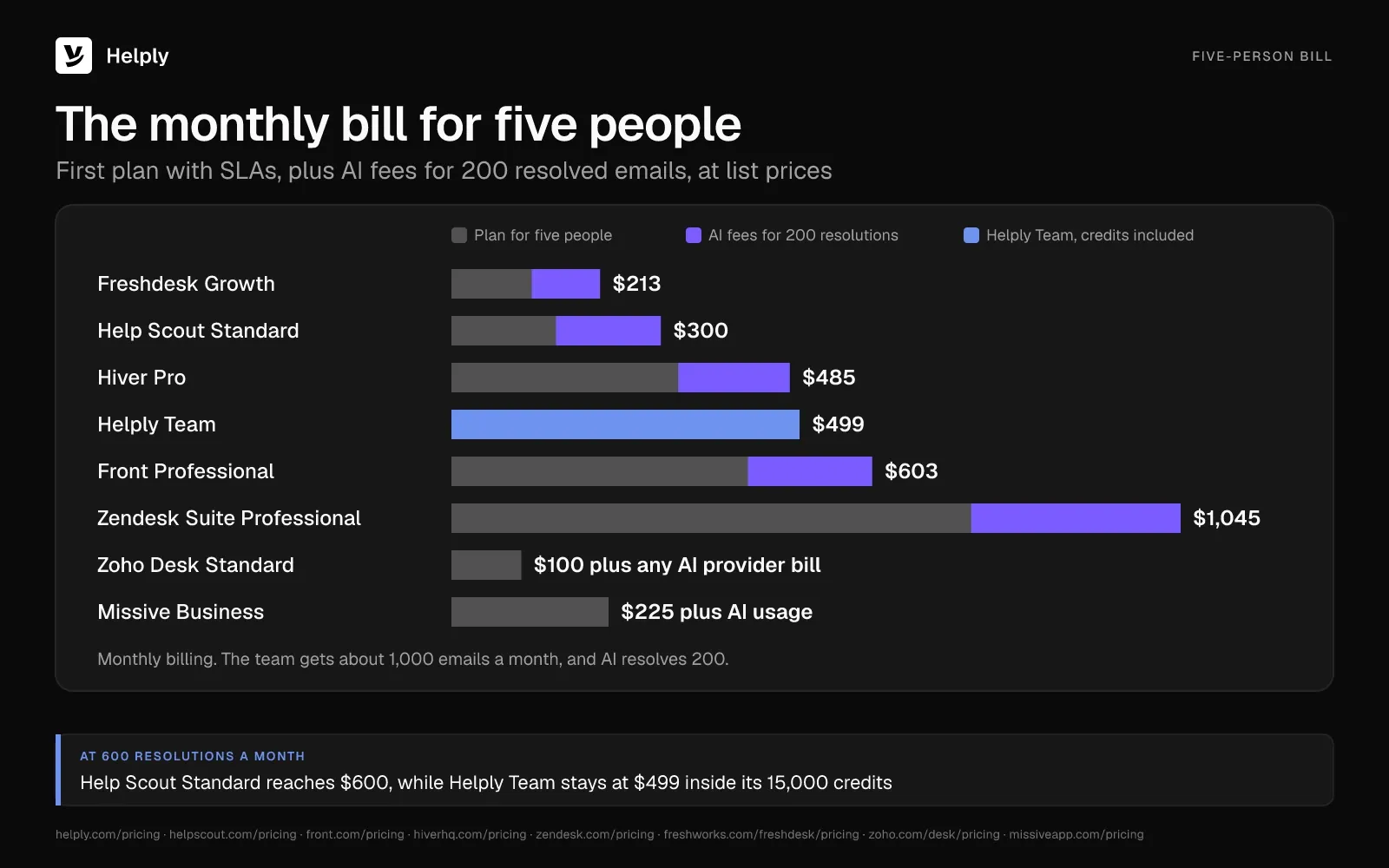
At this volume, Freshdesk, Help Scout and Hiver cost less than Helply Team. Help Scout's Envoy line grows with each resolution: at 600 a month it reaches $450, and the total hits $600, past Helply's $499. On Helply Team, 600 resolutions and 400 drafts use 6,800 of the 15,000 credits, so the price stays at $499.
Free and Built-In Email Management Options for Teams
A small team can start with tools it already pays for or with a help desk's free plan. In Google Workspace, a Google Groups Collaborative Inbox lets you assign conversations to group members and mark them complete. Groups come with every Workspace edition, and Business Starter runs $8.40 a user each month ($7 on the annual plan).
A Microsoft 365 shared mailbox needs no license of its own while it holds 50 GB or less. Up to 25 people can use it, and each needs a licensed Exchange Online mailbox. Microsoft's guide covers who can open and send from the mailbox but describes no way to assign an email or track its status.
Among help desks, Help Scout's free plan covers 5 users with 100 contacts a month, and Zoho Desk's covers 3 users. Freshdesk lets accounts stay on a Free Program with 2 agents for 6 months.
For setup steps and the signs a team has outgrown a shared mailbox, read the guide to a Gmail shared inbox.
Personal Email Management Tools: SaneBox, Clean Email and Superhuman
Personal tools manage one person's inbox. They help a founder whose own mail is out of control, but none gives support@ an owner, a status or a shared history.
- SaneBox. Manages one email account in any email client, from $9.49 a month ($5.42 billed yearly). It comes with a 7-day free trial.
- Clean Email. Organizes email, unsubscribes you from mailing lists and deletes messages for one account on any provider, from $9.99 a month.
- Superhuman. An email client for each person's own Gmail or Outlook inbox. It costs $30 per member a month ($25 billed yearly).
For a shared support address, connect the Outlook or Gmail mailbox to a help desk, and keep the personal client for personal mail.
How to Choose Customer Service Email Management Software
Run five checks during a trial with two test emails. Send a "where's my order?" question and a "you charged us for two seats we removed" complaint.
Each Email Gets One Owner and a Collision Warning
Assign the two test emails to different people, then open one email from two accounts. Look for a warning that shows who is replying before anyone sends.
Zendesk leaves agent collision off its Team plans, and Zoho Desk adds collision detection on Professional. Help Scout and Helply include it on every plan, and so do Freshdesk Growth and Hiver Growth.
Response Targets Match What Customers Expect
In Germany's Customer Service Barometer, published in October 2024, respondents expected a reply to written inquiries within 24 hours. In the trial, give the seat complaint a 24-hour SLA target and watch whether the tool flags it before the deadline.
Freshdesk Growth includes one default SLA policy, Help Scout Standard one basic policy and Zoho Desk Standard up to 4. Front, Hiver and Helply keep SLAs for Professional, Pro and Team, and Zendesk for Suite Professional among plans with listed prices.
AI That Looks Up the Order and Resolves the Email
The order email needs a look at the order, and the seat complaint needs a look at the invoice. Watch whether the AI drafts a reply for a person, or looks up the record and resolves the email.
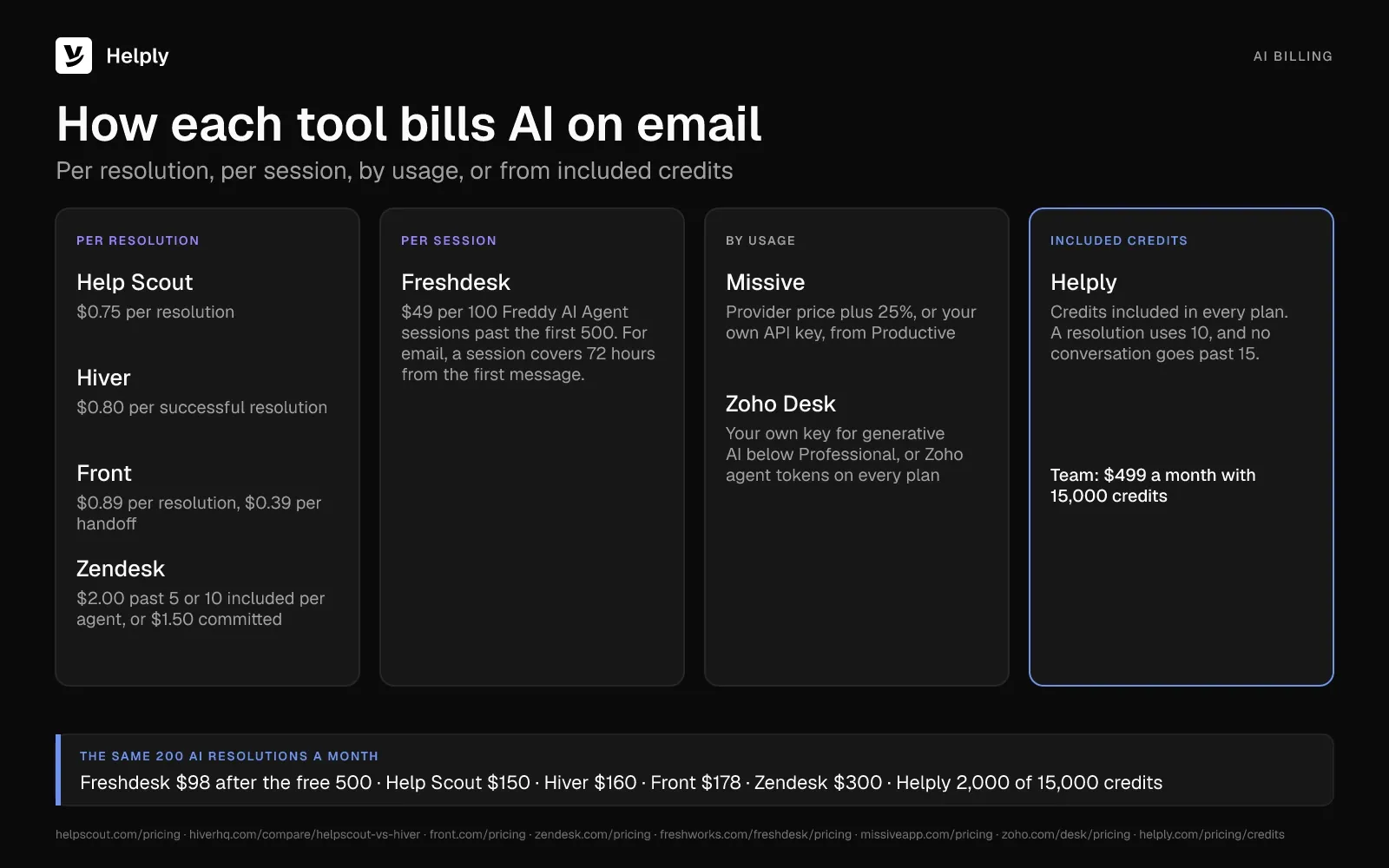
Then check how it bills: Help Scout, Hiver and Zendesk charge per resolution, Front per handoff or resolution, and Freshdesk per session. Below Professional, Zoho Desk takes your own AI key or Zoho's agent tokens, up to 30 million a month. Missive adds 25% to the provider's price unless you bring your own key, and Helply uses included credits.
Test drafting help even if a person will send every reply. In February 2025, The Quarterly Journal of Economics published a study of 5,172 support agents that measured AI help on chat. Agents with an AI assistant suggesting replies resolved 15% more issues per hour on average, with the biggest gains for less experienced agents.
Answers Live in a Knowledge Base the Team Keeps Current
An AI agent answers from what your team has written down. Freshdesk includes a knowledge base on Growth, and Help Scout Free comes with 1 Docs site. Zendesk adds a help center on Suite Team, Helply includes one on every plan and Missive lists none.
On Pro and up, Helply's Knowledge Agent spots gaps in your answers and suggests fixes for your team to review.
You Keep Your Address and Your History
With Help Scout, you forward support@ from your current provider, while Hiver runs inside Gmail and Missive connects Gmail, Outlook or IMAP.
Helply connects Gmail or Outlook, so customers keep emailing the same address. It can also bring supported history over from Front or Help Scout.
Shared Inbox or AI Help Desk: Which Should Your Team Pick?
Among email management software with SLAs, Zoho Desk and Freshdesk cost five people the least. Hiver keeps a team inside Gmail, Missive puts personal and shared email in one app, and Help Scout suits a small email-first team. Front fits teams that share drafts across many inboxes, and Zendesk suits larger teams that want AI resolutions per agent.
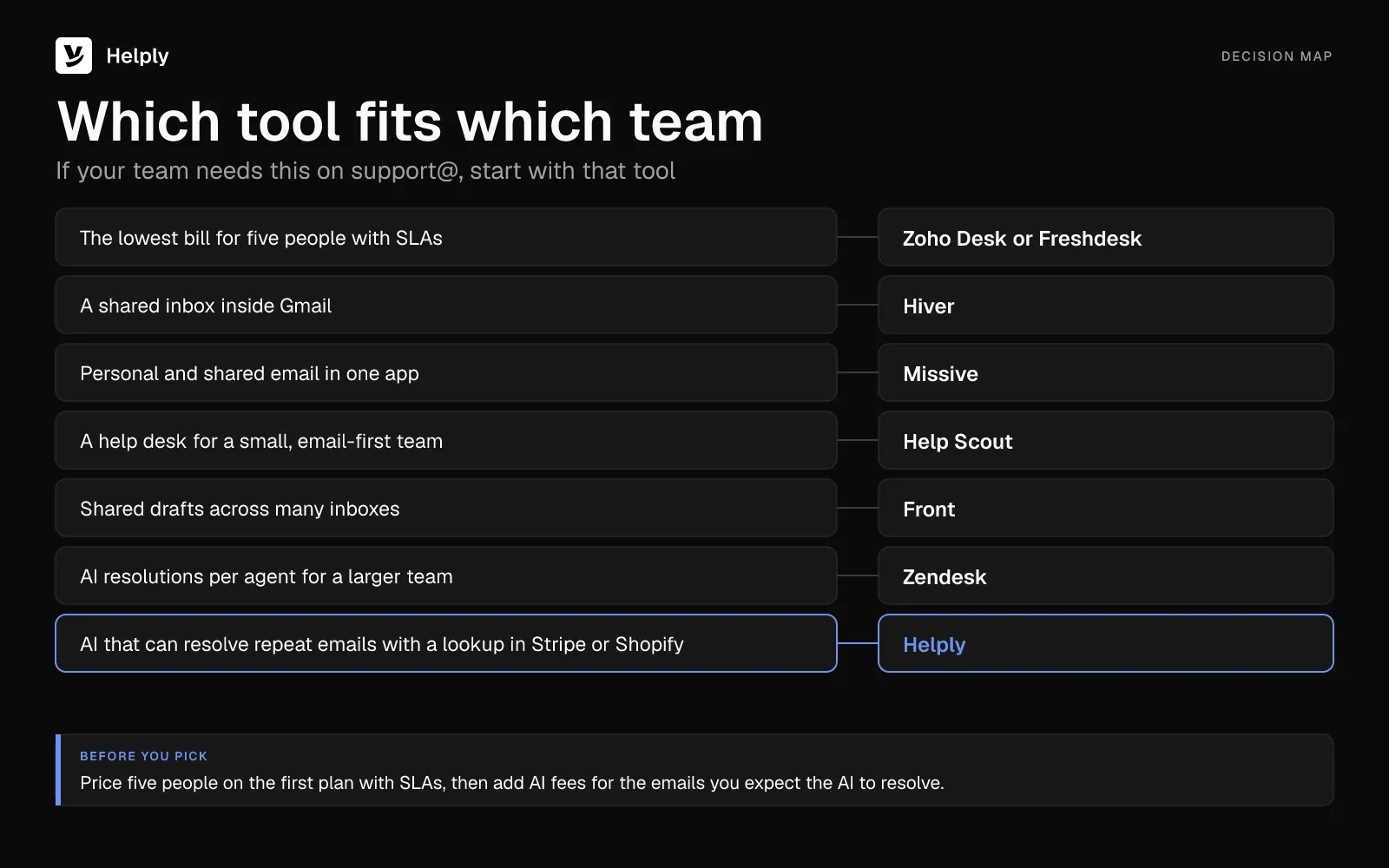
Choose Helply when the same emails return every week and answering them means a lookup in Stripe, Shopify or your order system. Collision detection shows who else is working on the order question. From Team, round robin gives the seat complaint an owner, and an SLA target flags it before the reply is late.
If someone is out, the full history stays on each conversation. The Support Agent can look up the order or invoice and resolve routine cases. It hands anything else to a person, with the investigation attached.
Gatekeeper Press loaded years of past emails, custom Q&A and knowledge base articles into Helply, which turned them into company memory. The Support Agent then replied in the publisher's own voice.
For five people, Team's $499 a month covers the seats, SLAs, round robin and 15,000 AI credits, on either billing cycle. It also includes an onboarding call and free migration. On Team, escalation rules let you choose when the AI hands off, and on every plan, Guidelines define how it behaves.
Start with billing@ or another single mailbox. Run the 14-day trial on it, then review what the Support Agent resolved and handed back before you move the rest.
Frequently asked questions
For a small team, the best email management system gives every customer email one owner, a status and a history. Helply adds AI agents that can resolve supported requests, while Zoho Desk and Freshdesk give five people SLAs from $100 a month.
Connect the shared address to a shared inbox or help desk, and give each email one owner and a status. Set a reply target, and add AI once the same questions repeat every week.
For a team, Help Scout Free (5 users, 100 contacts a month) and Zoho Desk Free (3 users) cost nothing. Google Workspace includes Google Groups Collaborative Inbox, and Freshdesk's Free Program allows 2 agents for 6 months after the trial.
An email client such as Outlook or Superhuman is the app each person uses to read and send mail. Team email management software adds an owner, a status and a shared history to every email sent to an address like support@.
For a shared support address, connect the Outlook mailbox to a help desk instead of replacing Outlook. Helply keeps the address customers know and gives each email an owner, a status, a priority and a history.
Per user, Zoho Desk Express costs $9 a month ($7) and Missive Starter $18 ($14). Zendesk Support Team costs $25 an agent ($19), Help Scout Standard $30 ($25) and Helply Starter $79 a seat.
Hiver runs as a Chrome extension inside Gmail. Helply connects to Gmail, so customers keep emailing the same address while your team works in Helply.
Yes: Helply's Support Agent can investigate and resolve supported requests end to end, and it hands the rest to a person. Help Scout, Hiver and Zendesk bill per AI resolution, Front per resolution or handoff and Freshdesk per session; Helply uses included credits.
A drafted reply uses 2 credits, answering from the knowledge base uses 3 and a full end-to-end resolution 10. No conversation uses more than 15, and with the AI off, the help desk costs no credits.
Microsoft's shared-mailbox documentation covers shared access and send-as permissions but describes no way to assign messages or track their status. Teams that need owners and statuses connect the mailbox to a help desk.
About the author

Alex Turnbull
CEO & Founder, Helply
Alex is the CEO & Founder of Groove. He loves to help other entrepreneurs build startups by sharing his own experiences from the trenches.
Keep reading

What Is an AI Chatbot? Rule-Based vs. AI Chatbots Explained
Bildad Oyugi · 11 min read
What Is a Customer Service Center? Types, Tools and How to Set One Up
Jared Scheel · 14 min read