
 Bildad Oyugi ··13 min read

It's 9:10 on Monday. An admin at one of your B2B customers emails to ask why this month's invoice doubled after they added three users. At 11:40 p.m. on Sunday, a shopper asked on WhatsApp whether customs is holding their suitcase.
The shopper has waited more than nine hours for a reply. Neither answer lives in your help desk: one sits in your billing system and the other in a carrier's tracking feed. Each ticket means three tabs, a lookup, a careful reply and a note for whoever picks up the follow-up.
Help desk vendors now sell an "AI help desk" for this work, and each sets its own AI fee. In the same Salesforce survey, reps who use AI spend 20% less time on routine cases. That frees an estimated four hours a week for more complex work.
What Is an AI Help Desk?
In an AI help desk, AI agents read requests, look up answers, act in connected systems and hand off what needs a person. Your team works the same queue, where the AI can close routine tickets.
Help desks automate tickets at three levels:
- Rules: keyword triggers tag and route tickets, with no understanding of the request.
- AI-assisted agents: AI drafts replies and summaries, and a person sends every message.
- Autonomous resolution: AI agents answer, investigate and resolve tickets on their own, within limits you set.
An AI chatbot sits in a chat window and answers questions, often by pointing to articles. An AI help desk owns the whole ticket across your channels, from triage to resolution or handoff.
AI Help Desk vs. AI Service Desk: Users, Requests and Frameworks
Vendors use "AI help desk" for customer support tools and IT tools alike. An AI help desk serves customers, while an AI service desk serves employees and IT processes.
| Compared on | AI help desk | AI service desk |
|---|---|---|
| Who asks | Customers and users of your product | Employees inside your company |
| Typical requests | Billing, orders, how-to questions, bugs, refunds | Password resets, access, hardware, incidents |
| Framework | Support SLAs and customer satisfaction | ITIL and IT service management |
| What AI does first | Answers and resolves customer tickets | Resets access and routes incidents |
For the IT side and the full split, read service desk vs. help desk.
What AI Help Desk Software Does
AI help desk software handles six jobs across the life of a ticket. Each job shows up on the two Monday tickets:
- Triage and routing: it tags the invoice email "billing," matches it to the customer's account and sends it to the right queue. Vendors sell this job as an AI ticketing system.
- Answers from your knowledge: it replies from help articles, past tickets and internal docs, and can cite what it used.
- Investigation and action: for the shopper, it checks the live carrier status before it replies. For the admin, it can issue a refund within the limits you allow.
- Drafts for your team: it summarizes long threads and writes replies your team approves, edits or sends.
- Handoff with context: it passes the ticket to a person with what it checked and what it recommends. Zendesk's CX Trends 2026 survey, published in November 2025, found repeating information frustrates 74% of consumers.
- Learning: it spots questions your docs don't answer and topics that are rising fast.
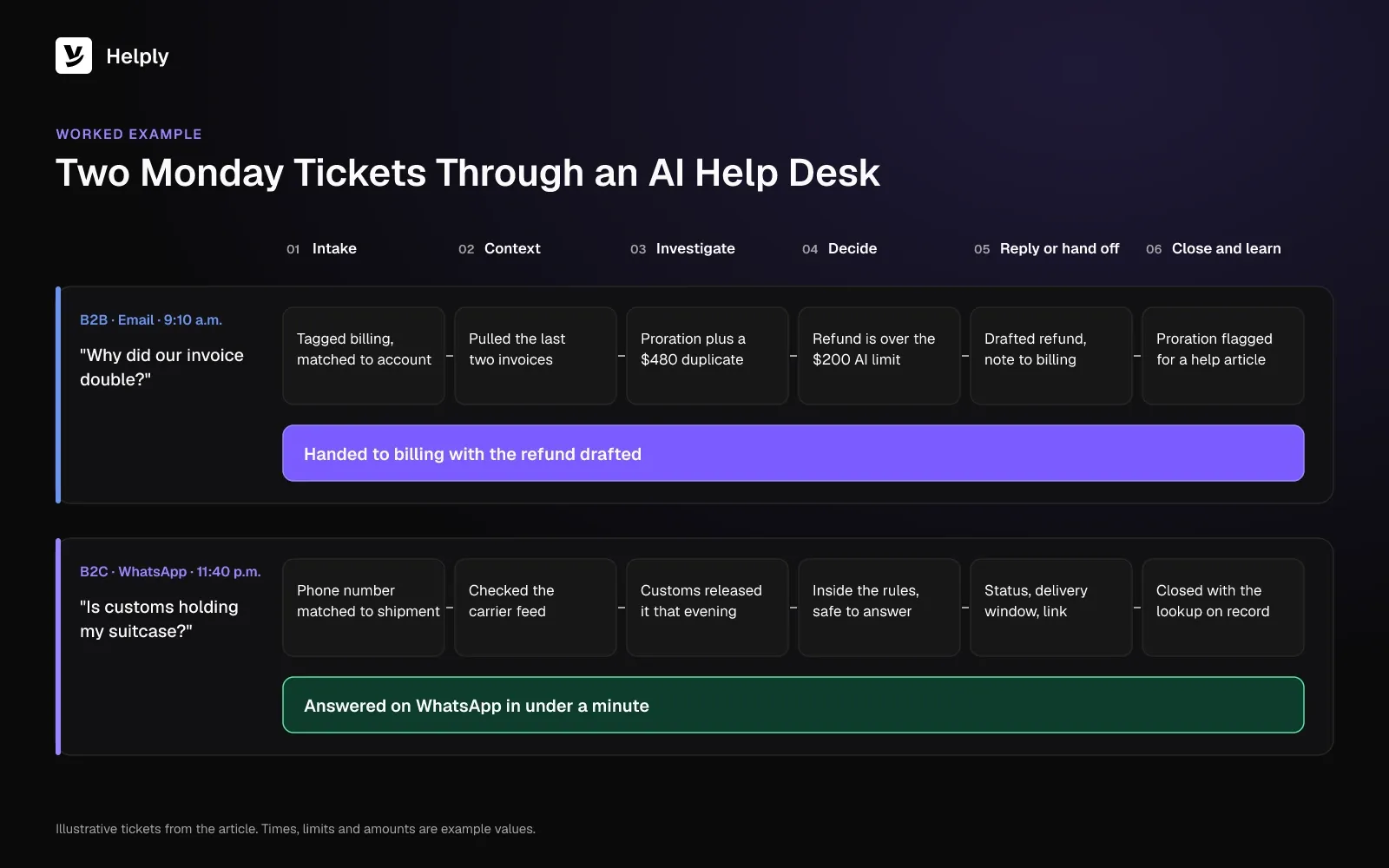
A B2B Ticket Through an AI Help Desk
At 9:10 on Monday, a customer's admin emails the AI help desk: "Our invoice doubled this month. We added three users, so why is it twice the usual amount?"
- Intake: the AI tags the ticket "billing," matches the sender to the account and notes the account's plan.
- Context: it pulls the last two invoices and the subscription changes from your billing system.
- Investigation: it finds two causes: a prorated charge for the three new users and a duplicate charge from a payment retry.
- Decision: the proration is correct, so the AI explains it. The duplicate needs a refund larger than your $200 limit for AI refunds, so it can't close the ticket alone.
- Handoff: it tells the admin a refund is under review and sends the drafted refund to a billing specialist. The note reads: "Proration correct, $480 duplicate charge on the 3rd, refund drafted."
- Close and learn: the specialist reviews the note and approves the refund. The AI tags the case and flags proration as a topic that needs a help article.
The same admin writes again on Wednesday in your shared Slack channel. An API call has failed since yesterday's release.
The AI checks the docs and recent tickets, finds two other accounts with the same error, and replies with a workaround. It opens one engineering issue with the request ID and all three affected accounts, then hands the thread to the account's support lead.
A B2C Ticket Through an AI Help Desk
At 11:40 p.m. on Sunday, a shopper writes on WhatsApp: "Is customs holding my suitcase? It has shown one tracking status since Saturday."
- Intake: the AI matches the phone number to the shipment.
- Lookup: it checks the carrier's feed and sees customs released the suitcase that evening, after the last public tracking scan.
- Reply: within a minute, it replies on WhatsApp with the status, tomorrow's delivery window and a tracking link.
- Close: the shopper replies "thanks," and the AI closes the ticket with the lookup on record.
A second shopper sends a photo of a cracked suitcase that night. Damage claims need a person.
The AI collects the order number, photos and delivery date, checks the claim window and hands the ticket to the claims team. The morning shift starts with the claim ready to approve.
How Helply Handles Both Tickets
Helply runs the invoice ticket and the WhatsApp ticket on one platform. Under the agents is a full help desk: shared inbox, views, tags, macros, collision detection and a knowledge base hosted on your domain.
- Lookups done for you: Helply's Support Agent finds the doubled invoice in Stripe and the suitcase's status through your API or MCP. It replies on email, chat, WhatsApp, Slack or SMS, then takes the actions you configure, such as a refund.
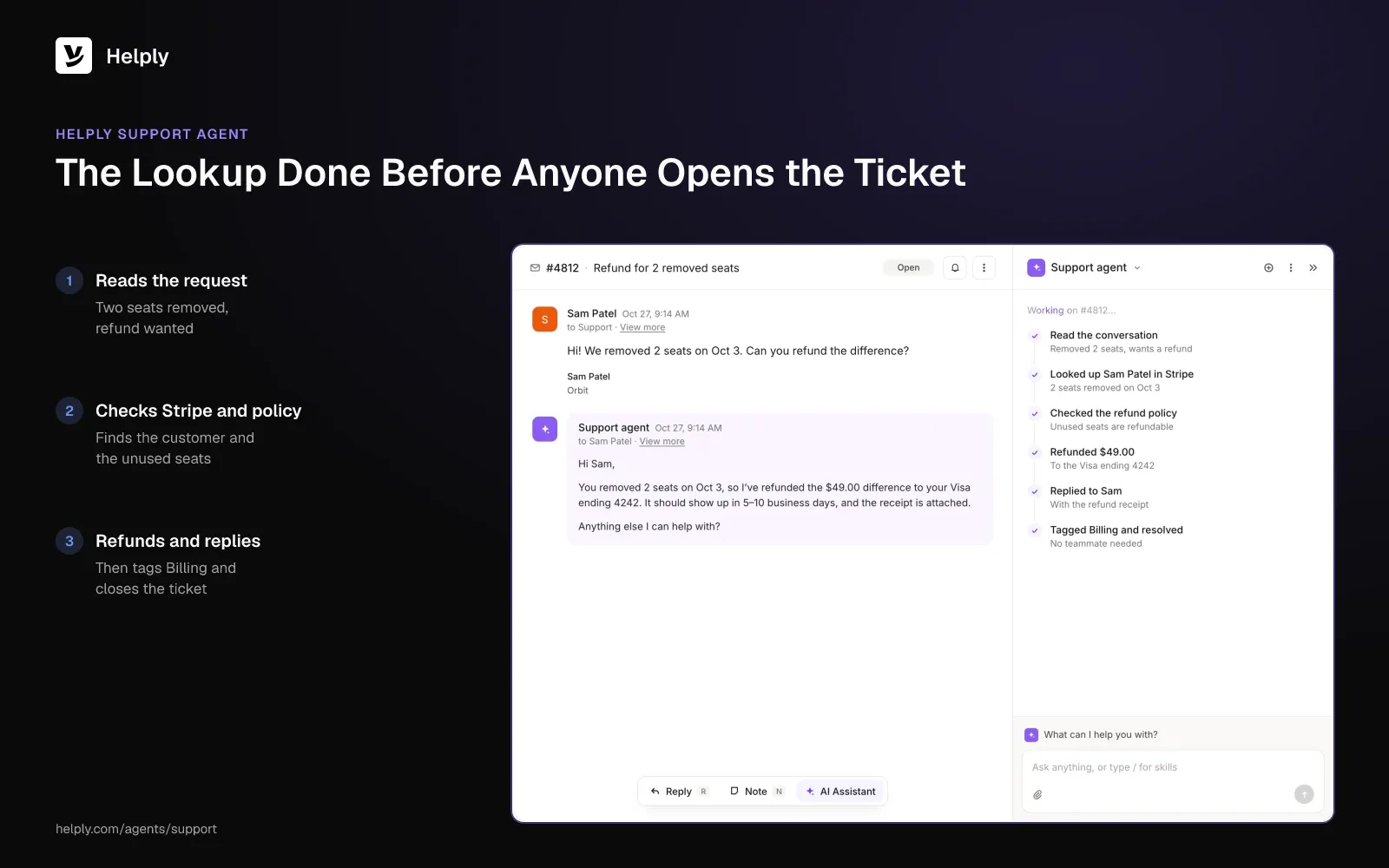
- Handoffs with notes: the Support Agent passes the oversized refund or API bug to a person and sends its notes and the customer context. Your team sets escalation rules for the confidence levels and conditions that trigger a handoff.
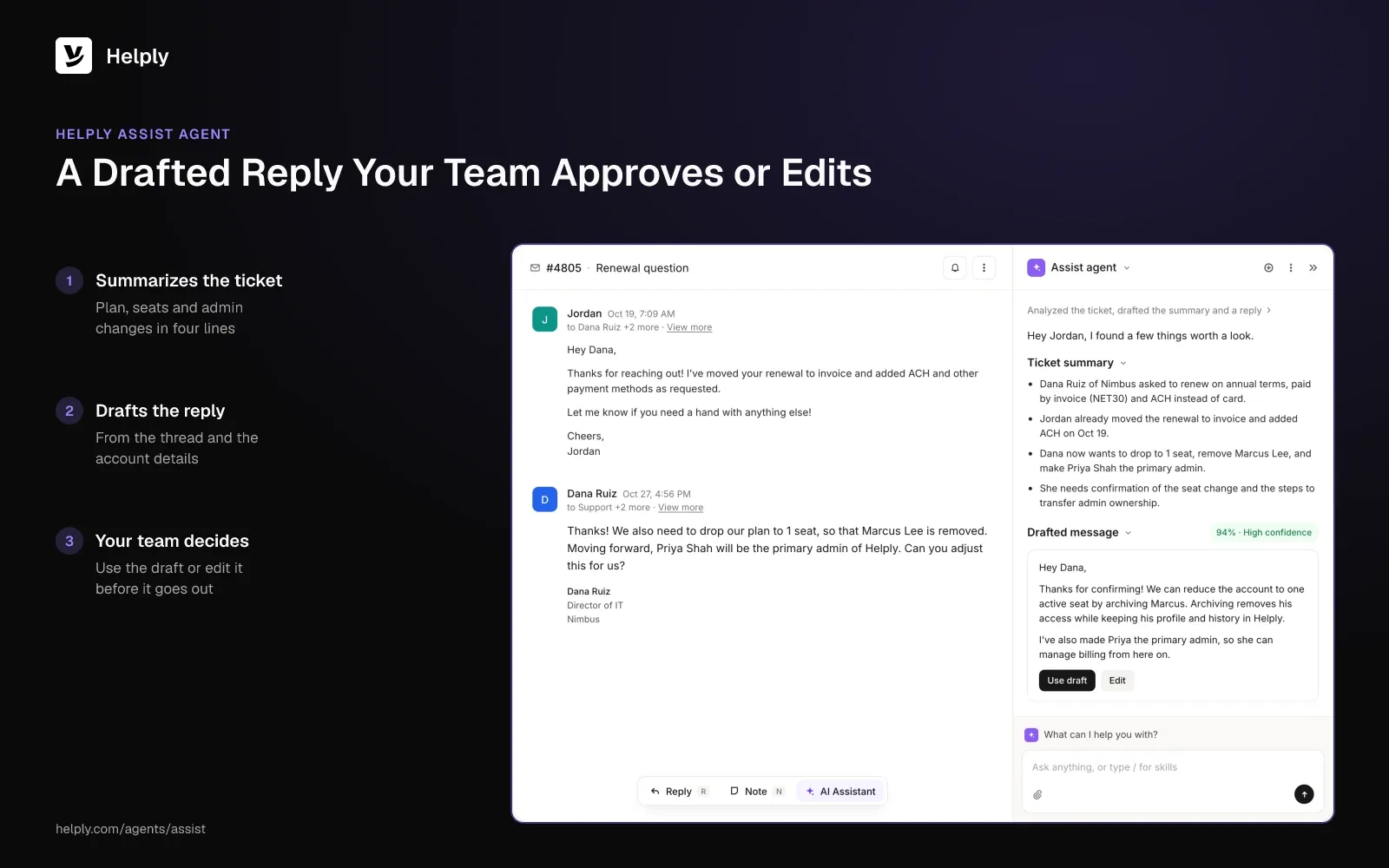
- The careful reply, drafted: the Assist Agent writes drafts using the thread, account details and your Guidelines. Your team approves or edits each draft, or tells Assist to run the refund.
- The Wednesday bug report: Helply turns the API error in your shared Slack Connect channel into a trackable ticket. Your team can then open a Jira or Linear issue with the conversation's context.
- Testing before go-live: you can replay the Support Agent on past conversations and score its answers before customers see them. Playground tests use no credits.
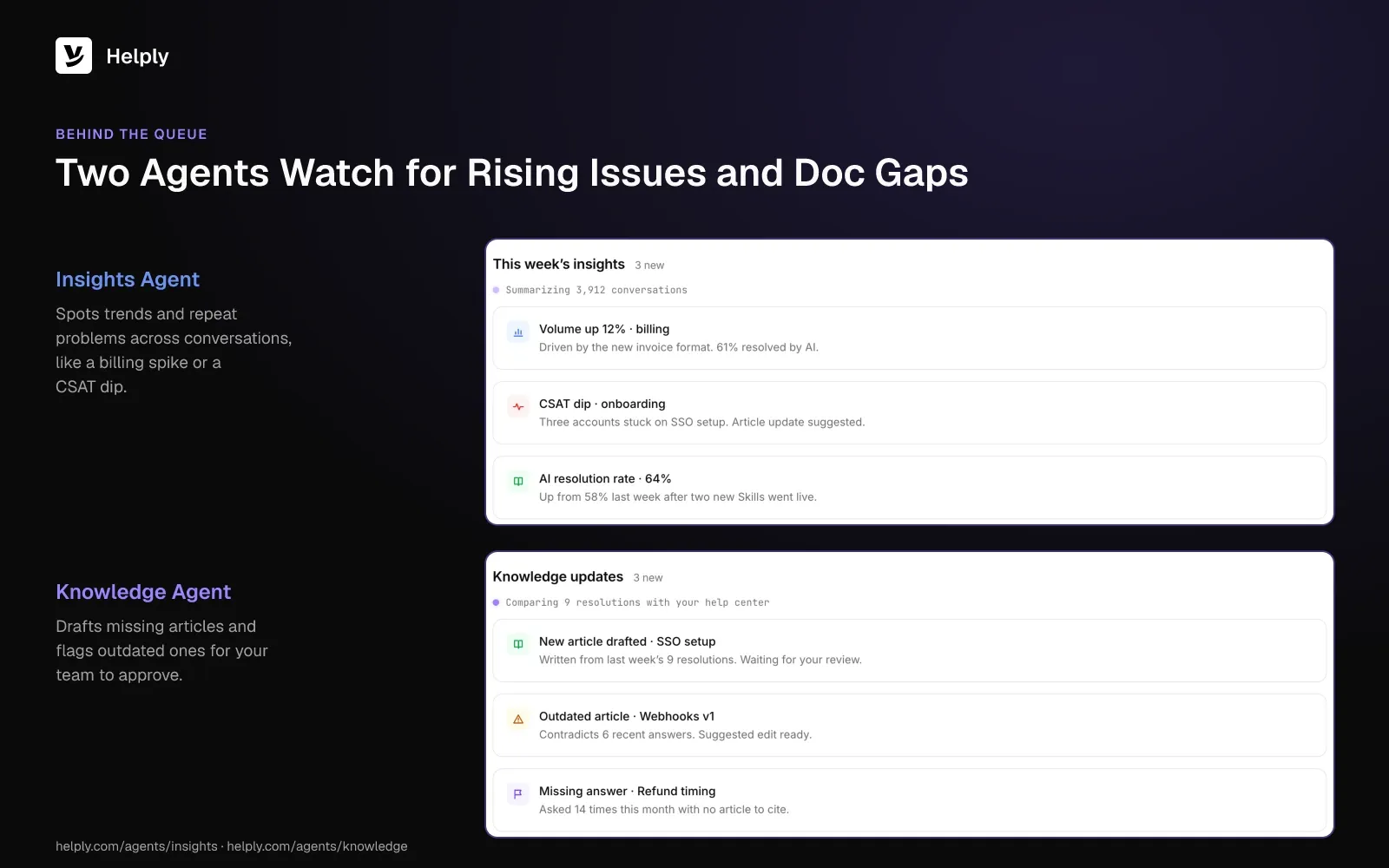
- Learning behind the queue: the Insights Agent finds trends and repeat problems across conversations. The Knowledge Agent flags missing or out-of-date answers for your team to approve. Skills teach agents your recurring workflows.
Helply holds SOC 2 Type II and signs a DPA on request. Helply's AI providers never train their models on what your customers send. The Trust and Security page lists the controls.
How AI Help Desks Charge for AI
Most AI help desks charge a seat or plan price plus an AI fee. Your bill depends on what triggers the fee: per resolution, per outcome, per session, per automated interaction or per AI action.
Seat prices are monthly list rates, with the yearly billing rate in parentheses, for Zendesk, Intercom, Freshdesk, Help Scout and Gorgias.
AI Help Desk Pricing Compared: Seat Price, AI Fee and What Counts
| Vendor and plan | Seat or plan price a month (billed yearly) | AI fee | What triggers the fee |
|---|---|---|---|
| Zendesk Suite Team | $69 an agent ($55) | $2.00 pay-as-you-go per automated resolution beyond 5 an agent each month, or $1.50 committed | A request the AI agent resolves with no escalation to a person |
| Intercom Essential | $39 a seat ($29) | Fin at $0.99 an outcome, none included | Customer confirms it's solved, asks for nothing more, or Fin finishes a workflow, handoffs included |
| Freshdesk Growth | $23 an agent ($19) | 500 sessions free once for new customers, then $49 per 100 | Each AI session: 72 hours from the customer's first email |
| Help Scout Standard | $30 a user ($25) | Envoy AI agent at $0.75 a resolution, none included, optional monthly cap | Customer gets an AI answer and doesn't escalate, search or ask for more |
| Gorgias Pro with AI Agent | $550 a month for 2,000 tickets ($471) | 190 automated interactions included, then $1.50 each | A request fully resolved without a human, by AI Agent or other automations |
| Helply | Plans priced by human agents | AI credits included in every plan, pooled across the team | Each AI task: 2 credits to draft a reply, 10 for a conversation resolved end to end, never over 15 in one conversation |
Newer Zendesk accounts get a dollar allowance per agent instead, and Zendesk draws it down only for verified resolutions.
One Month of AI Help Desk Costs Compared: Seats, AI Fee and Total
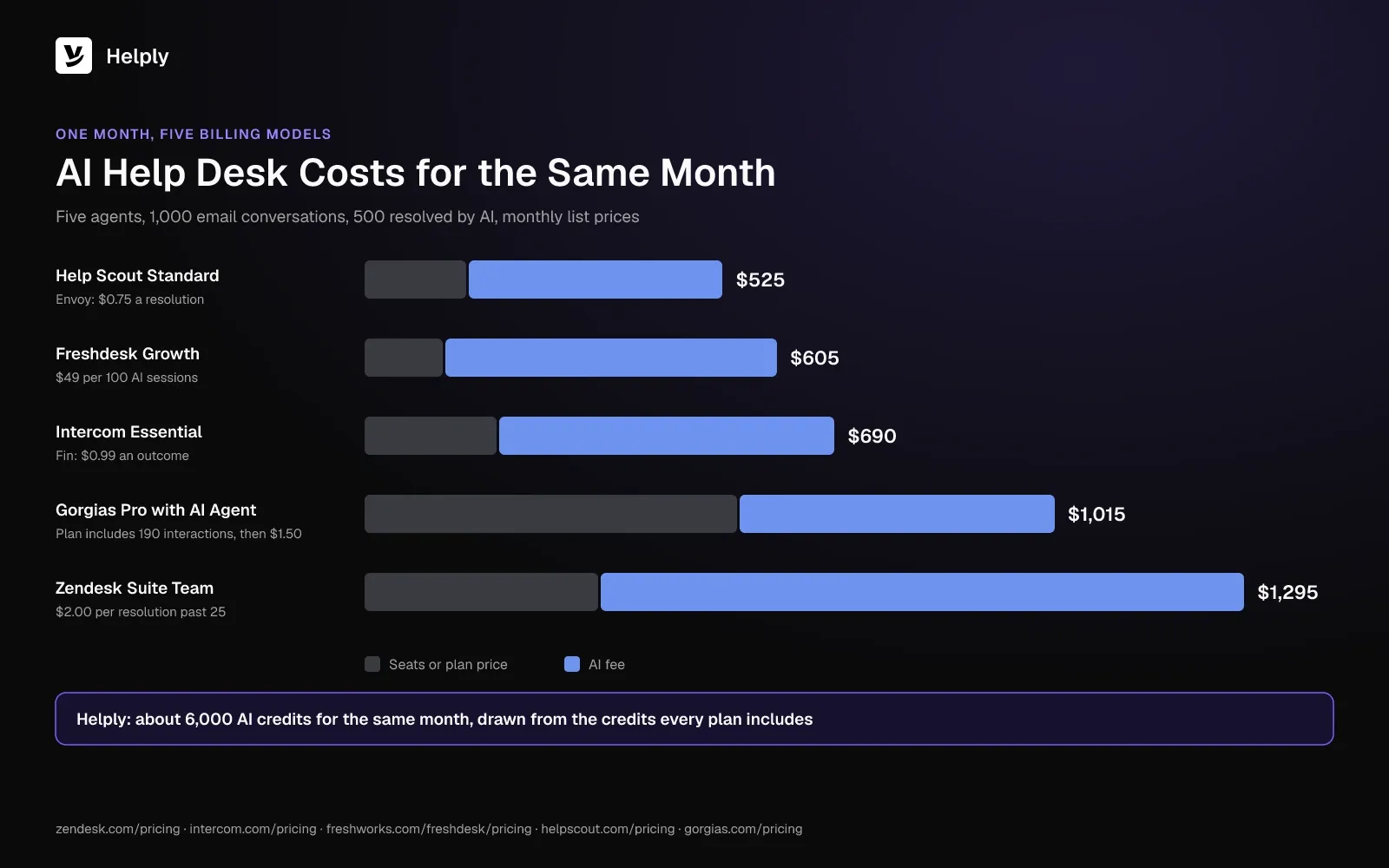
Picture a team of five on email, with 1,000 conversations a month and half of them resolved by AI. On monthly list prices, the bills look like this:
| Vendor and plan | Seats | AI fee | Monthly total |
|---|---|---|---|
| Help Scout Standard | $150 | $375 for 500 Envoy resolutions at $0.75 | $525 |
| Freshdesk Growth | $115 | $490 for 1,000 sessions at $49 per 100 | $605 |
| Intercom Essential | $195 | $495 for 500 Fin outcomes at $0.99 | $690 |
| Gorgias Pro with AI Agent | $550 plan with 190 automated interactions | $465 for 310 more at $1.50 | $1,015 |
| Zendesk Suite Team | $345 | $950 for 475 resolutions at $2.00 beyond the 25 included | $1,295 |
Freshdesk counts a session for every conversation the AI works, and its 500 free sessions come once. Intercom can cost more if Fin hands off through workflows.
Drafting help for your team often costs extra. Intercom charges $35 an agent a month for Copilot ($29 a month on yearly billing). Freshdesk charges the same for Freddy AI Copilot on Pro and up.
Zendesk lists Copilot at $50 an agent a month, on annual billing only, for Professional plans and up. Every Helply plan includes the Assist Agent.
At a 50% AI resolution rate, a typical team spends about 6 credits per conversation. Your team would use about 6,000 AI credits on Helply for the same month.
Credits come with every plan. Spam, auto-replies and tickets handed to a person after an AI attempt use no credits. Helply pricing lists each plan's allowance.
Slack Connect, WhatsApp, SMS, SLAs and escalation rules start on the Team plan. So do Skills, custom API actions, MCP connectors, Jira, Linear, AI QA, backtesting, the Insights and Knowledge Agents, and free migration.
Ask every vendor for your cost per resolution. Zendesk's CX Trends 2027 report, published in November 2026, found 85% of business leaders surveyed agree AI vendors should price on verified outcomes. In that report, 86% said they expect real-time visibility into cost per resolution.
How to Choose AI Help Desk Software
Run every vendor through the same eight questions, using a week of your own past tickets:
- Does it resolve or deflect? Ask how the vendor defines a resolution. Intercom reports that Fin averages a 76% resolution rate across 12,000+ customers, by Intercom's own definition.
- Can it read your systems and act? Check which tools it connects to, which actions it can take and how you set permissions.
- Can you see the handoff note? Ask to see the note a person receives, with findings and customer history.
- Can you set escalation rules? Look for rules by topic, confidence, customer type and refund amount, and map them to your support tiers.
- Can you test before going live? Replay the AI on past tickets and score its answers before customers see them.
- Does the AI fee fit your month? Model your month at a realistic resolution rate, including conversations the AI touches but doesn't solve and any copilot add-on.
- Does it cover your channels? Confirm email, chat, WhatsApp, SMS or Slack Connect on the plan you'd buy.
- Does it protect your data? Ask for SOC 2 Type II, a DPA and a written answer on model training.
Also ask how you'd move. Pick a vendor that lets you keep your old help desk running until you've tested the new one.
How Do You Roll Out an AI Help Desk Without Losing Trust?
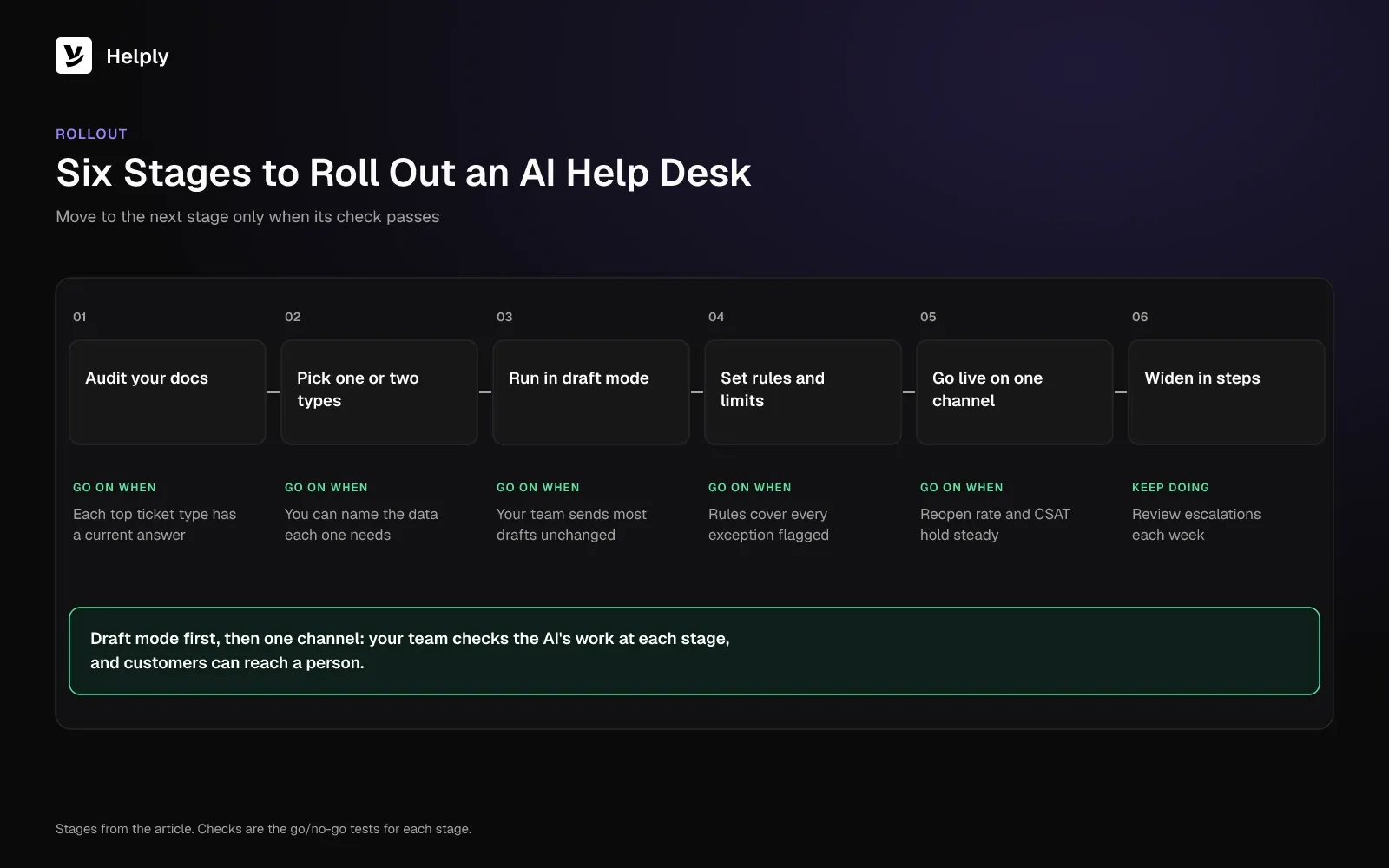
Roll out an AI help desk in six stages, and pass a test at each one before moving on. Start with your docs, then one or two ticket types in draft mode. Widen only when reopen rate and CSAT hold steady.
In Intercom's survey of over 2,400 support professionals, published in January 2026, only 10% said they had reached mature AI deployment. Of those, 87% reported improved metrics, compared with 62% overall.
- Audit your docs: fix outdated articles for your top ten ticket types. Go on when each has a current answer.
- Pick one or two ticket types: start with high-volume, low-risk requests such as order status or invoice copies. Go on when you can name the data each one needs.
- Run in draft mode: for one week, let the AI draft replies that your team approves or edits. Go on when your team sends most drafts unchanged.
- Set escalation rules and limits: cap refund amounts, list topics that always go to a person and set a confidence threshold. Go on when the rules cover every exception your team flagged.
- Go live on one channel: let the AI resolve on email or chat only, and review a sample daily. Go on when reopen rate and CSAT hold steady.
- Widen and review weekly: add ticket types and channels one at a time, and keep a weekly review of escalations.
Where AI Help Desks Go Wrong
Watch for six failures, each with a fix:
- Confident answers from stale docs: the AI repeats an old refund policy. Fix the docs before go-live, and let the AI flag gaps it finds.
- Silence counted as resolved: a customer gives up, and your reporting logs the closed ticket as an AI resolution. Track reopens and repeat contacts within seven days.
- Hidden humans: 88% of consumers in Zendesk's CX Trends 2027 report, published in November 2026, want a person available when needed. Give every conversation a visible path to a person.
- Handoffs that start from zero: the person who picks it up asks for the order number again. Require a handoff note with findings, so customers don't have to repeat themselves.
- Too much permission: the AI refunds the wrong account. Limit actions by amount and verify identity first.
- Fees on failed attempts: session billing counts every corrnversation the AI works, and some outcome billing counts handoffs. Model both before you sign.
Which Metrics Show an AI Help Desk Is Working?
Six metrics show whether an AI help desk works. Track AI resolution, escalation and reopen rates, CSAT on AI conversations, first response time and cost per resolution.
Read each next to the numbers on your support dashboards.
AI Help Desk Metrics Compared: Formula and What to Watch For
| Metric | Formula | Watch for |
|---|---|---|
| AI resolution rate | Conversations resolved by AI ÷ all conversations | Rising rate with rising reopens |
| Escalation rate | Conversations AI hands to a person ÷ conversations AI handled | Topics that always escalate and need a new doc or workflow |
| Reopen rate | AI-resolved conversations reopened within 7 days ÷ AI-resolved conversations | Silence logged as success |
| CSAT on AI conversations | Positive ratings ÷ all ratings on AI-handled conversations | A gap against human-handled CSAT |
| First response time | Median minutes until the first reply, per channel | Slow replies on channels the AI doesn't cover |
| Cost per resolution | AI fees plus seat costs ÷ all resolved conversations | Fees on attempts that didn't resolve |
Add AI to Your Current Help Desk or Move to an AI-Native One?
Adding AI to the help desk you already run avoids a migration, and per-resolution fees stay small while AI resolves few tickets. Help Scout suits teams that want a monthly cap on AI fees, and Gorgias suits stores that prefer ticket-volume pricing to seats.
Move when your top tickets need lookups and actions across billing, orders and engineering in one queue. Helply fits teams that want the doubled invoice and the stuck suitcase handled on one platform. Every plan comes with AI credits for the whole team, plus the Support Agent and Assist Agent.
Your team skips the three-tab lookup once the Support Agent checks Stripe or your tracking system itself. Your billing specialist still approves the duplicate refund, with the investigation attached. The shopper who wrote at 11:40 p.m. gets a customs answer that night, before the morning shift.
Helply can also draft help articles to fill gaps in your docs. At MyBaggage, it drafted the missing articles its own analysis found.
Helply prices plans by the people who reply to customers. Helply's plans show the agents and AI credits in each one.
Start your AI help desk with one ticket type in draft mode. Your old help desk can keep running while you move conversations over. On Team plans and up, Helply moves your data for free and runs an onboarding call.
Frequently asked questions
A chatbot answers questions in a chat window, while an AI help desk runs the whole ticket across your channels. That includes lookups, actions, handoffs and reporting.
No, because AI agents take repeatable tickets while people handle exceptions, judgment calls and relationships. Zendesk's CX Trends 2027 report, published in November 2026, found 88% of consumers want a person available when needed.
Most vendors charge a seat or plan price plus an AI fee per resolution, outcome, session, automated interaction or AI action. For five agents and 1,000 email conversations a month, half resolved by AI, monthly list prices total $525 to $1,295.
Test each finalist on a week of your past tickets. Pick the one that gets them right at a cost you can predict. Helply suits teams that want AI agents built into their help desk, with AI credits in every plan.
Yes, because AI agents can cover nights, weekends and repeat questions without new hires. Start with one ticket type and add more as the AI's answers hold up.
Plan about a week of draft mode for each ticket type before the AI resolves it alone. Connecting your inbox and knowledge base comes first and takes less time.
It can be reliable on ticket types with current docs and clear escalation rules. It hands anything uncertain to a person, with its findings attached. Track reopens within seven days to catch answers that only look resolved.
It can be, if the vendor holds SOC 2 Type II, offers a DPA and keeps AI providers from training on your data. Helply meets all three.
About the author

Bildad Oyugi
Head of Content
Bildad is a digital marketing expert with over 5 years of experience in copywriting, content marketing, and editing. Outside of work, he enjoys videography and spending time with his family.
Keep reading

10 Types of Customer Service and When to Use Each
Alex Turnbull · 11 min read
Customer Service vs. Customer Support: Differences, Examples and How to Run Both
Konrad Janczyk · 10 min read