
 Bildad Oyugi ··14 min read

A customer asks for a refund on an annual plan, two weeks past your refund window. Your first-line agent can't approve it. They ask the customer to explain again and ping billing in a side chat.
Billing asks the customer a third time. Two days later the ticket still has no owner, and the customer has stopped being polite. Your team has no written owner for a refund outside policy, and no list of what a handoff must include.
In Zendesk's CX Trends 2026 survey, released in November 2025, 74% of consumers said they're frustrated when they have to repeat information.
While that ticket sits, your billing lead works through refunds within policy that a first-line agent could approve. Put an AI agent in front with no exit to a person, and the customer explains it a fourth time.
Start the fix with a map of what each support tier handles, from tier 0 to tier 3. Then give the refund an escalation rule, a handoff checklist and a row in a routing table inside your help desk.
What Are Support Tiers?
Support tiers are levels of a support team. Teams rank them by how complex the work is and how much authority each level holds. A conversation starts at the lowest tier able to resolve it and moves up only when that tier can't finish it.
The same model goes by tiered support, help desk tiers, IT support tiers, or 1st, 2nd and 3rd line support.
With tiers, you keep costly specialists on the work only they can do. An HDI SupportWorld article describes shift left as moving IT support work as close to the end user as possible, toward cheaper channels.
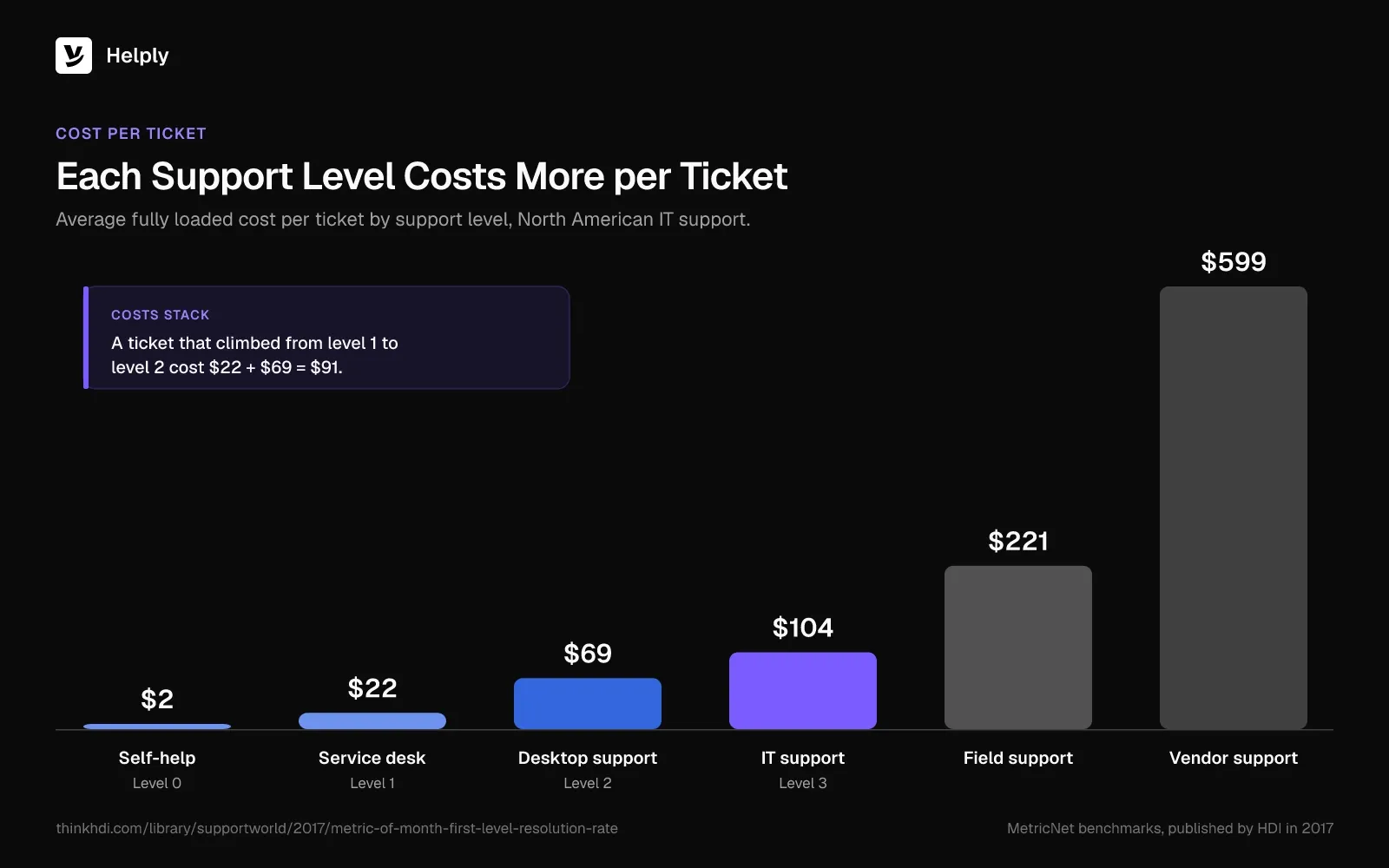
In MetricNet's 2017 HDI benchmarks of North American IT support, the average fully loaded cost per ticket rose at each level. Self-help cost about $2 a ticket, and the level 1 service desk cost $22. Level 2 desktop support cost $69, level 3 IT support $104, field support $221 and vendor support $599.
Costs also stack: in MetricNet's IT data, a ticket climbing from level 1 to level 2 cost $69 plus $22, or $91. In customer support, each handoff adds another person's time to the same conversation.
The Four Support Tiers, from Tier 0 to Tier 3
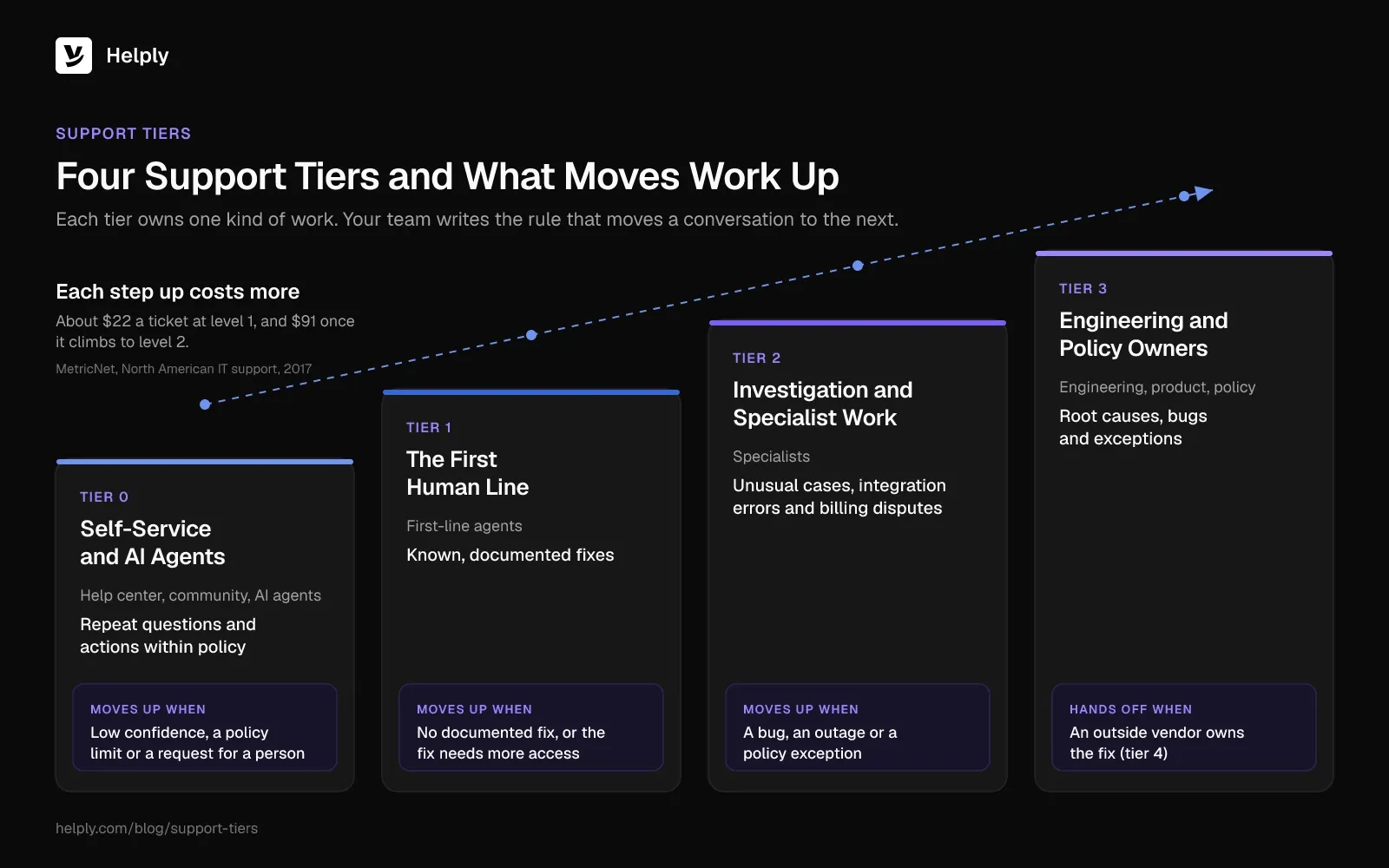
The four tiers run from self-service and AI agents at tier 0 to engineering and policy owners at tier 3. A software company, an online store or a marketplace can use them with small changes.
Tier 0 Support: Self-Service and AI Agents
Tier 0 covers every answer a customer gets without waiting for a person. That includes your help center, community threads, in-app guides and AI agents that answer and take action. A stronger help center also helps you cut incoming support tickets before they reach tier 1.
Gartner polled 5,728 customers about their service and support issues in December 2023. Self-service fully resolved only 14% of those issues, and only 36% of the ones customers described as "very simple."
Add AI agents and tier 0 can finish more of the queue. An agent connected to billing, order or account systems can check a status, change a setting or issue a refund within policy. In a March 2025 forecast, Gartner predicts agentic AI will resolve 80% of common issues in customer service on its own by 2029.
Tier 0 still needs a visible exit to a person, and that person should inherit the whole conversation.
Tier 1 Support: The First Human Line
Tier 1 support is the first person a customer reaches. Its agents handle known, documented questions: account access, order status, plan changes, how-to questions and refunds within policy.
A tier 1 agent works from the knowledge base and saved replies, inside a defined set of permissions. The job is to confirm the problem and apply the documented fix, then log it.
MetricNet's 2017 benchmarks of IT service desks put the average level 1 resolution rate at 74.3%, with a range of 37.6% to 97.8%. Anything outside documented fixes or tier 1 permissions moves up, with notes attached.
Tier 2 Support: Investigation and Specialist Work
Tier 2 support takes problems with no documented fix. Its agents read logs, reproduce errors, check configurations and dig through account history.
Typical tier 2 work includes integration errors, data that looks wrong, billing disputes and faults that hit one account but not others. In ecommerce, it covers a parcel marked delivered that never arrived, or a payment captured twice.
This work needs deeper product knowledge and more system access than tier 1. Tier 2 also decides whether a problem is a bug and, if it is, sends it to tier 3.
Tier 3 Support: Engineering, Product and Policy Owners
Tier 3 support owns root causes. In software, that means the engineers who change code or infrastructure.
Elsewhere, it's the owner of a policy, a warehouse or a supplier relationship. Tier 1 or tier 2 keeps talking to the customer while tier 3 works the issue in Jira, Linear or a similar tracker.
A tier 4, where it exists, covers outside vendors such as a payment processor or a hardware maker. Treat it as tier 3 with a longer wait and a named contact.
Tier 1 vs. Tier 2 vs. Tier 3 Support: Scope, Access and Escalation
Tier 0 answers repeat questions, tier 1 applies documented fixes, tier 2 investigates and tier 3 fixes root causes. Read each row for who owns the work, what access it needs and what sends it up.
| Tier | Who Handles It | What It Handles | Access and Tools | Moves Up When | Example |
|---|---|---|---|---|---|
| Tier 0 | Help center, community, AI agents | Repeat questions and actions within policy | Knowledge base, connected systems with set permissions | Low confidence, a person-only topic or a request for a person | Where's my order, answered from live tracking |
| Tier 1 | First-line agents | Known, documented fixes | Knowledge base, saved replies, basic admin | No documented fix applies, or the fix needs more access | Resetting two-factor login for a locked-out admin |
| Tier 2 | Specialists | Investigation and unusual cases | Logs, admin tools, billing and order systems | The cause is a bug, an outage or a policy exception | A webhook failing for one account after a key change |
| Tier 3 | Engineering, product and policy owners | Root causes and exceptions | Code, infrastructure, policy authority | An outside vendor owns the fix | A login loop traced to a recent code change |
In 1st, 2nd and 3rd line terms, 1st line is tier 1, 2nd line is tier 2 and 3rd line is tier 3. Tier 0 sits in front of all three.
How Do AI Agents Change Support Tiers?
AI agents take on work that used to sit at tier 1. An AI agent that reads the account and checks Stripe can act on what it finds, as a tier 1 person would.
Tier 0 closes more conversations, because an agent that can act finishes what a help center article could only explain. Once AI takes the repeat questions, first-line agents see more exceptions and more upset customers. Tier 2 starts with evidence, since an AI agent can gather logs, history and account details before a specialist opens the ticket.
Tier 1 and tier 2 get drafting help too. An AI agent working beside them can search history, draft a reply and suggest the next step.
Customers still want a way out. The same December 2023 Gartner survey, published in July 2024, found 64% of customers would rather companies kept AI out of customer service. Of the customers surveyed, 53% said they might switch to a competitor if a company planned to use AI for service.
Customers in that survey worried most that a person would become harder to reach. Write the exit to a person into your escalation rules from day one.
Escalation Rules: When a Conversation Moves up a Tier
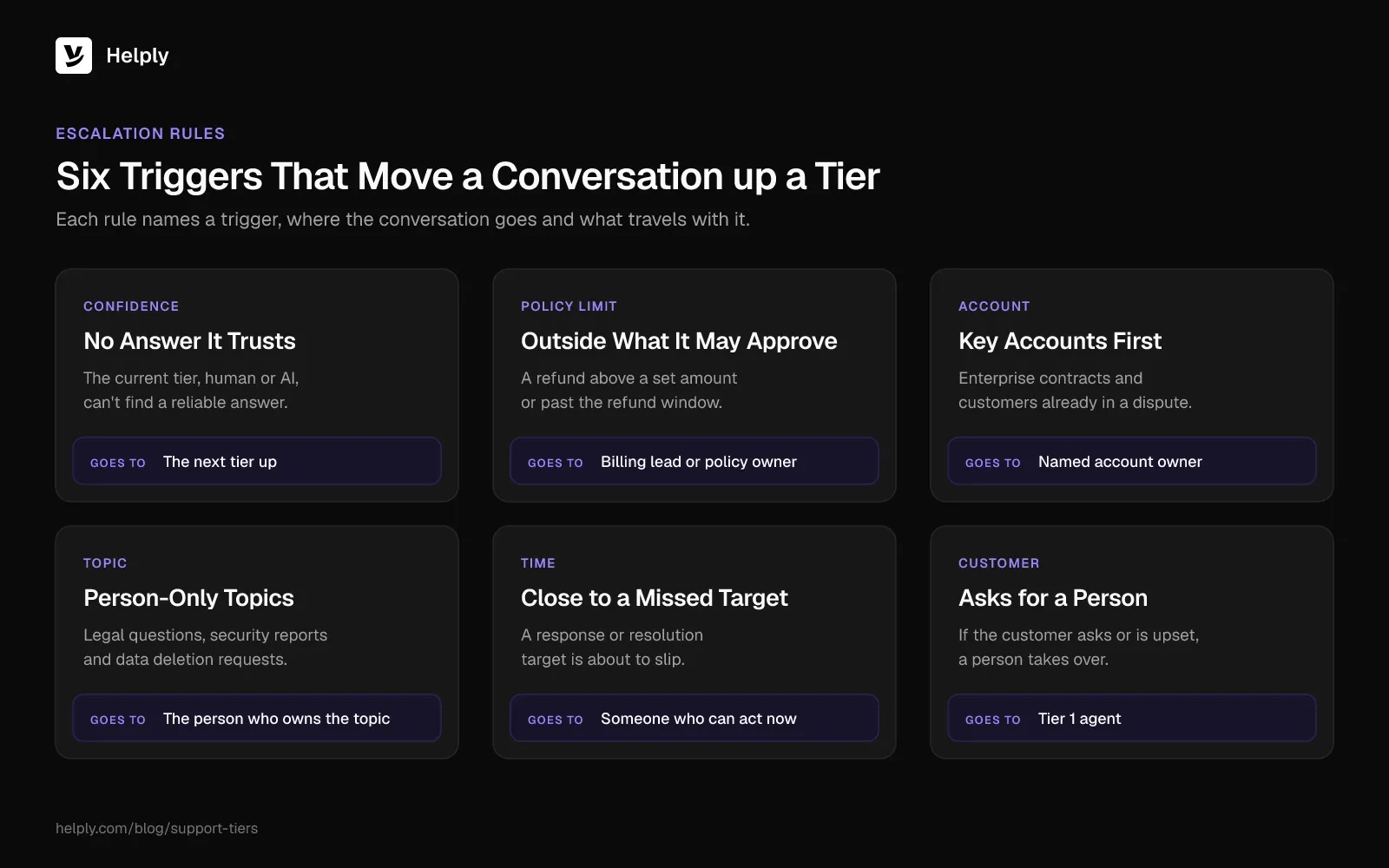
An escalation rule names a trigger, a destination and what must travel with the conversation. Start with six trigger types:
- Confidence. The current tier, human or AI, can't find an answer it trusts, so it moves the conversation up instead of guessing.
- Policy limit. The request sits outside what the tier may approve, such as a refund above a set amount or past the refund window.
- Account. Key accounts, enterprise contracts or customers already in a dispute go to a named owner first.
- Topic. Legal questions, security reports and data deletion requests go to the person who owns them, with no stop at tier 1.
- Time. A conversation close to missing its response or resolution target moves to someone who can act now.
- Customer. A customer who asks for a person, or who is upset, gets one.
Tier 2 adds one more trigger. A confirmed bug or outage goes to tier 3 with steps to reproduce and a list of affected accounts.
Write rules for the way back down, too. Once tier 3 ships a fix, hand the conversation back to the agent who owns the customer for the follow-up.
What Should an Escalation Handoff Include?
A good handoff lets the next person act without asking the customer anything. For CX Trends 2026, published in November 2025, Zendesk polled 6,182 consumers, and 81% wanted agents to continue the conversation without backtracking.
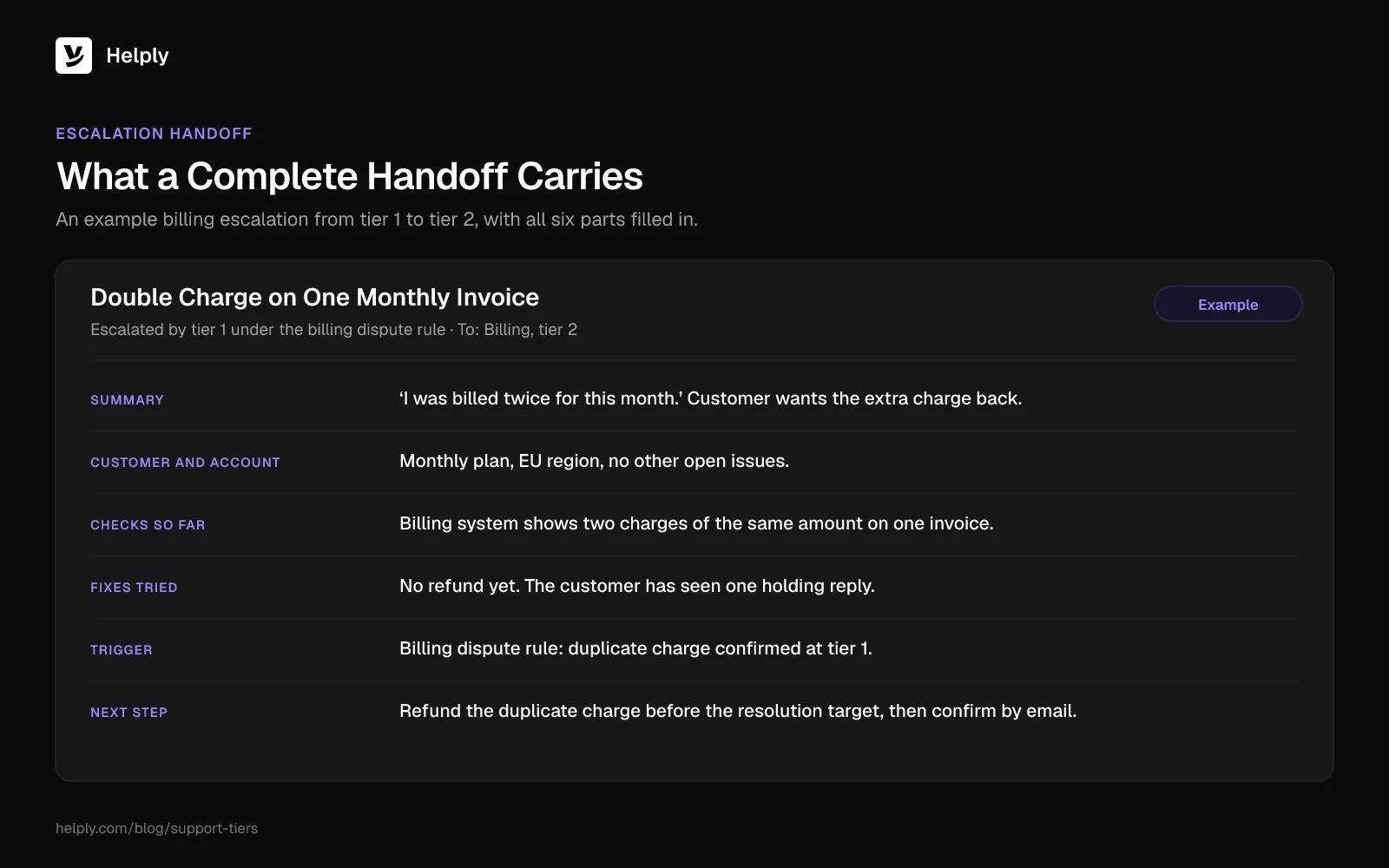
Every escalation should carry six things:
- Summary. Two lines on the problem, in the customer's own words.
- Customer and account. Plan, order, region and any other open issues.
- Checks so far. Each system or record the last agent looked at, and what it showed.
- Fixes tried. Every fix attempted and every reply the customer has already seen.
- Trigger. The rule that moved the conversation up.
- Next step. A suggested action and the deadline it has to meet.
For example, a customer finds two charges for one monthly invoice. Tier 1 confirms both charges in the billing system, sees no refund yet and escalates under the billing dispute rule. Billing opens the ticket to a summary, both payment IDs with dates and amounts, and a suggested refund, then replies within minutes.
A Sample Escalation Matrix and Routing Table for Tier 0 to Tier 3
Use this escalation matrix to map common requests to where they start, what moves them up and who gets them next. Change the owners and limits to match your team.
| Request Type | Starts At | Moves Up When | Goes To | Handoff Must Include |
|---|---|---|---|---|
| Password or login reset | Tier 0 | Identity check fails | Tier 1 | Verification steps tried |
| Order status | Tier 0 | Tracking shows a problem or no recent scan | Tier 1, then tier 2 for carrier claims | Tracking history and promised date |
| How-to question | Tier 0 | No article answers it | Tier 1 | Articles already sent |
| Refund within policy | Tier 0 | The AI can't confirm the charge or the customer's eligibility | Tier 1, then billing at tier 2 if the customer disputes the charge | Charge, policy rule and the customer's reason |
| Refund outside policy | Tier 0 | Always | Billing lead or policy owner at tier 3 | Account history and a suggested offer |
| Billing dispute or double charge | Tier 1 | Tier 1 confirms a duplicate charge in the billing system | Billing at tier 2 | Payment IDs, dates and amounts |
| Integration or API error | Tier 1 | No documented fix | Technical specialist at tier 2 | Error text, logs and recent changes |
| Suspected bug | Tier 2 | Tier 2 reproduces it | Engineering at tier 3 through the issue tracker | Steps to reproduce and affected accounts |
| Outage | Tier 2 | Tier 2 confirms a service is down for several accounts | On-call engineer at tier 3 | Start time, scope and status page update |
| Legal, security or data deletion request | Tier 0 | Always | Named owner at tier 3 | Request text and identity check |
| Key or enterprise account | Tier 1 | Any issue beyond a how-to question | Account owner, then tier 2 | Plan and contract notes |
| Customer asks for a person | Tier 0 | Always | Tier 1 | Full conversation and what the AI tried |
Set each row up as a routing or escalation rule in your help desk, so your team doesn't route from memory.
How to Set up Support Tiers in Six Steps
Lean teams can build tiers from request data they already have. From the same data, you can see where to scale customer support without hiring.
- List your request types. Tag a recent month of conversations by request type and count how often each one appears.
- Decide what tier 0 finishes. Pick the repeat questions and actions that an AI agent or an article can complete within policy.
- Define tier 1's scope and permissions. Write down what tier 1 may approve, change or refund, and what it may not.
- Write the escalation rules. Give every request type a trigger, a destination and a handoff checklist, starting from the sample escalation matrix.
- Connect tier 3 to the tracker. Link support conversations to engineering issues, so the agent who owns the customer can follow up when a fix ships.
- Review the rules every month. Read a sample of escalations at each tier and move work down wherever a lower tier could have finished it.
Metrics to Track at Each Support Tier
Track each tier on its own, then the handoffs between them. Give each tier its own panel on a support dashboard so you can see the numbers side by side.
- Resolution rate per tier. Measure the share of conversations each tier closes on its own, and compare level 1 with MetricNet's 2017 IT average of 74.3%.
- Escalation rate by request type. If many requests in one row of your escalation matrix move up, look for a missing article, permission or rule.
- Reopen rate after escalation. Check reopens after a handoff for missing context or a fix that didn't hold.
- Time to handoff and time in tier. Look at long waits between tiers to find conversations sitting without an owner.
- CSAT by tier. Compare CSAT survey scores for conversations resolved at tier 0, tier 1 and the tiers above.
- Cost per resolution. Each step up adds cost. In MetricNet's 2017 IT data, a ticket that moved from level 1 to level 2 cost $91, against $22 at level 1.
Running Tiered Support with AI Agents and Escalation Rules in Helply
In Helply, the Support Agent can take tier 0 and the routine end of tier 1 off your team's queue. It answers customers on email, chat and any other channel your team connects. It can check connected tools and take actions to resolve a conversation end to end.
Your team decides where it stops. You write escalation rules that tell it when to keep working, ask a teammate for help or hand the conversation to a person. A rule can key off the situation, the agent's confidence or the customer.
For example, you might let the agent resolve password resets and refunds under a set amount on its own. It can prepare refunds above that amount as drafts for a teammate and send every legal question to a person.
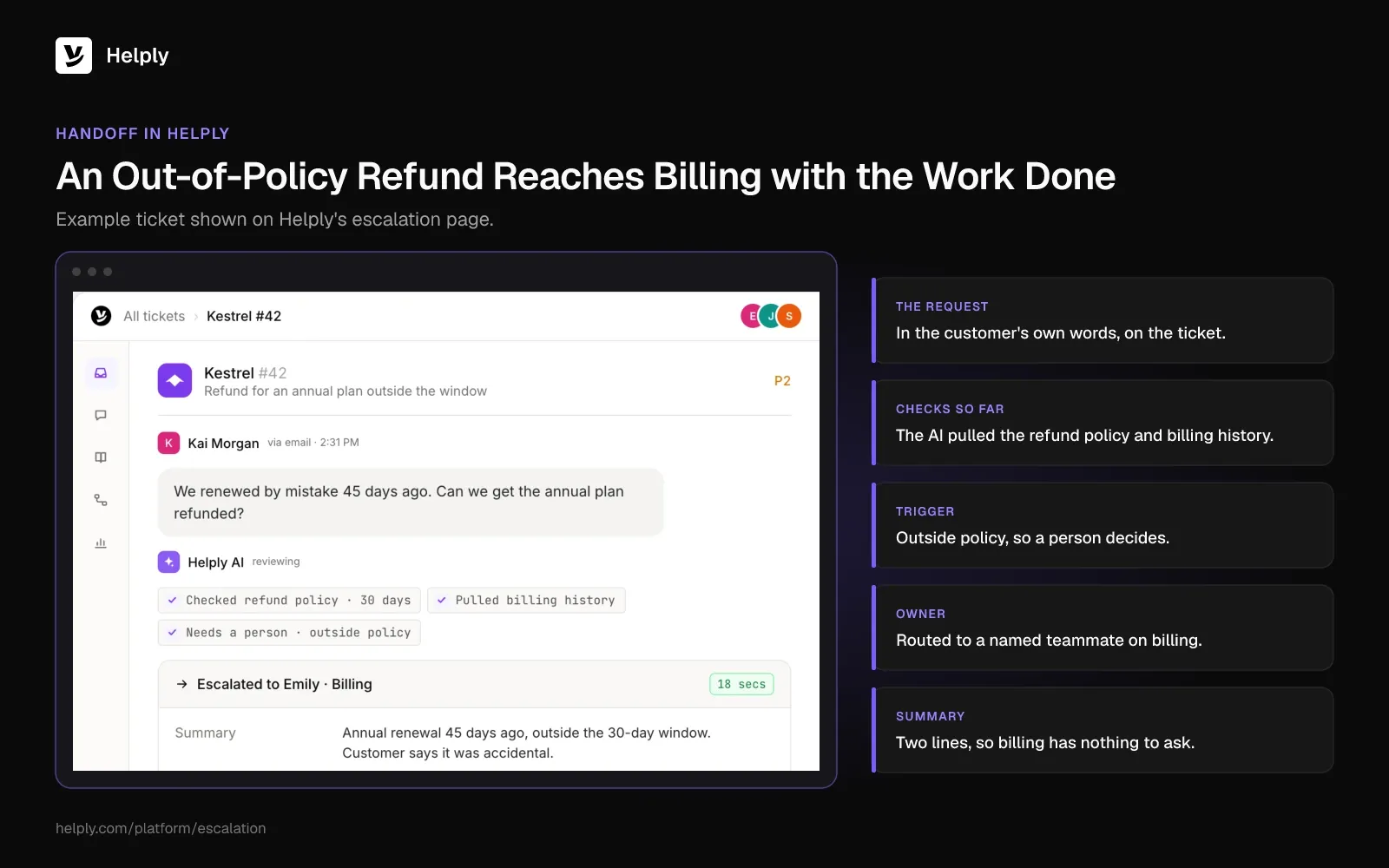
You can also route escalations by issue, account and urgency. A refund past your window can go to your billing lead with the agent's findings, so it has an owner at once. A bug report might go to the engineer on call in Slack, and a key account to its owner first.
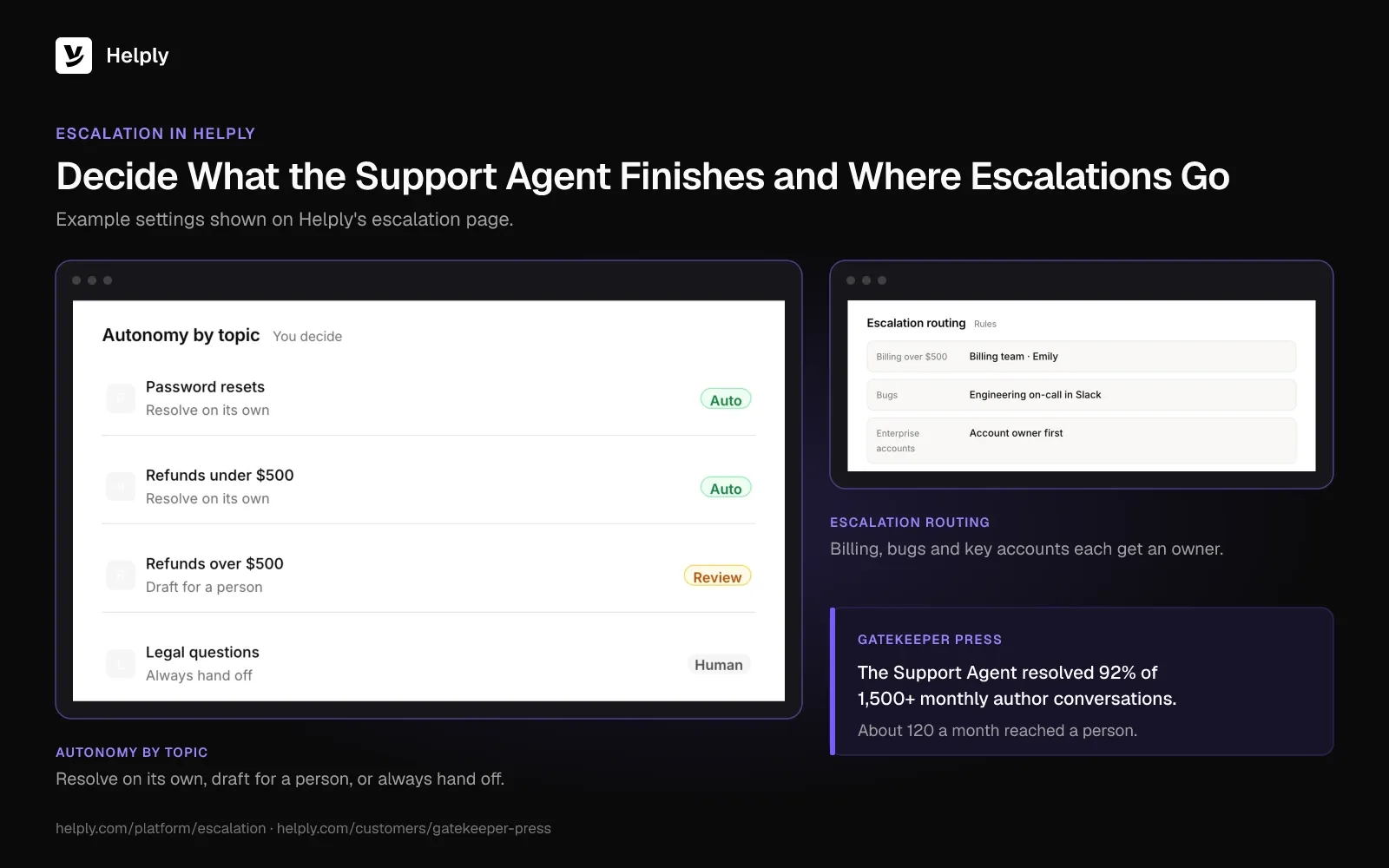
Your tier 1 and tier 2 agents work in Helply's help desk, with views, internal notes and collision detection beside the AI agents. Helply can route each new conversation by your rules and customer context to one teammate, a whole team or its AI agents. You can set response and resolution targets to back the time trigger in your escalation rules.
The agent hands over its investigation, the customer's context and the conversation history. The teammate who picks it up sees what the agent checked and the next steps it prepared, so the customer doesn't start over.
At tier 1 and tier 2, the Assist Agent gives your people a head start on the replies they write. It searches customer history and connected tools, drafts replies that follow your Guidelines and suggests the next step. On your team's request, it can take supported actions, such as creating an issue or updating a record, without leaving the ticket.
For tier 3, your team can create or link Jira issues and Linear issues with the conversation and customer context attached, where configured. Several reports can share one issue, and you can see which customers are waiting when a supported status change comes back.
Write your tier boundaries into Guidelines for your AI agents: what they handle on their own and when they stop. Skills teach the agents how your team handles a specific kind of request, such as a return for a damaged order. Gatekeeper Press turned its recurring author requests into Skills, so each one gets the same handling every time.
A Classic Three-Tier Desk or an AI Agent at Tier 0 and Tier 1?
A small queue of unique technical problems can run on a human tier 1 and tier 2 with written rules. A queue full of repeat questions, lookups and refunds gets the most from an AI agent at tier 0 and tier 1. Helply serves both, with the Support Agent on repeat work and the Assist Agent drafting for your human tiers.
Either way, the late refund on the annual plan needs a rule that names its owner. It also needs a handoff that carries the story, so the customer explains it once.
Each step up costs more, so set up your support tiers to finish work at the lowest tier that can do it well. Keep an always-a-person rule for legal questions, upset customers and anyone who asks.
Every Helply plan includes the Support and Assist Agents. Once the AI has tried, a handoff to a person uses no AI credits. Escalation rules, SLAs, agent teams, round robin, Jira, Linear and Skills start on the Team plan, and skills-based routing is on Growth.
Start with one request type. Write its escalation rule, watch where conversations land for a few weeks, then widen the setup.
Frequently asked questions
Tier 1 support is the first human line of customer support. Its agents handle documented questions, such as login help and order status, and escalate the rest with notes.
Tier 2 support is the investigation tier: specialists with deeper product knowledge and system access. They take what tier 1 can't solve, such as integration errors, billing disputes and one-account faults.
Tier 3 support is the expert tier that fixes root causes such as bugs. Depending on the business, it's engineering, product or a policy owner, working behind tier 1 or tier 2.
Tier 0 support is self-service: help center articles, community answers and AI agents that act. In a December 2023 Gartner survey, self-service alone closed only 14% of customer service issues in full.
IT support tiers run from tier 0 self-service to tier 3 experts. Tiers 1 to 3 also go by 1st, 2nd and 3rd line support, with field and vendor support beyond them in MetricNet's data.
Tier 1 support applies documented fixes with basic access. Tier 2 support has deeper system access, finds the cause when no fix applies and decides whether a problem is a bug.
The standard model runs tier 0 to tier 3. Small teams can staff tier 1 and tier 2 with the same people, and some models add a tier 4 for outside vendors.
An escalation matrix maps each request type to its start tier, trigger and next owner. It also lists what the handoff must include.
MetricNet's 2017 IT benchmarks put average level 1 resolution at 74.3%. The range ran from 37.6% to 97.8%, so treat it as a rough guide and track your rate by request type.
Yes, for repeat work such as order status and password resets. Helply's Support Agent hands off with its investigation and customer context when an escalation rule calls for a person.
About the author

Bildad Oyugi
Head of Content
Bildad is a digital marketing expert with over 5 years of experience in copywriting, content marketing, and editing. Outside of work, he enjoys videography and spending time with his family.
Keep reading

How to Build a Customer Support Team: Roles, Hires and AI
Konrad Janczyk · 16 min read
Customer Service Chatbot Examples: 8 That Worked, 4 That Failed and What to Copy
Bildad Oyugi · 15 min read