
 Alex Turnbull ·13 min read
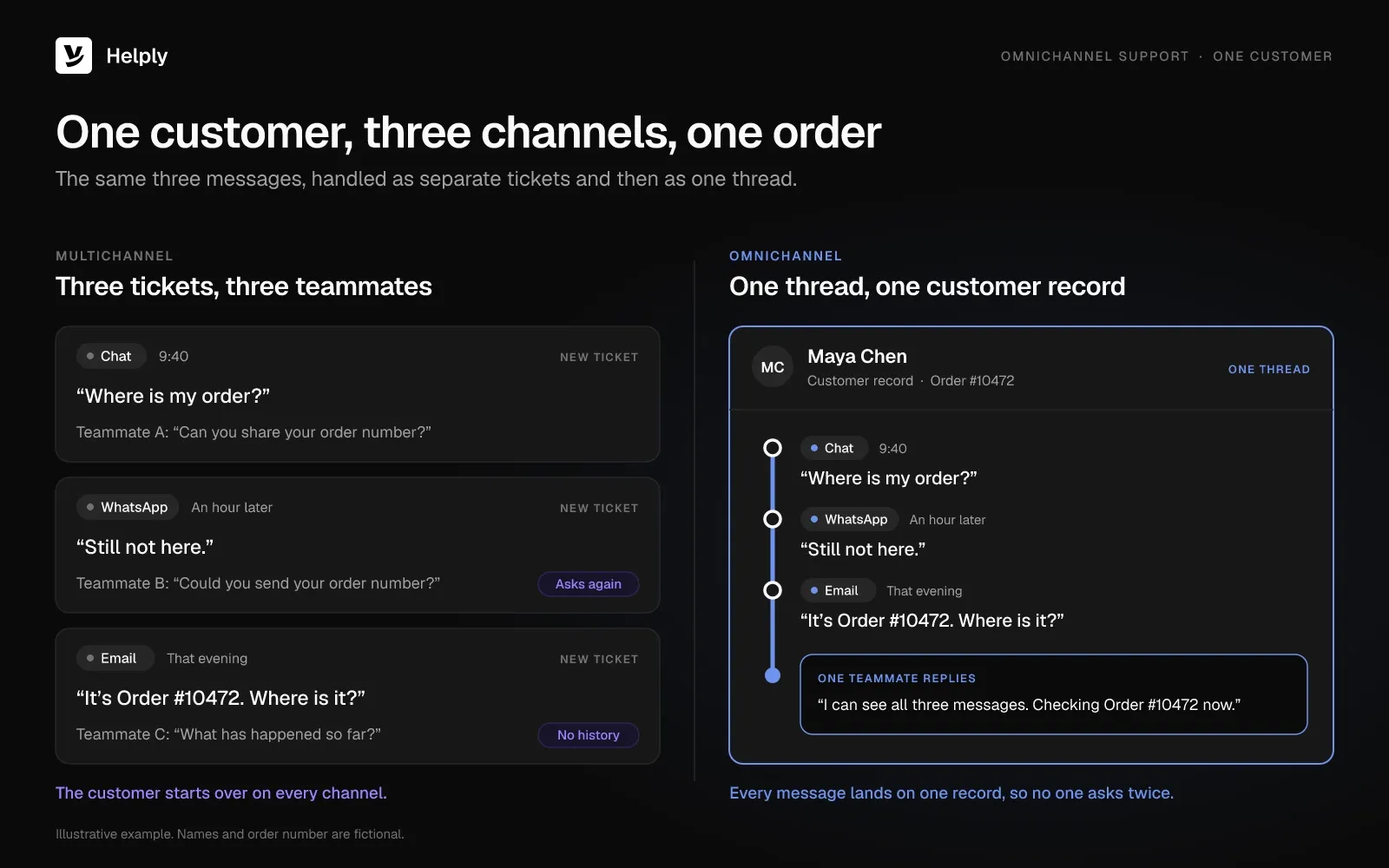
A customer opens your chat widget at 9:40 and asks where their order is. An hour later they message "still not here" on WhatsApp. That evening they email the order number with a subject line in capitals.
Your team now has three tickets from one person. Two teammates ask for the order number again, and the customer gets three different answers. Omnichannel customer support puts those three messages in one thread.
A small team can fix it with one shared customer record and a handoff that carries the work. Then track six metrics to see whether customers stop repeating themselves.
What is omnichannel customer support?
Omnichannel customer support is a way of running support where every channel feeds one customer record and one conversation history. A customer can start in chat, continue on WhatsApp and finish by email without starting over. Every teammate and AI agent works from the same timeline.
Omnichannel customer service means the same as omnichannel customer support. Teams that say "service" often include pre-sale questions, and "support" covers help after purchase. Both use the same mechanics.
Retail researchers gave the idea a formal definition. Verhoef, Kannan and Inman defined omnichannel management in the Journal of Retailing in 2015 (p. 176) as "the synergetic management of the numerous available channels and customer touchpoints, in such a way that the customer experience across channels and the performance over channels is optimized."
Omnichannel customer experience covers the whole journey, marketing and sales included. Support is the part where the customer needs an answer.
How does omnichannel customer support work?
Omnichannel support runs on four parts: identity matching, one conversation thread, shared customer context, and routing with handoffs. Miss one, and the customer starts repeating themselves.
- Identity matching. An omnichannel help desk links an email address, a phone number, a WhatsApp handle and a logged-in user to one customer. Without it, the same customer looks like a stranger on each new channel.
- One conversation thread. Messages from every channel land in the same timeline, in order. A teammate reading the email sees the chat and the WhatsApp message above it.
- Shared customer context. Order status, subscription plan, past tickets and internal notes sit beside the thread. Your teammates can skip asking for details the business already holds.
- Routing and handoffs. Rules send each conversation to the right teammate or AI agent by channel, topic or priority. Any handoff passes the history along with the conversation.
Sinch ran a vendor survey of 2,800 consumers in January and February 2025 for its State of Customer Communications 2025. Of those consumers, 59% said it matters that information flows between channels such as chat, email, text and voice.
Omnichannel vs. Multichannel Support
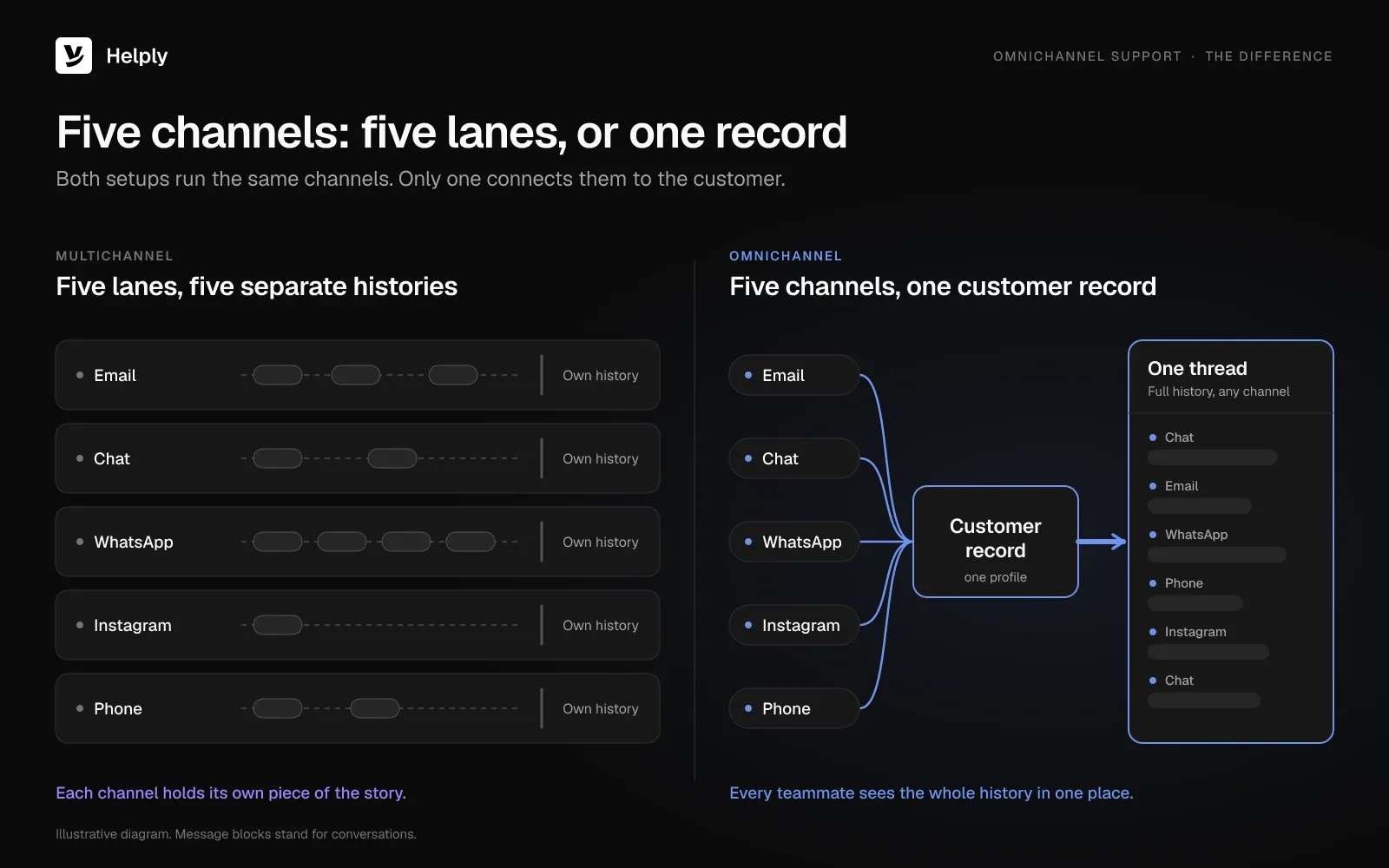
Multichannel customer service means a business offers several contact channels, each run on its own. Omnichannel support connects those same channels to one customer record, one history and one set of rules. A customer who switches channels keeps the same conversation.
| What changes | Multichannel support | Omnichannel support |
|---|---|---|
| Channel setup | Separate tools or inboxes per channel | All channels in one workspace |
| Customer history | Split across channels | One timeline per customer |
| Switching channels | Customer repeats the issue | Conversation continues where it left off |
| Agent view | Sees one channel's history | Sees every message, order and past ticket |
| Routing | Per channel, often manual | One set of rules across channels |
| AI handoff | Bot transcript stays in the bot tool | Transcript and findings move to the teammate |
| Reporting | Per channel, hard to combine | One report across channels |
A team can run five channels and still be multichannel. Support turns omnichannel once you connect all five to one customer record.
Is omnichannel still a thing?
Yes, because more than half of service journeys now start outside a company's own channels. Gartner surveyed 5,801 customers in January and February 2025 and published the results in July 2025.
The survey found 51% of customer service journeys now begin on third-party platforms such as Google, YouTube and ChatGPT. Only 22% of customers start, stay and resolve their issue entirely in a company's own channels.
In December 2024, Gartner predicted that 30% of Fortune 500 companies will offer service only through a single AI-enabled channel by 2028. That channel would handle text, image and sound.
A customer who arrives from a search result or an AI answer still needs one history once they write in. Your team and AI agents answer from that same history.
Key Benefits of Omnichannel Support
Customers repeat themselves less, and teammates answer from one record instead of three tickets.
- Customers stop repeating themselves. In Sinch's 2025 vendor survey, 81% of consumers had a negative reaction to repeating information after a channel switch or a bot-to-person handoff.
- Answers stay consistent. Your team answers chat and email from the same record. Salesforce's research with 15,015 consumers, released in October 2024, found 69% expect consistent interactions across departments.
- Fewer touchpoints per issue. Salesforce's October 2024 research found nearly 60% of consumers prefer fewer touchpoints to get information or complete a task.
- Teammates answer on the first reply. A teammate who sees the order, the plan and the last three messages can answer without a round of questions.
- Cleaner counts. One record per customer shows which issues repeat across channels, so you count each problem once.
What has to travel with an AI-to-human handoff?
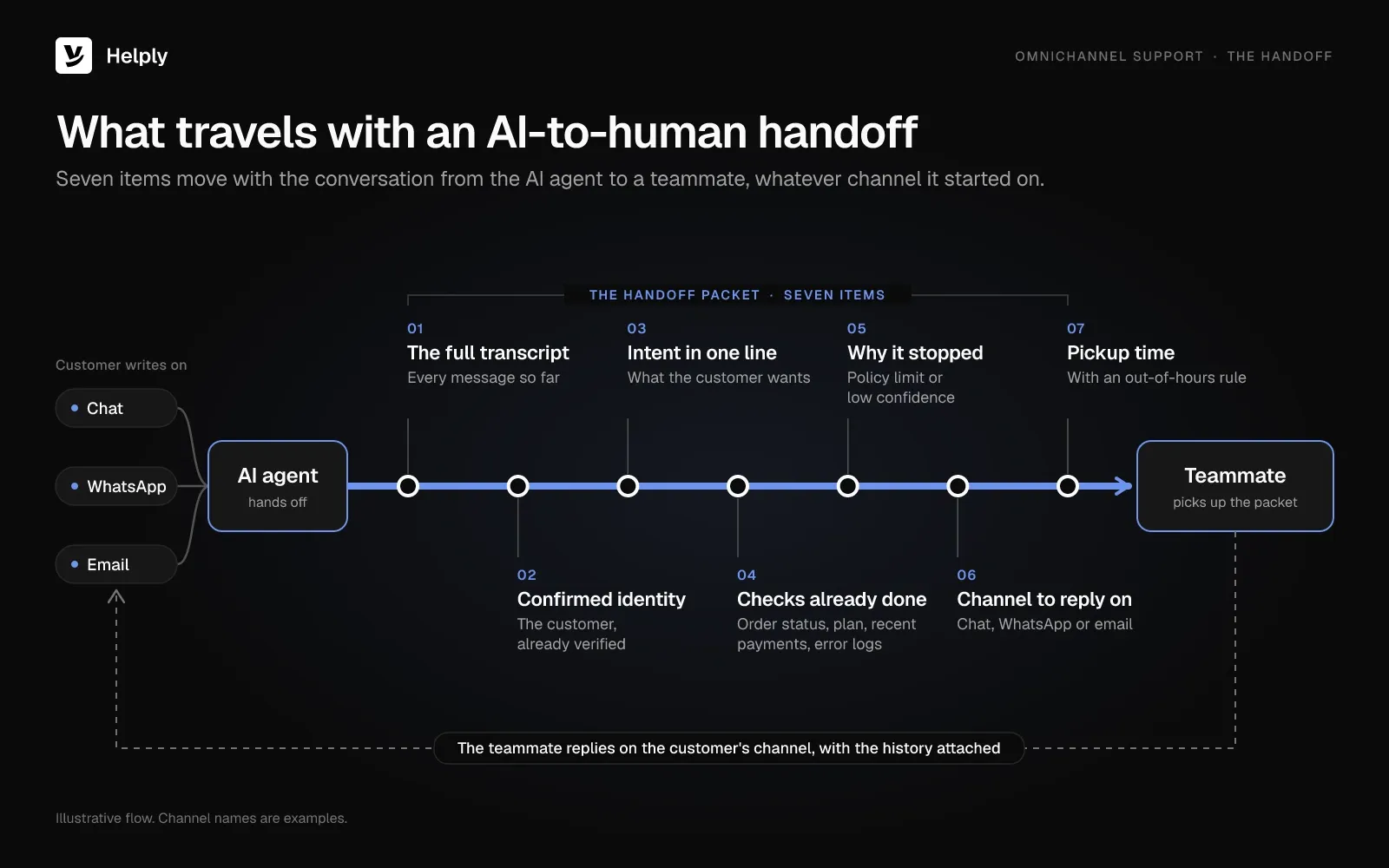
Seven things have to travel with an AI-to-human handoff. The teammate needs the transcript, the confirmed identity, the intent, the checks done and why the AI stopped. The teammate also needs the reply channel and a pickup time.
Once an AI agent takes the first reply, omnichannel support depends on the handoff to a person. Gladly and Wakefield Research surveyed 1,000 US adults who use AI support, in a vendor-sponsored study run in January 2026.
In that January 2026 Gladly study, 59% preferred AI-powered support as a first step. Yet 45% said that preference disappears when a human handoff feels difficult.
Check that every handoff, on every channel, carries these seven items:
- The full transcript, including what the AI agent said and what it linked.
- The confirmed customer identity, so the teammate doesn't ask for an email or order number again.
- The intent in one line, such as "refund for a damaged item" or "can't log in after a password reset."
- The checks already done, such as order status, plan, recent payments or error logs.
- The reason it stopped, for example a policy limit or low confidence in the answer.
- The channel to reply on, so the answer goes back where the customer is waiting.
- A pickup time, with an out-of-hours rule that tells the customer when a person will reply.
Test the handoff by sending a message on each channel and forcing an escalation. If the teammate has to scroll back to another tool, the handoff is broken.
How Helply keeps one conversation across channels
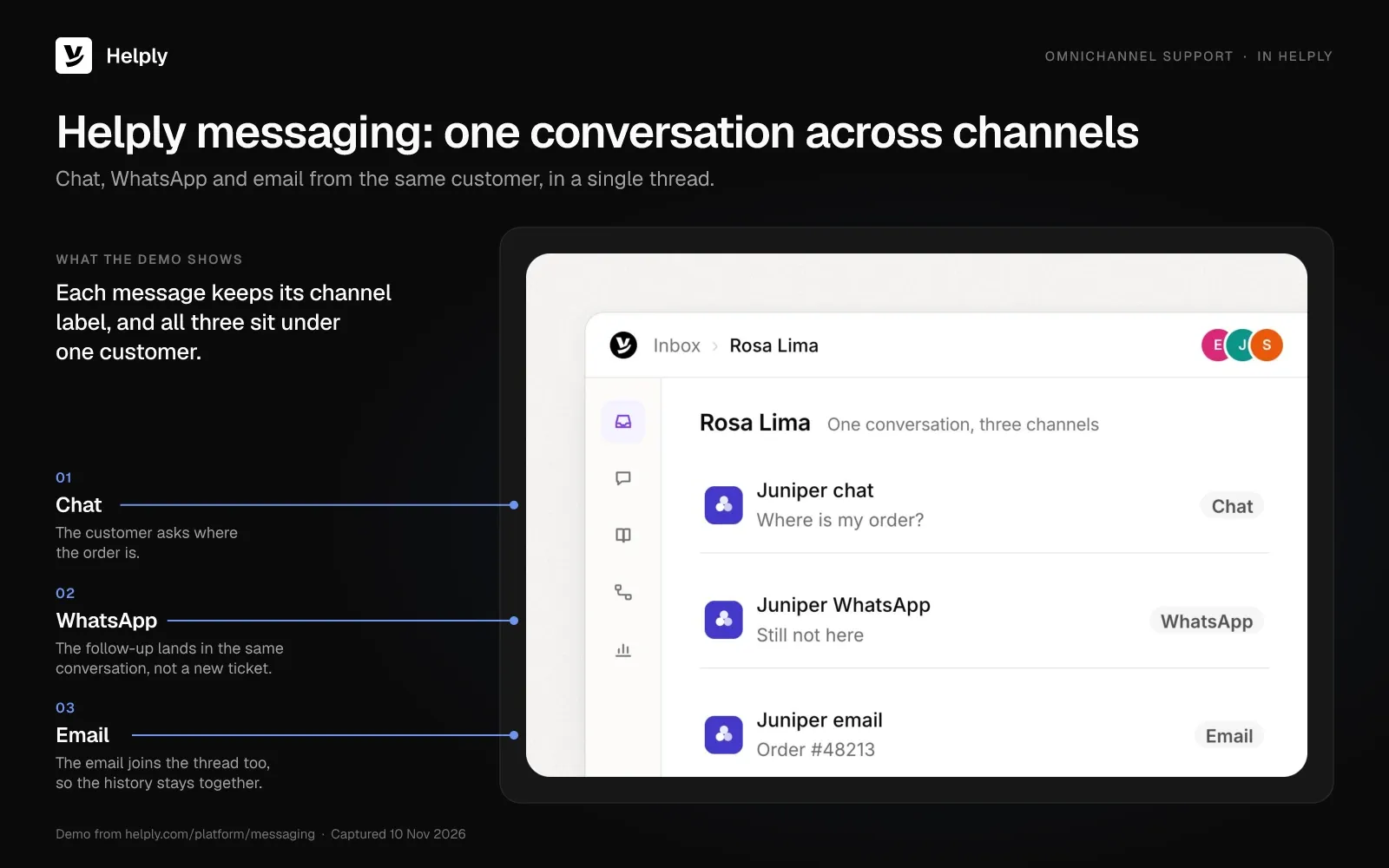
Helply is an AI-native customer support platform uniting email, chat, WhatsApp, Discord, Telegram, Slack, Microsoft Teams, phone and SMS in one workspace. Chat and messaging land in the same Helply inbox as email, so your team reads one customer's history in one place.
- AI answers first, then hands over with context. An AI agent can reply at once when Helply holds the knowledge and confidence to resolve the question. Otherwise, the Support Agent escalates with its investigation and the customer's context already gathered.
- Customers don't have to start over. Your team gets the full history, the customer's context and the work the AI agent finished. A teammate picks up where the AI agent stopped, without asking for the order number again.
- Customer details sit beside the conversation. Customer profiles show account information, conversation history, customer details and support activity in one view. AI agents get the same customer and account context as your team.
- Routing covers every channel. Workflows route conversations by customer, channel, priority, topic, language or account information to a person, team or AI agent.
- One knowledge base behind every channel. Customers, teammates and AI agents all draw on one knowledge base.
- Calls join the record. Phone and SMS connections link supported call information and transcripts, plus follow-up, to the customer's support history.
- AI agents cover the night shift. They handle common questions around the clock and escalate the conversations that need human judgment.
- The numbers sit in one place. Analytics shows resolutions, response times, escalations, CSAT and AI performance together, so you skip stitching reports from several tools.
Every plan comes with the Support Agent and Assist Agent, plus a shared pool of AI credits. Email, live chat, Facebook and Instagram are on every plan, and Microsoft Teams starts on Pro. WhatsApp, SMS, Slack Connect, Discord, escalation rules, SLAs and round robin start on Team.
How to set up omnichannel support with a small team
A team of two to ten people can run omnichannel support without a big rollout. Connect the channels that carry most of your volume, then prove the handoff works before adding more.
- Count your last 90 days. List every channel customers used and its conversation count, including unowned ones like Instagram DMs or a founder's inbox.
- Pick the top two or three journeys. Name the paths customers take most often, such as chat then email about a late order.McKinsey research from 2020 found more than half of customers use three to five channels in a single purchase or service journey. In some use cases, McKinsey reported that focusing on the top cross-channel journeys lifted self-service containment by nearly 20%.
- Choose your identity keys. Pick the fields that match a customer across channels, such as email, phone number, login or order number, and ask for one early.
- Connect channels one at a time. Forward your support address, install the chat widget, then add WhatsApp Business or social messaging, and test each before launch.
- Set routing and coverage hours. Write one rule set for the whole queue: who owns billing, who owns bugs, and what happens after hours.
- Test the handoff on every channel. Force an escalation from chat, WhatsApp and email, and check each item on the seven-point handoff checklist.
- Publish response times per channel. Set a reply target for chat, messaging and email, track each with support SLAs, and show it where customers write in.
Which channels should a small team connect first?
Start with email and live chat, then add the messaging app your customers already use. Email led in Sinch's State of Customer Communications 2025, a vendor survey of 2,800 consumers run in January and February 2025.
About 31% wanted support by email, 22% wanted live chat with a person and 19% chose a call center. Only about 5% picked an AI chatbot as their preferred channel.
Add WhatsApp or Instagram when your 90-day count shows customers reaching you there. Before adding a channel, name who answers it at night: a teammate or an AI agent. Compare options in our roundup of customer communication tools.
Which metrics show omnichannel support is working?
Six metrics show whether omnichannel support is working. They are repeat contact rate, channel switch rate, cross-channel first contact resolution, re-asked information rate, handoff pickup time and AI resolution rate.
| Metric | Formula | What it shows |
|---|---|---|
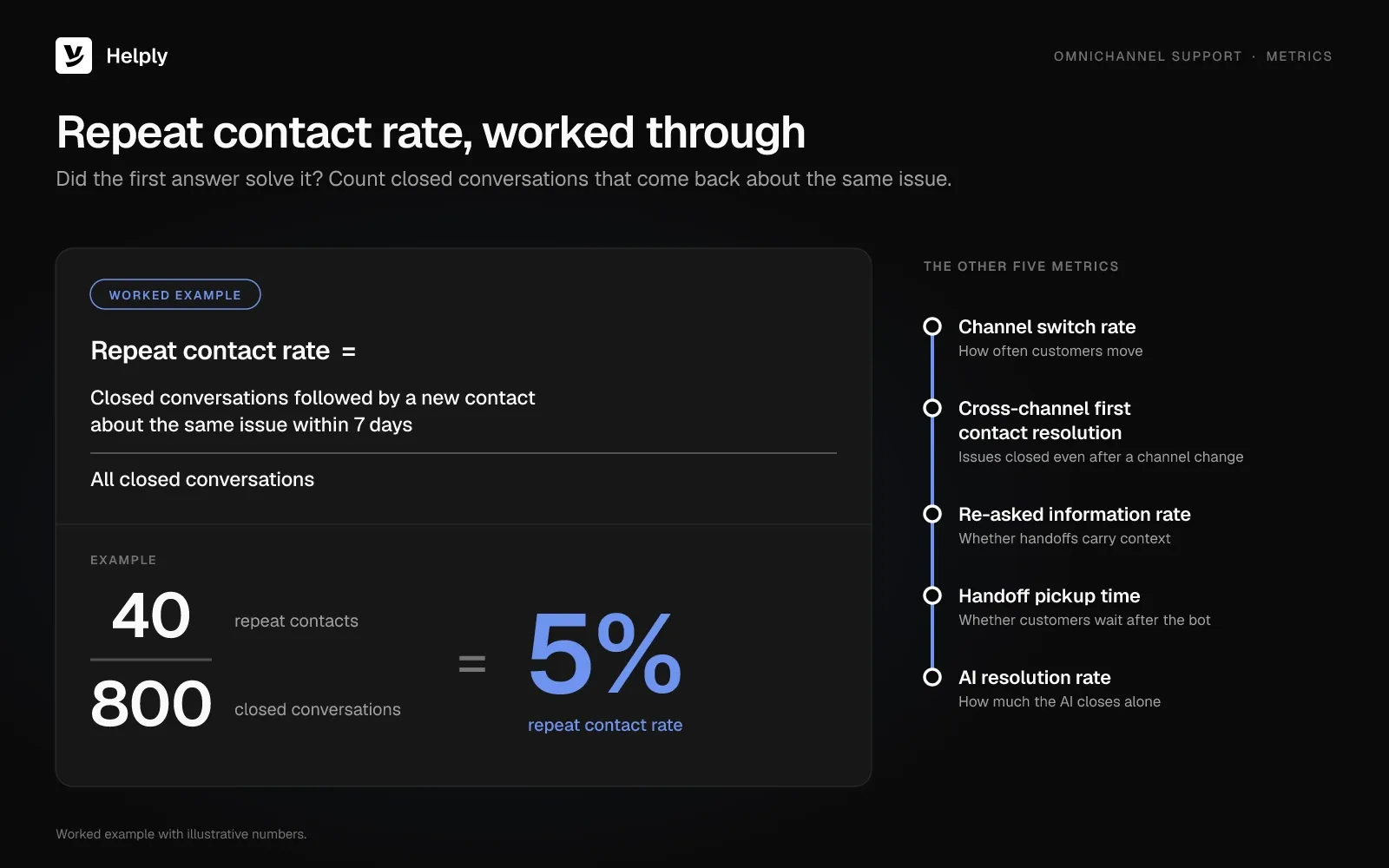
| Repeat contact rate | Closed conversations followed by a new contact about the same issue within 7 days ÷ all closed conversations | Whether the first answer solved it |
| Channel switch rate | Conversations that span two or more channels ÷ all conversations | How often customers move |
| Cross-channel first contact resolution | Issues resolved without a second contact on any channel ÷ all issues | Issues closed even after a channel change |
| Re-asked information rate | Handed-off conversations where a teammate asked for something already given ÷ all handed-off conversations | Whether handoffs carry context |
| Handoff pickup time | Median minutes from AI handoff to first human reply | Whether customers wait after the bot |
| AI resolution rate | Conversations an AI agent resolved end to end ÷ conversations it handled | How much the AI closes alone |
Track CSAT alongside these. Tag conversations that moved channels, then compare their scores with single-channel ones. If CSAT drops on switched conversations, check the handoff first.
Worked example: 40 repeat contacts from 800 closed conversations gives a 5% repeat contact rate.
Common omnichannel challenges and how to fix them
Small teams run into five omnichannel problems: duplicate customers, channel sprawl, mismatched answers, after-hours gaps and surprise channel costs.
- Duplicate customers. The same person shows up as an email contact and a WhatsApp number. Fix: ask for an email or order number early, and merge profiles weekly.
- Channel sprawl. Each new channel adds a queue with no owner at night. Fix: add a channel only after the 90-day count shows demand and you have an owner or an AI agent for it.
- Different answers on different channels. Chat macros and email templates drift apart. Fix: answer from one knowledge base and retire channel-specific templates.
- After-hours gaps. Messages arrive at 2 a.m. on WhatsApp while email waits for Monday. Fix: let an AI agent answer common questions overnight and tell customers when a person will follow up.
- Channel costs you didn't plan. Messaging channels, voice and AI often sit on higher plans or bill per use. Fix: before you buy, price the lowest plan that covers every channel you need.
Omnichannel Platforms Compared: Entry Price, Channel Gates and AI Fees
Each of these eight platforms puts a messaging channel, voice or AI on a higher plan or an add-on. Helply does too, so price the plan that includes your channels. November 2026 list prices are a month per seat, agent or user unless a cell says otherwise, with annual billing in parentheses.
| Platform | Entry plan | Where messaging and social start | Voice | AI agent pricing |
|---|---|---|---|---|
| Helply | Starter, $79 a seat ($79): email, live chat, Facebook, Instagram | WhatsApp, SMS, Slack Connect, Discord on Team, $499 a month for 5 seats ($499) | Supported call information and transcripts join the customer's history | Support and Assist Agents on every plan; Starter gives each seat 500 credits, Team pools 15,000; 10 credits per end-to-end resolution; no credits for a handoff after an AI attempt |
| Zendesk | Support Team, $25 ($19): email and ticketing | Suite Team, $69 ($55): messaging, live chat, social; extra fees apply; SMS add-on | Telephony from Suite Team | Team plans include 5 automated resolutions an agent each month; each extra one is $1.50 committed, $2.00 on pay-as-you-go |
| Freshdesk | Growth, $23 ($19): email only | Freshdesk Omni Growth, $35 ($29): chat, WhatsApp, Messenger, Instagram | Paid add-on on every Omni plan, plus call rates | 500 Freddy AI Agent sessions per account, one time; extra sessions cost $49 per 100 |
| Front | Starter, $35 ($25): one channel type | Professional, $85 ($65): multiple channels and social; native WhatsApp is a paid add-on | Through integrations such as Aircall and Dialpad | Autopilot $0.39 per handoff, $0.89 per resolution |
| Intercom | Essential, $39 ($29) list, with a new-customer discount | Live chat, inbound email, inbound WhatsApp (billed per message), Telegram, Discord on Essential; social from Advanced, $99 ($85) | Billed per minute | Fin $0.99 per outcome, once per conversation; handoffs via Procedures count as outcomes |
| Help Scout | Free plan, email only; Standard, $30 ($25) | Standard: chat, WhatsApp, Instagram, Messenger; native SMS from Plus | Integration only | Envoy add-on, $0.75 per resolution |
| Hiver | Omni Growth, $35 ($25): email, chat, WhatsApp, SMS | Slack from Pro | $30 a voice seat add-on | AI agents on every plan, no usage fee listed |
| Gorgias | Starter, $10 a month for 50 tickets (monthly billing only) | Email, chat and social on every plan | Voice and SMS add-ons priced by volume | Billed per automated interaction; $1.50 each past the plan limit |
Help Scout's free plan fits an email-only queue. Freshdesk Omni and Hiver Omni put WhatsApp on their entry plans at $35 a seat a month. Gorgias prices by ticket volume, so a store under 50 tickets a month can start at $10.
Intercom puts Telegram and Discord on Essential but bills Fin per outcome. Helply's WhatsApp comes with Team, $499 a month covering 5 seats, while 5 seats on a $35 Omni plan cost $175.
Team's price covers 15,000 AI credits each month. Intercom Fin, Front Autopilot and Help Scout Envoy bill each AI result on top of seats.
For a small team, compare the plan that covers your top two or three channels plus the AI you'd use. Helply pricing shows the channels on each plan.
Start With Two Channels, or Connect Them All Now?
Start with the two channels that carry most of your volume. Add the rest once a forced handoff passes on both.
If one channel carries almost all of your volume, stay there and fix response times first. An email-led team with light chat can start on any help desk with a shared inbox and a widget. A large contact center with heavy phone volume needs voice routing, which points to a different shortlist.
Helply fits teams whose customers move between chat, email and messaging, and who want AI agents that hand over with the work done. On Team, a customer who writes in chat, on WhatsApp and by email about one order lands in one thread. A handoff to a teammate after an AI attempt uses no credits.
MyBaggage runs web, email and WhatsApp on one Helply platform, and its customers get tracking and customs answers 24/7.
Starter is $79 a month per seat for teams of 1 to 3, and each seat brings 500 AI credits. It covers email, live chat, Facebook and Instagram. Team costs $499 a month and covers 5 seats, 15,000 AI credits, WhatsApp, SMS, Slack Connect and Discord.
Start by connecting your support address and the chat widget. Then force one handoff and read what the teammate sees.
Frequently asked questions
Omnichannel means one conversation that follows the customer across every channel they use. A customer who starts in chat and switches to email keeps the same thread and history. The next person to answer already knows the issue.
Omnichannel customer service connects every channel a customer uses to one record and one conversation history. It covers the same mechanics as omnichannel customer support: identity matching, one thread, shared context, routing and handoffs. Some teams use "service" to include pre-sale questions as well.
No. A CRM stores customer records, deals and account data. Omnichannel support uses that data inside every conversation, so the person answering sees the customer's orders, plan and history next to the message.
MyBaggage, a global luggage-shipping service, runs omnichannel support on Helply. Customers ask about tracking, delivery windows and customs on web, email and WhatsApp. Helply's Support Agent answers on all three from one platform with live tracking data, and it resolved 77% of questions end to end.
Ecommerce stores, SaaS products and marketplaces use it when their customers switch channels mid-issue. McKinsey research from 2020 found more than half of customers use three to five channels in a single purchase or service journey. Small teams adopt it once the same customer starts opening tickets on two or more channels.
Zendesk, Freshdesk Omni, Front, Intercom, Help Scout, Hiver, Gorgias and Helply all offer plans that connect several support channels. They differ most in which plan unlocks messaging channels and voice. Helply puts email, live chat, Facebook, Instagram and its Support and Assist Agents on every plan, with WhatsApp and SMS from Team.
At November 2026 list prices, Gorgias starts at $10 a month for 50 tickets and a Helply Starter seat is $79 a month. Zendesk adds messaging on Suite Team at $69 an agent a month ($55 billed annually). Helply adds WhatsApp and SMS on Team, where $499 a month buys 5 seats and a 15,000-credit AI pool.
A small team needs it once customers reach it on more than one channel and start repeating themselves. Zendesk's CX Trends 2026 report found 74% of consumers get frustrated repeating their story to one agent after another. Start with two channels and one shared record.
About the author

Alex Turnbull
CEO & Founder, Helply
Alex is the CEO & Founder of Groove. He loves to help other entrepreneurs build startups by sharing his own experiences from the trenches.