
 Konrad Janczyk ··14 min read

It's Monday, and your week is already gone. A routing rule sent billing questions to the wrong group over the weekend, and leadership wants an SLA report by Wednesday. Meanwhile, three help articles describe a settings page that changed last month.
None of that work sits in your job description. You're the help desk admin, the report builder and the scheduler, so you push coaching sessions and quality reviews back again.
Each of those jobs belongs to support operations. Once someone owns them, you can win those hours back for coaching.
What Is Support Operations?
Support operations is the team, or the person, that owns the system customer support runs on: its tools, rules, data and knowledge. Help Scout defines the team as one that helps support "be more productive, work more effectively, and deliver better service to their customers."
Frontline agents work one conversation at a time. Support ops improves the setup behind all of them: routing rules, QA and staffing plans. You'll also see the function called customer support operations, customer service operations or support ops.
In operations and support, each side feeds the other. Agents spot the broken macro or the missing article, and support ops fixes it for the conversations that follow.
Customer Support vs. Support Operations: Focus, Work and Metrics
| Aspect | Customer support | Support operations |
|---|---|---|
| Focus | Resolving each customer's issue | Improving the system that handles every issue |
| Unit of work | A conversation or ticket | A rule, report, schedule, scorecard or article |
| Typical metrics | First response time, resolution time, CSAT | SLA attainment, forecast accuracy, cost per resolution, AI resolution rate |
| Time horizon | Today's queue | Next week, next quarter and next year |
What Does Support Operations Own?
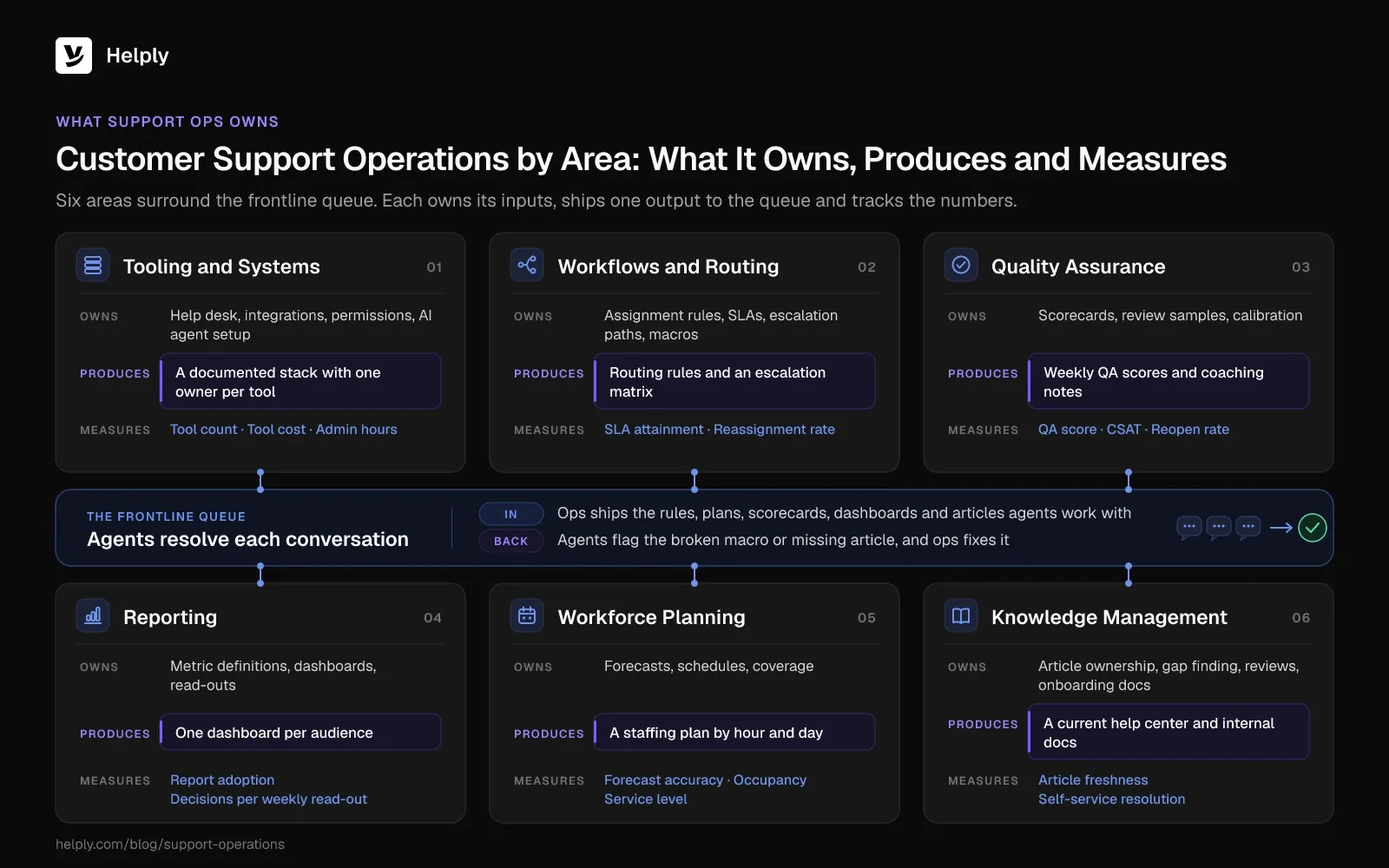
Support operations owns six areas: tooling, workflows, quality assurance, reporting, workforce planning and knowledge management. For each area, ops delivers an output the team uses each day and tracks a metric that shows whether it works.
Customer Support Operations by Area: What It Owns, Produces and Measures
| Area | What support ops owns | What it produces | What it measures |
|---|---|---|---|
| Tooling | Help desk, integrations, permissions, AI agent setup | A documented stack with one owner per tool | Tool count, tool cost, admin hours |
| Workflows | Assignment rules, SLAs, escalation paths, macros | Routing rules and an escalation matrix | SLA attainment, reassignment rate |
| Quality assurance | Scorecards, review samples, calibration | Weekly QA scores and coaching notes | QA score, CSAT, reopen rate |
| Reporting | Metric definitions, dashboards, read-outs | One dashboard per audience | Report adoption, decisions per weekly read-out |
| Workforce planning | Forecasts, schedules, coverage | A staffing plan by hour and day | Forecast accuracy, occupancy, service level |
| Knowledge managementz | Article ownership, gap finding, reviews, onboarding docs | A current help center and internal docs | Article freshness, self-service resolution |
Tooling and Systems
Support ops owns the help desk and everything wired into it: the CRM, billing, bug tracker, chat widget and any AI agents. That includes permissions, field setup, integrations and the admin work every tool change creates.
Tool sprawl is a common failure. In the Freshworks Cost of Complexity report, published November 2025, 36% of CX respondents named switching between too many tools a top frustration.
For its State of Service report, Salesforce polled 6,500 service professionals from April through June 2025. Reps in that survey spent less than half their time (46%) with customers. Salesforce names admin tasks and internal duties as part of the reason.
A good ops owner audits the stack every quarter. Each tool needs a clear job, one owner and a connection to the help desk instead of its own tab.
Workflows, Routing and SLAs
Support ops writes the rules that move work. Each routing rule sends a conversation to a teammate, a group or an AI agent based on channel, topic, priority, language or account.
Ops sets SLA targets for how fast each kind of conversation gets a first reply and a resolution. It also maps escalation paths: who takes over when the first owner can't solve a conversation, and what context goes with it.
For example, an enterprise conversation tagged billing and left unassigned for 15 minutes goes to the billing lead with a priority flag. Ops tests each rule on real traffic and reviews reassignment rates monthly.
Quality Assurance
QA checks whether answers are accurate, complete and on tone. Support ops writes the scorecard and picks a review sample each week. It also runs calibration, so two reviewers give the same conversation the same score.
Ops turns QA results into coaching. For each score, the reviewer writes a note the agent can act on. If a miss repeats, ops fixes the macro, article or rule behind it.
Read QA beside CSAT survey results to see whether accurate answers also leave customers satisfied.
With AI agents in the queue, QA covers their conversations too. An AI answer that quotes an outdated policy needs the same review as a human one.
Reporting and Analytics
Support ops defines every metric once and builds a dashboard for each audience. Agents need the live queue, managers need backlog and resolution trends, and executives need cost, volume and customer outcomes.
Each week, ops pulls two or three decisions from the dashboard: a routing change, a staffing shift or an article to write. For layouts by audience, see these customer support dashboard examples.
Give self-service results their own line on the dashboard. Self-service fully resolved only 14% of customers' issues, according to a December 2023 Gartner survey that covered 5,728 people. Count the problems self-service solved, since a customer who closes a help page may still open a ticket.
Ops also carries the queue's lessons to other teams. Each month, ops sends product and engineering the top contact reasons, with the bugs and confusing screens behind them.
Workforce Planning and Staffing
Workforce planning turns forecast volume into schedules. Support ops forecasts conversations by hour and day and multiplies by handle time. Then it allows for shrinkage: the paid hours agents spend away from the queue.
Take a team expecting 6,000 conversations a month at 8 minutes each. That's 48,000 minutes, or 800 hours of handle time.
Assume each agent works 160 paid hours a month and loses 30% to meetings, training, breaks and leave. That leaves 112 productive hours per agent.
At an 80% occupancy target (the share of productive time spent on conversations), each agent covers about 90 hours a month. The team needs 9 agents, before any coverage for nights or weekends.
If AI resolves 40% of those conversations end to end, people handle 480 hours. The plan drops to 6 agents, before any time spent reviewing AI conversations. For other levers, see how to scale customer support without hiring.
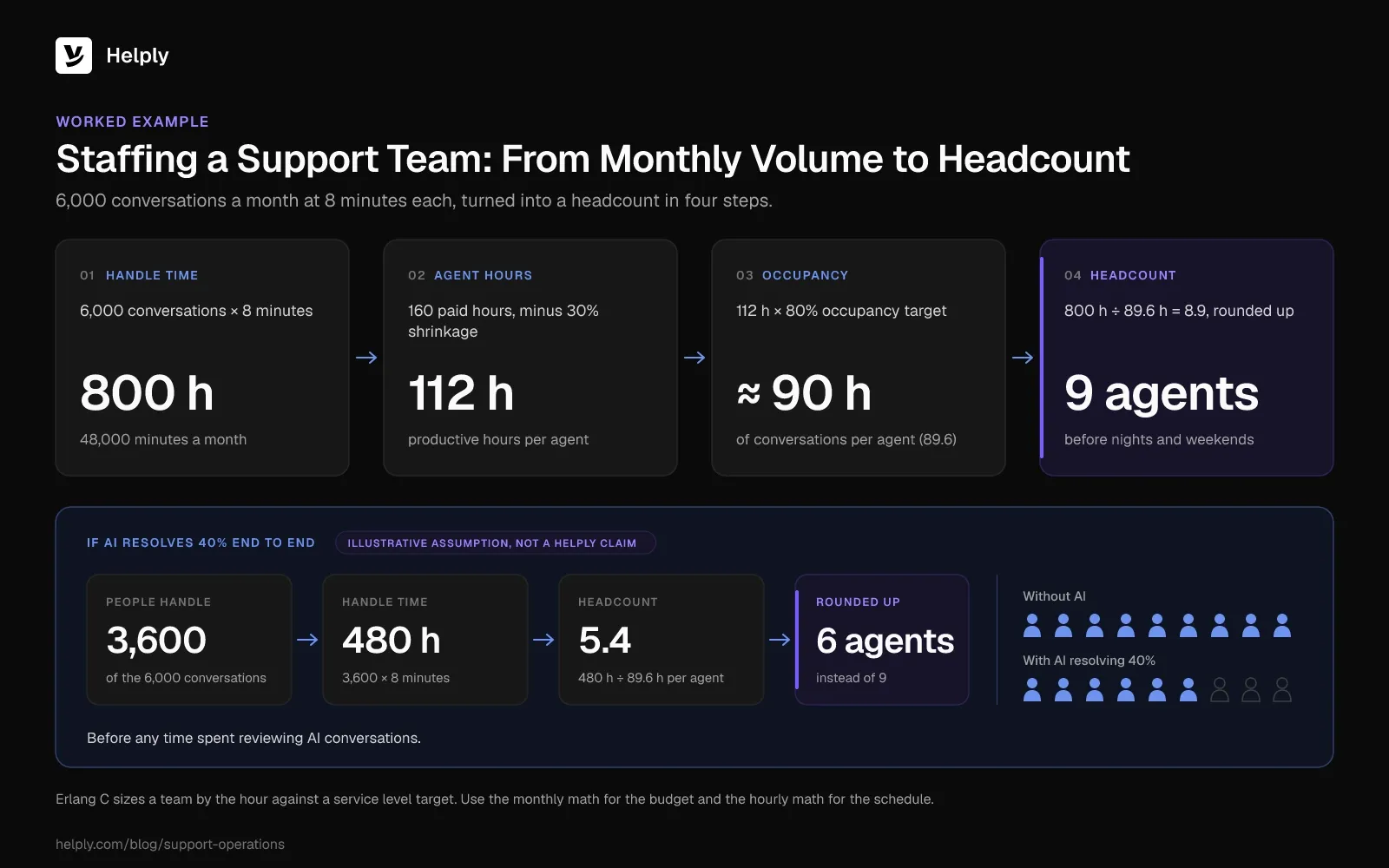
Contact centers size teams by the hour with Erlang C. TechTarget says it is "widely considered a standard calculation for managing call centers." Use the monthly math for the budget and the hourly math for the schedule.
Knowledge Management
Support ops gives every help article an owner and a review date. It finds gaps from real conversations: questions that keep reaching agents without an article behind them.
Stale content is a common problem. In a Gartner survey of 187 service leaders in July and August 2024, 61% reported a backlog of articles to edit. In the same survey, more than a third had no formal process for revising outdated articles.
In Gartner's December 2023 customer survey, the most common reason self-service failed was that customers couldn't locate relevant content. That happened in 43% of failures.
Knowledge also covers onboarding. Support ops keeps the training guide, the macro library and the internal docs new hires learn from, so agents give more consistent answers.
For the basics, see this guide to what a knowledge base is.
How Do AI Agents Change Support Operations?
With AI agents in the queue, support ops manages a second workforce alongside the macros and rules. Someone has to write the instructions AI agents follow, decide when they hand off and check what they say.
Gartner set a target year in a March 2025 forecast. It sees 2029 as the point when agentic AI resolves 80% of common service issues unaided.
In a Gartner survey of 275 service leaders in July and August 2026, 71% said they were shifting human agents into different roles. More than half had hired specialized staff to support AI initiatives. Only 21% of those leaders had reduced human agent headcount because of AI.
Running AI agents puts four new jobs on the support ops list:
- Instructions: write the policies, tone rules and boundaries every AI agent follows.
- Handoff rules: decide which topics, confidence scores and account conditions move a conversation from AI to a person.
- Testing: replay the AI on past conversations to see how it would answer them after a change.
- Split reporting: track what AI resolves alone, what reaches people and where AI needs help.
Disconnected tools slow AI work too. In Salesforce's 2025 State of Service survey, 44% of service leaders using AI said tech silos had delayed or limited their AI initiatives.
Running Support Operations in Helply
Helply is an AI-native customer support platform. Ops can fix a routing rule, check a report and update an article without leaving it. The inbox, live chat, help center, rules, reports and AI agents all sit in one workspace.
- Tooling, one place to work: email, chat and other channels land in one shared inbox with views, tags, macros and collision detection. Jira, Linear and HubSpot connect to it, and Slack notifications keep the team posted.
- Workflows, self-serve routing: routing rules assign conversations to a person, team or AI agent using the customer, channel, priority, topic or account. Round robin and load balancing spread work across the team. Teams can set up and change many common rules themselves, without waiting on engineering.
- SLAs, warnings before a miss: Helply shows which conversations need attention before they miss an SLA target. Escalation rules trigger on the situations, confidence levels or customer conditions you set. The person who takes over gets the investigation and customer context.
- QA, answers checked against your rules: AI QA scores conversations against your Guidelines, the instructions your AI agents follow. Backtesting replays the AI on past conversations, so you can see how it would have answered them.
- Reporting, human and AI side by side: Helply's analytics view shows response times beside what AI resolves alone and what causes escalations. SLA reports and custom reports can replace the Friday spreadsheet. Feed the AI resolution figure into your staffing math.
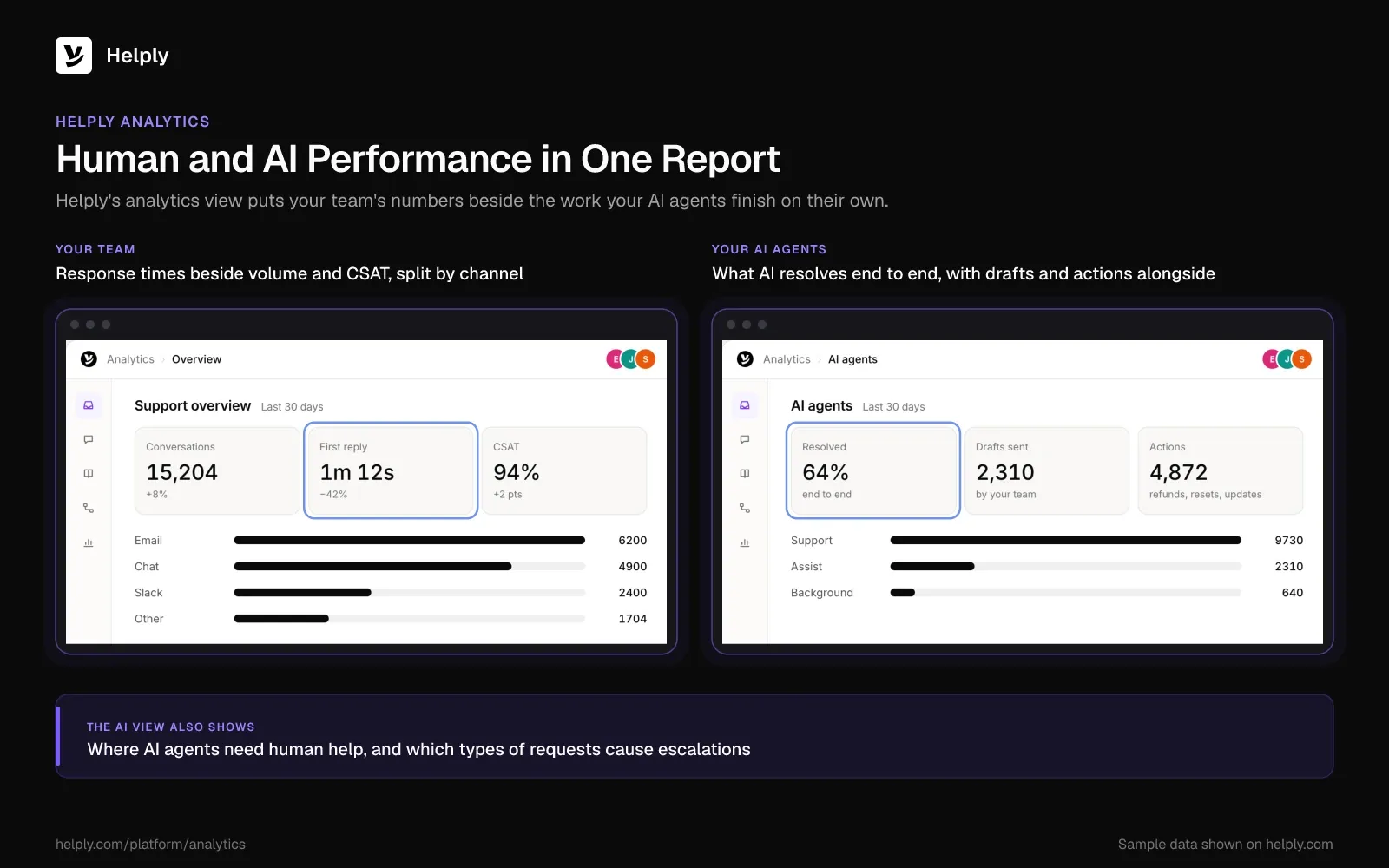
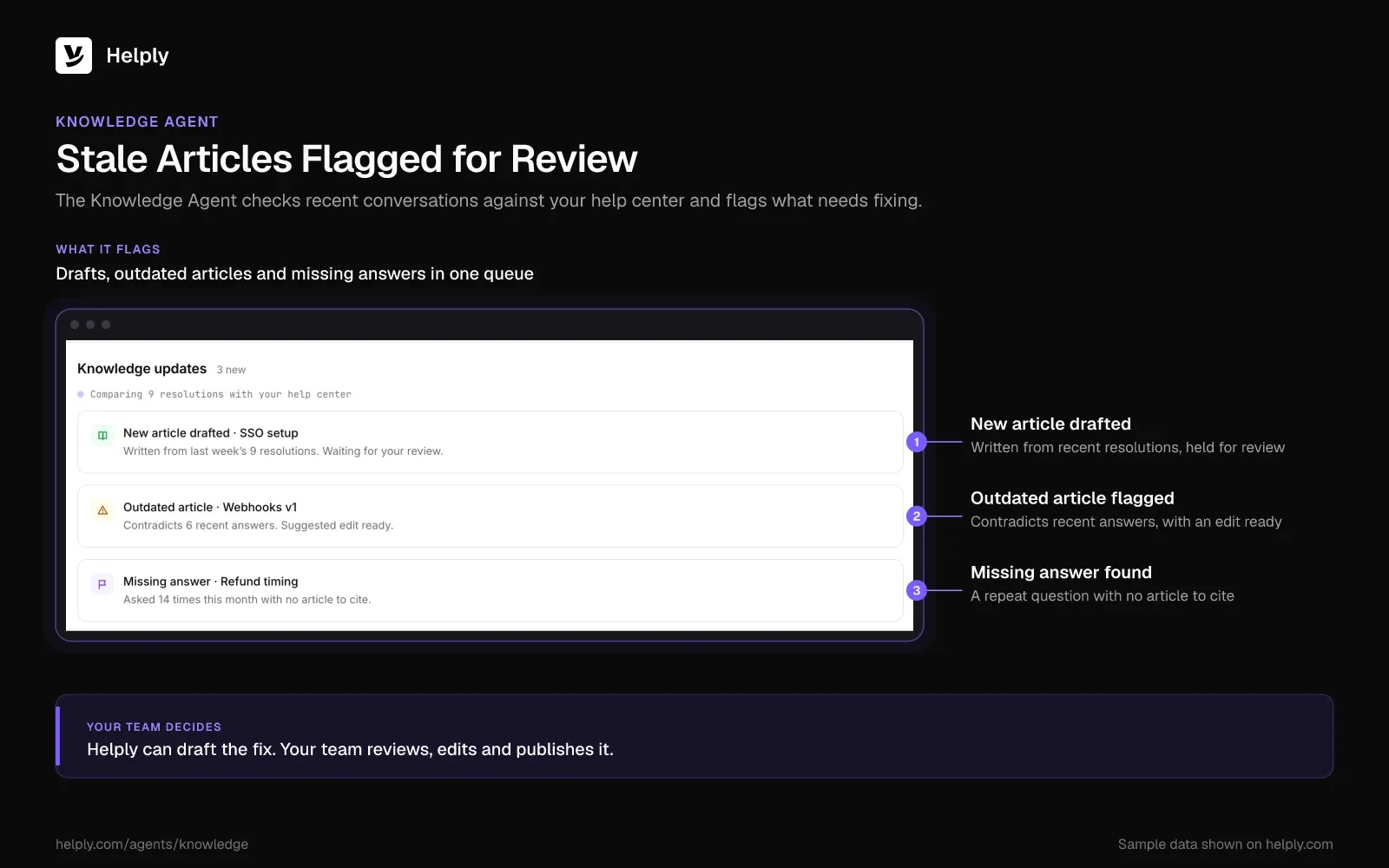
- Knowledge, stale articles flagged: the Knowledge Agent reads past conversations for unanswered questions and articles that have gone stale. Helply can draft the fix, which your team can then review, edit and publish. A private help center can hold internal docs for new hires.
- Trends, shared with your team: the Insights Agent spots recurring problems and emerging issues, then sends the findings to whoever needs them.
The Support Agent can resolve conversations end to end. If it can't, a person takes over with everything the agent already found. Guidelines for AI agents set how each one behaves, and Skills teach agents specific types of work.
The Team plan adds round robin, load balancing, SLAs, escalation rules, Skills, Jira, Linear and HubSpot. It also adds AI QA, backtesting, SLA and custom reports, a private help center and the Knowledge and Insights agents. AI reports, anomaly detection, custom dashboards and all Background agents start on the Pro plan, and skills-based routing and capacity planning on Growth.
See plans and what each includes.
When Does a Team Need a Support Operations Role?
A team needs a support operations role when fixing the system takes more time than anyone can give it on the side. Headcount is a weak trigger on its own.
Supportbench puts the first support ops hire around 20 support engineers, once admin work starts hurting frontline performance. Treat that number as a rule of thumb. A 10-person team on five channels with AI agents can need ops sooner than a 25-person team on email.
Signs Your Team Has Outgrown Ad Hoc Operations
- Agents route conversations by hand, or reassign a large share after the first touch.
- SLA tracking lives in a spreadsheet someone updates on Fridays.
- Every report starts with a CSV export and ends with a debate about definitions.
- Help articles describe screens or policies that changed months ago.
- QA reviews happen when someone has a free afternoon.
- New hires learn from whoever sits next to them, so answers vary by agent.
- AI agent instructions, handoff rules and tests have no owner.
- The support manager spends more hours on admin than on coaching.
Three or more of these signs together mean the work needs a named owner. If they persist after that owner gets protected time, hire.
Who Owns Support Operations Before the First Hire?
Before a dedicated hire, give one team lead protected hours for ops, such as one day a week. Write down the six areas and name one owner for each, even if the same person holds four of them.
Start with the work that compounds: routing rules, one shared metric dictionary and article owners. Once the protected day stops covering the list, write the job description.
What Does a Support Operations Manager Do?
A support operations manager owns the support stack, the rules inside it and the numbers that come out of it. That covers all six areas, including AI agent setup. In most teams, the role reports to the head of support or the VP of customer experience.
Day to day, the manager:
- Administers the help desk and its integrations, and approves every new tool.
- Designs routing, SLA and escalation rules, and reviews them monthly.
- Runs the QA program and calibration sessions.
- Builds dashboards and the weekly operating review.
- Forecasts volume and plans staffing.
- Sets knowledge base standards and owns article review dates.
- Configures AI agents and tracks AI resolution and handoff rates.
Look for people who have run a queue and bring systems thinking, comfort with data and the patience to document each rule.
ZipRecruiter's November 2026 figure puts the US average for a customer support operations manager at $123,678 a year, about $59 an hour.
How a Support Operations Team Grows Beyond One Person
The first hire covers all six areas. As the team grows, you split the areas into specialist roles:
- Systems admin: owns the help desk, integrations and AI agent setup.
- QA lead: runs scorecards, calibration and coaching notes.
- Workforce planner: builds forecasts and schedules.
- Knowledge manager: owns the help center, internal docs and onboarding material.
- Reporting analyst: owns metric definitions and dashboards.
The manager keeps routing, SLAs and the weekly operating review, and sets priorities across the specialists.
A 90-Day Plan for a New Support Operations Manager
Split the first quarter into three 30-day phases: audit, fix and scale.
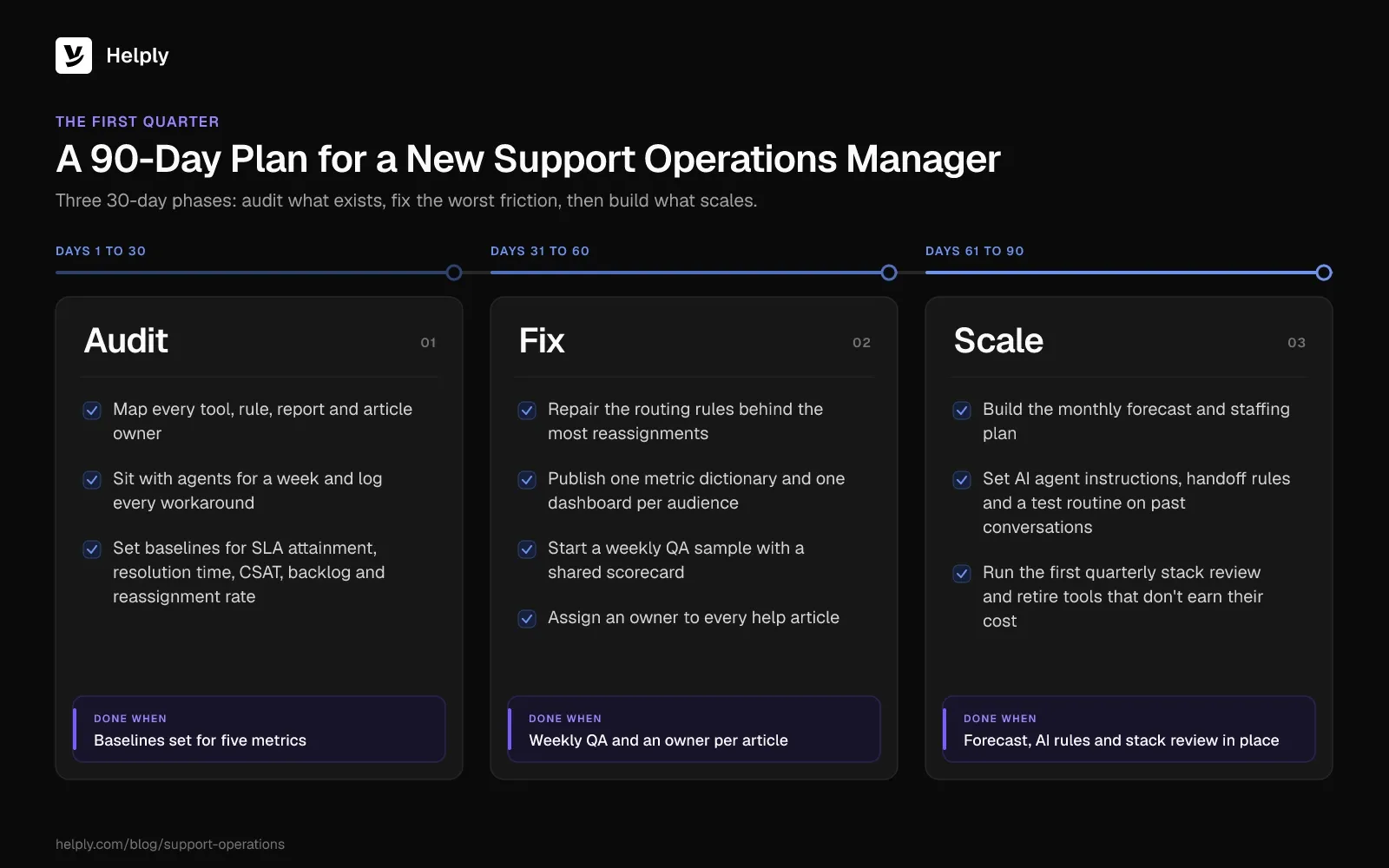
Days 1 to 30, audit: Map every tool, rule, report and article owner. Sit with agents for a week and log every workaround. Set baselines for SLA attainment, resolution time, CSAT, backlog and reassignment rate.
Days 31 to 60, fix: Repair the routing rules that cause the most reassignments. Publish one metric dictionary and one dashboard per audience. Start a weekly QA sample with a shared scorecard, and assign an owner to every help article.
Days 61 to 90, scale: Build the monthly forecast and staffing plan. Set AI agent instructions, handoff rules and a test routine on past conversations. Run the first quarterly stack review and retire tools that don't earn their cost.
Support Ops Hire Scorecard: Metrics That Show the Role Is Working
| Metric | What good looks like after 90 days |
|---|---|
| SLA attainment | Up from the day-1 baseline |
| Reassignment rate | Down, as routing rules improve |
| Resolution time | Down, with CSAT steady or up |
| Forecast accuracy | Within an agreed range of actual volume |
| Article freshness | Every article has an owner and a review date |
| AI resolution and handoff rate | Tracked weekly, with each handoff reason known |
| Manager admin hours | Down, with coaching time back on the calendar |
Hire a Support Ops Manager or Give the Work an Owner First?
Give the work an owner first, and hire once that owner runs out of hours. A team that still shows three or more signs after a protected ops day is ready for a support operations manager. If you run AI agents in the queue, you may reach that point sooner.
Picture that Monday with an ops owner in place. Ops tests the routing rule before the weekend and builds the SLA report from one agreed definition. Article owners update the three settings articles at their next review, and you put coaching back on your calendar.
Hired or assigned, the new owner audits fewer tools when the inbox, help center, reports and AI agents already run in Helply. After Sender.net moved onto Helply, flagged churn risks reached its customer success team days earlier.
Helply prices each plan by the number of human agents who reply to customers. Every plan bundles the Support and Assist Agents plus a shared pool of AI credits for the team.
Frequently asked questions
Support operations is the function that runs the tools, workflows, quality reviews, reports, staffing plans and knowledge a support team uses. Agents resolve conversations, and support ops improves the system that handles all of them.
An operations support manager, often titled support operations manager, owns the help desk, routing rules, QA, reporting, staffing forecasts and knowledge standards. With AI agents in the queue, the manager also owns their instructions, handoff rules and testing.
Customer support resolves individual conversations, while support operations improves the system behind every conversation. Support measures response and resolution times, and support ops measures SLA attainment, forecast accuracy and cost per resolution.
Customer service operations is another name for support operations: the function that runs a service team's tools, rules, reports, staffing and knowledge. Some companies use it for a wider scope that includes phone contact centers.
ZipRecruiter's November 2026 figure puts the US average for a customer support operations manager at $123,678 a year, about $59 an hour. Pay varies with team size, location and how much of the stack the role owns.
Hire when tools and reports take more of the manager's week than coaching, and a protected ops day no longer covers the work. Supportbench's rule of thumb puts the first hire around 20 support engineers.
Multiply monthly conversations by handle time, then divide by each agent's productive hours at your occupancy target. At 6,000 conversations a month and 8 minutes each, a team has 800 hours of handle time. With 160 paid hours, 30% shrinkage and 80% occupancy, each agent covers about 90 hours a month, so the team needs 9 agents.
A support operations team tracks SLA attainment, first response time, resolution time, CSAT, backlog, reassignment rate, forecast accuracy and cost per resolution. With AI agents, it adds AI resolution rate and handoff rate.
A support operations team uses a help desk, a knowledge base, reporting and BI tools, QA software and workforce management tools. Helply puts the inbox, help center, reports, rules and AI agents in one platform.
Operations support keeps the customer service team supplied with working tools, clear processes, current knowledge and accurate data. It covers the six areas of support operations: tooling, workflows, QA, reporting, workforce planning and knowledge management.
AI agents add new ops work: writing their instructions, setting handoff rules, testing changes on past conversations and reporting AI beside human performance. Gartner surveyed 275 service leaders in July and August 2026. More than half had hired specialized staff to support AI initiatives.
About the author

Konrad Janczyk
Staff Software Developer


