
 Alex Turnbull ··13 min read

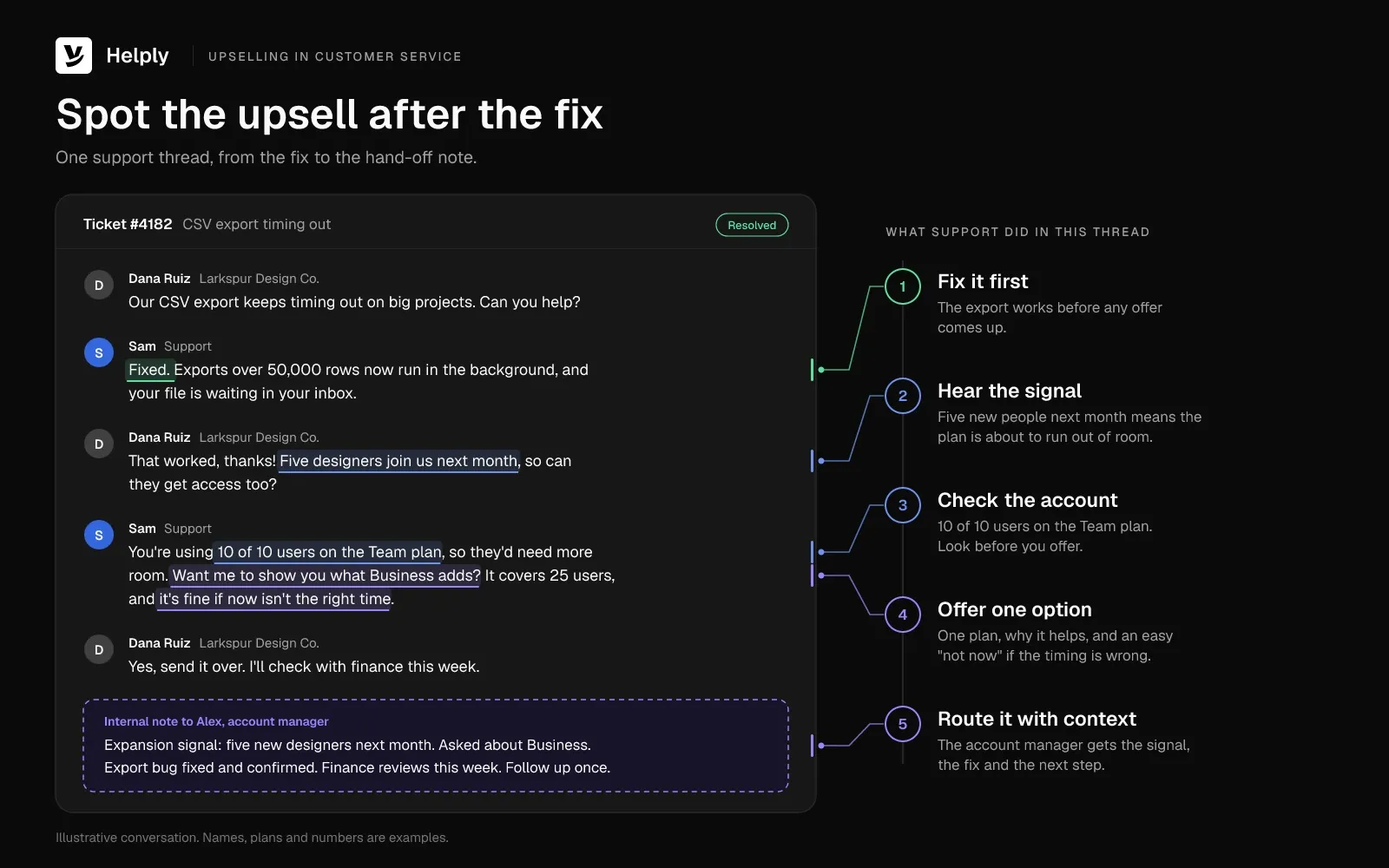
A customer writes in: the CSV export keeps timing out, and five designers join the team next month. Can they get access too? Your agent fixes the export, explains how to invite people and closes the ticket.
The plan covers 10 users, and the account already has 10. Nobody tells the account manager, who first hears about the upgrade next month from an annoyed customer whose invites failed.
The opposite mistake starts with the same ticket. An agent pitches an upgrade before the export works, and the customer leaves the chat angrier than they arrived.
Upselling in customer service works when you avoid both failures. Fix the export first, then tell the account manager about the five designers before the invites fail.
What Is Upselling?
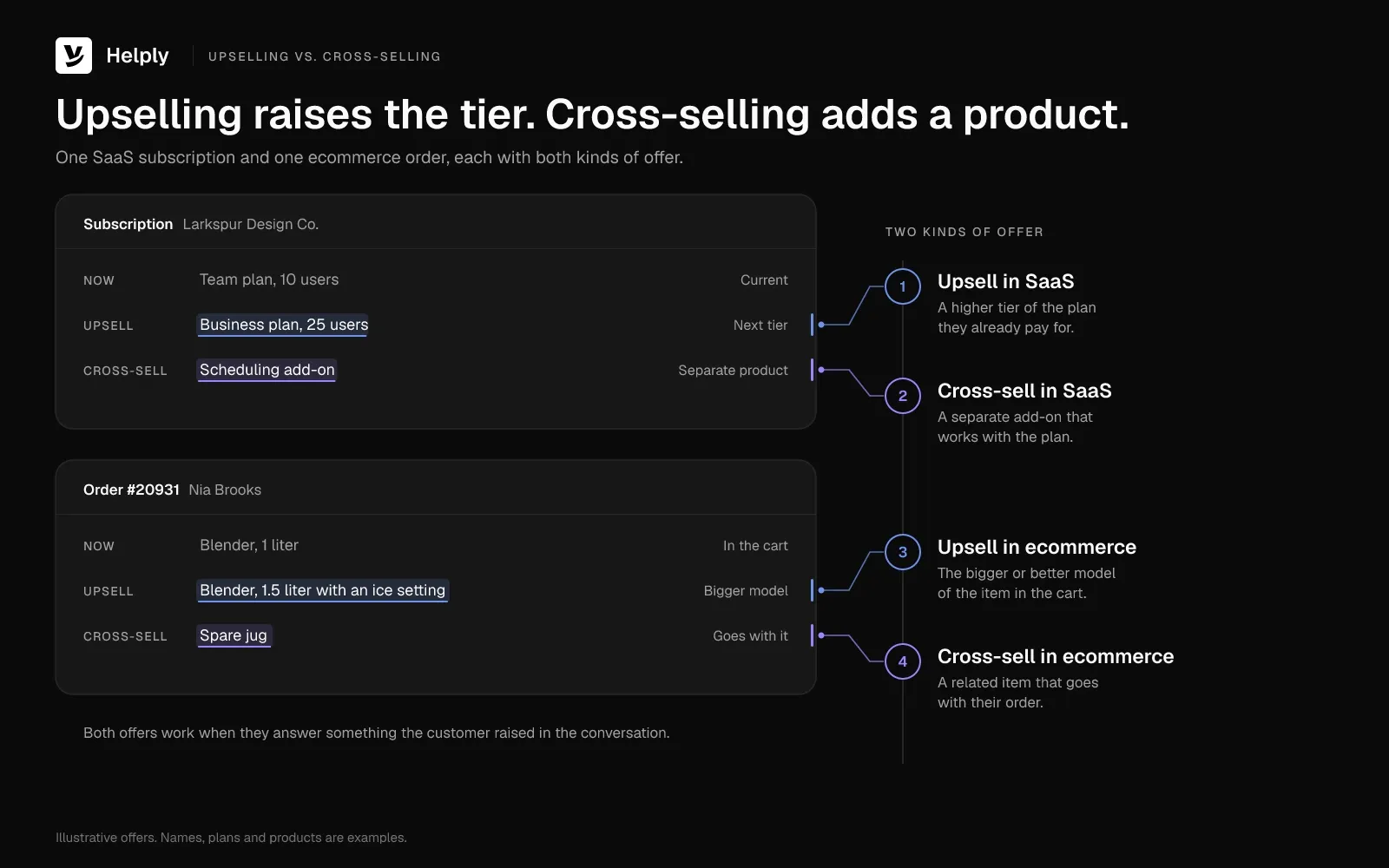
Upselling is offering a customer a larger, better or higher-tier version of a product they already use or are about to buy. In SaaS, that's often the next plan when a team runs out of users. In ecommerce, it's the bigger size or the model with the feature the shopper asked about.
Cross-selling offers a different, related product, such as a case for a new phone. Bundling means selling related products together at one price. All three can raise order value and customer lifetime value when they help the customer get more from the purchase.
Upselling vs. Cross-Selling: Offers and Examples Compared
| Compared on | Upselling | Cross-selling |
|---|---|---|
| What you offer | A higher tier, larger size or upgraded version of the same product | A separate product that works with the first one |
| SaaS example | Moving a team from 10 to 25 users on the next plan | Adding a scheduling add-on to a CRM |
| Ecommerce example | The 1.5-liter blender instead of the 1-liter model | A spare jug or a recipe book with the blender |
| Support moment | "We keep hitting the user limit." | "Does this work with our calendar?" |
Why Upselling Belongs in Customer Service
Support hears the need first. Customers tell support when they hit a limit, add a team or want one more feature. Sales hears about it later, if someone passes it on.
Service leaders expect support to bring in more revenue. For its April 2024 State of Service report, Salesforce surveyed 5,550 service professionals. Of the service decision makers, 85% said "service is expected to contribute a larger share of revenue this year."
Customers also say good service brings them back. Salesforce surveyed 14,300 consumers and business buyers for the 2023 edition of its State of the Connected Customer report. Among them, 88% said "good customer service makes them more likely to purchase again."
Gartner listed the "value enhancement" activities in an August 2020 release, and they read like good support: "educating customers on better or new uses of the product or offering, validating customer purchase decisions, anticipating customer needs and helping customers achieve a goal."
In the same August 2020 release, Gartner said service focused on those activities can raise the probability a customer stays to 82%. The same focus can lift the probability of deeper wallet share to 85%.
You may have seen the claim that selling to an existing customer succeeds 60-70% of the time, against 5-20% for a new prospect. The line credits the book Marketing Metrics, and the figures appear online as early as a May 2010 blog post by April Dunford. The book's first (2006) and third (2016) editions don't contain the figures, so treat them as a rule of thumb.
Upsell Signals Support Teams Hear First
An upsell signal is something a customer says or does that shows a need their current plan or purchase doesn't cover. You'll hear many upsell opportunities in the customer's own words, inside a ticket you're already answering.
Upsell Signals in Support Tickets: What Customers Say and What to Offer
| Signal | What the customer says | SaaS example | Ecommerce example | What to offer |
|---|---|---|---|---|
| A plan or usage limit | "We keep hitting the cap." | 10 of 10 users, API quota, storage | Monthly box limit on a subscription | The next tier |
| More people or places | "Five designers join next month." | A new team or office | Gift orders for a whole team | The plan or bundle that covers them |
| A repeat workaround | "Is there a faster way to do this?" | Manual CSV exports every week | Re-ordering the same items by hand | The feature or subscription that removes it |
| A higher-tier feature | "Can it do SSO?" | SSO, audit logs, advanced reports | A waterproof or engraved version | The plan or model that includes it |
| Steady repeat spend | "Is there a cheaper way to pay?" | A year on monthly billing with steady use | The same coffee every two weeks | Annual billing or a subscription |
| Praise after a fix | "That was fast, thanks!" | An admin after a bug fix | A buyer after a quick exchange | One goal question first, then an offer only if a need comes up |
Treat a feature question as a buying signal when the customer ties it to a goal, a deadline or more people.
When Not to Upsell a Customer
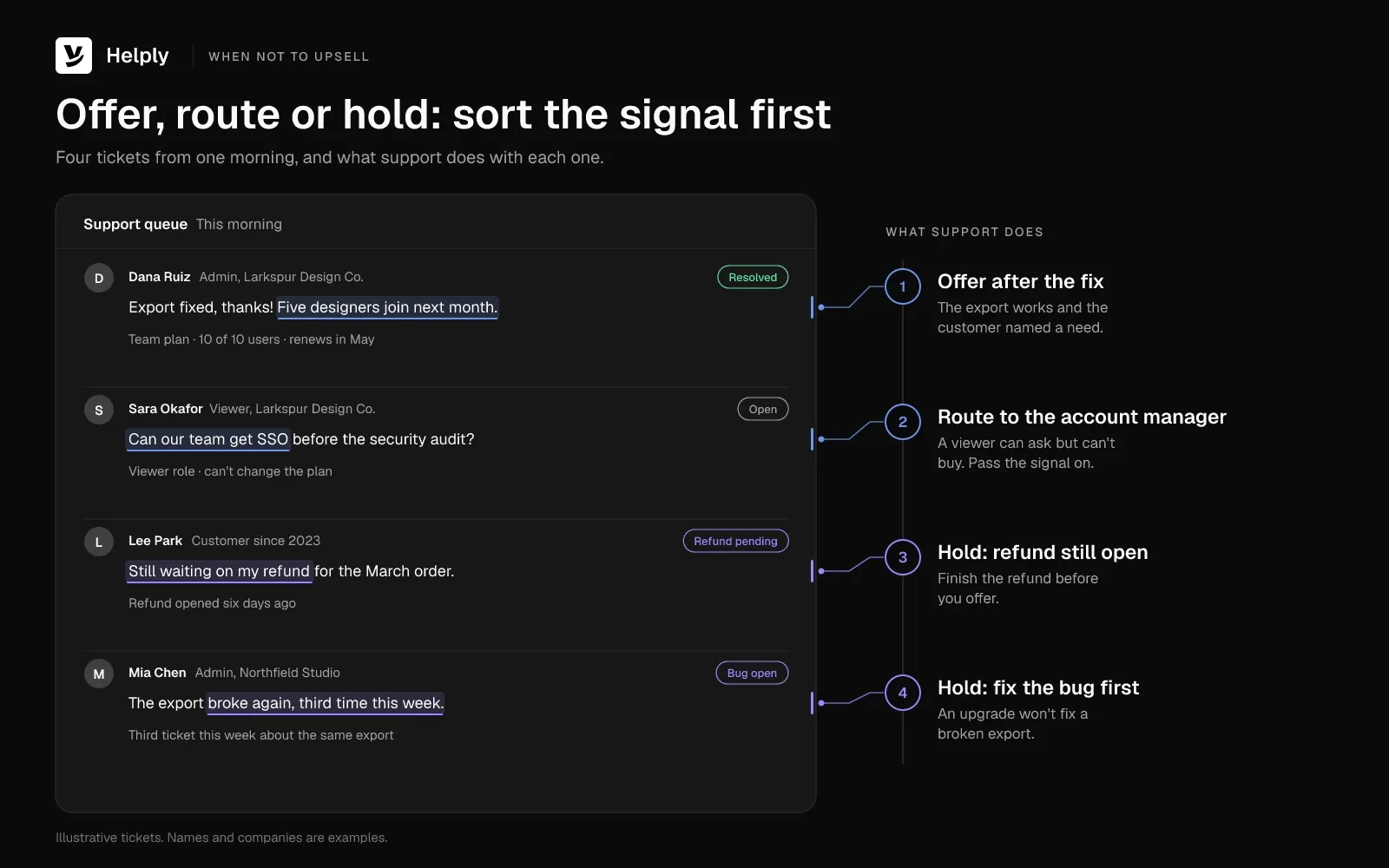
Skip the offer while the customer is upset, while a problem, refund or dispute is open, or when the upgrade wouldn't fix it. In July 2010, Harvard Business Review published a Corporate Executive Board study of more than 75,000 customers. In it, customers were "four times more likely to leave a service interaction disloyal than loyal."
An offer adds effort to a conversation that's already risky. Hold it when:
- The customer is upset, or the problem isn't fixed yet. Start with how to handle an angry customer.
- Your team is still working on a bug or an outage.
- A refund, return or billing dispute is still open.
- The customer has asked to cancel or downgrade.
- The ticket involves security, privacy or lost data.
- The upgrade wouldn't fix the problem the customer raised.
- The person can't buy, such as a user without admin rights. Route the signal to the account manager instead.
In these cases, solve the problem without an upgrade if you can. Save the offer for a later conversation that goes well.
How to Upsell Customers Without Being Pushy
To upsell without being pushy, fix the problem first, tie one offer to a need the customer named and make "no" easy. Work through these six upselling techniques in order, from the customer's problem to the hand-off.
1. Fix the Problem First
Resolve the request and confirm the fix works for the customer. Customers read an offer made before the fix as a sales script, even when the upgrade would help. If only an upgrade solves the problem, say so, and offer any free workaround alongside it.
2. Confirm What the Customer Is Trying to Do
Ask one question that ties the request to a goal. "Will all five designers need full access when they start?" tells you more than a usage chart. Use the answer to decide whether an offer fits.
3. Check the Account Before You Offer
Look at the plan or order history, usage against any limits, the renewal date, open tickets and any open deal. A renewal next week belongs to the account manager, and an open bug comes before any offer. With customer history and CRM data in one view, you won't offer something they already have.
4. Offer One Option Tied to the Need
Name a single plan or add-on, say what it changes for this customer and who confirms the price. Tie it to the customer's own words, so they can see you listened. Send five options, and the customer has to do the comparing.
Sales trainer Jeffrey Gitomer framed the offer from the customer's side: "Tell me how I win. When I win, you win."
5. Ask Permission and Make "No" Easy
Ask "Want me to show you what the Business plan adds?" before you explain anything. Offer an exit like "It's fine if now isn't the right time" in the same message. If the answer is no, accept it, note the reason and stop.
6. Route or Follow Up Once
If the customer says yes and can upgrade on their own, send the link and name the first setting to change. Hand anything that needs pricing, a contract or approvals to success or sales with a short note. After a "not now," follow up once, on a date the customer picked, and use a clear follow-up message when you do.
Upsell Scripts for Support Replies: Offer Wording and "Not Now" Answers
| Scenario | Reply wording | If they say "not now" |
|---|---|---|
| Plan limit | "Your export works again. You're using 10 of 10 users, so invites for the five new designers won't go through on this plan. Want me to show you what the Business plan adds?" | "No problem, I've noted it. Invites stop at 10 users, so reply here before the designers start, and I'll send the upgrade link." |
| Missing feature | "SSO isn't on your current plan, but the next plan includes it. Should I send a one-page comparison?" | "Understood. If your security review needs it later, reply here and I'll send the comparison." |
| Cheaper way to pay | "Yes, annual billing would cost less over twelve months, with one payment up front. Want the numbers?" | "Got it. Monthly billing stays as it is." |
| Order question | "Your blender ships tomorrow. You asked about crushing ice, and the 1.5-liter model has a setting for it. Want me to swap it for the price difference before it ships?" | "No problem. Enjoy the new blender." |
| Repeat workaround | "That export now runs in the background. You mentioned exporting every Monday, and scheduled reports on the next plan can send it for you. Want a two-minute walkthrough?" | "No worries. I've added the shortcut for manual exports below." |
For full replies you can adapt, see these customer service email templates.
Upselling Examples From Support Conversations
A good support upsell follows one pattern: a fix, a signal in the customer's words and one offer that matches the signal.
Support Upsells in SaaS and Ecommerce: Signal, Offer and Fit
| Queue | Signal in the ticket | Offer after the fix | Why the offer fits |
|---|---|---|---|
| SaaS | "We've used all 10 users, and five designers start next month." | The next plan, with room for 25 users | It covers the people the customer named |
| SaaS | "Our security review needs SSO by the end of the quarter." | The plan that includes SSO | It meets a deadline the customer set |
| SaaS | "Can we stop exporting this CSV by hand every Monday?" | Scheduled reports on the next plan | It removes a weekly task |
| Ecommerce | "Will this blender crush ice for smoothies?" | The 1.5-liter model with an ice setting | It does the job the shopper described |
| Ecommerce | "I reorder this coffee every two weeks." | A subscription on the same schedule | It ends the manual reorder |
| Ecommerce | "Does this jacket come in a waterproof version?" | The waterproof model | It answers the question the shopper asked |
A Real Example: GEICO's $2,000 Customer Service Call
In March 2014, Chris Yeh called GEICO for roadside assistance. Once the tow truck was on its way, the dispatcher made an offer. "From looking at your account, it looks like you're now eligible for a big discount on our comprehensive coverage."
Yeh agreed to hear more, and the dispatcher transferred him to a salesperson. Fifteen minutes later, he had added $1 million in coverage for his car and home, for about $100 a year.
A GEICO customer for 16 years, Yeh estimated the call added $2,000 in lifetime revenue. He called it a cross-sell. Support teams can copy that hand-off: the dispatcher arranged the tow before raising the offer, and a salesperson closed it.
Who Should Own the Upsell: Support, Success or Sales?
Support should spot the signal, make self-serve offers and route the rest. Customer success owns adoption and expansion talks, and sales owns pricing, contracts and approvals. In a shop without a sales team, support makes the offer and sends the product link.
Skip individual upsell quotas for support agents. With a quota, agents push offers into conversations that need a fix, and stop flagging signals they can't close themselves. Set a team goal instead, and credit every flag that turns into revenue.
Train agents to spot upgrade signals, then role-play the offer and the "not now" answer.
What a Support-to-Sales Hand-Off Note Should Include
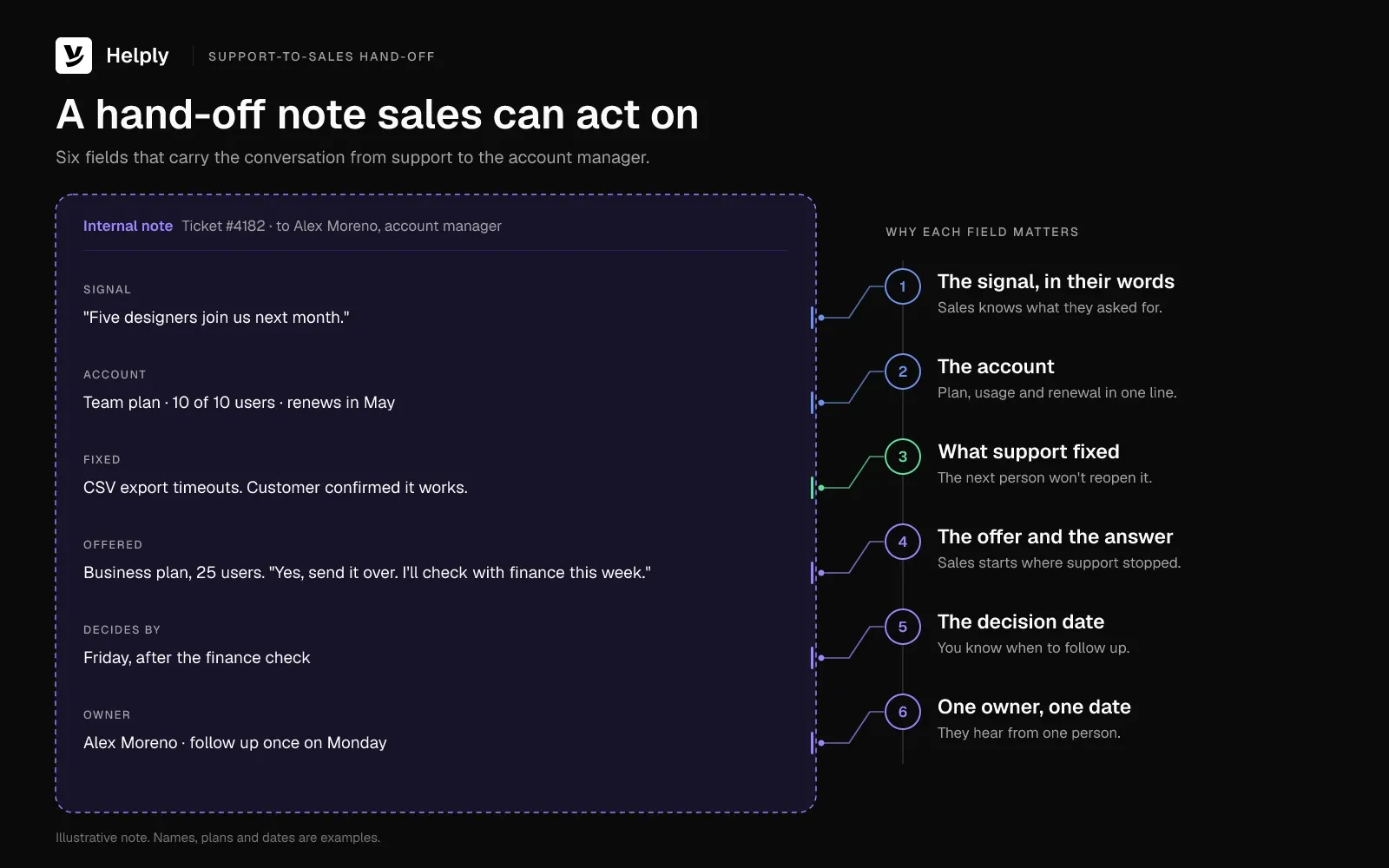
A good hand-off note lets the next person pick up the conversation without asking the customer to repeat anything. Include six things:
- The signal, in the customer's words. "Five designers join us next month."
- The account. The plan, usage against its limits and the renewal date.
- The fix. The problem and how support solved it, so the next person doesn't reopen it.
- The offer and the answer. "Asked about the Business plan, checking with finance this week."
- The decision date. The day the customer expects to decide.
- The owner and follow-up date. One name and one date.
Example note for the export ticket:
- Signal: "Five designers join us next month."
- Account: Team plan, 10 of 10 users, renews in May.
- Fixed: CSV export timeouts. The customer confirmed the fix works.
- Offered: Business plan with 25 users. "Yes, send it over. I'll check with finance this week."
- Decides by: Friday, after the finance check.
- Owner: The account manager, who follows up once on Monday.
Pick up hand-offs the same business day, while the customer still remembers the conversation.
How Do You Measure Upselling From Support?
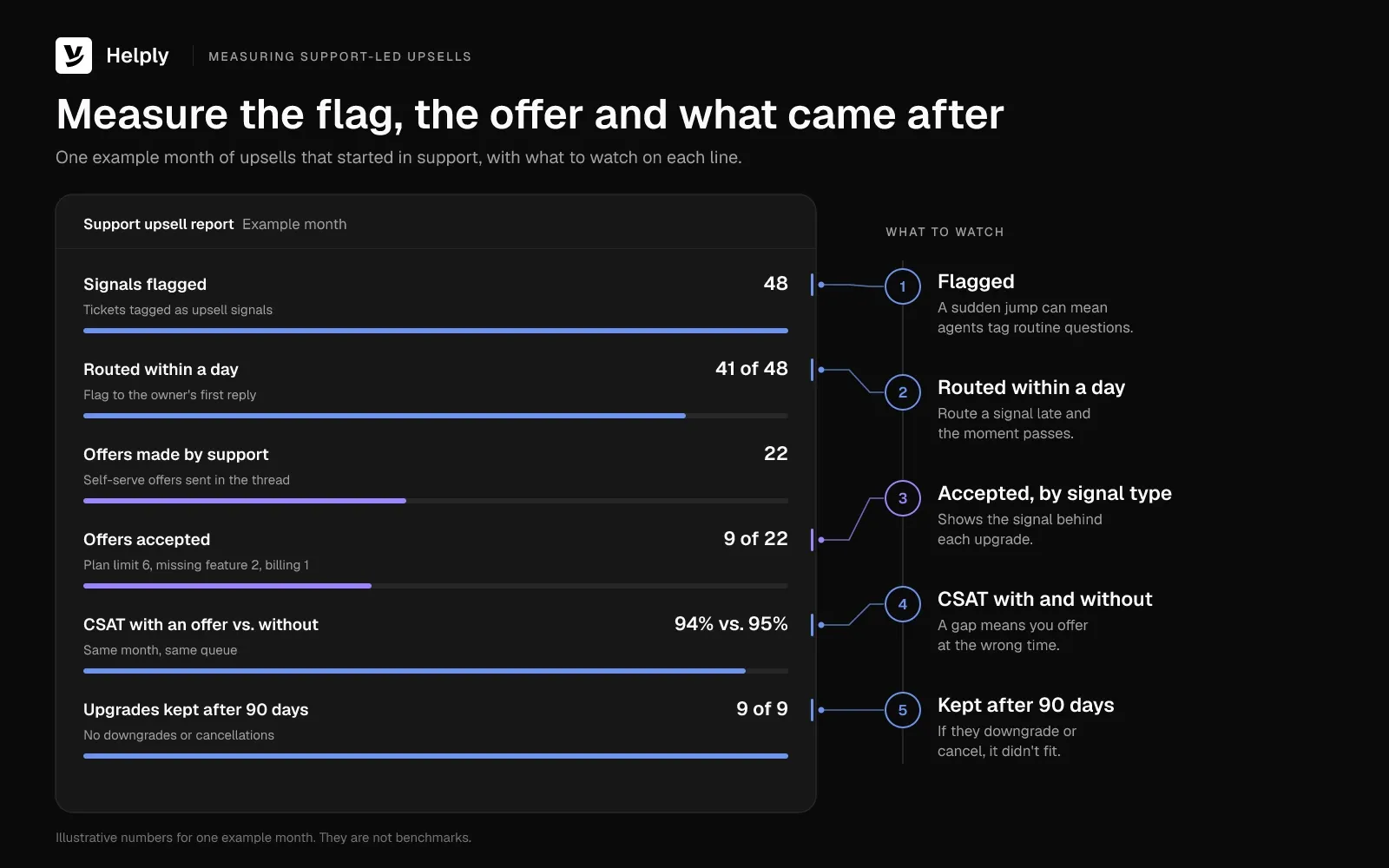
Measure the flag, the offer and what happened next, including how the customer felt about it. Count signals flagged, offers made, accepted upgrades and their revenue, then check CSAT on tickets with an offer. If you count only expansion revenue, you miss offers that cost you goodwill.
Send a short customer satisfaction survey after each ticket with an offer to see that cost.
Support Upsell Metrics: What to Count and What to Watch
| Metric | How to count it | Watch for |
|---|---|---|
| Signals flagged | Tickets tagged as upsell signals each month | A sudden jump can mean agents tag routine questions as signals |
| Time to hand-off | Hours from the flag to the owner's first reply | Signals that wait more than a day |
| Offers made | Offers support sent itself | Offers sent while a problem was still open |
| Acceptance rate | Accepted offers divided by offers made | Signal types with low acceptance that may not be buying signals |
| Expansion revenue from support | Closed upgrades with "support" as the opportunity source | Deals sales would have closed anyway |
| Decline reasons | The reason logged with each "not now" | The same reason again and again, which points to a pricing or product gap |
| CSAT and reopens after an offer | Satisfaction and reopen rates on tickets with an offer, against tickets without one | A drop, a sign that offers land at the wrong time |
| Churn within 90 days of an upgrade | Upgraded accounts that downgrade or leave | Upgrades that didn't fit the need |
Set "support" as the opportunity source in your CRM the moment someone creates the hand-off, so support keeps the credit after later edits. To measure the effect, compare flagged accounts with similar accounts nobody flagged.
How Helply Finds Upsell Signals in Support Conversations
Helply's agents work in the same conversations your team answers, so the fix and the signal sit in one thread. The Revenue Agent is one of five Background Agents, which start on their own when a signal appears. It monitors conversations for "upgrade intent, expansion opportunities, buying signals, and product demand so opportunities don't disappear when a ticket closes."
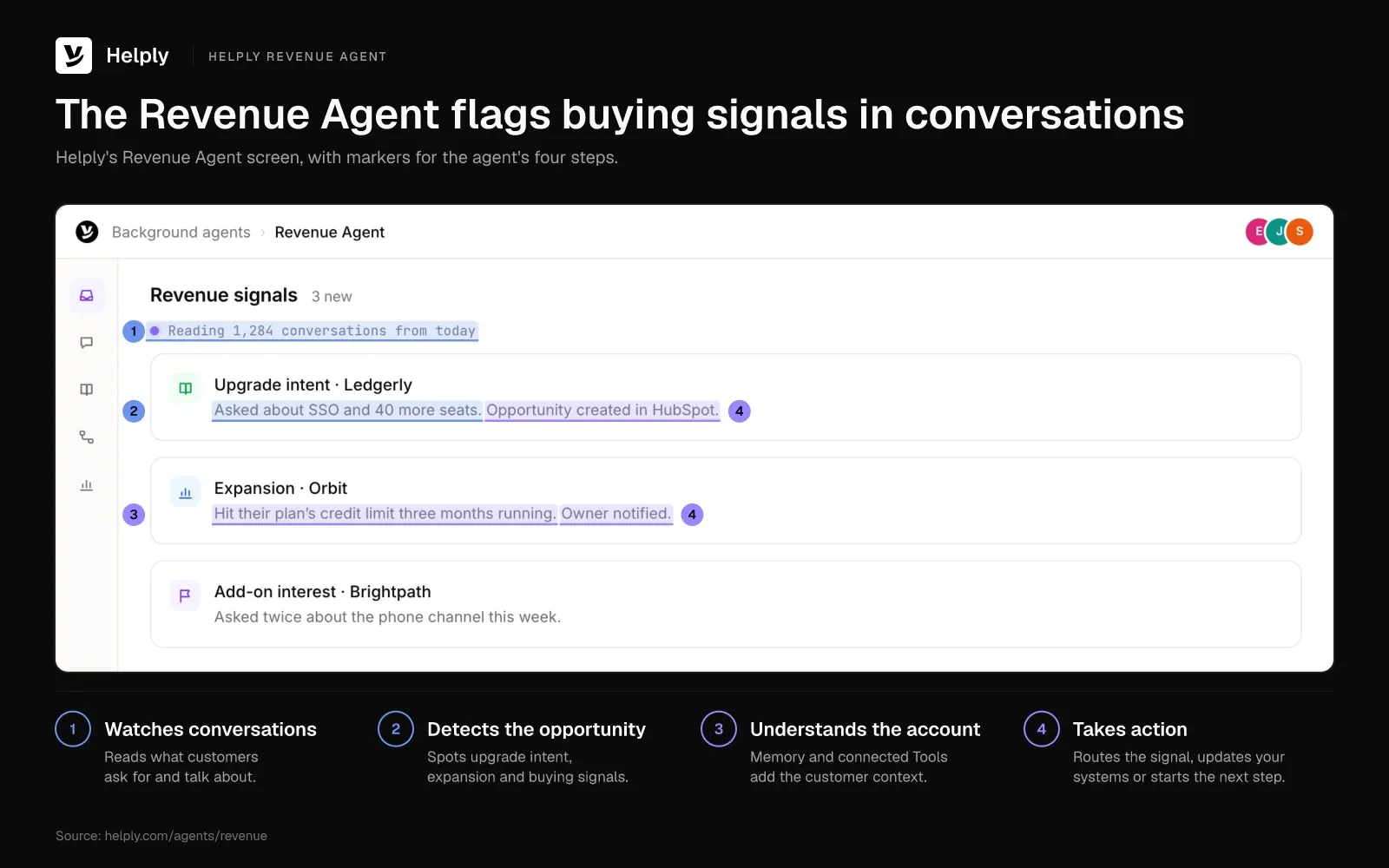
The Revenue Agent detects when customers ask about plans, capabilities, limits or additional users, as the customer with five new designers did. In a store, a buying signal can be a shopper asking whether a jacket comes in a waterproof version. The agent captures those signals "automatically instead of relying on support reps to recognize and route them."
With Memory and connected Tools, it pulls in context on the customer who raised the signal. Then it can notify sales or success, update the CRM or start the appropriate workflow. You set its role around how your business handles revenue signals.
Other Helply agents and settings handle the steps around the signal:
- The Support Agent can fix first. It can resolve an issue end to end. If it can't, it escalates and passes along its investigation and the customer context.
- The Assist Agent drafts the reply. It grounds each draft in the conversation, customer context and your Guidelines, so the offer matches your tone.
- The Churn Agent flags frustrated customers. It monitors conversations for frustration, churn risk and sentiment changes. It can alert the right teammate when a health signal appears, so your team can hold the offer.
- Guidelines and escalation set the boundaries. In your Guidelines, you define "what agents can handle independently and when they should stop and involve a human." From the Team plan, escalation rulescan also route a contract question and other "complex, sensitive, or high-value situations" to your team.
- Account context sits beside the thread. You see customer details, history and account informationtogether, and a connected Stripe account adds subscription and invoice data on every plan. From Helply's Team plan, HubSpot can add deal context where configured, and from Growth, Salesforcecan bring in ownership details.
Upsell by Hand or Let an AI Agent Watch the Queue?
A small team can handle upselling by hand. If upgrade questions come up a few times a week, your team can tag each one and answer with a saved reply. Add a shared channel with sales for the hand-off.
You've outgrown the tag when account managers hear about upgrade needs from customers first. An AI agent that monitors conversations for upgrade intent can catch the questions people miss. Helply's Revenue Agent does that job, and its Churn Agent watches the same conversations for frustration.
In the export ticket, the Support Agent can fix the export first, and the Assist Agent can draft the offer. The Revenue Agent can alert the account manager about the five designers before the invites fail.
From Helply's Team plan, sales and success get unlimited view-only seats to read support threads and leave notes. Every plan has the Support and Assist Agents, and from Pro, the Revenue Agent comes with the other Background Agents. Pro costs $999 a month and includes 5 seats and 50,000 AI credits each month.
You also control the spend. On Pro, you choose a hard cap or overage at the rate you agree on when you sign up. Usage alerts warn you before the plan's credits run out.
Count the upgrade questions your team closed last month without a hand-off. If you find more than a few, your team is missing signals an AI agent could flag.
Frequently asked questions
Selling gets a customer to buy something. Upselling means offering a customer a larger, better or higher-tier version of what they already use or are about to buy. In customer service, that offer should come after support solves the customer's problem.
Effective upselling starts with the fix: solve the problem, then confirm the customer's goal and check their plan, usage and renewal date. Offer one option tied to a need the customer raised, and ask permission before you explain it. Accept "not now" the first time, and route pricing or contract questions to success or sales with a short note.
A team on a 10-user plan asks how to add five designers, and support offers the next plan after answering the access question. In ecommerce, a shopper asks whether their blender crushes ice, and support offers a swap to the 1.5-liter model before it ships.
Upselling raises the tier, size or version of what the customer buys, such as moving a team from 10 to 25 users. Cross-selling adds a different, related product, such as a case for a phone. In support, either offer should meet a need the customer named.
Yes, when the offer meets a need the customer raised and comes after support fixes the problem. Support spots the signal and makes self-serve offers, while success and sales own expansion talks, pricing and contracts. Give support a team goal with credit for every flag that turns into revenue, and skip individual quotas.
Teach agents the signals to listen for: plan limits, new teammates and repeat workarounds. Then cover when to hold an offer, such as during an open refund. Role-play the moment a customer says "not now," so agents accept it and log the reason.
Hold the offer when the customer is upset, something is broken, a refund or dispute is open, or they've asked to cancel. Skip it, too, when the upgrade wouldn't fix their problem. A Corporate Executive Board study in Harvard Business Review (July 2010) found service interactions four times likelier to leave customers disloyal than loyal.
Customers say good service brings them back. In Salesforce's 2023 survey of 14,300 consumers and business buyers, 88% said "good customer service makes them more likely to purchase again." The popular "60-70% versus 5-20%" odds are a rule of thumb, online since at least a 2010 blog post by April Dunford.
Expansion revenue is the extra revenue existing customers bring through upgrades, add-ons or more users. To count support's share, set "support" as the opportunity source in your CRM at the hand-off. Then count closed upgrades and their revenue each month, and compare CSAT on tickets with and without an offer.
Small teams can catch upgrade signals with help desk tags, saved replies and a shared channel with sales. Log each hand-off and its opportunity source in your CRM. At higher volume, Helply's Revenue Agent can monitor conversations for upgrade intent and alert sales or success.
You configure the role of Helply's Revenue Agent around how your business handles revenue signals. It monitors support conversations for upgrade intent, expansion opportunities and buying signals. It can then notify sales or success, update the CRM or start the appropriate workflow.
About the author

Alex Turnbull
CEO & Founder, Helply
Alex is the CEO & Founder of Groove. He loves to help other entrepreneurs build startups by sharing his own experiences from the trenches.
Keep reading

Support Ticket Response Examples: 25 Replies by Ticket Type
Konrad Janczyk · 22 min read
Agentic AI vs. Generative AI: What Changes When AI Can Act on a Ticket
Bildad Oyugi · 14 min read