
 Bildad Oyugi ··11 min read

It's 9am on Monday. You open the queue to a weekend of unanswered conversations, and two of them breached their SLA overnight. An executive forwards a furious email from a customer who followed your billing article, which still describes the old plan.
Then product asks which problems customers raised most last month. You can't answer without a spreadsheet and a free afternoon. Your team worked hard all week, and still spent the morning firefighting.
Salesforce's State of Service report, published in September 2025, surveyed 6,500 service professionals. Less than half of reps' time (46%) went to customers, in part because of admin tasks and internal duties.
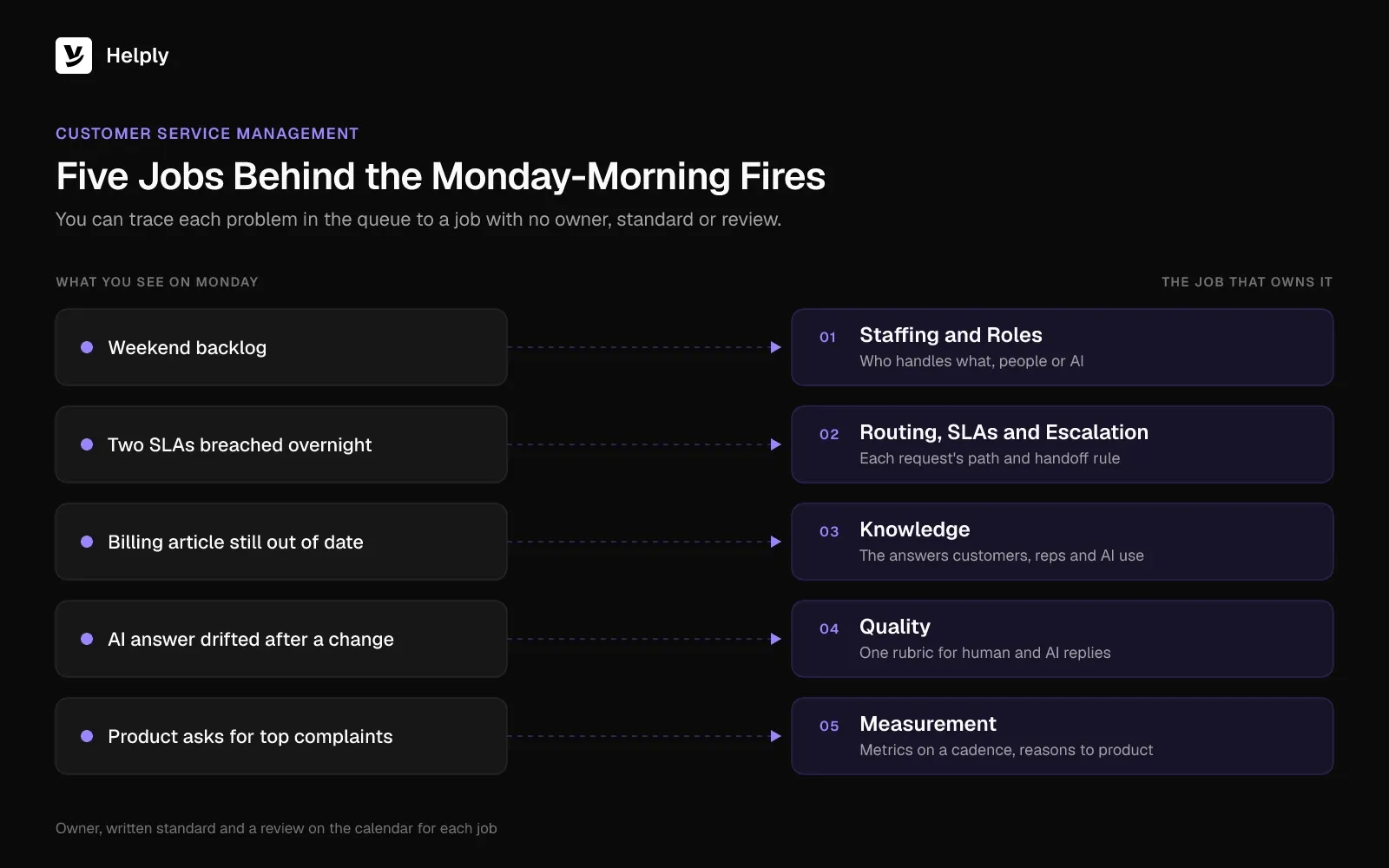
You can trace each Monday problem to one of five jobs. The backlog is staffing, the broken SLAs are routing, the stale article is knowledge, and product's question is measurement. Run a review cadence with a short metric set so they stay fixed, and choose help desk software that runs all five.
What Is Customer Service Management?
Customer service management (CSM) is the practice of running a support operation. The manager decides who answers which requests, how they move, which answers the team uses and how it learns from them. Atlassian's definition covers the software, strategies and processes behind handling customer questions, issues and requests across channels.
The work covers people, process and platform. People means reps, team leads, a support operations role in larger teams, and now AI agents that handle part of the queue.
Process covers routing rules, response targets, escalation rules, quality reviews and the meetings where the team makes decisions. The platform is the help desk or customer service management system that holds conversations, customer records, the knowledge base and reports.
A customer service manager owns all three. In a small company that's often the first support hire or a founder. In a larger one, a support director sets the cadence and team leads run the daily reviews.
Customer Service Management vs. CRM vs. Help Desk
Customer service management is the discipline, a help desk is the software that runs it, and a CRM tracks sales relationships.
Atlassian draws the line at the sale. A CRM tracks leads, opportunities and campaigns, while CSM manages the questions and issues customers raise afterward. Once you connect them, support and sales share customer context.
CSM vs. CRM vs. Help Desk: What Each Runs, Records and Answers
| Compared on | Customer service management | CRM | Help desk |
|---|---|---|---|
| What it is | A practice: how the support operation runs | Software that tracks leads, deals and accounts | Software that holds and routes support conversations |
| Main records | Policies, targets, rules, review notes | Contacts, opportunities, pipeline | Conversations, tickets, help articles |
| Owner | Customer service manager or support lead | Sales and marketing | Support team and support operations |
| Question it answers | Is the support operation working? | Which deals close this quarter? | What needs a reply, and who owns it? |
Customer success management is a fourth term with the same initials. Customer success works ahead of problems, with named accounts, renewals and adoption plans. Customer service management handles the inbound side, whatever any customer sends on any channel.
IT teams add a fifth term, the service desk. Our service desk vs. help desk breakdown separates the two.
The Five Jobs of Customer Service Management
Customer service management splits into five jobs: staffing, routing, knowledge, quality and measurement. Each job needs an owner, a written standard and a review on the calendar.
Staffing, Roles and Coverage
Staffing starts with volume. Count conversations by hour and weekday for the last eight weeks. Then set the hours you cover and the response targets you can staff, or plan 24/7 customer support if your customers need it.
Next, decide what AI agents handle first. Routine, documented requests suit an AI agent. Refunds outside policy, angry customers and account risks go to people.
You redesign roles around that split. In Gartner's survey of 275 service and support leaders, published in November 2026, only 21% had cut human agent headcount because of AI. More than half had hired specialists for AI work.
Plan for retention too. In a Verint survey of 1,000 contact center agents in late 2025, 31% said they would likely leave within six months. A rep who can move from password resets to escalations, quality reviews or knowledge work has somewhere to grow.
Routing, SLAs and Escalation
Your routing rules send each conversation to an owner, and they work best from one queue across all your channels. Write rules on what the request is about, which customer sent it and how urgent it is, instead of routing by channel alone. Then set a first-response and resolution target for each priority.
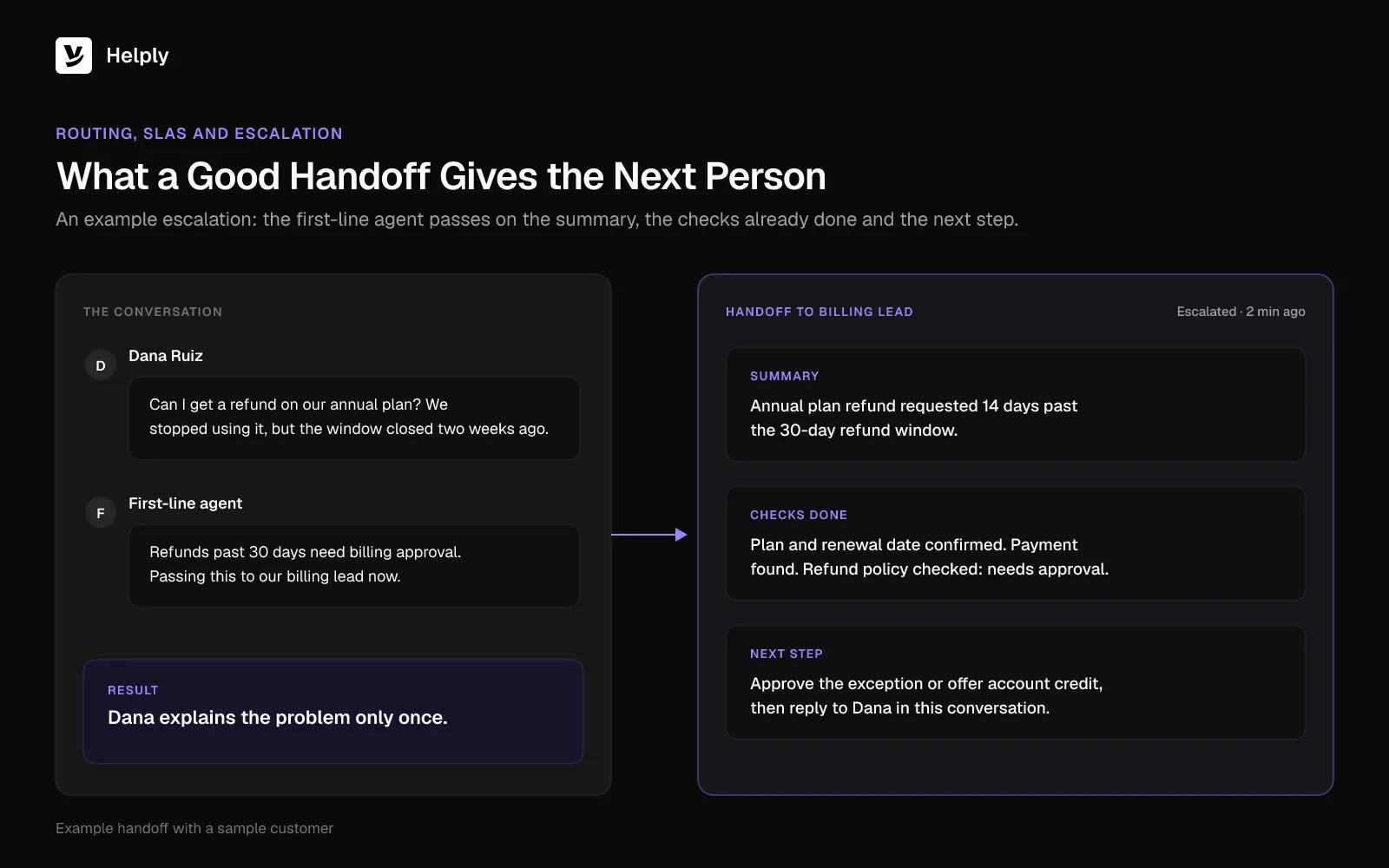
Write escalation rules first: which situations go to a person, which person or team gets them, and what the handoff must include. Our guide to support tiers has a routing table to adapt.
A good handoff carries a summary, the checks already done and the next step. In November 2025, Zendesk's CX Trends 2026 research reported that 74% of 6,182 consumers in 22 countries find repeating information frustrating. A 2010 CEB study in HBR of more than 75,000 customers found 62% had to contact a company repeatedly to resolve an issue.
Knowledge Management
Customers, reps and AI agents answer from the same knowledge base. If one article goes stale, each of them repeats the error.
Gartner's survey of 5,728 customers, published in August 2024, studied failed self-service attempts. In 43% of those failures, customers couldn't find content that matched their issue.
Give every article an owner and a review date. Tie updates to product releases, and turn repeat questions into new articles each month. In a Gartner survey of 187 customer service and support leaders, published in December 2024, 61% had a backlog of articles to edit.
Quality and Coaching
Quality management checks whether replies are correct, complete and on tone. Score a weekly sample per rep against a short rubric: right answer, full resolution, policy followed, clear writing.
Score AI agents' answers with the same rubric. An AI agent that answers well on Monday can drift after a pricing change on Tuesday. If an AI answer fails, fix its source: the article, the guideline or the escalation rule.
Talk through a single bad ticket with the rep who handled it. Save coaching topics for misses that repeat across a week's sample.
Measurement and the Feedback Loop
Give each review its own short set of metrics. Keep the definitions stable so you can compare one month against the next.
Tag every conversation with a contact reason, and each month send product the top five with counts and example conversations. If product fixes one confusing screen, your team can stop answering that contact reason.
Customer Service Management Review Cadence: Daily to Quarterly
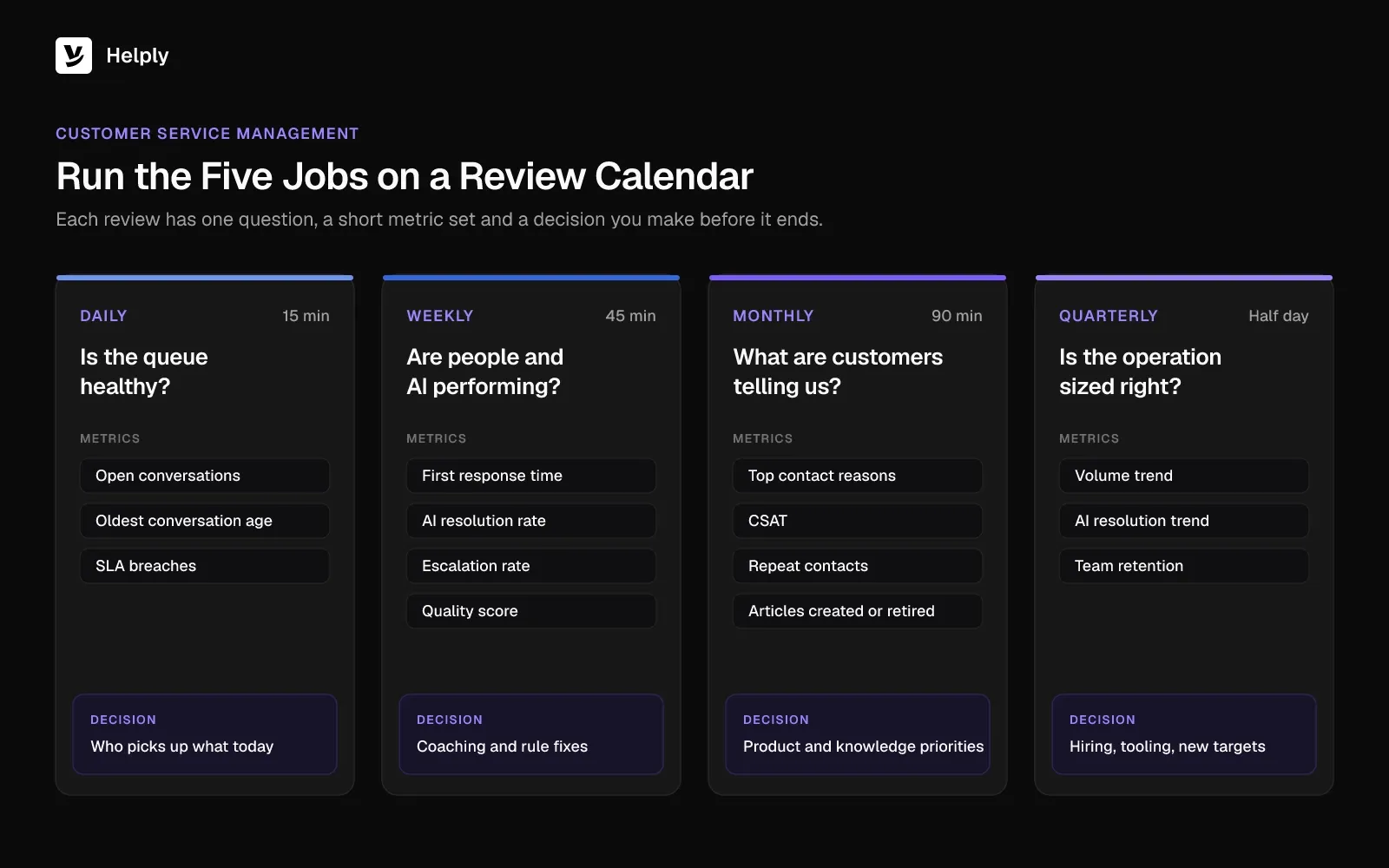
In a customer service management cadence, you review the queue daily, performance weekly, contact reasons monthly and capacity quarterly. Give each review a fixed question, a short metric set and a decision you make before it ends.
| Cadence | What you review | Metrics | Decision it drives |
|---|---|---|---|
| Daily (15 minutes) | Queue health: backlog, conversations near an SLA breach, stuck escalations | Open conversations, oldest conversation age, SLA breaches | Who picks up what today |
| Weekly (45 minutes) | Team and AI performance, quality sample, staffing for next week | First response time, resolution time, AI resolution rate, escalation rate, quality score | Coaching, schedule changes, rule fixes |
| Monthly (90 minutes) | Contact reasons, knowledge gaps, customer feedback | Top contact reasons, CSAT, repeat contacts, articles created or retired | Product feedback, knowledge priorities, AI scope |
| Quarterly (half day) | Capacity, tooling, targets and roles | Volume trend, AI resolution trend, team retention | Hiring, tooling changes, new targets |
Keep the daily review to one screen. If the weekly review keeps finding the same rule gap, fix the rule that week. Hand the monthly contact-reason list to product in the same format each time, so they can compare months.
Customer Service Metrics That Answer Management Questions
The core customer service metrics are first response time, resolution rate, SLA attainment, repeat contacts, CSAT, AI resolution rate and contact reasons. Pick each one by the management question it answers. If you build your customer support dashboard this way, it stays short.
| Management question | Metric | How to calculate it |
|---|---|---|
| Are customers waiting too long? | First response time | Minutes between the customer's opening message and your team's first reply, by priority |
| Do we finish the job? | Resolution rate and resolution time | Share of conversations closed without a reopen; time from open to resolved |
| Are we meeting our promises? | SLA attainment | Conversations answered and resolved inside target ÷ all conversations |
| Do customers have to come back? | Repeat contact rate | Customers who contact you again on the same issue within 7 days ÷ customers served |
| Are customers satisfied? | CSAT | Satisfied responses (4 and 5) ÷ total responses × 100 |
| What does AI handle well? | AI resolution rate and escalation rate | Conversations AI resolved end to end ÷ conversations AI handled; share handed to a person |
| What drives volume? | Contact reasons | Count of conversations per tagged reason, month over month |
The CSAT formula follows Qualtrics' definition. Our CSAT survey guide covers the questions to ask and when to send them.
How AI Agents Change Customer Service Management
AI agents change who does the work, while the five jobs of customer service management stay the same. The manager now decides which requests AI handles, which actions it may take and when it hands a conversation to a person.
The work splits four ways:
- AI agent on the front line: answers customers, looks things up in connected tools and resolves routine requests end to end.
- People on judgment calls: exceptions, upset customers, account risks and anything outside policy.
- AI assistant inside the conversation: drafts replies and gathers context for the person handling it.
- AI watching the whole queue: groups rising problems and missing answers for the manager.
Managing AI agents means writing rules they can follow. Set behavior guidelines and escalation rules with clear triggers. Review AI answers for quality, and test every change on past conversations before it goes live.
In Intercom's survey of over 2,400 customer service professionals, published in January 2026, only 10% of teams reported a mature AI deployment.
Respondents to Salesforce's State of Service report, published in September 2025, expect AI to resolve half of all service cases by 2027. They put the 2025 share at 30%.
Your job is to decide, request type by request type, which go to AI and which go to people. In a Gartner Q&A from November 2026, VP Analyst Kathy Ross says the future service organization "will be digital-first, but not digital-only."
What to Look for in a Customer Service Management System
Customer service management software should run all five jobs from one place. Use the questions below in every demo, with your own conversations.
| Capability | Why it matters | Question to ask in a demo |
|---|---|---|
| Shared inbox across channels | One queue for email, chat and messaging keeps routing and SLAs in one place | Which channels land in the same queue, and on which plan? |
| Routing, SLAs and escalation rules | Requests reach the right person before a target breaks | Can a rule use the topic, the customer and the account, not only the channel? |
| Customer and account records | Agents and AI answer with history in view | What does an agent see about the customer without opening another tool? |
| Knowledge base with upkeep | Customers, agents and AI share one source | How does the system find missing or outdated articles? |
| AI agents that resolve and hand off | You clear routine work from the queue, and people get edge cases with context | What does the person receive when AI hands over a conversation? |
| Quality review for people and AI | One standard across every reply | Can I score AI answers and test a change on past conversations? |
| Reporting and contact reasons | The cadence needs live numbers without manual exports | Can I see AI resolutions, escalations and top contact reasons on one screen? |
| Security and AI data use | AI agents read customer data each time they investigate or reply | Which security reports do you hold, and does our data train AI models? |
Price the system for the team you expect in a year. Ask which features sit on which plan, and how the vendor bills AI usage.
Running the Five Jobs in Helply
Helply puts AI agents inside the help desk itself, so routing, knowledge, quality and measurement run in one system. You can plan staffing from its volume reports, and each Monday problem has a matching part of Helply.
Weekend backlog: The Support Agent answers customers on your channels and checks help articles, past conversations and connected tools. It can resolve routine requests end to end. For requests it can't resolve with confidence, a teammate receives the conversation plus the agent's investigation and the customer's context.
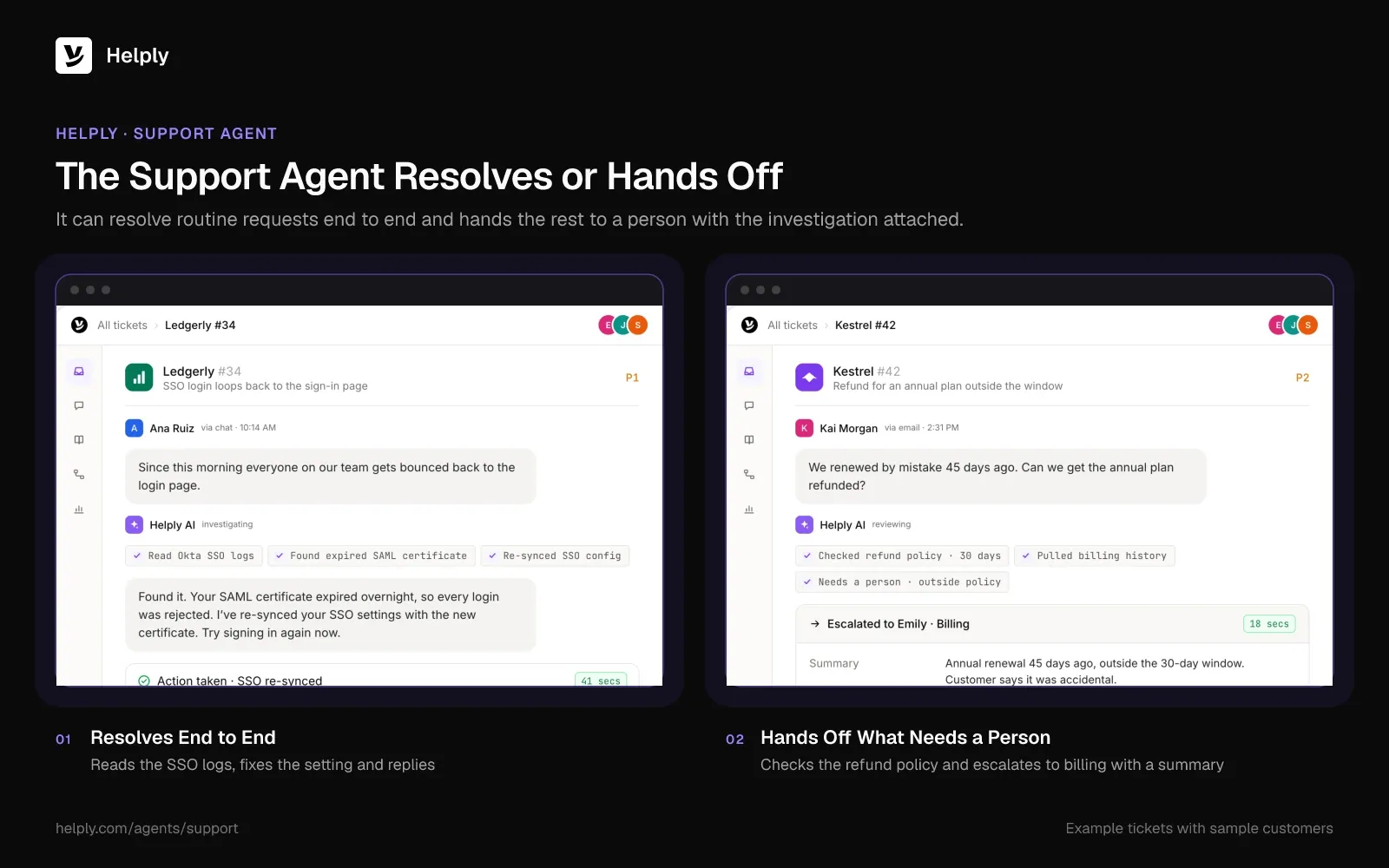
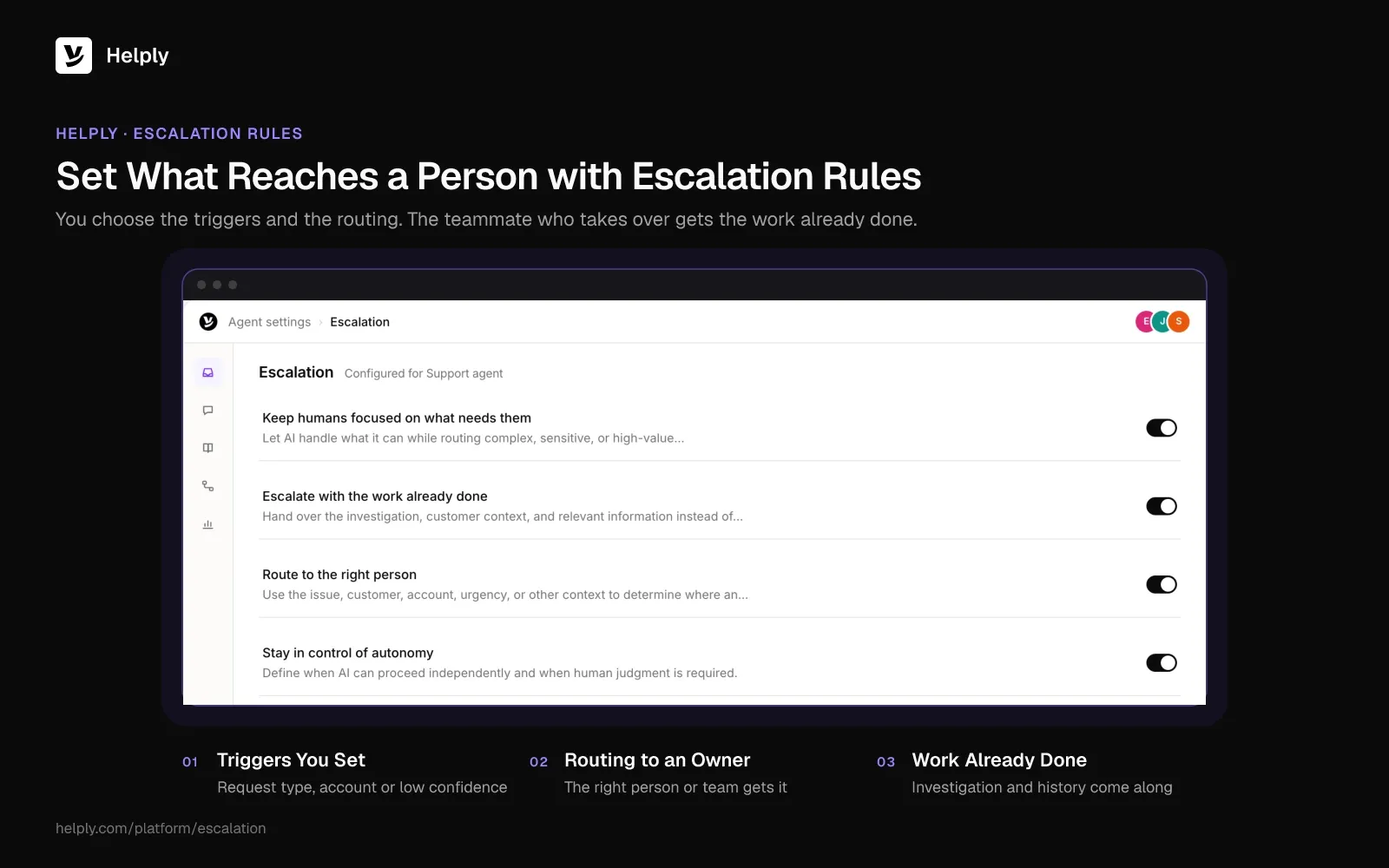
Broken SLAs and unclear escalations: You set handoff triggers in your escalation rules, such as a request type, an account detail or low AI confidence. In the same rules, you choose which person or team receives the conversation. SLA targets flag conversations before they breach, and the new owner sees the full investigation and history.
Agents slowed by research: The Assist Agent works inside each conversation beside your teammate. It looks up the customer, drafts a reply from your guidelines and takes the actions your teammate approves.
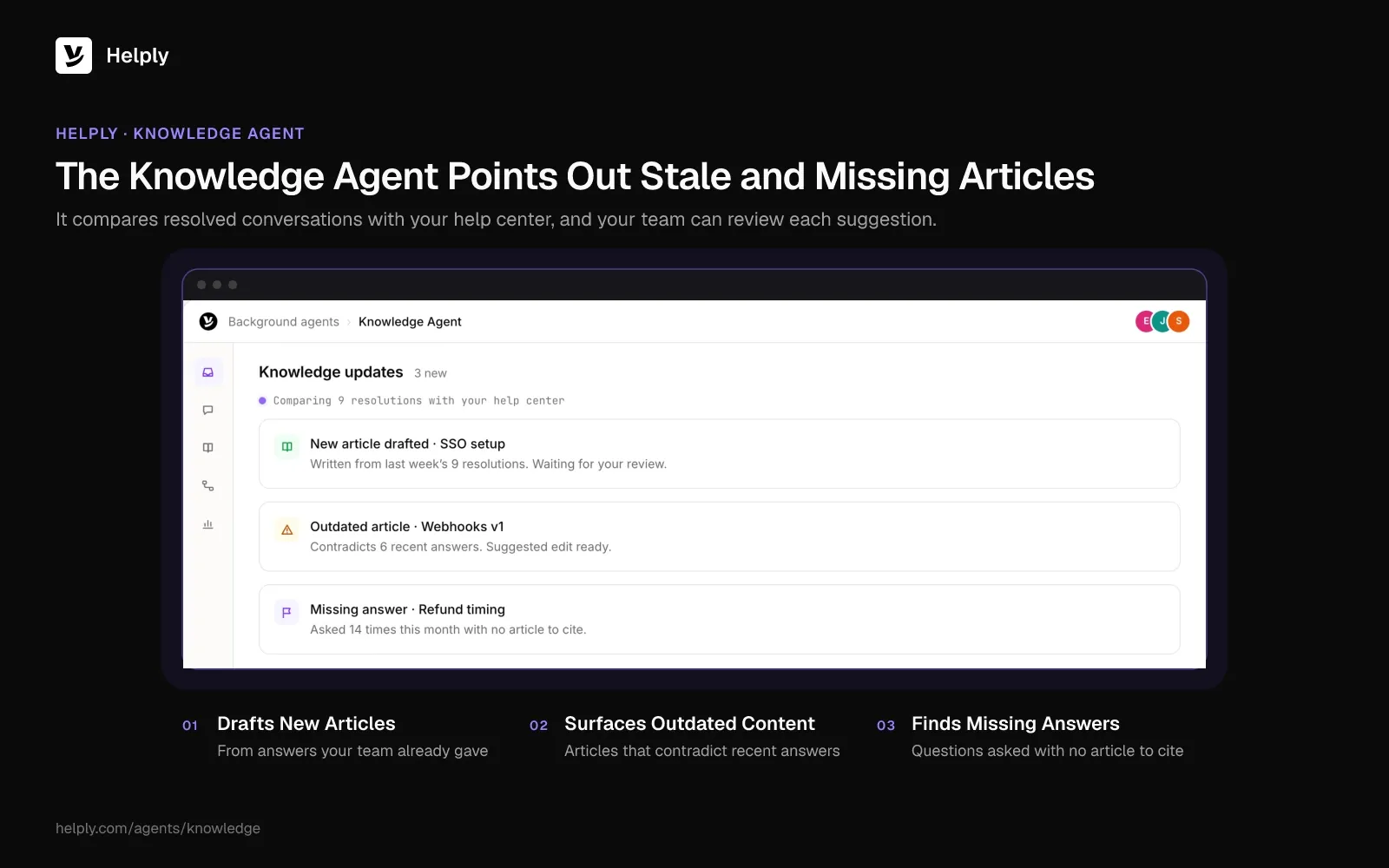
The outdated help article: The Knowledge Agent learns from conversations and points out missing answers and outdated content. Teammates can review each suggestion before customers or other agents see it.
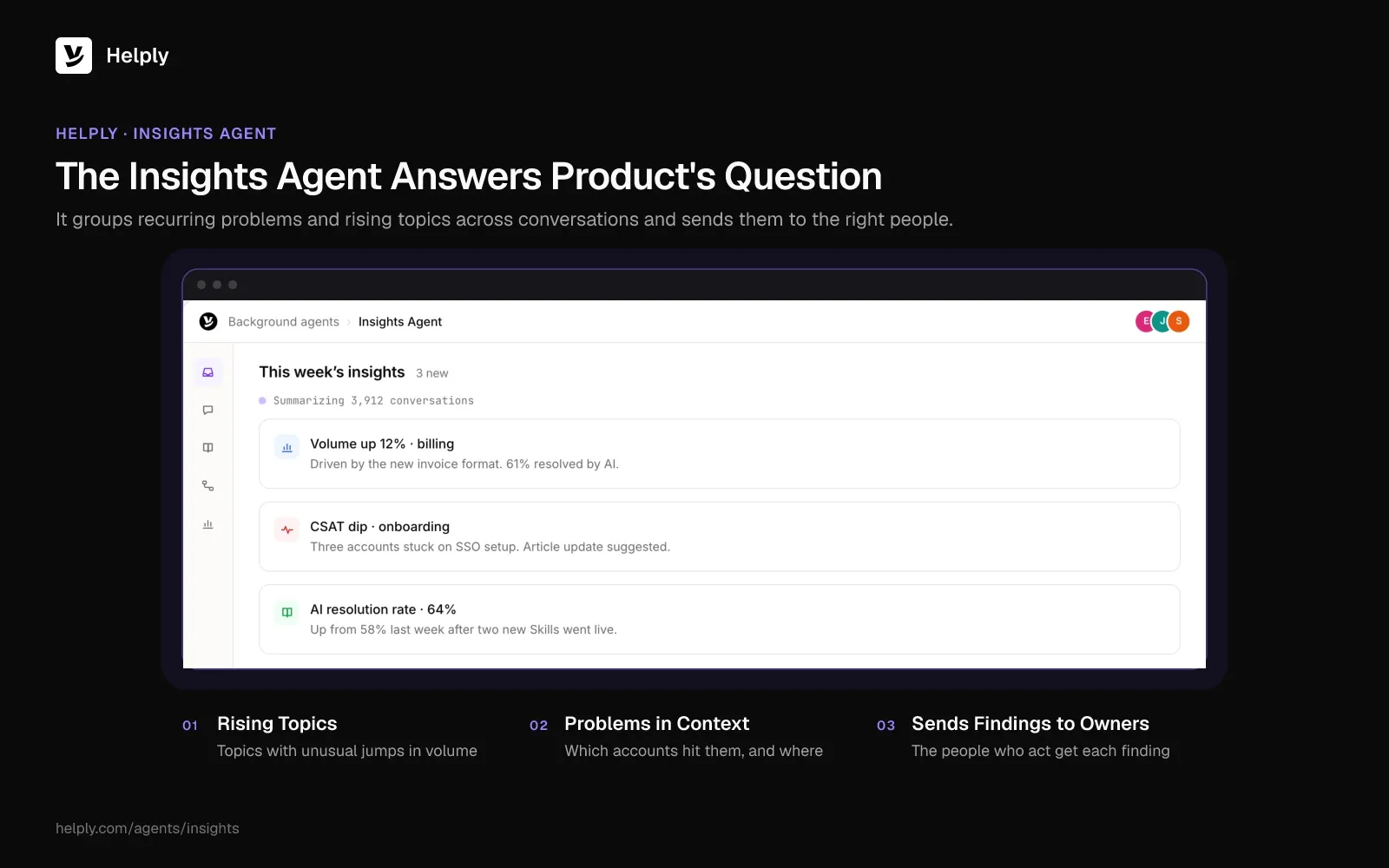
Product's question: The Insights Agent finds recurring problems and rising topics across conversations and sends them to the people who need them. Support analytics show conversation volume, response and resolution times, and escalations.
Not sure the AI got it right: AI QA scores conversations against your guidelines. Backtesting runs the AI against old conversations, so you can test a change before any customer meets it.
Security review: Under NDA, your security team can request Helply's SOC 2 Type II report through the Trust Center. Helply's AI providers never train their models with your customer data. The Trust and Security page covers the details.
Proposify moved from Zendesk to Helply. A support team member set up the platform and connected Salesforce and HubSpot in days, with no engineering help. CSAT held steady through the migration.
Fix the Process First or Change the System?
Start with the process if your queue is small and your tools fit. Run the customer service management cadence on what you have for a month: daily queue check, weekly quality sample, monthly contact reasons. If you keep finding the same tool gaps in those reviews, change the system.
Helply fits that second case. The Support Agent can take routine requests as they arrive, and your escalation rules set what reaches a person. The Knowledge Agent can point out the billing article before the next furious email arrives.
Helply pricing depends on how many people reply to customers, and one pool of AI credits covers the whole team. Each of the five plans includes the Support and Assist Agents; Team and higher add escalation rules, SLAs and AI QA with backtesting. Team also adds HubSpot, the Knowledge and Insights Agents and free migration, while Salesforce starts on Growth.
Proposify's support leader described the switch as the end of constant firefighting. Jacqueline Antworth, Director of Customer Experience, said: "It's a completely different way to run support."
Start with one queue. Run Helply beside your current help desk, and compare its first week with last week's backlog and first response time.
Frequently asked questions
Customer service management is the practice of running a support operation. It covers the people, processes and software a team uses to answer, resolve and learn from customer requests. The work spans five jobs: staffing, routing and escalation, knowledge, quality and measurement.
No. A CRM tracks leads, deals and accounts for sales, while customer service management (CSM) covers the issues customers raise after buying. Once you connect them, support sees account context and sales sees service history.
A customer service manager owns five jobs: staffing, routing and escalation, knowledge, quality and measurement. Day to day, that means queue reviews, coaching, fixing rules and sending product the top contact reasons.
AI changes what the manager runs: which requests AI handles and when it hands over to a person. In a Gartner survey published in November 2026, only 21% of 275 service leaders had cut human agent headcount because of AI. In the same survey, 71% were moving human agents into new roles.
Track first response time, resolution rate, SLA attainment, repeat contacts, CSAT, AI resolution and escalation rates, and contact reasons. Check queue and SLA numbers daily, speed and quality weekly, CSAT and contact reasons monthly, and trends quarterly.
A customer service management system is the software that runs support. It holds a shared inbox, routing and SLAs, customer records, a knowledge base, AI agents and reporting. Helply is one example: its AI agents can resolve routine requests and help teammates draft replies inside the help desk.
Give each of the five jobs an owner and a written standard. Then review them on a calendar: queue health daily, quality and staffing weekly, contact reasons monthly, capacity and tooling quarterly.
Both go by CSM. Customer service managers run the inbound queue, answering requests from any customer as they arrive. Customer success managers plan ahead for named accounts: onboarding, adoption and renewals.
About the author

Bildad Oyugi
Head of Content
Bildad is a digital marketing expert with over 5 years of experience in copywriting, content marketing, and editing. Outside of work, he enjoys videography and spending time with his family.
Keep reading

Customer Support Feedback: How to Collect, Read and Act on It
Konrad Janczyk · 13 min read
Online Customer Service: Channels, Setup and Where AI Fits
Jared Scheel · 14 min read