
 Konrad Janczyk ··22 min read

Key Takeaways
- A support ticket response needs five parts: issue, answer, next step and time, any ask and a way back.
- For bugs and outages, promise the next update time, keep it and close the loop when the fix ships.
- With an angry customer, own the failure first and answer abuse with one calm boundary.
- Closing a ticket due to no response takes one warning with the closing date, then a note that says how to reopen.
- On every plan, Helply's Assist Agent writes drafts using your Guidelines, the customer's context and the thread, at 2 AI credits each.
What Should a Support Ticket Response Include?
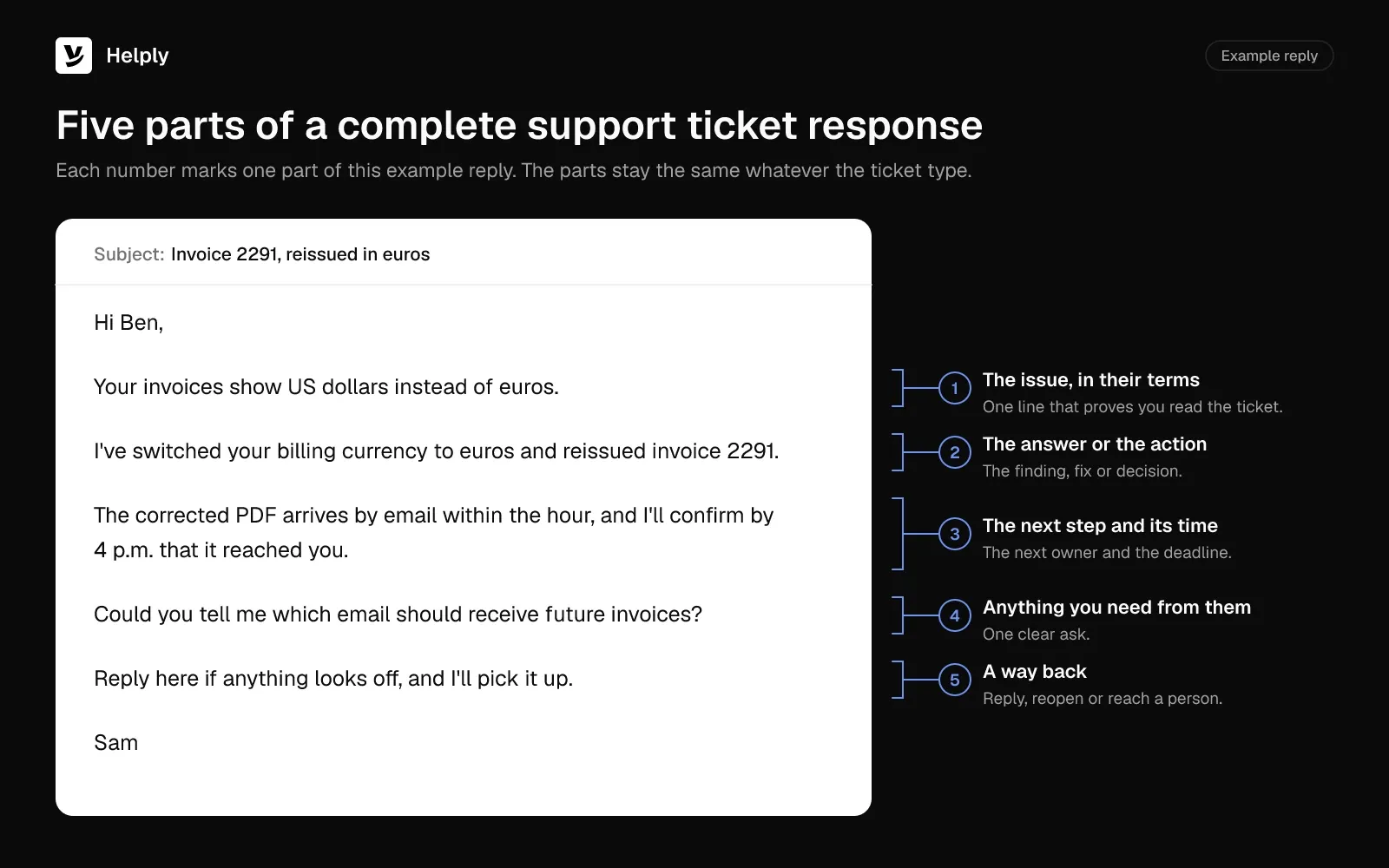
Support ticket replies that work share five parts, whatever the ticket type:
- The issue, in the customer's terms. One line that shows you read the ticket, such as "Your CSV export stops partway through."
- The answer or the action. The finding, fix or decision, with the specifics: the amount, the setting or the cause.
- The next step and its time. The next owner and action, plus the time the customer hears from you again.
- Anything you need from them. One clear ask, or a short list when there's more than one item.
- A way back. A line on replying, reopening the ticket or reaching a person.
A refund request, a failed export and three "is it down?" emails arrive before 9 a.m. Each saved macro opens with "Thank you for contacting support" and answers none of the questions.
A reply that skips the question makes the customer explain it again, and you answer the same ticket twice. In Zendesk's CX Trends 2026 research, published in November 2025, 74% of consumers said having to repeat information frustrates them.
In Shep Hyken's surveys of 2,226 US adults, published in March 2026, 57% expect an email response within two hours. For 86% of respondents, 24 hours is the absolute limit for an email reply.
Of the agents surveyed for Salesforce's State of Service report, published in 2024, 69% said balancing customer service speed and quality is difficult. Put first-response targets in your service level agreement for speed, and use these 25 templates to keep quality.
Support Ticket Replies: Facts to Confirm and Their Common Sources
Send a reply with a wrong fact, such as an old refund window, and the customer opens a second ticket. Confirm these facts before you send:
| Ticket type | Facts to confirm first | Common sources |
|---|---|---|
| Refund request | Amount, charge date, refund window, payment method | Billing system such as Stripe, refund policy |
| Bug report | Steps, app or browser version, known issues, workaround | Ticket history, issue tracker such as Linear or Jira, docs |
| Outage | Scope, start time, status page link, next update time | Status page, incident channel |
| Feature request | Its status (live, planned or declined) and the use case | Help docs, product board, issue tracker |
| Angry customer | Order or account history, earlier tickets, what went wrong | Ticket history, CRM, billing system |
| Follow-up or closing | Date of the last reply, what you're waiting for, closing rule | Ticket thread, help desk automations |
Refund Request Response Examples
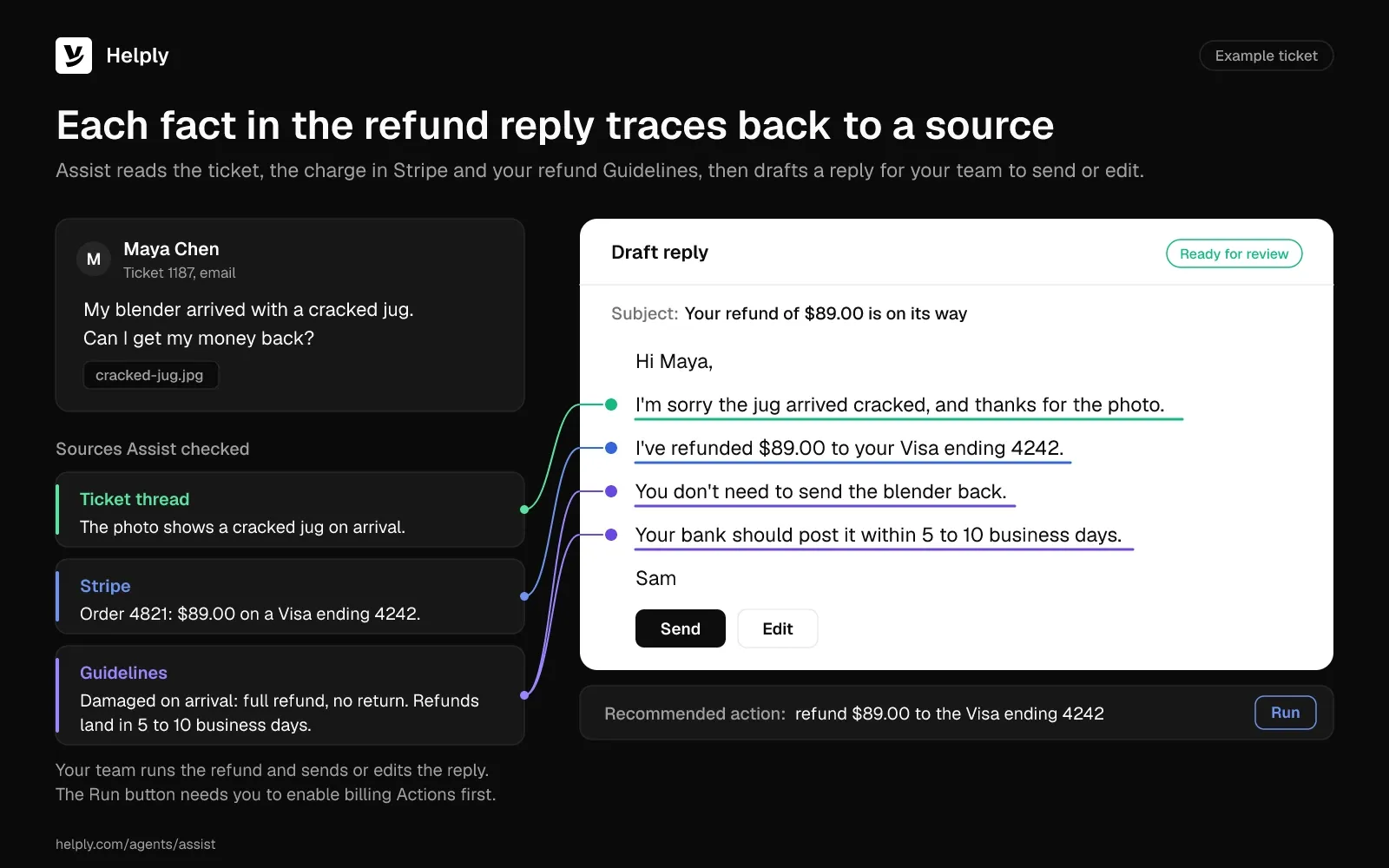
Customers read a refund reply for three facts: how much, to which card and when it lands. Put all three in the first two sentences. For anything less than a full refund, quote the policy and offer the next best option.
1. Refund Approved
Subject: Your refund of [amount] is on its way
Hi [first name],
Thanks for letting us know [the reason they gave, such as the order arriving damaged]. I've refunded [amount] for [order or invoice number] to your [card type] ending in [last four digits].
Your bank should post it within [number] business days, so look for it by [date]. I've attached the receipt for your records.
If it hasn't shown up by [date], reply to this email and I'll trace it for you.
[Your name]
Works because: The amount, the payment method and the landing date answer the three questions the customer would otherwise send next.
2. Partial or Prorated Refund
Subject: Your prorated refund for [plan name]
Hi [first name],
You canceled [plan name] on [date] with [number] days left in your billing period. I've refunded [amount] for those unused days to your [card type] ending in [last four digits].
The math: [price for the period] ÷ [days in the period] × [unused days] = [amount]. Our [refund policy link] doesn't cover [setup fees or used add-ons], so those stay on the invoice.
You should see the refund within [number] business days. Reply here if the numbers don't match your statement.
[Your name]
Works because: One line of math heads off the "why not the full amount?" reply. The policy link explains the charges that stay.
3. Refund Declined, With an Alternative
Subject: About your refund request for [order or plan]
Hi [first name],
I looked into your request for [order or plan]. I can't refund it, because [the reason from your policy, such as the purchase falling outside the 30-day window].
I don't want to leave you stuck, though. I can [offer an account credit of [amount] / move you to [cheaper plan] from your next bill]. Reply with "credit" or "switch" and I'll set it up today.
[Your name]
Works because: One sentence gives the real reason. The concrete alternative in the same reply leaves the customer a next step after the no.
4. Refund Issued but Not Showing Yet
Subject: Tracking your refund for [order or invoice number]
Hi [first name],
I checked, and we sent your refund of [amount] on [date]. The reference number is [refund reference], and your bank can use it to find the payment.
Card refunds can take [number] business days to post after we send them. If yours is still missing on [date], reply here and I'll open a trace with [payment provider].
[Your name]
Works because: A reference number gives the customer something to act on with their bank. The date tells the customer when to come back if the money hasn't landed.
Bug Report Response Examples
Bug replies set expectations while engineering works. Ask for what the engineers need, share a workaround when one exists and promise a date for the next update. For a full method, see this guide on how to troubleshoot customer problems.
5. Bug Reported: Asking for Steps to Reproduce
Subject: Help us reproduce [short bug description]
Hi [first name],
Thanks for reporting that [feature] [what goes wrong]. I'd like to get this to our engineers with everything they need, so could you send:
- The steps you took right before it happened
- Your [browser and version / app version and device]
- A screenshot or screen recording, if you have one
- The time it happened, with your time zone
With those, I can try it on our side and update you by [day or time].
[Your name]
Works because: A specific list gets complete answers in one round trip. The update time tells the customer the ticket won't go quiet.
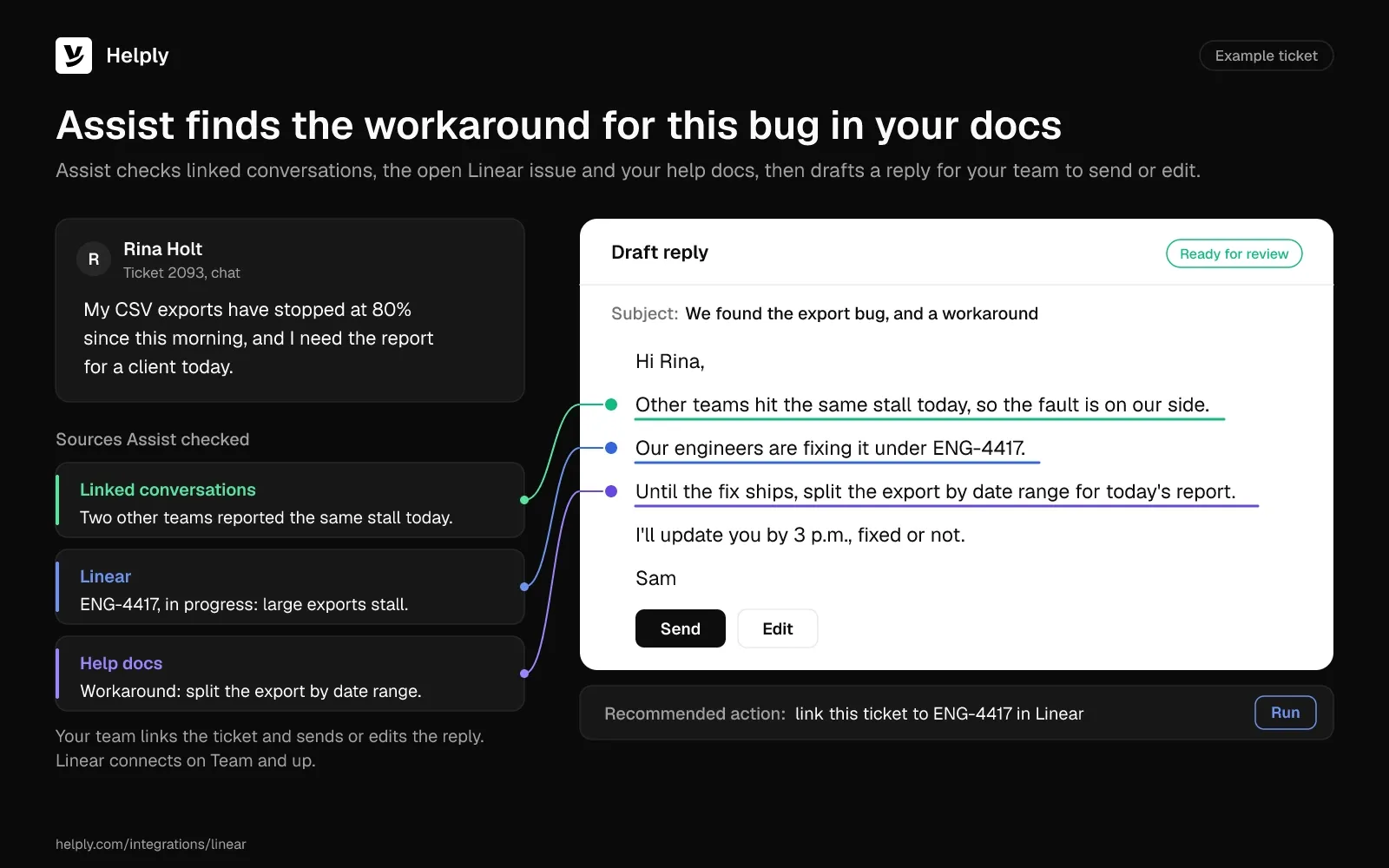
6. Bug Confirmed, With a Workaround
Subject: We found the bug in [feature], and a workaround
Hi [first name],
You're right: [feature] [fails in one case, such as on large files]. I reproduced it on our side and filed it with engineering as [issue ID].
Until the fix ships, you can [workaround steps]. It takes about [time] and gets [the outcome they need] working again.
I don't have a fix date yet. I'll update you on [day] either way, and again the moment the fix goes live.
[Your name]
Works because: Confirming the bug tells the customer they weren't imagining it. The workaround unblocks them today, and the dated update gives them a reason to wait.
7. Bug You Can't Reproduce
Subject: Still looking into [short bug description]
Hi [first name],
I tried [the steps you described] on [browser or device], and [feature] worked as expected on our side. That points to a difference in your setup, so I'd like to narrow it down with you.
Could you try [one check, such as a private browser window] and tell me what happens? If it still fails, a short screen recording or your [error ID] would help me spot the difference.
I'll keep this ticket open and check back on [day].
[Your name]
Works because: Describing your own test shows you believe the report. One check the customer can run now keeps the ticket moving.
8. Bug Fixed: Closing the Loop
Subject: Fixed: [short bug description]
Hi [first name],
Good news: the fix for [bug] went live [today / on date]. You can [stop using the workaround / use the feature again] now.
Thanks for the details you sent on [date]. They helped our engineers find the cause.
If anything still looks off, reply here and I'll reopen this ticket.
[Your name]
Works because: The customer hears about the fix from you first, can drop the workaround and knows their report counted.
Bug Report Response Examples
Bug replies set expectations while engineering works. Ask for what the engineers need, share a workaround when one exists and promise a date for the next update. For a full method, see this guide on how to troubleshoot customer problems.
5. Bug Reported: Asking for Steps to Reproduce
Subject: Help us reproduce [short bug description]
Hi [first name],
Thanks for reporting that [feature] [what goes wrong]. I'd like to get this to our engineers with everything they need, so could you send:
- The steps you took right before it happened
- Your [browser and version / app version and device]
- A screenshot or screen recording, if you have one
- The time it happened, with your time zone
With those, I can try it on our side and update you by [day or time].
[Your name]
Works because: A specific list gets complete answers in one round trip. The update time tells the customer the ticket won't go quiet.
6. Bug Confirmed, With a Workaround
Subject: We found the bug in [feature], and a workaround
Hi [first name],
You're right: [feature] [fails in one case, such as on large files]. I reproduced it on our side and filed it with engineering as [issue ID].
Until the fix ships, you can [workaround steps]. It takes about [time] and gets [the outcome they need] working again.
I don't have a fix date yet. I'll update you on [day] either way, and again the moment the fix goes live.
[Your name]
Works because: Confirming the bug tells the customer they weren't imagining it. The workaround unblocks them today, and the dated update gives them a reason to wait.
7. Bug You Can't Reproduce
Subject: Still looking into [short bug description]
Hi [first name],
I tried [the steps you described] on [browser or device], and [feature] worked as expected on our side. That points to a difference in your setup, so I'd like to narrow it down with you.
Could you try [one check, such as a private browser window] and tell me what happens? If it still fails, a short screen recording or your [error ID] would help me spot the difference.
I'll keep this ticket open and check back on [day].
[Your name]
Works because: Describing your own test shows you believe the report. One check the customer can run now keeps the ticket moving.
8. Bug Fixed: Closing the Loop
Subject: Fixed: [short bug description]
Hi [first name],
Good news: the fix for [bug] went live [today / on date]. You can [stop using the workaround / use the feature again] now.
Thanks for the details you sent on [date]. They helped our engineers find the cause.
If anything still looks off, reply here and I'll reopen this ticket.
[Your name]
Works because: The customer hears about the fix from you first, can drop the workaround and knows their report counted.
Outage Response Examples
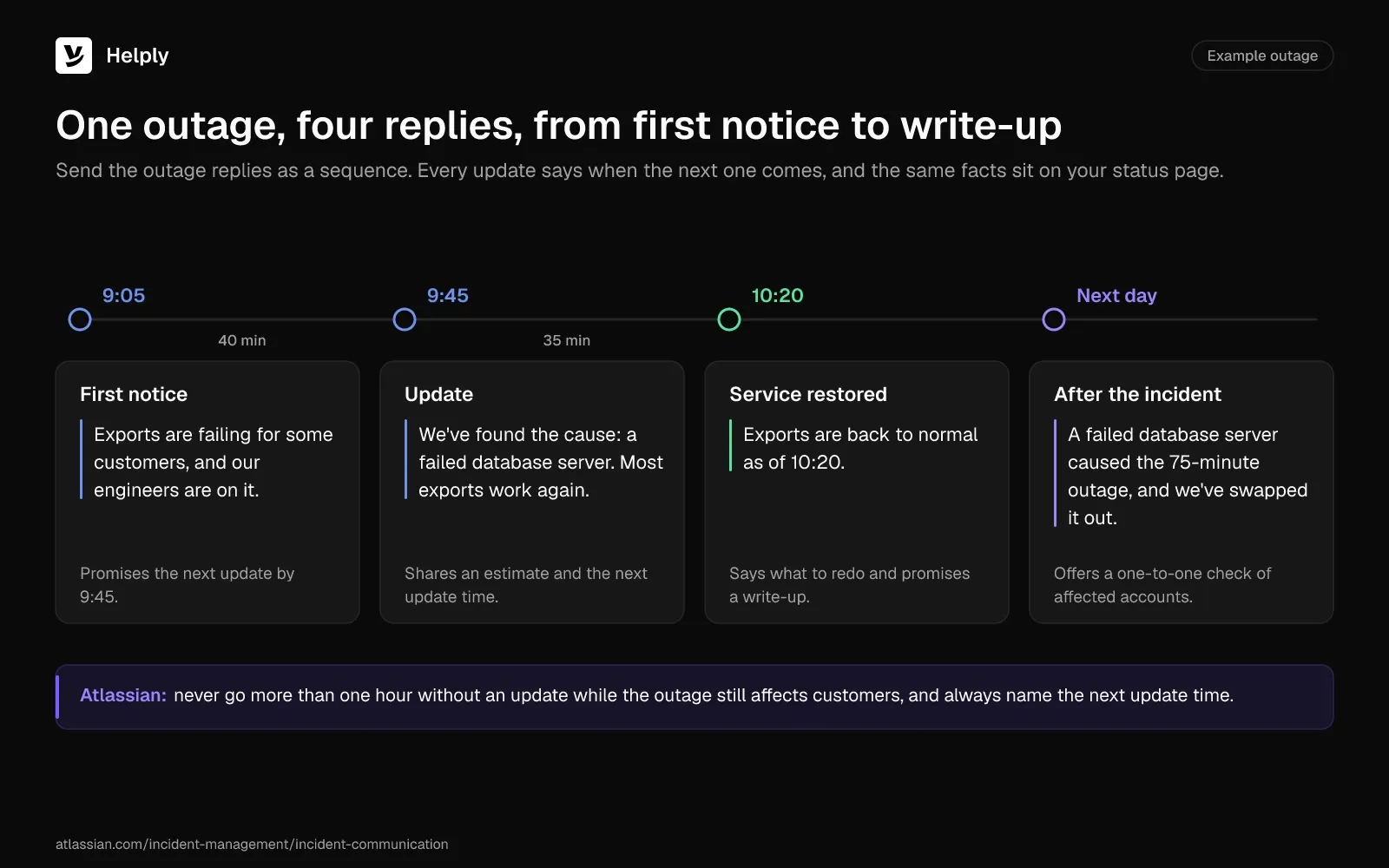
Outage replies work as a sequence, and each update names the time of the next. Atlassian's incident communication guide recommends no more than one hour between updates while the outage still affects customers.
Atlassian's first-contact advice: acknowledge the issue, summarize the known impact, promise further updates and address security or data-loss worries where you can. Keep your status page and your ticket replies on the same facts.
9. First Notice: You Know and You're on It
Subject: [Product] is down for some customers, and we're on it
Hi [first name],
[Feature or product] isn't [loading / sending / syncing] for some customers right now, and our engineers are working on it.
You don't need to change anything on your side. Our status page at [status page link] has live updates.
I'll email you again by [time and time zone], even if we're still working on the fix.
[Your name]
Works because: Once the customer knows the fault sits with your service, they stop troubleshooting. The promised update time tells them when to expect you again.
10. Update During the Outage
Subject: Update on the [product] outage
Hi [first name],
We've found the cause: [short description, such as a failed database server]. Our team is [restoring service region by region / rolling back the change], and [some features] are already back.
[Feature] is still unavailable. Our current estimate is [time], and I'll write again by [time] either way.
[Your name]
Works because: Each update adds a new fact, such as the cause, progress or an estimate, and arrives by the time you promised.
11. Service Restored
Subject: [Product] is working again
Hi [first name],
[Product or feature] is back to normal as of [time and time zone]. [Any step the customer must take, such as refreshing the page or resending failed messages.]
[If the outage touched data: We queued the messages you sent between [time] and [time] and delivered them at [time]. / Everything you saved is safe.]
I'm sorry for the disruption to your [day / launch / orders]. We'll share what caused it and what we're changing by [date].
[Your name]
Works because: The customer learns when service came back, what to redo and whether their data is safe. The dated follow-up says when they'll hear the cause.
12. After the Incident: Cause and Changes
Subject: The [date] outage: the cause and what we're changing
Hi [first name],
On [date], [product] was unavailable for [duration] for [which customers]. The cause was [cause in one sentence].
We've [fix already made], and by [date] we'll [longer-term change]. [If you offer one: We've added a [credit amount] credit to your account for the downtime.]
I'm sorry this hit you. If it affected [orders, data or a deadline], reply here and I'll look at your account myself.
[Your name]
Works because: Naming the cause and a dated change shows the customer how you plan to prevent a repeat. The closing offer catches customers the outage hurt in ways a general note can't cover.
For a fuller apology after a serious incident, adapt one of these business apology email examples.
Feature Request Response Examples
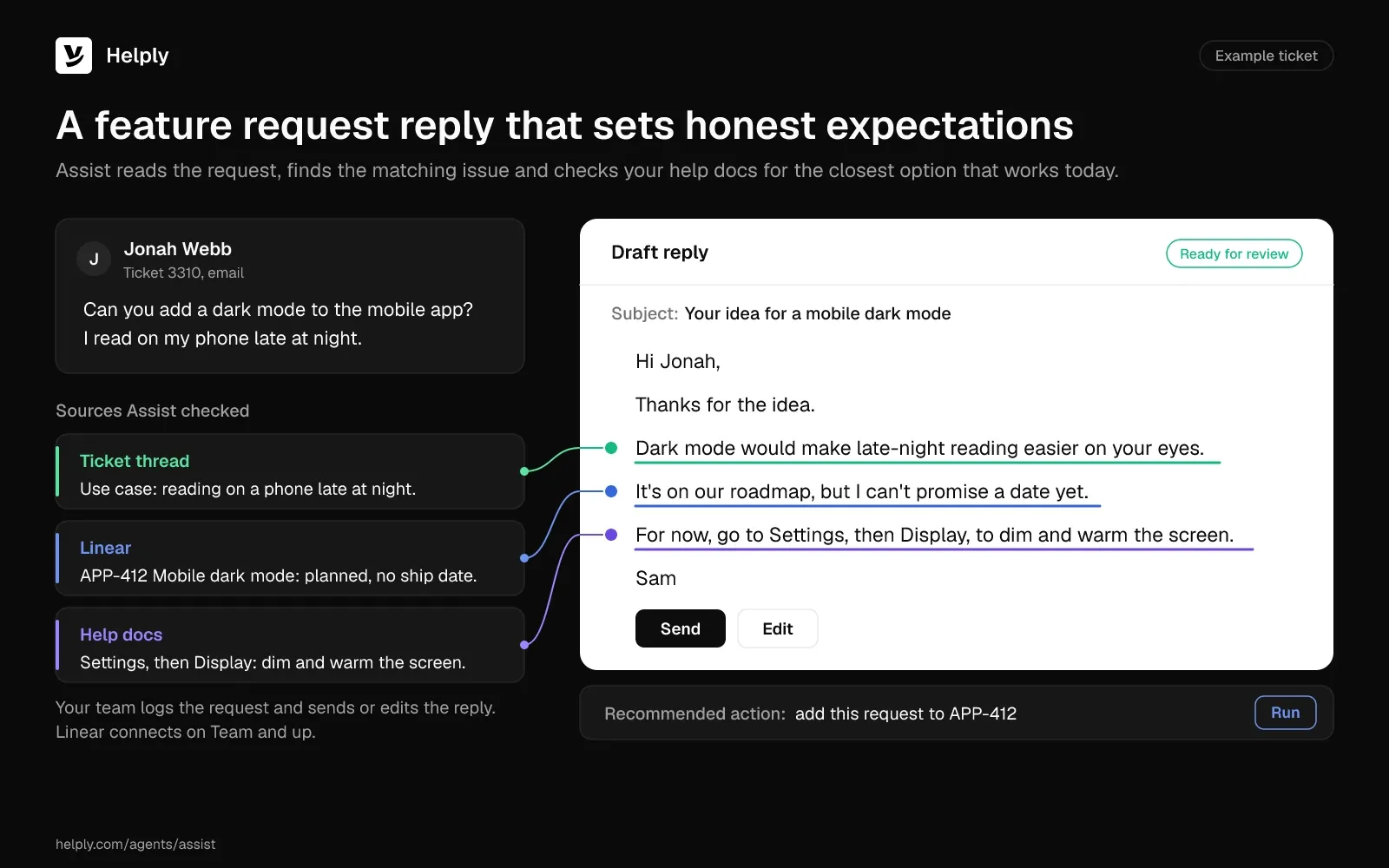
Leave ship dates you don't control out of feature request replies. Repeat the use case back, say where the request stands and offer the closest thing that works today.
13. Request Logged, With the Use Case
Subject: Your idea for [feature]
Hi [first name],
Thanks for the suggestion. [Feature] would let you [their use case in their words], and I've logged it for our product team with that use case attached.
I can't promise if or when we'll build it. Our product team reads requests that come with a clear use case like yours when it plans upcoming work.
For now, [workaround or closest existing feature] gets you part of the way.
[Your name]
Works because: Repeating the use case shows you understood it. The "can't promise" line keeps the customer from planning around a ship date you never gave.
14. Not on the Roadmap
Subject: About your request for [feature]
Hi [first name],
Thanks for asking about [feature]. It isn't on our roadmap, because [reason, such as a focus on another area].
Customers with the same need often use [workaround, integration or partner tool]. [Help article link] shows how to set it up in about [time].
I've still logged your request, so the product team sees the demand if plans change.
[Your name]
Works because: A clear no with a reason lets the customer plan around it, and the workaround keeps them moving.
15. The Feature Already Exists
Subject: You can already [do the thing] in [product]
Hi [first name],
[Product] already does this. Go to [menu path], turn on [setting] and [outcome].
[Help article link] has screenshots, and the setup takes about [time]. If your case needs something the setting doesn't cover, reply with the details and I'll take it to the product team.
[Your name]
Works because: You solve the request in one reply, and the help article link keeps the steps one click away.
16. The Feature Shipped
Subject: The [feature] you asked for is live
Hi [first name],
Back in [month], you asked for [feature] so you could [use case]. It's live now for [plans or all accounts].
To try it, open [menu path] or read [help article link]. Does it cover what you needed? If not, reply and tell me what's missing.
Thanks for taking the time to ask, and for explaining how you'd use it.
[Your name]
Works because: The customer sees you kept track of the original request and use case. The question invites feedback on the first version.
Angry Customer Response Examples
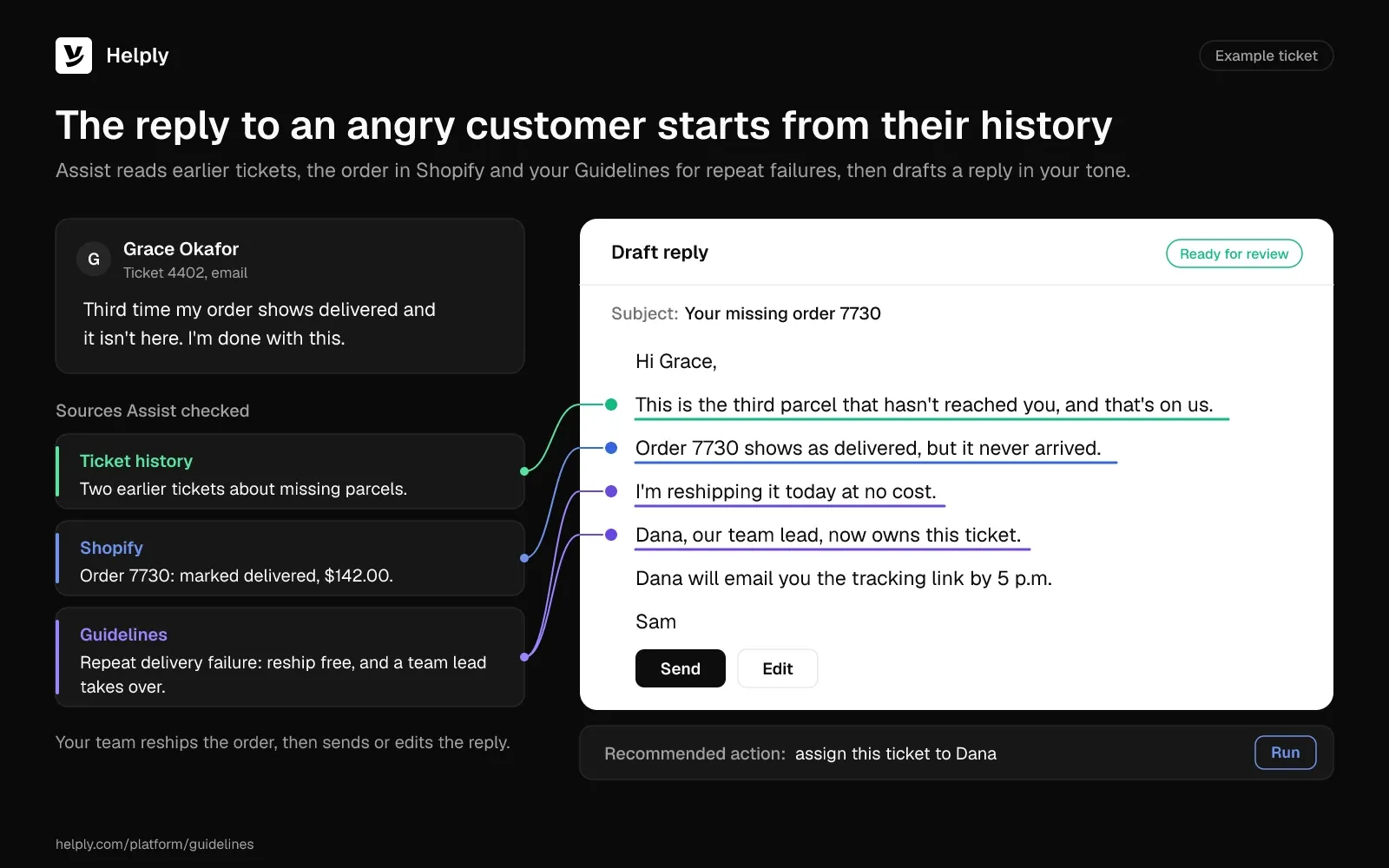
Angry customers want proof that someone read the whole thread. In Zendesk's CX Trends 2026 research, published in November 2025, 81% of consumers said they want agents to continue the conversation without backtracking.
Own the failure first, explain second and give the customer one person who sees it through. For de-escalation beyond the written reply, read how to deal with angry customers.
17. First Reply to an Angry Complaint
Subject: Re: [their subject line]
Hi [first name],
You're right to be frustrated. You [paid for something that didn't arrive / waited [number] days for an answer], and that shouldn't have happened.
So far I've [action taken, such as refunding the shipping or escalating to our billing lead]. Next, I'll [specific next step] and update you by [time].
I'm handling this ticket myself from here, so you won't need to explain it again.
[Your name]
Works because: Owning the failure before explaining it shows you read the complaint. An action already taken and one named owner tell the customer the ticket is moving.
18. When the Same Problem Happens Again
Subject: [Problem] again: I'm taking this on myself
Hi [first name],
I've read your history on this, and this is the [second / third] time [problem] has hit you. That's on us, and another standard reply won't fix it.
I've [escalated it to our [engineering or operations] lead / applied a fix to your account] and asked for the root cause. While we work on it, I've [added a credit of [amount] / set up an interim fix: [steps]].
I'll update you on [day], and I'll check in [a week] after the fix to make sure it held.
[Your name]
Works because: You cite the history, so the customer knows you've seen the earlier failures. The named escalation and check-in date mean this repeat won't get another standard reply.
19. When the Customer Threatens to Cancel
Subject: Before you cancel: [issue]
Hi [first name],
I understand why you're thinking about canceling. [The issue] has cost you [time, sales or trust].
I can [specific remedy] by [date]. If that doesn't work for you, I'll process the cancellation [and refund the remaining [period]] myself.
Reply with what you'd prefer, and I'll take care of it today.
[Your name]
Works because: The same message offers a real fix and an easy exit. With the exit on the table, the customer can weigh the fix without feeling trapped.
20. When the Language Turns Abusive
Subject: Re: [their subject line]
Hi [first name],
I want to fix [issue], and I've started on it: [action taken].
I'm also asking that we keep this conversation respectful. I'm staying on your ticket. If messages include [insults or threats] again, I'll [pass the ticket to my manager / pause this conversation].
I'll update you on [issue] by [time].
[Your name]
Works because: It separates the problem from the behavior, keeps helping and states the boundary once without matching the customer's tone.
Follow-Up Response Examples, Including Closing a Ticket After No Response
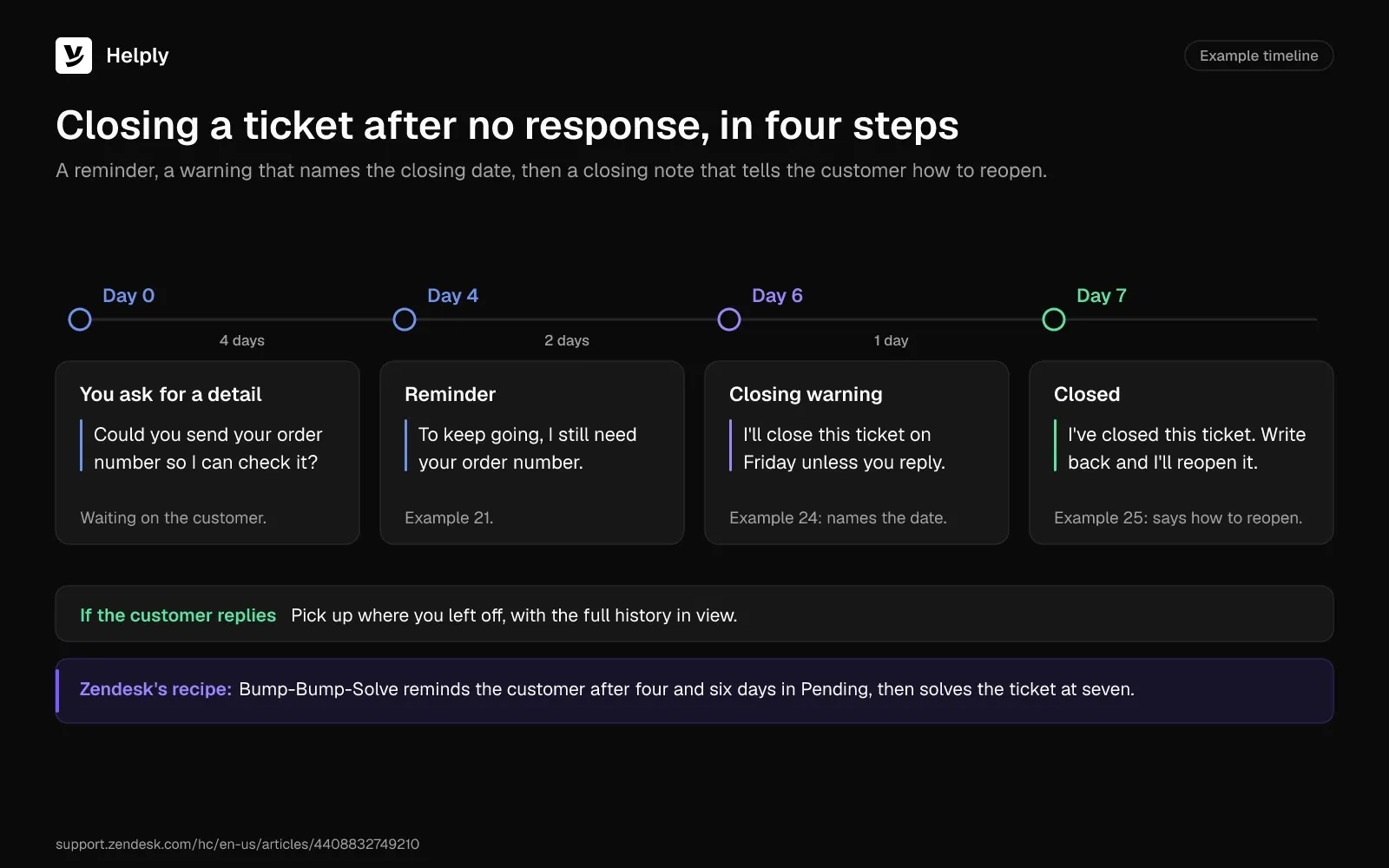
Follow-ups keep tickets moving when one side goes quiet. Help desks can automate the timing. Zendesk's Bump-Bump-Solve recipe sends reminders after four and six days in Pending, then solves the ticket at seven.
To close a ticket due to no response, warn the customer and name the closing date. If they stay silent, close the ticket and tell them how to reopen it. A closing note may be the last message a customer reads from you, so keep it warm.
Examples 24 and 25 give templates for both steps. For check-ins after a ticket closes, see these ideas for following up with customers.
21. Waiting on the Customer: A Reminder
Subject: One detail needed: [ticket subject]
Hi [first name],
I'm following up on [issue]. To keep going, I still need [specific item, such as your order number or a screenshot of the error].
Once you send it, I'll [next step] the same day. If you've sorted it out in the meantime, reply "solved" and I'll close the ticket.
[Your name]
Works because: A reminder that restates the exact item saves the customer a search through the thread. A one-word reply is enough to close the ticket.
22. Still Working on It: An Update With No News
Subject: Update on [ticket subject]: still on it
Hi [first name],
I don't have a fix for [issue] yet, but I didn't want you to wonder. Our [team] is [current step, such as testing a patch], and we've ruled out [cause].
I'll update you again by [day and time], or sooner if we fix it.
[Your name]
Works because: You keep the promised update time, and naming the current step shows progress even without a fix.
23. Checking In After a Fix
Subject: Is [feature] still working on your side?
Hi [first name],
Last [week / Tuesday], we [fixed or changed something] for your account. I wanted to check that [the outcome] still works as expected.
If it does, no need to reply, and I'll close this ticket on [date]. If anything has slipped, reply here and I'll pick it up right away.
[Your name]
Works because: The check-in confirms the fix held before the ticket closes, and the customer knows what happens if they stay quiet.
24. Closing Warning After No Response
Subject: Closing your ticket on [date] unless we hear from you
Hi [first name],
I haven't heard back about [issue] since my message on [date], so I'll close this ticket on [date].
If you still need help, reply before then and I'll pick up where we left off. You won't need to repeat anything, because the full history stays on this ticket.
[Your name]
Works because: Naming the closing date removes any surprise, and the history line takes away the worry of starting over.
25. Closing a Ticket Due to No Response
Subject: We've closed your ticket about [issue]
Hi [first name],
I haven't heard back about [issue], so I've closed this ticket for now. I hope that means you sorted it out.
If [issue] comes up again, write back here and I'll reopen the ticket with the full history. You can also reach us at [help center or chat link].
Thanks for your patience with this one.
[Your name]
Works because: Assuming the best keeps the tone warm, and the reopen line shows the customer how to come back.
How to Turn These Examples Into Support Ticket Response Templates
Save any of these examples as a macro in your help desk, and it becomes a support ticket response template. For onboarding, renewal and plan-change emails, start from these customer service email templates instead. Five habits keep a macro library from turning into form letters:
- Save one macro per variant. "Refund approved" and "refund declined" need different openings.
- Keep placeholders in square brackets. An unfilled [amount] stands out when you read the reply through before sending.
- Fill each placeholder from its source. The facts table shows where each one lives, such as the billing system for amounts.
- Write a chat version. For live chat, send the answer and the next step, and drop the subject line and sign-off.
- Review the set when a policy changes. An old refund window in one macro repeats in every reply that uses it.
Keep a Macro Library, or Let Helply Draft and Resolve Tickets From Your Docs
A macro library of these 25 support ticket response examples suits a queue with stable policies and agents who know where facts live. Once refund rules, bug status and account history sit in separate tools, the slow part of each reply is the lookup.
Helply is an AI-native customer support platform. Assist, the agent beside your team, works inside each ticket and searches the knowledge base, connected tools and customer context before it writes. The draft follows your Guidelines, where your refund rules, exceptions and tone live.
On every plan, Assist can draw on the charge in Stripe for refund replies. With Team and up, attach each customer's bug report to one shared Linear issue and tell them all when the fix ships. On those plans, your team can also direct Assist to create the issue without leaving the ticket.
For the "is it down?" emails, keep the incident status in one help article. Every draft can then carry the same cause and next update time. The Feature Request Agent, on Pro and up, connects each request with the accounts asking for it, so you can weigh its impact.
Your team sends each draft unless you choose otherwise. Helply's AI can reply to customers directly when confidence is high and you've configured it to do so.
The Support Agent can take a request from start to finish, including a refund where you've enabled supported billing Actions. If it can't confidently resolve one, it hands your team the conversation plus the investigation and customer context. On an angry customer's ticket, the teammate who picks it up starts with the full story.
At Kameleo, the Support Agent filed clean Linear issues for engineers and alerted the right person when a ticket needed a human. Customers no longer waited for business hours, so responses ran about three times faster.
Assist drafts from your docs, so an outdated help article can mean an outdated reply. Helply finds gaps and stale answers in your knowledge base, and AI can draft the fix for your team to review and publish.
Starter costs $79 a month per seat for up to 3 seats, and every seat adds 500 AI credits to the team pool. The Team plan bundles 5 seats and 15,000 credits for $499 a month, and extra seats cost $99 each.
Drafting one reply costs 2 credits, while an end-to-end resolution takes 10. Passing a conversation to a teammate after the AI tries costs nothing. Helply pricing lists every plan.
If your policies stay the same for months, keep the macro library. If each reply starts with a lookup, test Assist on one ticket type. Add your refund rules to Guidelines, connect Stripe and compare Assist's drafts with examples 1 to 4 for a week.
Frequently asked questions
Restate the issue, give the answer or action and set the next step with a time. Then ask for anything you still need and say how to reply or reopen. Match the details to the ticket type, such as the amount and landing date on a refund.
Common help desk tickets include refund requests, bug reports, outage reports, feature requests, complaints and follow-ups on open issues. Each type needs different facts before you reply, such as a refund's charge date or an outage's next update time.
Send one warning that names the closing date, then close the ticket with a note that explains how to reopen it. The closing note should assume the customer sorted it out. Examples 24 and 25 give wording for both.
Give the customer about a week, with two reminders before you close. Zendesk's Bump-Bump-Solve recipe reminds after four and six days in Pending, then solves the ticket at seven. Zendesk's standard automation closes a solved ticket four days later, and admins can extend that up to 28 days.
Atlassian recommends never going more than one hour without an update while the outage still affects customers. Each update should also say when the next one will come.
Give the policy reason in one sentence and offer one concrete alternative, such as an account credit or a cheaper plan. Close with a simple way to accept it, like a one-word reply.
Thank the customer for the use case, say the feature isn't on your roadmap and give the reason in one line. Then point to the closest workaround and log the request anyway.
Name the team that now owns it and say what you passed along, so the customer won't need to repeat anything. Give the time of your next update, and stay on the thread as their contact.
A canned response is a stored template that an agent fills in by hand. An AI-drafted reply starts from the ticket, the customer's history and your docs, and a person can review it before it goes out.
Yes, and Helply's Assist Agent does it on every plan, working from your Guidelines, the thread and the customer's context. Your team edits or sends each draft, and Helply can answer customers directly when confidence is high and you've configured it to. Billing Actions, such as refunds, run only where you've explicitly enabled them.
A drafted reply uses 2 AI credits. A Starter seat runs $79 a month and brings 500 credits to the shared pool. The free trial lasts 14 days and needs no credit card.
About the author

Konrad Janczyk
Staff Software Developer


